#helpdesk-twitch
1 messages · Page 254 of 1
 stuck hamlet
 fossil helm
That is true,
But during that one stream
I did stream it
It just froze, could this be the laptop?
stuck hamlet
yes, definitely.
fossil helm
Shit dude
Now I gotta save money, this seems bothersome
Unfortunate
Either way, I will stick around, just In case
Onslaught you are really helpful, kind, and a good person
Have a great day! Or night !

 fossil helm
whips
 dull elm
What does the Paragraph Plugin in Moderation mean?
stuck hamlet
it limits the number of characters someone can send in chat @dull elm
dull elm
Ah thanks
 mighty hamlet
@stuck hamlet Padding for the secondary text on the subs, cheer and tip alertbox does not work or it's bugged since I can't find the option, and I'm using Chrome this time (because I had the same issue with this but I was using Firefox and it was solved when I changed to Chrome), @pine hemlock replied that the options are not showing for him/her as well.
 pine hemlock
its been reported to the devs
 hushed ferry
@pine hemlock chat alert was enabled, as was the host and raid alerts within.
 steep verge
Howdy all. I just found out about Stream Elements recently and so far I like what I've seen I'm actually working on setting it up for my stream but I have a question or 2...
- Does Stream Elements have it's own built in chatbot type of program separate from twitch or do I just have to use the twitch chat?
- Is there a way of seeing who is viewing my ie: in stream chat...simliar to what chatbot does with streamlabs?
stuck hamlet
1, You'd have to use the chat, or our website.
2, no, we don't keep a list. You'd have to check through Twitch.
steep verge
will the streamlabs version of chatbot work alongside Stream Elements?
stuck hamlet
Sure
steep verge
awesome...I'm just one of those folks that's never been fond of twitches chat system
and since I'm going from Streamlabs to stream elements...I'm not seeing my recent followers etc showing up in my stream elements setup...Have I maybe missed something with porting that over from streamlabs or will my recent persons show up again once i've streamed for awhile with my stream elements
stuck hamlet
We only port over donations, and for everything to show up in recents, you would have to be signed up/donations go through us. When you stream a while with us, the activities will show up in recents
steep verge
ok now i understand that. thank you for clarifying
 ornate bridge
How can i dissconnect streamelements from my twitch account
 stone spire
is there anyway to add an alias for a command via chat?
 dense jackal
not at this time @stone spire
And why are you looking to disconnect, do you want to add a new account? @ESMK | StarBoyEst#8331
 crisp rivet
Hello
i change my name on Twitch channel can you add my chat stats https://www.twitch.tv/markojestem

 old fern
wut
crisp rivet
There is "404 - Page Not Found" on my chatstats page "https://stats.streamelements.com/c/markojestem" can some mod add me manual ?

 elder sorrel
@crisp rivet You should be able to sign out of Streamelements then sign back in. Should load your new name if I recall 🤔
crisp rivet
did it, still 404 - Page Not Found
elder sorrel
Huh, that is weird. I'm sure one of the Support Peeps should pop in shortly
 gentle imp
ty, this is something that has to be fixed manually so I'll report it but might take a while
 atomic silo
hello, can anyone help me with chat stats? It doesn't count emotes used on my channel properly.
crisp rivet
@gentle imp thx for help
 frozen nexus
Hey so
my quote system isnt working for subs
only mods can do it and i changed all the permissions
i even tried to set it to everyone and no one but mods can successfully quote
atomic silo
My channel stats doesn't count the emotes, only like 30% of my ffz emotes, which are used by the bot, but absolutely none of the BTTV GIF emotes. What can I do to make it count everything?
gentle imp
you changed the command level access to everyone @frozen nexus ?
I think someone else reported that issue too RyuTheRed, if it aint on ideas u could perhaps add it there https://strms.net/ideas
atomic silo
and what about me 
 storm pier
hey, is there a possibilty to shuffle the song request player or choose one request by random ?
gentle imp
I have no clue about your problem Ryccs, sorry 😦
not a possibility @storm pier u can however shuffle the playlist before adding it to StreamElements
atomic silo
and any idea why i can't add my twitch channel? it immediately says that the channel i tried to add is linked to a different account, without me having to log in
gentle imp
have you changed name on twitch?
atomic silo
yeah basically wanted to take my alt account's name but didnt realize there was a 6 month recycle time for names
logging in again didn't solve it, and it says i'm offline
 lofty geyser
Hi All, having 2 issues with Media Share. Firstly i cannot add a YT playlist as a "Backup" in settings. i add the playlist URL and it seem like it's unable to process it and add the items. I have done this for a few playlists on YT and the result is the same. single track is fine
gentle imp
ok, I will need your old and new names please, this has to be done manually and not by me, so it will take a while to get fixed @atomic silo
@lofty geyser look for red text on any field, that is probably the reason it's failing
normally it's the cost per second not being filled
atomic silo
@gentle imp i was told i could use my old name at around the 1st of may, which i do want to do.. isn't it better if we fixed this after I renamed myself?
lofty geyser
ahh ok i can see a few fields lower down that are red in an unrelated section. i must admit it's not 100% clear that "all" fields must be complete. thanks for the help 😉
gentle imp
yeah we've all been through that hehe, np
atomic silo
gucci. and do you think my emote problem is related to this? has no one before ever reported that it didn't count ffz emotes and bttv gif emotes? although, i'm not subscribed to bttv so i can only have 5 emotes
gentle imp
another issue is it won't auto skip deleted/blocked videos so if u don't hear music, go there and skip @lofty geyser 😃
I'm not sure but it does make sense @atomic silo
lofty geyser
makes perfect sense 😉 thanks
gentle imp

atomic silo
ok now i'm super confused, it counts gif emotes, except 2 of them, and counts one that is not even added to my channel
still ignores 70% of my ffz emotes
is it because i'm not partnered yet or something?
is it possible that it needs like 3-5 days to process enabled emotes?
gentle imp
on your channel do this command !emotes bttv update
it's probably still using old info if u didn't update
steep verge
Any ideas why the themes/overlay found on stream elements site won't switch scene when my stream is live?
gentle imp
it doesn't change auto, you need to do it yourself
normally each theme as 5 scenes, u need to set them all up
steep verge
I have done this...but when I try to chane them "myself" from 1 scene to another it doesn't chane and the animated scene run very slowly if they run at all
even the static scenes don't change when i try to change them
gentle imp
normally each scene takes about 3-5 seconds to load
steep verge
they chane when i select them in OBS but they do not change on my actual live stream
steep verge
it's been allot longer than 3-5 seconds more like 2-3 minutes and still does not work as it should
gentle imp
also make sure all browser sources have this option ticked "shutdown source when not visible"
 slate raven
hey um...not sure if this is the right place but...i imported a tip using the tipping list but i accidentally added more than 1 of the same tip...now the tipping scroll list on my overlay shows the duplicated tip even though i've already deleted it from my tipping list. any way to revert this?
 nocturne pelicanBOT
@steep verge Check out this tutorial for OBS’ studio mode which allows you to preload scenes before transitioning. https://www.youtube.com/watch?v=W8iWsD2Lq3U
gentle imp
delete it from here https://streamelements.com/dashboard/session @slate raven
 blissful apex
What am i doing wrong! why do you join just leave 2 moinutes later!? PLEASE tell me why! i want to be better!
Am i the only one who gets this. WTF am i doing to drive people away man :/ This is fucking dperesing me
gentle imp
we all get that @blissful apex and you are doing quite well from what I saw
blissful apex
How lol?
gentle imp
I have 4x your views and not even 2x the followers 😛
blissful apex
Wanna tell me some tarde secrets? other than not to be ,eta on strea, i just get really upset over it man.
meta on stream**
blissful apex
you got double the followers i do, not that i look at that shit . I go by how active people are in chat.
gentle imp
over 2 years streaming for me, not going that well, just keep pushing it
blissful apex
4 years on and off, only started taking it seriosuly in febuary. I just dont feel i do anhything good man
steep verge
ok well I've had this "shutdown source when not visible" checked in all the nessessary scenes and I've tried the pre-loaded transition thing also...it'slike whatever scene is selected when i start the stream just freezes and I can't change it even my sounds freeze and won't work and neither does chat
gentle imp
perhaps your computer can't handle the load @steep verge what are your specs and settings on OBS
slate raven
@gentle imp ❤ thank youuu
gentle imp
you're welcome 😃
steep verge
my settings for obs are...
vid bit rate - 2500
encoder - hardware
video base (canvas) res - 1920x1080 My monitor standard res
out res is 1280x720
downscale filter Lanczos (32 scaling)
fps 60
process priority - normal
my PC specs...
gentle imp
one thing u should change and it will improve a bit the load is video base 1280x720 and no downscaling
steep verge
I7 4790K, 16GB ram, 2-GTX 980TI factory over-clocked, more fans tan i can count on 1 hand, and power supply than could possibly run my 4x4 dodge
gentle imp
also you should try using NVENC instead and if u can up the bitrate a bit
steep verge
you mean change the base res from 1920x1080 to 1280x720
I thought it had to be set to monitors resolution?
what about changing the resolution of the scenes in OBS?
I already have it set to hardware (NVENC)
gentle imp
nah, everyone thinks that but you don't have to, it's just giving extra load to cpu with downscaling
atomic silo
@gentle imp it is using the old emotes, but putting update after !emotes bttv doesnt do anything
atomic silo
 you're my man
gentle imp
 gentle imp
yeah that can be related to name or just delayed
steep verge
Well for whatever reason(s) it still just won't work properly even after trying the various suggestions...which I do appreciate all the help by the way.
atomic silo
i see 

gentle imp
so strange, for me and 99% of the people it just takes couple seconds 😦
gentle imp
k
 normal igloo
@ivory holly what up?
 ivory holly
it always says page not found or gives me a random number + my name to find the page "new"
thats bad...
 hushed quail
Did you recently change your Twitch name?
ivory holly
like 1. error new page + number and 2. error says its not set up.. but it is and i still got donation so it should work.. wierd
no
old twitch name..
https://streamelements.com/followserrey/tip this should work (just simple right? but i always need something like this)
StreamElements
The Ultimate All in One Platform for Streamers
StreamElements
The Ultimate All in One Platform for Streamers
and the number changes
i dont know why i get a number aswell.. cause my name is unique.. so why a number?
hushed quail
I see. Let me investigate.
ivory holly
thx
also my normal profil page got an number behind.. is that the default?
StreamElements
The Ultimate All in One Platform for Streamers
hushed quail
It's a name given to you because followserrey is used. Just need to figure out how this happened. Speaking internally. Will get back to you asap.
 odd axle
Hey guys
Anybody alive, need some help with my newly arrived alerts
the text seem to be unable to align with the box dropping down
any ideas ?
ivory holly
for me it says twitch.tv/followserrey so when this is my name from twitch and on streamelements its just its just bad.. and i didnt got any information about that and so i couldnt decide for other name or so... yeah pls let me know
hushed quail
Did this change recently? For example, was this working fine before and then it just added the number after recently?
ivory holly
when i just open https://streamelements.com/followserrey (this is also me.. so i dunno why my name could be in use?)
StreamElements
The Ultimate All in One Platform for Streamers
 proud pumice
@ivory holly when you login to the SE website, do you use twitch or youtube login?
ivory holly
i have this problem now the 3. time or so.. thats why i am here.
twitch
so yeah could be that my name is used on youtube.. but i am from twitch and SE dont said name is used.. so this is bad now..
proud pumice
nothing is bad, hold on, we'll solve your issue.
ivory holly
ok. thx
 proud pumice
@odd axle whats the name of the overlay? :D
odd axle
its a custom one @proud pumice
proud pumice
is it on our system?
proud pumice
so where are you trying to align it?
hushed quail
@ivory holly You want default login to be the Twitch login yes? If so we can change it so the -number would be your youtube login.
@ivory holly I'll send you a DM with more info.
ivory holly
i just want it to be called: https://streamelements.com/followserrey/tip
StreamElements
The Ultimate All in One Platform for Streamers
like right now it looks like number is gone? did u change anything?
looks good now. thx you
hushed quail
I am in DMs with you. 😃 We fixed it, but giving you some extra info for future reference.
ivory holly
DMs? sorry what does that mean 😃
hushed quail
I'm messaging you in a private window.
ivory holly
ok
 silk mural
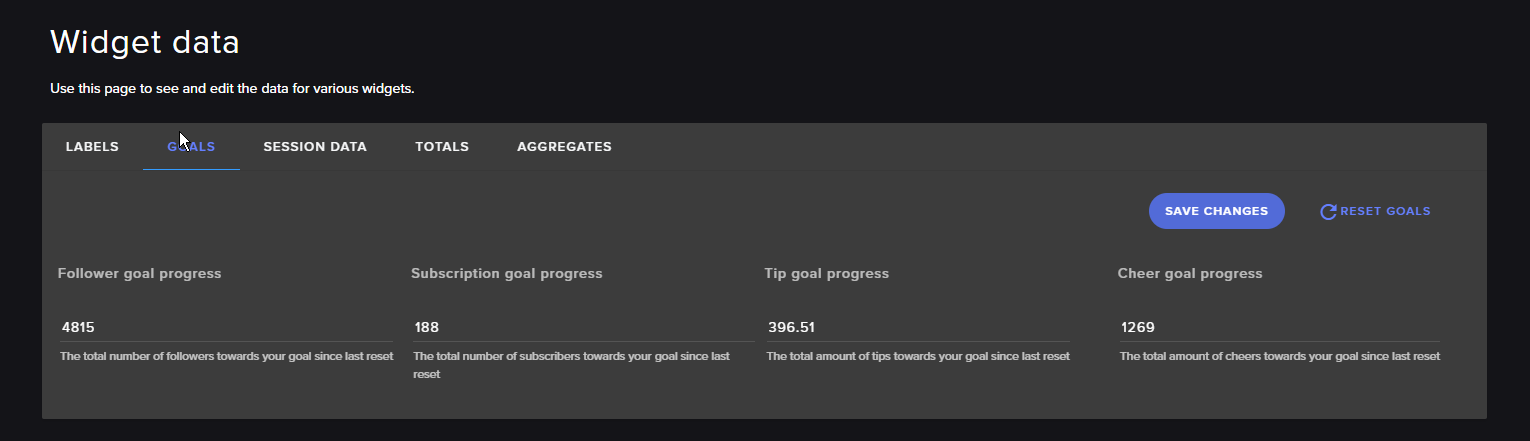
Hey Guys, a quick question. I wanna set a cheer goal, but if I use the widget it doesn't start at zero but it counts the total cheer I got so far on my channel as the starting point. How do I set it to reset and start at zero?
 tight harness
Activity Feed > Widget Data > Goals
Or when you're editing an overlay, Data > Goals
silk mural
Thanks as always!
tight harness
No problem
 wintry relic
Quick question: when adding commands in chat, how do you set the user level permissions?
hushed quail
@ivory holly is all sorted now. Let us know if you need anything else in the future. ❤
ivory holly
big thx man 😉
hushed quail
That's a good idea. I will follow everyone I ever help on Twitter.
proud pumice
@wintry relic its best to set a user level via website
wintry relic
Thanks Perry. was trying to add mod only commands for a streamer without having to go through the streamelements dashboard and couldn't figure out how to set the user permissions in chat
but if the only way is through the dashboard, i'll just let the streamer know
gentle imp
@crisp rivet I just got told your stats are fixed
tight harness
You can do it through the chat too, it's just a little more fiddly @wintry relic
It's !command options <command name> -level <user level>
The user levels are pinned in this channel 😃
crisp rivet
@gentle imp wow  working very well, thanks for helping
gentle imp
thanks to @stuck hamlet
wintry relic
great thanks!
 weary terrace
what are the dimensions for the banner on the profile page??
 narrow coyote
The SE profile? 1920x310px
weary terrace
thx
weary terrace
does the desktop app always have to be running to keep to bot's custom name?
narrow coyote
yes
weary terrace
are there plans to change this?
for example an option to change bots name through the dashboard
 slender yoke
Does streamelements have a way to have a custom chat statement when certain viewers arrive in a stream? I’m not talking about new viewers, but special selected people.
slender yoke
Danggggg
gentle imp
that's something I want too 😄
 celest temple
Soo, anyone knows about the Hype Cup?
Let me rephrase that..
Anyone knows a lot of controlling the Hypecup?
So let's say, the cup is considered to be full if Tips is X much, Bits is X much.
Because this "Variation" thing is confusing...
gentle imp
I don't use it anymore but what is the problem?
 velvet fractal
So I added a sound effect to be redeemed via stream store. I tried testing it, but the sound does not go through the stream when I redeem it. Any reason?
 weary mist
@velvet fractal you need to make sure to have the store redemption widget in your overlay
velvet fractal
Ah. The one where it shoes that they redeemed the item? @weary mist
weary mist
yeah
 lament blade
anyone online that could help me? ;D
weary mist
@lament blade only if you ask what you need help with
lament blade
i always ask if someone wants to help me ;D my question is as following: how do i keep track of new followers during the stream? i found that when i keep stream elements open, the alert sounds keeps getting picked up by OBS so it repeats itself a couple of times on stream, atleast thats what obs support told me
weary mist
That is likely because you have multiple browser sources with the alert box in it. Go through all your sources and make sure to check the box next to "Shutdown when not visible" is checked. This will stop the multiple sounds
lament blade
on the stream elements site?
nocturne pelicanBOT
@lament blade Make sure to :ballot_box_with_check: “Shutdown source when not visible” for all browser sources (all OBS scenes). If using studio mode, uncheck “Swap Preview/Output scenes After Transitioning.” Also keep in mind that sound can play from any overlay loaded in the browser (editor or launched). https://i.imgur.com/FegZJQS.png https://i.imgur.com/yY0wcFl.png

 weary mist
in obs
lament blade
done
so how do i know when someone follows
does the sound play through OBS
or through stream elements?
narrow coyote
You should hear the sound through OBS, depending on what your audio setup is
you can also use Ground Control or the activity feed to see these activities as they happen
lament blade
so the fact that i have the streamelements site open during stream had nothing to do with this?
narrow coyote
unless you have the overlay open in the overlay editor, no
lament blade
when i stream i have dashboard open on SE site
narrow coyote
the sounds will only play from the site if you have the overlay open in a browser tab, or the overlay editor
dashboard will not cause alert audio in your stream
lament blade
ok just because you said ground control, where do i find that? :p
narrow coyote
If you want to see activities as they happen, you can have this page open https://streamelements.com/dashboard/activity
weary mist
!gc
nocturne pelicanBOT
Our Desktop App Ground Control: https://streamelements.com/groundcontrol
narrow coyote

lament blade
downloading (y)
so i can have ground control open rather than the site in browser right? or should i use both
narrow coyote
you can have just Ground Control open, the only time you might want the site open as well, is if you use Media Request. GC is not fully compatible with Media Request, but GC will be completely rewritten soon™, it will have tons of nice additions
lament blade
yeah no i found it 😄 now it says something about a bot and custom bot name, whats this bot used for?
nocturne pelicanBOT
Custom bot name requirements
- StreamElements bot modded and in chat
- Active overlay with alerts
- StreamElements tipping page in the panels below the stream (!panels)
- Create a twitch account for the name you want to use
- Ground Control app must be running
Steps to enable custom name
- Sign in to https://twitch.tv with the bot account
- Install and run Ground Control (!gc for download)
- Visit https://twitchapps.com/tmi/ and generate an oAUTH token
- Copy/paste everything in the box to Ground Control oAuth settings and enter the name for the bot account
- Restart Ground Control (custom name may take a few minutes to take effect)
lament blade
0Auth token?
 ebon forum
Just follow the link and you will get the token from Twitch
This is their authorisation for third party tools
lament blade
yeah i need to learn how to read
okay so i put the token im assuming its getting implemented by itself since theres no save or accept option xD
ebon forum
yep. the token contains all the data so you should use it with the twitch account that you want to have as the botname 😄
lament blade
oh i had to name the bot same as my twitch?
ebon forum
you can choose any free twitch name (you have to register it tho) or you can use your main twitch account
i have my main twitch account, so the bot responds with my name
ebon forum
it will work, but you have to be logged in with your bot account when getting the token from twitch
lament blade
yeah
im gonna be honest
im braindead with this warm weather and im not an english speaker
so idk what to do now
xD
lament blade
i got the token from the authorization page it said it was my one and only account :p
dutch
ebon forum
ah, LatteMotte can speak dutch, but i will not tag him, he is rather busy 😃 But in case - feel free to message him
dull elm
Sorry i dont find the bug list, so I have to ask: In the deufault commands the Command alias doesn't work. I can't save it
lament blade
ok then i have another question something more simpler for me to understand
ebon forum
sure, throw it at me
ebon forum
@dull elm are you on chrome?
@lament blade that means that the account you use is already linked to a different login
lament blade
...
dull elm
yes
lament blade
idk right
ebon forum
@lament blade you logged in with that account somewhere already. this is why you get that message
need more infos to understand what is going on
lament blade
what account is logged in where xD
ebon forum
@dull elm make sure you have no empty fields while saving
ebon forum
@lament blade well if you see that error, that means the account you try to add is already linked to a different account
lament blade
so this error implies my twitch account is already linked to a different SE account that i dont have?
ebon forum
@lament blade first: where do you see the error. make a screenshot that shows me more than just the error text 😃
ebon forum
it IS already added
see that Devaland name with "owner" below it?
it means you logged in with Twitch and already linked it
lament blade
forgive me xD
 ebon forum
nah, go grab a cold beer and come back when your brain is functional 😛
lament blade
:p ok but that bot, i named it devaland like my twitch i took the key from my one and only twitch account so it should be done right? does test bot only work when im live? or where do i test it
ebon forum
forget the bot name at the start, you just got in, so you better start with the basics
i can guide you through the whole setup
lament blade
im listening 😄
ebon forum
custom bot name requires our regular bot to be in the channel and modded and a tip link + overlays, so you not gonna get it before other basics are done.
first thing that you want to do > dashboard > tell the bot to join
big blue button "Join" on the right 😃
ebon forum
if you already pressed it, it will say "part"
ebon forum
ok, so the bot is where it should be
lament blade
sounds good
ebon forum
ok, checked your channel, you have a lot of stuff from us 😄
dang, my brain is afk today too
ebon forum
so you have put in the oAuth token into groundcontrol
which is good, but you put the "wrong" one in, the bot just responded to me
with your MAIN account
lament blade
yes i clicked the link, it told me to authorize with my channel and then i copied the whole token
ebon forum
this is good, but you were logged in with your main account
you need to do that with your bot account
lament blade
so i need 2 twitch accounts?.
ebon forum
if you want your bot to have a different name - yes
lament blade
i dont mind :p
it can have the same name its no problem for me
unless it will cause problems
ebon forum
it already works with your name. and no, no problems here besides people get confused when you type and the bot too 😛
see, that works
ebon forum
go live and enjoy it, so far everything looks good. got any questions?
lament blade
yes, where can i read about the commands for the bot that is in my channel right now?
and what does this bot do in general
ebon forum
bot > chat commands in the left menu
the bot can do a lot of stuff - from posting "timers" with a fixed message like "here is my twitter blah" to moderation, mini-games etc
lament blade
in discord?
ebon forum
no, on twitch
lament blade
command share tab?
ebon forum
NO
Streamelements site > left menu > bot > chat commands
there are 2 rows that are interesting, custom commands (your own) and basic commands
some commands are controlled by modules, you can enable those later once you get familiar
ebon forum
check the commands, enable/disable them as you like
lament blade
yeah i see them ;D
ebon forum
@lament blade yes, it can, check the "timers" below the chat commands
lament blade
first i have to make a custom command then go to timers?
ebon forum
no, those are independent
custom commands are just commands that can be triggered manually
timers are automated
lament blade
ok so i press NEW TIMER and then i can go all out? :p
ebon forum
pretty much
lament blade
i paste link in 'message'?
ebon forum
Yeah, text and link
lament blade
chat lines 5 is fine?
ebon forum
5 lines, short timer
when you have a lot of chat activity, you can increase that to avoid spam
ebon forum
anyway, let me give you something useful:
https://www.youtube.com/playlist?list=PLCDDKlFdScbEwdx5AntcQIS1InkFJwHtv

YouTube
Need help? Check out our video guides, covering every feature in StreamElements.
lament blade
O.o
ebon forum
all the videoguides how to set up different things on StreamElements 😃 A few of them are slightly outdated, but useful^^
lament blade
yeah i was following alertbox guide
was good only they didnt show me how to change alert sounds xD
i kept hearing the standard alert
over my custom one
ebon forum
you need to check the actual alert sound + all the variations below
the default sound is still somewhere
lament blade
i fixed it by deleting the standard alert on all overlays i have
then it stopped playing the standard alert xD
ebon forum
yeah or so 😄
lament blade
big thanks to everyone and you cryonic
i was gonn ask help with songrequest cuz my viewers hate my music
BUT
i got video now
😄
10/10 support if i can leave feedback somewhere send link
Does anyone have an idea on what to start streaming first? I'm having problems it's been like 5 days since I've last streamed, and the problem is, I have no idea what to stream whatsoever. I check Twitchstrike but most of the games there are games I don't have. I mostly play games like Shooters, and RPGs.
next month you can stream bless online ;0
weary mist
@lament blade best thing to do is play games you enjoy. If you play something you don't enjoy, it will make a less entertaining strim
ebon forum
@lament blade no links for feedback, but we are happy about tweets and when you invite streamer friends so we can offer even more support 
lament blade
@weary mist The problem is is that games I enjoy, is highly saturated. I.E. Siege, Fortnite
weary mist
So are the ones I play
lament blade
cryonic about song request, if a song is playing on stream and i press pause in the SE site on the media share tab will it pause for the stream aswell?
ebon forum
@lament blade yes.
 keen night
Hey
Just found this link from a friend. So does how stream elements help my twitch out
weary mist
@lament blade If you have fun, then 100% yes. Tell your friends, get family to help. The more viewers you have, the more likely people will check you out
lament blade
@weary mist Well then thanks! You've been a great help!
weary mist
@keen night Multiple ways. we have a bunch of videos of what tools we have at https://strms.net/welcome. You can also see a good overview here: https://streamelements.com/ Then on the top middle, hit features, and go through those 4 pages
StreamElements
StreamElements is the leading platform for live streamers on Twitch and Youtube. StreamElements includes Overlay management, ChatBot, Tipping, Alerts and Loyalty.
keen night
Thanks! @weary mist
lament blade
i just love how SE has a whole channel on how to do stuff 😄
weary mist
 long hinge
i got a question well 2
 final stream
Where did the text scrolling option go?
wow that's incredibly annoying. It used to be right below the text shadow switch and now it is just gone
weary mist
There might be a reason for it to be missing. Let me see
final stream
Theres also not a setting for word wrap as an alternative
frozen nexus
@gentle imp sorry I just got done streaming, yea I’ve tried everything
lament blade
Hi I have an error 500
in my OBS
are the servers down ?
500 Internal Server Error
narrow coyote
I am not getting any errors in OBS for browser sources 
lament blade
hmmm ;/
 kind arch
I need help with the given Overlays, I don't really get how I insert them in OBS because there are like 4 different overlays but i just get the link to one..
narrow coyote
does the OBS log have anymore details than just 500?
nocturne pelicanBOT
@kind arch To add your overlays to OBS, add a new browser source in your scene. Paste your overlay URL in the browser source properties, set the dimensions to 1920x1080 (unless you changed them on the website), and :ballot_box_with_check: “Shutdown source when not visible” https://youtu.be/KDvLynUqXI4
narrow coyote

@kind arch you will do what it says above, and if you only want to use one of the overlays, that is fine, you will just add a browser source, and include the URL for the overlay you want to use 😀
final stream
So the text scrolling option being gone, I cannot turn scrolling off on old widgets or turn it on in new. Why would you mess with that?
narrow coyote
We are still trying to get information about this issue, will report back when we know more
 native musk
So if I have an overlay set up thru OBS(browser source) - do I have to launch the overlay thru SE website for it to work?
narrow coyote
no, OBS handles loading it, and that is all that is needed
final stream
@narrow coyote sounds good, all I needed to hear 😃
native musk
Ty
narrow coyote
 chrome cliff
Hello how i can do spam filter for color messages?
normal igloo
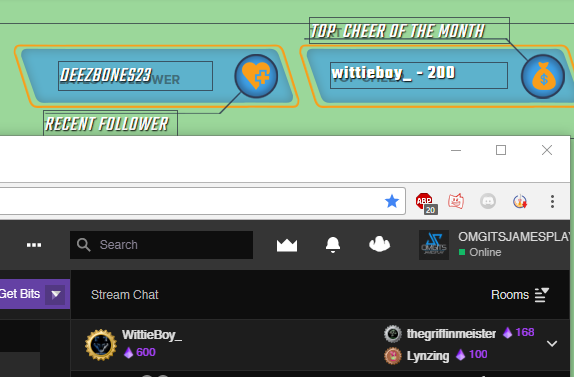
My top cheer of the month is wrong https://i.gyazo.com/c5a113595e473fe7617728326f97c2a3.png 🤔
 chrome cliff
Can i do spam filter for color messages guys?
normal igloo
Also @misty wagon I'm available for that conversation whenever you are Already 👍
@chrome cliff Don't quote me on this as I'm not sure But you could do /me in Banned Words Settings
Worth a try
tight harness
Haven't tested it, but if that doesn't work then nothing will
If it doesn't read the message with the /me then it won't notice the /me part
In which case there's no way of telling
 sterile quail
Is anyone online? I need help with a widet, not sure which chat I'm supposed to ask in though.
narrow coyote
@normal igloo Not sure exactly on this, but refreshing your aggregates might fix this. This can be done from https://streamelements.com/dashboard/session in the aggregates tab
@sterile quail what do you seek help with?
sterile quail
Just wondering if it's possible to make the chat box show messages from left to right instead of top to bottom
normal igloo
@narrow coyote reset labels?
narrow coyote
now, that will reset all of them, so I believe that would blank them out. If you go to aggregates, there is a refresh aggregates option in there
For the chat widget, there are no options to have it show left to right. You can try adding this suggestion to this idea in the comments section https://streamelements.helprace.com/i240-chat-widget-features
sterile quail
Oh okay, I might do that 😃
narrow coyote
Also be sure to up vote and follow the idea, so you get any updates on it
normal igloo
@narrow coyote not don't fix it
normal igloo
@narrow coyote monthly top cheer
 long garden
Apparently a new default command called "songlist" came with the media request update
I already have a command with that name, so now it's responding with both
I can't find the new one you made to shut it off
weary mist
@long garden Let me have a look
 sullen dock
shit's fucked
weary mist
@sullen dock can you explain what the issue is that you are seeing? It makes it easier to diagnose. It could be a quick fix
sullen dock
sorry about the link
my top tipper list broke apart
instead of tallying up user's tips
it split them into name based
it worked fine for months
it's all fucked up today
weary mist
@sullen dock let me fix 88bit's thing, then I will look into yours
narrow coyote
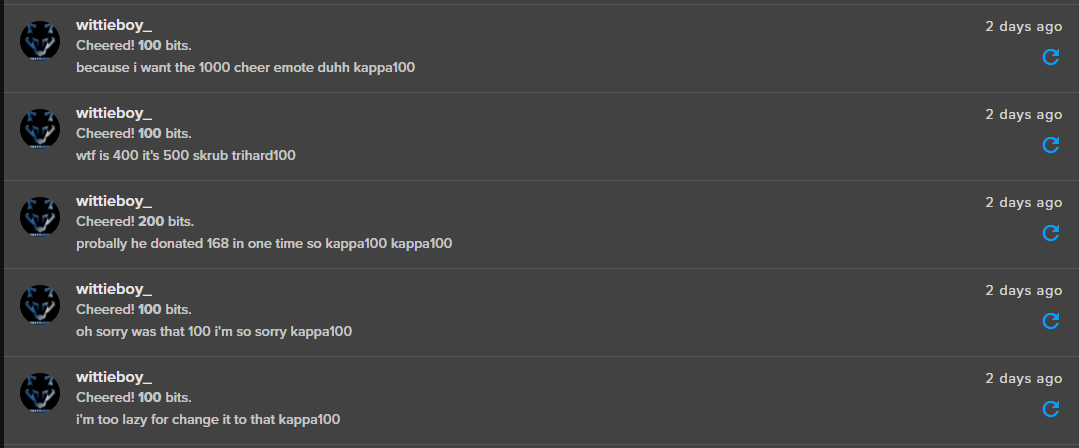
@normal igloo I don't have too much experience with the bits, and how they tie into SE. Is it possible that some of the bits they gave were before you started using SE, and they only gave 200 since you started?
kind arch
How do I set up a tts in a stream?
weary mist
@kind arch its from the alert box in your overlay
kind arch
?_?
normal igloo
@narrow coyote https://i.gyazo.com/b875d343de4dca01b03202e105234540.png
 narrow coyote
In your alert box widget in your overlay, if you click the gear next to the alert you want TTS for, you will see the settings
weary mist
@sullen dock OK, I am looking at your stuff. Are we talking about something on an overlay, or on your tip page, or...
kind arch
im kinda stupid i don't find it wtf
narrow coyote
where are you looking right now?
narrow coyote
@normal igloo  I might be too pleb to help fix it. I would have expected the aggregates to fix it, especially with them in your activity feed. Just to confirm, if you go back to the aggregates section of the widget data, is that incorrect for the all of the tip bits?
@kind arch yeah, just click the little gear next to the alert you want TTS on, and you will see the TTS Settings in there
normal igloo
@narrow coyote yep
kind arch
okay thanks!
tight harness
@normal igloo I know why it is, there's 2 different widgets, Top Cheer and Top Cheerer
200 bits was the most they sent at once, hence why it shows as 200, but Top Cheerer is what you want 😃
normal igloo
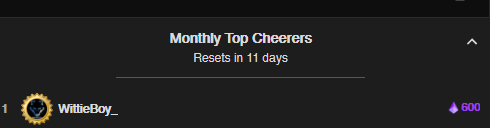
@tight harness 200 Not according to twitch ? https://i.gyazo.com/3420d118f6d46a05b523669cb1caa232.png
 narrow coyote
@final stream Text Scrolling seems to have found its way back into the editor
 sand goblet
Hey, so I changed my name on twitch and like the bot doesn’t show up anymore on streams, is there something I need to do to fix this?
narrow coyote
you will want to first log out of SE and log back in, then part the bot from your channel, and rejoin it https://streamelements.com/logout
tight harness
@normal igloo 200 is the most sent in 1 go, not the total amount
Makes sense now? 😄
normal igloo
I'm an idiot I just realised twitch adds total Of the month and se Only does for total sent out 
th x @tight harness
tight harness
We do both
tight harness
But the one you have displaying currently is for the individual cheer
Top Cheerer is total, Top Cheer is individual
sand goblet
So how would I part the bot from my channel?
narrow coyote
https://streamelements.com/dashboard right side
sand goblet
Thank you
narrow coyote
 willow quail
Hi guys, i need help with the OBS, i have a layer of streamelements and listen x2 the audio... 😕
narrow coyote
most common cause of this is having a browser source in another scene that does not have the shutdown when not visible set
willow quail
on the browser?
narrow coyote
the browser source in OBS... if you have an overlay open in the browser, close it
willow quail
In the obs have 2 tracks
narrow coyote
not what we are talking about, the browser source is where you added the overlay
willow quail
ooooh good, i see on the obs the option now...
up of the refresh the browser...
the first option
narrow coyote
the check box that says shutdown when not visible, you want to use that on all your browser sources that have sound
willow quail
Yeees! Now... ty 😍
narrow coyote
lament blade
is the streamelements bot going through any changes or anything? it keeps parting my channel
ebon forum
@lament blade not really, it should stay in the channel with 99% uptime.
ebon forum
@lament blade the bot just told me that it is running for 3 days and 9 hours, check the chat 😃
lament blade
yea thats interesting lol thanks
sullen dock
@weary mist sorry bro streamer mode on discord silences notifs
come into my stream pls
weary mist
I am there, I can watch, but I can't hear (no headphones)
sullen dock
yeah it broke
it used to pool them together
and i can't edit the amount that people have donated
to just add them together myself
weary mist
all you have to do is change usernames on the tips themselves. That is what I am doing
fixed in stream 😃
weary mist
 burnt field
Hello today 2 of my friends donate to my channel and i didn't receive a of them http://prntscr.com/j73r37 idk wht is wrong with it
 narrow coyote
Did you receive anything on the paypal side about receiving money? Are the tips in your activity feed?
 simple frigate
anyone know if the skip/pause hot key works yet?
pine hemlock
Will be announced in #announcements or #270206314561404928 when ground control gets up to date
 median saddle
Any SE staff here?
tight harness
Yes, what's up?
median saddle
I can't adjust the scale of my Hypecup the options it should go to won't let me scroll down is it browers I am using or some sort of bug?
tight harness
Which browser?
median saddle
Google Chrome but I have tried Internet Explorer too same thing
tight harness
Chrome works better than other browsers on our site so it won't be that it's Chrome
median saddle
I can see the arrow for the cup up and half of the arrows to move the cup left or right I can't see anything below that
tight harness
Tried zooming out?
median saddle
done nothing just tried it
tight harness
Could you show me what it looks like for you?
median saddle
hate to be a noob but how screen shot wise?
tight harness
Screenshot would be fine
narrow coyote
on windows, use snipping tool
snip what you want, copy from that, paste in here
From just testing this on a few different monitors, it looks like screen resolution might be a factor here. what resolution is your monitor?
 fiery meadow
Hey guys! I'm trying to create a command where if i say, Kappa, it counts it. However it always puts a ! in front of it first. Can I circumvent this?
median saddle
1080p
narrow coyote
hit ctrl 0 in browser, or try ctrl -
should be able to zoom out enough to see the options
median saddle
Kite you may be a genius ctrl - worked thank you so much
narrow coyote
you can hit ctrl 0 to reset the zoom when you are done
narrow coyote
median saddle
cheers guys props to you both
narrow coyote

tight harness
fiery meadow
So guys, if I wanted the bot to say "emote" has been said 50 times or whatever, without using !emote just saying the emote in chat
How would I make that?
I know it'd involve ${count}
but when I make commands it automatically adds a !
narrow coyote
Under the advanced settings of a custom command you can enter a keyword to to trigger the command
 grizzled owl
Hey! I have a problem, when someone hosts me it doesn't pop up on the overlay and in recent events. How can I fix this? Kinda anoying when I get raided without knowing
nocturne pelicanBOT
@grizzled owl
Twitch doesn't have a "notification system" for hosts (unlike follows, subs, raids, etc.) so the only way for StreamElements to know that you are being hosted is to connect through you to twitch. This connection is made on:
- SE Dashboard page - https://streamelements.com/dashboard
- SE Activity Feed page - https://streamelements.com/dashboard/activity
- Ground Control desktop app - https://streamelements.com/groundcontrol
Please have one of these open during your stream in order to receive host event notifications.
fiery meadow
Hey, brilliant! Thanks Kite, you're a hero ❤
narrow coyote
No problem
narrow coyote
You either need to have Ground Control open, the StreamElements Dashboard, or StreamElements activity feed
grizzled owl
Alright thanks a lot !! Legend ❤
narrow coyote
 inland nova
Hey, I decided to try out the Overlays for the first time on Tuesday, and everything worked out great, except for chat. no matter what i did, messages never seemed to show up on my OBS Studio preview.
 bright tartan
Did something change with the top tippers widget? it no longer matches the stats top tippers list. It was fine yesterday
burnt field
@narrow coyote No i dont receiving any thing about the money from paypal ... and yes i have my tips setup in activity feed and i have the donation page link in my description channel in twitch .. and Nothing works
narrow coyote
If you did not get anything from PayPal then the tips should not be in the activity feed, and there is no way to alert on it. If the tip went through, or was pending, you would have received notification from PayPal, usually via email
 tender moss
so how come whenever anyone tries to link a song via media share it links the same trailer to me that no one has requested~?
narrow coyote
that means you have the setting in twitch enabled to remove links from your chat
tender moss
thank you 😄 !
narrow coyote
 obsidian kettle
Is it possible to add a image/gif to a redemption with points? All i know how to make is a redemption that plays a sound.
 rugged trench
My alerts are showing up very late or not at all - I have no moderation enabled to stop any alerts. Please help with this! The delay is too much! It is even missing subs.....
atomic silo
Guys, is there a command that makes the bot count emotes? It just ignores some of my emotes.
i mean the chatstats
tight harness
@atomic silo Have you tried typing "!emotes update" in your twitch chat?
@obsidian kettle Stream Perk allows you to have an image and a sound
@rugged trench What kind of a delay are we talking about here? Any form of estimation? Also the only subs it will miss is those which aren't shared by the user, if they share it properly there's no issue
weary terrace
is there a way for the bot to play a random sound clip in a random amount of time?
tight harness
@rugged trench Also helps when the bot is joined to your channel, which it isn't
Although it seems to be picking up events fine in your activity feed 
@weary terrace Randomly? No, only on command via the stream store
weary terrace
dam, I was think of having an reward item a random jump scare
tight harness
I mean, if they redeem it via the store there's no message in the chat so no warning
As long as you set it up as a sound item
weary terrace
yea
rugged trench
@tight harness It only missed one Sub ( showed up in OBS ) but not Elements, I'll try putting the bot in the channel as well. THanks.
tight harness
No problem
 keen linden
Hello 😃 I'm trying to link my twitch account to SE, but i'm getting "account allready connected to another account"
exact message: ""The Channel you tried to add is linked to a different account."
 waxen valve
im not sure if anyone here can help me, but one of my viewers tried to donate a relatively large sum of money last night, and SE said it was successful by this image
https://cdn.discordapp.com/attachments/417674492026945536/436473151929712640/Microsoft_Edge_4_19_2018_12_23_57_PM.png
But there as no alert, no paypal notification nothing? Would anyone know what may cause this + is there an amount restriction ?

 random elm
My chat commands are down? I changed my name on Twitch on Sunday and it hasn't worked since. I've relogged from both Twitch and from Streamelements but it's not working still. I ahven't messed with any settings so i'm stumped. thoughts?
tight harness
@keen linden It's telling you why it can't be linked again, because it's already linked to an existing account
keen linden
@tight harness yes i kinda figured that 😃 but if it's linked to another account, i need it delinked from that one and added to my main one
tight harness
@keen linden It's possible for one of our developers to merge them into the same account, I can't promise it will be done in a hurry though because their weekend starts tomorrow. A workaround would be to give yourself Full Control dashboard access to each of the accounts, essentially the same thing and you can do it yourself right now
keen linden
@tight harness problem is i have no idea what other account it's linked to, because i've only used twitch login to login to SE
tight harness
@waxen valve There's no amount restriction, nope
waxen valve
@tight harness so there would be no reason for SE to say the payment was successfull but get no alert or any notification from paypal ?
tight harness
@waxen valve We get the data from PayPal's API, so there could have been an issue there at that moment
waxen valve
hmm so ill get them to check their paypal and see if everything is okay ?
tight harness
Did you receive the payment alright?
I see a tip from the 19th but it's a $1 tip so i'm guessing it's not the one you received, curious if it came through on PayPal though
PayPal handle the whole transaction, we just use their API to get the tip info
weary mist
@random elm part and rejoin the bot
random elm
@weary mist how do i remove the bot? dont see an option for it lol
random elm
@weary mist youre a genius lol thank you for the help it was driving me crazy now i can get back to stremaing
weary mist
@random elm
 misty wagon
Case solved 
 cursive obsidian
hey, anyone knows this... I try to add song requests into my stream, and the description says I have to activate it trough "modules" but when I go to modules I can't find anything related to son requests and music player... I can add songs to que but the songs don't play
lament blade
i changed my twitch name and lost so much watchtime on a friends channel, and way to get my old names stats moved to the new one?
❤
weary terrace
is it possible to set different animation depending on the amount of bits/tips donated??
 clever mango
Yes, using variations
weary mist
@lament blade You can try logging out of Streamelements, clearing cache, and logging back in. If you logged in before, it 'should' transfer information
weary terrace
variations?
weary terrace
thx
 cursive panther
Any staff available?
clever mango
Hello
lament blade
@weary mist where is the cache thing
weary mist
@lament blade hit CTRL+SHIFT+R
should do a hard reload, which clears the cache for the page
lament blade
@weary mist well i tried that and nothing happened, my old name on twitch was largelard, now its lardass, its the same account i just changed names, and the watchtime in on a friends channel, i just have 3 days watched and want it back lolz
weary mist
unfortunatly there is no way right now to manually move it
lament blade
fuck dude, can support help? i emailed them
weary mist
I am support 
But no, there really is no way to move the hours right now. There is an idea request. The more people that upvote it, the better I can argue that it is a needed feature with the devs
lament blade
oh haha, lets make it happen haha
cursive panther
Ive been in que for about... 30mins+
weary mist
@cursive panther Terra did answer you, but you never asked any questions
and I still dont know how to help you because you are being silent 😛 @cursive panther
cursive panther
@weary mist Saying hello isnt much, and Ive been in que waiting for a staff
Im tabbed out not sitting here waiting for a reply..
weary mist
@cursive panther We are all trying to help, but until you give us what you need help with, we can't do anything
cursive panther
Just need help with deactivating imports if that is possible?
Bot Imports to be specific
weary mist
Not sure what you mean by that. the imports are a one time thing, we don't keep an active connection with other services
If you mean that you want to remove the other bots from you twitch channel, that is something you do from each of those bot's dashboards
cursive panther
You cant deactivate an import once you have
weary mist
No, but you can delete what you imported. Like tips, or commands, or an alert box. Once imported, it's like you manually added them
cursive panther
how do I delete what I imported?
 rare fulcrum
how does one make the bot greet viewers, or say anything for that matter past a new follower?
weary mist
@rare fulcrum you can set up timers, which trigger after a set time period, but we do not provide an automatic way to greet someone in chat
rare fulcrum
Ah okay, thanks 😃
weary mist
:+1:
cursive panther
So no way to delete what I import?
weary mist
You can go in and hit the trashcan next to tips/commands, or the remove button for overlays @cursive panther
weary mist
@zealous osprey Advertising is not allowed on this discord server. If you would like your stream to be shouted out when you go live, you can apply to be a #402919550066229250. You just need to be using the Streamelements tip page, have the bot modded in chat, and to use our overlay system (alerts, etc).
nocturne pelicanBOT
@zealous osprey Are you a StreamElements all-in-one streamer and interested in stream promotion when you go live? Please fill out this application https://strms.net/sellout and if you meet the 3 requirements posted in the :pushpin: pinned message in #general you will be added to the stream announcements.
 safe kettle
Ok so I've been struggling with trying to find out why I get low FPS while I'm streaming. Before I begin let me show you my specs:
i7 8700k Liquid Cooled
Geforce GTX 1080 Ti FTW3
M.4 1TB SSD Drive
1050W PSU
My internet is 60 mbps Download and 20 mbps Upload
My frames in game without OBS open is 144fps with a 144fps cap. The moment I open up OBS in Dalaran I drop all the way down to 30fps or lower without even starting the stream yet. I only have 1 scene and all elements come from streamelements. The same happens when I use SLOBS. Any insight would be greatly appreciated
narrow coyote
What are your encoder settings, this would be the output settings in OBS
And your video settings in OBS
safe kettle
NVENC
CBR
5500 Bitrate
2 Keyframe Interval
Default Preset
main Profile
Use 2 Pass Encoding Checked
2 B-Frames
Base Canvas 1920 x 1080
Output Scaled 1920 x 1080
FPS x30
narrow coyote
In the game, are you using vsync? With nvenc and the game load, if you are using vsync that could cause the game to get locked at 30. If you have not yet, you could always try x264 encoding, and put then entire work load on the gpu. It might also be worth it to step down to 900p on the output over 1080p. With twitch, 900p is more of a sweet spot on the higher resolution side of things
safe kettle
@narrow coyote where do I find out if I'm using vsync?
If you mean Geforce Experience. I've completely uninstalled that
narrow coyote
It would be an in game setting, usually where you the resoultion and game mode. You can override on a display driver level, but by default it's controlled by the application
safe kettle
Oh ok I see it. Yea Vertical Sync is disabled
narrow coyote
It might be worth it then to test either a different encoding method, or lowering the stream resoultion from 1080, to 900 or 720, to see if this makes any difference
safe kettle
Thanks for your help. I can't justify lowering the quality of my stream to fix the FPS issue though as an answer with the expensive equipment that I'm using just so that I have the capability of streaming high quality without low fps
weary mist
only thing I can recommend is to try streaming off the CPU and see what happens. The other thing is to cap your FPS in games. Having it at unlimited (if you do), can cause a strain on the GPU (which is what you are using to encode right now)
 daring jetty
what size does the overlay need to be to fit into obs?
weary mist
The themes are set to 1080P by default, so width is 1920, height is 1080
 prime hearth
anyone having issues with accessing their tipping settings?
weary mist
@prime hearth not currently, what is the problem?
prime hearth
everytime i click on the Tipping tab it displays an error accessing the tab
weary mist
hmmm, something weird is going on on your end. I just got to your tip page with no issues. What browser are you running in
@prime hearth
 solid mesa
I recently changed the username of a twitch account that was linked to stream elements. Now my stream elements no longer works during my streams. HOw do i fix this?
 icy totem
I accidently signed up for pro donating to a friend like a month ago meant to unsubcribe and got charged again so i was wondering how to unsubcribe. btw the gif is garbo cause its recently been changed or updated or im just not going to the correct "tip" page
narrow coyote
Singed up for pro? Sounds like you might be talking about StreamLabs and not StreamElements
icy totem
they sent me here
narrow coyote
who?
icy totem
the customer service thing
and elements is what it takes me to when i hit anything donation
narrow coyote
Well, there is no Pro anything with StreamElements, especially something that costs money.
icy totem
eh xD well its more confusing that cause anytime i try to click on a donate page or tip page it takes me to elements
not labs
than*
narrow coyote
so, then what exactly is this pro thing you are talking about
icy totem
eh when u donate to someone they force u to sign up for streamlab pro
to allow u to donate
narrow coyote
@solid mesa You will want to sign out of StreamElements dashboard. log back in, part you bot from the channel, then join the bot again
well, that is StreamLabs, not StreamElements
icy totem
again it continues to take to me to elements though when i do xD tip page
narrow coyote
The StreamElements tipping page is not going to make you sign up for StreamLabs pro
solid mesa
Thank you!
narrow coyote
who is the streamer you are donating to, what is their twitch name
icy totem
xD its all gouda i got it they had a element tip page and not a lab page
ty for trying to help though @narrow coyote
narrow coyote
I would still be interested in knowing who you were tipping
icy totem
@narrow coyote nemesisxp3 sorry went and took care for somethings
narrow coyote
well, the donate panel they have on their channel is for StreamLabs, not StreamElements
 delicate citrus
How come when someone tries to redeem an item from the stream store the notification sound doesn't go off?
 slender flicker
hello i need some help
 ripe herald
you can type here what issue you have
slender flicker
@ripe herald i want to add a donation bar and it says that i already hafy 300eur on it how can i reset it ?
delicate citrus
glad i got ignored feelsgoodman
ripe herald
I'm sorry @delicate citrus didn't checked your question, my bad
@slender flicker you can reset you activity
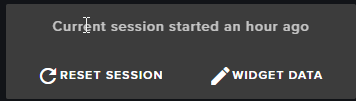
it's on left side under Activity feed
@delicate citrus do you have and alert on overlay for it
you need to have that widget on overlay
slender flicker
@ripe herald just did the reset and still have the same number
delicate citrus
i have an alert box in the overlay but redemption isnt there and i dont know how to put it into the overlay
 delicate citrus
i figured it out, thanks
 slender flicker
@ripe herald sorry my bad thanks for the help ❤
ripe herald
anytime ♥
 toxic basin
hello what mobile app do i use to stream with streamelements overlay?
alerts*
I want it to read out alerts out loud
tight harness
Our publicly available app is still Ace Live Streaming but we're remaking it to a new version which is currently in testing
toxic basin
oh yeah I heard about ace livestreaming
u know if soda is using that one?
by any chance? LUL
tight harness
Personally I'm not sure
 royal quarry
Yo, my Stream Elements is working hella good, and I like it a lot.
tight harness

 royal quarry
toxic basin
happy 4/20? idk
tight harness
I kept waking up constantly last night  but I'm feeling all good now
royal quarry
It's always 4/20 for me 
tight harness
royal quarry
All my friends are sleeping so I thought I would hang out in the tech support channel w u guys




 wintry basalt
hey there i set up some timers but there are not showing up, i did that while streaming do i have to be offline first so the bot knows that?
gentle imp
no, they should be displayed if number of lines/time has been reached
wintry basalt
time reached and number of lines is set to 0, i enabled and disabled them now, maybe that'll work
gentle imp
I'm not sure why they aren't triggered, perhaps add some lines to it
wintry basalt
i will try
gentle imp
you can test it offline, adding the offline option
cursive obsidian
tried to use a goal alert using variations, apperently when you use variation alerts it doesn't use the default animations anymore...LOL my whole IRL stream is fked up nog, How do you guys use GOAL alerts ? whats the best way to celebrate 50 followers for instance
 cinder ibex
Question, which app would you recommend for streaming on a mobile phone, and that can integrate streamelements overlay?
 winter zenith
I am not aware with mobile Streaming but I think "ace livestreaming" is what most here use 
cinder ibex
Thanks! I'll try it out!
A friend also recommended Bitstream...
winter zenith
@cursive obsidian when you set up a Alert Variation the normal one should still play
 pale meteor
Hi guys! I'm trying the superthemes but I don't see a way to change their resolutions. Can it be done?
winter zenith
@cursive obsidian TbH I never used Follower Variations befor 
cursive obsidian
@winter zenith the alert allways took the goal alert for me :p it said I reached 50 followers every time, might be bugged
double checked the settings but still
winter zenith
hmmm....
cursive obsidian
#feedback 😉
winter zenith
sure 😃
cursive obsidian
just a goal alert would be awesome
winter zenith
I will give it to the Devs
cursive obsidian
allright 😃
winter zenith
Sorry for the inconviniance
cursive obsidian
np
winter zenith
@pale meteor no need to change the resolution
if your scene is 720p you can still use a 1080p overlay
pale meteor
and the lower bar is too high
since the theme is for 1080 i cannot put it lower than that
winter zenith
yeah thats true.... why do you stream that way if I am allowed to ask?
Twitch is 16:9
cursive obsidian
@winter zenith indeed
pale meteor
because my monitor has that resolution and aspect ration 16:10
winter zenith
yeah but thats not important for the stream I can imagine
cursive obsidian
shouldnt focus on monitor resolution but on twitch output resolution
pale meteor
I stream at 1280x800 to keep the ratio
winter zenith
just cut the Gameplay footage left and right and you are gucci
pale meteor
left and right?
cursive obsidian
oh yeah i get it, black bars :p
pale meteor
how to do that?
winter zenith
yeah because 16:9 is the ratio of the Player in twitch
not 16:10 like your pc
are you using OBS?
or Xsplit?
pale meteor
well, so far I didn't have a problem with my ratio on twitch. I would like to keep it
yes obs
i can share the link to some videos if you want to see
winter zenith
I know how it looks like
lament blade
is it possible to delay the image on alerts? i know that you can delay text but can you do the same for an image?
pale meteor
Been streaming for a while now but it is first time here with SE
winter zenith
@lament blade not that I am aware of no 😦
pale meteor
Then If I change the game resolution that wouldnt be my native resolution and it would look bad
lament blade
aw 😦
winter zenith
@pale meteor I dont tell you how you should do things if you want to keep it, keep it. I am just advising you that the viewers will have black bars on top and bottom of the Stream
pale meteor
Ok, then how would be the proper way to do it?
winter zenith
wich isn't that pretty in comparison to not seeing your game footage more from left and right
Hold on let me start my OBS 😃 (Iuse Xsplit dont know how to cut stuff in OBS  )
)
pale meteor
I'm afraid if i cut footage then maybe the in-game chat would be cut or something else
that's why I started streaming with my native resolution
pale meteor
yep... i stream BF3 mostly
I think that would be solved if the 'canvas' of the SE themes could be changed
gentle imp
why not stream 1280x720 and make the game capture fill screen?
pale meteor
that way I could position all the elements with native aspect ratio
gentle imp
by pressing ctrl+f on the game capture
pale meteor
@gentle imp the game would be cutted
gentle imp
o_O
gentle imp
I know but ctrl+f makes it fit screen
gentle imp
your monitor/game res doesn't matter much unless its 4:3
winter zenith
his stream canvas is also set up in 16:10 @gentle imp
pale meteor
yes
winter zenith
I told him it would be better to stream in 16:9 since the player in Twitch is 16:9
gentle imp
it shouldn't, that's what I said above
 primal lichen
@pale meteor I have a 16:10 1920x1200 monitor its fine use a 16:9 res in obs and match the capture to screen 😃
pale meteor
anyway it would be a good idea to be able to change the themes canvas size 😉
pale meteor
@primal lichen cool. Nice to know. Do you have black bars or the info is cut?
primal lichen
I use nvidia to turn my monitor to 1920x1080 with no stretch but when i didnt it was fine itll all fit just resize it
gentle imp
I've helped someone like this and he had a 4:3 monitor/resolution in game
gentle imp
select game capture /browser source and press ctrl+f
but before change canvas to 1280x720
np 😄
gentle imp
pale meteor
take care, happy weekend
lament blade
are graphics for 420 bits as variation like this allowed?
or rather 4/20 pictures in general
winter zenith
I think its allright 😄
lament blade
mediarequest doesn't autoskip music
and skipping is replaying song 
through webpage
winter zenith
are you using chrome?
winter zenith
maybe clear your cache Mediarequest works fine for me
 wet lava
i have a question is there an actual chatbot like scorbot where i can see my chat without being on twitch?
winter zenith
Not yet. Its on the Ideasboard I think
wet lava
i hope its soon i would rather just use one thing instead of two
winter zenith
Thats what we are all about 👌🏻
gentle imp
there is other clients u can use for that @wet lava like chatty, trillian
wet lava
mmm never heard of that
celest temple
I have a question about the GiveAway
It's doing the Time Lapse.
When does the giveaway end?
tight harness
@celest temple When you close it 😃
tight harness
 echo owl
I have a problem, I have taken a premade overlay, deleted the standard follower sounds etc, added my own sounds, BUT on OBS it still plays the old sounds, I've saved it and launched it several times, but nothing helps, I need help (=
It plays the old + the custom sound
nocturne pelicanBOT
@echo owl Make sure to :ballot_box_with_check: “Shutdown source when not visible” for all browser sources (all OBS scenes). If using studio mode, uncheck “Swap Preview/Output scenes After Transitioning.” Also keep in mind that sound can play from any overlay loaded in the browser (editor or launched). https://i.imgur.com/FegZJQS.png https://i.imgur.com/yY0wcFl.png
celest temple
Two people entered my giveaway and says, not enough Entrants.
tight harness
@celest temple It probably wants at least 3 then
tight harness
I haven't ever seen any settings so I imagine it's hardcoded in
echo owl
wop wop, It seems like it helpt! Thanks
tight harness
No problem
 amber leaf
Heya, I cannot seem to get my hype cup to show in a browser source, can anyone help please?
tight harness
Does it show in the overlay manager alright?
You may just need to update your streaming software to the latest version
amber leaf
Oh and also sorry, it does not show on chrome either
Nvm, deleted it and will make a new one 😃 was only one thing
tight harness
@amber leaf Did that fix it? I was doing some testing
I also couldn't see yours, but I could see an old one and a new one that I made on my account
tight harness
Awesome 😄
 restive lantern
Hey ya'll. Was testing out the giveaway options in overlays and noticed that the default giveaway announcement text is misleading. I says you need to buy tickets with !ticket #, but if the !enter option exists, it's redundant. Is there anywhere I'm able to edit the default giveaway announcement text to just say !enter instead of !ticket? I'm a believer in the path of least resistance for viewers. Most of them will even get typing !enter wrong. 😃
for ref
 kind epoch
Hi all. Is there any way to accept c/c payments as donations?
winter zenith
Another user used a thing called 1upcoin @kind epoch
kind epoch
1upcoin?
winter zenith
1UpCoin - Cryptocurrency donations done easy!
tight harness
@restive lantern Default command responses can't be edited currently, I'm guessing it was worded like that because !ticket is an alias of !enter and so both work unless somebody removes the alias !ticket - but I see where you're coming from
I too have witnessed many people making typos trying to enter commands over the years 😄
restive lantern
The first time I used this giveaway config, I had to try to explain that the max tickets they could use was 1 and they were free anyway, so they still had to type !ticket 1, or !enter if they preferred, and it was basically a cluster F  Would super appreciate some updates to that before I can use it ❤
I ended up just using a diff software for it
tight harness
If you have some ideas about how we can simplify it for people but still have the same options (as some people want them of course) then it'd be great it you could post your ideas here: https://strms.net/ideas so we have a record of your ideas that we can easily look back on and notify you if there's any update to it
tight harness
That's already on there for sure 😃
restive lantern
woot will upvote!
it's a peeve of mine to feel obliged to thank people who aren't there LOL
tight harness
I can understand that 😄
restive lantern
@tight harness Thank you! Posted here: https://streamelements.helprace.com/i836-ability-to-change-default-announcement-text-for-things-like-giveaways
Added a little more detail for my use case etc
gentle imp
upvoted and !ticket works too, I've been through same thing as u since I use it almost every stream
restive lantern
Ty Rip. I'm always all like NotLikeThis I promise it's easy NotLikeThis
gentle imp
😄
tight harness
Also upvoted
kind epoch
hI, my question earlier about donations was not for crypto currency but that of credit card payments... is there any means of this payment method?
But thanks, i've added it to my stream anyways all good there.
tight harness
You can make credit card payments through the currently available PayPal option, although we are adding more options soon also
winter zenith
Oh totally my bad... I thought you ment Crypto Currency
 snow whale
Hey!
How can I customize the message "XYZ wants to duel you for 5000 Points, you can !accept or !deny within 2 minutes" (from the Duel Module)? I can not find this option - is that possible?
tight harness
@snow whale You can only change the 2 options shown in the settings, win message and points won message
dull elm
"Allow More Customization to Default Commands" is an idea. Does this mean you can change the standard message by the default message?
dull elm
I know but I want to know, that it is that what they mean. Nice
Other question I see that streamelements bot is come for discord. Does it mean, that the commands works on discord too?
tight harness
@dull elm It's another idea that's being worked on, slowly, but it'll happen
dull elm
I would be so happy!
And can it programm, that you have by the custom commands the option random?
For exampel: My bot has a personality and it would be funny, when she say different sentences, when someone trigger a command. Hope someone unterstands me, my english is not perfect.
tight harness
Sounds like an idea, which means it needs to go here: https://strms.net/ideas
dull elm
Ok but I must write it better so everyone can unterstand me
 fluid basin
Noticed TTS wasnt working at all anymore in my alertsbox. I've triple cheked TTS is enabled for cheers, tips, etc and even test alerts in the overlay editor doesn't work. Is there anything else i can change to try to fix this?