#helpdesk-twitch
1 messages · Page 253 of 1
 ebon forum
 weary mist
it is super sad
murica is behind in their infrustructure, especially where I live
I have to stream off my phone internet just to have a stable connection
 lament blade
What's the easiest way to allow streamers for your team channel to be able to host/raid without giving them too many permissions?
ebon forum
@weary mist yeah, some places have google fibre and some places got stuck in middle ages.
 gentle imp
they don't need permissions to host you
weary mist
hosts/raiding doesn't need permissions, they can do it whenever. But I feel like you are asking about something else
Something you can do to help is have everyone turn on autohosting, and put priority for team-mates
lament blade
If they are on your stream team, and they want to raid/host someone while they are on your channel, how can it be achieved without needing a super moderator or w/e its called.
weary mist
oh, they have to do it from their own channel
lament blade
oh really? 😦
weary mist
If they type the command from your channel, they are trying to trigger it for your channel
lament blade
oh okay
weary mist
They have to initiate the command from their chat
weary mist
Let me make sure the terms we are using have the same definition
lament blade
mkk
weary mist
For me, Team is someone that streams, but has a different channel that they stream from (Twitch Teams kinda thing).
I get the feeling you are talking about multip[le people that stream from the same channel
lament blade
yes
 warped nymph
Hey
weary mist
In that case, you will have to give them those permissions if you want them to be able to host/raid. there is really no way around it
warped nymph
Why is my name changed?
weary mist
We pull the first part of your name out automatically
lament blade
am i able to limit the permissions they have access to?
weary mist
@lament blade That is specifically something twitch side, you might want to ask them
weary mist
@warped nymph everyone here is a streamer. If you want your channel easily reachable, link it to your discord profile, turn on streamer mode, and then sellout
Streamer mode will change your activity icon to streaming when you are live, and sellout will get an announcement here when you go live
 nocturne pelicanBOT
@warped nymph Are you a StreamElements all-in-one streamer and interested in stream promotion when you go live? Please fill out this application https://strms.net/sellout and if you meet the 3 requirements posted in the :pushpin: pinned message in #general you will be added to the stream announcements.
warped nymph
I don’t have a pc I do everything I can on phone
 weary terrace
is there any reason why my OBS doesnt refresh to browser source when I change scene?
 normal igloo
rip mediarequest?
 tight harness
@OMGITSJAMESPLAY#0489 Working fine here
@weary terrace Are you running the latest version of OBS?
warped nymph
@weary mist can you help me in dms
weary terrace
21.1.0?
tight harness
That's the right version, did you tick the option to refresh it when it loads?
weary mist
@warped nymph sure, send me your questions
 storm ledge
rip mediarequest for me too sniff sniff
weary terrace
yes
storm ledge
Okay - it's back now
 weary terrace
my bad i read the linux version XD
but yea maybe this crappy lappy just doesnt want to stream
 fiery shuttle
howdy, im having issues importing my streamtip data
any advince?
also csv import is not working
(the csv from streamtip)
 rose iron
hi guys,
Im a noob can someone help me set my shizz up it doesnt work right. pretty much a rookie to PC as well so that doesnt help.
weary mist
@rose iron We can help with specific issues, the best thing you can do is watch the videos at https://strms.net/welcome
rose iron
ill check those out thanks @weary mist
 surreal fern
hi, does anyone know how to fix tts on donations? thanks
tight harness
What seems to be the issue with them?
surreal fern
well not "fix" per say, how do i get tts on donations?
 winter zenith
@surreal fern when you insert the Alertbox Widget in the Overlay Editor (or have one already) you can click on the widget and select Donations
there you see a TTS tab on the bottom

Down there it sayes TTS Settings
 plain locust
I am trying to get the store redemption alert widget in the overlay editor to link up with the images I have representing the items but all I see is a giftbox gif when I test store redemption am I missing something?
winter zenith
you can also ad variations for different amounts so they would have different voices
@plain locust you have to test them via Chat
if you test it in the Overlay editor it will always show the default one unfortunately
plain locust
ah I see thank you
 fierce trench
weres the chat bot
fierce trench
?
 quasi raft

 narrow coyote

StreamElements
The Ultimate All in One Platform for Streamers
quasi raft
^
fierce trench
ye its not in it
narrow coyote
right side
fierce trench
i did it but it never joined
narrow coyote
its there, its just not modded in your channel
quasi raft
yeah
fierce trench
?
lament blade
Why my tip goal show 3/249€ ? I havent get any donations yet?
quasi raft
its probably a bug; happens to me when i test tips on the overlay
winter zenith
did you imported from streamlabs? @lament blade
 serene granite
@fierce trench thats just twitch viewerlists being problematic, you can use /mods to see the actual list of mods
winter zenith
maybe thats it
just clear the goal by going into the Overlay editor, click on DATA and then to goals
fierce trench
do i have to have tipping
winter zenith
if you test it with StreamElements it will reset by default. But with 1Upcoin thats a external thing so you need to reset it manually
narrow coyote
If you dont want to accept tips, that is up to you
quasi raft
nice
winter zenith
great
narrow coyote

lament blade
SE using gogle fonts?
narrow coyote
yes
lament blade
every of them?
narrow coyote
most of them work, there are a few that do not
if you try a font, and it does not work, let us know
fiery shuttle
so im creating a new overlay now so I only just noticed this but the secondary text advanced tab has nothing in it on chrome
narrow coyote
 Can you give a screenshot of what you are talking about?
tight harness
Also a bit lost
fiery shuttle
weary mist
Which widget is this for?
fiery shuttle
alert box
weary mist
ok, which alert
fiery shuttle
sub so far
weary mist
ok
fiery shuttle
have not seen the others
narrow coyote
 it seems to be working for me
Have you tried closing the overlay and reopening it? Maybe check in an incognito window to see if it is the same
fiery shuttle
yes ive tried closing it
narrow coyote
Was this a new widget, or did you duplicate it from another overlay?
narrow coyote
as a test, if you make a blank overlay, and add a new alert widget to it, do you see the same thing?
fiery shuttle
same thing in the original
 dusky vessel
Is this a bug? I only tested !song while my backup-playlist is playing
fiery shuttle
same thing in a new overlay
narrow coyote
Not sure on that, might need someone who can look into your account check it out to see if they see the same thing on their end, with your stuff
fiery shuttle
okay
 lapis phoenix
So I downloaded the ground control and went to open it and it won’t work.
narrow coyote
What is GC doing when you try to launch it?
weary mist
@lapis phoenix make sure any antivirus you are using have an exception in place. Some will block/pull out parts
lapis phoenix
@narrow coyote it just shows the circle spinning and doesn’t even open
@weary mist I’ll try that.
weary mist
ooo
hit your start button, type %appdata%, open that folder, delete the ground control folder, and reopen the app @lapis phoenix
That normally fixes the endless loading circle
lapis phoenix
Awesome thank you for the help 😃
 steep narwhal
Hey, I'm having issues awarding bonus points during my stream. The bot keeps replying with: "there was an error accessing the chatters list"
It seems to be an intermittent thing, but happens more often than not. It also started about 2 weeks ago.
It also doesn't seem to matter if it's me or one of my mods.
 elder sorrel
It's prob The Twitch thing still being slow
narrow coyote
It has to do with the twitch chat list servers, they have been slow or down for about a week
elder sorrel
⤴
narrow coyote
narrow coyote
Once the one that is slow, goes green, everything should run smoothly again
You can check up on it here https://twitchstatus.com/
steep narwhal
Is there a fix? I have a contest coming up and that is a big part of it.
Or is this just a waiting game?
elder sorrel
Waiting unfortunately.
narrow coyote
its all on twitch
steep narwhal
Ok. Thanks for the help.
narrow coyote
@fiery shuttle Just to verify, is it only the alert widget, or do you see this in other widgets? Like in a stream label, or other widget that has text options?
 bright tartan
Is there currently any way to group store items into a sub category instead of having just everything on the screen in no order?
narrow coyote
There is nothing like this currently. I would recommend checking out the ideas page, and looking for an idea that matches what you are looking for, and up vote and follow it. like this one for example https://streamelements.helprace.com/i381-tabs-in-store if you cant find one that fits your vision, feel free to submit an idea and share it with #💭︱feedback-and-ideas
bright tartan
Upvoted
 junior pine
How do I test TTS? I have it enabled, set to 100%, voice selected, no delay, and minimum of 5 but when I click a test alert it does not read the message ogg.
Nevermind, maybe. I think the variation settings are overwriting the base settings 😛 Oops
bright tartan
That'll do it
 dull elm
Can I use variable random. User twice in a Account?
narrow coyote
I am sorry, but I am not sure of exactly what you are asking. If it is easier for you, you can always ask in German. We have support peeps like @ebon forum and @winter zenith that can help in German 😃 
dull elm
Oh thanks
Ich wollte wissen ob man den Parameter random.user zwei Mal in einem command einsetzen kann, sodass zufällig zwei Personen genommen werden @winter zenith @ebon forum
ebon forum
@dull elm nie probiert, einfach testen 😃
dull elm
OK 😊
fiery shuttle
@narrow coyote your name makes it hard to reply too. But its only the secondary text that does not have the advanced tab
narrow coyote
but do you only see this in alert widget or do you see the same thing in other widgets like a stream label widget?
fiery shuttle
what widget in stream label has secondary text?
fierce trench
woah henley has 9k
nocturne pelicanBOT
Please refrain from using [at]everyone or [at]here
fierce trench
were do we post our stream
quasi raft
!sellout
nocturne pelicanBOT
Are you a StreamElements all-in-one streamer and interested in stream promotion when you go live? Please fill out this application https://strms.net/sellout and if you meet the 3 requirements posted in the :pushpin: pinned message in #general you will be added to the stream announcements.
quasi raft
^
weary mist
You were sent this earlier
fierce trench
idid
weary mist
Then you have to wait
fierce trench
but i dont have tipping
weary mist
Is there a reason to not use our tipping?
weary mist
Then you could use a charity paypal address
People who watch your stream want to support you in some way. The best and easiest way is through tipping. Even if it goes to someone else, it is worth having
There are a ton of charitys that have paypal email addresses you can put on there
my favorite is Big Cat Rescue
narrow coyote
@fiery shuttle you could use something like latest follower
fiery shuttle
so i dunno how else to explain this, the alert box has normal text with an advanced tab and secondary text with an advanced tab.
in stream label there is only the normal text with the advanced tab, which works in both the stream label and the alert box.
weary mist
The secondary text in the alert box is like the tip message
narrow coyote
Ah, ok, sorry if I confused you
weary mist
There is the primary text, which is XXX has Tipped $XX
Then the secondary: Here, im throwing my money at you
fiery shuttle
yeah bingo
so secondary text for me does not have an advanced tab which is like the locational stuff
weary mist
OK. couple things to try, as I remember Kite saying he was still able to see his. I recommend trying these out:
fiery shuttle
perfect im ready
 blissful apex
Hey guys could i get a remidner of how to name your chanel bot?
fierce trench
any ways to start growing your twitch channel
weary mist
- Open page in incognito tab, and try it there (no extensions, no cached stuff, etc).
- Try in a different browser (FF or chrome).
- If neither of those work, check to make sure any firewall/antivirus has an exception for SE.
- Send me version information so we can try to diagnose
fiery shuttle
tried 1
nocturne pelicanBOT
@blissful apex Custom bot name requirements
- StreamElements bot modded and in chat
- Active overlay with alerts
- StreamElements tipping page in the panels below the stream (!panels)
- Create a twitch account for the name you want to use
- Ground Control app must be running
Steps to enable custom name
- Sign in to https://twitch.tv with the bot account
- Install and run Ground Control (!gc for download)
- Visit https://twitchapps.com/tmi/ and generate an oAUTH token
- Copy/paste everything in the box to Ground Control oAuth settings and enter the name for the bot account
- Restart Ground Control (custom name may take a few minutes to take effect)
blissful apex
!gc
nocturne pelicanBOT
Our Desktop App Ground Control: https://streamelements.com/groundcontrol
fiery shuttle
i used IE for testing and i couldnt get SE to load up
weary mist
IE is not supported
fiery shuttle
what browser then would you recommend
weary mist
FF (firefox) or Chrome
blissful apex
what acc do i log into twitchapps with my acc or the bot?
quasi raft
your account
blissful apex
ty ❤
weary mist
@blissful apex the bot account. You must be able to log into the account name you want to use
weary mist

blissful apex
ty @weary mist
quasi raft
sorry 
 weary mist
@fierce trench @fierce trench Networking, making friends, don't spam your channel link places unless asked to. Host and hang out with streamers before you stream. Raid after you stream. Join communities, interact, become friends, then give out twich link.
quasi raft
yes waffles
fierce trench
raid?
weary mist
raids bring all your viewers into someones channel. Its much better than a host
blissful apex
sure this time @quasi raft 
blissful apex
I'll hold ya to it! 

 weary mist

quasi raft

 hybrid owl
is there a known problem with hosting and the alertbox?
weary mist
@hybrid owl No known issues. If you are not getting host alerts, please make sure to have your activity feed open in either the website or ground control
nocturne pelicanBOT
Twitch doesn't have a "notification system" for hosts (unlike follows, subs, raids, etc.) so the only way for StreamElements to know that you are being hosted is to connect through you to twitch. This connection is made on:
- SE Dashboard page - https://streamelements.com/dashboard
- SE Activity Feed page - https://streamelements.com/dashboard/activity
- Ground Control desktop app - https://streamelements.com/groundcontrol
Please have one of these open during your stream in order to receive host event notifications.
 inner sluice
i need some help with overlays where can i get help for it dos anyone know?
hybrid owl
now that you're saying it, since i'm not opening streamelements anymore it doesnt pop up anymore thx @weary mist
weary mist
@inner sluice you can ask specific questions here. Otherwise we have some youtube videos that explain the basics
fiery shuttle
@weary mist can confirm i have the same bug on firefox and chrome
weary mist
@fiery shuttle ok. Can you check #3, and throw together #4? Another way to test would be on a completely seperate machine (tablet, laptop, someone elses desktop, etc)
weary mist
To be able to test if its an incompatability issue, I want to test with the same version of chrome
fiery shuttle
so you want version information on chrome?
Version 65.0.3325.181 (Official Build) (64-bit)
 fringe anvil
i need to reset my tip page, it is doubled the amounts of donations.. any help?
narrow coyote
fringe anvil
haha i was actualy on that page searching for it
a reset or refresh or something..
ohhh wait upon opening my eyes firther!
Ok another quick one, Top Tipers list in widgets, any way to get that to scroll? or is there another tip list that will scroll?
narrow coyote
yeah, that can scroll, one sec while I get you a screenshot
fringe anvil
thnk you, i see it was missing in the usal area
blissful apex
what do i do once i put the code into ground conrtol
narrow coyote
oh snap @fringe anvil sorry I lied to you, I dont think the list can scroll, but let me double check
fringe anvil
Thats what i thought Kite, any way to get something to scroll with that info? maybe another tip list i cant seem to find something to scroll and tell me top tippers
narrow coyote
I need to verify, but if what is in #297092117933719552 is an indication, it might in the future
fringe anvil
An thank you for take the time to check on this, apreash
weary mist
@fiery shuttle thanks
narrow coyote
how were you wanting it to scroll? like a single line that scrolls, or how the thing in #297092117933719552 looks?
fringe anvil
single line
narrow coyote
I did find one idea for having it scroll from a single line item https://streamelements.helprace.com/i780-scrolling-for-the-top-tippers-list
blissful apex
Hey guys, im trying to name my bot.
I have the auth coe for my bot account and out it in the CG app, how do i save it?
narrow coyote
ok, yeah unfortunately that does not look it will be possible right now, and I don't think the scrolling teased in #297092117933719552 will address it either. For sure up vote and follow that Idea I shared (I like this idea too).
fringe anvil
I agree Kite, for now a work around, take static list copy and past into Text, and add scroll, sucks we have to update it but hey it works right 😃
Thank you for your time
blissful apex
@weary mist just insert it and leave it for a bit then close it?
 elder pasture
so i put a countdown on my brb scene overlay...how would i reset that countdown?
weary mist
No, you have to keep ground control open @blissful apex
narrow coyote
No problem and nice on the workaround  I did not even consider that
@elder pasture the only way to reset it would be to hide and reshow the overlay, transition to another scene and then back, or refresh the overlay
elder pasture
i transitioned to another scene and went back, still counting down from the same time
fringe anvil
@elder pasture in obs, click propertys of the browser, scroll and refresh, should be last option
narrow coyote
Do you have that overlay set to not shutdown when not visible?
fringe anvil
^ and that
blissful apex
@weary mist do you include the ouath: part
elder pasture
ah thanks that did it
fringe anvil
Sorry lol love to help, be well all, ty again Kite! stop by the stream and hang out see what we did with SE 😃 livefromthemorgue on twitch.
quasi raft
you can add your twitch page to your discord profile; we can go straight there if you conenct your twitch account to discord
weary mist
@blissful apex yes
narrow coyote
@median pierWolf-LiveFromTheMorgue#0851 you should also link your twitch to your discord, easier for use to creep on
blissful apex
SO got the code in how do i rename it? @weary mist and i thought i was good with technology
quasi raft
you tagged the wrong steve
narrow coyote
 I blame discord, all I did was hit tab
well, discord hates me, tried to fix it, and it is just not having it
weary mist
I think its the - in the name
narrow coyote
yeah, thats what I figured. I even did a right click > mention > copy paste, and still the same
quasi raft
rip
@median pierWolf-LiveFromTheMorgue#0851 did u see me and kite's message?
rip
sorry this steve
weary mist
poor steve
quasi raft
discord wont let us tag a different steve
narrow coyote
 rip steve
narrow coyote
needs to have the oauth of the twitch account, that is the name you want
once you put that in GC, it should work
weary mist
@blissful apex So you should just put in the name of the account you got the token from, along with the token, and it should work. Make sure to follow the steps exactly
nocturne pelicanBOT
Custom bot name requirements
- StreamElements bot modded and in chat
- Active overlay with alerts
- StreamElements tipping page in the panels below the stream (!panels)
- Create a twitch account for the name you want to use
- Ground Control app must be running
Steps to enable custom name
- Sign in to https://twitch.tv with the bot account
- Install and run Ground Control (!gc for download)
- Visit https://twitchapps.com/tmi/ and generate an oAUTH token
- Copy/paste everything in the box to Ground Control oAuth settings and enter the name for the bot account
- Restart Ground Control (custom name may take a few minutes to take effect)
weary mist
!rename
blissful apex
so waffleyobotaouth:#####
narrow coyote
should just be oauth:#######
weary mist
There is a field for the username, and a field for the token
fiery shuttle
hey crew sorry for all the hassle today, any chance there is a way to get the kappagen to animate from the top down?
 errant drum
hello
weary mist
@fiery shuttle put it in its own source, and rotate it 180 degrees
@errant drum hello, what can we do for you
errant drum
i was told i can talk to a support agent here?
ebon forum
@errant drum yeah, how can we help you?
errant drum
well long story short i need a donation i made to a streamer refunded
errant drum
yeah that's the thing
weary mist
We do not touch the money
ebon forum
@fiery shuttle bounce animation in Kappagen works from top to bottom in standart rotation. Try it 😃
weary mist
There is nothing we can do
errant drum
i talked to on the of the streamers mods, and he replied that it was a problem on streamelements' end
weary mist
lol
errant drum
and he told me to contact you guys
weary mist
We don't touch any of the money. We just link up the two paypal accounts
ebon forum
@errant drum if the money went off from your paypal, then the streamer got it. We do not touch it.
weary mist
So its between you, the streamer, and paypal
errant drum
alright
narrow coyote
sounds like the streamer just does not want to offer a refund. They can easily do this from their PayPal account
errant drum
its sodapoppin
i doubt he would ever see any of my pm's so i asked a mod of his to tell him directly
normal igloo
sodapoppin 
 clever mango
This is a unique scenario. @errant drum please message @proud pumice about this.
errant drum
okay
blissful apex
@narrow coyote i see you in my channel 
normal igloo
neither Latest cheer or Monthly top cheer are Working for me On my overlay 
narrow coyote
yeah, was seeing if you bot was woke with a new name
blissful apex
i think ive done it wrong
btw i was skeptical at first, but stream elements is the best
I have the app runing i have the code, what do i enetr into the JWD
 upper steeple
in #command-share for the tweet command, where is has the other parameters below it. How exactly do you add those to the command for it to work?
narrow coyote
the JWT comes from your SE account, as that is how GC links to your account
from SE dashboard, click your profile pic > settings > show secrets
weary mist
@upper steeple Let me look that up for you, ill DM you
narrow coyote
yes
blissful apex
im so retarded tonight guys!!
fiery shuttle
alright ill try it, any chance we can randomize the image rotator?
upper steeple
@weary mist 👌
blissful apex
I would liek to formally apologise for not been able to figure that out xD I got it sorted. ignore the 
weary mist
@fiery shuttle I don't think that is currently an option
@normal igloo apologize for the delay, I will check it out now
blissful apex
ok @narrow coyote i think i did it?
normal igloo
@weary mist No problem You guys always serve good Support 

 blissful apex

weary mist
@normal igloo which overlay do I look at (the name you called it in your overlays section)
blissful apex
I can change the name with ustome bot name, or on twitch?
narrow coyote
its all tied to the twitch account you get the oauth from
normal igloo
@weary mist thank you
weary mist
😃
blissful apex
do they get the mod badge too?
weary mist
Black magic, and it works @normal igloo
narrow coyote
you will want to mod that twitch account
nocturne pelicanBOT
Custom bot name requirements
- StreamElements bot modded and in chat
- Active overlay with alerts
- StreamElements tipping page in the panels below the stream (!panels)
- Create a twitch account for the name you want to use
- Ground Control app must be running
Steps to enable custom name
- Sign in to https://twitch.tv with the bot account
- Install and run Ground Control (!gc for download)
- Visit https://twitchapps.com/tmi/ and generate an oAUTH token
- Copy/paste everything in the box to Ground Control oAuth settings and enter the name for the bot account
- Restart Ground Control (custom name may take a few minutes to take effect)
blissful apex
Thank you @narrow coyote & @weary mist I got it all sorted 😄
weary mist
narrow coyote
blissful apex
 icy dagger
@stuck hamlet well, we're back to it not working I don't know what it is, it worked yesterday, now it's not working again. I think it has to do with web socket connections, but I can't figure out how to make it so firefox and chrome allow it. I tried to close the antivirus, open the firewall, nothing.
blissful apex
Wait, am i gonna have to sub to my own channel aswell xD
narrow coyote
if you want your bot to have your emotes, yes, you will need to gift the bot a sub
if you are partner, then the bot sub is free
narrow coyote
yeah, as long as the bot account has access to the emotes, you can use it
otherwise it will just show the text
icy dagger
@stuck hamlet This is what the console says after it finally starts to play:
Successfully reconnected to the socket after 36 retries
vendor.js:25065:15
Connected to global streamelements socket
vendor.js:25065:15
Authenticating
vendor.js:25065:15
Successfully subscribed to songrequest updates
Object { room: "songrequest::5a6f65820dfb460001c83fef", message: "Successfully joined room" }
vendor.js:25065:15
Reconnected to topic songrequest::5a6f65820dfb460001c83fef
vendor.js:25065:15
You are in a maze of dank memes, all alike
vendor.js:25065:15
Authenticated
Object { clientId: "qqELVstFJWP8OoKIAIr0", channelId: "5a6f65820dfb460001c83fef", message: "Welcome XD" }
vendor.js:25065:15
Playing video
Object { videoId: "F3qqXqyaFsQ", start: 149.01570797901917 }
36 tries....
narrow coyote
you can say thank you as much as you like! We love it here 

blissful apex
RIP W4FFL3B0T, he only gets tier 1 this motnh 
weary mist
lol
narrow coyote
ebon forum

blissful apex
oh it changed back when i gifted sub D:
weary mist
what do you mean by "changed back"
 storm pier
groundcontrol shortcuts are not working for me 😦 anybody got the same problem ?
blissful apex
streamelements instead of W4FFL3B0T
narrow coyote
I am not sure, but you might want to get the oauth again from the bot acount
nocturne pelicanBOT
Custom bot name requirements
- StreamElements bot modded and in chat
- Active overlay with alerts
- StreamElements tipping page in the panels below the stream (!panels)
- Create a twitch account for the name you want to use
- Ground Control app must be running
Steps to enable custom name
- Sign in to https://twitch.tv with the bot account
- Install and run Ground Control (!gc for download)
- Visit https://twitchapps.com/tmi/ and generate an oAUTH token
- Copy/paste everything in the box to Ground Control oAuth settings and enter the name for the bot account
- Restart Ground Control (custom name may take a few minutes to take effect)
weary mist
you might need to restart ground control real fast
narrow coyote
@storm pier That is a known problem with the new Media Request system. GC does not have full support with the new system at this time. GC is being completely rewritten and will have full support for the new Media Request system.... soon™
blissful apex
Got it 😄
re auth the bot, works fine now, may happen to pepes in future D:
peeps and pepes, however u feel
you guys are on it
ehhh, when i relog it goes back to streamelements why you do this bat D:
narrow coyote
relog where? the bot should keep its name as long as GC is running
blissful apex
logging between bot account for auth code and my account
Hold... i'm trying somet Chill ya pepes
Do you midn just going in and checking, i believe its working now
I call black magic...
narrow coyote
 blissful apex
narrow coyote
blissful apex
10/10 support 😃 Goodnight all
narrow coyote
Have a nice night!
 dusty veldt
i need help with the media share with i have an echo on both ends
narrow coyote
Do you by chance have the media request page open, and ground control open when the song request enabled?
dusty veldt
i ahve it set up to show the video and play the song but i am hearing it twice
ok i am new to the media share , were do find the ground control
narrow coyote
ground control is the desktop app
dusty veldt
that will take out the echo ?
narrow coyote
if you hear audio twice, and you have it set to show on stream, then maybe you have the media share widget in more than one overlay, and one of these browser sources is not set to shutdown when not visible
dusty veldt
ok i just added it to one scene , so i have to make another scene with the widget for it to get rid of the echo ?
narrow coyote
well, if you have media request set to show on stream, then the audio should only be coming from the media share widget from an overlay. So if you have more than one overlay with the widget active, or if you have the overlay open in a web browser or overlay editor, that will cause an echo
dusty veldt
when i close the media share it shuts off my music
narrow coyote
yeah, you need to have the media request page open, or ground control open for the media to actually play. If you are using the show on stream option, there has to be another source that the echo is coming from.
this would be a duplicate media share widget on your active overlay, another overlay in another scene that is not shutdown and has the widget, the overlay is open in your web browser, or the overlay is open in the overlay editor
normal igloo
Is there a way of turning off the vid on mediarequest?
dusty veldt
i tried that but it dont work
narrow coyote
no, you cant disable the video, but what I like to do is set youtube quality to 144p (this can be done on any video) and this setting carries over to the media request
dusty veldt
ok i ma lost , sorry
narrow coyote
ok, lets take a few steps back. When you hear the echo, are you using the show on stream option, and if you dont use the show on stream option, do you hear the echo?
dusty veldt
when i dont use the show on stream i have no echo , but when i do i have the echo
sorry i am new to streamelements and i am trying to convert over from night bot and streamlabs
narrow coyote
Ok, in that case, there has to be more than one active media share widget somewhere. When you are testing this, do you have the overlay open in the overlay editor, as well as OBS open with the scene active that has the widget? If you have OBS open, if you change to a scene without an overlay with the widget, do you still hear the media?
dusty veldt
yes i do
but i only have the widget on one overlay i just checked
could it be night bot conflicting with strealelements
narrow coyote
what was the yes i do in regard to, I kind of threw a lot at you at once
dusty veldt
ok i closed the overlay editor and just left the my obs and the media share opend and i still have an echo , and my viewers are still hearing it twice as well
 sleek quartz
Can someone help me with the media sharing with the music
narrow coyote
do you have a scene in OBS that you can switch to that does not have the widget in it? If you still hear the echo that would mean there has to be an active overlay with the widget in it. The only way this should have an echo would be multiple active widgets for media request
sleek quartz
OK thx
dusty veldt
i have switched to different scenes and i dont have an echo
narrow coyote
but do you still hear the media? because that would mean that your current source is shutting down as expected, and there is an active source else where
@sleek quartz that was in response to something else, what did you need help with?
sleek quartz
I can't stream my music on my stream
dusty veldt
yes it shuts off when i switch to another scene . it only happens when i go the the scene that has the widget on it
narrow coyote
@sleek quartz need more details than that, are you having problems using Media Request, or are you trying to do something else?
sleek quartz
Media request
dusty veldt
could you go to my channel and see what i am talking about @narrow coyote
narrow coyote
the twitch linked to your discord is not live right now, and I actually need to go AFK for a bit. I am currently at work, and need to take care of a few things, then drive home. I will be back in maybe 20-30 min 
 exotic dew
Is it possible to shuffle the backup playlist?
tight harness
It was available previously and it will be available again, but right now it's not an option
exotic dew
Ah ok, as long as it becomes one eventually, I'm diggity down. Thanks!
narrow coyote
@krusher99#0155 What problem are you having with it exactly?
 gray birch
Helllo I need help with everything can I get a PM from a staff plzzz
 nimble zinc
how do i add points to stream? i have the currency in but i wanna do a giveaway of like 1000 points an i dunno how to give myself 1000
tight harness
@nimble zinc !bonus <username or all> <amount>
@gray birch What are you struggling with?
nimble zinc
isnt their a way to do it in the dashboard of stream elementts?
tight harness
@nimble zinc Sure, you can go to Leaderboard and do it that way for giving points to an individual
gray birch
@tight harness how do I get my overlay to my stream. I stream from my ps4 and it is in my room but my computer (for now) is downstairs can I still use the overlays?
nimble zinc
thank you Sean!!
tight harness
You'd need to use a capture card to get your overlays and your ps4 gameplay onto your stream
Which I suspect means they need to be close to each other
tight harness
Consoles don't support browsers / browser sources, so that's the way to do it, sorry 😦
gray birch
np np I'll just have to wait a lil longer till I can use overlays I appreciate the help though bruh
tight harness
No problem
 near heath
ok so i feel like kind of an idiot about to ask this question. when it comes to the webcam i'm assuming i have to add that source in OBS and then make it fit into any overlay that i may have?
narrow coyote
 livid ingot
@misty wagon Coffee man, I need some help
near heath
do i have to have it "show on stream" if i don't want the video actually shown and i just want the music played?
narrow coyote
for media request? by default your stream will only hear music, the show on stream will show it in your overlay if it has the media share widget
near heath
ok thank you
livid ingot
Its all good, I worked it out 😃
narrow coyote
 stray venture
Hi there, I have all of my alerts setup in multiple overlays. They show inside the UI that lets me edit them, but when I click to have an alert happen on stream/inside my broadcasting software only bit alerts show. Are there any known problems going on?
I tried setting up a new alert box and tested a follow alert and it still didn't work.
weary mist
@stray venture what broadcasting software are you using?
stray venture
Xsplit broadcaster
weary mist
There is an issue with the most recent version of Xsplit, you will need to roll back
stray venture
Oh I see. Do you know which version?
stray venture
Awesome. I'll check. Thanks for the heads up 😄
Glad to know it wasn't something I did LOL
narrow coyote
you might also want to contact xsplit support, so they can collect any useful information they might want to help them fix the problem
stray venture
I can totally do that. Thanks for the suggestion.
narrow coyote
We have had a few people contact them already
stray venture
I can imagine. Its definitely not good haha
 dry hare
You could use the PTR version
dusty veldt
so i still havent got my media play to stop echo @narrow coyote
nocturne pelicanBOT
@dusty veldt Make sure to :ballot_box_with_check: “Shutdown source when not visible” for all browser sources (all OBS scenes). If using studio mode, uncheck “Swap Preview/Output scenes After Transitioning.” Also keep in mind that sound can play from any overlay loaded in the browser (editor or launched). https://i.imgur.com/FegZJQS.png https://i.imgur.com/yY0wcFl.png


 pine hemlock
Can you be more specific? Where cant you see things?
You can change the size of the text etc in the overlay editor
If you want stuff to be larger like that you would have to do it that way... but.. the premade overlays are designed to be pretty normal sized(?)
Are you talking about on obs? because you can scale the preview to be larger.
narrow coyote
@dusty veldt I was asking around about this, and the only thing that should cause an echo with the show on stream is having more than 1 active media share widget. That has also been the only way I have reproduced this in testing. As a test, can you make a new blank overlay, and only put the media share in this overlay. Then in OBS make a new test scene and add this as a browser source. Before testing this make sure that you have made sure all of your other browser sources in the other scenes are set so they shutdown when not visible
pine hemlock
@dapper trellis Create another overlay, copy the alertbox widget over to replace it
dusty veldt
@narrow coyote i have looked and i only have one mida share widget , you can look if oyu want
you
 lunar dock
Could I have some help regarding a timer in the overlay, please?
 toxic zodiac
hey guys. setting up my overlay and finding when i change scenes i'm getting a good few seconds of black screen while it changes. anyway to fix this?
lunar dock
@toxic zodiac That can't be avoided because it has to load the overlay. If you use "Studio Mode" in OBS you'll be able to seamlessly transition your scenes without the black screen showing up on stream. You'll be able to see everything load, but wait until it finishes and hit "Transition"
lunar dock
I believe you have to enable the setting "Swap Preview/Output scenes after transitioning"
dry hare
!multi
nocturne pelicanBOT
Make sure to :ballot_box_with_check: “Shutdown source when not visible” for all browser sources (all OBS scenes). If using studio mode, uncheck “Swap Preview/Output scenes After Transitioning.” Also keep in mind that sound can play from any overlay loaded in the browser (editor or launched). https://i.imgur.com/FegZJQS.png https://i.imgur.com/yY0wcFl.png
toxic zodiac
how do i get into studio mode?
dry hare
Click studio mode on the right side of obs
lunar dock
You must be using Studio OBS
nocturne pelicanBOT
@toxic zodiac Check out this tutorial for OBS’ studio mode which allows you to preload scenes before transitioning. https://www.youtube.com/watch?v=W8iWsD2Lq3U
lunar dock
@narrow coyote Could I have some help real quick? 😄
toxic zodiac
cheers
lunar dock
@toxic zodiac Have fun!
narrow coyote
whats up?
lunar dock
So for a timer on my overlay to count down to when I start streaming, it only shows the completion message and not the countdown. If I disable the completion message, the timer pops up again. I was just wondering what I am doing wrong since it is not counting down and then, upon reaching 0, triggering the completion message.
Wait
Ok. For some reason it's working now. Sorry about that
narrow coyote
How long is the timer? The timer should be counting down as soon as the overlay with the widget becomes active
narrow coyote
if you hide, and show, reload, or transition to a different scene the timer should reset
so maybe the scene was open for a while
lunar dock
Yes, that's what I usually do, but for some reason it didn't work several times. I may have left "Count to exact time" unchecked accidently after changing settings for the timer
Anyway, thanks for being here 😄
Bullet dodged
narrow coyote
 heady imp
So I've been getting this error message about not being able to fetch charters when I add currency
Is there any fix
weary mist
@heady imp smack twitch around abit
 slim plank
can somone help me on setting up my alerts because i have no clue how to move the next
tetx*
text*
nvm got it
oh shoot
how do i undo
narrow coyote
Unfortunately, there is no undo
slim plank
rip rip potato chip
narrow coyote
It will have it, one day https://streamelements.helprace.com/i352-create-an-undo-button-in-the-overlay-editor
sleek quartz
Can some pls help with my music overlay
narrow coyote
What's the problem, I tried to tag you earlier, but it seemed like you left the discord
dull elm
Morning everyone. I have a question. How can i get points?
narrow coyote
there are chat commands, or you can add points from the loyalty page. In chat you can use !bonus username/all 1234 I would like to note that Twitch has been having issues with their chatter list server, so you may have some issues with the command, until Twitch sorts themselves out
dull elm
I thought the command was !addpoints
narrow coyote
!bonus is an alias for addpoints, does the same thing with less letters
Is that what you are looking for, or were you looking for something else?
 marsh mango
@gentle imp so I'm not sure if it's just me or what but I've had a few people come In and try to do a shoutout both ways but it's not working for us.
marsh mango
Everyone incase you didn't know @weary mist is a wizard.
narrow coyote

weary mist
(ノ◕ヮ◕)ノ*:・゚✧
weary mist
make sure you have the redemption widget in your overlay
 gentle tiger
where do I get this widget
gentle tiger
ok sorry overlay editor is where?
weary mist
https://streamelements.com/dashboard/overlays, then hit the large pencil on the overlay you want to edit
gentle tiger
so the alerts are in the overlay...so if I have the link with the overlay it will play the song if redeemed?
weary mist
yes
gentle tiger
wicked...thanks for your help
sorry I'm just learning so I'll be back with new questions 😄
weary mist
👍
gentle tiger
alright so maybe a harder question for all of you
I am mostly a rocksmith streamer so song requests and guitar tunings are an important part of the stream
could I set up a command that let's people know what tuning I am in...and mods could change for me
!tuning
output : E Standard
inner sluice
i want to put overlays on my stream but i dont know how to active them i have them set up i think but dont know how to get them on my stream i do not have a pc i have a mac do i need and proper pc to do it or to download something else on SE
gentle tiger
which command template or variation would be appropriate
I would like mods to be able to change output so !changetuning new !tuning Output: D Standard
weary mist
Here is how you will have to do it
First, add a command called tune !cmd add tune E Standard
Then, when ever you change, it would be like this: !cmd edit tune A Standard
 fierce violet
how do i use the twitch overlay for my stream?
weary mist
@fierce violet you add a browser source to a broadcasting software
Like OBS or xsplit
inner sluice
do you have to dowload obs is so where from
do i just type it into google or something
weary mist
Yes
inner sluice
thanks a lot
 glad python
i cant get rid of the default alert sounds in the overlay im using
weary mist
Make sure to check variation settings
 hollow goblet
everything works noice for making my custom overlay but i'm running into problems with alerts where the last line of secondary text is cut off from the bottom and after testing and tuning i apparently cant figure out why
weary mist
@hollow goblet have you tried increasing the size of the alert box to compensate for that long getting cut off
hollow goblet
yeah, that's one of the first things i tried, it's really weird, no matter how big i make it it's always cut off
example just in case
i havent tried in an actual stream so i dont have confirmation that it looks better there
hollow goblet
i've decreased the size of the text and the line height and it doesnt cut anymore. not sure if i'd be able to read it mid stream, but there's some kind of limit there. thank you for your help!
gentle imp
check text options > advanced, play with values there @hollow goblet
 dim heron
how do i set my new email to receive my stream stats after each stream?
gentle imp
stream stats are sent to the email you registered with, you changed that?
unless you unsubscribed the email
 celest temple
I know I subscribed to keep on updates with the Cheer Boss. But I haven't gotten any e-mail on about that. Any else got any word on that?
gentle imp
no, we will get an email when there's something new, we gotta wait
it will be coming soon™ @celest temple 😃
since you have subscribed to that, you will get an email
@lament blade ???
I just removed those links, no advertising please
celest temple
Adveertising on here? Hahaha
lament blade
My bad I was in the wrong channel I apologize
gentle imp
it's np 😃
 lusty yacht
Any plans to add more than just YouTube playlists for media backup? Or at least some how for it to skip the broken/missing videos automatically? Lol
winter zenith
@lusty yacht what would you like to have instead of Youtube Playlist 😃
lusty yacht
No idea to be honest, just not the eerie silence of broken lists since the perfect playlist doesn’t exist it seems. Spotify or pandora would be cool. No idea on the technical side
winter zenith
We tried working with spotify but they are very protective of there API, we will keep trying but it will might take awhile 
in the old Media Request broken videos where skipped, I will ask the Dev's if this is a bug or intentional for some reason thanks for letting us know
lusty yacht
I had no idea it use to do that. Was there a default time before it skipped? I always alt tab or use my phone to skip
winter zenith
Okay so it should Skip in the future, the Media Request thing got reworked recently so the approach to stuff has to be a bit different too but it will be possible in the future!
Soon™
gentle imp
™
lusty yacht
Cool
 peak crag
I tried a giveaway a week ago, but the !ticket did not work. My viewers had to log in on the public page and buy tickets there. Had 5 giveaways that evening, none of them worked with the chat command.
tight harness
What was the command they were typing in chat to try and buy them?
Either !ticket <number> or !enter <number> should work
gentle imp
you have to enable the option for viewers to buy tickets from chat
tight harness
That's true, you may have the command disabled
gentle imp
I use giveaways on all my streams but must check that option 😃
tight harness
Yep 😃
gentle imp
and like Sean said check if !ticket and !enter commands are enabled here https://streamelements.com/dashboard/bot/commands/default
peak crag
it was !tickets, at least that's what it said in my chat
can't find the command for it
tight harness
It's called !enter in the list, !ticket is an alias for it
peak crag
what.. you have to go down there.. xD omg that isn't made clear hehehehheeeh
gentle imp
^^
after setting those up, go to ur channel and do a test giveaway, see if all is working
also you should make StreamElements bot a mod
some stuff won't work without it
tight harness
Awesome
gentle imp
you're welcome 😃
but no, you didn't made the bot moderator, if you wanna do so just type this on chat /mod streamelements
u made him a sub 😮
 dusk summit
hey guys, my streamelements follower count isn't the same as my my twitch follower count
how do i fix this?
tight harness
Are you using the Follower Goal widget or the Total Followers widget?
If you use the Total Followers widget it should show the correct number 😃
normal igloo
Dear SE I am loving your product But here's my wishlist #1 Editwatch time #2 Have a option to get rid of the video player in mediarequest [ pretty sure I don't have to explain why XD ] If any of these things come soon™ That would be great
 stuck hamlet
Hiding the player doesn't work due to youtube and chrome updates.
normal igloo
@stuck hamlet mmm Makes sense
Also Long time no see My brother how are you doing @stuck hamlet /
stuck hamlet
👌
normal igloo
/)
 misty void
Question: is there a way to add in giveaways an option for people to receive points for giveaways by following twitter and subbing on youtube
gentle imp
not how giveaway is setup on StreamElements, no
fierce trench
how do i change the name of my stream on obs
gentle imp
OBS doesn't do that @fierce trench
fierce trench
so how do you change the naem
?
fierce trench
ok
 thorn swan
Hi can anyone tell me how to set up text to speech for donation and alerts for followers?
winter zenith
Put in a AlertBox in your desired Overlay in our Overlay Manager
its the "alertBox" widget
there you can set up Follower Alerts/subs/cheers/Donations/hosts
and also set up TTS for Cheers/donations/Subs
 atomic hollow

Create an amazing overlay with StreamElements, watch our video guide to learn how. ----- Tipping page setup: https://youtu.be/eLzxRkq7tJo Add KappaGen to you...
winter zenith
^
thorn swan
Thank you!
 warm whale
Does anyone know how to set the bot to target the person using the command by any chance?
wow that sounded terrible.... heres an example of what i mean xD. Lets say i set the command to !Hi and the bot responds with hello [insert the user that used the command]
Sorry imma scrub at both asking a question and finding answers
narrow coyote
You can use the variable ${sender}
 old thistle
Am i blind or is there no shuffle button for my backup playlist?
narrow coyote
your command could be !hi and the response would be something like Hi ${sender}, how you doing today?
@old thistle you are not blind, the shuffle functionality is not there currently, but should be back soon™
old thistle
@narrow coyote ohh alright, thank you
do you know if there is a timer that counts up instead of down in the overlay section?
asked here before but didn't get a response x)
narrow coyote
not currently, but the idea for it is currently under review https://streamelements.helprace.com/i241-counting-up-timer
old thistle
I see, thanks yet again ❤
narrow coyote
no problem
lament blade
sorry for writting my question in #welcome
I was wondering if I can add a command which can pick 4 random words from a list instead of just one word
narrow coyote
not sure, but it might be possible, let me test something quick
@lament blade ok, so not sure if this will be exactly what you are looking for, but should work, unless someone else has a better way
I made a command that was !multitest and the response was ${random.pick '1' '2' '3' '4'} ${random.pick 'a' 'b' 'c' 'd'} ${random.pick '5' '6' '7' '8'} ${random.pick 'q' 'w' 'e' 'r'}
so the command will pick a random selection from each random pick var, and look like
 ivory terrace
Is there a widget that shows all new notifications? Like the ground control does.
quasi raft
StreamElements
The Ultimate All in One Platform for Streamers
i think this is what you're looking for?
ivory terrace
thanks Ill check it out
ok so is it possible to have this as a widget for an overlay
ivory terrace
Event list
Real time event list ticker that shows all recent activity
quasi raft
yup
blissful apex
How do i set my bot up to stop people psoying link and give the a 2 seconds ban?
narrow coyote
You can use the Spam Filters, this will time them out if they post a link
blissful apex
oh ty ❤
lament blade
hey.. When i try to test my alerts, I have 4 scenes and they all play on each scene, 4 different overlays, I can't seems to get them just play on the active scene and they all seems to have different sounds and I want them to all have the same sounbd what am i doing wrong?
 proper garden

 💇
💇
ebon forum
@lament blade you are on OBS Studio? If yes, when you import the browser source (1x per scene) put in the resolution (1920x1080) and check the "shutdown when not visible" option below. This will shut down overlays on other scenes
@lament blade so only your active scene will have an active overlay
proper garden
lament blade
thank you so much, now one more question if you dont mid?
Is there are way to get all my sounds that i have on this one overlay copied over to the other one, for alerts? or do I have to do that all man ually
narrow coyote
you can clone the alert widget from one overlay to the other
one sec, getting screenshot
narrow coyote
lament blade
can I do the same thing with just the video
narrow coyote
You can only duplicate the entire widget
lament blade
Hello, guys. I have a question. I changed my Twitch username and now I can't change the twitch username in StreamElements. Tried to download the GroundControl, but it shows an error (*Maybe because I'm on 32 bit). Is there anything else that I could try? Thanks in advance 😃
ok thanks ! 😄
narrow coyote
Log out of StreamElements, and log back in, this will have SE grab the new Twitch name. After this you will want to part the bot from your channel, and rejoin it
lament blade
Thanks. Tried this, can you please tell me how to remove it from the channel and make it join again. It currently doesn't show up to be online.
narrow coyote
https://streamelements.com/dashboard right side
lament blade
Thank you very much! I spent hours trying to change tokens, lol xD You are a life saver! ☺
narrow coyote
No problem!
 inland knoll
hey there - there is a variable in the Cheer alert setting called {message} where can I find this vatiable to change the options
 limpid tree
Yo i'm having a huge problem
i'm trying to have song requests on my stream while having the video shown. But every time a new song starts it plays it twise with a 3 second delay so everything sounds fucked :/
narrow coyote
@inland knoll What are you trying to do? There are no options for variables, and for the alert widget there should be an option to show the message, and in the chat alert module this supports {msg} variable
proper garden

narrow coyote
@limpid tree the only way you should hear an echo is if you have more than one overlay active that has the media share widget
lament blade
does sound on alerts not transfer over when i duplicate to another overlay?
limpid tree
But i don't tho, i open OBS, and then i open Ground control.. but as soon as i hit the "Show on stream" button it plays the song twise with a delay
i do NOT have the eco when i don't press the show on stream button
narrow coyote
as a test, can you try from the media request page instead of ground control, to see if this makes a difference?
limpid tree
already tried it, same result with ground control closed
i'm not coming here if i really haven't tried everything in my power 😛
lament blade
anyone know for me? If sound transfers when i duplicate the alert box layer, or do i have to do that for each overlay?
limpid tree
Before the update on the music request thing everything worked for me.
@lament blade it worked for me. so it should work for you too
narrow coyote
well, the only way I have been able to reproduce the behavior of an echo is if there is more than one active overlay with the media share widget. As a test, can you make a new overlay, add just the media share widget, and see if you still get the echo?
lament blade
It's not for some reason, I'll keep trying though
limpid tree
hmm wait
narrow coyote
What browser are you using @lament blade
limpid tree
i might know the reason.
lament blade
chrome
limpid tree
I made two overlays, one for the game and one for IRL.. and added the widget on both..
that MIGHT have caused the issue?
FUCK YES
THAT IS THE ISSUE
sorry for swearing
 atomic silo
hello, i came for help, can anyone help me here with a quick question?
limpid tree
i need to try to remove it from one of them
narrow coyote
Yeah, if you have more than one overlay, and the browser source is not set to shutdown when not visible, that will cause an echo
narrow coyote
@atomic silo best to start with the question
lament blade
Nevermind I figured it out lol, thanks anyways
had multiple alertboxes by accident zz 😛
limpid tree
haha this must be a common problem for the staff here
atomic silo
sry, my question is: why the chat stats doesn't feature BTTV emotes and FFZ emotes? It only counts the ones my bot used. Top chatters only counts the ones above 60 messages which is 5 people for me. Some ffz emotes are not featured, and BTTV gif emotes doesnt feature.
narrow coyote
@limpid tree It happens somewhat often
limpid tree
great staff. ❤
narrow coyote
for the record, I am not staff 
atomic silo
anyone? 
narrow coyote

@atomic silo sorry, I dont know enough about the chat stats to answer that, if you sit tight, someone that knows more will be able to help
 elder ingot
Hi there, I am very new to streaming. I have a quick question, in order for streamelements to do stuff in my channel, do I have to be streaming actively? or can I test it without being live?
atomic silo
so what should i do now? 
narrow coyote
You can test things without being live
narrow coyote
you can be patient, cant always get answers instantly to everything
atomic silo
i see 

elder ingot
okay, thank you KITE 
narrow coyote
atomic silo
so do I just join a voice channel here and wait, or tweeting is better? (i've already tweeted  )
)
elder ingot
🤦🏻 I didn't connect the bot to my channel.....lmao
narrow coyote
It happens
 rain musk
hey i need some help setting up my stream any one able to help
narrow coyote
that is a really broad topic, what specifically do you need help with
 solid crown
Does anyone know why in your user options when you switch from YT to Twitch then click Tipping>click Open page> once in page at the top your URL has numbers behind it? Example https://streamelements.com/lurkhyn-127/tip
StreamElements
The Ultimate All in One Platform for Streamers
StreamElements
The Ultimate All in One Platform for Streamers
StreamElements
The Ultimate All in One Platform for Streamers
 pale meteor
Hello all. I'm trying to change Streamlab's bot name following the last msg of this streamelements page https://streamelements.helprace.com/i282-modify-the-bot-s-twitch-name but when I push the test button in the GroundControl software the bot sends msg's with my name instead of the name I wanted.
 hushed ferry
Last couple of weeks, when someone raids / hosts my channel, I get the SE alert, but the automated shout-out in chat does not seem to want to work? Any suggestions...I know awhile ago Raids / hosts kind of borked the system but had hoped that was fixed now.
narrow coyote
@pale meteor that means you used the oauth from your twitch account. You need to make another twitch account that will be the name you want the bot, and use the oauth from that account in ground control
narrow coyote
 cold matrix
hello, I am having trouble with my points system. Every time I do a contest and I chose a winner, the people that win never get those points added automatically, I always have to go one by one and add them my self but when they do lose the points do get subtracted from them automatically, is there a setting I might need to change for that?
normal igloo
As stream elements has helped me so much I think it's only fair I share this This is some of the comments from my viewers https://i.gyazo.com/b50f537a54b7c1427ac96144f2f23276.png

narrow coyote
@normal igloo I shared this in a channel to make sure SE staff see it
normal igloo
@narrow coyote oh you but thx 😃
 south tundra
I would like some help please!
So i had this weird thing going for a while where my Cheers (and only my cheers) would play double if not triple when going through. I have different alerts for my home screen and different alerts for my game screen.
I guess they play on both scenes for some reason?
The only solution i found was to check the "shutdown source when not visible" on the obs settings for the browser on both my game and home screen. That fixed the double cheers issue on my game screen.
However now when i switch to my home screen there is a 3 second delay before the overlay shows.
So i guess my question is how do i stop the double cheering on two different scenes without delaying either overlay?
narrow coyote
this is how the browser sources work. If you dont have an overlay shutdown when not visible, and it is not visible, it is still active in the background. The delay is from the browser source having to load. There are a few things that you can do that try and mitigate this problem.
one is using studio mode to do your transitions. This will preload your scene before you transition
!studiomode
nocturne pelicanBOT
Check out this tutorial for OBS’ studio mode which allows you to preload scenes before transitioning. https://www.youtube.com/watch?v=W8iWsD2Lq3U
narrow coyote
Another way you can deal with it, is have more than one browser source (if you pc can handle it)
 foggy dust
thank god i needed this info so bad im about to start my first stream using these overlays
narrow coyote
you would have one overlay that is your images, and text, things that dont make sound. This can be set so it does not shutdown when not visible. You would then have a second overlay for your noisemakers, and this one would be set to shutdown when not visible. This way, you wont have to worry about the loading of the images/text, and you wont have to worry about the multi audio
@south tundra ⤴ left a few comments for you
also, there might be more ways to handle this better in the future 
foggy dust
theres so many settings to go through this is insane
narrow coyote
There is a lot to it, but its worth, there are some really good getting started videos if you have not checked them out yet.
foggy dust
yeah this has been a huge learning process the last two hours since i found this
 amber notch
I got hosted but my chat alert for hosts didn't do anything even though its on? not sure what's wrong or how to fix
nocturne pelicanBOT
@amber notch
Twitch doesn't have a "notification system" for hosts (unlike follows, subs, raids, etc.) so the only way for StreamElements to know that you are being hosted is to connect through you to twitch. This connection is made on:
- SE Dashboard page - https://streamelements.com/dashboard
- SE Activity Feed page - https://streamelements.com/dashboard/activity
- Ground Control desktop app - https://streamelements.com/groundcontrol
Please have one of these open during your stream in order to receive host event notifications.
amber notch
I keep those open and the host notification shows on stream alright, but nothing happens with the chat alert bot
steep narwhal
@amber notch i have the same problem with hosts, even though i get notifications for subs/followers. All settings are turned on, they just don't show up.
narrow coyote
I am not in a position to test this, but I am asking around about it
amber notch
thank you @narrow coyote
narrow coyote
Will report back if I hear anything
lament blade
Is there a viewer count widget???
narrow coyote
Not currently, but there is an idea post for it https://streamelements.helprace.com/i208-viewers-count-in-overlay
blissful apex
Evening guys i'm back with another query :D
How does one link the SE bot to a discord?
narrow coyote
Not possible, but you might want to follow this https://streamelements.helprace.com/i180-add-a-discord-bot
narrow coyote
depends on what you are looking for. You can link your twitch to your discord to get emoji for channels you are subbed to, example 

 as for notifications, i think there are some bots that are out there, that you could use for now to alert your discord when someone subs or follows
blissful apex
i meant alets for when i go alive. NO worries it's nice to have everything in one place 😛
narrow coyote
oh yeah
plenty of bots that do that
I personally use mee6 bot in my discord for that, as I use it for other features as well
 burnt field
Hello today 2 of my friends donate to my channel and i didn't receive a of them http://prntscr.com/j73r37 idk wht is wrong with it

 elfin flame
Hi, I'm having troubles with cheer alerts
plain locust
so for stream elements leaderboards extension, do we have a way to remove stream elements from things like top chatters
 dense jackal
I don't believe so at this time, but we are doing some big really cool changes to it very soon 😃 @plain locust
elfin flame
Basically, i can't change the image. It doesn't matter what i choose, it always displays that dancing shark.
elfin flame
I've already done it
I even tryed to create 1 variation for at least 1 bit
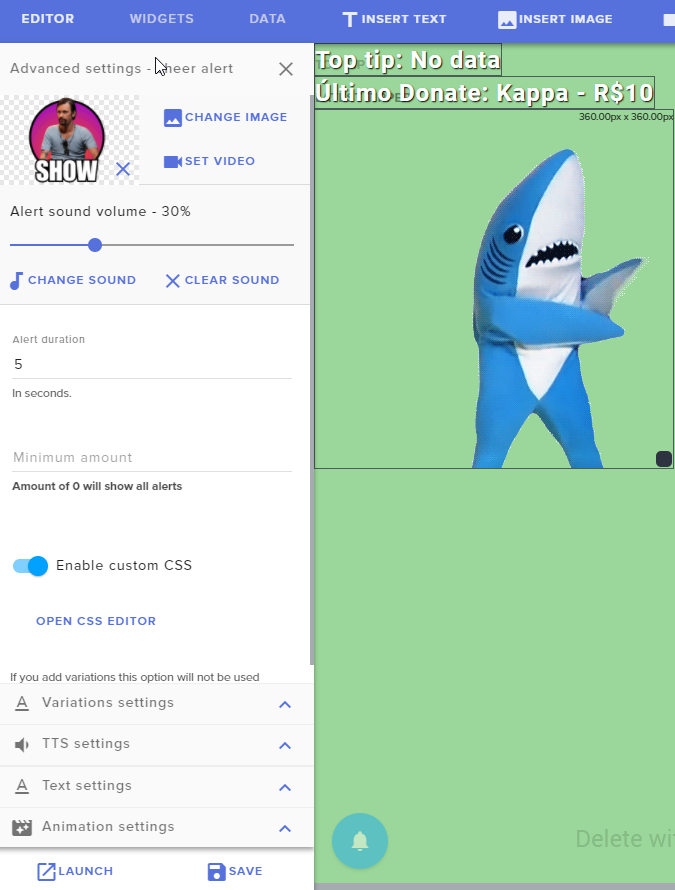
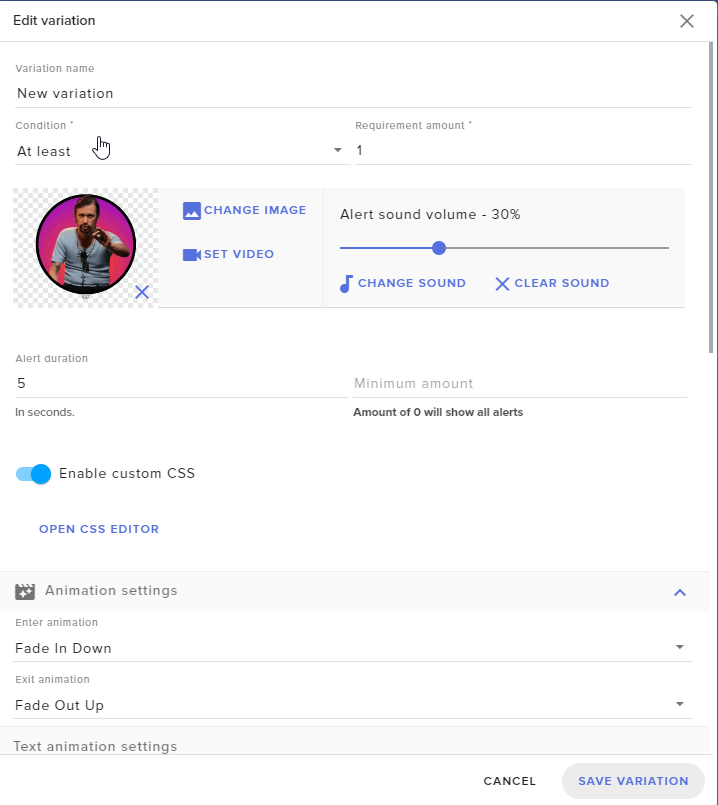
<@&382267076632379392>
dense jackal
When you make a new alertbox do you have the same issue @elfin flame
elfin flame
You mean another alert or another widget?
Because i had no problem changing other stuff, just the cheers that are having issues
dense jackal
Another alertbox widget altogether, for testing purposes, cheers seem to be working fine when I just tested them
dense jackal
🤔 on the new alertbox you aren't hearing the default sound?
and seeing the normal bit?
elfin flame
Well, it worked with another widget
I'll just put it above the other
And unmatch the cheer function of the bugged one :v
dense jackal
I'd have to get into your account to check, maybe some weird box is checked or something, that should work from now on tho
weary terrace
does steam elements have anything against streamers advertising the site on a twitch panel??
this is a great platform and I think more people should know about it
weary mist
We have no problem at all. In fact, let me get you some of the assets you can use
weary terrace
thx
weary mist
@weary terrace https://strms.net/assets
 supple aurora
Hey guys, I'm adding a sub goal widget to an overlay, and it's displaying a number of "current" subs for my channel that is way higher than my actual subs
Any idea why that could happen? Something on my end I can adjust?
ooooh wait
I think I can fix it 😃
weary mist
Haha, yes. The sub goal widget counts the number subs that happen, not your current sub total
 pulsar lichen
What is the best way to keep tabs on chat/viewers that stays up-to-date. Chatty doesnt seem to refresh like... almost ever...
fierce trench
how do i use the stream elements ended stream when for twitch it asks for a file
marsh mango
@Neospykx#2630 dont trust @weary mist hes a wizard.
marsh mango
@weary mist how long you worked at hogwarts?
weary mist
@pulsar lichen I never have issues with Chatty, most of the time it seems ahead for me. But you can use twitch chat, it has a popout feature. There is also Chatterino
@marsh mango shhhhhh
marsh mango
@weary mist oh yeah number 1 rule of fightclub.
weary mist
We don't speak about fight club
lament blade
Anybody to help answer a question?
narrow coyote
whats up
lament blade
Media Request
narrow coyote
its best to just post your question
lament blade
So when I am using Media Request, a user requests a song, the link is deleted and it adds a random Netflix Trailer... lol. Is there any way to allow links with just this command? I even tried to disable the link deleting filter and it still is deleting links.
narrow coyote
⤴ discussed in DM
 desert dome
So someone tries to donate to me and it wants me to link a bank but im only 15 and i dont have a bank so it just says pending
so i denied it and its weird
pine hemlock
Thats how paypal functions.
pine hemlock
They might have donated before with a paypal balance
the person this time probably used a card or their bank account so it might have caused the pending issue
pine hemlock
not positive then
hushed ferry
Copying my message from earlier as it went unanswered:
Last couple of weeks, when someone raids / hosts my channel, I get the SE alert, but the automated shout-out in chat does not seem to want to work? Any advice...I know awhile ago Raids / hosts kind of borked the SE system but had hoped that was fixed now.
 mighty hamlet
So, padding for the secondary text on the subs, cheer and tip alertbox does not work or it's bugged since I can't find the option, and I'm using Chrome this time (because I had the same issue with this but I was using Firefox and it was solved when I changed to Chrome)
nocturne pelicanBOT
@hushed ferry
Twitch doesn't have a "notification system" for hosts (unlike follows, subs, raids, etc.) so the only way for StreamElements to know that you are being hosted is to connect through you to twitch. This connection is made on:
- SE Dashboard page - https://streamelements.com/dashboard
- SE Activity Feed page - https://streamelements.com/dashboard/activity
- Ground Control desktop app - https://streamelements.com/groundcontrol
Please have one of these open during your stream in order to receive host event notifications.
hushed ferry
Thanks but SE Activity Feed is always open, your move @nocturne pelican
pine hemlock
Do you have the chat alert widget enabled? with the host alert enabled withhin it?
@mighty hamlet The options dont show for me either so im unsure.
I'll bring it up to the devs
 proven drum
Is there any way to import my settings from Stream Labs without using the Chrome extension?
elder sorrel
@proven drum Try this https://streamelements.com/dashboard/account/import
StreamElements
The Ultimate All in One Platform for Streamers
Not sure if this is actually an extension but to my knowledge being the best way to import 😅
proven drum
Ok! Thanks so much, I'll try it out.
elder sorrel
No prob. Hope this is what you're looking for 😃
mighty hamlet
@pine hemlock At least I'm not the only one, it sucks because I was in the process on renowing my whole overlay and alert system and now I can't xd
 deep burrow
am i able to enable text to speech for my tips?
narrow coyote
Yes, it is a setting in the alert widget, once you click the cog to go into the alert, you will see TTS settings
deep burrow
Thanks! 😄
narrow coyote
mighty hamlet
Does someone know if the padding bug, or whatever it is, is going to be fixed or what's causing the option to not work properly?
 indigo summit
I absolutely love getting my stream elements email after every stream of twitch, but as we all know, the revenue from subs in only half, so it's a little misleading when it says I made $25 from 5 subs, and it's really only $12.50. Anyway to get that algorithm to cut the subs $$ in half?
stuck hamlet
@indigo summit Different streamers have different splits, so we can't just divide by half, and we dont have access to that information. so we are pushed to put the full 5$
@mighty hamlet Which padding bug?
indigo summit
damn, also i didnt realize there were different splits, i guess i'm not in the "upper echelons" lol
ok thanks, I guess I just have to keep doing maths (sic)
stuck hamlet
Different splits start at like 50k or 100k. I wouldnt know exactly, cause i definitely dont have that much 
Followers that is.
indigo summit
ah yeah i have 1.5k so... lol
 fossil helm
May I ask questions here?





 fossil helm
Damn
indigo summit
thanX @stuck hamlet
fossil helm
9000 iq
stuck hamlet

fossil helm
lmao
stuck hamlet
Whats up Aero?
fossil helm
First off, nothing much, what about you?
stuck hamlet
Just chillin 😃
fossil helm
Nice
But because I am bored of regular gaming
And I’m basically a beginner
This YouTube video
Showed me
Stream elements
Which will help with most of the things with steaming, correct?
stuck hamlet
Correct
fossil helm
Ok, while I was looking at your support page, turns out I need to renew most of my equipment
But without doing this are you it’s still able to help me
stuck hamlet
Sure, what do you need help with?
fossil helm
I guess a few basic stuff with OBS, but not all, there seems to be a problem when I tested a stream, it didn’t really stream the entire thing, it just kinda froze a bit. I also need assistance with making my channel looking nicccccce instead of a bad looking channel
stuck hamlet
What are your PC Specs?
stuck hamlet
you might be able to stream minesweeper off of it
fossil helm
Minesweeper?
stuck hamlet
ye