#helpdesk-twitch
1 messages · Page 252 of 1
 stuck hamlet
or just command settings?
Custom commands here https://streamelements.com/dashboard/bot/commands/custom
Default commands here https://streamelements.com/dashboard/bot/commands/default
Variables for Coammands here https://streamelements.com/dashboard/bot/commands/variables
 carmine abyss
@stuck hamlet Yeah seems all good. I think i was too heavily modding my own donations lol
@stuck hamlet Dont stress im just glad it works tbh. Like i dont want people to not want to donate to me as they dont get the whole experience from it
stuck hamlet

 dull elm
Variable sorry
 timber atlas
could someone help me link my twitch and youtube together on stream elements?
its saying a already have a account and i cant merge them together since i signed in on two different accounts
dull elm
Thanks
 thorny nymph
I need help with the stream elements ground control. I need help with the song skip and resume it wont work
stuck hamlet
The current version of ground control is not supported with the Media Request, we know it is a highly requested, and we will be working on it and have a new version as soon as we can
 limpid rampart
Hey guys, i/we have a problem with streamelements for twitch. People changed their name and ever since they are not able to redeem anything from the shop, it always says they don't have enough points. Got any ideas how to fix that?
carmine abyss
hey team is there a known issue with the ground control hot keys not working with skipping songs notifications etc etc?
 summer mulch
@timber atlas Click this link: https://streamelements.com/dashboard/account/channels and add the channels you want to be under StreamElements (youtube, twitch)

StreamElements
The Ultimate All in One Platform for Streamers
 atomic hollow
@limpid rampart just tell them to log out and back in to SE so we can get their new name from Twitch
and as an FYI, their points dont carry to the new name so you will need to "give" them points via the bot
limpid rampart
Yea, we did give them their old ammount of points but it's still saying the don't have anough points. So I have to log out and in again so streamelements knows my new name? Lemme try it
summer mulch
@carmine abyss There was an issue but it's been fixed
limpid rampart
@atomic hollow it worked, thank you very much!
atomic hollow

carmine abyss
@summer mulch I cant seem to get it to work. I have tried different hot keys. I have closed and relaunched the app since setting up the hot keys. Tried various buttoins like f10, f11, f12
v1.4.3 is the up to date version?
atomic hollow
@carmine abyss sorry, its still not fixed on the live version, the fix will be released later today
carmine abyss
@atomic hollow Easy as thank! How do i update this? will it prompt me to update or?
atomic hollow
yeah, the update will be forced on all clients
carmine abyss
Perfectim sure i can manage that
timber atlas
@summer mulch this is what i get
summer mulch
@timber atlas That means you created another StreamElements account with that youtube channel
timber atlas
I didnt mean to i just tryed to link both together
anyway to delete one and get it working?
summer mulch
Unfortunately right now we can't revert things :/
timber atlas
welp rip
timber atlas
k
summer mulch
Sorry
timber atlas
its okay just was wondering a way to do this
lol
ill just be patting till then https://giphy.com/gifs/KZxe5hJimJWxdoK80k

😂
 sage wolf
Is the media request going back to the first song in your backup list then going to the next song in the list normal or a bug?
 gentle imp
@sage wolf make sure u don't have the option to skip song midplay when a request is done
sage wolf
I'll see if it makes a difference, just noticed with my backup list currently playing with zero requests that it'll start the first song in the playlist for 6-9 seconds then skips to what 'should' be the next song
gentle imp
I have that off and so far no issues, although I've been using Ground Control instead of site
sage wolf
Yeah I'm using Ground Control as well
I'll see what it does when the next song in the list rolls over
gentle imp
was supposed to have more issues with ground control but for me is the opposite lol
sage wolf
Yep that fixed it, so it's basically just a bug with the skipping
gentle imp
yeah could be, I never used it ^^
tbh doesn't make sense to me a song stopping mid-play just because someone made a request
sage wolf
Indeed
 dark patio
On media request the list of songs whats already on there can they be removed ?
gentle imp
on backup playlist or?
dark patio
it says they backup list
gentle imp
go to settings and delete the playlist from backup and songs should be gone
or just click the remove all button on the right side https://streamelements.com/dashboard/mediarequest/general
dark patio
ive tried the remove all button but it says 0 videos
there 25 pre added songs on there seems i cant get rid of them
ok some how the link showed up in backup list managed to delete them
gentle imp
yeah if it is songs from playlist, u need to remove the playlist from settings > backup playlist
glad it's sorted 😃
 ancient iron
having some issues with gifted subs, (using xsplit) real ones won't show on alerts test ones do, all other alerts work fine
 ebon forum
@ancient iron do you have a sub variation for the gifted subs in your alertbox?
ancient iron
yep and double checked nothing had changed and it looks fine
like i say test ones work
ebon forum
strange. generally Xsplit just grabs the link, if the test shows all sub variations going through, we need to dig deeper, this is definetly not your software.
ancient iron
ok thats good to know cause im going crazy here 😄
ebon forum
do you see the gifted subs in your activity feed? if yes, repeat the alert from there and check Xsplit
or the overlay in the browser/editor
ancient iron
yep have tried to repeat it and they dont work
follows etc work
when i repeat it the i do see it activate in the editor
ebon forum
so the issue is: you have gifted subs in the activity feed and you don't see the alert for them, but the test alert for gifted subs works?
ebon forum
if you repeat the alert, it should pop up everywhere
ancient iron
agreed it should
 cursive obsidian
help needed: my leaderboards extension is blank, I allready tried deleting mycoockies etc, tried to deactivate an activate again, nothing works... on mystreamlabs profile the leaderboards do work, but not on the extension ? what shoud I do ?
ebon forum
nah we do not like fixing that live, focus on the stream and i will have somebody look into that who has access to the dashboard etc 😃
ancient iron
roger that 😃
ebon forum
@ancient iron meanwhile use groundcontrol or activity feed to track gifted subs and scream for mods to poke you if you miss something 😛
ancient iron
heheh yea all over it 😃
 next spruce
Hey team - my hype cup isn't showing any of my custom cheermotes in the hype cup? 😦
same with the normal bits as well right now
 midnight topaz
I have a question
I'm changing my theme to the Red Lines one
cause it suits my monitor resolution (1920x1200) so I can fill part of the black gap with the side pannel
my question is, is it possible to get one of the files, so I can edit it, cause it has to camera windows on it, and I pretty much can't use the 2nd one
or is there one with one of the windows removed already
gentle imp
you can hide the camera image that you don't want, on layers
midnight topaz
it's the one on the talk scene
the whole left side is one file
with 2 camera openings and the chat part under them
so I can hide the whole left side image as one
 gentle imp
but there is one with just 1 camera image
or u can copy from brb and/or stream ended overlays
gentle imp
hmm I see what you mean
gentle imp
aww awesome Kireaki 😃
 ripe herald
just download this and replace with that one you have
midnight topaz
ok, ty
ripe herald
np 👌🏻
 silver patio
I added a custom tip to my tip list, it wont get added to my donation goal?
 dense jackal
did you add it as an imported tip? regardless you can go to activity feed -> widget data and edit your donation goal to the correct amount @silver patio
 obsidian frigate
So first of all im wondering what the difference is such as does stream elements have a page where i can view notifications, chat and so on instead of using an external source?
dense jackal
https://streamelements.com/dashboard/activity but we also have an external source @obsidian frigate 😃
obsidian frigate
that is good but is it possible to see my chat and notifications on the same page or would that be on your external source?
dense jackal
Chat is coming soon to our external source, and hopefully that page as well
obsidian frigate
well either one would be good as i have 2 monitors one for the game and one for chat so any time i get a notification its annoying to have to tab out to see it do you have a set date for when it's coming or is it all still in the works for now?
dense jackal
No ETA but we are rewriting our a lot external source atm
stuck hamlet
@obsidian frigate You could just pop out chat and activity https://www.onslaught.ca/s/iw9elhgm.png
 ebon forum
@obsidian frigate there are transparent chat clients that can be placed above your main game, so you can stream with 1 monitor for a while without alt-tabbing.
obsidian frigate
thank you guys
 icy light
Okay so im trying to make overlays and I was thinking, is is possible for someone in chat to type like "!hype" for something to pop up on screen? or even better link it to when I win a game? Thanks 😄
dense jackal
You can't really link it to when you win a game, because we would have to have some kind of connection to said game, but you can create a sound effect/store redemption then create a command like this one
(hype would replace 'happy' as long as you name your store item hype) @dec_117
 lament blade
how would I go about having a soundclip play when someone does a certain command? same for having a soundclip play for a notification
dense jackal
for a command check what I just said above ^ for alerts you have to go into your alertbox settings
icy light
Yeah I was hoping there was a way to skip the !redeem part, still really cool, I couldnt do this at all with old bot so Ill take it for sure ❤ thanks @dense jackal
dense jackal
icy light
thanks a bunch!!
 cinder lotus
Hey, I have updated my nickname on Twitch and now the stats page won`T load (it is still under the old nickname though)
dense jackal
Try relogging into your StreamElements account
cinder lotus
still not found
 hushed quail
When you rename, you lose your stats, if you mean Twitch stats.
cinder lotus
so !chatstats will only show something after my first stream?
right now I can still see the stats under the old nickname but the new nick is 404 no site
 serene granite
@cinder lotus what's the old user and the new user? we can fix that for you
cinder lotus
nothing big but I am checking right now if everything is working
the store page e.g. is loading without a problem
Although still saying: FURO_'S PROFILE
twitch.tv/furo
😛
dense jackal
It's a common bug, we will see what we can do
cinder lotus
great, so the rest will be ok or anything else that I might have forgotten?
 clever mango
Fixed 
cinder lotus
nice ❤
cursive obsidian
Still have the problem with blank leaderboards extention 😦 ... I tried relogging, resetting, re-activating, deleting coockies,.... nothing works
clever mango
@cursive obsidian which channel?
I'll have the extension dev take a look at it but the extension needs to be in the panels assuming it's twitch.tv/mrnev3ts
cursive obsidian
@clever mango I deleted the tab because its not working anyway,but its lhttps://www.twitch.tv/mrnev3ts

I'll put it back in
@clever mango its back in the panel 😉 thanks in advance
clever mango
I think I see the problem... that's a streamlabs panel
cursive obsidian
@clever mango omg hahaha youre right 😂 sorry
clever mango

cursive obsidian
now its working hahaha :p lol
cursive obsidian
That was so dumb 😂
 safe kettle
2 Questions. First, How do I get my stream to automatically broadcast on the sellout channel? 2nd, My top tipper changed his twitch name. For some reason his old name is still being recognized on the tipper list even when he makes a new donation, which shows up on the in game overlay for top tippers. Is there a way I can fix it to make it his new name?
 brave lintel
<@&382267076632379392> Any updates on my error from yesterday? Account name is texblaster. I very curious to see how this plays out
 nocturne pelicanBOT
@safe kettle Are you a StreamElements all-in-one streamer and interested in stream promotion when you go live? Please fill out this application https://strms.net/sellout and if you meet the 3 requirements posted in the :pushpin: pinned message in #general you will be added to the stream announcements.
dense jackal
@proud pumice @strong mason#7807 ^Couldn't sign into our website through his account? I believe we thought it may have been on tiwtchs end and we messaged the devs to see if we could make a breakthrough to our servers
brave lintel
@proud pumice @dense jackal I just tried it on a different computer, and I got in. I think I know what is happening
 proud pumice
Tell us
dense jackal
anti-virus 🤔
brave lintel
I use a program called CovenantEyes on my computer. It tracks internet history and has a filter. I've had issues in the past where it will block certain websites or applications that it deems as "mature". For instance, it has prevented me from joining Rocket League matches. I think we might be getting a similar issue
Which is why I couldn't connect to StreamLabs either. It must be blocking the communication between my Twitch account and StreamElements, or any other similar platform
 tight harness
That does indeed make sense 😮
nocturne pelicanBOT
@safe kettle Are you a StreamElements all-in-one streamer and interested in stream promotion when you go live? Please fill out this application https://strms.net/sellout and if you meet the 3 requirements posted in the :pushpin: pinned message in #general you will be added to the stream announcements.
tight harness
@safe kettle That's the answer to question 1 ⤴ I'll look into question 2 in a moment, we're mid-meeting at the moment
safe kettle
no problem thank you for the response
 inner wedge
Is there a way to block a donator through streamelements?
tight harness
Yes, when you go to tip list you can ban that email from tipping, if they haven't tipped but you know their email you can add a tip with that email manually and then ban it then
inner wedge
Thank you!
 normal igloo
 stuck hamlet
?
normal igloo
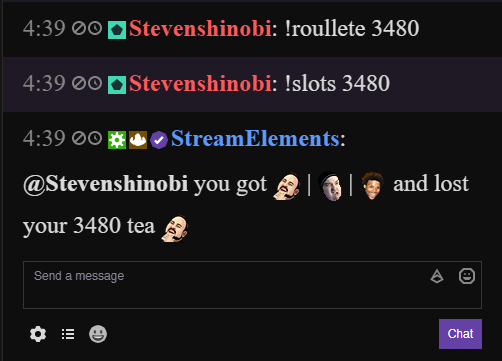
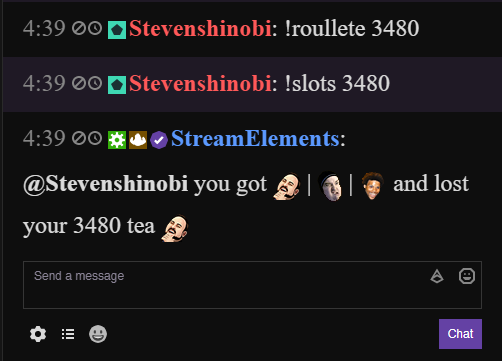
@stuck hamlet !roullete again 
 normal igloo

stuck hamlet

atomic hollow
!rulet
 dense beacon
Just wanna ask you guys. If you know if there is a way to do so. But it's annoying when people post their links to their twitch channel but I want them to link clips and etc.
clever mango
whitelist clips.twitch.tv/
dense beacon
In twitch or streamelements?
clever mango
in the link protection filter with StreamElements
dense beacon
Thanks I will take a look ❤
 narrow coyote
dense beacon
narrow coyote
dense beacon
Yeah I found it. Thanks ❤
narrow coyote

dense beacon
Whats the best stuff to blacklist and whitelist? 😄
narrow coyote
really depends on what people are trying to post, and what you want them to post
with link protection enabled, it will only allow through whitelisted links
 fiery ridge
Hi ! is there a way to create a que for viewers to be selected turn wise ?
tight harness
@safe kettle Sorry for the delay, wanted to see if there was an easier way than I suspected, it goes off of the email they use, so you could rename all of the tips from that person if you edit them
 weary mist
@fiery ridge Sure! Set up a Stream Perk (using the stream store), and they will be added to the redemption list. You then approve the redemptions as you play with that viewer, so you always know who is still in line to play 😃
 pulsar gulch
Hello
I'm not able to change the font or to do text settings on my " Followers Goal " bar
dense jackal
are you using chrome @pulsar gulch ?
pulsar gulch
yes
dense jackal
maybe someone on pc can help then, i’m on mobile currently
@weary mist @narrow coyote
 jade mortar
Hello! I'm sorry if this has been asked already but I wasn't able to find an answer. I've been having trouble with my Chat Alerts Module. I have a simple welcome message set for new followers but whenever that happens it doesn't show the viewer username. I'm not sure how to use the variable for the username, I've tried ${user} but that didn't work. So how should I set it? Thanks in advance!
 unique robin
Hello guys I have a big issue. 😦 Everything works good with xp;lit but I can't see the alerts, none of them. Can you help me?
 west gull
narrow coyote
west gull
narrow coyote
I'm at lunch at work, so I am on mobile right now, I can look at stuff when I get back to my desk
safe kettle
@tight harness ok ty
unique robin
@west gull exactly, it is so weird
everything work but the alerts. I tried to create a blank overlay and put only the alert on it but northing too
lament blade
how would I go about having a soundclip play when someone does a certain command? same for having a soundclip play for a notification
narrow coyote
If you are on the most recent version of xsplit, they have a known problem with their browesr source that has been causing problems for users
weary mist
⏫
 dry hare
release build or PTR build?
unique robin
of course this happen only on xplit because on obs it works
narrow coyote
Most xsplit users have had to roll back to the previous release. Xsplit is aware of the problem, and are looking into it. I don't remember the version numbers off the top of my head, but if you search this discord for xsplit, should be able to find the previous posts about it
unique robin
oh thank you 😃
narrow coyote
ebon forum
3.2 should work when it comes to Xsplit. Got a report of overlays freezing after a gifted sub, refreshing works, but this is better than being borked completly 😄
weary mist
@jade mortar Let me look into that
unique robin
Do you guys know where I can find the older version?
narrow coyote
@pulsar gulch What problems were you having with the text on your follower goal? Testing this the font is changing fine for me, unless you are having an issue with a specific font
weary mist
@winter zenith or @ebon forum might know that answer @unique robin
unique robin
found it but still have the problem 😦
narrow coyote

Unfortunately, I am useless when it comes to xsplit, I just know that they have been having serious problems with their browser source
narrow coyote


 winter zenith
Okay but you didn't experience studders/freezes mid animation?
narrow coyote
@jade mortar try using just {user} in the chat alert message
jade mortar
Thank you @narrow coyote and @weary mist. I'll try that out during my next stream and I'll let you know if anything goes wrong. Cheers!
weary mist
👍
narrow coyote
@lament blade You could create a sound effect store item and have that in your command. For example, if you have a redemption item DankSound you could make a command that has a response of ${redeem DankSound}
lament blade
thank you! @narrow coyote
narrow coyote
lament blade
is there any way to stop the bot from responding when they're redeemed
like - ModeratorVerifiedStreamElements: @SparklingWrackspurt you successfully redeemed Nosey for 0 nargles.
narrow coyote
 I am not sure if you can hide the redemption notification from the chat. For a custom command, you can go into the advanced settings, and change the "how should the bot send the message" and you can change this to whisper, but it still might show the redemption message
It looks like it has been mentioned in this idea post https://streamelements.helprace.com/i191-allow-more-customization-to-default-commands
ebon forum
@unique robin Xsplit version 3.2 clean install will work with alerts. Confirmed here, no freezes outside of gifted subs.
narrow coyote
You can start by picking and generating premade overlays with the themes https://streamelements.com/dashboard/themes or you can go to https://streamelements.com/dashboard/overlays and create a blank overlay
 noble flare
I did that
narrow coyote
once you have an overlay configured, you can then add it to your broadcasting software
!add
nocturne pelicanBOT
To add your overlays to OBS, add a new browser source in your scene. Paste your overlay URL in the browser source properties, set the dimensions to 1920x1080 (unless you changed them on the website), and :ballot_box_with_check: “Shutdown source when not visible” https://youtu.be/KDvLynUqXI4
noble flare
I use mac lel
narrow coyote
ok, so download OBS for mac 
ebon forum
It is the same on OSX, just download OBS Studio for OSX and be happy. 90% of settings are the same
hushed quail
Open Broadcaster Software is free and open source software for video recording and live streaming. Stream to Twitch, YouTube and many other providers or record your own videos with high quality H264 / AAC encoding.
noble flare
Okay so the settings are the same
No i got the program
Thing is i didnt know how to use it
But ty guys
ebon forum
well there are great guides on OBS, half an hour on youtube should get you up&running.
noble flare
Okay thank man❤️
hushed quail

Setting up StreamElements is easy, learn how to in this video, hosted by Twitch Partner GIRLvsDUMB - Got any questions, or just want to say "Hey"? Join our D...
This may help.
noble flare
Ty
 grizzled sail
Not sure if this is where I should ask since it's a question about Ground Control but my media keys aren't working as hotkeys for pausing/playing or skipping tracks. I've tried rebinding them in the settings and my keyboard (corsair k70) is up to date
ebon forum
@grizzled sail this will be fixed with the next GroundControl update. Due to changes to MediaShare the mediakeys are not working right now.
grizzled sail
got it, thanks!
 dawn venture
can anyone help me with a question
weary mist
only if you ask the question @dawn venture
dawn venture
I added the kappagen widget for stream elements for the emoji explosion. They work form Followers, Subs, Hosts, Raids but not for cheers
when I use the test feature option it shows up on the url page, just not in OBS
weary mist
Hmmm, so something is stopping the images from showing up. I do know that the cheer's one use the actual cheer image
dawn venture
I am trying to use the Kappagen widget feature that rains down emojis. It works for every type of alert but cheers
on cheers it shows it exploding and raining down on the web page but it doesn't come thru on obs. I want to use the feature it is there as an option.
I'm trying to figure out how to get it to show like its supposed to
dawn venture
do you have a solution?
weary mist
The cheer ones are a bit different than normal because they use the actual image twitch has assigned. Sometimes those are blocked by anti-virus softwares
dawn venture
if that were the case then none of them should work
weary mist
I have had that same situation when testing from work and testing from home
Work didn't allow the connection to twitch, so I didn't get any cheer emote images
But everything else worked fine
The cheermote images come from a difference source that some programs don't like
dawn venture
another thing that I notice is that the emojis that show up in the emulator are not the same ones that show up in obs which is fine
but I'm not getting any type of program conflict and I'm at home
is there anything I can do to resolve this?
weary mist
I am working on that
it takes more than a few minutes to test things and see what is wrong
@dawn venture just to verify, are you using OBS classic or OBS Studio
dawn venture
I'm using OBS Studio 20.1.3
weary mist
ok, thanks
dawn venture
np
tight harness
21.1.0 is the latest I believe 😃
Cheer kappagen events use the emotes used in the cheer message rather than the ones you set, that's normal
dark patio
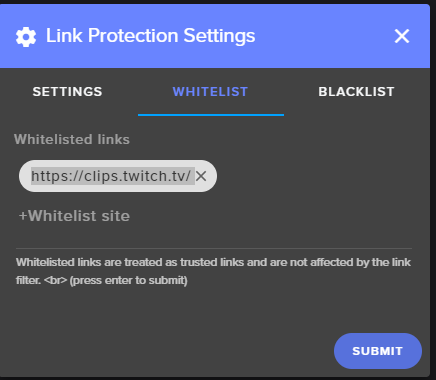
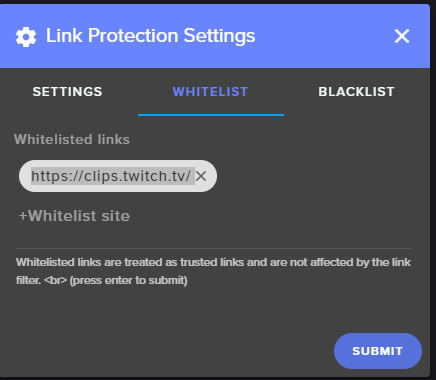
I need help with whitelist section when i add link to that section and says success added to filter but when i go back into the whitelist does not show whats been added ?
narrow coyote
did you hit enter after you entered the URL?
after you enter the URL, hit the enter key, should look like this
once you see them added there, press submit
dark patio
do i put all the url or only the part you need
narrow coyote
not sure I follow, what are you trying to whitelist?
normal igloo
@dark patio only the part you need so like https://clips.twitch.tv/
i' just did it https://i.gyazo.com/8969ee72c5807e665aedcf2f177ccb8e.png
 dark patio
thats what i put in but nothing
 vague cloak
can you change the name of the streamelements bot in ur twitch channel
nocturne pelicanBOT
@vague cloak Custom bot name requirements
- StreamElements bot modded and in chat
- Active overlay with alerts
- StreamElements tipping page in the panels below the stream (!panels)
- Create a twitch account for the name you want to use
- Ground Control app must be running
Steps to enable custom name
- Sign in to https://twitch.tv with the bot account
- Install and run Ground Control (!gc for download)
- Visit https://twitchapps.com/tmi/ and generate an oAUTH token
- Copy/paste everything in the box to Ground Control oAuth settings and enter the name for the bot account
- Restart Ground Control (custom name may take a few minutes to take effect)
vague cloak
thanks so much
narrow coyote
@dark patio did you hit your enter key after entering the URL?
@vague cloak no problem, let us know if you have any questions, or issues with the process
vague cloak
is there any programmable commands or normal commands that you can setup with fortnite
like a win counter or something
or games played that day
narrow coyote
you could create a win/death counter, there is an example of this in #command-share
you could take that template and apply it to games played, wins, death, anything with a count really
 vital garden
HELLO. I HAVE PROBLEM. WHENEVER I TYPE A COMMAND IN A FRIENDS CHAT I GET NO RESPONSE. WHEN I SWITCH TO MY 2ND ACCOUNT I CAN SEE THE RESPONSE JUST FINE. THE BOT IS NOT BANNED ON MY ORIGINAL ACCOUNT. ANYONE KNOW WHAT THIS COULD BE?
narrow coyote
No need to yell
winter zenith
^
narrow coyote
sounds like the bot is being ignored
vital garden
JAYVSGALAXY

 inland estuary
So once I have an overlay link, what do I put it into OBS as?
vital garden
Thank you! sorry for "yelling" its jus how i type
nocturne pelicanBOT
@inland estuary To add your overlays to OBS, add a new browser source in your scene. Paste your overlay URL in the browser source properties, set the dimensions to 1920x1080 (unless you changed them on the website), and :ballot_box_with_check: “Shutdown source when not visible” https://youtu.be/KDvLynUqXI4
vital garden
Thanks again! =]
weary mist
👍
narrow coyote
winter zenith
 tidal swallow
Is there a way to set up a command so that it only plays a sound clip and doesn't actually post in chat?
weary mist
of course
go into the editor and either hide or delete the widget @inland estuary
@tidal swallow as far as I know, there is no way to set that up right now.
tidal swallow
Aw lame. 
winter zenith
uhm you can do it wit Soundeffect I think
inland estuary
ok
winter zenith
and only make them optainable via Store
weary mist
it still gives a message
winter zenith
oh
weary mist
ohhh
narrow coyote
@tidal swallow There is an idea that mentions adding something like this https://streamelements.helprace.com/i191-allow-more-customization-to-default-commands
winter zenith
weary mist
because he wants it accessable via command
normal igloo
@narrow coyote i fix it for @dark patio him not not do enter
 misty void
Hello, im trying to see if someone can help me, im trying to see how to properly add a backup playlist in streamelements, when i post the url in the music section it said it cannot be added
weary mist
@misty void 99% there is a field on the settings page that is empty
tidal swallow
What's soundeffect?
weary mist
get a value in all the fields, and it will save
misty void
@weary mist what do you mean?
narrow coyote
@OMGITSJAMESPLAY#0489 
weary mist
@tidal swallow Through the stream store, there is the option for sound effects. You can create one there, and have it only redeemable through the store, which will not cause a chat alert. But if you make it redeemable via command, it will have a chat alert
@misty void the page will autosave
tidal swallow
Hm, not really what I'm looking for. Trying to give subscribers personalized commands so store wouldn't really be ideal. Thanks anyway, though.
misty void
so how do i fix it?
weary mist
@tidal swallow that is something we have been requested on our Ideas page. you could go there, upvote it, and you will get notified when we start progress/release it 😃
tidal swallow
The ideas page someone sent isn't really what I want either. Do you have a link to a better one?
weary mist
@misty void start at the top of the settings page. If there is an empty text field, put in a value to fix it. Once they are all full, you will see a little saved dialog pop up. That is when you know it is working
@tidal swallow I can look
misty void
@weary mist ok ill try that
weary mist
@tidal swallow this is the one you want: https://streamelements.helprace.com/i485-option-to-set-a-command-to-be-limited-to-certain-users
with this feature, you will be able to limit certain commands created to just one or more users
misty void
it worked you are a genius!
tidal swallow
Okay, but what about making the command a sound clip? I'm not seeing anything about that. I can make commands just usable by subs now, so I don't really need this exactly.
weary mist
The store already does that part
The stream store allows you to put in sound clips, and you can make a command out of the stream store item
its more we provide certain parts of what you want, and the other parts just need to be created
tidal swallow
I'll go take a look.
If it's on my store, won't anyone be able to just see it and use it, though?
weary mist
It depends. If we can get it so commands are user specific, it should be simple to then turn that code onto the store items. We just need people to show that its something thats wanted right now
this one can go along with it: https://streamelements.helprace.com/i184-more-stream-store-redemption-limit-options
@tidal swallow
tidal swallow
Eh, this really isn't going to work. I put in my own idea on the site.
Thanks for the help.
narrow coyote
if you posted an idea, you should share the link in #💭︱feedback-and-ideas
 short harness
Does streamelements have donations text to speech?
narrow coyote
yes, you just need to enable it
tidal swallow
Thanks for the tip @narrow coyote !
short harness
Thanks any idea where it is located to enable?
narrow coyote
in the alert widget, click the gear next to donations alert, you will see this in there
short harness
Ty
narrow coyote
 icy dagger
media request is not working for me at all 😦
I have the overlay open, and added the widget but when I click on the show on stream button it does not detect it
 clever void
Is there a support agent online?
brave lintel
@proud pumice I uninstalled and reinstalled Covenant Eyes, and all the issues are resolved. So it was some glitch in that program, and not on your end
weary mist
@clever void, if you tag <@&382267076632379392> AND ask the question, someone will answer ;)
@icy dagger I'm not home, so I can't test, but @clever mango might be able to point you in the right direction
tight harness
@strong mason#7807 Thank you very much for the update 😃
 indigo roost
@tight harness No, it won't even put them into the queue, from the setting the links should work, and have worked, I didn't change anything.
tight harness
Hmm?
clever mango
@icy dagger Where are you not seeing it? Overlay editor? OBS? Are both of these open?
icy dagger
I am not using OBS, using Xsplit and when I click on Show on stream, it does not play on the overlay editor like in the tutorial video, even when I launch the overlay, it says it doesn't detect the active widget
clever mango
And what is happening after it says it can't detect the active widget?
There is an open issue we're trying to diagnose which is why I'm asking these questions. We're attempting to replicate the issue.
proud pumice
What is that program?
icy dagger
it just goes back to playing the video on the media request main screen
where the queue and stuff is
clever mango
Ok, have you had the default streamelements tutorial video begin playing randomly at all?
icy dagger
I tried it with the default tutorial vid and a random vid in youtube with no avail
clever mango
Ok, so the widget has not worked at all yet for you?
icy dagger
yes, not at all
clever mango
Thank you. I don't have an answer or solution for you right now as we're trying to diagnose what is happening but please check in with us tomorrow about this.
icy dagger
ok thanks
stuck hamlet
Can you try removing the widget from your overlays, hitting save, refreshing the page and adding the widget back? Then hitting the "show on stream" button @icy dagger
 gray steppe
had a question about how viewrs earn points
wasnt sure if it was by them being active viewers, like watching the stream, or if anyone who simply visited the webpage got points for the time im live?
curious how that works and if its required to have the stream playing
weary mist
They have to be showing your viewer list, every 10 minutes. They have to be there at least 10 minutes
gray steppe
points being the currency for giveaways and such
kk thats what i thought, so not required to have it playing. ❤ ty
weary mist
Twitch doesn't give us a way to detect if they're actually playing the video or not
gray steppe
curious if theres a system out there for that tho
oh
figured as much, iv googled and coudlnt find anything
icy dagger
@stuck hamlet, I have removed it and readded it like 5 times already and still nothing
icy dagger
Kanza_TV
clever mango
Which browser are you using @icy dagger ? And version # if you know it
 icy dagger
@clever mango I am using Firefox, let me check the version
stuck hamlet
let me know the result
clever mango
I'm trying FF now
stuck hamlet
Can you refresh all the StreamElements pages your on?
icy dagger
it's firefoz v 59.0.2
clever mango
Hmm It's working here in FF
icy dagger
still nothing, don't know what it could be
clever mango
ok, refresh your editor and free F12
icy dagger
ok done
clever mango
click on console at the top and look for any errors when you send the video to the editor
icy dagger
The connection to wss://realtime.streamelements.com/socket.io/?EIO=3&transport=websocket was interrupted while the page was loading.
clever mango
Ok thanks. We'll look into it further here and have the devs take a look into this tomorrow.
Sorry about the tech difficulties and thanks for your help!
icy dagger
thanks
stuck hamlet
I'll love for you to open the overlay in a new tab, and see if i send it, if it shows up for you 
stuck hamlet
Is it there?
icy dagger
nope, it says errors on the console again
Firefox can’t establish a connection to the server at wss://realtime.streamelements.com/socket.io/?EIO=3&transport=websocket.
59ba90de-7e1f-481e-aac1-3267193ec561:164:43
The connection to wss://realtime.streamelements.com/socket.io/?EIO=3&transport=websocket was interrupted while the page was loading.
59ba90de-7e1f-481e-aac1-3267193ec561:164:43
Firefox can’t establish a connection to the server at wss://realtime.streamelements.com/socket.io/?EIO=3&transport=websocket.
tried it on chrome, same thing
stuck hamlet
Alright, this leads me to believe it would have to be your connection. but we'll have to wait for the devs tomorrow, as terra mentioned.
Unless you feel like pulling it up on your phone 
icy dagger
I'm gonna look into it further
 calm arch
Hey, I was streaming earlier today and someone sent a donation but it didn’t trigger the alert and it doesn’t show in my dashboard
weary mist
im looking right now
@calm arch when this person sent you a tip, did the money end up in your paypal account?
calm arch
It’s pending in my account @weary mist
icy dagger
@stuck hamlet it suddenly started working
stuck hamlet

icy dagger
and it wasn't me cause I did nothing
weary mist
@calm arch that is the reason. Until its complete, the API doesn't send a notification to us
calm arch
Oh okay was making sure
icy dagger
the weird thing is, it works on the editor but it doesn't when you launch the overlay XD
sage wolf
Is it normal to try clearing the backup playlist URL from media request and it just reverting back to filled?
 solid sun
Hello, I'm attempting to setup stream elements, because my friend BobCalvery recommended it. So.... How do I? I'm kind off mind-boggled on this. Thanks 😃
Nevermind, I've looked into it, and figured it out!
 slow dragon
Good evening, I am trying to turn on my song request chat command and it says it is controlled by the module settings, but it is not listed in my modules. Anyone able to help?
 pine hemlock
https://www.cuda.live/s/fq9748te.png
Located on: https://streamelements.com/dashboard/mediarequest/general
 slow dragon
Now I feel I missed something soooo easy to find..... I do appreciate it
pine hemlock
@sage wolf Make sure there are no blank fields anywhere in the media request settings
carmine abyss
Hey team was wondering if the update for gound control has hit yet as i still cannot control my music through it with the hot keys
narrow coyote
It has not, when it does it will be shouted about in #announcements
 graceful star
Quick question, is there a way to disable SE from sending a notification on the chatbox when people redeem their points for sounds?
pine hemlock
@graceful star To my knowledge, no
graceful star
Hmm 
narrow coyote
There was a post on the idea page, but I am having trouble getting to it
 elder pasture
So when I copy my overlay link into OBS it shows everything but the box that's supposed to be around my webcam...anyone know why that could be?
narrow coyote
Open the overlay in the overlay editor, and ensure the webcam is not hidden in the layers, it is most likely marked as not visible
elder pasture
yup that was it thanks 😃
narrow coyote
elder pasture
now to get it to match the exact size of my camera...unless there's a way to get the exact size dimensions from obs
narrow coyote
you should resize the camera in OBS to fit the frame
Once you add the video capture source in OBS, when the source is active, you will see a red box around it with control points, you can click and drag it to the size to fit the overlay frame
 digital olive
hey! where is the option to part the streamelements bot from my channel?
tight harness
On the right of the dashboard page
elder pasture
this is so much better than what i was using before
do you have to manually put in the top tip then tho when it happens?
tight harness
No, it's automatic
elder pasture
hmm when i emulate tip it just goes into the recent donation not the top tip part of the overlay
tight harness
What did you set your top tip widget to? Session, weekly, monthly or all-time?
 summer birch
so after i add the alerts to my overlay on elgato, how do i activate it?
elder pasture
it is set to session
tight harness
@elder pasture Session means current stream only, was that intentional?
elder pasture
oh so it just won't work for testing, i actually have to be streaming to see it
tight harness
@summer birch Elgato? We don't have any Elgato integration yet 
@elder pasture Set it to something other than session and it'll update if you have tip data, yeah
Just tested it
Right, time for me to sleep, it's almost 3 AM here 
 proper salmon
Is there a way to get the Twitch chat widget overlay to not clear the chat history with scene changes in OBS?
narrow coyote
 I think the only way to do that would be to have it in an overlay that does not have it set to shutdown when not visible
so if you have it in an overlay it alerts or other noise makers, you could separate these. You would have your noise makers in one overlay so you can have it set to shutdown source when not visible, and then your chat widget, and other widgets that dont have sound in a second overlay and this would be set to not shutdown the source. This way it will always be connected to the chat, even when you change scenes
dry hare
That’s something for #💭︱feedback-and-ideas @proper salmon
Definitely. Persistent chat across overlays
If it’s possible
if
narrow coyote
It would be better for OBS to make it so you could set a browser source to be muted when not visible. That would take case of this, and scene transitions
proper salmon
Definitely
clever mango
😏
lament blade
Hey, I have a Q about streamelements overlay command is it cool if someone could help me?
narrow coyote
Ask away
lament blade
Hey, on the alert section. What is the line I have to write to say that 'X' gifted a sub to 'Y'? {name} is the name of the person but how do I write that command??
narrow coyote
For what, the chat alert module?
lament blade
Yeah the AlertBox widget... on the subscriber section.... add a new variation, gift variation to show who gifted the sub to who
narrow coyote
There is already a variation for this
lament blade
Thank you, I accidently deleted that hehe
narrow coyote
 no problem
 round geyser
Was just using the random.chatter for a command, and i'm getting this:
Any solution to that?
(there's deffo chatters)
narrow coyote
When was the last time you used this command? Twitch chat list servers have been having problems the past few days
round geyser
Just now, was running it in an active chat
narrow coyote
I guess I should have asked when was the last time you saw this command work?
round geyser
Oh, i haven't. I literally just created the command, and deleted it again because it didn't work.
narrow coyote
I think this is going to be related to the problems twitch has been having with their chatter list servers.
round geyser
Gotcha. I'll just wait it out and create the command at another time. Thanks for the heads up.
narrow coyote
no problem, you can check up on the twitch servers at https://twitchstatus.com/
 stone spire
is there anyway to find the date of your first stream?
 marsh mango
My !so command just up and stopped working can anyone help me with that??
 young pebble
Can someone help me set the resolution down from 1080 to 1050 for a premade overlay?
nvm
 royal quarry
Sorry to bug you guys but I'm having a weird issue that I'm quite sure is setting related
I haven't changed any settings in StreamEle, or OBS, but today for some reason all my alerts echo, it wasn't doing this last night. Is there a way I can remedy this? Obviously it's very bothersome for my stream 😛
I've ensured that I do not have duplicate alert boxes on the overlay, and the stream elements sound is muted, only getting sound through OBS, however for every alert the sound echoes now. This has changed overnight. o_O
lament blade
when will the chatstats work again for people who change their name?
clever mango
royal quarry
Any ideas about my sound issue? I'm trying to troubleshoot as we speak, it simply plays twice.
lament blade
why does it works now? Oo but i still cant change the settings @clever mango
and the topchatters list is very old, all these people who stay in the list i didnt see since over 6 months in my chat
clever mango
@lament blade Because I migrated your old stats to your new channel. The settings are disabled right now. The stats are old because nothing has been collected under the new name. Stats are now being recorded again for your channel.
lament blade
ok and why are the settings disabled? ^^
clever mango
It's still being worked on. When it's finished, users will be able to change their settings.
@royal quarry Are you sure that all overlays in your streaming software are shutting down when not visible?
Is the overlay editor open?
royal quarry
No even earlier tonight while I was streaming, that's how I discovered it. Now I'm trying to fix it but I can't ... very bizarre issue.
I haven't changed any settings at all.
lament blade
oh ok, thought thats a bug too cause of the namehange. is it possible to reset the stats page to complete 0 @clever mango ?
clever mango
Please check all of your browser sources in all scenes to make sure they all have the bottom box checked https://i.imgur.com/6bWXxjR.png
 royal quarry
Yep it's done on all of them, I have all streams and otherwise all audio sources muted aside from obs and the sound echos, ONLY for alerts
clever mango
@lament blade I will ask and get back to you
royal quarry
I don't have duplicate copies of the alert box in my overlay, so not sure what's causing it. Even with the sound muted it echoes in OBS.
clever mango
sound muted where?
 lusty yacht
What’s the limit on the backup playlist?
royal quarry
Any video sources
royal quarry
Testing the alert box sounds in overlays with obs closed, there is no echo.
I open OBS, mute the sound for the streamEle editor and the sound plays twice about 1 second apart on OBS
royal quarry
It still plays twice
clever mango
you only have one scene?
royal quarry
I only have one open scene
I'm not using studio mode
Like I said earlier, this changed overnight, I have never had this problem before. I have changed no settings in the past 48 hours that would affect this.
Dying to fix it... can't really stream otherwise
The sound alert plays twice, and only when OBS is open, it's weird as hell.
clever mango
check every scene
every source in every scene
there has to be an overlay that doesn't have shut down source when not visible checked
royal quarry
They're all checked off
clever mango
have you restarted OBS?
royal quarry
Yes, restarted OBS, my PC, logged in and out of stream elements, logged in and out of twitch, removed overlay URL and re-added, deleted alert box and re-added. Running out of variables here
It doesn't make any sense
clever mango
go to scene collection > export and paste the .json file here
royal quarry
It appears to be working normally in some scenes and not in others. However I managed to fix it in one sec by removing and adding a diff alert box.
I feel like I'm being trolled by OBS at this point
@clever mango I have absolutely no clue what's going on, I haven't even changed anything with the scene but the problem stopped
Are you guys messing with me? o_O
lusty yacht
Any eta on the scrolling up being broken on text? It’s stuck on scrolling left lol
proper salmon
Does the countdown widget have a set highest counter it can reach? Doesn't seem to be calculating the time to a date correctly.
clever mango
@lusty yacht as soon as possible
@proper salmon a fix for that should be deploying in the next couple days
 gray spoke
I was just wondering but when I set up the follower goal and tip goal, it's already partially filled (Like 10/20). How do I change it back to Zero?
 old fern
Is it possible for me to remove myself and Streamelements bot from this leaderboard panel?
 vital wyvern
@old fern if you go to our website www.streamelements.com you can add your username to the ignored users under the Loyalty Settings
and after this you can remove your username from the leaderboard by clicking the garbage can with an X in it 😃
old fern
It's not the points-leaderboard, it's the top chatters leaderboard
I can't find anything to change it
old fern
Ah, okay, thank you
 timid yacht
Guys and Gals, is there a Polls command kinda like nightbots on SE?
noble flare
How to fix this guys
atomic hollow
set the browser source resolution to 1920X1080
atomic hollow
thats because you are on 720P
noble flare
How to fix that
atomic hollow
!res
nocturne pelicanBOT
The default resolution for StreamElements overlays (theme and custom) is 1920x1080. Please add them in OBS at their full resolution and use CTRL+F to fit to screen if necessary. You can then downscale your stream in OBS settings > Video if you'd like https://i.imgur.com/6bWXxjR.png
atomic hollow
sure
 worn cradle
im maakiung my own custom overlay and i have a new follower image and i want the text to display over that image, how do i do that?
worn cradle
mk
gentle imp
alert box > follower alert >then first option
gentle imp
go to text > advanced > play around with values 😉
on the same follower alert
it will show u text box size on the fly, easy to setup
gentle imp
u can set them here, test follower alert so u see it better
you are controlling the text box size and position
 weary terrace
is there a way to get a link to the current media playlist?
tight harness
In the Media Request settings it gives you a field to put the Backup Playlist link
weary terrace
thx
tight harness
Or do you mean requesting an individual song?
weary terrace
ok so my idea was to create a !playlist command for the public so they can see which songs are in the list
tight harness
!songqueue does that
gentle imp
tight harness
You can edit it to have an alias of !playlist as well
weary terrace
ok
 steady monolith
Hi guys, is there a way to make a command spit out a social media list?
dense jackal
thru chat or website? @steady monolith
steady monolith
through chat, lets say a viewer typed in !socail
and it spat my social sites
in a neat list 😛
steady monolith
ohhhh
lol
well I'm trying through the website, but dont know how to put it into a list
:/
dense jackal
on the website you can go to chat commands and hit new command, name it social then add all your social links to the response
steady monolith
would that output into a list though?
or would it be best to put a ; between each one?
dense jackal
i’m confused by what you mean by a list, it would list whatever you typed in the response, and you could put like | or ; between them
steady monolith
one shall try and see if it poops out correctly
tight harness
I think you mean so it posts them 1 link per line, that's not possible because there's no line break in Twitch chat
steady monolith
hmmm, i guess i could be wrong then but I'm pretty sure Shrouds social posts in separate lines
steady monolith
how do you edit a command? guess i have to do it through chat yeh?
tight harness
Are you the streamer or a mod?
tight harness
Ahh, yeah through the site, Chat Commands 😛
steady monolith
yeah didnt see the scroll bar at the bottom 😆
Guess thats the best im gonna get @tight harness ?
steady monolith
😰
 sly folio
are there no shortlinks in SE?
tight harness
Anyone can make shortlinks, use a site which does it 😃
steady monolith
@tight harness is the response in the chat command edit, HTML friendly?
tight harness
It's essentially a message going into Twitch chat, if you type HTML into Twitch chat it doesn't do anything right?
steady monolith
i'll try something
normal igloo
What would be the best way to set up timers I did have it on for 15 minutes and 15 Chat lines But it will post every single one at the same time
steady monolith
not possible @tight harness
winter zenith
@normal igloo I set them up with diffrent times and Chatlines so its rare that they appear all at once
 polar marlin
Hello how do I add a on screen custom text counter?
winter zenith
lets say Donations 30min 20Chatlines, Social media 15min 20 Chatlines, StreamElements store shout out 30minuts 30 Chatlines
@polar marlin what do you mean with text counter? Like wins and deaths?
gentle imp
we have it to show on chat not screen
winter zenith
But I think its on the Idea's board... if not would be cool to add it in #💭︱feedback-and-ideas
 fierce trench
is anyone here for help?
fierce trench
is their anyway i can turn the stream elements link into a file
its forcing me to use obs wich is making my stream bad
winter zenith
what do you mean by "file" ?
gentle imp
you can use OBS or Xsplit
winter zenith
If you are not streaming with OBS what do you want to use instead? 😃
fierce trench
i use a nividia gtx 1060 wich has a recording system in it to add an overlay to it you need it as a file
winter zenith
oh but the NVIDEA thing doesnt support weboverlays
gentle imp
^
fierce trench
oof
winter zenith
so if you get a follow you dont see it on stream
fierce trench
obs makes my stream 4 fps
winter zenith
because there is no way for alerts
atomic hollow
@undone cairn you can type in German here
winter zenith
how did you set up you stream 😃
 undone cairn
Hi everyone. is someone here who speaks german and can help me with the alerts?
atomic hollow
@winter zenith can help
winter zenith
Oh ein deutscher?
fierce trench
on waht obs?
winter zenith
immer her damit :3
@fierce trench are you encoding with x264 or your Graphics card for example?
or do you have many overlays not just one?
undone cairn
ok also mein problem ist ich hab immer noch den Bit alert drin und bekomm den einfach nicht raus und der alert ist so laut das ich starke kopfschmerzen bekomme
winter zenith
whats your hardware specs?
fierce trench
ive watched some videos and their saying for stronger u use nvenc so i use the x264
winter zenith
Oh je das klingt echt ungeil... heißt du willst gar keinen Alert für Bits?
narrow coyote
You only want to use x264 if you have a CPU that can handle it
winter zenith
aber für doe anderen schon? 😃
fierce trench
oh so use nvenc
undone cairn
für donations etc hab ich alles on point aber für alerts nicht
narrow coyote
Well, what is your CPU? If you are getting 4fps sounds like you might want to try nvenc
winter zenith
@undone cairn ok so im Overlay Editor kannst du das Alertbox widget anklicken
narrow coyote
Nvenc is that same type of encoding you would get with shadowplay and GeForce experience
fierce trench
i5-7600k cpu @ 3.80GHz
winter zenith
da kannst du auswählen ob du eben nur Donataions/follows ETC haben willst
da kannst du einfach das Cheers ding ab hackerln
undone cairn
ja mom probiere es gerade
fierce trench
?
gentle imp
@fierce trench take a look here for some help regarding settings https://stream.twitch.tv/encoding/
but go with nvenc not x264
narrow coyote
Yeah, try nvenc, i5 is not the best for real-time encoding
fierce trench
ok
undone cairn
also ich hab sogar alle overlays gelöscht und hab immer noch den sound <.<
fierce trench
k
winter zenith
okay klär mich mal auf du verwendest StreamElements oder nicht? 
gentle imp
make sure you don't use more than 80% of your upload speed on bitrate
winter zenith
hast du das overlay auch aus OBS genommen?
undone cairn
ja
fierce trench
ill see how it goes now
winter zenith
dann gibt es physicalisch keinen weg mehr wie du das hören solltest wenn du alle overlays geöscht hast, und OBS das overlay in jeder scene entfernt hast
Ich behaupte mal das ist technisch unmöglich xD
undone cairn
ich habe stream elements benutzt aber bin zu streamlabsobs geswitcht weil es für mich mehr futures hatte aber der sound von stream elements ist korioser weise immer noch drin
winter zenith
bist du sicher das es StreamELements und nicht StreamLabs ist?
undone cairn
Ja.
fierce trench
its still like 4 fps
winter zenith
zeig mir mal bitte nen screenshot von der szene. und visual alert kommt nicht?
(schlies auch bitte mal deinen browser)
es sollte dann absolut unmöglich sein das der StreamElements sound zuhören ist und wenn liegt es daran das SLOBS einen wierden Chach speicher hat
undone cairn
@winter zenith hast evtl teamviewer? wäre einfacher für mich
gentle imp
are you using an animated overlay @fierce trench
winter zenith
Bin auf arbeit und helfe hier nur zum spaß aus 😃
gentle imp
if so I advise against it, they require a good cpu
winter zenith
also kann ich gerade nicht
undone cairn
achso
emm du brauchst ein screnshot vom alert box?
oder was genau
sry bin neu im geschäft 😄
ebon forum
ich kann in 15min oder so nachsehen^^
winter zenith
Oder Cryonic zaubert jup 😃
winter zenith
der hat mehr zeit als ich und spricht auch deutsch 😃
ebon forum
@fierce trench wait before you change settings and overlays. first: find out your CPU usage via task manager
@undone cairn hast du noch bissl Zeit? ich futtere hier noch rippchen und bin komplett vertieft 😄
@undone cairn wir machen das schon ordentlich
fierce trench
i was in super themes
undone cairn
alles klar
fierce trench
is that why
winter zenith
ja wart mal besser auf cryonic ❤
fierce trench
btw my cpu usage was 99 when streaming
undone cairn
@winter zenith trotzdem vielen dank sry bin echt blond 😄
atomic hollow
danke 🇩🇪
winter zenith
@fierce trench if you are using an animated one it will take LOTS of CPU
better use a static one then
fierce trench
ok
ebon forum
@fierce trench well there is a start. open taskmanager and expand the OBS process, watch for the CPU usage of the cef-boostrap part of it
this will tell you how much the overlay is taking
winter zenith
@undone cairn kein ding würde ja sagen bis zum nächsten mal aber leider verlässt du uns ja v_v
undone cairn
@winter zenith ich hatte nie vor euch zu verlassen aber meine ganzen kumpels hatten Streamlabs und konnten mir damit besser zu helfen zu streamen. weil ich der einzige war der StreamElements benutzt hatte und echt 0 ahnung davon hatte karm mir das dann recht die hilfe anzunehmen sry =/
winter zenith
das ist dein problem?! Oh junge sobald Cryonic mit seinen sexy rippchen fertig ist glaube ich dich bald wieder bei uns begrüssen zu dürfen 😄
ebon forum
@undone cairn dafür haben wir doch den support mensch, hau uns bis alles steht und rennt 😃
undone cairn
ich hab bis verhin noch nichtmal euer Discord Widget gesehn xD
winter zenith
StreamElements kan manchmal bissl viel sen auf dem ersten blick aber es ist eine All in one lösung und erleichtert dir auf dauer so hart das leben. Ausserdem ist die user aktivity viel besser mit StreamElements weil wir viele coole features haben damit user im stream interagieren können 😃
ebon forum
jetzt weißte das. so, gib mir ma 2min, ich schaufel den tisch frei etc, komm dann rüber 😛
winter zenith
Cryonic bekehre diesen mann und mach sein leben einfacher @undone cairn du kannst uns dann später danken wenn alle deine freunde super neidisch sind auf deine geilen streams 
ebon forum

undone cairn
haha @winter zenith danke 😄
winter zenith
@undone cairn Neh ehrlich mal, Ich krieg kein geld um dir das zu sagen, aber seit ich StreamElements verwende ist mein Chat ON FIRE. leute sammeln Loyalty punkte ohne das ich ein doofes programm immer laufen haben muss, kaufen Items in meinen shop, könenn lustige videos requesten, ihre emojis springen im stream herum wenn im spiel nix passierten verzocken sie alles in den !slots es ist traumhaft und das alles passiert mit nur einem Bot/overlay/tipping und nicht mit 3 verschiedenen servicen
@fierce trench are you trying to use a static theme now?
ebon forum
@undone cairn so, dann wollen wir erstmal für ruhe sorgen. voice geht auch, kanal oder anruf?
marsh mango
Need help with my !so command. It just stopped working out of no where I've tried to troubleshoot but it's not working.
undone cairn
aber du bist onstream muss ich den stream schließen?
winter zenith
@marsh mango what doese the !so do?
marsh mango
Its gives a shoutout in my stream to whoever activates the command
ebon forum
@undone cairn nah kein TS wir sind doch hier. on stream geht auch, ich bin da nicht scheu ^^
undone cairn
ja gut 😄 dann ruf mich mal an weil ich hab 0 ahnung von discord xD
ebon forum
@undone cairn mal sehen ob audioeinstellungen passen 😄
gentle imp
can u show us the command @marsh mango ?
marsh mango
Let me try
gentle imp
just the response 😃
gentle imp
it's caps, perhaps why?
its due to caps
edit it to !so instead or add the alias SO on the command
that was on your channel 😉
marsh mango
@winter zenith its straight from the shoutout template on site. I'll edit it then, thank you boss. I guess I just had a minor error in there that messed it up. Thanks @gentle imp
@winter zenith its straight from the shoutout template on site. I'll edit it then, thank you boss. I guess I just had a minor error in there that messed it up. Thanks @gentle imp
atomic hollow
@winter zenith its straight from the shoutout template on site. I'll edit it then, thank you boss. I guess I just had a minor error in there that messed it up. Thanks @gentle imp
winter zenith
@winter zenith its straight from the shoutout template on site. I'll edit it then, thank you boss. I guess I just had a minor error in there that messed it up. Thanks @gentle imp
gentle imp
w t f 😂
winter zenith
^ 
gentle imp
 vagrant topaz
the !pay command does not work automatically (loyalty points). How do I enable it?
marsh mango
How that happened we will never know.haha
winter zenith
its called !tip
tight harness
Or do they mean !give to give each other points? 🤔
vagrant topaz
Yes, give each other points
dull elm
everytime I have problem with the streamelements bot and his name. I have create the token an paste it in the right fiel. Shout the bot down and up and down again, and he has the name streamelements and not another, what shoul i do
ebon forum
@dull elm groundcontrol needs to be running for the bot to have the custom name active.
dull elm
its running
fierce trench
even with the static its really bad
ebon forum
@fierce trench did you look into the CPU usage of the cef-bootsrap process (part of the OBS process) in the taskmanager?
fierce trench
?
ebon forum
without that we can't figure our how much is our overlay using your CPU
fierce trench
mabye
ebon forum
@fierce trench please open the taskmanager, expand the OBS process and check the usage from all the parts. your i5 is fine for streaming, but most modern games will overload it even without the stream
fierce trench
k
dull elm
@ebon forum the groundcontrol is running
weary terrace
to change the bot name dont you have to make another twitch account with that bots name?
nocturne pelicanBOT
Custom bot name requirements
- StreamElements bot modded and in chat
- Active overlay with alerts
- StreamElements tipping page in the panels below the stream (!panels)
- Create a twitch account for the name you want to use
- Ground Control app must be running
Steps to enable custom name
- Sign in to https://twitch.tv with the bot account
- Install and run Ground Control (!gc for download)
- Visit https://twitchapps.com/tmi/ and generate an oAUTH token
- Copy/paste everything in the box to Ground Control oAuth settings and enter the name for the bot account
- Restart Ground Control (custom name may take a few minutes to take effect)
ebon forum
@dull elm so does it take the token and does it work with the name?
fierce trench
 weary terrace
thats probably what hes doing wrong
ebon forum
@narrow coyote actually you can use your own twitch account for the bot, it works, i have it set up like that so it uses my channel name 😄
dull elm
@ebon forum it has worked on Saturday and I didn't change anything of the settings
ebon forum
@fierce trench ok, 7% total which is absolutely fine. what game are you trying to capture and where do you get 4FPS?
dull elm
but now its not working
fierce trench
fortnite
narrow coyote
right, I get that, it really comes down to the oauth that you are using
fierce trench
on my stream
ebon forum
well fortnite should run like a charm on that rig
need all the details to find out what is going on
dull elm
@narrow coyote ok? What should i do next time?
narrow coyote
If it was working before, it would be expected to still work, as long as ground control is running
 dry prawn
HEY guys!
Is the .webm sound bug fixed?
You know, the one that kept destroying my ears? 😄
I wanna go back to my old alert :]
 ivory aurora
@hollow zinc hey could you help us out with setting up the loyalty system for our channel?
 hollow zinc
Sure. @stuck hamlet
ivory aurora
Can I add you to a group chat?
weary mist
@ivory aurora you can set up all the loyalty right through this link: https://streamelements.com/dashboard/loyalty
narrow coyote
What exactly is not working?
ivory aurora
After setting all of it up, it doesn't come up in the stream
narrow coyote
what do you mean when you say its not coming up in the stream?
 wooden silo
Basically, i've named my currency and all the income that people get from following or hosting or being in the chat, but anon says that it is not showing up
narrow coyote
ok, but not showing up where? where are you looking and what are you expecting to show up? As people earn points they will show in your leaderboard, or you can see your points balance with chat commands !points is the default command
wooden silo
Don't worry, inputted the command wrong, sorry
narrow coyote
You can also create an alias for it, so people could use your custom currency name for the command as well
wooden silo
Ok, well thank you, thanks for the time
narrow coyote
 cold valley
i got a donation from a mate, but he selected a rude name when doing so
ive removed the donation, but on my "recent donators" widget it keeps scrolling by
obviously i don't it there. any help anyone?
weary terrace
I have a problem, when I go live my overlay is about 4 times bigger than my screen (1920x1080) what causes this?
gentle imp
@cold valley go here https://streamelements.com/dashboard/session and remove the donor
narrow coyote
sounds like your browser source settings might be wrong
what resolution do you have set in your browser source?
narrow coyote
can you post a screenshot of how it looks in your OBS preview?
cold valley
thanks very much @gentle imp
gentle imp
you're welcome 😃
weary terrace
thats what I see when i go live
narrow coyote
what resolution did you create it as on the StreamElements site?
weary terrace
where do i hit ctrl+f? in obs?
narrow coyote
yeah, you would do that in OBS
weary mist
click your broswer source (only once), and hit CTRL+F
weary mist
Because not all sources are created equally
 naive topaz
Hey SE helpers, I hope you're all doing well. I'm having a strange issue where my stream elements overlay sound effects are not playing, for things like subs, unless I refresh the page in Xsplit. Has anyone heard of this problem before?
narrow coyote
xsplit has a current known issue with browser sources in their latest release, it might be related to this
naive topaz
Damn. Are there any known workarounds?
gentle imp
yeah, revert to previous version
narrow coyote
rollback to the previous release
gentle imp
or use OBS 😄




 gentle imp
hehe but from Kiwa's experience rolling back solved it
narrow coyote
It might also be good to contact xsplit support, as you might be able to give them more info to help them fix the problem
naive topaz
Haha well I'm an Xsplit Elite, so I think I'm contractually obligated to hate obs
weary mist
lmao
gentle imp
😂
weary mist
At least contact the support for xsplit, they need people to work with them to be able to fix it for everyone 😃
naive topaz
Will do. I was hoping it was a simple SE fix before I started reverting program
thanks for your help
ebon forum
Xsplit deployed a patch recently, no idea if that fixed it. I tested for like 20min, worked for me (make sure you enable "keep source in memory" for every browser source)
weary mist
👍
winter zenith
and please go through the trouble and contact the XSplit support @naive topaz
They need all the data they can get to find the bug from 3.3
naive topaz
As of last night, it was still doing this. so I will definitely contact them.
winter zenith
they think its because of the Nvidea EXperience overlay
if you roll back to 3.2 your overlays will be fine again
naive topaz
strange. I don't use that
winter zenith
I troubleshooted a lot with them and told them that many XSplit users (also elite users like you) come to us and complain here that our overly's not work
when in fact the rolled out a XSplit version with a Bug that was known from the PTR version 
they asked me to get as many people as possible to report the issue so they can look into the Logs of many diffrent users to find the BUG
Also, get me also to Elite Status I hate OBS an I am not even an Elite
naive topaz
That must be annoying for you all. I'm sorry you have to go through that. I was hoping it was SE because that's a simpler fix.
loooooooooool I'm not quite that influential
winter zenith
True and welp, asking never hurt anybody
vagrant topaz
How do I make/activate the !pay command? (Used for paying other people your loyalty points)
gentle imp
https://streamelements.com/dashboard/bot/commands/default enable givepoints command and add the alias of pay on it
fierce trench
im back
gentle imp
if it's enabled, just add the alias pay to it
vagrant topaz
Thanks!
fierce trench
i was wondering if you guys new how to make the stream stream 1080
narrow coyote
You don't want to do 1080
fierce trench
or atleast transfer wat it looks like on my obs
it looks really good on the obs but looks bad on twitch
well not bad but worse
is their away
narrow coyote
1080 is not going to fix that, it will probably make it worse, as well as make it so less people will be able to watch you
ebon forum
@fierce trench when you get affiliate etc. you can start thinking about 1080p. And you will need better hardware. 1080p is REALLY taxing.
narrow coyote
Well, really, the only way to get better quality would be to use an encoder that can allow for higher quality, like x264, but if you don't have the hardware to handle that, there is really not much you do
weary mist
I have been an affiliate for almost a year now, I still dont' stream at 1080
It takes a high bitrate, and a beefy CPU
weary mist
its recommended to be 6k+ for 1080p
ebon forum
i saw your hardware, you are not ready for 1080p
ebon forum
i have a dual PC setup to make sure that i can do that
narrow coyote
On the high Rez end, 900p is the sweet spot on twitch
weary mist
1080p is super taxing on GPU or CPU. And keep in mind that GPU encoding is only really good if you are not really using your GPU
weary mist
I recommend 720p|60fps, if that is hurting your stream, lower the FPS. 48 FPS isn't noticably different for viewers
at least, not super noticable
fierce trench
ok
weary mist
I stream at 720p|48fps regularly at around 2k bitrate, and have no issues (other than when my net decides to be shittier than normal)