#helpdesk-twitch
1 messages · Page 250 of 1
 lament blade
 delicate citrus
does the back-up playlist hold more than 50 songs yet?
 weary mist
Not yet, it will be announced when that has been updated
delicate citrus
ok thanks
lament blade
@weary mist rules!
weary mist

lament blade
Sigh...@weary mist it's still happening...do you think he needs to do something on his end after stream?
lament blade
Gotcha
 pulsar gulch
Hello there
can anyone tell me why i can't see the mediashare widget on obs ?
i added it on overlay , i see it on website but when it's on .. i can't see it on obs
 narrow coyote
Did you click the show on stream from the media request page?
pulsar gulch
yea
oh after u change position you need to click again show on strema
strema*
fixed 😃
And how my viewers would know that i use this ?
weary mist
you are going to tell them 😉
pulsar gulch
and how are they gonna do that ? is there a link to that or ?
 tight harness
If you have cost-per-second disabled then you can have either all media bought with points shown, or you can toggle it on/off for ones you want/don't want to show, or if you have cost-per-second enabled you can have it so paid requests show but requests with points just play the sound but no video 
 misty sparrow
im currently reviewing my loyalty points and i want to give my viewers the option of using some points for a song request, but the settings give me the option of 'free' or 'tip' or 'both' how can i make this for them to purchase songs?
weary mist
set loyalty points here:
the "free" means you can't pay for a song request with $$$$$$$$$$$$$
misty sparrow
were do i see tyat? also im trying to make the song requests actually cost them points, so they have something to use their points on
oh nvm
misty sparrow
ive set up a giveaway for people to bid for raid runs, i put the ticket at 60 with a max of 10 tickets, i type my own description, but wen i start it says "say !ticket 10 to buy 10 tickets. A ticket costs 60 crystals" . that isnt the description i typed?
weary mist
The message that the bot sends is default, it doesn't change except for the title of the giveaway
and cost
They can view the details by typing !giveaway and going to the link provided
misty sparrow
oh ok my bad, there's absolutely no way to change the default message?
tight harness
Correct
 drifting cairn
So here's a Weird one...
On my Overlay Editors - It shows my Notifications (follows/subs/raid) etc is showing.. .However in XSplit nothing is showing... Kappagen is going crazy but the actual animation and sound isnt coming through.
But it is on the browser!
 ebon forum
Do i hear Xsplit?
There was a bug with the latest version. Did you update Xsplit in the last like 3-4 weeks? If yes, please roll back to the version you had before 
drifting cairn
Wil try that now 😃
narrow coyote
yeah, that 100% sounds like the problem @winter zenith reported to xsplit. She has been working with them on it, so hopefully they will be able to address the problem soon
 winter zenith
They just rumoured to me (not confirmed) that NVidea Game Overlay might be the problem but if you roll back to 3.2 for now you should be fine. Contact Xsplit if you dont mind since they are trying to resolve the issue ASAP and every data they can get could help them @drifting cairn
 neat turret
soo how do you get the overlay to work as mine isnt
narrow coyote
what do you mean by its not working? Like what exactly is happening
narrow coyote
Do you have the browser source behind any other sources that might be blocking it? Was it added at the correct resolution?
neat turret
Lemme Just Try
neat turret
IT WORKS
winter zenith
@drifting cairn thats REALLY strange 😦
for me an 6 other people that resolved the issue
maybe ask the XSplit support? they are fast in answering but that sounds strange
drifting cairn
its bizzare things were working fine like 4-5 days ago
but since last night my notifications arent showing was that the same for you?
narrow coyote
did everything appear in your activity feed, and just not show through the alert widget?
drifting cairn
yeah so everything appears in my feed
bot is announcing it
and when i use stream elemetns overlay editor
it shows there... Even if i open it as a Tab
i see it all there...
But currently a colleague is streaming - and even on my Xsplit - i'm not hearing anything or seeing any notifications
Oh i made a new overlay with just the notification on its own and it seemed to rock it..
Has anyone had any problems running Redemptions/Notifications/Kappagen on same overlay?
narrow coyote
Not that I am aware of, I use all of those widgets in my overlays, but I also use OBS, not sure if that has anything to do with it
as a test, if you make a new overlay, and duplicate the "problem" widgets to the new overlay, do they work?
drifting cairn
will give it a try now
 fierce sun
Change to win on slots?
 nocturne pelicanBOT
The slider increases the payout if you manage to win
Less than 100 on the slider means people will not win money over time using the slot machine. 80-100 is a good range
less emotes = higher win chance
its like 5 emotes = 3%, 4 emotes = 7%, 3 = 12%
actual formula : n / n^3
n = number of emotes
narrow coyote
 That is super strange, and I am not really sure what to say. Maybe for now, it might be best to duplicate everything into a new overlay, and use that
 gritty mulch
@olive lintel soy nuevo en discord y me he liado. quiero ir al canal de expanse pero no se como
drifting cairn
Okay it seems Kappagen and Notifications cant be on same overlay without it hiding the notificatons
Maybe its a constaint on xsplits side
gritty mulch
@olive lintel soy nuevo en discord y me he liado. quiero ir al canal de expanse pero no se como
ebon forum
@drifting cairn you can run multiple overlays with Xsplit with no issues. just move Kappagen to a separate overlay
@drifting cairn this will also give you the option to quickly disable Kappagen when you need it to go)
weary mist
I do that in OBS. Kappagen and the cup on its own widget so I can kill it if I need the CPU
gritty mulch
ah, creo que me tienen que invitar ? @olive lintel
 clever nimbus
Does the backup playlist auto repeat at the end of playlist
weary mist
haven't tested that part yet 🤔
personally
it didn't before, but it may now. Unsure. Let me ask if someone higher up knows
 olive lintel
@gritty mulch escríbeme un mensaje directo para ayudarte, no estoy en casa en este momento.
weary mist
@clever nimbus good news, it will restart from the beginning automagically
drifting cairn
thanks @gritty mulch @ebon forum
drifting cairn
Does Stream Elements struggle say if you had 14-15 different overlays?
ebon forum
@drifting cairn nope, all the overlays are pulled from the server without any issues. Xsplit can deal with many overlays without a lot of CPU usage. On OBS tho you need to check "shutdown when not visible" so it will only run with overlays on the current scene.
@drifting cairn the biggest impact on the CPU comes from the Hypecup and Kappagen, so you want those on a separate overlay unless you have way too much CPU power 😄
drifting cairn
yeah its odd i thought i fixed it but i havent - it just seems that the notifications arent being pulled from the Browser... Despite my browser actually seeing it.
ebon forum
@drifting cairn well this is strange. what is your Xsplit version?
drifting cairn
it was 3.3/4
now rolled back to 3.2
still no luck - i do feel these issues started when i added kappagen though
i might purge all my overlays start again
ebon forum
well, make a separate overlay with kappagen and test it
drifting cairn
see whats up you know
ebon forum
nah dont throw them away, you can have a lot of those in the dashboard
just rename them to (old) or something
so you dont lose track of them
lament blade
anyone got time to help a noob? 😄
tight harness
Ask away 😄
ebon forum
@lament blade sure
lament blade
I've just linked my bank account so people can donate, but im wondering what information will people be able to see when they check their statement? is my name and info protected?
narrow coyote
The dentations are through paypal, so if you use a personal paypall account, they will see your name and email
ebon forum
@lament blade we use paypal. paypal will show the e-mail and your name with the default account. you can make a business account for free on paypal
@lament blade the business account will protect your data
narrow coyote
⤴ I use a business account for this reason
ebon forum
same 
tight harness
Same
lament blade
thanks guys, i upgraded to a business paypal account. now they will only see the business name and not the email right?
narrow coyote
correct
lament blade
thx 😄
narrow coyote
 clever mango
@dull elm did you try restarting the program?
misty sparrow
how do i reset everyone's points to zero?
 dull elm
Yes i do twice
clever mango
@tardy mulch yes, the $(random.pick) variable will do this. Check it out on the variables page.
 tardy mulch
clever mango
tardy mulch
clever mango
@misty sparrow yes, from the leaderboards page
misty sparrow
wer is that?
clever mango
Click on leaderboards in the left menu of the website
dull elm
i try it again at morning. Maybe i forget something. I check it up and than ask again
misty sparrow
ive found it thx
dull elm
Ok i do it
clever mango
copy everything in the box including oauth:
dull elm
yes I will
 quasi portal
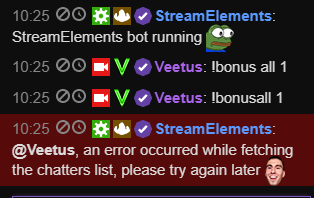
been seeing these "an error occurred while fetching the chatters list, please try again later 4Head" over and over again the last 4 or so hours at someone's stream - any ideas other than trying again later to try and fix ?
dull elm
Ah yes. It work. In Ground control is now the Setting Custom bot name
I've enter name and the code and have clicked on the button Test bot
narrow coyote
I think that twitch has been having some problems today
quasi portal
ahhhh, makes sense! cheers @narrow coyote ! 👍
narrow coyote
 blissful apex
oh my, the overlay organised!! 
 dense hound
I had a donation last night that never showed up on my activity feed and as a result not on my overlay, can anyone help me figure that out?
narrow coyote
If they tipped you through StreamElements, then the tip should be in the activity feed, are you sure they tipped you? Did you use other services in the past, where a viewer might have had an old tipping link?
blissful apex
Hey guys, how do you get the bot into your room?
 icy light
Hi, sorry if this is the wrong place to do this, I am just setting up stream elements on my twitch channel, and I was going to add a "manager" but, mainly for future reference/peace of mind, as I cant find it on website, is there a way to view and more importantly remove managers if the need arises, if so, if someone could walk my slow brain through it haha, that would mean the world ❤
narrow coyote
https://streamelements.com/dashboard/ On the right, there is a bot settings box
narrow coyote
@icy light Should be able to do this from settings > channels
from the dashboard, click your profile icon, and go to settings from there
lament blade
Thanks for fix my issue ❤ all of you rock so hard ! 😄
dense hound
@narrow coyote I only have one link on my page and it takes you straight to my stream elements tipping page. The money came through paypal so I have an email proving the funds came through. I dunno how this person would have been able to tip me if they didn't go through the stream elements tipping page link on my channel.
icy light
Okay so just same place I add them, I can remove them too? Thanks a bunch, just wanted to be sure I could remove them before I added them haha, cause obviously I couldnt test this without adding someone
@narrow coyote your the best
dense hound
@narrow coyote hold up, it appears to be there now, I dunno if it was just delayed or if I was blind and never saw it, but I swear it wasn't there last night when I was looking for it, is it possible for a donation to be delayed if it goes through currency exchange?
 normal igloo
well guys Finally got everything setup i'm now Officially part of the StreamElements Family I would @ every Staff member Who has helped me out But I will be here all day So massive thank you guys  👍
👍
narrow coyote
Some other people reported some delays with some alerts and other things last night, today twitch had a delay on their chat service, so there might have been some twitch issues causing a delay
@normal igloo 


icy light
Yeah actually, this aint place obv, and not on my stream but over weekend noticed twitch chat being weird haha, so good shout on it maybe being their end
dense hound
@narrow coyote ah ok. Well I checked the vod from last night and it definitely wasn't there last night. It is there now. Hopefully there's no more weird delays, thanks for the info.
narrow coyote
sometimes its just twitch being twitch 
dull elm
is it possible, that i can connect my twitch bot account to discord, wo when I'm streaming, that the bot send a message in a channel, that I'M streaming now?
narrow coyote
no, but there are tons of bots that can do that mee6 bot is super simple to set up twitch announcements, and that is what I use in my discord
 leaden pumice
hey i cant add any points to all my viewers today? "
an error occurred while fetching the chatters list, please try again later "
tight harness
There were issues with the twitch chat servers today, I believe it was to do with that
leaden pumice
okay thx sean ❤
narrow coyote
they restarted it a little while ago, status was offline, looks like they are still having problems with it
blissful apex
Hey guys, I hear you can set up your paypal in a certain way to protect your email n stuff
tight harness
Yep, if you set it up as a business account
blissful apex
do i need to make a new one, or can i change it
icy light
I presume that would cost money for a business account?
never actually thought of that, good idea
ebon forum
Nope, business account on paypal is free and easy to set up, you keep your login etc, all remains the same, just your public name changes.
blissful apex
you can upgrade your current account too
 elder sorrel
Does a Credit/Debit card need to be linked to Paypal to receive Tips? 🤔
blissful apex
yes, bank detials atleast
ebon forum
@elder sorrel nope, but to get the money out of paypal you need a bank account and/or a card (depends on the country).
elder sorrel
Okay that's fine, at least I have the option to add that whenever 😎
ebon forum
Paypal has limits when not fully setup, check those.
blissful apex
so i think ive set it up, does paypal still take their portion?
ebon forum
Paypal will always take their cut.
blissful apex
cool, so its purely to keep my email safe
ebon forum
yeah pretty much. makes a few other things easier, but you generally do not care about those as a streamer
lament blade
is it possible to make a command or store redemption that only a specific subscriber can use?
weary mist
not at this time, though I know it is a requested feature
narrow coyote
twitch has been having problems with this all day, it has been going offline from time to time as well
 mortal tide
😓
clever mango
Hi @mortal tide unfortunately when the twitch chatters lists are slow or down we can't retrieve the usernames in the chat so we can't award points 😕 Sorry about that. Hopefully twitch will resolve it soon.
 kind epoch
Yo, hey all, it's been awhile since the utilization of streamelements but for some reason when i include the main scene i.e. via the url provided in overlays, the cpu usage is almost double that of what i have which is a webcam and elgato video capture device. Anyone know why this is happening? As soon as i remove this source from the scene, the cpu usage is halved, i.e. from about 50% in obs to around 25%. Thanks for your answers in advance.
narrow coyote
It kind of depends on what is in the overlay. Thinks like kappagen are "heavier" widgets and will consume more resources. If you try with a basic, static overly, do you see the same usage spike?
Also, do you keep your OBS up to date? They recently did a major update to browser srouces
kind epoch
No, i have not tried a static layout and yes obs is upto date. BTW, what is a static layout? And i don't use kappagen right now, but i want to do so though.
narrow coyote
Well, I guess we can take a step or 2 back, the overlay you tried, was it one of the themes, and was it animated? The animated super themes will be more resource intensive than a static non-animated overlay
animations, hypecup, and kappagen are some of the heavier things. You can for sure get kappagen going, you might just need to optimize its settings for what works best for your system
kind epoch
Right, i cannot confirm, but i'll try to locate this "static" overlay within your themes. And as for kappagen, it's not a big issue i don't think.
narrow coyote
with kappagen, you can do things like make it smaller, not use the whole screen, limit emojis, and tweak their size. My current CPU is a potato, and I use kappagen, just had to play with the settings a bit
kind epoch
Ok, cool, lemme at this. Thanks for your help.
narrow coyote
no problem
 echo hound
Hey, my media request is saying there's no active widget, but there is one and it works sometimes, but right now it doesn't want to. Any idea?
Also, it's not playing my backup playlist.
Yeah actually it's just the backup playlist not working.
I don't know why.
icy light
wait see when yous mention overlays, the main thing I want is the bot in chat, will this interfere with current overlay/breakscreens etc?
and can I just say the support here is amazing, from @narrow coyote in particular ❤
clever mango
@echo hound what specifically is not working with the backup playlist?
echo hound
@clever mango It's not playing.
There are no songs in my queue yet the playlist isn't picked up.
clever mango
Is that a public playlist?
echo hound
Yeah.

London’s George the Poet and Maverick Sabre deliver a powerful performance of their brand new single “Follow the Leader” which also features vocals from Jorj...
Oh wait, does it only work if I'm live?
clever mango
No, just a sec
echo hound
@clever mango thanks. I'm going to go grab a snack and will brb. My twitch is MnkMnkMnk if you need to check into stuff.
 lunar furnace
im trying to do many things today so there will probably be several different inquiry messages but first i would like to work on getting my custom bot name going
i have my 0auth in but its still not showing the custom bot name
clever mango
@echo hound This is a YouTube created playlist as opposed to a user playlist. They act a bit differently and it doesn't seem that these can be added. I recommend creating your own public playlist with these videos. That playlist link will work.
echo hound
Ok thx!
Found this neat little tool, so I'll try that. https://ctrlq.org/youtube/playlists/
clever mango
@lunar furnace
echo hound
How is StreamElements monetized? How can we further support development?
clever mango
We're taken care of financially. The best way to support is to spread the word about us. 😃
echo hound
Man that sounds weird
Are you guys trafficking narcotics
Because you don't need to do that you know
We'll support you
We love you guys
clever mango
echo hound
"We're taken care of financially"
shudders
Hey, my own playlist worked 😃
If someone requests a song now, will it take priority over the backup list?
clever mango
requested songs will play if they are in the queue
if you want them to interrupt the backup playlist if it's playing there is a setting for that
echo hound
Ah christ, something really odd going on with the Show on stream now. It starts playing a few seconds, then pops up "No active widget" error and stops it.
 echo hound
@clever mango let me know if that video I posted works
clever mango
@echo hound refresh the page
echo hound
Okay.
clever mango
the wrong video is showing there in the now playing
clever mango
Is the title the same as the song that is playing?
echo hound
Naw, it's showing the SE Media REquest video
clever mango
skip
clever mango
and if you skip?
echo hound
Now the title and video match
But it's still doing the no active widget error
After a few seconds
clever mango
@random burrow I'll be with you shortly
clever mango
do you have the overlay editor open?
echo hound
Nope.
If I request a song, it works fine.
But as soon as it switches to the backup list, it does that.
 random burrow
Thanks
clever mango
@echo hound playlist link? I'll try to replicate here
echo hound
Ahh hold on, I seem to have fixed it by actually playing through one requested song.
Instead of start with the backup playlist
lunar furnace
@clever mango thank you for that help 😄
echo hound

YouTube
Source: http://j.mp/YouTubeCopier Curator: YouTube Spotlight https://youtube.com/playlist?list=RDGMEMP-96bLtob-xyvCobnxVfywVMLYG1Waliqbw
 true zephyr
Could I get some help with the custom bot name? Not urgent but a friend knows how to do it and has the setting for it, but I don't seem to have the setting on Ground Control
clever mango
@echo hound I'm not able to replicate this problem here. Backup playlist and requests are both showing in the widget when I send the video there
narrow coyote
@icy light Thanks for the kind words  I would have responded sooner, but I was driving home from work. The bot will not interfere with your current overlays and break screens. If you are not yet, you should look into using the SE overlays as well, everything just goes together so nicely
nocturne pelicanBOT
@true zephyr Custom bot name requirements
- StreamElements bot modded and in chat
- Active overlay with alerts
- StreamElements tipping page in the panels below the stream (!panels)
- Create a twitch account for the name you want to use
- Ground Control app must be running
Steps to enable custom name
- Sign in to https://twitch.tv with the bot account
- Install and run Ground Control (!gc for download)
- Visit https://twitchapps.com/tmi/ and generate an oAUTH token
- Copy/paste everything in the box to Ground Control oAuth settings and enter the name for the bot account
- Restart Ground Control (custom name may take a few minutes to take effect)
clever mango
@random burrow Did you receive emails from PayPal about these tips?
clever mango

lunar furnace
ok the next thing im wanting to work on is the win/deaths counter command
clever mango
There is an example in #command-share
lunar furnace
i know its a custom command but i would also like a counter on my overlay that shows it
clever mango
We don't support that at this time.
true zephyr
is that !panels command for here or what?
lunar furnace
and is it two separate commands made via custom commands
true zephyr
Kinda confused cause just started using SE 😅
clever mango
@lunar furnace Yes, one command increases the count and one displays the count
lunar furnace
ok
clever mango
!panels
nocturne pelicanBOT
Twitch's official help guide for Panels: https://help.twitch.tv/customer/portal/articles/2416760-how-to-edit-info-panels
clever mango
If you need help with adding your tipping page link to your panels section
true zephyr
Thank you very much!
Thought I had the tipping panel set up right, but it wasn't. whoops
icy light
@narrow coyote no problem for kind words ❤ just speaking the truth :D
alright sure thing, and thanks, I will look into it for sure ^^
narrow coyote
Just let us know if you need any help with anything
random burrow
@clever mango no email but it does show payment in my PayPal app
lunar furnace
i got the first counter to work but i cant get the second part to work for the win/deaths counter.... i am probably formatting it wrong
tight harness
What did you put as the command response?
lunar furnace
for the command on the second one so that it would tie to the first ?
im trying to tie it to use for raiding in wow lol
$(channel) has $(getcount bosseskilled) so far this Week! << thats for the second command
tight harness
Alright and you have a command called !bosseskilled ?
lunar furnace
which the second command is set to trigger with !bosseskilled and the first is set for !bossdown and will react to one of my emojis used by me
and the first one works fine
tight harness
Alright, so yeah I'm guessing you're aware of the other variable which displays the number and adds 1 to the counter?
lunar furnace
yep its the one i set up first
yep boss down works just fine
im gonna set up a second set of counters for wipes LOL
clever mango
@random burrow OK, please send me all of the info you have for the tips that were missed. I'll have the devs look into in the morning.
tight harness
@lunar furnace Oh i'm familiar with wiping on WoW 😄
lunar furnace
yep and thats the fun in why i am making it
clever mango
@random burrow you can message me all the info you have
lunar furnace
im making one for the boss count that we down in raid so i can give points a bit better at the end of raid night
random burrow
@clever mango tipped 3 Dollars to kkelpcake on twitch
Didn't show in her activity feed
clever mango
Ok, so it was one tip and you tipped a streamer?
lunar furnace
@tight harness so what am i doing thats making the resetting of the counter not work
clever mango
Please send me the information that you see on PayPal for the tip. If you can take a screenshot of the whole page that would be best.
tight harness
Do you know about the command !editcounter ? @lunar furnace
lunar furnace
nvm i found it
random burrow
@clever mango yes I tipped once and my bud mumoee tipped twice
None of these have shown up
tight harness
Awesome @lunar furnace
lunar furnace
nvm thought i did but i did fix it so it responded with the bosses killed now to get the edit counter to work LOL
random burrow
@clever mango dming screenshot
clever mango
thank you
tight harness
The editcounter command? 😛
lunar furnace
yea 
tight harness
Oops 😄
lunar furnace
i got it now 😄
all i have to do is finish those commands now
later on ill make ones for probably pubg and fortnite as well but that takes care of the commands that were shared that i was wanting to do.
i have a few other games that i want to do but figuring out how to make them might be a bit trickier
tight harness
Usually doing it once helps so you know roughly what to do next time 😄
 dry hare
roughly
tight harness

normal igloo
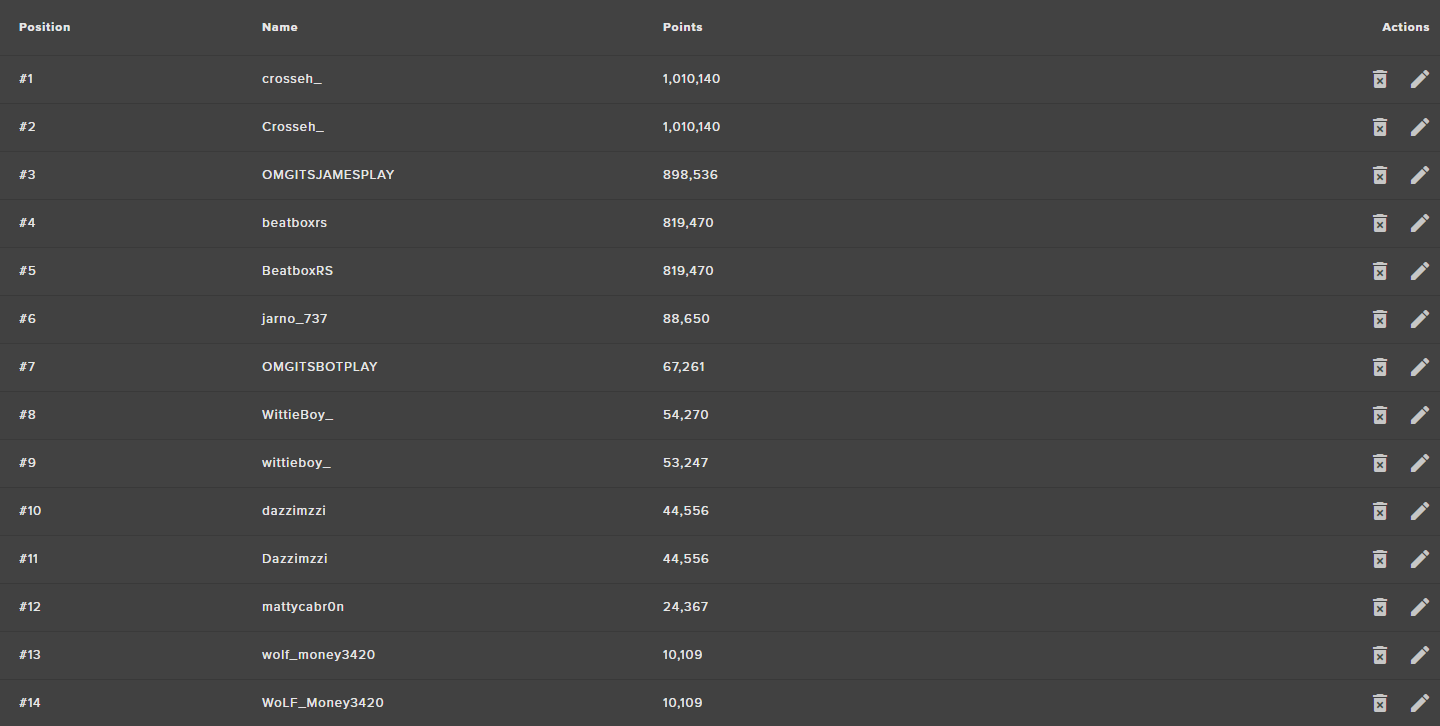
Ok when I imported My currency I think it went a bit wrong somewhere This happened https://i.gyazo.com/e4c555431cbabda5f5c7f65a6bcd2c20.png and For some people When they use for currency command to check their currency It says 0 Despite what The leaderboard says 🤔
 clever mango
@JAMES#0489 Hi, I know what's gone wrong. Message me your currency file and I'll take care of it
normal igloo
@clever mango as in me currency file That I imported with?
clever mango
yep
 deep widget
in my stream summary email?
normal igloo
https://i.gyazo.com/c572c4c92915f7712002d55a3c470b3b.png Just saying it how it is 

I know for a fact @stuck hamlet know what other services I'm talking about And I'm pretty sure @clever mango Does too But I'm not a hater i'm a Player Hints my username
aka Wasn't going to mention the name here 🤔
 vague mural
is there something going on with overlays? Mine aren't working in OBS
normal igloo
Ok last few questions for now anyways 😂 #1 In the currency command Is there any way of getting rid of the and is rank ???/2274 on the leaderboard. Part #2 I'm probably going to give myself the answer to my question but What's the difference between CURRENT and
ALL TIME like all time is Is what the User would have if Never lost a single currency ?
clever mango
@vague mural Are you using OBS studio 21.1.0 ?
lunar furnace
current is usually afaik at that point in time but all time is like ever since they started receiving and you started streaming with currency @normal igloo but @clever mango could clarify it better for me
weary mist
current is number of points they have from viewing, gambling, bonuses, etc. All time is just amount earned from viewing
normal igloo
Thanks guys 👍
lunar furnace
np
 pulsar fiber
can i import my streamlabs stuff ?
 shy osprey
hey i use to stream with OBS and it use to be fine but i re downloaded it and since i did i get frame drop from 60FPS down to like 40 and it looks really bad, anyone know how to stop it
 minor kindle
If people aren't getting currency, how do we resolve that?
normal igloo
@pulsar fiber Depends on what you need ?
weary mist
@pulsar fiber you can import your tip informatino and your alertbox
clever mango
@minor kindle Unfortunately, we can't do anything about it as Twitch's chat user list servers have been very slow for most of the day. We rely on the user lists to handle loyalty.
In fact, they are now offline completely
normal igloo
gg twitch
 heavy sigil
YAY I WAS ABLE TO SET UP A STREAM WOOP WOOP
heavy sigil
WOOHOO
clever mango
@shy osprey The most common reason is that there are multiple overlays running at one time. Make sure that all browser sources in OBS are shutting down when not visible https://i.imgur.com/6bWXxjR.png
 heavy sigil
Mmk
clever mango
Beyond that, the fine folks over at OBS will be able to help. discord.gg/obsproject
heavy sigil
Ok Thanks
 fervent rose
Hey, I’m really new to OBS and I wondering how do I record my screen and put a overlay on it
weary mist
you add sources. For your screen, you will want window, game, or desktop capture. For the overlay, you will want a browser source
I recommend checking out some tutorial videos for OBS
normal igloo
gg to @weary mist I think I made the right move to move to Stream elements You guys even give support For stuff outside Of your brand [ Even to say OBS Is open source but you know what I mean tho ] I think my relationship with stream elements It's going to be a long lasting one If not permanent 
minor kindle
@clever mango Thanks
fervent rose
Thanks
heavy sigil
Hi
normal igloo
@heavy sigil hi
weary mist
@plush mica you can open the overlay in the editor (the larger pencil), and edit the things you want
 plush mica
K thanks
vague mural
@clever mango I am OBS 21.1.0
clever mango
Have you tried refreshing the overlay cache by double clicking the browser source under sources and then scroll down to refresh cache?
clever mango
If you grab the link in the browser source and add it to your browser does it show?
vague mural
yep, that's why I can't figure it out
clever mango
Hmm, I'll have to refer you to our friends at OBS for this. They'll get it sorted out. discord.gg/obsproject
vague mural
thanks for trying!
 grim warren
is media request enabled with every donation amount when you have it enabled? i don't see an option for media share donations anymore
 dry ingot
does my tip link block out my personal infromation?
weary mist
you have to do that with paypal, business account
 wise cliff
Did they change where I can reset my Follower Goal count? I can't find it anymore
nevermind I just found it
weary mist
 violet mountain
do any of y'all know what a super moderator is?
weary mist
It allows for a seperation of commands betwen moderators
By default, it a super moderator can give people points, where a moderator can't
 sage wolf
Is there anyway to restore or import widget data? For some reason mine is completely wiped and before it was, it was kinda broken anyway.
shy osprey
@clever mango that didnt fix it, still choppy
 stuck hamlet
@sage wolf I'm confused by what you're asking here?
what widget data are you trying to alter?
stuck hamlet
Did you reset your labels?
The only one you cant add to are recents
The rest can be changed
sage wolf
As far as I know, all I did was add some new ones to align with what I had from Streamlabs and now there's nothing
stuck hamlet
So you are using Recents?
lament blade
hello everyobdy, would anybody be willing to help me with something? i am very new to stream elements and i have a little issue i just cannot seem to fix... if you want to PM me about it feel free!
stuck hamlet
Unfortunately there's no way to add to recents, you'll have to wait until more activities come through :/ There's no reason for labels to be erased, so you might of done it by accident. I'm not quite sure.
@lament blade you can ask your question here
sage wolf
Damn.. shame there no way to import from Streamlabs either then..
lament blade
Okay, so my question is the following: ive picked a premade overlay from streamelements, and customised it around to my liking, linked them with OBS and everythings fine... except follow alerts, show up 10-20mins after they followed or they dont show at all.
i also created a tipping page through stream elements and used that URL in my stream for people to tip on, which someone did and nowhere does it say they tipped, not even in the activities thing on the dashboard on stream elements, is there any way i can fix this?
tip moderation is off, and theres also no pending requests
well now, the next day it all showed up, but can i make it so it shows up like during the stream immedietly?
stuck hamlet
Were you streaming when these followers took 10-20 minutes to come through?
lament blade
yeah it was a test stream, we were testing the alerts out, and paypal said someone tipped, but nowhere did it show up
except the new follower showed up 10-20 mins after he followed, which is a bit late i think? unless thats completely normal
stuck hamlet
There was a hiccup with paypal last night, and we pulled all the data we could and gave it to streamers. That's why you didnt see it yesterday, but you see it now. Donation will show up instantly, it was just due to the issue.
Regarding Followers, We check if someone has followed you every 10 minutes when you're offline, at it take roughly 10 minutes for us to see that you're live. If on the website you see this: https://www.onslaught.ca/s/at2fs6bk.png we don't know you're live yet.
Now when you are live, we check followers every 1 minute, we have to go looking for the data, twitch doesnt actually provide it. I hope that makes sense.
 lament blade
so its always 10 minutes for followers to show up on the stream?
stuck hamlet
Now when you are live, we check followers every 1 minute, we have to go looking for the data, twitch doesnt actually provide it. I hope that makes sense.
stuck hamlet
When you're live, we will check every minute 😃
lament blade
so then when someone follows, every minute it gets refreshed and will show up
stuck hamlet
yea
lament blade
ok so yesterday i was live, and then i still took 10+ mins, did i do something wrong there? i stream with stream elements opened on my desktop should i close it?
stuck hamlet
No, having the app open isn't an issue.
How long did you test stream yesterday?
lament blade
like atleast 1hour 30 minutes, and the new follower showed up 5 minutes in
because it was a test follow right, my friend followed to test my alerts
stuck hamlet
Yea, that would be the issue. Like i said, it takes roughly 10 minutes for us to see that you're live, after you've clicked "start streaming". It's not something instant.
New followers will show up within a minute, don't worry 😃
lament blade
i was gonna ask a new question but i realised, that i had 2 more followers 40-60mins in and they never showed up, i had to click on stream elements to automatically play them
or they didnt follow during that stream, sorry its just weird
stream elements says i have less followers than what twitch is saying xD
 lament blade
on stream elements dashboard, and the other number on my twitch channel, twitch says i have 2x the followers than what stream elements is saying
D:
stuck hamlet
We only check followers since you signed up with us + that's followers this month.
Not total.
lament blade
weird 2 followers in that list are before i signed up xD
but thats okay for me, i have all the answers i needed, and i thank you very much. i have 1 more question.. is it possible to see my livechat during stream through stream elements?
stuck hamlet
We don't have that feature right now
stuck hamlet
Not with streamelements, you can see all of that on your Twitch Dashboard
lament blade
ok
thank you very much onslaught for all the help, i will make use of all the information you have given, and if something doesnt work i will surely ask for help rather than ruining everything xD
stuck hamlet
👍
normal igloo
only i can do !roulette ?
lament blade
is there a discord for OBS support?
ebon forum
!obshelp
nocturne pelicanBOT
For the best OBS support, please join their discord where OBS devs and support volunteers are available all the time discord.gg/obsproject
ebon forum
@lament blade there you go ⬆
lament blade
thanks alot
 silver patio
Any support active right now?
 dense jackal
What’s up @silver patio
silver patio
I want this to be from the start of the month
I can only choose end date
not start date
My Tip Goal, shows the total tips ive recieved since I started to stream, I want it to show month to month.
I cant find any option to change that. Do I need to use another third party widget for that or what can I do?
dense jackal
So for the goal there's no real way to do that for a monthly session, but, you could use our Total tips widget, and then select monthly total tips and then make it out of a certain amount
lament blade
hey guys
silver patio
So you dont have any donation goal widget at all?
lament blade
mind helping me out with something if its ok?
dense jackal
We do have a donation goal widget, you cannot set a start date or set it to a certain session at this time @silver patio
whatsup @lament blade
silver patio
Then you cant do any donation goals at all then? Since it'll track all total donations. Tips is to change that. Alot of streamers wants to do monthly goals or other donation goals to afford stuff, and dont want to share there total donation $.
lament blade
i checked every alert box but it doesnt seem to alert on my stream whenever someone hosts, follows, or subscribes
silver patio
And Since I use Streamelements for everything I cant even use another sites donation goal because then it wont track. That sucks tbh
lament blade
it only has sound
dense jackal
You can change goal data here every month https://streamelements.com/dashboard/session @silver patio
lament blade
i want there to be the short vid whenever someone host, follows, subscribe donate
dense jackal
@lament blade what type of video file are you using?
lament blade
uhh i thought there was already one in automatically when i turn on the alerts?
i believe it was the left shark dancing one
dense jackal
@silver patio What do you mean by they want a donation goal but don't want to show total donations? You can set a goal to 0, and it will go from there.
@lament blade do they not show even when you test?
lament blade
oh so i need to upload a video first
lament blade
how do i test?
ive been using it for 2 days now and it only makes a sound i havent seen it popup yet
dense jackal
There's a little bell to the bottom left of the editor, hover your mouse over it, and you can test any alert
lament blade
i think im missing something
dense jackal
@lament blade go ahead and dm me a full access link generated here https://streamelements.com/dashboard/account/channels I'll take a look into your account
lament blade
it shows up on test
does that mean itll show up on stream as well? maybe i just didnt see it
 torpid estuary
Do you maybe have the Browser source below another source in your obs/xsplit?
dense jackal
No problem
 jolly folio
Is there any way to pull a variable that contains the remaining cooldown of a particular store item. I have a frequently bought item in my store and I would like to be able to say "Item unlocks in x minutes x seconds."
preferably with a timer.
 vagrant topaz
What is the command for giving other people currency (loyalty bonus) without subtrackting them from an account? Not like !pay and !give but !set or something like that?
dense jackal
!addpoints or !bonus # <user> @vagrant topaz
@jolly folio i don’t believe that’s possible at this time, but I do like it, please suggest it on our ideas page found at the top of our #💭︱feedback-and-ideas channel
jolly folio
Thanks Tomathin
 crimson abyss
Hi, I stream on the xbox through twitch, but have my laptop open with the chat etc on and was wondering if it was possible to use streamelements through this
dense jackal
you can use our chatbot/loyalty systems just not overlay and alerts 😃 @crimson abyss
crimson abyss
So if someone was to sub/follow i wouldnt get an alert?
dense jackal
The issue is you would need to be able to add a browser source to your stream, since you are streaming directly from xbox, you can’t add any kind of overlay
and yes, but you can have chat alerts so it will say when someone sub/follows in chat 😃
crimson abyss
Ahh, makes sense. New to streaming you see so trying to set it up to go well
dense jackal
All good! It’s a process and we’re here to help
crimson abyss
Can you.use more than one bot? I have night bot at the minute but was looking for a different one to add more things to the stream
dense jackal
You can, but it does complicate things, I would suggest going to our import page, from there you can import all of your nightbot commands, for a smooth transition to SE and all of our features
Import is in the top right of the web page btw
crimson abyss
Okay! Thank you for you help!
 warm trench
Hey can anyone help me ? The path affiliate mission (3 viewers average within 30 days) is basically stuck on 33 percent .. but I’ve been streaming for a few week and I average on 5 viewers or more ... it still doesn’t change
lament blade
hi, is it alright to ask for help on how to activate songbot in my stream?
 supple abyss
When looking up 'songbot setup for streamelements' the search it pops is for the initial setup with GirlVsDumb, not sure if this is the appropriate video or if goggle is misinterpreting my search terms.
google fml.
When you're asking about songbot, just to clarify do you mean turning songrequest on through streamelements itself or adding in a separate bot that will work with SE to run it? @lament blade
 native crystal
Hey, I can not save new changes to the loyalty system
 last tangle
Does anyone know what to do about a bunch of charge backs I just received? A girl on twitch has donated me around $400 dollars over the past couple months and now has tried to charge back all 9 of them.
tight harness
@warm trench You'd be better asking Twitch that questions, we have no control over that
@lament blade https://www.youtube.com/watch?v=17eUkoZ6eIs this should help
@last tangle Speak to PayPal about it, I generally ask to speak to their fraud department because if they're falsely claiming that they didn't make those payments when you have evidence that they did make those payments as donations then they're committing fraud
 inland knoll
hey there, can you remove the sound from the 'cup'? as it drops things into the cup for followers etc
native crystal
@tight harness Why should I set up something in the media request to set the loyalty settings tab? 
tight harness
@native crystal Oops, misread 😄
Similar answer though, if something is missing it won't save
What did you try to change? @native crystal 🤔
I just temporarily changed your follower bonus to 1, it saved perfectly fine and informed me so, changed it back to 0 as it was before
native crystal
ok, it does not matter anymore. I wrote 0 in empty fields and works. 😄
@tight harness 
tight harness

native crystal
Tell me more, the sub bonus gives you every time you give a subscription?
inland knoll
it must be from the alert video?
tight harness
Yeah, must be, I just tested it and I can confirm it's definitely silent 😃
inland knoll
i have everything reduced to zero but still hearing the sound
tight harness
Got any other overlays in the background that may have an alert box still active?
inland knoll
oh that might be it
tight harness
!multi
nocturne pelicanBOT
Make sure to :ballot_box_with_check: “Shutdown source when not visible” for all browser sources (all OBS scenes). If using studio mode, uncheck “Swap Preview/Output scenes After Transitioning.” Also keep in mind that sound can play from any overlay loaded in the browser (editor or launched). https://i.imgur.com/FegZJQS.png https://i.imgur.com/yY0wcFl.png


 odd beacon
Hey @shell creek I still hears my alert sounds double. and i want it to be fix.
tight harness
@odd beacon Check the response from the bot above your message
odd beacon
@tight harness It did not work. and i dont use the studio mode
tight harness
I see you're using a super theme, each of those overlay browser sources have been added to OBS in different scenes within OBS right?
odd beacon
@tight harness I have 4 scenes with 4 overlays
tight harness
And you've gone into each of those scenes and checked the corresponding browser source's properties that the 'shutdown source when not visible' option is ticked for all of them?
odd beacon
@tight harness Yes then are not visible when not show
@tight harness Never mind xD found the fail xD
tight harness
No problem
 devout crater
French people were are you ?
tight harness
@devout crater Do you need French support?
devout crater
No thank you but y want a french channel,this is possible ? @tight harness
 proud pumice
<- half french, goes?
 toxic basin
How do I turn off auto hosts from showing as host alerts? O _ O
narrow coyote
unfortunately that is not currently possible, but looks like its planned https://streamelements.helprace.com/i307-disable-autohost-alerts
dull elm
hello. I changed the name of the bot but in twitch he has the name streamelements
narrow coyote
The name change is through Ground Control, and that must be running for the name to change, did you have Ground Control running?
 atomic fossil
hey guys i have a problem streaming like i finally have put the layout but now video comes on i mean unless you cant stream on ps4 and have it on the stream lab at the same time am pretty new at this so i really dont know what to do i could use some help ?
but no video comes on *
narrow coyote
What is your streaming setup? Are you streaming straight from a PS4, using a PC with a capture card, or trying to stream from the PC using PS4 remote play?
atomic fossil
am trying to stream from the ps4 with out a capture card cause
cause my computer is kinda sucks and should i use remote play ? would it actually work i know people have been saying it works but idk how to set it up
narrow coyote
well, if you are streaming straight from the PS4, you wont be able to use an overlay, if that is what you are trying to do currently. To do this you would need to use something like OBS as your broadcasting software, and you would either use a PC with a capture card (best output) or use remote play on the PC and stream that
atomic fossil
ohh okay ill try the second option
narrow coyote

dull elm
@narrow coyote Yes i have and i have change the name and enter this Aouth code
narrow coyote
You might want to try logging into twitch with the bot account, and regenerate the oauth. and make sure that twitch account is a mod in your channel. If that does not work, try parting the bot and rejoining it from the bot options on the right side of your StreamElements dashboard
 ember anchor
Trying to import a playlist from YT, but it's saying there are no videos.. it's a public playlist, and if this is in the wrong spot, I apologize
tight harness
Are you putting the full link?
ember anchor
I am
weary mist
it looks like you have the max song duration at 5 seconds. I don't think most songs are that small 😉
ember anchor
Ahah.. I thought that was just for the media share function for donations.. I seeeee now
weary mist
you should be able to put in that backup playlist here: https://streamelements.com/dashboard/mediarequest/settings

StreamElements
The Ultimate All in One Platform for Streamers
yeah, its for everything. Its all in one
you can just turn on and off the donation part
ember anchor
And I put MY Playlist in the backup section.. Ok I get it now
transitioning from SL ChatBot, so it's a bit of a learning curve
 untold estuary
Trying to give bonus to viewers: https://i.imgur.com/TepSR61.png
 narrow coyote
Twitch has been having problems with their chatters list being slow/down the past few days
 minor eagle
 trHi:everyone - where can I post question about a label not updating?
narrow coyote
Do you have tips listed in your activity feed, or anything listed in the label data for the latest tipper
Widget data
icy light
Sorry this isnt support so to speak so feel free to ignore, its more a quick question, if someone is a mod on my twitch, do I still need to mod them on streamelemts? and if so,what is the purpose/difference between mod and super mod
narrow coyote
Twitch mods are automatically at the chat bot moderator level, it is to control what types of commands they have access to
minor eagle
No, tips are not showing in the activity feed; everything else is
icy light
@narrow coyote Thanks 😄 helpful as always, so for my more trusted mods, what would they get out of being a super mod? (sorry if this is on page im probs being blind as always aha)
narrow coyote
super moderators will have access to higher level commands, checkout https://streamelements.com/dashboard/bot/commands/default the super moderator commands will be towards the bottom
@minor eagle What did they tip you through, I see multiple tipping services on the twitch page linked to your discord
icy light
So I was being blind aha, thanks ❤
minor eagle
To my paypal Kite
 silk patrol
@devout crater French support incoming!!! Quel est ton problème ?
narrow coyote
No worries @dec_117#2624 there is a lot going on here
@minor eagle But did it come from the StreamElements tipping page? You have a StreamLabs tipping panel on your Twitch page. If they did not tip you through your StreamElements tipping page, their is no way StreamElements would be notified of the tip
minor eagle
Aaah, ok. Makes sense. It came through SL, not SE
narrow coyote
Just change your tip panel to your SE tipping page, and the tips will then alert in the alert widget, show in the feed, and update the latest tippers in the overlay
 safe kettle
So my playlist is working for media request, however, when someone requests a song, the song shows like it's playing but the media does not show up on stream and there is no sound. Can someone please view my stream to verify
devout crater
@MrAlucardDante#4773 merci,pour les config sur le site,il faut les coordonnées avec OBS ?
 glossy radish
Hello! I need some help. The hype jar isn’t showing up in OBS. When I open it in browser from the overlay editor, it appears but OBS isn’t showing it. Don’t know if this is the right channel. Thx
minor eagle
Done. Thank you @narrow coyote 😄
safe kettle
Still happening. The song they request plays just fine as long as "Show on Stream" is not checked, but once I select "Show on Stream" there is no audio and no video
So after I updated the entire web page and then re-selected "Show on Stream" the song started playing on stream with the media showing, however, when a new song request is requested, it won't show on stream until I completely refresh the page again
narrow coyote
@safe kettle Can you share the youtube link they requested?
safe kettle
it's more than just one, it's like every other song is being muted until I refresh the entire stream elements web page
then i click show on stream and it shows on stream and starts playing
narrow coyote
What browser are you using for the web page? I was doing some quick tests with some random youtube links, videos and songs, and have not seen any issues so far
safe kettle
chrome
You tested it by having viewers request a song on your stream? The songs I put in myself work fine.
The songs that are requested are getting muted until I refresh the webpage
narrow coyote
yeah, I tested using a separate account in my chat
clever mango
Give me a minute to read through what's going on and then I'll come to your chat
silk patrol
@devout crater Hey, oui, il faut mettre la meme resolution dans la browsersource que tu crée dans OBS que celle que tu as choisit quand tu as crée ton overlay sur StreamElements
 slender yoke
Hey guys I'm streaming and my sound effects are not redeeming
elder sorrel
Did you add the Store Redemption Widget to your overlay?
slender yoke
I have had the same overlays for months. Worked fine last stream. Today they are not redeeming
elder sorrel
Huh, that is strange 🤔
narrow coyote
are you doing it from chat command or store page? does one work, and the other not, or both not?
slender yoke
However today I am trying the elgato capture card. It's plagued with sound problems. I don't know if that is the cause or not.
elder sorrel
Oo fancy. Grats on the new card.
clever mango
A few questions we need to know to diagnose:
- Where were the redemptions made? (store page, chat, panel extension)
- Which item was redeemed and what type of item is it? (perk, sound fx, code)
- About how long ago was this redemption?
Let's focus on the last redemption that did not work
 wispy gull
how can i get my overlays in obs?
nocturne pelicanBOT
@wispy gull To add your overlays to OBS, add a new browser source in your scene. Paste your overlay URL in the browser source properties, set the dimensions to 1920x1080 (unless you changed them on the website), and :ballot_box_with_check: “Shutdown source when not visible” https://youtu.be/KDvLynUqXI4
slender yoke
@clever mango these are just sound effects in my store, and I honestly believe it is a Elgato issue. If I redeem them in the store, via chat command, or just play directly from my pc they are not going through. Unless you have any Elgato suggestions, they would still apply in lieu of not hearing them anywhere
clever mango
Is there any indication of the redemption being successful?
Is the issue that there is no sound on redemption?
slender yoke
yes it says it is redeemed. but no sound coming thru obs
clever mango
Ok, so the redemptions themselves are working.
Yes, it sounds like a sound issue with OBS/elgato
Are other sounds from the overlay not heard as well like sounds from the alertbox?
slender yoke
lets try
clever mango
Let's also verify that OBS volume is not muted by chance by opening up the window audio mixer and checking OBS studio
narrow coyote
Depending on the elgato capture device, there could be additional settings in there, or it might be related to the OBS sound capture settings as well
slender yoke
fyi this is taking so long because streamelements takes FOREVER to reload on chrome....
ok emulated cheer event. it happened but no sound at all. I think its the card
narrow coyote
 I use chrome and SE always loads fast for me. What capture card is it? there might be more that can be configured with the audio for it, like mixing the audio from the elgato, and then adding the elgato as the audio source in OBS
 fleet valley
is there no way to see your chat from within streamelements?
narrow coyote
no, but it should be making its way into Ground Control, which is going to be completely rewritten, and amazing when its done
narrow coyote
me too 
clever mango
@safe kettle Sorry, I forgot to mention I changed your loyalty cost to 0 during testing but now I can't remember how you had it set.
 uncut dome
any news on GC?
clever mango
It's being re-written to be a lot better
uncut dome
ya i know that. i guess i meant when its going to be released? or news on when its coming
clever mango
The answer for all release dates is soon™
There are many, many factors that affect a release date in this industry so it's better to not give one.
safe kettle
@clever mango no problem. Thanks again for the helpo
 median tulip
Is there anyway to control the volume on ground control for music?
narrow coyote
if you dont see the volume control, expand the app and you will see it
median tulip
Thank you!
narrow coyote
 warm tide
Is anyone here good at fixing streams?
narrow coyote
whats the problem
warm tide
I've had an issue for a long time and I still haven't been able to fix it
can I post links?
I have an example
that id like to show
its of a past broadcast from last night
narrow coyote
at what time in the vod does the issue happen, and what is the issue?
warm tide

what's happening is that im getting freeze frames
I play at 155 fps
and it tends to hit 73 frames with a freeze
is that makes sense
if it doesnt skip you, it happens at around 28:40
it happens every couple seconds or so
narrow coyote
what broadcast software do you use?
narrow coyote
did it say that you dropped frames? If you get me the log from that stream, I could look at it. OBS > Help > Log Files
warm tide
I droped like 60 from what I saw
throughout the entire stream
how do I send you the log?
narrow coyote
Because that did look like it could have been a rendering stall, but 60 from a whole stream is not much. Do you use game capture or display capture?
you can drop it in here, or DM it to me if you want
narrow coyote
looks like it, there are some dropped frames for rendering stall, and a very few from network
22:24:18.388: Output 'simple_stream': Number of lagged frames due to rendering lag/stalls: 300 (0.3%)
22:24:18.388: Output 'simple_stream': Number of dropped frames due to insufficient bandwidth/connection stalls: 51 (0.1%)
warm tide
Is that what's leading to those freeze frames?
narrow coyote
it could be part of the reason
narrow coyote
how often did it happen during that stream?
warm tide
very often
every like 5-10 seconds or so
at some point
I think around that time
is when it did that alot
narrow coyote
Do you keep your video drivers, and OBS up to date?
warm tide
yes
I havent updated in a little while though
because I stopped streaming
since I had that issue
but before that
Ive always been up to date
with that issue
narrow coyote
do you play the game full screen, or borderless windowed? Have you tried to see if either of these make a difference?
warm tide
I always play on full screen
narrow coyote
to see if it makes any difference, I would try seeing if borderless windowed makes any difference, as well as trying to use display capture makes a difference for this game
if your internet can handle it, I would also increase your bitrate, since it looks like you are targeting 60fps on twitch with nvenc for encoding
narrow coyote
lol, i see that now, looked at the wrong part of the log
I have had an odd issue in a few games where streaming it would look like I was stalling frames, unless I used vsync, that could be another thing to test to see if it makes a difference
wait, @warm tide are you using the 32-bit OBS?
narrow coyote
Try the 64 bit to see if that makes a difference
it also looks like the OBS version might be a few behind, might be worth an update as they recently did some major updates to browser sources
narrow coyote
 thorny tusk
@clever mango @safe kettle this is for the media request errors in Gamercopx's stream
https://clips.twitch.tv/SilkyProductivePuddingAsianGlow
The first song request started, then without using a skip went to the second song requested which was different. The requested song https://youtu.be/dX3k_QDnzHE
https://clips.twitch.tv/ApatheticSoftWatermelonVoteNay
The second song request played all the way through but the third request started then skipped after a few seconds. It showed on stream as the backup play list, but Gamercop was showing it as playing, just not on stream. He used the skip next to move back into the backup list. These requests were all made n stream with the ! sr [ link ]


M83's seventh studio album 'Junk' is out now: http://m83.it/buyjunkYo Watch the rest of the Trilogy here: https://www.youtube.com/watch?v=DJQQrjVmQG0&list=PL...
 clever mango
Thanks @thorny tusk
thorny tusk
NP just trying to help Gamer out.
lunar furnace
new day new SE stuff to work on 😄
i dont know how i would do it in SE but i also dont know if yall have seen the like boss fight games in ppls streams
i would like to do something like that but not sure how to do it
warm tide
So I updated, tried 64-bit and window borderless mode
and still same thing
im streaming right now too
narrow coyote
cheer boss is something that is SE is working on
tight harness
narrow coyote
Have you tried using a display source to capture the game?
lunar furnace
no not the cheer boss granted i cant wait for that one to be in use...... its a viewer game for points command that ive seen
 velvet fractal
Do Regulars take Priority over Subscribers when it comes to User Levels?
lunar furnace
one viewer does !boss then the others can do !join to join and then after a time elapses it runs like a scenaro type thing and then tells the results as to like who all survived and how many points they gained
 bright tartan
Is it possible to make the Goal widgets only temporarily show for a short time after someone donates?
nocturne pelicanBOT
@velvet fractal
Chat/Bot Levels
100 - viewer
250 - subscriber
300 - __regular __
500 - moderator (twitch mods automatically placed at this level)
1000 - super moderator
1500 - broadcaster
Dashboard Manager Levels (least to most access)
Bot Supervisor (can add super moderators from dashboard)
Editor
Full Access
https://i.imgur.com/s61Liry.png
 clever mango
@bright tartan No, but you can vote for this idea if you'd like it https://streamelements.helprace.com/i627
bright tartan
voted, thanks 😃
velvet fractal
One more thing! How do I get an Auth Token for a Custom Bot Name? I know I saw it somewhere in the Discord, but I don't remember where
narrow coyote
you need to have a twitch account with that name, then you login with that account and request the oauth
@velvet fractal ⤴
velvet fractal
Thank you!
narrow coyote
 naive basalt
quick question and idk if this is the place t o enter this, but am i able to import designs into SE overlay editor and edit them that way or do I literaally have to make one from scratch on the Overlay page?
velvet fractal
Hmm. I put in my Bot Name I wanted, but it is just showing up as my actual name. Any fix?
narrow coyote
there is the theme gallery with prebuilt themes that you can customize. Or you can make a blank one and import images, animations or other elements you might already have
velvet fractal
Pic for reference
narrow coyote
@velvet fractal that means you used the oauth of your twitch account, you need to have a twitch account with the name you want for the bot, and use that oauth
lunar furnace
im gonna try and get a pic reference for what im talking about LOL
 manic lava
Hey again. Is it really not possible to get help, or shall I write to an email?
narrow coyote
what do you need help with?
manic lava
Well, for some reason streamelements spams my chat everytime it timeouts someone

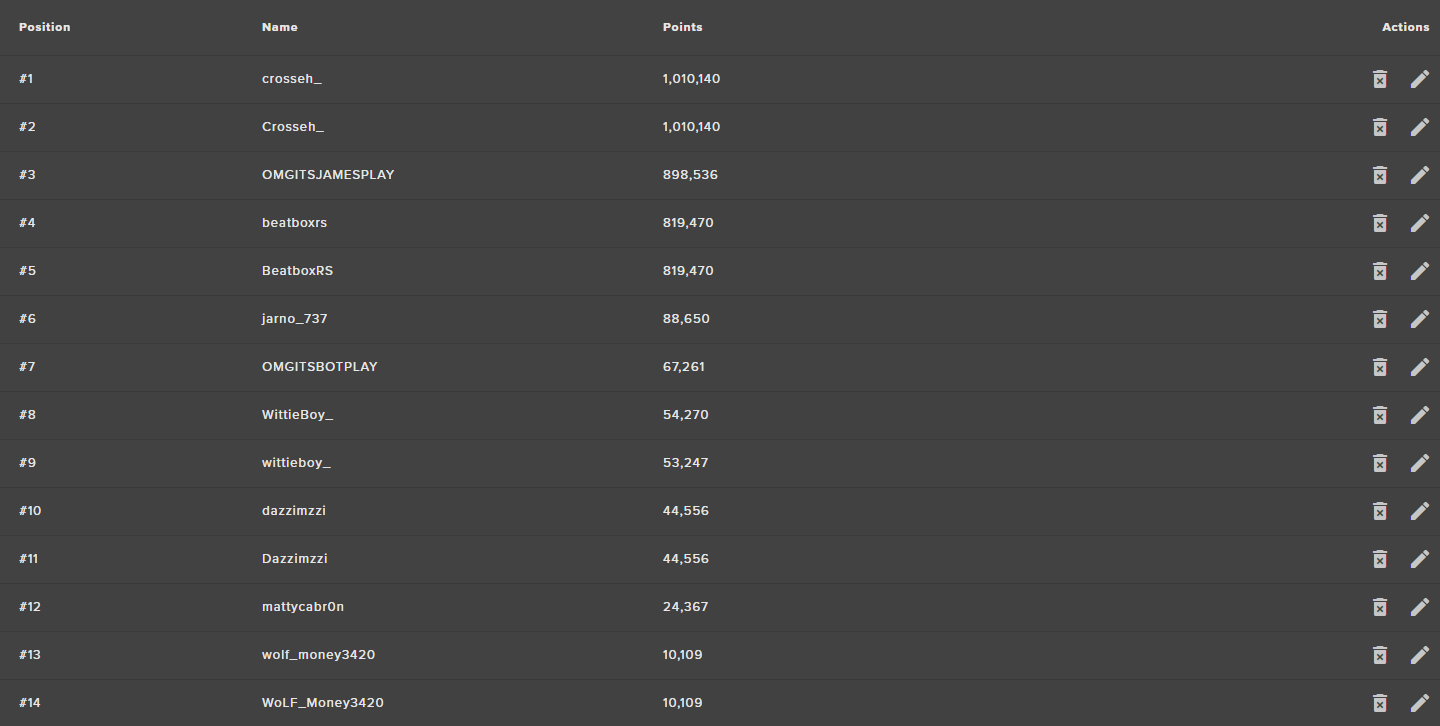


I dont know what to do, and I almost considering a different bot
This is my third time trying to ask for help, and no one has the answers. I even wrote to twitch support
clever mango
It's not spamming the chat. It sends only two timeouts to make sure that the person is timed out. This is the setting that will fix the additional messages.
Uncheck that
manic lava
I just tried and not working
clever mango
What does your chat look like now?
manic lava
it is now only showing to messages
clever mango
manic lava
well, shouldnt there only be one?
clever mango
We send two because sometimes twitch does not recognize the first if there is a lot of chat activity
It's a common practice for bots to send two timeouts just to make sure that the timeout goes through
manic lava
Okay! Thanks for actual help. It has been a problem for weeks now and driving us all crazy ❤
clever mango
I'm sorry that it took so long to resolve this for you.
inland knoll
I'm writing some chatalerts in the Bot Module - is there a way to get my Twitch emotes to appear?
clever mango
The bot must be subscribed
inland knoll
that would cost me lol
clever mango
Well you asked if there was a way
The bot, just like all twitch accounts, must be subscribed to a channel to use the channel's subscriber emotes.
narrow coyote
Your other option is to get partner, then you get a free sub for the bot
inland knoll
thanks for your answer, both excellent
lunar furnace
this is the sequence i was talkin bout. waited for the person that i knew had it to go live and he said its in the streamlabs bot but i really dont want to have more bots than needed in my channel
@clever mango @tight harness the above image is what i was talking about as far as the viewer boss fight chat command do i need to get the streamlabs bot or is there a way to do it in SE
dense jackal
We don't have that at this time @lunar furnace but you can suggest it on our ideas page 😄
lunar furnace
lol i was just writing the one above ok ill pop it in the ideas page then
 serene tartan
Is there anyway to disable the !donate command?
tight harness
@serene tartan By default it's the !tip command in Chat Commands > Custom Commands, !donate is an alias of that command, you've got an on/off switch to the right where you can enable/disable it
serene tartan
Ok thanks
 thick citrus
Could i hop in a chat with someone for some help with getting streamelements setup please and thank you
 inner wedge
EMERGENCY: Really sorry for this guys but I have been majorly chargebacked by a user and I need to see all the donations she gave me over the course of a month but the donations on the activity feed only go up to 10 days ago. I need to go more than that if possibl. I could really use the help
narrow coyote
inner wedge
THANK YOU
normal igloo
@misty wagon No need to I've been here for a while And you're welcome 👍
 tepid mulch
I get an error message stating ""calculatedDuration" fails because ["calculatedDuration" must be a number]]" when trying to use media share in my channel, is there something I am missing?
weary mist
@tepid mulch ill check it out
 alpine pasture
Hello, my media request settings don't update in the browser version... is this a known issue?
weary mist
@alpine pasture make sure you have a value in each field. There is an issue where initially there are no values in several fields
easily fixable on your end
alpine pasture
Works like a charm now, ty
weary mist
👍
tepid mulch
Yeah, when I try to set it up, there isn't like a "save" button or anything?
weary mist
@tepid mulch is that coming up when you place a request
weary mist
and no, its automatic when you change a value. you will see a little dialog pop that says saved
ok, give me a second to pop in
tepid mulch
ah I see, ok
 shadow urchin
Hello! I'm a long-time streamelements user, and I rely quite heavuly on my overlays/browser sources that are hosted with SE.
Al day today, however, all of my sources show up blank/black with just a little blue "help?" button in the lower right.
I have tried clearing/refreshing the cache for each source, rebooting, removing/adding the affected source
No luck yet. SUper frustrated with black screens 😦
weary mist
I will do what I can, I am testing your overlays in my OBS right now
shadow urchin
ROger that! Thank you very much! What do you need from my end?
weary mist
are you running OBS? I just was able to load your overlay in just fine
I am not 100% what would be the issue
I tested out of game
@shadow urchin
shadow urchin
Hey I'm sorry about that!
I am running StreamlabsOBS atm - I still have OBS Studio installed however, let me see if I get them to function in there
hmmm same result there
i wonder if im having a cache issue here.
holy hat that was the issue. Deleted OBS's cache folder and we're all set here.
I SUPER appreciate the prompt and awesome support @weary mist thank you very very mcuh ❤
 marsh kiln
has anyone else had problems with SE COmmands not working on twitch and how to fix it?
narrow coyote
Are you having problems with specific commands, or are no commands working for you?
weary mist
also link your twitch to your discord profile so that people know when you are live, and can easily get to your twitch channel
marsh kiln
its not me thats streaming or my channel its a channel im a mod in but they cant get any of their commands to work im also mod in their S.E
weary mist
can you give me the channel name? @marsh kiln
marsh kiln
precisionempress
weary mist
which commands are not working?
marsh kiln
thanks guys I appreciate it!
weary mist
👍
ember anchor
Is there a way to utilize spotify?
weary mist
@ember anchor not at this time, though it is something that we have been wanting for a long time (been waiting on spotify)
ember anchor
Dang.. I'm running on older hardware, and Youtube causes frame stutter in my games...
weary mist
you can lower the quality. Got to a random youtube video, change it to the lowest quality, then all the song requests will play at the lowest setting
help with that (I have to do that)
lament blade
I started using the counter command on my stream, but how do I reset it so I start fresh with the command each stream?
weary mist
!editcount countname 0
lament blade
Thank you!
one more question - I got a tip last night (my first, still very new to streaming) and the notification never came up. I checked my paypal and it's making me verify w/bank account. Would that be why the notification didn't show? I checked the mod menu for the tips to make sure it was off.
weary mist
yes
Because the money hasn't officially transfered yet, so there is no API notification from them
@lament blade
lament blade
gotcha. So once I do the paypal confirmation it won't make me accept the money each time from the tip jar?
tepid mulch
I appreciate your help tonight, hopefully I can figure out a way to stabilize the media requests, or at least what I am doing wrong, my community would love it! Thanks again
weary mist
lunar furnace
my SE bot did *** during my stream and i had a person in there talking all i can think of was that it was something that was mod caught but i cant find how to see what it was that was caught
 pine hemlock
not sure what you mean exactly
lunar furnace
ill do a print screen to try and show
narrow coyote
Do you have the twitch setting enabled to remove links?
And your bot account not modded in the channel?
lunar furnace
pine hemlock
You probably have the option to disable hyperlinks in your twitch settings enabled
also your bot isnt modded
narrow coyote

lunar furnace
thats what im double checking now LOL
 carmine abyss
Hey staff, again I seem to be having issues with my notifications. we had one of you test it last time and said it was fixed but again it is not. I got a 6.66$ tip last night while live and it did not enable TTS but when i run a test one with the overlay editor it does do tts. Any idea what is wrong?
lunar furnace
i thought this was indication to my bot being modded but i can see that it has to be the actual bot account now because of me using it for other things too LOL plus the custom name
pine hemlock
Custom name makes it so the custom name account needs to be modded
pine hemlock
@carmine abyss Who helped you last time, can you tag them
lunar furnace
just fixed that now to look at the link piece
carmine abyss
@pine hemlock It was the person with the .gif of a red dragon I forget their name I am horrible.
pine hemlock
@tight harness He's probably asleep but he can look into it again
I dont have access to view peoples accounts etc
carmine abyss
That was him! Hmm
pine hemlock
All i would do is, open the overlay in the overlay editor -> Open the console to your browser -> replay the event that didnt read TTS -> See if any errors result in the console
carmine abyss
CAn you explain how I do that exactly I havnt been into the console before
narrow coyote
F+12 in your browser will bring up Dev tools, console is in there
You want to do it on the overlay url you are using as the browser source
weary mist
@carmine abyss which overlay are you using? I am looking at it right now
carmine abyss
@weary mist uhh its called main - current i think
lunar furnace
thank you for that help now it should be a bit easier to know what got them in the future.
narrow coyote
weary mist
@carmine abyss I am going to leave it up to Sean to figure that out. I can't seem to make it work either
carmine abyss
@weary mist How do i contact him cause our time difference is a fair bit
Also team how do i update the leaderboard at the bottom to show bits and such not just points?
weary mist
Right now its only just points. There is a new extension in progress that will show more. He was tagged, I will also send him a message to see if I can get more information
carmine abyss
@weary mist CAn you let Sean know that he can DM me etc as i might miss the caht if im streaming or something and with a DM i can reply as soon as i see it
weary mist
Yup, I passed allong your informatin
 old thistle
Hey guys, i was wondering if you can have a timer instead of a countdown on your layout. I'm planning on doing a 12 hours stream and want a timer on my screen displaying the amount of time i've been streaming. thanks in advance and sorry if i've missed the widget for it, can't find it anywhere x)
 maiden spindle
Looking for a similar thing to @old thistle, can i put in a command in the timer section for !uptime instead of manually typing it?
tight harness
@carmine abyss Your settings seem fine to me as well
tight harness
@next spruce Thanks for telling us, this is being looked into
 next spruce
CHeers
stuck hamlet
@next spruce Can we have more info on this missing donation?
Who donated, what email, what amount. stuff like that. DM of course, so we dont leak the mans stuff
 ancient iron
Hi all, is there an issue with Sub notifications playing atm. all other notifiations are fine. Ground control is open
 azure thicket
and the donations are not showing on stream
It was working a couple hours ago
not showing at the dashboard at all
Any ideas?
tight harness
@azure thicket It could very well be related to the issue that was just being discussed before you messaged us
@ancient iron Was the sub shared via the 'Share' option in Twitch?
tight harness
Why would you PM them? They don't work for us
ancient iron
😛
 atomic hollow
@ancient iron im checking
ancient iron
ty
azure thicket
Okay, I am waiting for update!
inland knoll
I'm not sure if the sub notifcation or gifted subs work because I rarely get any lol 😂 😂 😂 😂
ancient iron
just got a follow which didn't show up . its hit and miss at the moment
tight harness
And Ground Control is still open?
ancient iron
yep
interestingly the follow didnt show up in the list on GC but the bot announced it in chat
azure thicket
Is it possible to get fixed if I reset the session or smth?
It happend before and it worked back than it wasnt showing a sub
stuck hamlet
We are looking into the issue you have reported.
Once we have more info, we'll update you guys 😃 Shouldn't be too long
azure thicket
Thanks for the info guys hopefully it will be back soon! 😃
 cedar gust
Is it possible to add a font yourself?
ancient iron
Looks like its resolved just had a sub and a follow and both worked
azure thicket
still doesnt appear in the stream for me even thought I see it at the dashboard
 upper steeple
yeah i just 2 donations over 30 minutes ago, ground control is open. nothing happen. I restart ground control and one donation goes off and then the second one comes through 5 mins after.
Is something up?
 copper pollen
Yeah im having the same problem with donations!
atomic hollow
hey guys, we are having an issue with donation alerts, we are working on it, should be resolved quickly
sorry for the trouble
 scenic gorge
Is it possible to have the bot in the stream chat automatically spew out information every now and then? Like to promote social medias, remind people of twitch prime etc. I have the commands !discord and !prime but I have to type them in myself obviously
 uncut vale
use timers
stuck hamlet
@upper steeple @copper pollen @Filyaka#1414 can you all check your activity feeds? Tips should be there now
The issue should be resolved for new tips as well. Please let me know if anything is missing.
@azure thicket 
upper steeple
@stuck hamlet mine showed up after i restarted ground control when the problem occured, so i won't know anything till another tip happens
stuck hamlet
Thank you 😊
 faint fern
hey a streamer i am watching recently added streamelements, but !watchtime doesnt track the hours, does he need to enable Loyality? or something else ?
stuck hamlet
@faint fern yes, loyalty and watchtime are tied together currently.
they would have to enable it
@uncut vale Can't voice right now, whats up?
uncut vale
im trying to get my tips and followers to show up on an over lay and its not working so :/
@faint fern
faint fern
you tagged the wrong person @uncut vale
stuck hamlet
the alerts? @uncut vale
 magic ermine
Hey dudes! Quick question if this is the right place - Is there any way I can change the color of the tip amount on a widget?
So, like, I want the name to be white and the amount to be a different color. Is there perhaps a something I can put in this area here to add a custom color to a certain part?
tight harness
Go into Text Settings, you can change the font colour, highlight colour and secondary text colour
magic ermine
Sean - I was trying to find highlight but I can't see it in Text Settings
I might be blind
tight harness
Can you scroll down?
magic ermine
That seems to be all there is - Where the animation settings are is the end as far as I can tell
tight harness
What happens if you try zooming out on your browser? Ctrl + Scroll down
magic ermine
Nah then it all just squishes up a lot and moves into the corner
That's why I asked here because I saw the highlight thing in the support section but couldn't find it
tight harness
Yeah
stuck hamlet
do you have the widgets there? @uncut vale
magic ermine
I mean I guess I can try Internet Explorer I dunno if Chrome might be doing something
magic ermine
Weird
Maybe I messed something up with the overlay - Lemme try a new one