#helpdesk-twitch
1 messages · Page 241 of 1
 gentle imp
gentle imp
gentle imp
what is the game res and overlay res?
 agile lake
my screen - so my in game resoluton is 2560 x 1440
overlay is automatic is 1920 x 1080
agile lake
I cant seem to find that option
gentle imp
sec
gentle imp
I'm not home so it's all by memory
gentle imp
ok, so on obs it shows anything out of place?
agile lake
yeah, but when i set my overlay to 2560 x 1440
it is good
but it doesnt show my map
spells
summoner spells
stats
etc.
just the overlay
Do you want me to go live so i can show u?
gentle imp
hmm if u can sure 😄
send me channel link on private message plz
or if u have any videos I can watch them
but since you are downscaling to 1920x1080, you should have both overlay and game on that res in OBS
!add
 nocturne pelicanBOT
To add your overlays to OBS, add a new browser source in your scene. Paste your overlay URL in the browser source properties, set the dimensions to 1920x1080 (unless you changed them on the website), and :ballot_box_with_check: “Shutdown source when not visible” https://youtu.be/KDvLynUqXI4
gentle imp
or both on your native res and it should be fine
 toxic otter
my hosts are enabled in the modules, but when i stream and someone hosts, the message doesn't pop up in chat like it should, follows work as show up in chat so im confused
gentle imp
@toxic otter you need to have Ground Control or StreamElements dashboard open for hosts/raids alerts to work
toxic otter
awh, that sucks because my pc is down and i stream straight from the xbox one until i can get the pc back up
gentle imp
😦
 lament blade
question: I play 3 games, cs go, league and battalion. How does the overlay thing work then, do i need to make for every game a new scene or can it just be in one scene?
 tight harness
If you have a different overlay for each game then separate the overlays into different scenes
agile lake
Guys, i have another problem
the overlay is 1920 x1080 but my monitor is 2560 x 1440 , i cant fit my hud in league properly with the overlay
I tried to downscale it, but it doesnt seem to work
is there someone over here who wants to downscale it to the right resolution?
if yes, ill send you a screenshot of my ingame hud to know if it matches
lament blade
hey i have an problem: my obs recording is 1280x720 when i put in the overlay and edit it to 1280x720 and press alt+f it fils the whole screen but only shows the corner of the overlay, thanks.
 winter zenith
@lament blade I use xSplit but let me try to help you here
I think if you set the resolution to 1920x1080 and press alt+f it should work
All of our overlays are designed for FullHD (1080p) resolution. You still can use them in a 720p obs scene
They just need to set up right I think
If that still doesn’t work you can set up your resolution to 1080p in obs as well just change the streaming output resolution to 720p
lament blade
How do u test the sound of the Donations/subs/etc? are they all in the themes / Super Themes?
 slim cairn
You can test the sound / alert in the overlay manager of any overlay, there should be a button in the bottom left
winter zenith
Did you disable the speaker in the overlay editor on the top right?
Or do you mean sounds for specific variations of a alert?
lament blade
it's not muted, ye i mean what u said
like a follower sound
sub sound
donation sound
do u have to manually put dem in or
 dense jackal
if you make a new alertbox widget, there are default alert noises
agile lake
Do i have to change me scenes everytime i go into game when i left lobby?
because i have a lobby overlay and an in game overlay
or is there an option when i enter game that it will automatically switch to the in game overlay?
lament blade
@winter zenith does not work ;-;
 tacit anvil
hi 😃 joining from twitter link
i have issue.. i changed my twitch user name and I think something is broken..
!watchtime command is frozen for viewers and I cant add my twitch channel in settings.. says "The Channel you tried to add is linked to a different account."
tight harness
@agile lake That is not an option, no, you'll need to change it. You can set up hotkeys in your OBS settings to do it without having to minimise if you don't have something like a Stream Deck
@tacit anvil Click on Part Channel, click on Sign Out, sign back in then click on Join Channel 😃
lament blade
Why can't i delete the shark in my alertbox, it keeps popping up
 serene granite
@lament blade did you check the variation settings ?
dense jackal
what is your overlay resolution on streamelemenets
dense jackal
make that 1920 x1080
lament blade
so 1080?
dense jackal
even when streaming at base 720p it’s better to have 1080p on SE and your browser source then scale down in obs
lament blade
oh ok thanks
tacit anvil
hmmm.. same error "The Channel you tried to add is linked to a different account." I even tried to add youtube channel and again same error popped up
tight harness
@tacit anvil You don't need to add the channel again, once you follow the previous instructions it changes your name on the website, all you need to do from that point is change it in places like Profile Page, Tipping, Overlays etc if you've still got your old name typed in there 😃
tacit anvil
hmm ok thank you 😃
lament blade
how do i add an custom fade between scenes in obs?
nocturne pelicanBOT
@lament blade Make sure to :ballot_box_with_check: “Shutdown source when not visible” for all browser sources (all OBS scenes). If using studio mode, uncheck “Swap Preview/Output scenes After Transitioning.” Also keep in mind that sound can play from any overlay loaded in the browser (editor or launched). https://i.imgur.com/FegZJQS.png https://i.imgur.com/yY0wcFl.png

 dense jackal
Studio mode is your go to
dense jackal
in the bottom right of obs there is a studio mode above settings
lament blade
and then what do i doi?
dense jackal
like the second picture above you can set transitions
set fade to say 3000ms for a 3 second fade
dense jackal
eh whatever their discord is
 ornate orbit
where can i find the command !gc / ground control ? wanted to add the new Bot name 😃
gentle imp
https://streamelements.com/groundcontrol here @ornate orbit
I'm guessing you mean the app
gentle imp
np 😃
 jagged silo
hello all 😃 I'm just wondering if its possible to change the username of streamelements within chat?
nocturne pelicanBOT
@jagged silo Custom bot name requirements
- StreamElements bot modded and in chat
- Active overlay with alerts
- StreamElements tipping page in the panels below the stream (!panels)
- Create a twitch account for the name you want to use
- Ground Control app must be running
Steps to enable custom name
- Sign in to https://twitch.tv with the bot account
- Install and run Ground Control (!gc for download)
- Visit https://twitchapps.com/tmi/ and generate an oAUTH token
- Copy/paste everything in the box to Ground Control oAuth settings and enter the name for the bot account
- Restart Ground Control (custom name may take a few minutes to take effect)
gentle imp
it is @jagged silo but you must meet all the above requirements
 vestal oracle
Hi guys! I'm streaming with 2 monitor and playing on the same pc. I've notice that when OBS is in background it has a lot of frame drop. If I click on OBS window that it is ok but, off course, I can't play. I've tried many option and that I tried to switch off the streamelement overlay and it seem to go smooth even with obs in background. Any ideas? thx a lot
jagged silo
!gc
nocturne pelicanBOT
Our Desktop App Ground Control: https://streamelements.com/groundcontrol
nocturne pelicanBOT
Make sure to :ballot_box_with_check: “Shutdown source when not visible” for all browser sources (all OBS scenes). If using studio mode, uncheck “Swap Preview/Output scenes After Transitioning.” Also keep in mind that sound can play from any overlay loaded in the browser (editor or launched). https://i.imgur.com/FegZJQS.png https://i.imgur.com/yY0wcFl.png
vestal oracle
yeah i've done this 😦
gentle imp
if you are using an animated theme try a static one, see if that makes any difference @vestal oracle
and/or on game capture untick some options like multi -adapter, anti cheat etc
 carmine abyss
Hey Team, I am having issues with my layout not playing TTS on cheer alerts. I have no variations (deleted all of them) added a minimum of 100 for TTS and tested it . Would not do it for one but would do it for another.
For any of the staff, it is the layout called "MAIN - CURRENT"
tight harness
Am I alright to run some test events?
carmine abyss
@tight harness Go for your life mate, also the 100$ + text isnt showing like my 4.20 one etc when they have the same settings
I am just going AFK for 5 mins or so if you wanted to talk to make it easier
carmine abyss
Yeah I didnt want the message to show, just the name of the person and the amount
carmine abyss
it wasnt showing before but now i unticked the show tip messages and now it works
thats a weird thing but ok that was easy
the cheer ones got me completely stumped
tight harness
Probably because the alert box is pretty tiny
carmine abyss
lol its not when its on my stream though
tight harness
Cheers are working fine
carmine abyss
See the screen shot i put up above. One of those will play TTS and the other will not. They are both over the threshold and the 700 will not play TTS which is also over the 100 bit threshold
tight harness
All the tests I just ran worked fine
carmine abyss
Then why did these not work for me when I was live? Also the 4.20 tip amount worked in the test as well but did not work live on stream.
Because I understand you're saying the test works fine which means that those cheer events should be working fine also but when I replay them they don't. You can even go in there and replay them yourself if you would like to see what I am exactly on about. Because they meet the requirement's for the TTS to work perfectly fine.
tight harness
I replayed them and I see what you're saying, but if they work fine when we run a test it would suggest that currently the issue isn't happening
carmine abyss
That is what i did after the stream and got the same result, I have been without internet since then pretty much so i have not had the chance to get in touch. So I do not know how to resolve the issue. Because I went to one of my admins (who does all this for me) and he had the same result as well
 tame bone
hey guys, good morning aftenoon, when I try to rename the bot in the ground control app, does it need something extra to take effect?
nocturne pelicanBOT
Custom bot name requirements
- StreamElements bot modded and in chat
- Active overlay with alerts
- StreamElements tipping page in the panels below the stream (!panels)
- Create a twitch account for the name you want to use
- Ground Control app must be running
Steps to enable custom name
- Sign in to https://twitch.tv with the bot account
- Install and run Ground Control (!gc for download)
- Visit https://twitchapps.com/tmi/ and generate an oAUTH token
- Copy/paste everything in the box to Ground Control oAuth settings and enter the name for the bot account
- Restart Ground Control (custom name may take a few minutes to take effect)
 vapid badge
@tame bone Hope that helps !
tame bone
oh wow, thanks a lot
vapid badge
No problem ! 
 grim belfry
Hello team can any one help? im having an issue where i add the browser sorce on OBS and it cpu usage goes up by alot any one have an idea on how to fix this?
 late bronze
Question: I have a mov file with alpha for my notifications, but streamelements only supports webm. How can I convert this? On cloudconvert.com I get a transparentcy error
late bronze
@vapid badge a video in photoshop? what
vapid badge
No problem ! ✌🏼
@grim belfry Do you have your sources as Shut Down When Not Visible in OBS ?
grim belfry
yea @vapid badge
vapid badge
Weird, I'll ask the team @grim belfry
grim belfry
@vapid badge thank you 😄
tame bone
oooh
vapid badge
Found it? 
tame bone
do i have to edit an overlay to open the widget?
vapid badge
Yes sir! Go into your overlay editor, edit an overlay, then in the top left click on the widget panel and find the Top Cheer panel!
tame bone
I don't see the panel one
vapid badge
@grim belfry can you check if cef_bootstrap.exe is capping at 100% or near when streaming?
grim belfry
k let me do a test stream
vapid badge
Go ahead!
carmine abyss
@tight harness What should i do to fix it?
tight harness
@carmine abyss You'd need to have a new live event to see if the issue still persists, seeing as the test works there's no confirming whether the issue is even still an issue or not
grim belfry
@vapid badge my cpu is hitting 95-100% but the cef-bootstrap.exe only goes to about 30% and obs64.exe is at about 10%
tight harness
@grim belfry You should find out what's taking up the rest then
lament blade
Im currently struggling a bit because I do cross platform streaming and yesterday someone had donated $5 and it didnt register onto the Top Donator or Recent Donations widgets but it states that they did in the activity feed, any advice? .-.
@tight harness
 weary mist
@lament blade which overlay are you using that have those widgets
lament blade
From twitch its called red ghost @weary mist and im using red flare for other scenes also from twitch
 viral sonnet
Hey. I want to check one thing what comes to tips/donations. If I want the donations to be secured/not easily refunded (if donor thinks that it was mistake to donate), does the "Force users to login and use their actual username" do that?
lament blade
I love stream elements vs streamlabs but its a little hectic when it comes to cross platform streaming xD
weary mist
@lament blade we just released youtube, so working on perfecting that. I will see what is up with that theme
@viral sonnet you can that feature to prove that it wasn't a mistake, and use the information of that username (email, if you log your caht, etc)
lament blade
okay, cause when I test the tip it pops up in recent (but disappears later) and it doesnt show up in the monthly top donator
weary mist
we are also working on getting more payers that have better charge-back policies
viral sonnet
thanks 😃 I don't get many donations but I want them all to be secured
weary mist
@lament blade I performed some black magic. check it now
@viral sonnet I completely understand. We do the best we can to help make it harder for chargebacks, but the ToS of paypal are tough to fight. But we are trying to make it harder on the chargeback trolls
lament blade
legendary haha I see it coming up for the monthly top donator but not the recent donator .-. (does that refresh every session?) and I was wondering was it something I did wrong for the monthly top donator? just so I dont make that mistake in the future
@weary mist and regarding the tipping system is there any way to combine both tipping pages to one?
weary mist
@lament blade I just refreshed the aggregates tab on your widget data. As for the recents, I am not sure about that. That is only populated when an event comes through, and appears on the first tab in your widgets data page
 olive bloom
@pine hemlock I fixed the donation issue. More like, I figured when I had done fked up! I had forgotten to activate the paypal email, so the donation was on hold for a week.. I activated it and it went through immediately.
So again, thank you for your help!
 unkempt totem
in the new easter theme, none of the socials so up in start and end
ok update, its working on end
still doesnt show up in start
 dire magnet
how to play pyramid in chat?

 bright pike
Hi! I have a problem with StreamElements. I want to delete a twitch account on streamelements, but I don't know what I have to do. Thanks for your help.
 clever mango
@bright pike We're here to provide support if you have questions. I'm sure we can help you and you'll see the benefit of the free tools/service that are offered.
Don't give up just yet 
 narrow coyote
on your StreamElements dashboard there is a box on the upper right that is bot settings, if it is not in your channel, there will be a join button there
when the bot is joined it would look like this
narrow coyote
 thick eagle
Is there a maximum on the countdown widget? I'm trying to countdown to an event in June and it just says 695 hours.. was also hoping it would count days instead, but I guess that's not possible?
dire magnet
thank you, but for building my pyramid. bot does not respond to the specified width. is there such a possibility?
clever mango
@dire magnet could you take a screenshot of the chat?
@thick eagle I'll check on this
@thick eagle I see what you're talking about. I'll file a bug report.
lament blade
Is there a way to give people points?
clever mango
Sure, !addpoints name # in chat by a supermod or add from the Leaderboards dashboard page
thick eagle
ty @clever mango
clever mango
The default bot commands are found by selecting Chat Commands and then Default Commands
unkempt totem
any word on why the socials are not showing up on the starting soon easter animated theme?
@clever mango ?
 ripe herald
@unkempt totem i can help you with that
can you please open layers on left side

and you see grass can you please move it down with arrows
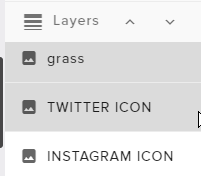
I will fix it now my bad 😃 but you need to fix that on your side
unkempt totem
got it
ripe herald
Sorry for the trouble
unkempt totem
i should figured that out myself
lol
well at least you know that was happening
lol
ripe herald
Nah it's my bad when i was setting up i didn't moved grass 😦
bright pike
Excuse me, can someone help me?
tight harness
Ask your question and somebody will answer
bright pike
I have already written, but I repeat: I have a problem with StreamElements. I want to delete a twitch account on streamelements, but I don't know what I have to do.
clever mango
I responded to your earlier post.
May I ask why you've decided to stop using StreamElements? Do you have questions that we can help you with? We're here to help.
 delicate hull
For the last two months CAPTCHA and reCAPTCHA are missing from all of my browsers i have tried to delete all of my cookies and history and addons but id did not fix the problem
clever mango
 Is this causing issues for you with StreamElements?
I don't believe we use CAPTCHA for anything
 native musk
Hello, I was wondering if someone can help me. I have Ground Control up and Im wondering if there is a way to delete some of my recent activities.
clever mango
No, not from the activity feed. They can be removed from Widget Data which is in two places on the site:
Activity Feed > Widget Data
Overlay Editor > DATA
late bronze
Can you delay alerts between eachother?
 stuck hamlet
no
clever mango
@late bronze Please add that idea to our ideas board https://strms.net/ideas
 grand tusk
idk if this always happens, but for me my themes/overlays take forever to load on xSplit
can someone let me know if this is supposed to happen, or if not help me to get it to load faster
narrow coyote
the overlays will take some time to load, as it is a browser source, so its actually loading the web page. Loading time for overlays will vary based on your internet speed, ping to servers, and the amount of data to load in the overlay. Unfortunately, I do not know xsplit, so I do not know if they have a way to preload and switch scenes like OBS does. About how long is your overlay taking to load?
grand tusk
oh ok, it takes about a min and a half
narrow coyote
 that does seem like a long time, if it were just a few seconds like 5, I would have suggested to increase the time on the transitions between scenes
 tribal drum
Hey there! I'm having trouble finding an easy way to allow me to display my sub points in real time. Seems like such a trivial thing but searching for a solution has been quite painful. Any advice would be grand 
clever mango
@grand tusk Right now it all depends on factors such as internet connection, PC, and ping to the servers but we're working on a very cool solution to all of this 😎 stay tuned
@tribal drum We're working on a sub points widget 😃
 drifting yarrow
I've got an issue with not being able to get rid of the original sound ping that comes default with the alert box. It will not go away even if I delete it. I also deleted a song that I wanted to use and that won't go away either. Nothing I do gets rid of alert sounds to start fresh
clever mango
what type of activity?
clever mango
have you added any overlays to OBS?
drifting yarrow
Yes I have them muted/hidden and still the same
I even stsrted a fresh overlay and doesn't work either
clever mango
Let's work on getting the right sound. Close OBS for now and we'll work with the editor
We want just one editor open and no launched tabs in the browser
Then go into the alertbox and remove the follower sound and change it to the one you want
do a test and let me know if it's correct
Actually if you can join me in voice support this will be easier
drifting yarrow
Yeah sure
bright pike
@clever mango Because someone used my twitch account and my e-mail to create a StreamElements account. I didn't know anything about this thing. Now I changed the password for my Twitch account, but I didn't want to create an account on StreamElements. I noticed this because I received e-mail from StreamElements, but I had never used StreamElements. And I don't want to have an account on StreamElements. I don't need and I don't want an account on StreamElements.
clever mango
@bright pike If you go to https://twitch.tv/settings/connections and scroll down until you see StreamElements you can disconnect the integration with Twitch. Once disconnected, we don't receive any information about your account from Twitch and the account is disabled.
 sour minnow
Can a mod and a counter in chat by the streamer is playing
sour minnow
Wins
clever mango
Sure, check out the command example in #command-share
sour minnow
Ok will do thanks
bright pike
I already do this, but I receved an e-mail about my last stream. I don't understand why. A friend of mine used my Twitch account instead of his. He created some things with my account on StreamElements. I spoke with him a short time ago. Can you cancel this account? (Thanks for the help and the time)
 knotty field
is there a way that i can make the hype cup smaller??
tight harness
Yes, with the Cup Scale option
 eternal stag
Hi there can I chat with someone about adding stream elements to my stream
well nvm ill just do research. thanks.
narrow coyote
I cant do voice chat now, but if you have any questions/issues, feel free to ask/post them here
clever mango
@bright pike Could you forward this stream report to me? austin@streamelements.com
We will make sure you don't receive any more emails.
bright pike
The problem is not the notifications. I don't want to have an account with my data.
 fossil pine
does stream elements work with mixer?
tight harness
Not yet, we plan on it later in the year
 crystal turret
Bot seems non responsive for me, any known issues currently?
stuck hamlet
looking into it 😃
 snow bane
Same my bot isn't responding
 zealous kestrel
bots not working for me either just fyi
 neon crater
U guys too?
neon crater
Nerdmaster747 is having the same issues...bot = nonresponseive
 trail condor
Ruh roh 😛
stuck hamlet
We're on it 
 proud pumice
it looks like twitch refreshed connections, our bot is reconnecting quickly to all channels
 orchid rock
same
trail condor
Wow timing. Darklaunch pls
clever mango

narrow coyote

weary mist

 violet dune
Same here, in our stream is not working.
 safe kettle
Streamelements bot suddenlty stopped working in my channel. I parted the bot and rejoined it and it still isn't doing anything
weary mist
@safe kettle @violet dune read up, Perry said it is coming back now
stuck hamlet
We're on it guys 😃
safe kettle
oh ok gotcha
weary mist

violet dune
Jajajaja
trail condor
You guys are the best though ❤
violet dune
I know I know
stuck hamlet
beatbox, dont you dare 
 winter anchor

 jade breach
My bot cammands and notifications aren't working. Anyone else having this problem?
violet dune
I love when things goes wrong and you feel like superman solving it.
stuck hamlet


 elder sorrel

violet dune
Jajajaja nice
narrow coyote

jade breach
I just caught up on the messages, thanks for all your hard work guys!
 strange meadow
was just coming to say my notifications were not working and bot left the channel but i can see it has already been reported.
violet dune
Of course
 versed zealot
Hello, can someone help me with our stream elements bot?
clever mango
Twitch forced a refresh on the bot connection so its now rejoining channels. It will take some time to find it's way back to it's homes so we appreciate your appreciate. <3
Is better to report that there are reports about something
weary mist
versed zealot
thank you scalper
 river narwhal
Onslaught is about to lose his mind lol
river narwhal

 bright nexus
Ground Control isnt showing the recent bits donation and is doing no alerts, is twitch api down?
weary mist
twitch did something to chat, we are reconnecting now @bright nexus
violet dune
@bright nexus bitd are working in our stream
 bright tartan
im streaming right now and my commands have stopped working
 stable aurora
My stream elements bot isn't working.. it just isn't in my viewer list or doing anything..
clever mango
Twitch forced a refresh on the bot connection so we the bot is now joining channels again. It will take some time to find it's way back to it's homes so we appreciate your appreciate. <3
@river narwhal 
lament blade
Will missed notifications come through after everything gets reset or are they lost in space?
river narwhal
@stuck hamlet bb pls nu 
river narwhal
'Till then, I'm just being held at pepe point
 molten brook
Quick question, I know you get this a lot but I always forget the answer, how do you edit a tip goal widget to show that nothing has been donated yet?
weary mist
@molten brook go to activity feed, widget data, goals tab, change to zero, hit save
molten brook

 agile mist
Hello support team
 placid spruce
Is the bot not working right now...?
 urban wolf
@placid spruce scroll up some
clever mango
Twitch forced a refresh on the bot connection so we the bot is now joining channels again. It will take some time to find it's way back to it's homes so we appreciate your appreciate. <3
Question. Command outputs are not showing in the stream chat, want to know if there is something going on cus there are no posts in y'all's update
 pulsar hare
so we jsut need to wait?
elder sorrel
Yep 😄
agile mist
LoL apparently
lament blade
Are there any issues with the bot?
placid spruce
Was that pinned anywhere? I didn't see that...
placid spruce
And people aren't likely to scroll through it...
But no matter. Thanks for the update.
clever mango
Twitch forced a refresh on the bot connection so we the bot is now joining channels again. It will take some time to find it's way back to it's homes so we appreciate your appreciate. <3
 gusty herald
thanks for the info
 loud hatch
i changed my font but wont change on stream
how come
clever mango
Which font @loud hatch ?
gusty herald
man i've had that mix-up before, embarassing
lament blade
Would parting my channel help the bot to re-join faster?
safe kettle
Roughly how long should it take for the bot to come back to the channel? I'm losing viewers
proud pumice
as fast as twitch allows us to rejoin channels @safe kettle
clever mango
@loud hatch There does seem to be an issue with that font. I will write it down as one for the devs to look into.
loud hatch
💔
lament blade
Need help. I had a giveaway running for the last few hours and for some reason streamelements is not working now. My commands !points etc nothing is working. When i click on my viewers list its not even in my channel. When i go to the streamelements dashboard it shows "part channel" so i did that and re joined and nothing is working.
HELP my giveaway stream is failing.
elder sorrel
Twitch forced a refresh on the bot connection so we the bot is now joining channels again. It will take some time to find it's way back to it's homes so we appreciate your appreciate. <3
This was posted in here about a few minutes ago.
lament blade
Oh sorry I'm new here just joined where do i see those updates?
elder sorrel
Scrolling up is the only way currently.
 placid edge
wondering if anyone can help. been loving the site but all the sudden my streambot stopped working and the site still says im live even tho I am not
elder sorrel
Not sure if it can be pinned or be put under #announcements I don't have control of that 😅
lament blade
Thanks for the support, Im hoping it comes back soon. i have people wanting to buy tickets.
 orchid ledge
anyway to prevent the overlay editor from snapping to edges
ive tried using the location input
elder sorrel
Using the arrow keys is how I get around that.
No prob, @lament blade ! Have an awesome stream 😄 Gotta log off for now.
orchid ledge
thank you so much
 whole trellis
I was wondering why commands weren't working. 😉
lament blade
yeah this is frustrating.
placid edge
is the chatbot down?
lament blade
yup
placid edge
okie dokie was wondering what was up
proud pumice
can you guys check if the bot is back in your channels?
connected to over 60% of the users so far :>
lament blade
nope not in mine
zealous kestrel
connected, but some commands not working yet
dense jackal
seems to be working in mine
 errant fractal
still not up in mine
placid edge
connected but cannot use any commands
 proper lantern
I understand it's taking some time but is there anything manual we have to do? Or just wait for full support?
proud pumice
try part/rejoin from the dashboard
proper lantern
Gotcha thanks.
proud pumice
tell me if it works now
lament blade
back in now thanks for the support.
errant fractal
i did that a few minutes ago and it didn't work, but i just did it again and it's working now! yay!
placid edge
still no commands working for me
proper lantern
Not yet, but i'll wait and periodically do it. Thanks. I'm moding some else's channel and trying to handle it for him.
strange meadow
commands working for me, but not alerts
proud pumice
@placid edge did you part/rejoin?
placid edge
yup yuppp
proud pumice
ok hold up let me push you guys to the top of the reconnect queue
proper lantern
(I'm modding for TheSquadCaptain)
violet dune
I reconnected de bot manually and still not working
dense jackal
parting and joining the bot may help some but we just have to wait as it is coming back to channels
violet dune
Now, is working in our channel. Thanks for the support
placid edge
BINGO
proper lantern
oh awesome, back online, thank you so much!
lament blade
alerts aren't working though
 thorny tusk
@fierce widget it took a bit once it said the bot was back and 2 stream resets for everything to be up and running in the stream I'm watching
 fierce widget
so i should part with the bot bring it back and reset my stream?
proud pumice
@fierce widget im hopping on your stream to take a look
narrow coyote
fierce widget
thanks perry 😄
stable aurora
thanks!
lament blade
What bit rate should i stream on and resolutions i have a 22.9 upload speed
 native horizon
Moin jemand deutsches hier 😄
 charred garnet
for my follower alert sound why can i hear 2 of the same audio playing over top of one another it is so annoying and the audio that i uploaded is fine.
nocturne pelicanBOT
Make sure to :ballot_box_with_check: “Shutdown source when not visible” for all browser sources (all OBS scenes). If using studio mode, uncheck “Swap Preview/Output scenes After Transitioning.” Also keep in mind that sound can play from any overlay loaded in the browser (editor or launched). https://i.imgur.com/FegZJQS.png https://i.imgur.com/yY0wcFl.png
lament blade
lol, shutting down source when not visible would be great if it didn't take 15 seconds to load the entire overlay every time I switch scenes. Just make a scene with nothing but a notification box and then mute the notifications on all other scenes. Then it even saves you the trouble of having to change a sound on EVERY scene if you decide to update your notification sounds.
 astral quiver
anyopne else having issues where people SR and it links everyone to netflix ad?
and no matter what link they request it's the same netflix ad
clever mango
@astral quiver disable the Block Hyperlinks setting here https://www.twitch.tv/settings/channel
proud pumice
@astral quiver we're going to surprise you with a whole new SR system in the next couple of days - ads free
 flat valve
why would twitch ask for points ot be disabled?? they allow it with streamlabs
flat valve
this makes me super salty./..... points/contests (betting) is a huge PART of my stream interaction
stuck hamlet
We will have it back in a few days.
 burnt sky
Bot not given viewers points, how do i fix that ? 😃
 storm roost
Yeah im having that same problem , the bot stop giving the viewers points over time , any ways to fix this?
 broken swift
my follower alerts isnt working, how can I fix that?
 hoary dune
Hello, I have a question and wonder if someone can help me: My host alert doesn´t function for some reason. It functioned for like one or two days and thenn suddenly stopped working out of the blue.
 neon crow
good morning, some german mods actually here?
 fallow lake
I think im having this bug where my viewers arent receiving points for watching the stream. Im not sure if this is just a personal issue or what
 misty wagon

Hey loyalty system users, FYI, @twitch asked us to shut down loyalty points handouts for a couple of days, stores and redemptions still work. We'll update you as soon as we get permission to run it again :)
 Twitter
@neon crow der Slimme @ebon forum und der Schone @winter zenith 😃
 ebon forum
@neon crow Moin Moin, ja, schönen Feiertag dir erstmal!. Wo brennts?)
neon crow
wünsche ich dir bzw euch auch, und zwar versuch ich es seit längerem schon zu fixxen das ich sobald ich anfange zu streame, harte ingame lags und fps einbrüche habe, was ich vorher nie hatte
fallow lake
aww ok thnx @misty wagon is there a possible return date yet?
dense jackal
@hoary dune do you have your event list or activity feed open?
ebon forum
@neon crow Na da brauche ich paar mehr Infos. Deine Hardware (CPU, GPU reicht) und noch ne Kleinigkeit - ob bei OBS bei dem Browser Source der Haken bei "shutdown source when not visible" sitzt (habs net auf deutsch gerade)?
neon crow
@ebon forum i5-4460, palit 960 jetstream 4 gb, jaa haken ist drin
ebon forum
@neon crow kannst du mal OBS anwerfen, Taskmanager aufmachen und dort die Prozesse OBS und cef-bootstrap mal auf nem Screenshot verewigen? cef-bootstrap ist das was von uns kommt, da sehe ich die Auslastung. Dann können wir optimieren.
dense jackal
@fallow lake unknown to us
fallow lake
ok
neon crow
@ebon forum kann ich es hier einfach reinposten?
ebon forum
@neon crow ja klar
 patent hearth
how long does it take for a pending emote to go through
ebon forum
@patent hearth Twitch takes time, specially after the Affiliate wave, i would say a couple of weeks
neon crow
@ebon forum
ebon forum
@neon crow was sehe ich, 7% für OBS, 11% für cef-bootstrap (das ist unser overlay im browser source). Ist nicht zu viel. Ich kann nicht sagen ob da was animiert ist oder nicht, willst du diese 11% reduzieren - nimm keine animierten Overlays und kein Kappagen.
Und mach bei LoL nen FPS-lock rein, fixier das mal auf 60FPS.
Dann kurz testen (ohne Stream, stell bei Aufnahme denselben Encoder ein wie beim Stream damit die Last gleich bleibt) und wir guggen weiter. Bislang nix auffälliges.
neon crow
okk ich teste das mal in ruhe durch, danke schonmal @ebon forum
ebon forum
@neon crow gerne, schreib mich (oder Kiwa) hier an, wir sind eigentlich immer online, ich helfe auch bei Problemen ausserhalb von StreamElements
neon crow
@ebon forum danke dir, wenn du mir jetzt noch sagen kansnt warum fortnite und pubg auf den falschen bildschirm laufen, dann biste der king 😄
alle anderen spiele laufen auf den richtigen monitor, außer diese beiden 😄
ebon forum
@neon crow weils BR games sind, die kannste nicht mal Beta nennen. Ehrlich - kA, stell die mal auf Fullscreen auf dem Hauptmonitor und starte die neu. könnte helfen, muss net.
neon crow
@ebon forum alles probiert, klappt nischt .
ebon forum
@neon crow hilft halt nix, wenns nicht mal per configfile geht, muss man damit leben. Gehe die Entwickler hauen 
neon crow
@ebon forum werde ich machen, muss ich brandon und tyler mal wieder schalgen gehen
ebon forum
@neon crow alles klar. viel Spaß beim testen. wenn du wirklich mal guggen willst was bei dir limitiert, lass MSI Afterburner im Hintergrund laufen, dann siehste was limitiert in der Grafik.
neon crow
@ebon forum okk ich werds danach mal probieren
 royal quarry
Hello is there a way to access the data / images from the premade super themes from a blank canvas in Stream Elements? I'm trying to make a stripped down version for myself using 1 theme pack and 1 super theme pack.
 midnight seal
Hello, I need help setting up the songrequest system... The songs are being queued, but the stream won't play them
royal quarry
I guess I'm too cynical, it listed web-l as an eligible file type but not web-p, however they both work. Thanks for answering my super dumb question, I'll likely have more soon :\
ebon forum
@royal quarry
misty wagon
@royal quarry you can only create that by exporting from one overlay set to another. Downloading & editing our overlays is against our ToS.
royal quarry
I'm trying to reverse one image bar 180o, I'm not editing the image in any other way, if at all.
misty wagon
In overlay manager 2.0 which is in the making, there will be a lot more features. Post the image and we can ask one of our designers if they can do it for you.
royal quarry
Also wondering if there is a way to disable the functionality, or the "emulate alert" button in the bottom left.
misty wagon
There is none, why are you asking?
royal quarry
Well if there was a way I could somehow scale down the black gold super theme to 720p, and disable/remove some of the features that would essentially solve everything I'm trying to achieve.
The blue button is preventing me from using that button left corner, keeps popping up etc and hindering the ability to slide the bars around
misty wagon
The emulate button will not show when ur live, or when u launch it to test the overlay.
Ah I see, perhaps one of the Support folks know a trick for that
royal quarry
It's just preventing me from placing some of the items in that location, that's all.
ebon forum
@royal quarry you can manually set the position of the file per pixel, let me explain once i open the editor
royal quarry
I think I know what you're referring to, the values in position and size etc?
ebon forum
@royal quarry yep. use "top" and "left" with the pixels to adjust the position. remember the default size of the overlay is 1920x1080, so this is your "map" in that case
royal quarry
Ok I follow you, I'm trying to convert a bunch of the material from your 1080p black gold set into a usable 720 format for myself.
I can't stream in 1080p 😦
midnight seal
@ebon forum is there a support page on how to properly setup songrequest?
ebon forum
@royal quarry the overlay is 1080p but it will be scaled by OBS to whatever scaling you set to.
The size matters when you import the browser source, everything else is done by OBS internally
@royal quarry just set OBS to scaling to 720p, 30 or 60 fps, select a filter that you like and it will be scaled down, no need to mess around with a 720p overlay^^
ebon forum
@royal quarry yeah it can be confusing from time to time.
royal quarry
Well, you suggested there is a way to import material from other super themes onto a blank canvas? I'm looking for this option but cannot see it.
Thanks for the help btw, really appreciate it. I am very unfamiliar with this app, first time using it tonight.
ebon forum
@midnight seal try to use that video https://www.youtube.com/watch?v=Wj-hGfqbeC0
we do not have a written guide for songrequest/media share right now. This should help tho

Song Request let your viewers request songs to be played in your stream. Media share doubles the fun and adding video as well. Both features are integrated w...
@royal quarry there are multiple ways, you can delete parts of the overlay, you can copy the whole overlay or use the "duplicate widget" function on the layers bar in the editor
ripe herald
@royal quarry what image you need to turn around
royal quarry
I'm trying to merge the black/gold alert pack onto the same overlay as the black/gold in-game overlay.
@ripe herald The image I'm trying to flip is the "bottom bar" from the black/gold super theme pack in-game overlay.
ripe herald
Okay i'll flip it for you now 😄
royal quarry
The exact portion I need is labelled "bottom bar" in the image section
It's the locked bottom bar
royal quarry
Thank you very much
ripe herald
open and change the one you need
hoary dune
@dense jackal sorry didnt expect an answer so fast and now I failed  oh yeah for some reason the hosts don´t even appear in my recent events list anymore
 storm mango
Is there any problems with loyalty points now?
My viewers aren't getting any points when they watch my stream
ripe herald
@storm mango
Hey loyalty system users, FYI, @twitch asked us to shut down loyalty points handouts for a couple of days, stores and redemptions still work. We'll update you as soon as we get permission to run it again :)
Twitter
storm mango
Thanks a lot , sorry didn't see the announcement
royal quarry
Hi there, I believe I have my data set up inside StreamElements correctly, however I'm having problems converting it into the 720p format on my OBS, someone mentioned that it would automatically resize itself, but it isn't happening correctly. Everything is out of place, is there a way I can correct this so the overlay copies over to my OBS in 720p format? When I added the overlay to OBS as a browser and filled in the URL, I imported it over in 1280 X 720p format, should I use 1280 X 1080p instead?
I'm very close to having this set correctly! So close I can taste it Kreygasm
ebon forum
@royal quarry when you set up our overlay with browser source, you need the size of the overlay. 1920x1080.
 ebon forum
@royal quarry
royal quarry
Let me see if I can get this to launch correctly so I can get some sleep and move forward with my life
midnight seal
@ebon forum thank you for the link, i wouldnt have known I needed ground control to make it work. However, it still won't play the music in the stream. Am I missing something?
ebon forum
@midnight seal ground control is not needed, but useful to have hotkeys for songrequest. When you have our overlays set up, you will have the music playing once the playlist is not empty and running.
midnight seal
overlays are required for songrequest to function? okay
ebon forum
@midnight seal ground control will work too, you should see and hear the video when the playlist is not empty.
royal quarry
I'm not having any success launching the overlay on OBS now, it's not picking up test alerts. I've followed the directions in the videos, clicked the source boxes, input the resolution and then resized to fit to screen but OBS won't seem to recognize it now.
ebon forum
@royal quarry mh ok. If you see the overlay in OBS, then it works. For alerts to work, the alertbox should be set up (or left with default settings for the test).
royal quarry
I'm not seeing it in OBS, none of the material is copying over, I don't know what I'm doing wrong
ebon forum
@royal quarry well, did you set up the overlay via browser source properly or not? It will work no matter what, just the size can be wrong
royal quarry
It seems like it was upload lag or something at first, I just kept saving/launching and reinputting, now it works!
My sincere thanks for the help, it's 4am here and I think I fried my brain from making so many mistakes. I have it working now and it looks great!
Everything I may add, including the alerts 
ebon forum
Enjoy it. 4AM... go grab some sleep, zombie streamers are scary!
royal quarry
Thanks man, take care!
 stark maple
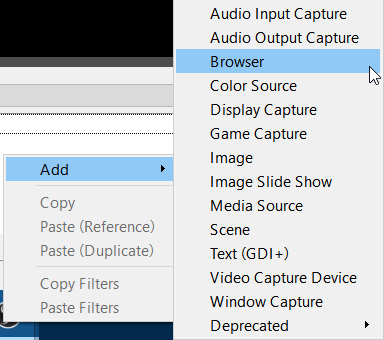
can some one tell me how i can import an overlay to obs 21,1,0? there is not hthe button add browser source
 stark maple
im on pc. and now i dont have this one
ebon forum
@stark maple you probably installed OBS without the browser source (this is possible). If this is the case, the best way is to reinstall OBS.
stark maple
oh ok. i try it
ok  me. i had really dont intall the browser plugin. thanks @ebon forum
ebon forum
@stark maple happens, now you have it 
stark maple
jes 😄
 kindred forge
The Streamelements dashboard is still telling me I'm live, even though I went offline almost 12 hours ago now. It has the red dot on the top left, and shows on my computer as well as my phone when I check the site.
Is there a way I can force this to change? As long as it's irrelevant and doesn't affect anything that's fine, but it's a tad annoying.
lament blade
So our viewers can't earn points for the next few days.... Guess it's time to go to StreamLabs.
tight harness
You can still give your viewers points with the !addpoints / !bonus command, the tweet was clear that this request came from Twitch because their servers are having a hard time with all the requests for the chat list of channels for rewarding points, if Twitch requests something like this that's out of our hands
lament blade
I have streamlabvs loyalty points and i have 10 viewers up 1 hour none of them have points
winter zenith
@kindred forge its not doing anything if it still sayes that you are life. You are right it should disappear at lest an hour after a stream .
tight harness
@lament blade So it's not just ours?
winter zenith
Or did you mean streamElements?
tight harness
🤔
lament blade
streamelements*
tight harness
We've actually posted an official tweet about this: https://twitter.com/StreamElements/status/979548941342691328
Hey loyalty system users, FYI, @twitch asked us to shut down loyalty points handouts for a couple of days, stores and redemptions still work. We'll update you as soon as we get permission to run it again :)
Twitter
lament blade
Ohh.. Thanks
winter zenith
 we hope to make it available soon but we have to wait on twitch for that
lament blade
Hi!
Some people in my channel is reporting that they are not receiving points, or has been like that for 1 week. How come?
I really love Stream Elements system, its easy and user friendly. Sucks that Twitch who's owned by Amazon a billion dollar company can't get their shit together.
ripe herald
@Roshtein#2129
Hey loyalty system users, FYI, @twitch asked us to shut down loyalty points handouts for a couple of days, stores and redemptions still work. We'll update you as soon as we get permission to run it again :)
Twitter
winter zenith
@lament blade belive me, we aren‘t too happy about this wither
tight harness
A couple of days is the ETA, hopefully sooner 😄
lament blade
Can I give points manually in the chat?
winter zenith
Yes
lament blade
!addpoints
winter zenith
Or with !bonus all 123
lament blade
what is the difference
tight harness
They're the same command, just !bonus is a shorter alias
winter zenith
Shorter to type 😃
tight harness
No worries
lament blade
final question, the missing points will not be added later, right?
winter zenith
No problem we all been there and we love to help
lament blade
So I dont give manually and then it gets added 😛
winter zenith
Sadly no 😦
winter zenith
No problem thanks for your understanding
burnt sky
Question, when does the Hypecup tilt ? 😄 i am afraid of going in the overlay 😄 (i dont wanna reset it) 😄 i am doing a 24h stream 😄
 rough jacinth
Wassup guys, pls upvote this cool guy: https://streamelements.helprace.com/i486-allow-the-streamer-to-sort-their-own-store-items#item_comment_block_33315
Manually StreamStore sorting
And groups, and stuff
 turbid pewter
I do not get any alerts, got 2 followers without notice, someone else got the same?
tight harness
I see why, it's because you have 2 Twitch accounts with the same username on our system
The other account is registering your follows:
tight harness
I'll ping a dev to see if he can merge them
turbid pewter
thanks!
turbid pewter
found a solution?
 celest temple
So, a frtiend of mine is trying to import from StreamLabs to StreamElements and I guess it requires and addon\
She opened the addon and than try to click import and and it says some like "Error Occurred" Any help or advice please?
tight harness
Make sure she's logged into both our site and theirs
celest temple
Okay, Checking. Hold on
midnight seal
@tight harness Hi, could I bother you with some help for the songrequest system? I have everything set up (to my knowledge), but I can't get the music to play through the stream
midnight seal
If you're willing, I'd be quite grateful
celest temple
Yeah
winter zenith
You need to have the app GroundControlls or the Songrequests dashboard open to hear the music
tight harness
Preferably the song request page, we're releasing something today and at first it'll just be supported by the page on the site
midnight seal
@winter zenith I have both open, and I can hear them through their respective sections
the only deviation from the norm is that it does not go through the stream
IE my viewers cant hear the stream but I can
tight harness
@midnight seal Check what you've set in your Audio settings on your streaming software
Could be that you've got it set to capture the wrong device
 flat edge
Hello, i got some Probs with my Loyalty setting. My Viewer never becomes her Amount 😦 , i dont know why.
tight harness
We've actually posted an official tweet about this: https://twitter.com/StreamElements/status/979548941342691328
Hey loyalty system users, FYI, @twitch asked us to shut down loyalty points handouts for a couple of days, stores and redemptions still work. We'll update you as soon as we get permission to run it again :)
Twitter
flat edge
Tahnks m8
tight harness
midnight seal
@tight harness does OBS affect how the stream interacts with StreamElements?
midnight seal
you mentioned that my audio settings might interfere with the songrequest
tight harness
I said you might have the wrong audio device selected in OBS for capturing audio in general
turbid pewter
Still not working for me:/
tight harness
The merge has been done, may take some time to see the effects
tight harness
No problem 😃
tight harness
@ionic herald I see why, you've got the same bug as zefron where you've got 2 accounts on our system, one of them shows you as online and one of them shows you as offline
tight harness
I'm not deleting anything  it's a developer who does the merging, but they're celebrating the Passover holiday so it can get done but most likely not for a few hours at least
 ionic herald
Oh shit 😄 anything i can do now? Or do you already submitted that for me?
tight harness
I told him
ionic herald
Also: Is there anything i can do to make 1 Point per 1 Minute instead of 10 Points per 10 Minutes?
tight harness
Sadly not
10 minutes is too much for the Twitch servers to keep up with, making it even shorter would cause even more of a meltdown for them 😄
ionic herald
ok
tight harness
They actually told us yesterday to pause loyalty points for a couple of days because we were overloading their servers 
ionic herald
oops
safe kettle
Am I able to rename the stream elements bot?
lament blade
@safe kettle that's an excellent question I'd love to know as well.
nocturne pelicanBOT
Custom bot name requirements
- StreamElements bot modded and in chat
- Active overlay with alerts
- StreamElements tipping page in the panels below the stream (!panels)
- Create a twitch account for the name you want to use
- Ground Control app must be running
Steps to enable custom name
- Sign in to https://twitch.tv with the bot account
- Install and run Ground Control (!gc for download)
- Visit https://twitchapps.com/tmi/ and generate an oAUTH token
- Copy/paste everything in the box to Ground Control oAuth settings and enter the name for the bot account
- Restart Ground Control (custom name may take a few minutes to take effect)
safe kettle
awesome thank you @atomic hollow
 atomic hollow
lament blade
@atomic hollow !rename doesn't do anything in my chat channel... is that where I type that?
safe kettle
rename is the discord bot command that posts the directions on how to change the bot name. Just read the directions above
Basically it looks like you can't change the bot name through streamelements, you have to actually create a new twitch account and hope that the name you want to change your bot too is available
tight harness
@lament blade The first list is requirements to have the option available, the second list is instructions to do it
lament blade
Ahh yeah too much work for such a simple request. I'll leave it streamelements, that's fine by me.
winter zenith
Its not like other services have it simpler. Our solution is just free thats all
lament blade
Oh I'm not saying other services are any better, just too much for me to be bothered with.
tight harness
Gotcha
winter zenith
Its alrigth 
ionic herald
@tight harness just for asking, do you know my Twitch Name? :p
tight harness
Yes it's in your Discord profile
ionic herald
oh i see :p
 storm ledge
Having trouble with Alerts in the new Fluffy Bunny Animated Easter Theme - trying to go live in about an hour ... I've tried changing out the audio for the subscriber alert but it seems to be keeping the chime that is default for the theme.
atomic hollow
take a look at variations
safe kettle
I just did all of the above, lets see if it works
it worked at was pretty simple. Just sucks that the name you want to change your bot too has to be available as a separate twitch account
tight harness
That's always the case 😄
storm ledge
I've looked at the variations and under the alerts that are giving me trouble, I'm not seeing any variations
I am also getting a weird echo effect when I show the video on Overlay during Media Share
tight harness
@storm ledge We've got an update coming to Media Share / Song Requests, so we'll see if the issue persists with the new version or not
 stone citrus
storm ledge
stone citrus
storm ledge
@tight harness Thanks for your help!
 open sinew
Hi Im having a issue with streamelements isn´t showing stats for a streamer who changed her name to emma. https://stats.streamelements.com/c/emma
 weary mist
@open sinew that is a known issue. It is on our bug list. Thank you for reporting it.
open sinew
@weary mist cheers, i saw it was updated to work with people changing their names but i guess not atm. any eta when it will be fixed ?
weary mist
@open sinew not sure yet, I haven't been told anything yet
open sinew
kk
celest temple
Can Editor of my StreamElements see my Stream Store?
clever mango
Any manager level can @celest temple
agile lake
Is there someone who can convert a .mov file to .webm for me? because every site I try to use doesn't work
I need it because i want to insert a video into overlay
ripe herald
@agile lake how big is file
agile lake
86.6 mb
clever mango
ripe herald
send it to me on private I'll convert it
 tough mason
So last night when i was streaming my alerts were working fine but later when i was receiving bits i wasn't receiving any notifications. Same for just two of the subs i got.
also doesnt show any of the information on my dashboard
 sudden nacelle
Hmm someone knows why the f.... my alert sound last 20 seconds, when the alert is only set to 5 seconds?
 worthy reef
How do I set someone as a supermod?
clever mango
@tough mason There was a rare service disruption last night but we're back at 100% now
weary mist
@worthy reef !level 1000 username
clever mango
@sudden nacelle Your sound effect must be 20 seconds long. You'll need to edit it down to the part you want for the alert
sudden nacelle
ahh ok, bummer.....
tough mason
@clever mango Ok thanks. So i'll assume that notifications that were missed will just not be shown on the dashboard correct?
 worthy reef
lol it's okay, I did it through the site. Thanks though!
clever mango
@tough mason You can edit the data that appears in widgets so your latest sub will show correctly
Activity Feed > Widget Data OR
Overlay Editor > DATA
tight harness
@lament blade Incase you missed it loyalty points are back up 😃 https://twitter.com/StreamElements/status/979740464223055872
aaand loyalty points handouts are now back on track. Thanks @Twitch for working with us to resolve this quickly! https://t.co/BLKETxIr1g
Twitter
jagged silo
Thank god!
jagged silo
Thank god!
ionic herald
@tight harness Can you unlink my youtubeaccount?
jagged silo
Good job guys
ionic herald
Would be cool if they allowed 1 point per minute now 😄
tight harness
@ionic herald I can't do that, don't have the access, apologies
The dev that merges accounts is enjoying the Passover holiday 😃 we'll have to wait until later
ionic herald
oh no 😄
 toxic basin
Hey, how do I turn off commands controlled by module settings? !roulette specifically
weary mist
turn off the module
weary mist
👍
 coral sierra
what could be the reason if stuff doesn't show up in my activity feed anymore? the bot is in my channel, everything is linked and it worked up until a few days ago. even other stream services which i abandoned for SE still show newer activities
winter zenith
@coral sierra did you change your Twitch name recently by any chance?
coral sierra
nope
winter zenith

 storm ledge
When one of my viewer redeems a sound effect, it doesn't display as a store redemtion - why oh why is this the case? Also, I'm getting a lower volume echo in the Fluffy Bunny theme when they redeem the sound effect.
weary mist
Sond effects are just that, sounds. They do not show images. If you want it as an image, you will want to add it as a stream perk
coral sierra
@stuck hamlet https://i.imgur.com/xIP27wL.png


 coral sierra
missing a host
stuck hamlet
!host
nocturne pelicanBOT
Twitch doesn't have a "notification system" for hosts (unlike follows, subs, raids, etc.) so the only way for StreamElements to know that you are being hosted is to connect through you to twitch. This connection is made on:
- SE Dashboard page - https://streamelements.com/dashboard
- SE Activity Feed page - https://streamelements.com/dashboard/activity
- Ground Control desktop app - https://streamelements.com/groundcontrol
Please have one of these open during your stream in order to receive host event notifications.
toxic basin
Hey, I am resetting my streamelement point system but I'd like it if it was possible to not reset the all-time points
Only the current points
is that possible @stuck hamlet  ?
?
 coral sierra
@stuck hamlet that's odd. how do other services capture those events without me having their stuff open?
toxic basin
thank you Offslaught
stuck hamlet
@coral sierra They "login" as you through the overlay, we dont do that as it isnt secure.
 unkempt stratus
What do you guys use obs or XSplit
weary mist
A lot of people use OBS (I do), some use xsplit (like kiwa and cryonic)
each have their perks and learning curves
ebon forum
OBS here, my Xsplit license expired like 6 months ago 😄
clever mango
@loud hatch No, it's been added to the task list but there are quite a few with higher priority.
ionic herald
congrats @stuck hamlet
stuck hamlet
?
ionic herald
For the 0 Hoster 😄
stuck hamlet

 coral lava
is there a way to do like just a raffle giveaway? like anyone in caht can win like night bot does? im blind and cant find it
narrow coyote
!giveaway is also a default command, if that is more of what you are looking for
coral lava
it is but those require tickets i want anytone to beable to win with out buying tickets or spening points
ill just have to use night bot no big deal
thank you
narrow coyote
make a give away, and set the ticket cost to 0
 tawny bay
hey does streamelements have a way to give all viewers or all people who have viewed points? Or make a command that gives a person points (only can be used 1 time for that person)
narrow coyote
!bonus username|all 123
you can give to a specific person, or use all to give to all
narrow coyote
you can also do !addpoints user 123, but bonus will do the same thing
 last tangle
Why did Streamelements stop working in chat all of a sudden?!
narrow coyote
Are you referring to yesterday?
proud pumice
It's working fine rn
 dusk pond
Hi I was wondering how mods could add commands in twitch chat? I've had my mods try the !commands add like on the website but it doesn't work
weary mist
that should work, it just depends on the context they are using. Also, depends on the access level the !command command has. If it is set to supermoderator, you have to set them as that first
for example, !command add test this is a test will create a command !test that will respond with this is a test
dusk pond
I believe all the permissions are correct
As I myself as the streamer cannot add commands as well
Nvm I just noticed that it wasn't enabled at all

Thank you though
 unique ore
On the "Contests" widget....mine doesn't go away after the contest has ended, but i haven't picked a winner....used to do this. Has the behavior been changed or is there something I'm missing?
clever mango
Contest and Giveaway widgets will hide after a winner is selected. I don't remember the widgets acting differently.
 delicate aspen
ok I have a question about something on stream elements, is this the right place to post/ask?
narrow coyote
yes
delicate aspen
Great! I accidentaly imported my saved data from streamlabs twice, and now all my donations are showing up as double, is there a way to fix this?
unique ore
@clever mango I used to do a 5 minute timer on contests for PUBG placement betting and it'd go away once the timer was done and I could pick a winner after the match. Without it being on the screen the entire match.
narrow coyote
@delicate aspen if you do not have too many, you should be able to just delete the duplicates, otherwise you could delete them all, and reimport again
delicate aspen
I deleted both the alert boxes that were displaying in the overlays section, but all tips are still showing double so I imagine that's probably not how I was supposed to do it. Where should I be deleting them?
narrow coyote
from your dashboard go to Tipping > Tip List. From in here you should be able to select multiple, and then at the bottom use the delete selected button
delicate aspen
@narrow coyote awesome, thank you! I have a few more questions because I have the computer skills of a 90 year old grandma. How do I add the latest follower/etc. to my overlay? Do I need to use an outside source like I did with streamlabs (like streamlabels) or is there something built into the system?
narrow coyote
 No worries. In the overlay editor click on the Widgets at the top, in here you will see all sorts of good stuff, like Latest Follower, and several others. Once you add the widget you can further configure it from the editor view
If it does not pick up on your latest follower, you can use the data tab to set the initial value
once you get a new follow or something, this will update automatically
delicate aspen
Okay awesome, thank you so much! I may have more questions as I dive further down this stream elements rabbit hole, but you really helped me out! ❤
narrow coyote
No problem, thats what we are here for, feel free to ask whatever you need whenever, we will help guide you through the rabbit hole all the way to wonderland
royal quarry
Hey I just have a few general UI related questions, sort of fine tuning my StreamELE stuff 😛 - First of all,any time I edit an overlay in StreamELE, I need to relaunch in StreamELE and re-add the browser in order for the changes to take place, correct?
ebon forum
@royal quarry nope, editing the overlay does not require anything special, the link remains the same and OBS will refresh it anyway. Changes will be shown in a few seconds at worst
royal quarry
I'm also having a strange issue with 1 image not showing up on my OBS, only the "cam" image from the black/gold series. I've looked through all the image options but I can't see any differences from the other images aside from that the image has a white checkered background. Is there a setting I can change to make the image show up?
Ok thanks
Everything else is working relatively seamlessly, liking this substantially more than Streamlabs...
ebon forum
@royal quarry white checkered background? Should be transparent, this is why you do not see that in OBS, it is set to be transparent.
royal quarry
That's the part that confuses me, I know the white checkered background part is intended on not being visible, but the camera border, specifically the entire image does not appear on my OBS. In summary I'm just trying to get the camera "frame" to show up around my webcam. Pretty much the only issue I'm having at this point.
ebon forum
@royal quarry check if the layer is set to invisible in the editor (the little eye icon next to the name of the layer) - some parts are invisible by default in themes/superthemes
royal quarry
Ok let me check that real quick, I thought I had gone through all the image options but this was also at 4am 😃
 fast hamlet
how do i change twitch account becuase every time i sign out it doesnt let me sign in to a other account it just automatically signs me in with the same account
royal quarry
Lol, I was looking in all the options in position/size/animation etc, but neglected to notice the visibility button somehow. Thank you again! @ebon forum
ebon forum
@royal quarry 
royal quarry
Best tech support evarrrrrrrrr, have a nice day!
fast hamlet
@ebon forum
ebon forum
You too @royal quarry
@fast hamlet Hi. If you want to log in with a renamed or new twitch account, log out from SE, log into Twitch first and then log into SE.
You can also delete cookies etc. to make sure nothing gets stuck there.
fast hamlet
oh ok ill try that
bright tartan
Is there any kind of host log to see who all hosted you during a stream?
ebon forum
@bright tartan yes, ground control (desktop app) and your activity feed/dashboard.
bright tartan
Ahh didn't think of that, thanks 👍
ebon forum
 gray umbra
Can I get some help with something?
tight harness
Sure, just ask 😃
gray umbra
I changed the resolution of my stream in OBS to 1080x720, and of course, I need to edit the dimensions of my overlay to suit that but I am not sure how to do so. I would appreciate any help
The overlay is from the ones offered by Stream Elements
gentle imp
it's 1280x720 if u are aiming at 720p
weary mist
@TerraSage#0112 Set the browser source width to 1920, height to 1080, save, then hit ctrl+f
gentle imp
and for the overlay to fit, just press Ctrl+f on the browser source
weary mist
that will scale it to the canvas
gray umbra
it's appearing like this although I did that
I'm sorry, I am not very experienced with overlays
should I edit the overlay from Streamelements?
gentle imp
no, right click the overlay browser source, transform, fit to screen
gray umbra
It didn't work...hold on lemme show you the original before I switched the resolution
gentle imp
I dunno, on obs studio it works like this but you are using a diff obs
narrow coyote
where exactly are you changing your resolution?
gray umbra
those 2
narrow coyote
and you are just changing the output?
gray umbra
yeah
narrow coyote
 Then I would expect the fit to screen to work, I have never used slobs though, I would need to throw it on a vm to test to see if it is just a slobs thing
in the mean time, is there a reason you are using slobs over obs studio?
gray umbra
Because Slobs has StreamLabs built in it, it makes streaming easier for me since I use StreamLabs a lot
hold on
wtf
I just changed the output one and it worked now
WOT
Thanks a lot for the help tho
Idk what happened there
 velvet arrow
So I am new to StreamElements today. Been using StreamLabs. Is there no way for me to pull my history of followers/subs/etc to display on my overlays? Just new stuff as it comes in?
narrow coyote
from your SE dashboard, go to Import, and you will need to install and use the import chrome extension, when you do it, make sure you are signed into both your SL dashboard and SE dashboard
weary mist
@velvet arrow @narrow coyote there is no way to pull in recent followers/subs, but what kite said does pull in tips and your alert box
velvet arrow
I did that. But it only imported tip data
Yeah I was hoping to get the followers and such
weary mist
you can manually update the latest widgets, but the recents only update as new events come in
velvet arrow
@weary mist So I saw that I can manually put in stuff. Will that overwrite when new events come in or will I have to remove those manual ones?
weary mist
yes, it will update as new events come in
velvet arrow
Okay well that's at least a way to do it. Appreciate it
weary mist
👍
gray umbra
a quick question about streaming in general. what's better? more bandwidth or lower RTT?
 regal cave
gray umbra
regal cave
gray umbra
Round-trip time (RTT) is the duration in milliseconds (ms) it takes for a network request to go from a starting point to a destination and back again to the starting point.
narrow coyote
well, you will want to find the lowest ping server you can, but you also want adequate bandwidth so you can use a decent bitrate
why, are you dropping frames from networking?
 quiet ruin
hey guys, having issues with SE not displaying twitch followers any ideas why?
royal quarry
Hi friend, just wondering if you can confirm that for each different scene in OBS, I would use a different overlay, and thus a different URL?
For example for a PubG in game overlay, I would use exactly that, copy/transfer the URL to OBS
For a "BRB" type overlay I would create a different overlay in streamELE, and then import the new URL for that into my new "brb" OBS stream?
obs scene*
quiet ruin
the overlay is working fine its SE itself that didn't transfer over my followers so the overlay is useless
narrow coyote
@quiet ruin where exactly are you referring to that you are not seeing the followers?
@royal quarry that is correct, you would want a different scene for each of these, and you would have a different browser source for the different overlays. each overlay will have its own url that is used.
royal quarry
Thank you
narrow coyote
quiet ruin
streamelements is showing I have 0 followers on dashboard and on the overlay
narrow coyote
are you using an alert widget in the overlay, and did you get any followers since you started using the overlay?
tight harness
@quiet ruin What's your username?
quiet ruin
yes using alert widget but no new followers
narrow coyote
the followers on the dashboard will only show followers going forward that you get, after setting up with SE, it will not display your current total follower count
quiet ruin
oh sad day ok thank you
tight harness
If you go to Activity Feed > Widget Data > Totals and then Reset Session it'll update the data for your overlay at least
lament blade
How do I get StreamElements to stop sending me emails of my data?
 north glacier
 dapper apex
I'm testing out the contest in SE
But if i open one up and someone joins nothing happens
No confirmation, nothing.
What am i doing wrong?
 pine hemlock
did you check the option: https://www.cuda.live/s/g19eofxx.png
 dapper apex
Yes @pine hemlock
clever mango
Did they join with the chat command? Was the !bet command changed at all or default?
flat valve
do we have points back?
flat valve
LOVE
tight harness
They've been back for 11 hours 
pine hemlock
👌
celest temple
Is there a way to edit the custom commands?
clever mango
Yes, on the custom commands dashboard page or in chat with !cmd edit
celest temple
Wait, I had to scroll.
Thank you @clever mango
Hmm, any support with Monstercat Music with the song request?
weary mist
@celest temple monstercat keeps all their music on youtube 😃
celest temple
Yeah, but gotta have License to play on Twitch or Youtube
weary mist
Yeahhhh
celest temple
And I have a License.
weary mist
We can't do anything about the license part, but you can easily build a playlist from their songs to use on twitch
celest temple
Form YouTube Huh?
weary mist
yup
I have one I use

YouTube
That is the one I put together
its my backup playlist
celest temple
Ah.
Hmm, do you know if SE can connect to with Spotify?
So mayba can control my Spotify?
weary mist
not at the moment, though it has been requested
celest temple
Ah, your right, just checked.
 maiden swift
Hey guys, I had a Prime Sub last night but its not showing up in my activity feed at all. Any ideas?
maiden swift
did it work previously RedBaron?
 floral stirrup
yep
maiden swift
Try to update the link in the browser layer?
floral stirrup
and it's showing in properties when i click on the overlay
but it's not displaying
the eyeball is not crossed out
maiden swift
Right, can you try to repaste the link URL in that layer?
Sometimes I've had to do that
floral stirrup
got it, thank you
maiden swift
Awesome 😃
narrow coyote
If you did not, you can also try to do a refresh cache in the browser overlay properties
 prisma sluice
silly question but i just renamed by channel how can i i relink SEBOT?
narrow coyote
You will want to log out of the SE dashbaord, log back in, and then part the bot and rejoin it it from the bot settings on the right side of your dashboard
prisma sluice
ok thanks ... didnt occour me to log out then back in
 wheat scaffold
Hey I have a question about the loyalty system
narrow coyote
whats your question
wheat scaffold
Can I change the delay from 10 minutes to 1
narrow coyote
no, it has to do with how twitch updates the viewer list. if you wanted to do something like a point per min, you can set it to 10 points
wheat scaffold
But it would take 10 minutes still
I want gambling more often for those who are new
narrow coyote
you can use the commands to give points to users, like !bonus username|all 123
wheat scaffold
so could i create a command that at one minute intervals gifts one point to all?
narrow coyote
i dont think that the bot will listen to its own commands, and plus, do you really want the bot to spam your chat every min?
narrow coyote
the timer will have the bot post whatever is set in the timer into chat
 pale ingot
Hi! just a fan of a great streamer who uses your progrma, he does alot of giveaways and accidently joined for a giveaway i didnt need... is there anyway to make a pass command for the !ticket commands at ll??
March 30, 2018
 wraith walrus


 safe kettle
So is there a way to have the ground control app open but not use the song request portion of it and still use the song request from the stream elements website?
I want to keep it open simply for the bot name change and nothing else
narrow coyote
you should be able to go to the settings, and toggle use songrequest, so it does not display the songrequest options
safe kettle
Won’t that turn song request off completely though even on the website?