#helpdesk-twitch
1 messages · Page 233 of 1
 lament blade
 inner jasper
alright
 narrow coyote
yeah, once i transition, i close studio mode
inner jasper
whats studio mode again?
 slim cairn
It allows you to preload scenes
inner jasper
ok
narrow coyote
inner jasper
kk
narrow coyote
you can activate it and deactivate it by clicking on that button
inner jasper
Y'all are awesome helpers lol
narrow coyote
you can also setup a hotkey for it as well
inner jasper
ill do that in a moment and let you know if i have any more questions/problems
 bright tartan
You can get a little bit of ground control integration with it and the hotkeys
Open app and song/video control
narrow coyote
nice, now we just need some native support love from elgato 
 crystal bone
hi all, quick question i hope
i got my first tip yesterday, and though my paypal worked properly and is linked to streamelements, i got no notification, also my overlay never updated to show it
any ideas what i'm doing wrong?
narrow coyote
Alice is too fast for me
lament blade
❤
crystal bone
ty alice i will try!
lament blade
https://streamelements.com/callmenala/tip this is your link but you need to set up your settings first.
crystal bone
i think i got it, but what settings do you mean?
lament blade
First link i sent you
crystal bone
ok thank you
lament blade
how do i get the chat to appere on stream?
narrow coyote
there should be a widget for chat that you can add to your overlay
narrow coyote
🤔 I don't recall the exact location in the widgets or what it is called exactly, I am at work so I have limited access, otherwise I would send a screenshot
If someone does not step in and answer before I get home, I can grab a screenshot when I get home
lament blade
nvm i found it by using my brain 😛
narrow coyote


lament blade
can I add music to the overlay like pandora or spotifty for when the stream is startin?
you can play the music on your pc
or use groundcontrol for youtube playlists
but there isn't a spotify option at the moment
or pandora?
 vital wyvern
@lament blade if you want to let your viewers see what you are currently listening on spotify, i recommend adding the spotify social panel on your twitch, this will only work for people watching from a pc and not for mobile users
doe this wont be shown directly on you stream overlay, it kinda works
lament blade
I play music reguardless I was just wondering if there was an option ^w^
 ebon atlas
Why I have the currently playing area blank and use snip
vital wyvern
^snip work perfectly for a "Currently playing"
ebon atlas
Just needs to find a way to make it more quicker
lament blade
okie thank chu all
 lean idol
can you setup the giveaway to last a few days?
 vapid badge
Giveaway will last as long as you don't end it manually @lean idol !
So it could last a few months if needed !
lean idol
cool, and how is a winner chosen?
vapid badge
When you end the giveaway, no other participant can join. A button "Draw a Winner" pops up, and when you click on it, one of the bearers of a ticket is chosen !
lean idol
ok so its like a raffle?
vapid badge
Yup !
Using their Loyalty Points, each viewer can buy a certain amount of tickets that will decide the percentage of chance they have to win the giveaway
If you want all odds to be the same, just put the maximum ticket to one per user, and check the "Give everyone their first ticket for free" !
lean idol
ok, cheers,
vapid badge
Pleasure ! 😁
 pale pagoda
suggestions to capture song requests in obs havent had any luck in finding a capture that will play the songs on my stream
 nocturne vortex
Hi, can I delete custom commands?
I cant find where on streamelements browser!
narrow coyote
@pale pagoda what is your current streaming setup like now that you cant get song requests on your stream?
pale pagoda
im trying out obs and cant find a source to add that will capture the sound from either the sr page or ground control. i am streaming a xbox 1 using a elgato capture. i have my overlays just fine its only when i try to source for songrequest that i cant seem to get the right one to pull the audio
narrow coyote
the songs should just be coming from the desktop audio, so whatever your speakers are for the pc should work as the audio source to get the song requests on stream
i think elgato also as their own audio app, not sure if that would help for "mixing" the audio
pale pagoda
thank you
narrow coyote
 thick lake
Hey I need help setting up my twitch account with my stream elements. It says I have more than one account which I havent done. So its not letting me set it up.
If anyone has a solution
lament blade
Can you send me a screenshot of what happens?
vapid badge
@nocturne vortex Clicking this little icon should get your custom command deleted !
 weary mist
You might have to zoom out for that
thick lake
hoping no one can screw with my account with the ID XD
thick lake
Thats good lol
Never mind I figured out why its saying that. When I set it up it automatically connected twitch as owner
 digital oak
When I try to send a template to air on Twitch, the overlay goes to a a new tab, but I don’t see it. Is there something I need to do get it to send to OBS instead?
narrow coyote
you need to take the link for your overlay, and add it as a browser source in OBS
you will want to set it up something like that. If you dont have the best streaming pc, you can try 30 fps for a bit less cpu usage
 coarse heath
What is the url for one’s tipping page? I need to give just the url to someone
Nvrmnd- found it
digital oak
@narrow coyote thank you for the help. I’ll try it tonight.
narrow coyote
 timber owl
Hey does anyone know if it's possible for me to connect a second monitor to my desktop. My desktop doesnt have the hookup that uses pins all I have is 1 extra USB port
lament blade
Maybe you could ask that on #welcome ? this channel is more for StreamElements related questions 😄
timber owl
Okie dokie
 finite viper
Sorry if this is a repeat question, my computer died the other day before I saw an answer, but is there a command to gift loyalty points from yourself to another person (rather than adding and subtracting with setpoints)?
narrow coyote
i think !givepoints is what you are looking for
!givepoints username 123
@finite viper ^
 limber bane
Hi, im having trouble with !Commands, its not showing the actual channel in the link so not working, i have full access to that channel, im my channel it works fine, how can i edit it in? as the link is broken and looking like this You can find a list of all Commands here
https://StreamElements.com//commands instead of https://StreamElements.com/fungoose_/commands

StreamElements
The Ultimate All in One Platform for Streamers
StreamElements
The Ultimate All in One Platform for Streamers
narrow coyote
do you have it enabled in your commands? I think it might be disabled by default
narrow coyote
finite viper


narrow coyote
@limber bane did you recently change your twitch name or anything like that?
might be worth trying having the bot leave the channel, and rejoin
limber bane
@narrow coyote No I didnt, I am trying to set it all up in a channel i mod but have full access to his Elements. It works in mine, but when I go to his one the command doesnt insert the name
narrow coyote
🤔 Not sure on that, as I don't have experience with that, might need to wait for someone with more experience on that matter chime in
one thought you could try
try making a custom command, like commands2, and give it the response:
You can find a list of all Commands here https://StreamElements.com/${channel.alias}/commands
it would be interesting to see if you get the same results, because that is what the default command should be doing
limber bane
@narrow coyote https://StreamElements.com//commands <-- its not putting the channel in for some reason even with that if you want to jump in fungoose_ and have a look for yourself, it works in mine angel_x
StreamElements
The Ultimate All in One Platform for Streamers
coarse heath
My offline timed messages won’t turn off. Help when you get a chance please and tag my name too pretty please. Thanks!
I hit submit also
narrow coyote
yeah, I did peek into FunGoose earlier, and saw the bad link, I am looking to see if anyone has come across this issue before. Also, can you edit the last comment to just have the twitch usernames, I dont want someone to see it, and nuke it thinking there is self promoting going on 
limber bane
I might just in the mean time make a manual link
 dense jackal
@coarse heath How often does it go off? and try setting chat lines to 0
coarse heath
Chat lines are set to 0. Lines go off as if the box were ticked... so I set them as high as possible at 120min so they’d go off less frequently but would prefer it do as I ask and not go off at all - thanks @dense jackal !
dense jackal
My bad I meant not to 0 @coarse heath
The way the timer works is it checks if that many chat lines have passed in that many times
narrow coyote
I just tested with a timer, and disabling the offline interval worked 🤔 is there maybe another timer that is displaying the message
coarse heath
But...... wouldn’t that affect the times I want to go off when I’m online??? I think yes ^_^
dense jackal
Yes it would, but unchecking offline should fix your problem. Would you mind going here and sending me a control link to your account so I can check it out? @coarse heath Feel free to revoke my access after
We just tested unchecking offline and it seems to be working for us, as @narrow coyote said. So I want to look into your account and see what the issue could be
coarse heath
Terra has access... I’ll get with him - thanks bunches!!!
dense jackal
Alright then 😄
coarse heath
I just figured it out @dense jackal it continues to go off if I host someone!!! Essentially it is as though I’m online. Cool then. No problem and thanks
dense jackal
🤔 definitely a bug then interesting. I'll make sure it's reported
 slim hazel
How do I add a timer to my stream, like a countdown timer for a 24 hour stream? Also, how do I change the writing for when someone follows me. In stead of it saying so and so followed you it would say something else?
 paper sparrow
is there any way to add a donate command where viewers (non-mods) can give points to each other?
dense jackal
for a 24 hour stream countdown you can use the countdown widget, but I would suggest putting it on a separate overlay and make it so that it is always on and is just the timer
@Pacos#9966
as for the donation check the settings of the follows check the alert message @slim hazel
@paper sparrow !givepoints is a defualt command that will do that
so "!givepoints tomathin 100" would take the users points and give 100 to me
slim hazel
Thank you!
lament blade
@dense jackal the in game client overlay is bugged i think https://gyazo.com/f90c579dd7e4b2cef5368229553e892e
 dense jackal
it looks like you have multiple overlays
thick lake
How do you make it so you can have music in your stream?
thick lake
do you happen to know which source you do that through?
lament blade
@dense jackal yea i have 2 1 for game client and in game client
its just the 2nd in game client is over the first client
 livid ingot
Damn that bot is spamming again, Why the hell is it so tempermental, Id rather it spam a message every 10 mins per 10 lines or so, Not every damn minute
slim hazel
Also does stream elements offer any free starting soon overlays?
dense jackal
Yep check our super thems every one has a starting soon overlay @slim hazel
@thick lake the desktop audio source
slim hazel
Thanks again
dense jackal
@livid ingot Is it spamming a timer? can you show me what timer?
nocturne vortex
Hi @vapid badge thanks you. Wierd before I didnt see this buttons! thanks works now! cya
livid ingot
Like that:
dense jackal
Can you show me the timers in SE are the chat lines set to 0?
 thin sparrow
@dense jackal Hey, I was the person with the double alerts sounds. Disabling the browser sources when not visible solved it. Thank you!
thin sparrow
Never knew it worked that way tbh. Seems kind of wasteful to have them function when in a different scene.
by default at least
livid ingot
livid ingot
Unless its ment to be different?
dense jackal
So basically the way timer works, is every ten minutes it would check if 10 chat lines have past, if they have it will post the timer. If it's quiet for awhile, and then 10 minutes pass with 10 chatlines, ALL the timers would go off because they would all read ten chat lines in the past 10 minutes
So to stagger them more, make them last longer or have more chat lines etc.
slim hazel
Would you mind linking me to the Super Thems @dense jackal ? Or telling me how to access it.
dense jackal
It's an option on the left @slim hazel https://streamelements.com/dashboard/themes
slim hazel
Awesome thank you.
dense jackal
np 😄
slim hazel
I play such an old game it won't be in here. Will just go with a random one. Ultima Online is olldd
 fair rampart
lol
hi there
just saw you in chat
i meant the custom bot
i restarted the app a bunch
never changed any settings
it worked last night
@atomic hollow @dense jackal
dense jackal
!rename
fair rampart
using test function sets off standard bot
dense jackal
Did you follow all of those steps ^
dense jackal
hmmmm I tested it today so it should be working fine
fair rampart
idk whats up then
just tried disabling and re-enabling
nothing
it should be posting as Tronb0t
fair rampart
i was afraid youd say that lol
ok
nope
not working
did oauth, restarted app, restarted session, nothing
weird right
weary mist
did you part and rejoin bot, just in case?
fair rampart
ill do that
weary mist
gotta try everything at this point, lol
weary mist
That pretty much covers everything I know about it. only thing we can do is an all in one sweep. Log out of SE, clear cache, close ground control. Open task manager, make sure there is no bot.exe or anything else from GC remaining. End it if there is. Log back into SE, part and rejoin bot. Wait 2 minutes. Open GC, give about 2 minutes, and test bot name. If that doesn't work, we will need to find a sacrifice to give the bot
dense jackal
We'll look into this and see if theres something that has changed recently 😄
 smoky tide
looks like the condensed version of the tip goal doesn't show the fill for the bar? https://i.imgur.com/Nt0tuP3.gifv
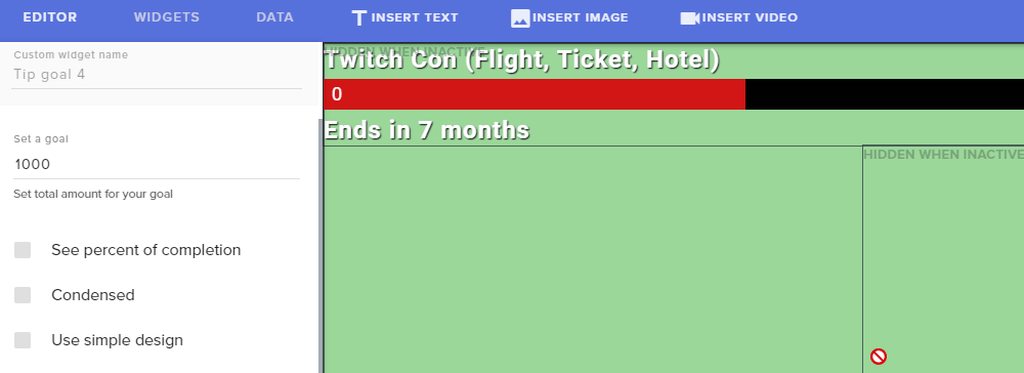
nvm, its because a height wasnt set
limber bane
Still after some advice if anyone knows why Store/commands are dropping a broken link and not including the channel even tho the command does have the channel variable in it?. It works 100% in my channel, and I have full access to the channel im trying to get it to work in, but i have no idea whats going on. Pls help, online help i've also been waiting over 5hrs for an answer 😦
vital wyvern
could to take a screencapture of the message with the broken link, so i can take a better look at it 😃
@limber bane
limber bane
I'll scroll up and repaste it https://streamelements.com//commands instead of https://streamelements.com/fungoose_/commands @vital wyvern Ive disabled it in the chat atm, even making a new link as was suggested earlier still doesnt paste the actual channel name
StreamElements
The Ultimate All in One Platform for Streamers
StreamElements
The Ultimate All in One Platform for Streamers
vital wyvern
there should allready be a command for viewers to get the link to his commands, it should be !commands
@limber bane
limber bane
@vital wyvern yes, and when we do !commands it pastes this https://streamelements.com//commands the channel doesnt get put in. but it works properly on my page, when making a new command with the channel variable in it, still makes the same broken link without the channel
StreamElements
The Ultimate All in One Platform for Streamers
 limber belfry
anyone could help im having issues with some command coding
vital wyvern
@limber belfry shoot :3
limber belfry
anyway we could jump into a voice channel would make explaining easier
vital wyvern
sorry i wont be able to talk as i am currently at work
limber belfry
ok i will try my best to explain
im just not sure what i need to change in some of my commands to make them work properly
${touser} is running away from the stream!! They must be trying to take care of some 'business'.
that first part should be the persons name that entered the command
limber bane
@atomic hollow if that was to me its not working https://StreamElements.com//store <-- my channel works fine, it doesnt in Fungoose_
StreamElements
The Ultimate All in One Platform for Streamers
vital wyvern
@limber belfry there is no ${touser} variable
vital wyvern
if you go to the streamelements dashboard then Chat commands and then go to variable you will see all available variables 
 vale glen
Can you help me please I used one of your themes from out of your website to use as an overlay every time I put it into OBS it makes me drop frames is there a reason for this
limber belfry
ok thank you i will see what i can figure out from there thank you for your help @vital wyvern
 simple frigate
curioous if anyone know if we can like put in the command like !hype and play a clip of music?
vapid badge
@vale glen Never heard of such thing. Have you tried with a "basic" overlay ?
vale glen
The one I'm using is the bright green one nearly at the bottom of the page it is basic it's not an animated one at all
vapid badge
@simple frigate Bot commands don't support automated music play. I wonder however if you could get the !hype command up, have the bot send in a !sr in response in chat and have that play a song for you 🤔
Yep that works !
vital wyvern
@vale glen if you dont have the browser source checked at "Shutdown source when not visible" this will take up some of your cpu usage. and also take a note that alert from other overlays will also play in the background if you do not have this checked
vale glen
Do I have to have your page running in the background for all the alerts and the theme to work
simple frigate
@vapid badge how do you do that?
vital wyvern
you can either use the activity feed from our website or download the Ground control program 😃 you can find this under the activity feed and on the right side @vale glen
@vale glen
vapid badge
@simple frigate Easy ! Go into your commands, and add a custom command. For the command itself just type in "hype". As for the response just type in "!sr (link of the song that you'd like played)"
(This of course only works if you've songrequest active and your Ground Control running in the background
vapid badge
For the same hype feature ?
vapid badge
If so, sure ! Just edit whatever sound you want in an external software, be it music, or music and video, and upload it to youtube !
Then link to it !
simple frigate
and for some reason my viewers can spam my hype command
vapid badge
You don't want that ?
simple frigate
is there anyway i can make it like 1 second CD?
vapid badge
Sure !
Go into "advanced option" you'll have access to "user cooldown" and "global cooldown" which you can set as you wish !
User CD = The cooldown to one particular user
Global CD = If a user uses the command, it'll be on cooldown for the entirety of your viewers during the set time
vapid badge
Haha was editing a screenshot right then
vapid badge
Even 0 buddy, no cooldown mayhem ! 
simple frigate
cool lets hope it works
vale glen
Where will I find my jwt token please
vapid badge
If it doesn't, hit me up again, and I'll ask the SE staff if they've got an idea for your problem ! @simple frigate
vapid badge
StreamElements
The Ultimate All in One Platform for Streamers
and then press "Show Secrets" !
(but don't show it to anyone 😶)
@simple frigate No problem, glad I could help ! If you've got any other issue, pop in here whenever you need !
simple frigate
great support team!!!
vapid badge
Haha, you know it ✌🏼
vapid badge
@simple frigate Send me a dm, I've got an even better idea for you !hype command !
vale glen
Yep
I've implemented the stuff that you have suggested it's dropping frames from 60 down to 75 now which is a lot less
From 60 frames down to 57 sorry
@vital wyvern
vital wyvern
could you dm me a screencapture of your streaming program? like you overlays and such
 gentle imp
have you ticked shutdown sources when not visible?
 tepid raptor
@simple frigate what platform are you using? I’ve been wondering the same thing BUT I’m currently gaming directly from my Xbox one. It shouldn’t matter because !sr works, i should just have to create the command, right?
vital wyvern
!obshelp
@vale glen it might be a obs issue still, but il take a close look on our end
 sharp wind
anyone with good infos about setting up paypal/ donations can join voice maybe?
gentle imp
I can't join voice but I'm here if you need help
all you need is to create a paypal account and link it on StreamElements tip page
sharp wind
can i pm you
gentle imp
sure, no need to ask 😃
sharp wind
Rippz0r helped me with my issue. He did it quick and easy. Thanks man!
gentle imp
you're welcome mate
 oblique galleon
Darn it! For so long ive tried to figure out, how do i copy one Custom made Widget, lets say donation goal widget. ANd instead of ree-doing it on next overlay, how do i simply save it / copy paste it to the next one? Anyone can help?
oblique galleon
But how do i Copy / paste it?
oblique galleon
OHHHH
oh Gosh, i dont think i payed enough attention last time ive tried this then
Feel so dumb...
@atomic hollow Ur a legend and a God at the same time, I am forever thankfull, much love ❤
gentle imp
😂
vapid badge
@tepid raptor are you still looking for a solution for the sound effect command just like Paper Planes?
If so, send me a dm, I'll send you the same steps that I gave Paper to help him out
gentle imp
@stone spire quotes are being reworked so they are not available now
 stone spire
ah
 slender yoke
I need help. Kappagen Emote Explosions are no longer sent to OBS. They appear in my streamelements overlay editor but are not sent to OBS. Any suggestions?
gentle imp
added the kappagen widget?
vital wyvern
^
slender yoke
yes the widget is added. That is the only way for them to appear in the editor
It all worked fine for a long time, then suddenly stopped. Nothing has changed.
It only doesn't work for cheer events. It works fine for other events
vapid badge
Is your problem specific to one overlay of have you tried the widget on other ones?
slender yoke
let me check
nope, other overlays it's the same. All events show the explosion but not cheering. I have confirmed cheers are selected in the kappagen explosion menu
gentle imp
hmm checking mine
slender yoke
Also, is there a reason why streamelements is no longer putting a chat message when someone hosts me? The onscreen notification happens, but not the chat message. I rely on the chat message because there is a time delay from when it happens to when I see the onscreen notification on my twitch browser.
gentle imp
for host notifications you need to have the dashboard open or ground control
slender yoke
what is ground control?
gentle imp
StreamElements app, sec
can u try disable on kappagen cheers, save, then enable and save again, they are working for me, at least on editor, can't check OBS atm
for the host messages check bot modules/host alerts, see if it's well configured plz
slender yoke
OK I disabled cheers on kappagen, saved, enabled, saved again, and even refreshed the cache for the overlay source on OBS. Still no emote explosion on OBS even though it appears on the editor.
gentle imp
do you have, use the entire screen checked?
slender yoke
I don't understand what you mean by that question.
gentle imp
first option on kappagen
gentle imp
I can't properly test kappagen, launched my overlay on a new tab and mine show, so strange
you can try add a new kappagen widget, see if that works
slender yoke
That's really strange.
gentle imp
just for testing purposes
slender yoke
I guess I could remove it and reinstall it, but that's going to be hassle for all the overlays. I know you can copy a widget, but I would need to delete it from all the overlays. ugh
re: the JWT, it doesn't show one, but asks me to reset. Doing so will log me out. Does this impact any OBS settings?
gentle imp
don't reset, just click show secrets
slender yoke
I clicked the link you gave me. There is nothing that says "show secrets"
gentle imp
ops my bad, check it here https://streamelements.com/dashboard/account/channels
slender yoke
oh wait I found it
gentle imp
sent u wrong link first, sorry 😃
also I don't want you to redo all overlays, just add a new one, if the new one works, means there's something wrong on current
so we can pinpoint what is it and fix on the current kappagen
gentle imp
means, you can use a custom name for the bot, or your own account
for a different name, you need to create a new twitch account for it
gentle imp
You can create an extra account with the name of the bot but you can also use your own account.
Pro of using your own is that when you are live, the bot can use sub-emotes but in this case make sure your offline timers don't use any.
If you choose to use an extra account you have to gift a sub to the bot to use sub-emotes.
The OAuth token is the key to your account, so it uses that to talk. If you give it the oauth for your main account, it will speak as you. So if you want it to have a different name, you have to have an account with that name. You can open this page in an incognito window and login with the name of your bot account. https://twitchapps.com/tmi/
https://cdn.discordapp.com/attachments/199460642975907840/415894005285650432/Renamebot.png
slender yoke
where do I get the custom bot auth token?
gentle imp
read above, it's explained there 😃
slender yoke
Ok I did all that, Put the oauth code in for my twitch account. I click 'test bot' and I don't see anything happening on my twitch channel. What am I looking for?
lord have mercy. I deleted the kappagen app and reinstalled it just like it was before. Now there are no kappagen emotes even on the editor dashboard!
guys I'm really getting ticked off. none of my commands are working either. There are no bot messages at all. WTF is going on?
gentle imp
I think twitch is having issues
 atomic hollow
twitch is currently scuffed
slender yoke
I just discovered that
sorry for the frustrated language
OK looks like the streamelements bot is back up and working on twitch even though video is not. I still don't know what 'test bot' is supposed to do for custom bot name.
vapid badge
The test bot option will just have your bot say "Is this thing working ?" in the Twitch chat to check for yourself if the name change actually works @slender yoke
slender yoke
OK. Hard to tell because of the Twitch issues right now. My commands are working, but when I click 'test bot' nothing is happening on my twitch chat.
vapid badge
Yeah Twitch is having a hard time as clicking test bot should give you a result no matter what (should it be StreamElements or CustomBotName)
slender yoke
do I need to have the oAuth text in front of the token text?
slender yoke
ahhhh it works!
vapid badge

slender yoke
wait, no it doesn't. The test comment came from me, but commands still say 'streamElements'
vapid badge
Did you sign into twitch with the bot account ?
slender yoke
Oh I didn't know ground control had to be running
vapid badge
Yeah that too
slender yoke
Ok, well, still having the same problem with the kappagen explosion. I had commented above that I followed the advice to delete the widget, reinstall it, and see if they work. Now they don't appear at all in the editor.
vapid badge
Let me check if I'm having the same problem on my end
slender yoke
never mind. they are back in the editor, but still don't appear in OBS for cheers. All other events are fine.
so weird. I'll let you guys look into it and see if it works later. If not I will bring it up again.
vapid badge
Sure, sounds good @slender yoke
 unreal dome
Hello i have problem with downloading the desktop app
vapid badge
How so ?
unreal dome
unreal dome
idk for me isnt working 😦
gentle imp
tried on another browser?
 carmine ether
Does Stream elements has a App for desktop? That i can see the number of viewers and comments?
atomic hollow
there you go - https://streamelements.com/groundcontrol
StreamElements
The Ultimate All in One Tools Platform for Streamers
unreal dome
translate: No access to this site
carmine ether
@atomic hollow In this app i can see the comments and number of viewers? Or i still need to view on my own twitch page? (google chrome uses a lot of RAM)
atomic hollow
oh it doesnt replace your twitch page, that is planned though
vapid badge
Neon I'll send you direct file transfer so it should work fine, hold on
carmine ether
So, what does this app do?
unreal dome
ok djen 😃
vapid badge
It keeps track of the latest activity on your twitch page, helps you manage songrequest in an easier manner, and lets you change your bot's name if you want @carmine ether
carmine ether
I can see the comments in the app? @vapid badge
vapid badge
You mean chat ?
gentle imp
not yet, but planned 😃
vapid badge
⤴
carmine ether
Yes
Thanks
Do you guys know some app that i can see chat, viewers and who followed me? ( i dont wanna to let browser open when i´m streaming)
gentle imp
Trillian does that if I'm not mistaken
carmine ether
Ty ❤
gentle imp
https://help.twitch.tv/customer/portal/articles/1302780-twitch-irc a guide on how to set it up
 spiral pine
how do i test alerts??
narrow coyote
in your overlay editor there is a blue bell in the lower left corner of the editor view, there are different alert tests that can be triggered from there
spiral pine
ty
narrow coyote
gentle imp
make sure there's no other overlays loaded or that you saved after changing sound
or it's probably one variation
weary mist
Also, OBS will play the test alert, which if you haven't saved, could be triggering the old sound
spiral pine
ive saved it everytime
cause im testing the volume
everytime
the beep is still there
gentle imp
it isn't variations?
spiral pine
follower sound
weary mist
what is your twitch name (it isn't linked with your discord profile)
weary mist
I am just loading up your overlay, lol
spiral pine
oh
weary mist
I only hear the wolf howl from my end, so its possible you have an old alertbox somewhere. I do see you have a second overlay, so you might be hearing it from that as well
spiral pine
i have editor muted
weary mist
ok, but what about OBS
If you have two overlays, make sure you have the Shutdown when not Visible checked in the sources
spiral pine
the only thing in my obs is my Screen that im testing
spiral pine
i have the old sound in a different scene
but that scene isnt active
soo why would it mnake any noise
okay
changed it int he otehr one
beeps are gone
guess it was somehow making noiser
figured it out
didnt have the shutdown source while inactive chacked off
gentle imp
it's what I said in the begining 😄
spiral pine
thank you for help
gentle imp
you're welcome, glad it's sorted 😃
 safe cedar
I'm having a similar issue but I'm hearing it for my subscriber sound and my cheer sound. updated both to a new effect, but it's not updating in the editor. I'm using that to test my effects, will do an obs test once they are all sorted.
 tight harness
That's probably to do with variation settings
safe cedar
this is in my prime force field game overlay
gentle imp
make sure you tick shutdown when not visible on all browser sources and all scenes
+what Legendary said
tight harness
@safe cedar Did you change the variations as well as the basic alert?
safe cedar
didn't know there were variations in that super theme lol
tight harness
Absolutely, there's variations for all alert boxes
Click on Variation Settings at the bottom left
safe cedar
k let me go check
thanks. sort of wish there were a way to set default sounds accross the board though
as in every alert box you have starts with the sounds/settings you choose unless you change it
gentle imp
you can disable variations if I'm not mistaken
spiral pine
anyway to make the pubg overlay part that is behind the social links longer??
i ahve 3 social links not 4, soo 2 on 1 and 1 on 1 looks kinda funny lol
gentle imp
which one? see if I can change it for u @spiral pine
sunburst or bullet rain
if it's the animated, nvm 😄
safe cedar
nope... didn't quite work
still getting the chime
changed it in default as well as both variations
spiral pine
yes its the animted one lol
gentle imp
ahh, can't then hehe
have you checked if you marked all browser sources with "Shutdown when not visible" on all scenes @safe cedar ?
safe cedar
I'm only using the overlay editor
but yeah, all browser sources shut down when not in use
gentle imp
oh only in editor 😮
if you changed all 3 and still hear default, then I'm sure that's a cache issue
after changing all and saving overlay, alert + variations, hit ctrl+shift+delete and clear the cache
or just leave the editor and edit it again
safe cedar
will try that
 whole orchid
Hello, do auto hosts earn the currency like a normal host?
atomic hollow
yeah
 gaunt light
can anyone please come on Voice support
safe cedar
problem solved... subscriber alert fixed 😃 ty so much
 cerulean rune
is there anyway you guys could put a 720p overlay
my PC can only handle a browser source at 720p
gentle imp
nice @safe cedar 😃
narrow coyote
you should be able to change the overlay size to 720p on the SE site
If you do that, your widgets will be out of place, and you will need to rearrange them
weary mist
Have you tried downscalling the overlay in OBS? @cerulean rune Just hit CTRL+F after setting the height to 1920, and width to 1080
that will downscale it to 720p
narrow coyote
^ doing this approach is better than having the overlay having a native resolution of 720p
cerulean rune
it wont work tho
because the overlay is 1920 to 1080
it breaks my obs
unless i set it exactly to the same size
 fallen lava
is there a way to have the bot do an automated command when someone joins the room?
cerulean rune
of the overlay in browser
narrow coyote
how does it break it?
cerulean rune
crashes it
gentle imp
not that I'm aware but I think it's on the ideas board @fallen lava
weary mist
I would recommend talking with OBS about that issue
cerulean rune
its nothing to do with obs
weary mist
weary mist
If it isn't OBS, then what is it? I downscale all my browser sources just like that with no issues
fallen lava
@viral gust dang 😦 okay thanks
narrow coyote
i have a potato pc, and stream at 720p 30fps, and my browser source for my overlay is 1920x1080. I have never heard of a crash like that
weary mist
There could be a corruption in the browser source plugin that is causing the crash, or something else entirely. I would talk with the guys at that server I linked. They will be able to hlep get that fixed.
cerulean rune
thats the point kiddo
I don't want a 1080p overlay
because my base is not going to be set to 1080p
I can only stream at 720p
weary mist
Mine isn't either
But I do the downscale, and it works perfectly
I stream at 720|30
cerulean rune
if you say so
weary mist
you could check my vods if you don't believe me
cerulean rune
i dont need to check if ur not being helpful
weary mist
There are only 2-3 things I can think of that could cause your OBS to crash. 1. PC that can't handle it. 2. Browser Source plugin is corrupted (this is possible, it is a plugin, but provided directly with the OBS package. It is not the same as putting an image on the overlay in OBS). 3. Too many sources in a scene (this is common with people that have switched from other providers for overlay widgets).
If its crashing, that is an issue that needs resolved, as it could have residual effects on your stream. What if its something in the install of OBS you made that could cause issues with your stream down the road? Or what if its eating more CPU/GPU than necessary? I highly recommend reaching out to the OBS devs (which I recommended alread), and see what they have to say about it.
cerulean rune
blocked
 crimson yew
He's helping you, though?
cerulean rune
ur already blocked too lotus
crimson yew
oh wait... you're that one toxic person.. going to digress immediately.
 onyx oasis
Hola guys, couldnt really find this in the docs, can I set userlevel & cooldown when I add a command through Twitch chat and if so how?
cerulean rune
tbh ur both toxic
weary mist
@cerulean rune Even if you won't be able to see what this says (you could always unhide it), we are trying to help understand what is going on and fix the issue at hand.IF you really want a 720p overlay, you can change the Overlay resolution on the site, and move all the components to match where they are supposed to be. All overlays are completely customizable.
lament blade
My commands aren’t working
crimson yew
@onyx oasis I'm not sure if you can add them through Twitch chat.
weary mist
@lament blade which commands specifically
lament blade
None
 atomic owl
how can i add PaySafeCard to tip List ?
dense jackal
I just tested !ping and it worked @lament blade what commands were u testing?
dense jackal
ah I assumed it was your connected one to discord
lament blade
He asked me for help and I came to you
dense jackal
The bot isn't in the chat
lament blade
How do I fix
tight harness
@cerulean rune Scalper has provided you with all of the correct information, I advise you take it 
dense jackal
@lament blade head here https://streamelements.com/dashboard and click join channel on the right
make sure to also mod the bot once it's in chat
dense jackal
Awesome 😄
lament blade
Thanks
dense jackal
np
onyx oasis
@crimson yew Thats unfortunate, but thanks 😄
crimson yew
Are you not able to access SE site?
weary mist
@onyx oasis you can add the level and cooldown, Let me see if I can find that info
onyx oasis

weary mist
lol, its old information, not commonly asked now with dashboard access
crimson yew
My apologies, dude. xD
weary mist
!command add/remove/edit/options/show
Valid flags are: -cd (number) -usercd (number) -cost (number) -level (number) -type (say, whisper or reply) -count (number)
and the user levels: https://i.imgur.com/ciIZBWq.png
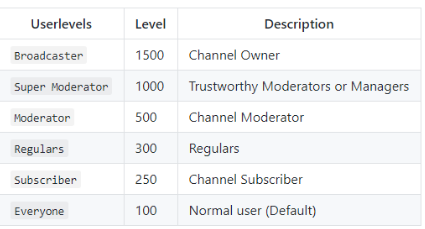 onyx oasis
yeah understandable, i was using it for a 'command generator' so people can just copy-pasta some custom api stuff in their chat, but couldnt find this info, thanks alot @weary mist
weary mist
👍
atomic owl
how can i add PaySafeCard to tip List ?
weary mist
We don't have that option yet, but it is coming
lament blade
Soon ™
atomic owl
that means people cant donate via Streamelements
dense jackal
Unfortunately if you can't use paypal you cannot donate through StreamElements at this time but this is something we are avidly working on.
atomic owl
ok
onyx oasis
@weary mist Ehm do you have an example in what order/format I should use this? I assumed it was something like !command add !test -level=500 test ?
weary mist
So, first, you create the command with !command add <name> <syntax>. You do not need the ! when creating. Then, you do !cmd options <name> -level=500
onyx oasis
Oh I see, separate commands, thanks for clarifying
weary mist
👍
 lofty tusk
I had someone on Twitch reach out to me that said they are from SE and wanted to gain ways to contact me. I'd like to know if this person is legit or not but I don't want to put them on blast. I just wanted to give a heads up to the staff in case there is someone out there trying to target SE users.
dense jackal
@lofty tusk We have helpers to go out and spread the word, and tell people about us. Who was it?
lofty tusk
FreakDevil_
 winter zenith
Yeah he is legit
dense jackal
Yes @north glacier works with us as a promoter
winter zenith
Hello rachie 😃 
gaunt light
@atomic hollow Come Voice support
 north glacier
Ah?
dense jackal
Totally understand if it feels weird. We just like to reach out and help whoever we can 😄 If you're curious or If you ever have any questions feel free to ask them here @lofty tusk
gaunt light
@serene granite Come voice support please
lofty tusk
Thanks @dense jackal
north glacier
@lofty tusk hey
lofty tusk
Hi @north glacier
weary mist
don't forget, you can right click a name, and go to profile to see linked accounts 😃
 unborn obsidian
is there future plans for panels that match the overlays?
narrow coyote
looks like someone at least proposed the idea for super themes https://streamelements.helprace.com/i445-add-matching-twitch-panels-for-super-themes
 radiant wave
is there a delay in twitch.. i always resub a channel aty the 14th, payment also says the 14th as date...but i dont see the resub yet
weary mist
There might be, not sure. You could ask twitch. They do give you like 10 days leyway
radiant wave
okay thanks
 upper umbra
Hey, I was directed here from an email I got, I am looking for some help with growing an audience and maybe some techniques that could be used to reach such goal.
If anyone could give me some advice it would be great, I have been streaming for 2 months now everyday and I feel like I could be growing quicker if I just do the right things.
weary mist
The biggest thing, @upper umbra, is networking. If you want to grow your audience, you have to grow the people you know. Get into communities, hang out, interact, be friendly, and people will stop by to hang out. Hang out here, #general-chat is a fun place to chat with others 😃 We have a lot of fun here, and support each other when we can. @misty wagon can give you some more copy/pasta's he has for this information
 dense beacon
Sorry If I seems lost. But how can I see the chat and etc with Streamelements?
narrow coyote
like outside of the stream itself? chat should be coming to Ground Control, with other new features
upper umbra
@weary mist I seem to have some trouble with networking in general, I'm just not very sure on how to get in touch with communities.
narrow coyote
what I tend to do is use a popout chat on another monitor, there are also other third party applications that can be used for chat as well
dense beacon
like chat, followers etc,
I use streamlabs chatbot. But currently having huge problems and I need to remove some stuff and etc. To see if it works and wanna know a second way to have the chat, recent follower and more.
narrow coyote
Ground Control can show you the notifications like follows and donations, just not chat at this time, but should be one of the features being added
 elder sorrel
I do what Kite does.
2nd Monitor has Ground Control for Notifications for Follows / Subs/ Cheers
- the Popup chat from Twitch to read the chat.
weary mist
I do that as well. I run an application called Chatty, its pretty light on the system, and it logs my chat for me
dense beacon
Is Ground control something I download?
elder sorrel
Yes it is.
 misty wagon

Want to grow your #twitch #livestreaming channel but 'never have time'.. Yeah, heard that one before 😎 Here's a guideline how to prep & spend your time wisely. Plan ahead! 🚀
Likes
133

 Twitter
weary mist
Twitter
weary mist
its very customizable
misty wagon
@dense beacon I have several alerts set so I can quickly respond to questions and call outs. Also usually have about 5-10 muted Chrome tabs open to do live support or active supporting for views. Chatty is bae but some people like Chatterino... it's all about personal preferences I guess.
dense beacon
@misty wagon But it works fine with Twitch? 😄
misty wagon
What does the picture show you 😉 What you do need to know is that I don't count as a 'viewer' in the ones I have open in Chatty. That's why i have the Chrome tabs too.
upper umbra
@misty wagon There's a lot of stuff I don't do in those steps such as hosting or hanging out in peoples channels, I will try these out. Thank you very much
misty wagon
Good luck, it's hard (but he, all of streaming is hard work so hence my great respect) but it's worth it.
weary mist
@upper umbra don't forget to hang out here as well 😃 we have a ton of fun when we stream together, right @narrow coyote ?
narrow coyote
YAR! Many a good times to be had 


dense beacon
@weary mist Thanks for the Chatty "recommendation" even if you never said you recommended it. But you took it up ❤
 sharp bramble
@misty wagon very useful advices
weary mist
@dense beacon
dense beacon
I know it's not streamelements issue. But do anyone know a way to get discord only volume bar in obs? So that people could hear those i speak to a bit betteR?
misty wagon
I think people use Banana Voice Meeter for that
safe cedar
ok, one more question for you. I'm using the animated force field super theme and have downloaded the social icons pack. how would I go about switching facebook and instagram for steam andblizzard
narrow coyote
yeah, vban would be a good way to handle that
 winged hedge
Hello.
weary mist
hey
winged hedge
How can i give to my viewers 1 point per minute ?
I saw that i am able to give them points per 10 min
weary mist
You can only do per 10 minutes, so if you set it to 10 points per 10 minutes, it is the same as 1 point per 1 minute
weary mist
nope
weary mist
dense beacon
@narrow coyote Vban is the vbanreceptor?
There is no download button for vban only vban rececptor and vban-spot
narrow coyote
sorry, did not mean to confuse, I meant voice meter banana https://www.vb-audio.com/Voicemeeter/banana.htm
VoiceMeeter Banana, the Advanced Virtual Audio Mixer by V.Burel
dense beacon
Ahh fuck that. I've tried with it before.. I get it to work.. then next day it's all messed up ..
narrow coyote
unfortunately, that is one of the better ways to handle this problem, and its a common issue people have. I usually just live with my discord mates being a little quieter on my stream. The alternative would be to turn them all up in discord, but in my case, then they are way too loud for me
dense beacon
I have turned them all up but someone mentioned today that my friend is quite low. So :S Hmm guess it will work this way. I like when the Voice Meter banan did work. But it only worked for that day and after a restart and a new day = Messed up.. Don't know how as I never changed anything.
weary mist
heh, I will let you know if I learn anything. I am re-installing my entire setup tonight, that included
narrow coyote
yeah, you are not alone, i have seen shroud have issues with banana during stream sometimes
dense beacon
Sucks :3 hahahah
I am looking for another option that is more secure :3
How do you guys work with the songs and music? Being able to pause/play the music while in game and etc. Spotify only or ?
narrow coyote
When i do play music, i tend to use the media keys on my keyboard to control
dense beacon
@narrow coyote Meant programs. I love to listen to youtube music as I find those a lot better than the radio's or spotify. But you can't pause/play youtube while ingame. I could download them and put them on spotify and that would work. But then I could not let youtube "sling" the songs.
narrow coyote
Ah, I usually just play stuff that is local on my machine, so I use media player classic for that. I know spotify is a big one, and that should work with most media keys on a keyboard. I thought my media keys did work on youtube, but i have not tried in a while, and that might not work if YT is not in focus
dense beacon
Yeah 😛 That's the issue for me :3 Any good suggestions on how to do it? 😄
narrow coyote
maybe something like this 🤔 https://chrome.google.com/webstore/detail/streamkeys/ekpipjofdicppbepocohdlgenahaneen?hl=en

Global hotkeys for online music players including support for media keys.
 keen girder
How do you set commands up
dense beacon
@narrow coyote You are a beast ❤ Can I give you a kiss? 😄
narrow coyote
hearts are fine you can send a kiss if you really want, but just so we are on the same page, I am a dude 😘
dense beacon
Who cares 😗 I'm not afraid of such stuff. Fuck the other peopel 😄
narrow coyote
 just wanted to make sure you knew what you were getting into
dense beacon
Hahha :3
narrow coyote
@keen girder what exactly are you looking to set up?
keen girder
Just like !discord and then it will link my discord
dense jackal
go here https://streamelements.com/dashboard/bot/commands/custom and click create comand
narrow coyote
^
This video also goes over commands, might be helpful https://www.youtube.com/watch?v=FUAmzaj70Js

Make the most of StreamElements, learn how to use Chat Commands. ----- Got any questions, or just want to say "Hey"? Join our Discord server: http://bit.ly/D...
dense jackal
For example this @keen girder will mean '!discord' will reply with 'discord.gg/se'
keen girder
Anyway to do it off phone
dense jackal
you can add a command via your twitch chat
!command add discord (put discord link here)
will create
!discord = (discord link)
 normal geode
Hi, I have a problem with shuffling the backup playlist for song requests. I can shuffle the playlist fine and it will start playing through the new shuffled list but if a user requests a song, when the queue returns to the backup playlist it is no longer shuffled. Does anyone else have this problem?
dense jackal
I believe this is a known bug @normal geode
normal geode
Ok, thanks 😃 Any idea when it will be fixed?
dense jackal
No ETA unfortunately
 mossy plover
Hello to anyone willing to help out! Is there a way to resize a 1080p overlay to 720p? I've found the option to change the overlay project size to 720p, but it doesn't auto resize the layout. I tried to manually do it but I can't select any of the layers that are out of the bounds of the canvas... help!
 stuck hamlet
Keep the canvas at 1920x1080 and resize it in OBS
 pine hemlock
Set the browser source to 1920x1080 and ctrl+f to fit to your screen in obs
mossy plover
Sorry I should have been more specific. I meant in Stream Elements Overlay Editor... The 1080p animations i have are bogging my obs down regardless of any resizing I do in OBS... So i was hoping to downsize the 1080p overlays i have to 720p in stream elements but it's proving a little difficult...
narrow coyote
have you tried using 30fps in OBS for the browser source?
pine hemlock
There's no simple way to accomplish it. They're designed to be 1080p. If you change the canvas size you have to manually resize each part of the theme
 urban wren
hello im using obs classic and wanting to use the kappagen via clr browser , unfortunately it shows in the latout editor and webpage but not the browser application on stream just shows a help image
pine hemlock
You can copy something like the alert box to another overlay that's 720p and reduce it that way
 nocturne pelicanBOT
OBS Classic was deprecated in October of 2016 and is no longer supported by OBS or StreamElements. Please update to OBS Studio at https://obsproject.com
pine hemlock
^
urban wren
damn
pine hemlock
Nothing we or you can do about it unfortunately
urban wren
understood thank you for the immediate feedback
narrow coyote
Moving to studio is worth it, much better than classic
 livid aurora
new to twitch today, im attempting to overlay a game so that i can tab out without it effecting my stream, how can i do this?
narrow coyote
not sure I follow what you are asking exaclty
livid aurora
I'm currently streaming a game, as i tab out from that game my stream freezes up and does weird things, how can i stop this just so that it's focused on the single game capture itself?
that way i can communicate to others without it effecting my viewers
narrow coyote
well, that is more of an OBS thing, and will depend on the source, and what you are capturing
if you can use "Game Capture" as your source, it could be smoother for alt tabbing
livid aurora
I am currently using OBS
narrow coyote
if you play games in fullscreen, you are better off using borderless windowed if the game supports it, if you alt tab a lot
narrow coyote
If you use "Game Capture" as the source, instead of Display Capture, that will just capture the game and whatever else is in your scene
livid aurora
already done 😃
narrow coyote
if it works with the game, not all games work with Game Capture
livid aurora
well it's working for me
i wouldn't know what's wrong or what to ask, im brand new to this 😂
narrow coyote
no worries, also this support channel is more for StreamElements itself. If you have general OBS questions, or want some streaming tips, you can ask in #welcome
livid aurora
Thank you @narrow coyote
narrow coyote
No problem, and welcome to the wonderful world of streaming
 rancid coral
is there away to change stream elements name in twitch chat?
nocturne pelicanBOT
Custom bot name requirements
- StreamElements bot modded and in chat
- Active overlay with alerts
- StreamElements tipping page in the panels below the stream (!panels)
- Register the twitch account for the name you want to use
- Ground Control app must be running
Steps to enable custom name
- Sign in to https://twitch.tv with the bot account
- Install and run Ground Control (!gc for download)
- Visit https://twitchapps.com/tmi/ and generate an oAUTH token
- Copy/paste everything in the box to Ground Control oAuth settings and enter the name for the bot account
- Restart Ground Control (custom name may take a few minutes to take effect)
narrow coyote
You will still see StreamElements in your chat, but this will rename the bot name in the responses it posts in chat
 ocean haven
hey guys, if i wanted to download the .txt files so i can set them as the file location for text in obs can i download those through streamelements?
narrow coyote
Everything with StreamElements is cloud based so you would not be able to download anything. If you are adding text you can add it to your overlay
lol, @stuck hamlet too fast for me
stuck hamlet

 abstract forge
Hey, Any clue why the custom bot name doesnt come up for me on my ground control?
stuck hamlet
!rename
nocturne pelicanBOT
Custom bot name requirements
- StreamElements bot modded and in chat
- Active overlay with alerts
- StreamElements tipping page in the panels below the stream (!panels)
- Register the twitch account for the name you want to use
- Ground Control app must be running
Steps to enable custom name
- Sign in to https://twitch.tv with the bot account
- Install and run Ground Control (!gc for download)
- Visit https://twitchapps.com/tmi/ and generate an oAUTH token
- Copy/paste everything in the box to Ground Control oAuth settings and enter the name for the bot account
- Restart Ground Control (custom name may take a few minutes to take effect)
 desert dome
i tried streamlabs someone donated to me and it made me add a bank account to accept the money will it do the same for SE
narrow coyote
you just need paypal for SE
and you do not need a bank account tied to paypal, I dont have one on mine
narrow coyote
lament blade
I would like a buddy to stream wit cus i hate being by myself
Anyone wanna buddy up
cerulean rune

That's the 1080p overlay being made into a 720p overlay
from browser source
and it's the green goblin animated in-game
pine hemlock
You set it to 1920x1080 and ctrl +f to fit it to your screen.
pine hemlock
I'm saying that's what you should do.
cerulean rune
the overlay on the site is 1080p
fitting it to my screen doesn't make it work
as u can see it is fit to my screen
pine hemlock
If the overlay on the site is 1080p, you add it as a browser source at 1080p to match the site. Obs downscales it to 720p if that's what you stream at
 pine hemlock
I'm not familiar with the overlay but looks normal to me.
cerulean rune
it's alot smaller then a 720p overlay
lol
anyhow
I just kindly suggest to have 720p overlays
cerulean rune
but again
 ripe herald
It's made for Dota where hud is covering a lot of space
cerulean rune
I'm still suggesting to have 720p overlays
a person on a 1366x768 computer isn't going to be running at 1080p unless they really want to force more data then needed
yes ik that you put a higher bit rate
but at the same time a larger browser souce means more unstability if your computer isn't supposed to be at that resolution
desert dome
@lament blade fortnite?
weary mist
Or take it to #general-chat, we don't mind
lament blade
Oke thank you :) @weary mist
 humble summit
I have a small issue adding sounds to alerts, is there a file size limit or a file type that ive missed?
weary mist
@humble summit No, there is no limit (except maybe a file size of 1gb  ). What alert are you trying to update
humble summit
tyvm Scalper 🙃
weary mist
lol, not sure I have helped yet, just asked a questions
 lunar furnace
how do i reset my tip goal
nocturne pelicanBOT
@lunar furnace If you are using the total follower/total subscriber widget, reset your session from the Activity Feed to fetch updated data from twitch. If you’re using goal widgets, you can edit the progress of any goal by going to Activity Feed > Widget Data > Goals. This can also be found in the overlay editor by selecting DATA (next to WIDGETS) > Goals
 clever mango
applies to all goals
lunar furnace
thank you i didnt even think to look there LOL
clever mango
It's where all widgets get their magic from 😃
@lament blade Please post general streaming questions in #welcome. Thanks 😃
 marsh wadi
@everyone
nocturne pelicanBOT
Please refrain from using [at]everyone or [at]here
marsh wadi
i need help stream elements
and support isnt helping
i need support guys
im queue position 1 and no one is helping
dense jackal
give us a minute @marsh wadi please don't start @ing everyone what seems to be the issue
marsh wadi
im sorry , ive been waiting a while
 edgy kindle
There really isnt a queue for support but just be patient lol
marsh wadi
my apologies its just stressful
my streamelements alerts werent working and it says im offline
for some reason they just up and running now but for future reference whats a fix?
dense jackal
What is your twitch channel
marsh wadi
edgy kindle
Also you haven't been "waiting a while", only 3 minutes according to the search feature
marsh wadi
im impatient yes, sorry for bugging
it seems like forever when im getting follows but no noti
edgy kindle
You can always @ supportheroes if it is indeed urgent 
dense jackal
First things first you need the bot in your chat @marsh wadi You can add it from the dashboard
and then mod it once it's in chat
dense jackal
There it is running now
marsh wadi
thank you
dense jackal
@marsh wadi mind if we test an alert?
dense jackal
it's ok we understand
marsh wadi
i got the alert, but now its not in recent events and thats where i go to name peopole off
tight harness
Sorted in stream chat ⤴
It was a test alert which is why it didn't show in the recent events 😄
lament blade
misty wagon
@marsh wadi You joined x:26 and claimed to been waiting a while at x:27 AFTER you wrote several msgs. I suggest you change your name to TheFlash
edgy kindle
^Bloody memers 
dense jackal
All good
tight harness
misty wagon

I'm so happy that you said that @marsh wadi honestly, you have no idea. Thanks for that, appreciated
marsh wadi
yeah no problem man, i appreciate all of you
misty wagon
feels glorified, share the warmth folks!
wait, that came out wrong with a person named Satan
Actually going to watch an episode of Lucifer now while keeping an eye out
marsh wadi
hahaha i have a way of glorifyin folks too
misty wagon
mesmerizing 
marsh wadi
alright now that everythings working, ima go back to focusing on chat and what not, thanks for all the support you guys are life savers.
misty wagon

 azure horizon
is a way to drag your layers around?
 stable aurora
hey there! so I have stuff in my loyalty store but I can't redeem it via chat and neither can my viewers. It is set to redeem in chat I'm not sure why it's not working
lament blade
No problem 😄
 knotty spade
is there a way to make a !hightlight or !hl that can save to a google doc?
pine hemlock
Don't believe so
 ancient iron
Hi Team, Not sure if this has been raised yet.
Over the last 2 nights of streaming i have had the !points command freeze up and not respond, other commands continued to operate during this time.
I tried kicking and re-adding the bot and that didn't resolve it but disabling and re-enabling the !points default command got it going again.
ancient iron
Yea first time was just normal activity and second time (last night) was during a giveaway so everybody was checking points at the same time
weary mist
next time it happens, check custom commands and see if it works find. Compare default and custom
its a rare thing that happens, but we are trying to figure it out
dense jackal
It could be your global or user cool down as well @ancient iron making it seem laggy
ancient iron
I'll check the Custom commands at the time. i know things like !redeem !store were working fine so was !ticket but they seem global
wasn't user cooldown as i never use that command but did to test it and it didnt work for me. i don't think i have a global cooldown active as quite often i get a !points spam in stream with no issue
just checked global CD is default 1 sec and user is 5 sec
dense jackal
Got it was just worth a check
ancient iron
yep
will keep you posted if it happens again i will try a custom command and report back
dense jackal
got it 😄
 slender cliff
is there a way to create a giveaway with a list of users already in ?
stone spire
Hey guys, question
dense jackal
Not at this time @slender cliff but I like that idea add it to our #💭︱feedback-and-ideas channel
stone spire
with 1upcoin platform, how do the alert variations work with the $ value
When integrated with SE of course
slender cliff
@dense jackal done thanks
stone spire
Also, what's the purpose of linking youtube as a channel in acc settings?
dense jackal
Yo ucan setup overlays and stuff for youtubes 😄
stone spire
ah
 limber kettle
is there any way to customize the contests to make the win rates vary?
so for example, someone bets on something, they win twice or thrice the amount they bet
 limber kettle
uhh
lament blade
thank you
developers
this helped me so much
i just want to thank all the devs of this bot
THANK YOU
i cant thank you enough
😄
dense jackal
@limber kettle not at this time @stuck hamlet was talking to @stone spire
and no problem we appreciate the love !
lament blade
this bot will prob help me alot through my twitch journey until i get a good pc, then i can use StreamLabs
btw @dense jackal
is streamlabs the same devs of streamElements?
limber kettle
ah, so it's something that's gonna be added in the future?
and if not, do ya have any recommendation for something that could do what i'm looking for?
stuck hamlet
 dense jackal
@lament blade No we are two completely different companies. StreamElements is the way to go though 😄
stone spire
@stuck hamlet it went into my donations list
and increased the counter on dashboard
dw, it's a good thing hah
dense jackal
@limber kettle you can add it to our #💭︱feedback-and-ideas page I want that as well. Not really something we can do that atm. I apologize for the late response I am witnessing history https://www.twitch.tv/ninja
 limber kettle
gotcha, and no worries! everyone deserves their bit of free time 
 brazen moon
hi maybe this is not the right place to ask but i dident know where els, but anybody know where i can find a free red alert overlay ? or like a overlay for old school games with a simple info bar at bottom and top, would prefar c&c red alert theme but any can work. good day 😃
vital wyvern
@brazen moon we got some great premade overlays that you can edit as much as you like 😃 you can find them under the "Themes gallary" on StreamElements dashboard (https://streamelements.com/dashboard/themes)
StreamElements
The Ultimate All in One Platform for Streamers
brazen moon
chanpai u do idd have awesome overlays available already but i checked those doesnt seem to fit with c&c :S idk.
vital wyvern
allright then i recommend checking out #art-marketplace for any artists that fit your style of overlay/banners/emotes/alerts :3
brazen moon
okay will do, i did make my own already but its kinda meh 😄
 valid slate
Is there a possible way to add a list two followers that want to join my game?
Say for example if I have a full Lobby and followers want to join me is there a way I can put a waitlist or have them entered into a waitlist
 coral lava
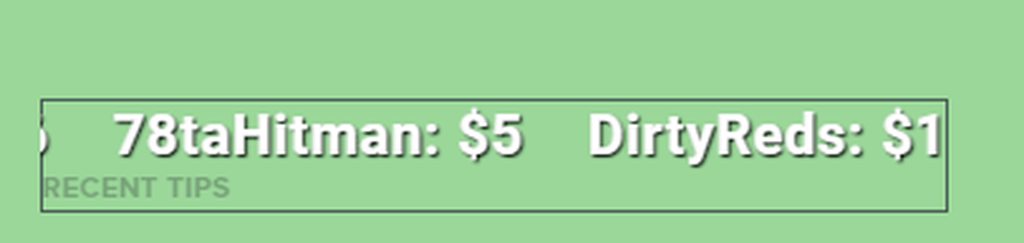
is there a way to rotate text? like latest sub etc?
coral lava
do i need to remake it ot see it?
atomic hollow
add it as a widget
coral lava
i guess im not seeing
atomic hollow
coral lava
no the rotate option
atomic hollow
add them, you will see that they rotate
valid slate
ok thx
coral lava
where will i see it at? im onthe ones u circled and nothing
atomic hollow


 unreal dome
xD
coral lava
i mean rotate the text on an axis
coral lava
lul
unreal dome
shadow LUL
coral lava
new feature?
atomic hollow

coral lava

atomic hollow
!ideas
nocturne pelicanBOT
Here is the StreamElements Ideas Board: https://strms.net/ideas
unreal dome
atomic hollow
upvote it here
vapid badge
Are you looking to add the stream elements bot in your chat? 😁
 novel willow
yes yes yes
tight harness
Then you simply click on Join Channel on the dashboard of the StreamElements website
vapid badge
⤴
novel willow
Activate the chatbot < this thing?
tight harness
Yeah, you click on Join Channel on the right of the dashboard
In this part:
If the bot needs joining it'll say Join Channel instead of Part Channel
novel willow
where can i see the bot settings?
novel willow
Thanks 😄
tight harness
No problem
 worn cradle
is there a way for me to change what the stream elements bot says when I'm raided?
in my chat*
oh wait. i think i found it
atomic hollow
just remove it from your panels
atomic hollow
yeah and you can disable the !tip command
 potent ibex
but people can still tip by accessing my page?
atomic hollow
how can they find it? you want to remove your paypal e-mail from there? I can do it
may I ask why you dont want to use it?
potent ibex
because I am using another service for it
atomic hollow
ok, ill remove your e-mail from there which will disable it
potent ibex
yeah I got it now
atomic hollow
youre good?
potent ibex
yeah
atomic hollow
potent ibex

winged hedge
Hello
atomic hollow
hey
winged hedge
I added "contest" in my OBS but i cant see the widget