#helpdesk-twitch
1 messages · Page 232 of 1
 simple frigate
 lament blade
I have added the follower alert overlays properly, and the image shows up. But I hear no sound effect like I do when I test it
Why is that? I get the same issue with streamlabs
 stuck hamlet
Do you get sound on the overlay editor?
lament blade
Yeah when I go to the overlay editor and test the sounds, I get sound from both the editor and obs. But when I get an actual follower only the picture and text comes up. No sound effect.
test the follower rather. sorry my english is not so good
stuck hamlet
Can you take a screenshot of your obs?
lament blade
sure
Hm, I have not gotten an actual follower since I changed "shutdown source when not visible". could this cause a bug where no sound plays?
stuck hamlet
No, the alert box should be visible, so that option doesnt take affect.
 midnight topaz
btw, while talking about the sound, I want to ask, there they come from
I mean, I can hear it
but my OBS outputs only 3 virtual cables and my mic
so it's not heard on the stream
stuck hamlet
Desktop Sound
midnight topaz
meh, desktop sound is not routed to go out through OBS 😄
stuck hamlet

midnight topaz
was thinking if there's option to reroute it through one of the virtual cables, the way I reroute Ground Control, but seems there isn't
stuck hamlet
So if you play an alert right now, you hear it correct?
lament blade
Yes, in the browser and in my OBS. But it only plays the animation when someone actually gives me a follow
stuck hamlet
Hmm, that doesn't seem too plausible. Let me check it out.
midnight topaz
btw, can I be added to the #402919550066229250 ?
 cyan geyser
hey guys, when i add points using streamelements some users are not getting points, 2 out of 50 or so wont get any, is there any reason?
 nocturne pelicanBOT
@midnight topaz Are you a StreamElements all-in-one streamer and interested in stream promotion when you go live? Please fill out this application https://strms.net/sellout and if you meet the 3 requirements posted in the :pushpin: pinned message in #general you will be added to the stream announcements.
 weary mist
@cyan geyser it depends on when the bot pulls the viewer list. If they show on the viewer list, then they get the points (I am assuming you are talking about the !bonus all command)
weary mist
👍
if for some reason twitch isn't showing the person on the viewer list, there is nothing we can do about that. You could always bonus them directly
midnight topaz
form filled, didn't knew there is one, last was said to ask in that channel for it ^^
 leaden pumice
hey since a few days my host alerts wont show up neither in my alert box or on the dashboard
nocturne pelicanBOT
Twitch doesn't have a "notification system" for hosts (unlike follows, subs, raids, etc.) so the only way for StreamElements to know that you are being hosted is to connect through you to twitch. This connection is made on:
- SE Dashboard page - https://streamelements.com/dashboard
- SE Activity Feed page - https://streamelements.com/dashboard/activity
- Ground Control desktop app - https://streamelements.com/groundcontrol
Please have one of these open during your stream in order to receive host event notifications.
leaden pumice
k ty
lament blade
@stuck hamlet Could it be that the sound plays but not in obs for some reason?
stuck hamlet
No.. sound should always play. 
Regardless of where it's coming from.
Especially if you it's workin on testing, and it's just "real" ones
maybe the sound is too low and you dont hear it while playing games?
 languid ridge
yo guys im just wondering why i got charged 4 dollars or about that amount when it states that your overlay manager is free of charge?! 😄
 ornate surge
help me x.x
stuck hamlet
That would be paypal fees @languid ridge StreamElements does not take anything off donations.
ornate surge
so umm how do you get emote flow to work????
languid ridge
oh yea that makes sense maybe its prime then .. thanks for answering ,, @stuck hamlet
stuck hamlet
Emote flow should be on @ornate surge there's a switch for it.
languid ridge
@stuck hamlet btw do u have an option for making the same alerts for all the overlays u have ..?
stuck hamlet
You mean just duplicating it to other overlays?
ornate surge
everytime i switch it on and reload it switches back off
languid ridge
Right now i am setting the same alerts for every overlay i have and every overlay has 4 different overlays if u get what i mean it does take alot of time just wondering if u could make them all use the same alerts so u only need to do it with one overlay..
stuck hamlet
Oh, you mean the settings page, the settings page is currently broken, and we are working on it @ornate surge
you can just make it on one overlay and duplicate it to another overlay.
@languid ridge
languid ridge
hmm ill try to do that thanks.. 😄
 safe bluff
Does streamelements have something similar to Mee6 for announcing my stream in Discord and what not. Trying to get as much in one place as possible.
stuck hamlet
We do not currently have a Discord bot.
safe bluff
@stuck hamlet thanks for the update! Is that on the road map ? I noticed you said currently.
stuck hamlet
We want to develop it, but it is currently not in development, nor do we have an ETA, but it's on there. 😃
safe bluff
haha nice
languid ridge
who is making the overlays`?
stuck hamlet
The premade ones?
languid ridge
yes
stuck hamlet
That would be @ripe herald 😃
languid ridge
they are insane man
much thanks-.
does he have a tutorial for making such things?`
 clever mango
*She
languid ridge
oh sorry..
does she"
i need one for ark survival but my overlays look like shit tbh 😄
languid ridge
oh damn thats gonna be a long question .. i might aswell get going making one but thanks for the overlays ill ask when i get stuck and mad.. XD
 ripe herald
You can dm me if you will stuck in the middle 😄
lament blade
@stuck hamlet Could it be that the sound files are imported from streamlabs? I made all .mp3 files. But then again, the redemption alert from streamlabs does not work eather...
Only when I test it.. Damn it
stuck hamlet
i feel like something might be wrong with obs
languid ridge
hehe u should see my last overlay oh shit.. i will do that thanks @ripe herald
lament blade
@stuck hamlet https://obsproject.com/forum/threads/streamlabs-audio-not-working-after-new-obs-update.75902/

Open Broadcaster Software
After OBS updated to 20.1.0 I can no longer hear the sounds from my notifications that come from Streamlabs. If I open the test window from the...
Seems like others are having this issue..
And there seems to be a solution here, thanks for helping me out.¨
 crimson yew
Bebo is your friend, guys.
 brittle pendant
Is there any way to easily transition points to SE without having to do it individually some of my viewers are regulars and had a decent chunk of points on a different bot system I used that isn't importable.
weary mist
@brittle pendant what bot are you transitioning from
brittle pendant
Vivbot
weary mist
If you can get a CSV file of the username,points, we can import that
clever mango
@lament blade That thread is for the mac version of OBS and I believe you are on windows. That's also no longer an issue with the most recent version of OBS for mac.
It was an issue with the browser source plugin not playing .mp3 files only on the mac version. But it's now been resolved by the great folks at OBS.
By the way, they have a support discord as well discord.gg/obsproject
for anyone interested
brittle pendant
@weary mist I have a link to the list but not a file I can download.
ornate surge
so if the page is broken how do i make it work????
weary mist
@ornate surge not sure what you are talking about. Can you be specific about what page?
clever mango
chat stats emote flow was the discussion earlier
weary mist
Ah, from what I know that is still soemthing being worked on getting fixed? @clever mango
clever mango
This settings page is not functional at this time https://streamelements.com/dashboard/chatstats Emote flow is enabled for all channels
 timber owl
would anybody be able to explain to me how the song request feature works and how to get it working on my channel?
clever mango
We have a tutorial here: https://www.youtube.com/watch?v=Wj-hGfqbeC0&index=14&list=PLCDDKlFdScbEwdx5AntcQIS1InkFJwHtv
If you have specific questions we'll answer them 😃
timber owl
ill watch that first and see if i can figure it out
ok i think i understand that. im downloading this ground control thing now to play music. is there a tutorial for getting that to work?
nocturne pelicanBOT
You can find your JWT token on your account information page (Click on your name next to the Sign Out button) https://streamelements.com/dashboard/account/information
timber owl
i did that i don't see the jwt token anywhere
clever mango
show secrets
timber owl
yup i found it thanks
 proud pumice
gg brian, giant steps towards supreme streamer status
 narrow coyote
should be able to copy paste that
clever mango
ctrl+c and v
timber owl
you the man
so i just link a youtube playlist in the songrequest tab that will play on my stream if i don't have requests? do i need to do anything to make the songs play or add anything to obs or will it do that automatically?
 tight harness
Song Request > Settings > paste the link in the Backup Playlist section
 modern iris
I have been using streamlabs for awhile now.. i was wondering if there's a way to import the currency/point system from streamlabs (extension) to streamelements?
tight harness
No, you can either play it through the Song Request page or through our Ground Control app @timber owl
crimson yew
Bebo >
tight harness
!gc
nocturne pelicanBOT
Our Desktop App Ground Control: https://streamelements.com/groundcontrol
tight harness
@modern iris Yes
tight harness
No problem 
timber owl
im confused sorry.
i have ground control open and i pasted the link on the songrequest page
so if i start streaming it will just play automatically?
tight harness
You don't need to be streaming for it to play
modern iris
i already exported from streamlabs. where the heck are did the files go ? O.o
tight harness
But if you put in the backup playlist link then it will play through Ground Control, if it isn't currently try restarting Ground Control and make sure the whole link is in the Backup Playlist section
 faint musk
is it okay if i use a super theme with some modifications ?
tight harness
If you wish to modify it then sure
faint musk
yes i did i made some changes, thank you
modern iris
@tight harness do you know where the files are ?
tight harness
@modern iris No, you choose where they get saved to
ornate surge
where do i get the api for emote flow then? i dont see it on my stream when i try to test it
timber owl
so it only works if im on the song request page on streamelements?
that is the case currently atleast
modern iris
i cant find them thou
proud pumice
@timber owl on the settings area of GC you need to mark Enable song request
modern iris
i found the Points excel file but currency from the site can't find it haha
timber owl
it was already on but then i turned it off and back on and now it is working! thank you @proud pumice
proud pumice
👌
timber owl
you guys have been very helpful the past few days to me!
weary mist
modern iris
can't find the file.. not in the cloud folder
proud pumice
errrrrr
it says Error
but says successfully ?
im confused
i think this one just sends it to your extension
its not the file save
try again according to the instructions?
narrow coyote
dat error message box, to give a success error 
modern iris
Since i go to Cloud -> select folder -> seperate excel files
which gives me the local 'currency'
so i click streamlabs -> export currency and hours
thenit gives me that error
ornate surge
aigh
proud pumice
😕 and the excel file doesnt have all your currency data? did you open it?
proud pumice
this is so confusing, why are they doing it like that
@stuck hamlet @clever mango any idea how we can help this dude break free from their bot?
modern iris
because there's 2 currency
one from local and one from (extension/website)
i am using the extension one haha
i wanna try streamelements, but if i can't get the points for my twitch viewers, might be too hard
lol *
clever mango
I'll be right with you
narrow coyote
if it actually saved the excel file locally, you could try searching windows for it. from the search bar on your drive you can search for *.xlsx
clever mango
@modern iris I'll DM you
ornate surge
this is useless...
lament blade
I've got a quick question - Does the Hypecup currently support the ability to make custom images appear instead of Twitch emotes?
Hello
Is anyone available for a quick simple question?
proud pumice
@lament blade you can change almost every image on the hypecup, which emotes exactly?
@lament blade yah
proud pumice
yeah there's a way to edit those on the cup settings in the overlay manager @lament blade
lament blade
Instead of twitch emotes falling into the cup, I want to be able to choose what falls into the cup when a bit / cheer is sent
 serene granite
hmmm for bits, I'm pretty sure there's no way to edit them
lament blade
So my question is basically this.. I am setting up a follower alert for my stream. I followed stream elements guide to copy and paste the link into OBS and then its asks for my "Width and "Height". I chose 720p for the alert but Im not sure what my width and height would be for 720p. Thanks!
@proud pumice ^
lament blade
The width is 1280 and the height is 720?
lament blade
Awesome! Thank you guys so much!
ayyyy larger width haha
For Hypecup cheer alerts, I see that I can change an image for what falls into the cup, but I can't ever seem to make that exact image appear when a cheer is sent
serene granite
ya, for cheers we use the twitch image
lament blade
No over-riding it whatsoever? Darn
serene granite
not for cheers :/
 vale glen
can you help iT wont let my inport my stuff form StreamLabs
ornate surge
@weary mist yet again im unable to get stream emote flow to work on my page and i have yet to get actual assistance
proud pumice
@ornate surge what emote flow you mean? KappaGen?
 visual nymph
Hey guys, new user here. When i get a donation, my song and voice message are playing twice, like on top of each other.
ornate surge
@proud pumice yes
proud pumice
@ornate surge can you link your channel's stats page?
weary mist
Ok, so that is different, that is Kappagen. Did you add the kappagen widget to your overlay that you have in OBS?
ornate surge
how do i do that? i dont see the api link anywhere
weary mist

StreamElements
The Ultimate All in One Platform for Streamers
open the overlay that you are working with in the editor (click the bigger pencil). Then click Widgets in the top left, then click add under the Kappagen widget
lament blade
Who do I talk to if I have an issue regarding payments through streamlabs to a streamer not being received by the streamer but the money is being charged from me?
ornate surge
can i pull the source off here and add it to my main overlay or do i have to make one entirely on streamelements?
modern iris
I feel sad now. Currently no way to export currency if ur using extension.. just chatted with streamlabs support
narrow coyote
@lament blade if it was through StreamLabs, it would probably be best to contact them, or the payment provider used for the tip. This discord is for StreamElements
clever mango
@vale glen Hi, what are you trying to import?
lament blade
I meant streamelements sorry, mixed the two up,
weary mist
@ornate surge Do you use StreamElements for your normal alerts and stuff? Or another service? If you use us, you can use the same overlay you use for the other stuff. If you use another service, you can add the widget to a blank overlay, and then just add that browser source to OBS
narrow coyote
are you sure the streamer does not have a pending deposit on paypal?
otherwise you may need to contact paypal support about this
lament blade
how would I go by contacting the streamer to make sure he's at least received it on paypal?
if I can't donate to ask hehe
it's sodapoppin btw, for context
 velvet wren
My subcount widget says 0 😩 which is wrong and has been wrong for ages now, even after deleting it and re-adding it. How can i fix this?
weary mist
All we do is connect the paypal accounts. None of the money touches our hands. You could contact PayPal and verify that the payment went through, but if the issue is that the streamer put the wrong email address in for the donation page, that is something the streamer has to take care of
@velvet wren Go to the data tab (top left in overlay editor, or you can get to it from Acitivty Feed -> widget data), then go to Totals, and click reset session
ornate surge
been trying to add the widget via browser source for an hour with no success
velvet wren
Tried that already 😦
weary mist
So you are grabbing the wrong widget
Make sure you are grabbing the Total Subscribers widget
velvet wren
👌 ❤ I'm a dumbass
weary mist
@ornate surge since you are in a LoL game, I have updated your overlay to include the widget. Go ahead and refresh if you have it open in the editor, and then you can click on the box, make any changes, and make sure you hit SAVE before you exit
 timid hare
clever mango
timid hare
clever mango
@timid hare Hi, are you connected with youtube or twitch?
Are you using a supertheme?
ripe herald
He is streaming with youtube and i've set up alerts removing sponsor/superchat alerts cause he can't use it
I've tested alerts they worked but I can check again
vale glen
Then it won't let me proceed by clicking the bottom for some reason
 slim cairn
Click the SE icon at the top right of your browser
clever mango
@vale glen Are you clicking on the actual extension button?
That is just an image where your cursor is
vale glen
I didn't realise that was just the picture thanks ever so much I've done it now
slim cairn
It's all good, we're here to help
ornate surge
ive only grabbed the kappagen wigdet @weary mist
weary mist
What other widget do you want?
ornate surge
thats the one i want to pull out and use on my custom scene on obs
weary mist
ok, so the overlay that is in your My Overlays page should be JUST kappagen
and you can use that in a browser source in your OBS scene
ornate surge
says kappagen1 yea
weary mist
click launch in the bottom left, copy the link. Go to OBS, create new browser source, change width to 1920, height to 1080, click ok, hit CTRL+F, and you are set to go
 gaunt light
@weary mist My life in a nutshell :d
weary mist
xD
timber owl
for some reason i can hear my ground control in my headset but it isn't coming through my stream i am live now and nothing going through
weary mist
Make sure that OBS is capturing the right audio sources.
timber owl
how do i do that?
clever mango
Settings > Audio
proud pumice
better set it right then :>
timber owl
i don't know what right is haha
any chance someone here knows the settings i need to change?
narrow coyote
do you have any audio being captured by OBS?
narrow coyote
What do you have the Audio Input Capture set to capture? Do you still also have the Desktop Audio listed in the mixer? You will want to make sure these are capturing from the correct audio source
timber owl
its just default
i do not have the desktop audio listed in mixer
haven't seen that one
narrow coyote
default should pickup what ever Windows has set as the default audio device, you can try changing this from default to the audio device that the audio is coming out of, in this case your headset
timber owl
so i switched the properties to head that didn't seem to do anyhthing
narrow coyote
🤔
timber owl
ya this is really weird i thought i would have to put it as a source or something but that isn't doing anything
narrow coyote
Is OBS outputting any audio at all? Like if you look at the audio source in the mixer do you see any activity from it? like the little green bar shown under desktop audio
 worthy token
Is slots bugged atm? even when we briefly set it to 200, no one has ever won it in my channel
narrow coyote
ok, so it sounds like the audio source that should be capturing the desktop audio is not capturing anything, if you changed this to your headset, or if Windows has the headset as the default audio device, it might be good to try restarting OBS
I have this issue with OBS, where it will not capture my desktop audio if I change the default sound device in Windows while OBS is open
timber owl
do i need to make a whole new scene when i restart?
or just restarting would change it back?
timber owl
i did that and still nothing
weary mist
!slots
nocturne pelicanBOT
The slider increases the payout if you manage to win
Less than 100 on the slider means people will not win money over time using the slot machine. 80-100 is a good range
less emotes = higher win chance
its like 5 emotes = 3%, 4 emotes = 7%, 3 = 12%
actual formula : n / n^3
n = number of emotes
weary mist
@worthy token
narrow coyote
so the desktop audio still has no activity on the decibel counter?
timber owl
correct
narrow coyote
and if you change the device for desktop audio, are you still getting nothing for any of the sources?
timber owl
yes its just default or speakers
if seeing it would help you can go to my stream and ill put it on screen
narrow coyote
whats your username, just the twitch name, no link
timber owl
briangaria88
nocturne pelicanBOT
@placid drift Make sure to :ballot_box_with_check: “Shutdown source when not visible” for all browser sources (all OBS scenes). If using studio mode, uncheck “Swap Preview/Output scenes After Transitioning.” Also keep in mind that sound can play from any overlay loaded in the browser (editor or launched). https://i.imgur.com/FegZJQS.png https://i.imgur.com/yY0wcFl.png


 grim warren
is there any way to transfer settings for your alertbox from one overlay to another one?
weary mist
@grim warren you can duplicate the alertbox itself to any of your other overlays. Its in the Layers tab of the overlay editor
Just click the box, then click the duplicate button, and it will ask you which overlays you want it in
grim warren
oh ok, found that out. thanks so much @weary mist
 frank falcon
(Sorry i'm moving it to general because I don't believe it's a "support" type of thing )
 winter zenith
oki
winter zenith
what do you mean? there is a widget where you can add events in a "list mode"
 cerulean rune
yeah event list
winter zenith
 cerulean rune
thnx
winter zenith
no problem
narrow coyote
For the record, took Brian's issue to DM, the audio problem seemed to be OBS not being able to initialize the drivers: Failed to get initialize audio client: 800401FB. Error translates to "Object is not registered". Advised audio driver reinstall, and provided link to OBS discord
winter zenith
thank you so much Kite
narrow coyote
weary mist
 delicate olive
Can't remember if I mentioned this before but Kappagen is showing my old subscriber emotes (ones that are no longer active or available) during emotesplosions even when I disable all my subscriber emotes from showing in Kappagen
 vernal sand
So i changed my twitch name from SentinoOne to T3C_Sentino today. None of my cheers or subs popped up on my overlay or in my ground control. Only followers and hosts. Is there any fix to this and is this related to me changing twitch name ?
 pine hemlock
@vernal sand Log out of SE and log back in
 dense jackal
@delicate olive try relogging as well not sure why this would be happenenning perhaps hasn't updated fully. Have you tried adding a new kappagen widget?
vernal sand
That simple huh ? Thnx @pine hemlock
pine hemlock
Should be that simple yes
delicate olive
removing it and re-adding it seems to have worked, thank you
dense jackal
Awesome 😄
dense jackal
one moment, I do much better on text support
 cunning summit
i know but i need voice
its complicated to text it
sorry
are u going to get in voice tho?
sorry to bother u again @weak moth i a noob but what is the res for the defualt overlay. i cant seem to get it to fix perfect in the window
dense jackal
1920x1080
nocturne pelicanBOT
Make sure to :ballot_box_with_check: “Shutdown source when not visible” for all browser sources (all OBS scenes). If using studio mode, uncheck “Swap Preview/Output scenes After Transitioning.” Also keep in mind that sound can play from any overlay loaded in the browser (editor or launched). https://i.imgur.com/FegZJQS.png https://i.imgur.com/yY0wcFl.png
dense jackal
Like the first picture above @cunning summit ^
 livid ingot
How do i set up Reward system?
lament blade
Loyalty system? 😄 https://streamelements.com/dashboard/loyalty
That's how they get points and then you can open a store for them to spend their points there
clever mango
And here's a tutorial (old website but still mostly relevant) https://www.youtube.com/watch?v=hM7D0HJDRHg&t=0s&list=PLCDDKlFdScbEwdx5AntcQIS1InkFJwHtv&index=7
tight harness
It's for when you want to give away for example a list of game keys
tight harness
If you have game keys for Steam, sure 😄
dense jackal
Or nuclear launch codes @livid ingot
livid ingot
Dear god no
dense jackal
DON'T LET KIM GET 500 LOYALTY POINTS
livid ingot
Lucky i have over 100 steam codes 😛
So i just add my Steam keys in the list and they get 1 per 500 Points right?
tight harness
If you set the cost to 500 then yeah that's how it works
livid ingot
Ok then, just as long as i dont lose all the keys due to some bug, we will be good 😃
dense jackal
make sure to turn off anything that can abuse your point system then, like gambling etc. There is currently no max gamble limit @livid ingot
livid ingot
I dont have gamble on
dense jackal
Just making sure 
livid ingot
Done, Added 15 keys to start with
tight harness
Awesome 
livid ingot
Ok next question, How do i set up the Redemption point, meaning How can they trigger the reward?
 blissful cove
Quick question, for some reason, setting up a line break on a resub notification causes the text to just overlap instead of shifting down
dense jackal
they can trigger it by !redeem Steam_Key
or !store
and going to the webpage @livid ingot
then they go to their streamelements account and go to https://streamelements.com/dashboard/account/redemptions
StreamElements
The Ultimate All in One Platform for Streamers
dense jackal
Can you post a specific screenshot @blissful cove ?
Np 😄 @livid ingot Have a great day man
blissful cove
i can try, one moment
dense jackal
u can say StreamElements instead of Streamer elements
livid ingot
Ok ill fix that one up lol
blissful cove
line break issue with the line {name} just resubbed <br>for {amount} months!
just trying to break the second half to another line, so it doesnt go past the sides of my alert box
dense jackal
My html is rusty but don't you need </br> after <br>
blissful cove
could be, it worked on gift sub without but i can try, my code is probably rustier than yours lol one moment
blissful cove
hmm ok then, it must be somethine else iv done causing the text to overlap, as even with the other break, it causes overlapping text, im just looking for my other issue...

 blissful cove
yea its still set to 0
 stuck hamlet
0 makes it overlay.
dense jackal
I can code @stuck hamlet can hack
blissful cove
perfect, then i think this should fix it
 blissful cove
Perfect! Thank you guys ! now off to bed lol , have a great night!
stuck hamlet
You too my man
livid ingot
Just a question before i get streaming, The bot wont throw a "Welcome to the stream" message for anyone whos just sitting and lurking around right?
dense jackal
nope!
livid ingot
Thank fuck
Anyways, Thank you so much again for your help! I look forward to a great team up with you guys
dense jackal
no problem thanks for stoppin by
livid ingot
Just as along as you guys dont pull what Drangrybot team did, We will be fine
pine hemlock
^
tight harness
Heard of them but don't know what they pulled
livid ingot
The owner of the bot program, decided he wanted money for it and is now charging $5 per month for usage and its going private, You have to follow him and sub to him every month on his twitch
dense jackal
oh did he have a clause in his terms of service saying he could change it whenever he wanted without notice?
tight harness
Yeah, no we're not going to do that
 livid ingot
Either way, found it kinda selfish, but understood his idea, but i couldnt spare $5 a month for it
dense jackal
Paying to get money on twitch 
dense jackal
modern iris
Tomathin do i just copy+paste everything ? O_o
dense jackal
yep just add commas .should look like this
bob,123
fred,43
larry,67
lament blade
For a donation goal would I use countdown?
modern iris
HMM it says done
weary mist
@lament blade We have a Tip Goal Widget
lament blade
Lol I'm a retard, mb, I looked through it and past it
modern iris
hey @dense jackal it says its done but not appearing in leaderboard section ?
dense jackal
You put your JWT token and account ID there as well, hit load CSV and then send to StreamElements, all of that was completed?
dense jackal
I don't believe so 🤔
dense jackal
Also send a screenshot of your import page here if possible
modern iris
modern iris
wait its working now!! 😄
i can finally move from streamlabs to stream elements
Thanks @dense jackal @stuck hamlet
stuck hamlet
where's my pizza
modern iris
i has no pizza
dense jackal
Awesome 😄
 hexed herald
In the overlay creator, is there a way to rotate the bit cup to make it go upside down or have the bits come from the left instead of the right?
clever mango
Currently no, not in the editor.
livid ingot
Uh,,, the bot is going is off every 60 seconds
clever mango
@livid ingot what are your timer settings?
 edgy kindle
@hexed herald You can do this if you create a blank overlay with only the bitcup and then use OBS to rotate it to the direction you want
 brisk drift
Hey how do i set a different alert box for donations and a different alert box for followers? ive got 2 set up but when i select something on one it does it on the other
lament blade
Did you untick for example, donations on the followers alert box?
brisk drift
If i untick something on one box it does it to the other
brisk drift
And how did you set the two boxes up? for some reason what ever i do the one it does the the other
dense jackal
@dapper trellis custom or default?
pine hemlock
Add two seperate alert boxes. they shouldnt mirror changes
dense jackal
2fast
lament blade
5me
 night jasper
Is there a way to reset which cam is seen on the computer? mine when i launched went to laptop webcam immediately. But when i launch now its black and i can't find where to add webcam or have my laptops webcam to turn on.
brisk drift
im trying to create two different alert boxes but for some reason the settings i put on one go over to the other?
lament blade
save and refresh the overlay?
brisk drift
ill give that a try
lament blade
with the settings i sent you, it's been working perfectly for me and my friends 
dense jackal
@night jasper with obs? you can only capture your webcam once
tight harness
@brisk drift Make one, save and refresh, then make the other one, then save and refresh. Should be all good
dense jackal
You have to add that video source to other scenes @night jasper
you can change which cam is being used in the video source settings
 thin sparrow
Hey, any idea as to why I have two voices during text-to-speech for donations?
dense jackal
Do you also have double alert sounds? Make sure you have shutdown source when not visible checked on all browser sources @thin sparrow
night jasper
I'm not seeing to add it in scene Tom
brisk drift
@lament blade @tight harness thank you ❤
lament blade
yw 
night jasper
I'm not seeing any options to add or change video source settings :/
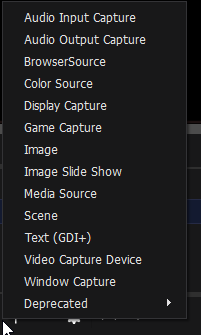
dense jackal
It's called "Video capture device" specifically like this https://i.imgur.com/J3gCQxL.png
 night jasper
Finally thank you 😃 i have to see if i can get laptop to work with external webcam for streaming
thank you for the help @dense jackal
dense jackal
np 😄
 proud copper
im not sure this is a streamelements or obs problem but my obs stream is now dark AF after changing soem game settings
lament blade
Streamlabs?
proud copper
i meant elements
<.< >.>
well i pressed on and off on alot of stuff and fixed it i guess.
lament blade
Do you have hosts bonus your loyalty settings? https://streamelements.com/dashboard/loyalty
livid ingot
Sure do
 twin echo
the bot is ready for youtube chat?
crimson yew
Patience is a virtue. 😛
twin echo
No they just added the option for Youtube
crimson yew
Then why did you ask??? XD
twin echo
Just asking if it's ready
pine hemlock
what do you mean the option
twin echo
The chat bot for youtube
clever mango
It is live
twin echo
Cool, that's all I wanna know
crimson yew
-smacked Exion-
clever mango
You can find it in the dashboard now
crimson yew

twin echo
@clever mango does this mean including points system going to work?
clever mango
No, loyalty will not work until youtube makes viewer/chatter lists available to us
proud copper
what is a JWT Token?
crimson yew
Hard for me to explain, but think of the stream key on Twitch.
It's something similar to that.
modern iris
hey guys when i click 'Emulate Item Redemption' nothing happens 😮
pine hemlock
Add the store redemption widget to your overlay
nocturne pelicanBOT
@proud copper You can find your JWT token on your account information page (Click on your name next to the Sign Out button) https://streamelements.com/dashboard/account/information
 surreal crag
I'm having a hard time trying to get my Camera box on a overlay to not be extremely elongated. Anyone able to help me set up an Overlay?
proud copper
thank you
lament blade
Are you using our themes? Some of them come with 2 webcam sizes
pine hemlock

lament blade
how can i find my paypal email link and put it here https://gyazo.com/484c6ae46986fcaeac844813411b0175

@pine hemlock sorry for @ ing 
dense jackal
@lament blade it's whatever email you used to signup for paypal
 static gate
anyone here that question about help hehehe
lament blade
@dense jackal ty i got it~
 mental solar
how do i extend the give away duration?
it says create and start
i dont wanna start it and then it will end so soon
Anyone?
dense jackal
It goes until you decide to stop it
mental solar
so do i just click create and stat
dense jackal
Yep and when you want to do it, just click pick winner
mental solar
ty
dense jackal
Any of our themes are pretty dope, what game you want to play?
lament blade
well i play mostly league of legends
and other games
like closers and soul worker
and step mania 5
 blazing flare
Hi there, im sure it has been asked a million times, but im trying to work out how to change my bot name. i have tried to change it within ground control but cant seem to get it to change namew
static gate
@dense jackal i tried to put brower source of the widget in obs but when i test it ..it cuts off and doesnt show full name ..or anyone know the issue
dense jackal
@lament blade we have league of legends themes in our theme gallery!
nocturne pelicanBOT
@blazing flare Custom bot name requirements
- StreamElements bot modded and in chat
- Active overlay with alerts
- StreamElements tipping page in the panels below the stream (!panels)
- Register the twitch account for the name you want to use
- Ground Control app must be running
Steps to enable custom name
- Sign in to https://twitch.tv with the bot account
- Install and run Ground Control (!gc for download)
- Visit https://twitchapps.com/tmi/ and generate an oAUTH token
- Copy/paste everything in the box to Ground Control oAuth settings and enter the name for the bot account
- Restart Ground Control (custom name may take a few minutes to take effect)
dense jackal
@static gate make sure your obs source looks like this https://i.imgur.com/FegZJQS.png
static gate
k let me try @dense jackal
lament blade
@dense jackal nice i chosen the phoenix theme but what if i want to change a game with the same overlay but the resolution is different
dense jackal
The game res is different?
I would try to keep your game resolutions the same, otherwise you would have to change your game capture source in obs
lament blade
oh because some games have different @dense jackal screen sizes
dense jackal
yes but you can change them to be the same
lament blade
oh ok
static gate
@dense jackal think got it figured out for now.. but quick question ..you cant have a custom for bit sound ?? cause i tried but it just did default
 sterile wedge
dense jackal
sterile wedge
dense jackal
@static gate open up the variation settings located on the bottom left of the editor and you can edit them there
lament blade
is stream elements gonna update there league overlays cause we have new runes now @dense jackal
lament blade
@dense jackal you play league right?
lament blade
yea the bottom left corner of the character icon in game it doesnt have the purple slot
 dense jackal
ah well you can click and you can still see stats through the overlay
 latent mural
i would love for a way to size the overlay according to your ingame overlay for leauge
i had to do a good hour of fiddling in my league overlay to fit it to my ingame interface
since the original size is HORROR
lament blade
lol
dense jackal
I agree
latent mural
(i am at like 12% interface size)
dense jackal
I just take out that part of the overlay
lament blade
https://gyazo.com/3ddccc807a6cc9d7e4efc428e9f69de9 yea cause the circle is bugging me lol
 lament blade
ill just ignore it
static gate
@dense jackal https://gyazo.com/da2a4642a41c3003ea9d297b6463bd94 where at?
 dense jackal
bottom left above text and TTS settings "Variations settings"
static gate
k
lament blade
how can i test a overlay in obs @dense jackal
and the red square is off https://gyazo.com/0f08e826e9e3263e95f4be41a82180b1
 dense jackal
!multi
nocturne pelicanBOT
Make sure to :ballot_box_with_check: “Shutdown source when not visible” for all browser sources (all OBS scenes). If using studio mode, uncheck “Swap Preview/Output scenes After Transitioning.” Also keep in mind that sound can play from any overlay loaded in the browser (editor or launched). https://i.imgur.com/FegZJQS.png https://i.imgur.com/yY0wcFl.png
 vital wyvern
^
dense jackal
studio mode in the bottom right
vital wyvern
^
lament blade
oh ok and then edit the over lay
how can i show song thats playing in background @dense jackal and im using soundcloud most of the time
!song
modern iris
is ignore users for loyalty points working properly? i try to add nightbot.. then after refreshing nightbot disappears
serene granite
press enter after writing nightbot
modern iris
ah that was dumb of me. hahah thanks
 agile basin
Why is there a huge gap inbetwen my scrolling text when I set the visible items to anything other than 25?
what it looks like until the gap
mental solar
how do i prevent mods to be able to execute commands like !raffle?
mental solar
where
 atomic hollow
mental solar
atomic hollow
mental solar
ty
 bronze lichen
10:32
Moderator6-Month SubscriberVerifiedStreamElements: @MaschineTV no items found
there is a item in store, but the command doesnt work. is it known?
bronze lichen
Okay
 ornate ferry
@gaunt light
leaden pumice
!host
nocturne pelicanBOT
Twitch doesn't have a "notification system" for hosts (unlike follows, subs, raids, etc.) so the only way for StreamElements to know that you are being hosted is to connect through you to twitch. This connection is made on:
- SE Dashboard page - https://streamelements.com/dashboard
- SE Activity Feed page - https://streamelements.com/dashboard/activity
- Ground Control desktop app - https://streamelements.com/groundcontrol
Please have one of these open during your stream in order to receive host event notifications.
lament blade
How come the top line still says Points and not the currency i set as BeanieBits? it seams a little confusing for the viewer. This is on the giveaway page
Is there actually a way for songrequest to enable it for only subs? Because mods can also use sr 
ornate ferry
any spanish supporter??
 vapid badge
@lament blade The site is set up this way. Add it to #💭︱feedback-and-ideas if you want!
lament blade
Yeah but mods still can use it
winter zenith
yeah... so?
lament blade
They shouldn't if they are no subs xd
winter zenith
LAWL
They way this works is as followed
useres get a "Rank"
300 are subs
500 are regulars
1000 are Mods
1500 are Super Mods
if you set it up that only Subs can songrequest every other user level also can SR
bc they have a higher rank
vapid badge
Just tell your mods not to use the command @lament blade haha
winter zenith
^
lament blade
Yeah I know this kiwa
winter zenith
then I dont know what you dont understand
lament blade
Well not exact numbers, but the "function"
 gentle imp
mod subs only 😄
lament blade
Fair point
winter zenith
good idea 
lament blade
Rip 3 mods 
lament blade
If they sub then in the future
gentle imp
perhaps something good to add to ideas board
winter zenith
yeah put it on the Ideas board that the SR Command can Ignore users
lament blade
I set it to sub+ only because a frenchie always did sr French rap
Didn't found feature to ignore users yet
gaunt light
@olive lintel can you please help @ornate ferry in spanish ?
lament blade
Gonna add it when I'm home, if noone else will do before
winter zenith
thanks
vital wyvern
@winter zenith rip Fabi's trolling in your chat
winter zenith
lament blade
My name is Fabian 
winter zenith
its is?!
lament blade
I'm not trolling :c
gentle imp
😂
lament blade
Yes it is @winter zenith
gentle imp
such a coincidence hehe
vital wyvern
^
ornate ferry
@gaunt light add me like a friend
atomic hollow
?
winter zenith
?
 brazen moon
hik
lament blade
Has there been any examples done for using the API?
brazen moon
so idk what it is, but it seems like eversince i swtiched to streamelements with alerts and got a awesome overlay downloaded ground controle my cpu usage is going crazy on obs it takes 30% now just by opening obs not even streaming befor it was 3% , 5% at highest, this means with 30% cpu usage it makes my machine drop fps in games, i already switched the encoding to gpu on obs cuz my cpu is not strong enough. any help
nocturne pelicanBOT
@brazen moon To add your overlays to OBS, add a new browser source in your scene. Paste your overlay URL in the browser source properties, set the dimensions to 1920x1080 (unless you changed them on the website), and :ballot_box_with_check: “Shutdown source when not visible” https://youtu.be/KDvLynUqXI4
brazen moon
?
gentle imp
look especially at the last part
brazen moon
that was not my quieston streamelements bot but thanks
winter zenith
did you shutdown Browsersources when not visable?
gentle imp
Shutdown source when not visible 😃
winter zenith
^
brazen moon
huh ?
nocturne pelicanBOT
@brazen moon Make sure to :ballot_box_with_check: “Shutdown source when not visible” for all browser sources (all OBS scenes). If using studio mode, uncheck “Swap Preview/Output scenes After Transitioning.” Also keep in mind that sound can play from any overlay loaded in the browser (editor or launched). https://i.imgur.com/FegZJQS.png https://i.imgur.com/yY0wcFl.png
vital wyvern
i think it could be the same as what @tight harness found out what was taking all of my cpu usage
gentle imp
it is the answer to your question, believe us
winter zenith
This is important if you dont do this all Browser overlays load in the background
brazen moon
okay thanks
winter zenith
Channy what was your problem?
brazen moon
i try that now i get back to you
gentle imp
if you don't do that you will have all your browsers sources loaded at the same time, resulting in high cpu usage
winter zenith
Thanks
vital wyvern
my issue was that i was having several game captures for different games, instead of just one
brazen moon
rippz0r so just the overlays ? or everything from streamelements ?
gentle imp
anything you added as browser source, that includes overlays, yeah
vital wyvern
^
gaunt light
@ornate ferry Added
ornate ferry
thanks
gentle imp
 lament blade
can you only have 1 giveaway and one contest running at any one time?
gentle imp
giveaways you can have more than one, by mistake I've done this before, but dunno how it will show on stream
not sure if the widget expands
lament blade
ok... that dont matter so much i was just wondering.
gentle imp
and probably will be a mess to enter it hehe
lament blade
but i need a giveaway to run for 4 weeks.... will this work ok?
lament blade
ok cool thanks.... i want viewers to be able to buy tickets all the time to the next giveaway lol
gentle imp
yeah that works nicelly 😃
lament blade
is there a way you can find out how many tickets you got so far? like a /tickets command?
i have not found anything yet
 lost veldt
Hey guys, :)
I tried to rename my Streamelements bot but the option is not showing in the ground control app. Does anyone know a fix?
vapid badge
Hey @lost veldt ! You need to complete 3 tasks before being able to rename your bot
- Add the tipping page to your bio
- Mod your streamelements bot in your chat
(and the last one that I'm searching for right now bear with me 😅)
gentle imp
use SE overlays
lost veldt
What does 'add the tipping page to your bio' mean exaclty? 😃
Thanks for helping!
gentle imp
means you need to have the donation linked to streamelements on your twitch panels
which you don't have at the moment
vital wyvern
our dear @stuck hamlet got a video explaining how to setup a tipping page 😃 @lost veldt il dm you 😃
lost veldt
that's great. Thank you guys so much
vapid badge
No problem!
vital wyvern
winter zenith
Woha its Todesberg 
 torpid estuary
The Todesberg is here? 
 lofty shell
hey, just an question. I use "PhantomBot" at the moment, but I really want to switch to StreamElements. It would be awesome, if I could copy all the points my viewers already collected to StreamElements. Is it possible?! 😃
stuck hamlet
Does phantombot have a file with all the points?
lofty shell
there is a way to get the .csv-file which I have to check out
with the help of sqlitebrowser
never used this before, but they say that it is possible


 lofty shell
ohoookay, not good at all? 😄
stuck hamlet
Message @clever mango He'll help you out later tonight when he gets home 😃
lofty shell
okay, thank you 😄
stuck hamlet
We'll get you sorted it and 100% on StreamElements 😃
lofty shell
♥ would be super awesome 😃
vital wyvern
@stuck hamlet is le best le best le best 
pine hemlock

lament blade
how is the discord bot coming on?
pine hemlock
I'm not sure of an eta
weary mist
usage examples of the API are at dev.streamelements.com
lament blade
i have not seen any "code" examples just the calls you have to make
surreal crag
So I'm adding my Overlay as a browser source. However it is to large and does not fit to screen in OBS. Any guidance?
lament blade
did you set the right size on the site when making the overlay @surreal crag
vapid badge
@surreal crag What's the size of your overlay on Stream Elements ?
surreal crag
I did not, I'm also not sure how.
lament blade
when you create a new overlay you get this box...
vital wyvern
^
lament blade
1080p should be 1920x1080
vital wyvern
!add
nocturne pelicanBOT
To add your overlays to OBS, add a new browser source in your scene. Paste your overlay URL in the browser source properties, set the dimensions to 1920x1080 (unless you changed them on the website), and :ballot_box_with_check: “Shutdown source when not visible” https://youtu.be/KDvLynUqXI4
vital wyvern
does it still not work after doing this ^
surreal crag
I actually didn't get that box, I used the RED FLARE SUPER THEME. It just asked me to name it.
vital wyvern
if am correct , the default is 1080p
lament blade
make sure you set the size in obs like so
surreal crag
Perfect! That was the issue! Setting size in OBS! I appreciate it!
lament blade
👍
 vivid cove
Loyalty points on host and offline does not work for me, what could be wrong?
lament blade
are you running the site or ground control while on stream? im sure you need to or it does not pick up hosts etc
tight harness
@vivid cove Do you have the activity feed open while you're live?
vivid cove
hm, no.
tight harness
You need the activity feed open (either on our site or Ground Control) for our system to recognise hosts, that'll be why
The explanation as to why it's needed is in our pinned messages for this channel
vivid cove
Does this also apply to the offline points?
lament blade
is there offline points for SE?
proud pumice
nopez
vivid cove
I was told yday it is
lament blade
is there some markup for the text on the giveaway page? it does not seam to take a new line atall?
gentle imp
what do you mean @lament blade
 old pecan
Hi is this a place i can get some help with tips/donos
stuck hamlet
What do you need? @old pecan 😃
old pecan
Just a question mainly
I have set up tips from the website
but apparently paypal took a fee from my tip
so i recieved less than what i was supposed too
is that normal?
or did i set up something wrong
stuck hamlet
yes. I believe the paypal fee is 2.9% +.30c
old pecan
is there a way i can direct link my bank or something?
im quite new to this sorry for bothering btw
stuck hamlet
Not at this time, we are looking into adding more payment options 😃
stuck hamlet
No worries, it's a normal thing. Most streamers deal with it cause there's no better solution, but we hope to bring the best solution known out there 😉
old pecan
Okay thanks for your help!
gentle imp
check if you don't have automatic currency conversion since that makes it cost more
gentle imp
if possible keep the currency people donate, only change when you need to
gentle imp
1.Click on the profile icon in the top right and select "Profile and settings"
2.On the left sidebar click "My selling tools".
3.Next find the "Block payments" setting and press "update" on the right side.
4.Look for "Allow payments sent to me in a currency I do not hold" and set it to Yes, accept and convert them to U.S Dollars. (Or whatever default currency your PayPal account uses)
but if you can don't convert 😃
gentle imp
yeah all on paypal
I just had a look and there's no way not to convert it auto unless you wanna approve each transaction manually
and even so will probably result on same thing
gentle imp
np
 hard estuary
winter zenith
hard estuary
winter zenith
@hard estuary what do you need? 😃
 misty wagon
@hard estuary
 olive lintel
@ornate ferry hola, si tienes cualquier problema, mándame un DM y te puedo ayudar.
 steep patio
Hi, I am using your PUBG overlay "Bullet rain non animated". Would it be possible to include a 4:3 camera frame pic ? There is only 16:9 available and my cam gets blurry when I use the 16:9 format. Would be great ❤ cheers awesome overlays love it so much !
gentle imp
@steep patio you can distort it to your likings
just the camera part
select it, and on the left where u can see size auto, change it to scaled and resize as u wish
steep patio
yeha i tried that, but even with scaled it is 16:9 :/ though about that
weary mist
@ripe herald
ripe herald
yes
dense jackal
We have one just doesnt seem to be in this pubg supertheme
ripe herald
dense jackal
@steep patio ^
weary mist
@steep patio 😃
 dense jackal
bless @ripe herald
gentle imp
wow Kireaki 
 eternal oracle
quick question i dont know where to ask this
is there a stremelements discord bot?
dense jackal
Not atm, but it is being worked on 😄
eternal oracle
I am setting up a server where if anyone subs to me they can get the twitch discord role
how do i do that?
narrow coyote

Discord
Check it out: Twitch Integration is here! You can now have a dedicated Discord server for all of your closest sub buddies to chill in and spam Giphys and emotes. Kappa. Oh, and even our Twitch Affi...
gentle imp
^
tight harness
weary mist
Actually, I think if you link your twitch to your discord account, and set it up on your discord server, it will automagically set them as subscribers @eternal oracle
slim cairn
There's a syncing process
weary mist
awesome
steep patio
yo @ripe herald my man could you do it as well for "HS TAVERN IN GAME STATIC SCENE" there is also only 16:9 cam frame ❤
steep patio
❤
gentle imp
would be awesome if u guys/gals always did the 4:3 since some of us have those cameras ^^
I actually haxxed mine on photoshop lol from the 16:9
you mean the date when viewer followed @strong widget ?
 strong widget
no, how long a user has been watching
dense jackal
Had to delete because of link I am sending you a variable list
strong widget
i want to replace the default !watchtime command with a custom one that doesnt ping me
in the chat
gentle imp
I don't know then, maybe someone else
strong widget
alright
vapid badge
Hold on, I can look into it @strong widget
dense jackal
@strong widget
you can name it watch time just remember to disable it on the default watch time command
vapid badge
Too late :(
dense jackal
here copy paste this @strong widget ${user} has spent ${user.time_online|'0 seconds'} watching ${channel}
dense jackal
and remember to disable the default one @strong widget
it won't go every time because it has global cooldown 
strong widget
gotcha xdddd
dense jackal
AHHAHA


 weary mist
@gentle imp I believe most of those frames are already made, thejust disappear, or something from the editors. But Kireaki is ver good about supplying them when needed 😃
#discordDidn'tScroll
 lone lichen
i need help
narrow coyote
what do you need help with?
lone lichen
im new here
narrow coyote
ok, is there something specific that you needed help with?
 full elk
My chat seems to like the idea of a !hug (username) command. What variables would I need to make that happen?
winter zenith
Use the Love template there you can find the variables necessary 😃
But very basic its:
${sender} hugged ${1}
full elk
Thank you! I should have been able to figure that out. I always forget there is a template drop down!
winter zenith
its ok, there also is a list of all variables with an description if you need more detailed commands 😃
modern iris
how to make streamelement bot say "Thanks for following namehere" ?
winter zenith
its a Module
tight harness
Chat Alerts
winter zenith
StreamElements
The Ultimate All in One Platform for Streamers
its called, Chat Alerts just like Legendary said 😃
modern iris
Thaank you
modern iris
People won't get loyalty points if i am offline, correct? because some just stay in chat. haha
modern iris
hahahahahh thansk 😄
vapid badge
No problem !
vivid cove
So there's no way to make SE give points when offline?
I'm really confused as yesterday I was told this was in, today it's not like this
serene granite
there's no way to do such a thing
not sure who told you that, but our apologies for the confusion.
hexed herald
Does the week for the weekly top cheerer line up with twitch's week for their bit badges?
 steady phoenix
Does anyone using the AlertBox widget have variations set up for the Host Alert setting?
hexed herald
Also, is there anyway to have a recent cheer also show that person's total cheer?
i don't but i may be able to help @steady phoenix
what's up?
steady phoenix
just setting mine up at the moment but the emulate host event function in the editor, at least, seems to be ignoring the variation settings and just using the base settings
wondering whether that still happens with actual host alerts when using the overlay in a live environment
narrow coyote
do you have the alert widget set to use random variations?
steady phoenix
yup
pine hemlock
Weekly cheers reset on Monday pretty sure.
Unless you change it in your twitch settings
steady phoenix
just two variations created at the moment, with the random checkbox selected, ,but when the alert actually appears it is just using the sound and custom CSS from the base alert settings instead of any of the variations
perhaps just stumbled on a bug 😄
narrow coyote
Unfortunately, I am not somewhere where I can test this right now
 dense beacon
Is there anyway to setup the bot to only removed the link? Not just ban the user?
stuck hamlet
Just remove 1 message?
because that isn't possible on twitch
you can purge people, banning then for 1 second.
dense beacon
I wrote in a chat at a streamer and I used D.Va .. and it did that
( Siickest: <borttagen länk> only? ❤ )
The text say "Removed Link"
 bright tartan
Do you guys know if you have any plans for Streamdeck integration for overlays and/or song request?
dense beacon
Ohh 😮
narrow coyote
that all depends on elgato, several people have tweeted and re-tweeted them that they need to look into SE integration for streamdeck
dense beacon
So I can then disabled then "Link Protection" 😄
bright tartan
ok thanks, I will tweet them then
narrow coyote
@bright tartan if you check the top pinned message in #welcome you can see the tweet template, and tweet at them
bright tartan
ok thanks
narrow coyote
no problem
slim cairn
Was about to say doesn't look like SE
narrow coyote
livid ingot
There we go
narrow coyote

livid ingot
Monstercat shouldnt be even recongised...god damn it
narrow coyote
you can remove points, and block users from getting points from the loyalty settings on the website
they would still get points from something like !bonus, but wont get points for watching
livid ingot
ffs! I swear i added MOnstercat in on the block section for points, Jeezus!
slim cairn
As Kite said, you can remove points from people in the loyalty settings
livid ingot
Sorted out 😃 Again thank you for the lovley help
narrow coyote
lament blade
hey how do i remove the camera part on 1 of the animated overlays?
narrow coyote
You should be able to remove it in the overlay editor
 inner jasper
Hey all! I'm new to streaming so this might not be with streamlabs, but i used the fortnite overlays (animated ones) and everytime i switch to a different one, obs goes black for a second and loads them in. Is it a streamlabs problem or is it my (somewhat underpowered (1080 graphics card) computer?
lament blade
I'll end up putting a image in where the camera part is at lol I hate webcams
nocturne pelicanBOT
Check out this tutorial for OBS’ studio mode which allows you to preload scenes before transitioning. https://www.youtube.com/watch?v=W8iWsD2Lq3U
inner jasper
awesome, thank you
narrow coyote