#helpdesk-twitch
1 messages · Page 229 of 1
 pine hemlock

 frigid radish
lol
 vital wyvern
@dense jackal is such noob
pine hemlock

 dense jackal

 viral cedarBOT
frigid radish
viral cedarBOT
frigid radish
Changing the height and width will still keep the chat condensed in the window or will it chop off chat
dense jackal
@atomic hollow probably knows
 atomic hollow
told you he is a noob
frigid radish
i am assuming the answer is yes
atomic hollow
it will condense it
frigid radish
thanks
 dusk skiff
Does anyone have Pretzel Rocks now playing in their overlay?
 tight harness
Now i'm hungry 
frigid radish
Hello again another quick question... is there anything that alerts in real time new viewers joining the chat.... something along the lines of " CashGam1ng has just entered the Chat Room" so this way i know when new viewers arrive and can call them out by there name rather than going into twitch chat and then looking at people in the chat
 slim cairn
Currently no for the reason of it may scare away lurkers
Some people would rather not be greeted and just chill around in the stream
frigid radish
hmm really?
tight harness
Yes really
frigid radish
well it makes it hard for me to know who is in and who to acknowledge when playing intense games like pubg or sc2
vital wyvern
^
frigid radish
any solutions lol right now i am just asking them to say hi in chat so i know they are here
tomato i guess that is true
ok thanks
slim cairn
No problem
slim cairn

vital wyvern
damn that Alias change work mighty fin for ya XD
 modern belfry
Hi, trying to get the donation goal bar to show up on bitstream on a S7/S8 but not loading. Is there a work around?
slim cairn
Did you set it to the right resolution
modern belfry
720p ?
tight harness
It should show if it's in the overlay, but if the resolution isn't correct then it could very well be off of the screen
slim cairn
^
modern belfry
I'll try dropping it below 720p
slim cairn
Id do higher
modern belfry
I've already tried it at 1080p and 720p
slim cairn
Try 2560x1440
modern belfry
Will do, thanks
 brazen lagoon
need some help i cant seem to get my overlays work with xsplit any help be great
 lament blade
Make sure the resolution on the website and on xplit are the same
brazen lagoon
how do i do that
 vapid badge
Go into your Overlay menu @brazen lagoon then click the little pen icon on one of your overlays (not the bottom one, but the small top right one) and you should be able to edit the resolution so it fits the one you have on xsplit 😀
brazen lagoon
ok i set it at 1920 x 1080
vapid badge
Is it working now ?
brazen lagoon
yep thanks
vapid badge
Pleasure ! 🙂
frigid radish
Hi, is there something that posts in chat current viewers SE points earned?
vapid badge
There's an extension you can also add in your stream bio for people watching your stream on PC @frigid radish that allows everyone to see where they're at
atomic hollow
^
frigid radish
leaderboards extension?
vapid badge

Just click on configure up right, you'll be able to activate it in your panels underneath your stream, in your bio
vapid badge
Yes sir
frigid radish
overlay extension?
tight harness
Yeah you can have overlay extensions too, we've not released ours yet, don't get too excited 😛
frigid radish
can you link me an example
tight harness
Apparently not, if I try to go to the Extensions page on Twitch it redirects me to the wrong page, but that's where they all are and they're clearly labelled as either Panel or Overlay
So there shouldn't be any confusion
 fleet sorrel
Я не могу купить платную версию, я нажимаю на Sandwich - Unlimited и ничего не происходит, не пишет способы оплаты и т.д , просто ничего не происходит!
tight harness
@ebon forum ⤴
 ebon forum
Got him 
frigid radish
Sean i am on my twitch profile where do i find overlays? i can get to panel extentions from edit panels on my channel page itself
but where can i find the overlays you speak of
nvm i see under the extension it says overlay
and panel in grey
duh
got a good recommended overlay?
tight harness
Nope, not until ours is out 😄
frigid radish
nice can you talk about what it might do?
tight harness
Sadly no, we've not publicly talked about it yet
 rare bobcat
Hey guys, so i got this problem, where ive got one of the overlays, where at the bottom, its say the current song. ive tried to hook my spotify to it, but it wont work. So my question is: How do i hook what song is playing, to my stream?
lament blade
Right now it will only show if it is a requested song and not from your back up playlist 😄
rare bobcat
So theres no way, to make it hook up to ones spotify? Could that be a future feature or something?
 elder sorrel
Hopefully soon. I believe SE Devs been trying but Spotify holding out.
lament blade
https://streamelements.helprace.com/i224-spotify-songrequest Currently it's under review 😄
 sour canopy
Aloha and thanks guys for streamelements! I just got a small problem and it's the host alerts some of em just don't show at all and i was wondering why
 nocturne pelicanBOT
Twitch doesn't have a "notification system" for hosts (unlike follows, subs, raids, etc.) so the only way for StreamElements to know that you are being hosted is to connect through you to twitch. This connection is made on:
- SE Dashboard page - https://streamelements.com/dashboard
- SE Activity Feed page - https://streamelements.com/dashboard/activity
- Ground Control desktop app - https://streamelements.com/groundcontrol
Please have one of these open during your stream in order to receive host event notifications.
dense jackal
Check out that ^ @sour canopy 😄 Should help 😃
sour canopy
thanks
 azure horizon
I am noticing that my dashboard does not give any info when it comes to hosting. It forever stays at 0 even though I know I'm being hosted by at least 3 others, when I'm streaming
Also, for tips, changing it from count to amount does nothing. Just discovered that.
I am working directly off the website
 weary mist
ok, I am checking this out rightnow
I am looking at the tips. The bar stays the same when you change to ammount, but if you look left, the scale numbers do change.
as for hosts, do you have the activity feed open either in the site or on ground control while you stream?
@azure horizon
azure horizon
Oh okay :3. No I normally don't but I do know like for last night I was being hosted by 3 and my summary for that stream is saying 0
same thing for the month of Feb no info
weary mist
If you don't have the activity feed open while you stream in either location, we are not receiving host information from twitch
weary mist
😃
azure horizon
are there plans to add twitch chat to groundcontrol?
weary mist
I believe that is something we are wanting to do
azure horizon
thats the main reason i never have it open since i only have one monitor
Okay! I look forward to that!!
weary mist
we have some big plans for GC
azure horizon
Woo! Exciting!! Since using SE I've gotten most of my streaming friends to switch over just because it is soooo much more user friendly and I'm sure they would like to start using ground control when it comes with more offers
weary mist
 chrome grove
just downloaded streamelements and it ask for my jwt token.. then it say i can find it at my profile but cant find it.. tried youtubing also.. no help there either 😦
 narrow coyote
you need to go into your profile, and click on show secrets
tight harness
chrome grove
wow im such a noob 😄 thx @narrow coyote
 white lintel
Can you make a command that for example whispers the schedule to the sender with !schedule and at the same time says (for example): "${sender}, I whispered you the schedule! ^-^" in chat?
narrow coyote
white lintel
Ye I tried to make a cmd for each with the same trigger but it doesnt let me, not even as an aliases, but all good, the whisper should be enough, thanks for the reply and honesty 👌
C yu

 white lintel

lament blade
alot of people are telling me they are not seeing the alert box animations on stream, but when people follow I can see it on OBS preview on my end, is it working or have I done something wrong?
narrow coyote
If you see it in OBS preview, that is what should be seen on your stream as well 🤔
lament blade
yeah thats what I thought
tight harness
My guess would be that they're not paying enough attention 
lament blade
ok probably not lol
narrow coyote
too bad you dont have your vods saved on twitch to check what was actually shown on stream
narrow coyote
yeah, have it save vods, that way you can check stuff like this, as well as have a nice history of your stream for people to check out
 robust current
Could someone help me fix the lag in my stream when i start it on my side its perfect but i do not know whats wrong why its so laggy on the stream
lament blade
does the game lag as well or just on stream
lament blade
well all I would do is run the test wizard to have it test for you or set bitrate to 3500 and output base as 720p
in obs
robust current
And where do i do that at?
narrow coyote
was this an issue that you are seeing related to anything SE, or just your stream in general? If it is a general issue with your stream you can ask in #welcome as this is more for SE support, you can also hit up the OBS discord discord.gg/obsproject
lament blade
tools then autoconfiguration wizard
if u want u can priv msg me since this is for SE if u have any more question
 crude ridge
Is there any way to do a Text Scroll that pauses? Kind of like the ESPN Ticker, where it says something, waits a few seconds, then scrolls to the next thing, then the next thing, then back to the top.
Preferably with different time delays by line.
 signal peak
I accidentally logged into my youtube channel thus creating a new account but want to link it to my twitch account instead. Is there any way to do this
 winter zenith
Yes log out of the dashboard
Just log in with your twitch 😃
@signal peak
@crude ridge sadly no, but SE is adding more things over time you can put that idea in the ideas channel
So when you made a post in the board and people upvote it probably will be added
crude ridge
Thanks @winter zenith
 regal wave
Is it pretty simple to make a notification when someone sub's?
Haven't really figured it out yet but I haven't dug really deep into it either
lament blade
Of course, have you checked out super themes? @regal wave
some of them have a preview of the alert that they have on them
or if you want to make your own, you only need an audio, and a picture/gif
regal wave
Ight bet, appreciate the help
lament blade
No problem, if you need anything else just ask
nocturne pelicanBOT
@white lintel Are you a StreamElements all-in-one streamer and interested in stream promotion when you go live? Please fill out this application https://strms.net/sellout and if you meet the 3 requirements posted in the :pushpin: pinned message in #general you will be added to the stream announcements.
white lintel
owo

 ) BabyRage
white lintel
) BabyRage
white lintel
Why is it necessary though, really? ._.
 stuck hamlet
no shaking needed, but to be a proper sellout, you do need to use those aspects of our service
 stuck hamlet
goodnight
 dense beacon
Hello, is anyone awake+ 😛
lament blade
I'm awake :3
narrow coyote
they are always watching, you can post your question/issue, and someone will see 
dense beacon
But I would like to get help as quick as possible now and not wait 2-3 hours when I went to sleep 😄
Anyway, good 😃
I'm new to this now. I've used streamlabs and currently between streamlabs or this. But I will give it a try, but having trouble with the alert. Follower Alert I have a image with "New Follower" etc. But I can't put the text in the box? Only Under it, next to it or above it? :S
lament blade
To fix that i usually go on "text settings" and "advanced" and messing with these numbers, it will move the text around for you 😄
for example, when top is 33 it's like this
dense beacon
Ty.
lament blade
changing to 0 is like this
dense beacon
I was in the before but I had wrong .. ? thingy?
But should it not be a default thing?
lament blade
It depends on your picture 😄
Where exactly you want it to display the name
The numbers are not the same for everyone
dense beacon
No it's not but just to use as Streamlabs it works with almost all image 😛 But we all have different surely 😃
Sounds btw, you have any default ones beside the one loaded or I need to upload my owns ?
lament blade
i use myinstants.com for sounds
they have a bunch to choose from
all you have to do is pick a sound,download and upload it to the cloud 😄
lament blade
dense beacon
But I will check myinstants.com
I wanna ask you @lament blade You might know this. Is it possible with Streamelemens to make kind of a changing way between latest follower, latest sub, latest donation etc etc?
lament blade
Like.. variations?
dense beacon
So like.. Fade In Latest Sub: Name *Stays 10 seconds Fade out fade in Latest Follower: Name fade out .. etc
Ninja has that type of thing and been looking for it for a while :S
lament blade
We have event list, i never heard of what you are describing before so 
I don't believe so
dense beacon
Yeah fack xD Been looking for a custom code like that around the web 😛
 dense beacon
What devs?
I had streamlabs setup to event list to show 1 line and it was changing between them all 😄
It works here to ? 😛
pine hemlock
Add an event list widget to your overlay, set it to 1 even max and it will swap when a new event happens, sure
dense beacon
On the event list.
Do I have to go into the custom code or how does work with you guys to remove the top right "follow/Sub/Donation" etc text.
NVM - FOUND IT ❤
tight harness
That's only in the overlay manager (the multiple messages)
Nothing to worry about
In regards to the background, set the Theme to Custom and you can change it
tight harness
 dusty parrot
dense beacon
Sean
tight harness
Yeah? 😃
dense beacon
To change the size of the widget? I have to exit it and change it from the list? Or can I change while I am editing a widget?
tight harness
Widgets you can change by dragging the square in the bottom right at any time
You do mean widget and not overlay?
dense beacon
The green box xD
Overlay maybe?
The one where you add widget like Latest Follower and etc
tight harness
Yeah, to change the resolution of the overlay you exit it, click on the small pencil by the name and then change it there
dense beacon
Im not getting the chat to work. Got the res on 480 x 460 and I have the same res on obs when added the source :S
tight harness
With the chat it should be 1920 x 1080 ideally
dense beacon
It did work when I had 2560x1440 but .. Dont wanna work with to big res and have it complicated where to put the box and etc.
tight harness
The overlay I mean
dense beacon
Well my Chat Box size on my design is that size
lament blade
is there a command to transfer users points to there new name after a name change
tight harness
Right, but you can make the widget that size but the overlay 1920 x 1080
tight harness
@DakodaAtTwitch#9480 You can use !addpoints <name> <points> to give them points, or say -500 to take away 500 points for example
lament blade
oh so no command to just transfer after a name change
tight harness
No
winter zenith
just bonus them the amount they lost
lament blade
maybe that should be added to the todo list
tight harness
Indeed, !bonus works as well as !addpoints, it's a shorter alias of the same command
More difficult than it sounds
lament blade
every other bot does it
dense beacon
But to clarify. The size can be 1920 x 1080 but then all overlays will be like that like "Latest Follower" and "Latest Tip" etc etc and when I wanna move 1 alert. Then I might move the incorrect one and you know it fucks up.
tight harness
Has a command to do that?
lament blade
yes like !renameuser oldname newname
and it just renames the user
theer for transferign everything over
that or the bot uses userId not Username
there for dont need such feature
tight harness
UserID would be good, I agree with that
It's probably on our ideas board already: https://strms.net/ideas
lament blade
i coukld make an api that can get the points form the old name remove them then add them to the new name then any bot that has readapi command can use it
kind of like the same way i use SE as a bank to my main bot 😃
weary mist
if you did that, we could recommend the command response to anyone else that has that issue 😃
dense beacon
Sean.. Why should it always be 1920x1080? Would it not be easier for us to set like okaay. I want a size of 500 x 500 and then where ever I put the alert on OBS it's in that box? I don't want multiple alert with size 1920x1080. Just curious why it's made like this?
Second: The donation thing. Does it have to show .. like no one have donated since I switched over to you guys so it's just show [ - 0 $ ]
tight harness
@dense beacon Just certain widgets like that should be kept at 1920x1080 otherwise the text is out of sight, you can downscale your overlay in OBS Video settings so it doesn't really matter
dense beacon
I understand more now when I noticed that you can have multiple stuff on a single overlay. Like Chat, Latest Follower etc etc. I made one for each before, One for chat, one for follower and one for donation and I wanted them in a small area. But I added them all to a single and then I understood the thing of 1920 x 1080.
But second question to be answered ❤ 😃
 clever mango
@dense beacon which widget is that?
dense beacon
Latest Tipper
 weary citrus
Is there a way to set up an "UnFollow" alert ?.. Think it would be funny to point them out
 naive field
does anyone know why i get frame drops when i use obs?
i have a gtx 1080 and a i7 6700k
16gbs rams
dense jackal
@weary citrus not at this time
weary citrus
Thank you
naive field
does anyone know why i get frame drops when i use obs?
i have a gtx 1080 and a i7 6700k
16gbs rams
dense beacon
In the game?
I can think of two stuff that happens for me.
- You have OBS up.
- You have a webb browser up.
naive field
i have a costume overlay yeah that i got from SE
could the overlay be making my framesdrop?
its has moving affects to it
clever mango
It can if the overlays aren't added to OBS correctly. Follow these steps for best performance:
!add
nocturne pelicanBOT
To add your overlays to OBS, add a new browser source in your scene. Paste your overlay URL in the browser source properties, set the dimensions to 1920x1080 (unless you changed them on the website), and :ballot_box_with_check: “Shutdown source when not visible” https://youtu.be/KDvLynUqXI4
naive field
i get frame drops in my game not the stream
clever mango
The last step is the most important
dense beacon
@clever mango Can I Import a overlay I've made. Like I've made a Alert Box Overlay. Could I import that one into another overlay that I wanna use for my main screen overlay. Don't feel to remade the whole on over again 😃
clever mango
Ah, well that is normal since your CPU and/or GPU are under increased stress while streaming
The drops should not be too significant though if you only have one running at a time
That's why shutting down the background scenes is important
naive field
not stream im at 180 to 200
on stream its itlll even go down to 22 at times
i dont get it
dense beacon
Nvm. I found it, don't answer my question. ❤
tight harness
@dense beacon To answer your second question yes it has to show if it has no data, some widgets you can choose what to show if there is no data but for that one that choice isn't there
clever mango
Do you have OBS open right now? @naive field
clever mango
Ok, open task manager and then under processes expand the OBS process
naive field
channel
dense beacon
How can I be listed in hte "sellout"? 😄 haha
 peak heron
Can someone who is an expert at this software PM me?
nocturne pelicanBOT
@dense beacon Are you a StreamElements all-in-one streamer and interested in stream promotion when you go live? Please fill out this application https://strms.net/sellout and if you meet the 3 requirements posted in the :pushpin: pinned message in #general you will be added to the stream announcements.
 fallow scroll
Do i need to disconnect my streamlabs bot for the stream elements bot?
lament blade
Hey
I was told to come here to talk about Alert Variations
I wanted to have set percentages instead of having all of the alerts be the % of happening.
Any ideas?
tight harness
@fallow scroll It's not required but it's advised
@lament blade I'm not sure I understand what you mean, apologies
fallow scroll
thank you @tight harness
tight harness
No problem
lament blade
Okay
Lets say I have 4 alerts in Alert variation
They are all (by nature) a 25% chance of happening
Could I change it to have one at 15%, one at 45% etc
tight harness
Ahh, I see. No that's not possible currently
Not unless you added duplicate variations to have more chances of that one occurring
That'd work
Bit of a workaround
peak heron
can Anybody help me?
tight harness
I don't believe you mentioned what software you needed help with
fallow scroll
so uhh...how do I disconnect my streamlabs bot xD
tight harness
It's ran via the chatbot program, if you don't open the program it isn't running
fallow scroll
alright perfect thank you again
tight harness
If you go to Twitch, then Settings, then Connections you'll see if there's still a valid connection
naive field
@clever mango I LOVE YOU BRO, THANK YOU FOR THE HELP!
fallow scroll
ooo
 latent mural
all this love for terrabuck.... are we gonna see the special tonight? the... buckshot...?
(i am so sorry please dont hit me)
tight harness

clever mango
 uncut pendant
how the hell do i find my JWT token...
fallow scroll
where do i find or edit quotes on stream elements
winter zenith
Its on the Ideas board
fallow scroll
; -;
winter zenith
But for now you can Delet a quote by a number
tight harness
@uncut pendant Click on your username, then click on Show Secrets
winter zenith
and add it again I think
uncut pendant
@tight harness thanks dude
tight harness
No problem
fallow scroll
so in peoples stream I see the bot randomly say stuff from time to time. can i turn that off?
narrow coyote
thats all based on timers, if you dont have timers set up, you wont see that
winter zenith
do you mean when some one follows/donates/cheers?
or when they promote to follow or to donate or to join discord?
fallow scroll
the promotion stuff
winter zenith
yeah thats a timed message
if you dont set them up you wont have them in your stream
if you were asking if you could disable those timed commands in another ones stream/chat thats not possible
fallow scroll
got it x) thank you guys
narrow coyote
 tidal raptor
hey anyone know how to get obs to stop using so much resource like when i use geforce experience no problem but no overlays when use obs overlays but makes game lag
winter zenith
How many Overlays do you use in one scene?
nocturne pelicanBOT
Make sure to :ballot_box_with_check: “Shutdown source when not visible” for all browser sources (all OBS scenes). If using studio mode, uncheck “Swap Preview/Output scenes After Transitioning.” Also keep in mind that sound can play from any overlay loaded in the browser (editor or launched). https://i.imgur.com/FegZJQS.png https://i.imgur.com/yY0wcFl.png

 tidal raptor
no.....
winter zenith
so in every scene you have a overlay it just runs the overlay at the same time
thats not too good
 dark dome
Question For HypeCup: What does it mean by Recent Events refill the cup
tidal raptor
ok what else can help cause only one was not checked
i know better internet but not possible where i live
winter zenith
what stuff do you have on your overlay?
tidal raptor
i can start my stream and you can look
winter zenith
@dark dome what do you mean what the hype cup doese?
if someone follows/donates/hosts/tipps/cheers a token fall down to the cup
you can also determend how many events should refill the cup every session
so it doesnt load empty every time
tidal raptor
would that make it easier
dark dome
ah
tidal raptor
uhhh
winter zenith
or did you just put alertbox, kappagen, hypecup into your overlay?
or show me a screenshot of your overlay layers
dark dome
Thanks Kiwa, would explain why i would refresh and nothing would be there 😃
winter zenith
@dark dome no problem
narrow coyote
just snip, then ctrl+c, and ctrl+v in here
narrow coyote
you want to ctrl+c in snipping tool, and ctrl+v in here
tidal raptor
Didnt work
narrow coyote
did you actually snip the screen
click new, and screen will go white, snip what you want, then copy pasta
frigid radish
hi is there a feature in SE that sends out social media alerts like tweets when going live?
tidal raptor
yes
frigid radish
I have my twitch account connected to my twitter but its doesnt seem to be sending anything out
Rampage can you give me more info
tight harness
No we don't have that
weary mist
there isn't anything that will tweet when you are live, but we have a module that will share your tweets to twitch chat
winter zenith
@tidal raptor I need your Overlay Ediotr layers
tight harness
There might be an external one, but they asked specifically if there was a feature in SE that does it 😄
narrow coyote
also, you will probably want your browser source to be the top layer
frigid radish
well the external way is through twitch... i used to use restream.io and that would do that but now that i am off of that i have to put the tweets out manually
winter zenith

I need to know if you use this:

bc those are a little heavy on the CPU if they set up too crazy
winter zenith
ok
tidal raptor
i tried to use obs but it was so resource intensive idk if i have my settings in obs wrong
winter zenith
did you really checken the "hide if not visable" thing on every scene you are using?
!multi
nocturne pelicanBOT
Make sure to :ballot_box_with_check: “Shutdown source when not visible” for all browser sources (all OBS scenes). If using studio mode, uncheck “Swap Preview/Output scenes After Transitioning.” Also keep in mind that sound can play from any overlay loaded in the browser (editor or launched). https://i.imgur.com/FegZJQS.png https://i.imgur.com/yY0wcFl.png
tidal raptor
yah
winter zenith
those settings not only in the scene you are using but on all sceance where you have an overlay?
tidal raptor
yah
narrow coyote
if you have a lot of animated pieces, and a complex overlay, it can be resource intensive, and it will depend on your system and encoding settings
weary mist
ok. So. What kind of CPU and GPU do you have?
narrow coyote
and are you using nvec for encoding?
tidal raptor
a what
weary mist
Can you open your task manager, and screenshot the tasks under OBS?
tidal raptor
tasks?
narrow coyote
the 6300 is a bit on the potato end, depending on what exactly you are streaming
weary mist
and take the snip of it
tidal raptor
do i need to run obs
narrow coyote
I have an 8350, and this thing can choke hard
weary mist
depends I guess, because I am seeing a 6 core, 3.5ghz when I looked it up
tidal raptor
yes it is
weary mist
which is better than the i5-6420p I had when I first started streaming
tidal raptor
do i need to have obs open @weary mist
weary mist
yeah
narrow coyote
yeah, but vischera is not anywhere near as good as intel cores
tidal raptor
weary mist
perfect
narrow coyote
3 physical with 6 threads, my 8350 is 4 physical with 8 threads, and it can choke hard, that is why i made a simple overlay for now
tidal raptor
it is i think
tidal raptor
i know to close boot strapper
weary mist
Open OBS, go to settings, then down to output
weary mist
if you close the boot strap, you actually shutdown the overlay
tidal raptor
oh lol
weary mist
more like it freezes
because it isn't pulling data anymore
I was looking to see if you had more than just one
sometimes they hide very well, lol
tidal raptor
so now what
weary mist
I am working from memory here. @tight harness, you are the OBS guy, can you take over? need to get the preset stuff
tight harness
I'm the OBS guy? 
narrow coyote
screen shot of your output and screenshot of your video in settings will help
tidal raptor
ok
weary mist
lol
tight harness
That's an interesting output resolution 
tidal raptor
lol i know
narrow coyote
that should be fine for what you are trying to output, even though 480p is a bit tiny
tidal raptor
i was just messing with settings
narrow coyote
so are you dropping frames, when you stream, i think I missed the overall problem part
tidal raptor
the overall problem is when playing a game like pubg i have lag bad but gefource none
even when i take out overlays
narrow coyote
like streaming with geforce experience?
tidal raptor
yes
tight harness
PUBG is famously poorly optimised still
tidal raptor
i can run 720 p no problem
narrow coyote
well, that will be higher level access to the gpu than OBS, but it also is not nearly as good of quality as OBS can output
tidal raptor
and this is the problem im having if i can get obs to work great i dont like using the geforce cause i cant use my cam it doesnt work for some reason and you cant use live overlays
weary mist
enable advanced encoder settings
tidal raptor
ok
weary mist
now what does it look like
tidal raptor
narrow coyote
uncheck that recalse output
tidal raptor
ok
narrow coyote
that eats cpu, you will want to just use the video tab to down scale, and set the frame interval to 2
tidal raptor
ok
narrow coyote
rest of the settings in there should be fine
narrow coyote
yeah, those are all fine, the main things to set are the scale, bitrate, and keyframe interval
tidal raptor
whats your up tho
i ddint have the thing under nvech checked
should i stream at 480
?
narrow coyote
my up varies from 10-12 Mbps. If you can get away with 720p i would recommend that over 480p, because down sampling more is actually more work
you should be able to do 720p 30 fps on 2500 bitrate, I just do 4000 because i can get away with it
tidal raptor
i just tried and i got dropped frames
nvm pubg was updating lmfao
i wonder if i should just use gefource and find overlays
cause i think its just my internet
narrow coyote
i dont think that it supports overlays at this time
you can also try setting your browser source to 30fps, that is what i use, because my pc is potato, and i play some cpu intensive games
 hidden timber
Can i please get some help? My donations are not granting loyalty points and I have everything set up correctly (to my knowledge)
clever mango
I'll come take a look @hidden timber
hidden timber
@clever mango thank you so much
stuck hamlet
Boomer ❤
 celest pine
can someone help explain why im bottlenecking on streaming fortnite but can still play other intensive games decently? (using fx 8320 and gtx 1060)
pine hemlock
different resource allocations on the game
 slender cliff
any plan to implement drag & drop for song request sorting ?
its painful when there are a lot of songs just to move one to an upper place
 slender cliff
wow
elder sorrel
Soon ™ 😄
slender cliff
any leak of what can we expect ?  .
.
slender cliff
xD kk
 twin urchin
I've tried turning it off but it won't save, people are still able to do !Sr in chat
 gleaming ferry
hi just wondering how i can make my chat transparent and my chats still show up
!Sr
vital wyvern
when you select your twitch chat widget, where it says dark, press it and select custom
gleaming ferry
ok thx
 royal vector
My dashboard is displaying 2x my stats. Example: If I made $200 in a month it displays as $400 in my dashboard
 gentle imp
probably money paid to you not the money you actually get? if it's sub revenue that's it I'm sure
since SE has no means to know how much u get from each sub, just that they pay 5$
or 10$ or 25$
tbh, if u want to check your revenue you are better off checking it on twitch dashboard
lament blade
I can't switch between my Twitch and YouTube account on the dashboard
The twitch panel also stopped working.
any support?
royal vector
No, as in tips
tight harness
@lament blade will probably need more details than that
royal vector
The bug seems to be if you try to "integrate" stream labs multiple times it doubles everything
how do I reset that 🤔
lament blade
@tight harness I have my youtube (not used anymore since a week) and my twitch (linked since 1year+) linked on my account, and I cannot switch between them. When I click on twitch.. I got the "Roleplay" notification. But still doesn't switch to my twitch.
royal vector
@tight harness All of my stats are showing triple the amount after integrating the streamlabs into stream elements. Is there a way to reset all my integrations?
tight harness
@royal vector why did you import multiple times?
lament blade
In other words, I cannot get on my twitch dashboard on SE.
royal vector
I was setting up an overlay and the tipping feature wasn't showing data
so i thought I had to reintegrate
lament blade
help?
royal vector
now everything is showing triple numbers 😂
lament blade
I'm on school... HELP!
tight harness
@lament blade yes, patience. 😬
gentle imp
you will need to delete them @royal vector
tight harness
What browser are you on?
lament blade
Chrome, Win10.
royal vector
@gentle imp Where can I delete them?
tight harness
Haven't heard anyone else ever having issues switching between them 🤔
royal vector
@tight harness So is there a way for me to reset all of my stream labs integrated data into stream elements? Because the double/triple data is annoying
lament blade
I let you unlink my YT from my SE account.
tight harness
Tipping > Tip List for tips, My Overlays for alert boxes
gentle imp
@royal vector https://streamelements.com/dashboard/tipping/list

StreamElements
The Ultimate All in One Platform for Streamers
royal vector
Fixed, thank you
tight harness
@lament blade to my knowledge only certain people can do it so it won't likely get done in the next 5 mins.
lament blade
@tight harness video recording https://drive.google.com/file/d/1VDOr6LcRkkA3AAkk7qQGM-MaWvub4v22/view?usp=drivesdk
Google Drive is a free way to keep your files backed up and easy to reach from any phone, tablet, or computer. Start with 15GB of Google storage – free.
(via school computer)
tight harness
Okay
lament blade
@tight harness and...?
gentle imp
you're welcome @royal vector 😃
tight harness
Please read my second to last message @lament blade
lament blade
solution?
tight harness
Did you read the message?
lament blade
yes
vapid badge
Sean can't do it, only a certain amount of people can @lament blade
tight harness
Then why are you asking? 🤔
You're on a restricted network at school, that could very well be the issue
vapid badge
^
lament blade
sean, I see you again in the evening! bye! (from belgium school, flanders)
tight harness
Okay
 lapis vault
Hello guys. I'm getting some crazy error here, and i've no idea on how to fix it.
gentle imp
hey @lapis vault let us know what it is so we can try and assist
lapis vault
So basically i'm trying to start a contest via api.
The background is: i've an application that automatically starts contests via APIs. during the development I've used this call a tons of times, always worked out, with a lot of different accounts.
it always worked perfectly, but with this particular account, it doesn't.
gentle imp
always used it with StreamElements before?
lapis vault
yea
i mean, it's exactly the same code, it works with the 99% of SE JWT tokens, but it doesn't with this one particular token.
some things that i've already verified: the token is correct, since i can use it for make other calls.
in fact, it is not an auth problem, but for some reason the contest data is ignored
gentle imp
you can try and change the token
lapis vault
hum
lapis vault
yeah but that it's my last resort, i mean, i want to know if there is something wrong in my application in order to avoid that something like that ever happens
gentle imp
I honestly ain't that skilled, if it's a problem with the app then it's with them you need to have a word, am kinda clueless besides resetting the jwt token
gentle imp
yeah but perhaps, there is someone else using same app/api and can lend u a hand
I go nuts when I have something I can't fix, I search and read so many sites/posts etc until I can sort it out
dense beacon
Damn you @lament blade Been stuck at myinstants for 1 hour just clickin buttons hahahah 😄
gentle imp
😂
lapis vault
Okay, i've found the problem.
Apparently, since the token comes from a form, there are some blank spaces at the end of it.
however i would expect the APIs to tell me that i'm not authorized, and not that i am but only work halfway 😛
gentle imp
hehe good to hear and thanks for letting me know, that might help next time someone has same issue
lapis vault
yes, always trim.
lapis vault
lol
dense beacon
@gentle imp I uploaded a sound for the follower alert.. but still the "bip" sounds come up. Is it normal?
tight harness
@dense beacon Is that as well as the new sound or instead of it?
dense beacon
Both of them.
tight harness
Then you have another overlay in your OBS which you haven't ticked the option 'shutdown source when not visible' in the properties of yet
dense beacon
I took remove sound ( the original ) then added the one I downloaded.
I try it on the streamlabs ?
Emulute a follower event?
tight harness
Same option exists there too
dense beacon
Streamelemens
tight harness
You have a browser source in your streaming software which isn't shutdown basically, if you right click on every browser source (including one in entirely different scenes to that which is open now) and check that 'shutdown source when not visible' is ticked for all of them
dense beacon
Wait, so if you have like 2 other sounds from other sites.. As a example and you run the simlate thing on streamalemens website it will run all of those sounds? xD
I did that some days ago xD
But it was from streamlabs apprently 😛
Removed it and done.
tight harness
No, if you run the simulator on SE it'll only test the events on the SE overlays
dense beacon
Well I had obs up running and it came from streamlabs to.
So it was not only on SE overlays xD
tight harness
But if you have multiple SE overlays you need to tick that option for all of them, and if you have any SL alert boxes you need to remove those also for live events otherwise they'll both trigger
Exactly
Live events will still trigger for both
dense beacon
Yeah, that was the sound I heard from streamlabs so I just disabled it and it was gone 😛
tight harness
Did you check that option is ticked on all of your browser sources?
Because it also adds unnecessary CPU usage to not have it ticked on all of them
tight harness
Good 😃
dense beacon
You know any good sounds on that site? Or maybe any recommended search to go for? 😛
tight harness
We normally suggest https://www.myinstants.com @dense beacon
dense beacon
@tight harness Yeah but a good search to find good stuff. There are a lot of random stuff :3. Second, if you upload a song that is 30 seconds as a example. You don't have the option that it only plays up the first 8 seconds? Like you can adjust the lenght of the alert?
gentle imp
you have that option on all alerts, display time
dense beacon
But the song keep playing.
gentle imp
although I'm not sure it actually stops the song
ahh, there u go
I suggest u cut it then
tight harness
Edit the sound in say Movie Maker and then save it as an audio file 🤔
dense beacon
Yeah, I was whondering if it was any options 😃
I know @tight harness But I was thinking if I could go the easy way through 😃
tight harness
That is the easy way 
dense beacon
Easy way is if you could edit the lengh of alert and lengh of the audio file : P
gentle imp
honestly that's a good idea, perhaps u could add it to the ideas board https://strms.net/ideas
dense beacon
I will post it.
tight harness
Check it's not already there first 😄 if it is you just simply need to upvote it
gentle imp
then post it on #💭︱feedback-and-ideas so ppl upvote, I know I will 😄
 rugged salmon
anyone home?
gentle imp
I'm at work but here ^_^
rugged salmon
Got an issue that is driving me INSANE
This the right place for assistance I presume?
Issues with the alert sounds 1. being duplicated(not no dup mic and no stream open) and two, even after I deleted the sound from the storage...it still plays it. Con-FEW-sed.....
and yes I saved after i did all these actions
gentle imp
yeah this is the place 😃
check all your browser sources on all scenes, you need to mark them with shutdown when not visible
it will also duplicate sound if you have editor and OBS open
rugged salmon
ahh... that is one thing I have going for me...both obs and editor are open...however, editor is muted, so....
gentle imp
check browser sources on obs then, tick shutdown when not visible
rugged salmon
so, go through all my scenes and click shut down when not visible....will become visible when I click on it to use...correct?
gentle imp
correct 😃
if you don't tick that, source will still be loaded = using more resources and will duplicate sounds
rugged salmon
holy crap! my CPU usage just went toteh basement.. THANKS....not the issue I was having, but helped!
gentle imp
rugged salmon
was at 75% CPU usage and was thinking.. well, this might be an interesting stream tomorrow...lol.
ok gonna test the alerts and get back to you
gentle imp
damn 😄
 celest temple
Hmmn, how does the points work for the Hosting
When someone is hosting me, do they get points?
tight harness
Yes
gentle imp
they get the amount of points u set it up, once per host not "while" they host
celest temple
I just got hosted and the Bot didnt give them the points.
celest temple
Ahh, it has to be at least 1 viewer?
Gotcha.
StreamElements website is being slow?
tight harness
I've noticed twitch chat being slow in general recently
tight harness
It's been taking a while for my own messages to show up once i've typed them
ebon forum
same here.. i also do not show up in the viewerlist before i actually type something
and the viewercount between the twitch channel page and third party tools like my chat client are wastly different
gentle imp
yeah twitch changed that, if ppl don't type they get removed from viewer count or something
ebon forum
Not the viewer count, the userlist in the channel.. which is meh. Anyway, twitch is twitchy lately, for a week or so, even without any big streams that could bring the plattform down...
gentle imp
ahh
rugged salmon
@gentle imp Problem solved. thank you. closing those scene not in use helped out A LOT of things.. I bet dollars to doughnuts, a lot folks dont know this. I will spread the word on that too. Thanks again!
gentle imp
you're welcome, glad it worked out 😃
 hidden ember
Can I get my stream posted in sellout or wherever you post streams that are live?
nocturne pelicanBOT
@hidden ember Are you a StreamElements all-in-one streamer and interested in stream promotion when you go live? Please fill out this application https://strms.net/sellout and if you meet the 3 requirements posted in the :pushpin: pinned message in #general you will be added to the stream announcements.
hidden ember
Okay thanks 😃
winter zenith
 silver isle
в общем хотел узнать если прога или сайт о уведомление (о подписки лайк и т.д) со всех платформ (михер gg vk yotube Periscope твич)? в виде event list
vapid badge
Sorry, only english posts are allowed on the server @silver isle 😕
@tight harness 👆🏼
tight harness
I don't speak Russian, @ebon forum does 😄
ebon forum
@silver isle у нас пока твич и ютуб (ютуб ещё дорабатываем). перископ и миксер будут, но не скоро. а так у нас это есть.
silver isle
@ebon forum эм
ebon forum
@vapid badge we have support in multiple languages, so we do not mind different languages here or in general at all 
silver isle
@ebon forum а вк gg и остальное?(
vapid badge
slowly fades away
I saw Legendary tagging you last time a russian speaker came in support, you replied "Got him" so I thought you were just deleting the said message !
All good !
ebon forum
@silver isle уууууууууу это ой как долго ещё не будет. гг скорее всего никогда, вк - даже не знаю что сказать, ребята тут даже не знают с чем это едят.
silver isle
# печаль
@vapid badge lul, i actually speak german and russian too, other champions cover portuguese, spanish, french etc 
vapid badge
Sweet ! 
silver isle
@ebon forum Restream Scheduler что эта за хрень?)
ebon forum
@silver isle это ты где накопал?)
ebon forum
Во во, иди Михаила тряси в рестрим дискорде, если это туда)
silver isle
ну в чате напишу мб кто ответит)
 tacit pendant
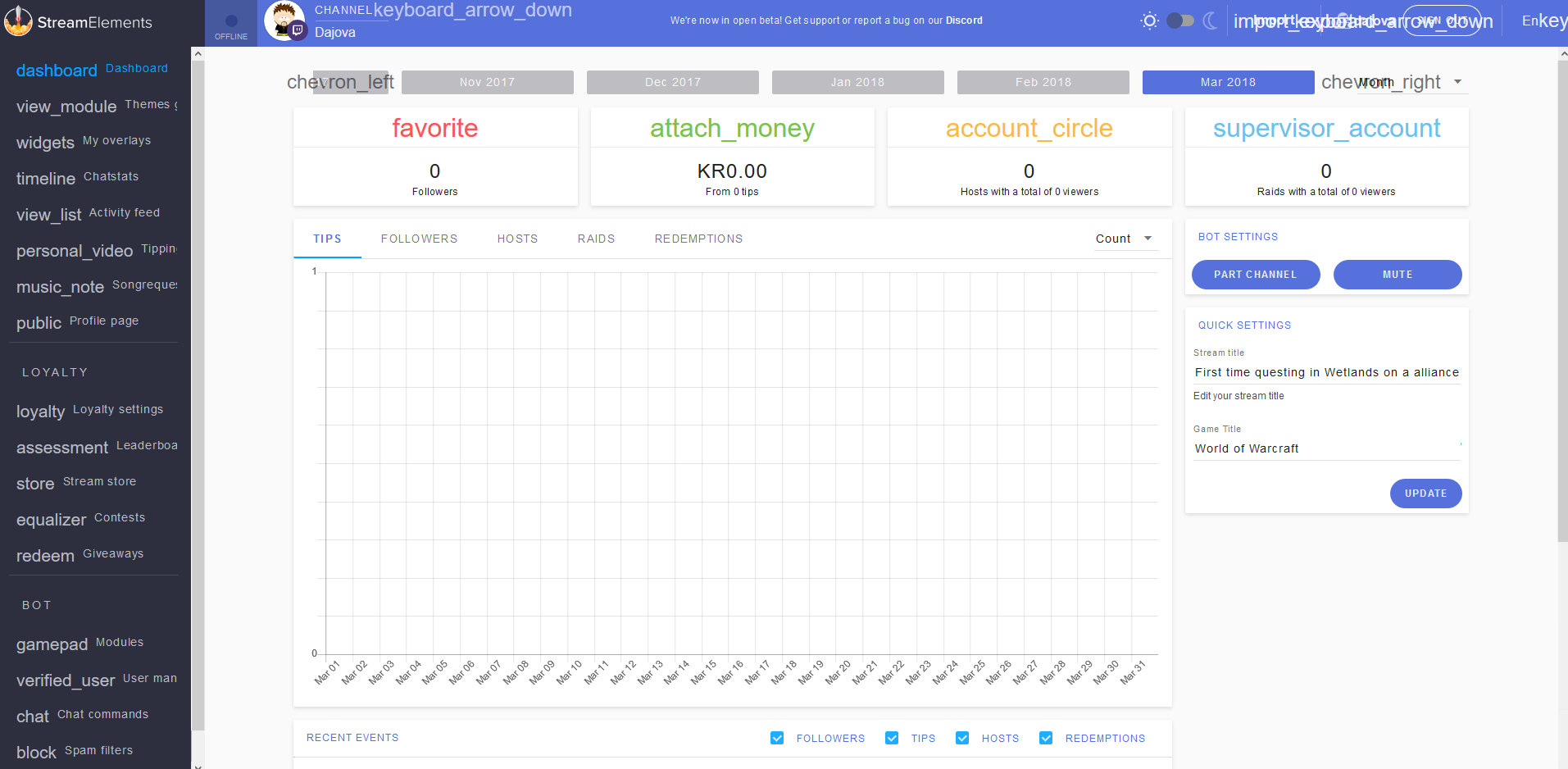
uhm.... what? https://i.imgur.com/iUbQnwD.png
 silver isle
rip
tacit pendant
yeah not sure why this is happening.... i havent logged in in a few weeks, but still...
vapid badge
Have you tried logging out and back in @tacit pendant ?
tacit pendant
yes and clearing cache.... neither works
pine hemlock
What browser?
pine hemlock
let me test
chrome grove
hi im trying to use the red lines overlay from streamlabs 😃 but i dont own a cam so figured i would reuse the cam box with a subtle background and then put text on top.. but there is soo many fonts and no preview of them.. i would love something in the area like this font https://gyazo.com/bb2cd2039ce27ca2f0a46a372b8f4496 do u guys know if that excist in the font list? (doesnt have to be exactly the same but cba to go with the standard times new roman xD)
 pine hemlock
Mine seems to be fine on firefox.. do you have any extensions running? @tacit pendant
can you try incognito or whatever firefox calls it
tacit pendant
@pine hemlock i do, but ive tested to disable them all and no change
vapid badge
@chrome grove Hold on a sec, pretty sure I found one a couple days ago
pine hemlock
What is that screenshot on? Desktop?
tacit pendant
yeah, desktop
pine hemlock
Any other sites acting up? Maybe run malwarebytes trial? 
tacit pendant
then i sent the link to my laptop and it looked fine there
chrome grove
@vapid badge that would be awesome 😃
tacit pendant
i have premium
tacit pendant
and its only this site so far that looks like this ._.
pine hemlock
Sec ill be annoying and see if I can get an answer
tacit pendant
hehe
well, i just tested with a private window (incognito) and it was the same there
pine hemlock
Ctrl+shift+J , can you screenshot that and send it
stuck hamlet
Disable Malwarebytes and reload the page.
tacit pendant
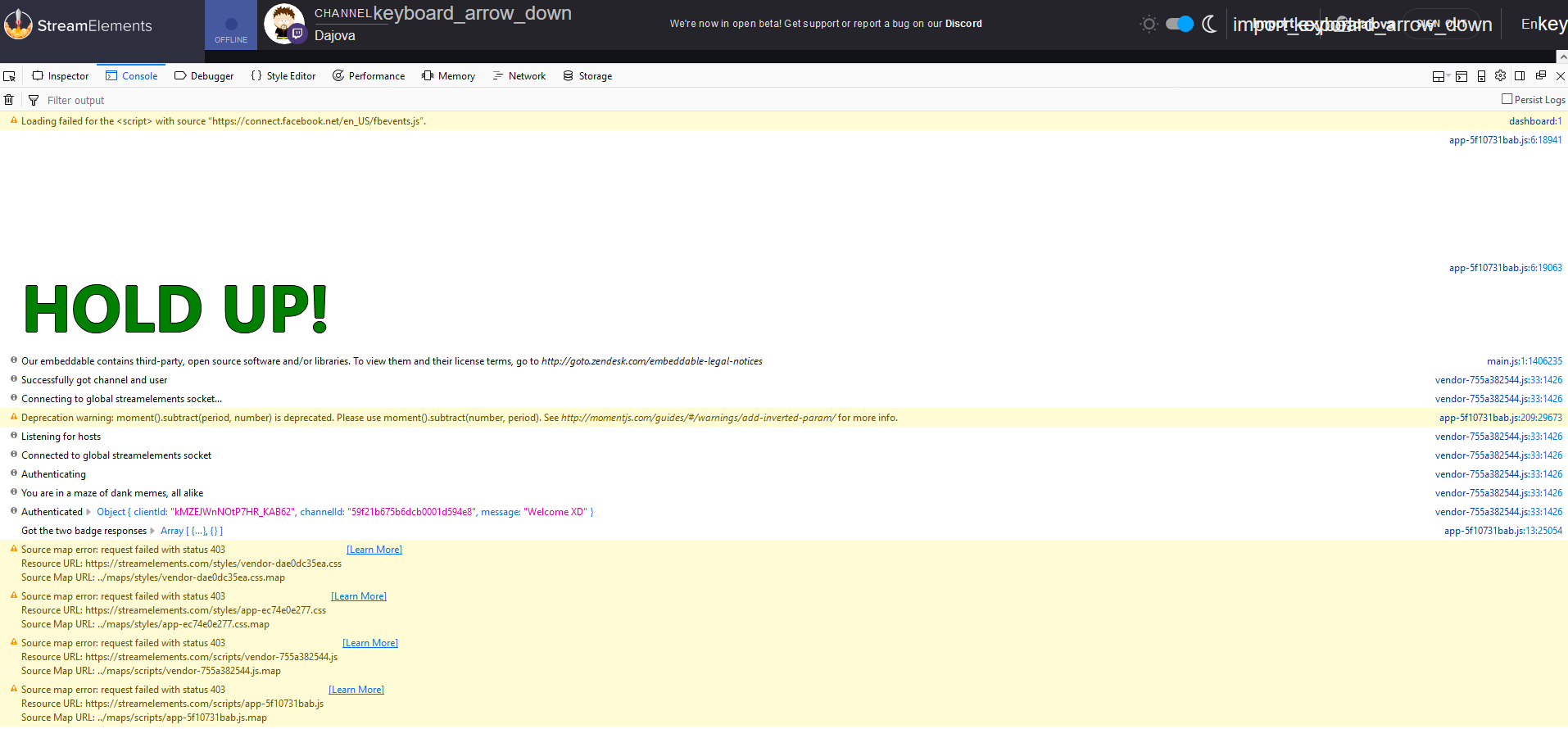 pine hemlock
Console tab
tacit pendant
there
vapid badge
@chrome grove can't seem to find it.. 2 choices, you can settle for Trade Winds which is somewhat close or download fonts like Black Asylum, Outrun Future or Capture It (this one really looks like the one you sent) edit your text on Photoshop and import it into SE
chrome grove
ill try that thx 😄 im rly a noob so just tried adding text in SE but given there is 200+ fonts and u have to check all of them one by one since there is no preview in the font name 😄
vapid badge
I know how you feel haha ! I'll keep looking in the fonts to see if I can find something of the like !
pine hemlock
Try disabling malwarebytes/any other virus software @tacit pendant
because console doesnt show anything
chrome grove
thx man ur a champ
vapid badge
@chrome grove Pleasure ! If you've got any other question, hit me up when you need !
chrome grove
thx man 😃 i rly like the capture it so u dont have to bother spending time looking for others 😄 ill just go with that one hehe thx a lot
vapid badge
Sounds good ! No problem !
tacit pendant
@pine hemlock nope no change
modern belfry
Hi, how do you reset the donation goal bar? Its showing the default 3k donation on the overlay
pine hemlock
@modern belfry Activity Feed -> Widget data
Goals tab
@tacit pendant Uhmmm
Open cmd prompt, ipconfig /flushdns
Restart
?

tacit pendant
i can try my other one, if that makes any difference
chrome grove
next problem 😄 get photoshop xD
tacit pendant
yeah, even tried to change what font firefox is using and still nothing.... i can try dns flush, but yeah...
vapid badge
Haha, some shady websites can help you with that :p
tacit pendant
nope, didnt work either..... sigh
 cursive plover
@chrome grove You can you gimp as a free alternative to photoshop 😉
vapid badge
👆🏼
Oh you can also use https://pixlr.com/editor/ which is an online photo editor @chrome grove
pine hemlock
@tacit pendant Yikes.. uh
Is there anything more in the console if you scorll
scroll*
tacit pendant
@pine hemlock nope, that is it.... just rebooted the computer and its still there.... i suppose i can try and see with chrome

 wanton jetty
live sub counter doesnt work btw
https://chrisis.live/s/0903184921_7.png
 tacit pendant
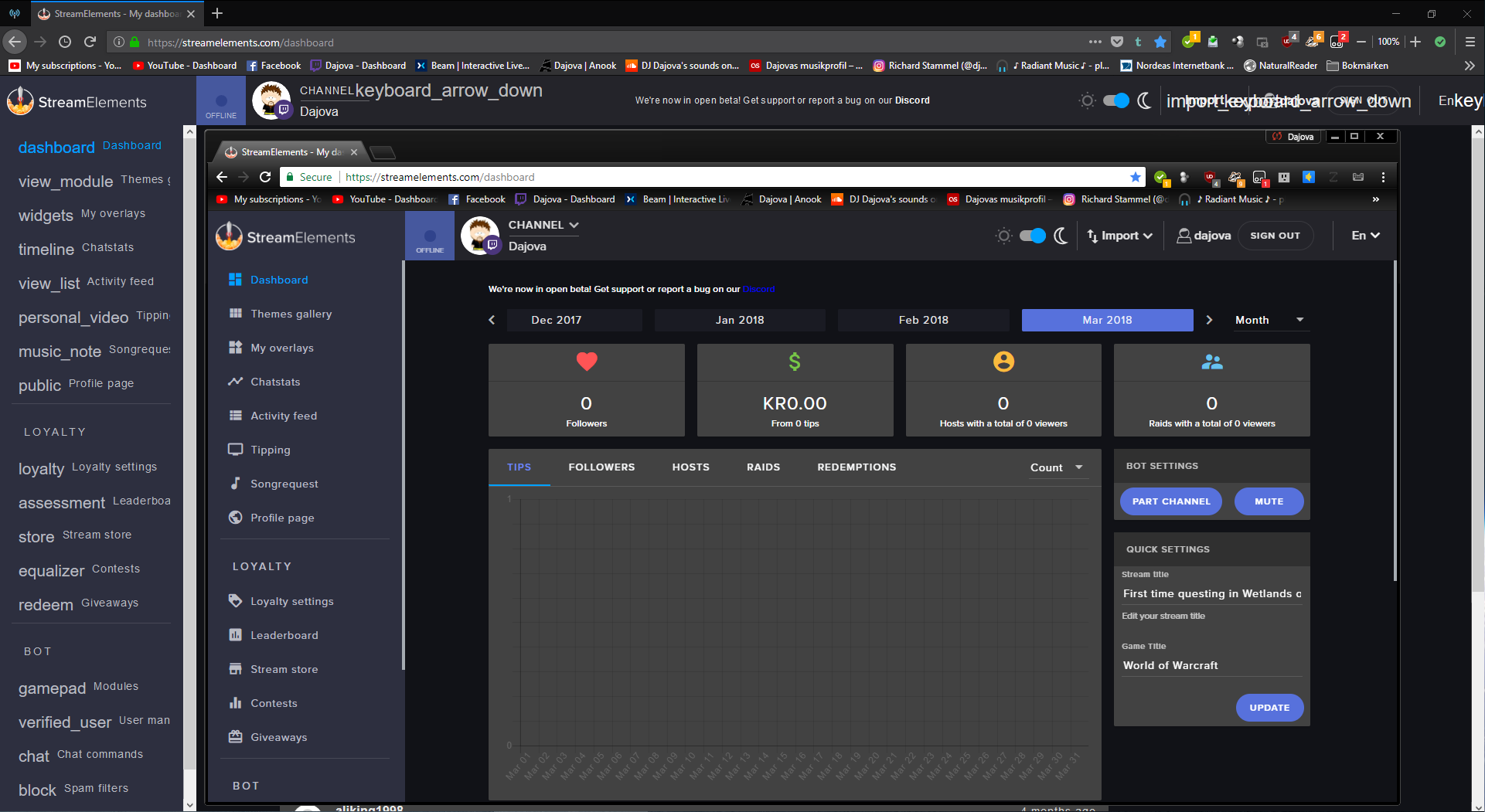
yeah ok, chrome works fine... so its only firefox it bugs on
its really wierd https://i.imgur.com/aqmV7Tp.png
 pine hemlock
Its gotta be an awkward rare firefox thing. i cant duplicate it
tacit pendant
maybe, its the first time ive seen it myself
althou.... i do kinda see it now as well on imgur
https://i.imgur.com/Y3ItGvO.png its like its replacing certain icons with letters for no reason
 pine hemlock
Sounds like something fishy
modern belfry
@pine hemlock Thank you 👌
chrome grove
if i wanna reuse the red lines background where the red lines kinda drop down the screen.. where can i find that then? i found overlays but not the picture itself wanna throw mah name on top and put it in the cam area..
tight harness
Tried using duplicate widget in the bottom left?
lament blade
Hallo there 😎 it’s me again
chrome grove
@tight harness problem is the overlay thingy have 5 scenes.. and its in 2 different scenes
lament blade
My kappagen appears behind my camera. How can I change that?
 swift burrow
@tight harness
tight harness
@swift burrow Yes, the same way you set up twitch alerts, create an overlay in My Overlays
@chrome grove You can duplicate to different scenes
@lament blade Easy, move your camera behind the overlay
lament blade
But then it’s behind the whole background?! @tight harness
tight harness
Yes
lament blade
You mean in obs right?
tight harness
Yes
lament blade
Then it’s not seeable anymore?!
 proud pumice
@lament blade so separate the KappaGen to a new overlay and load it on top of the cam
lament blade
facepalm ofc
chrome grove
@tight harness i know i can copy one scene.. but dunno how to copy layer from one scene into another look at my screen here. maybe that clarifies what im trying (if not tough luck for me i guess) 😄 https://gyazo.com/a20020d1103f98ae70d35a86e9c15cb4
 pine hemlock
Click on the layer, the theres an icon with a red symbol above it that says duplicate layer
and you can duplicate it to the other overlay
 tight harness
You need to edit the overlay you want to copy the layer from, them use the duplicate widget button
pine hemlock
type slower sean
tight harness

chrome grove
lool u guys are amazing (having patience with 10 thumb noobs like me) 😄
tight harness
😄
chrome grove
i cant add my own font though to SE can i ?
 chrome grove
ye sadly they are pretty sad looking 😄 wanted the one @vapid badge found for me hehe but if i put it in photoshop the background in the letters is white and if i do it on top of the actual picture.. the background of the letter is the same as the picture
gentle imp
if its the main overlay there's no background image @lament blade
lament blade
I have my own full background image @gentle imp
gentle imp
ahh then has to be like Perry said, unless u cut a camera hole in it lol
lament blade
I prefer Perry’s way then 😉
gentle imp
^^
lament blade
Next question... is it possible to have a colored background with the latest follower widget?
chrome grove
is this song thingy https://gyazo.com/d94466b09ec43c7fb5ddc726e36fcc45 only for request or can i make it show what im listening to on spotify ?
 weary mist
@chrome grove If you link spotify to Last.fm, you are able to show what you are listening to with spotify
I believe
chrome grove
is that a website ? or a feature in SE im a complete noob plz bear with me 😃
gentle imp
you will need to make an image for it too @lament blade
lament blade
Alright that’s what I did @gentle imp
 jovial oyster
Hello 😃 im new to Streamelements and i want to ask how i can import all my commands, currency and games to streamelements
acctualy im using streamlabs chatbot
 grand mason
Check the IMPORT button at the top of the SE dashboard 😁👍
 glad escarp
Hi I would like to know how can I have the leaderboard ranking be visible on my OBS
Leader board layout?
jovial oyster
@grand mason okay but where i find the files ?
grand mason
Ok, in StreamLabs bot click bottom left button with the silhouette , goto Cloud Backup, choose a folder to save to, and click Save to xls files , the file data.xls is the one that should have you commands, timers and quotes in it to import
If you used locally stored points (not the StreamLabs Extension) you can also save currency to a file 😁👍
 sharp canopy
I'm probably missing something easy, but what could be causing alert box text to not show up? The image that should be behind it is fine and where it should be, but no text
yep, something easy, it's below the cut off 😃
sharp canopy
how do I get a line break in there however?
weary mist
try <br>
weary mist
I know, but it is standard HTML. your browser will read it as a line break
maybe something else
I guess only certain things work in the text line... hmmm
sharp canopy
actually, what i thought would work didn't, still no line break and I'm having a problem with overlapping text
sharp canopy
I'm pretty stumped on this one
weary mist
same
sharp canopy
I tried duplicating from other messages which work fine
ok it may just boil down to curropted data. A new alert box solved the issue
doing everything the same but i deleted the one that didn't work and added a new widget for one that now is
 heavy spindle
Why does it say in the chat commands I cannot enable song request because it states "controlled by module setting"
weary mist
That is controled by the Song Request module, which has its entire page to itself. https://streamelements.com/dashboard/songrequest/general
StreamElements
The Ultimate All in One Platform for Streamers
heavy spindle
Is there any way I can prevent requesting songs from link, just by the song name?
weary mist
Right now, we can only do link. We are hoping to possibly be able to by name, but we have to be careful with the youtube API, as our limits are much lower than other bots (because youtube lowered them)
plus with youtube integration, there are a lot of variables.
heavy spindle
Ah okay. Hopefully it will be there soon! Thank you!
weary mist
👍
 atomic valley
ty
 strong stump
Can i use stream elements with mixer?
dense jackal
Not atm, but we do plan on creating integration for it 😄
strong stump
ok thx
elder sorrel
Soon ™
 dawn wolf
yo hallo
dense jackal
whatsup bro
dense jackal
The super theme?
dawn wolf
yes

SuperThemes are stunning ready to use customizable overlays. Launch "Llama": https://strms.net/fortnitetw Learn more about StreamElements SuperTheme: https:/...
dense jackal
Have you used StreamElements before?
dense jackal
The alerts come up if you test them 😄
dawn wolf
i did
i opend a new page of it and followed my self
and it didnt work
and it says upload one
 north glacier
@dense jackal Iis this thing new ? https://gyazo.com/7adb0d282133494942f0c957f642e154


 dawn wolf
yo someone help
dense jackal
I'm not sure I understand what you are asking @dawn wolf https://www.youtube.com/watch?v=jPfhUK7YYuY&list=PLCDDKlFdScbEwdx5AntcQIS1InkFJwHtv&index=10 This playlist will be very helpful
dawn wolf
the gif doesnt show i have my obs open
okay in the video it shows a gif when donating their is no option to pick it
weary mist
did you create the theme pack?
https://streamelements.com/dashboard/themes and search fortnite
dawn wolf
i did i downloaded the super theme
click on the animated one
and look how their is a gif
weary mist
there is no download. It just creates the links in your My Overlays page
dawn wolf
at the first one
yeah same
basically im saying is that their is no donation gif or anything
it didnt come with the super pack
dense jackal
What is your twitch channel
weary mist
didn't ask for link, just name, provaicz
weary mist
showed just fine for me:
dawn wolf
oh shit thx so much
lament blade
🤐
dense jackal
Sorry no promotion allowed
lament blade
🤐
dense jackal
?
dawn wolf
ok ill make sure to do it again
 inner wedge
How do I skip a text to speech that goes on for too long/.
weary mist
there should be a skip alert button in ground control
 sonic spade
Guys, my chat overlay gets displayed but it doesnt update when I type in my twitch chat
I have added link of overlay to OBS browser source
dawn wolf
how do reset like fake donations
weary mist
@sonic spade what is your twitch name
dawn wolf
so it doesnt show up on screen
weary mist
@dawn wolf refresh the page
dawn wolf
still showing up on my obs tho
weary mist
you have to do a cache refresh in obs
dawn wolf
ok
weary mist
@sonic spade I think I have your overlay open (if your twitch name is Vincene). Why do you have all the widgets soo clustered up? You can space them out in the green area, then when you are in OBS, just make sire to make it fit to canvas (ctrl+f)
weary mist
😃
sonic spade
not sure why chat isnt updating tho
weary mist
just make sure when you put it into obs to change the width to 1920 and height to 1080. Gives you more room to play with it. I saw it update with my chat when I tested it
at least in the editor
weary mist
👍
 foggy compass
Is there a way to increase the cost of a stream store item to be higher than 1,000,000?
weary mist
right now, it looks like its limited to 1mil
foggy compass
ok
foggy compass
yeah i'd have to change my point circulation to accomodate
foggy compass
Right right
 toxic vault
hey, is it possible to set the cost of the !kappagen command to the kappagen value? so for example !kappagen 1000 would cost 1000 points, !kappagen 5000 costs 5000 points 😃
weary mist
not at this time, you can only set a specific cost for a command