#helpdesk-twitch
1 messages · Page 226 of 1
 solar kraken
 tight harness
You'd need to get the artists role, you'd have to ask Alice about whether it's available currently, I believe she's likely sleeping at this time though as it's 7 AM for her
solar kraken
any other roles because i offer webhosting
tight harness
There's no role for web hosting no
 cinder lotus
Question: If I connect Youtube as well will I then get an alert for all followers on Twitch and Youtube?
same for subs / VIPS etc
solar kraken
i think that you will have to enable overlays for yt
 atomic hollow
youtube and twitch work as separate platforms
cinder lotus
so if I want to stream on both at the same time that is not working with the alerts?
atomic hollow
yeah, its different alerts, for example, follow on twitch and subscribe on youtube
 drifting epoch
So I got a premade overlay, but how can I make the current song get the info from Spotify and not from songrequests?
drifting epoch
I guess people will just have to ask for the song then :p
 latent frost
@atomic hollow Could you type out the !qutote command for me because I've tried to find the correct variable, but not succeeded. I'm trying to make a !highlight command that saves the text that you type in & the current uptime. For example "!highlight breaks leg" would be something like: quote variable ${uptime} breaks leg
I'm not sure that the quote system can save current uptime though 🤔
 serene granite
the quote command is fairly simple , i'm not sure it can do what you want it to do
its a default command so you can't edit it to make it store the variable
latent frost
awh, damn! Thanks for the reply @serene granite looking forward to more functions in the future. Especially Spotify or something. Would be sweet with a function like highlight though
 coarse field
🖐 Hey. Any ideas why my hype cup empties on its own. Really like to try and fill it with (<edit) follows
tight harness
@coarse field There's a slidebar in the hype cup settings for you to choose how many recent events it will refill with upon reloading
 compact kestrel
@tight harness have you heard from the develepors yet?
tight harness
Not yet
 nimble owl
when you enter your dashboard there is an option where you can view your stuff timewize. however every time i exit the page and load it again it resets to the default witch is "monthly". is there an option where i can save these time options so every time I open up the dashboard it defaults on "year" ? 
im to lazy to do 2 clicks every time i open up my dashboard 
tight harness
Not currently 😛
nimble owl
oki 
 lament blade
do you guys have tips to grow faster becues friday i did a stream and no one came and look
 pine hemlock
I find networking to be the easiest way. Make friends with other smaller streamers and work with them to grow.
Streaming is rough starting. Just enjoy the games you're streaming and interact with whoever comes by. Try not to care about view counts starting



 white ermine
Is the !giveaway option bugged currently ?
 lunar anchor
@tawny pivot is it possible to connect both youtube and twitch accounts? I connected youtube but i want twitch instead. Or can i just create another account?
 stark yoke
hi! how do you start a countdown timer once it's already in your scene?
 winter zenith
Restart the scene 
So if you are using obs you just switch to the scene
If you are using xsplit just refresh the browser source
stark yoke
it doesn't restart when i transition to the scene :/, i'm on OBS
winter zenith
Then you probably dont have the „hide when not visable“ box checked as we suggest you do
Bc alerts being played double and so forth
serene granite
hi @tawny galleon
 tawny galleon
hey @serene granite
stark yoke
that did it @winter zenith thanks! 😎
stark yoke
of course what else would i use 😉
winter zenith
So when you transition to scenes the next scene can preload ❤
lunar anchor
@stark yoke flirty much
 tawny galleon
anything more you need from me @serene granite ?
otherwise I assume you're investigating 😃
winter zenith
I find that normal...
lunar anchor
Sorry
 lunar anchor
Im in middle school and whenever people do something nice its flirty lol
stark yoke
lol true
tight harness

winter zenith
Haha , well I am 24 so I am waaaaay out of middle school 
I just like it when people are nice to each other 😃
lunar anchor
Oh ok
I went into stream elements thinking i can use it on console. Is there any way to do this? Brb
winter zenith
Yes if you have a capture card like an Elgato HD60
You can connect your console to OBS on your PC
And use our Overlay in OBS too :3
drifting epoch
Cool
lunar anchor
Is obs free? Cus i have an elgatohd but not hd60
winter zenith
Obs is free yes
lunar anchor
Uhm ive never done this before... How exactly can i connect them?
winter zenith
And doesnt matter what elgato you use It was just en example 😃
lunar anchor
Ok
winter zenith
You hook up your elgato to your console and to your tv
lunar anchor
Just like i was streaming with it?
I mean i used it to stream not with obs and stuff
winter zenith
Then you add a Game/video source in obs and your overlay from stream elements as a browser source
With what did you stream then?
Bebo? Xsplitt?
winter zenith
😅 well you said you streamed with something and your elgato
So... what did you use?
lunar anchor
I connected it to elgato software on my pc if thats what u mean
winter zenith
And streamed directly from the elgato software to youtube?
lunar anchor
Yep the elgato software has that built in
I wanted to use overlays though and i saw streamelements
winter zenith
I recommend OBS
lunar anchor
Im using the installer rn
 misty wagon
Hello support, where can I get such a great avatar as @winter zenith I can't seem to find that option? 
 gentle imp
😄
lunar anchor
Lol
winter zenith
Its from a guy who is named „GrobiGrafik“ he is a fucking god
Even drew @granite vessel avatar :3
 marble raft
Does anyone else have problem to start a giveaway with stream elements? I start a giveaway but there is now stream message and noone can enter :/
 grand snow
Hey I was wondering how I stop the !donate command from showing up in chat. I went through my command list and it’s not even there
winter zenith
He gladly takes commisions, I tried to get him here @misty wagon wasnt quite successfull just jet bc this whole Discord and Twitch thing is new to him
lunar anchor
What here
winter zenith
Looks good just install 😃
lunar anchor
Ok thx
winter zenith
@marble raft what do you mean? If people type !giveaway nothing happens?
marble raft
@winter zenith yes nothing happens if people write !giveaway :/
winter zenith
@near charmhund#7989 !donate is a default command I believe why do you don’t want it to show up?
grand snow
@winter zenith i already have my donations set up through streamlabs. I use stream elements for points
tawny galleon
was I supposed to ask again or what's happening @serene granite? D:

 nocturne pelicanBOT
@light citrus To add your overlays to OBS, add a new browser source in your scene. Paste your overlay URL in the browser source properties, set the dimensions to 1920x1080 (unless you changed them on the website), and :ballot_box_with_check: “Shutdown source when not visible” https://youtu.be/KDvLynUqXI4
 light citrus
wtf insane overlay 😮
winter zenith
You know you can import StreamLabs to your StreamElements right? @grand snow
So you wouldn’t have to hassle with 3 different things but have everything you need in one tool
 sterile tapir
@se.s]
 native horizon
hello
sterile tapir
Guys how can i deactivate the sound like that "peeeep" whenever somone is following
 quick forge
I cant find the Browser Source in OBS.
quick forge
It's ok
native horizon
i hsve 12 followers in last hour and no see an alert usw
quick forge
ok.. But I need to find the Browser Source in OBS and I didnt get a response i the OBS Support page
Or Oka. Aber ich muss die Browser-Quelle in OBS finden und ich bekam keine Antwort auf der OBS-Support-Seite
pine hemlock
Re-download obs studio
theres an option for Browser Source
when you're installing
@sterile tapir Edit the sounds of your alertbox on your active overlay
light citrus
Ok i got another question. How can i resett the timer for the "Starting" Overlay ? 😃
 earnest lichen
Hi all - I'm having an issue where no matter which font I select for text elements in StreamElements, I just get Times New Roman showing up in OBS.
Any insight would be appreciated
pine hemlock
@light citrus swap to another scene and back again
If you have the shutdown when not active option selected
@earnest lichen what version of obs
earnest lichen
21.0.1 64bit on windows 10
light citrus
@pine hemlock thank you . and how can i change the color of the text in "Chat" thing ?
cuz black on black is not right xd
pine hemlock
Edit the twitch chat widget, should be able to mess with the text settings
light citrus
well i tried to swap and its still counting down ;/
pine hemlock
@earnest lichen After you change the font, are you hitting save? Also can you try clearing the cache of the browser source
light citrus
and when i tried to resett it its dont work aswell 😦
pine hemlock
@light citrus Make sure the shutdown when not active option is checked for your starting browser source. then when you swap off of it, and back to it - it will reload
sterile tapir
@pine hemlock
Everything is off and i still get that "Ting" sound
http://prntscr.com/imquyq
http://prntscr.com/imqv94


 dense jackal
do you have obs open @sterile tapir ?
sterile tapir
yeap
dense jackal
have you tried muting it or closing it then testing?
earnest lichen
@pine hemlock I’m definitely saving, the issue has persisted for a few days in different overlays. Is there a place in OBS to clear the cache for a given source ?
pine hemlock
right click the browser source and go to properties, scroll down and theres a refresh cache button
I havent heard of the text not updating like that recently
sterile tapir
@dense jackal i have muted the site. its the same.
dense jackal
so you’re hearing it from obs then?
earnest lichen
Other elements of the same textblock are updating fine (color, shadow) so it seems like it’s receiving fresh data on a save
sterile tapir
yeap
dense jackal
@earnest lichen are stuff like alerts going through ?
sterile tapir
I want the rest sounds that come from the theme, just not the "DING"
earnest lichen
Aye
tawny galleon
maybe ground control might be making sounds as well?
earnest lichen
Everything is 💯 except font
dense jackal
well you have another alertbox most likely in your obs@sterile tapir
pine hemlock
What font are you trying to use
earnest lichen
Don’t have a preference yet, I’m literally just changing them to see anything shows up differently
pine hemlock
Does it change on the site?
earnest lichen
My next hope was to find a preview of all the fonts so I could actually pick ones that suit
Yes
pine hemlock
!fonts
nocturne pelicanBOT
More than 800 google fonts are supported at this time. You can preview them here: https://fonts.google.com/
pine hemlock
Uhh
earnest lichen
Oh brilliant didn’t realise it was just using google fonts
pine hemlock
@dense jackal are you on desktop
dense jackal
not atm
pine hemlock
Same
I was gonna say send us your overlay link so we could try it but neither of us are at our pcs
dense jackal
@earnest lichen i’m asking admins to look into your acct
earnest lichen
Lol neither am I, I stepped away between my first message and now, I’ll be back in 10
Thanks @dense jackal , let me know if I can assist
I’m a frontend/JS dev so let my know any way I can help out 🙂
 runic copper
Anyone having issues with the !quote command? It adds quotes but doesn't recall any... just says "No quote found" even thought they've JUST been added
dense jackal
i’ve been here a while and haven’t seen this issue before especially being isolated makes it more weird 🤔 @earnest lichen
lament blade
Having issues with my cpu going wayyyyy higher than normal when using streamelements overlays. Any advice
dense jackal
i’ll look into this @runic copper our quote commands are very basic atm
are you using nvenc, bicubic scaling, high process priority, 720p, around 3k bitrate, 48 or 30 fps? @lament blade
sterile tapir
@dense jackal worked in one way. i m only getting it on subs now
dense jackal
what did you do to get it to work?
sterile tapir
Had more scenes than i should in by obs
Although that sound is propably attached to the theme that i have chose
 bright tartan
Is it possible to change the bot name so it doesnt post as me?
 hybrid owl
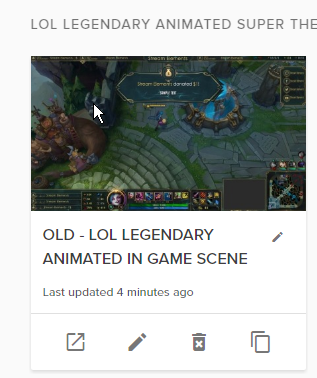
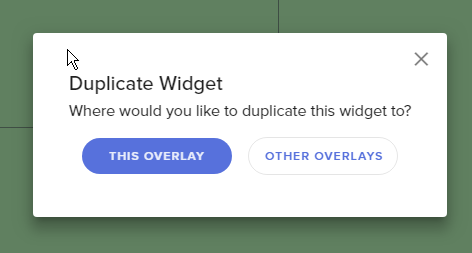
Is there a way to change one alertbox in the animated super themes and then use that one to all other scenes from that super theme?
dense jackal
yes you have to create a new account and generate an oauth through that account, then mod it on your channel @bright tartan
bright tartan
ok thanks
dense jackal
you can click the pages with the red star in the bottom left to duplicate any widget to another overlay @hybrid owl
in the overlay editor
hybrid owl
you mean the duplicate widget button?
 strange pagoda
That's the one 😃 @hybrid owl
earnest lichen
@pine hemlock @dense jackal i have more info now, it works after a cache clear
but then if you change fonts, and save, it loads times new roman in place of the new font
hybrid owl
thx all!
earnest lichen
if you switch back to the original font from the fresh reload, that font will display properly
but every other font seems to fail
my instinct would be to go interrogate the request that obs is making to google font api
drifting epoch
So much knowledge
 quiet drift
hi how to change alets seetings ?
tight harness
@quiet drift Chat alerts or overlay alert box?
quiet drift
yep
tight harness
Both? 🤔
 pale nymph
Good day, I am setting up the Kappagen widget, and when I click the Select Emotes button (from the Explosion section), there are no emotes appearing for me to select. I am a Twitch affiliate.
 empty saddle
Streamelemets giveaway is not working. Is it global issue or is it justme?
lament blade
@atomic owl Like roulette?
 atomic owl
@lament blade y
lament blade
Yep, we have that on the bot modules
atomic owl
bank heist ?
tight harness
Roulette and heist are different, if heist doesn't say completed on the ideas board then it's not finished
lament blade
Oh i used both and i thought they were the same
atomic owl
on Deep Bot they have it with level etc.
tight harness
Yup
atomic owl
you have it to ?
tight harness
I've used it in the past
lament blade
Can you try to relog on the website? @pale nymph
@empty saddle What is happening?
Me too, and i never noticed a difference
empty saddle
@lament blade yes we did that but no help. Giveaway starts on streamelement, but does not announce that on stream. And wont sell tickets
pale nymph
@lament blade I relogged, and tried opening a new browser just now, on Chrome, still blank.
lament blade
Everything is blank or only your twitch emotes?
pale nymph
When the window Select Emotes pops up, it is completely empty.
AT first I thought I should copy/paste them there till I watch a tutorial.
lament blade
Yea, it should look like this, can you try to maybe refresh cache/cookies? 
pale nymph
AH HA! Just tried again and WOWSA, they are there. I just refresh the screen beforehand.
lament blade

pale nymph
I see that exactly, thank you so very much. You made this granny's day.
serene granite
@empty saddle on what channel ?
empty saddle

Twitch
Steam avaimia/pelejä tänään jaossa!!! =) !21bet !magicred !intercasino !redbet !mrgreen
jampanpaja
serene granite
@empty saddle we're looking into it.
lament blade
hello guys, i have a question if this is a bug or no, i got 3subs today ( 2 with prime and 1 gifted ) after i finished my stream and got my stats on the email it showed me that i had 0 revenue ( No revenue during this stream. Keep pushing, you’re doing well!)
serene granite
@lament blade can you forward this email to noam@streamelements.com please
lament blade
ok i will @serene granite
serene granite
thx
lament blade
done
empty saddle
@serene granite i did set subscriber luck to 0. And giveaway started to work
serene granite
@empty saddle this was now fixed on our end, all new giveaways will work well with the bot
empty saddle
Thank you! Keep up the good work!
serene granite
np, thanks for reporting this 😃
 dry orbit
how do i put the links for my theme into obs?
nocturne pelicanBOT
@dry orbit To add your overlays to OBS, add a new browser source in your scene. Paste your overlay URL in the browser source properties, set the dimensions to 1920x1080 (unless you changed them on the website), and :ballot_box_with_check: “Shutdown source when not visible” https://youtu.be/KDvLynUqXI4
dry orbit
well i dont have the browser source in my obs
tight harness
OBS Classic or OBS Studio?
dry orbit
studio
tight harness
Then you didn't tick the option to include the browser source plugin when you installed OBS Studio
tight harness
😃
dry orbit
does donation and such update it self on the pre made ones?
 hasty briar
What is the shoutout/caster command template under? you know the one you use for shouting out other casters
 quaint sluice
Hey im running into an issue, have tried searching for it but had no luck. Im switching over to SE from StreamLabs and on my activity feed it doesn't display my subscribers. I have imported it with the chrome plugin but it only shows followers/donos. On top of that it shows my donos on the feed but when i go to add a widget to an overlay im working on it comes up with "-$0" on latest tip. Any help would be appreciated.
 somber mortar
I downloaded obs studio, I want to add overlays there but I don't see the option intro static and add from browser anyone can help me please 🙏
dense jackal
@hasty briar the shoutout command is a default of the custom commands when you try to create a new one
@dry orbit yes as long as they are using your SE tipping page
@somber mortar check out our tutorial here https://www.youtube.com/watch?v=X7XrDdRE7Fk&list=PLCDDKlFdScbEwdx5AntcQIS1InkFJwHtv&index=3 theres also a bunch of other helpful videos
@quaint sluice subs don't import because we don't recieve the alert for them until you are signed up with us, same for cheers, but you can update your data here https://streamelements.com/dashboard/session
quaint sluice
@dense jackal So as soon as I go live for the first time with SE, they will start appearing?
Thank you. The second half of my question, the donos appear on my feed but when i go to add a widget to an existing overlay im working on it comes up with "-$0" on latest tip. Is that because they were using streamlabs donotation page so they wont show until i get a dono from SE page?
dense jackal
@quaint sluice yes you can test them in the overlay editor as well
Yes it needs to be thru SE tipping page
quaint sluice
perfect. thank you very much.
dense jackal
np
 shy dock
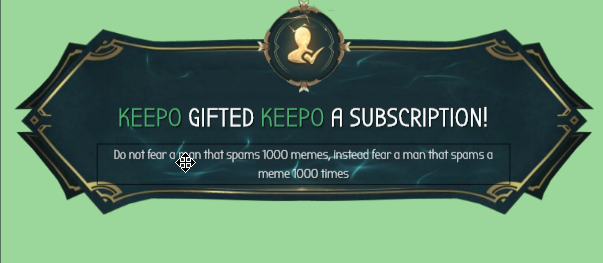
Hi ! I get some problems on displaying alert videos from the legendary LoL Overlay. For example, the sub alert did not work. When i use the inspect on the place where is the alert I can see the URL to the .webm. When i try to open it in other tab.... nothing for a long long time. Thereby, when i emulate a sub gift, i can only see the text over the video, and no sound too.
 somber pulsar
I need the instructions to change the name of the bot, someone can help me - My English is very bad, I use a translator =)
shy dock
Do you encounters problems with cdn ?
 drifting yarrow
i have a problem with trying to connect streamlabs and stream elements. it always says that i need to log into streamlabs when i clearly am. i am using chrome to do access it.
tight harness
@drifting yarrow Have you tried this again today? There was an update for it today
@serene sigil Usually happens for people with PCs not powerful enough to handle it, but make sure to tick 'shutdown source when not visible' to check you don't have a bunch of overlays open at once
drifting yarrow
i tried it today and yesterday
 clever nimbus
Does StreamElements have an option to down load/update data to my PC....for example, most recent cheerer, most recent follower, tip amount, most recent tipper, most recent subscriber?
 serene sigil
yeah, i've tried it on both a hex core @ 3.4 ghz w/ 64 gigs of ram .... and on a dedicated stream pc, quad @ 2.8 w/ 16 gigs of ram
i don't think it's a performance of my machines issue just yet
pine hemlock
@clever nimbus Everything is cloud based.
tight harness
Text files in current year 
drifting yarrow
it just worked @tight harness. i tried it like 10 mins ago and it didnt work
tight harness
At least it worked now 
clever nimbus
So if I want to use my own graphics, not a StreamElements Theme how would I get the data to show?
tight harness
Click on where it says Insert Image
 proud pumice
@serene sigil if the pc is strong enough, and you're sure you marked 'shutdown source' on all overlays so they dont overload CPU while in background
serene sigil
ahh.... .. incorrect input resolution on the browser source was causing a down convert
proud pumice
and it fixed it? :D
serene sigil
the 80s animated one
proud pumice
great choice 👌
serene sigil
haha, once i'm setup. i'll spam (once) in sellout
@proud pumice is this aws elastic transcoder btw? i'm impressed so far.
proud pumice
we're working with lots of aws goodies
not techie enough to tell you which
i just pay the bills
serene sigil
hahah, fair enough
tight harness
Is the tick box for cheers ticked in the Emotesplosions settings?
 dark dome
yes
winter zenith
did you try deleting it and adding the kappagen again?
dark dome
yes
dark dome
It seems like i had an issue with chrome, all is fixed.
dark dome

tight harness
 nova copper
hello guys, can somebody help me with ace live streaming?
winter zenith
thats the Android App if I am correct?
nova copper
yes
winter zenith
Bc I know nothing about this sadly 
nova copper

dense jackal
@tight harness
winter zenith
what would be the problem?
compact kestrel
hmm still waiting for the developers to help me 😦
nova copper
when i test follow and other notifications, they start flickering, glitching on phone and on stream
winter zenith
@compact kestrel what is your problem? Maybe I can also help?
dense jackal
@compact kestrel it's a known bug we are working on atm
winter zenith
@nova copper maybe restart the phone?
compact kestrel
mods cant use !skip or !removesong
nova copper
I'll try
dense jackal
it should be working once you enable song request
compact kestrel
no thats the thing
dense jackal
we got a couple of these reports and are trying to figure it out
compact kestrel
i talked with @tight harness and he said it was a bug
dense jackal
Yes, and as I said it is known and being worked on
compact kestrel
😃
tight harness
Yeah, you're the only person i've seen it happening for
But @dense jackal says a couple of other people had it too
shy dock
Hi again ! I get some problems on displaying alert videos from the legendary LoL Overlay. For example, the sub alert did not work. When i use the inspect on the place where is the alert I can see the URL to the .webm. When i try to open it in other tab.... nothing for a long long time. Thereby, when i emulate a sub gift, i can only see the text over the video, and no sound too.
Any encounters with CDN ?
dense jackal
try adding the supertheme again or copy the alertbox from a working part of a different overlay from that supertheme
Not sure why sub test wouldnt be working @shy dock
dark dome
@tight harness @winter zenith Hey, so the emote explosion for cheers seems to not be working, i reset everything thinking it was chrome but it wasn't. Once you apply the cheer to the overlay it doesn't work, when you reset the browser and head back into the overlay it works but the emoticons you want for the explosion aren't being used but random ones. That is the problem i am having atm.
shy dock
Its the same on all part of the theme
nova copper
@winter zenith nothing changed, still flickering
dense jackal
Are you using the static or animated theme @shy dock
shy dock
the animated one
nova copper
can i post video link for example what is happening?
tight harness
Yes
dense jackal
go for it
nova copper
 dark dome
so all the alerts work but cheering 😦
shy dock
I just note that is onely for the sub gift
dense jackal
Yeah in your profile we are seeing the same thing may have been a weird bug adding the overlays to your account
readding them should fix this
you don't need to delete anything
tight harness
@dark dome So the alert shows but it's not the emotes that you want? 🤔
dark dome
@tight harness It won't show up on obs either and yes the emotes are random
dense jackal
@nova copper what type of file is that ?
dense jackal
you mean the imported streamlabs alertbox?
dark dome
@tight harness The sub/tip kappagen works perfect
nova copper
yes
tight harness
@dark dome I'm pretty sure that for cheers it uses bits as the emotes for a cheer alert on Kappagen
dense jackal
@nova copper if you still have the gif have you tried reuploading the gif and using it? on our website?
dark dome
@tight harness Odd, why give the option to pick your own ? Also it won't show up on obs because i am emulating it and it won't pop up because the emotes its supposed to use aren't being used ? lol
@tight harness 🤔
I see it is using the bits used to donate as the explosions this is correct
Now if it just can show up on obs, i am happy.
nova copper
@dense jackal I copyed that gif from gify to streamlabs
should I upload it directly?
tight harness
Try refreshing the cache of your overlay in the properties of the browser source in OBS @dark dome
dark dome
alright
dense jackal
@nova copper you do know this is the StreamElements discord not StreamLabs correct?
nova copper
@dense jackal yes, but when I wrote letter to support in Ace Live Streaming, they sad connect to this discord
dark dome
The event still pops up on my overlay while i am testing it but not the obs @tight harness This is odd, since the sub/tip go through fine.
tight harness
Yeah, very odd
nova copper
@dense jackal when I stream on stramlabs app all alert works fine, but video quality sooo shitty
tight harness
If it shows up on the overlay it means the issue isn't on our end, so I'm wondering why your OBS is playing up
dense jackal
I think possibly because ACE livestreaming is being developed to work with SE . is your browser source in the app a link to streamlabs?
nova copper
yes
dense jackal
best of luck hope everything is ok @dark dome
dark dome
Thank You! Just torn shoulders and a lower back
old man things
i'll be ok haha.
oh i do have 1 last question for the hype cup, i put an image on it but is there a way for the image to fall with the cup or move with it?
dense jackal
@nova copper Then there's not much I can do, try recreating the alertbox in a StreamElements overlays and using that gif, and we can help you from there
dark dome
while i have the gravity/physcis on**
nova copper
okey
dense jackal
Unfortunately no @dark dome
dense jackal
shy dock
The same problem with a fresh new copy of the super theme
only text
A lot of time loading in a new tab
dense jackal
🤔 Try doing it in a incognito browser possibly an extension having an issue with it
shy dock
Tried from 2 different com
I just did it
2 diff computers, in normal mode and incognito
45s before pages loaded
and the probelm occurs only for the gift sub
for 1 sub or custom sub it seems working
dense jackal
ahhhh that's why
 ripe herald
Thing would be sub gif came later so theme does not have alert video/image
you can just replace/add this webm you showed as alert
shy dock
so I should Download the Webm to reupload it ??
ripe herald
yeah or i can send you original file
shy dock
yep
ripe herald
yep as you need or yep as you gonna use that one
ripe herald

shy dock
Its the Lol SuperTheme
 ancient fractal
Hey does anyone here know if you need to give streamelements a sub for it to use your emotes in custom commands?
shy dock
not the granite
dense jackal
@ancient fractal just go to your channel and click gift a sub and search for SE
ripe herald
when you uploaded did you save
ripe herald
ok imma check now give me a sec
lament blade
hey guys can anyone assist me with renaming my streamelements bot? bit of a hard cookie that is
 nocturne pelicanBOT
@lament blade To rename the bot you must use our tipping page and make sure it is linked in your Twitch Panels, and use our overlays. The option will appear in your Groun Control (!gc). You must own the BotName you are trying to use, sign in to https://twitchapps.com/tmi/ with the account you'll be using, and generate your Oauth token. Make also sure to the name is ground control is the same as the bot account and that it is modded in your channel :)
ripe herald
@shy dock
winter zenith
@lament blade sure how can I help?
ripe herald
you had wrong settings
winter zenith
oh
shy dock
@ripe herald its me .... -_-
 shy dock
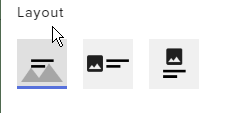
I just find that is a variation and the variation do not have a video... (it should by default
lament blade
@winter zenith i will check what the bot said to me but i have tried it many times but I still cant see the option for renaming in the ground control
 lament blade
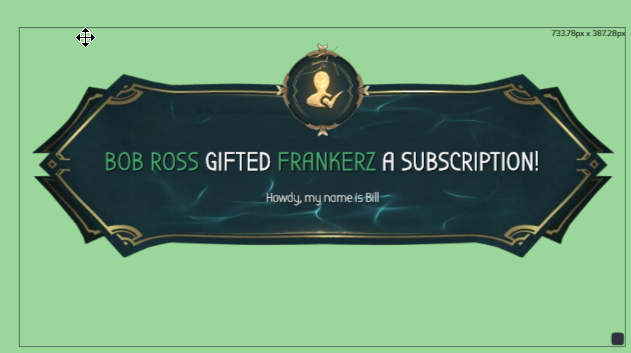
@winter zenith yeah I think I use all 3 of them if you mean if they are filled in streamelements
shy dock
I see it, just the text that is not inside the video (only a part of it)
ripe herald
ill set up for you that now sec
shy dock
Oh you can ? 😃
ripe herald
yeah im on your account now
shy dock
Ty. Tell me what i did wrong, ill check next time
winter zenith
@lament blade and you are using ground controlls?
lament blade
@winter zenith ground control 1.4.3
ripe herald
wrong layout was set as alert so text was not on alert
winter zenith
🤔
ripe herald
 winter zenith
and you dont have that option:
https://i.gyazo.com/f4255d697a7ed3118e684e66216b2cf2.png
 lament blade
@winter zenith yeah that is missing
winter zenith
sorry to ask stupid questions but you looked in your settings in ground controll? not the activity feed or something like that?
winter zenith
wierd I told the Devs about your problem
pine hemlock
Well problem #1 you dont have the tipping page below your channel, which im pretty sure is what it checks for as one of the requirements before the bot option shows up
winter zenith
but if you !donation it works
lament blade
does it have to be under my channel? as I am small and its more like insult for the viewer ?
winter zenith
also no other bot in his stream
pine hemlock
I dont know how its coded
shy dock
@ripe herald you finished fixing it ? (because the text is still not completly on the video)
shy dock
Wich part of overlay did you modifiued ?
ripe herald
gift alert settings
shy dock
ok , but in wich overlays ? (the "OLD - ....." were only for testing
pine hemlock
"To rename the bot you must use our tipping page and make sure it is linked in your Twitch Panels" @winter zenith @lament blade
winter zenith
true
ripe herald
@shy dock https://i.imgur.com/7CmfuGh.png
 winter zenith
didn't new that was necessary 
lament blade
daym thats just dissapointment that I have to push there the donate button if I seriously dont want it :/
shy dock
ok , ill check the settings and paste it to the real overlays
nova copper
how I can test alerts on SE?
winter zenith
@lament blade you could link the link into a randome pannel TBH
ripe herald
or you can just delete all alertboxes in other overlays and copy this to others
pine hemlock
Just put the link on one of the images, you dont have to make it anything special
@nova copper In the overlay editor theres a bell in the bottom left
ripe herald
@shy dock https://i.imgur.com/0Cfs0eH.png
 winter zenith
yeah put it in the About Me pannel or something @lament blade
nova copper
@pine hemlock thnx
shy dock
Yep, i will do something like this
lament blade
@winter zenith oh like hide it under different name? smart 😄
@winter zenith will try
shy dock
But not from this one, because its not my natural language ^^
I customized
But I saw th 140 from top for the text 😉
ripe herald
you can change text and customize as you like if you will have any problems let me or any support know
shy dock
Ty for your help @ripe herald
ripe herald
anytime
lament blade
@winter zenith @pine hemlock thanks guys works already even tho I am bit scared of somebody finding the donate button 😄 but still thanks
nova copper
@dense jackal so I inported alerts from streamlabs to stream elements and it's even worse 😄 still flickering and alerts are off screen\
 pine hemlock
@nova copper Try reimporting. There was a fix deployed todayh
lament blade
@winter zenith hah using the chargeback thingy perhaps? and yeah I am doing it for the fun really no need of donates
dense jackal
he just did it @pine hemlock
lament blade
@winter zenith it actually works but still seems complicated and bit harsh so I actually will rather use the streamelements name but thanks tho super support here guys ! 😃 take care
winter zenith
@lament blade whats wrong ?
You have to make a second Twitch Account with your desired Bot name while loged in with this account on Twitch get the OWAuth code by clickling the Link in ground Controlles
Copy this Token into Ground Controlls and thats it
lament blade
@winter zenith i got it working already 😄
winter zenith
lament blade
@winter zenith I will just preffer not using it as I wont have to even hide the donate button and I guess there is nothing wrong about streamelements being my bot with the name it has
winter zenith
ok sorry
 wary loom
Hello Having a bit of an issue with incorrect data
tight harness
Hey, could you explain what data?
wary loom
sry.. trying to figure it out.. shows 3 subs on twitch but only 2 on elements
was thinking about parting and rejoing?
tight harness
Goals shows 2, Total shows 3 😃 if you're using Subscriber Goal that'll show how many you've gained since you last reset it, if you use Total Subscribers then it'll show you your actual amount
 tight harness
That's the public page, you don't draw a winner from the public page
 sleek stratus
hmm
this is the public page

StreamElements
The Ultimate All in One Platform for Streamers
not that one
that one's on my dashboard
wary loom
i don;t have any goals set for subs tho.
sleek stratus
wtfI reloaded
and it said close giveaway LOL
alright forget it, prob a bug or my blind eyes
tight harness
@wary loom I looked into your account before giving you that information, if you see 2 subs then you're looking at the Subscriber Goal data, I also looked at your Totals data and saw 3 for subs.
@sleek stratus Sorry, I saw "Public Page" at the top and got muddled up, you're right
wary loom
i see. so discord is using my goal data? it is doing the same ..
tight harness
Discord uses data depending on how many people are connected to your Discord
So if there's someone not in your Discord who's subbed it doesn't count them, so it's not 100% accurate
wary loom
all 3 subs are in Discord but only 2 of them are labeld as subs.
tight harness
Then it's likely that they haven't connected their Twitch to their Discord account.
tight harness
No problem
 nimble zinc
I need support
so i have stream elements in my stream, earlier i was able to give myself a whole bunch of points, how do i do it again?
its to giveaway in the stream
pine hemlock
!addpoints user number
nimble zinc
like on the website
nimble zinc
Thank you kite!
 narrow coyote
nimble zinc
is there a limit to how many i can grant?
narrow coyote
that is something that i dont know
 sullen dock
 civic pasture
hello variable $ {channel.subs} does not work with my command it puts me that I have 0 subs while I have 27 how to do?
civic pasture
thx you
 stuck hamlet
np
 feral axle
only some post in chat any reason why https://streamelements.com/beardedgamer75/store
StreamElements
The Ultimate All in One Platform for Streamers
dense jackal
It only shows stream perks and not sound effects, hallelujah and wrong are set to stream perks, the rest are set to sound effects
feral axle
becuase he likes seeing his broman pic should i have it set to streamperks? @dense jackal
dense jackal
Sure 😄
 glad elm
Does Streamelements have a schulede extesion ?
 clever mango
Not yet
The panel extension is going to be gaining more functionality so stay tuned
 languid kernel
I'm having difficulty figuring out why an imported alert box is not properly showing donations. Is this the place to ask?
clever mango
Yes, how is not showing them properly?
languid kernel
I imported my alertbox from streamlabs, but I don't think I properly linked the streamelements donation page.
clever mango
What makes you think this? In order to help, I need to know what is happening/not happening 😃
languid kernel
Sorry, I created an alertbox using streamlabs which shows follows and subscriptions, but my donation page is linked to streamelements so I imported it and must have improperly imported it or set it in OBS because it only shows follows and subs. When someone donates, nothing happens.
I'm new to this so I apologize if that's not enough info
I would guess it is a simple step I just neglected to complete
 strange frost
can i get my stream in sellout next time i go live? i filled out the app
nocturne pelicanBOT
@strange frost Are you a StreamElements all-in-one streamer and interested in stream promotion when you go live? Please fill out this application https://strms.net/sellout and if you meet the 3 requirements posted in the :pushpin: pinned message in #general you will be added to the stream announcements.
strange frost
I filled out the application yesterday
clever mango
@languid kernel Did you set up donation alerts in the streamelements alertbox or only follows and subs?
strange frost
Yeah I did. Got some fancy jaz music for the followers
lament blade
Your bot is not modded
languid kernel
I did set up the alerts in streamelements when I created the alertbox
clever mango
@languid kernel if you go to this page: https://streamelements.com/dashboard/activity do you see tips pending at the top?
languid kernel
no, I do not
as far as I know, I have received the donations and I received notification for them on gmail
it just didn't recognize at the time
clever mango
Do you see the tips if you log into streamLABS and go to my donations?
languid kernel
I do not
clever mango
Ok, give me a few minutes to look into your account
languid kernel
OK. I see the tips under Activity Feed on Streamelements.
clever mango
from Drew_HOTS and shenrontv_ ?
languid kernel
yes
clever mango
@languid kernel I am going to replay those events. Let me know if the alerts show
languid kernel
I have not seen them yet if you have done it already
clever mango
I have
This means your alertbox is not added to OBS properly
I will message you the link
languid kernel
ok
 sweet sky
is anyone else having issues with none of there alerts working?
i have found two others that are having the same issue
sweet sky
ok thanks i will look through all of my settings tomorrow again and let you know if it is user error
custom overlay
themes seem to be ok but i havent used them in a couple weeks
 sharp wind
will there be cryptodonations ? @ me if you answer THANK!
 tropic ivy
Is there something wrong with the chat alerts, because none of my chat alerts are working
 acoustic badger
Evening, working on my overlay. How do I invert, rotate images and videos? Thanks. I am trying to rotate a "webm" file so I am not able to do on computer and insert so I am trying on the editor.
dense jackal
@tropic ivy make sure in settings they all have a message or are disabled
@acoustic badger Currently you cannot, it would need to be done somewhere else, its something we are looking into for our overlays v2
tropic ivy
They all have a message but somehow I still don't get notified when someone hosts me or follows
acoustic badger
@dense jackal Thank you very much
dense jackal
For hosts you have to have your activty feed/dashboard or ground control open
tropic ivy
Which I do, and still nothing
dense jackal
can you go here and send me an editor link? so I can check it out 😄
 proper shoal
hello
when people redeem redemptions in our chat, it says back to them that they have, let's say, 50000 chips
but then will say they do not have enough to redeem
stuck hamlet

stuck hamlet
dont i know you
proper shoal
stuck hamlet
hahah
proper shoal
(I am 1cePrime's wifey_
sorry
was just wondering if anyone else is experiencing the same thing 😄
stuck hamlet
So the bot is not registering how many points people have?
proper shoal
Yeah, for instance someone will have more than enough of our currency for a redemption
but it will say back to them they do not have enough
stuck hamlet
Have you tried parting the bot and having it rejoin?
dense jackal

 brazen moon
hi 😃
anybody knows how to make ur text without background colour? for example im trying to make eventlist without a background colour, how i do that ? 😃 thanks right now either i get white colour or i get small holes behind it if i dont choose a colour? its weird to me lol. any help is appriacted
dense jackal
Make your event list custom themed
then move the second slider, the transparency one, all the way to the bottom
brazen moon
hmm
where is that custom setting
i already made eventlist
do i need to delete that ?
dense jackal
under theme
dense jackal
np
dense jackal
try it
brazen moon
thansk 😃
dense jackal
the important part is the last , 0
brazen moon
all mine was zero exept for the middle
it was always 100
another question while i got u 😄 how come the first activity text seems bigger than other 2 ?
any way to make them scale
dense jackal
it's the most recent
 quiet torrent
How long do Ideas need to be online until they are really reviewed by the team?
https://streamelements.helprace.com/i702-allow-users-to-add-to-the-recent-x-in-widget-data
Up for almost 2 weeks now
dense jackal
They first need enough votes, it's important to know what's most important to our base
quiet torrent
Ohh okay
But there are many Ideas with 0 (or rather 1 vote from the creator) which are already "Started" or "Planned"
Is there a chance to get someone to review it maybe?
I mean as it is now
With "only" 2 votes
 next spruce
hi, my $100 donation didn't even put a tent in the 100 bit badges for my hype cup? Tripled the weight of the $100 and it doesnt move anything in the cup
dense jackal
These are also the top ideas @quiet torrent I'm not saying it is ignored, more votes just give us a clearer picture
We'll look into it @next spruce Thanks for bringing this up 😄
acoustic badger
Dumb question from a noob, what is the size of the overlays?
acoustic badger
@dense jackal once again, thank you
dense jackal
 main mulch
I have my stream labs fixed up but I cant figure out how to get my layout and that into my stream do I have to add it to my OBS or can I set it up through my ps4 or Xbox
dense jackal
This is StreamElements discord, and OBS browser source 😄
 robust narwhal
Just curious, is there a way to cycle through Latest Follow, Latest Sub, Latest Host, Latest Donation, etc.? I want to create a single label in one source.
For example;
<Name of latest follow fades in>
pauses on screen for 5 seconds
<Name of latest follow fades out>
<Name of latest Sub fades in>
pauses on screen for 5 seconds
<Name of latest Sub fades out>
etc etc
My goal is to have a video animation that cycles every 5-7 seconds, that is in sync with the fade in/out of the labels.
Hopefully that makes sense.
stuck hamlet
There is currently no way of doing that with our system
coarse field
Alert box animation type does not update after selection and saving.
coarse field
It's all very good this server side overlays and widgets but they don't work. Cup keeps emptying, Stuff falls through it. Animations won't update. Streamlabs beginning to look attractive again.
Made a new blank overlay. Added Alert widget. Changed animation to slide up in/slide down out. Hit save. Test. Slides down in and up out..... is it a bug?
stuck hamlet
What browser are you using, and do you have video of the items falling through the cup?
 twilit fog
Hello support, I'm trying to add my Twitch channel to your application/plugin, however the link just sends me in a loop back to the site.
coarse field
Hey, I'm using firefox 58.0.2 - all extension disabled. I'd have to check vods and clip it for a video. It was the funny looking cup bottom left of the choices. Deleted everything now and attempting to rebuild. Still having trouble with the Alert animation wont update. Which browser do you recommend? Please dont say chrome
 lean elm
Hi,
I cant seem to access the "Change bot name section" in Ground control app. Tried unjoin/Join bot from dash board. Reinstalled ground control too
Running version: 1.4.3
gentle imp
it is chrome @coarse field
I don't understand what you are trying to do @twilit fog
@lean elm do you have tips with a link in panels + overlays + bot in channel modded?
twilit fog
The Twitch button doesn't work
@gentle imp It attempts to load 'a' page, then re-directs back to where I was
gentle imp
you still have tips going through streamlabs that's why @lean elm
@twilit fog but twitch channel is there by default
that is only to change channels if you are a mod on other channels
twilit fog
Should the button not then ask me what channel? I feel like it's still not asking me what channel I want to do anything with...
lean elm
@gentle imp I don’t think so. I have setup my streamelements tips. How can I verify that?
gentle imp
check your panels, I did, shows SL tip page not SE
probably u setup it on SE and forgot to update panel
but you have youtube and twitch channels where you stream to @twilit fog ?
coarse field
I like my privacy which means Chrome is not an option but thanks for your input @gentle imp I shall try otherthings
brazen moon
Hi 😃 Is it possible to show ur current number of viewers watching with streamelements ? i cant seem to find anything in Widgets. thanks 😃
gentle imp
same mate, but I normally use both browsers when something doesn't work on FF @coarse field
coarse field
Copy that, trying Opera first, will update here if successful
gentle imp
😄
lean elm
@gentle imp I’ll double check and correct it. Once done, will the bot option show on ground control?
gentle imp
yeah it shows when those 3 things are done
just one more thing, if you wanna use another name other than yours, you need to create it
@twilit fog try adding channels here https://streamelements.com/dashboard/account/channels
brazen moon
ill try again later i guess 😄
gentle imp
Sorry @brazen moon there isn't such widget afaik
brazen moon
oh :S guess i just have to crossover with elements and labs for now then
thanks for answering ❤
gentle imp
np
twilit fog
@gentle imp That's exactly where I was attempting from.
 knotty warren
Is there something I'm missing when it comes to giving the bot a custom name? It just shows up as my username now.
(in chat)
gentle imp
you need to setup a new twitch user with the name u want @knotty warren
coarse field
No change to alert box animation not updating on Chrome, Opera, Firefox, Edge, Internet Explorer. This is not a browser issue. I had it working once on FF last night.
gentle imp
@knotty warren channels using tipping+overlay+bot can now rename their bot!
Download the latest version of groundcontrol on the right side of your Activity feed https://streamelements.com/dashboard/activity or here https://streamelements.com/groundcontrol
You can create an extra account with the name of the bot but you can also use your own account.
Pro of using your own is that when you are live, the bot can use sub-emotes but in this case make sure your offline timers don't use any.
If you choose to use an extra account you have to gift a sub to the bot to use sub-emotes.
The OAuth token is the key to your account, so it uses that to talk. If you give it the oauth for your main account, it will speak as you. So if you want it to have a different name, you have to have an account with that name. You can open this page in an incognito window and login with the name of your bot account. https://twitchapps.com/tmi/
https://cdn.discordapp.com/attachments/199460642975907840/415894005285650432/Renamebot.png
coarse field
Okay back to SLOBS for me, will check back in a few weeks to see if the animation types get fixed as no one can answer. AlsoI just tested TTS and I hear "undefined" after every alert. Seems I just find bugs and issues.
gentle imp
sorry @coarse field I dunno about your problem, which cup are u using?
I just created an overlay with default cup and all is working
 reef drift
I switched over from StreamLabs and am seeing if I can make new alerts through StreamElements but I'm having a ton of trouble using the editor. Any help?
 vital wyvern
@reef drift what have you done so far ? 😃
gentle imp
hmm now cup removed everything 😮
was that your problem @coarse field ?
if it is the solution is very simple 😄
select the cup, scroll down on the left, recent event slider, means how many things in the cup needed to refresh it, change it to 100 or 50 or something that u think it's good
coarse field
Cup I changed for the high tech force field one, seems to work. The funny looking cup bottom left has physics issues with the thickness of the bottom of the cup if its anything like collision modelling I've done in blender. What I want is the Alertbox animation to slide up and then down so I can place it at the bottom of the screen. Currently changing the animations does nothing (same for all browsers) they continue to follow default behaviour. Have deleted and redone. I think the programmer needs to have a look at it as something is wrong server side
It was set to 20 before and changed it to 50, no change
reef drift
@vital wyvern I started out importing my SL alerts and making a donation goal, and made two sources for the goal and alerts (I had them separate with SL). After two goal bars were showing up on OBS, I realised all the widgets use the same URL for the BrowserSource, so I went into the editor trying to figure out how to make new alerts/goal and have them separate. The only solution I could think of was making the widgets the size of my monitor, then messing with layers and where they're positioned. Long story short, I've made no progress and now my alerts show up for a split second before going off-screen, and no matter how many dimensions I change or how much I move the source, I don't see them.
coarse field
Gonna leave it all for now. Getting stressed. Thanks for your input though
gentle imp
everytime I change something on the cup it empties
mine has gravity and physics off though
coarse field
Thats what I had every stream. Impossible to fill the cup.
vital wyvern
@reef drift by making the widget to the size of the monitor,you do mean that you change that the Browser source overlay (on OBS) is 1920x1080 ?
reef drift
I changed it on OBS as well as the Editor on the SE site
vital wyvern
hm right
reef drift
When it started messing up I changed them back but the alerts still aren't showing up properly
vital wyvern
to have them seperate per se you will need to make another overlay on the SE editor. but hmm
but normally you should just have it on one overlay in our SE editor
okay so the Tip/donation goal and alert box works fine for me, but for the alerts thats only showing up for a splitt second you will have to select the alertbox and change how long you want the alert duration to last
@reef drift
reef drift
It's not the duration
They like flicker in the corner
On OBS. On the editor it looks fine
reef drift
i have lightshot
vital wyvern
okay, could to capture a gif/video for me so i can take a look at it
because i might be a problem related to OBS itself
gentle imp
have you checked overlay/layers see if you don't have any duplicate widgets/alerts?
 gentle imp
having goal and alerts in separate overlays is easy too with SE, just need to make a new overlay, dupe the goal to that new one and delete from current
vital wyvern
aaaah the alertbox is to big, it might look like its there for a split second
reef drift
I've changed it so many times to so many different dimensions though
What do I do then?
gentle imp
yeah try 600x400 and also check alert durations
vital wyvern
^
reef drift
Okay I moved it around again and changed to those dimensions. Still didn't work the first time but it did the second time testing
Works normally now
Okay, that's one problem solved
How do I go about separating the goal and alerts? I want the goal in the bottom centre of OBS and the alerts in the bottom right corner
vital wyvern
you can move these in the SE editor for your prefence, and it will be updated via the Browser source
nimble owl
Yea
vital wyvern
@reef drift quick question, have you check out our tutorial on youtube ? 😃
reef drift
no
vital wyvern

Create an amazing overlay with StreamElements, watch our video guide to learn how. ----- Tipping page setup: https://youtu.be/eLzxRkq7tJo Add KappaGen to you...
reef drift
Alright I'll watch the guides and have another go on my own getting everything sorted
Thanks for the help @gentle imp @vital wyvern

vital wyvern
No problem, we are allways here to help 😄
lament blade
So all my moderator song commands have just stopped working. They are all disabled in chat commands and I cannot re-enable them
 stone spire
Aynone able to help me with a bg on the editor quickly?
lament blade
yes
 rigid ingot
hey, is there an easy way to get the twitch overlays for the youtube stuff?
lament blade
I kicked the bot and re-enabled it and its working now. nevermind @stuck hamlet cheers anyway
stuck hamlet
looking at your settings @lament blade song request is not on.

ok
Not sure what you mean @rigid ingot
rigid ingot
i've set up all my overlays for twitch. now i see that youtube is now supported and i want to use my overlays for youtube too. do i have to "recreate" my overlays or can i import it to the youtube section, change the followers etc and use it for youtube
stone spire
@stuck hamlet I'm trying to copy a video background form an animated theme to a static one but it's not playing nice
Also I think some images aren't loading
stuck hamlet
You can hit the duplicate button on the overlay (on the "My overlays" page) and if your youtube and twitch accounts are linked, you can duplicate it to your youtube.
what is the name of the overlay you're duplicating from and what is the overlay you are duplicating to @stone spire ?
coarse field
Okay support guys and gals. As for ALERT BOX animations: When adding an alert box users are presented with the various config options on the left one of which is Animation settings. This does nothing. User have to edit each type of alerts animation manually by click the cog and changing the animation in that menu level. Suggestion: perhaps remove the defunct "Animation settings" option from the top level config for Alert Boxes to avoid further support calls. SeemsGood
I still have no idea why TTS reads out "Undefined" at the end of each fof all alert types
coarse field
Yes annouce event other wise nothing is presented via TTS
Spurred on by this recent success I'll see I can diagnose the TTS thing a bit more and report back
stuck hamlet
TTS is usually meant for messages within an alert.
Announce was added on top of that, to read out "X has followed" and such.
We know of the issue with undefined, and are going to be fixing it 😃
coarse field
Oh okay great. Can live with that and it might make for some amusement in chat in the mean time
That announce feature is really handy for VR stream 
dark dome
For the hypecup i turned off Announce Action, because it kept using the tts saying b-day 1 for each cupcake and bit other than the normal triangle. It's really annoying >.>
it still announces the bits separately as 1 each.
so someone donated 20 bits and kept saying b-day 1 until it finished. then it said the tts
spoiler, it wasn't the announcement. It's the actual cheering. I can't have a tts that says each bit >.<
winter zenith
Understandable :/
Normaly users Cheer one Big Cheer so this wouldn't be too annoying
dark dome
It's very annoying, even as i was getting 500-1000 bits tonight
the tts was saying
100 pjsalt
100pjsalt.
to all 5
then the tts.
so if this is a normal thing, i guess the cup isn't for me. It's more of an annoyance to smaller viewer base from 10-20 when i see cheers ranging from 10-1000 each night. wouldn't you find it annoying hearing b-day 1 said 25 times just to hear the tts ? lol
tight harness
That does sound annoying 
dark dome
it was.
Unless there is a fix, i won't be using the cup sadly.
I liked it too
Also Kiwa which users do you know? I wouldn't mind having those said "users" pass by, if they believe in just 1 big bit donation lol.
winter zenith
So for my audiance (also very small 10-15) they like to give me 100-500 Cheers in one message so they can hear ther message and either at the beginning or end it sayes the emote so its not too Anoying
but then they also use the option to annoy me.
Using 10 PjSalt cheers just so the TTS is saying it over and over again
I locked my TTS to 150 Cheers at least
everything below wont trigger TTS
so my annoyens isnt jsut for there laugther but also a little bit more worth for me
dark dome
I purposely made the bits lower weight for 1 bit each so it gives incentive for bits wars and more fights with cup and tts, this just seems like its going to have the opposite effect now. I made the other bits heavy also for more cup interaction. My main goal is to get lots of smaller bits donations rather than lots of larger ones.
since it adds up and its works just fine
i don't want to cap a tts because my program doesn't have an off button for each bit name 
right
winter zenith
do you have al imit for TTS like me?
dark dome
no why ?
winter zenith
so TTS only triggers after a set amount?
dark dome
I have it to 1 so everyone has a chance.
to use the tts
not for them to head b-day 1
hear
winter zenith
I only can imagine that this is anoying on its own to be honest
dark dome
It's really not.
Justin's voice on labs was just fine with cheering.
and not saying each bit name.
winter zenith
maybe you should set it to 100 or something. so they still can fight bc the message still will be displayed aka the hypecup stll fills
but it would take more bits for the TTS
dark dome
Yeah that doesn't really do it for me, i hope an option will be made soon to fix it. Where it doesn't say the bit names separately. To me it seems like you are using a bandage, i am looking for a fix for now. I enjoy elements but the cup needs to be worked on.
winter zenith
Noted
tight harness
@dark dome It's the alert box which reads out the message, not the cup 🤔
dark dome
yeah
@tight harness Yeah it is the alert box, sorry. It had to do with cheering and the cup also because justin's voice is a do or die for me for cherring.
cheering*
@tight harness I Just worded it a little strange.
tight harness
Yeah, we got what you mean
dark dome
alright
 solar hedge
Just wanna drop a thank you to y'all SE peeps. I had to totally wipe my HDD last night. Was able to transfer some stuff off, but I know at least all my overlays are safe 😃
winter zenith
The cloud is the Future 
solar hedge
😄
winter zenith
I know that Feel @solar hedge My pc wiped 3 times in a row
solar hedge
I now know to also export my obs scenes and save them off somewhere too. That'll be annoying.
yeesh
winter zenith
but at least I could Stream with no problem thanks to SE
solar hedge
^
winter zenith
yeah did that after the first wipe too
tight harness
 awesome to hear that you managed to save yourself some time by using our cloud system
winter zenith
export the scenes so you never have to worry about ANYTHING
solar hedge
Spent 16+ hours this weekend troubleshooting. Still don't know what was quite wrong. But clean reinstall of windows on a blank slate drive works beautifully lol
Yeah I was able to save the images I made for each scene, so that works. I just gotta cobble them all back together.
vital wyvern
then moment when you have a freshly installed windows is le best
more room for games again
solar hedge
until you realize how much is still borked
crashed four times trying to get the integrated graphics card drivers updated. After that it's a good feeling 😄
winter zenith
yeah just found out I didn't install my GPU driver 4 days ago
solar hedge
o.o
winter zenith
my last accident wipe was 2 month ago
and you now you can upload your Overlay pictures right?
so you only have to use the SE overlay
solar hedge
yeah but not under your webcam 😛
solar hedge
Got the webcam sandwiched between two elements
winter zenith
I see
stone spire
is there somewhere you can see all quotes?
also, is there a way so that everyone can call it but only mods can add
tight harness
We haven't gotten around to making a quotes UI yet
That's how it is currently I believe 🤔
stone spire
ah cool
solar hedge
tbh the only thing in my mind keeping SE from being literally 100% perfect is no quotes UI and no ability to set multiple commands on one timer.
other than that 👌
stone spire
is there a way to set the "your message wasn't sent because it was sent too quickly" to permit regulars?
or is that a SE only rank
stone spire
yeh.. I figured 😦
solar hedge
Actually ... about timers. How do y'all set up multiple timers so they don't conflict? Like ... you don't want them all ending up getting spammed at once or looooong stretches with nothin'.
stone spire
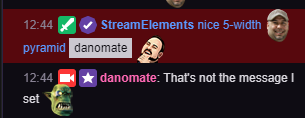
Is there something I'm missing with the pyramid module? It's not displaying mycustom msgs
https://i.gyazo.com/a11e96272fbb8fc542c7b4f995303af3.png
https://i.gyazo.com/eefe8a7f8bc52929fc1d9b867158377c.png

@solar hedge does it not do that automatically?
solar hedge
Dunno. It asks you the interval you want for each command, so I imagine they'd conflict eventually, right?
tight harness
It's all dependent on chat activity and when it last activated
solar hedge
Right but if you've got say two commands both set to repeat every 15 minutes and 50 chat lines ... wouldn't they both fire at once?
tight harness
50 chat lines? That's a lot 😄
solar hedge
I know talkative peeps 😄
tight harness
I don't believe I have mine fire at once
solar hedge
I mean it would be easy to test
hm
doesn't drop them at the same time, but it doesn't do quite the full interval
odd
It's set to 1 minute and 2 chat lines ... somethin's not right 😂
solar hedge
any ideas on how to fix that?
solar hedge
But there should be chat lines between the last four.
gentle imp
oh nvm I'm blind xD
solar hedge
😄
gentle imp
perhaps its counting his own lines lol
gentle imp
but 1 minute + 2 lines is too little add variations to it
solar hedge
changed it to 1 min 4 lines
gentle imp
and ofc, don't use the offline part, turn it off 😃
solar hedge
well just for now it's for testing 😛
 stuck marsh
how do i setup shoutouts on stream elements plz msg back
solar hedge
@stuck marsh what do you mean shoutouts? Like to shout out another channel?
gentle imp
something like this @stuck marsh Check out twitch.tv/$(1) last streamed game was $(game $(1))
on response and of course, change text to what you prefer
solar hedge
The one in my channel is something like Shoutout to $(user)! Check them out over at http://twitch.tv/$(user) 😃 ❤ bleedPurple
compact kestrel
where can i find my JWT token?
solar hedge
and then the command is just !shoutout person
Click on your name next to the sign out button @compact kestrel
top right
and then toggle the "show secrets" switch
dense jackal
!jwt
nocturne pelicanBOT
You can find your JWT token on your account information page (Click on your name next to the Sign Out button) https://streamelements.com/dashboard/account/information
solar hedge
or we could know the chat commands lol
gentle imp
that link is outdated, takes u to same page i linked
solar hedge
and now imagine when we have discord integration and someone typing JWT will have that command auto pop 
solar hedge
👍
stuck marsh
what the commad for the shoutouts
lament blade
i can´t choose a picture and add it to for example tipting page background
plz help
it´s like i can´t upload a image






the upload button doesnt work
 dry hare
Which browser are you using @lament blade
lament blade
edge
stuck marsh
thx
dry hare
Try chrome or firefox
dry hare
I had issues with that Friday night
lament blade
ok