#helpdesk-twitch
1 messages · Page 221 of 1
 wanton jetty
Wait you have Spotify on a different audio track ? (Virtual cable)
wanton jetty
add it as a audio imput method on OBS and turn it down then 😃
if you have it all on seperate tracks
wanton jetty
@radiant crest This is something you have to request from Twitch themselfs and you get 1 free bot sub token where that bot will remain a subscriber to your channel for Free
email partner support
 tight harness
⤴ can confirm
 radiant crest
Fair, cheers.
wanton jetty
very welcome @radiant crest
@radiant crest Just make sure if you use ground control and have all 3 elements of SE you give them the custom bot name your using and not the StreamElements name
 lament blade
I didn't even have to make an extra track on obs
wanton jetty
😃
lament blade
Feels good
time to stream smthing im good at 😃 thanks for the help and the idea. i dont think i did what you reccomended but gave me an idea 😃
radiant crest
@wanton jetty not the bots name? ... wait what?
wanton jetty
Give them the bots name your using but if your using stream elements and using ground control and using all 3 of there elements (tip, overlay & ground control) you can give the bot a custom username
you would need to provide the "Custom Username" for the emotes to work
 left umbra
hi guys, is their a bug with !watchtime command
as some of my viewers have 0 seconds watch time
any help?
tight harness
Haven't heard of that one before
wanton jetty
Meybe they never watched the stream and it was all an illusion 😄
left umbra
they checked yesterday and troday as well, same amount , no increase.
tight harness
Try clicking on Part Channel on the dashboard and then Join Channel, could be that the bot needs to rejoin
 toxic basin
Hey support friends (and Legendary_Studios) when will I be able to use a custom nickname for my Streamelements bot in chat? 

tight harness
Since days ago 
toxic basin
 ?!?!?!
Do I have to host the bot on my end?
Or where can I set this up?
Friend 😃
tight harness
If you meet these requirements:
- Chat bot (modded and in chat)
- Tipping service (link in panels below stream)
- Overlays (theme or custom)
Then open up Ground Control, you should have the option in your settings menu of Ground Control
tight harness
And as long as you leave GC open and meet those requirements it'll be changed to your custom one
toxic basin
jk but ye okay thanks
tight harness
No problem
toxic basin
Where did you communicate this update @tight harness ? I feel like I have been left out from that information, maybe there is some kind of newsletter or something I am not subscribed to?
and how'd you get your discord ID to be #1337 O _ O
tight harness
Not every feature is instantly announced 😄
tight harness
Ohh, because I'm a Discord Partner so I have Nitro and Nitro lets you do it 😄

 tight harness
toxic basin
Uhm my custom name doesn't seem to work
tight harness
Let me check
toxic basin
I want to make twitch.tv/trizzebot my custom name
I added trizzebot's OAuth token to GC
and wrote "TrizzeBot" as the name, maybe that's not how it works
tight harness
Yeah, that's not how it works
toxic basin

tight harness
You need to put the name of the account, because it uses the account you create as the bot
It has to way to change that
tight harness
You own the account TrizzeBot?
toxic basin
yes
tight harness
Then all you do is log in as TrizzeBot, get the OAuth token while logged into it, put in the token, put the name as TrizzeBot, that's it
toxic basin
That's exactly what I did actually
toxic basin
Showing as StreamElements
and the oauth code is like oauth:391300blablabla
correct format I guess, I just copy pasted it from the website where GC told me to get my oauth from
tight harness
Hmm 🤔
toxic basin
IT'S WORKING
I just copy pasted it again, not sure what was the issue
Maybe I just didn't copy the whole token
tight harness
Phew 
toxic basin
Classic trizze 
tight harness
Awesome 
toxic basin
Thank you for the company I actually didn't have any issues I just wanted to talk 
tight harness


toxic basin

tight harness
Turns out we have a different clapping emote 
 lament blade
Would there be anyway to make a uptime overlay by inserting text with the variables?
tight harness
lament blade
Thx
tight harness
But there's also a similar one here: https://streamelements.helprace.com/i283-add-bot-variables-to-the-overlay-editor
lament blade
So
Im kinda stupid
Would it be like this? In text? Uptime: ${channel}${uptime}
Er
Idk
tight harness
Those things were for our ideas board, it's not available yet
wanton jetty
😃
 muted swift
Does anyone use a setup with a DSLR and capture card? What capture card do you use? TIA!
This would be for Win10 and a Canon HF M400
Just looking for recommendations for good CCs, or ones to avoid
tight harness
Not my field of expertise i'm afraid 😄
wanton jetty
Theres a program to avoid using a capturecard and use a DSLR on ya PC costs a little bit tho its a one time purchess theres a free version but after a while it starts to let ya camera go to sleep /:
ill find it for ya one sec
SparkOCam is what its called @muted swift
@tight harness i got him Bb
tight harness

wanton jetty
I only know about it coz i was thinking of doing it myself
People like Timthetatman and Activator recommended it to me
 dense jackal
TIM
 warm tulip
heyy so using streamelements for my stream but i cant seem to get song requests to work for normal users, only myself and my mods can do it! it pops up saying song requested is too long all the time
dense jackal
check your Song request settings, in the top left make sure the max length isn’t 5, It’s in seconds not minutes
tight harness
You set it to 25 seconds
warm tulip
ah ok thats my fault then
yah i did i thought it was minutes my bad thaniks for the help
tight harness
No problem 😃
dense jackal
wanton jetty
25 second songs 
 noble perch
hello guys , is there any way of changing the bot name from StramElements to something else ?
tight harness
Yes
Meet these requirements:
- Chat bot (modded and in chat)
- Tipping service (link in panels below stream)
- Overlays (theme or custom)
Then check your Ground Control settings @noble perch
muted swift
Thank you for that software recommendation @wanton jetty ! Does the camera-PC hookup then consist of an HDMI cable from camera direct to video card ? (I'm not sure if my vid card has an extra port)
lament blade
Is there an add-on for Hearth stone that shows game results
 upper steeple
@weary mist the sub count is not syncing while i'm live, its only one off but its been the wrong number for almost the whole stream now
 weary mist
Ok, thanks
tight harness
Styler addressed this yesterday, saying "Live updating should be back at the end of the week. It should sync it right after the stream though"
toxic basin
Hey I was going to make a donation goal starting today so I can pay my BTTV pro membership of $5 but when I make a tip goal it says €354.89 already donated. Not sure where that's from.
I can't reset it
tight harness
Activity Feed > Widget Data > Goals
toxic basin
oh I couldn't find it in the editor but what Legendary_Studios said worked
tight harness

tight harness
No problem
toxic basin

 novel axle
Anyone here know a fix for the problem I posted earlier? I have a command set up for jumpscares. The streamer gets sacred, we increment it one. We switched from Nightbot to streamlabs and now the reset command for the counter doesn't work. It was !jumpscare "Oh shit" counter: $(count) The reset was !clearjumpscare !jumpscare -c=0.
 clever mango
labs or elements?
to reset a counter with streamelements use !editcount <countname> 0 or !editcounter <countname> 0
 frozen spade
I need help
I have been tested the donation system and by accident I have blocked a person, I have already sent a message to be unlocked since I can not unlock it myself
What I can do?
?
clever mango
@frozen spade Please send a message to @serene granite
frozen spade
ty
 runic copper
Hello lovely humans! I need some expertise regarding using StreamElements overlays with OBS and having CPU usage max out as a result.
Before switching across to SE, i was testing streaming using my Elgato & webcam, and had no issues with my CPU.
I then created my first overlay in SE having heard it reduces CPU usage... i added a HypeCup, Kappagen, and top donator/newfollower/sub and follow goal. I also added a redemption alert & donation total.
As soon as i put this overlay into OBS using the browser source, OBS CPU usage has at least doubled, and has resulted in my CPU maxing out, causing my stream to drop frames, have latency issues and generally be a stressful experience.
Even kappagen freezes mid splosion, and sometimes the hype cup glitches, dropping event icons wayyyyy away from the cup. Like half a screen away haha
Is there anything I can do to resolve this? Have I just added too many widgets to one overlay? I stream in 720, have checked that my overlay is the correct size... so not sure what else to do.
All help appreciated!
clever mango
@runic copper Do you have any overlays created or just this one?
novel axle
Oh sorry. StreamElements. I keep doing that.
Still getting used to it. I'm the mod of the channel. The streamer told me yesterday about the switch to StreamElements and I accidentally get it mixed up with others.
clever mango
No problem
runic copper
@clever mango I only have that one above added to OBS. I made one additional overlay which has nothing but a Giveaways widget... that one is not on my OBS.
clever mango
Ok, and has this been added to more than one scene?
weary mist
I would recommend playing with the Kappagen settings. Smaller emotes, less in an explosion, smaller screen area. This can case large amounts of CPU usage. Same with your hypecup. If you make the cup smaller, it will have less events to hold and retain (thus less CPU usage).
runic copper
@clever mango nope. Just one very bare scene. The layers are SE Overlay, webcam with green screen, elgato game capture.
@weary mist splosion area is 1/4 of my screen, emotes are tiny, i could definitely reduce amount of emotes as an option. Hype cup itself is teeny. It does use full screen area though so I’ll try reducing that.
clever mango
@runic copper The hypecup and kappagen are the most resource intensive widgets so it could just be too much. You can reduce the kappagen usage by following these steps: https://i.imgur.com/MqEhoQF.png
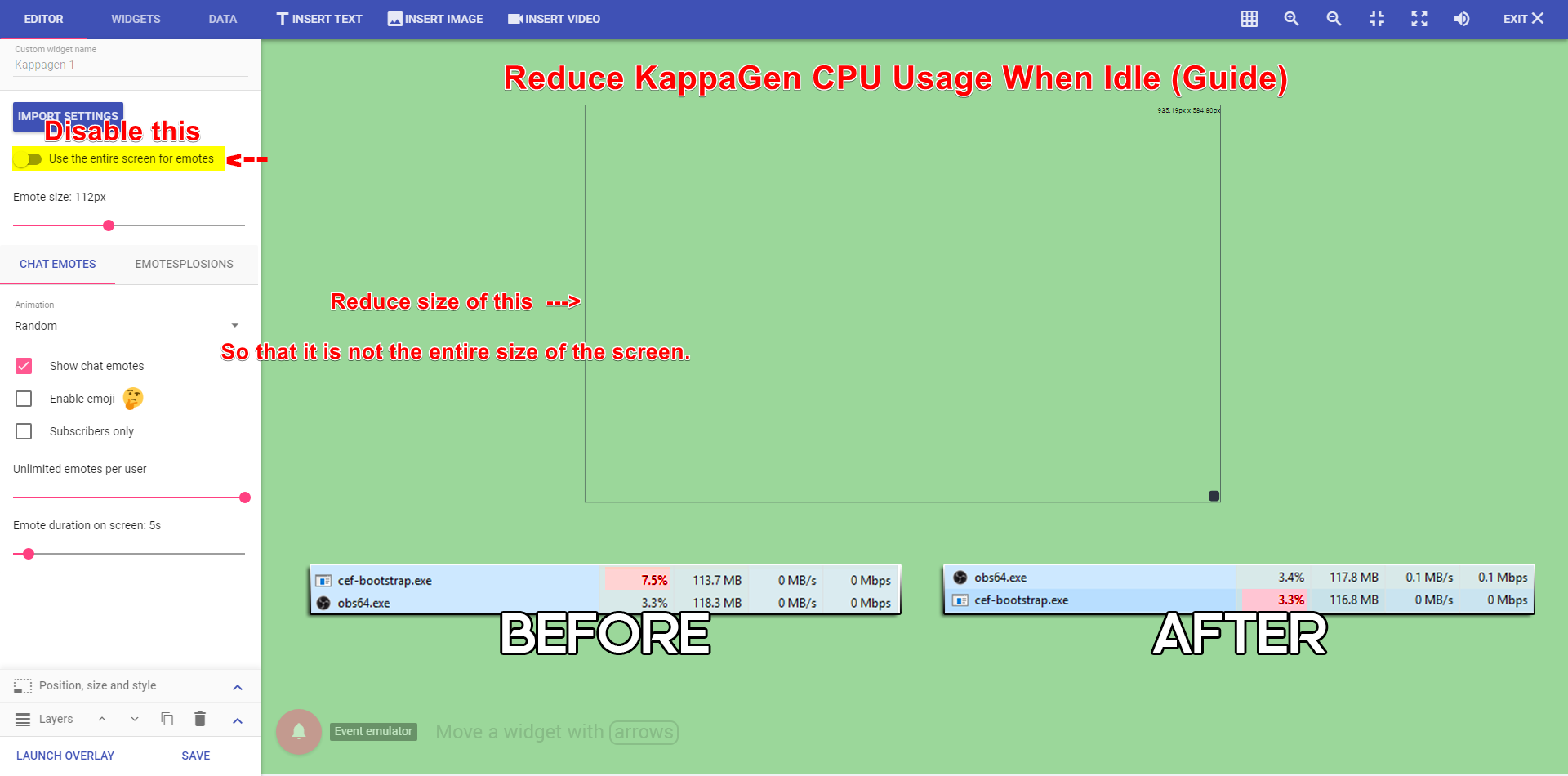
If the full screen option is enabled then it will ignore the boxed area
unchecking that will definitely help as it will only work within the widget boundaries
clever mango
my pleasure
frozen spade
I have received a message in the mail, replying that this has already been discussed here, due to discord but at the moment it has not been able to do anything.
tight harness
@frozen spade You were asked to message Hectic, that's what it means by already discussed here
Rather than discussing something in 2 different places at once, it makes a lot more sense to keep it in 1 place
frozen spade
okay
and can I ask why do I have to ask for help from SE in green to be able to unblock a person myself in the donations section?
only for curiosity
clever mango
That's a question for Hectic as he is staff. We're just support
frozen spade
and is there any way to unsubscribe the service so that it restarts from 0 and re-registers?
clever mango
you can request to have your account deleted by sending an email to doron@streamelements.com
tight harness
Yes, if your account is deleted then it's wiped in it's entirety
frozen spade
Ok now I send the mail again and then I link everything again, thanks for your help
tight harness
frozen spade
The problem is that it is not synchronized at all because I have 22 followers and on the web it tells me that I have only 3
tight harness

StreamElements
The Ultimate All in One Platform for Streamers
It's correct, not sure where you're looking
tight harness
Did you gain some of them prior to signing up with us?
Because that'd explain why you see only 3 there
frozen spade
yes
tight harness
We don't register information from when you weren't even signed up to us
We have no way of doing that
But as you can see from my screenshot, your total followers amount is correct
frozen spade
ah there only sell those who subscribe since they register with you in agreement now I understand
tight harness
Yes
clever mango
Keep in mind that number is also showing the total for 2018 as the filter above indicates
any followers from 2017 or before won't show in that number
that's in addition to what Legendary said. The numbers reflect from the point you joined SE 😃

 hasty briar
My settings for the chat alert module keep getting reset
"There was an error updating module"
 narrow kraken
Please help me
lament blade
What do you need help with? 😄
lament blade
@hasty briar can you send a screenshot of the settings?
As a panel? we have a twitch extension
narrow kraken
tight harness
Go to Twitch, click on Extensions, find the StreamElements extension and add it there 😃
hasty briar
Everything is turned on but it seems that everytime i close the window it resets to disabled
lament blade
Did you click save?
hasty briar
Yes...
That's when i get the error msg
Like i said it gives me an error msg n then when i look at it again everything is turned on but once i cloase the tab and open it again it's all back to disabled
narrow kraken
Thanks ❤ ❤ ❤
 eager frigate
Hey question, if i'm adding a command using !command can i set if it's moderator only command or is that only possible using the dashboard?
 fallen lava
sorry yall had to get off!
lament blade
Don't believe you can do it by a command, here is a quick link to it though https://streamelements.com/dashboard/bot/commands/custom @eager frigate
eager frigate
Ah maybe in the future then! Thanks though 😄
lament blade
Are you using chrome? @hasty briar Really odd that it's happening.
hasty briar
Yes
 nocturne pelicanBOT
Here is the StreamElements Ideas Board: https://strms.net/ideas
lament blade
By any chance do you have any field with some weird characters or a really long message? @hasty briar
if not, maybe can you try parting the bot, logging out, logging back in and join the bot to your channel?
hasty briar
Only one that has a long msg is the one that is always on regardless but other then that my raiding has a msg
{user} just raided the channel with {amount} viewers PogChamp
lament blade
That's good, can you try parting the bot, relogging and joining the bot back on your channel?
hasty briar
did it didnt work
tight harness
@hasty briar I fixed it for you, instead of just disabling modules you removed the messages from them as well as disabling them, they have to have something in there even if they're disabled. If there's blank text fields it thinks there's an error
So I put in some text but left them disabled, now it all works
hasty briar
Yeah, that fixed it thx
tight harness
No problem
muted swift
Is there a way to clone my layout and then work with the copy, so that I do not mess up my current version?
tight harness
Yes absolutely, there's a duplicate overlay button on the My Overlays page
muted swift
Found it, thanks @tight harness !
tight harness
No problem 😃
 white cradle
Will you be coming to mixer? Demon HSP brought me here.
 winter zenith
will at one point yes
white cradle
Anytime soon?
winter zenith
I am not a developer so I dont know that. Youtube support just finished
 left crow
Hello, good morning/evening! I'm trying to help my friend's SE, xxsilverspades. She accidentally ban someone from tipping her. Is there anyway to fix it? Thanks
white cradle
Okay. Thanks.
winter zenith
@left crow I asked what to do. What is the Users name?
 tawny pivot
Mixer happen in the future yes.
left crow
@winter zenith xxsilverspades 😃
winter zenith
and the one who got banned?
left crow
Mellochu @winter zenith
winter zenith
@serene granite told me you should DM him @left crow
left crow
Okay ma'am @winter zenith , thank you very much ❤
winter zenith
no problem
 hollow pine
any way to make my stream extremely less laggy then wat is already is which is barely bareable
tight harness
Checked your task manager to see what's eating up your CPU usage?
 cold merlin
Bot is working for somone?
 upper vine
hello if i want to make two sound of tip Alert How i can ?
lament blade
Works fine for me 😄
What do you mean by that? you want to create audio, or you already have the audio and you want to use it as a tip alert? @upper vine
upper vine
if someone give me 5$ it`s have sound and if another give me 50$ i need but another sound
lament blade
Oh of course! you can set that up as a variation
Go to your alert box, click the gear next to the tip alert
And open up
And you can find some other sounds on the internet, for example a good website is myinstants
upper vine
Thanks 💯
lament blade
No problem
 leaden yoke
Good evening everybody! So first of all thanks a lot! I've been using StreamElements for quite a while and I am impressed! But I've got a question. I don't want any links to be shared in my stream expect for Twitch clips, but I have no idea what to do. I've tried everything what came to my mind.. Can somebody help`? 🙂
weary mist
@muffindebutton#4914 for sure we can help
If you go to your streamelements dashbaord, then at the bottom of the left side, there is an option for spam filters. There, you can activate link protection, and add a whitelist of the twitch clip base, and you are set 😃
 tepid elbow
What's the source of the text fonts? Is there a better way to preview them than selecting each individual font?
 cloud niche
so i am a manager for 4 channels but its not letting me switch to the one i need to switch to - i click channels 3 pop up - i go to settings "channels - manage" i still see all 4 but i can switch to the one i need to.
weary mist
@cloud niche scroll down 😃
cloud niche
ty ty tho ❤
tight harness
They did update that so they are not all clumped, exactly
 frigid radish
question
I am using Restream.io does the alerts for donations follows etc work for all mediums i am streaming to?
MIXER YOUTUBE TWITCH at the same time?
tight harness
Well if you're using OBS and the overlay goes to OBS then your Twitch events will show up for all mediums, yes
frigid radish
Oh wait ok i guess i worded that wrong... will it also pickup follows and subs from those other mediums?
tight harness
Well we don't support Mixer yet and we've only just released youtube on beta so it's still early days
frigid radish
can it do youtube and twitch at the same time?
tight harness
Should do, yes
frigid radish
thanks for the info helps out!
winter zenith
I dont think this is possible python :0
tight harness
Buy it? I doubt it
 misty aurora
Hi there, I have a question regarding host and raid alerts in SE layouts 😃 anyone here?
Im not sure who to tag 😦
 storm ledge
That is a great question Crescentine - I'm struggling with that too.
misty aurora
It seems like all other alerts work on layout except those two, is that your issue as well? 😦
storm ledge
I completely redid my auto host tagging yesterday
misty aurora
sorry not layout = overlay
wait let's tag @tight harness
says he's playing se support staff 😄 maybe he can help ^^
storm ledge
I just started streaming tomorrow is the end of my 1st week, so I'm struggling with everything grins I just learned about StreamElements last night and have been fighting with it since then - I'm determined to make it work though 😃
misty aurora
oh but it's an amazing platform, although if you are having trouble with it, dont hesitate to use multiple bots in your twitch channel 😄
by the way, congrats for the first week! @storm ledge
I use three myself haha
storm ledge
Thanks @Crescentine#2828 😃
misty aurora
not one single bot can address all your needs xD but each have their own specialty
tight harness
Ahh, check the pinned messages 😃
storm ledge
I appreciate the advice too - I've been so confused about the bot thing
tight harness
Second one down
storm ledge
Hello @tight harness
tight harness
So I think I may have already answered it
misty aurora
oh okay, thank you! ill check pinned 😄
tight harness
Hey btw 
misty aurora
ahhhh!! @tight harness I need to have the window open on my browser? is that right? 😃
just confirming what I understood ^^
tight harness
One of the 3 mentioned things, yes
misty aurora
Thank you so much, always a great help here SE staff 
storm ledge
Sorry I'm such a newb at all of this... how does one view pinned messages?
tight harness
Other services choose to do this via the alert box/overlay, but this isn't as secure because then if somebody finds out your overlay link your account is compromised, so we use the much more secure method of using the activity feed instead
Top right hand corner of discord, the pin icon @storm ledge
storm ledge
tytyty @tight harness
tight harness
No problem 😃
misty aurora
@storm ledge goodluck on your 2nd week, man~ first month is always the hardest since it's mostly fixing and testing everything out
Goodnight thank you again @tight harness byeee
tight harness
You're very welcome
storm ledge
@misty aurora Thank you - I am checking out your channel - want to see how the pros do it! 😃
misty aurora
Oh im far from it @storm ledge but thank you, drop me a follow so I can follow back 
tight harness
I've been streaming for around 3 + 1/2 years so i'm happy to give advice where I can 😃
storm ledge
@misty aurora Thanks for the kind offer 😃 Right now I have one good scene, but, I'm really wanting to get my 2nd one setup for Dungeons III and that is where I'm struggling
misty aurora
oh wow now that's a pro @tight harness show us da wae, ill follow you too
tight harness

misty aurora
59k followers oh my god 
tight harness

storm ledge
It's been a hilarious week @misty aurora I had more than one occasion where my mic was muted and I was talking for 20 minutes (once) like a crazy person... lol
Does StreamElements have a chat log?
misty aurora
@storm ledge happens a lot to me actually, the muted thingy haha wait let's go to the general channel since we're now out of topic in their support channel
I'm stalkin'...I mean following now @tight harness 

tight harness
Followed back
novel axle
The reset still isn't working.
Is there something wrong with how I wrote the command that is causing this?
 stuck hamlet
You're not resetting the command name, you need to reset the count name
and as i can see, you dont have a count name
$(count jumpscare)
would be the appropriate way to have it
and then doing !editcount jumpscare 0
novel axle
Okay. I will try that. Thank you. I appreciate it.
stuck hamlet
np
 vestal scroll
Hello everybody! could any of you guys tell/help me on how to use the ${args} variable command. I have been trying to figure out by myself how the variable works but I haven't been getting any results
Maybe by providing me an example of the variable being used in a command 😃
weary mist
the args variabel represents a word location in a sentance. If you want a specific word after the command (for example, I will use !test hello world)
if I had the response as $(1), it would return hello
you can either get specific words, or the whole phrase after the command trigger with $(1:)
or just specific sets $(1:4) will get the first 4 words
@vestal scroll
vestal scroll
Alright! Thank you @weary mist ! 
 latent mural
That promo ResidentSleeper
vestal scroll
I like How He promoted himself and then ended up his stream right away 
latent mural

weary mist
@hybrid comet no promoting please
vestal scroll
It was a little kid. 
weary mist
lol
latent mural
@fleet cape support section woukd be here
 fleet cape
Thank You
 hybrid comet
I would like to apologize I just figured out that what I did was bad. Please don’t outcast me I had no idea.
tight harness
? 
 narrow coyote
self promoting
dense jackal
Ah no problem @hybrid comet we luv u
vestal scroll

 dense jackal
Head to your profile page @Zelakto
then click open page
and you can update your icon in the top right
novel axle
Is there a way to pull up a list of the quotes that have been added?
clever mango
Not at this time but a quotes tab in the dashboard is coming https://streamelements.helprace.com/i242-quotes-tab-in-dashboard
 tiny lotus
What is the difference between all time stats and current? I've never reset either but some how the numbers are different
novel axle
Oh neato. Thank you.
weary mist
@tiny lotus if you are talking points, all time only counts points given through viewing, current is including everything else
storm ledge
Is there a way to play a YouTube playlist without allowing song requests from viewers?
stuck hamlet
Sure, set up a backup playlist and make the command broadcaster only.
 smoky tide
when rewarding hosts with points/currency, do only the ones that meet the threshold to show within alerts get the reward? Or do autohosts and hosts of 0 people get it as well?
 modern marlin
Is this normal that this isn't saving? https://i.zelakto.tv/images/crmE.gif
 storm ledge
@stuck hamlet Thanks - I was thinking about this, but, then the playlist site still shows that songrequest is enabled
stuck hamlet
normal, no. known, yes @modern marlin
modern marlin
Sweet, thanks.
 rough glade
I don't have a paypal what do I do?
 versed crane
does anyone know why i have new followers cheers or subscribes it isnt shown up in the Dashboard ?
@rough glade make an paypal account
versed crane
making a paypal account is free
weary mist
@fallen flame no advertising please
@versed crane I know the aggregates are not refreshing properly right now, but that will be fixed soon
versed crane
@weary mist thnx then i will wait till its fixed
 desert briar
hey staff, can you remove me from #402919550066229250 listings. Gonna be feeling out all my options in the next few streams to make sure I'm still getting the best quality with SE :)
weary mist
👍
dense jackal
❤
weary mist
@desert briar let me know if you have any questions about anything we provide, including issues etc
dense jackal
Melmsie's an og
desert briar
<3
 safe bluff
I am still getting double alert sounds even though I have shutdown source while not visable checked for every instance of elements and I am in studio mode
any ideas ?
weary mist
!studio
erg, I need to learn commands
Studio mode is special. The second box (preview) is considered "visible", so alerts will sound on there if you have an overlay with an alertbox active on it
I recommend having a scene that has nothing in it to switch to so that there are no chances to double alerts
nocturne pelicanBOT
if Check out this tutorial for OBS’ studio mode which allows you to preload scenes before transitioning. https://www.youtube.com/watch?v=W8iWsD2Lq3U
clever mango
for the visual learners
 azure crypt
Morning. I tried to add an editor to my page but the link it generated had apparently already been used. Any ideas?
dense jackal
Try sending another link seems to be working right now 🤔
Re log your account, and make sure you are using chrome, otherwise
dense jackal
Awesome 😄
 twin urchin
one of my mods donations arent showing up through streamelements but they are going through paypal, any way to fix this?
dense jackal
You're sure they are using the SE page? and have they donated to you before @twin urchin ?
 sage hare
how can i make an uptime command
dense jackal
It's a defualt command located here @sage hare https://streamelements.com/dashboard/bot/commands/default
 uneven atlas
Is there a way to search Theme gallery? Lets say by name or game.
dense jackal
Top right there is a search bar, and there is also a sorting drop down
sage hare
Thank you <3
dense jackal
You can sort by popularity, A-Z, New, or game
uneven atlas
Ah, the page just opened from bottom or I missed it at some point, thank you!
dense jackal
No problem
twin urchin
@dense jackal they were still using streamlabs....
dense jackal
ah, that'd do it  We can only get notifications if it's through our page, you can import the tip manually here 😄 https://streamelements.com/dashboard/tipping/list by clicking add a tip @twin urchin
safe bluff
Anyone? Shutdown source when not visible checked on all instances of StreamElements in OBS and I still hear double alerts. Any ideas?
 atomic hollow
maybe your browser is open with the overlay?
dense jackal
Make sure you don't have any extra alertboxes in your overlays that are hidden as well @safe bluff
 frank compass
Hey i there a way to get a donation Goal or Follow Goal with Streamelements?
dense jackal
Yes it's under the widgets tab in your overlay editor 😄 @frank compass
 remote stratus
toma i need some help ^.^
dense jackal
What's wrong upside down berkley
remote stratus
i keep trying to make my new overlay fit my monitor but it keeps auto fitting to 1920-1080
my screen is 1920-1200
dense jackal
what resolution is that?
remote stratus
just says 1920 by 1200 on my comp
dense jackal
like 1920 x 1080 is 16:9
remote stratus
tryna make is 16:10
dense jackal
So if that's your base resolution in obs , when you go to create a new overlay with SE select custom res
remote stratus
can the pre made ones be changed too?
dense jackal
Yes just click the small pencil on the right
remote stratus
just takes me to the page with all the widgets and stuff
dense jackal
The smaller pencil
remote stratus
oh, thank you! ❤
dense jackal
remote stratus
diddnt see that before
dense jackal
np 😄
remote stratus
have a nice day! ❤
dense jackal
you too!
smoky tide
hello! I am trying to set a host variation alert. i.e. 2 or more as the amount. However it seems it can not be triggered. It also has "When amount is exactly" underneath the title of the variation. https://i.imgur.com/GRyu2r7.png
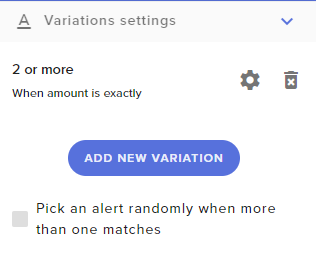
but even host 2+ are not using this new variation
dense jackal
Is the test host working? but actual hosts are not going through?
smoky tide
test host will go through but it uses the default alert settings.
even when I send a custom of 2 or more.
or send the test 10 option
dense jackal
Got it, running some tests
 mint cove
Is there somebody who can help me set up OBS with the "Perfect settings" ? If yes please ping me, so I can call you and I can screenshare
dense jackal
@smoky tide There seems to be some sort of issue, with host variations atm, we are looking into it as I speak 😄
Thank you for informing us!
smoky tide
awesome! you guys are always on top of things 👍🏼
dense jackal
@mint cove checkout discord.gg/obsproject they may be able to help
mint cove
@dense jackal Thanks man!
twin urchin
okay actual question, after importing my information from streamlabs all past donations are multiplied by 3, so someone who donated like 1 dollar before i started using streamelements, it now shows that they donated 3 instead
dense jackal
Did you attempt to import multiple times? @twin urchin
remote stratus
tom i need a tiny bit more help xD
remote stratus
dang ;-;
so i just added a follower goal and i want it to have the amount that i currently have, how would i do that?
dense jackal
Go into the Data tab , in your overlay editor
remote stratus
oh thank you! diddnt see that before
dense jackal
remote stratus
at 46 sofar 😄
dense jackal
Hell yeah B)
twin urchin
Yes I did :(
dense jackal
We are talking about the best way to solve your issue @twin urchin Thank you for your patience
dense jackal
@twin urchin Alright we deleted all of your previous donations, try re-importing one last time 😄
storm ledge
If I'm streaming 720p at 30 frames should I setup my overlay to be at 30 frames too?
tight harness
Yes
 native horizon
tight harness
native horizon
tight harness
If you ask it I may be able to help 😄
 ebon forum
This should be solved, Anton is one of my guys 
tight harness
Awesome 😃
lament blade
so ive been stream a couple days in a row now and been streaming some different game which all appeared on obs and stream. but destiny only shows a black screen. anyone have this happen and found a fix to it?
tight harness
@lament blade go to the properties of the game capture and tick the anti-cheat hook option
lament blade
unfortunatly didnt fix it
ill see if restarting obs makes it work
nope
always had issues with destiny 2 for some reason
tight harness
🤔
lament blade
ah
i found out why
bungie has made game cap incompatible with destiny 2
has to be done through window cap
tight harness
Why would they do that?  oh well
 crimson quest
got a question, do timers work on reruns?
on twitch?
I have a timer set to display regardless of any chat lines or anything every 15 min and havent seen it come up. Does the app have to be opened for that to work?
tight harness
I believe they do but only really if people type during the reruns 🤔
Ohh, well then 😄
crimson quest
ive had a number of issues with timers, but i think im just not doing them right, sometimes they work sometimes not
tight harness
Does it normally display alright with no chat lines requirement?
crimson quest
well this one is a new one i just added about 30 or so minutes ago
i will open ground control and see if that does a difference
 midnight topaz
I have a question, actually I've asked before, but what was suggested didn't worked out
so, when I'm using the "Shutdown Browser Source", the chat on each scene clears, so if I change from BRB to talk scene, there's no chat
is there a workaround for that?
 fringe creek
It has probably been asked before but is it possible to preview a song before it plays in song request so it doesn't auto-play?
tight harness
@midnight topaz The workaround before was likely to make another overlay just for the chat without ticking the shutdown option, that does work
midnight topaz
I have one
that's what I got suggested
so I have an empty scene, with just that overlay
that has only the chat
tight harness
@fringe creek Yes, you or your mod can listen to it before it gets around to playing and delete it if necessary
midnight topaz
but it still resets
tight harness
Testing now
Worked fine for me

Make sure you have 'show messages permanently' for the widget in the overlay 🤔
Otherwise it could be that they're just disappearing over time
midnight topaz
they are
midnight topaz
they aren't

here, that's from last night
skip to 9:50
where I change from start to talk scene
tight harness
And you changed the chatbox in all of these scenes to the new one that doesn't shutdown?
midnight topaz
well, it's the one in the Red flare
that shuts down
so I need to overlay another one on top, that is just the chatbox and doesn't shut down, right?
tight harness
Yes
tight harness
Yes
storm ledge
In my Alerts settings, for some reason my Subscriber image is showing that it is saved to a different image, but, when I run the test, it shows the original image in the Alert - any ideas? All of the other Alerts are working fine with their custom images.
tight harness
@storm ledge You've not changed your variation settings in this case
So when you're running a test it's running a variation with the default settings still
tight harness
 vital wyvern
@tight harness yo, the beta site and normal SE is confusing me lmao, should all of my like chat commands, bot and tips be on the normal SE site or just beta 
tight harness
I generally use the normal one unless something specifically needs testing on the beta site
vital wyvern
allright lmao, well is there anyway to transfere my alerts and allready configed overlay to the normal site from beta ? cx
tight harness
No I don't believe so
tight harness
Indeed 😄
 stone spire
Are there any plans to allow SE/Ground Control to pull info from external sources
like a text file or something
tight harness
We don't use text files, everything is stored on the cloud
 untold sorrel
Not sure where this has been asked but; will we ever be able to rename the bot?
Nevermind
I'm a dunce
wanton jetty
Can we please in the Ground control app get a way to accept or deny store bought items and read the info on them....
tight harness
@wanton jetty I believe that's planned for the revamp of it
@untold sorrel You got it 😄
wanton jetty
good coz as much as i love SE dat shits annoying lol
stone spire
@tight harness is there anyway to achieve that then?
I suppose I could create something that uploaded the text file to my website and just displayed the text lol
tight harness
@stone spire What kind of text? You can add text widgets and text to the overlay already 🤔
stone spire
Yeh but they won't update
tight harness
What won't update?
stone spire
it's pulling current playing info from spotify
tight harness
Right, that's what you meant 😄
Yeah, Spotify denied our dev access request, but it's still planned
stone spire
anyway you could pull it from discord?
tight harness
Hmm, don't think so
stone spire
Although it does overwrite that with the streaming msg
untold sorrel
Wehre do I get a JWT code?
tight harness
@untold sorrel Click on your account name in the top right, then click Show Secrets
untold sorrel
Bingo thanks
stone spire
Is there a way to fix disparity between the total followers displaye don channel/vs overlay
tight harness
Which overlay are you using? as in what did you name it
Nevermind, found it, but don't see the Follower Goal widget
Right, it's a separate overlay, got it
untold sorrel
Huh, now the bot just has my name lol
tight harness
@untold sorrel That'll be because you didn't log into your bot's Twitch account when you requested the OAuth token but instead requested it while still logged in as your main Twitch account 😛
tight harness
@stone spire There was a temporary issue with pulling live data, instead it updated after each stream. It was said that it should be fixed by the end of this week, i'll try to find out what's going on with that 🤔
@untold sorrel A second account for it, the account still exists and you still own it, but the bot uses it to talk from
tight harness

untold sorrel
But hey, at least is better than it was, right! 😄
tight harness
😃
untold sorrel
Bot doesnt talk
tight harness
What happens if you click Test Bot?
untold sorrel
Nada
tight harness
Nothing at all?
untold sorrel
Nope
tight harness
Interesting, even if it didn't work it should message as StreamElements 😛
Is the bot muted?
tight harness
It's not muted from what I can see
But also not replying to any commands, one moment
tight harness
Did you include the oauth: bit of the token?
untold sorrel
Yup
untold sorrel
Done no change
tight harness
What was it? 😮
tight harness
Ohhh
 broken dragon
Hey there, has anyone experienced any issues with song requests? So everything seems to work fine at first, then after a song or two plays, one will just start repeating over and over while there are 4-5 songs still in queue. When i go to press play manually on the "next" song, nothing happens. It basically just locks on to one song and refuses to let me force play any others. Only way to fix it is to restart ground control and have users resubmit requests, but then it will end up happening again after a few plays? Any ideas?
tight harness
@broken dragon I don't believe i've heard of this one 🤔 i'll try and replicate the issue
 indigo bone
anyone got that add quote command
tight harness
indigo bone
smh sorry im dumb
 vapid nimbus
how do i edit my contest i made a miss take
tight harness
If it's live you'll need to end it and then change it I believe
 summer star
yes
Legendary can yu Tell me About SoundRequest
Can Anyone Setup For Dont Spam Twitch Chat If Anyone Request Music ¿
tight harness
@summer star What's your native language? Maybe that would be easier 😃
summer star
Spain Or Russian
tight harness
@ebon forum speaks Russian and @olive lintel speaks Spanish 😃
 olive lintel

ebon forum
Так, живой, в чём проблема?
summer star
Hola Здраствуйте
olive lintel
🖖 vulcan too 😉
summer star
Нужна Помошь В настройки Заказа Музыки , Если Ли Способ Чтобы Не Было Оповешение Через Твитч Чат ¿ Или Иной Способ ¿
tight harness
ebon forum
@summer star не понял, для чего убирать оповещение в чате? Оно для того там и есть чтоб все видели что заказ сработал, его никуда не уберёшь.
summer star
@ebon forum Просто Когда Хочу Сделат Много Музыки Весь Твитч Чат Заполнен Пока Сделаю Всю Музыку , Или Если Это Делает Модератор
 echo hound
Why are giveaways not showing the info on screen and stuff?
I'm really not a big fan of how Streamelements does giveaways 😦
ebon forum
@summer star по другому никак. Бот специально так настроен, никому же не мешает, народ и играми у бота спамить будет итд.
echo hound
Having to explain to people the whole !ticket thing is ugh
tight harness
@echo hound Did you add the Giveaway widget to your overlay?
echo hound
Yeah @tight harness
Unless it was randomly removed
I did when I first setup the overlay
clever mango
@echo hound It's pretty flexible. Tell us how you want it to work
summer star
@ebon forum А Только Через Реквест Можно Ставит Музыку На Стрим (Для Стримера И Модератора ) Или Можно Зайти В Сайт StreamElment И От Туда Можно ¿
echo hound
Well, the old system I used would give me the choice of just "Whoever types a keyword in chat" (that worked really easily), or "anyone that typed anything in the last X minutes"
ebon forum
@summer star можете настроить команду как вы хотите, уровень доступа же есть. Можно заказывать музыку и с дешборда (модераторы итд, кому доступ дали), но бот дальше будет писать подтверждения. Оно так и планировалось, не пытайтесь убрать часть функции которая нужна для работы заказа песен.
summer star
@ebon forum Спасибо Вам
clever mango
@echo hound while keyword doesn't work just yet (it needs to include a ! at this time) you can change it to whatever you want by editing the default command and you can make it one free entry per person
other than the ! it's basically the same thing at that point
The other type of giveaway is something that we would consider if enough people request it at https://strms.net/ideas. Keyword seems like a much more popular option and should be available when we allow for editing of default commands in the near future
 late burrow
I cant seem to find a eventlist of recent follows etc do you know where i can find them
winter zenith
Hey! It should be on the dashboard!
StreamElements
The Ultimate All in One Platform for Streamers
sceoll down a little right under the graphs you can filter it through Followers/Subs/Tips/Hosts/Cheers/StoreRedemptions
late burrow
I dont se anyway of changing it. I want something like this https://gyazo.com/8d778f6bfdf2344872d6b6c0c4c72605

an eventlist onscreen
winter zenith
Oh, then you have to make an Overlay in the Overlay Editor
or use the Super Theme for Fortnite wich we provide for free
tight harness
It's called Llama 😃
 winter zenith
The Heart Icon is for followers do you want to display more then just one name?
 winter zenith
yes it is implemented in the Overlay.. I think I dont understand what the problem is... Sorry 😦
 cobalt mesa
@weary mist Currently online if you wanna pop in to see what i was talking about a couple of days ago with the song request not working for subs.
late burrow
yea thats the problem it doesnt show up. The eventlist onscreen doesnt show up.
it should be like this https://gyazo.com/9b83e5ed264b5f063dc771b0a4ca5617

but mine is like thi s https://gyazo.com/2061ca2e679b1e9d806054e7ce2025c6
 winter zenith
I think you use the wrong overlay ?
 left moat
Hello, my alerts are all working but host alert doesnt, what is the problem?
winter zenith
or did you accidently deleted it in the Overlay Editor?
late burrow
I can try to do a new one again
winter zenith
yes pls. I see you moved the Camera Frame maybe in the procces you deleted the Event lists?
late burrow
so its llama super theme right
winter zenith
yes
late burrow
it didnt work
clever mango
 @left moat There is a pinned message 📌 in this channel about host alerts
late burrow
something went wrong in OBS im sorry https://gyazo.com/b2d337cd246413c197ae96044dace56e
 clever mango
@late burrow did you change the dimensions of the overlay on the site? If not, the dimensions are 1920x1080 and you'll need to set those in the browser source properties
weary mist
@cobalt mesa that 15 minute follower mode is a pain 😛 was that test with a link? because I saw !sr *** which isn't a valid request
winter zenith
 timid yacht
Hai Guys
Quick Question
Is there an issue with Host Alerts in chat and people that Host not getting their Points automatically?
clever mango
@timid yacht first let's verify that you are receiving all hosts in StreamElements. Please check the 📌 message in this channel about host alerts
Is one of those three open at all times during stream?
timid yacht
So I have to get them to get the ground control app for the host stuff?
@clever mango
clever mango
Ground Control isn't required. It's just one of the options
The other two are pages on the site
timid yacht
So they would just need the dashboard tab open? that's it?
clever mango
The streamer does, yes
timid yacht
She already has the song request page open, so another tab with dashboard should help?
clever mango
In that case, I recommend Ground Control since it has both of those in one app
and will getting more features
!groundcontrol
rip
StreamElements
The Ultimate All in One Tools Platform for Streamers
 grand skiff
i connected through youtube... but wanted to take my overlays from twitch.. only then realised i couldhave just added the youtube channel in the twitch account...
now i cant
when i click add youtube ....... after clicking allow for permissions.. nothing is happening
late burrow
How do i change follow sound
clever mango
@late burrow Check out this tutorial https://www.youtube.com/watch?v=8LVRd2X4HvU&index=12&list=PLCDDKlFdScbEwdx5AntcQIS1InkFJwHtv
late burrow
tnx!
 glad berry
Is there any way to rotate the hype cup? I want it to be 90 degrees, for the funzies.
dense jackal
create an overaly for just the hype cup in SE
then put it into obs as it's own browser source and rotate that
glad berry
ah ok
 outer ravine
hello guys it's me again, can i ask a question about the SR?
dense jackal
Fire away 😄
outer ravine
I'd like to set a cost for my followers to request a song and make it free for my subs.
but with these setting none is paying ahahah
dense jackal
Try changing user limits don't apply to, to moderator 🤔
outer ravine
@dense jackal i tryed but the "normal" follower cant request
it says "the song is to long"
dense jackal
Change maximum song duration from 60 to something higher, it's in seconds they could be requesting a song longer than 1 minute
outer ravine
this way my mod will not pay?
dense jackal
If you set user limits to moderator your mod will not pay, if you set it to everyone, no one pays
outer ravine
if i set it to subs?
nocturne pelicanBOT
Chat/Bot Levels
100 - viewer
250 - subscriber
300 - __regular __
500 - moderator (twitch mods automatically placed at this level)
1000 - super moderator
1500 - broadcaster
Dashboard Manager Levels (least to most access)
Bot Supervisor (can add super moderators from dashboard)
Editor
Full Access
https://i.imgur.com/s61Liry.png
 dense jackal
We'll look into it, because it seems to be working on our end, you can always go here https://streamelements.com/dashboard/bot/commands/default and make the actual command cost loyalty points @outer ravine
 mortal galleon
anyone have the full description for the default ! points command? this is all i see; $(user) has $(user.points) $(pointsname) and is rank $(user.points_r
dense jackal
$(user) has $(user.points) $(pointsname) and is rank $(user.points_rank) on the leaderboard.
is the full reply
@mortal galleon
All variables are also listed here https://streamelements.com/dashboard/bot/commands/variables
mortal galleon
thanks!
outer ravine
@stuck hamlet everyone pays except subs
stuck hamlet
https://www.onslaught.ca/s/j51lu4yy.png Should be what you're looking for

 tropic plinth
sorry if I'm butting in
this happened when I tried to "connect with youtube"
I'll try agwain, but just letting you know
worked with second try
tropic plinth
gotcha, thanks!
also, just quick question
can I have alerts/ stuff for both twitch and youtube at the same time?
 simple frigate
Im having a hard time removed the ding sound so i can put a custom sound in there it ding then says mine afterwards
tropic plinth
or do I need to stick to one at any given stream/momonet?
stuck hamlet
You can set up your twitch alerts and youtube alerts on either side of the site, but we dont have a way to merge them yet.
so basically 2 overlays, that is possible.
tropic plinth
so I can get both alerts if someone subs on yt and then follows on mixer, but I would need two things?
outer ravine
@stuck hamlet i'll try thanks
lament blade
i have a litle question about how to mod streamelements in youtube i didnt figure it out. if i got som help i wouldbe greatfull
dense jackal
We do not currently have a bot for youtube chat but we are working on it 😄 @lament blade
 frozen skiff
I'm trying to change the name of StreamElements bot in Twitch but it isn't 100% working
Is there somewhere in the main site I can go to edit this instead of via the downloadable client?
frozen skiff
I have ground control
I put the custom bot info in
Both the oauth token for it and the name of the account
But it isn't working
dense jackal
did you generate your 0auth token while signed into that account?
frozen skiff
Yeah
The problem is that it isn't always working
Sometimes streamelements posts, sometimes the custom bot
lament blade
@dense jackal okey thx m8
frozen skiff
Never mind I found my issue.
It's only going through the other account if ground control's up
dense jackal
Was just about to ask haha
weary mist
yeah, that is the only way to get the custom bot name. Got to have Ground Control open
 upbeat void
Hello! I was curious is there a way to edit the quote command not to @ the person using it? ie @upbeat void #4 "quote" DaemonGrin?
dense jackal
If it was made into a custom quote command using custom api, they could set it to reply or whisper
 lavish shore
Hi 😃 Was just wondering if there was a way i could mute a whole overlay instead of having to mute each variation for each type of alert.
fleet cape
Just wanted to say thanks to whoever it was that helped me with my stream elements problem where it had started to drop my Frame rates and had to completely remove stream elements from obs to fix it. All I had to do was shut down source on my other overlay and fixed it! So happy :)
winter zenith
@lavish shore what do you mean mute the overlay? You can mute the overlay in your obs
Or do you just want specific things like hosts,followers muted?
dense jackal
Glad we could help @fleet cape
lavish shore
I wanted to mute like all noise coming from one of the overlays cause when i get a follower etc it plays 1 time for each of the overlays i have. I know i can shutdown the source when its not visible but then if i switch scenes the overlay doesnt show up for a few seconds
winter zenith
Use stuio mode in obs
dense jackal
Using studio mode can help, and adding a transition time of around 3500ms
winter zenith
And do the „shutdown source if not visable“
dense jackal
shutdown source when not visible also decreases the load on your machine significantly
winter zenith
^
broken dragon
What would be the best way to make streamelement chat go through another chat channel? That way I don't get my main chat channel spammed with commands?
lavish shore
Alright thanks for the help 😄
winter zenith
@broken dragon the chat channel thing is pretty new on twitch
Give the developers some time, bc I dont think it is possible ATM for bots to switch to a Twitch Chat Channel specifically 🤔
dense jackal
You can make custom commands whisper as well
winter zenith
^
broken dragon
Sorry but what'd you mean and how would I go about this?
Is that only custom commands, or could I make it do that on like dueling... Etc..
dense jackal
Currently no, but that is something we are looking into implementing
it only works with custom commands
broken dragon
Gotcha ,ok np, thanks!
dense jackal
 lost sparrow
Is the ability to give points for subs gone? Seems like that option is completely gone
 pine hemlock
to give points to subs via a chat command? I dont think that was ever a thing.
Giving points to people who sub is under loyalty settings
lost sparrow
No, just automatically when they sub. The option under loyalty settings to set the amount is gone
These are the only options
pine hemlock
Try logging out of our site and logging back in, i still see it
It just means the site isnt detecting you as a affiliate/partner correctly
lost sparrow
Ah there we go. Thnx
pine hemlock
np
 sullen dock


 lament blade
echo? can you go on obs
latent mural
check your browser sources and set them all to "shutdown when not active"
lament blade
And tick "shut down source when not visible" for all your browser sources? it's located on their properties
latent mural
if you dont shut them down, basically they run in the background, and every source will play the tts
stone spire
Aynone know if twitch has a delay on approving emotes atm?
lament blade
can anyone help with making a command?? plz
weary mist
What kind of command would you like?
lament blade
like an !time , so people no what time it is where i live
weary mist
@stone spire there is always some sort of delay, I have seen a few hours to a few days->weeks
lament blade
i tried ${time}
stone spire
Mines been over a week :/
lament blade
but it was wrong time
weary mist
@lament blade what is your timezone?
lament blade
mst
weary mist
perfect, because I already have that command built for myself 
lament blade
yah!!
weary mist
$(time.America/Denver)
lament blade
one more thing lol
weary mist
sure
stone spire
How can I do that for Aus?
lament blade
what would it be for cst
weary mist
this is what I use: https://en.wikipedia.org/wiki/List_of_tz_database_time_zones
copy the value from the third column, and put it here: $(time.<here>)
lament blade
thank u!
hehe 1 more thing, whats the code for uptime
so i can edit my friends command
is it ${uptime} ?
stone spire
correct
lament blade
thank u
stone spire
You can see a list in commands >variables tab btw
You can also do like ${uptime streamname} I think
dense jackal
Hahaha I was just typing that ^
stone spire
😄
storm ledge
How do we show the current YouTube song that is playing (even if songrequest is not enabled)?
lament blade
On the overlay it can only show the now playing if it's a song request and not from a back up playlist
storm ledge
Thanks Alice ❤
lament blade
how would i go about making a stats command, something that shows how many viewers/followers/views someone has
😄 welcome
storm ledge
that makes me a little sad though 😦
lament blade
storm ledge
lol
lament blade
Our variables are here https://streamelements.com/dashboard/bot/commands/variables
I know you can make a shoutout command, that would for example, tell your viewers to check their stream.. but i never heard of a command that would display those things to other people, the command would work for yourself though
storm ledge
I am really struggling with an overlay that I put together last night, all of my other scenes which are directly created inside of OBS seem to be good at 30fps, but, my SE overlays are down around 15 - 20 fps - any advice? #sorryI'manewb
lament blade
It can display your subscriber/follow count.. etc.. but not for other users, the variable for that is on the list i linked 😄
do you have shutdown source when not visible on every browser source?
thank u
np
 tulip acorn
Anyone else having problems with host alerts not working?
lament blade
Do you have either ground control, dashboard or activity feed opened during the stream?
tulip acorn
no, my other alerts don't need it open.
lament blade
Check the second pinned message on this channel 😄
storm ledge
For host alerts to work you need to keep your dashboard open @tulip acorn
tulip acorn
ah okay.
dense jackal
Dashboard/Activity feed or ground control
tulip acorn
what's ground control?
dense jackal
An app you can download onto your pc 😄 https://streamelements.com/groundcontrol
It tracks activty feed, media share, and songrequests
tulip acorn
where can I find my JWT token? I can't see it under my account
smoky tide
hey @dense jackal is there some place that I can follow the host variation issue so I can be on top of when I can set them up again?
dense jackal
I'll dm you now, and when I see it's working again I'll recontact you 😄
smoky tide
I'm down with that system 😉
dense jackal
Feel free to  if you're wondering if it's fixed yet 😃
 frail goblet
Is there a way in which I could do a giveaway without using my viewers buying tickets with points
I would like to pick one randomly
latent mural
...i am talking out of my ass here, but could you just set the ticket price to 0? (never used the giveaway feature before)
dense jackal
@frail goblet You can create a custom command with a random chatter ${random.chatter}
all of our variables can be found here https://streamelements.com/dashboard/bot/commands/variables for later convienance 😄
 humble summit
Is there a limit to the sound file that you can use for alerts? Also why can I not apply a different sound for a follow/sub/cheer? (I'm probably being an idiot but still)
frigid radish
hello got a question
sometimes my timers dont go off for text notification in the chat.... do i have to have SE open in a browsers or ground control loaded for it to work?
lament blade
hi again, i'd asked about this earlier and it was fixed but then i did something and messed it up -- my all time top cheerer isn't updating, i was wondering how to fix?
dense jackal
@frigid radish what do you mean for timers don't go off for text notification you mean chat lines?
@lament blade go here https://streamelements.com/dashboard/session and refresh aggregates
lament blade
thank you tomathin!!
dense jackal
frigid radish
yes
i feel sometimes my chat is going and yet the timers are not going of even if the given chatlines are there
 gentle imp
are they correctly setup in online offline zones?
lament blade
can i import my fonts on streamelements?
gentle imp
no but there is a lot of fonts to choose from @lament blade
fringe creek
Is there anyone that can help me in voice support with the song request feature as I have a problem with it automaticly playing a song as soon as it gets added if the list is empty
 jagged maple
did they setup chat in groundcontrol yet?
gentle imp
not yet @jagged maple
jagged maple
damn
gentle imp
yeah I want it too 😄
jagged maple
kinda went over to the dark side cuz they didet have it -_-
(streamlabs)
support streamelements alot more but no chat rly sucks
gentle imp
it will be there at some point
I take it things will move a lot faster now or soon when what they are working now get's done
gentle imp
youtube integration
jagged maple
ah cool
fleet cape
Ok I thought I had fixed the fps problem with stream elements overlay. It back to giving me low fps under 10. I even have shut down sources. It was fine yesterday as it was. Why will it change now all of a sudden? :(
tight harness
It was fine yesterday and nothing changed with your overlay or OBS since then? 🤔
tight harness
Are you sure it's that causing the issue then?
fleet cape
Yes because if I remove that one source which is the stream elements overlay it goes back to 30fps
tight harness
Interesting, do you have a lot going on in that overlay?
fleet cape
What's weird is when I switch to the brb screen which also uses a stream elements overlay it goes back up to 30fps??
Ummm I have kappagen, alerts.
That's alp
All
I'm gonna remove the alerts as I already have streamlabs alerts on. So I'll see if that makes a difference
tight harness
Kappagen can use a lot
fleet cape
Yeah so I even made sure it doesn't use full screen and made the emotes smaller. Also with emote explosion I used alot less emotes
The thing is in the past I've always used the free overlays and I've never had a problem at All, not even with all the changes i have done now. I don't understand at All. Really gutted :(
So I removed alerts now and the only think I have on that overlay is the kappagen which is my favourite. Still no good. It shouldn't be doing this :(
tight harness
It's more likely going to be kappagen than the alerts
fleet cape
Ok gonna remove it and see what happens
No that didn't help either made my fps worse actually lol :'(
tight harness
How does that make sense? your PC confuses me 😛
tight harness
I'd maybe expect that from a low-end laptop but shouldn't be happening on a PC
tight harness
Is that the animated version of the theme?
fleet cape
Umm yes I think so
It came as a pack of 5
I used the game ome
One
It's called a super theme is that the animated One?
tight harness
Hmm, I wonder if your PC is struggling with the animated theme in that case
Seeing as that's all that's left really
fleet cape
Hmm yeah maybe?! I'll try a normal theme instead
Awe :( same thing happens with a normal one
Was really hopeful too lol
Ok I just noticed something
When I add the source without changing the sizes or anything it's remains at 30fps but when I go to resize it the fps drops!
tight harness
Huh, interesting