#helpdesk-twitch
1 messages · Page 217 of 1
 clever mango
clever mango
clever mango
@gray spear event list* does not have animations at this time
 pliant shoal
Did something change in regards to the Commands page and the banner image size? It wasn't like this before (right side is duplicated)
 gray spear
Okay, thanks
clever mango
It's possible that something changed in October with the new site but nothing since then
the page header size is 1920x310px according to the profile page settings https://streamelements.com/dashboard/profile
pliant shoal
Hmmm, I just added this about two weeks ago
yes, that is the size I am using
Just tried uploading a new one, same size, does the same thing - seems like something is up with the responsiveness of it, as in it isn't adjusting properly anymore
 steel plover
@clever mango how can setup for sellout?
clever mango
Did you verify that you meet the requirements? If so, please connect your discord and twitch here:
discord settings ⚙ > connections
 stone spire
How can you load a scene into the transition window without swapping to it instantly?
 limber summit
ffs
steel plover
for sellout i must do this :1) chatbot (modded and in chat)
2) tipping service (link in panels below stream)
3) overlays (theme or custom) right?
limber summit
That moving background I've spent a total in 5 hours making makes my stream run at 20fps
Just on facecam
 tight harness

limber summit
ymhm
tight harness
@steel plover Yes
steel plover
for moment i would not tip, i must do or i can skip?
limber summit
Its because my streaming pc is my old pc which runs at 100% cpu usage with an elgato and overlay. Adding that moving background just crashes it completley.
clever mango
do you accept tips at all? @steel plover
steel plover
yes
tight harness
@limber summit Ahh well that makes sense
limber summit
yeah
thought that having the video loaded into a browsersource would be less intensive as it would be internet loading rather than cpu or hdd
steel plover
i m not good english, tip = donation or not ?
clever mango
please connect your discord and twitch here:
discord settings ⚙ > connections
 weary mist
@limber summit if you load it through the browser source, then the browser source has to render the video as well. either way, something is going to be hitting your CPU
limber summit
rip ¯_(ツ)_/¯
steel plover
@clever mango i do it
limber summit
Welp, looks like my new theme i spent hours designing isnt gonna work out anymore
ffs
weary mist
hold onto it, you never know when you might be able to use it in the future on a new machine/upgrade/travel
clever mango
@steel plover I will add you to #402919550066229250
limber summit
but its only gonna work with that moving bg
steel plover
thx man
limber summit
Can I be a sellout?
limber summit
ey 😉
pliant shoal
<@&382267076632379392> Please also add me to the sellout list, ty!
limber summit
❤
weary mist
@pliant shoal done 😃
steel plover
@clever mango the command !ping what do you test ?
limber summit
shroud dosent count as a streamer success?

StreamElements
The Ultimate All in One Platform for Streamers
pliant shoal
@weary mist Tyvm 😃
 sacred fulcrum
subs can "buy a sfx sound" but regular viewers cant buy the same sfx
weary mist
@limber summit "streamer Success" means those people are here to help streamers succeed
clever mango
Sub only items are possible
limber summit
I misunderstood the term :p
weary mist
its all good 😃
limber summit
Can you sign up for that or something?
I've had my sub button for like a month and a half now, still on 0 subs 😦
weary mist
Let me DM you
limber summit
aite 😄
steel plover
@clever mango can i start stream for only what if sellout go ?
clever mango
Sorry, I don't understand
pliant shoal
Do you guys have an open beta testing opt-in for people interested in testing new features and providing input?
or is that what we are doing now? lol
I mean, something that is not yet released
I have a great deal of xp in UI testing and design, and I love your platform so I was curious
clever mango
We do have some beta testers that help out from time to time. The best way to get into that group is to be here often and help out when you can
pliant shoal
ok thanks!
 native estuary
@tight harness ok
 winter zenith
Ok
weary mist
whats up
winter zenith
Hello 😄
weary mist
Hi
 rough jacinth
Good day
weary mist

winter zenith

rough jacinth
Streamelements, store, redemptions
winter zenith
Yes
rough jacinth
When I reject redemption
weary mist
lmao, don't think we can help with the ass on 🔥 part
winter zenith
Okay
rough jacinth
If somebody ordered an Item
And I reject it
Few weeks ago it works
Right now - nope
winter zenith
I think its rejected not refunded
winter zenith
We restarted the servers and stuff maybe it has something to do with this? 😃
weary mist
let me do a test in my store
winter zenith
If you say it worked before it still should work like this
rough jacinth
It seems like I juked tons of my viewers
With something like "dont care, If I not complete your order i will refund"
This is real shit
I like sit on da fire
Juked = cheated
winter zenith
But you are aware that you can reward your viewers with points
weary mist
interesting
winter zenith
So you can „refund“ them that way
weary mist
It does say when you click the red X that it will refund, and it is not refunding my my points
winter zenith
Ah
winter zenith
So it is a problem bc yesterday it worked for him
rough jacinth
Im not sure about yesterday
winter zenith
So what to do 🤔
rough jacinth
I dont know how long this problem exists
winter zenith
Ok
weary mist
Thank you for reporting it 😃
winter zenith
We send it to the developers should be fixed soon!
winter zenith
Untill its fixed try to give the viewers the points manually
rough jacinth
One question
winter zenith
I will DM you when we solved the problem
weary mist
One answer
rough jacinth
Can u help me to find out what was refunded today from my Redemptions?
Is this possible?
weary mist
its all
rough jacinth
oh
weary mist
completed have a green bar next to it, denied has a red bar
weary mist

rough jacinth
Keep in touch with this probl pls
 elfin magnet
how do you add "currecny" to a viewer, without taking them from your own?
weary mist
!bonus
!bonus reckyj 100000
will give you 100000 points from the magical point fountain
@elfin magnet
weary mist
are you the broadcster, or a mod
elfin magnet
broadcaster
weary mist
kk, give me a second
elfin magnet
the bot responded.. no added currecny tho
weary mist
ok. I am just loading up your stream so that we can test this
 worthy token
Have to say, I’m really not a big fan of the “ y you no stream” emails
 lament blade
Hi there, Just wondering if I mod somone what can they actually do? Anything negative?
 proud pumice
 @worthy token
can you elaborate why?
lament blade
also when theyre adding youtube to the songrequests ... things that are 2 minutes long are too long!
proud pumice
@lament blade they can ban people ;o
winter zenith
@lament blade
What do you have set up on your songrequests ?
If you go to the songrequests tab you can acces settings there
How much some one can song request and how long the songs can be
If you make some one a Mod on your Twitch they can access the Mod Commands you configurated
lament blade
@winter zenith just got it working ... wow i didnt save xD
winter zenith
So besides the standard twitch stuff like /ban and /timeout
They can !skip songrequests
Or award people points
Start !sraffle and other stuff you set up for mods to do
If you make some one a Super Mod via a generated Stream Elements Link they can access your overlay settings and make Chat Commands them self
Basically everything you can do but not deleting your account or tipping page
But they can delete and edit overlay/chatcommands/modules/etc.
worthy token
@proud pumice pretty much I just decided to take a week off for myself and to work on some bot stuff that needed doing
Kinda a stream refresh/revamp
I’ve been on the website the last few days doing stuff despite not actually streamig
I know I haven’t been streaming, I don’t need you guys to tell me I haven’t been
proud pumice
🤔 usually we send those for people who dont stream 2 weeks+ to see if we can help them with whatever they might need
worthy token
I remember over Christmas a streamer friend of mine got one of these too and they’d been hit with a family death, obviously they hadn’t been streaming
My last stream was on the 9th
So ten days
4 of which weekends
proud pumice
we'll take a look
worthy token
Righto. I think the phrasing, while meme-ish, can just be taken wrong in too many situations
proud pumice
interesting
worthy token
Maybe I’m being over-sensitive 😂
proud pumice
any chance you have a better "cute" wording for it? :D
we need to cater to over sensitive people too :X
worthy token
“We miss you, hope everything is okay”
 Kiwa knew my train of thought
winter zenith
Kiwa knew my train of thought
winter zenith
^
proud pumice
KIWIFEM :X
winter zenith
I know everything
winter zenith
Enough to pass
winter zenith
Thats what I said :v
 golden geyser
LOL Black Magic is at work here....
 sonic juniper
Hey @stuck hamlet . Any updates for me regarding Chat Stats?
lament blade
How do i make my bit goal go from like the all time amount to a month amount
winter zenith
Reset the session I would say
lament blade
how
weary mist
you can set the current amount on a goal in the widget data, goal tab
lament blade
where?
weary mist
you can get there from either your overlay editor, or activity feed page
lament blade
I don't see it on my overlay editor
lament blade
 lament blade
ty lol
weary mist
😃
 analog idol
Hey does the "Token Bounce" variable on HypeCup actually do anything? No matter what I have it set at, the bits still bounce the exact same height
golden geyser
@analog idol Are you sure you hit Save before testing it? It works just fine for me.
analog idol
Yeah I hit save and it reloads in OBS, then drops them and they bounce the exact same
golden geyser
From what I can see, it really comes down to how much you have in the cup @analog idol I would also try Reloading and Clearing the cup, and then messing with the settings as well.
Make sure you dont have any weird position, size, or style settings either
tight harness
Getting the cup just right does take a lot of testing, very true
 fervent rose
How do I get overlays streaming on Xbox one using twitch
tight harness
You'd need to use either a capture card or Remote Play to get your content onto something like OBS on a PC first, add the overlays as a browser source to that same software and then use the software to stream to Twitch instead of directly from the Xbox
 celest ivy
^
 zealous rover
Hey, got a question about how tipping works. When someone makes a donations are they sending the funds from their paypal directly to mine or are they sending from their paypal to streamelements and streamelements sends to my paypal?
winter zenith
They send from there Paypal straigth to yours
StreamElements never touches any money bc we think the whole service should be free
zealous rover
ok thanks, just needed to know how to set it up for security
tight harness
Set PayPal up for security?
fervent rose
So what do u recommend as a remote play on Xbox one
tight harness
@fervent rose I don't know what you mean by that
winter zenith
Elgato screen capture
fervent rose
Thanks
zealous rover
@tight harness since they are tipping directly to you, it would be best to create a business paypal so that you can't keep your real name from showing.
tight harness
Was that a question or a statement? I already knew that 😄
zealous rover
@fervent rose if you don't want to purchase an elgato you can probably capture your xbox by streaming it to your pc with the xbox app and then using window capture in obs or whatever program you use, thats what i do with ps4 remote play
 ancient silo
if my loyalty points are counting all the time, how i can enavble roulette thing. I changed to enabled and i need to download something or change in twitch?
 dense jackal
once it's enabled it will work in your stream
 vestal oracle
hi staff. A friend of mine made a donation while the stream was off. In the streamelements overlay recent donator and top donator I don't see his name. Neather in the leaderboard of the tip page. How can I fix this?
dense jackal
as long as the bot is in the chat and modded
ancient silo
hmm i need to configure any bot and then roulette will work?
dense jackal
Tell them to check the activity feed, it may be pending, and also make sure his donation link in his twitch bio and tht it is StreamElements
@vestal oracle
@ancient silo you just need to add it to your chat, then mod it
you can mod it by typing /mod StreamElements
 long garden
I had a donation goal set up that was a proper bar with colors and normal size text. It's suddenly this.
dense jackal
Donation goals seem to have been bugged after our most recent update, we are working to fix them, adding a new one should help
long garden
Gotcha, thanks
vestal oracle
oh thx @dense jackal . So how I can accept a donation notification by default?
dense jackal
Go to tipping settings and uncheck Moderation
We have a nice little disclaimer beneath it that describes what it does
We didn't before 😉
dense jackal
np
weary mist
@long garden which overlay is your goal on, I want to check something on it real fast
 magic storm
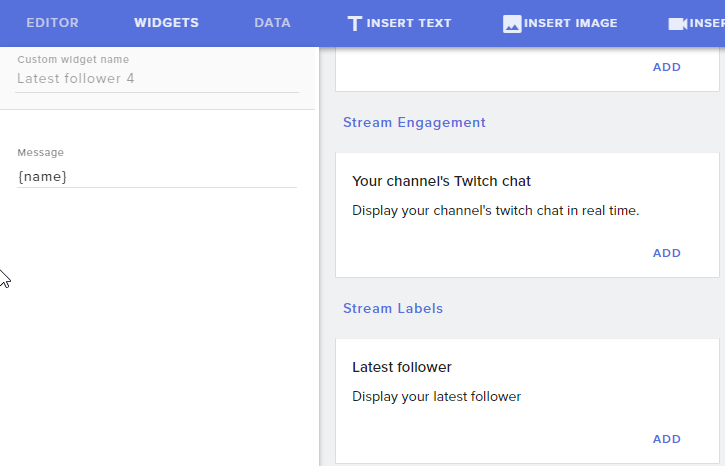
What's the best way to display the "recent follower" on a premade overlay?
golden geyser
@magic storm On the premade overlays (If its directly from StreamElements) most of the time they already have the widgets that you need i.e. "recent follower" but youll find that under Widgets > Stream Labels > Latest Follower https://i.imgur.com/fATfJdC.png in your Overlay Editor 😄
 oak sequoia
How to modify the bot's twitch name?
tight harness
Do you have Ground Control already?
 acoustic quartz
anyone available to help me out?
tight harness
Ask your question and we'll see 
acoustic quartz
I'm capturing my game in OBS, but the sound isn't coming through on the stream.
Any ideas?
Feel free to PM if it's easier 😃
tight harness
Did you choose which audio device you want to capture the audio from in your settings? Although, it's worth bearing in mind that OBS questions are better asked here: discord.gg/obsproject
acoustic quartz
Thanks man
tight harness
No problem
lament blade
Is it possible with the recent bits tab/scroller to only have certain ones (Like 50+ and not 49 and below) to show?
@tight harness ?
tight harness
You can manually remove people from the list, but other than that no
lament blade
;-;
 nocturne pelicanBOT
Here is the StreamElements Ideas Board: https://strms.net/ideas
lament blade
Can do that with alerts, only above 50 will show, but the ones bellow will still be on the recent bits ;.;
rip ok ty
tight harness
No problem
weary mist
you can set the bit minimum to 50 on twitch, lol
tight harness
That's true
 lapis vault
yo, sorry if i ask for something that has been answered already
- I can change my bot name only by using ground control?
1.1) If so, how?
tight harness
weary mist
lmao
lapis vault
I'm already a sellout 😛
tight harness
So do you have the settings already?
tight harness
weary mist
change this dono link to the streamelements one, then reload ground control
lapis vault
lol, i don't really stream.
tight harness
Interesting
lapis vault
yeah, i just wanted to learn how to change the bot name in order to change it for a friend of mine.
weary mist
that is how you change the bot name
you Must have the streamelements link in the panels, the bot must be modded, then restart ground control
weary mist
try it out, and see
change your link in that panel to https://www.streamelements.com/enkkfull/tip
StreamElements
The Ultimate All in One Platform for Streamers
lapis vault
okay, what link should i place in the panels?
weary mist
<-- mind reader
weary mist
now restart ground control
lapis vault
done that too
weary mist
go to settings, scroll down
lapis vault
nothing new.. apparently.
weary mist
do you have your JWT token in there
lapis vault
yup
weary mist
🤔
tight harness
Did you create an overlay?
lapis vault
yeah, almost empty i think
tight harness
🤔
lapis vault
added some text
tight harness
Just a tip, I wouldn't post your overlay links publicly
weary mist
or if there is a time frame when its detected
lapis vault
they could be stolen, i guess?
tight harness
Best kept secret 😄
lapis vault
yeah, it's literaly "your text goes there". just that. lol
weary mist
hmmm
lapis vault
!sellout
nocturne pelicanBOT
To be a proper #sellout all you need is to use StreamElements as your primary service for Overlays, Tipping and Bot.
weary mist
I wonder if its because there isn't an image in the panel
lapis vault
the overlay needs to be used?
or just created
the only time that i went online I used an overlay made from OBS
weary mist
it shouldn't matter, my overlays are all offline right now, and when I put my jwt in, the option is there for the bot name
are you on pc or mac
lapis vault
mac
weary mist
hmmm
lapis vault
i can try on windows if u want
weary mist
derp, that can't be why
I just tried it on my machine, and it didn't work
the only thing I can think of is to try it with a new panel, put a rando image there, and put the donation link on it
tight harness
So having the tip link in the 'Image Links To' section, could very well be it
dense jackal
I just set it up today @weary mist and it works
weary mist
then why isn't this working, lol
@lapis vault try logging out of the SE site, and logging back in
lapis vault
let's make a recap:
- I've got an overlay, not empty, but very old. Never used.
- SE it's the only bot I have in my chat.
- I've got the tip link in my panel.
sure thing
weary mist
I also may have added an alert box, just to make sure 
lapis vault
logout didn't wokr
let me set up the alert box
on a brand new overlay
okay, done.
i think that my account it's still linked to streamlabs (i set it up ages ago and never went live :D)
that may be it?
the new overlay didn't work
weary mist
nah, that shouldn't be it
lapis vault
on a side note: how can i test alert boxes?
weary mist
overlay editor, bottom left ther eis a blue button
hover over that, and you can emulate any event
and as a side note, for your friend, if it works, this should show up:
lapis vault
oh wow
weary mist
put in the name of the account to use as a bot, then generate the oauth token (need to log in as that account)
then magic, the bot is renamed (for as long as ground control is open)
lapis vault
uh..
not very clean, but i guess you cannot do much, since you cannot create 2903190 twitch accounts everytime one changes the name
weary mist
what do you mean web app, the site itself?
lapis vault
y
weary mist
If you mean the website (streamelements.com), I do not believe so. It is already fully integrated into Ground control
lapis vault
what is ur version of ground control?
weary mist
I am using PC, so my version numbers might be different. But that shouldn't matter, since when I put in your JWT, it still doesn't show the option I am looking for. I am on v1.4.2
lapis vault
oh, okay.
lol
i was scared that i published it somewhere [i'm very careful with my tokens lol]
tight harness
That's good 😃
lapis vault
well, so, i guess one or more of the sellout conditions aren't met.
weary mist
I honestly think something happened, because we just rolled out a few features today, along with a dashboard update
lapis vault
but isn't that still working for you?
maybe you had it activated before the 'problem' arised tho
now it's impossible to activate it.
lapis vault
let me try with another twitch acc i've got
 reef bobcat
Im trying to catch up with the conversation on customizing chat bot name
weary mist
@reef bobcat no problem. let me know if you have questions
reef bobcat
So this is kinda where I thought I'd find the setting
Is it in overlays? I see your screenshot @weary mist just not sure how to get there
lapis vault
nope, doesn't work
weary mist
@reef bobcat ground control, you can get it from activity feed
reef bobcat
ok
 lunar dock
@reef bobcat 
weary mist
it should appear in those settings
lunar dock
Fancy meeting you here.
reef bobcat
;P
lunar dock
Do I have to be logged in on the account I wish to use as the bot in order for it to work?
reef bobcat
Long time no see my friend!
lunar dock
@reef bobcat Indeed 😄
Wait, I think it's working now. For some reason it wasn't at first.
weary mist
@lunar dock no, you just need to be able to log in once, grab the oauth token, then thats it
lunar dock
@weary mist Thank you. It appears to be working now. I may have gotten a little too excited 😛
lunar dock
Are a lot of people having trouble? 
weary mist
no, just one account so far
lapis vault
2 actually
lunar dock
¯_(ツ)_/¯
lapis vault
tin, are you on mac or on windows?
lunar dock
Windows
weary mist
👍
lapis vault
aaand it doesn't work
but that was expected, u are on windows aswell, and it wasn't workin' using my token.
lunar dock
Have you tried generating a new code?
lapis vault
i cannot seem to find the generare new token in the new dashboard
lunar dock
You're talking about generating a new oauth code for the account you're trying to use as the bot, correct?
lunar dock
Ahh
lament blade
You are trying to use the custom bot name?
lunar dock
I'm guessing you've tried restarting GC?
lapis vault
1.4.2
lunar dock
v1.4.2
lapis vault
i think i'll sleep over it, it's 3 am here in italy 😛
lapis vault
@weary mist tomorrow i'll update you, if it gets to work
thank you for you support guys!
lunar dock
@reef bobcat It's a tab just like "Use Compact Mode"
It says "Custom Bot Name"
Don't see it for you though
Not sure
weary mist
@lapis vault ok, thank you 😃
reef bobcat
Im going to try resetting session and token information
weary mist
I think your issue is there is no tip link in your panels
the system automagically searches and checks, if it doesn't see one, the bot name options will not show up
 ionic thorn
weary mist
ionic thorn
weary mist
@ionic thorn yup. add the tip goal widget, and edit your goal data to be where you want it to start
weary mist
👍
reef bobcat
@weary mist Yep, adding a tip twitch panel was the ticket- which OAuth does the setting require for Custom Bot Name?
weary mist
@reef bobcat the oauth for the account whos name you are trying to use
It will use your name by default
lament blade
Does SE work with mixer? and if it does do i have to set it up somewhere?
reef bobcat
@weary mist I've tried leaving OAuth blank, I've tried putting in my twitch username all lowercase. When I click "Test Bot" the name is still "StreamElements"
Should I create my own custom twitch app and grab the OAuth token from the Twitch Dev API?
weary mist
try restarting ground control real fast
oh, you might need to part and rejoin bot
just to make sure
reef bobcat
Ok will do
 devout sentinel
Hi, i changed my twitch username, and now the leaderboard on my page doesn't populate. Any help with this? )
 pine hemlock
Have you tried logging out of SE and logging back in
Usually fixes name change issues
reef bobcat
@weary mist Hmmm still no luck, I tried restarting ground control and parting bot from the channel temporarily
devout sentinel
yes I've logged in and out
pine hemlock
Which leaderboard are we talking about specifically
devout sentinel
 pine hemlock
Try removing the widget and re-adding it. I havent heard of anything personally causing that issue with name changes
but it would make some sense
weary mist
@reef bobcat make sure to rejoin the bot, it still has to be in channel
 quiet torrent
@weary mist One question: The bot name change only takes affect when Ground COntrol is running right? Is there a way to make this permanent?
reef bobcat
Yes it's rejoined- I can tell when I brake it because "Test Bot" no longer works. However, nothing I've tried actually changes the bot's name. I suspect my OAuth is wrong and Ground Control doesn't have permissions to change my bots name- however, I'm not sure which OAuth it wants. I've tried a number of different things, but I guess I will wait to see what others are having luck with.
@weary mist
pine hemlock
Only works with GC running
reef bobcat
@quiet torrent I haven't tried running with the bot live- maybe thats my issue
weary mist
@quiet torrent no way to make it permanent. Only while GC is running
quiet torrent
:(
Thanks anyways @pine hemlock @weary mist
weary mist
@reef bobcat lets try to sit down one night and do a teamviewer session, to see if I can figure out how to fix it
 kindred tusk
Hello! Im trying to set my time zone to PST and commends doenst working. Any ideas?
weary mist
@kindred tusk https://en.wikipedia.org/wiki/List_of_tz_database_time_zones should help
kindred tusk
@weary mist nope, none of those work. only ${time.CET} works
weary mist
@kindred tusk use $(time.America/Los_Angeles)
kindred tusk
@weary mist thanks! it seems working. i have another question, how do i make 12 clock like am/pm
weary mist
that is not an option right now
kindred tusk
@weary mist thanks! ❤
 next spruce
Hi, my sub goal overlay has no layers in it?!
 stuck hamlet
@sonic juniper I havent heard anything, the devs have been quite busy as they are planning a big update, I'll poke them again and see whats up
next spruce
ok @weary mist thanks but it doesn't even show a text field or anything
weary mist
there is nothing on that overlay, you will have to add the widget
weary mist
👍
 cloud niche
is it possible to copy one thing from one overlay and pasting it on another overlay?
weary mist
@cloud niche Yeah, there is a duplicate layer button, which allows you to copy pasta to another overlay
@dense jackal too slow
cloud niche
tyty
dense jackal
bottom left with the Red star
weary mist
dense jackal

cloud niche
so we are working on item sound effect redemptions and we have custom lil gifs for each item - but when we redeem it in stream elements it stays grey and never pops up for stream - we do the test item redemption with the present box and that pops up fine - kinda lost atm
i can try to word it differently if that helps
weary mist
@cloud niche sound effects only make sound. If you want an image to pop, it will have to be a stream perk
 oak rover
how you edit nottifactions
oak rover
like folllowers, cheers etc
oak rover
overlay
weary mist
go to my overlays. If you have an overlay already, open the editor, click the alert box, and click the gear on the notification you want to edit
cloud niche
ahhh it was the sound effects thing the @weary mist said tyty ❤
weary mist
oak rover
thanks
cloud niche
love you guys so much
weary mist
lament blade
will there be support for mixer?
dense jackal
Right now we are rolling out youtube support next is mixer 😄 @lament blade
 stable aurora
ooh I didn't we could be sellouts! I'm interested!  I love streamelements lol
 narrow coyote
I just changed my Twitch user name, is there a way to update my tip URL to use the new user name?
 finite viper
o/ I've been using the "banned words" spam filter to block specific urls (bot auto-downloads) but it doesn't seem to work now... specifically "imgurimg.com" seems to get through when I add "imgurimg" as a banned word. Thoughts?
finite viper
Most of the time I want to let folks post links - it's fairly open. Only bots are abusing.
It seemed a pretty simple, easy solution to add the domains as banned words.
stuck hamlet
Fair enough, but i dont see any banned words on your account and the filter isnt on @finite viper
narrow coyote
I tried logging out an in a few times. It did update my twitch profile details, but the tip URL is still the previous username
finite viper
I'm modding a different account - mrllamasc
just tried adding wild cards to front/back but it didn't change anything
oak rover
aany reason? im on xsplit
 hoary glen
I need help with something minor 😮 I used to have a profile picture on SE, but it doesnt show it anymore ): Happened awhile ago but decided to do something about it now lol
finite viper
@oak rover Did it start after adding streamelements?
narrow coyote
okiteo
oak rover
i disable steamelements and still stutters
stuck hamlet
https://streamelements.com/amourie @hoary glen You can change it here
StreamElements
The Ultimate All in One Platform for Streamers
hoary glen
oh thanks LOL
stuck hamlet
pls no ban "roebutt" @finite viper That's my test account
stuck hamlet

stuck hamlet
bots are people
Do you have a link they used, or is that the one?
it's instant, shouldn't take a while
finite viper
I'd have to scroll way back... we have around 700 folks viewing and the initial testing was maybe 30 minutes ago
the link itself was before that
stuck hamlet
Well please let me know if it happens again. 😃
finite viper
kk - thanks for the help testing
(btw - should I be putting wildcards before/after or just the domains themselves?)
stuck hamlet
wildcards usually after
but just like facebook.com will work
should, im not 100% on that
finite viper
so facebook* is better?
stuck hamlet
I believe so.
finite viper
kk thx
 finite viper

stuck hamlet
Strange @narrow coyote I've alerted the devs, we'll have a look 😃
narrow coyote
Ok, it also looks like my StreamElements profile URL is also the previous twitch name. Probably should have made the twitch change before setting any of this up 
stuck hamlet
It may be due to our update yesterday, I will let you know as soon as i hear from someone 😃
narrow coyote
Awesome, thanks!
 woven scaffold
Hi,
My alerts for Hosts do not show up in my stream. The other alerts do though. When I do a test host it shows up. Please help me. I appreciate it. 😃
stuck hamlet
Do you have the activity feed open anywhere?
nocturne pelicanBOT
Twitch doesn't have a notification system for hosts (unlike follows, subs, raids, etc.) so the only way for StreamElements to know that you are being hosted is to connect through you to twitch. This connection is made on:
- SE Dashboard page - https://streamelements.com/dashboard
- SE Activity Feed page - https://streamelements.com/dashboard/activity
- Ground Control desktop app - https://streamelements.com/groundcontrol
Please have one of these open during your stream in order to receive host event notifications.
woven scaffold
Thank you! 😃
stuck hamlet
Np
woven scaffold
How do I use the custom bot name? 😃
stuck hamlet
Having the tipping link in your panels should unlock the option in ground control.
worthy token
Did something happen to the dono bar overlay :l?
stuck hamlet
what do you mean?
We've had report of settings changing, but it shouldnt be broken @worthy token
Hmm?
You're just using "Simple Design".
stuck hamlet
As mentioned above, we had reports of settings changing when we updated the site yesterday, but nothing seems to be broken
worthy token
Where is the option for it to be not simple? not seeing it under "Size/style"
stuck hamlet
It's in the screenshot you showed me 😛
stuck hamlet
Hhaha, no worries.
worthy token
Sorry lol.
stuck hamlet
You're good, we apologies for the settings changing :C
worthy token
It happens, I just cant believe I missed that lol
 ancient iron
Assuming Tip goals has been mentioned. Created a new one and it seems issue remains only in Simple design mode.. No bar
worthy token
Is there anyway to reorganise the items in your redemption store?
(beyond uploading them in the correct order)
stuck hamlet
Simple Design isn't suppose to have a bar
it's simple
just text
@worthy token You can't reorder them yourself, but on the public page users can
 fierce sun
2 of my viewers have said that when they try and donate through the stream elements donation page on mobile it crashes. 1 said she was unable to donate at all until she was on a desktop. Just wanted to pass on what I have been told.
stuck hamlet
@worthy token That might not actually help  Just a fair warning.
@fierce sun We would need to know the device, and the OS on said device, and anymore details they could provide.
worthy token
Remaking the ones I want at the top of the list o.0?
I just want all the random gamecode ones I have at the bottom lol
stuck hamlet
Yea, i dont know if it would do what you're looking for, thats why im just giving you a heads up, i dont want you to do all that work and it not actually work.
worthy token
It does 😃
I did it with one first, disabled the old ones incase I have more gamecodes I want to add later
stuck hamlet
Alright 😃
lament blade
Hey guys i have problems whwn i use super themes
My cpu usage goes from 10% to 20-30% just when i add a super theme (which leads to fps drops in ow)
How can i fix this?
My Tips/Host/Raids Not showing on stream but followers/bit are please help
 gentle imp
@lament blade have you marked all browser sources to shutdown when not visible?
lament blade
@gentle imp no i didnt thank you
gentle imp
you are welcome 😃
@lament blade for hosts/raids you need to have StreamElements dashboard or ground control open
regarding tips there was a site problem yesterday that got fixed, should be sorted by refreshing tip page
stuck hamlet
Only hosts needs The Activity feed.
lament blade
how do i open that and it hasnt shown tips ever
stuck hamlet
Whats your twitch account?
lament blade
Pryoxis
stuck hamlet
!host
nocturne pelicanBOT
Twitch doesn't have a notification system for hosts (unlike follows, subs, raids, etc.) so the only way for StreamElements to know that you are being hosted is to connect through you to twitch. This connection is made on:
- SE Dashboard page - https://streamelements.com/dashboard
- SE Activity Feed page - https://streamelements.com/dashboard/activity
- Ground Control desktop app - https://streamelements.com/groundcontrol
Please have one of these open during your stream in order to receive host event notifications.
stuck hamlet
You havent received any tips on our platform.
You're using StreamLabs Donation page.
stuck hamlet
https://streamelements.com/pryoxis/tip this would be your link.
You can change that in your panels on twitch as well.
nocturne pelicanBOT
Twitch's official help guide for Panels: https://help.twitch.tv/customer/portal/articles/2416760-how-to-edit-info-panels
stuck hamlet
I recommend also double checking your settings: https://streamelements.com/dashboard/tipping
 soft pebble
Good Day o7
Is there a way for moderators/admins to edit the userlevel of a command by chatbox - without openening the GUI?
nocturne pelicanBOT
You can make changes to custom commands in chat with!command add/remove/edit/options/show Valid flags for !cmd options are: -cd (number) -usercd (number) -cost (number) -level (number) -type (say, whisper or reply) -count (number). --- Example: !cmd options twitter -usercd 60 -type reply -level 250
soft pebble
for exmpl ; iwanna mmodify the userlevel by hand
bc the mods dont usually have acces to the GUI - for whatever reason; and the streamer itself is mostly busy playing and so mods can add new commands or !deathcounters ; but it can be triggered by everyone right now, so im looking for a way to modify the user level
in that case it would be just -level(value) i assume, giving by your statement?
stuck hamlet
Yes. but the command must be created first, and then the options changed.
soft pebble
adding and editing aint the problem
is there a table; list; FAQ for default config of the user levels somewhere?
didnt find something on https://streamelements.com/streamelements/commands
StreamElements
The Ultimate All in One Platform for Streamers
nocturne pelicanBOT
Chat/Bot Levels
100 - viewer
250 - subscriber
300 - __regular __
500 - moderator (twitch mods automatically placed at this level)
1000 - super moderator
1500 - broadcaster
Dashboard Manager Levels (least to most access)
Bot Supervisor (can add super moderators from dashboard)
Editor
Full Access
https://i.imgur.com/s61Liry.png
 stuck hamlet
!levels
soft pebble
perfecT!
on a different note.. StreamElements is a effective "User Account" on Twitch right?
The Bot isself was unable to use certain emotes, until given a subscription to that said channel.
So in theory.. by donating a Sub to the Bot itself - every! twitch suer should be able to use said emotes for that period, or am I wrong?
soft pebble
Yes, its just about the bot right now
Lets say I donate a sub to StreamElements for Channel (HeyThere) for use Emotes
I could use StreamElements in 2 different Stream ~123 and ABC; but the Emotes from HeyThere would be usable for both channels for the sub duration; no restrictions?
(its totaly stupid I know, but I have to tripple check it and get it confirmed before ppl believe it....)
thank you though!
soft pebble
i know, but i needed it confirmed.. hell i went through the trouble and demonstrated it and i still was "you photoshoped this"..
SOME PPL :: xD
lament blade
how do i find JWT ?

 languid burrow
Is there a way to have the background colour of the Event List widget changed to a different colour for the most recent event?
soft pebble
@stuck hamlet ty for the help!
gentle imp
sadly not afaik @languid burrow
 signal remnant
any way to disable sub/tip alerts from having the streamelements emotes?
exmaple: it replaces 'bruh' and 'happy' with some emotes for some reason
Also would love to be able to add larger/bolder text shadows on alerts. Being able to add a text outline would be even better. It's hard to read the alerts text as is imo
 atomic hollow
hey @signal remnant
ill get that emote thing sorted for you
and can you please show me an example of the hard to read alert?
lapis vault
@weary mist sorry mate, the bot rename still doesn't pop
 rough zodiac
@lapis vault The field for the bot name in GC wouldn't show up until I added my tip panel on Twitch. I still can't get the bot to use the newly created Twitch name yet though.
lapis vault
Done that.
rough zodiac
😦
There we go, got the chatbot renamed... thanks to @weary mist helping others up above. Thanks
 rigid yew
Hellooo
atomic hollow
helllo
rigid yew
my friend said we can modify the chatbot's name now? 😮
I'm kinda backreading here in case it has been answered 😮
atomic hollow

tight harness
It got answered a lot last night 😛
rigid yew
Found it!
Also, is there a way to automatically accept tips?
mine's on pending approval always
gentle imp
check if you have moderation on, if so disable it
if it's on paypal side there is also a way to auto accept
atomic hollow
StreamElements
The Ultimate All in One Platform for Streamers
tight harness
Tipping > Tip Moderation > Disable the option 'Enable Moderation'
gentle imp
on paypal
1.Click on the profile icon in the top right and select "Profile and settings"
2.On the left sidebar click "My selling tools".
3.Next find the "Block payments" setting and press "update" on the right side.
4.Look for "Allow payments sent to me in a currency I do not hold" and set it to Yes, accept and convert them to U.S Dollars. (Or whatever default currency your PayPal account uses)
 oblique pasture
Hey guys, i have a problem with a notification again v.v
oblique pasture
well, im moderating my friend's stream and his subscription notifications don't pop at all, only the followers. he already imported his streamlabs stuff
and it still didn't pop, now he just changed back to it until i can fix it ;/
gentle imp
for subs to display an alert the subscriber has to share it when he/she subs
if it's with twitch prime that is
oblique pasture
share it?
it appears on streamlabs
if he keeps both on at the same time, streamlabs shows it appear but streamelements never did
gentle imp
yeah StreamElements uses a diff way to collect the sub info
oblique pasture
🤔 so theres no way for me to fix it?
gentle imp
no, has to be the subscribers sharing when they subscribe
oblique pasture
😢
how do you even share a sub
when i subbed it only gave me the option to sub and thats it no sharing
gentle imp
!share
nocturne pelicanBOT
Twitch prime (new and resub) and paid subscriptions (resub only) must be shared in chat manually by the person subscribing in order for the subscription information to be sent to StreamElements. For twitch prime, the user needs to have sharing enabled on https://www.twitch.tv/settings/prime. For paid subs, if the share box doesn't show up immediately it will when they refresh the page. https://i.imgur.com/VNJN0Uv.gif https://i.imgur.com/2297EA7.png

 oblique pasture
thanks
gentle imp
no problem, that will fix it 😃
oblique pasture
i wonder if they will change that ever, since most people dont share
oblique pasture
o youre not a dev
gentle imp
nah just a willing to help dude 😉
oblique pasture
thanks c:
 nova merlin
Honest question: Do you guys just use the font defaults or do you edit all your widgets to use the same font settings? I can't believe we still have to change every single widget one by one :S Does nobody modify their font settings or do people not care about spending time on that? I'm so confused about that
oblique pasture
i change them one by one most of the times 🤷
nova merlin
@oblique pasture 😦
 slim cairn
I think we do the share thing so that the subs can leave their own message
clever mango
@nova merlin While I agree that being able to set a global font preference for an overlay would be helpful it's not something that can be done without a rewrite of the editor as a whole. A brand new editor is planned feature but there are so many ideas and not enough devs or time to get them done as fast as we would all like.
lament blade
@gentle imp i tried it now and it still makes me drop frames. U wanna know my specs?
nova merlin
@clever mango As a dev I understand. It just makes me not want to get started lol. Sooo many clicks and in some cases with delays
I know the editor is complex, but inheritance isn't really new science 😛
winter zenith
@nova merlin for most Overlays you use at once the design is pretty much the same
maybe you could do the font design in one overlay
and Dublicate the widgets into the other overlays
maybe spare you some clicks, I do it that way still much work, but less work then change it for every Overlay 
nova merlin
@winter zenith Thanks anyway ❤ Yeah it still requires some setup and clicks
Just OS the editor and I'll add it in 
winter zenith

 modern marlin
I'm having a weird issue where I'm trying to update my theme and it's not saving.
Even though I press the save button.
winter zenith
doese it say anything ? Like "could't save"
modern marlin
Nope.
winter zenith
bc normaly it sayes "saved" on the bottom right
modern marlin
Sorry, overlay.

 winter zenith
what browser do you use?
modern marlin
Firefox Quantum.
winter zenith

winter zenith
well the site works best with Chrome and also on "normal" firefox
Onslaught is on the case so this will be fixed ASAP
winter zenith
it is?! 😮
nova merlin
@modern marlin Xbox? dm'ing you my address
winter zenith
Mine looks diffrent
 thin sparrow
Hey all, I'm wondering if anything has changed around the stream report emails recently. Haven't received one from my stream yesterday.
modern marlin
Yeah Quantum is just the version.
stuck hamlet
Yea, it's asking for a Captcha, and im not sure why.
Did you import your alert box? @modern marlin
modern marlin
@nova merlin ..what?
winter zenith
@thin sparrow not that I know... 🤔
nova merlin
@modern marlin (console joke)
winter zenith
modern marlin
Yes @stuck hamlet, I imported it from streamlabs, you guys added the feature in yesterday to import custom CSS because of me.
One of your developers imported it for me.
Oh jeez, @nova merlin, I see what you did there.
Took me a minute, it's early. 😅
winter zenith
@thin sparrow and you looked into your Spam folder also?
and may I ask you Twitch username? You didn't link it in your Discord
 granite vessel
@winter zenith this is gonna be a really random question but did you ever get a prtrait commissioned by a guy named Grobi-Grafik on deviantart some time ago?
modern marlin
LOL
granite vessel
he is! i've gotten 2 from him already
stuck hamlet
Should be fixed @modern marlin
winter zenith
will get a new one soon bc my Hair style changes every minute
granite vessel
nice! im pretty attached to mine 
winter zenith
 Onslaught fixed it
stuck hamlet
Not really me, but ill take the credit.
winter zenith
modern marlin
Can confirm, thank you @stuck hamlet <3.
atomic hollow
it was me
modern marlin
oh
 winter zenith
ShadowBoxer fixed it
modern marlin
Well, in that case, thank you StreamElements for doing everything you guys do. ❤
winter zenith
modern marlin
I won't specifically thank people until I see who committed the code. 👀
stuck hamlet
@narrow coyote I just got informed that this is suppose to happen and not a bug. 😮 The public pages will not be renamed for now.
atomic hollow

stuck hamlet
No commit was made tho
 jolly folio
Does anyone know if its possible to trigger a video on the screen with a !command
jolly folio
Ive done that with sounds, it works with videos?
jolly folio
then I could just make it only redeemable from a certian level.
cool, let me try that.
winter zenith
yes
jolly folio
Thanks.
winter zenith
let me know if you need help again or if it isn't what you were looking for
jolly folio
I just want my !social to also trigger a lower thirds video, so I think that will probably accomplish what im tryingt o do.
winter zenith
AH I have a Video wich I made 30 Minutes long
were at the beinning my Social stuff is displayed as a lower third
and fades out and after 30 Minutes it loops and displayes it again
so I dont have to bother about plugging my socials in chat or with a command 😃
jolly folio
Ive tried that but it also grinds away in OBS. If this doesnt work I'll just write some quick javascript to reload a quick video sequence ever 10 minutes or so. Then I can just add it as an additional browser source.
winter zenith
also good 😄
jolly folio
the problem with the 30 minute thing is that I have to render out 30 minutes of video every time I want to add something, make a change, etc.
winter zenith
I am a dumb dumb and cant do cool stuff like that
jolly folio
or in my case was an hour. 😃
winter zenith
also my Xsplit is capable of doing it 😄
 topaz citrus
Hey there! I am wondering if someone is able to help me change the name of my Stream elements bot
tight harness
@topaz citrus If you meet all of the !sellout requirements then the option appears in the Ground Control settings
@full grail Ask the question and we can help
topaz citrus
How do I know if I meet the sellout requirements?
nocturne pelicanBOT
@topaz citrus To be a proper #sellout all you need is to use StreamElements as your primary service for Overlays, Tipping and Bot.
topaz citrus
Oh, that's what I do
tight harness
- chatbot (modded and in chat)
- tipping service (link in panels below stream)
- overlays (theme or custom)
 full grail
@tight harness ty, so for some reason viewers cant request songs an error occurs even though its set to everyone
tight harness
Make sure in your Twitch settings that you don't have it set to block hyperlinks
If twitch is deleting the hyperlinks then the bot can't read them
full grail
i see i actually have it enabled
quiet torrent
Can somebody tell me why my Problem was deleted?
https://streamelements.helprace.com/i705-widget-data-cannot-be-fully-modified
tight harness
No problem
topaz citrus
How do I add the tipping service panel below my stream? And also how do I mod a bot in my chat? I have looked for some support documents, but still a bit confused, sorry.
tight harness
@quiet torrent Could be because it's not a problem, it is an idea, just a guess 🤔
@topaz citrus Add a picture to a panel and have the picture link to your tipping page (Tipping > Open My Page > copy the URL for that page > put it in the 'Image Links To' section of the panel)
quiet torrent
@tight harness Well at first I opened a "Idea" topic but when I though more about it, I thought its more of a problem because I cant really think of a reason why its intentionally implemented that way. More like an error in my eyes, thats why I opened a "Problem" topic
The Problem topic was now deleted and my Idea topic was edited o.O
Could you at least switch that? So delete the "Idea" and add it to "Problem"?
tight harness
It's an idea, we have recently thought that maybe we should add the ability to allow people to add recent events, but before we didn't implement it to allow that, it was a conscious choice, so to change it is an idea, it's not bugged
quiet torrent
Alrighty then
tight harness
The problems section is specifically meant for bugs, worth keeping that in mind 😃
topaz citrus
Hello again! I have added a link to my tipping page under my stream, now how do I check if the bot is modded?
tight harness
Type /mod StreamElements in the stream chat
lament blade
https://stats.streamelements.com/c/asteri this is not looking correctly 
topaz citrus
Oh it was already a mod >.<
Ohk everything is done for the #402919550066229250 stuff!
What now?
tight harness
Check your Ground Control settings then
topaz citrus
Thanks so much for your help!! Have a nice night 😃
tight harness
You too 😃
topaz citrus
Wait no, I have an issue. It's just saying my stream name, and not the bot name. Sorry for all the trouble!
tight harness
I know why, it's because you didn't log in as the bot account when you requested the OAuth token
You need to be logged into Twitch as the bot account when you request it, otherwise you're giving it your main account's OAuth token 😛
topaz citrus
Of course, I'm an idiot haha. Thanks heaps it works a charm now!! 😄 Ohk actually have a good night now! Thanks heaps!
tight harness
No problem 😄
 ornate lichen
I keep on forgetting to ask if I could be added to #402919550066229250 LUL
ornate lichen
Thanks @atomic hollow ❤ ❤
atomic hollow
narrow coyote
@stuck hamlet Thanks for the info. That is a bit unfortunate as I had decided a bit too late in setting things up I had wanted a disconnect from my Twitch username to other accounts, as I use my old user name for other various accounts. Is there a way I could get a mulligan? Even if it involves deleting my current account and starting over? I had just started setting things up so I really do not have much to lose. Thanks!
stuck hamlet
I would have to inform myself if thats something that is possible
 blazing vigil
Hello, I am having an issue with the tip goal widget when I make a goal and set it up it is taking all the old tips and making them part of the new tip goal... Is there anyway to reset it to zero ?
tight harness
Yes 😃 Activity Feed > Widget Data > Goals
Change the goal amount to 0 and click Save Changes
 floral galleon


 blazing vigil
@tight harness Thank you so very much,,,, I was going crazy lol,,,,
tight harness
No problem 😃
lament blade
is there a way to stop certain email adresses from donating?
Yes, i believe you can block certain users
is there a way to input an email to the site?
It collects emails as well as the username o:
where is that page?
thanks 😃
No problem 😄
 neat hinge
i was playing with the sub goal thing and se thinks i have more subs then i do anyone know why or how to fix it ?
lament blade
Could you use the total subscriber widget instead? 😄
And on the message you make it {count}/100 for example, and it will look like a goal 😄
That widget updates frequently by twitch
narrow coyote
Ok, so I see in the tos there is an email address to delete an account, "If you wish to delete your Account you may send an email request to StreamElements at doron@streamelements.com" If I go this route should I be able to create a new account, unless there is a way to have the profile and tips URL updated manually on StreamElements side? Thanks again!
neat hinge
use the Total subscribers thing?
 cerulean jacinth
Is there a way to integrate twitter alerts to the overlays?
lament blade
This widget @neat hinge
Not to the overlays, but you can have it displayed on the chat @cerulean jacinth
neat hinge
ok cool tyit works @lament blade wonder why the other thing wont work 🤔
cerulean jacinth
@lament blade Yeah I have it active for chat, oh well, thanks : )
lament blade
If you want to stop using StreamElements, you can unlink your account from twitch https://www.twitch.tv/settings/connections I don't see why deleting it completely would be needed, @narrow coyote Is there a reason why you want to do it? 
@cerulean jacinth You can vote on this idea https://streamelements.helprace.com/i269-twitter-alerts
@neat hinge It just doesn't get automatically sync with twitch like the other widget does, if you get a subscriber it goes up, but it won't go down if you lose one
narrow coyote
I changed my Twitch username, and the streamelements profile and tips URL is still the old username, I had wanted to make a disconnect from my twitch username, as my old username is used for other various accounts. I had thought about doing this all after I had started setting up streamelements
lament blade
Did you relog on the website? 😄 @narrow coyote
 crimson spoke
How can i deactivate the Email notification about my stream ?
narrow coyote
yeah, this is expected behavior, so I am just trying to work around it
lament blade
StreamElements emails? @crimson spoke Whenever you get one, you can scroll down on it and click "unsubscribe" at any time if you don't wish to keep receiving them
neat hinge
cool ty all working now yore the best @lament blade
lament blade
What is your new username? @narrow coyote
narrow coyote
okiteo
stuck hamlet
Here you go @narrow coyote https://streamelements.com/okiteo/tip
We updated it manually! 😄
Don't forget to chage it in your panels!
narrow coyote
Huzzah, much thanks!
lament blade
><
narrow coyote
💞 
winter zenith
lament blade
how do i get someone unabnned from donating and such, it says contact support
blazing vigil
Hello, again . I have another question . I have the top tipper widget I use in my stream and when someone donates say 5 dollars and then they donate another 5 dollars is there a way to get it to add those and make them the top tipper from all there donation combined .. Was also wondering if it would work on the cheers as well ?
As of now I can only get it to say the top tipper of one donation not by combining them all together ...
weary mist
@lament blade send an email to support@streamelements.com
@blazing vigil there are two widgets, one is top tip, and top tipper. The top tipper should accumulate the value
 indigo bone
whose got that shoutout command ?
commands that you can use for other streamers and will give their link
weary mist
@indigo bone create new command, click template dropdown, scroll down, click shourout
weary mist
👍
lament blade
@weary mist ty 😃
weary mist
 celest temple
I know this isn't prob related to StreamElements, but is anyone having issues having issues opening Extensions on Twitch?
indigo bone
i actually just cliked that lol and its like froze. @celest temple through your dashboard ?
celest temple
Yeah.
blazing vigil
@weary mist a I ment you thank you
indigo bone
go through your channel, click the edit page wo rked fine for me @celest temple
celest temple
Huh? I only see Broadcast options.
 jade breach
Hey, so I'm having trouble with the new option to pull in your top tippers. I imported from Stream Labs a while back when I switched everything to Stream Elements. But after the import, it grouped all my tips from Stream Labs under one users name. So now it says that my top tipper is one of my users with a total amount of all the tips I received through Stream Labs. Is there a way to divide out all those tips so it is only allotting each user what they gave. If I look up the same users username in the tips records it pulls correctly. Just not in all the Top tip lists.
weary mist
@jade breach I would recommend removing and re-importing the tips. You may have imported during a time there was a bug with pulling the user's email address
jade breach
@weary mist How do I remove?
weary mist
go to the tip list, expand the date to before you started streaming, then select all and delete
 wanton jetty
i reset my tip's page is there anyway i can reset this ?
https://chrisis.live/s/2002180430_6.png

 jade breach
@weary mist Will that delete all my current tip info through Stream Elements?
weary mist
oh yeah, that
you would want to make sure not to remove anything that was tipped to you since you switched
The other option is to go through all those tips and add an email
depending on how many tips you received, it could be quite a few, or not many
jade breach
@weary mist Ok, so to avoid deleting all the current tips, I need to only delete the tips during the period I was using Streamlabs?