#helpdesk-twitch
1 messages · Page 207 of 1
 dense jackal
 clever mango
ok now click the dropdown
 trail condor
rofl
clever mango
houston we might have found the problem
clever mango
well we still need the screenshot to determine
trail condor
clever mango
8 is just how many processes there are but no necessarily running
trail condor
that 7% si a fatass default overlay lol
clever mango
sorry I came into this late so I'm not sure what the issue you're experiencing is
frame drops?
clever mango
what sort of games do you play?
trail condor
so much lol, I do monthly themes, so tonight I was having an issue while playing Overcooked (absolutely no reason for this)
my scenes list is about 40 long, but they're all dupes of the Game scene (not the fat one)
honestly like 25% of my streamtime probably goes into Dead By Daylight
but the problem started last night when I
- added SE alert package to replace muxy
- added the fatass SE overlay
- Streamed Homefront 2
So, the issue might rest in OBS' hands, what with handling browser sources poorly
dense jackal
one tip is you can set your frames to 48
which can allow for more cushion
without taking much more hardware
like dropping 15 frames from 48 you're still above what you had before
dropping like 8 frames in 30
the slideshow begins
trail condor
@dense jackal in Output settings or Video?
trail condor
hmm, would changing the downscale filter do anything?
dense jackal
bicubic should be fine
your pc is really good
changing it lower would probably give a unnecessary quality hit
trail condor
haha thanks, it's easy to forget that when I have such trouble with browsers
chrome is fat
OBS browser source is fat
mad about it 😛
dense jackal
@chrome diet when?
trail condor
I'm sayin
dense jackal
wait a min
can you send me a screenshot of output, in the advanced mode @trail condor
dense jackal
try unchecking enforce streaming service encoder settings 🤔
and then restarting obs
trail condor
cool, done and done, obs restarted. With Overcooked running, I'm still peaking at like 71% max
dense jackal
damn
That was my last effort 
You can always check with discord.gg/obsproject
They may be able to help
trail condor
Haha, thank you! 71% is way better than the 90-something% I was seeing before I made your changes
You helped a ton @dense jackal thanks ❤
 lament blade

dense jackal
I appreciate your WILLINGNESS TO WORK WITH US I HOPE YOU HAVE AN AMAZING DAY
lament blade
paitence
trail condor
pait. ence.
dense jackal
/ban
trail condor
hahaha
lament blade

dense jackal

lament blade
LOLOLOLOLOLOl
trail condor
BTW @dense jackal OBS community suggested that the bit cup (with all the physics it loads) could be the high CPU culprit. And I've got it on every single page
clever mango
With your processor you can expect it to use from 3-5%
trail condor
across 4 sources that stay loaded in the background?
clever mango
it's in 4 different overlays and all 4 of those are running all the time?
trail condor
Alert box, the fat scene with lots of elements, and the lightweight scene are all staying loaded, but only alert box and (either) fat scene or light scene are ever running at the same time
if I have them unload when not in use, even using a slow transition means they take a while to load. looks bad 😦
clever mango
Which overlays have the cup?
trail condor
fat scene, light scene
(alert box is just alert box because I have like 30 bit levels tht have individual alerts)
clever mango
Ok, well if the fat and light overlays are not set to shutdown when not visible then the cup will use 6-10% in total
3-5% per instance of the cup
these figures are just based on your processor
I know because I'm using the same one
trail condor
awesome 😄
 worn cradle
is the website down? O_O
dense jackal
up for me 🤔
worn cradle
oh mines not responding x.x
 quick shard
so, I do not know what is going on but when I went to adjust my Overwatch BRB screen, my COD WWII was in it with the normal stuff....that was wierd.
worn cradle
oh now it is, dafuq lol
quick shard
@worn cradle are you doing your overlays?
worn cradle
nah i was about to tho
quick shard
Oh @worn cradle I freeze up all the time editing my overlays, that's why I was asking. It's a pain in the rear end, but the result is worth it
@dense jackal I do it all the time as someone told me to do that before, doesn't seem to make a difference
dense jackal
go here chrome://settings/ and go to advanced
make sure hardware acceleration is off
quick shard
I have already done that, multiple times, I have even turned it on and off again to make sure. Nothing changes...
dense jackal
It's looking okay on our end so we are trying to figure out what i t could be 🤔
quick shard
I have tried to make a YouTube tutorial video but ended up frustrated due to all the freezing. I would have to spend all my time editing out all the cussing... lmao
 weary mist
hmmm
dense jackal
What extensions do you have running? I'm assuming you have fine internet
quick shard
I have mentioned this multiple times, used muitiple platforms (ie: Crome, IE, etc) and nothing works. My internet is fine, all other pages load great. It is just the overlay editor that freaks out. I even get the warning that "Streamelements has stopped responding" "do you want to wait?"
let me check my extensions
The only thing running is Destiny Item Manager
wait, I was wrong, hold on
Adobe Acrobat 15.1.0.6
Convert current web page to an Adobe PDF file (Windows only)
BetterTTV 7.2.1
BetterTTV enhances Twitch with new features, emotes, and more. We like to think we make Twitch better.
Destiny Item Manager Shortcut 10.0.2
A link to the DIM website which provides a robust interface to manage items in Destiny.
Docs 0.10
Create and edit documents
Google Docs Offline 1.4
Get things done offline with the Google Docs family of products.
Honey 10.6.2
Automatically find and apply coupon codes when you shop online!
Sheets 1.2
Create and edit spreadsheets
Slides 0.10
Create and edit presentations
The FFZ Add-On Pack 3.0.0
A combination of add-ons for the Twitch extension "FrankerFaceZ"
yeah, lots of them
 untold turtle
hey quick question where can i find how to command a shoutout command so it says the username as atm i have one but doesnt say the username n i dnt know what im doig wrong
dense jackal
I'm not sure what could making your overlays more difficult or giving you these really weird bugs
quick shard
@untold turtle did you do the command like this: Please take a moment to check out ${user} 's channel at twitch.tv/${user} and drop them a follow
lament blade
@untold turtle On custom commands, when you create a new one, it's on "template"
And no problem
dense jackal
Syntax is
!shoutout ="Check out Alice, they are playing..."
quick shard
my command is this: !so dreamangelcore and the response would be: Please take a moment to check out dreamangelcore's channel at twitch.tv/dreamangelcore and drop them a follow from Heavens Gate!
dense jackal
^
quick shard
Of course you can use your own wording just make sure you use the ${user} or ${user}'s in there to get the persons name 😉
Hope that helps @untold turtle 😄
dense jackal
My only thought is that one of your many chrome extensions is freezing @quick shard
quick shard
I will dump them all then
dense jackal
No problem I appreciate your patience
lament blade
Have a good night
quick shard
Thanks all
lament blade
 analog idol
Hi support room, anyone around?
lament blade
I'm here, how may i help you? 😄
analog idol
Hey! Is there a way to copy my alert box from one overlay and paste it in another? I don't want to rebuild the entire thing by hand
lament blade
Of course, let me grab a screenshot
analog idol
Noiceeee, thanks
lament blade
Select your alert box and click on that button with the red dot and select "other overlays"
analog idol
That's so awesome
lament blade
It's an amazing feature 😄
analog idol
Only problem is that when I refreshed the page to see the new copied widget, I forgot to save!
lament blade
Yes, if you refresh it before saving, it will pretty much undo everything you've done after your the last save
 loud turtle
hate to butt in, but i have no idea on how to set up anything for a stream
 gentle imp
hey @loud turtle watch this https://youtu.be/UuweQah3v00
 river narwhal
Hello there! I just had a quick question! I've been googling it and haven't seem to come across a clear answer. Is there a way to create an alias for loyalty? We call my loyalty "Treats", and i'd like for viewers to be able to do !treats to view their points. Is there a simple way to do this that I am just overlooking? Thanks in advance!
loud turtle
thanks for the link
gentle imp
@river narwhal yes, just check default commands and edit the command to whatever u like
it's !points but u can change it to something else
river narwhal
You're a real one ❤ Thanks! Can't believe I overlooked that
gentle imp
np, u can also change the rest, transfer etc 😃
river narwhal
Oh awesome! TY!
loud turtle
i forget, what do i put in for the stream key for obs?
 winter zenith
You twitch streamkey
loud turtle
oh ok
winter zenith
Located on you dashboard I think
loud turtle
ok, but how do i change the themes for my overlays?
gentle imp
themes? you mean overlays?
loud turtle
i was talking about the super themes
gentle imp
if you want to choose another one pick one of those here https://streamelements.com/dashboard/themes add to your overlays then edit them to your likings
when done, copy the overlay link/browser source and add to your OBS
loud turtle
ok thanks
what are the scenes for?
also, am i able to set up my webcam fo my stream?
gentle imp
scenes are for u to organize better, 1 for start, 1 for stream, 1 for afk, 1 for end
but of course u can have as many as u want, just make sure to tick on all browser sources to shutdown source when hidden
regarding to webcam, yes it's easy
gentle imp
Right-click inside the Sources box and click Add > Video Capture Device
loud turtle
ah ok
 lunar turtle
hi, i was told to come here for an issue that we've been having with one of our viewers. she has been unable to redeem any items from our store. i was told to get her to call up the command and come here so that you can have a look at the codes or something. the channel name is ipaintcreatures and the viewer with the issue is Rudy_
gentle imp
hi @lunar turtle most issues are caused by not using Chrome of Firefox, if it works for everyone else it is a good sign
lunar turtle
wasnt a chrome or firefox issue.
everytime she tries to redeem something, streamelements tell her that she doesn't have enough points
has that happened before?
winter zenith
Did she checked her points?
winter zenith
wierd
lunar turtle
she wasnt blocked from using her points as far as i can tell
winter zenith
what roll doese she have? Viewer/Sub/Regular/Mod ?
gentle imp
yeah I've had that on my stream too but I manually gave the viewer his reward, forgot to mention this to SE Staff
lunar turtle
sub
lunar turtle
the ones she usually try to use are for everyone
winter zenith
k, it really sounds dumb but try give her the Regular roll in your StreamElements User Managment
lunar turtle
Can i post a screenshot here?
winter zenith
I personally don't have the technical know-how why this is happening and it shouldn't happen but maybe this can temporarily fix your problem till it gets fixed
yes you can
lunar turtle
winter zenith
wait you use nightbot also? 🤔
lunar turtle
We do
winter zenith
first of all, sorry to bother you but to buy store items you usually have to type "!redeem Item" right? did you made an alias for that?
lunar turtle
But the only one with this issue is this particular user
winter zenith
aka why doese it trigger Nightbot to say something if it trys to redeem a store item
lunar turtle
Everyone else had no issues
winter zenith
I understand just curious 😃
lunar turtle
Because nightbot had a response triggered by the same command
winter zenith
ok but if another user buys !lurk its no problem?
winter zenith
and can the user buy NOTHING ? Or just those regular Items she trys to buy? and did it work at any point for this one user?
lunar turtle
Thanks for dropping by to check it out @winter zenith ! Appreciate your help!
winter zenith
No problem sorry I couldn't do more but Like I said, after getting more infos from the guys who actually know coding and stuff we will get this sorted out 😄
lunar turtle
Appreciate it! <3
lunar turtle
@winter zenith i can't say thank you enough for your help! it worked! you guys rock!! ❤
lunar turtle
much love! ❤
winter zenith
If you need anything else in the future don't hesitate to come here again and ask again ❤
lunar turtle
YES MA'AM!
 atomic hollow

 distant estuary
Hello, I have a cuestion
winter zenith
What do you need my man? 
winter zenith
The loyalty system yes
distant estuary
I need change what coins win the People in my stream
winter zenith
you mean how much they get per minute?
distant estuary
I don't know
winter zenith

distant estuary
This is the problem haha
winter zenith
well... what exactly is your problem?
You think they have to many points?
or the name?
distant estuary
Yes and the market is sow emm
I don't know
Any words of English
Whait 1 second I go to Google haha
winter zenith
distant estuary
I am from Argentina and my only leangue is spanish
winter zenith
No problem
winter zenith
Ok can you send me your StreamElements store?
winter zenith
Ok that one is easy 😄
distant estuary
What? Emm how send me to you mi stream elements store?
The store have a link 0_0
My store is in my chat of my stream
Rigth now I am in my cell phone
I go to mi house in 8hs
gentle imp
there u can see how much viewers earn each 10 minutes etc
papitafeliz23 rewards 15 points every 10 minutes.
 slim cairn
You can change how many points they earn per 10 minutes from https://streamelements.com/dashboard/loyalty

StreamElements
The Ultimate All in One Platform for Streamers
gentle imp
if you want to change how much viewers earn change it here https://streamelements.com/dashboard/loyalty remember the value is for each 10 minutes
gentle imp
slim cairn
 obsidian kettle
How do you reduce the token boundary size? I cannot find it.
gentle imp
Feliz dia ❤ 😄
distant estuary
Gracias jaja
slim cairn
@obsidian kettle like in the hypecup?
obsidian kettle
Yeah the bitcup
they have like a forcefield arround them now which does not look nice in my opinion
slim cairn
Like a visible forcefield? Or a hitbox?
obsidian kettle
hitbox
slim cairn
Yeah change what legendary said
obsidian kettle
i'm not sure where you are getting that body bounds setting
i have no idea where he is seeing that
slim cairn
It shows when you select the hypecup
distant estuary
For suscribe is much?
obsidian kettle
I dont see it
slim cairn
In the overlay managet
obsidian kettle
I am in there i cant find it
gentle imp
that's up to you @distant estuary I set my subs to 2x
 tight harness
@obsidian kettle That's because you're not editing a token yet, you need to click on the gear/cog, then click to edit a specific token, then it's there
tight harness
Yes of course, because each token can be different
winter zenith
sorry was draged away 😦 But you got helped after all wich is awesome
tight harness

obsidian kettle
the minimum still makes it look like there is a forcefield arround the token so rip
tight harness
How small are your tokens? 
obsidian kettle
i wanted them to be able to have some overlap like on the streamlabs one
tight harness
Overlap? Yeah that's not how it works
obsidian kettle
yeah thats what i was trying to do since in the streamlabs one they overlap a little which looks nice in my opinion
rip
winter zenith
i think it looks nicer bc its more realistic that way but like Legendary said, Preference
winter zenith
thank you ❤ Next time I will help you 😄
obsidian kettle
Yeah i think it would look a lot better with overlap myself it makes no sense to me that the tokens seem to have some kind of forcefield

winter zenith
can you make a screenshot for me? I am really curiouse what exactly you mean
obsidian kettle
Sec
winter zenith
👌
obsidian kettle
winter zenith
O_O
obsidian kettle
There is so much visible space in between them
winter zenith
you are right dat dosnt look right
slim cairn
I think the problem is your emotes are too small
slim cairn
If you have a higher scale version use that
winter zenith
yeah just the emote you use to change it
obsidian kettle
I think i may know the issue not sure
It does not show up on the tokens but that image does not have a transparant background so that may be what is colliding here.
oh wait it does
tight harness
So there's some transparency around them
tight harness
What do you have the body bounds set to?
obsidian kettle
miniumum
obsidian kettle
I'l probbably get a custom image made for that in time so i'l deal for now
 upper steeple
i just got a prime sub and the alert did not show in chat but nothing happen on stream and nothing in ground control
it doesn't even show in the dashboard and i even logged out and back in
the sub shows on streamlabs dashboard
winter zenith
are you using both services at the same time?
winter zenith
hm 🤔
winter zenith
I think so too
you have too choose to show Prime Subs, I think only then Stream Elements also gets the Information that a Twitch Prime member subbed
upper steeple
even if its not a re-sub?
tight harness
If they choose not to share their prime subs in their own personal settings I don't think it makes a difference
upper steeple
i've never had to do that when subbign with prime
 tight harness
That ⤴
upper steeple
yes i do
winter zenith
so there is your problem, the person subbed has this box unchecked just like in the screenshot I send you
tight harness
Fixed in stream chat ⤴
 coral lava
So I seen I can add “videos” to the overlay editor but it didn’t look like it accepts any video formats or idk which was video. What’s the best format to save my video as for it to work on the editor.
tight harness
It's also the one we use for our super themes 😃
coral lava
Webm? So when I render and save from after effects it’ll have webm?
tight harness
I don't use After Effects so I couldn't tell you but it's worth a try 
coral lava
Ok thank you.
tight harness
No problem
coral lava
What program do u use?
tight harness
I don't do video editing which is why I don't use it
coral lava
LUL
winter zenith
upper steeple
the prime sub just checked and it is set to automatically share
winter zenith
Then it must be a problem with twitch or something
Its wierd that StreamLabs detected it though
tight harness
You said it didn't show in the chat, if it did we would have picked it up 🤔
winter zenith
Bc if it doesnt appear on chat Twitch fucked Up i guesse
upper steeple
it did not show in chat
the bot posted nothing
now twitch did
the little message that twitch puts in chat did
tight harness
Just now?
winter zenith
what? just now?
tight harness
That's very delayed
winter zenith
true
winter zenith
do you use ground control?
upper steeple
yes and i ahve restarted it and log in and out of streamelemtents
winter zenith
that is infact very wierd
tight harness
If the sub wasn't registered then relogging won't make it appear
winter zenith
good to know 😄
so was it Twitch who didnt shoot the information? or was it StreamElements?
 round flicker
yeah guys the sub came from me i have it set to automatically share
i saw it in twitch chat and other methods but no notice on the sub box alert in the overlay on her stream showed it
winter zenith
if every other TwitPrime sub works but not this one its strange maybe a hiccup?
round flicker
could potentially be a bug i would suggest investigating it to make sure all handles and connections are top knotch ok
winter zenith
@round flicker did you twitch prime subbed to her befor?
round flicker
yep
worked before
just not this one time
which i have seen others with stream elements based notices not working either
even myself during my DJ stream
like bits notices bugged out for me sub notices didnt work last weekend and just yeah
tight harness
How our system works is it picks up the data of a sub being shared, so if it doesn't get picked up then it usually means that there was an issue with the sub being shared 🤔
tight harness
Yeah, just explaining how it works
round flicker
but like all technology even with me being a apple rep i have seen it act up
just inform the Engineers for me to look into it if possible it could be a bad string of code
tight harness
I just informed them
round flicker
thank you @tight harness
winter zenith
 stuck hamlet
What do you mean bits are bugged? @round flicker please be more descriptive 😃
round flicker
Like i had people saying that they put bits in my chat
and there was no notices
stream elements dashboard showed no record of it
yet stream labs dashboard did
so that usually indicates a issue in the handshake of connections
stuck hamlet
Thanks (:
coral lava
Ok so the video I’m talking about that can be used as a notification right?
tight harness
You can use webm files as alerts, yes
Just bear in mind that the text-to-speech is based off of the sound uploaded, so if you make a webm with sound and you want the TTS to start after the sound from the video then add a silent audio file as well which is the length of which you want silence before the TTS starts
tight harness
Alright 😃
lament blade
I’m new to stream elements and all I’m wondering do I have to be 18. Because in the stream elements initial setup video she says in the beginning, that you have to enter your paypal email for setup tipping page. To get PayPal u have to be at least 18?
To stream you have to be at least 13 or 14 I believe
But you need to be 18 for PayPal
winter zenith
⏫
slim cairn

winter zenith
?
slim cairn
nothing... 
winter zenith
:MonkaOMEGA:
tight harness
@slim cairn
slim cairn

 winter zenith

slim cairn


 dry hare
So close
lament blade
But I want to create an overlay and u can’t go to the next point if you haven’t written your email for PayPal
 cloud solstice
Hey boys and girls !! is there any way to set streamelements chat bot to welcome new viewers ?
cloud solstice
lol
lament blade
?-?
slim cairn
If you want you can make a command for when someone says "hi"
dry hare
Poor Panda
lament blade
I’m exhausted and this confuses me
cloud solstice
True , thing is with lurker no matter what you say to make them feel welcome they will never respond 😄
dry hare
It’s a PayPal terms of service thing (age requirement)
tight harness
@Typicaplaya#9163 It's not an option
slim cairn
Yeah it would be bad to use PayPal when you're younger than 18
dry hare
You’re doing good so far!
cloud solstice
oh i see no worries
lament blade
😦
dry hare
Could they technically accept tips via their parents PayPal account?
cloud solstice
How would you deal with lurkers guys ?
slim cairn
Theoretically yes @dry hare
winter zenith
yes
tight harness
If PayPal find out that you lied about your age they will terminate your account
cloud solstice
would you totally ignore their presence in chat ?
 desert briar
https://i.imgur.com/HnlPxsW.png does this mean if someone donates $1, they get 5x100 points?
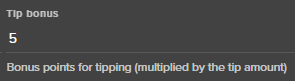
Confused by the multiplied tip thing
because this doesn't look like/say anything about multiplied https://i.imgur.com/061AKMc.png
 desert briar
Gotcha, makes more sense. Thank you
lament blade
No problem c: have a good day
desert briar
You too!
lament blade
❤️
desert briar
I'm trying to export my streamlabs points to SE, but their support won't answer my on how to do that. Any suggestions on where to look?
gentle imp
hi @desert briar and welcome
go to your StreamElements account page, you will see an import option
tight harness
coral lava
These are he only options I have
desert briar
thanks!
coral lava
@tight harness any idea?
desert briar
@tight harness followed those steps, didn't seem to work
The top points in SL currency is like 6k+ and not this person https://i.imgur.com/DoSImdK.png
 gentle imp
!pointscsv
 nocturne pelicanBOT
To import points in a CSV, use https://filter.dj/CSVtoStreamElements.html . Note that the format required is Name,Points. You can find your JWT and Account ID on this page https://streamelements.com/dashboard/account/information
gentle imp
can you check if that helps @desert briar ?
desert briar
will try
clever mango
@coral lava I'm pretty sure even VLC will convert to WEBM or you can check this out http://www.fnordware.com/WebM/
desert briar
well that's because streamlabs isn't giving me the correct values I guess @gentle imp
nothing I can do about that, as they won't respond to me
¯_(ツ)_/¯
clever mango
@coral lava Forgive me, I'm coming into the conversation late. What format are your videos in now?
Or where are these files coming from?
coral lava
I’m rendering them in after effects and i only have these settings
None really work but avi esp with transparency
clever mango
render as avi
There are a few ways to convert avi to webm
you can open your file in a program such as VLC and convert to webm
you can use a free web-based converter
or if you have premiere pro you can open it there and convert using the plugin I linked above
that plugin also works in adobe media encoder
coral lava
didnt show up in ame
clever mango
did you install this plugin? http://www.fnordware.com/WebM/
clever mango
what settings are you currently using?
clever mango
A screenshot of the export window is enough
clever mango
I'll need the window before beginning encoding
this one will likely have the background
coral lava
i gotta redo everything
wish u guys would just allow these files where i dont need to do hoops to get it to work
clever mango
If you want to send me the original avi I'll get it converted and give you the steps to do it
I don't know the reasoning behind webm only. I'll ask
clever mango
Hey Xage sure
gentle imp
so I'm guessing the csv is badly configured when u open it @desert briar ?
round flicker
is there a way i can be added to the #402919550066229250 section
like for my re runs and such
desert briar
so in SL chatbot I see this with 19 more pages https://i.imgur.com/XAt3TpL.png

after exporting the document says this https://i.imgur.com/fndNcx8.png
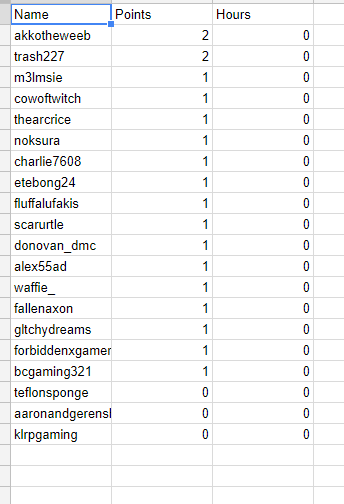
Their stuff has to be broken
desert briar
names, points, hours
same as their currency tab
gentle imp
😦
desert briar
Might just manually enter the highest ones and then just give everyone else 1k points to say sorry for not being able to transfer stuff
gentle imp
yeah, that's what I would do
clever mango
@round flicker I've added you but I don't believe it announces re-runs
I think it's only actual live streams
round flicker
thank u
 dense laurel
Does SE support TTS in alerts?
stuck hamlet
yes
dense jackal
Yup 😄
 dense laurel
alert box settings
dense jackal

dense laurel
thanks for the help 😃
stuck hamlet

desert briar
@gentle imp @tight harness @dense jackal for future support on exporting points: https://i.imgur.com/1t8cTDM.png

sad
desert briar
mhm
tight harness
I thought you meant from Ankhbot / SL Chat Bot 😄
desert briar
I did mean that, I assumed they would effectivly be able to link the two. Guess not 🙄
tight harness
Ohh, yeah, they don't let you do that afaik
dense laurel
ok sub tests good for TTS in editor. Tips dont put up text. How do I test tips?
desert briar
Well you can, that's why I assumed it would work. Hence why I see thousands of points in the chatbot, but only a few points got exported
It just doesn't work well I guess
dense laurel
sure @tight harness
tight harness
Right, I see a problem
dense laurel
ok so did you add the text or use the test buttons?
tight harness
I used the test button
The problem I see is that the donation text is out of sight because the alert box is too small, but it's still reading it out
Is that intentional?
 carmine abyss
hey team, are you guys finding there is a delay with notifications? I had delays tonight with both donations and subs and resubs especially with TTS
dense laurel
no I wanted the smaller box. I guess I will have to enlarge it
must be on my end. I dont get TTS on cheers
tight harness
Yep, especially the variations 😃
dense jackal
@carmine abyss Is it suddenly really long?
carmine abyss
@dense jackal It just happened tonight.
dense jackal
I'm not sure why there would be a big delay 🤔 did you change anything big recently with your twitch or SE?
carmine abyss
@dense jackal Nothing has been changed in awhile. Its even weirder the notifications appear with a slight delay but the TTS will take ~2 mins to start after say a donation notification has played
stuck hamlet
Angry, i dont think i ever answered you about more space, we will have more in the coming future
carmine abyss
@stuck hamlet Yeah I know every time i came to see if you were here i would of just missed you. It was due to the time difference like its 4:!5am for me at the moment
stuck hamlet
damn aussies Kappa
carmine abyss
LUL dont judge us becasue we have dollary doos
dense laurel
No TTS for follows hosts and raids?
carmine abyss
They dont have TTS options within twitch so they dont need it
dense laurel
ah ok so custom video for there
carmine abyss
yeah exactly thats when you need to be creative
dense laurel
I got me a plan for doing that. Iwas hoping to trim some extra work LOL
carmine abyss
But team has there been any other reports on delays for notfications lately? or is this just me having another issue lol
gentle imp
ty @desert briar
nocturne pelicanBOT
Please refrain from using [at]everyone or [at]here
 visual delta
I can't at se. anything though so how do I get a bit of attention
visual delta
Ahh I have the store set up and it's great but I don't know how to get it to play a sound on my stream
I set up a mp3 in it
dense jackal
you have to type !redeem item
visual delta
so if they redeem it from the store it wont work?
dense jackal
I'm not sure I understand what you mean 🤔
for example if you setup a sound named "meme"
!redeem meme
would play the sound
visual delta
well I have like in game things set up
dense laurel
anyway to call it without having to use teh redeem command so like just !meme?
visual delta
but I want it to play a sound when one is purchased so I knows its purchased
lament blade
Is it as a stream perk? 😄
tight harness
Yes, you add a command with the response ${redeem <item name here>}
lament blade
And did you add it on your overlay?
gentle imp
make sure you have the store redemptions widget on overlay
visual delta
how do I add it to an overlay?
dense laurel
ah ok
visual delta
I have stream element alerts but I just imported from stream labs
dense jackal
you have to add the store redemption widget
dense jackal
The way SE works is your alertbox and recent follower and everything will basically all be on one overlay
and you can have multiple overlays for different games or scenes
but each overlay will be one link for your obs
visual delta
okay I will see if I can get that to work thank you for the help
tight harness
visual delta
awesome it works
coral lava
idk what your artists do to get your special overlays up but this is pissing me off i have to do this converting crap (which doesnt work) and the fact i can only use 100mb doesnt help either
visual delta
thank you 😄
tight harness
No problem 😃
dense laurel
ok so say I wanted something to play by just a simple command I would use !meme ${redeem meme} ?
dense jackal
I don't know enough about graphic design unfortunately there may be some more helpful videos on youtube 😄
dense laurel
or just ${redeem meme}
tight harness
Exactly, although replace meme with whatever the item name is you're wanting to trigger 😃
It'll still show the redemption confirmation in chat
dense laurel
so the 2nd one. Great Thanks! one more question - Is there a limit to the number of commands one can have?
lament blade
Don't believe so O_O
 lament blade
Don't know what happens when you have 9mil commands though 
dense laurel
thanks again I know about store storage limits just not the amount of store itmes max
lament blade
😄
tight harness
All good 😃
coral lava
you guys cant talk to the ppl who make your overlays to help me?
lament blade
What you mean by that? o.o help you with what
coral lava
getiing my 8 second video on your site so i can use it as an alert with transparency
but im guessing they dont have a 100mb cap
dense jackal
Their job is to make overlays, I can't really even contact them
coral lava
awesome
dense jackal
everyone has 100mb cap
coral lava
clearly not the ppl making yor overlays
cant make an overlay that big with that many moving parts under 100mb
its w/e
dense jackal
He's saying it's not counted towards the 100mb we give users
and that it cannot be reproduced with less than 100mb
lament blade
That's not the format
slim cairn
It said .xmp
lament blade
slim cairn
Ah I understand sorry
lament blade
coral lava
idc it uploaded to your site
stuck hamlet
 coral lava
renedered it through adobe media encoder as a webm but i guess it told me to screw myself and did what it wanted
kinda like what im getting here lol
 neat hinge
how can i setup a weekly givaway so everyday eatch person can only get one tickit?
 brave steeple
hello again, I have trouble with the SongRequest. a friend did the !sr +YTlink but the bot says that the link wasn't valid.
dense jackal
@neat hinge one giveaway that lasts a week? or 7 seperate giveaways?
lament blade
You can set a maximum tickets per user @neat hinge So they can have a limit of how many tickets they can have 😄
slim cairn
@neat hinge Are you my brother?
tight harness
Probably
stuck hamlet
Why not render it as a Webm right out of AE? @coral lava (Sorry i just got here, trying to understand the situation)
neat hinge
giveaway that lasts a week i want eatch person to beabel to enter everday 1 time
tight harness
That's not a thing currently
coral lava
@stuck hamlet it does not support that
slim cairn
We can still get a blood test @neat hinge
neat hinge
any idas how i can do it ?
coral lava
i had to download a plug in for the encoder to even do it
slim cairn
You can't do that megilino
dense jackal
@neat hinge we can't do one free ticket everyday, only one free ticket per giveaway unfortunately
 ripe herald
@coral lava with that plugin you can export from AE also
coral lava
@neat hinge give everyone who comes into the stream the points for a ticket
@ripe herald
neat hinge
wont i have to rest the givaway everday tho to do it the way i wnat
ripe herald
and then render as webm
coral lava
That one? @ripe herald
brave steeple
I can't get the songrequest right, I can do it do SR, but friends/watchers can't.
coral lava
do u do a giveaway every day?
neat hinge
i wnat a week long giveaway for a strem card everday eatch person can enter one time all be doing this for about 4 weeks if i can get it to work right
tight harness
@brave steeple What did you set the required level to?
coral lava
if everyone can enter one time just do first one for free?
brave steeple
I followed the tutorial, and have everything set up except the paid promo.
neat hinge
dont i have to reset it everday then?
coral lava
no why would u?
if the give away doesnt end till the end of the month nothing else to do
neat hinge
ya ok maybe im thinking of this wrong sorry 🤔
tight harness
@brave steeple Your settings seem fine, I just checked them myself
neat hinge
no that wont work the way i want lame
coral lava
not getting what u are wanting to do man., u said u only want everyone to be able to have 1 ticket yet u want to give them one everyday?
ripe herald
@coral lava yeah and then if you add that plugin in encoder just render as webm
neat hinge
ya if i put max too 7 thay can enter all 7 in one day witch is not what i wnat
lament blade
You could make a limit of 7 tickets per user @neat hinge
But you can't set a daily limit
neat hinge
my gaming team want me to avrag x amout of ppl everday soi can get other free things to givaway so if ppl enter alll 7 in one day mess it up that up
weary mist
How long do you stream per day? @neat hinge
neat hinge
6-7 hr
lament blade
then you can set the limit to 1 and make a new giveaway everyday
coral lava
hmmmmm seems like not the right way to get viewers
weary mist
@neat hinge set the ticket price to 5 hours watch tine
Then people still have a chance for all 7 tickets, but they have to keep coming back to get more
lament blade
 Scalper
neat hinge
@coral lava is how the average viewers work i get the right # of ppl ever day comein over the cores of 5 hr is dose not work as an average
brave steeple
is it maybe possible that bot doesn't take links because I have link protection?
neat hinge
ok all ty @weary mist all ttry that
lament blade
If you go here: https://www.twitch.tv/settings/channel is "delete links in chat" ticked? @brave steeple
tight harness
@brave steeple If the links are being removed then yes
brave steeple
@lament blade, it was ticked 😃 hope its fixed
lament blade
i'll try again
neat hinge
how do you ticket price to 5 hours watch time?
lament blade
brave steeple
thank you 😃
lament blade
No problem
tight harness
lament blade
@neat hinge You have to go on your loyalty settings and see how many points you want them to earn in 5 hours https://streamelements.com/dashboard/loyalty
And make that the ticket price
weary mist
@neat hinge take the points you give per 10 minutes, and multiply by 30
 lost ridge
When i first set up SE i set up some quotes, but now i can't remember how i did it and i would like to change a few, any ideas?
weary mist
!quotes add/remove
lost ridge
cool, is there a way of seeing them on the dashboard or changing the command?
weary mist
@lost ridge not at this time
Though getting them onto the dashboard is something we have been pushing for, it just isn't top priority
lost ridge
ok, cheers @weary mist
weary mist
 analog topaz
what is the overlay creator?
weary mist
@analog topaz you can access it by going to My Overlays, then creating a new overlay, or clicking the larger pencil on any existing ones
weary mist
It helps you build your overlay to what you want it to be. You can add images, text, images, and a bunch of other widgets. The best thing is to check out the themes gallary for examples
All the themes are created in the editor, and you can open them there and change them as you please
analog topaz
so it says overlay name and overlay game, what would i put htose as and when i do, do that what pops up?
like in the stream
tight harness
Overlay name is for your reference so you remember what overlay that is for, overlay game is just for the thumbnail picture as serves the same purpose
analog topaz
ok
tight harness
coral lava
had to redo obs AGAIN and my cup in the editor fills up but the cup in obs doesn not
 pine hemlock
does clearing the cache of the browser source fix it
lament blade
Right click the browser source ----> properties ------> Refresh cache of current page ^
coral lava
didnt fix it
pine hemlock
Do you have the editor open at the same time?
coral lava
no
desert briar
with the chatbot, does whitelisting a domain work, or is it only specific links?
Like, can I just put https://clips.twitch.tv and all clip links will be good?
lament blade
Yep 😄
desert briar
Awesome, thanks!
lament blade
Make sure on your account settings, that "remove links" is not ticked, because if so, twitch will delete it
@desert briar https://www.twitch.tv/settings/channel
desert briar
👍
 silver patio
I need support regarding a donation issue. Is anybody available
lament blade
Yep, what is going on? @silver patio
lament blade
here is fine 😄
silver patio
So to try to sum it up:
I got a donation war between 2 viewers a few days back. One of the guys who tried taking the #1 position lost heavily. After that he started to say that he used his last money for rent to donate with and he wont afford food for the month, then he said he lied and said that he used his dads money without permission and that his dad have to work extra hours to afford food to his family ( the dono was 58$t total). I was already sure that he was lying to get the money back because he lost the dono war and had second thoughts about donationg and just wanted the money back.
After that I said that he could get his dad to contact me and explain the situation and i would hapilly give them back. He said that his dad didnt want to give his number to strangers(lie again).
Didnt work and he tried the depression card and said that he has been home from school for days because he has been feeling bad and i stated once again that his dad could just contact me about it and i would happily solve it. And last he said that he will kill himself because he is depressed.
it ended with this following message: (Give the money back or i'll take em back myself).
Said and done, I got 7 chargeback letters from PayPal, and since the dono's trough SE is done as "buy for service" I only have 3 options to solve the chargeback. He claims in the chargeback that his account was used by someone else (unotherised access) But I have prints of everything.
These are the 3 options to the chargeback:
- I have delivered the oject and can prove that it has been delivered with a valid transportation certificat
- I havent delivered the object and will pay the money back:
- I have sent a refund.
I want to explain the situation and show the proof that he is just lying to get the money back but since its not sent as a donate on paypal i cant choose that.
Should I just pick #1 and explain the situation with all prints & proof?
lament blade
That's a complicated case, If you want to dispute it and not refund then the option is indeed #1, but i can't really say what you should do, that is up to you. I can say that the exact same happened to me before, i disputed it and lost, and got charged with fees, but paypal after that waived them for me. But i also know people who disputed it and won. I also know people who lost and didn't get the fees covered. It is really complicated :x It's 100% up to paypal
tight harness
Your best bet is to call PayPal and explain to their fraud department that the person is committing fraud by claiming they didn't make the payment
silver patio
I mean, we are speaking about 58$ total, So the fee's if the chargeback is approved wont be much so i dont really care.
 bleak abyss
Got around 8 dollars in donations, went straigh to paypal, and only got 6. It said it was a 67 cent donation for 1 dollar
silver patio
I dont want this guy to get a refund because he is an asshole.
lament blade
My fees were 20 dollars per donation so $140 dollars only in fees
ripe herald
yeah it's 20$
lament blade
Because he used a credit card and that's the feed the credit card company charges Paypal
silver patio
I can risk 140$ on it. I have proof of everything.
lament blade
Even if it's $1 donations, $20 fee
silver patio
He littirary tried every lie in the book
tight harness
@bleak abyss Talk to PayPal about that please, the donation goes directly through them, we don't handle payments
silver patio
Any reason you use "pay for services" on donations and not actual donations?
he wouldnt have been able to chargeback it if it was sent as family & friends?
lament blade
Donations/online goods are not in the seller's protection so your best bet is doing what @tight harness
silver patio
Roger that
tight harness
If you call them, ask specifically to speak to their fraud department, then explain to them that the person is wrongfully making these claims, they won't side with somebody committing fraud, especially if you can prove it. Had this happen several times and won every time
silver patio
I can absolutely prove it. I have print screens of all the conversion, the actual donations and everything.
tight harness
Exactly
silver patio
We'll see, thanks for the quick answer.
tight harness
No problem
lament blade
Good luck 😄
 native horizon
Hello, I have the new VIOLET MOMENTUM STATIC SUPER THEME built in and when I do a test donation, it shows the donations double and moving the image
 stuck totem
Hi! so i just noticed something in OBS wich i didnt noticed before, my scrolling text on latest follower and tip is not smoth at all anymore:/ I noticed it while doing a recording and playing witcher 3, any tip on how to get rid of this? cuz i guess it will be the same problem when im live right ? cheers
tight harness
Didn't change anything to do with your FPS? @stuck totem
stuck totem
no, nothing :/ i even tried to set it on 30, still the same.
tight harness
Do you know how to make GIFs? that'd be useful to see how you mean
stuck totem
oh, never done that tbh :P^^
its fine when i alt+tab, but as soon as i enterthe game, the text starts "lagging"
pine hemlock
Sounds like too many resources are being used
Scrolling text has an impact on performance
stuck totem
would it be wize to change it to just the text then ?
pine hemlock
At least, in related to to obs
stuck totem
no scrolling involved
pine hemlock
Yeah static would be better if you're experiencing non smooth scrolling
stuck totem
it's just wierd, it has been ok for over a week..but alright, i guess ill do the normal text for now 😛 Thanks:)
pine hemlock
It could just be the game.
stuck totem
yea, i guess it could be. ill try another game and come back if it works out 😛
tight harness
stuck totem
a re-boot solved it it seems^^
pine hemlock
That's good
stuck totem
let's just hope it doesnt happend during stream, i only have 1 pc 😛
coral lava
cup still hasent filled
desert briar
Is there a way to make a store redemption read something via TTS?
Basically I want a TTS redemption
winter zenith
not yet but its on the Ideas Board
desert briar
Cool, thanks
winter zenith
If you give it a upvote it shows the demand and will more likly happen
wait I search for the link
lament blade
is there a way to show the months someone has subbed in the recent sub section ?
tight harness
Yes, you add the variable {amount}
 cloud niche
is there a way to customize the Song request - song added command? or at least shorten it up a little?
cloud niche
oh sorry i mean like the message the bot gives when a song is requested
user added - song song name to the queue at # playing in a few
that message
lament blade
Not currently, but it's planned on the idea's board https://streamelements.helprace.com/i191-allow-more-customization-to-default-commands 😄
cloud niche
ty ty
lament blade
Hey i changed my Twitch name today, from 123Razzer123 to PzyhoGaming, and i cannot setup my Donation Settings (It is completely gone on the left hand sideo fthe screeen, as a choice. What do i do now?
Log out of the website and log back in 😄
It didn't work, atleast my Donate button is completely different when i click it now, takes me directly to PayPal instead of w/e it was before where you could type in a message that should appear on the screen when it arrive :/
That's odd, you are linking your tipping page?
You have to link your tipping page to the panel 
Oh i was just following the guide <.<
winter zenith
@lament blade try to log out and in again
lament blade
Out of Streamlabs or Twitch?
tight harness
That's the wrong service
lament blade
We are StreamElements, not StreamLabs
winter zenith
uhm This is StreamElements
lament blade
yeah my bad, i keep mixing the two, you know what i mean xD
I meant StreamElements xD
To use our tipping service, you only need to prove your paypal email and then link the page i sent you to your panels, it's really simple 😄
winter zenith
^
lament blade
Can you try and click my Donate button now and see if it works? 😮
No need to create weird paypal donate buttons
I guess im "Old school" lol xD
Yep, now it takes me to your tipping page
Did you put your paypal email adress on the tipping settings?
Think i did, let me check, btw is there a way to change that grey picture with the question mark in it by any chance to something custom? https://gyazo.com/dd45eb1b51007e4c72346f87494ccc78 Sorry for posting the link if it's against the rules here, just joined the discord :<


Of course, that is the default profile picture, you can upload your own
winter zenith
Just go to ypurStreamelements profil page
lament blade
Do i change the currency to what people donate or just the one from my country?
winter zenith
and change the Avatar from there
lament blade
Up to you
tight harness
People normally set it to the currency of their country, but as Alice says it's up to you 😃
lament blade
Hmm aight i'll just change it to my own currency then xD
tight harness
winter zenith
on the left side
winter zenith
^
lament blade
There got it, thank you so much and sorry for the waterfall of questions xD
lament blade
Yay! Have a nice day
tight harness
"We love us some waterfalls"
winter zenith

tight harness
Huh? 
lament blade
How can you not like water falls 
tight harness
They're nice, but cute? Nah
lament blade
TAKE THAT BACK, YES THEY ARE CUTE 
winter zenith
THEY ARE SO CUTE
tight harness
lament blade
@winter zenith SHOW HIM DA WAE
lament blade
I didn't expect the bot to reply LOOOOOOOOOOOO\OOL brb dying
dense jackal
thank god someone finally did it
lament blade

tight harness
lament blade

winter zenith
Look at that and tell me its not cute
tight harness
Why is this in support? D:
winter zenith
OOPS my bad sorry...
tight harness
Move it to #general-chat 😄
lament blade
 What are your thoughts on water falls now? @tight harness
 vestal crater
is it normal for your virus scanner to pick up "ground control" as a malware?
lament blade
Yes, it's a false positive
tight harness
False positive, it happens sometimes, it's because Microsoft hasn't registered it as safe yet
lament blade
Have a nice day
weary mist
@vestal crater it is marked that way because of a secret feature we have been testing out ;)
weary mist
Haha, yehh
vestal crater
can't re-install or find it
weary mist
It probably quarantined/deleted it
weary mist
I would suggest redownloading, just in case
vestal crater
tried it :/ going through trouble shooting process atm
gonna go into my appdata to figure it out..
winter zenith
@celest ivy Whats up your donations arent displayed on your activity feed?
or doese the Alertbox not work?
 celest ivy
No I had to manully input it
vestal crater
yea nothing is working i might have to try again tomorrow when i restart my comptuer... literally nothing is working and it's weird o_O
celest ivy
I didn't see it in the alertbox
celest ivy
fatcatmcnasty
winter zenith
Oh
celest ivy
I'm not live atm
lament blade
Would never have guessed
celest ivy
lol
winter zenith
tight harness
You don't have your StreamElements tipping link
winter zenith
Uhm...
tight harness
You have a direct link to PayPal instead
lament blade
@vestal crater Hopefully tomorrow it will work 😄
winter zenith
your tipping isnt going through stream elements
celest ivy
Yes is that why???
tight harness
Yes
winter zenith
yeah what @tight harness said
vestal crater
@lament blade thanks
celest ivy
OK so I need to.......
lament blade
Yes, you need to put the link to your tipping page, which would be
winter zenith
go to your stream Elements dashboard
celest ivy
ok
winter zenith
on the left you see tipping page
celest ivy
yes
celest ivy
ok dang you guys are awesome
winter zenith
no problem dude ❤
lament blade
or just copy paste this if you are lazy https://streamelements.com/tip/fatcatmcnasty this @viscid cargo
celest ivy
Thank you so much
dense jackal
winter zenith
Here to help
celest ivy
lmfao Kiwa I love you already
winter zenith
HAHA
dense jackal
i keep telling people
winter zenith
I love you too man ❤
dense jackal
kiwa op
celest ivy
you stream kiwa???
winter zenith
sure