#helpdesk-twitch
1 messages · Page 206 of 1
 split jewel
 weary mist
yeah. the api returns the time, you add what ever you want around it
so I have mine as "Stream uptime:"
split jewel
Great that's what I wanted to know~
 tight harness
Probably don't need the %7D
weary mist
lol, thats just discord converting a character
tight harness
Ohh 😄
tight harness
Silly Discord 
split jewel
would not have been able to find that on my own
tight harness

 strange pagoda
For some reason, Raids don't pop up in my event list, nor on the alert, but they trigger the cup and KappaGen
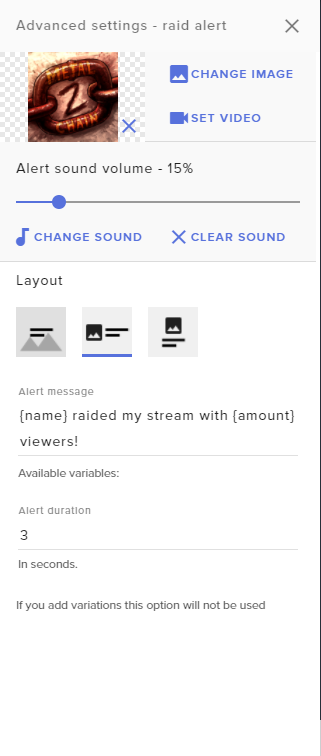
No variations, either
I think that instance of the alertbox was just bugged, delete and replace and it worked fine, just gotta tweak the minimal customizations I did again 😛 Mind you I should have tried duping instead
 pine hemlock
There was a point where it was bugged and had to be readded but I haven't heard of it recently
Let us know if you run into it again
 lament blade
Glad to hear it works now
strange pagoda
Ah, yeah, would make sense when raids were a new thing, I haven't fiddled with the overlay since before then, but I fixed it, I'm so smart  Sorry for the time waste 😂
lament blade
ahha you are fine We are here to help
lament blade
thank you @tight harness ur the best
tight harness
No problem
strange pagoda
In the tip alert, do they get converted to the streamer's currency, or stay in the originally donated currency?
 dense jackal
streamers currency I believe
strange pagoda
Okay, that simplifies that, would have asked after if the minimum amount would be in that currency or just be that amount of THEIR currency 
dense jackal
it’s all in whatever currency the streamer chooses
tight harness
⤴ better to keep it like this for simplicity 😄
 lofty stone
Hey.. I'm trying to make a substitute command for an already existing command, is it possible to do this? Like can/how would I make the "!shave" command do "!roulette all" (but still keep the !roulette command)
tight harness
@lofty stone You can go to Chat Commands > Default Commands, click on the pencil by !roulette, add an alias for what you want to be an alternative trigger for it 😃
For example, !gamble is already an alias for !roulette
lofty stone
But like, is there any way for just !shave by itself to do !roulette all
tight harness
No
Whatever you add as an alias you'll still require either an amount of points or all after it
tight harness
No problem
 somber chasm
Could anyone help me with getting my overlays and game play working together on OBS? I already have my scene and overlay source.. Just confused on how to do the "game capture" and overlay together.. Also im on Xbox One.. No facecam needed just game play. Thanks🍻
I've watched all the vids and i just get so confused when switching between the different tutorials
 naive topaz
Hello, I have what I hope is a quick question: I'm trying to put the Subscriber Goals on my overlay and it's reporting my number as nearly 4 times the number of actual subscribers I have. How do I make it refresh so it has the correct number?
tight harness
@somber chasm You need the overlay source higher in the sources list than the game source so it shows in front of the game and the game shows through the transparent elements of the overlay
dense jackal
You can go into data in your overlay editor to change the number to the correct one
@naive topaz
somber chasm
Ok so have overlay as #1 source @tight harness ??
tight harness
Yes absolutely
somber chasm
Then do a "game capture" below. Got it thank u so much!!!
tight harness
That's it 😃 yup, no problem
naive topaz
@dense jackal I tried that but the Subscriber Goals number does not aggregate correctly. Only the total subscriber number is correct?
 shadow hawk
Hello
somber chasm
1 more.. Any advice on running OBS with the xbox app on windows 10? Im confused on how to stream to twitch while also using the xbox app to stream
dense jackal
@vanilla#1337 whatsup 😄
shadow hawk
is there a list somewhere of where I can see all the fonts available? It's kinda time-consuming for me to check every one of them ;_;
tight harness
@naive topaz How it works currently is that the Subscriber Goal is meant for short-term goals such as per stream, the Total Subscriber widget however does sync with Twitch so you can add for example "/50" after the variable to make it into a Total Subscriber goal opposed to a short-term goal
somber chasm
Or maybe point me in the direction on where to find help for that🍻
dense jackal
@somber chasm I have no idea how to run obs on xbox one. here @vanilla#1337 is the list of all the fonts https://fonts.google.com/

may want to look into getting a capture card
shadow hawk
Thanks ❤
naive topaz
@tight harness Ah, I see. But then you lose the nice background gradient. Damn.
somber chasm
Yea that's what ive been reading. My PC isnt really great. Just started streaming recently. Thank u tho @dense jackal
tight harness
@naive topaz Yeah, they just have different uses so they have different styles, but I understand
dense jackal
You can still use streamelements for bot and tipping! donations can be posted in chat
pine hemlock

 tiny glacier
Hello! I could use some help from someone who's knowledge is bigger than mine when it comes to SLOBS!
tight harness
They have their own Discord for support with it, that would be a great place to start
tiny glacier
Haha this is the link the "support-chat" gave me on their website xD
tight harness
Wow 
dense jackal
LMAO
tiny glacier
My point too.. Well well, thanks for showing interest atleast! Big love! ❤
tight harness
 clever mango
pine hemlock
clever mango
pine hemlock
Lol
 winter zenith
 small skiff
Hey all, a little confused and I am not sure if this is StreamElements or Twitch.. I have !songrequest active and while yes I can & my mods can use it.. When a normal viewers uses the command it deletes the link
I disabled the link delete in my twitch, but still happening
Also when they type !songrequest
the bot does not reply to them
settings say everyone
lament blade
If you disabled it on twitch, then maybe check your settings here? https://streamelements.com/dashboard/bot/filters
"link protection"
lament blade
You are using nightbot on your channel, can nightbot delete the links maybe?
weary mist
what commands?
weary mist
oh, it will always reply to me for that. I am bot admin
small skiff
ugh lmao
lament blade
i'll try
tight harness
Also can't help test as also a bot admin 
small skiff
nope
weary mist
puzzle solved
lament blade

small skiff
weary mist
pine hemlock
tight harness
winter zenith
 faint frigate
Hey all, was wondering if anyone can help me with an overlay problem? My overlay follower goal widget starts at my follower goal of 50 and then every follower gets added onto the 50 (going over the 50/50 i.e. 56/50)
tight harness
So you go into the overlay manager, click on the widget and change the number it goes up to in the "Set a goal" section on the left @faint frigate
dense jackal
MOAR SE HEART
 faint frigate
Yeah I've tried and reset the widget and reset it to 50 and then resaved it but it still seems to be starting at 50/50
 tight harness
Is that what you mean? The progress? 😄
Because I told you how to change the end goal
 mortal pollen
does streamelements have a queue system?
winter zenith
for donation/songrequests/events ? what do you search for my dear
mortal pollen
I need a queue system for viewers to join me in multiplayer games 😃
mortal pollen
Ohh, alright
 acoustic totem
So I had to fix my recent followers widged and now it wont sit on top of the background. Did something change and I am totally missing how to put text over the top of an image? Help please. 
 boreal meadow
hello
winter zenith
@BucketOfSunshine#4719 did you check the layers of the Overlay editor?
if your text is over the layer with your overlay?
and Hello @boreal meadow
boreal meadow
just switched from streamlabs to this lol im a little confused on how the overlay editor works
acoustic totem
I was looking in there but didn't see the text box layer, but I will go look again. ty @winter zenith !
winter zenith
let me now If you find it and if not if you need anything else @BucketOfSunshine#4719
@boreal meadow awesome glad you came to the best Service I ever used streaming
did you check out the cool tutorials on the Youtube channel?
There is an awesome guide about the really cool and easy to use Overlay Manager

Create an amazing overlay with StreamElements, watch our video guide to learn how. ----- Tipping page setup: https://youtu.be/eLzxRkq7tJo Add KappaGen to you...
 celest pine
can anyone give me some quick help with my overlay? it wasnt connecting to chat and also my follower notifications werent showing up either. i could be an idiot but i cant find where to fix it
lament blade
You have the alertbox on the overlay?
When you test alerts, only the follow alerts are not displayed? @celest pine
celest pine
@lament blade when i emulat eit in the editor it seems to work i just realized that i recently changed my twitch name and streamelements didnt switch the account name yet maybe that was the reason?
lament blade
You have to log out and back in on the website 😄
boreal meadow
ill check it out @winter zenith
 novel apex
anyone know if you can test alerts with stream elements?
novel apex
Sorry haha but thank you! also can boom tv replays work with stream elements?
tight harness
Probably, it's not really anything to do with us, works completely separately to my knowledge 😛
 slim cairn
Is this the longest this chat has gone without anyone asking for support
 hoary cove
Hello! Ever since I started using one of the overlays on my OBS my game started crashing and giving me my stream ID when it does. Not sure why this is happening. (overwatch)
lament blade
Stream ID?
lament blade
Wait, so ever since you started using our overlays, while you are streaming, your OBS started crashing and your stream key got displayed as an error or something? 
hoary cove
It will crash Overwatch and say Blizzard Error and the code is my stream key
dense jackal
are you using obs studio?
hoary cove
yes I am
which from all the tutorial videos threw me off everyones OBS is grey and mine is white>
not sure if that matters
if I have an older version
 robust flame
@here i am having issues getting the bot to connect to my stream chat? if anyone can help me i would greatly appreciate that
 nocturne pelicanBOT
Please refrain from using [at]everyone or [at]here
dense jackal
nah that's just a theme, but blizzard has no way to get your access key
you can try to reinstall @hoary cove https://obsproject.com/
or make sure it is the correct one
lament blade
What is going on? @robust flame
hoary cove
maybe its the theme?
robust flame
@lament blade i click join channel and it doesnt
lament blade
On your dashboard? https://streamelements.com/dashboard
robust flame
yes
dense jackal
I have no idea why it would crash your game, and there's no way blizzard can get your stream key
robust flame
yes
lament blade
You need to log out and back in on the website
dense jackal
no trouble, glad to help 😃
 lament blade
@bright nexus 

 bright nexus
😛
lament blade
Are you using chrome? O_O
bright nexus
he is
bright nexus
^
dense jackal
It seems to be because of your recent name change, try refreshing the cache on your browser
dense jackal
It is working for me at the moment
lament blade
And then he never comes back ~
dense jackal

lament blade

dense jackal
This kind of thing usually happens during a name change it takes time to reset all the api calls, it should be fixed by relogging and refreshing/deleting cache
if for some reason it still isn't working we will look more into this issue
robust flame
i ctrl + f5'd
nothing
having troubling finding the google setting to clear cookie and cache
lament blade
robust flame
no this was over 30 days ago i believe
full flush of chrome
still unable to join

dense jackal
You said you changed your name 30 days ago, are you just joining SE now?
robust flame
i tried joining before but was overwhelmed, thankfully today i was finally fed up with slabs and my buddy @bright nexus came to my aid
dense jackal
 @bright nexus
bright nexus
yeah ive been trying to get everything going for him but the bot not joining the channel seems to be the only issue we are having
dense jackal
I have never seen this issue, and it is working correctly for my bot, do you mind sending me a full control link https://streamelements.com/dashboard/account/channels so I can check it out?
robust flame
sure
dense jackal
Is it possible an older bot is stopping it from joining?
dense jackal
I'm assuming you imported loyalty points?
robust flame
no the file from streamlabs has changed to an encoded file
bright nexus
i mentioned that to shadowboxer the other day
robust flame
its a non issue, we are starting fresh
dense jackal
you have loyalty points in the leaderboard is why
robust flame
could you clear them?
dense jackal
cleared
dense jackal
First things first, I'm sending this issue to the devs, because I haven't seen it, and want to make sure it gets taken care of
robust flame
i appreciate that
bright nexus

dense jackal
Alright, I have looked just about everywhere here. I really appreciate your guys' paitence, I'll make sure our guys see this and get it fixed. My guess would be wait a day, if it doesnt work come back here and I will give you an update
robust flame
awesome
bright nexus
thanks
dense jackal
you guys are the real MVP's
dense jackal
as a streamer myself, I know you can't be waiting on support all day if u wanna get famous 😉
 stone spire
Has there been any development on plain text song requests?
As in just keeping a list, not it searching youtube
dense jackal
!sr (youtube URL) adds it to the queue
I guess I'm confused on what you're asking my apologies
stone spire
Like I want !sr song - artsist
but just add that to a list
so I can read it. It's for a DJ stream, so I'll be playing the tracks myself
dense jackal
oh! almost like our quote system 😄
bright nexus
@dense jackal could you do me a favor
dense jackal
whatsup
bright nexus
@dense jackal i imported my tips from streamlabs 5 times and then i tried to clear them out myself but it still shows on my leaderboard which makes it now unusable
-.-
dense jackal
Do you want to clear it?
bright nexus
yes
dense jackal
You tried to clear them here https://streamelements.com/dashboard/tipping/list correct?
bright nexus
i tried everything avaible
i couldnt get it to clear completely without still showing on the leaderboard
i literally went through 1 by one and cleared them
and it didnt take
dense jackal
But they still show on the top tipper list? try going here https://streamelements.com/dashboard/tipping/leaderboard disabling and relogging then enabling
@stone spire that is basically our quote system and you can rename it or make your own here https://streamelements.com/dashboard/bot/commands/default
stone spire
the !quote add/remove?
dense jackal
yes you can add aliases or make a new command
say !sr but just make sure you disable the other songrequest command xD
dense jackal
alias would be 'req'
stone spire
okay, and then usage would be?
dense jackal
!req
just make sure you hit enter after typing 'req' then save
that will save it as an alias
bright nexus
@dense jackal that seemed to work but it still shows the previous dadta i shoved into it from slabs
dense jackal
dense jackal
it's not a perfect system @stone spire i would suggest just having people sr videos
unfortunately not
stone spire
okay how about this
dense jackal
but I believe it is on our ideas page
stone spire
If I make a custom command, that whispers me the request
is there a way to append a number to it
like a counter variable
I mean the timestamp would probably be sufficient
dense jackal
There is a counter variable $[count] and $[getcount] I'm trying to find an example if we have one
 marsh niche
is there a way to do a shoutout command that uses multiple variables? like i currently have one that is triggered by !so {$1}, and i know i can use {$2} (etc), but i'd have to use exactly 2 variables every time. is there another way to do this?
dense jackal
testing something @marsh niche
marsh niche
ty
 coarse relic
can i get some help in voice support 1
lament blade
@coarse relic does it have to be on voice?
stone spire
So @dense jackal any idea how I'd go about it?
coarse relic
Well basically in a nutshell if i play anygame i get 200 fps and then when i try to stream it starts studdering for me and the stream looks great
dense jackal
@stone spire first let me ask, do you have ground control?
marsh niche
ok thank you @dense jackal !
stone spire
I do yes, not using it currently though
dense jackal
you could simply use our song request feature, and they could request a song they want and you don't have to actually play the song
but it will build up a list in ground control
and you can delete the ones you have done
lament blade
@coarse relic I can join voice but i'll type instead of talk k?
lament blade
hii
are you using obs studio?
are you using our overlays or anything?
You should go to obs's discord, they will be able to help you better with this issue
uh
is it open?
on the top go on "help"
yeah then upload
Okay good luck!
You too!
stone spire
ohk @dense jackal that might work, only issue is that not all songs are on youtube
It's not that much of an issue atm, not too many people that's its un manageable to do it manually, just less chance of missing something if I have a system in place
dense jackal
we want spotify support but they denied our api requests way back
stone spire
lol
dense jackal
np ❤
stone spire
Surely that could only be good for them
dense jackal
They are stingy
stone spire
or maybe not cause it's less users
 lofty marsh
Can't seem to get my animations to work in the editor? I'm fairly new to it, but does anyone have any ideas
?
dense jackal
What type of files are they and are you using chrome?
lofty marsh
The animations just built into the editor, and yes.
dense jackal
oh I thought you meant custom animations
What do you mean can't get them to work, they aren't animating? There are two types of all super themes static and animated
lofty marsh
OK next question. Do I need to create a separate overlay for follower, subscription, and donations?
dense jackal
nope! To get those add the alertbox widget
then you can duplicate that widget to other overlays
lofty marsh
But can I have all three on the same overlay page is what I'm asking.
dense jackal
yes!
follow alert tips etc are all in the alertbox
you can check and uncheck whatever you don't want
coarse relic
That moment when OBS them selves wont awnser you lol...
dense jackal
Not everyone has 24/7 support like we do 
coarse relic
true but the support people are there and on lol
lofty marsh
Yeah it's not letting me change my sub animation. No matter what I put, it stays with the dancing shark.
 sharp garnet
i need help
dense jackal
whatsup @sharp garnet
sharp garnet
i cant get my Jwt Token to work
dense jackal
on ground control?
sharp garnet
yes
dense jackal
when you paste your code in gc it doesnt refresh it?
sharp garnet
no i cant paste it in gc and its saying that the token doesnt match
dense jackal
this token correct?
dense jackal
Awesome 😄
sharp garnet
just had music playing a soon i in put the token in
dense jackal
dope
sharp garnet
thank you @dense jackal
dense jackal
 deep gust
hello?
 atomic hollow
hello?
winter zenith
Hellooooooo~ 🎵
winter zenith
Hi haha yes I think so bc I love all too 
atomic hollow

winter zenith

But @deep gust what did you need? Just woke up and have the urge to help people again
lament blade
Question guys.. Yesterday i had my stream running and in OBS the overlay was all good and everything was showing up properly, today i went through the VOD and i noticed that the Overlay wasnt showing on stream. Any idea what could be the issue with that?
winter zenith
Wtf?! :0 I never heard of a case like that...
Did you check all the settings in obs? Is there some kind of visibility thing that states that it will not send this specific layer on stream? 🤔
lament blade
Hmm, the only thing i changed was adding a Webcam yesterday. But the Overlay sources are still there, and visible in obs
winter zenith
Also I am streaming with XSplit not OBS so I am afraid that I dont have the requiered knowledge to help you 😦
But if it showed up on OBS it also should be streamed to twitch...
lament blade
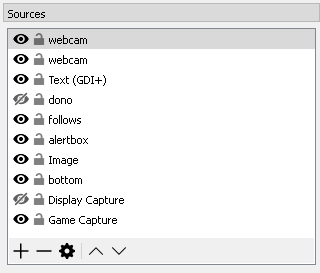
i dont know what it could be, i just started my obs and the overlay is showing , im gonna open stream to test if it shows
winter zenith
Thats many layer
So what didnt show up? The alert box or image?
Also why do you have so many diffrent things like follow and alert box? 🤔
lament blade
because its easier to move around single modules
winter zenith
You knoe you can merge all those things to one layer including the image in the Overlay manager right? 😄
Ah I see
lament blade
anyway, i just tested, stream today shows the overlay, but yesterday it didnt
and i havent changed anything 🤔
winter zenith
Hm... maybe a interesting detail for obs?
Bc I cant see how streamelements has to do anything with it, bc if the overlay showes up on your obs it should get transmited by obs
Apparently obs some how made the layer not visibale while transmitting wich... should not happen 😓
lament blade
The Alertbox was definatly not working, but i have streamelements app, twitch chat, discord and twitch dashboard on second monitor, so i have no space to have obs open aswell and didnt notice, because follows were showing up in the streamelements app i thought everything was fine
winter zenith
Like i said, if you saw it in ground controlls/streamelements app it definitely showed up in your obs also
So it must be a error on obs transmiting side to transmit all the layers you have visable
 gentle imp
is that OBS Classic?
also you should do like @winter zenith was saying, all in one overlay so it's less resource hog @lament blade
if you need to move things around you can do that easy on the overlay too on site
lament blade
obs studio
gentle imp
ahh ok, seemed like an old version 😃
lament blade
all up to date
 normal crystal
What am I missing here? I can't see anything when loading SE on my browser? Thanks!
Nvm, apparently restarting my PC will fix it.
gentle imp
hehe good 😃
 vapid badge
Any way to make a command that is used in a periodic manner, like is used by the bot every 30 minutes ?
tight harness
You mean a timed message?
If so, that's what Timers is for at the bottom of the left navigation menu
vapid badge
Oooooh, let me check
winter zenith
you can set up different timers and how many chatlines and how much time must have past to show the timed message. Its great! 😄
vapid badge
Awesome ! Just what I was looking for ! Thanks a bunch !
tight harness
No problem
winter zenith
 subtle edge
Is there a way to set up a playlist for when there are no song requests?
vapid badge
Yep !
tight harness
Song Requests > Settings > Backup Playlist
vapid badge
Go into songrequest, settngs, and insert a Youtube playlist under the Backup Playlist option
Or what @tight harness said
tight harness
No problem 😃
subtle edge
Also Studios I feel bad for your keyboard that typing speed though XD
tight harness
Gotta go fast
 vital wyvern
anyone her that could help out @silent pivot with OBS? am getting out of ideas
pretty please papa @tight harness
vital wyvern
eyy nice one
tight harness

vital wyvern
i feel like a utter idiot for not thinking about that 
tight harness
lament blade
how do i add a donation button to my stream?
winter zenith
First you need a Picture of some sorts
either you design one yourself or you take a standart donation button from Paypal or something...
I dont think StreamElements has default ones ... but you could also commission a design in #art-marketplace
If you dont want to use a Picture you also could Just do it with a Hyperlink in your Twitch pannels
Just type into a Twitchpannel:
##Donation(streamelements.com/username/tipping)
if you are using a Picture in your panel just type in you URL into the Panel 😃
lament blade
thx
gentle imp
"Store your money here!!!" could also work
tight harness

winter zenith

tiny glacier
I will explain my problem that I have.
For some stupid reason when I have ALL my screens activated (3), not duplicated to two. Just running all three so I can use all three for different stuff. Everytime I boot ANY .exe program e.g StreamLabsOBS or OBS my screens go nuts, everything lags like a motherfucker then the program crashes without any fault-message or anything.
But now when I duplicated two screens everything is working fine. Don't why this is happening. I will be really pissed if this keeps going on when the 1080TI arrives..
Anyone might have an idea?
gentle imp
well, could be a number of reasons
gpu not capable of handling 3 screens, not using original obs but that one
 runic sigil
People help me, I need to know who else donated in January, but I do not know how to find this information.
tight harness
Checked PayPal?
gentle imp
you should also check OBS logs @tiny glacier might provide some help
dense jackal
runic sigil
@dense jackal but I wanted the top of the month of January you know?
by the list, can not know the top of the month of January
tiny glacier
@gentle imp I've checked my logs. I aint getting any crashlogs or nothing.
gentle imp
😮
tiny glacier
@dense jackal Im using StreamLabs
gentle imp
then you are on the wrong discord lol, this is StreamElements
winter zenith
^
dense jackal
https://streamelements.com/dashboard/session would show the last month but not specifally january so it includes the first 7 days of febuary @runic sigil We don't have a way to get the top tipper of specifcally january atm
tiny glacier
What the actual fuck. I got the link from Labs to this.. Well. thanks anyways!
dense jackal
Sorry @tiny glacier we aren't well versed in their program
THATS THE SECOND TIME
AHHA
winter zenith
tight harness
They keep doing this recently
gentle imp
they know what a good support is so they send u here! 😄
winter zenith
The support here is so good even the compatitors threw there users here
gentle imp
xD
 cloud niche
is it possible to make a redemption ask a question - chatter can put in a question and tts will read it tts on stream?
cloud niche
word ty ❤
gentle imp
@runic sigil on https://streamelements.com/dashboard/tipping/list change date to january and it will show u tippers
dense jackal
gentle imp
then click amount and sort by that
oh and make sure u hit search
or it won't update the list
 upper steeple
is ther any news on the bug when people redeem sound effects in the store and they overlap when going off?
gentle imp
Never had that and I redeem sounds in every stream
gentle imp
so more than 1 ppl redeem it at the same time?
dense jackal
and you have all other sources shutdown as well
upper steeple
it is more than one redemption and when someone just goes down and hits all of them to redeem them, they play but begin to play over each other like its trying to catch up
dense jackal
I'm pretty sure this is a known bug and is being worked on we appreciate your paitence
upper steeple
yes i know, i was just checking in is all
cause i hadn't had it happen for some time
lament blade
Hopefully it will be fixed shortly c:
 fallow relic
Hello is there a way to update or fix the follower counter on here?
mine shows im off by 4 or 5 followers on the counter
pine hemlock
Activity feed -> Widget Data
dense jackal
@fallow relic https://streamelements.com/dashboard/session
fallow relic
tytytyty
 hearty peak
BTTV emotes arnt showing up in chatbot again FYI
gentle imp
you can do this command so bot updates them !emotes bttv update
pine hemlock
what you mean
gentle imp
he means chat widget
 stuck hamlet
are you sure?  cause he has no chat widget on his stream
gentle imp
oh? I'm watching his stream lol
 compact stump
Can someone help me with songrequest? Problem - "@USER could not add song: The requested song is too long" . Every song isnt working FeelsBadMan
lament blade
What did you put on the "max song duration"
 feral axle
Did Quotes Get Removed
gentle imp
anyway, replacing chat widget should solve it @stuck hamlet he will try it later
lament blade
compact stump
@lament blade 5 mins , yep
pine hemlock
thats seconds
lament blade
It's in seconds
stuck hamlet
compact stump
LUL, nvm ;D
faint frigate
Hey guys, sorry for going AWOL yesterday, I was able to fix the overlay follower goal problem so thanks to everyone who helped!
 feral axle
@stuck hamlet did you guys remove quotes
lament blade
checking
lament blade
stuck hamlet
it was never a module
lament blade
feral axle
well it should be a module
 meager hull
Hello all, I just got modded to a streamer that uses SE!! I wanted to make some fun custom games for currency, I look at the variables list and there doens't seem to be things like $addpoints and $remove points, does Stream Elements have these commands?
 sick creek
yes, there is
clever mango
A dashboard page for quotes is being developed @feral axle https://streamelements.helprace.com/i242-quotes-tab-in-dashboard
sick creek
it's a default command, Tran
try going to the commands tab and looking in the default commands
lament blade
https://streamelements.com/dashboard/bot/commands/default @meager hull 😄
feral axle
@clever mango did my freinds stats thing get fixed?
lament blade
meager hull
so if I was going to make a simple game like !coinflip, where is the removepoints variable
lament blade
dense jackal

lament blade
LOL
meager hull
so I would have a command like this $readrandline(C:\ProgramData\Microsoft\Windows\Start Menu\Programs\AnkhHeart\AnkhBotR2\slots.txt))
and it would read from a text file like
dense jackal
So basically generate a random number
and subtract that from a users points?
or add?
meager hull
well the 100 lines were so you could change the odds of winning
coarse relic
Oh my shaking my head. I contacted obs and a day later with minimal help my videos are supposedly not lagging but my game is... Is there anyone here that knows obs well and can help me set up better settings. I have a GTX 1080TI, i7 8th gen, and 16 gb of ram
dense jackal
Unfortunately we cannot read from a text file because it is a fully cloud based bot
dense jackal
dm me your settings @coarse relic
feral axle
@dense jackal what about through the app it self?
coarse relic
how do i do this
 faint parcel
sorry if this is the wrong place to ask but is there any new update on the ability to rename the bot?
feral axle
nope
 quartz wedge
If People donate through streamelements with paypal will be cost incurraded ?
lament blade
hi! sorry im still noobish, but i noticed some people have occasional messages that pop up on their chat during stream from streamelements reminding viewers to like join the streamer’s discord channel, i was wondering how to do something like that?
dense jackal
@quartz wedge we do not touch the money it goes directly to paypal
clever mango
@faint parcel if you're using StreamElements as you're all-in-one then the option will be available to you in the StreamElements desktop app, Ground Control. Note that It's still in beta testing.
feral axle
@clever mango you havent answerd my question
faint parcel
@clever mango i downloaded ground control but didn't see the option for that anywhere. is it possible to get into the beta testing?
clever mango
@feral axle The devs have it on the task list but have not had a chance to look into it
@faint parcel it requires you to be using StreamElements as you're all-in-one. This means tipping service, bot, overlays.
When you meet those requirements it will be available
 dry hare
@lament blade you should be able to set a timer via the bot to run a command based on interaction in chat. So as an example, if after 10 minutes you have multiple people chatting, the bot fires off a message to chat saying “join the discord and hang out when I’m not streaming”
I did that via slabs for a friend but I believe the functionality is the same in SE
faint parcel
@clever mango understood. i haven't switched everything over yet but fully intend to. thanks for the help!
clever mango
No problem
dry hare
Someone from the amazing SE team will hopefully provide more info for my bad explanation
dense jackal
@lament blade head here https://streamelements.com/dashboard/bot/timers
dry hare
They’re so good at that 😃
lament blade
@dry hare @dense jackal hahahah thank you guys x
dry hare
I’m just a user. The SE team are the rock stars
dense jackal
There you can create a timer 😄
if you want it to fire say every 10 min turn chat lines to 0
dry hare
Thanks @dense jackal! As always such amazing support
lament blade
what are command variables?
dense jackal
Command variables are things that change per command, so if I were to use the command !points it would tell me how many loyalty points that I have
but if you did !points it would should how much you have
the command variable for that command is $[user.points]
Np @dry hare I appreciate the love it's guys like you that keep us going
lament blade
ohhh, okay, was just confused that we could use that with the bot. thank you so much!
dense jackal
gotchu 
 cloud ember
hello i need he with the !sr i want to know how can i enable to viewers to request a song by title and not only woth limk
clever mango
@cloud ember We are not able to search youtube in the songrequest system right now because youtube is limiting our usage. StreamElements is working with youtube to have this limit raised.
cloud ember
thanks
dense jackal
@cloud ember you can still use !search to find the id then copy that into !sr
EX:
!search life on mars david bowie
v--IqqusnNQ
!sr v--IqqusnNQ
but you have to create the search command
and this would be the response
"Here's your video id: $(customapi.https://decapi.me/youtube/videoid?search=$(queryescape $(1:)))"
cloud ember
thanks
dense jackal
its not perfect but is a good temporary solution
 untold turtle
hey everyone quick question ive had a look through the layouts and i was wondering if theres any ark themed ones as i cant seem to find any if there is
tight harness
Not currently
tight harness
Good evening to you too
tight harness
Using the alert box widget 😃
quartz wedge
Where I can find it
tight harness
When you edit an overlay, you click on Widgets then where it says Alert Box click Add
Only if you don't already have one in your overlay of course 😄
quartz wedge
Ty I found it 😃
tight harness
Awesome 😃 no problem
 warm igloo
My overlay dosent work can anyone help me
clever mango
What isn't working?
clever mango
Which version of OBS are you using? (top left corner)
warm igloo
v0.659b
nocturne pelicanBOT
OBS Classic was deprecated in October of 2016 and is no longer supported by OBS or StreamElements. Please update to OBS Studio at https://obsproject.com
warm igloo
Ok im downloading
clever mango

warm igloo
Thank you
 stray fiber
in an earlier post it said "it requires you to be using StreamElements as you're all-in-one. This means tipping service, bot, overlays.
When you meet those requirements it will be available" i think i meet those requirement but still don't see a name change on the app, please help 😃
 sick patio
I need help streamelements
dry hare
What help @sick patio?
tight harness
You don't have the tipping link in your panels @stray fiber
That's what the checker checks for
In regards to the tip aspect of the requirements
stray fiber
oh right i see thanks for the hellp
tight harness
No problem 😃
dry hare
You just have to have the link in a panel. I have one for SE and one for Extra Life 😃
sick patio
i set up the tip configuration
tight harness
@sick patio Awesome!
sick patio
But it did not work
I was testing the tip but when i tested it.It did not work it got the notifacation but no tip sent
tight harness
You received a real tip today that shows up in your tip list and your activity feed
sick patio
yes
tight harness
Which overlay are you using currently? You seem to have many
tight harness
Yeah
When you say you got the notification but no tip sent, could you elaborate?
From what I can see from your account everything is set up correctly
sick patio
when i went to my paypal it was not there @tight harness
I put in the right email for my paypal
tight harness
Right, the only error on our end would be if you put the wrong email in the Tipping page, if you're sure that email you put is correct then you'll need to take up any issues with payment with PayPal as the transaction goes directly through them, the only thing we do is use the transaction ID to pull the details like the amount donated into our system from the PayPal API for you to display on your overlay for example
sick patio
Im on my paypal right now i have no email or notifacation
so do i have to go to paypal and find out what is going on?
tight harness
Yes, we don't handle the money at any stage, it all goes directly through PayPal
sick patio
ok ill ask paypal thank you
tight harness
No problem 😃
 lament star
any suggestions on what to do when i'm loading an overlay in OBS (as a browser source) but all it's showing is a small help button ? If i load the same link in a browser it's fine.
tight harness
Yes, right click on the browser source, click Properties, click on the button in the properties that says 'Refresh cache of current page' 😃
lament star
hmm i don't seem to have that button.
sick patio
Ok i found out how to fix it thank you for your help @tight harness
clever mango
@lament star what version of OBS are you using? (top left corner)
lament star
0.659b (64bit)
nocturne pelicanBOT
OBS Classic was deprecated in October of 2016 and is no longer supported by OBS or StreamElements. Please update to OBS Studio at https://obsproject.com
clever mango
tight harness
lament blade
hi
! for some reason my redemptions aren't showing up on my profile, i was wondering if there was something i might be doign wrong?
yesterday i checked and i had like maybe 6 or 7 in there that viewers had submitted and i didn't touch them or anything, and i went back to check just now and there is nothing there
ToT
tight harness
I'll have a look 😃
lament blade
ty!
tight harness
Are these meant to be pending redemptions?
lament blade
yes
specifically from the recommendation reward i have in the stream shop
that would have shown up in the redemptions tab
tight harness
Yeah, I see a couple from 2 days ago
In your history 🤔
But none from today
It's currently set as a sound effect
lament blade
ohhh, should i change to be a stream perk
tight harness
Yeah 😃
tight harness
No problem 😄
lament blade
does that mean they'll stay pending?
tight harness
If you put it as a Stream Perk yeah 😃
Unless you approve them (stating you've seen it)
 stuck totem
Hi! can i get some help with setting up my twitch chat box in one of my overlay ? i've tried to do it on your page, but its just popping up as a grey box^^
tight harness
What resolution did you set the overlay as?
stuck totem
1920x1080 i belive
lament blade
Are you trying to get the chat to be transparent?
stuck totem
im new to this 😛
tight harness
It's no problem
stuck totem
yes, transparent and showing 😃
lament blade
Change the theme to "custom", Then go on "text settings" and pick a font color /size
tight harness
⤴ & the background will already be transparent by default, the option to chose the text colour is just to the right of where it says the font name in Text Settings
 worn cradle
so im going to be doing a tourny (dueling) andi wondered if there was an overlay or widget that would work for it?
stuck totem
oh, well that was easy:D so will the ppls (if there are any) text show up in the box just by adding it in the editor, or do i need to do anything else?
tight harness
@stuck totem All you need to do is save the overlay and use that overlay as a browser source in your OBS
@worn cradle Have you had a look through our available overlays? You can preview them to see which ones you feel would fit the UI for the specific game
small skiff
Ugh. I fucked my setup up lol
tight harness
@small skiff To what extent? 🤔
small skiff
So I redid my montior layout.. but now grandcontrol want come up
stuck totem
@tight harness ok! thanks for help! 😄
worn cradle
Nah not oveylay lol my bad i meant widget, @tight harness
 tight harness
@worn cradle What is it that you're wanting the widget to do exactly?
@small skiff If you Alt + Tab do you see it in your open apps?
tight harness
And if you Alt + Tab onto it, does it open? If not, try shutting it down in Task Manager then re-opening it, if that doesn't help then close it again, go into %appdata% folder, delete the contents of the Ground Control folder, then open it
tight harness
Well then
dense jackal
there ya go
tight harness
Whoops
small skiff

dense jackal
worn cradle
@tight harness I'm looking for the widget to display a braket, not sure how t change it on the fly
dry hare
A bracket? Like for a tournament?
worn cradle
yes
dense jackal
http://challonge.com/ is a good website, then u can do a window grab of it in obs

The Ultimate Source for Tournament Brackets
worn cradle
We're having a dueling tournament and im wanted a small overly to show the next fighters on stream lol like some sort of text
dense jackal
SE doesnt have a bracket widget
stuck totem
@tight harness I've got it working now, i think, i typed a word in my twitch chat, and it popped up x4 in the editor, but x1 in the overlay...that's normal ? 😃
stuck totem
alrighty, then all good 😃 thanks again 😃
tight harness
No problem
tight harness
😄
 tired tulip
Can anyone tell me why notifications aren't working and have been on and off working correctly for the last couple weeks and why hosts are not being listed in the recent events on the dashboard?
worn cradle
Doyou guys also have a st, patrics day theme? I cant seem to find one
clever mango
@worn cradle There isn't one but you're welcome to suggest it at https://strms.net/ideas. Please add it under the Themes category

StreamElements
The Ultimate All in One Platform for Streamers
@tired tulip What do you have open when you stream?
tight harness
@tired tulip Hosts require the activity feed to be open to be registered, what other events are you missing?
worn cradle
Id love that
tired tulip
@tight harness never had to be before and none of my notifications work 100% all the time. so now you are telling me I have to have an extra window open to get everything to work right in my overlay?
tight harness
Alright, well it's had to be open for host alerts to work for some months now 😃 you've got 3 choices of how to have it open, all of which are listed in the pinned message within this channel which also explains why you need it open
tired tulip
Where do I get the Oauth token to change the bot name in the ground control app?
tight harness
You log into the bot account you want to use as your bot via Twitch, then you request the OAuth token from the app
If you're still logged into your main account it'll get the OAuth for that instead
tired tulip
And is there a way to get my alert hot keys to work with my unused G keys on my keyboard? Can't seem to map them there....
tight harness
Very possibly not if it doesn't appear to be happening, unless, you remap them in your keyboard software to trigger another key on your keyboard, then when you bind it it will work
tired tulip
SO I can use another bot as my Streamelements bot? I mean I already have a bot so I can combine them?
tight harness
I do the same thing with my mouse
If you have a bot account called ExampleBot for example, you log in as that account, then you request the OAuth
You have to own the account
tired tulip
Thing is I don't want to remap keys, Corsair made it a big pain in the ass.....
tight harness
I'm aware, I use a Corsair mouse
But I did it with the 5 button on the side so I can talk with it
clever mango
sorry wrong channel
tight harness
😄
 spring shard

clever mango
no one saw a thing
tight harness
clever mango
xd
spring shard
I'd be scared to tell anyone, that's for sure.
tight harness
That can't be comfortable
dense jackal

lament blade
question, is it possible to show streamlab dono's on stream elements?
clever mango
It is not. No need for it when StreamElements offers a tipping service that is built into the all-in-one 😃
lament blade
i ask because Elements doesnt have a Goal for Donos and i kinda wanted that feature lol
clever mango
You're in luck then because we do have goal widgets and I can help you find them.
Have you created an overlay yet on the site?
lament blade
thus we become great friends lol yes i have
clever mango
When you're in the editor you can find all of the widgets/addons by clicking on widgets in the top left
Scroll through there are you'll see all that's possible 😃
lament blade
ahh tip goal(hyped) lol
clever mango

stuck hamlet
no way still
lament blade
assuming they still working on youtube
clever mango
@lament blade Please give this idea an upvote to get updates on Mixer support https://streamelements.helprace.com/i532-add-mixer-account
Youtube is the current major project, yes.
lament blade
will do
novel apex
is there a way to connect spotify, so that the overlay from stream labs reads what song Im playing on spotify?
tight harness
Do you mean Streamlabs or StreamElements? 🤔
tight harness
We did ask Spotify for dev access but when we last asked they didn't give it to us, i'm sure they will eventually 😃
novel apex
Sounds Good! thank you
cloud niche
is there an Undo Button in overlay editor? i see its been proposed in ideas just wondering if its been implemented yet
tight harness
Not yet
cloud niche
word ty
tight harness
No problem
 abstract python
hmm, so i mad an overlay in stream elements, how ever when i take the link into browser source on obs, nothing appears just stays blank...
dense jackal
!multi
nocturne pelicanBOT
Make sure to :ballot_box_with_check: “Shutdown source when not visible” for all browser sources (all OBS scenes). If using studio mode, uncheck “Swap Preview/Output scenes After Transitioning.” Also keep in mind that sound can play from any overlay loaded in the browser (editor or launched). https://i.imgur.com/FegZJQS.png https://i.imgur.com/yY0wcFl.png

 dense jackal
Make sure your browser source looks like this
tight harness
This might help 😄 https://www.youtube.com/watch?v=KDvLynUqXI4
abstract python
ill give it is a shot 😃
ok so it has to be 1080 to work, that was the issue, was setting it to 720
thanks 😄
tight harness
No problem 😃
winter zenith
cloud niche
so is there a way to reset a widget "count down" timer without going into overlay editor
tight harness
Sure, refresh the overlay 😄
cloud niche
ty ty
tight harness
No problem
cloud niche
so ...... ...... how does one refresh the overlay?
lament blade
You can hide it
tight harness
Do what Alice suggested or tick 'shutdown source when not visible', then hide it and then show it
tight harness
lament blade

 misty cedar
so i got two question, i imported moobot into streamelement, where can i see my alerts? is it in overlay somewhere? also i tried to import tipeestream but somehow i get an eror
when it migrate i get an eror
lament blade
misty cedar
am not a man
lament blade
Did you just assume her gender?
/voteban @stuck hamlet
When you import from moobot, you are only importing your commands from there
tight harness
I don't believe the Moobot import imports alerts judging by the import page
lament blade
To see your alerts you have to go to your overlays 😄
lament blade
Did you tick "import alertbox?"
dense jackal
https://streamelements.com/dashboard/overlays Yor alerts are done by creating an overlay here in the overlay manager, once editing your overlay add the alertbox widget
stuck hamlet
Moobot doesnt have alerts 
lament blade
or only points
lament blade
It should be on your overlay then, it's called "streamlabs imported" or something like that ;.;
Nice 😄
tight harness
You can duplicate the imported alert box to any overlay you want 😃
You just use this button
misty cedar
thats super cool
tight harness
😃
 dense jackal
i love ur emotes @misty cedar
misty cedar
thank you  @dense jackal

 stark swallow
Anyone know why StreamElements chatbot is randomly banning people for posting non-offensive messages?
It's happened at least three times now and I checked all of the settings to be sure.
lament blade
Banning? O_o or timing out
stark swallow
Timing Out
lament blade
https://streamelements.com/dashboard/bot/filters you can check your settings here
stark swallow
Did that already. Paragraph is at 600 (chat message blocked was 125), emote protection is disabled, Link protection only set up for bad links.
stark swallow
Already disabled.
lament blade
Does it say in the chat that StreamElements timed them out?
stark swallow
Nope Stream Elements doesn't message.
BUT I removed STreamElements and the user is able to post the message again.
dense jackal
🤔 what was the message
stark swallow
"time to sleep... nearly 3.30 AM in France, plus I have a driving lesson this morning... I will look for the next stream. 😃 "
lament blade
Is stream elements on now?
faint parcel
this is a really dumb question but is there a way to trigger a test alert? i just want to see what they look & sound like in one of the standard overlays
stark swallow
Yes Stream Elements is on now.
lament blade
Yes there is, on your overlay editor there is a white and blue bell @faint parcel
tight harness
Does it say why they're timed out? Because you have Emote Protection, Paragraph Protection and Link Protection all enabled
lament blade
Not getting timed out  @stark swallow
dense jackal
It's in the bottom left corner @faint parcel
faint parcel
omg how did i miss that? thanks @lament blade !
lament blade
No problem c:
hi! was wondering where i go to change the name of my points for my raffles from {pointsname} to beets lol
tight harness
@lament blade You can either rename the !points command in Default Commands or you can add an alias to it in the settings for that command 😃 also you need to go to Loyalty Settings to change the points name there too
@stark swallow I'm not seeing anything unusual in your Spam Filters, you have emote protection on (10 emotes max) and you have paragraph protection (600 characters max) enabled on top of the link protection of course
 woven adder
What's that thing where the emotes bounce all over the screen
I want to get that lol
lament blade
It's a widget that you can add on your screen on the overlay editor 😄 called that ^
woven adder
thanks xP
lament blade
No problem
coarse relic
FIXED THE LAG
it was that i had 6 browser soures i had the whole pack instead of just the overlay
lament blade




 tight harness
coarse relic
so yeet
now here is the real support question for streaming any advice to attract and keep veiwers besides living and breathing like dr.disrespect
tight harness
That's the support question? 🤔
lament blade
one can't simply become a SE Champion
coarse relic
i got you
 ancient iron
is there any traction on disabling notifications on Autohosts ?
tight harness
Haven't heard anything about that in a long time
ancient iron
it drives me bonkers, i constantly get autohosted with 30+ viewer/bots (Good problem to have) but having a song and dance for something that doesn't have anybody behind it is pointless
stark swallow
@tight harness Yeah I have no idea what could be causing it. It's the second time I ran into something like this. I just disabled emote protection. Let's see if that'll solve it? I know it triggered on longer text chat even though paragraph protection 600+
Odd thing is, it stops once I remove SE chatbot from the room.
tight harness
Could be the paragraph protection, trial and error is your best course of action as you are doing by disabling each feature at a time
stark swallow
Am I the only one having this problem? Seems to work for others...
tight harness
It's no doubt one of your spam filters, that's the only thing that could be timing people out from our end
Generally speaking I only normally see people using Link Protection
So my bet would be it's down to paragraph or emote protection being triggered occasionally
 next spruce
is the Jukebox fixed yet? 😃
stone spire
I believe he's talking about song requests
dense jackal
what is the problem @next spruce ? Can you be more specifc?
stone spire
I was a bit temperemental, like stopping songs early, skipping them etc
dense jackal
Ah ok, those are known and actually currently being worked on alongside youtube integration
 trail condor
I've been having an issue with OBS browser source lately where having 2 instances of SE (one for a general background and one for an alerts package that I update constantly) causes a TON of CPU usage. To the point where it slows down my stream and creates an audio/video discrepency. Any advice on how to tell OBS to fuggin chill with browser sources? lol
next spruce
youtube integration will make the jukebox the best there is - really looking forward to that. Get that 200 fetch up there x
good one team x
dense jackal
@trail condor I can help can you post your obs encoding settings and video settings, and advanced settings?
trail condor
sure! here or in DM?
dense jackal
@next spruce are you looking for a command that will be able to do !search life on mars - david bowie and come up with the youtube url?
here is fine
trail condor
I should say, I was using Muxy for alerts, and when I switched over to a SE alerts package in a separate overlay (having 2 overlays on a single scene) I started seeing lots of lag
getting those screens
dense jackal
May I ask why you are using two overlays?
stone spire
Do you have shutdown source when not visible ticked?
stone spire
But if it's in the same sceene then yeah
dense jackal
but she is using two at the same time in the same scene if I understand correctly
trail condor
I can't do that for alerts, because if I switch scenes while an alert is playing then it'll stop playing. and if I do that for the other scenes, the load time is super noticible
stone spire
I have 2 overlays going, 1 for usual alerts/stuff and 1 for follower goal
dense jackal
One trick we use is to click studio mode and set your transitions to 3000ms
stone spire
so I can move them independentally
dense jackal
it will load smoother
trail condor
oooh that's sneaky haha
I've already got a nice wipe transition set to 1800ms
dense jackal
1st: change process priorety to highest otheriwse stuff like discord take priority and other weird stuff 0_o
2nd is fine
3rd: change to advanced and change bitrate to 3k
stone spire
why does twitch only allow 160kbs audio 😦
dense jackal
shurg
clever mango
same reason they want to limit streamers to 6k bitrate
dense jackal
^
clever mango
less to ingest means less cost
trail condor
@dense jackal I think that helped. Does increasing the bitrate help in any way? What's the science behind that change
dense jackal
browser sources can drop frames or be buggy because they are intensive hardware and network wise
your bitrate is how much you are uploading to twitch
decreasing that would allow for more breathing room
as well as increasing process priority gives it more access to more of your hardware
trail condor
It's not a network issue for sure, I gots dat FIOS gigabit 😉 But I'm now capping at 70%-ish instead of 95% with those changes
clever mango
always running OBS as admin will help
dense jackal
^ That's something I need to do more
trail condor
I don't even have that option, I think this account has full admin
clever mango
You can set it to always do it by right clicking OBS and going into the properties
trail condor
Rather, I'm running win10 pro, if that makes a difference
dense jackal
If you don't mind me asking what is your cpu/gpu and ram? @trail condor
I wouldn't know the difference if there was one maybe obs does 😛
trail condor
speccies
clever mango
nice pc
trail condor
(that 127 temp is a busted sensor)
clever mango
hardware should not be an issue
trail condor
Yeah, I SHOULDN'T HAVE ANY PROBLEMS streaming
so something's fucky
and it's def with OBS and the way it handles browser sources
I have a few FAT SE scenes lol
like really fat
dense jackal
how many alertbox scenes
trail condor
like, I'm a huge widget fan
dense jackal
are you running at once
dense jackal
but like in how many different scenes
clever mango
ok do this
trail condor
.... Like 40
clever mango
open task manager
trail condor
lol