#helpdesk-twitch
1 messages · Page 203 of 1
 tight harness
 dense jackal
^
 coarse relic
Hello I am getting a new pc that i can truly Stream on and was wondering if someone could help me set up the best settings for obs
i know how to work obs for the most part but some stuff trips me up
 lament blade
Best would be asking OBS, they have their own discord 😄 discord.gg/obsproject @coarse relic
coarse relic
oki thank you
lament blade
hi alice
@lament blade So you put your overlay on OBS? and any alert is working but redemptions?
any alert works just kappagen and some widgets
i think i have solved the problem, first i did uninstall OBS and then Clean the regedit from ANYTHING that had with OBS to do, then reinstalling it, Using x264 codec to stream to my other PC with NDI but i changed so insted of having 1080p output to the stream PC and then downscale that to 720 i went directly for 720p on my GamePC and then i just used Stream PC to stream to twith with 720p without downscaling
i just need the reedemptions alert
and now it seem to work fine with Facecam aswell as BrowserSource overlay
tight harness
@lament blade Did you add the Widget called 'Store Redemptions' yet?
lament blade
Yes, and if i do a test redemption it shows up but if its a real redemption it doesnt
What are the store items as? it will only show if it's as stream perk
If you make them "sound effect" or access code, it won't
tight harness
⤴ and could you tell me your twitch username?
lament blade
its an acces code
That's why then 😄
can someone do me a small favor thou, go into my stream and see if it laggs for the wiever or not
Those won't show alerts 😦
tight harness
Only Stream Perks should show on the overlay
lament blade
😦 i need to make a random number redemption with alerts
I'm watching @lament blade
in stream perks i cant i thinj
So far, everything is smooth
No buggering
LOL
WHAT IS THAT WORD ALICE?
tight harness

tight harness
@lament blade That's not really what it's for, it's meant more for people to be able to redeem game keys etc, sounds like an idea: https://strms.net/ideas
lament blade
@tight harness i want to do like a "premium raffle" you buy a ticket and you get a random number, i got a board with the rewards and their numbers in my wall
lament blade
Yea, it's still not buffering for me @lament blade 😄 you should be fine then
just wanna give a big thnx to Tomathin and TerraBuck for trying to help em solve the issue, and aswell thank you alice, for cheking my stream to see if it works 😃
I got some credit 
No problem 
That's what we are here for
😛
tight harness
lament blade
and i gues the quality is good enough aswell 😛
Yep, looked really smooth
so would be kinda foolish of me to try to increase the quality eaven more 😛
was pleasant to watch
awsome
now i only need to work on playing the game good XX
See, smoooooooooooooooth
😄
 Good luck on streaming c;
tight harness

lament blade
thnx :D.. al thats needed now is a new webcam and a bettre mic 😄
Maybe some lights too 😛
 valid geyser
So, im going through the default bot commands. For quotes. its says its for everyone, but do you have to be a mod to remove / add quotes still?
tight harness
@valid geyser Yes
valid geyser
okay thanks
lament blade
or something like that, so its kinda shitty :p
tight harness
I've got 2 x Logitech C920 webcams 😃
Used to have one facing out of my window, I called it Sky Cam 
lament blade
send one to me then 😄
valid geyser
hmm, is there a way for me to see a page w/ all the quotes that were added? for chat to referance to
outside of me making a custom one
lament blade
haha
tight harness
Not currently, although we definitely want to make one
valid geyser
gotcha
 polar gorge
Are the Store Perk Alerts in the Store working for anyone else?
I'm having issues with things popping up and doing their sound effect.
tight harness
Sound effect is just a sound, there's no pop-up for it
polar gorge
Yeah, but the Store Perk should show the image.
tight harness
You just need to add the Store Redemption widget to your overlays for it to play
polar gorge
I have it, but it doesn't pop up.
tight harness
Am I alright to test it?
polar gorge
Sure.
It works in the overlay.
But it doesn't work for the things I have in the Stream Store.
tight harness
Which overlay?
polar gorge
In Game Scene.
tight harness
Alright
polar gorge
I can replay Sub and Follow alerts, donations, etc.
Just not the Store Redemption stuff.
 weary mist
are you testing with the "store redemption" button, or are you actually redeeming?
tight harness
We did both, both worked
weary mist
because the only way I know to test is the actually redeeming
 tight harness
tight harness
It's like I turned up and the issues were like 
 lament blade

 acoustic totem
quick question. I was going through my emails and on the 30th I had a tip that never showed up in stream elements and still is not there, is there a way for me to add that so the next time they are on I can replay it and thank them? or is it just gone for a notification?
weary mist
@BucketOfSunshine#4719 if you go to yout tip list, you can manually add a tip for the same amount, and mark it as imported
then it will show up on your activity feed, and you can replay the alert
 pale linden
Hello, My emote flow won't stay active. Every time i go back to chat stats it is unselected.
acoustic totem
Thank you so much @weary mist I forget about that part. I will get this yet. 😃
tight harness
You mean this? @pale linden https://gyazo.com/74995a984fa465040325e260e6e1e66d 🤔

 uncut sapphire
Any chance MP4 support for videos is being worked on? It's annoying to have to always convert to an MP3 to upload.
tight harness
@uncut sapphire Tried webm? that's what we use for our super themes
I don't recall hearing anything about mp4s
uncut sapphire
I'd have to convert to webm as well
tight harness
Yeah, just you said mp3 which is only sound, so I assumed you weren't aware of the webm video format
uncut sapphire
Oh mispoke
still remains the same though you don't support mp4 which is the most common video file
 ionic summit
my songrequests are broken! only mods can request them and youtube is whitelisted as allowed links. Won't work with link protection on eather. and when the first song ends the whole que resets and nothing else plays
tight harness
@ionic summit What did you set as the level of people to use song requests in the song request settings?
 cloud plinth
How would I add a count command? Like for example if I wanna keep track of the amount of wins I have in a game or the amount of deaths etc.
ionic summit
like 300
cloud plinth
nvm i think i figured it out
tight harness
@cloud plinth Awesome, sorry answering 2 live chats, was hoping somebody else was around to help 
cloud plinth
Lol actually I do need help
 surreal spoke
I was wondering if someone could help me with the songrequest settings.
cloud plinth
Yes @tight harness
surreal spoke
Songrequests is enabled but for some reason when a user requests a song, it ends up with !sr *** and: you must provide a valid youtube id or url
tight harness
@cloud plinth Seen these variables yet? 🤔
cloud plinth
oh okay i got it, thank you!
tight harness
@ionic summit 300 is Regulars which is above Subs (250), that's why
No problem 😃 @cloud plinth
 shy aurora
okay hello 😃 so i m wondering , this question is probably been asked like 10000 times, but what is the command to at the current time for a streamers country
lament blade
tight harness
@surreal spoke That means you need to disable the option in your Twitch settings which deletes links, it's in here: https://www.twitch.tv/settings/channel
@shy aurora Which timezone? I'll tell you mine and I think that'll help you work it out
The variable is ${time.Europe/London}
surreal spoke
@tight harness okay, so now my users can request songs but now the error goes: could not add song: The requested song is too long when I've put the limit on 8 minutes, and the requested songs are not 8 mins...
tight harness
What did you actually put in the max time box?
If you put 8 then you actually set it to 8 seconds
tight harness
It's fine, lots of people have done that recently if that makes you feel any better
surreal spoke
Thank you. It does make me feel better haha
lament blade
i cant upload any IMAGESA
tight harness
What browser?
lament blade
chrome (incognito mode)
tight harness
Okay so I just logged in as you using Chrome and uploaded without any issues
tight harness
Which account?
lament blade
woah
tight harness
No issues
lament blade
can u add this image? https://cdn.discordapp.com/attachments/402634278044696580/409103320129470464/Ketharia_Logo.png

 hushed quartz
hello everyone i've been having problems with the host notification
tight harness
Done @lament blade
Do you have the activity feed open anywhere during your streams? @hushed quartz
hushed quartz
today an yesterday someone hosted me and it didnt show up in the overlay nor on the streamelements .........
i give you a screenshot
i dont have any problems with tips, follows or other alerts
tight harness
Yes, host alerts need the activity feed open, just the host alerts
Check the pinned messages of this channel, it's the second one down
It explains exactly why this is
hushed quartz
okay thank you
tight harness
No problem
hushed quartz
so i need to have the streamelements page open?
tight harness
You need just one of these 3 things open:
- SE Dashboard page - https://streamelements.com/dashboard
- SE Activity Feed page - https://streamelements.com/dashboard/activity
- Ground Control desktop app - https://streamelements.com/groundcontrol
If one of those are open it's all good 😃
hushed quartz
okay thank you
tight harness
Ground Control is useful to have open anyway, not only does it come with the activity feed it also allows you to do your song requests from there too
hushed quartz
does it consume cpu? because im a little bit short of that
tight harness
It doesn't consume much, it's probably better than having a page open for the activity feed and a page open for the song requests, just 1 app instead
 bright tartan
Question with ground control, is it possible to have the backup playlist play with ground control? Its working great on the site, but its no where to be seen in ground control
hushed quartz
im streaming pubg and that motherf*** uses cpu as hell
tight harness
@hushed quartz Yeah sadly PUBG isn't very well optimised yet 
@bright tartan If you put the Backup Playlist link in the settings page on the site it loads it in Ground Control as well
bright tartan
hmm any idea why it wouldnt load for me?
tight harness
Never heard of that issue, I use it daily myself without issues, check you're on the latest version, also you can try deleting the Ground Control folder in your %appdata% folder and then reloading it
bright tartan
a force close and reopen of ground control seems to have started it up, thanks
one more question
on overlay widgets there is a now playing for plug.dj, but is there anything for the song requests to put a now playing in the overlay other than a video with media share?
tight harness
The same widget displays requested song names, you just choose the song request option instead of plug.dj
bright tartan
ok thanks for the support!
hushed quartz
sorry to bother you again but how do i change my botname because when i do this.
this happens
tight harness
You need to log in as your bot when you request the OAuth key
hushed quartz
okay so i need to create an account with the name of the bot
tight harness
Yes
lament blade
Yes
tight harness
Then you need to be logged into it when you click on the option to create the OAuth
Otherwise it uses your current account
ionic summit
@tight harness but the songrequest thingy didnt work when it was on 2 eather..
hushed quartz
okay but after that i don t need to keep using that account right?¿
and do i have to log into that account via ground control?
tight harness
@ionic summit You don't set the level requirement for the command in your commands page, you set it in your song request settings page
ionic summit
@tight harness ik..
tight harness
But you're telling me numbers when you only set numbers in the commands page
You set an actual user level in the song requests settings page
bright tartan
does the Now Playing not work with the backup playlist? Tried with ground control and songrequest page open on site. Any suggestions?
tight harness
I can look into it anyway, it'll be a lot easier
ionic summit
@tight harness https://gyazo.com/acee24d78ea48b3fab369760197d1110'
tight harness
You have a quite low maximum song duration @ionic summit
lament blade
Only for requested songs, not backup playlist ;.; @bright tartan
bright tartan
damn, thanks
 vale knoll
Whadup guys, quick question: Is their a quick fix to where all alerts work exept for hosts from twitch?
bright tartan
cool, hopefully it'll make it to the in developement board 😛
 nocturne pelicanBOT
Twitch doesn't have a "notification system" for hosts (unlike follows, subs, raids, etc.) so the only way for StreamElements to know that you are being hosted is to connect through you to twitch. This connection is made on:
- SE Dashboard page - https://streamelements.com/dashboard
- SE Activity Feed page - https://streamelements.com/dashboard/activity
- Ground Control desktop app - https://streamelements.com/groundcontrol
Please have one of these open during your stream in order to receive host event notifications.
lament blade
Yea. 😄
 soft flame
Hello!
lament blade
Hey!
tight harness
@bright tartan It's to do with our limit on how many API calls we can make to Youtube's API currently, should increase in the future then we can revisit the idea
vale knoll
but i have ground control open, it dosent even show in the activityt feed?
lament blade
Can we help you with anything? @soft flame
soft flame
yes plz!
I'm just setting up to stream and this service looks awesome! My question is if you provide this service for free, how do you monetize?
bright tartan
ahh ok cool @tight harness I had that issue with some scripts I was writing a while back
soft flame
its kind of one of those. "if its too good to be true" type things
tight harness
@soft flame Absolutely free, yes. We are funded by some very awesome investors currently and we have no intention of ever charging streamers or their viewers for anything
lament blade
It is too good but it's also true
soft flame
o.0
hushed quartz
okay now im conected to my bot account and in the ground control i think my main acount
bright tartan
its free and the best one I've used to date
hushed quartz
do i have to log in ground control into the bot account?
tight harness
Samsung are just one of our amazing investors, we're well backed financially, you don't need to worry about that 😃
hushed quartz
okay
soft flame
whelp. i guess i have a couple other questions. I'm using an elgato capture card to stream from my ps4. Is there anything that would cause things to get wonky?
tight harness
@soft flame Wonky? No, plenty of people stream using our service and Elgato capture cards 😃 no known issues
soft flame
sweet! lol I was just thinking of graphic getting in eachothers way
 clever mango
@vale knoll Do you see other events in your activity feed in ground control?
soft flame
whelp. Im going to download and join the community. Thank you so much!
clever mango
Did anyone host you during your stream yesterday?
tight harness
No problem at all
vale knoll
and when i compare the streamelements list to my activity feed on streamlabs, the only thing missing is hosts
yes
@clever mango Yes Kappa
clever mango
And ground control was running the entire stream yesterday?
vale knoll
i belive so
clever mango

xD
If it wasn't when you got a host that would cause them to not be received since one of the three has to be open when the host occurs
I'm happy to test this if you want to go live briefly
or I'll pop in during your next stream
vale knoll
hmm, i asked my friend to host me just now, even tho im offline, and the sound worked, but not the alert
clever mango
It came through
because I assume you have GC open right now
and if you don't I have your activity feed open 
vale knoll
@clever mango Yes, but only the activity, the actual alert never showed, prolly cuz im offline or something
clever mango
Alerts are separate thing entirely
Yes
A) you're offline and B) It was for 0 viewers and alerts are set to only show for 1+
I'll check your alertbox settings
vale knoll
yeah, but the song i have for hosts, witch i cut down to like 4 seconds, played, from i dont know where, and it played the whole song, and i could not skip it #creepedout
clever mango
Which overlay are you working in right now?
lament blade
@vale knoll Is it possible to create custom moduouls ?
vale knoll
its called "REDJUAN - RED FLARE IN GAME SCENE" but i only use it for the allerts, the rest of the overlay i made myself
clever mango
@lament blade It is not at this time
lament blade
Even if you know programing ?
vale knoll
@lament blade Thank you for your question, but i'm not affiliated with StreamElements, so i dont know Kappa
clever mango
Correct, the idea has been added to https://strms.net/ideas and you're welcome to upvote it
looking now @vale knoll
I'm going to play some test alerts
clever mango
seems good
vale knoll
Like the song? Kappa
clever mango


vale knoll
hahaha, thanks alot man, cya around ❤
 grim current
 pine hemlock
some aspects may not work on IE
 thorn crystal
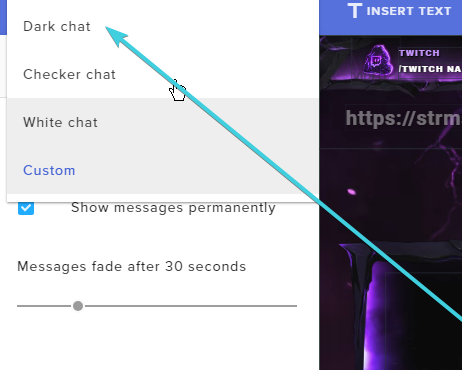
Hello! Is there any way to set up the chat widget so that it's similar to Streamlab's boxed chat theme, where each individual message has a background but the background of the actual widget is transparent?
clever mango
Not yet, though more options are planned for it and other widgets
dense jackal
If you make the chat widget custom it will at the very least make it fully transparent 😄
that is: selecting custom in chat themes
thorn crystal
Yeah, I'm aware of the custom option. I was looking for a way to have each comment easy to read in front of any background but have the box out of the way when there isn't a new message. I suppose I'll wait for the update. Thanks!
dense jackal
we appreciate your paitence
thorn crystal
Can't expect everything to be perfect at once. You guys have already done so much. I can wait a little longer for this one.
 tight harness
 crimson quest
any chance on getting response character limits raised to like 500? or 450?
dense jackal
on commands?
dense jackal
I haven't heard much about that unfortunately you can always add it to our ideas page 😄
crimson quest
but someone else uses it in their SE commands so not sure how they got it to fit
dense jackal
🤔
tight harness
It's restricted, so raising the limit isn't really an option sadly
crimson quest
hmm i will have t ask them how they did it then lol
its ascii
maybei can make it shorter, somehow
crimson quest
hmmm ok maybe im doing osmething wrong then cause its working on another stream, thx for checking
oh no im 47 over not 7 ugh, how are they doing it lol dang it
thorn crystal
Alright, an issue just cropped up again that's started happening ever since I started using SE. When I switch to a new scene OBS will crash. I don't know if it makes a difference, but there are two SE overlays active in the scene I switch to. One of them is my main overlay which is active at all times, and the other is a contest overlay that is shutdown when not visible.
Gist
OBS 20.1.0 (mac) log file uploaded at 2018-02-02, 18:15:59
The crash happened at line 187
clever mango
Do you have OBS websocket plugin installed? @thorn crystal
Because I know there was a recent issue with crashes when that plugin was installed
thorn crystal
Not that I know of. How would I go about checking?
clever mango
Under tools in OBS

If you're getting crashes when you switch your scene collection on OBS Studio v21 and you use Palakis's obs-websocket plugin, please be sure to update to the latest version, which fixes this issue: https://t.co/t8Ihi31fV8
 Twitter
I'll take a look at the crash log but I might have to refer you to OBS on this
thorn crystal
yeah, I see no websocket plugin
clever mango
hmm so the crash didn't occur right after changing scene collections?
it was changing scenes within one collection?
 spring shard
That's not a crash log, it's seems to be a normal log.
thorn crystal
Exactly. I go to change a scene and OBS just goes down. It's happened a few times mid stream.
Where can I find the crash log?
clever mango
AFAIK they are generated and can be uploaded only at the time of a crash
maybe they're stored in the folder with other logs
spring shard
For Windows, they save the crash logs at "%appdata%\roaming\obs-studio\crashes".
clever mango
@thorn crystal go to help > log files > show log files
from there go up in the finder window and see if you see a crash folder
thorn crystal
There's no crash folder. Its just a bunch of logs.
clever mango
:/
thorn crystal
There is a plugin here called OBS-browser. Is that different from the OBS websocket plugin you mentioned before?
clever mango
yes
thorn crystal
OK. I figured but just wanted to make sure.
clever mango
I think its best to check with OBS on this one. Head over to discord.gg/obsproject and post your log files and what's going on. They should be able to help out
thorn crystal
OK. Thanks!
lament blade
Hey, is it possible to transfer an alert box with all the variations and stuff to another overlay?
@weary mist
weary mist
yeah, for sure
click on the alert box, then in the layers tab, there is a button that will let you duplicate, and let you select which overlay you want it copied to
lament blade
it doesn't show which overlay to copy to, but i clicked the duplicate thing
oh wait maybe not, one sec
dense jackal
ty
tight harness

clever mango
Sorry folks
 thorn quest
hey folks quick question: my animated alert gifs dont loop anymore... they only play once and then freeze. is there a way i can make the gifs loop again?
lament blade
@weary mist I duplicated it, i went back to my other overlay, so now how do I get it?
can anyone help?
dense jackal
what file type is it @thorn quest ?
when you duplicate it to another overlay it should show up there
lament blade
@dense jackal where should it show up?
 outer ravine
it's been a week, hosts don't work. Not only the alert but it doesn't even shows on the dashboard on Stream elements
tight harness
@lament blade Top left hand corner of the overlay you duplicate it to 😃
dense jackal
whgen you duplicate you will choose an overlay and it will show up on the overlay you chose
that button is bottom left in overlay editor
tight harness
Do you have the activity feed open somewhere during streams?
dense jackal
@outer ravine do you have ground control?
lament blade
Thank you
tight harness
@lament blade No problem
dense jackal
outer ravine
it all worked fine till a week ago, know i tell my friend to host me for testing and it works, but when someone "bigger" hosts me SE doen't notice, its not the alert tho
 elfin frigate
Hey, does anyone know why I am getting an echo on my alerts now for no reason when I test them?
nocturne pelicanBOT
Make sure to :ballot_box_with_check: “Shutdown source when not visible” for all browser sources (all OBS scenes). If using studio mode, uncheck “Swap Preview/Output scenes After Transitioning.” Also keep in mind that sound can play from any overlay loaded in the browser (editor or launched). https://i.imgur.com/FegZJQS.png https://i.imgur.com/yY0wcFl.png

 outer ravine
@elfin frigate because you have obs open
elfin frigate
hmmm it don't that yesterday with OBS open
didn't*
I also did what you said @clever mango still getting the echo 😭
outer ravine
@clever mango no i'm not ahah
 copper socket
do you have the overlay launched somewhere in a browser..?
elfin frigate
I pressed refresh on the properties. Thank you! ❤
dense jackal
https://streamelements.com/groundcontrol gotchu @outer ravine
outer ravine
every single alert work ahahah it's seem it doesn't even acknowledge the host but only from some channeld
clever mango
Ground Control isn't necessary but it is one of the three options for host alerts. One of the three (SE site dashboard, site activity feed, or ground control app) must be open when the host occurs. This is why I recommend ground control because it runs and can't be closed accidentally like a browser tab
Hosts are different from every other event
We use those three outlets to listen for host alerts using the streamer's chat token
dense jackal
plus it can control your media share/ song requests and has darkmode, different fonts 
clever mango
thorn quest
anyone have an idea why my gifs dont loop in my alerts? they stop after being shown once 😦
dense jackal
I asked earlier what type of file they were 😄
thorn quest
whoops sry... yeah either webm or gif
dense jackal
no prob
clever mango
Webm video doesn't loop but GIF should
thorn quest
my webm's looped before too 😦
clever mango
I'll look into this. I just need to know which overlay you're working on in your manager
thorn quest
you mean the name of my overlay? 😄 sry im confused
outer ravine
ok i'll download it but it doesn't answer my question xD
clever mango
The answer for 98% of cases where a host alert isn't received is that one of the three options wasn't open at the time of the host
outer ravine
the thing is it worked fine for three months lol
thorn quest
oh wait the gifs DO loop... >.< alright so I guess i'll just have to convert my webms into gifs
clever mango
I promise nothing has changed since October
outer ravine
and it works when host my self with another account or my friends host me
clever mango
If you have Ground Control open during your streams going forward and a host doesn't appear in the feed let us know ASAP after it happens and we'll be happy to look into it. It's just not something we can troubleshoot after a stream has ended.
But the code is written in the ground control program to receive hosts as long as it is running when they happen 😃
 winter apex
So i'm still trying to figure out the delay in my widgets when transferring scense. All I have in this particular scene is an alert box and a border for my cam and the border loads in pretty slowly. Any quick tips or troubleshooting i can try??
clever mango
!load
nocturne pelicanBOT
Loading time for overlays will vary based on your internet speed, ping to servers, and the amount of data to load in the overlay. Using studio mode, you can preload your next scene before transitioning so that no loading appears on stream. You can also use a longer transition time. https://youtu.be/W8iWsD2Lq3U?list=PL_9rga23xIlJDyaOnO2avbss-PHm28oNs
clever mango
I recommend studio mode as loading times will vary
and you can switch as soon as it loads
winter apex
Well whats weird is it's crazy inconsistent. Like i said there are simply two widgets in this particular scene. I'm using one of those fancy animated scenes for Heroes of the storm with all kinds of crap and that has no delay at ALL
Can you think of why that might be?
clever mango
The same can be said for any webpage on the internet
lament blade
IS there a way to select all?
clever mango
They don't all load in exactly the same time each time
There are a number of factors in play
 lament blade
is there a way that i can like move it all up?
lament blade
Ok
clever mango
select one and hold shift while pressing an arrow key a set amount of times. Then I repeat this with the others so that I keep the positioning after all have moved
holding shift while using arrow keys will move 10px at a time
as opposed to 1
It's not great but that's the best solution right now
outer ravine
so i'm obliged to download something extra? i don't understand why it worked fine 3 days ago and now it doesn't xD
clever mango
you're not obligated to
There are two other options
But IMO ground control is the best of the three
outer ravine
@clever mango well every antivirus i have is deleting it so what are the other 2 options?
clever mango
It's just a false positive because it's Microsoft hasn't looked it over yet. It's open source and safe. I can walk you through to how whitelist it as many do.
outer ravine
we just tryed tho hosts from two accounts one worked and one not ahah
clever mango
The other two options are these pages... https://streamelements.com/dashboard https://streamelements.com/dashboard/activity
May I know your twitch account so I can take a look?
outer ravine
misspizza
clever mango
Thanks just a moment
outer ravine
yep but i'm offline
we just tryed hosting with two account, in my dashboard i only have one of them.
clever mango
Well, it's hard to test reliably when you're offline. Can we test while online?
outer ravine
ok
clever mango
Ok, please open this page and keep it open during testing https://streamelements.com/dashboard/activity
outer ravine
BUT the thing is that it may work, when you test it ahahahah. The problem is that it takes only some of the host. Today I've had like 5 host and it worked 2 times
 winter zenith
I will try to host also
clever mango
I'll host you from multiple accounts 😉
winter zenith
so we can check
outer ravine
ok i'll go online know
clever mango
thanks Kiwa
winter zenith
or that
clever mango
please do as well
 timid pagoda
same
clever mango
😃
lament blade
Works 😄
clever mango
seems good
outer ravine
idk
i know that you can see any other host on my dashboard even tho today i received two of them
xD
lament blade
o.o
outer ravine
and you can see from my dashboard that they dont show
outer ravine
nope
they were our tests with my friend
i had 2 with 5 viewer
julezen for sure and the other i dont remember the name
it's like it started showing only the 0 viewer host
lament blade
I'm confused on what the problem is
outer ravine
is possible?
clever mango
No 😦
They are all received the same if the right page is open
Alerts may not go off for some based on filters but they will all be received
outer ravine
@lament blade some host works and some don't, if they don't it's not the allert, they don't even show on my dashboard
i see them because twitch as a default messege for hosts
lament blade
I was on your stream when terra hosted, and i saw the host going through and it also was on the activity feed  Maybe you didn't have activity feed/ground control open before
That would explain why it didn't work before
outer ravine
@lament blade i swear to god today i receive two 4 host. Rikicost and Jannachan (that are tests i made) both shows on my dashboard/activity
julezen and another (both +5 viewers) don't appear on my dashboard/activity
dense jackal
Those are our fixes for now, I'm not sure what changed for you but we will investigate. It doesn't seem that others have this issue consistantly, and what we suggested has worked in the past.
outer ravine
@dense jackal ok, thanks. I'll tell you if tomorrow i have the same issues or not 😄
dense jackal
We will check around more and see if we can find others with this issue to more accurately pinpoint the issue
tight harness
Awesome 😃
lament blade
Sorry to hear that 😦 but if you keep ground control or activity open, you shouldn't come across any future issues Let us know how it goes next stream c:
outer ravine
@clever mango tomorrow 22 CET i'll be on for sure
clever mango
I will be there
outer ravine
i'm just worried they only works with 0 viewers 😦 so all the tests work ahahah
lament blade
'
lament blade
It's fine 😄 we all get missunderstandings
outer ravine
i hopes tomorrow they work
lament blade
Yep, Take my energy (ノ◕ヮ◕)ノ*:・゚✧
outer ravine
but i swear they weren't ahaahha my viewers can testify ahahahah
thank u all ❤ sorry for the trouble xD
winter zenith
we belive you
lament blade
:3 have a nice day
dense jackal
it's ok we are just doing our best to help
tight harness
winter zenith
but next time just try to come in imidiantly
i think most of the people can help that way more easy 😄
clever mango
I'll still be there tomorrow @outer ravine
outer ravine
thank u all 😄
lament blade
Np
lament blade
not sure if this is where this goes, but how would I add a on screen notification of who folowed, instead of only the bot saying someone followed?
winter zenith
you can make a Overlay in the StreamElements Overlay Editor
from there you can make an AlertBox and also display TopTipper, Last Follower ETC.
lament blade
ahhh cool, seems simple enough, just wasnt sure where to look
thanks for the response 😄
winter zenith
Also, if you want cool Designs without putting much effort into you can check out the "Super Themes"
dense jackal
Super themes are op 😮
winter zenith
they are preset Overlays StreamElements lets you use for free
and there are many diffrent ones to choose from
lament blade
i only really want the f ollow noti, not a overlay per say
winter zenith
worth a look, especially bc you can modify them to your desire
tight harness
No problem 😃
winter zenith
Move boxes and disable stuff you dont want/need
lament blade
ok
winter zenith
No problem 😄
just wanted to let you know that there is a option like that available
lament blade
sweet 😄
my virus scanner also is giving me probs with ground control, says its a virus, but its most likely false positive, but i tried loading up ground control with pubg, and pubg wont run with ground control open, is my software compromised? I downloaded from main website of streamelements
tight harness
It's a false positive
dense jackal
Is it blocking the download entirely?
lament blade
i disabled it for a bit to install it, cuz i figured it was false positive, and installed
and added it to exclusion virus list
winter zenith
you maybe need to whitelist it
winter zenith
but it is no virus I can garentee you that
clever mango
same issue
Since microsoft hasn't reviewed it and certified it antiviruses and battleye see it as unknown and panic
but it's completely open source on github and safe
Try setting the program to always run as administrator
lament blade
ok
 astral epoch
does anyone know of a way to pull in world of tanks player stats using stream elements? we use another bot for it at the moment but its uptime is bad
clever mango
@astral epoch do you know what this other bot does to get the stats?
 hardy garden
Does someone knows if i can stream using the GeForce Experience , with the help of SE as well ?
hardy garden
Apreciate
astral epoch
@clever mango not off hand, checking to see if they show how on the wotlabs site, which is were the current bot gets its stats
hardy garden
@clever mango How would SE help me ? meaning that I can directly live with GFE
clever mango
@hardy garden Sorry for the image but I think this explains it well
hardy garden
Ok
It does
Sorry if I am silly atm, I am tired....haven't sleep all day....5:34 AM here
clever mango
ouch
Well SE has a lot to offer you even though you can't use overlays on the stream. Explore the site (aside from the Themes Gallery and My Overlays sections for now) and ask questions here anytime
hardy garden
Thank you
lament blade
 craggy rose
hey um i dont know if this is common or not but every time i get a donation it always goes to pending, is there a setting to take that off or is that an always thing?
lament blade
https://streamelements.com/dashboard/tipping/moderation You may have tip moderation turned on o:
Or is it pending on paypal?
craggy rose
i turned off the moderation, or is the problem that i have to restart stream
lament blade
So it was on before? o:
craggy rose
yes and i have it off now but still happening
lament blade
You have to click save on the bottom
craggy rose
iv done that as well
clever mango
When did you disable moderation?
craggy rose
like 30 mins ago
clever mango
and then received a tip after that?
craggy rose
ya
clever mango
one sec
It should take effect immediately and I see you've disabled it. If the next tip requires approval I'll poke the devs about it in the morning.
craggy rose
alright thank you very much for your time 😄
lament blade
Have a nice day
craggy rose
you to 😄
lament blade

 last totem
Hello, may I have some help with Timers?
lament blade
Of course! 😄
last totem
So I have a timer set up, It's enabled. Yet it never happens in my stream?
lament blade
That might be because of the "chat lines" option, maybe you set it too high, what happens is, it will wait for you get that amount of lines before posting
last totem
yeah
it is set to 0
5 minutes 120 minutes 0 lines
online
offline then chat lines
ahh wait.... 😭
lament blade
So online interval is also ticked?
 last totem
sorry about that..
lament blade
Don't be sorry
We are here to help, if you have any other questions feel free to ask anytime
last totem
okay.. Thank you guys! Love the platform!
dense jackal
Our if you have any good memes 😉
lament blade
last totem
dense jackal

lament blade

tight harness
last totem
Thanks guys! Have a great day!
dense jackal
you too
lament blade
hardy garden
officialy I find SE helpfull and extremly good
lament blade
hardy garden
1 questiom, for the Tip memo i have to write the {user} variable ?
hardy garden
Thank's
lament blade
No problem
hardy garden
And about the placeholder, what it deos ?
 lusty laurel
Hey guys for top donator widget, what kind of text do i need to input for like name + total amount of donations they've made?
lament blade
That is the suggested amount someone sees when they open your page @hardy garden
 stuck hamlet
{name} {currency}{amount} @lusty laurel
lament blade
It's default on the top tipper widget 😄
hardy garden
@lament blade thx
lusty laurel
@stuck hamlet its currently like that, cause the same person donated a couple times for me, it only shows the top donation made by that person, is there anyway to make it so if for example they donated like 3 + 5 +7, it would show top donator: 15?
stuck hamlet
are you using top tip, or top tipper?
lament blade
Yep, top tipper widget 😄
stuck hamlet
😃
lament blade
lament blade
hey i know this isnt about streamelement but obs chat isnt responding if u can please teach me how to fix https://gist.github.com/20f1438c2f592a7a489001a43b8ce337
Gist
OBS 21.0.1 (64bit, windows) log file uploaded at 2018-02-03, 13:10:09
cuz my screen cant be recorded starting the output failed please check the log for detail notet:if u are using the NVENC or amd encoders please make sure your video drivers are up to date
Sorry i don't understand that much about it, maybe tomato will help @dense jackal 
dense jackal
what are you using to encode? x264 or NVENC?
lament blade
nvenc
dense jackal
are you sure your drivers are up to date?
lament blade
how to check
dense jackal
What is your gpu?
lament blade
sry im noob
dense jackal
I'm finding a way ot figure out your pc's gpu
lament blade
um i found it
lament blade
wait
dense jackal
My gpu in that case would be the NVIDIA GTX 1070
lament blade
I DONT UNDERSTAND THESE LANGuages
WTF
ITS IN CHINESE WTF
please take a picture and send it D:
dense jackal
I don't know how to help there
lament blade
i mean like u take screenshot of where to press
lament blade
yes nvidia gforce gtx 1050
lament blade
how do i check
dense jackal
download this https://www.geforce.com/geforce-experience/download
it will auto detect your driver and navigate the program
to update it
dense jackal
now install
dense jackal
it has shadowplay
dense jackal
click drivers
and then download the drivers you need
mine are up to date
so there isnt any download button
should be for you
lament blade
but uh theres a download button
ok i pressed the download button alrdy
ok it downloaded and it have showned express installation/custom installation
dense jackal
express
lament blade
ok downloading
dense jackal
your screens will flutter black for a sec, it's just installing don't worry
lament blade
Ok
 crimson yew
In the Ground Control app which token do I put in where the custom bot name is?
If that makes sense. xD
dense jackal
the token for when you are signed into the bot account
dense jackal
you have to sign into your bot account
dense jackal
then generate token in ground control
crimson yew
twitch*
lament blade
its installing now 😄
dense jackal
@lament blade after updating if you continue to have problems checkout discord.gg/obsproject we like to stay more SE focused here if we can 😄
dense jackal
your gpu most likely runs a lot of ur system so its guna reset everything for a short moment
lament blade
@dense jackal i did ask the cominuity but no one reply
Then ask in #welcome , Support is more for SE questions 😦
Installation Complete
sry whats SE lol
Stream elements?
dense jackal
yes
lament blade
ok tomathin installation complete
if you continue to have problems checkout discord.gg/obsproject we like to stay more SE focused here if we can 😄
crimson yew
After I generate, what do I do next?
lament blade
Try testing it now
ok
You logged in your bot's account and got the token on Ground control? @crimson yew
crimson yew
Yeah, and I tested it. Now the bots name is different
lament blade
It's on the name you wanted it to be?
crimson yew
Yup! 😃
lament blade

dense jackal
Generate your 0Auth token in ground control
crimson yew
I must say, StreamElements is pretty bad ass.
dense jackal
lament blade
ok @dense jackal the only thing is uh the graphic is like 360p or something
dense jackal
I'm not sure I can be of much help from here on out I apologize @lament blade
dense jackal
glad I could help
lament blade
@dense jackal Thanks! I am willing to spent this day to find how to chnage it to 1080p if i have problem i try to msg u again thanks
dense jackal
Please direct StreamElements based problems here only ❤
lament blade
dense jackal
I can help some but the obs devs and helpers are more helpful with their stuff 😄
 random hedge
Is there a way to setup an image to pop up on screen in timed intervals?
dense jackal
Yes! the image rotator widget 😄
 vale ridge
Quick question, hopefully I'm not bothering anyone. It's about the overlay. I'm using it at the moment but all it picks up is black. Is there something miniscule I'm skipping?
The overlay is perfectly fine but it doesnt show anything else but the beauitful overlay.
dense jackal
it shows up correctly on SE but not obs?
random hedge
Thanks @dense jackal
dense jackal
vale ridge
After I finished using the overlay editor, I popped it onto OBS and everything looks fine but everywhere else that should be the screen is black.
Hopefully that makes sense.
dense jackal
!multi
nocturne pelicanBOT
Make sure to :ballot_box_with_check: “Shutdown source when not visible” for all browser sources (all OBS scenes). If using studio mode, uncheck “Swap Preview/Output scenes After Transitioning.” Also keep in mind that sound can play from any overlay loaded in the browser (editor or launched). https://i.imgur.com/FegZJQS.png https://i.imgur.com/yY0wcFl.png
vale ridge
I checked over and over again. Shutdown is checked. Swap Preview is unchecked.
dense jackal
can you screenshot what you see in obs
oh silly! you need other sources 😄
like gameplay
or desktop capture
dense jackal
lament blade
vale ridge
It works. Thank you so much for your time. Have a good night/morning. I really appreciate it.
lament blade
Goodnight! Thanks for being nice
dense jackal
no prob man come back anytime we are always open B)
 worn linden
my stream elements donations isnt working but follows was and so was sub
dense jackal
what is your twitch channel?
worn linden
dense jackal
You need to change your tipping link
in your bio
to StreamElements and not Streamlabs
worn linden
thank you
dense jackal
worn linden
i forgot to do that when i switched my stuff over
dense jackal
all good 😄 happens sometimes 😃
 nova iris
is it possible to transfer points from an old twitch name to your new one ?
nova iris
i think i only got half of that @dense jackal
dense jackal
all editable here https://streamelements.com/dashboard/leaderboard/current 😄
nova iris
oh ok cool thank you
elfin frigate
Hey so kinda mad, I got echoed alerts through obs and I had a huge host with no alerts. What is going on?
nocturne pelicanBOT
Make sure to :ballot_box_with_check: “Shutdown source when not visible” for all browser sources (all OBS scenes). If using studio mode, uncheck “Swap Preview/Output scenes After Transitioning.” Also keep in mind that sound can play from any overlay loaded in the browser (editor or launched). https://i.imgur.com/FegZJQS.png https://i.imgur.com/yY0wcFl.png
dense jackal
!host
nocturne pelicanBOT
Twitch doesn't have a "notification system" for hosts (unlike follows, subs, raids, etc.) so the only way for StreamElements to know that you are being hosted is to connect through you to twitch. This connection is made on:
- SE Dashboard page - https://streamelements.com/dashboard
- SE Activity Feed page - https://streamelements.com/dashboard/activity
- Ground Control desktop app - https://streamelements.com/groundcontrol
Please have one of these open during your stream in order to receive host event notifications.
dense jackal
Have you tried these @elfin frigate ?
elfin frigate
Oh I have to have that open? That's good to know. Thanks. Do I tried the mutli options and still echoing through obs I did not have the overlay open
 cursive grove
theres a built in !store command, not sure where to find it? (so ic an change it)
it was an alias of items, nvm
dense jackal
Was just about to link haha
cursive grove
:p
dense jackal
check ur layers for multiple alert boxes @elfin frigate
elfin frigate
I only have one 😦
 desert briar
long long time user of obs and streamlabs, but switched to stream element today thanks to tomathin. Only thing is, I'm getting hella hella bad lag that I've never seen before. My pc has great specs, and this only happened after using one of the super themes or w/e they're called.

Only thing I can think of is that it's the theme slowing my pc down for some reason, but why would that happen, and how could I fix it?
dense jackal
Animated superthemes can be more intensive can you send me your obs specs?
desert briar
what specifically do you need?
lament blade
hi! my total sub button is not updating, is there a way i can refresh the widget?
dense jackal
https://streamelements.com/dashboard/session you can refresh the totals

StreamElements
The Ultimate All in One Platform for Streamers
lament blade
it still shows as 0 when I have 3, does it normally take a while to update? ><
dense jackal
that would do it, twitch api will be flaky at first for us 😄
lament blade
ok sooo it worked, thank you! but i mucked up and accidentally reset my labels, is there a way to get them back?
dense jackal
have to add them manually or wait for more 😦
lament blade
ok no prob, thank you so much!
cursive grove
can we make it so when a sub is gifted, the GIFTER gets the points, and not the receiver?
dense jackal
not atm but that's a good idea!
cursive grove
its a good incentive for others to gift subs 😄
cursive grove
i also discovered something which im pretty sure is a bug: i had an item in the store that costed 100 points, a few people purchased it, and at some point I made the price 10,000, and refunded the people who bought it at 100 pts, and they got refunded 10,000
dense jackal
The refund just gives them however much the item costs
so if you change the price then refund it will refund 10k
 untold sorrel
Just incase Im missing something, are we able to copy and paste widgets from one overlay to another?
dense jackal
Yes bottom left icon that looks like two pages and a red star
 icy shuttle
Hey, how do i turn off the Stream Report Email?
dense jackal
There's an unsubscribe button at the bottom of the email 😄
hardy garden
Huge streamers and youtubers community....love it
icy shuttle
damn im blind, thanks @dense jackal 😄
 honest charm
hey everyone i wanted to irl stream an event im attending and participating in tomorrow but im not sure on even how to irl stream i went to the streamelements irl guide all you need to know but it didnt have what i needed..
honest charm
yes i know that but im wanted to use my go pro and its a car race event .
honest charm
haha yeah iv been digging on google but not alot about it and so far only parascope ooffers to connect to the go pro then go live but i cant use it for twitch.
 lapis ingot
damn i wish i knew to help you man
honest charm
all good parascope leads to facebook or twitter ... hmm maybe somthing for the twtich devs to get on haha
what about overlays and such for irl streams?
tight harness
We do overlays for IRL streamers but the whole using a go pro is a bit out of my depth
 upper steeple
why is there a help button on my overlay now o_0?
its gone now, but in case it happens in the future what was that?
upper steeple
okay it was weird when i changed scenes it apepared
hushed quartz
hey i have a problerm with the widget tips top donator and recent donator
the last donator did the donation with anonimus because he put his name in the description so he asked me to stwitch his name. and i had to tipe it manualy.
now i want it to go back to automatic tell me who is the top donator and the last donation
hushed quartz
no it said anonymus
tight harness
Email, not name
hushed quartz
okay i think i fixed it
tight harness
cursive grove
@dense jackal yes, im aware of that...(you just restated what I said), which is why im saying its a bug
 cloud niche
so is it possible to give a moderator permissions in stream elements? modding for a streamer and he isnt very productive on this stuff
tight harness
@cloud niche There is a feature we call Dashboard access which the streamer can set up on this page: https://streamelements.com/dashboard/account/channels and it allows them to grant moderators of theirs access to their StreamElements account to help them set everything up
lament blade
What does the loyalty points do?
tight harness
Allows you to spend them on things like mini-games, the stream store, giveaways, contests, song requests, a bunch of things
lament blade
Oh I See Thanks Dude!
tight harness
No problem
 left meteor
how do I enter the JTW key without typing the whole thing
i need help in voince support
lament blade
just a question > do people who auto host still get currency for hosting??
Hey How Can I Set Video Hosting public so that everyone can host
tight harness
@left meteor Copy it then paste it
Ctrl + C, Ctrl + V
@lament blade Yes
@lament blade Video hosting? 🤔 you mean Media Share?
 indigo bone
how do i add a user name to a command, but make it clickable for their twitch profile
tight harness
I don't believe you can 🤔
tight harness
Doubt it'll be clickable though
indigo bone
hmm anyway to do like a link but change the text ?
tight harness
No
tight harness
Yes
 pulsar gulch
I want a command with !wins ( show's wins ) and one with !addwins x .. how do i make that with !add wins cuz i can't figure it out
tight harness
pulsar gulch
so at !wins i use ${count <name>} ?
tight harness
If you don't want to increase it use ${getcount <name>}
With name being the name of the command
pulsar gulch
i want to increase it manually
pulsar gulch
but i cannot use like !addwins 5 so it will add 5 ?
tight harness
No
 proud pumice
luckily you win game by game
😄
@pulsar gulch you're overcomplicating it my man
just edit a command
 tight harness
This might also be useful
These commands already exist in default commands
You don't need to make them manually
And you put <name> as the command name, which it isn't
That was just to demonstrate where you put the command name
pulsar gulch
hmm
tight harness
Profile Page > Open My Profile > Change it over on the left
pulsar gulch
the first one works .. but the second one it's .. ehm still don't understand 😦
tight harness
You don't put !addwins
Okay, so the idea is that it gives you a counter of how many times a command has been used
getcount shows you the number without adding 1
count adds 1 and shows you the number after adding 1
So say ${getcount example} would show you the command !example has been used once
If you do ${count example} it would add 1 and say used twice
pulsar gulch
so i should have !wins ${getcount wins} and !addwins ${count wins} ?
Sooo like this then
tight harness
Yes
pulsar gulch
Thank you ❤
tight harness
No problem
pulsar gulch
so when i use the !addwins he will display a message StreamElements : 1 and if i type again he will increase it
but can i stop it from getting the message " StreamElements : 1 " ?
pine hemlock
I don't believe it's possible to change it. It's just showing how much the count is increased to
pulsar gulch
I see , it will look better with a message or something ? any tips ^^ ?
pine hemlock
Make the response something like: Added a win, new total is: $(count wins)
pulsar gulch
how do i reset that count ?
pine hemlock
np
 latent magnet
Updated the number of points users get for follow/subbing but it hasn't updated it in stream yet, do I need to remove the leaderboard and reinstall it?
pine hemlock
did you hit save, and it usually takes ~10minutes for it to start updating
latent magnet
I did, it's still sitting at the points I updatd to
pine hemlock
It should automatically start doing the updated numbers. no need to remove anything
dense jackal
i wonder if parting and joining the bot would refresh it here 
latent magnet
i'm hosting someone else right now, I'll update the numbers again and see if it sticks tonight
ionic summit
When someone tries to request a song this message pops up! you must provide a valid youtube id or url and the setting for who can use it is set to everyone in the music request settings.
 versed crane
when i add a item to the store and i choose for stream perk it will shown up in the widget when i redeem that item but when i choose for code-list because i have multiple codes for that game the widget doesnt show an alert on stream is this a bug am i doing something wrong
weary mist
@ionic summit make sure in your twitch settings that you allow links, otherwise that is what will be posted
@versed crane let me check in on that, I am not 100% sure
ionic summit
ok so when the first song is finished palying.. the queue just dissapears, and doesnt keep playing the rest. How do i fix that?
?
lament blade
So you have a list full of requested songs, and when the first song is done, the queue clears up?
ionic summit
yes
and then when i restart the ground control, all of them are back but it only plays the first one again.. and then repeats that pattern
any fixes?
lament blade
Sorry for the inconvenience, i'm checking right now if that has been reported before
ionic summit
think i saw a forum post about it
tight harness
We don't have forums 🤔
 blissful blade
Hi! I'm having problems with my overlay chat
tight harness
What kind of problems?
lament blade
@ionic summit Could you tell me what songs were on the playlist?
blissful blade
@tight harness My text for twitch chat has a bit of transparency and its hard to read it
@tight harness I checked and it said my opacity 100%
lament blade
If you go to text settings, you can select a solid color
tight harness
Yeah, it'll be the text colour opposed to the opacity
lament blade
blissful blade
lament blade
Select a black color
lament blade
move it around
I'll show you one sec
https://gyazo.com/91ad0838ba5d19f23aa5375bb99a2a4c See that the default has opacity to it
But if you move it around it doesn't
 ripe herald


 lament blade
OR that ^
blissful blade
yeah but i didnt want the black box, i just wanted the transparent background
lament blade
Then did you do what i said? That should fix it