#helpdesk-twitch
1 messages · Page 199 of 1
 gentle imp
 next spruce
Just got someone saying this in my chat ":the tips page is taking me to a page thats telling me i need to authorize stream elements but if i click authorize im getting an error, wanna disable needing to authorize for 10mins?"
and two others are having problems

error "bad request"
stauts - 400
 sour forum
Oh yeah one LAST thing. How come the slot machine isn't picking up emotes? Is their a limit?
gentle imp
@sour forum when adding emotes, hit enter after each one
sour forum
Yeah I did lol
 atomic hollow
@next spruce looking
sour forum
Alright next step break the enter button lol
gentle imp
I just tried and it works fine, have u tried clear cache/cookies?
sour forum
I tried doing older twitch emotes too maybe thinking you guys didn't update the full thing yet or something
I will rn
 nocturne pelicanBOT
undefined,
The slider increases the payout if you manage to win
Less than 100 on the slider means people will not win money over time using the slot machine. 80-100 is a good range
less emotes = higher win chance
its like 5 emotes = 3%, 4 emotes = 7%, 3 = 12%
actual formula : n / n^3
n = number of emotes
sour forum
Thanks for the tip. I'll let yk if clearing the cache works
atomic hollow
@next spruce the screenshot is a twitch URL, not streamelements, how did they get it?
next spruce
i dont know
sour forum
Wait so if it's lets say 90 for example as you use it you basically lose RNG
gentle imp
yeah, I have mine at 150 @sour forum
but better to adjust to your experience, hardly anyone wins it
sour forum
Thats the point, lol (; @gentle imp
gentle imp
😄
sour forum
@gentle imp since yours is at 150 what does that mean since its over 100
gentle imp
I really don't know, not much ppl use it but even that way I hardly saw anyone winning it
but since I have 4 emotes I assume it's 10.5% chance of winning
oh nvm, the slider is actually the payout xD
The slider increases the payout if you manage to win
so I'm guessing I'm giving 150%, gonna change that right now ^^
gentle imp
nah, was 150% payout, u enter with 50 and get out with 150% in case of a win
the only way to change the win chance is by adding or removing emotes
sour forum
Oh so you were giving more points gotchya
gentle imp
yea 😃
sour forum
So that 90 back in example is the minimum threshhold a person can get to?
gentle imp
90 means you are paying them what they bet + 90% of it as prize, that is if they win
gentle imp
no problem 😃
sour forum
I didn't mean that sarcastically lol
gentle imp
^_^
sour forum
Oh yeah forgot to tell u about the slots
Okay so I relogged in cleared everything, and I pressed enter a billion times. Twitch hates me.
gentle imp
you can't add emotes still? perhaps you can try with firefox
 serene nimbus
Hey guys I need follower count on my stream overlay only seasonal or for today. Which widget?
serene nimbus
Yeah right thanks but one more thing
Can I get that number divided by let's say 5
?
serene nimbus
Ikr I want a lvl for my stream boss who level up every 5 followers
 tight harness
That's new 🤔
atomic hollow

serene nimbus
I have added this request to idea 😉
The higher the level of my stream boss the more valuable is the loot from him
Nvm will figure out something 😉
My head is full of crazy ideas and not enough knowledge to make them real
 twilit talon
hello staff ^^
atomic hollow
heyoo
twilit talon
still need some help with my alert :/ i have the problem that my alert image fades out before the alert text :/
can you help me with that?
atomic hollow
did you play with the animation settings?
twilit talon
yea. im using a theme and did put up the alert duration little higher to sync it with my alert sound
it seems like the image is on the "default alert duration" and if i put the actual alert duration higher, it only affects the text but not the image
 safe kettle
<@&382267076632379392> Can somone please tell me how to make it so that when I'm looking at OBS it's not mirrored? I'd like to see preview mode in obs the way it looks to everyone else when I'm in game. Thanks in advance for any help.
I finally figured out that it was my screen caputure source all along
 winter zenith
I am no support but @twilit talon is you gif/video fading? What I mean by that is if your source picture fades out
twilit talon
yea
winter zenith
Yeah so thats why stream elements cant effect it 😃
It cant manipulate how slow or long it stands there
twilit talon
is there a way to fix it?
winter zenith
Did you make your gif/video on your own?
You could loop, or lower the speed of it in an video editing software
So you get your desired length 😃
 misty wagon
I use this site often to play with animation settings or optimize https://ezgif.com/

Easy to use online animated GIF maker and image editor. Upload and edit GIF images for free. Create, crop, resize, reverse, optimize and split animated gifs.
twilit talon
yea i get what u saying. nah since its an overlay from streamelements itself
i guess i have to deal with it then 😄
but at least i know why its like that, thank you 😄
winter zenith
No biggie 
 outer ravine
hi, sorry but i'm trying to set a new follower goal, but it starts a 185 when i have 175 followers ahahha? how can i fix it?
tight harness
The follower goal is meant for short-term follow goals, use Total Followers instead of Follower Goal if you want to display your total followers
 verbal heron
my notifications on stream arent working... like new followers cause thats all i got at the moment
anyone got any ideas? It works in testing
outer ravine
@tight harness so we can't use the goals because they don't work? Why i can't set the starting amount? even for the tipping goal?
tight harness
The goals do work, but they are for short-term goals, not long-term goals. As in how many you gain in a stream, it's not made to count down if you lose one, that's what Total Followers is for
outer ravine
@tight harness ok. The thing is my follower goal says 185 when I have 176. I can't restart it to zero and use it as a short- term goal every time i stream? Like 10 follower goal every time i stream?
there isn't the "set the starting amount" setting, thats the problem xD
gentle imp
u can Baki, check here https://streamelements.com/dashboard/session
tight harness
You can go to Activity Feed > Widget Data > Goals and do that easily
twilit talon
Me again 😄
tight harness

twilit talon
I want to show my Top Donator but it keeps saying no data
outer ravine
@gentle imp THANKS, that was the I needed in the first pls xD thanks mate ❤
gentle imp
np ❤
verbal heron
@tight harness any ideas on how to make my notifications actually show up in obs during live stream? It works on testing but not in the stream itself
 dense jackal
is everything else on your overlay coming up correctly?
verbal heron
like when im in overlay editor or testing in OBS?
dense jackal
i mean does obs show everything you have in your overlay editor
verbal heron
yes
dense jackal
and you saved, and the alerts are showing on the editor but not obs 🤔
winter zenith
@twilit talon did someone donate to you since you are using stream elements?
dense jackal
ah
verbal heron
but if i test it live it doesnt
twilit talon
nah not yet but i imported the csv file from tipeeestream
and in the donation lists everything shows up
verbal heron
also that widget is top in my obs sources
dense jackal
when you test live or get a real follower bc many times twitch api would be the reason of a follower not going through and there’s not much we can do there
winter zenith
hmm then I dont know ^^`for me my importation of Tippeeestream didnt work either but I just manually typed in my top donator LOL
twilit talon
mh 🤔
verbal heron
I had a similar issue with streamlabs which is why i swapped to streamelements
dense jackal
The good news is, when this weird stuff does pop up you got me to help you out 😄
twilit talon
@dense jackal do you have an idea on my case?
gentle imp
have u changed the widget to show top tipper instead of session tiper maRky?
verbal heron
thanks guys, now to spend the next seventeen hours trying to figure out what gifs to use where
gentle imp
default is session
 dense jackal
niceu
twilit talon
thank you ^^
dense jackal

gentle imp
nice!
 lament blade
Hello, I'm moving from OBS to Lightstream due to performance issues with my new laptop (it has a GTX940mx wich has no Gsync, and my dedicated intel HD 650 is not strong enough) but lightstream has no SE integration, only Tipeeestream. Any solution? I don't wanna leave SE!
 weary mist
- don't use integrated graphics for encoding
lament blade
I know
weary mist
- What kind of performance issues are we talking about? We might be able to help mitigate them. Lightstream (as far as I know) doesn't allow addition of browser sources, so there is no way to use out stuff. But we do know a lot about OBS and might be able to make that work for you
lament blade
OBS gives framedrops, NO G-SYNC on my laptop, and integrated intel graphics is a no go.
so lightstream is the only option
PLEASE.... I don't wanna leave the fantastic stream elements for tipeeestream (only integration in lightstream)
hello?
 lament blade

 marble marsh
hi, i'm trying to update my tipping page but it say that a error occured
atomic hollow
im checking @marble marsh
marble marsh
ok thanks
atomic hollow
successful for me, what are you trying to change?
marble marsh
title
atomic hollow
to what?
 scenic robin
Hey I'm having problems When I do shut down Source when Not visible it doesn't work I still hear the sounds this has been for a while not and even though obs updates am I doing something wrong?
tight harness
@scenic robin Are you checking overlays in all of your different scenes as well? Even if they're in a different scene they're still active if you don't tick the option
 nimble owl
can you request media share only with real mony? or is it availeble through points aswell?

scenic robin
Really.... Ok thanks @tight harness I'll check on that hopefully it works after I'll have to do it tomrrow
 steel hamlet
So I have a completly unrelated question but I thought I might ask anyway? My system is a FX8350 with a GTX960 4GB and 16GB of RAM and since a while I have been having issues even keeping over 60 FPS in LEague of Legends even though maybe a month back I would get 200 FPS and over all the time.. anyone know wtf is going on?
tight harness
@nimble owl If you set the cost to 0 it'll work without paying real money, also if you click on Show Video on Overlay
gentle imp
I would blame last windows updates @steel hamlet everyone got hit, or almost everyone
steel hamlet
so its because im on Fall Creators update now?
nimble owl
ooooh ok gotya thanks @tight harness 
gentle imp
check for settings that u changed, they got reverted, like virtual memory on by default etc
tight harness
No problem 😃
gentle imp
some ppl claimed, reinstalling fixed it, I just worked around all settings
steel hamlet
Well when that update came out I decided to do a fresh windows 10 install cuz upgrades have been a pain in the past.
If I refresh my system it will be GUCCI performance for maybe a day and then it will be shit again
gentle imp
damn, check if there's page file being used, disable it, should help
same for that windows backup for all drives
steel hamlet
why it wont use the pagefile unless I run out of memory
having a pagefile is not a bad thing
gentle imp
helped me, so just sharing my experience
even though I have 16gb ram it would be really slow
steel hamlet
it still would protect u from a crash might a program start a memory leak or whatever
run out of ram without pagefile is a 100% BSOD
I saw however that GAME DVR was back on turned that off it might help
gentle imp
ahh it does, that's why I said, check all settings u recall changing, they were all reverted, another thing I had was the power plan
steel hamlet
that was on balanced i dont think thats an issue on a desktop though put it on high performance now going in a custom game filled with bots now its still around 80 FPS at game start
gentle imp
there is this problem that we are all still waiting on a patch, I don't recall name right now, affects both AMD and Intel cpus
weary mist
are you talking about spectre/meltdown?
gentle imp
yea, ty
steel hamlet
its the patch that is going to lower performance not not having the patch
weary mist
those were patched already on most systems
steel hamlet
and it doesnt affect the FX series cpu's
gentle imp
oh 😮
steel hamlet
it only affects AMD cpus in the opteron lines that have ARM coprosseccors
gentle imp
hehe, well since last both creators fall updates my performance was never like it was before, dunno why
 latent aurora
some patches for that were released months ago, and performance difference is almost zero (on newer cpus)
gentle imp
indeed 😄
weary mist
the patches really only effect programs that rely heavily on kernals
gentle imp
and I'm running a Ryzen 1700x
steel hamlet
thats cool and all but I also have a quad socket opteron system with 4 12 core Magny Cours cpus and even that has issues running League ATM
i think it might be just league too cuz csgo gives me over 300 FPS on both systems
tight harness
300 FPS? 
gentle imp
could be, I don't play that game
weary mist
im sorry, I am still stuck on the 4 12 core cpus in one system 🤤
weary mist
@nimble owl ❤
nimble owl


weary mist
tight harness
steel hamlet
how is that weird? have you never seen a Quad socket system before?
 steel hamlet
quad socket has been a staple on server hardware for both AMD and Intel for ages
socket G34 for AMD Opteron 6000 series does quad socket
latent aurora
systems with quad socket cpus don't have a great single-threaded performance
steel hamlet
true
latent aurora
it's probably the reason why you can't run league
most games can barely use 4 threads
steel hamlet
I could run it just fine a couple patches ago
and we are talking about my normal system now xD
latent aurora
old cpus suffered the most after the kernel bug patches
steel hamlet
plus @latent aurora those patches didnt apply for AMD FX and related since they dont use that kind of branch path prediction
latent aurora
yeah but they still got other related patches
spectre was a both intel and amd problem
lament blade
Pawi ._.
latent aurora
i'm just talking about tech
lament blade
where did you come from lmfao
latent aurora
stream elements website
lament blade
right
steel hamlet
http://www.supermicro.com/Aplus/motherboard/Opteron6000/SR56x0/H8QGi_-F.cfm here is the board im using xD
latent aurora
and where else
lament blade
are you reading every msg i post here?
latent aurora
nah
steel hamlet
4 CPus 32 memory slots and only one PCIe slot
latent aurora
people who browse supermicro's website for fun are rare
steel hamlet
meh got the board for 90
the chips I took from work
put in a W7100 and thats my workstation now
latent aurora
yeah it's quite easy to get old mid-range server gear now
steel hamlet
they just practicly gave it to me
the only thing I bought was the firepro and some extra ram
they had only 1 dim with each CPU
I just filled it
latent aurora
after datacentres get new hardware the old stuff is basically garbage for them
latent aurora
i need one
 young wind
Faster than my bullet
latent aurora
my friend is using my old machine to host modded minecraft servers, somehow my 12gb ram isn't enough for him
steel hamlet
onboard server hardware is the oldest shit ever though
can u believe they put a matrox G200 onboard on the board
with a whole 2MB of VRAM
latent aurora
LOL
steel hamlet
I still dont understand the reasoning behind only one PCIe slot on a server with so many lanes
young wind
AMD Athlon II P340
ATI Mobility Radeon HD 4250
WD Blue 2.5" 250GB
6GB Kingston 1066 MHz
steel hamlet
the asus dual socket board for G34 has 8 full lenght PCIe slots
latent aurora
i have an athlon ii x2 250 in my old machine, that cpu was $7 on ebay
steel hamlet
I used to have the Phenom 2 equivalant of that cpu
it unlocked too
to a B50 or something
latent aurora
the good old times
steel hamlet
basicly a x4 950 for 40 euros
back when the phenom line competed with the i5 offerings
like the i5 750
latent aurora
1st gen i5s were considered good back then and only a few people needed the i7s
steel hamlet
and the phenom 2 quadcore were really close to them in performance
steel hamlet
right we donezo
 oak bison
I guess the sellout bot doesnt works anymore with me 😦
I fixed all CPU problems so that awesome
oak bison
I be live for a couple of hours already 😋
 slim cairn
Are you sure you didn't just miss it?
oak bison
I be sure
slim cairn
Message @clever mango about it, he's the one that runs it all
tight harness
It seems the bot isn't posting
steel hamlet
oh I found that League also never triggers Nvidia GPU boost and other games do
tight harness
But it's 3rd party so there's not much we can do about that
lament blade
TOMATHIN WHY 
 where TF you at Discord casper
dense jackal
where TF you at Discord casper
dense jackal
baited
 clever mango
hello
slim cairn
Sellout bot seems to not be working
 spring shard
That bot has been VERY slow the last weeks. Somtimes announcing it 2h after the stream started etc.
clever mango
It's because it's being rewritten to be far better and not much time is spent on the current version
tight harness
Ahh, that makes sense 😃
spring shard
Ah, good to hear they're upgrading it. 😄
clever mango
We also have an insane number of channels being announced
maybe the largest server the bot is being used in
300+ channels on twitch and when youtube support comes very soon we'll have it announcing youtube live as well
tight harness
Most likely
spring shard
Oh I meant slow overall. I'm using it in 2 other channels and it's slow there as well.
 median dome
hey folks, im having a weird issue on my stream store redemption page, for some reason its only showing one users redemptions instead of showing everybodys. Any advice? (:
i think i may have figured out what was wrong, the user in question had over 3000 store redemptions, i unfortunately cant keep up with clearing the redemption page so i think the information just got overloaded?
lament blade
3000 
median dome
if i set the filter to only a month span, it shows only the redemptions of a different user lol i feel ive broken something
 rancid coral
If i change the name of my currency will everyones points be reset to zero?
median dome
No worries (:
rancid coral
Shweet thanks
lament blade
You can change the name on the Loyalty Settings, and if you wish to change the command name to your currency's name, you can do that here https://streamelements.com/dashboard/bot/commands/default it's called points
marble marsh
is there a false positive with the ground control ?
 stuck hamlet
sure
marble marsh
ok
median dome
is there anyway i can clear my redemption pages history, like hit Approve to All without having to go through all of them individually? that might clear this up. (:
 weary vessel
Hey, I have a weird problem with setting up a theme for my obs, can I msg someone to send screenshots and figure this out?
lament blade
What is the problem ?
weary vessel
when I grab and input the scene I only get like a quarter of the actual thing
theres like pieces missing
stuck hamlet
!res
nocturne pelicanBOT
undefined, The default resolution for StreamElements overlays (theme and custom) is 1920x1080. Please add them in OBS at their full resolution and use CTRL+F to fit to screen if necessary. You can then downscale your stream in OBS settings > Video if you'd like https://i.imgur.com/6bWXxjR.png
 lament blade
@median dome unfortunately the isn't a way to do that ><
weary vessel
okay that helped, the one scene was in 1920x1080 and still didnt work but I re-did the entire thing and now it works
thanks
lament blade
median dome
I just spam clicked for a while and cleared this month of all redemptions made, so hopefully new ones popup correctly tonight (:
 whole trellis
Hello. I've set up all of my scenes in OBS and I use Studio Mode. Because I have 2 windows open (the current one and the one i've prepaired to transfer to) my alerts play twice. Naturally, this sounds terrible. I'm sure i'm just doing something wrong, and was hoping one of you fine folks could point it out for me. Thanks 😄
clever mango
In between the preview and live there is a settings cogwheel
uncheck "swap preview and live after transition"
@whole trellis
whole trellis
Awesome, thank you SO much!
I knew it had to be something small. Much obliged sir!
lament blade
Do you know the other store items options we have? Sound effect and access code... Might be useful to change to those depending on what your store items are so it will make your redemption list smaller >< @median dome
median dome
i knew about sound effect, hadn't seen access code before
lament blade
Sound effect only plays an audio... No image and doesn't show up on the redemption list. Access code just shows a link/text that you want them to be able to see once they redeem it. No alerts and you don't get notified when its redeemed 
So those you don't have to manually approve like you do on stream perks
median dome
fascinating, i already know a way i can use that - my moderators are currently scheduling between themselves spamming through the approval of the redemption page lol Thank you for the advice ^.^
lament blade
I just noticed something really odd @median dome
It will only work if you are using our tipping page https://streamelements.com/cripsteruk/tip
median dome
oh yeah we dont do it automatically, my mods give them the extra bits in chat
lament blade
You don't want it to be automatically? 😄 it's really easy to set up the tipping page
median dome
probably would be simpler to just switch over lol its just how we did it before stream elements was even a thing so people are in the habit now
lament blade
Yeah >< would be way more convenient, you can set up your tipping page here https://streamelements.com/dashboard/tipping
median dome
cheers ^.^ will look into it
lament blade
Have a nice day 
median dome
you too (:
weary vessel
I have another specific question, Im setting up the hearthstone tavern super theme rn and in the social media tableau of every scene where there should be symbols for youtube, facebook, twitter etc. I only have the youtube symbol and the other 4 are all f for facebook instead of the twitter bird or the isntagram icon
idk how to fix that cause its on every scene and it doesnt change even if I redo the overlay
 summer sigil
Is it possible to manually set/edit the count for a command? I'd like to set the count of $(count deaths) for a command to be 50 instead of 2
weary vessel
help?
spring shard
@summer sigil You can use the !editcounter command.
summer sigil
I'll look into that. Thank you!
spring shard
You're welcome.
tight harness
@weary vessel Do you see other icons that are currently hidden that can be shown?
I'll have a look myself too
weary vessel
I do not
 lime pollen
how do i get my stream key
lament blade
Can someone come into voice support
spring shard
@lime pollen It's under your Dashboard on Twitch. Then click Settings -> Stream Key -> Show Key
lime pollen
thanks
spring shard
No problemo!
tight harness
@weary vessel Thanks for pointing this out, seems to have been a bug, it will be fixed 😃
tight harness
Interestingly, the icons in the animated version of the overlay seem fine, so you could fix it right now by removing the icons and then using the duplicate widget tool to copy the right icons across from the animated overlay and then saving it
weary vessel
oh dang, didnt think of that since when I tried to use the animated one in the first place it crashed my obs (likely my PC's fault though)
I'll try that, thank you 😃
tight harness
No problem 😃
@weary vessel It's fixed now, so whichever is most convenient 😃
Either that or recreating
weary vessel
okay, I'll figure it out, thanks a lot ☺
tight harness
You're very welcome
 lost ridge
can anyone tell me why i get OBS saying that i have FPS drop when i stream, it only seems to happen when i use the browser source for SE
lament blade
hello?
Hello
@lost ridge Do you have "shutdown source when not visible" ticked on all your browser sources?
No
okay
lament blade
Whopsey wrong server 😊
tight harness
😛
dense jackal
we are 100% free B)
lament blade
Unfortunately Mirillis Action doesn't support this yet, I'm waiting for their 3.0 update, so excited
lost ridge
think i fixed it, enabled my v-sync on the game, fixed it at 60 FPS
weary vessel
hello, me again, another question about the Hearthstone Layout, the social media stuff is fine now, but it seems that twitch and twitter are capslocked, maybe Im dumb but I cant seem to change that
its not really a problem
more of an aesthetic thing
tight harness
If you click on the widget then Text Settings there's an option to change it if it's text
Unless it's an image
weary mist
That is a text option, like the bold, italics, it is a double T as an image
tight harness
This is the button
 hard estuary
hello?
tight harness
Hello
tight harness
Would you rather speak in Russian? Because @ebon forum can help there 😃
hard estuary
Why such a load on the GP?
 ebon forum
Добрый вечер
ebon forum
@hard estuary пиши мне, будет проще)
hard estuary
В лс написал
ebon forum
@hard estuary можно прямо в личку.
lament blade
what different all-time and current stats points??
current it is last week, mont or last session??
spring shard
Currrent is all you've gained from games and such. All-time is only from watching.
stuck hamlet
correct!
 silk patrol
Tjockas beat me to it
spring shard
Like if people give points to you, or if you play in either of the games. (Slots, roulette, bingo, duels)
I believe bonuses from subs and tips are counted into the Current as well.
So basically All-time is just a toplist who have viewed the stream the most.
silk patrol
@lament blade you have access to mini-games like roulette or duel in the modules page
winter zenith
I helped my boyfriend setting up his streamelements and I tried to donate to see if everything is working but I always get an "error message" after I am loging into Paypal... now sure it its paypals fault or if his Paypal isnt connected right to StreamElements
maybe some one can help me figure it out? His tipping page is:

StreamElements
The Ultimate All in One Platform for Streamers
winter zenith
yeah I will look if there are typos hold on
dense jackal
I haven't heard of any tipping issues as of late 
winter zenith
na its the right paypal adress
silk patrol
@winter zenith I can go to his tipping page and to paypal while being logged in, so i'd say it's working
winter zenith
strange 🤔
silk patrol
@winter zenith also, you should tell him to switch to a business account, it's free and it will hide his real name
 silk patrol
🤣 I wish I could dad
atomic hollow
i know i know
lament blade
"dad"
atomic hollow
we got a goddess instead of you
silk patrol
Yeah I saw that
atomic hollow
but she is not french
silk patrol
she can't be perfect  she is already cute, that's a good start
atomic hollow

lost ridge
how does one give points to everyone in my channel?
silk patrol
@winter zenith nailed it!
winter zenith
;D
lost ridge
cheers @winter zenith
winter zenith
no biggi @lost ridge
 stark swallow
Just a small question, is there a page that contains the stream elements logos?
winter zenith
google? 🤔
winter zenith
damn should have asked that too now I downloadet everything :>
 pine hemlock
Lol
 sudden forge
hi can someone help me? I keep getting this error when I try to install the streamelements ground control desktop app https://puu.sh/zcrCM/76d86e03cc.png
 stark swallow
Your antivirus might not let it run
It's probably being quarantined and you're not seeing the notice about it.
stark swallow
Best bet is to try to Run as Admin or temporarily disable your AV.
Make sure to add the directory where you install it as safe.
lament blade
Is there a way to bind a custom command to make an image appear on screen? Streamjar has this.
gentle imp
the only way atm is by having that as a store item, but that is being worked on
but add it as a store item and u can make a command to redeem it using a single keyword
when u create a store item it will work with !redeem xxxx but u can make another command for instance !tshirt on which the response will be $(redeem xxxx)
@lament blade
lament blade
Hey! When I try to load an overlay into obs only the help sign shows up, what do I do?
Right click the browser source --- properties and "refresh cache of current page" @lament blade
 elfin juniper
hey! i need help with my stream overlays whenever its possible 😦
dense jackal
whatsup @elfin juniper ?
elfin juniper
@dense jackal hey i recently got this overlay i really liked but i cant set it to appear like my monitors native resolution
my native res is 1360 x 768
dense jackal
is that 16:9?
weary mist
I think so
dense jackal
create your overlay normally in se then scale it down in your obs
elfin juniper
in properties ?
dense jackal
se can be 1920x1080
obs res can be scaled down from there
make sure obs browser source is 1920 x 1080
then physically transform it
dense jackal
@weary mist can you screenshot walkthrough? i’m on my phone 😦
dense jackal
that works xd
 weary mist
Create the theme. Copy the link. Create the source in OBS, change width to 1080, height to 1920, click "Shutdown source when not active", click ok. Hit CTRL+f
magic
elfin juniper
god damn ... hold up brb let me see if that should do it
wait do i have ot rescale it on SE website ?
weary mist
nope
elfin juniper
or can i leave it at 1080 ? bcuz i wanna stream at 1360 by 768
 wintry wraith
Hello folks, I am trying to find an email from someone in marketing regarding a potential business opportunity and not having much luck on google. Anyone able to help?
elfin juniper
better frames ya know
weary mist
you scale it when you hit CTRL+f
weary mist
it transforms it to your OBS canvas size
dense jackal
can you be more specific @wintry wraith ?
lament blade
Now only a part of the theme is showing up in obs ^^
dense jackal
!multi
nocturne pelicanBOT
Read This! Make sure to :ballot_box_with_check: “Shutdown source when not visible” for all browser sources (all OBS scenes). If using studio mode, uncheck “Swap Preview/Output scenes After Transitioning.” Also keep in mind that sound can play from any overlay loaded in the browser (editor or launched). https://i.imgur.com/FegZJQS.png https://i.imgur.com/yY0wcFl.png

 elfin juniper
what about when im adding the browser source do i change anything there >
weary mist
@wintry wraith ill DM you
wintry wraith
@weary mist thanks!
weary mist
Create the source in OBS, change width to 1080, height to 1920, click "Shutdown source when not active", click ok. Hit CTRL+f
@elfin juniper
lament blade
thanks!
elfin juniper
@weary mist ighty
@weary mist why havent you gotten promoted or a raise > or any of that good stuf ?
stuff *
god ur a genius
weary mist
@elfin juniper I am a champion 😃
elfin juniper
thanks so much
dense jackal
pine hemlock

weary mist
its what we are here for
dense jackal
i did my best while being in phone and in class xd
gentle imp
just don't ask him to do an hair cut 
 peak dock
hi just have a question, I've noticed the redemptions aren't picking up the users? I have a screenshot
{example}
stuck hamlet
what is your username?
peak dock
my username is tinybluewitch. I'm streaming now and just noticed this happening
stuck hamlet
let me have a quick look
peak dock
thank you!
stuck hamlet
So I'm not sure why this is happening, but i have reported the issue and the devs will look into it
peak dock
omg it might be working now?? did ya'll do some shenenagins
peak dock
okay thank you!!!
stuck hamlet

spring shard
Onslaught AKA Mr. Magic Man 👏
 eager trout
Onslaught i cant here music or sounds in my stream but they are playing.
 obtuse gyro
@weary mist @tight harness
tight harness
So your stream hears it but you don't?
eager trout
it shows that its playing but it doesnt put audio out on the stream
obtuse gyro
Does obs detect it?
eager trout
streaming off xbox
obtuse gyro
ah, thats a bit harder to troubleshoot... I have no experience with any console streaming
eager trout
do u know who does?
weary mist
not sure about that, console streaming software is pretty lacking. but audio should be fine (at lease from the game you are playing and a microphone if you have it attached)
eager trout
so i mean that they can here the stream and me but i cant play requested songs in the playlist /requested songs but they play but the stream cant hear it
obtuse gyro
@eager trout uh.... Can you set overlays in xbox streaming?
eager trout
yes
obtuse gyro
You need to somehow route the audio through your xbox streaming software
Thats all I know
eager trout
do u know how to do that?
obtuse gyro
from a little bit of googling, you can have your pc's headphone jack connected to your xbox and then use your pc's microphone outputting to the headphone jack
but i recommend just googling, since I don't really know
Sorry Breezy, can't hlp you much
eager trout
its all good thanks
 elder sorrel
If you have a PC good enough for streaming and connecting the Xbox app from PC to console. That's what I do with OBS.
eager trout
r u talking about the app on the computer
elder sorrel
Yep! As you connect the app to your console and use OBS to Display Capture your gameplay.
I have my Xbox and Computer next to eachother for that to work.
eager trout
ok thank you
 green scroll
is there a way to get a bot to read my sub/cheer messages to me?
obtuse gyro
text to speech might be what you are looking for
 obtuse gyro
its in the overlay manager settings right?
clever mango
there is text to speech options
pine hemlock
Overlay editor, alert box, tts
obtuse gyro
@green scroll there you go haha
green scroll
thanks
 foggy timber
Can you rearrange items in your store? I've created a few, but they are all cluttered, and I can't figure out how to move them around, if you can. that is
clever mango
Not at this time but you can upvote this idea https://streamelements.helprace.com/i486
@foggy timber
 shut ibex
i’m using a stream elements overlay, may i be in #402919550066229250? idk how this works i just saw the thing in that channel ;;
dense jackal
!sellout
nocturne pelicanBOT
Read This! To be a proper #sellout all you need is to use StreamElements as your primary service for Overlays, Tipping and Bot.
dense jackal
@shut ibex
shut ibex
i don’t even have a paypal yet, darn it
dense jackal
😦
 terse lichen
!sellout
nocturne pelicanBOT
Read This! To be a proper #sellout all you need is to use StreamElements as your primary service for Overlays, Tipping and Bot.
terse lichen
i have overlays, tipping and bot setup under streamelements. May i become a #402919550066229250
dense jackal
indeed! I'll add you
 runic sigil
@lament blade está por aí?
obtuse gyro
yo estoy aqui, en que le puedo ayudar?
@runic sigil
Si no le puedo contestar, le traduzco la contestacion de uno de los Support Champions
runic sigil
eu falo português rs
I want to see how much each person has donated in a given period.
it's possible?
runic sigil
for example, the top 10 tips of the month of January
lament blade
Estou sim 😄
 wanton jetty
Hey how can i reset leaderboards on StreamElements
Iv reset Points but how does i reset chat lines ect ?
lament blade
Deixa eu ver
 weary mist
@runic sigil hmm, im not sure if that is something we can do. I know you can pull up the tips from just Jan, but not sure about how to play with the data
runic sigil
Too bad, that would be important for live action. Where can I suggest this?
lament blade
Não tem como fazer isso ainda... Mas tenho certeza que está sendo planejado @runic sigil
weary mist
!ideas
nocturne pelicanBOT
Read This! Check out the new ideas board https://strms.net/ideas. You'll be able to add your ideas, upvote others that you like, and track their progress with email notifications. Adding and upvoting ideas also helps the staff know which ideas should be prioritized so please take some time to upvote the features that you’d like. The #ideas channel is best used for discussing ideas already on the board.
weary mist
@wanton jetty That is not resetable. This is the total chat messages SE has recorded in your channel
wanton jetty
I want to reset it though 😢
Also is there a way to import "Alerts" from StreamLabs to SE ?
Coz iv custom alerts
weary mist
yes, you can import
wanton jetty
Even the custom Alerts ?
weary mist
StreamElements
The Ultimate All in One Platform for Streamers
are you talking custom CSS, or custom images
wanton jetty
Custom CSS
weary mist
ah, that isn't supported on our end yet. it is being implemented though
weary mist
as of today, it was marked on the ideas board
wanton jetty
oka
Is there no way what so ever i can clear the "Chat Messages" at all ? I really want a fresh start...
weary mist
Not at this time. The chat stats are not really ment to be messed with
wanton jetty
oka 😢
runic sigil
não consigo acessar o site das ideias fica carregando eternamente @lament blade
lament blade
o.o você está usando chrome?
wanton jetty
Is there a public board i can see to see when the "custom css imports" is viable ?
Also is there any plans for a interactive overlay (iv got the panel but prefer video overlay)
lament blade
Sim, está funcionando para mim
 merry hill
question im setting up timers but was wondering do the bot have to stay as streamelements or is there a way to change its name? 😛
 wise cliff
Hey guys, I noticed that the Timers I imported from Streamlabs weren't firing off. It's not something I pay too close attention to, do I have to be physically in the dashboard for them to prompt?
stuck hamlet
@merry hill if you use our tipping page and you set it in your panels, our desktop app would have the option to rename the bot.
@wise cliff What are your timer settings?
wise cliff
I have 3 timers, one at 11 mins/40 lines, one at 60 mins/50 Lines and one at 45 Mins/30 Lines
They are enabled on here
stuck hamlet
do you get 30-40 or 50 lines of chat in a 5 minute window?
wise cliff
It depends on the day, I'm not a big channel yet.
But the way Streamlabs worked was if 11 minutes passed it would automatically post
misty wagon
I'd set them all to max 10 mins and 3-5 lines, that should do
stuck hamlet
We check the past 5 minutes when the timer time is up, and we check if lines are more than what you set
wise cliff
Hmm I'll look into that. I also don't want to spam the channel if people aren't talking but I can bring the times down
stuck hamlet
if no one is talking the timers will not be sent
lines need to be met in the last 5 minutes
 lost cove
Hey everyone! Is there a way to cycle stream labels? So instead of having 5 spaces for subs, follows, tips, cheers, and hosts, can I have one space that cycles through the most recent events in each category like a slideshow?
dense jackal
not atm! but that's a rteally cool idea something me might want to implement in our overlays system 2.0
feel free to add it here Check out the new ideas board https://strms.net/ideas. You'll be able to add your ideas, upvote others that you like, and track their progress with email notifications. This channel is best used for discussing ideas already on the board.
StreamElements
The Ultimate All in One Platform for Streamers
lost cove
@dense jackal I noticed on Shroud's stream that he was cycling his social media. [right above his facecam]. https://www.twitch.tv/videos/223669634

I wasn't sure if that was a stream elements widget that I had overlooked or if her was using a gif or something. Thanks for the feedback.
dense jackal
This is gif specifically made for him integrated with his social links 😦 If you like you can use the image rotator widget if you have custom graphics for your different social medias
lost cove
Thanks again!
dense jackal
 silver ibex
Curious. Is the cup reload controlled by cookies of some sort? I did a format of my system and when I reinstalled OBS and set up my overlay, my cup lost all of the stuff it usually dumps in at start. Just wondering what controls that. I never hit the "empty cup" button.
lament blade
Likely in whatever browser plugin OBS uses, did you restore the OBS folder from %appdata% after the reformat?
silver ibex
I did not. Just set everything up manually again. I made a backup so I can take a look in there.
dense jackal
In the future we are planning to make it so it will only consistantly load a number of previous events of ur choice so that this kind of thing can be avoided 😄
silver ibex
Ah nice. I was going to suggest something like that since that's kind of how I thought it worked when it was first implemented. Will restoring the cookies and local storage from my backup restore it or is it a lost cause?
dense jackal
I'm not exactly sure why reformatting your system would effect the cup, as it's all cloud based 🤔
silver ibex
Nope. That 100% brought it back. It appears the cup reload is saved locally right now.
No biggie. I look forward to having that more configurable in the future though.
silver ibex
Did another test where I used my new cookies but added the old localstorage for streamelements. So it's definitely stored in localstorage. Thanks for the help!
dense jackal
I appreciate the test! I'll make use of that info in the future when helping others 😃
 worn cradle
what do you guys think would be the best overlay for Dayz standalone?
or overlay packet
package*
sour forum
And also (for clarification) if I put 1 month for subscribers and put 12 months, does stream labs identify any number between 2-11 or do I have to manually put the number manually.
atomic hollow
@sour forum tipping works through PayPal
and for subs you can create as many variations as you like
sour forum
Shadow coming in clutch again.
 sour forum
So when someone donates stream elements doesn't get a portion of it? It's just straight up a tool to help donate.
sour forum
Okay thanks
atomic hollow
make sure you setup your overlay with the donation alertbox
atomic hollow
you need to change the link in your panles and setup an alert so it will appear on stream when you get a dono
sour forum
Aghhh okay
Thanks
Okay now regarding the subs, like I said so do I HAVE to put in the months manually, or kind of like you said the system will identify it
gentle imp
system will if your alert included {amount} on the alerts module @sour forum
gentle imp
I'm not a bot, just let us know your problem and we will do our best to help @lament blade
😄
lament blade
Ok, is streamelements ever comming to "Lightstream"?
It's because only streamlabs is available there, and no I hate them. Streamlabs has the worst support ever!
#streamlabs support
sour forum
Thanks @gentle imp
gentle imp
I actually have no idea @lament blade but will ask
atomic hollow
@lament blade no immediate plans for lightstream
guess you should add it here:
!ideas
nocturne pelicanBOT
Check out the new ideas board https://strms.net/ideas. You'll be able to add your ideas, upvote others that you like, and track their progress with email notifications. Adding and upvoting ideas also helps the staff know which ideas should be prioritized so please take some time to upvote the features that you’d like. The #ideas channel is best used for discussing ideas already on the board.
 north glacier
@atomic hollow what is lightstream?
atomic hollow
 sweet elbow
Is streamelements going to have integration with the stream deck at any time? It would be useful to do things, such as "skip alert" or "skip song" by the stream deck.
Currently Stream Deck only supports Streamlabs.
north glacier
So this is basically another streaming platform
sweet elbow
No, a Stream Deck is a physical device that allows you to do things with OBS, Twitch, YouTube, and even just open apps/websites on your computer with a push of a button.
atomic hollow
@sweet elbow we are trying to work with elgato, if you tweet at them it can help
for now you can bind those things to keyboard hot keys
sweet elbow
What should I tweet?
atomic hollow
hey elgato, get streamelements on your stream deck, they are the best thing on Twitch
sweet elbow
There we go.
atomic hollow
link it here 😃
sweet elbow

@elgatogaming Hey elgato, get @StreamElements on your stream deck, they are the best thing on Twitch!
 Twitter
atomic hollow
Twitter
atomic hollow
you rock
sweet elbow
Now I need to learn how to get affiliate.
I heard that all I have to do is stream at least three times a week.
atomic hollow
sweet elbow
I can do 8 hours in a week.
And what are the "7 unique broadcast days"?
Does that mean, I have to have a different game/title?
atomic hollow
no, just stream on 7 different days
sweet elbow
Ah, that's easy.
I think my only thing is my concurrent viewers.
Also, what is media sharing on Streamelements?
atomic hollow
StreamElements - Legendary Live Streaming
Media share is a recently added feature to StreamElements, and it’s part of the song request system.
winter zenith
@atomic hollow @sweet elbow the more the better ;D
https://twitter.com/KiwaOcto/status/958304122163421187

hey @elgato , get @StreamElements on your #streamDeck, its the best way to interact with the Audience while streaming on @Twitch and there are many other user of StreamElements who can back me up on that claim!
Twitter
atomic hollow
cool, like, RT
gentle imp
liked and RT'ed both 😄
winter zenith
Haha Oops I tweeted to Elgato not Elgatogaming 
https://twitter.com/elgato/status/958304668798586880

@KiwaOcto @StreamElements @Twitch Thanks for your suggestion, will pass it on to @elgatogaming labs
Twitter
gentle imp
they did reply to u though 👍
winter zenith
north glacier
@sweet elbow i was talking about lightstream
 serene granite
@supple lily just ask 😃
dont worry about it being small, we'll help with anything
 supple lily
Haha, so everything is all good except macro's are posting from streamer instead of bot on streamlabs chatbot
Unless that's how it's supposed to be
gentle imp
you are on StreamElements not streamlabs support unless I'm not following
gentle imp
nope, that is not from StreamElements ^^
misty wagon
And they have a third for I forgot.. and prolly a fourth too for real support. Come on, that's not support, that's confusion.
 rich whale
Hi! Where i can find widgets on StreamElements site? I want to add KappaGen on my stream.
tight harness
You edit one of your overlays and then it's in the top left
rich whale
Oh, Thanks!
lament blade
is there a way to change default bot commands language?
 dapper plank
the redemption history is bugged, i cant see the last item bought :3
page 1 (item bought 3months ago), page 2 (item bought 1 month ago), page 3 (item bought 7months ago)
tight harness
@nicomar93#1671 This is a known bug, it's being fixed 😃
dapper plank
oh ok thanks :3
lament blade
@tight harness Thank you!
tight harness
No problem 😃
 whole scroll
Guys - major noob here - I obviously use Stream Elements, now with song requests, is there a way I can set it up so my Stream can hear it but not me, it's too loud and throws me off in game. Thanks in advance ❤
tight harness
You can, but you'd need to use 3rd party software to do so
A virtual sound mixer would do the trick, you'd want to be very careful when setting it up and watch plenty of tutorials about it though because often people set it up wrong 
whole scroll
Story of my life right there, setting things up wrong haha I will look into it, thank you! 
tight harness
No problem 😃
 bright nexus
can anyone help me with a audio issue im haviong with the overlay i just put on last night i fugred out why it was crackling and super loud but i still cant figure out how to get rid of the bing bing bing defualt noise
dense jackal
you can change the sound on the alert box widget settings make sure to save!
bright nexus
i have tried that
i am beginning to think its the imagine that has the sound built in but im not sure
dense jackal
just making sure! it shouldn’t be built in make sure there aren’t any other alerts in your layers or other unfinished overlays are playing it
bright nexus
my only issue is the default alert noise i cant seem to shed everything else is perfect now
yeah i deleted them all or made inactive when not showing
testing another thing
i figured it out
holy
im so dumb
sorry to trouble you guys
i had 1 still active
 dense jackal
np i appreciate u back bro
 sharp cloud
Can someone go in depth a little bit and tell me how stream elements works exactly, I’m still kinda new to this
slim cairn
@sharp cloud Can you be a bit more specific of what you'd like to know 😄
If you mean like all of SE then you can check out our video tutorials at https://strms.net/welcome

Setting up StreamElements is easy, learn how to in this video, hosted by Twitch Partner GIRLvsDUMB - Got any questions, or just want to say "Hey"? Join our D...
sharp cloud
Hey it’s you again haha, I’ll definitely give that vid a look
 rustic hamlet
heyyy! I need some help, for some reason my monthly top tip and tipper says 2 different things, it gives me 300 instead of 100. How do i fix that?
dense jackal
if you go into your overlay editor click data on the top left
from there you can edit any labels you need
rustic hamlet
uhhh that dosnt work
its stuck on 300 instead of 100 on aggregates
its wrong for some reason
dense jackal
Try going here https://streamelements.com/dashboard/session and refreshing your aggregates
rustic hamlet
still says monthly top tipper 300 😦
dense jackal
Getting someone to look into your account!
rustic hamlet
thank you ^^
stuck hamlet
@rustic hamlet You imported your tips multiple times
rustic hamlet
oh fuck
stuck hamlet
3 times to be exact :p
 stuck hamlet
rustic hamlet
stuck hamlet
rustic hamlet
thanks for the help 😃
rustic hamlet
wait.. do i have do remove them all manually? 1 by 1?
stuck hamlet
you can check 25 at a time
stuck hamlet
should be roughly 10 minutes 😃
thats the amount of donations you have, but you're not filtering it properly, cause you actually have 5k
stuck hamlet
at the top, make the "from date" something way back
I will help you
give me a second 😃
gentle imp
poor left button 😂
stuck hamlet
oh god
thats the amount of donations you have, but you're not filtering it properly, cause you actually have 5k
rustic hamlet
oh

 just gunna keep going
rustic hamlet
just gunna keep going
rustic hamlet
gahhahahaha jesus
gentle imp
lol, wish I could help, gl ^^
rustic hamlet
i just wanted to fix my overlays maaan
 rustic hamlet
hjahahahaha
gentle imp
xD
rustic hamlet
guess i gotta say to my people that ill be later ... FeelsBadMan
stuck hamlet
@rustic hamlet 
lament blade
 pseudo cedar
Hi, so I currently have an issue with custom commands in the browser. I can make new ones but once I've made them I can neither edit them or remove them. Just turn them on/off
lament blade
Scroll to the right 😄
pseudo cedar
Oh wow.. Thanks lol
lament blade

gentle imp
magik!
lament blade

stuck hamlet
Now you refresh aggregates like Tomathin said earlier and you should be good @rustic hamlet
lament blade
Yeah, refresh it @lament blade 
 solar hedge
Got a question for a mod...
tight harness
What's the question?
solar hedge
I’m doing a SE focused how-to stream and wanted to know if it was okay to post here about it.
solar hedge
Today lol
Here I’ll paste what I wrote...
Not sure if it’ll be helpful to folks, but I like making my notifications match whatever game I’m playing. It’s one of the main reasons I switched to StreamElements, actually. I’ve had a few folks ask how, so I’ll be doing a creative stream live tonight on my channel at 5p EST, going through the process step by step from start to finish. That being said, for those who’ve tried but have trouble with it, what’s the part that hangs you up most? That you’d like help with?
serene granite
good stuff
when you're live, post it in #welcome with a message explaining people what you're streaming today, and add at the end that hectic approved it
solar hedge
👍
 upper vine
Hi , if i want to change original song in ALERT BOX to another ? but i can't my song and that other song play both how i can make my song for follower play only ?
tight harness
If you have the original sound playing as well then you likely forgot to tick 'shutdown source when not visible' in some of the browser sources within your OBS
Even ones in different scenes will still play if you don't do this
upper vine
Which browser recommends it ?
slim cairn
@upper vine We recommend Google chrome for the website 😃
upper vine
Thank you ^^
rustic hamlet
is there an easier way to empty the jar?
pine hemlock
other than going to the overlay editor and pressing the button, no, not currently
 ornate eagle
hello, was wondering if there was a variable i could use so that whatever is after the !command (here) is what's displayed in the response.
clever mango
@rustic hamlet here you go https://streamelements.helprace.com/i660 Give it a 👍🏽
 storm venture
Hello is it possible to get the template source file? I just want to make some adjustments.
serene granite
you can't download them, but you can make lots of changes on the overlay editor
all parts can be moved / deleted
storm venture
not to video backgrounds dont need last sub in lama template
It looks awkward when it's still empty.
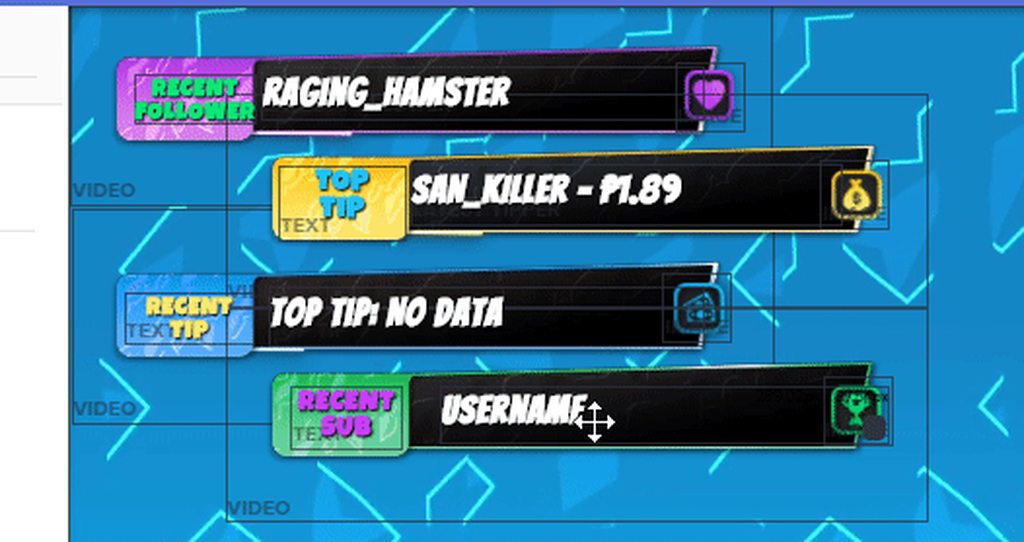


 storm venture
This is single video 😦
serene granite
which scene is that
storm venture
LLAMA ANIMATED IN GAME ANIMATED SCENE
serene granite
ah
I see it is one video on that overlay indeed
you can go to one of the other scenes, like Starting Soon
and select one of the video boxes, and copy it to the in game scene with the little copy button on the bottom left corner
its marked with a red dot
storm venture
Okay, I'll try to thank you for your advice.
lament blade
You can't 😦
tight harness
The default commands cannot be edited yet
 acoustic cedar
It says what you can change to Russian
tight harness
At the top right of the page you can click where it says En and change it to Ru and then the site is in Russian but the bot's default commands are in English and cannot be edited yet
You can change their settings but not the message itself
acoustic cedar
I want to use your commands, it's a duel and a lottery, but I can not because of the fact that the description in English is displayed
tight harness
If you go to: https://streamelements.com/dashboard/bot/modules and then go into the Settings of the modules you want you can edit the Responses
acoustic cedar
But there the settings are not the team itself but simply the process itself. Inscriptions that the team has started and is waiting for an answer in English
And can you give the message code? Would I make it as a new command?
tight harness
You mean the variables? They're not available to use in custom commands
acoustic cedar
And how to do it with these variables so that he can spread his glasses?
 late bronze
Hi, is there any visibility on when ideal is supported?
acoustic cedar
but better of course, ready to just take. If you threw it off I would be glad
tight harness
@acoustic cedar I'm not sure I understand, maybe @ebon forum can help better in Russian 😄
acoustic cedar
translator a good thing))
ebon forum
mh eh what?  waking up
@acoustic cedar а тут мы и по русски умеем. дай почитаю что у тебя там)
acoustic cedar
неужели
Крч, мне надо сделать описание команды дуэль и лотереи. Надо чтобы команды принять отклонить и т.д выводилось по русский.
Но говорят что тут нельзя их менять
может код команды скинешь а я его сделаю по русский
ebon forum
К сожалению нельзя. Я сам делал перевод сайта на русский - бот с его командами не переведён. Ты можешь сделать кастомную команду с нашими модификаторами итд на русском, но переделать готовые ПОКА нельзя. Мы работаем над этим сейчас.
Так что по поводу перевода у бота (и в редакторе тоже) - скоро.
acoustic cedar
вот мне нужен код готовый , чтобы я мог создать команду. А то самому долго будет да и не уверен что обычная команда сможет управлять очками
т.е то что выводиться при !duel с переменными
ebon forum
Сейчас посмотрю можно ли эти команды сделать, дай ка минутку.
acoustic cedar
Да без проблем, минутка ничего для меня уже не решит. Сижу часа 2))
ebon forum
Ну теперь знаешь что есть и русская поддержка в виде меня. В общем дело такое: сложные команды которые привязаны к модулю, нельзя переделать просто так как кастомные. Тоесть все команды за которыми стоят модули типа мини-игр итд. Тут придётся ждать перевода.
Сожалею, но тут костылями не поможешь, надо делать нормально)
acoustic cedar
а скоро будет этот перевод?
ebon forum
Я его собственно и буду делать. Как только наши разработчики выдадут мне список слов итд. для перевода и будет время. Планирую месяц-полтора, учитывая что я ещё немецкий делаю + техподдержку.
acoustic cedar
долго будет, как я понял)
ebon forum
Ну дело не критичное, это не баг же, а функция, работы много, так что да - сразу говорю что точно не на след. неделе 
 crude gulch
Hi, if anyone could answer a quick question for me, I would be very grateful. Is there any way we are able to grab the different images used from the themes? I've noticed an issue with the one I use where instead of it saying raiding, it says hosting. I cant change the text since its part of the alertbox image so, I was going to do it manually.
acoustic cedar
и еще один вопрос, скорее даже спрошу совет. Какой плейлист добавить в !sr ,чтобы все было минимальное
без каких то красок, тупо плейлист
а все, понял. Это оказывает не то под полонкой "запасной плейлист"
ebon forum
Ага, там всё и есть)
tight harness
@crude gulch If you notice any issues with the super themes you're best off asking @ripe herald 😃
 ripe herald
raiding is new feature and it was just pulled image from hosting so it's not empty, I will change all themes so they fit but if you need this urgent let me know theme name
crude gulch
Its not super urgent but, I was also wanting to change the text on the other alertbox images to match the font im wanting to use
but, the theme I use is the Variety - Red Flare
Wasn't sure if this was something I would be allowed to do with the free theme or if it was stepping into the bounds of having to just go and create my own theme
crude gulch
Rogerino
acoustic cedar
@ebon forum а лотерея работает на рандом челика или кто первый написал?