#helpdesk-twitch
1 messages · Page 198 of 1
 dense jackal
 pale crater
cool, thanks guys
 tired tulip
@dense jackal Much appreciated
pale crater
it looks like the normal site is back up (and nothing is lost) woo!
 tight harness

dense jackal
should be fixed now 😄
 true cloak
Wow I came here in a panic as I'm getting ready for a stream in a few hours and was also being directed to the jagermeister beta site where everything appeared to be missing. Thank you for fixing this so quickly! ❤ Much love for SE
tight harness
No problem 
tired tulip
@dense jackal not for me even after a hard reset on chrome
dense jackal
log in and log out
dense jackal
and I assume you went directly to Streamelements.com and it redirected you too
tired tulip
Yeah typed it in how it's supposed to be, but after 1 final try it's finally back the way it's supposed to be. must just be slow rolling out all over
dense jackal
thats good
 harsh slate
Hello! I just wanted to ask where I can export loyalty from?
tight harness
https://github.com/Slikrick/streamelements-csv @harsh slate

 shut ibex
How can I tell what encoding is good for my stream?
tight harness
@shut ibex You mean CPU vs GPU?
shut ibex
er
 lament blade
Yea i think so
tight harness
Do you know? 
shut ibex
no ._.
tight harness
Hmm
 edgy crest
I know this is probably obvious, but when I stream, the stream store doesnt show. Is there anything I have to do after setting up loyalty system and redemptions?
tight harness
@shut ibex x264 is if you believe your CPU (processor) would be better at handling it, Hardware (if you're using a NVIDIA card will be referred to as NVENC) is if you believe your graphics card would be better at handling it
If you're not sure, try it
shut ibex
i'm using x264 currently but im using a laptop
edgy crest
99% sure I opened it. Does it have to stay open for the duration of the stream?
tight harness

lament blade
x264 is cpu I believe
shut ibex
😭
tight harness
Laptops are not known for being good for streaming
shut ibex
make do with what i got
tight harness
I applaud your bravery
lament blade
No, what are you trying to do? @edgy crest When you open your store, can you see all the items there?
edgy crest
Yeah
shut ibex
how do i know which one would handle the stream better?
lament blade
Well then it's working fine, if you want to advertise to your viewers that you have a store, you can link the url of the store to a pannel, or make a timer/command for it
tight harness
@shut ibex Trying it
shut ibex
:D
lament blade

 hoary mirage
Again, I talked about this around 3 months ago but I'm bringing it up again after getting turned back to you guys from Paypal.
I got sent a $2 tip through you guys and it hasn't come into my paypal, I'm very confused by this.
 acoustic void
Excuse me, anyone happens to know why i cant see anything in themes gallery? Thank you 😄
edgy crest
Ahhh! I saw a small on screen box and thought it was from StreamElements, turns out it's from StreamLabs xD You guys should look into devving it. Really user friendly 😄
lament blade

hoary mirage
 I jsut wanna have my $2, I'm a starving streamer!!
 native crystal
I have a problem. badly displays the number of cheers in the top cherrers list widget from all the time. I noticed that it is the same amount as in the month.
tight harness
PayPal don't turn people back to us because we don't handle the tips at any stage, they do
I'm guessing you mean the tip that our system recorded in August, seeing as we have a record of it that means you received the tip and PayPal's API told us that you received it 
@acoustic void What's your Twitch username?
@native crystal Is your username right on your Discord profile? Because your account doesn't show any cheers at all
 tight harness
Interesting, this is me looking at that very page logged in as you 🤔
acoustic void
Whattt why dont i see it
native crystal
@tight harness I'm managing someone else's account. Twitch name: RockAlone
acoustic void
Thats weird cause i was watching a video and seems like people get to see those themes but idk why i cant
acoustic void
Nothing, also tried signing out and in, restarting pc (just incase) turning stream on and off, turning off adblock (my only google extension) no success 
 tight harness
What are those lines from?
acoustic void
🤔 thats true
 ripe herald
it's chrome issue
not related to site
those lines
try in incognito mode @acoustic void
 tight harness
@native crystal So you're saying that it's only showing cheers from when we implemented the cheers list and top cheerers leaderboard this month? Because that would explain it, just like how tips from before people sign up with us don't appear in the tips list, because until the feature is implemented or until somebody signs up this data isn't being actively recorded
acoustic void
Okay i will
@tight harness @ripe herald Themes popped up in incognito
I guess ill be using it through that haha
acoustic void
Ill try that as well
ripe herald
update if it solves the problem @acoustic void
lament blade
 But cookies
ripe herald
ok don't delete cookies eat them 
lament blade

acoustic void
Reset everything from browsing history to cookies, Themes are now showing up  rip cookies
ripe herald

acoustic void
Thank you for the help 😍
ripe herald
Anytime
tight harness
ripe herald
cookie with chocolate
tight harness
Did you test it like I suggested?
lament blade
 oh
oh
ripe herald

 slim cairn
@ocean solar any reason you're in the support voice channel?
tight harness
I heard it's where all the cool kids hang out 
dense jackal
get in there @lament blade
lament blade
You first
 thorn mountain
hey, I have a question
Is there any way I can get the bot to every, let's say, 5 minutes pop up a message on chat?
tight harness
You mean Timers, it's the feature at the very bottom of the navigation menu over on the left of our site
tight harness
Thanks 😄
thorn mountain
since I'm here, what exactly are the leaderboards?
tight harness
Points leaderboards, from loyalty 😃
 worn cradle
can i change what my bot says when ppl sub/resub?
thorn mountain
yeah, i don't really understand that concept
worn cradle
and is there a command what i can input for a counter like... how many times i kill someone with a pan lol
dense jackal
@sonic juniper https://stats.streamelements.com/ stats 2.0 is up 😄

@worn cradle you can change it in the alert modules here https://streamelements.com/dashboard/bot/modules
StreamElements
The Ultimate All in One Platform for Streamers
harsh slate
@tight harness Thank you for your help 
tight harness
You're welcome 😃

@thorn mountain People can get points from doing any of the loyalty settings here:
But also they can get the all-time points just from watching 😃
thorn mountain
What are the points used for?
edgy crest
That'll be because you're not affiliated/partnered
Neither am I, so... dw about it :3
hmu if you want help with the redemption shit
thorn mountain
to twitch or to stream elements?
edgy crest
twitch
thorn mountain
Will do
edgy crest
It's pretty simple, you offer a reward for a certain amount of your currency and add any further requirements they need before being able to redeem
worn cradle
how do i get song requests to work? i want o enable that but like...
I'm not sure how to make it work
tight harness
@worn cradle Go to the song request page / song request settings page, it's all there
worn cradle
yeah i just mean how does it play
slim cairn
@worn cradle for song requests to work you need to download ground control or have the song requests page open https://streamelements.com/songrequest
StreamElements
The Ultimate All in One Platform for Streamers
worn cradle
right so if i have the dashbord webpage open
worn cradle
oh so i HAVe to have the song request page open too or otherwise it wont play?
worn cradle
i do
slim cairn
That'll work
tight harness
By either I meant one or the other 😄
slim cairn
Not both though
worn cradle
ah ok, so in ground control i can have the songs tab open and on the internet tab with the dashboard?
tight harness
Yes 😃
worn cradle
neato how should i do the setting, the average songlength time and stuff?
tight harness
Up to you, just remember the song length time is in seconds
tight harness
That's where you can show the video of requested song requests in your overlay, also needs the MediaShare widget added to your overlay
worn cradle
to show what song is being played is i need a widget for tat too right?
tight harness
Current Song widget, yeah, but that's also for requested song requests, not backup songs
worn cradle
ah ok
how to i ban some song that are racist? or contain racist content in the title? is that what banned tags are for?
tight harness
Yes, that's right
worn cradle
whats the widget called to see the playing song thats requested?
@tight harness
Its current song right? or will the bot share who it is?
tight harness
i'll double check, pretty sure it's Current Song

Leave it on the Song request option over on the left
worn cradle
mk
tight harness
mmmk
 proud pumice

slim cairn

lament blade

 indigo heath
Hello, I wish to use the song and song request commands in my stream, but it says something about going to Module Settings. I went to the Modules tab, but I don't know which of the Modules will allow me to use the commands that I want to use. I would like it so that instead of a YT link, they could request titles of songs.
tight harness
It's telling you to go here: https://streamelements.com/dashboard/songrequest/general and here: https://streamelements.com/dashboard/songrequest/settings
Also, the reason it has to be the link or at least the video ID currently is because we have a limit of how many API calls we can make to youtube each month, when youtube streaming support comes out soon we're hoping it'll get raised 
indigo heath
lol, is there another bot that could do what I want? Or would i need a moderator
tight harness
You can create a command which searches for the Youtube ID using the song name and then use the Youtube ID it gives you to request the song, that's a workaround until the API limit gets raised
indigo heath
ahh ok i see, thank you
tight harness
!searchcommand @indigo heath
 nocturne pelicanBOT
This command can be added to allow searching for a song. Bot will output youtube video ID that user can then use to do a songrequest. Response: Here's your video id: $(customapi.https://decapi.me/youtube/videoid?search=$(queryescape $(1:)))
indigo heath
What do i do with the videp id?
tight harness
Request songs
indigo heath
But, where do i put it?
tight harness
In the command after !songrequest or !sr
Instead of the link
So you use the search command, it gives you the video ID, then you do !sr followed by the video ID
So it's just 2 steps instead of 1, still super simple 😃
indigo heath
So I make a new command and name it search?
tight harness
Yes, with the response the bot gave you after "Response:"
 languid pasture
Does streamelements work on mixer?
tight harness
We haven't worked on mixer support yet, but it is planned for the future
We're actually currently working on YouTube streaming support
languid pasture
The bots I use on there aren't as... Nice as twitch bots. Like I am using beta stuff. Lol love streamelements.
indigo heath
Ok, so to confirm. Make a new command and name it !search, then under the response text box, put the video id StreamElements gave me. Then hit submit. @tight harness
tight harness
No
nocturne pelicanBOT
This command can be added to allow searching for a song. Bot will output youtube video ID that user can then use to do a songrequest. Response: Here's your video id: $(customapi.https://decapi.me/youtube/videoid?search=$(queryescape $(1:)))
tight harness
!searchcommand @indigo heath
indigo heath
So name the command !searchcommand?
tight harness
No, you can name it !search
Just remember to put the response as the part after "Response:"
tight harness
All of it after "Response:"
indigo heath
I think i get ot now
tight harness
Here's your video id: $(customapi.https://decapi.me/youtube/videoid?search=$(queryescape $(1:)))
This is the response
Put that as the response to the command
 quick sluice
Hey im new to this and confused, i went to a streamer's store and redeemed something but i dont know where to go to get it
lament blade
You can find it on your profile, one second i'll give you a link ><
https://streamelements.com/dashboard/account/redemptions @quick sluice
quick sluice
Thank you so much, there is no code written below the access code so should i wait for the streamer to put it there?
lament blade
Depends on what you reedemed, it can be a stream perk, that streamers have to manually do, sound effects, that only plays a sound on the stream or access-code, in which case, if you accidentally close the box without getting the code, you can find it on the link i sent you, without having to reedem it again ><
indigo heath
Ok, so sorry, but one last question. Is it possible to add a Priority request function that cost 1 token or dollar?
quick sluice
Its a code for bonus items in a game
 crude gulch
Was the sellout list cleared out or something? My twitch channel doesnt show up in it anymore that ive noticed
quick sluice
nvm problem solved
 clever mango
@crude gulch You've only been live 5 minutes. It posts somewhere between 5-15 minutes on average and can be longer depending on various factors
It posts live channels only now and deletes the announcement when they go offline
crude gulch
Oh, alrighty
Yeah, thats what I was curious about lol. I couldnt see where it was showing it
 faint marsh
Hey can someone help me out?
lament blade
Of course! What do you need help with? 
faint marsh
Tips aren't showing on my stream.
I checked AlertBox and it is set up to show streams, and I set an animation for it
lament blade
Did it just stop working, or it's your first time setting it up?
faint marsh
Well i've had it set up, but just got my first donation and only realized when I got the notification on my phone
also the info didn't update on the overlay.
 small skiff
Question, do users get added as a Regular overtime? or do you have to manually add them to that group?
lament blade
Do you have tipping moderation on?
faint marsh
Just checked and nope
lament blade
Does it show in the activity feed on stream elements?
lament blade
Could it be that somebody donated using another service?
faint marsh
no, it was my brother and he donated using the link on my page
which is "https://streamelements.com/obeseskydiver/tip"
StreamElements
The Ultimate All in One Platform for Streamers
 primal sluice
the loyaly settings isnt giving me my points what do i do?
clever mango
@faint marsh when was this tip?
faint marsh
Today less than 10 minutes ago
lament blade
@small skiff That is an idea on the idea's board https://streamelements.helprace.com/i181-automatic-regular-status-for-viewers
clever mango
@primal sluice bonus points or earning by watching?
primal sluice
earned
faint marsh
He followed me and then donated 2 minutes after
small skiff
Thank you for the reply @lament blade
primal sluice
is it on the correct platform like paypal or splice?
lament blade
No problem 
faint marsh
yup its on paypal
clever mango
@faint marsh I let the devs know about this and they'll look into it
lament blade
Are you talking about your own stream, or someone else's? @primal sluice
clever mango
No no.. it won't be that long.
You can add the tip manually from https://streamelements.com/dashboard/tipping/list
but the payment might end up being sent automatically from paypal resulting in a duplicate entry at which time you can delete one
faint marsh
....
lament blade
If you go over here, https://streamelements.com/dashboard/loyalty Is loyalty enabled and do you have something on "amount"? @primal sluice
clever mango
@faint marsh When I hear back from them I will contact you. Again, if you'd like to add the tip now you can and it will show in the activity feed and show the alert. There are quite a few reasons that this can happen (though it's not common) so the devs will have to look into the cause before they can resolve it.
faint marsh
I messed around with it and donated $1 to myself and got it to work.
 turbid reef
@faint marsh can you give me the paypal transaction id? it should be on your paypal dashboard
turbid reef
the one that didnt show
faint marsh
ill PM it to you or just here?
turbid reef
yeah pm it
clever mango
@primal sluice please link your twitch with discord so I can look into it. (discord settings > connections > twitch)
 runic sigil
people, which is the link that accesses the "saved" information that appears in the overlay for example?
lament blade
O que quer dizer com isso? o: @runic sigil
lament blade
Ah sim, você já achou? 😄
 toxic parcel
Is there a way with the current variables and what not to have the bot timestamp and save those timestamps to someplace (a google doc or make another command with each timestamp)
toxic parcel
timestamp/uptime
lament blade
Que bom
clever mango
@primal sluice The reason you are not earning points is because the streamer and streamelements bot are ignored from earning loyalty by default
You can click the X next to your name and save if you want to earn points
lament blade
I know you can check for uptime... I don't believe you can save it on a separate file... It's on the idea's board, you can 👍 https://streamelements.helprace.com/i204-having-a-way-to-save-timestamps-for-highlights @toxic parcel
turbid reef
@faint marsh i didnt see any obvious errors, it might have been an error on paypals side
toxic parcel
hmm ok, thanks @lament blade (can it save it as a seperate command?)
lament blade
You should give this a try https://obsproject.com/forum/resources/infowriter.345/ I believe it's what you are looking for @toxic parcel
lament blade
Yep, check your default commands https://streamelements.com/dashboard/bot/commands/default !givepoints
toxic parcel
Thanks ❤ @lament blade 
lament blade
Anytime
toxic parcel
😄
lament blade
 pine hemlock

lament blade
pine hemlock

lament blade


 lament blade


pine hemlock

lament blade

pine hemlock

 misty wagon

 harsh wyvern
anyone know the command syntax for setting the stream title from chat?
misty wagon
!setttitle
pine hemlock
!settitle
harsh wyvern
ty ty ty
pine hemlock
Mobile auto correct ruined it I'm slow
lament blade

lament blade
@misty wagon
misty wagon

toxic parcel
lol
 pine hemlock

lament blade

misty wagon
I like 
pine hemlock

misty wagon
 bite me
pine hemlock

lament blade

misty wagon

lament blade


 spring breach
my timer on my bot is not posting in my chat, any help ? please and thank you!
 thick eagle
Is there issues going on with song request right now? My songs seem to be randomly getting cut off and the next song starts playing, some songs are being skipped entirely even though they've played on stream before?
dense jackal
https://streamelements.com/dashboard/songrequest/settings Make sure maximum song duration is higher than 5 it is in seconds
StreamElements
The Ultimate All in One Platform for Streamers
 night horizon
Do I get points for watching a stream if the stream is in a different tab or minimized?
thick eagle
Yeah, it's at 600 and always has been. Doesn't let people add songs in that are longer than that...
dense jackal
Might be a bug, 🤔 we'll look into it!
@night horizon as long as you are in the viewer list you get points
thick eagle
Thanks. At first I thought it was the songs but it did it probably 10 times tonight to different songs that weren't finished lol
worn cradle
Anybody here use an alienware area 51? My pci express is running at a x8 instead of a x16 which is supported. I'm wondering how can I get the port to read more then x8 I'm out of ideas so I figured I'd ask here
dense jackal
no idea but imo if u can avoid alienware all my friends have had bad expereinces with them
 bold tusk
I messed up. I blocked a tipper instead of deleting the tip, and now I can't do anything about it. It asks to contact the support, but got in a queue, no answers so far... 
 stone spire
Hey, how can I set up a command to respond via pm rather than in chat?

 split jewel
Would anyone be able to help me with a Followers and Shoutout command for chatbot?
stone spire
Like to announcer new followers in chat?
split jewel
yes for the bot to announce if i have new followers in chat
stone spire
in your streamlabs panel
go to Modules under bot, and there is a module called Chat Alerts
enable that, and then you can configure it to announce followers, subscribers etc
split jewel
Ahhh let me do that now 😃
I think it worked, thank you @stone spire - well it seems like it worked.
Is there a way for me to do a shoutout command.
Where I do !shoutout [user] and it'll come up with a command saying
"you should follow [user] over at [usertwitchlink]" or something
stone spire
Yes, I believe you will have to make a custom command though
but there is a template
split jewel
yeah that's fine making a custom command, but I'm just not sure of what the code is....
stone spire
go to commands -> custom -> new command
then from the templay dropdown button
select !shoutout
From there you can customize it as you wish
split jewel
so when it says....
Check out ${1}, they are playing ${game ${1}} at https://twitch.tv/${1}
What....I don't understand what 1 signifies....
 stone spire
well the ${1} are the variables
which will be the first parameter of your command
so if you do !shoutout danomate
it would say Check out danomate, they are playing Runescape at https://twitch.tv/${1}
etc
split jewel
see that's what i was wondering so 1 is I have to type the username - that's what I wanted to know
lament blade
How can I preview my overlay?
stone spire
you don't type that in the command settings though
just when you use it int chat
@dusty echo you can press the overlay preview button in the My Overlays section
@lament blade *
or, you can just load it into OBS
then use the button in the bottom left corner of the overlay editor to simulate events
 split jewel
yes I tested it, I understan Danomate 😃
stone spire
cool
split jewel
thank you so much~
stone spire
No problem
lament blade
Well I dont have OBS on this potato laptop
stone spire
So it's not your streaming pc?
lament blade
nope Im waiting to get my streaming laptop
stone spire
Just press the launch overlay button in the overlay sectioin
and it will load the web page of your overlay
lament blade
it shows white
lament blade
Im just trying to see what it looks like
stone spire
it will be transparent in OBS
stone spire
👍
Check out the themes section on streamelements, there's some great ones there to start with
 pearl light
thanks for the help @stone spire ❤
 atomic hollow
who are you asking?
 cerulean hound
Anyone here who can help me with some problems uploading images? and a couple of other things I think are because of streamelements
pearl light
@cerulean hound sure what's the problem?
cerulean hound
Hiya so, 2 Things really, I try to upload an image to streamelements for use in the stream store, and just on my stream in general, and it says Failed whilst uploading file, I've tried resizing and the likes, They're all under 10 mb, saved as jpegs png, allsorts and none of it works.
and secondly, Whilst on my stream for the last few days, If people have hosted my channel, I've not been getting an alert, Not sure if this is to do with twitch or streamelements, but It's all ticked and says that it should be showing the alert
pearl light
ok so for the first issue: maybe you're out of storage? can you check? it's limited to 100mb
and for the 2nd one, let me check real quick
ripe herald
You need to have open ground control app or your streamelements dashboard/activity feed for host
cerulean hound
Ah okay, So keep my streamelements dashboard open always?
ripe herald
yeah that would be awesome or you can use our https://streamelements.com/groundcontrol
StreamElements
The Ultimate All in One Platform for Streamers
 wanton solstice
hey guys, is there any solution for high encoding? i have an I5 - 7400 and i can't Streaming 😦
pearl light
yeah either ground control or your activity feed
charlotte, you wanna send me one of the files you're trying to upload and I'll try it here?
tight harness
Just a quick question, what browser are you using? @cerulean hound
cerulean hound
Chrome
tight harness
Ahh okay, just checking because we recommend chrome but some other browsers cause issues 😃
cerulean hound
It was my adblock ❤ Thankyou so much for all of your help guys
cerulean hound
❤ Thanks again
tight harness
 elfin magnet
Hey peeps! I was just wondering, can you change the bot name? i love using Elements. But.. the bot name is just not working for me.
pine hemlock
Feature is in beta testing
 serene granite
are you using StreamElements as your main service for bot, overlay and tipping @elfin magnet ?
no, streamlabs donations
serene granite
the bot custom name feature is something we're rolling out right now to people who use us as their main service for bot overlay and tipping
when you do that, if you use the desktop app ground control: https://streamelements.com/groundcontrol the option will be available
StreamElements
The Ultimate All in One Platform for Streamers
to change the bot name.
elfin magnet
all i have is the glas from labs. the rest is SE
serene granite
Your link on the twitch panel is for streamlabs donations
elfin magnet
ok. well. i can change that.
serene granite
its up to you 😃
the less tools you use the more you can focus on the actual stream
thats why we made StreamElements an all-in-one tool
and our hypecup widget can do what the glass does 😃
elfin magnet
the hypecup?
tight harness
Yes
elfin magnet
sounds awesome.. cant find it tho!
serene granite

Add extra HYPE to your stream with HypeCup - the best cup on Twitch. HypeCup visualizes all your stream events into tokens that drop into a container - your ...
elfin magnet
hypecup added!
 oak bison
I gladly do like to know of there are any sounds included in Super Themes.
tight harness
To my knowledge it's just graphics, you can still add your own sounds
 dapper plank
http://prntscr.com/i6peos .... the date filter doesnt work

how can i have the last item bought on the top
 echo jasper
Is there a place to view those support items that are actually bugs and what the status may be?
oak bison
So little other question
I use OBS Studio and have it in as a Browser Source but I dont get the full graphics visible.
This is all what i see
tight harness
@dapper plank It should be that way but since yesterday it doesn't seem to be, i'll ask about it
tight harness
@echo jasper There is, https://strms.net/problems if you have one of the issues you upvote it
echo jasper
Thanks @tight harness
tight harness
@oak bison The issue could be your OBS, not sure what that version number is but it's not the latest
tight harness
Alright 😃
oak bison
But I pretty like the LLAMA theme cause its simple and cartoonish and that really reflects my channel name.
tight harness
Glad you like it 😃
 silk mural
Hey, is there any problem with StreamElements today? It has already happened 3 times today that someone subbed but there was no message in chat/animation/record of it in the dashboard
serene granite
@silk mural what's your twitch username?
silk mural
valenash
serene granite
did they hit the SHARE button on the chat?
silk mural
I don't know, but it's always happened automatically for every single sub so far
without them hitting any share button
serene granite
all re-subs events we're aware of come after the viewer uses the share button
oak bison
The new obs takes over 89% of my processor without running a game 😰
tight harness
When was your processor made? In the middle ages?
dense jackal
are you encoding with x264 or ur graphics card
 safe kettle
Ok so I've tried google and can't seem to find an answer to this. How do I edit an overlay, (ie; move a webcam graphic around) on the streamelements editor and still see where it's actually placing on my stream in OBS. Currently I'm edited the overlay, then going back to OBS, just to find out it's not quite where I need it, then going back again and so on. Any help would be greatly appreciated
silk mural
@serene granite I asked some people that resubbed and they said there was no "share" button
serene granite
ok, it should be at the top of the chat
regardless, lets make sure your account is synced up with twitch properly
StreamElements
The Ultimate All in One Platform for Streamers
and log back in
 swift parcel
@safe kettle here's a nifty trick take a screenshot of your obs preview window (with where you want your camera and without the SE overlay) and upload it to the overlay editor, place it in the background, then you can put the camera overlay where you need it and just remove the screen shot image
safe kettle
Thanks @swift parcel
swift parcel
no problem
oak bison
Cool to have Stream Elements watching my stream 😊
tight harness
We're in every channel who uses us 🤔
oak bison
Awesome what does that sellout channel here on Discord mean?
tight harness
!sellout @oak bison
nocturne pelicanBOT
@oak bison, to be announced in #sellout you need to be using our Overlays, Tipping Service (preferably linked in panels) and the StreamElements bot. (Modded in your channel)
 pulsar sierra
anyway to get the raffles set to a timer?
tight harness
Nope
pulsar sierra
crap, Thanks @tight harness
tight harness
Unless you set a timer on your phone to remind you
oak bison
Thats awesome I use them all. 😊
tight harness
@oak bison Go in your Discord user settings > connections and link your Twitch to your Discord so I can check
tight harness
You haven't modded the bot yet 
oak bison
Oh how do I do that?
tight harness
Type /mod StreamElements in your stream chat
 split quail
Are donations not being captured again?
lament blade
Hey guys. The currency points I'm gained for write messages on stream? Just gained for time spend of live?
serene granite
@split quail it shows up on your paypal?
@split quail I see you had a donation 4 mins ago and 2 mins ago
tight harness
@oak bison Added you
serene granite
@lament blade loyalty points are handed out when the stream is online
lament blade
@serene granite Yes, I understand it, but is it like in other websites that for the time spent counts points, and also for chatting activities ??
serene granite
no
there are no points for chatting
but the streamer can enable bonuses for events like following, subscribing, donating, hosting
oak bison
Awesome @tight harness
lament blade
you planned add extra points for activity on chat in the future or not?
 upper parrot
hello, its possible to have a command like !sound1 who play a sound in stream?
serene granite
not really, there's too much abuse potential
sure @upper parrot , use the store for that
create a sound-effect type item
and make sure you have the store-redemption widget on your overlay
upper parrot
i do it but didnt work with chat command
lament blade
@serene granite And any other ways to donate outside of paypal?
serene granite
not yet @lament blade but we're working on adding additional methods
upper parrot
if i reedem true the store website work, but with command not..
serene granite
did you mark the "redeemable via chat" @upper parrot ?
upper parrot
yes
serene granite
maybe the bot needs a resync, try making it part and join
serene granite
no problem 😃
upper parrot
thank you
tight harness
${redeem ItemNameHere}
upper parrot
thank you 😄
serene granite
aye
tight harness
😃
upper parrot
its working thank you ;D
serene granite
Legendary Service! 😛
pine hemlock
oak bison
Hopefully next week my stimulation money comes in of volentering 😊
Than I finnaly can go live again 😋
Actually play online games again 😅
tight harness
If you tell us what you need
 serene raven
Bro i start from modules the roulette system
but from commands i cant activate
what i need to do ?
clever mango
@serene raven what module(s) are you trying to activate. The commands are automatically enabled when you enable the modules
serene raven
Roullete
clever mango
Enable roulette from modules and the command will be enabled
serene raven
See i cant activate it.
clever mango
They are linked
serene raven
Its enable
serene raven
tight harness
Are you do !roulette <number> or !roulette all ?
tight harness
You were just doing !roulette?
tight harness
No problem
tight harness
lament blade
Getting flashbacks on ! roulette all @tight harness
 raw shell
Hey @tight harness I changed my twitch name, is there anyway to get it so that I dont lose all of my overlays on streamelements?
serene granite
of course
visit https://streamelements.com/logout and log back in
StreamElements
The Ultimate All in One Platform for Streamers
all your overlays are there
raw shell
oh thats all
serene granite
always best to be prudent and ask 😃
tight harness
We prefer it if you ask if you're not sure 😃
tight harness
I don't believe that changes
 winged estuary
hi so i have set up mutipal overlay and when adding sound effects on the website its all working gravy but when im live i hear the basic sound and the sound i have added, it does it for all the alerts but here is the test for the follow https://clips.twitch.tv/AmorphousEmpathicChinchillaAMPEnergyCherry
 tight harness
@winged estuary What you need to check is the properties of all of your overlay browser sources (including ones in other scenes) for whether the option 'shutdown source when not visible' is ticked or not, it should be ticked for every browser source
winged estuary
AMAZING ❤
 somber sparrow
lament blade
somber sparrow
lament blade
Create an overlay or edit your existing one and add the "alertbox" widget 😄
pale crater
It seems that whenever I have a backup playlist on for songrequest and a song is requested, i have to reload the page for the requested song to play, otherwise it just sits in queue
Shouldnt it automatically switch from the backup playlist to the requested song?
pale crater
browser
pine hemlock
which browser?
pale crater
Chrome
pine hemlock
version?
Settings -> About chrome
If its out of date it will auto update
and that could be the problem itself
pale crater
Hmm, that didnt seem to work
Also something I noticed; when I hit "play now" for the video in the queue (without refreshing the page first) it shows in the info box for the song but the actual video that is playing is still the backup playlist video
pine hemlock
@tawny pivot ^ do you know anything about this
elfin magnet
hmmm. cant my host alert or my donation alert to work.. no sounds, no "adding them to "new donations"
pine hemlock
do donation alerts work when you emulate them
elfin magnet
yes
pine hemlock
your donation link in your profile is set to streamlabs so if users are donating it wont show up
as for host alerts, check the pinned messages of this channel
elfin magnet
so this pinned msg shows me how to change to elements "tipping"
but the host.. I dont get it
pine hemlock
 elfin magnet
so how do i change so my tipping is thru SE. and not Labs?
pine hemlock
change the links under your twitch stream
to https://streamelements.com/tip/reckyj isntead of the streamlabs url you currently have
elfin magnet
done. but it wont update latest tipper.
pine hemlock
If no one has donated through our webpage, then you wont have a recent tipper.
 drifting basin
How do you import streamelements loyalty store to streamlabs?
It says on streamlabs I need the "JWT" or something.
elfin magnet
thx
pine hemlock
https://streamelements.com/dashboard/session you can add a "tip latest" username and amount manually here though @elfin magnet
@drifting basin Your JWT token is located under your account page on our site.
drifting basin
ty
elfin magnet
@pine hemlock thank you for you help!
pine hemlock
yw
 pastel sail
How do you make the overlays in 720p? i found an option but it only gives me half of the screen..i stream in 45 min..help please..I use Xsplit
pine hemlock
You have to manually scale things if you want the overlay on 720p on the site.
If your display is 1080p, obs scales it to 720p for you - just use it as 1080p
(im sure xsplit is similar but im not sure how it functions)
 lost ridge
does anyone know how i can get an animated gif to pop up on screen every 5 mins or so?
pastel sail
ive done everything i can think of to scale it down manually and cant figure it out
 umbral patio
hello, when I put the URL of my overlay from stream elements into a browser source in OBS, it shows just a black screen instead of my overlay. I saved my overlay and am using the correct link. any suggestions? it is the only source in the scene right now so nothing is covering it
pine hemlock
@umbral patio What obs version
umbral patio
21.0.1
pine hemlock
Is there a fit to screen button/option for xsplit @pastel sail
@umbral patio Uhhhh. Can you send me the link in a DM
@lost ridge Theres an "image rotator" widget that can do this
solved Khralum's issue via dm
umbral patio
thanks @pine hemlock
pine hemlock
@ebon forum How do you scale a 1080p overlay to 720 with xsplit
(idk if hes home but we'll see)
 ebon forum
@pine hemlock at home. brain not working. gimme a minute 😄
pine hemlock
thx. if you could help @pastel sail it would be appreciated. idk anything about xsplit scaling
ebon forum
@pine hemlock @pastel sail Xsplit does the scaling by itself. you have the "stage" resolution and FPS at the top right corner and you can also set extra resolution and FPS options for each output (where you enter your twitch account and set up the bitrate, outputs > settings for each one). So if you scale your stage to be 720p 60, everything will be downscaled to that.
pastel sail
my top right corner says 720 at 60fps...but the image above shows it scaled down at 720 and only half the screen
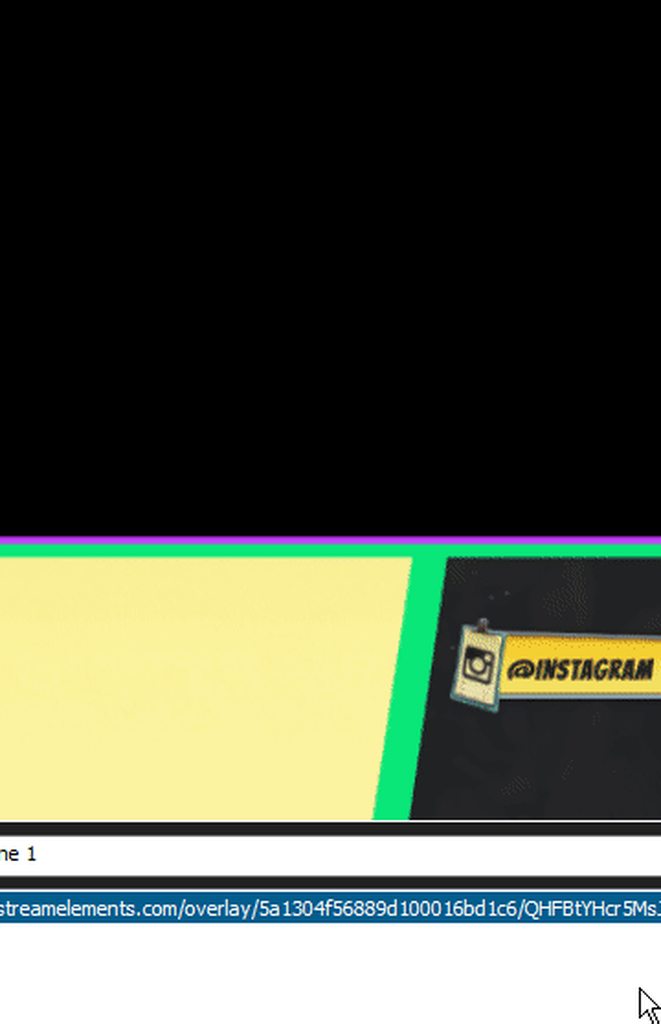 ebon forum
@pine hemlock @pastel sail and to get your overlays to fit to the scene, you need to set them to custom resolution and set that to 1920x1080 in the "webpage" source
pastel sail
yes its set to custom
ebon forum
@ripe herald thx, makes it easier 
ripe herald
it's working for me perfect when i set custom as 1920x1080
ebon forum
@pastel sail you need to set the resolution of the source to the resolution of the overlay. by default our overlays are 1920x1080. then resize it to make it fit to screen
ripe herald
yeah you need use 1920x1080 as custom
pastel sail
oka and now im lost..i have no idea how to do this
ripe herald
just type in custom 1920 in one box and in other 1080
pastel sail
OH!
ebon forum
@pastel sail right there where you are on the picture, set it to 1920x1080 and Xsplit will take care of the scaling later
ripe herald
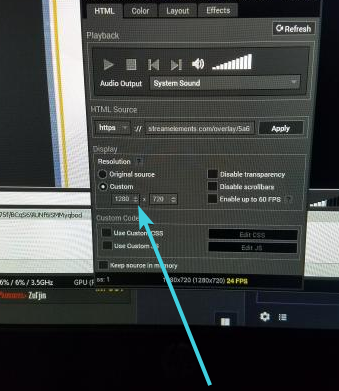 ripe herald
ebon forum
now add the "keep source in memory", make sure it is checked for all our sources on all scenes and then configure your output and it will be scaled down to whatever you set as the output resolution @pastel sail
pastel sail
nice thanks!!!
ebon forum
@pastel sail  if you have any questions about Xsplit, OBS, settings and even hardware - feel free to poke me (and anyone else if i'm not around xD), we help you
pastel sail
sweet deals! 😃
 upbeat reef
i need help with overlay
pale crater
Maybe be specific on what exactly you need help with?
upbeat reef
ok so i try to set up my obs start stream overlay but its not he correct size
it cuts of half the overlay
pale crater
You should be able to drag/scale it in the preview, no?
pale crater
Not currently, im on my phone atm
upbeat reef
ok
pale crater
Maybe someone else is willing to take a look
pale crater
Just switch between scenes and the timer will reset every time you select the scene
oak bison
A streamer I have played some Fortnite with has got 40k new followers in 4 hours time 😱
pale crater
Wth
pastel sail
how do you get your mods to access your dashboard to create custom commands for you? sorry for all the questions
pine hemlock
StreamElements
The Ultimate All in One Platform for Streamers
oak bison
Its active stream elements user aswell 😃
pastel sail
cool thanks cause when i give them the link it takes them to their account and not mine
oak bison
40k followers in 4 hours insane letterly insane 😱
tight harness
@pastel sail it's fine, you click on your username and it shows you the accounts you manage in a dropdown
pastel sail
hm he is trying to access my dashboard but cant even though he is a manager under mine
oak bison
This guy letterly gets a new subscriber every 5 seconds 😋
 peak magnet
is there any way to ensure that i don't get two images of my banner on my profile page?
 valid cliff
So had an issue where I made a design and posted as an image on STream Elements like this
tight harness
@peak magnet Could you show me what you mean?
valid cliff
But on obs it shows like this. I thought to refresh or wait but nothing seem to have changed :/
peak magnet
instead of being one seemless image it ends up being double
tight harness
@peak magnet Ohh, yeah make it the right size
peak magnet
i've tried messing with the resolution
but to no avail
my 1080p also ends up strange
 stuck hamlet
Set the resolution to 1920x1080 of your browser source @valid cliff
peak magnet
i've changed the image now to show what i mean @tight harness it is 1920x500 so i get why it is cut off there
but it still has double images
valid cliff
@stuck hamlet I did that already :/
pine hemlock
obs version ?
tight harness
I don't believe it's 500 height
peak magnet
yeah the height is wrong i know that
valid cliff
peak magnet
but it should not affect the side lenght
valid cliff
obs 21.0.1
valid cliff
 stuck hamlet
Huh 🤔
valid cliff
This is what it should look like sadly :/
pine hemlock

valid cliff
I did the design and its a png
stuck hamlet
Can you create a new browser source and try again?
valid cliff
okay strange
s2 possiblities
works now
❤
1 is i had to resave my design on illustrator
stuck hamlet
Cool
valid cliff
and then posted the new design
worked but i also did the obs again about 10 minutes ago
and issue showed. so if issue like that i think just had to resave the design
but thank you! I was so scare since though my design couldnt work
tight harness
@peak magnet Were you zoomed out?
peak magnet
yeah lol
tight harness
😄
lament blade
Hey guys, if anybody could help me out I have a question. I don't know if you guys know, but TimTheTatman got hacked by clicking a link on stream. I was reading through the comments and people were suggesting him to switch to StreamElements, but why is that? Do you guys provide a better filtering for dangerous links or something? Because if that's the case then I would most definitely make the switch as well.
 steady sage
Hey guys, just wondering if anyone can help? I keep getting an message when I try to change my chat alerts module saying: 'error saving changes to module'.. So i'm unable to receive notifications if I get hosted
tight harness
@lament blade We do provide Link Protection on our Spam Filters page: https://streamelements.com/dashboard/bot/filters although people should still be very careful about what they click in general 😃
@steady sage This normally means there's either a blank message box, or too many characters, or an unrecognised symbol, or a too high number, i'll give it a check if you like and try to figure out which module is causing the issue
lament blade
Of course, rightly so, my understanding is that if someone wants to hack you and are truly capable of doing so, then there really isn't much to do about it. But in this case its nice to know you guys provide link protection for something I can actually control.
tight harness
@steady sage Yeah, if there's a problem with one of them then none of them save
I know what it was
It's because your Chat Alerts had at least 0 as the trigger amount, needs to be at least 1
steady sage
Yeah I changed it to 1, but it still didn't do it
Okay it's done it now haha, thank you!
tight harness
No problem 😃
 thorn lark
Hey guys looking for some advice please. Is there anyway for me to do this without using a capture card. I have an Elgato pro but it does'nt work with a laptop which is what I have.
tight harness
@thorn lark What are you trying to stream from?
thorn lark
Xbox One
tight harness
If you want overlays, song requests etc you'll ideally want a capture card, but I believe there are other ways such as Remote Play
thorn lark
Yes ideally hoping to use a basic overlay etc
pale crater
still could use some help, song requests dont automatically switch from backup playlist to requested song
i have to refresh the page for it to switch
thorn lark
I may have to use remote play temporarily until I can find a solution. Thanks for the help
tight harness
@pale crater It's known but hasn't been able to be fixed yet, apologies
@thorn lark No problem 😃
tight harness
No problem 😃
 olive cedar
Is there a way to copy and paste my alerts from one screen to the next?
Or do I need to individually set them again
pine hemlock
select the alertbox widget and press the button with the red thing: https://www.cuda.live/s/52p7id9f.png

 heady pond
Is there a way to do basic arithmatics within a command, like $value -1 ?
tight harness
@heady pond I don't believe so
It was added to this idea which is under review: https://streamelements.helprace.com/i311-more-custom-command-variables
 pale linden
Anyone know how to get my activity feed data back? I accidentally reset it and now my widget data is no longer there. So now my overlay has no followers/tips/ ect.
 dusky warren
When I try to use a premade overlay its way too zoomed in on my obs and I cant fix it
tight harness
@pale linden Which tab did you reset?
pale linden
@tight harness unfortunately labels
tight harness
@dusky warren Are you keeping it at 1080p on the site and when you add it to OBS?
@pale linden You can input the Latest data manually if you know it then Save Changes, but the Recent Widgets will need new data
dusky warren
No, I change it to 1280x720 because thats my obs size
tight harness
@dusky warren Right, that's the problem, keep it at 1080p on the website, add it as 1920 x 1080 on OBS, then use Ctrl + F within OBS to fit it to your canvas
pale linden
@tight harness Ok, that's not an issue, I have all the data saved, but in the labels tab, it won't let me edit recent followers.
unless that's the wrrong location.
tight harness
Yeah, the Recent data you can't add to, the Latest ones you can, but the Recent data is added when the events happen but can't be added to, you can only remove things from the Recent data
So when you get new follows/tips/subs/cheers/hosts that'll populate again, but you can change the Latest data manually
pale linden
@tight harness ohhhhh ok. got it! So like you said, just manually add them to it
tight harness
For Latest yeah 😃
pale linden
ok, no worries! thank you very much!
tight harness
No problem
pale linden
dusky warren
Oh, it works now thank you :) @tight harness
tight harness
No problem
pale crater
yo im tryna be a sellout how does that happen 
tight harness
!sellout @pale crater
nocturne pelicanBOT
@pale crater, to be announced in #sellout you need to be using our Overlays, Tipping Service (preferably linked in panels) and the StreamElements bot. (Modded in your channel)
lament blade
Are you really? i don't believe people who end their sentence with a kappa
 pulsar gulch
Is someone really using that "twitter " ?
from SE bot
or i just don't understand it ?
clever mango
the twitter module?
pulsar gulch
yea
clever mango
a lot of people use it
pulsar gulch
so i will get a msg in chat from someone who is gonna start his stream soon ? O.o
clever mango
The module follows twitter accounts that you set in the module settings. When those accounts post a tweet, reply to a tweet, or retweet someone it will be posted in chat by the bot
You can remove what is there or add on with twitter accounts that you want posted in chat
pulsar gulch
but .. i don't tweet when I'm streaming
clever mango
Do you tweet anything for your viewers to see?
pulsar gulch
before starting the stream
clever mango
Some viewers pop into the chat or lurk there while it's offline and they'll see tweets that are sent
The most common use case is to have it follow other twitter accounts. Personally, I follow the twitchsupport account so I know when twitch is breaking and the PUBG twitter account since I play that often and they tweet updates and such. Everyone is different
It may not be for you

lament blade
Hello, I need help
clever mango
Welcome to the StreamElements support channel. The fastest way to receive support is by describing what you need help with or asking your SE related question. You’ll receive a response as soon as possible.
lament blade
When someone subscribes a notfication does not appear at all, only when gifted, my dashboard also shows 0 subscribers however that's not true
clever mango
Twitch prime (new and resub) and paid subscriptions (resub only) must be shared in chat manually by the person subscribing
For twitch prime, the user must make sure that the sharing option is enabled on https://www.twitch.tv/settings/prime. For paid subs, if the share box doesn't show up immediately it will when they refresh the page.
lament blade
They are all new subscribers, most of them paid, as I just got a sub button
clever mango
Everything seems fine right now with their API hmm You said you just became an affiliate?
and these subs occurred during today's stream?
lament blade
Yes, they occured today and for about 2 months, the notifcation however, only pops up when people are gifted subs which is strange
clever mango
I see you signed up with StreamElements in November but imported a streamlabs alertbox in the last day or so I'm a bit confused. Did you move everything to StreamElements recently?
Sorry, I have to play detective in order to figure out the whole story so that I can solve the problem
lament blade
Yeah, I switched to stream elements in hope the subscriber notification would work as it didn't on any other program and no problem 😃
clever mango
Hmm ok I'm going to make an educated guess here about what happened
 Actually let me not do that as I'm still trying to wrap my head around this. Here is the best thing to do going forward. If someone subs and it doesn't enter StreamElements activity feed, please come here immediately and ping me. I'll come into your stream and talk with the subscriber and look at your account again. This will be the best time to figure out what the issue is. It's hard to investigate now that some time has passed 😦
Sorry I can't be of much assistance but I promise we'll get to the bottom of it if the issue comes up again
lament blade
ok, thanks! 😃
proud pumice
@thick palm there's 2 requirements, the activity feed has to be open and the host has to be for at least 1 viewer
@tight harness can explain more :>
tight harness
Do you meet those requirements? 😃
 thick palm
i know.. it worked before.. now (1-2 weeks) it doesnt work 😦 i had big hosting like 150/200
tight harness
Did you have the activity feed open at the time?
thick palm
and also I have chat alert for hosting at least with 1 viewer and it still dont show
clever mango
When was this 150/200 host?
thick palm
no I dont.. but alerts and chat alerts works perfectly for subscribe,follow,anything
not for hosting
last week
and today it show only first hosting and the others doesnt 😄 sorry I know that I suck in english
tight harness
You've had to have the activity feed open for host alerts for months
clever mango
Here are all of the hosts that twitch has sent to StreamElements in the last 25 days. This is why we say that the activity feed (https://streamelements.com/dashboard/activity) must stay open during the whole stream. It's the only way that twitch will notify StreamElements that you are being hosted.
thick palm
oh okay
clever mango
If that page stays open all hosts will come through and alerts will work 
clever mango
there's a 20 day gap there though which is more what I was referring to
thick palm
 thanks you .. i always feel so bad that alerts not showing with big hosting 😄 no i Had more last week .. it is not even in screen
 thick palm
proud pumice

tight harness
 ionic flare
is there a way for me to have a counter for how many days since I made my account?
in days, not dat
tight harness
!accountage
ionic flare
e
tight harness
Ah
ionic flare
I know account age, but I need the date
days*
I can convert it, but I need it to go up every day for a specific reason
tight harness
I see, it's not a thing at the moment, it'd need to be added to our ideas board: https://strms.net/ideas
ionic flare
is there a way to have a counter that goes up every 24 hours then?
 candid moon
is there a way for the leaderboard to not show bot accounts?
for the loyalty rewards?
nvm, i completely misse dthe ignor list
 humble hare
Is it just me or is someone experiencing this too when installing the ground control?


 humble hare
oh ok so it's just a false positive then.
 upper pike
: hey i currently need help
dense jackal
what is it boyo
humble hare
btw @stuck hamlet Thanks
dense jackal
did you get your overlay link @upper pike ?
upper pike
yes
dense jackal
create a browser source in your obs
set it to 1920 x 1080
and remmeber to check shutdown source when not visible
upper pike
would that be it
clever mango
yes
upper pike
still nothing
dense jackal
Have you used obs before?
dense jackal
make sure your browser source is 1920 and 1080
upper pike
only half is coming up
dense jackal
 copper pawn
I had the same issue longhauler what tomathin showed fixed it
dense jackal
@upper pike
upper pike
yes thank you so much
dense jackal
small skiff
Question, I had 2 Host tonight, but It never showed through StreamElements? I only found out cause of the chat
no alerts and does not show up on the Dashboard either
nocturne pelicanBOT
undefined,
Twitch doesn't have a "notification system" for hosts (unlike follows, subs, raids, etc.) so the only way for StreamElements to know that you are being hosted is to connect through you to twitch. This connection is made on:
- SE Dashboard page - https://streamelements.com/dashboard
- SE Activity Feed page - https://streamelements.com/dashboard/activity
- Ground Control desktop app - https://streamelements.com/groundcontrol
Please have one of these open during your stream in order to receive host event notifications.
small skiff
Gracias!
small skiff
Am I able to be added to sellout? twitch.tv/ghosttown 😃
lament blade
Added you there 😄
small skiff
Thank you thank you! Not going to lie... StreamElements has been a amazing find and has helped me out alot
atomic hollow
lament blade
lament blade
hi, how do I add a complete youtube playlist into streamelements and save it?
 gentle imp
hi @lament blade only way to add a playlist at once is as backup playlist
this will probably be available in the future though
 sour forum
So how do I fix this module error?
lament blade
@gentle imp what do you mean with backup playlist?
oh ok...got it... but i have to paste the link into the backup playlist everytime if i start the stream. that's not helpful. And if i'm correct, i have to activate songrequests. It would be better to have a own plalist without songrequests
gentle imp
yeah, sadly it's the only way atm to have a playlist 😦
lament blade
k thanks 😦
gentle imp
I was able to add another response on 8-ball @sour forum
sour forum
What!
gentle imp
aren't u having issues with 8-ball module?
gentle imp
which browser?
sour forum
Chrome
gentle imp
hmm same here
atomic hollow
@sour forum taking a look
sour forum
I appreciate it guys
gentle imp
perhaps clear cache and cookies might help, also ty ShadowBoxer
sour forum
I'll try it right now i'll let you know what happens
atomic hollow
its usually an unsupported char or too long of a phrase
sour forum
I've tried with multiple words, like "I THINK NOT"
atomic hollow
give me 1 that doesnt work
sour forum
Yeah sure
sour forum
I'll type in something
atomic hollow
you cant have more than 40
sour forum
I wanted to add a lot more witty comebacks. More would be sick.
I also have another question
On the twitch extensions, where you guys have the stream elements panel setting "configure" is it supposed to be blank? Because nothing is loading. Can it not be configured?
atomic hollow
yeah there is nothing to configure yet
sour forum
You plan on editing that feature in the future?
atomic hollow
sure
sour forum
Also thanks @gentle imp and @atomic hollow for the help. Stream Elements has the best support and community outreach ever