#helpdesk-twitch
1 messages · Page 196 of 1
 olive cedar
 tight harness
Did you check all of your overlays in OBS? even ones in different scenes
tight harness
Awesome 😃
tight harness
Tried lowering it? You've got an alert volume slider bar
olive cedar
Maybe im dumb but i dont see the slide bar
 pine hemlock
It's in the alert box. Each alert has a volume adjuster
 weary mist
try it out in chrome, the slider tends to be hidding in FF
its blended in with the change sound button
olive cedar
lul
 rustic bear
so im super noob at this and cant get my video resolution to match the resolution of the bounding box. any help?
im in the voice support if that helps
 proven delta
So i need some help
 lament blade
Yes? 😄
proven delta
My emotes work for Kappagen but not for emotesplosions and my alerts are not going off
ive readded the source several times and noda
lament blade
You can choose the emotes you want to display on the Explosions
Just scroll down when you click on Explosion
proven delta
its kind hard to explain, my regular alerts are nto showing up
as well as the kappagen slposions
lament blade
Do they show up when you test them? O_O
lament blade
What resolution is the browser source on OBS?
lament blade
It never worked, or just stopped working? 
lament blade

 forest stag
I had someone resub with their twitch prime, but no notification nor information loaded within streamelements?
proven delta
dont know if it was communication issue between obs and SE
lament blade
Did it show up in the chat? @forest stag
If they choose not to share the subscription, it won't appear
forest stag
no it did not. only showed that i had another sub point within the dashboard of Twitch
lament blade
That's it then, If they choose not to share it, then it won't be displayed on the alerts/dashboard 😦
proven delta
its funny cuz my regular chat emotes work fine
lament blade
That's really odd, maybe can you try to PM me the overlay url , and then test an alert? I'll see if it'll show up for me @proven delta
proven delta
Well my modem just dced so I think I'll have to restart OBS. That may fix my issie
lament blade
Hopefully 
 cedar siren
How do you get a voice command? like if if someone types !avocados
a voice would come up on the stream saying avocados from mexico
lament blade
You can do that on the stream store 😄 @cedar siren
Create a new "sound effect", They can reedem it via chat
And you can put a price/cooldown so it doesn't spam
 opal sluice
Hello - Do we know how to move points from streamlabs leaderboard to streamelements one?
I can't find any info referencing this question anywhere assuming it can't be done?
 dense jackal
you can download a csv from them and import here https://streamelements.com/dashboard/account/import?provider=streamlabs

StreamElements
The Ultimate All in One Platform for Streamers
@opal sluice
opal sluice
gosh gotcha! @dense jackal
dense jackal

lament blade
rustic bear
hey alice if I want my tip tracker to be linked up, How do I set that up?
 old locust
anyone know if we are going to see more games?
 visual cypress
Now I may be just an old fashioned country chicken, but I reckon there's a way to, if I'm using more than one stream overlay from SE, prevent my alerts from duplicating without turning off the source, unless I'm doing this all entirely wrong.
Did I say that clearly enough
old locust
ie, slots, duel, etc
lament blade
You have to tick "shutdown source when not visible" on the properties of the browser source on OBS, and make sure there are no duplicate alert box in the overlay editor, even if it's hidden @visual cypress
visual cypress
Rats I was hoping there was another way
I had that done, but noticed that the chat widget cleared chat every time I switched scenes
so was trying to figure out a tennable workaround. Unless I just had an alert only overlay and made everything else the everything else overlay.
 frigid radish
Hello
lament blade
If you have any other game ideas, you can post them on #💭︱feedback-and-ideas or on https://streamelements.helprace.com/ @old locust Not sure when the next module will come
frigid radish
Anyone use or currentyl use Restream.io
My question is that I have restream chat log setup in obs as a browser source, and am using the GORE SUPER THEME
I have the restream chat setup in the chat boxes for the given scenes that use a chat box, I have disabled twitch chat widget in the scenes, as with restream chat log i get chat from twitch and my youtube channel
lament blade
i have multiple overlays in browser sources on the same scene, but i make sure that one of them doesn't have an alert box that would make the alert duplicated, @visual cypress
frigid radish
issue i am having is that when i change scence for instance i am in a IN GAME SCENE and then change to a BRB SCENE i lose all the chat that was going on in the previous scene as the chat log for restream resets
visual cypress
Roger roger, that looks like its the best solution to the problem, thanks!
lament blade
No problem, if you need anything else just ask 
@frigid radish I'm trying to see if there is a way to fix that ><
Unfortunately there is no way to stop that from happening @frigid radish 
rustic bear
hey alice I found it lol thanks again!
lament blade
No problem
frigid radish
@lament blade I think i may have figured it out - there is an option for a png file to be used iin obs from instead of a browser souce url
@lament blade but i cant to resize the image window in obs to fit correctly into the chat box that came witht he theme
@lament blade is there a way to take objects in a THEME from the THEME GALLERY and resize them, so i can resize the chat box? teamviewer?
lament blade
Sure we can teamviewer, i'll try to help
frigid radish
@lament blade Awesome! Thanks! Which version of teamviewer do you have?
lament blade
Newest
We don't allow downloading the elements in our themes, but there is an option to resize them, seeing what you are trying to do will be easier
frigid radish
@lament blade great one moment i am updating to the newest one
 steep pebble
So I am getting tips but they aren’t showing up in my PayPal immediately even though they were in the past
 atomic hollow
do you have tip moderation on?
frigid radish
@lament blade ready
lament blade
Send it to me on PM's
steep pebble
Yes
And it says they are all pending
I mean I think I have tip moderation on?
Okay, yes I do
frigid radish
@lament blade did you get it?
lament blade
My internet just died  sorry about that
frigid radish
@lament blade all good
lament blade
I'm helping someone on teamviewer 
Why isn't it letting you approve the tips? what happens when you try to @steep pebble

 thorn crystal
I'm setting up my redemption alerts. Is there any way to have the picture be the same as the preivew image I set in the stream store?
 silk patrol
@thorn crystal yes, it does that automagically. If you add an image on your store item, the store redemption widget will use it. If you don’t, it will use the image configured on the widget
thorn crystal
OK, thanks. It's hard to tell whether or not that's the case with the test alerts.
thorn crystal
Alright, last question I do believe. Is there any way to have the chat widget ignore any commands beginning with "!" ?
 sweet hornet
Hi, I have a sound issue with my overlay and have no idea how to fix it
since i am new it could be very simple and I am just missing something small
I have no widget that has sound alerts and when testing I get NO sound
however when streaming I get sound with my alerts
currently to only way to get rid of the alert sounds is to mute all sound other than my voice/mic
lament blade
hi! my latest follower / follower count widgets are not updating when i get a new follower, i'm not really sure what to do as i have authorized the streamelements for twitch :/
@thorn crystal There isn't an option on the chat widget to ignore commands, but it does allow you to ignore users. ><
@sweet hornet You have no alert boxes?
thorn crystal
Ok, thanks. Might be a nice feature to see in the future.
sweet hornet
I have a hypecup but there are no sound options
lament blade
https://streamelements.helprace.com/i240-chat-widget-features You can vote on this @thorn crystal
So, no alert boxes on your overlay, when you test alerts, no sound is played, but when you put it on OBS and test it, you hear the alerts from OBS? @sweet hornet
@lament blade Can you maybe try to restart the session? ><
sweet hornet
yes no alert boxes, yes no sound is played when tests, but NO sound in OBS when testing. ONLY sound when LIVE streaming,
lament blade
lament blade
Trying to get my brain to work
lament blade
Could it be that the sounds are coming from another service? Not StreamElements? @sweet hornet
 hybrid monolith
How do I save my videos while streaming? None of my videos are saving.. I do not know what to do.
sweet hornet
I dont use any other services that I know of
lament blade
You have to set that up on OBS, Settings--->Output---> recording... You can ask for help on their discord discord.gg/obsproject @hybrid monolith
Can you create a new scene, only have the StreamElements Overlay in it, and i'll go to your channel, give a follow and could you tell me if you hear any sounds? @sweet hornet
I've tried restarting OBS and streamelements and my recent follower shows up as blank, and says i've 0 followers even though i don't
sweet hornet
LOL OK but I did that last night still had sound
hybrid monolith
@lament blade THANK YOU! 
lament blade
@lament blade Are you using the total followers widget?
No problem
nope! its the follower count one
thats like x/100
Try the total one
sweet hornet
do you want me to go live? or just have OBS open?
lament blade
You can also change the message, and put for example, {count}/100 , If you want to use it as a goal @lament blade
I'll follow it right now
sweet hornet
so created a new overlay with just image, added to OBS & add 1 camera.
lament blade
Tell me if you got any sound alert ><
sweet hornet
nope no sound
lament blade
But you saw my follow alert right?
sweet hornet
no cos I had the pic only overlay open 😫
you were #561 follower so easy to see when I refreashed
lament blade
Wait you didn't have the StreamElements browser source in it?
sweet hornet
I have a image only StreamElements browser source in
lament blade
Oh right sorry, but that's what you wanted right? not having any alert boxes and not getting any sound or alerts at all
sweet hornet
yep
lament blade
So if there is sound playing, it can't be coming from the StreamElements browser source
sweet hornet
but when Live I get sound
lament blade
Because we just tested it
sweet hornet
yer but thats not new
OK i just tryed a Follower test from SE on my image only pverlay and got sound 😫
lament blade
still shows up like this :(
Did you restart the session? @lament blade
yep, I restarted the session
😪
 gentle imp
what is wrong there, I don't get it
if u restarted session it should show 0 and no name, unless u got a new follower
@lament blade are u using the total followers widget?
I think that is what you need, not what you have that will be reset each time you reset session
lament blade
Total followers syncs with Twitch so it is accurate ><
gentle imp
exactly, so should be working, just tried on mine and works fine
lament blade
Maybe refresh the overlay or wait for it to sync? ¯_(ツ)_/¯
how do i refresh the overlay? i just made it lol
(lol respectfully)
do you know how long it usually takes to sync with twitch?
Save it, and then just refresh the browser
still isn't working T-T
 serene granite
the TOTAL followers amount is wrong?
gentle imp
would you mind sending me the overlay url so I can check it out?
serene granite
You need to refresh it on the data tab
gentle imp
or that ^
serene granite
i think you might be using the follower goal widget and expecting it to sync with your accurate amount of twitch followers
these are two widgets that show two different numbers.
lament blade
but even the most recent follower widget doesn't update
serene granite
when did you sign up?
lament blade
earlier today
serene granite
we dont know of followers events you had before you signed up
from now on we will though 😃
serene granite
np, we're here if you still have issues
gentle imp
@sweet hornet are you sure you don't have any other alert system on your OBS even on another scene, cause if they aren't set to be shutdown when inactive they will still work, do sounds etc
sweet hornet
OK I will go over them all but I do have to go live soon so may have to look at it all after, thank you
gentle imp
ahh, hope all goes well 😃
unlike me, got overrun on they are billions 6 times in a row xD
sweet hornet
Oh 😱
 naive finch
anyway to fix viewers !points and !watchtime when they change names on twitch as it resets both to zero?
gentle imp
you can manually edit user and give them points like they had but hours or anything automatically nope since it's a new user
naive finch
i mean when people edit there names to a new one not a new account or will it e same still?
gentle imp
yeah, it's like making a new account, first time bot sees that nick
there's no way to edit hours currently
naive finch
ok thanks
 nocturne pelicanBOT
undefined, Check out the new ideas board https://strms.net/ideas. You'll be able to add your ideas, upvote others that you like, and track their progress with email notifications. Adding and upvoting ideas also helps the staff know which ideas should be prioritized so please take some time to upvote the features that you’d like. The #ideas channel is best used for discussing ideas already on the board.
gentle imp
hey @stone spire on your profile page says you are online https://streamelements.com/danomate
StreamElements
The Ultimate All in One Platform for Streamers
perhaps refresh page or logout and log back in?
 stone spire
I think it fixed itself
gentle imp
hehe, good 👍
 lime notch
hi! is there a way to use symbols in the random command? Like so ${random.pick '(╯°□°)╯︵ ┻━┻' '(ノಥ益ಥ)ノ ┻━┻' '(ノಠ益ಠ)ノ彡┻━┻' '┻━┻ ︵ヽ(`Д´)ノ︵ ┻━┻' '┻━┻ ︵ ¯(ツ)/¯ ︵ ┻━┻'}
but it shows them all
 spiral snow
Hey guys, is it possible to delete old commands that you don't want anymore?
gentle imp
@spiral snow default commands can't be deleted but can be edited or disabled, custom commands you can delete, on the far right side there's a bin icon to delete
@lime notch it should, looking
lime notch
@gentle imp Nah i've noticed if you use correct english using " ' " and stuff, it bugs out aswell. Because it uses ' to seperate the variables
gentle imp
yeah, was just trying it myself
can't find any way to do it, seems like it doesn't work with symbols
lime notch
no sneaky work arround?
gentle imp
I'll ask 😃
naive finch
how do you stop donos/subs repeating the message twice in stream?
gentle imp
hey @naive finch make sure on all browser sources u set them to shutdown when not visible and also if u have overlay open on browser mute it
naive finch
ok thanks
gentle imp
np, hope that's it
gentle imp
great! 😄
 oblique umbra
hi guys..i wanted to ask if i can show videos on my channel when im not live
is that possible?
lament blade
you mean like rebroadcasts or? 
gentle imp
that's more on the twitch side not streamelements, you can cast vods, not much else afaik
gentle imp
@oblique umbra https://blog.twitch.tv/new-video-producer-tools-available-today-947ee17c5a24 more info on that 😉

Twitch Blog
Twitch is synonymous with streaming, but that isn’t all we are, and that isn’t all our creators do.
oblique umbra
lol thanks mate
gentle imp
yw 😄
 thorn spear
giveaway page seems broken for my users, they can spend their loyalty points but not buy tickets, and shows 0, als the points page and store page never show right for some of them
gentle imp
not even with !ticket 1 or !enter commands?
gentle imp
strange I was just messing with that and works fine for me, all well setup on the giveaway, cost etc? this is mine and it's working https://streamelements.com/rippz0r/giveaway/5a69d3776238f40001cd0319
just did another one with diff settings and was able to buy 5 tickets twice, are they using Chrome and Firefox, those are the only 2 browsers supported by StreamElements
anyway lunch time, hope that helps a bit 😃
 raw shell
hey how do we get our streams on the now live bot
tight harness
!sellout @raw shell
nocturne pelicanBOT
@raw shell, to be announced in #sellout you need to be using our Overlays, Tipping Service (preferably linked in panels) and the StreamElements bot. (Modded in your channel)
raw shell
I have all 3 of those
tight harness
Added you 😃
raw shell
Thanks
@tight harness if there is a prefered Tip panel that you guys have could you DM it to me
tight harness
We don't mind, as long as there is one 😄
raw shell
Oh alright sounds good
 modest adder
Is it possible to play a music playlist using the ground control launcher. I would like to have a playlist playing but if a viewer requests a song it will take priority over the next in the playlist then after continue with the playlist.
serene granite
yes, set it all up here first https://streamelements.com/dashboard/songrequest/settings
StreamElements
The Ultimate All in One Platform for Streamers
stone spire
how do I get myself on the sellout channel 😄
raw shell
!sellout
nocturne pelicanBOT
undefined, to be announced in #sellout you need to be using our Overlays, Tipping Service (preferably linked in panels) and the StreamElements bot. (Modded in your channel)
raw shell
@stone spire
stone spire
!sellout
nocturne pelicanBOT
undefined, to be announced in #sellout you need to be using our Overlays, Tipping Service (preferably linked in panels) and the StreamElements bot. (Modded in your channel)
nocturne pelicanBOT
danomate, to be announced in #sellout you need to be using our Overlays, Tipping Service (preferably linked in panels) and the StreamElements bot. (Modded in your channel)
stone spire
Damnit
tight harness
It's not automated, you still need to ask and we still need to check 😛
stone spire
ah
tight harness
That's just a command which explains it
stone spire
ohk
well uh, I think I've been here long enough and asked enough annyoing questions to verify that :p
tight harness
And done 😃
 raw shell
Hey @tight harness is there a way to have it so there aren't double sound alerts
if you use ground control
tight harness
Ground Control isn't what plays your alert sounds, it's done through the overlay browser sources in your OBS, make sure to tick 'shutdown source when not visible' in the properties for each and every browser source, including ones in other scenes
raw shell
hm thats what I thought, but for some reason with ground control open is the only time its double sound
ill have to check my obs again
tight harness
Alright 😃
tight harness

 rose yew
hey there,
I'm on the web site trying to load my overlays, and keep getting the message An error occurred, could not load overlays.
??
 plucky haven
Did you upload them?
rose yew
no this overlays I've been using for a couple of weeks on my profile
but for some reason they wont load now
on the web site any way
tight harness
I'll check it out
rose yew
thanks
tight harness
I just managed to load all of your overlays 🤔
rose yew
wow something wrong then, because they are not loading for me 😦
rose yew
trying internet explorer, because its not working with chrome with me
all though that is what I've been using up until now
tight harness
Chrome is the best browser to use for our website
So it won't be that you need to use IE 
rose yew
IE never worked any way
tight harness
Yeah, it's bad 😛
rose yew
it loaded even less than chrome lol
tight harness
Definitely no problems launching them 
tight harness
It is very strange, as soon as I logged in it let me open them
plucky haven
Is it possible to create a command that saves the input to a database? Example: Someone uses the command !like which shows ($Uses$ likes $currentsong$ and 100 other people liked the song aswell)
serene granite
no, that's not possible
lament blade
Hello, is it possible to add people to a giveaway manually? without them using points or being a subscriber for example?
tight harness
Not currently, it was suggested to me recently and I in turn suggested to the person that they put it on the ideas board
lament blade
ok thats a shame thanks!
 fiery shuttle
hello
tight harness
Hello
fiery shuttle
im having issues with my overlays, the sound is coming through but not the animations or the images and the event tts is not being read out. Ontop of that viewing the overlay on the website shows no errors at all. I am really confused as to why it is doing it. I am using the latest OBS and the broswer source method for showing it
tight harness
Do you have the overlay in front of the other sources?
fiery shuttle
yes
it was working earlier in the stream, then it stopped
without any input from myself
tight harness
Is it the 'Basic Small' overlay that you're using currently?
fiery shuttle
yep
tight harness
Am I alright to run some test alerts?
fiery shuttle
yes
tight harness
Yes
fiery shuttle
how did it change mid stream?
tight harness
When you click on Layers and you see the eye icon next to AlertBox 1 and AlertBox 2, it was toggled to visibility off for both of them
fiery shuttle
thats... strange..
tight harness
Indeed
tight harness
No problem, it's all good now 😃
fiery shuttle
thanks!
tight harness
You're welcome
 dense laurel
I have a question regarding follower count in SE and a different one on my channel page on twitch. Which one is the correct number of followers?
tight harness
There's a common misconception which is that follower goal is meant to show you your total number of followers when it's not, the follower goal widget is meant for short-term goals such as per stream, the total followers widget shows your total follower count and syncs with Twitch, it can be changed to have a number after it such as adding " /50 " at the end after the variable for example
dense laurel
Thanks @tight harness
tight harness
No problem 😃
dense laurel
Does the Leader board not auto remove those that no longer follow?
tight harness
Nope
It's because it's harder than it sounds continuously checking to see if everybody following you in still following you or not
dense laurel
and no doubt the API calls would be horrindous on data too, to do that for every account
tight harness
Yep, exactly 
dense laurel
Thanks again 😄
tight harness
You're very welcome
 south wind
hey im trying to set up media share and i cant set the minimum amount for some reason
 south wind
yeah that worked
which is weird because the ticker on my screen raises it in 0.1 increments
 outer ravine
HI! I'm looking for a way to change some outputs on the defaults commands. For example instead of "X has 10 points" I'd like it to say it in another language or to change it in any way i want. There is a way?
lament blade
hey everytime i try change the module to allow follower notifications it says this >
i had them off for a while because i was getting a influx of followers but i want it bk on now and it says it saved then that message appears
go back onto it later and its off again
Currently you can't change the wording of default commands @outer ravine But that is planned https://streamelements.helprace.com/i191-allow-more-customization-to-default-commands
outer ravine
there is a way to know how a default command is built so i can copy it in a custom one?
 hallow elbow
Hello! Is there something I have to do in order to hear my custom sounds from alerts when streaming?
gentle imp
u can actually change it @outer ravine disable points command and make a new one with this $(user) has $(user.points) $(pointsname) and is rank $(user.points_rank) on the leaderboard. and change all that u want
lament blade

outer ravine
@gentle imp mine was an wxample nut i want to change the wording on most of my commands xD t
gentle imp
just go to default commands and copy the code, change to your liking
outer ravine
@hallow elbow you don't hear your alerts?
lament blade
@hallow elbow there is a blue bell on the overlay editor that allows you to test the alerts 😄
outer ravine
@viral gust and where are the codes? they aren't in description or at least not in every command
 spring shard
@lament blade I had this issue myself once. I found the problem was that one of the modules had an empty entry in it. It was the Chat Alerts -> Subscribers that had it for me. Please go through all modules and see if any of the entries doesn't have one that's a bit more faded. Like this: https://i.imgur.com/Ea2vQdx.png
 lament blade
Those are the variables @outer ravine
gentle imp
not all can be customized though but check them here https://streamelements.com/dashboard/bot/commands/default
hallow elbow
Yep, @lament blade they all work properly when I test them in the editor page. @outer ravine , they used to make the original sound that was there by default, but now they don't make any sound, at least yesterday they didn't. Seems like it's different every time.
tight harness
You can change some of them, but not all of them, it depends on whether the variables are available to use in custom commands 😄
hallow elbow
I think my viewers are hearing the custom sounds but I dunno.
lament blade
ok thanks @spring shard
outer ravine
@tight harness oooooooh this is an answer for what i'm asking ahahha thanks
tight harness
Yes 😄
Some of the variables used are available in the variables list, some aren't 😃
outer ravine
@hallow elbow you hear it from obs O.o
tight harness
Do you use a virtual audio mixer?
outer ravine
if it doesnt work from obs leave your alert overlay opened i think
hallow elbow
Hmmm, I haven't changed anything on OBS but almost every time I stream something different happens. I'm not using a virtual audio mixer. The other day the alerts started playing the default sound but cranked up really loud! Yesterday they made no sound at all.
Also, the tip alerts weren't going off either, but then they started working part of the way through the stream.
tight harness
If you hear the default sounds then either you've got variations in Variation Settings that haven't been changed to your custom sounds yet, or you have other overlays (even if they're in another scene entirely) without 'shutdown source when not visible' ticked in the properties of the browser sources
hallow elbow
Ah, perhaps that's what's happening. I'll take a look at deleting some unused scenes.
lament blade
@spring shard still having this issue and i checked everything is filled in
spring shard
@lament blade Please check all modules. Because if one isn't correct. You can't update any of them.
weary mist
@lament blade The chat alerts do not use the normal variables, only the ones stated under "Availabble arguements"
spring shard
Oh, that might be the reason then ^
tight harness
So it's ${channel.followers} that's doing it
lament blade
the only ones not filled in are the hosts
ok how do i change it??
can i not have channel followers thing?
tight harness
You can only use the "available arguments"
lament blade
where do i find them or do u no what i could put instead?
spring shard
Click on the X's to the right of the empty hosts ones to remove the hosts messages. You don't need to remove the first one.
lament blade
ok so i cant have anything saying how many followers i have now?
tight harness
No, because it's not an available argument
tight harness
Yep 😃
lament blade
thanks for your help everyone , maybe in the future u can add another argument
tight harness
If it's on the ideas board and gets quite a few upvotes sure 😃
lament blade
sweet, have a great evening guys o/
https://streamelements.helprace.com/ <- ideas board
tight harness

spring shard
Glad we could help you! 
lament blade
hallow elbow
Thanks for the advice ya'll!
tight harness
No problem 😃
 spare trail
hey my widgets aren't showing up on stream do I have to do anything special to get them on screen?
tight harness
Is the overlay in front of your other sources?
lament blade
Did you put your overlay on obs?
spare trail
oh obs do I just launch the overlay and paste the url?
lament blade
You put is as a browser source
1920 by 1080
and tick "shutdown source when not visible"
spare trail
alright that worked but I can't seem to get chat to work
lament blade
where can i see my stream stats on SE?
At the end of the stream, you get an email, but you can see it on your dashboard as well https://streamelements.com/dashboard/welcome-back @lament blade
What is happening? @spare trail
ahh right, do you know a way i can download or view more then this months stats
?
Open your editor ----> Widgets ---> Stream egagement --> Your channel's twitch chat
spare trail
I have the browser source in and the url and chat shows up on screen but it doesn't show what is being said
If I send u the stream link could you type some stuff in chat it might not work cause I'm the broadcaster
lament blade
@lament blade You can change the date here. You can't download it though
It should work even if you are the broadcaster, can you check the resolution? @spare trail
Make sure on OBS, the browser source is at 1080p
spare trail
yup does fps matter for chat?
lament blade
No
spare trail
alright
spare trail
I have the chat's theme as custom so that the background is transparent but I think I just figured out it makes the entire chat invisible..
lament blade
You can set a background color if you wish, but if you want the background to be transparent, you can go to Text Settings and change the text color there
Text shouldn't be transparent by default, but maybe you don't see it because it's the same color as your background?
spare trail
not sure but no text is showing up in live chat on stream
tight harness
You're logged into our site with your old account
spare trail
am I?
tight harness
Yes
You're updating your overlays on your old account:
But that channel no longer exists
So go to your dashboard, click Part Channel, click Sign Out, sign back in with your new account, then click Join Channel
spare trail
My username for your site is my old one I think
lament blade
No way i would've guessed that
tight harness
It's just a background
spare trail
is it transparent?
spare trail
alright thanks
tight harness
No problem
tight harness
You're welcome 😃
tight harness
Roboto I believe
spare trail
aww yes thankyou
tight harness
No problem 👍
 tough linden
<@&382267076632379392> so its been close to a week and 4.99$ sub alerts still aren't working.....
lament blade
Did you recently get a subscriber button?
Because if so, you need to relog on the website ><
tough linden
negative.
lament blade
They show if you test it on the overlay right?
tough linden
Prime variation Alerts will show when tested however the Prime variation does not catch $4.99 subs during stream.....
Dear Dev's, it is a bug, not a feature.... with love, users
tight harness
Am I alright to do some testing?
tough linden
feel free.
tight harness
Okay, so testing it now, both tests have worked fine 🤔
tough linden
hmmm.
 tough linden
ok, question... if I replay a sub from my activity feed it should play the notification right?
tight harness
Sure, let me test that
tough linden
sad trombone
tight harness
So when I replayed the last $4.99 sub it just had the text and KappaGen but not the video, but if I test the alert it shows fine  that's a first
tough linden
so then... back to the begining then.....
tight harness
@weary mist I saw you typing temporarily, any input? 😛
tough linden
Scalper and I were talking about this last week... hehehe
weary mist
See what happens in the console tab
I remember testing this myself, and I could swear I reported it
tight harness
I mean I get an error but i'm getting the error even without testing it
No errors in regards to the alert
The error is in regards to Gamewisp emotes 😛
tough linden
so if I test a previous prime membership, it plays just fine.
tight harness
Yeah I just saw that
tough linden
my guess is that when it comes to variations, the code isnt' picking up the 4.99$ it is only picking up prime specific subs.
weary mist
the really weird part, is that this is only an issue for you
tight harness
Just tested replaying a $4.99 sub on my own account and it worked fine 🤔
tough linden
yeah, I've been known to cause problems..... 
welp, alrighty then, I'll check back in a week...
weary mist
Working on getting more info on this. 
 tribal drum
Hi there 😃 I was hoping you can help! I have set up my custom alerts for my stream but I never ever get the notification for "hosts" ...I get the raids just fine though 
tight harness
Do you have the activity feed open while you stream?
If not, read the pinned messages for this channel 📌 second one down
tribal drum
You are a star!! Thanks! ❤
tight harness
No problem 😃
lament blade
I want to be a star too 
tight harness
One day maybe
lament blade

spare trail
To view my stream should I just watch it without audio or would u recommend ur site?
tight harness
View your stream?
spare trail
to see chat and the viewers that kinda thing
tight harness
Use Twitch dashboard
spare trail
alright thanks
tight harness
No problem
lament blade
hi again! so my newest follower widget is working, but i was wondering if there was a way to start the follower goal widget (x in x/100) to my current amount of followers as opposed to how many followers i received based on when i started using streamelements
tight harness
No, the follower goal is widget is meant for short-term goals, you use the total follower widget for your total followers
lament blade
oh okay, thanks!!
tight harness
No problem
 hushed fox
i have a couple questions
lament blade
Yes? o:
hushed fox
in obs i dont want the music for alerts to play on all screens so i check the "shutdown source when not visible" button but then it takes so long to switch between scenes how do i fix that?
 clever mango
!load .
nocturne pelicanBOT
., Loading time for overlays will vary based on your internet speed, ping to servers, and the amount of data to load in the overlay. Using studio mode, you can preload your next scene before transitioning so that no loading appears on stream. You can also use a longer transition time. https://youtu.be/W8iWsD2Lq3U?list=PL_9rga23xIlJDyaOnO2avbss-PHm28oNs
lament blade
okay hi sorry, so i changed my widget from the follower goals to total followers, and I have 19 thus far but the widget says I only have 2, what should i do?
clever mango
reset session to refetch totals from twitch - Activity Feed > Widget Data
hushed fox
omg it worked. thank you so much! i can stream without problems now...hopefully lol
 runic sigil
Hello, my alert of 'auto host' isn't able
tight harness
@runic sigil Was the host for at least 1 viewer? and do you have the activity feed open?
 junior lily
Got a bit of an issue, since downloading and using StreamElements for my scenes.
 golden shard
is there a specific template to import points from another bot?
I'm trying to import from PhantomBot CSV file and shows up: ''Couldn't import points :/''
junior lily
I've managed to set the layout of the scenes all okay, however, since I've started using the links for the scenes, each time that I change scene (From Stream Starting > In-Game, for example), the loading of the scene, takes way longer than 10,000ms, as well as, each of the individual elements load in one by one, not as one scene.
nocturne pelicanBOT
., To import points in a CSV, use https://filter.dj/CSVtoStreamElements.html . Note that the format required is Name,Points. You can find your JWT and Account ID on this page https://streamelements.com/dashboard/account/information
clever mango
!load @junior lily
nocturne pelicanBOT
@junior lily, Loading time for overlays will vary based on your internet speed, ping to servers, and the amount of data to load in the overlay. Using studio mode, you can preload your next scene before transitioning so that no loading appears on stream. You can also use a longer transition time. https://youtu.be/W8iWsD2Lq3U?list=PL_9rga23xIlJDyaOnO2avbss-PHm28oNs
golden shard
Thanks
junior lily
My Internet speed, is 200mb/s, and ping shouldn't be high, due to my bandwidth. There's not an awful amount of data on the scene, so surprised it's taking so long. I can try studio mode though, see if it helps 😃
junior lily
Want me to record a clip, showing it?
clever mango
No need, I believe you
junior lily
It loads the scene, everything remains black, then about 6-10 seconds later, it starts loading it in
Studio mode works though 😃
clever mango
Sounds like a rendering issue. Could be software or hardware. Maybe a fresh install of OBS will help
And yes, studio mode will at least ensure that loading doesn't occur on stream
spiral snow
Sorry for using the reposted message, but is it possible to delete old commands in stream elements?
clever mango
Sure, !cmd delete in chat or from the custom commands dashboard page
 boreal wagon
can i change alert box tipping sound and image
clever mango
clever mango
Yes
boreal wagon
thx
 vestal pagoda
How do I change the tipping so I don't need to approve the pending donations throught the desktop app?
clever mango
In your tipping moderation settings, uncheck "Enable Moderation"
 long ridge
Hello....is that possible, if u send timers without chatlines? So when nobody is writing, the bot will send the timers?
 dry hare
Is there a way to load overlay assets locally and only load alerts/data remotely?
 hollow compass
How do I add extra emotes to the slots, I deleted one by accident
tight harness
@long ridge You can try it, but I have a feeling it might need to be at least 1 🤔
@dry hare Sure if you're not using our overlays 😛
long ridge
hm ok
tight harness
@hollow compass The same menu you removed it from, just click in the emotes section, type in the name of the emote, press Enter, then save/submit
dry hare
I wanted to load the overlays locally though 😭
tight harness
You can load overlays locally, just we like to keep ours on our website/our service
spring shard
@dry hare If the reason is that it's loading slowly I can recommend the new Multiview feature that came with the lastest OBS. (If this is the streaming service that you use)
dry hare
....you mean put OBS into Studio mode? Meh. I’m not worried about loading slow. Was just curious for if I’m recording and don’t have internet access
hollow compass
@tight harness thanks I'll try
tight harness
No problem
spiral snow
@clever mango Thanks!
@clever mango It won't let me delete my custom commands from the Stream Elements page
clever mango
Do you see the trach icon on the far right? If not scroll to the right or zoom out
clever mango
?
spiral snow
So having the screen zoomed in at 125 % totally gets rid of the trash can icon lmao
I have 20/20 vision but with a slight left astigmatism, so that's why I use the zoom in
And I was like, wait, is there really no delete option? xD
clever mango
lol 
weary mist
Hey @spiral snow
spiral snow
@weary mist Oh hai Scalper
weary mist
O/
spiral snow
Oh hai Mark
 dry sage
...I don't understand these themes where the actual game window is so incredibly tiny.
 fleet oxide
hello, i was wondering, how do i fix my Stream Elements Donation Goal text not applying in OBS and also how do i reset it to 0 dollars
tight harness
What scene are you looking at? @dry sage 
@fleet oxide You reset it in Activity Feed > Widget Data > Goals
But what do you mean by text not applying in OBS? 🤔
fleet oxide
like ive put a text as like a custom one in SE but it doesnt show the custom one In OBS
tight harness
It is one from the dropdown list on the site?
You can try right clicking on the overlay, properties, refresh cache
fleet oxide
yes it is the drop down list
tight harness
Did you try the refresh cache of current page button?
It's on OBS
Right clicking on the overlay browser source, properties, refresh cache
dry sage
@tight harness Well, let's take 'Let's Blue These - Blue Flare Talk Scene'.
tight harness
The talk scene isn't for gaming on
That box is for a webcam
The in-game scene is for in-game gameplay
The talk scene is for well.. talking 😛
dry sage
Apologies, I started streaming a few years ago and I've always been trapped in that Geocities-esque scrubdom
I just figured maybe I should get some production values 😛
tight harness
No problem 😃
fleet oxide
ill try that @tight harness
tight harness
Awesome 😃
fleet oxide
all good by the looks mate, thank you
tight harness
No problem
vestal pagoda
when using the Donation Goal widget you can't set a starting ammount
clever mango
Activity feed > widget data > goals
lament blade
@slate glen Seriously, how many times now have we told you to stop self advertising? 
 halcyon walrus
Anyone down for some PUBG in about 15 mins ?
 winged sundial
I still have problems with the refreshing with sr each time
halcyon walrus
@winged sundial On obs do you have the browser source at 60fps, id reconmend 30fps
halcyon walrus
Hmm weird
dry sage
Is there a Discord bot for StreamElements?
lament blade
That project has been started and might be available soon 😄 https://streamelements.helprace.com/i180-add-a-discord-bot @dry sage
 strange meadow
is there anyway to do a countdown timer?
lament blade
Yes there is, On your overlay editor, there is a Widget called countdown 😄 @strange meadow
strange meadow
oh no i meant in a chat window using the bot
clever mango
Not at this time but upvote this idea so you'll receive updates on it https://streamelements.helprace.com/i622
 velvet fractal
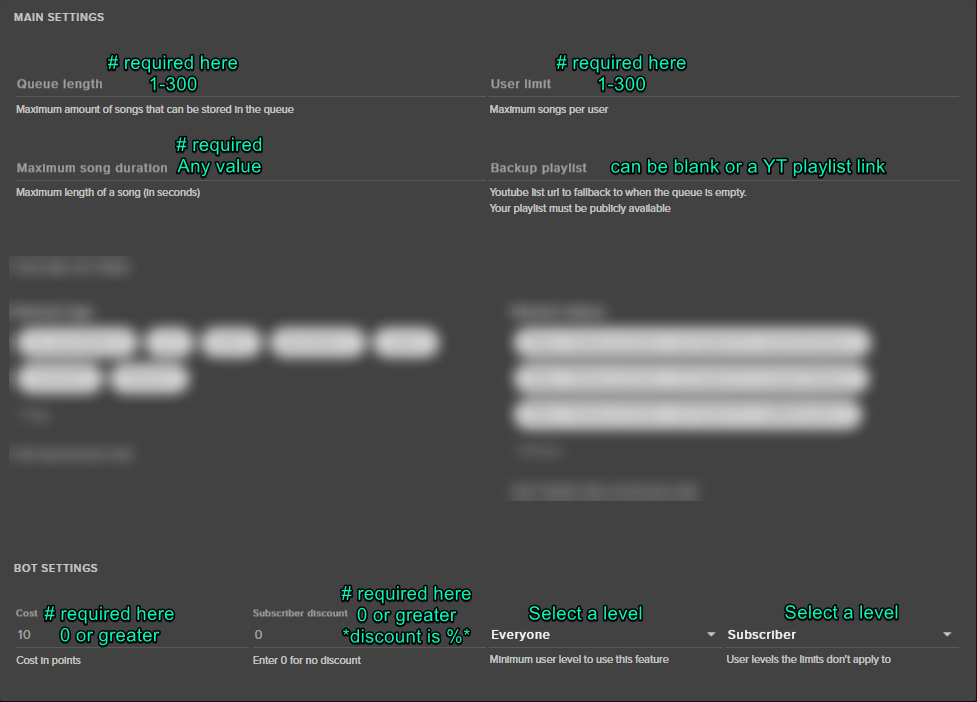
Trying to increase the song duration, but nothing is working. Anyone know why that is?
For SOng Request
clever mango
It's not saving?
clever mango
Make sure your settings match these requirements https://i.imgur.com/t28AhpK.png
 fallow pecan
In order to have the stream elements bot active in my chat, do I need to keep the stream elements website open in the background?
weary mist
@fallow pecan nope, once you hit the join button, it is in your chat, and you can close out the site if you would like
fallow pecan
That is awesome to hear, my shitty computer can't keep many instances of web browsers open while streaming ^^
 native crystal
Hi, can I set up maximum characters in a donate message?
native crystal
 frail olive
Hello i need help with streamelements
I need help setting everything up
@tight harness
clever mango
Start here please: https://strms.net/welcome
If you then have specific questions we're here for you
 clever hill
is there a way to make it so only the viewers hear the music with !sr
or am i forced to hear it aswell
clever mango
You'll need a hardware or software mixer to send the music to it's own output
It's not quick or easy but if you want to look into it check out voicemeeter tutorials on youtube
frail olive
what is normal cpu usage while streaming?
clever mango
All depends on computer hardware and what you're running
frail olive
im running an intel i5 4600t with a 1060 gtx 6gb graphics card
what would you estimate a 1080 stream would run at?
for 60 fps
for my cpu usage
clever mango
150%
frail olive
jesus mate
clever mango
With that processor you're probably better off using NVENC encoding on the GPU
in fact you're definitely better off with nvenc
frail olive
im using nvenc
birate is at 6000
and i only plan on streaming league for the most part
clever mango
Ok you should be ok to stream 720@30
clever mango
use static overlays
hollow compass
Am I able to put emotes in a custom command? Like for say a !hype command?
clever mango
Yes, what emotes are you wanting to use?
hollow compass
Maybe just pogchamp & the curselit
clever mango
Yep no problem there
hollow compass
How do I do it ? Is there a certain way I have to type it in?
clever mango
the same as you would type it in chat
frigid radish
Question
how do i move multiple widgets in a overlay at once.... trying to shift some widgets to the right... i tried holding ctrl but no luck
clever mango
At this time, there's no way to select and move multiple layers at a time
There is an idea on the ideas board that you can upvote if you'd like to request this https://strms.net/ideas
frigid radish
Thanks
clever mango
Holding shift and using your arrow keys will allow you to move 10px at a time. Using this you can move multiple layers the same amount to keep them aligned
 olive pumice
@clever mango I have an issue with creating overlays with stuff like magneting when im trying to move it. Like it just moves and sticks to certain positions which makes it difficult to get it to the correct position any idea how to make it not do that?
clever mango
@olive pumice click this to toggle off snapping https://cdn.discordapp.com/attachments/342748377416466442/406205320097169418/unknown.png
 olive pumice
Wow that would have been great if i saw that orignally thanks so much !
 split jewel
This is probably a really stupid question and I apologize for asking it, but I made a custom command, and I typed in the code wrong, and it's not letting me edit or delete the command....what do I do?
serene granite
zoom out on the custom commands page, or scroll to the right
theres an edit button, looks like a pencil
split jewel
annddddd there was a scroll bar........
literally just noticed that as I went back to the window
thanks @serene granite
 spring breach
how do you change the name of the bot ?
 red vine
chat stats not working ?
lament blade
Um i changed my backup playlist already, but in the ground control its still the previous playlist, how do i make it so that the ground control has the current backup playlist
 carmine trout
Heya StreamElements
Working again on my chan so ... As I'm using a UW resolution, is there a way to move "blocks" of widget or still on the work ?
gentle imp
@spring breach that is not possible yet but it's in the works
@carmine trout sadly that is not possible, at least I dunno how to but u can suggest that idea here https://streamelements.helprace.com/s1-streamelements/ideas
upvoted and would be cool if u can too 😄
gentle imp
me?
 wary hollow
Yeah lol
gentle imp
I have nothing more to say ^^
 hollow surge
is there any way to kind of group commands/timers etc to enable/disable some of them just in one click?
wary hollow
Depends what ur looking for?
hollow surge
so for example I stream 2 different games and I want to disable all commands not related with the game I currently stream
and then after switching the games make them enable and disable commands for the first one
wary hollow
Have u explored it at all?
carmine trout
Done, thanks for the input Rippz0r
wary hollow
Wow
gentle imp
np Pohan, that's something I want too 😃
that is not possible afaik on StreamElements, I went through ideas and see nothing like that, perhaps suggest it @hollow surge
!ideas
nocturne pelicanBOT
undefined, Check out the new ideas board https://strms.net/ideas. You'll be able to add your ideas, upvote others that you like, and track their progress with email notifications. Adding and upvoting ideas also helps the staff know which ideas should be prioritized so please take some time to upvote the features that you’d like. The #ideas channel is best used for discussing ideas already on the board.
 amber sorrel
More focus on Currency system and Event List. Saying those are two most popular things Stream___ has. (your competitors has). Yet you don't put focus on making them good.
Probably a good amount of users are using Stream___ chatbot and Event List and would switch over if equal / better.
Just so it doesn't seem like I'm complaining or a Stream___ shill.
For example you could make Events List (Look Good) and have better (Customization options) than Stream____
and you could work on better mini games like Stream___ chatbot has. Slots is a good start.
But !heist, !ffa, !1v1, etc.
wary hollow
I have an idea not sure if u want to here it but I have a good one
If anyone is interested come in the voice chat I'm better with my voice lol
Has any fought with there bot because it became fun for some reason lol it's what there best for right?
gentle imp
some of them are being worked on already @amber sorrel but I'm sure best would be to add those ideas to ideas page https://strms.net/ideas
amber sorrel
Just did @gentle imp but I do like how Discord is very direct.
amber sorrel
Streamlabs vs streamelements. Streamlabs win because of small reasons.
That's why it's so urgent I post it in Discord also.
People wouldn't even use Streamlabs if Stream Elements had these two features.
Tbh.
or they would barely use it.
based on Twitch channels with these two things in it so much
wary hollow
Really? Why's that?
 gloomy sand
Hi all, does anyone know if there’s a SE app or one planned?
I’m on the fence about switching over, but like a lot of what I’ve seen
amber sorrel
Most channels use Stream____ chatbot because of it's expansive Currency system. StreamElement's currency system is abysmal right now. Most people use Stream____'s Event List because it's better than Stream Element's Event List also.
They could work on these two features as priority (instead of whatever they think is important) to actually be better than Stream___. But StreamElements does have very good features I think but these two are so important imo.
Same time it's just my opinion. A professional knows better than me. But I just know what people use.
@gloomy sand Streamlabs OBS (in beta) & the rest is cloud based, no setup needed.
Well no setup on computer / program / appneeded
gentle imp
hey @gloomy sand there is https://streamelements.com/groundcontrol
StreamElements
The Ultimate All in One Platform for Streamers
amber sorrel
I never saw that before @gentle imp 😮
gentle imp
😄
StreamElements is great, if you want to make it better or can suggest things or upvote if the idea is already there, they are improving each day, I changed when they showed up just because of the overlays, now there's a lot more things, this is just my opinion
 lofty tundra
hey, im having problems with the tipping page. i have created a donation overlay and pasted in the correct url from streamelements into my obs. i have also fixed my paypal link to open in streamelements. however, when people donate, nothing comes through.
when i test the tipping alert, it works fine. the donations are even shown in my 'tip list.' although interestingly, the tips are not shown in my 'recent events.' what;s my next step? any help appreciated
tight harness
Having a look now 😃
gentle imp
ty 😃
tight harness
Okay right, yep, as expected you've enabled tip moderation @lofty tundra
On this page: https://streamelements.com/dashboard/tipping/moderation
That basically means that you've said you want to moderate all of your tips before they display
So unless you turn that off (in which case they're automatically passed through), you got a backlog here: https://streamelements.com/dashboard/activity/moderation
gentle imp
also you can enable leaderboard and then tips show there too like we were talking on your channel, here https://streamelements.com/dashboard/tipping/leaderboard
StreamElements
The Ultimate All in One Platform for Streamers
 manic lava
Hellu?
manic lava
are u able to help?
tight harness
What seems to be the problem?
manic lava
I added my mods to streamelemts, so they are able to control commands or so, but when they login it says they are not mods on any channels
I also made them supermods
tight harness
Ahh yes, okay so mods/super mods in this page: https://streamelements.com/dashboard/bot/users/moderators have chat mod/super mod privileges but if you want to make them have dashboard access to help you on the site you need to do that here: https://streamelements.com/dashboard/account/channels
manic lava
OH, I see 😃 Thanks!
Also, are u able to make streamelements as sub, so i can use my emotes in commands?
tight harness
Yes, I see you are a Twitch Partner also so you can just ask your Twitch Rep or Partner Support to give the bot a free sub 😃
manic lava
Oh okay! 😄 Thank you so much for the help!!!!!!!
tight harness
No problem 😄
manic lava
Are u only able to have one bot supervisor, editor and full control?
tight harness
Nope, you can create as many invite links as you want 😃
They are just 1 time use per link
manic lava
I see ^^ Thanks again! Very nice u guys have an active discord!
tight harness
No problem!
gentle imp
a Legendary support 
tight harness
manic lava

 untold turtle
hey everyone quick question is there anythingt that i can have on my layout that updates my followers as atm i have it in the middle of my layout but was wondering if theres a thing that updates its self if that makes ony sence
tight harness
The Total Followers widget shows your total followers accurately (it syncs with Twitch)
 gentle zodiac
anyone have any idea why streamelements chat alerts are not working?
tight harness
I believe it's become you added a variable which doesn't exist into your tips message
Could be wrong, checking now
Hmm, you've got {currency} but that's not mentioned in the "Available arguments"
So I believe that's the problem
gentle zodiac
but all the chat alerts doesn't work
tight harness
Yes, they all save together
So if there's an error with one, there's an error with the module in general
So take out {currency} and put in your actual symbol or currency code instead, then save
gentle zodiac
ah, ok so, they're connected and ran in 1 single script
tight harness
It's a single module, so I'd assume so
 potent raptor
When someone writes in my chat or donate something its all doubled
example someone writes in the chat
luckystricker22: hi
luckystricker22: hi
can someone help me with that ?
tight harness
Is this on the chat widget in your overlay manager?
potent raptor
yes and when i replay a donation the sound comes doubled too
tight harness
Okay, so the overlay manager shows the message multiple times but OBS doesn't
So you don't need to worry about that
The double sounds will be because you've got something open that shouldn't be, such as another overlay browser source in OBS without 'shutdown when not visible' ticked in the properties (even if it's in another scene entirely)
tight harness
Also if you have the overlay manager open when you replay you'll hear it there too, so click on the speaker icon in the top right of that to mute it
No problem
potent raptor
i dont had it open in that time but could it be that it does that cause i accidantly import my streamlabs twice ?
tight harness
If you have 2 active overlays that'd do it, but you'd need to add them both to your OBS and not tick that option I mentioned for that to be a problem
You do have a few overlays I see, so I believe you've likely not got 'shutdown when not visible' ticked in the properties of another overlay, as I said it could even be in another scene and it'll still happen
So check all of them
native crystal
Hi, i have a problem with chat stats. channel: RockAlone "Channel was not found
Tell the streamer to sign up so we could track your memes!"
tight harness
Actually, I get the same thing with my channel
native crystal
tight harness
Asking about it now
lament blade
My chat stats are still based on my old name
tight harness
lament blade
Probably already 2 months ago, my rename to asteri 
 elder torrent
hello everyone. what is #402919550066229250 ?
tight harness
!sellout @elder torrent
nocturne pelicanBOT
@elder torrent, to be announced in #sellout you need to be using our Overlays, Tipping Service (preferably linked in panels) and the StreamElements bot. (Modded in your channel)
tight harness
It's a channel where the @past tartan bot automatically announces when your stream goes live
tight harness
We set it up for you when you're using all of that and you ask for it to be set up 😄
You need to meet all 3 requirements, then ask
elder torrent
Ah, this how it works! can i ask for that? i do use all of that.) overlay. tipping service and stream elemtns bot as well)
tight harness
When I tried to add you I got this response: Now Live: I was recently restarted and am still loading. Please try your command again in a few moments. 😄
I'll try again soon
elder torrent
no worries 😄 thank you
pine hemlock

 keen wadi
anyone keen on elgato?
red vine
Channel stats not work ?
tight harness
Yeah, we're aware 😃
 plucky stag
yo guys is there any sort of Sound effect library in stream labs or do you know of a place i can download MP3 notification sounds for Following & Loyalty rewards
tight harness
In Streamlabs? Couldn't tell you 😃
tight harness
tight harness
 plucky stag
how do i download them :P?
lament blade
Click on them and press the download button 
plucky stag
thank y ou 😃
 umbral nebula
Hi! Is it possible (and how) to let users type something in the same message where they use a command to redeem something from the store? Like if I have a command !hello that uses $(redeem hello), that the user could type "!hello Good afternoon!". Currently the redemption fails if there's anything else than the command in the message.
tight harness
What would be the purpose of the extra text?
All it does is triggers the redemption, so the response from the bot will be the same either way
umbral nebula
There's no need for the text to have an affect. For some reason my viewers just always do that, and then after they realise the sound didn't trigger I need to explain that it just doesn't work like that. Would be great to eliminate the confusion, that's all.
tight harness
I see 😛
umbral nebula
So there is no way currently?
tight harness
I honestly didn't realise you couldn't, but if you say it doesn't work without just the command trigger then that would appear to be the case
umbral nebula
Yeah, it just doesn't do anything. I recently also made a command for the viewers to suggest a game for me to play in exchange for some currency, and naturally they keep trying to type the game name after the suggest command.
tight harness
Implementing a poll tool into our system has been suggested before ( https://streamelements.helprace.com/i190 ), I suggested recently that we consider it
umbral nebula
Oh, sorry, but a poll system wouldn't help my case
tight harness
I thought for your viewers suggesting a game for you to play it'd be ideal
umbral nebula
Text after a command is all I'm asking for 😃 if not possible, I will keep explaining it to them.
 subtle python
I'm currently trying to whitelist links, such as clips.twitch.tv, youtube, gyazo etc but even with them on the list PLUS person being permitted,. the link is being deleted? Not sure why this is happening, thanks.
clever mango
Check your twitch settings to make sure that twitch is not deleting all links
subtle python
No simply <deleted link>. Yes, Nightbot and Streamelements, Nightbot filter is turned off. Streamelements only one monitoring links
clever mango
connect your twitch with discord please and I'll have a look
discord settings > connections > twitch
 dull wolf
Hey guys, i'd have a question regarding "Followers Goal" widget. it displays a weird number of my followers. Where does it load the number from and how could I re-set it so it reloads the correct number?
clever mango
!totals VlooMan
subtle python
linked
nocturne pelicanBOT
VlooMan, If you are using the total follower/total subscriber widget, reset your session from the Activity Feed to fetch updated data from twitch. If you’re using goal widgets, you can edit the progress of any goal by going to Activity Feed > Widget Data > Goals. This can also be found in the overlay editor by selecting DATA (next to WIDGETS) > Goals
dull wolf
Thanks @clever mango
native crystal
it's possible to add to the command information about the current song with spotify or lastfm?
clever mango
@native crystal do you want the !song command to show what the streamer is listening to on spotify or lastfm?
native crystal
yes
clever mango
It isn't supported natively but I might be able to find a way to do it with a custom API @native crystal Give me a few minutes to look into it
native crystal
Ok, thanks ❤
clever mango
@lament blade
Keep in mind that you will need to resize the layers after doing this as it does not auto-resize
And then when you add the overlay to OBS input the new dimensions in the browser source properties
default is always 1920x1080
 winged blade
Changed my twitch avatar and now StreamEle shows a default tv with a ?, been a couple days. Anyway to force the update/change ?
clever mango
yes, Profile Page > Open my profile > click on the picture to update
winged blade
Thanks! o/
 summer summit
It has been suggested to use the graphics card when streaming to easy up on CPU usage. But Anytime I try I get an error.
I've updated my driver software recently too, and that doesn't seem to solve th issue
suggestions?
clever mango
!obshelp drakenhart
nocturne pelicanBOT
drakenhart, For the best OBS support, please join their discord where OBS devs and support volunteers are available all the time discord.gg/obsproject
lament blade
hey i resized my overlay, is there any easy way to resize the widgets to fitt it?
or is there a way to get obs to go over 1280x720
lament blade
where?
clever mango
add the overlay into OBS with dimensions 1920x1080 and then use CTRL+F to fit the overlay to the canvas
where you just changed it
lament blade
oh klk
clever mango
For some reason I thought you were using odd dimensions but 720 is the same aspect ratio as 1080
lament blade
oh ll
native crystal
@clever mango Can you write me a private message, if you find out what's with my idea !song? 😃
clever mango
sure thing
thorn crystal
Is there any way at all to copy layers from one overlay to another? I need to add an alert box to a different overlay, and I really don't want to go through and change every single alert setting again for a new overlay.
gentle imp
you can duplicate the overlay
easiest way that I recall
@thorn crystal
then just delete unwanted things
thorn crystal
But I'm wanting to add the alert box to an already existing overlay.
gentle imp
oh
click duplicate alert/widget on that duplicate icon on layers, then choose the other overlay option
thorn crystal
Oh...look...there's a duplicate layer button XD
gentle imp
😄
thorn crystal
You're amazing. Thanks!
gentle imp
no problem 😃
 atomic juniper
Is there any way to remove/hide items in the Mixer?
clever mango
I'm not sure what you mean by "in the mixer?"
atomic juniper
Bottom Right .. there is a mixer ... I want to hide some items listed in it
clever mango
 I'm still not sure what you're referring to. Could you take a screenshot?
atomic juniper
On the editor tab, it is the bottom right .. on the Live tab, it is the bottom middle.. Labeled "MIXER"
clever mango
Are you sure you're here for StreamElements support? I'm not familar with any of what you're describing.
atomic juniper
Damn ... sec
clever mango
lament blade
 tired tulip
Anyone areound to help me with something?
clever mango
!welcome @tired tulip
nocturne pelicanBOT
@tired tulip, Welcome to the StreamElements support channel. The fastest way to receive support is by describing what you need help with or asking your SE related question. You’ll receive a response as soon as possible. There’s no need to ask to ask a question or ask if anyone is available.
tired tulip
Didn't want a bot response......
My issue is my donations are not showing up in my streamlabs overlays
I have no clue why and after getting my first donations yesterday I would like for them to be seen where they are supposed to appear
clever mango
Are you seeing them listed on the StreamElements dashboard or Activity Feed?
clever mango
Ok, have you added any tip widgets to your overlay? If so, which ones?
tired tulip
I tried adding ones outside of what comes from the overlay itself and it shows the data just none from the overlay itself
@clever mango
clever mango
The widget being used for New Donation is "Latest Tipper." This data is auto-populated from "Tip Latest" within the DATA section (found next to widgets at the top left)
The widget under Top Donation is the "Top Tip" widget. If you click on the widget box in the overlay the widget settings will appear in the left panel. It is set to Session/Stream top tip by default. You can change this to Weekly, Monthly, or All-Time
tired tulip
Ok so how do I get the new donation to show?
clever mango
Click on DATA next to WIDGETS and you can edit the latest tipper information
olive pumice
hey how can i become a sellout i use all 3 required
tired tulip
Will it update when a new tip comes in?
 faint parcel
brand new here. is this where i can get help renaming the streamelements bot?
clever mango
@faint parcel That feature is still in beta testing and will be available for everyone soon
faint parcel
ah ok. is it possible to get in the beta testing or is that full?
clever mango
@serene granite is in charge of that
tired tulip
Ok so to my next issue, the person who tipped me, his latest tip isn't showing in the recent events, he tipped 3 times and it shows the first 2 tips but not the last one and on top of that the notification didn't even show when he tipped, I have no limit on the ammount set in the notifications and feelbadman that his tip didn't trigger the notification
faint parcel
@clever mango got it. thanks so much!
clever mango
@tired tulip This is because moderation is enabled here
This requires manual approval on the activity feed for all tips that come in
You will find them in the pending section at the top of the activity feed
 smoky tide
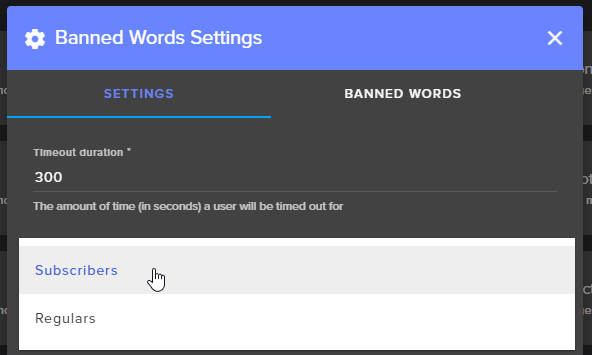
what if I dont want anyone excluded from this? https://i.imgur.com/psbf28I.png


 tired tulip
So if I turn that off it will go through without a hitch next time someone tips?
clever mango
Yes, no approval necessary