#helpdesk-twitch
1 messages · Page 192 of 1
 oblique umbra
 rotund tangle
yea there in my channel and last night fonz_tv been in my chat since the last 12 or so hours
 tight harness
Alright thanks 😃
 bitter tree
I've got a question. Is there any possibility that there will be youtube version too?
 clever mango
They usually just log what occurs in chat. If they aren't spamming or disrupting the stream I wouldn't worry about them
tight harness
@bitter tree That's actually in active development right now
tight harness

bitter tree

rotund tangle
umm i don't like it since there a lot of bots on the internet and they could be collecting info. or im just being paranoid .
oblique umbra
ah fixed thanks
 clever mango
well anything in your chat is public
 weary mist
@rotund tangle as terra said, your chat is 100% public, which means anyone can come in and get the information. Even third party chat applications give the ability to log channels (I have this turned on by default for any channels I join). The only information they can collect is what is given in the chat. Again, with Faegwent (I think its a twitch information gatherer, run by twitch. but speculation), you don't have a choice. It will be there until they are done gathering the info they want. There is just nothing you are able to do about it. sorry
 lament blade
is there a way to add a playlist to song request ?
clever mango
@lament blade in the song request settings you can add a backup playlist
 hearty peak
just an FYI the HypeCup doesnt load all bit options properly
rotund tangle
yea ok becouse i don't want things in my chat like that i want actual viewrs not bots. except mine wich are ardonbot and of course streamelements
hearty peak
the Muxy cheer image doesnt load
clever mango
in OBS? @hearty peak
hearty peak
the widget
lament blade
@clever mango where do i find these settings if i may ask ? :c
nvm
found it xD
@clever mango thank you for all your help, kind person ❤ ^.^
 pine hemlock
@hearty peak it's because it's a competitor token. It's supposed to be replaced by something else
It was a pepe before but after we had drama about pepes maybe they forgot to add an image
clever mango

 clever mango
No SE rocket cheermote... 
pine hemlock
Kappa
clever mango
would be the best cheermote on twitch
tight harness
💯 / 💯
pine hemlock
One year
 lost goblet
I need to know if you can add custom variables
or if the !quote commands use variables we can access
anyone able to help?
tight harness
There isn't any way to add custom variables, available variables can be seen here: https://streamelements.com/dashboard/bot/commands/variables - but i'm curious what exactly you have in mind
 lavish shore
Could anybody help me with an issue with tipping? When i get a donation i have to manually process it and i was wondering if i was able to make the donations be automatically processed where i dont have to accept each one
tight harness
@lavish shore Ahh yes, this is easily changed, go to Tipping > Tip Moderation and untick Enable Moderation
pine hemlock
Disable tip moderation
tight harness
No problem 😃
 winter apex
I'm having some trouble starting up with StreamElements. When watching the YouTube videos, there seems to be some inconsistency with what is in the video and what i'm seeing on my screen. Are the videos outdated?
tight harness
Some of the videos were made months ago and our service is constantly being improved, so some videos need to be remade, yes
winter apex
My stopping point atm is that I'm trying to set up the alert box but I'm having difficulty dragging and dropping my own images
They don't seem to be uploading
tight harness
Try clicking on Select Files
pine hemlock
If you're not using Chrome and you have issues with the uploader id suggest using Chrome
tight harness
Even with Edge you should see it, but Edge is not the best choice for using our website
We recommend either Chrome or Firefox, ideally Chrome
winter apex
I drag and drop a .gif and I see it on the screen, but when I hit the putple "Upload" button, nothing seems to happen
purple*
tight harness
Yeah, try with Chrome or Firefox, ideally Chrome
winter apex
Will do!
 clever kelp
hey all, havent had a chance to read through the 300+ msgs but when it comes to !sr command, only mods seem to be able to do it? everyone else gets told link is too long
anyone else had this issue?
winter apex
Chrome worked! Thank you! @tight harness
tight harness
No problem
winter apex
Another quick question though. Do I only need ONE alert box for donations, followers, etc. or do i Need multiples?
tight harness
Only one
pine hemlock
Did that sr bug get fixed @tight harness (in response to Briggsy)
tight harness
Hmm 🤔 in regards to briggsy's issue I'm a bit confused
clever kelp
.<
tight harness
Have other people been getting this?
pine hemlock
We don't have a library yet but there are default sounds @winter apex
tight harness
I mean, I know sr in general has a bunch of bugs at the moment
winter apex
@pine hemlock Do you have a recommended site or source to find sound bites?
pine hemlock
Can you screenshot your settings for songrequests @clever kelp
tight harness
Settings seem fine, i'm looking at them now
Ohh wait 
I see the issue
Your maximum song duration is 10 seconds  @clever kelp
 boreal wagon
i need help with the themes its cutting in the middle of the page
tight harness
pine hemlock
Lol
clever kelp
sorry just woke up, still half asleep
boreal wagon
720p
tight harness
Tried it at 1080p? the themes are made to be 1080p
boreal wagon
i cant
cuz the live is on 720p and i use xsplit
if i want to use 1080p it cost money😫
tight harness
You don't need to keep it at 1080p once it's in your streaming software, but at least on the site and when you add it into your stream software it's best to keep it at 1080p and then use your streaming software to downscale the resolution to 720p or whatever you want, but if that's the case you're going to have to do it the hard way
Which is dragging everything down to size in the overlay editor
tight harness
Yeah because it's made to be 1080p 😄
boreal wagon
let me try some settings ill be in chat in like 1 minute
look its the xsplit watermark if i want it to be 1080p
tight harness
Welp, another reason why i'm happy that I use OBS Studio 😛
boreal wagon
its harder to use i think
tight harness
Nah
boreal wagon
xsplit work good cuz i get once a year the primum from my youtube partnership (i can use it for anything i want)
tight harness
I was also offered Xsplit Premium for 3 months, didn't use it 
boreal wagon
Cool
i have a good for 100 subs partnership
i made the theme work
why its like that?
no twitter youtube and discord after i put the links in my profile settings
tight harness
It doesn't automatically put that information into the overlay
boreal wagon
how to change this to the real links?
tight harness
Pretty sure it's on the ideas board for that to be a thing though
Edit the overlay, type it in
boreal wagon
thx
winter apex
So my gampe capture has to be a separate source thats underneath the StreamElements overlay source correct?
winter apex
And the Scenes are like individual things right? So i could havea desktop scene and a PUBG scene and a LoL scene that just switches between my different overlays and adjustments?
boreal wagon
is the recent donation auto changing
tight harness
@boreal wagon Yes
lament blade
Yep, @winter apex You can have a brb scene, starting soon, different games...
boreal wagon
thx
winter apex
Neat
tight harness
And you just tick 'shutdown source when not visible' so only 1 browser source is running at a time, because otherwise browser sources in different scenes can still be running in the background
winter apex
And I can set the game capture to specifically capture an application
tight harness
Yes
winter apex
So if i set it to capture, say, WoW and I close the game, it won't be captureing anything but the overlay elements on top of a black screen
lament blade

tight harness
Awesome 😄
winter apex
When capturing the game, do I want to force scaling or anything?
tight harness
Nah you don't need to
winter apex
Allow transparency?
tight harness
If it's ticked by default, leave it, if it's not, leave it 😄 that's my rule
When it comes to game capture anyway 😛
winter apex
Haha thats a good rule
tight harness
If it's blank, try the cheat hook setting ticked
winter apex
Now I just got a Logitech C920. What would I use to insert that into the overlay?
pine hemlock
Obs
tight harness
Right click > Add > Video Capture Device
winter apex
So it is separate from SE
tight harness

pine hemlock
Yes
tight harness
Yes
winter apex
SE would only be used for say a border around the cam
 fast stone
Why doesn't songrequests work?
How can I check if the streamelements bot is in the chat?
tight harness
@winter apex That's trial and error really, have a test 😃
@fast stone Look at your chatters list, try !ping
winter apex
I figure when I start streaming I can ask a friend or two to let me know
tight harness
Yeah
winter apex
I set up a basic overlay for WoW, I'm just gonna use some of the ones you guys provide for LoL and HotS
Thyre pretty bada**
lament blade
Glad you like them 😄
tight harness
😄
fast stone
When playing from my backup song list, shouldn't it appear as "now playing"?
tight harness
No, it doesn't show the name of backup songs
 dense raptor
Hey I have a quick question is there a way I can link my paypal on stream elements?
tight harness
Youtube's API runs on a point system. They give us 1 million points per day, with a monthly max of 16 million points, each call has a different amount of points usage. We have to stay within our limit otherwise song requests don't work until they're next reset. This is why we can't have all of the features we want yet in regards to the youtube song requests
@dense raptor When you go to Tipping on the left navigation menu that's the first thing you do at the top
dense raptor
I enter my paypal email?
tight harness
Yes
dense raptor
wait do I have to be a affiliate?
dense raptor
ok...so when I enter my email what do I do?
tight harness
Save
tight harness
Suggested amounts you have displayed on your tipping page
lament blade
3 fast 5 me
dense raptor
So it should be on? right?
tight harness
Your choice
lament blade
If you want it to, i suggest to have it on if you have custom variations for tips
lament blade
You can click "open my page" and link that to your donation panel
tight harness
If you don't have a panel click on Edit Panels, click on the giant plus on a blank panel and add one
dense raptor
Ok, thank you.
dense raptor
Do you mind hoping in the voice channel?
winter apex
Is there a way for it to automatically switch scenes depending on whether it detects an application launching or is that all strictly manual?
lament blade
I'd rather type, what else do you need help with? o:
tight harness
You'd rather voice? @lament blade
dense raptor
It says I'm tipping myself...haha
tight harness
😄
lament blade
oops
tight harness
It's really late here otherwise I would, almost 2 AM
dense raptor
Its fine.
tight harness
@winter apex Strictly manual
lament blade
Yea, if you opened your own tipping page
tight harness
Although you can set up hotkeys to make it so you don't need to minimise
winter apex
I have 3 monitors so I can just click into different scenes, its no biggie
Was just wondering if there was an automatic feature i wasn't aware of
dense raptor
I just put "open my page" like you said. Im just trying to link it.
lament blade
Copy the url
dense raptor
Then?
lament blade
Put it on your donation pannel
dense raptor
Oh, okay.
winter apex
Can the custom themes be edited?
I don't havea twitter, youtube, etc. and I want to remove the graphics from the overlay
lament blade
Of course, you can select those layers and click the trashbin icon
tight harness
If they're locked you'll need to unlock them in Layers first with the padlock icon
Then delete them or hide them
winter apex
How would I scale my webcam capture to fit into the overlay border??
tight harness
Drag the corner? 
lament blade
you can resize it/crop it
winter apex
Well dragging the corner keeps the same resolution so I can't scale it perfectly
 spare trail
does Streamelements do all the follower, donations, and sub notifactions?
lament blade
Yep @spare trail
 lavish oxide
How do I disable the feature to add videos in the tipping section
spare trail
alright now I just have to figure out how to set that up 
lament blade
We are here to help if you find any troubles
winter apex
I got it! Had to manually type in the resolution values
tight harness
@winter apex If you have a different shape webcam border then you're either using a 4:3 webcam and need the 4:3 border or you're using a 16:9 webcam and need a 16:9 border
That works 😛
tight harness
@spare trail Alert Box widget in the overlay manager 😃
lament blade
@lavish oxide https://streamelements.com/dashboard/songrequest/settings It's called media share 😄
tight harness
You access the overlay manager by going to My overlays and clicking on the largest pencil icon for the overlay you want to edit
lament blade
Under tip settings
spare trail
does it matter what game I choose or can I leave that blank?
tight harness
If you don't have an overlay yet you can either create a blank one from that page or choose a pre-made one from Themes Gallery
Yes, that's fine, it's just for the thumbnail picture
spare trail
wait should I do one widget for all or seperate ones?
tight harness
One alert box can be used for all alerts
spare trail
oh thats cool
winter apex
Do you have a preferred way for me to advertise that I'm using streamlabs on my channel?
Sorry, Stream Elements
tight harness
If you use our overlay manager, tipping system and bot (modded) we can add you to the #402919550066229250 channel to be automatically posted there
Just whatever you do don't post your own link, that's bad
tight harness
Super Themes have alert boxes in them already
winter apex
Pretty sure I am. I'm using the overlay (obviously), I put in my email for my Paypal, and I did the moderator rights for the StreamLabs bot
lament blade
You can test the alerts by clicking the blue/white bell
lament blade

winter apex
Labs is a shorter word and I think my simple mind defaults to typing that instead
lament blade

tight harness
@winter apex Did you add a panel for your tipping page with us?
winter apex
I haven't yet. I do that on my dashboard right?
tight harness
Actually, make sure to connect your Discord to your Twitch in your Discord user settings > connections
You do that on your direct Twitch page, not the dashboard
You need to edit your panels which can only be done on your direct page
 vast garnet
is there a general chat in this discord?
boreal wagon
@tight harness i use super theme but i did testing donation in streanlabs but it dont show in the theme
vast garnet
face palms myself
winter apex
@tight harness Is there a tutorial video on how to set up that panel? I don't want to bug you for a step-by-step if I can avoid it
boreal wagon
i am going to sleep good night everyone
tight harness
@boreal wagon Test donation is streamlabs? 
No wonder it didn't show
We're not connected at all
boreal wagon
it have no?
tight harness
We're not connected to Streamlabs what so ever
boreal wagon
...
lament blade
tight harness
If you use our overlays you have to use our tipping system too
boreal wagon
how to use it?
tight harness
Donations through Streamlabs will make no effect here
Our tipping system? Go to Tipping, set it up
boreal wagon
ok
boreal wagon
thx
tight harness
Once you've set that up, go to Open My Page, and change your donations panel to that link instead
Then that's all set up 😃
@winter apex No there isn't
boreal wagon
i set it up
tight harness
Told you it's easy 😄
tight harness
No problem
Like I said, don't forget to update your donation panel to that new link if you haven't already 😃
winter apex
@tight harness I think I can figure it out, do I just need to create like a hyperlink image or something to my donation page?
tight harness
I thought you meant if we have one but it seems Alice linked you to Twitch's own one  awkward
That works 😄
Exactly, a hyperlink image would be perfect
 molten cipher
I JOINED WITH A QUESTION. lmao so i was setting it up since a friend recommended it over streamlabs and when i set up the overlay it either takes at least 10 seconds to load or will show a different overlay before correcting itself. is there a way to fix this @tight harness ?
boreal wagon
WTF
tight harness
@molten cipher I COME TO YOU WITH AN ANSWER. 😄 yes, use Scene Transition 'Fade' with a transition of a few seconds or use Studio Mode to preload the scenes
lament blade
¯_(ツ)_/¯ it's fine for me
molten cipher
@tight harness THANK YOU I WILL TRY IT NOW
tight harness
Awesome!
lament blade
YOU ARE WELCOME
tight harness
Alice has a time machine confirmed
lament blade
winter apex
So I'm trying to add my camera sources into individual scense, but it's not showing the camera anymore...
I can create one fine, but after that, they no longer show up on the screen
And "FPS" and "Video Format" are both red in OBS.
winter apex
Just have one default?
winter apex
How do I get them to stay the correct size for each scene?
Because when I scale the resolution, it changes on every scene
tight harness
Yeah
winter apex
Is there a way to have each scene have an independent resolution?
tight harness
It's due to a limitation with webcams themselves
There probably are ways, but none come to mind immediately
Are you ticking shutdown source?
Not sure if that makes any difference
winter apex
What would you recommend I do? For instance, the overlay for Heroes of the Storm has an "In Queue" scene and an ":In game scene"
molten cipher
@tight harness i added a fade of 2000ms and its still glitching into the scene or just showing the old scene... 😭
winter apex
And the borders for the cameras are different in size
tight harness
@molten cipher That's only 2 seconds
tight harness
I think I normally have to use more
Keep raising it until it seems seemless, or use Studio Mode
@lament blade That was mentioned recently by someone else, seems to be an issue with Twitch
 pure forge
@winter apex as long as you don't have the source locked you should be able to scale the same camera source differently in each scene.
winter apex
@pure forge can you help me with that?
 runic sigil
@tight harness ah, I wanted to add you that helped me a lot the other day. I am very new to it, and I have silly questions and you always respond with patience.
pine hemlock
twitch is dead
tight harness
@runic sigil I accepted your friends request 😃
rotund tangle
is twitch down or did fcc lol and Ajit Pai get what they wanted ? becouse i can't get any of my followed channels or broadcast to show up. at all?
pine hemlock
nah everyone is having issues
molten cipher
my twitch is fine though?
oh and @tight harness the fade wasnt working but studio mode fixes it right up!
tight harness
Awesome 😃
I use fade and it works well enough 😄
But I don't overly care about it loading slowly-ish to be fair 😄
molten cipher
lol i dont normally but rn im on a change my overlay kinda mood so EVERYTHING HAS TO BE PERFECT lol
tight harness
Understood
pine hemlock
yeah they used my name Kappa
clever mango
@TwitchSupport: 🔎 We're looking into reports of pages not loading for some users. Hang tight. ^RSS
tight harness
@pine hemlock Ask for royalties
rotund tangle
ok so might be just twitch with some users
tight harness
Yes
rotund tangle
seems to be back
tight harness
Excellent 😃
 long tusk
Can somebody help me figure out how to fix my chat module on Twitch?
tight harness
What seems to be the problem with it?
long tusk
I have it activated on my chat, but no notifications pop up
tight harness
Chat Alerts?
long tusk
Yes
tight harness
What events do you feel that you're missing?
long tusk
When someone follows me, the alert doesn't show in my chat.
tight harness
Testing now
long tusk
It works! 
tight harness

runic sigil
how do I create a command that indicates the channel of a friend in the chat, showing his channel in the chat?
XD
winter apex
@tight harness so on my panels I have an image that links directly to my SE tip page. Is that all I needed to do?
tight harness
@runic sigil When you make a custom command you'll see command template at the top, select the shoutout one and customise it how you like 😃
@winter apex For tipping yeah 😃
winter apex
Is there anything else I needed to do aside from using the overlays and modding the bot?
tight harness
To get into #402919550066229250? nope
winter apex
Do you guys have images or anything for use in panels?
tight harness
You'd do with linking your Twitch and Discord in your Discord user settings though
tight harness
Don't see anything in your discord profile
runic sigil
@tight harness ♥
tight harness
molten cipher
LAST QUESTION I SWEAR! the chat box works for some overlays but not others
tight harness
@winter apex added you 😃
@molten cipher When you say it doesn't work for other overlays, what indicates that it's not working? So I know what it might be
winter apex
The panle pictures are .psd, can those be used??
tight harness
Maybe 🤔
molten cipher
i mean i spam my chat and the chats i send show up on one overlay but not on another. lol ill send a screenshot since im bad at describing
tight harness
Are they both 1080p?
molten cipher
small but you can see how its not working
tight harness
The overlays
molten cipher
yea theyre both 1080 from what i know
tight harness
Is it just the starting soon it doesn't show in or others too?
molten cipher
its just that one
tight harness
I know what the problem is
winter apex
All of the pictures are bigger than 1 MB LOL
tight harness
The chat widget isn't present in your starting soon scene
Want me to duplicate the chat widget from the other scene into this one?
That'll fix it
molten cipher
yes please
i had gotten rid of it cuz it looked like my chat was smeared so i thought i had two up[
molten cipher
thank you!
tight harness
I used that to duplicate it to your other overlay
tight harness
Did you want the text that dark?
I think you know how to change it if you don't 😃
Text Settings 😃
tight harness
No problem
winter apex
@tight harness Do you have any other pictures of your guys' logo thats less than 1MB in file size?
Thats the limit for panel uploads
tight harness
Just trying to find the one I use
winter apex
I found one that works, it isn't the logo but it's one of the panel ones
tight harness
This is the one I use
winter apex
tight harness
Obviously doesn't work great on light theme 😄
tight harness
The one I posted I mean 😛 but yeah, works really well on dark theme
winter apex
Any recommendations for flashy panels for bios, pc specs, etc?
tight harness
None come to mind
runic sigil
has something like $savetofile in elements?
tight harness
We don't use text files, we like to keep everything online so you can use it wherever you are 😃
runic sigil
Okay, but is there something I can use that replaces and saves online?
tight harness
All of the things you'd normally have in text files on other services is all stored in here: https://streamelements.com/dashboard/session 😃
winter apex
So how does the song suggestion widget work?
tight harness
Song suggestion widget? 🤔
winter apex
Songrequest
Sorry
They use the chat command and it automatically adds the video to the queue?
tight harness
Song Requests are all done from the Song Requests page, the only widget in regards to songs is the current song widget, which just shows the name of the currently requested song (requested songs only, not playlist songs)
 sleek flume
i feel strange butting in, but does anyone know how to disable !donate?
tight harness
Yes, that's right @winter apex
winter apex
So lets say they link a song thats inappropriate, what would i do?
tight harness
You skip it 😄
winter apex
And I do that from my Songrequest tab?
tight harness
Media Share is another story, Media Share is where you show the video on the overlay as well
winter apex
Yeah i'm going to avoid that
tight harness
Either that or !skip in the stream chat, yeh
tight harness
But there's a known bug where the next song doesn't load when you use !skip currently
So if you do, make sure to do !play afterwards
tight harness
Yes
winter apex
No spotify?
tight harness
Spotify denied us dev access we'll try again in the future, we just don't want to bug them
tight harness
We'll get it eventually 😃
We only recently got Discord Partner, all in good time 😉
lament blade
Um, how do i edit widgets for the stream? My stream says current song: No song but i have a song playing..
lament blade
Oh. So I need to make a song playlist then it will be shown on stream?
tight harness
The songs need to be physically requested into the queue to show
lament blade
Oh.... alright. I get it now. thank you
tight harness
Youtube's API runs on a point system. They give us 1 million points per day, with a monthly max of 16 million points, each call has a different amount of points usage. We have to stay within our limit otherwise song requests don't work until they're next reset. This is why we can't have all of the features we want yet in regards to the youtube song requests
No problem
pure forge
@sleek flume Go to your stream elements dashboard>Bot Section>Chat Commands>Default Commands Tab>Find !tip>Click the pencil on the right>Remove the command alias donate.
 atomic lotus
How do I get the text under the actual alert of subbing to use two lines, I use a gif for the sub alert and if someone puts a message its too long and goes outside the gif
tight harness
@atomic lotus Go to Text Settings, next to Secondary Text you've got Advanced, I believe in there if you play around with those settings you should be able to achieve that 😃
atomic lotus
Ok I will try, I think I tried but maybe I was doing it wrong haha
tight harness
It's 4 AM for me so sorry if that's not right 😄
atomic lotus
Go to bed!
tight harness
I'll be getting some sleep soon 
atomic lotus
😛
lament blade
How can I test follows on streamelements?
tight harness
There's an event emulator in the bottom left, blue circle with a bell icon
lament blade
I cant find the blue circle with a bell icon. What do i have to click first? Im at the dashboard page
winter apex
How do I change the delay in the sources loading on OBS?
tight harness
@lament blade My overlays, click on the large pencil icon to edit the overlay you want to edit and it's in there
lament blade
Click file, settings, advanced, under stream delay click enable and choose the time of delay
@winter apex
winter apex
I don't want to delay the stream, when I switch scenes thers about a 2 second window where none of the overlays load
lament blade
@tight harness Ohhh alright thanks
winter apex
I just want to eliminate that delay
lament blade
Oh sry i dont know that @winter apex
winter apex
@tight harness do you know what might cause that?
pure forge
I believe it's an issue with processing speed/internet connect.
I run low spec and have the same issue.
pure forge
Are you HotS overlays less complex?
winter apex
Theyre the Super animated ones on SE
pure forge
In instances when I swtich for a scene without an overlay to one with one, there is a small load delay.
tight harness
I'm in bed now, sorry. It's 4:20 AM
pure forge
One of the way I have gotten around then is prep your transition in studio mode, it should load your overlay before.
winter apex
How would I do that
pure forge
Under recording, hit studio mode.
winter apex
Okay I have two screens in front of me on OBs
clever mango
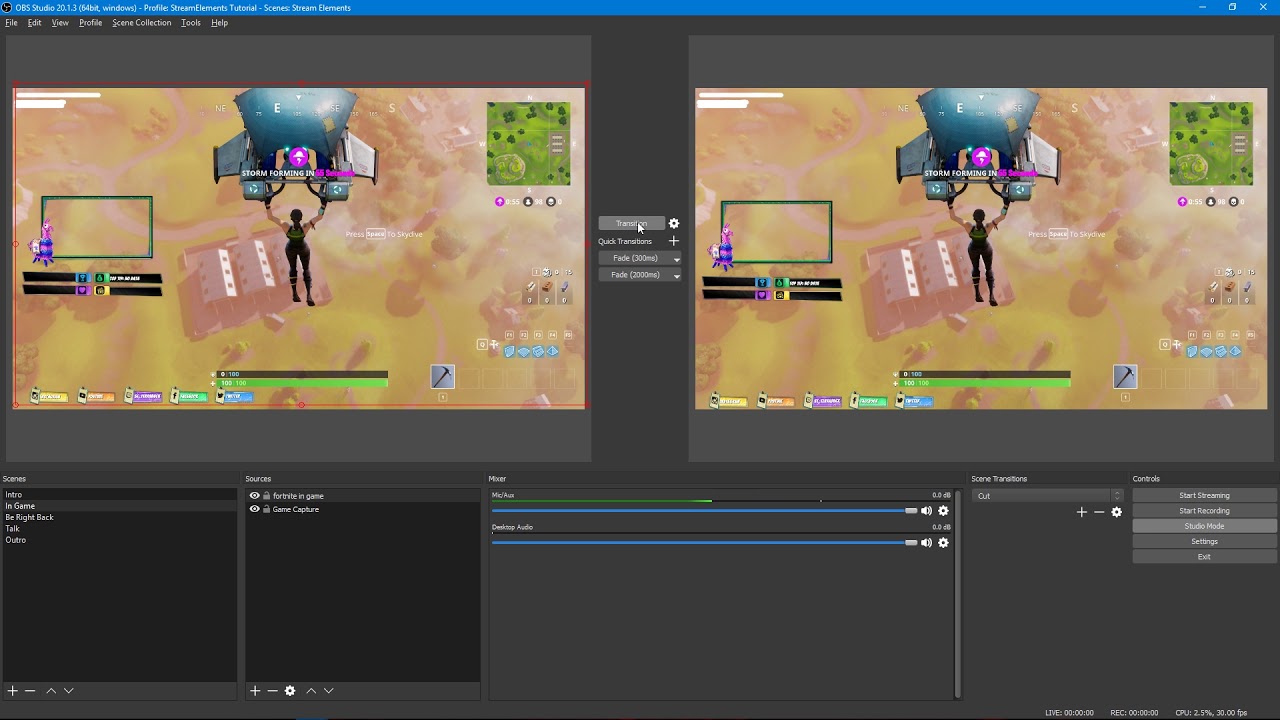
Tutorial #2 - Scene Transitions with OBS Studio Mode ----------------------------------------------------------------------- 🚀 StreamElements 🚀 -------------...
pure forge
Happy bed time 😉 @tight harness
winter apex
Oh okay
So you basically prep it that way
Makes sense
I guess my LoL sources just take longer to load than my HotS ones
Which is weird cause the HotS ones seem way more fancy
 viral plaza
When I try to add a command to use my channel's emote, it displays the text and not the actual emote. How do I get that to work?
 stuck hamlet
You would have to gift the bot a sub or try and contact twitch for a free sub
viral plaza
ah ok, thanks @stuck hamlet
 runic pivot
Quick issue, !give command was deleted, How do you add it back? I'm now unable to trade currency to others on the channel, ive tried adding the command manually but there are no variables to send currency
stuck hamlet
!give cannot be removed, it is a default command
 wise cliff
Hmm it doesn't look like my stream popped up on the #402919550066229250 page tonight
 radiant condor
hi, i clicked by mistake in refresh overlay using the stream elements ground control
and now my overlay says (help) in the bottom right corner
any way to fix it? without restarting the stream :S
 lone terrace
Anybody awake?
stuck hamlet
hello
lone terrace
ummm I don't think so? It just shows it in my ground control 🙇
stuck hamlet

I believe we are only accepting beta testers right now, but i may be wrong
can you show me what it looks like
lone terrace
just says Custom Bot Name and i checked it on , then ask for name and the 0auth token
i would screen shot it but ground control is on my stream pc sorry
stuck hamlet
Are you using our tipping service and overlay?
lone terrace
yes i use everything through streamelements
stuck hamlet
Alright, do you have a bot account you'd like to associate with it?
lone terrace
oh that makes sense now
stuck hamlet
We'll go through the steps and see if it's active for you
lone terrace
i need to make a bot account
Idk why i was thinking it would just change the streamelements name
haha
stuck hamlet
I mean, it's basically just masking StreamElements name to something you own
so like, you could have the bot run through your account
lone terrace
yes correct makes sense now haha, i shall try it that way ahah i was just trying to use some random name 
if its not active for me no big deal 😃
thanks for the hlep
stuck hamlet
no worries!
lone terrace
okay now that is working is there a way to get the robot moderatier icon on it or will it just have the normal sword
stuck hamlet
it will be a normal sword
the robot icon is only for verified bots i believe, and is a part of an extension
lone terrace
Otay
 peak magnet
I am using stream elements as overlay, bot and tipping
So i can then ask for the "sellout" role right?
 stone spire
Is there a way to move multiple elements in the overlay editor?
stuck hamlet
at once, unfortunately not
stuck hamlet
😃
stone spire
I just noticed the {currency} parameter
can I set that somwhere
or is that just a macro for $
peak magnet
thank you
stuck hamlet
its whatever your tipping setting is set to/what people donate in
stuck hamlet
im not sure with AUD,
stone spire
ahk
stuck hamlet
you can test it
 dense flare
is it correct that, in order for your follower alerts to work, you have to be streaming from your CPU instead of GPU? i've seen this on a couple of posts
 heavy pecan
Uhm what are you talking about @dense flare
That doesn’t matter at all, my friend runs on his GPU and gets alerts and I run on my CPU and get alerts
dense flare
well, thought so, some people told me the alerts would not work on GPU and i wanted to make sure, thanks
heavy pecan
Don’t listen to the trolls
heavy pecan
Yea just come here if you need experience people LOL
stuck hamlet
You can remove any aspects of the overlays you don't like
If you dont want to use a webcam, you can remove it
 tiny elk
hello, my host alert does not work, what should i do? follower alert does work normally. 😃 thx.
stuck hamlet
Twitch doesn't have a "notification system" for hosts (unlike follows, subs, raids, etc.) so the only way for StreamElements to know that you are being hosted is to connect through you to twitch. This connection is made on:
- SE Dashboard page - https://streamelements.com/dashboard
- SE Activity Feed page - https://streamelements.com/dashboard/activity
- Ground Control desktop app - https://streamelements.com/groundcontrol
Please have one of these open during your stream in order to receive host event notifications.
tiny elk
i have already connected twitch account to streamelements and made 2 layouts for cs and pubg and im using OBS studio and made websource and everything is fine. I have modified host alert sound and picture and everything seems ok but it just does not show up.. 😦
i can preview it on your site but somehow online it does not show up. Did i understand your answer right?
OHH now i got it
i have to keep one of those sites open during the stream, sorry my english. 😄
@stuck hamlet i downloaded now ground control, so should i now get all the alerts automatically if the program is running all the time when streaming? this program is very good for handle youtubelist to pause/resume also!
stuck hamlet
yes
 bold schooner
hello. i have a problem with my overlays. it doesnt notify me when i get a new follower or donation?
 misty wagon
Do you have your dashboard open or the Ground Control app?
lament blade
if i use streamelements, will i get featured in the sellout channel if i go live?
stuck hamlet
So you've recieved a follower, but didnt get notified?
If you use, bot, tipping and overlay, yes, we will add you to that channel
stuck hamlet
send proof at streamelements.com/onslaught/tip
thats a joke
pls dont
but, your donation panel on your channel is streamlabs
not streamelements
stuck hamlet
Why turn it off, when you can put our there 
stuck hamlet
Go to your channel, and right below the player on the left, "edit panels"
bold schooner
hello. i have a problem with my overlays. it doesnt notify me when i get a new follower or donation with no sound?
lament blade
Thanks!
stuck hamlet
So you've recieved a follower, but didnt get notified? @bold schooner
bold schooner
yes
stuck hamlet
When was this?
bold schooner
What do you mean?
stuck hamlet
when did you get a follower and it did not notify you
bold schooner
its been doing it since ive hit 25 followers and im on 32 followers now
so give or take 2-3 weeks ago
or should i say its been happening for 2-3 weeks now
@stuck hamlet hello???
bold schooner
im using FORCE FIELD ANIMATED SUPER THEME
yes i have
stuck hamlet
What version of OBS are you using?
 spring shard
is it possible to get the overlays to load faster? It currently takes 5-6 seconds for it to load and it quite a hassle when switching scenes.
bold schooner
where do i find that out
stuck hamlet
!load @spring shard
 nocturne pelicanBOT
@spring shard, Loading time for overlays will vary based on how internet speed, ping to servers, and how much is included in the overlay. Using studio mode, you can preload your next scene before transitioning so that no loading appears on stream. You can also use a longer transition time. https://youtu.be/W8iWsD2Lq3U?list=PL_9rga23xIlJDyaOnO2avbss-PHm28oNs
stuck hamlet
should be at the top of the program @bold schooner
bold schooner
OBS20.1.3
bold schooner
yes
stuck hamlet
That may be the cause of the issue, a lot of anti viruses dont like OBS Browser Source, especially pop ups
spring shard
Oh ok. Guess I can't use any of the standard themes then. 
Thanks for the hard work and swift answer @stuck hamlet
stuck hamlet
Why wouldnt you be able to use them
spring shard
7s delay while switching scenes seems a tad too long for me.
stuck hamlet
Where are you from?
stuck hamlet
whats your ping to streamelements.com?
spring shard
4ms
stuck hamlet
what overlays are you trying to utilize?
spring shard
I use the green flare one. Not the animated version.
stuck hamlet
I don't know why it would take you 7 seconds to load the overlay.. seems exessive.
I'm guessing you dont like studio mode?
spring shard
It's alright. I'm just confused by it, haha. Guess it's the best option to preload them.
clever mango
Any antivirus?
spring shard
It's not like I switch between all of them all the time, it's usually just 2 and then start/end
Nope, no Anti Virus.
But yeah, best option seems to be to use studio mode. I'll have to learn to live with it. It's not that bad. 😃
Cheers guys! ❤
 slim quest
hello can u help me!
i need help please!
how do i check my alerts from the alert box (i mean how do i check its working)
ok found it
 unkempt hemlock
i need help
clever mango
Well you're in a support channel so just go ahead and describe what you need help with or ask your question. Thanks
unkempt hemlock
Okay, i'm trying to link streamtips to streamelements and it says import failed
tried different browsers and it didnt work
stuck hamlet
hmm
clever mango
Okay I'll look into it and mention you when I find something out
stuck hamlet
Best way would be to open the network tab of chrome and try to import, and see what the error is there
clever mango
!error @unkempt hemlock
nocturne pelicanBOT
@unkempt hemlock, On the page that gives an error, press F12 to open Developer Tools. Navigate to “Network” at the top and then Select “XHR” in the filter section. Try the action again that gave the error and note in the network tab any red text. Please copy and paste the error information that is given when clicking on this red text.
slim quest
hello can i have help please!
i want to transfer all my overlays to another stream!
please
lament blade
If you log in on your streamelements account somewhere else, you will have access to your overlays, what are you trying to do?
slim quest
im trying to transfer my overlays for 1 account to another account
lament blade
I don't think you can share overlays
 atomic hollow
thats not possible
slim quest
ohh ok...
heavy pecan
Why does my Ethernet say invalid ip config
 heavy pecan
You really would think I never used google
tight harness
I had a sneaky suspicion
 serene nimbus
Text font is not the same as in streamelements editor - do I need extra fonts on my PC?
tight harness
I vaguely remember something about the font size being slightly different
stuck hamlet
The style, or size.
stuck hamlet
What is the name of the font?
serene nimbus
Changa
stuck hamlet
Whats your version of OBS?
stuck hamlet
Can you refresh cache?
stuck hamlet
yea
serene nimbus
or will my CPU die fast 😄
serene nimbus
I stream nvec
stuck hamlet
👌
serene nimbus
ty
stuck hamlet
if you have text scrolling, 60 fps isnt that important
if you have kappagen or the cup, 60 will be a lot smoother
serene nimbus
thats what I wanted "smoother"
trying out that new animated overlay
so many moving stuff in there 😄
tight harness
The Force Field one?
serene nimbus
yeah
I dont really like to have all the overlay and alerts and everything on cloud because of my ISP some times just dont have connection to SE... but some times...
stone spire
Hey I'm trying to set up Snip track id
But my Text seems to be blurry for some reason
clever mango
what's snip track id?
stone spire
It's a program that reads from audio players, and writes to a text file
i.e spotify
so you can add a text source from file


text seems to only be blurry in the second scene :/
clever mango
Ok so you'll need to adjust the text settings in OBS
did you stretch the text without changing the size?
stone spire
hmm
I think it was like that from the getgo
but I'll try again
Also any idea if the teko font in the overlay editor is the regular version?
trying to replicate the settings
Also what's the TT button, is that auto capitlization?
near italic, bold etc
clever mango
Not sure about "regular" version. You can find it on https://fonts.google.com
TT is all uppercase
stone spire
the one on the ovverlay looks slightly darker, probably the shadow
lolwat does this font not have a hyphon :/
nvm it was some other similar character
tight harness
😄
stone spire
is there a way to set a custom text size in obs, rather than the preset list :/
28-36 is a pretty big jump
Guess I'll go bigger and reduce the size
tight harness
If you click where the number is can you not manually type it in?
tight harness
You got it 😃
stone spire
ok, think i got it all sorted... Sory for spam :p
tight harness
No problem 😄
 lament blade
Nice job!
stone spire
😃
lament blade

runic sigil
Hi everyone, can you tell me if I can translate the bot's response into the minigames? example "wants to duel you for 100 chords, you can! accept or! deny within 2 minutes"
 verbal ferry
My OBS fails to launch, giving the message 'failed to find locale' ive searched around but this error seems unanswered.
runic sigil
@tight harness are you there?
clever mango
@runic sigil Not at this time. This could be possible when default command responses can be edited (planned)
tight harness
Yeah I'm here
 merry lantern
what's the #402919550066229250 channel about? lol
lament blade
It announces when people go live, but only the ones who request to be there and use stream elements
tight harness
@runic sigil These are the only responses that you can change currently in regards to duels:
lament blade
Have the bot modded,uses the tipping page, and uses the overlays
merry lantern
Ah okay. Gotta use the overlays from the superthemes gallery or even the custom ones that we make ourselves?
lament blade
Custom ones are perfectly fine
merry lantern
Thanks. I'm still exploring around. Having the bot modded means to have streamelements listed as a moderator on my chat right?
lament blade
Yep, and join the bot to your channel
merry lantern
Join the bot to my channel?
runic sigil
@tight harness I understand, it would be nice to be able to translate that part as well.
tight harness
I agree 😃
 minor acorn
for the overlay do you paste https://streamelements.com/dashboard in obs?

StreamElements
The Ultimate All in One Platform for Streamers
clever mango
!add @minor acorn
nocturne pelicanBOT
@minor acorn, To add your overlays to OBS, add a new browser source in your scene. Paste your overlay URL in the browser source properties, set the dimensions to 1920x1080 (unless you changed them on the website), and :check_mark: “Shutdown source when not visible” https://youtu.be/KDvLynUqXI4?list=PL_9rga23xIlJDyaOnO2avbss-PHm28oNs
minor acorn
how do you get your overlay url
clever mango
check out the youtube tutorial that was just linked
minor acorn
k thx for the help
clever mango
No problem
winter apex
I spent my entire night last night setting up my overlays and didn’t even have time to stream 
clever mango
When you're done you'll be glad you put in the time though 😃
winter apex
Yeah it’s a satisfying feeling. I’m still wondering why my animated Heroes overlays loaf instantly but there’s a delay on the simpler League overlays
I can use studio mode like it was suggested, but it just seems odd
winter apex
No
 long crypt
as i cant see it on my dektop right now
clever mango
It may seem simpler but the animations may be longer
winter apex
You should only see it on your stream
winter apex
You’ll see it pop up on OBS
long crypt
i have only one screen
winter apex
It will be difficult for you then
winter apex
Yeah
clever mango
use a second device like a phone or tablet if possible
winter apex
You’d need to tab when you hear the donation alert
clever mango
to monitor chat and use chat alerts
winter apex
Or use a second device yeah
long crypt
oh. i remember that i have an old screen somewhere standing around.
winter apex
I have 3 monitors. One for gameplay, one for OBS, and another for my stream so I can see chat and interact
With two monitors, you could add a Chat widget to your stream so that when you’re looking at OBS, you can see your chat
clever mango
I generally don't recommend watching the preview in OBS because that's something else for your system to render
winter apex
You would just need to size it and place t somewhere on the overlay that isn’t going to draw attention away from your game or cover anything viewers want to see
clever mango
I disable mine and just use chat and ground control to monitor events
winter apex
How do you keep up with events without OBS?
clever mango
Unless I need to see something in OBS
winter apex
Do you just keep your dashboard up and read from there?
I’ll probably end up bugging you when I start streaming later tonight on how to do that, disable the preview to save on CPU usage
I want to see how stable the stream is tonight and make adjustments where necessary
 dense jackal
@winter apex do you have our ground control app?
clever mango
my 2 monitor setup while streaming https://i.imgur.com/ceqOoT0.png
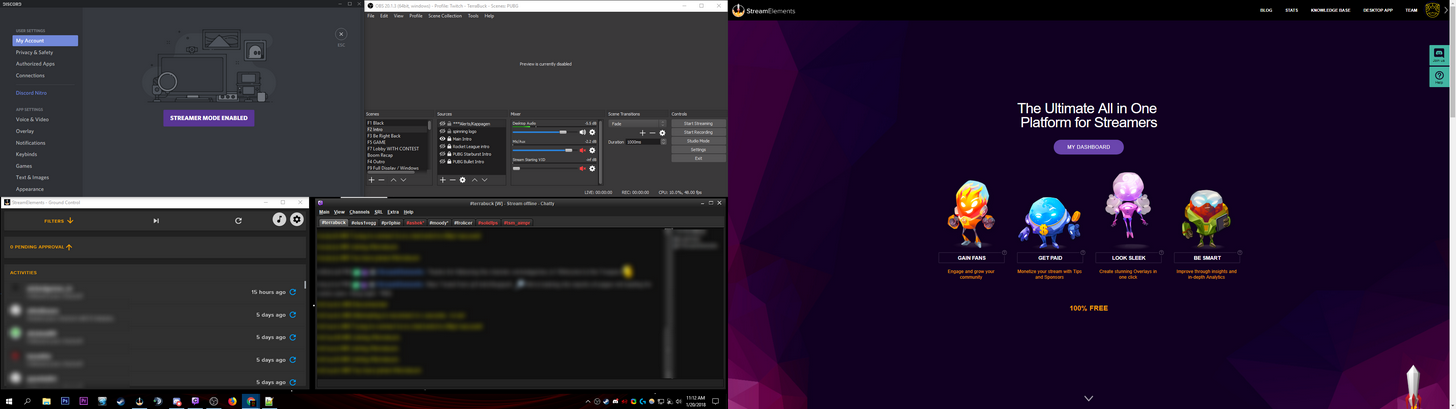

right monitor is FS game of course
dense jackal
ooooh i'm a left monitor is game boi
winter apex
Top left Discord top right OBS with preview disabled so you can switch scenes bottom right is ground control presumably and bottom left is ?
winter apex
OH
winter apex
Twitch chat?
clever mango
yea
clever mango
It's a lightweight twitch IRC client
dense jackal
nah chatty is a third party program he uses so he can track many different channels chat's at once
 tribal drum
Hi there! How do I add a Super Theme Overlay into one browser source into OBS? I tried to use them on individual scenes which took over my CPU to 100% 
dense jackal
Are you using a static or animated theme @tribal drum
tribal drum
I was originally using an animated one but my CPU cant handle that with the 100% usage so switched to a static one
dense jackal
But still 100%? What is your cpu usage with a normal overlay and not supertheme?
clever mango
!add @tribal drum
nocturne pelicanBOT
@tribal drum, To add your overlays to OBS, add a new browser source in your scene. Paste your overlay URL in the browser source properties, set the dimensions to 1920x1080 (unless you changed them on the website), and :ballot_box_with_check: “Shutdown source when not visible” https://youtu.be/KDvLynUqXI4
tribal drum
No not 100% thankfully with the static 😃
clever mango
You can't run them all at the same time in different scenes 😃 ☑ "Shutdown source when not visible"
dense jackal
That too^
tribal drum
Got that now 😃 I was more meaning how can I add the 5 pack to one browser source for the static pack 😃 its just i saw it on the https://blog.streamelements.com/8-obs-tips-to-make-your-stream-run-smoothly-a8d634b34bce but i cant find anything to tell me how to do this 😃

StreamElements - Legendary Live Streaming
In an ideal world, we would all be using a brand new NVIDIA GeForce 1080 Ti graphics card with an Intel X-Series processor.
clever mango
Each overlay is it's own browser source
They're different webpages that are loaded when you are using them
tribal drum
lol ah ok xD
so its best to have all five in 5 browser sources held within one scene?
clever mango
No
tribal drum
oh
dense jackal
1 scene for each browser source
this way when you switch between them, it activates one and deactivates another
tribal drum
hmm...thats not what the image shows on the 8 tips site...if you look it shows a whole bunch of browsers under the "Sources" area. It looks like they are all held under almost a "master source" which can be clicked to show/hide...
clever mango
That's correct
That's how the other guys do it
Each piece is it's own browser source
With SE all of the pieces are put together in one overlay
then added to OBS
as a single browser source
 ebon atlas
redueces bandwidth
as if its trying to load 10 browser sources uses more bandwidth so the cpu hangs so dropping frames
winter apex
Each scene is a combination of multiple overlays and sources combined into a single browser source. It’s easier for your COU to load one browser source instead of multiple sources.
CPU*
That’s why you have one scene that’s like the countdown to starting your stream. Then you would switch to your chat scene. Then to your game scene. Etc. etc.
tribal drum
Yeah that is what I have been doing 😃 just confused from the tips website which shows me an image with 1 browser source that you can click to show 11 or 12 other browser sources attached
And I was trying to figure out how to do that
But thats ok...i see where Terra is coming from
Thanks guys for all your help and advise! Appreciate it
dense jackal

tribal drum

clever mango
 round otter
Hello guys! Can I have question about text to speech in tipping process? Will be added any new supported languages?
clever mango
It depends on the langauge available of the text-to-speech providers and also how many it would be used by @round otter
What language would you like to request?
weary mist
if you have a streamdeck, or like hotkeys, you can do all the sources in one. You just have to master those hotkeys, or the streamdeck. Then it can hide/show certain overlays when you want them
@tribal drum
 tough linden
@weary mist any headway on that bug I brought you yesterday?
 forest stag
So trying to setup the Follower Goal, but it not showing the correct information? is there a way to fix that?
round otter
@clever mango Czech language
clever mango
!totals @forest stag
nocturne pelicanBOT
@forest stag, If you are using the total follower/total subscriber widget, reset your session from the Activity Feed to fetch updated data from twitch. If you’re using goal widgets, you can edit the progress of any goal by going to Activity Feed > Widget Data > Goals. This can also be found in the overlay editor by selecting DATA (next to WIDGETS) > Goals
clever mango
@round otter I'll get back to you on this
forest stag
@lament blade Thanks that worked
one more question.. Is there a way to setup to approve song requests?
weary mist
@tough linden I have sent it on over, but today is a day off for the devs. Tomorrow I can bug someone
clever mango
@forest stag if you give trusted mods "bot supervisor" access to your dashboard they can preview and delete song requests from the queue before they play. Songs can also be deleted right from chat with !removesong
stone spire
twitch stats down for anyone else?
 whole viper
I have a question, does Stream Elements work for YouTube or just for Twitch
stone spire
well
technically you could use the overlays for either
but pulling data, chatbot etc I believe are only for twtich
twitch*
whole viper
Ok Thx
atomic hollow
@digital crag-Inbound#2215 youtube support is around the corner
 paper ferry
quick question, How do I make a shoutout command that displays the persons twitch url? I'm looking at all the variable and the url ones are confusing to me
 lunar bronze
Im still a bit struggling with songrequest, after i skip a song on my friend his stream the next song wont play. Anyone knows how to fix it?
atomic hollow
@paper ferry create a new custom command, there is a template for that
 tight rover
Is there a way to make the link in the shout-out command clickable?
 slim cairn
You could put twitch.tv/ before the username variable
ebon atlas
@tight rover are you using the template?
tight rover
@ebon atlas I am.
At the moment, it returns the correct text for the URL, but it's plain text, not a hyperlink.
tight rover
Just tested it, here's an example: Check out thealakazamking at https://twitch.tv/thealakazamking!

Only discord added the link. On twitch, no link
lament blade
got some questions ...
-
starting with a TTS feature "Announce action"; I don't notice any difference, what does it exactly?
-
Can you have TTS as variation? for example, if sb. donates 3.33€; that I have another Voice than usual
-
for the widget "event list", is there a way, to have a min. amount for "hosts" that it will be shown in the list?
-
when I change the duration of an alert, the animation/picture is gone, but the text&name stays there. bug or did I do sth wrong?
slim cairn
@tight rover I think I found the problem, make a / at the end then put a space after it
Example: Check out thealakazamking at https://twitch.tv/thealakazamking/ !

Twitch
❄️Chill Stream❄️Zelda: Wind Waker [GC Original] I Kno De Wind, I Kno De Wae #TeEm #Erox #Theraccpack
tight rover
hmmm
tight harness
It's because it's adding ! into the link
tight harness
No problem
 ripe elbow
Hey guys, does streaming elements have a thing that writes in chats when someone host me and with how many?? I need to enable it if I do. So if I ever have to stream from my PS4 straight.
stone spire
I believe so
ripe elbow
Do you no da wey?!!!
stone spire
In your overlay, where your follower notifications etc are there should be one for hosts, and I think there's an announce in chat option
ripe elbow
I need the announce in chat
atomic hollow
@ripe elbow under modules ---> chat alerts
atomic hollow
launch
ripe elbow
Thank you.
 eternal oracle
then what do I do
atomic hollow

Create an amazing overlay with StreamElements, watch our video guide to learn how. ----- Tipping page setup: https://youtu.be/eLzxRkq7tJo Add KappaGen to you...
tight harness
Copy the link and put it in as a browser source 😄
ripe elbow
^^^
eternal oracle
I use stream elements is there a certain amount of viewers I ahve to have to be in sellout
tight harness
There's no viewer requirement, no
eternal oracle
cool
tight harness
If you are streaming with StreamElements:
- chatbot (modded and in chat)
- tipping service (link in panels below stream)
- overlays (theme or custom)
eternal oracle
i have all i thyink
I know 3 and 1
2 I am pretty sure
u can check
I have twitched linked to discord
dense jackal
you have streamtip linked rn asd your tipping @eternal oracle
tight harness
dense jackal
everything else is good to go
tight harness
Importing is not the same as linking, you can't link the 2 services together
You need to switch to our tipping system
 vernal pike
sellout says to ask in here to be a sellout if I'm using bot, overlay and tipping...so...have I sold-out now?
tight harness
@vernal pike Added you 😃
eternal oracle
check again
misty wagon
Nice @vernal pike Don't forget to turn on the tipping presets 3,33/4,20/6,66/13,37 they give a higher conversion and help you with the transaction costs
dense jackal
the link in ur bio is still streamtip
dense jackal
your tipping page https://streamelements.com/warboyrose/tip
StreamElements
The Ultimate All in One Platform for Streamers
eternal oracle
got it
 silent loom
I need help
pine hemlock
Ask away
silent loom
ok
so im trying to make a stream overlay
Using this
how do I do that?
youtube isnt helping
tight harness
Is it meant to be a starting, brb or ending screen? 🤔 wouldn't really work that well for an in-game overlay
eternal oracle
Legendary Did I get it set up
tight harness
Now you have 😃
vernal pike
@silent loom if you took the background out so it was just the name and orange creeper, that could sit at top of screen
eternal oracle
also does anyone know how to group screens togther
like if I want a rocket league one, a overwatch one
tight harness
You have them as separate scenes, they're not grouped together
vernal pike
wot he said
eternal oracle
yea