#helpdesk-twitch
1 messages · Page 190 of 1
 lilac basin
 stuck hamlet
That works.
lilac basin
okay so how would that work
would they just need to use obs and same concept but use the elgato as the display?
stuck hamlet
You would need to use a streaming software like OBS, and capture the gameplay with your elgato, correct.
lilac basin
okay but he can just apply everything as is
and what is the elgado under, a video source?
lilac basin
okay sweet thank you so much onslaught. and you did the vid tutorial on tipoing right? i need to set that up
stuck hamlet
Yes I did
lilac basin
okay cool ill give that a watch
 wind sapphire
anyone want to watch runescape?
 stiff flare
Hello. @stuck hamlet can you help me with something?
stuck hamlet
sure
stiff flare
So. For the Link Protection tab. I added a custom message saying "You are not allowed to post links in chat if you are not subscribed" you know as reason for timeout, but the only people who see this message on twitch chat is me and the moderators
Like the viewers are not seeing the reason of their timeout
stuck hamlet
Yea, that's the ban reason, it doesn't say anything in chat.
stiff flare
Can you come vocal?
It would be a lot easier for me if that was a possibility for you
stuck hamlet
I currently cannot, but is there anything else i could help with?
stiff flare
Well. Yes 😛 Give me a sec
Can I DM you screenshots of 2 angles?
You still there ? I dmed you
stuck hamlet
I have no idea why your viewer isn't seeing the ban reason, he should be. May be a twitch setting i dont know about.
the person banned and the mods should see the reason.
stiff flare
The person banned currently only sees "Deleted message"
While me and the mods see the whole thing
stuck hamlet
Yes, you stated that in the DM.
I don't know why the banned person cannot see it, that would be a twitch setting or issue.
 midnight yarrow
 pure warren
@weary mist yeah I know characters are problem, thats why i wrote an example. It supports UTF-8?
 gentle imp
afaik unless u have BTTV installed and ticked show removed messages you won't see timed out/banned messages
pure warren
Ban reason is visible to viewer, I tested it. Maybe he is on phone? @stiff flare
stiff flare
Did you test it on my stream?
 lament blade
i can no longer move my cursor with the arrow keys when editing text on the editor.
stuck hamlet
yeee, i noticed that as well @lament blade
lament blade
Glad it is not just me
wind sapphire
@stuck hamlet can i get a shoutout for my stream?
 clever mango
@wind sapphire Check the 📌 message in #welcome. If you meet all 3 requirements I'll add you to the NowLive bot
wind sapphire
@clever mango i have all of those
clever mango
Please add your tipping page link below your stream in the panels section @wind sapphire
Also, for your follower goal you can edit the progress by going to Activity Feed > Widget Data
 heavy pecan
what tab in dashboard do you add the offline screen
clever mango
That's added in your twitch settings
heavy pecan
is it in twitch or streamelements
clever mango
twitch
clever mango
select your name in top right > Settings > Channel & Videos
 heavy pivot
heavy pecan
heavy pivot
heavy pecan
thanks
how do i add a brb channel and starting soon channel
do i have to manually put that in obs
heavy pivot
Yeah they'll be scenes you create and add to OBS. Stream Elements has some good overlays and themes that you can edit to your liking

StreamElements
The Ultimate All in One Platform for Streamers
heavy pecan
how do you mute yourself in obs
 tight harness
You click on the mic or speaker icons
heavy pecan
ty
tight harness
Np
wind sapphire
ok @clever mango i set up tipping
clever mango
You've been added
wind sapphire
thanks
gentle imp
quick question, if i set codes on a store item, person who redeems it only sees 1 code right? and does it get whispered to him/her?
clever mango
Yes
gentle imp
cool, tyvm 😃
 nova merlin
Team link on the following page is pretty funky and doesn't work: https://streamelements.com/groundcontrol (and there's a horizontal scrollbar on the page)
StreamElements
The Ultimate All in One Platform for Streamers
nova merlin
The entire page seems outdated and not in sync with the main website 😃
@stuck hamlet 😄
tight harness
😄
 zealous orchid
Need some help with something.
 pine hemlock
Ask away
zealous orchid
Why does my alert sound go twice?
 silk patrol
@zealous orchid Make sure to tick the checkbox called "Shutdown source when not visible" in your browsersource properties, in each and every scene
 atomic hollow
Dante 
silk patrol
Hey dad ❤
atomic hollow
we missed you
silk patrol
me too, I've been busy
zealous orchid
And is there a way then when I alt tab that it doesnt show my desktop.
silk patrol
@zealous orchid use game capture instead of screen capture
zealous orchid
Also that didn't fix the situation.
silk patrol
@zealous orchid you probably forgot one browsersource, you need to tick that checkbox on each and every source, in each and every scene
zealous orchid
i have done that. I even closed OBS after to test and it is still extra playing the alert sound.
heavy pecan
hey why does my widget not show up
zealous orchid
I found the reason.
heavy pecan
someone followed me but its not showing on recent followers
silk patrol
@heavy pecan Do you see your overlay in OBS?
heavy pecan
yes
silk patrol
@heavy pecan If you do a test event in the overlay editor, does it show up in OBS?
silk patrol
@heavy pecan Open your overlay in the editor, click on the bell in the lower left corner
silk patrol
@heavy pecan Are you using OBS Studio?
atomic hollow
you emulate a follow and nothing shows on the overlay?
heavy pecan
yes
atomic hollow
twitch username?
atomic hollow
checking
atomic hollow
just emulated and I can see "the rock" 😃
heavy pecan
it shows it but it did not do the widget
it does not say it in recent follower i said earlier
atomic hollow
look for it here - https://streamelements.com/dashboard/session
StreamElements
The Ultimate All in One Platform for Streamers
what do you see?
pine hemlock
Login and reload the page
heavy pecan
atomic hollow
ok
heavy pecan
i see the login that does nto help
atomic hollow
you see the latest follower?
pine hemlock
Delete and readd the widget to your overlay and hit save
The latest follower widget
heavy pecan
delete what
 barren pawn
Heyoooo can I get some help, is there anyway I could put gambling into the Streamelements bot I’m playing a game where one team will win, lose or we could draw, is it possible to make a betting option like that?
silk patrol
@heavy pecan the recent follower widget on your overlay
atomic hollow
@barren pawn you mean streamelements?
heavy pecan
ok i deleted it
barren pawn
Ffs
pine hemlock
If you don't have a follower widget on your overlay you'll need to add it
heavy pecan
i did
barren pawn
Every time...
heavy pecan
i deleted the widget
pine hemlock
Ok so readd it, it should show your recent follower.
silk patrol
@barren pawn you can use duel, but the duel will be between 2 viewers, not a team
barren pawn
No I mean as in on my steam I wanna play an actual game, and I want viewers to gamble points to se if I will win lose or draw
heavy pecan
dont i add the widget again
silk patrol
@barren pawn Oh then yes, it's called contests
heavy pecan
i added the widget and now i cant see it
silk patrol
@barren pawn make sure to add the contest widget to your overlay too
atomic hollow
dont forget to save
heavy pecan
ty for help
zealous orchid
Question. How do I get music just rolling music. Like it just does a youtube playlist?
atomic hollow
StreamElements
The Ultimate All in One Platform for Streamers
you can add a youtube playlist here
zealous orchid
Cheers mate!
And will that after someone requests a song switch to theres and them when it's finished switch back.
pine hemlock
Yes
zealous orchid
And how do I get that to play when the stream starts?
zealous orchid
Fixed it!
i had to reset the app.
It's just saying no current song on my alert box.
atomic hollow
current song widget doesnt show playlist songs
zealous orchid
Is that all of them? Will you change that one day?
silk patrol
@zealous orchid This is due to Youtube API limitations, we can pull song request title and artist, but not the backup playlist. If YT fixes it, we will implement it for sure
zealous orchid
So how do I go around Copy right?
silk patrol
you play non copyrighted songs 😃
clever mango

zealous orchid
But they poop.
atomic hollow
💩
silk patrol
Make your own music then 
zealous orchid
And is there anyway to not have StreamElements classed as a viewer?
silk patrol
well the bot has to be in your chat to answer commands
clever mango
I'm not sure if it is considered a viewer but it is always considered a chatter
zealous orchid
Yeah, I have two active viewers. Myself and the bot apparently.
tight harness
Time to get some more
heavy pecan
Hey
silk patrol
long time no see
heavy pecan
So I made a custom alert box design, do I just simply fit the widget inside the design
tight harness
Yes 🤔
heavy pecan
Ok I can resize the widget right?
tight harness
Yes
atomic hollow
wut?
tight harness
Wrong server i'm guessing? 
 foggy basin
ether im just blind or dumb but how do i edit the commands again xD
 misty wagon
at the rightside
foggy basin
yeah but the optin is not there for me xD
misty wagon
Screensize/resolution or scroll bar?
lament blade
 Maybe zoomout?
misty wagon
or that
foggy basin
yeah that workd... but whu coud i see it on default and not custom wit hthe normal zoom
this is wired
lament blade
Glad it worked 😄
tight harness
With default you only have the edit, with custom you have edit and delete, could be why you saw it on one but not the other
foggy basin
maby who knows... well i guess il just have to change the xoom whenever i wana edit there commands
foggy basin
lol i didnt even notice that xD
clever mango
or use shift and scroll up and down 
lament blade
Terra smart
foggy basin
welp thanx 
tight harness
The more you know 
misty wagon
TerraSmart4aBuck
 hollow surge
Is there any way to change !duel text "x wants you to duel for xxx points, you can !accept or !deny"? I know you can change win message but can i change the invitation's message to a duel?
tight harness
No, you can change the win message and the points won message
 runic sigil
Can you help me, do you have the option of donation goal?
tight harness
Yes, it's called Tip Goal in Widgets
It's within the Stream Goals section of Widgets
runic sigil
Oh, okay, I'll look better. Thanks
tight harness
No problem 😃
hollow surge
@tight harness Will it be changed in the future? Or is it too much work to do? Would be useful for all the non-english streams.
tight harness
Changing things to be in different languages is definitely in the works, yes
It's a huge project 😄
foggy basin
thats cool
hollow surge
Ok, thank you, looking forward for it! My viewers enjoy the command anyway, just wanted to make it more accesible
lament blade
hola
clever mango
It's open source and safe. It's just that Microsoft is taking forever to sign/certify it
 fast stone
Windows defender
tight harness
clever mango
Do you see Run Anyway or Advanced?
clever mango
ok
lament blade
algun español
clever mango
mer info
clever mango
fast stone
where's the jwt token at?
clever mango
hola @lament blade un momento @olive lintel
fast stone
my man
 olive lintel
@lament blade hola, cuando desees puedes enviarme un mensaje directo y te ayudo en lo que pueda.
 pearl light
@lament blade sorry about before, discord crashed 😃
 clever nimbus
Is there a way to adjust the follow message that displays in chat, not the alert, but the message in chat?
Found it
lament blade
Nice 😄
 terse whale
anyone know why this would happen? streamelements didnt say anything
misty wagon
Likely Twitch Automod, check in your Twitch settings.
clever mango
It says SE timed him out. It won't give a reason if you don't have a timeout message set. Which spam filters do you have enabled?
lament blade
https://streamelements.com/dashboard/bot/filters Link to it ^
tight harness
Must have triggered one of them 😄
terse whale
ty for the help all
lament blade
No problem 
 coarse geode
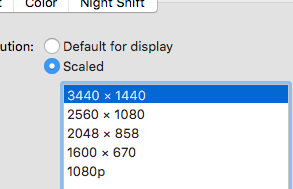
Hello, I need help, I try to use an animate overlay but my screeen is 2560x1080 and i don´t found the way to put overlay on this scale
 serene granite
@tawny pivot did he just beat you in the resolution game?
 tawny pivot
 serene granite
you can edit an overlay to a be a different resolution with the little pencil icon next to its name in your "My overlays" page
however, our superthemes are 1920x1080 and increasing their resolution won't enlarge the items inside
you can load up the themes as 1920x1080 browser sources to your OBS, and then use Ctrl+F to scale it up
it might get pixelated
coarse geode
okay thanks you
 spring shard
is it possible to add recent tip manually after importing from Stream Labs? it's currently not showing up in the recent tips widget
spring shard
They're already in tip list. But not in recent tips while checking the Data on the overlay page.
 upbeat rose
Hey all!! Been awhile since I've had to ask a question because SE is so amazing and easy to use! But quick question.... is there a way to edit the Top Tippers List? Or maybe it's a bug, but my Top Tipper list keeps screwing up my #2 person and replacing it with random other people but keeping the amount the same lol
and there are also a few spots that it lists the same person rather than combining all their tips into one and giving them a higher rank on the list
lament blade
Hey @upbeat rose , Hope you are having a wonderful day c: Can you try the refresh aggregates button on the aggregates tab in the data section of the overlay manager
upbeat rose
Sure! I'll try that right now!! Thank you so much for the quick response and I hope you are also having a wonderful day @lament blade 😃
lament blade
upbeat rose
That did not appear to change anything 😦
pine hemlock
We're looking for a solution. It's not as simple as it seems
upbeat rose
alrighty
 fallow pine
hey this sounds simple but, now that theres no add browser source option, where do I go to paste the overlays link?
lament blade
Where are you trying to paste the link? Obs, Xsplit?
OBS is browser source, Xsplit is Webpage
@fallow pine ><
 kind jacinth
Ehy guys, can someone tell me how should I edit the notification for the resub? I mean, what excatly should I choose in the variation settings? D:
tight harness
You click on Add New Variation, then you choose whether it's the 'Subscription Tier', the 'Months Subscribed' or whether it's a 'Gift' sub that causes this to be a variation
kind jacinth
Thank you @tight harness ! :3
tight harness
No problem
fallow pine
@lament blade obs, sorry!
tight harness
Then you should have Browser Source, did you not tick the option to include the Browser Source plugin with your installation of OBS?
fallow pine
i guess not, i'll reinstall and see. thought it was too simple of a problem 😃
lament blade
Good luck
 round geyser
Any plans to add that by any chance?
lament blade
grrr
tight harness
It's on the ideas board but not planned yet
tight harness
round geyser
Obviously i didn't search hard enough again. Thanks!
lament blade
No problem
tight harness
No problem 😃
 split wedge
Hey there! I'm editing my layout on the Stream Elements website, and I'm changing all of the alerts. My problem is that for the alert box, there's no option to change the item redemption alert. So if I test the item redemption it will use the graphics included in the layout. I suppose I could start fresh but I'm using the one provided by stream elements as a template.
tight harness
@split wedge The image and sound used for a specific item redemption comes from the settings when you create/edit the item in the stream store page, it's not changed via the alert box settings, what this basically means is that to test the alert for a specific item you can just give yourself the points needed for it and redeem it to test
misty wagon
I'm a pleb @split wedge so as a rule of thumb I always copy the overlay set that I want to work on first (and then screw it up 3 times  )
)
split wedge
Oh! So I need to change it from the stream store settings on the site?
 obtuse gyro
lets see if i made a mistake by unmuting this channel
lament blade

tight harness
@split wedge That's right, it uses the image and sound you upload in the store for that item as the image and sound for the alert 😃
The things you upload for the alert box is just a 'default' so to speak, so when you upload an image and sound for that specific item in the store it overrides that default
split wedge
Ooohhh I see! Thanks so much 😄
tight harness
No problem 😄
 scarlet basin
I must be insane or something but I can't find how to change my profile image because ever since I added SE when ever I link my twitch it uses the little orange guy as my link pic instead of my actual logo
How can I change it
clever mango
https://streamelements.com/YOURNAME Click on your photo
scarlet basin
Ah ok so I actually have to be on my stream viewing page not in the dashboard kinda funky but ok thnx!
clever mango
Normally the picture would be able to be edited from dashboard and public page. It's on the to-do list
You're welcome
fallow pine
reinstalling fixed it, thank you 😃
tight harness
No problem 😃
 near sluice
In StreamElements Guides How to Guides "8 OBS tips to make your stream run smoothly". For the tip "Load your Overlay from a single Browser Source", how would I combine the five overlay from a Super Theme? In what order should I have them in before I combine the overlays into the one Browser Source? I will be using OBS for my streaming.
tight harness
@near sluice I think you've slightly misunderstood, each scene (starting, in-game, brb etc) are meant to be added separately to their own scene in OBS, you tick the option 'shutdown source when not visible' for each of them and then there's 1 scene open at once, all of the different Widgets are added to those individual scenes. You don't combine multiple scenes into 1 browser source, that's not physically possible
lament blade
When I add a song to the song list, it asks for a youtube URL, now if that song gets requested and plays, would it play an ad when it playts?
tight harness
@lament blade No, it doesn't play ads
near sluice
@tight harness Thanks for the fast reply but I'm aware of how the overlay works. But on the guide "Load your Overlay from a single Browser Source
StreamElements takes everything possible and puts it all into one single browser source. Loading your overlay from a single source means that your CPU only has to load one source instead of several, which will reduce CPU usage by a lot." It also has a short clip of multiple overlays being selected and than deleted because of one being titled All-in-One. https://cdn-images-1.medium.com/max/800/1*VgVzb5FhrjWMfiMmzCbZbQ.gif
 tight harness
Yes, those are Widgets being put into a single overlay browser source
"all of the different Widgets are added to those individual scenes"
So you edit the overlay, you add the widgets, you take the URL for the overlay, you make a scene and you add the corresponding browser source for that scene. You then edit the next overlay, add the widgets for that overlay, you take the URL for that overlay, you make a scene and add another browser source for that scene, remembering to tick the option 'shutdown source when not visible' for each of them, repeat this for all of the different scenes you create
near sluice
@tight harness Thanks for the reply. Is there any order in adding the overlay to OBS? I know that the game scene needs to be lower than the overlays. In what order should I add BRB, Stream End, Stream Starting Soon, Talk Scene, and In-Game Scene?
tight harness
Well because you're adding them to their own scene they're not actually in the same scene at all, so they won't overlap each other
near sluice
@tight harness Okay. Thanks for your help.
tight harness
No problem
lament blade
@SE.Staff Hello, I have recently started streaming on Twtich and was looking to make my streams look nice. I've started using Stream Elements and I think it is amazing. However, I have one issue/question. When I start OBS, the Overlay seems to make the game I'm playing drop 70+ frames. Can anyone help me with this issue?
tight harness
@lament blade Hey, did you remember to tick 'shutdown source when not visible' for each of the browser sources you added?
lament blade
@tight harness I dont believe so. I'll try to change that ASAP
tight harness
It's in the properties for the browser sources, it's best to tick it for all of them
kind jacinth
I don't know why, but when someone write something subscribing to my channel, the message appear but when the message is too long, the words go one above the others! I'm having this problem for a lot of time and I can't figure out why! I didi some changes but nothing happend! D:
lament blade
@tight harness Ok, thanks!
obtuse gyro
did you try making the alerts widget have more space, like enlarging it?
kind jacinth
I did but nothing happened! I put the same settings I have for tips messages (that are ok) but I have the same problem! D:
tight harness
Is there a different line height for sub messages? 🤔
kind jacinth
Nope, I wrote nothing
obtuse gyro
should i check?
kind jacinth
@obtuse gyro sorry for asking but... You're part of the staff or something? o.o
obtuse gyro
no im not
but if i can help i will
so the message is just overlapping, its not getting cut off right?
kind jacinth
"Black gold in game theme"
tight harness
Alright, looking now 😃
pine hemlock
Could be the variations not having sub messages on
tight harness
Are you live or am I alright to run some test events? @kind jacinth
lament blade
is there a tts for tippings?
tight harness
Yes
lament blade
how do i enable it?
tight harness
Click on the alert box > Click on the cog/gear next to Tip Alert > Then click on TTS Settings > Tick Enable text-to-speech and go through the other settings
kind jacinth
I'm not straming so you can do whatever you want! uwu
tight harness
Awesome, i'll have a proper look 😃
Ignore any alerts that pop up, it's all me testing
kind jacinth
The tts and messages tips are ok! D: the only problem is the sub messages! D:
pine hemlock
@tight harness mine wasnt showing the gift sub message until i deleted the variation and re-added it
well, it was, but it was cut off
tight harness
The message shows up, but it shows all of the lines of text overlapping each over
pine hemlock
tight harness
Uploading a gif to demonstrate
pine hemlock
You're special and have access to peoples account Kappa
kind jacinth
Yep! That is the problem! D:
tight harness
It's definitely the first time I've seen this one
tight harness
Gift isn't doing it 🤔
pine hemlock
If its more than 1 more just delete the variation and re-add it
if its default, gl

tight harness
Nah it's custom
 junior pine
Is there currently a way to copy all of your donation/tip alert variations to the bit/cheer section as well or can it only be done manually?
tight harness
@kind jacinth I deleted the variation because it was the variation that was doing it 🤔
pine hemlock
Manually as far as i know @junior pine
junior pine
Thanks
pine hemlock
We offer copying widgets to other overlays but not settings from within the same alertbox on the same overlay sorry
kind jacinth
@tight harness so now... What should I do? D:
kind jacinth
Yeah, it seems so! Thank you so much for the help! ;w;
lament blade
tight harness
No problem at all
runic sigil
Hello, how can I change the language of reading the tips?
tight harness
When you're in TTS Settings you click on Select TTS voice which is a drop down box and if you look you'll see that there's a few voices which are separated by what language they are @runic sigil
lament blade
hi all, trying to import from a csv to streamlabs.
and having some issues, wondering if i could get a little assistance
tight harness
To Streamlabs or StreamElements?
lament blade
elements
tight harness
Ahh good 😄
When you say you're getting some issues, what can you see that indicates a problem?
tight harness
Could you try this instead? https://filter.dj/CSVtoStreamElements.html
lament blade
i am trying that now
when i put them in there and click load CSV, this is what im seeing.
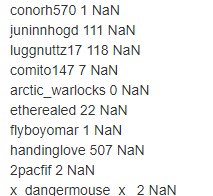
im not sure where the NaN is coming from
tight harness
I believe what it does is removes any unnecessary data that isn't importable
tight harness
Yep
lament blade
how do i get it to copy in that format?
tight harness
Does it not let you import it as it is?
tight harness
Imported alright like that?
lament blade
i had to copy it in the format of colum a, colum b
lament blade
ty ty
tight harness
No problem
tight harness
It's alright, a lot to look at but it's all worth it 😃
lament blade
trying to find everything and get my stream back set up
tight harness
Well if you have any more questions just ask 👍
lament blade
will do.
is there a battle game?
folks can use points to battle each other?
Yes there is
tight harness
If you check in Modules you've got a few minigames, Duel allows people to fight each other for points 😄
 honest blaze
still wish ground control had a twitch chat...
tight harness
No problem 😃
@honest blaze I know it's been suggested a lot, and we listen to feedback, you'll just have to keep an eye out 😉
lament blade
 prime glen
is there a way for text to speech for tips?
lament blade
Yep,
lament blade
😛
 neat plume
can someone help?
lament blade
Of course, what do you need help with?
neat plume
i want to set up a thing where the chat automatically thanks follows for follwoing not sure how though?
lament blade
It's under modules, https://streamelements.com/dashboard/bot/modules It's called Chat Alerts 😄
neat plume
thank you
lament blade
No problem 
heavy pecan
Hey need help again
tight harness
What's up?
heavy pecan
You know those breaks where the streamer isn’t playing games and it just shows his facecam covering a little more than half
the screen
 modern perch
Hey i got one Problem. I set up an Item in my Store and tried to buy it via chat (got chat redeem activated) with a random account he has enough Coins but still not working.
tight harness
Yeah
heavy pecan
How do I add all the recent follows in the break area
tight harness
@modern perch Did you add the store redemption widget to your overlay?
modern perch
Just want it in Chat.
heavy pecan
Hey can someone help me
modern perch
Rohm your getting help just chill 1 sec (:
heavy pecan
please don’t tell me to chill or calm down that really triggers me
modern perch
legendary got no 8 arms
Legendary, is it maybe cause i choose Stream Perks instead of Acces code?
tight harness
@heavy pecan Add the widget for it, it's called Recent Followers I'm pretty sure
modern perch
you can change the Settings to all followers
tight harness
@heavy pecan Recent Followers (plural) is multiple
 dense jackal
there is a recent followers list widget and a most recent follower widget @heavy pecan
misty wagon
General announcement;  is now Decaf 100% only
tight harness
Latest Follower is singular, Recent Followers is plural
modern perch
Well and legendary how we fix my problem? D:
tight harness
@modern perch What kind of item was it? Because if it was a sound item you still need the store redemption widget for the sounds to play
That's why I say you need it, it's not just for the visual alerts
modern perch
So i need the widget to get it working
tight harness
Yeah, the widget is very necessary 😃
tight harness
Awesome! thanks
modern perch
gimme a sec
dense jackal
no seconds given. Status: Failure
 rancid coral
Sound plays when i test the alerts. But doesnt play when something actually happens..?
dense jackal
does your image still show?
rancid coral
Yep
dense jackal
when you test it does it work in obs as well?
make sure the sound is playing from obs too
tight harness
OBS muted? 🤔
 next spruce
can someone please tell me the default gifted sub alert message text (including paramters? cheers
 karmic bronze
alright boys
i don't know why my alertbox is duplicating the alert sounds for follows still
obtuse gyro
i had that issue, it was that i had obs open while i was testing the overlay
lament blade
On obs, did you tick "shutdown source when not visible"?
obtuse gyro
so both obs and the overlay test were doing the sound
lament blade
Do you have any extra alert box layers? even if they are hidden?
karmic bronze
checking
modern perch
The thing is stil not working legendary .-.
dense jackal
@next spruce should be the same as regular sub text i’m pretty sure
karmic bronze
i don't @lament blade
lament blade
And you don't have any variations right? 
modern perch
Can I add a text if someone has not enough coins and trys to use the command?
tight harness
With double sounds it's either: multiple browser sources without 'shutdown source when not visible' ticked, multiple alert boxes in one overlay, overlay manager and OBS both open (as the sound will play in both of them) or two instances of OBS open
 crimson yew
I'm not sure if I asked, but SE will have Mixer support soon, right?
dense jackal
we are currently focused on youtube support, mixer is next B)
 modern perch
whats this mixer i got it in my Kitchen
crimson yew
xD
dense jackal
blender support soon
modern perch
same
lament blade
No, i dont believe there is  @modern perch
dense jackal
gordon ratatouille
crimson yew
XD
lament blade
tight harness
It normally tells someone when they're too broke to afford something 
You don't need to remind them a second time
crimson yew
Gonna go create playlist. Hope you guys are having an amazing day.
tight harness
We are indeed!
 coral kelp
how come autohosts dont work with streamelements
i get autohosted by a bunch of channels and i never see alerts for them ever
granted, theyre probably all 0 viewer hosts
but still
and normal hosts sometimes randomly dont work either
tight harness
That's why, they only show if they're at least 1 viewer
coral kelp
i have the host threshold set as low as it can go
i got hosted for 6 viewers once and SE just didnt show it
normally if its under like 10 its a toss up if itll show up
tight harness
Do you have the activity feed open somewhere?
coral kelp
during streaming?
not normally
i mean it says "user hosted you for 6 viewers" through twitch chat
tight harness
Yeah, you need it open, it explains why in the pinned messages for this channel
coral kelp
could i make a browser source in obs and have it be 0x0 and show it on one of my scenes thats always open
would that work
coral kelp
wont work because you cant use the obs browser as a normal browser and youd need to connect your twitch
o well
tight harness
Right, that's probably why nobody tried it before 😛
coral kelp
An Attempt Was Made
dense jackal
you have ground control right @coral kelp ?
dense jackal
🤔 our desktop app hurts that much? not in my experience
tight harness
Seems pretty low usage for me too 😄
 flat valve
so audio clips in my stream store are not playing on my overlay? is there something I need to add to the overlay to make it work?
tight harness
Yes, the store redemption widget in Widgets
karmic bronze
I don't have any variations, I don't have the manager open at the same time, I only have 1 instance of OBS open, I have shutdown when not visible ticked on every browser source, and only 1 alertbox in my overlay
obtuse gyro
test the overlay alert through the editor with obs closed to see if its obs or SE
karmic bronze
how do I test from the manager
tight harness
The blue circle with the bell icon in it
obtuse gyro
near the bottom left
obtuse gyro
i think we found the issue
tight harness
Yes, but if it's an OBS issue then it's the 'shutdown source when not visible' not being ticked somewhere 🤔
obtuse gyro
how were you testing the alerts without the editor though? curious
obtuse gyro
Howd you fix it?
karmic bronze
I had a 2nd alertbox on a separate scene that was old - from streamlabs - still visible
it had the same sound and stuff lmao
obtuse gyro
oh lol well glad you got it fixed c:
karmic bronze
I unlinked my streamlabs like 2 weeks ago, thought it wouldn't be an issue
tight harness
Ahh yeah, that'd do it 😃
lament blade
Am I just blind or is there no way to edit or remove custom commands
tight harness
There is, there's a pencil icon and a trash can icon, if you don't see it then look for a scroll bar along the bottom 😃
lament blade
oh my lanta 😂 thank you so much!
tight harness
No problem 😃
 foggy gulch
quick qustion how do i import my current OBS scenes into SLOBS?
tight harness
I believe there's an import tool within the program itself, I heard it doesn't work very well but maybe that's been worked on since then
flat valve
@tight harness thanks m8!
tight harness
No problem
foggy gulch
i can't seem to find it though
pine hemlock
Ask Streamlabs.
tight harness
You'd be best off asking on their discord for issues to do with their program
pine hemlock

tight harness
I still use OBS Studio
foggy gulch
k sorry thanx anyway
tight harness
No problem
 charred elk
Anyone up for helping me out? Message me please really need some serious help with setting up obs
obtuse gyro
would you rather i link you to the obs support discord?
I think youd get better help over there @charred elk
tight harness
Definitely more suited for them
 oblique pilot
Guys i cant enable the !song command from the bot manager... it says something about controlled by modular why is that?
 weary mist
you activate the song request command from the song request page
heavy pecan
hey so i just bought my new webcam
how do i set it up in obs
tight harness
Right click > Add > Video Capture Device
oblique pilot
oh.. even if im not using the bot to put the songs?
heavy pecan
ty
weary mist
@oblique pilot if you are not using the bot, then turning on the song request command won't do anything
 quiet depot
I need some help
My friend logged in to his account on my computer
and Im trying to sign out but every time i click login
it goes straight to his dashboard
pine hemlock
Log out of our site and log out of twitch
Then login to twitch with your account and then our website
 forest stag
Is there a viewer Widget? within the overlay?
pine hemlock
Not currently no
 hallow harbor
Is there a way you guys can point me to how they did a multiple cam stream like this?

like this
weary mist
no idea, you would have to ask them, lol. I am curious as well
 prime flicker
Can someone help me out by walking me through setting up my stream some time tomorrow? I am new and don't really know much but I want to make sure my stream at least looks good
weary mist
check out the youtube videos we provide, and if you are looking for OBS help, look at some videos for that. Then come with questions 😃
prime flicker
I already did watch the videos XD
weary mist
Then ask questions, and we will do our best to answer
weary mist
make sure you change the size of the bounding box as well
weary mist
in the overlay editor
heavy pecan
yes but where
weary mist
make the grey box around the text larger. Bottom right
weary mist
its not big enough, so make it larger
weary mist
and I can't look, your twitch isn't connected to your discord
heavy pecan
cant you just type my username in there
weary mist
your discord username doesn't have to be your twitch username, so its easier to have it linked for people
weary mist
👍
obtuse gyro
if its set to scroll it will scroll iirc, but scalper will confirm
heavy pecan
tag me if you need anything ill be streaming in the mean time
weary mist
is already streaming and doing support 
heavy pecan
lol
weary mist
😉
heavy pecan
is there any way to combine sources in obs @weary mist
weary mist
@heavy pecan what kind of sourceS?
 distant jacinth
Hey, anyone wanna take a crack at helping me diagnose a computer issue?
 fickle idol
is there anyone on that can tell me how i can integrate a tiltify campaign to my SE notifications
distant jacinth
Today, two times during my stream, my PC shut down (no blue screen, just black screen). I thought it was because I was maxing my CPU too hard or something like that, but I have been running OCCT (overclock testing software) for the past 2 and a half hours at 100% CPU load and its stayed on. The programs I was using at the time were OBS, Nightbot, and Spotify. I also had Input Director open (but not active), Open Hardware Monitor active, Elgato Sound Capture active, Logitech Webcam Software (2 Logitech webcams plugged in), my Blue Yeti plugged in, and dropbox open. I can't figure out why it shut down twice today (and lost me one of my comp overwatch games....)
FWIW I am using a dedicated streaming PC / gaming PC setup, so those were the only active programs
 grand ledge
Is there someone on here that can tell me why when i emulate a followr, tip, etc it repeats the sounds and text-to-speech?
obtuse gyro
common mistake, you have both obs and the overlay editor playing the sound
close obs and try again, see if it still happens
or you might have two sources in obs of the overlay
stuck hamlet
@distant jacinth sounds like overheatting issue.
distant jacinth
@stuck hamlet but wouldn't the issue reoccur if I ran the overclock CPU tester for 2.5 hours and my CPU was at 100% the whole time? It was fine then, so im not sure whats up. I just opened the case and the fans are spinning, although strangely enough my openhardware software isnt detecting CPU temperature for some reason, just load %
fickle idol
if anyone could help with my issue it is unfortunately a bit time sensitive lol. for some reason my donations notifications are not showing through my tiltify and my charity stream starts in like 5.5 horus 😕
if not i guess no notifications 😦
ive added my tiltify url but maybe its the wrong url? 🤷🏻
stuck hamlet
I believe we've known about an issue, im not sure if its been fixed or not @fickle idol
fickle idol
😕 dang
grand ledge
when im in my stream in game how do i show my hypecup and chat etc.?
clever mango
@fickle idol You can follow this issue and know when it's being worked on and fixed by giving this a 👍🏽 https://streamelements.helprace.com/i571
weary mist
@grand ledge if you have the layer with the cup/chat etc above the game, it should show overtop
grand ledge
it does in obs but when im in the game it doesnt show up... i think im jus retarted lol
fickle idol
also is there any way to pull media uploaded to SE back onto pc?
specifically a sound clip
 finite moth
I don't know if I'm doing something wrong, but whenever I try to use an Image in OBS, I click browse, and then it crashes OBS. Can someone tell me how to prevent this?
 viral cape
where is the setting to let people put Youtube URL when tipping
viral cape
is that youtube url in tipping page for songrequest, I was wondering if it's possible to display the video in the alertbox
dense jackal
yes but it's a seperate widget called media share
viral cape
could you link that please?
dense jackal
its in the overlay editor
viral cape
and @ me cuz i'm going to scshleep
finite moth
Oh yeah, I forgot to say to @ me as well, if anyone comes up with the solution to my problem.
zealous orchid
Actually I curious about something.
dense jackal
hit me with it
zealous orchid
Actually two things. What's the best way to read the chat without actually having a chat box on your overlay?
dense jackal
just popout your chat from your channel 😄
weary mist
or you can use Chatty or Chatterino
zealous orchid
You can do that!? I'm still learning.
dense jackal
although we are working on getting chat in ground control 😉
weary mist
or a phone, ir tablet
dense jackal
sibling/slave
weary mist
a tomato works too
dense jackal
or scalper
zealous orchid
OOO! Please do! also. When streaming with others. Is there a way for them to hear the music at the same time?
dense jackal
Not really, i know there are some discord extensions though that will play music in the voice channel for all to hear
zealous orchid
Yeah. But won't allow song requests in stream.
weary mist
you can use plug.dj
anyone in the room can hear the music, though song requests would again not be a thing
if you want song requests, you can give them your jwt and ground control. as long as they don't touch the songs playing, it will work good
but only do that if you trust them
zealous orchid
All good. Just curious. Sweet Sweet. Also sorry. Do you have plans for mobile app?
weary mist
yes
zealous orchid
Wahoo! I have a Tablet that I use for stream.
weary mist
we purchased a mobile streaming app, and are working on making it better, and full of awesome features
zealous orchid
Wahoo! I'm excited!
 twilit cedar
I have a quick question for anyone who can help, is there away to rotate text? My overlay has a main center part an my recent follower and dontations is at like a 20 degree slant and im not seeing anyway to rotate text which is a bummer...
 sonic ice
I have setup tipping page..but where is the URL for it so that i can put it in my twitch Donate panels ?
weary mist
@twilit cedar not right now, but you can check the #💭︱feedback-and-ideas board (link is in the header of the #💭︱feedback-and-ideas channel). If it isn't there, request it
@sonic ice there is a button at the bottom of your tip settings, click it (open page)
twilit cedar
@weary mist Ok dang no biggie. an ok will do. Thanks
sonic ice
@weary mist Thanks got it. Will the end user see my actual paypal email address too ?
weary mist
if you are using a personal account, yes. They will be able to see the email address/name. If you upgrade to business, It will be hidden
misty wagon
You can freely upgrade your PayPal to a business account without legal/tax consequences. It will also hide your email address and instead it will show a 'business name'. I think mine is the Coffee Company or something like that. Secondary benefit is that it will bring back partial Seller Protection against charge backs which was removed from Personal accounts by PayPal last April.
Takes 10 minutes.
Now to prevent even better against charge backs, make sure you turn on the 'force users to use their real name' on the StreamElements tipping page settings. That's their Twitch name and it means none can donate with racial slur names for example. And of course don't forget to change the link in your donation panel to the new one used in the !tip command. It's only 3 steps to donate which is especially nice to mobile users (other services are 4-5 steps), plus we offer a higher conversion with the presets.
Upgrading to a business account is very important! You don't want to pay $15 chargeback fee that PP charges for every troll donation or get a ban for someone using discriminating texts or people abusing the email address for spam/scams or show your personal email address but rather a company name eventhough it's maybe a made-up
lament blade
Business prevents for "scam"?  didn't know
weary mist
hinders is a better work
 last tangle
I want to start a tip goal but its using donations already made in the goal. How do I reset that?!
last tangle
Thanks!
 lusty yacht
Just downloaded ground control..... what’s a jwt token and how do I get it lol
atomic hollow
@lusty yacht you can get it right here - https://streamelements.com/dashboard/account/information
StreamElements
The Ultimate All in One Platform for Streamers
😃
lusty yacht
thanks
 tired frigate
hey guys. i'm streaming and the song request keeps breaking. either songs don't play from followers, last song in the line doesn't play, songs get skipped. idk how to fix it
skipped mid song
lusty yacht
kinda related? song request on chrome browser keeps crashing chrome.
tired frigate
I've been using the ground control app as well
 ivory glen
Is there any way to prevent SE from recognizing eg. "Mr.Bean" as a link?
lusty yacht
Ground control is having issues it seems. Fails to load and I think it’s uninstalling itself
atomic hollow
@ivory glen what do you mean?
@lusty yacht can you try a fresh installation and let me know if its still hapening?
ivory glen
@atomic hollow We have Link Protection eanbled. When someone forget to press the Space botton between two words it get's detected as a link, and SE automatically time it out. :/
lusty yacht
Was having issues with song requests crashing chrome so I tried to install ground control and it failed to load then the icon vanished and wouldn’t let me install again. Ran ccleaner and restarted pc and it did it again
atomic hollow
@ivory glen thats weird, let me check something
ivory glen
Sure 😃
atomic hollow
@lusty yacht what windows are you using?
ivory glen
That happened to me as well @lusty yacht. I redownloaded my browser - Afterr that it worked as it should.
lusty yacht
I switched the song requests to edge for now until I can get ground control installed. temp fix
atomic hollow
@ivory glen this happens on your channel?
ivory glen
No, on the channel I moderate. I will send you the link in PM's.
fast stone
Hey, I've got a small dilemma. I'm creating a new twitch channel, but I want to connect my previous streamelements account with it. Is it possible or do I have to start from scratch again?
Detaching it from the old account and attaching it to the new one
pearl light
@fast stone have you considered doing a namechange to your old twitch account?
instead of opening a new account
pearl light
can you translate that one for me? 😃
fast stone
You can update your username again in 57 days
fast stone
okay
pearl light
Seems like we don't have that option at the moment but I'll try to figure out another solution
gentle imp
to prevent abuse, not long ago you couldn't even change nick
fast stone
I understand, but it's such a hassle to get it changed, let's say you made a typo
 pale walrus
any overlays i can get
fast stone
Creating a new account feels.. too much
 fast stone
You need to open your game first
gentle imp
if it's a typo email them @fast stone they will fix it
fast stone
Thanks, I'll give it a shot
gentle imp
good luck 😃
tight harness
🤞
zealous orchid
Theres no volume shortcut for the music in the app is there?
stuck hamlet
what do you mean volume shortcut?
tight harness
You mean a hotkey to change the volume? 🤔
zealous orchid
Yeah.
tight harness
No, but you and your mods can use chat commands to do that anyway
tight harness
No problem
 stray blaze
hi together, im new to streamelements and i tried to include "kappagen" but it doesnt show up live only in the test layout (green screen) im using classic obs
stray blaze
so i have to use obs studois?
atomic hollow
yeah
stray blaze
all my stuff is set up on obs classic 😦
atomic hollow
you can still have them on studio
stuck hamlet
atomic hollow
⤴
stray blaze
checked the link but never done that bevor. ill do everything manually and you are pretty sure its not working on classic obs?
stray blaze
ok fine. preciated your time
 patent hemlock
I like steamlabs obs better even comes wirth different overlays you can use
 gentle imp
u infidel Santa! Kappa
tight harness
zealous orchid
So I had a running playlist and a song was requested when I clicked it to play now it kept playing my playlist?
stray blaze
does streamlabs have something similar than kappagen? i just know something about streamelements caused by kappagen and now i have to learn obs studios completly new :/
gentle imp
I'm just kidding btw, does seem a decent effort
tight harness
What seems a decent effort? 😛
gentle imp
it's easy to export and have all ready Max
stray blaze
ok im in the link for export but dont know what to do im honest
gentle imp
and studio uses way less resources
stuck hamlet
Even the OBS Devs shun people for using Classic. It is a very very outdated program, you should honestly just switch to Studio.
stray blaze
"copy and paste "%APPDATA%\OBS\sceneCollection" dont know what that is
tight harness
It's a folder on your computer
stuck hamlet
 stray blaze
but the settings as well -_- finally i got the settings on obs to stream in full hd and now switch to studios. i just have to learn studios first. again: thank you for your help guys
tight harness
No problem 
tight harness
I used to use Classic all the time too, but when I made the switch I've never even thought about Classic again 😄
Anyone else want to share with the group?
 hushed barn
heyo, is there a way to redeem soundeffects without the message displaying? instead i'd like to input in custom messages,
tight harness
If people redeem the items through the store page it doesn't display any redemption message in the chat, it's only when the chat is used to do the redemption that it gives the response in chat as feedback of the redemption being successful
 rustic spindle
@everyone Hi guys! I have a problem and I hope you guys can help me. I use streamelements with my twitch account, I stream with OBS and Safari browser. Everything seems to be ok, the follow, sub, or host's alerts are working, but the audio items i have created don't work. I mean, viewers can redeem them via chat, and an alert is shown but no sound is played. Can anyone help me please? 
pine hemlock
An alert is shown on the overlay but the sound you uploaded doesn't play?
tight harness
The same widget which shows the alert 'Store Redemptions' also plays the sound 🤔
So it's odd that you'd get one without the other
finite moth
Is OBS Studio the one that's 20.1.3 or is that classic?
tight harness
That'd be OBS Studio
finite moth
Then I'm using Studio, so then the solution I was given doesn't help
tight harness
The solution you was given?
finite moth
I was told to use Studio, I thought I was on Classic, so apparently I've been using Studio
tight harness
I see 🤔
stuck hamlet
Someone asked if you were using classic, they never suggested that was the fix 
tight harness
Yeah, I just noticed that through searching through the chat
I didn't see a response to the question
spring shard
So I'm having an issue with Streamelements.
When the overlay is active, the stream lags very much.
But once I disable it, it works just fine. Any tips?
it's just a very basic overlay. Recent tips, an alert box and recent subscriber.
lament blade
When you go on OBS, properties of the browser source, is the "shutdown when not visible" ticked? @spring shard
spring shard
Indeed.
lament blade
 jagged maple
is it possible to add a command to streamelements for changeing game and stream title?? just like nightbot??
spring shard
@jagged maple There are already commands like that, however they are limited to Super Moderators.
spring shard
StreamElements
The Ultimate All in One Platform for Streamers
jagged maple
thx
lament blade
spring shard
You're welcome!
lament blade
!settittle and !setgame
jagged maple
kk thx then i dident have to read thrug the whole thing xD
tight harness
@spring shard I'll look into your account and see if I have the same result if you like
@spring shard Without the overlay my OBS uses 1% and then with the overlay it uses 2%, it's not much for me at least 🤔
I'm running an i7-6800K, 1 + 1/2 years old
The overlay doesn't seem to be the problem
spring shard
I see. Well then, guess it's an OBS issue? Because it works fine when she was using Streamlabs.
tight harness
If they can open up task manager they can probably see what's causing it, at least for me it doesn't cause much of a difference at all
spring shard
The only thing that I could find that spiked when toggling on/off was OBS. She's using a i7 3770. Could it be the CPU that's the issue?
It's got a couple of years on it.
 ebon forum
3770 without OC:. still a decent CPU. It is like 15% slower than a 7700 when streaming, maybe 20%, but it can do 720p 60fps.
spring shard
That's what I thought as well. She couldn't stand it anymore though and switched back. 😦
gentle imp
well, with my old pc i5-2500k obs could use sometimes 30%, i know 3770 is more recent and capable but it's old
tight harness
Yup
 lunar furnace
when and where are the winners getting announced for the 10k giveaway
gentle imp
™
lunar furnace
its almost 10 am here thats why i was wondering im CST lol
atomic hollow
not joking, very soon
 stone spire
@rustic spindle do you have the volume on the sound in the overlay editor up?
oops that was an old post
Hey guys what's the deal with the show video on overlay button in the songrequest module
tight harness
@stone spire It's for Media Share, showing videos on the overlay 😄
stone spire
yeah, but how exactly does it work
tight harness
It needs to be used alongside the MediaShare widget
tight harness
It shows requested songs
stone spire
how do I get that
tight harness
Media Share or the widget?
tight harness
Tick Media Share at the top to enable media share, then when you're in the overlay manager (when you click on the large pencil icon for one of your overlays in 'My overlays' you click on Widgets in the top left then scroll down to MediaShare, click Add for that widget, place it where you want it and hit Save
tight harness
No problem
 stark furnace
Heya - I have a suggestion to make things a bit easier if I may ?
tight harness
If you go to #💭︱feedback-and-ideas you'll see there's a link in the description at the top, that's for ideas/suggestions
stark furnace
Ah ok - ty 😃
 opaque night
Hello, can someone tell me why the "Tip goal" isnt starting at 0 and is displaying a random number?
tight harness
@opaque night You have received tips since starting to use us, you reset the tip goal here: https://streamelements.com/dashboard/session at the Goals tab
The tip goal progress continues to add up even if you don't have the tip goal widget active in your overlay
tight harness
No problem 😃
stark furnace
BTW I got a message on Twitch from someone called "bash" - Was this legit plz ? Bash_: Hello there! It's Bash from StreamElements. I wanted to send you tips, info and inspiration but did not find a direct contact on your channel. Could I have your email for business enquiries please?
weary mist
@stark furnace For sure. @edgy iris is one of our champions 😃
weary mist
dollars
stone spire
I see
weary mist
tip multiplieer... I haven't heard it called that before though
stone spire
ah
weary mist
basically, it takes the points and multiplies them by the donation. So if I donate 3.33, its (points)*3.33
stone spire
yeah that's what i set it at
pure warren
@weary mist Fixed dance command...
${random.pick '${customapi.https://pastebin.com/raw/cjuiJt0T}' '${customapi.https://pastebin.com/raw/jR4eTumJ}'}

pure warren
yeah
weary mist
glad you found a way
 lament blade

 slate glen

tight harness

lament blade

gentle imp
Nitro peeps making me jelly 
tight harness
lament blade
Join us 
 plush plume
So, I need some help with something. Over the past few weeks, I'm noticing larger hosts not showing up in my alerts. However, 0 viewer hosts show up when I test it.
I double-checked, and I have NO variations set for host alerts...
weary mist
Check the second pin 😃
plush plume
Thanks, I'll try that!
rustic spindle
@stone spire yes I have the volume up. I can hear the alerts, but not the sound redemptions
 mild pelican
When i try to change the name of an overlay it doesn't submit and chrome console logs this error
Form submission failed, as the <SELECT> element named 'resolution' was implicitly closed by reaching the end of the file. Please add an explicit end tag ('</SELECT>')
weary mist
@mild pelican which browser are you doing this in?
mild pelican
Chrome 63
rustic spindle
@weary mist thank you so much 🤓
 prime fox
How would i set up my layout if i am streaming on xbox @weary mist
 shut grove
i recently changed my name and now no commands seem to be working
weary mist
@prime fox I am guessing you mean overlays. The only way to get those onto a console stream is to do it through a capture card
@shut grove part the bot from your channel, log out of StreamElements, clear cache, log back into StreamElements, then rejoin the bot to the channel
@rustic spindle do you have the Store Redeption widget in your overlay?
@mild pelican hmm. Can you tell me which overlay you are trying to change the name of, and what you are trying to change it to? I can't seem to duplicate it
waits for responses
slowly starts to get up from chair
tight harness
Run while you can
rustic spindle
@weary mist you mean the one that shows a gift box? no, I don't
weary mist
@rustic spindle Ah, you need to have that one on your overlay to get the image/sounds
tight harness
⤴
mild pelican
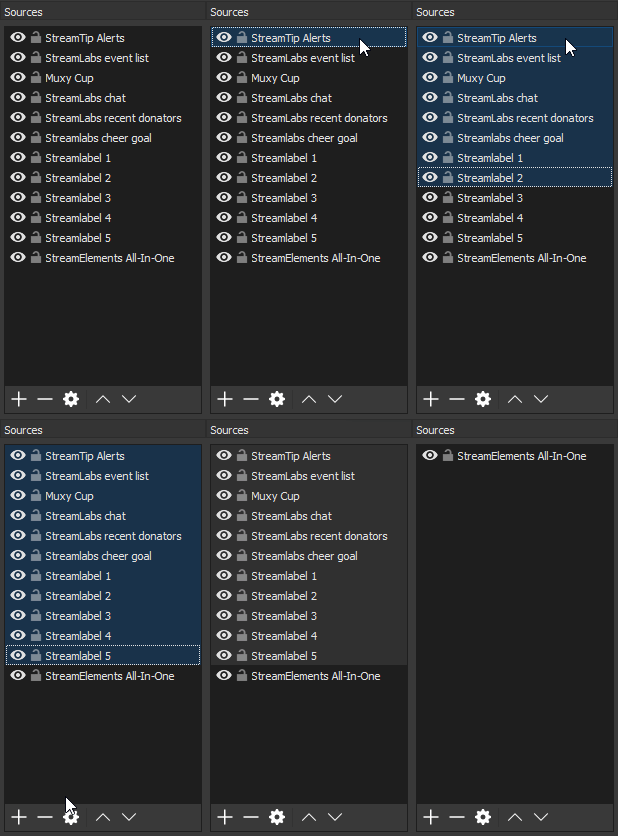
@weary mist https://imgur.com/a/R4Vlc




 rustic spindle
@weary mist i'll try. Thnks!! 😄
weary mist
@mild pelican super weird, I was able to change that one with no issues when I tried. Try logging out, clearing cache (closing down the browser entirely will help too), log back in, and see if it works then
rustic spindle
@weary mist It seems to be working!! Thanks a lot!!
tight harness
@rustic spindle It's because that widget provides both the sounds for sound items and the alerts for other redemptions 😃
Glad you've got it set up now 😄
mild pelican
@weary mist same.
Logged out, cleared cache, logged in. Even tried in incognito mode incase was a plugin. I get the same error.
tight harness
@mild pelican Is that for every overlay or just that one?