#helpdesk-twitch
1 messages · Page 187 of 1
 craggy rose
@lament blade i only have that one but i have other over lays on obs with alerts would it effect it?
 ebon atlas
prob so i went to the blue snowball and i had it for ages
 slim dock
I've done voice overs for audible
 lament blade
Yes, if you have other alert layers on OBS in the same scene, it will duplicate
craggy rose
@lament blade oh no i have 4 different scenes
 ebon forum
@slim dock once you try out a good audio interface with decent preamps (at least a Focusrite Scarlett), a decent condenser mic (NOT from Neewer) and some additional stuff like a hardware compressor, limiter or even a sidechain compression - you understand me then^^
slim dock
Mine was better then a focusrite scarlett at the time of purchasing it Mackie Onyx blackjack it's still pretty good other then mackie not supporting windows 10 directly have to jump through some hoops to get it to work
if you want i can show you how my stuff sounds if you want
ebon forum
Nah it works, i am just a little bit crazy when it comes to audio quality.. When you start working on a radio station with Neumann and Shure SM-7B microphones, you want the same quality at home 😛
slim dock
oh i hear ya my point was just to have something better than a usb microphone and something that had Direct input stuff cause i play guitar and record a little so it's hard to play with a delay i don't think voicemeeter was a thing that would work with asio monitoring.
ebon forum
Nope, ASIO is limited to a single software. When i did that stuff back in the days, i would just route the output of the DAW into a secondary DJ mixer and then into the PC, while leaving my audio interface with like 7ms latency in Ableton for monitoring. Works fine if you get the spare hardware flying around
slim dock
its better to run it through physical hardware in my opinion always because you'll alwayys get consistant quality unless something goes wrong
 tight harness
@craggy rose What Alice meant is if you ticked the 'shutdown source when not visible' tickbox in the properties for each and over overlay browser source you added to OBS
If you don't tick that option they're still open and the sound plays from each overlay
Even if they're not visible and hidden in another scene
lament blade
To do that right click the browser source , properties and then tick shutdown source when not vidible
slim dock
that drives me nuts when i have 2 tabs of it open by accident +obs
tight harness
😄
craggy rose
ahhhh ok that help me thank you @tight harness & @lament blade sorry for making it so complicated
lament blade
❤
slim dock
Question really fast tho, I'm looking at my tip goal widget and was wondering if theres a way to make the background color transparent?
tight harness
No problem 😃
slim dock
not the fill color just the bar itself
tight harness
If you used chroma key in your streaming software then sure 😃
slim dock
can you do chroma key on a browser source on obs?
tight harness
Good question, maybe 
ebon forum
should be possible, look under filters
rightclick on the source - filters, look for chroma
tight harness
I'd have thought so
slim dock
Looks like i can, i would have to be picky with my colors cause i'm picky asf
tight harness
Yep 😄
ebon forum
no, it works with any color
just make a separate overlay for that, otherwise it will affect everything else
you can't select an area, it is for the whole source
tight harness
Yeah, I was thinking that too 🤔
slim dock
Oooo good idea @ebon forum thanks!
I was worried about my media share picking up the color and getting really wonky
tight harness
Yeah xD separate overlay would solve that
slim dock
spank you
tight harness
tight harness
@sharp kernel It shows how many followers you've gained since you last reset it, are you expecting it to do what the Total Followers widget does?
That's a common misconception
 sharp kernel
yeah lol
tight harness
Yeah, it doesn't do that 😛 you can edit Total Followers to have "/ 100" at the end after the variable for example
But the goal is meant for short term goals and to be reset when reached
slim dock
it goes by time the widget was made to goal
tight harness
Or when it was last reset, yeah 😄
 misty sparrow
i wana do a raffle for my subs but half of them aren't here, can i create a raffle where i input their names myself?
tight harness
Sadly no, they have to enter themselves
 summer urchin
Hi hi. I'm trying to make a new overlay, and for some reason I can't upload a new background picture. Anyone have any ideas why?
 severe kraken
So, I seem to be having an issue with the multi-raffle option. For some reason, when someone wins the raffle, instead of it choosing multiple winners, it is only choosing 1 but showing there name twice in the end message...help?
 dense jackal
@summer urchin can't upload any picture or can't get it as the background?
@severe kraken investigating 🤔
severe kraken
Thank ya @dense jackal
summer urchin
@dense jackal I get to the point where you click upload and nothing happens
dense jackal
uploading is currently working for me what type of image is it a gif?
summer urchin
Jpeg
severe kraken
Just FYI...my current "End message" is shown as "/me The Multi-Raffle has ended! {winner} and {winner} won {points} ${pointsname} each FeelsGoodMan"
summer urchin
Yes
dense jackal
I'm not sure why that would be happening can you upload any other images ?
summer urchin
Hmm will try
dense jackal
This seems to be a bug @severe kraken just tested with some mates
summer urchin
Any picture I try @dense jackal
severe kraken
Ahhh okay...at least it's not only me. lol
dense jackal
I'll report it and make a post for it to make sure it gets attention feel free to upvote it ;0
severe kraken
Thanks! I appreciate the help!
dense jackal

ebon forum
@lament blade yeep sure. who needs help with Xsplit?
lament blade
Thanks for responding so quickly, I do
It's a few problems..
- Viewers cant hear my game audio. 2. I cant hear my own Follower alert/donation sounds.
I can start a quick stream to help show you and get this fixed.
@ebon forum
ebon forum
sure, message me directly so we can fix that )
lament blade
Mk
ebon forum
sounds like both issues have the same problem behind it
summer urchin
Any ideas @dense jackal ?
 queen current
is there a way to prevent specific users from showing up in random commands?
streamelements... faegwent etc
would be great ❤
tight harness
I don't believe so, was mentioned once before quite recently
 clever mango
@queen current https://streamelements.helprace.com/i382 boop the button
 tender mango
When i try to do the follower goal, it shows 127 followers even though i have 223. My goal is 250. So is there a way to change that to say 223/250? is that what you were talking about earlier? also my sub count says 19 because its counting resubs. Is there a way to change that to just first time subs or new subs?
 dapper apex
Does anyone have some info about charge backs through tips? Don't really know what to do about them... They filed to PayPal they did not receive their product yet.
This was something I was always scared about
 terse hinge
Is there a way to control when text to speech happens during alerts, like if i want it to happen before my alert sound
tight harness
@tender mango Yes that's what I was talking about earlier, you need Total Followers to show the total number of followers, the goal widgets are for short term goals and don't sync with your total followers
tender mango
Okay, thats fine. but i cant change the 127 follow number? I wanted a goal of 30 follows. its going to say 127/30. 😦
tight harness
@dapper apex The best thing you can do is show them that it was a tip, in every case i've ever had to talk to PayPal about chargebacks i've explained that they are making fraudulent claims and i've always won the cases
@terse hinge I don't believe so, you'd be best off checking if it's on the ideas board yet: https://strms.net/ideas
dapper apex
Thanks @tight harness . I'll give them a call tomorrow
tight harness
@tender mango Activity Feed > Widget Data > Goals, you can change the number you're at there, and then in the overlay manager you can click on the widget and change what the number it's counting up to is
 sly moat
hello, i was just wondering if anyone is having the same problem i have, when i use the ground control app or the website and i want to repeat an alert, its says "name" instead of the actual person who triggered the alert. how may i fix this?
 dull quiver
Hey I was wondering if there is a way to add some kind of timed alert? I'd like to add an animation that slides down just like my other alerts for a youtube plug twitter ex.
dull quiver
Any ideas for a timed alert? I guess I could put a gif on loop or something
tight harness
@dull quiver There is a Image Rotator widget which allows a rotation of images and you can set the time the image shows for and the delay between each image being shown
dull quiver
op
tight harness
They do come with animation settings at the bottom too
dull quiver
alrighty ill check that
tight harness
No problem
dull quiver
thanks
tight harness

terse hinge
is there a way to use the default alert image from a theme for gifted subs?
sly moat
@tight harness copy on that , thank you for the quick response
tender mango
AH thats what i needed Thank you @tight harness
terse hinge
there is images for regular subs, but no image for gifted subs
and that's the same for all 3 themes i've been trying
tight harness
Ahh I see what you mean, so far there is no way to access the media used in alerts, you'd have to ask Kireaki if she has them available
It is on the ideas board for us to have them all available to select any reuse in overlays
terse hinge
ok
dense jackal
I aplogize @summer urchin i was away for a bit, I have no idea why it's not uploading it seems to be working for everyone else but I will make sure to report this bug
summer urchin
Thankies. I get my laptop back on Monday. Will try again then and let you know
clever mango
@terse hinge which theme and image are you looking to use?
terse hinge
sub alert from the universe animated super theme
clever mango
The one without the lines is the one you'd like to use right?
terse hinge
I just basically want the sub alert video alert from a regular sub to the gifted sub variation as well
it's the sub alert that came with the theme
clever mango

terse hinge
You got it?
clever mango
Just a moment
 alpine bane
Hello anyone have any idea on why the ground control wont show links (like song adds and steam friends requests) wont show up for approval? the link are being redeeded through the stream store. any ideas?
clever mango
The alert background is in your uploaded videos now @terse hinge
terse hinge
thank you!
clever mango
@alpine bane the activity feed does not show the redemption requirements at this time. I'll create an idea for it on the community board and you can upvote it
Turns out it's been an idea on the board for a while now
 next spruce
My exit animations aren't working for any of my alerts...?
alpine bane
yelp hopefully it gets added soon lol

 remote sentinel
Need some help if anyones on
So i need some help, I have my overlays and such setup..but when i switch scenes it takes a good 5 seconds or more for everything to display
wondering why theres such a lag...and this is me doing it offline just testing it
slim dock
Could it be a internet issue?
remote sentinel
download speed and upload speeds are great
clever mango
They're a webpage and the CEF browser plugin isn't great
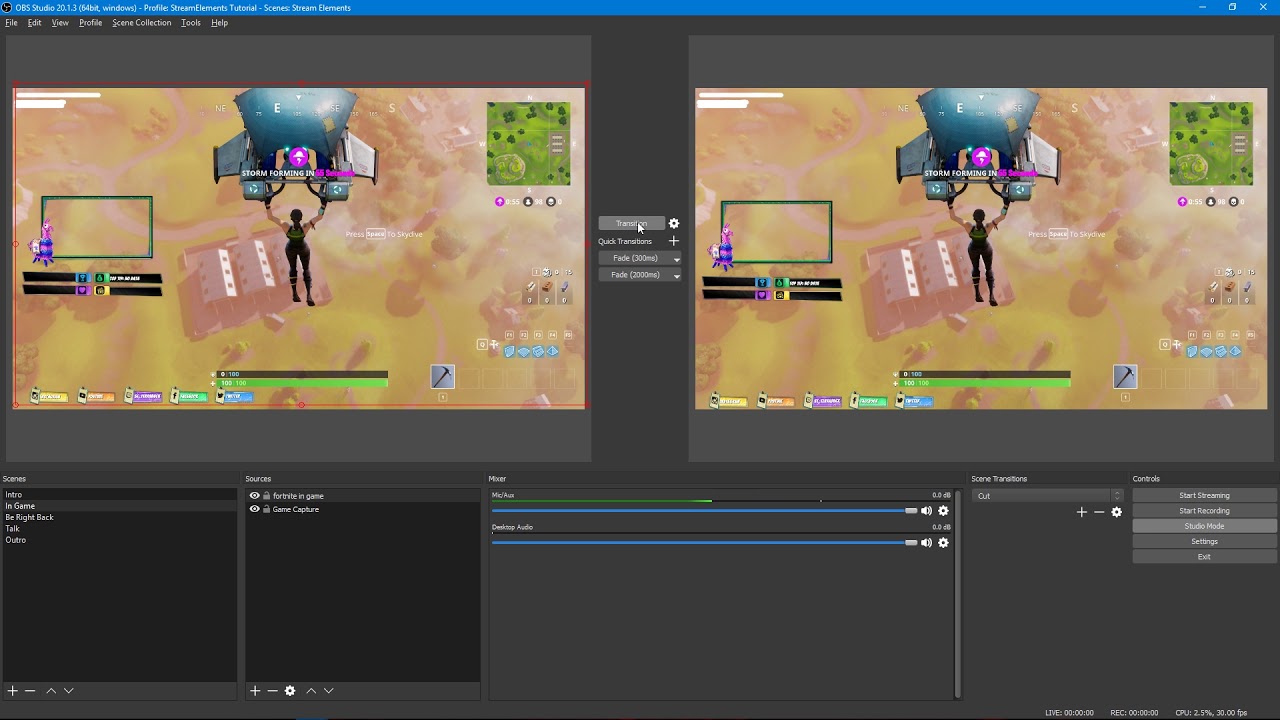
Tutorial #2 - Scene Transitions with OBS Studio Mode ----------------------------------------------------------------------- 🚀 StreamElements 🚀 -------------...
lament blade
How can it be when I've Max Song time around 15min and sb can request a 10h song?
clever mango
Who requested? A mod or you?
lament blade
No mod no sub no donator no regular, just a normal one
remote sentinel
@clever mango Thank you
slim dock
Didn't know that exsisted on obs @clever mango
thanks
I always try to keep everything cached like that cause i just like everything running already before i go to use it
cuts down on loading time
tight harness
You've also got Scene Transition 'Fade', whichever you prefer 😃
clever mango
@lament blade It's because the temporary fix for the "internal server error" was to change this to everyone
Let me see if that was resolved and can be changed back
That issue was fixed with the last update so you can change the exemption to whatever you had it set to before
@lament blade
lament blade
Well usually I don't get troll request but this guy was drunk  ty I'll change it back
 fair rampart
Any word on when/if timer will be fixed so an option to restrict it to one at a time is available?
clever mango
There's nothing to report at this time. I see you've upvoted the idea on the board. If anything changes with it you'll get an email notification. https://streamelements.helprace.com/i369
fair rampart
That's a pretty big deal. It's spammy right now.
I'm testing it so it's time only and not lines tonight. Hopefully that's better.
For example, if time passes and 3 are on standby, when line req hits then all three are posted. That's annoying.
remote sentinel
studio mode fixed my issue 😄
clever mango
@fair rampart I agree that timers should be restructured (I voted for it) but I don't have much say in when/if an idea is implemented. Before and during the "Under Review" stage the staff discusses how much time it will take to implement an idea. If there is enough demand for the idea and the devs are able to fit into their workload, then it will likely enter the development stage. There are major projects being worked on right now that require a huge amount of dev time so smaller projects are receiving less attention than normal. But there will come a time when these ideas can be considered.
fair rampart
Cool thanks
lament blade
😄
lament blade
I have another question x3
tight harness
Ask away
lament blade
When i input my tip page into my twitch profile will the alerts still work from streamlabs when i have it imported in stream elements?
tight harness
You import the tip data but there is no link between the two services, after the import you should switch over to our tipping service
lament blade
So i would have to do the alerts for whoever donates into stream elements when i input my tip page into my channel.
tight harness
Yes correct
lament blade
Would i have to set it up by using the overlay editor?
tight harness
For alerts, yes
lament blade
Ok sweet ❤ Ty ❤
tight harness
No problem
 lilac basin
anyone available to give a little assistance?
i want to put a custom sound when someone follows/subsrbes to my twitch
 paper flower
I have a question, for my giveaways the tickets whats a good ticket cost and Max tickers per user.
 misty wagon
Depends on the price and the amount your viewers earn during a stream. You decide, all up to you 😄
@lilac basin https://youtu.be/X7XrDdRE7Fk There a bunch of tutorials there 😉

Create an amazing overlay with StreamElements, watch our video guide to learn how. ----- Tipping page setup: https://youtu.be/eLzxRkq7tJo Add KappaGen to you...
clever mango
And this one specifically for the alertbox https://www.youtube.com/watch?v=8LVRd2X4HvU
lament blade
Hi I'm new to Stream Elments i watched a couple of videos but i still don't understand how to use it
 thick eagle
Is there a way to do a countdown to a date, not an exact time?
That would say like "68 days" or something?
clever mango
Sure, it's in the widget settings 😃
lament blade
thick eagle
But it I can't pick just a date and it counts it in hours format instead of days?
 eager olive
I am using an alert box and I'm trying to use the {name} variable and it wont read the name it will just say name has resubscribed
 pine hemlock
@eager olive it's a bug when you replay alerts
It will work properly if the alert is new
eager olive
No like the alert was brand new and it said name instead of their user
eager olive
No but I saw what the problem was! Thank you for the help @pine hemlock I simply had the wrong bracket. Dumb me lol
pine hemlock
Oh okay. Np. We were having issues with it showing name instead but I believe it's only replayed alerts though
Let us know if you find anything else
 wispy sage
hey guys, quick question
someone donated $4.20 to me last night but my overlay only says $4.2, is there a way i could fix that?
pine hemlock
That should have been fixed... See #270206314561404928
If it's still not showing the extra 0 and the donation was after that announcement let us know and we'll tell the devs
clever mango
where does it show 4.2? what widget?
wispy sage
recent tips
clever mango
thanks I'll take a look
 wraith marlin
anyone else having an issue with host alerts showing up? I see them enabled on the dashboard and overlay editor
clever mango
 It's explained in a 📌 message in this channel
wraith marlin
thanks!
clever mango
no problem
 lean prism
I'm having an issue with tips showing up. Is there a way to fix this? I have no idea how to make it show up 😦
clever mango
@lean prism Hi, please visit this page https://streamelements.com/dashboard/tipping/moderation Do you have moderation enabled at the top?
lean prism
Yes I do
It's also not showing up on the leaderboard either. Like if I go into my settings, I see the tips. But if I go to the donation page, there isn't any info there :/
clever mango
Ok, so with that enabled it means that you or a moderator will need to manually approve tips and their message before they show up in your activity feed and show an alert. You can approve the pending tips from the activity feed at the top under pending alerts. 😃 And if you'd like to have tips go through automatically, you can disable this option 😃
Soon there will be a message on that page explaining what that switch does. Sorry about the confusion.
lean prism
Oke, thats fine. But it's still not showing on the overlay :/
just says no data, and latest tipper is blank :/
clever mango
I'll have a look at your account. Just a moment
@lean prism I'm going to message you a screenshot
 agile basin
I was messing with test donations in the emulator, and now my donation bar doesnt match what I have recieved. Help?
clever mango
@agile basin refresh and it will return 😃
agile basin
refresh OBS or Elements?
clever mango
both, if both are open
agile basin
Oh I fixed it.
clever mango

 queen garden
Hello friends. I am new to Stream Elements, and I am trying the overlays, but when I switch scenes, it seems to take a while to load the overlay, is there any way to speed this process up?
clever mango
@queen garden not speed it up but you can mask it from happening on stream https://www.youtube.com/watch?v=W8iWsD2Lq3U&list=PL_9rga23xIlJDyaOnO2avbss-PHm28oNs&index=3
queen garden
That's funny I was just watching your video TerraBuck. Thank you
queen garden
Take it easy man
clever mango
Thanks @wispy sage I will add to this bug report here: https://streamelements.helprace.com/i598 Please upvote it to track the progress of the fix and so that the devs know to prioritize it.
 silver ibex
Hah. Just joined to report that replaying activity feed stuff shows as "name" and breaks the "recent events list" widgit.. but I see it looks like a known issue already. On the ball.
clever mango
@silver ibex if you refresh the overlay does the event list refresh and fix itself? I believe it should
silver ibex
Ya. If the overlay gets refreshed, the event list goes back to normal. Just replaying any activity borks it again.
clever mango
Ok thanks
 nocturne moth
Hey guys any reason my song request que keeps getting "helted" then deleted?
sorry "halted". Only been happeniing for like 2 days
previously, it was flawless!
lament blade
Why do donations go through on the donation list but they never appear in the alerts? all my other alerts work fine
clever mango
Please upvote this issue to prioritize the bug fix and be notified of any updates https://streamelements.helprace.com/i601 @nocturne moth
Hi @lament blade, please visit this page https://streamelements.com/dashboard/tipping/moderation Do you have moderation enabled at the top?
lament blade
@clever mango No I don't
clever mango
@lament blade I'm looking now and it is in fact enabled. This means that tips need to be manually approved on the activity feed page before alerts show. If you would like them to go through automatically switch this to off
If you go to the activity feed page you'll see there are 5 pending alerts awaiting approval https://streamelements.com/dashboard/activity
 celest temple
Is there like a link, so I can see in my OBS Studio where I can see the alerts and also shows on my stream?
I can hear the Alerts, but I dont see them on OBS or the stream
clever mango
@celest temple Yes, check out this tutorial and the one that follows https://www.youtube.com/watch?v=KDvLynUqXI4&index=2&t=6s&list=PL_9rga23xIlJDyaOnO2avbss-PHm28oNs
celest temple
Thanks
 south shale
is there any way to backup all the scenes and work done? after spending hours in the editor id be awesome to have a back up 😃 <@&382267076632379392>
 edgy onyx
I believe there is a OBS export option which backups your entire OBS setup, if i recall correctly.
 atomic hollow
we have a backup for everything on our side as long as you dont delete them
south shale
typing SO many px areas across scenes and dreading doing it again
ok great @atomic hollow i wont delete then lol but if something goes wrg your say you guys do have a back up?
ogt my obs backup all set a while ago thanks tho @edgy onyx
atomic hollow
yeah of course
edgy onyx
Awesome stuff. Stream Elements are epic when it comes to back ups. You can easily setup your entire stream on any PC as long as you have access to your Stream Elements Account 😄
Also np @south shale Just wanted to confirm you've got all your bases covered o/
 round fiber
hello guys i have a gif that doenst auto restar but on overlay it restart
how can i stop it after 1 cicle?
atomic hollow
make sure the alert playing time is not longer than the alert
round fiber
on streamlabs its automatic
add this option too guys
keep up the good work
atomic hollow
👍
agile basin
Any way to only count new subs? My sub count also counts resubs
edgy onyx
I'm pretty sure New subs and Resubs are totalled together on twitch so SE have to do the same. But if there is a way for SE to distinguish between the two, a Staff Member or SE Champion will have a better idea.
 graceful nexus
Is there a way to have both Twitch and YouTube together? Currently couldnt figure out if i can so, twitch - Streamelements and youtube is StreamLabs.
atomic hollow
@graceful nexus youtube support is coming soon
 vapid badge
Just wanted to pop in to say thank you so much for such a great interface and design, couldn't have dreamt better ! Keep it up, it's fantastic !
atomic hollow
@vapid badge thanks a lot! it means a lot to us ❤
graceful nexus
Ok, thank you.
vapid badge
Oh by the way, quick question, how does the "Access Code List" work and what is it for ? 
 inner flame
I Have problem with my alerts
tight harness
@vapid badge you create a list of say game keys and people can redeem one from the list whenever they spend their points on redeeming that item
@inner flame could you describe the problem?
vapid badge
Alright, makes sense, thanks @tight harness
tight harness
No problem
inner flame
@tight harness So Tested my new alerts and i tested with real followers and it says like name like i tested on my second acc i tested the name was rav3n i followed and it sayd name
tight harness
Ahh yes we're aware of that one, it is being fixed
inner flame
@tight harness Friday there was no problem with that and now there is
inner flame
Okey but it is fixed tomorrow or something
I Wanted to day to stream and i saw this i was like WTF
tight harness
Haven't heard when it'll be fixed, but things with the alert box are generally fixed quickly
inner flame
Okey
tight harness
It's only when alerts are replayed to our knowledge, so new alerts should show up fine
inner flame
Okey i will wait i rly want to stream XD
tight harness
You can stream, it's only when alerts are replayed
The issue is with replaying alerts, not with the alert showing up correctly in the first place :)
tight harness
Yes, and the name issue only happens if you replay events, so if you don't replay events it won't be noticed
inner flame
I Always Test Before Stream Is Everything Good
 lapis vault
Hello guys, I was wondering if there is a command such as !commercial for SE. Thank you.
 stuck hamlet
Just make a custom command for it
You should be able to /commercial or whatever the twitch command is for it
lament blade
Is there a way to make an overlay for all games, so have the overlay for every game?
lapis vault
@stuck hamlet thx mate... another question. I can't seem to be able to add any banned words.
i add them, but after i click save, the field remains empty.
stuck hamlet
Hit enter
inner flame
Alerts are still broken
tight harness
@inner flame You mean with the name thing?
inner flame
Yeeep
tight harness
Well it's only been an hour and a half since we last talked about it 😛
tight harness
I can actually still see our last conversation about it in this channel still without having to scroll up 
inner flame

lament blade

 wanton sluice
Media share still having quirks?
pine hemlock
Haven't heard anyone say anything.
wanton sluice
I’ll try to explain.
Say I’m playing the backup playlists. Someone requests a song. In order for it to play / display I basically have to relaunch ground control.
Once it’s working, as long as the request queue doesn’t run out it works like a charm. If it runs out the backup playlist appears to take over. But it’s muted. Can’t I mute without relaunching ground control.
I even tested it by using the website and not even messing with ground control at all. The same basic thing happened. Instead of relying ground control I essentially had to refresh the webpage
But here’s the weird part. There was one time where the video that was playing on the webpage song request area was not the same thing that was actually playing over the screen. It was a completely different video.
pine hemlock
I'll leave that for @tight harness or someone because I don't use it and I'm at work. I can't test anything
tight harness
I tested it to begin with, but I haven't used it since, will see if I know the answer anyway, just reading now
wanton sluice
If it would make things easier because this does seem like a pretty complex issue I will put together a video about it so I can actually show you what is going on. If I don’t actually have the media share aspect turned on and I just do normal song requests it seems ok. The problem seems to stem from enabling the media share itself
tight harness
So after reading it I understand what's happening but not why it's happening, a video would still be very useful for the developers to see what's going on with their own eyes 👍
Nice thinking 😃
wanton sluice
OK I will get to work on that in a few minutes. Will let you know when it’s done
tight harness
Awesome, thanks
 covert ember
Hey Everyone. I wanted to see if anybody else is having issues with using Super Themes. My system gets taxed hard when I use them and I've confirmed that all scenes are set to make them inactive when they aren't up. CPU usage goes much higher than normal, which I find odd considering it's a browser source and no extra heavy lifting is really being done by my system.
 lethal dock
Hello, I have a question, Is it possible to get more than one overlay link thingy for browser source?
clever mango
@covert ember
You can expect CPU usage to be higher than normal if the overlay:
- Is animated as opposed to static
- Has scrolling text
- Has Kappagen or the hype cup
It's good that you've made sure that each browser source isn't running when it's not visible. Now it sounds like the super theme requires a bit more CPU than your system can handle? Luckily you're able to edit it to make it work for your system.
Also, if you were streaming during this test take into consideration the streaming settings that you're using. They might be able to be more optimized for performance.
wanton sluice
Would YouTube be ideal for the video @tight harness ? Or is there another place I can send it directly
wanton sluice
OK. I was thinking about uploading to twitch but since my issue deals with song requests there’s a chance that part of my commentary will get juted. This defeating the purpose. I’ll just upload it to YouTube as a private video and send you the link. If the copyright claim it who cares. It’s a private video so I don’t know that they would. Just know there might be ads involved.
wanton sluice
Maybe I’m misunderstanding you then what do you mean by streamable
clever mango
wanton sluice
I just wanna be sure that I am understanding what you were trying to say
OK I’ll try to get it to fit under gigabyte. Lol
tight harness
😄
 wanton sluice
I don’t know yet. I haven’t actually made it. And no it is not in 4K. I might be crazy but I’m not an idiot
 pliant hound
lol
wanton sluice
It’s just gonna be a lot of cutting but we will see what happens once it renders
clever mango
I know, just a meme
wanton sluice
I know. I’m not bad I’m just giving you a hard time. Haha
Not mad
I am going to try to be as detailed as I can without boring you to death
pliant hound
🍿
wanton sluice
I just woke up. I have to work the night shift tonight so I’ve been trying to get naps in. It’s not easy going from 1am starts all week to suddenly have to switch to a 7pm start one day.
covert ember
Thanks @clever mango - I wasn't streaming at the time, simply setting things up in OBS. I didn't setup Kappagen or the Hype Cup yet. I'll tinker with it to see if I can get it to calm down a bit.
wanton sluice
Does setting OBS to gpu render help with the overlay? If the gpu can handle it anyway
clever mango
 I'll be available in a bit to take a look and give some suggestions if you'd like
@wanton sluice I haven't seen that setting. Do you mean encoder?
lethal dock
Is it possible to get more than one Overlay URL for browser source?
clever mango
Multiple URLs for the same overlay?
If so, yes just duplicate the overlay and there will be a new URL
lethal dock
multiple for different ones
clever mango
Every overlay has a unique URL
lethal dock
ooh, so that's how it works.. I duplicated and hoped for a different one cuz I had to change one image
clever mango
Well, that would work since you want to make a different overlay but using most of one you already created
Duplicate, open the editor for the COPY, then remove what you want and copy/paste the URL for that one into OBS
two different overlays 😃
 hoary merlin
Ok so, if anyone could help me figure out why my cheers and follows/subs did not transfer over from streamlabs after I followed the directions I would love you
Like only a couple of days worth transferred
hoary merlin
@clever mango So basically, when I use one of the overlays provided on StreamElements, and it has options for "latest follower" and so forth, says NoData or something along those lines. The Alertbox also does not display an alert image or sound when I test it on streamlabs after importing it on streamelements
So for now I'm literally using stream elements for overlay and stream labs manually for alerts...rather than just being able to integrate them all into one. I tried to upload CSV files from stream labs and it tells me they cant be used when I try and upload
tight harness
The reason it won't show your latest yet is because you need to have a latest from after you switched to us, all of your latest data is stored here: https://streamelements.com/dashboard/session and if there's nothing in Recent X then it won't have any data to show yet
But once that event happens and our system registers it you'll have Recent data for us to display your Latest X
tight harness
I don't believe the imported data is particularly friendly with what happened when, so figuring out recent events from that can be a pain
clever mango
As for the alertbox, the devs are aware of some issues with SL imported alertboxes and are working to fix it. SL have been actively blocking imports from their service for months so it does have issues at times and but it's always patched
wanton sluice
By the time stream labs allowed importing I had already set mine up
But if I remember correctly they did transfer over the GIF files I was using So I did not have to hunt them down again
clever mango
Yep, you're able to download any graphics or sounds that you're using
At this time, the extension's purpose is for transferring donation history and the alertbox import will be fixed asap
@wanton sluice Switching to GPU encoding could help if the GPU is stronger than CPU and can handle playing the game and encoding the stream
@violet nimbus Hi, please upvote this songrequest issue report so that it can be prioritized for the devs and you'll also get notifications of any changes to the issue status https://streamelements.helprace.com/i601
wanton sluice
I was just trying to help but suggest about the super themes for the guy that was having trouble. I have an i7 6700k. And even that has issues with my CPU using Anna made it super themes. Are used to use the overwatch one but I ended up just using my own custom.
tight harness
Upvoted
 dull cypress
Русская поддержка имеется?
clever mango
@ebon forum
 dull cypress
Добрый вечер 😃 проблема состоит в том, что в программе лояльности, а точнее в "магазине" я сделал услугу с мелодией. но при ее покупке за поинты не проигрывается музыка, в чем моя ошибка?
ebon forum
@dull cypress а виджет "Store redemptions" добавили? Проверяйте в эдиторе у нас, если в эдиторе работает то и на стриме будет.
dull cypress
Тогда глупее вопрос, где этот виджет?
ebon forum
@dull cypress когда редактируете оверлей, раздел "widgets" в редакторе слева сверху, заходите туда, добавляете виджет и настраиваете - он нужен для показа покупок в магазине на оверлее. По дефолту не стоит.
 violet nimbus
@clever mango thank you. Today it was many times with songs longer then 5 min.
clever mango
😦
 drowsy basin
When I replay a dono it just says name and not the persons twitch name
tight harness
Yeah, this is a known issue, it'll be fixed 😃
clever mango
https://streamelements.helprace.com/i583 please upvote to track the progress
dull cypress
Спасибо Крионик)
ebon forum
@dull cypress если что - обращайся. Я единственный кто в команде по русски говорит, так что можно сразу меня шевелить 
hoary merlin
I feel like its counting "Cheers" as donations...cuz I've gotten a lot of cheers yet I see this.
and under tips i see this
Is that because I've not gotten a cheer since I integrated streamelements with stream labs? So logic is that once I get another cheer all my previous cheers will update?
tight harness
Weird, it's working alright here 🤔
 stone spire
Hey guys, sort of off topics obs question, how do I hide this overlay?
tight harness
But I did notice it only started counting after I switched over
 hoary merlin
Hmmm, strange. O well I will get a buddy to cheer me and see if that fixes it
tight harness
I think you guessed it before, basically it starts counting cheers from when you switched over
hoary merlin
On top of that, is there a way for me to mitigate my CPU usage....cuz holy liftin some of these overlay destroy me. I have already made them close while not in use. Is my only other option to lessen the amount of overlays I have prepared on the site?
tight harness
I believe so anyway
Are you ticking 'shutdown source when not visible' in the properties of the browser sources?
stone spire
me?
tight harness
Nope, MrPopoTFS, I've never seen that overlay before that you mentioned, sorry
hoary merlin
@tight harness Yes I am, still bumps me up to around 80% cpu usage while running overlay and game
stone spire
I know there's a stats menu, but that's in a separate window
tight harness
That is pretty high 
hoary merlin
Ya and I have i7-6700k @ 4.00GHz
tight harness
I'm not seeing anything in the game capture properties that I believe would cause that overlay 🤔
stone spire
yeh, neither
hoary merlin
May it's due to all my overlays being animated
stone spire
idk what else it would be coming from
tight harness
I use an i7-6800K and mine can get pretty high in general with everything I choose to run while I'm streaming, if you open up task manager you should be able to break it down and see what's using the most
As long as you have that option ticked for each and every overlay it will only load one overlay at once
hoary merlin
That's so frikken weird
ebon forum
80% on a quadcore is actually pretty normal. the 6800k or my 5820k are WAY more powerful with 2 more cores
stone spire
found it..
tight harness
What was it?
stone spire
It was what i thought, but quitting it from the system tray didn't get rid of it
It was my cpu config tool
NZXT Cam
tight harness
Ahhh
stone spire
why it put an overlay on obs I have no idea
tight harness
Good question
stone spire
Any plans to add chat to ground control?
wanton sluice
@clever mango mp4 format ok?
Ok @tight harness @clever mango I got the video done. its rough.. has no editing and I was going through stuff on the fly Hope it helps
 tight harness
Watching it now
clever mango
thanks @wanton sluice
wanton sluice
I found a couple work arounds in the meantime. but figured it was easier to show you than try to write a novel explaining stuffs
tight harness
Completely agree, thanks 😃
I laughed at your reaction when you noticed it was 62 minutes long
lament blade
wanton sluice
i have a limit of like 28 mins tho
so the fact it allowed it shocked me
unless im exempt?
tight harness
You are, the exempt user level will be broadcaster or below that
tight harness
wanton sluice
then again it was a mix of lots of stuff
Dream theater is notorious for the 28 min songs
tight harness
Really appreciate the video! having a video demonstrating the issue is very useful indeed
wanton sluice
np if I run into anything else similar Ill do the same
oh and I should point out I forgot to mention
same thing happens on the website.. its not limited to just ground control
lament blade
Of course!
 spark nest
i changed my name on Twitch and my overlay dosent push alerts when somebody follows me
idk why
lament blade
Can you log out of the website and log back in? 😄
spark nest
i tried that
nothing
dosent when register i am streaming
that thing next to my name top left
on website
tight harness
What you need to do is part the bot, log out, log back in then join the bot 😃 you've got Part Channel and Join Channel on the dashboard to do this
lament blade
spark nest
ok will try that in a sec thanks
tight harness
No problem 😃
tight harness
lament blade
Legendary Support 
spark nest
yup
wanton sluice
speaking of name changes
Im guessing Id have to re set up everything after hm? or does it transfer along
think i might have asked this before but eh.. my brain is fried
lament blade
Re setup what for example? because if you do what @tight harness said, "What you need to do is part the bot, log out, log back in then join the bot" , it should be working fine after that o: unless you have your name written on your overlay or something along those lines, but also it's a quick fix
hoary merlin
Ok, can I change stream elements to GPU instead of CPU? Because these overlays are killing me?
Or is it only the setting on OBS that affects it?
lament blade
Do you have "shutdown source when not visible" ticked under the browser source's layer properties? ><
lament blade

lament blade
tight harness
wanton sluice
when I say re set up things I mean set up alerts and all that, as SE would see a new account?
clever mango
It sees the same account with a different name when you re-connect twitch
spark nest
so can i check if the overlay is working now
wanton sluice
ah ok.. that makes things easier then
all the data should still be there then
Id have to change the tip link tho on twitch to point to the new name Im guessing
clever mango
right
the only thing you lose is the points that you had earned in other streamelements channels
wanton sluice
Im still debating.. but thats a huge hurdle eliminated
clever mango
but even then the points under the old name can be given to your new name
wanton sluice
ive excluded myself from getting points
clever mango
points you earned in other streamelements channels
wanton sluice
gotcha
lament blade
tight harness
@spark nest Awesome to hear 😃
inner flame
Did you got this alert thing fixed
lament blade
 Second
 round geyser
Is the currency import from ankhbot (streamlabs chatbot) broken? I just used the import and got numbers from 0 - 17 as currecy, instead of the actual currency numbers.
It seems to have imported the hours, and not the points.
clever mango
@round geyser please send me your currency.csv in a message and I'll have a look
dull cypress
Крионик, прости, что отвлекаю. StreamElements: @t1nzooooooo added emimusic - "Revolver - Get Around Town (clip officiel)" to the queue at #6 (playing in 20 mins 12 secs)
как запретить боту спамить об добавлении песни
clever mango
@round geyser Importing currency now. Hours cannot be imported at this time but are being tracked by SE as long as you have loyalty enabled
@ebon forum ⤴
thanks
ebon forum
@dull cypress оповещения о песнях у бота пока убрать нельзя, также как и кастомизировать базовые команды, над этим работают. пожалуйста пиши мне по нику или в личку, а то могу пропустить, меня вон терра шевелит)
lament blade
There is a blue bell on the overlay manager that you can click to test the alerts
tight harness
The event emulator? It's in the overlay manager
My overlays > click on the pencil icon for the overlay you want to edit
Then you're in the overlay manager
Then you click on the feature Alice told you about
tight harness
You can use that to test events on any overlay
Not just themes
Custom made ones too
celest temple
Because currently right now, I am not using themes or anything, Just the Game Source at the moment. But I still want to show when a viewer is following, Tipped, Etc,. on Stream.
 dark monolith
Is there a way to set up a "Wishlist" on the "Tipping" Page? Like how StreamLabs lets you?
tight harness
You'll need to at least make a custom overlay then
celest temple
I heard test the Test sound, but I didnt see it on OBS
 hallow dove
How do I fit to my screen in OBS a default overlay?
tight harness
You don't need to use a theme, but you'll need to create an overlay no matter how basic you make it
@hallow dove If you do Ctrl + F in OBS it fits your currently selected browser source to your canvas if that's what you mean
hallow dove
Nope, when I load the overlay via browser, it turns out cut on OBS
Even when scene is fitted to screen
celest temple
This is getting confusing again...
tight harness
@hallow dove Did you make the overlay 1080p on our site and 1920 x 1080 when you added it to OBS, then tried it?
celest temple
I added the BrowserSource Overlay. And now no notifications
tight harness
But didn't you say you don't have an overlay yet? @celest temple
hallow dove
@tight harness No I have not, should I?
celest temple
Yeah, I dont have one...
tight harness
Yes @hallow dove
@celest temple That's why I said you need to make one
No overlay means no alerts
Otherwise where will they come from?
tight harness
Absolutely
hallow dove
@tight harness You're the man, thanks!
celest temple
Thanks.
Is there a Undo Button on Overlays
Ohh, yay! I got it working!
Okay, is there a way to change the sounds for the follows, tips and etc?
Wait, FOUND IT....Derp
clever mango
@dark monolith not at this time https://streamelements.helprace.com/i192-wishlist-on-tipping-page upvote it and you'll get update notifications
celest temple
What is a Raid Alert?>
lament blade
Raid is something like Hosting, https://help.twitch.tv/customer/portal/articles/2877820
celest temple
Ah, okay.
lament blade
Raiding is hosting but... in a worse way ALMOST? I got raided once and everyone spammed my chat with a bunch of asshole things :/
ebon atlas
was it a probber raid who was it a 4chan raid
lament blade
wondering if there is a issue with the music bot, a streamer of mine has issues on song requests.
the bot stops songs halfway through / skipps songs usually like 5 at a time / or just stops playing or gets stuck on songs.
happened for at least a week.
A streamer came with his like 50 people and started sapmming my chat with cunty words and pissed me off
Can you get copyrighted for playing music ? on twitch?
tight harness
Yes, you can
lament blade
How? what cant you play? is there like rules on it?
ebon forum
You can play any songs. The only thing Twitch does is muting your recorded VoD's where copyright is detected. On stream nothing happens.
If you want to export to Youtube tho, up your copyright free music game 😄
tight harness
@lament blade We've received a few reports of the song request player not working as intended recently, we've passed on the reports to the developers including a video demonstration taken today
lament blade
What is "VOD"
ebon forum
Video on demand. Recorded stuff 😃
lament blade
okay ty
tight harness
A Twitch employee did point out that you can still have the original creator of the music take action against you for using it though
Only if it's copyright free are you truly safe
tight harness
Even if you only stream
lament blade
ty @tight harness yes its been dreadful
ebon forum
DMCA applies to USA only so far i know. And even then - it would affect only the recorded/uploaded videos, no livestreams. Dont bother so far, twitch is wild west when it comes to copyright right now. Might change in the future.
tight harness
We have a similar law called Copyright and Related Rights Regulations
Here in the UK
 pearl flint
I have noticed that when I replay a notification, it only says name, rather than the actual persons name. Is this a glitch?
tight harness
This is a known bug, yes, it will be fixed 😃
pearl flint
okay thanks!
ebon forum
youtube actually has an algorhytm that can detect copyrights on livestreams, got my livestream suspended when i tested youtube gaming beta 😛
pearl flint
And btw, at least in the US, you can play any music on twitch, but it may be muted later on
muted in Video
ebon forum
Not only in US, this is global, twitch does not separate regions or languages.
They have a simple algorhytm checking all videos, this is it.
 hallow harbor
Does dashboard work as activity feed does and ground control?
hallow harbor
ok awesome
 main apex
Hey, I know this isn't exactly StreamElements, but does anyone here know how to make OBS run through GPU rather than CPU?
lament blade
i'm confused. I'm editing suggested amounts right now
Why is the suggested amount x,xx and the preset x.xx? 
 swift parcel
@main apex in output settings select NVENC or whatever AMD is called (if you have an amd card)
it will still use SOME cpu just a bit because it is a program but thats just run the base program itself not the encoder
 fiery shuttle
hello, was wondering if there was a way to center text vertically on alerts?
ive looked around and i couldnt find anything obvious
tight harness
Have you tried choosing the Layout choice which puts the text in front of the image?
fiery shuttle
yes, but i want the text to be bound to specific region and center hor and vert
so far it just has the horizontal options
the subtext has both
just not the main
clever mango
text settings > advanced > edit the top or bottom margins to move the text
clever mango
I'll have a look
@lament blade suggested amount is the amount that shows up when the tip page loads
 lament blade
I know, but why
But I got a question about Mediashare Songrequest through Donations.
With having the Widget in Overlay and GC playing the Music, everything is happening by itself, or do I have to click anything to make it work?
clever mango
@fiery shuttle there are two separate text settings. One for the event and one for the secondary text
fiery shuttle
yeah im specifically talking about the event text
clever mango
There are margins for both
fiery shuttle
you can set the box no problem, but you cannot center the text to be both in the center horizontally and vertically
i can show you an example
one sec
clever mango
Which overlay are you working on? DIE PARTY SMALL?
fiery shuttle
ideally the text regardless of size should be centered in all directions
basic small is what im working on
if i set the box to match the size of the reb background the text will be up the very top
if i eyeball it to sit in the center when events come in with larger or smaller names it will not look great
clever mango
What setting would you need to accomplish this?
fiery shuttle
much like you showed with secondary you would have one for vertical as well
so whatever is in the borders set by the user the text would be centered vertically and horizontally
clever mango
so this?
fiery shuttle
well that is horizontal only
 subtle sparrow
just curious, if I wanted to use a command to have an image (gif/jpg) to pop up, what exactly would I need to do?
fiery shuttle
and its only the secondary text
also the secondary text has the advantage of showing the border box, having that be visiable on the event text would be nice
tight harness
@subtle sparrow Right now you'd have to use the stream store to do this
clever mango
@fiery shuttle Ok, I suggest adding all of this as a new idea on the ideas board https://strms.net/ideas I'll pass the idea to the staff and you'll be notified of any activity on it
fiery shuttle
sweet thanks
the other thing i feel is missing is the option for a varient on if the event contains secondary text
that way you could create a new style of art to contain the additional text
clever mango
 You're on a roll with the ideas. After you add them to the board you can post the link to them in the #💭︱feedback-and-ideas channel and also promote them through social media if you'd like. With enough support from the community and the time to get it developed, ideas turn into new features 😃
 cedar siren
so i have a problem.... will a big one my computer is maxing out on memory on trying to open obs64 this morning it would open the program no problem any ideas what is going on
it is taking almost 16 gigs of memory to open it, which isnt normal
 quaint lotus
This is just a question for twitch in general. If I update my username how long does it take for it to change in the stream chat?
Said game by mistake, oops.
clever mango
@cedar siren ask the OBS gurus discord.gg/obsproject
cedar siren
thank you
 gritty forge
Hello, Does anyone know how I might add excel data into my overlay ... and have it update at I update trhe excel file?
my goal is to show my excel calculations as I play an online golf game ... while streaming
tight harness
No
tight harness
Depends how determined? 🤔
clever mango
if you set it up in a google sheet you could add the published sheet in OBS as a browser source
and it will update as you edit
or it calculates
gritty forge
hmmm ... but can I capture only parts of the sheet (like a window) or is it all-or-nothing?
clever mango
You can crop part of the source
gritty forge
in OBS?
quaint lotus
Anyone got an answer to me question?
clever mango
just hold down ALT and drag the sides to crop the browser source
clever mango
@quaint lotus it's immediate after signing out and back in
@gritty forge one of those don't crop the same way I believe but they can still be cropped
gritty forge
ok, thank you all
 weary mist
You can right click any source and go to filters, then add a crop
 odd crag
Hi! Just started using Streamelements, and I was trying to import my commands and currency from Ankhbot. While it kept saying that import failed, I now seem to have a bulk of repeated commands on my Streamelements bot. Is there a way to delete all commands at once?
misty wagon
There is no way to delete all the commands at once. How many are there? 
I'll help deleting 😃
 flat valve
can I get added to #291219887274328064?
misty wagon
Lemme check your resume @flat valve 
odd crag
Uhh.. A real lot. :|
729 to be exact.
misty wagon
Done!
flat valve
thanks!
misty wagon
Oh my  lemme check with some folks
tight harness
Combined effort?
odd crag
What I think I'll do is I'll disable all but one command for now, of each.
At least I think that's easier than deleting them all.
misty wagon
Yeah was thinking the same @tight harness go on a deleting spree
We don't mind to help @odd crag We have no life 
misty wagon
Send me one of these
odd crag
LOL, I appreciate it. Yep, all of them. Same with quotes, I'm pretty sure it did the same to them.
misty wagon
Start deleting. @tight harness doesn't need an invite, I do... I'm senior pleb 😄
tight harness
I'm already on it 😄
odd crag
Thank you! I'll send you one. :)
tight harness
100 down, 600 to go
wanton sluice
That’s an idea. Tagging/mass deleting command option
odd crag
^
 lilac gale
any idea why my overlay wont work with obs, set it up with the clr browser but just doesnt appear, my streampro.io one works no problem
tight harness
All done @odd crag
clever mango
OBS classic? @lilac gale
misty wagon
Indeed, 700+ commands gone! I gotta quickly reboot.
lilac gale
i believe so @clever mango
clever mango
OBS deprecated it last October so we no longer support it. OBS studio is available on obsproject.com
lilac gale
ah right sweet, i think the last i looked it was still in beta so shows how long ive been out the loop
next spruce
my song requests are stopping with like 20 seconds left in the tracks?
odd crag
holy JESUS Thank you @tight harness @misty wagon you guys are pros at this. I super appreciate it!
tight harness
No problem 😃
odd crag
I would've spent long hours at this.
tight harness
I probably have repetitive strain injury already so a little more won't hurt
pine hemlock
@next spruce were aware of some issues occurring like that. No fix currently unless someone else knows something I don't
lilac gale
any of you know if you can copy all your scenes and stuff from obs classic to studio ?
lament blade
I'm sure you can, second
 lament blade
Found it first though
lament blade
tight harness
lament blade
How do people buy a ticket to a giveaway
tight harness
!enter <number of tickets>
lament blade
!ticket {tickets} or !enter {tickets}
tight harness
or !ticket <number of tickets>
lament blade
grrr
tight harness
😄
lament blade
tight harness
lament blade
Thanks guys
tight harness
No problem 😃
lament blade
No problem
 inland elm
So I had a thought and I can't seem to find anything on it. Some of these super themes have text for facebok, instagram, twitter, youtube etc. It seems I need to edit each overlay with new information including hiding the ones that I don't have. Is there not a data tab that I can put this information into and it automatically populate when I create a theme?
tight harness
That very idea was suggested 5 days ago on our ideas board 😃
Feels free to upvote it
inland elm
Done and Done! Thanks for the link. Been trying to stream again for fun and this program is helping.
lilac gale
hmmm converted the scenes but its not appearing in studio still QQ
ill try again tomorrow
lilac gale
Tyty
clever mango
@next spruce is it happening with every song? Are these from the playlist or the request queue?
lament blade
Should i switch from XSplit broadcaster to OBS?
pine hemlock
Personal preference
lament blade
ok
lament blade
same
 hexed herald
I use the activity feed popped out when I stream. Is there a way to see the difference between hosts and autohosts there?
tight harness
Right, in that case you've set the resolution to something other than 1080p on the site and/or in OBS when you added the browser source, the best thing to do is keep it at 1080p on the site, add it as 1920 width and 1080 height into OBS and then finally using Ctrl + F in OBS to fit it to your canvas if you use a different sized canvas
lament blade
thank you!
tight harness
No problem 😃
 dusky lantern
yeah thanks a lot!
tight harness
@hexed herald Currently there is no difference in the activity feed but it is something we want to work on though if the API lets us
I believe it may even be on the ideas board
hexed herald
any idea on timeline? i think there are other options I could use in the meantime.
hexed herald
cool, thanks
tight harness
No problem
lament blade
also, what is the weight and height of the facecam box? im having trouble with resolution
tight harness
Generally overlays will come with a 16:9 aspect ratio webcam box, some have a 4:3 alternative too
lament blade
so how do i put that into obs?
tight harness
If you're using a 16:9 border then you can use 1920 x 1080 or 1280 x 720, it's up to you
As long as you keep it at the right aspect ratio it doesn't matter
tight harness
No problem 😃 and thanks 😄

 tight harness
What resolution did you put it at?
I wonder if you've got the 4:3 webcam box showing instead 
lament blade
i think so
its more square than rectangle
its at 640x480, and thats the most it will go
tight harness
Right, I just looked into your account, you've got the rectangle webcam border showing and the square one hidden
See? 😃
tight harness
I'm Support staff 😃
lament blade
well, yeah. but was it really that easy?
i guess im just a bit curious on how you exactly knew my account
tight harness
It's linked to your Discord
tight harness
And a select few of us have dashboard access/admin to help out directly
tight harness
No problem 😃
lament blade
and btw, those twitch fail videos on youtube are what got me here. good content!
tight harness
I've been in one
 tight harness
Yeah I do Twitch
odd crag
Okay so I found the culprit to be the Currency.csv everytime I import that, it fails.
lament blade
whats your channel?
odd crag
Nope, this time it didn't. 
tight harness
My name on Discord is my Twitch name 😛
lament blade
kkol!
tight harness
@odd crag Phew 😅
 dense laurel
What happen to the backup playlist option in the Song Request panel on SE site? Was it removed deliberately? Or a bug?
lament blade
@tight harness you sound a lot like i thought you would
tight harness
Not sure how to take that
odd crag
Is there a specific tab for quotes?
lament blade
in a good way
clever mango
@dense laurel It's still in the same place: Song Request settings
tight harness
⤴
lament blade
like a kind of person thats really excited to help someone
clever mango
@odd crag It's a planned feature but not available yet
dense laurel
hmm sorry must have been rushed tooo much whe n Iwas trying to get stream going and just did not see it. Indeed it is still there now. thank you
odd crag
Ah okay so there are no quotes I have to worry about for now?
lament blade
hey legend i was also wondering how i can display live chat
clever mango
There is a quote system, it's just in the chatbot
If you import quotes they should then be visible through !quote command
lament blade
You want to put the stream chat on your overlay? @lament blade o:
clever mango
The dashboard page hasn't been setup yet
lament blade
idk is that a bad thing?
No, just wanted to make sure that it's what you want
yeah
Once you open your overlay in the overlay manager, https://streamelements.com/dashboard/overlays
There is a Widgets tab, and from there if you scroll down you'll see "Your channel's Twitch chat"
ok. i gottem
Is it notmal for the website to be comepletely blanket except the help button?
On obs?
tight harness
Try Ctrl + Shift + R
lament blade
I'm trying to get to the website to look around. Am I doing something wrong?
tight harness
Did you try Ctrl + Shift + R?
lament blade
Yep
tight harness
And did that work? 🤔
tight harness
Hmm, Ctrl + Shift + R usually works, it refreshes your page and your cache., you can try going into your Chrome settings and refreshing your cache and your cookies in there
lament blade
Cleared Cache. Now I can't get a secure connection 😂
tight harness
lament blade
Rip
tight harness
I'll try googling that error code
It says this typically happens when you're running an older operation system or browser 🤔
tight harness
Ahh 😄
lament blade
All fixed
tight harness
Our site actually works best in Chrome, works pretty well in Firefox too
lament blade
Apparently it just hates my chrome 😅
tight harness
If you absolutely can't use Chrome then i'd suggest trying Firefox, our site is not optimised for Edge currently at all 😅
lament blade
^-^7
 balmy oracle
Hey I needed some hardcore help! My computer broke 😦 and I’m thinking about investing around $500-$650 in a computer built to stream ps4 gameplay from my elgato!! What’d u guys suggest I get for the build??
This is what I’ve got so far, any suggestions on what I should upgrade or downgrade from that list?
tight harness
Hey Daysan, it was me that you spoke to in the support chat, it's 4 AM for me so I'll not be active until I've gotten some sleep but hopefully you'll get the advice you need here 😃
 ripe holly
anybody having issues where it says "name" has followed or hosted your stream instead of the actual persons name
dont know if my scripting needs to be changed or what
tight harness
Aware of it happening when you replay events
tight harness
Yeah, then we're aware :)
ripe holly
so it's a known issue not on my end?
tight harness
Staff are back in the office tomorrow, their weekend is Friday and Saturday, yeah it's a known issue
ripe holly
ok cool was just curious if i messed something up. Thank you!
tight harness
No problem
ripe holly
🇨🇦
 solar hedge
Can I get added to #291219887274328064? 😃
next spruce
@clever mango was happening with every song. Refreshed page and it seems to be ok again
clever mango
@solar hedge You're in
solar hedge
wewt
clever mango
@next spruce thanks for the feedback. That's some strange behavior. It will be researched.
solar hedge
I'm liking SE. Still gonna keep a few things on Ankhbot where I can control 'em better (timers for social media commands & a quote system). Other than that? I'm basically a convert 😄
 plucky warren
@stuck hamlet Hey u available?
stuck hamlet
For?
plucky warren
idk im confused
lament blade
Is there a mirror link for ground control? Your website hates my guts
 frosty lantern
@misty wagon think you can help @lament blade with his OBS problem?
misty wagon
Turn off Hardware Acceleration under advanced settings @lament blade
frosty lantern
i have limited OBS knowledge
misty wagon
Nah mate, I'm dedd, almost 6AM, I'm off. Sorry
frosty lantern
will be like a 3 sec fix
lament blade
Yeah I cant get a video going on OBS it is just a blank screen that 3 people r watching smh
Pls
pine hemlock
Use game capture or window capture
obs questions are better off being answered in discord.gg/obsproject
 paper marten
For some reason when i stream my follow sound and all my sounds from alerts play twice as an echo
pine hemlock
Go to each of your browser source properties and select shutdown when not active
stuck hamlet
I mean at least they left a 10/10 review
 scarlet basin
With the hypecup what is the command my viewers use to cheer?
 edgy kindle
@scarlet basin You have to be an affiliate or partner to use cheers however they can follow or donate to fill it up if you're neither
scarlet basin
Ah ok thanks!
dark monolith
Any1 online for support?
pine hemlock
Easier if you just ask what you need help with
dark monolith
A Viewer tried to donate to me and it's giving him an "Internal Error" Whenever he tries
pine hemlock
Seems to load to PayPal fine for myself. Don't think it's related to the site
 last tangle
Everytime someone gambles streamelements turns that part of the chat red. can i turn this off?
pine hemlock
Don't know what you mean by that
If you're talking about it highlighting chat that's a feature from bttv or a similar addon
dense laurel
one of the pins shows a list of levels
Chat/Bot Levels
100 - viewer
250 - subscriber
300 - regular
100 - 200 - 300 what?
pine hemlock
It's just a number that determines the user's not level
!level user 300 sets the user as a regular
pine hemlock
It's a reminder list for bot commands levels
dense laurel
ok thanks
round geyser
On the note of that line of questioning. Is it actually possible to add your own levels?
pine hemlock
Not currently no
round geyser
On another note: Is it a known issue that the bot overview tends to always show the following?
pine hemlock
There may be bot ranks etc in the future. It's already been posted on the ideas board
Not sure on that. I don't stream often so I wouldn't know. I don't think we have any logging for chat in place yet
round geyser
Just wondering what it is for then. That's showing on the moderation end of a channel that streams pretty often. (I have full permissions over his SE)
pine hemlock
If you want good logs for the time being, set up : https://cbenni.com
round geyser
We've got that setup. Just making sure you guys know that that's happening.
edgy kindle
@round geyser I've been here since like June or July of last year and that page has not changed so they are very aware of it
round geyser
Gotcha
pine hemlock
I think the goal of that page is to show the bot actions but it hasn't been implemented
 versed merlin
 fiery spruce
Good day, I do not understand how to set the volume of alerts, put on 1% and still loud
 stark jewel
lapis vault
stark jewel
lapis vault
YO, any ETA on the change bot name feature?
pliant hound
Speaking of which, the OAuth Token you provide is from your main account or from your bot account?
 spring shard
@fiery spruce Have you checked in the "Variation" settings of the follow alerts?
pliant hound
@lapis vault This feature is currently still being tested. To test it, you need to download and use StreamLabs Ground Control, go to the settings and provide the OAuth Token (you'll have a link there that will lead you to it) and your desired bot's name.
If you want your bot's name to be different from your broadcasting name, I think you need to make another Twitch account with the name you want your bot to have and provide their OAuth Token, but I could be wrong.
If that alone doesn't work, you should PM hectic here, 'cause I'm not sure if the team needs to unlock something on your account since it's still in testing phase.
lapis vault
Oh thank you, it's not for me tho. I'm a mod for a friend
but the final feature will allow for a custom name? or just the streamer name?
Also, i've noticed about this SE ground control.. what's the advantage in using that instead of the web app? can be used also by a moderator for another chan?