#helpdesk-twitch
1 messages · Page 185 of 1
 clever mango
 gleaming matrix
ah, gotcha. It doesn't just grab it from the twitches?
clever mango
It does but occasionally it bugs out 😕 Sorry about that
gleaming matrix
Alrighty. Thanks!
clever mango
@tacit ridge Does everything look correct on these pages? https://streamelements.com/dashboard/tipping/list https://streamelements.com/dashboard/tipping/top-tippers
 tacit ridge
checking now @clever mango i fixed the recent donation after doing what you said to do
clever mango

tacit ridge
those pages are correct. top tip still shows no data
also thank you again for the help!
clever mango
You're welcome. Just a moment while I look into it
tacit ridge
I was able to manually enter it
will that automatically update when someone tips above that?
clever mango
For top tip were you using session, week, month, or all-time?
tacit ridge
currently switched to tall time
clever mango
That should be fine. If you go into DATA and then AGGREGATES you'll see that the data has been populated there
tacit ridge
(odd unrelated question) is there a twich green icon that is avaible to use?
and cool ill check that out.
clever mango
Some of the data like subs and cheers we're only able to collect from the time you signed into streamelements the first time
An icon for twitch panels?
clever mango
No problem and welcome!
tacit ridge
sorry to ask. is there a way to test a follower on streamelements?
 lament blade
So lately streamelements has not been notifing me when people sub. If anyone could help that would be great. 😃
clever mango
 @lament blade when was your latest sub?
 elfin crypt
I had the same problem @lament blade last night. Looking here for a solution
clever mango
Patrick we'll get it sorted out
First, please log out and back in to re-establish a connection with twitch @elfin crypt @lament blade
elfin crypt
I assume you mean more than just logging out of the webpage?
lament blade
I had 2 subs today the last one was about 1 hour ago maybe
clever mango
No, just by using the sign out button in the top right
@lament blade Were these prime subs?
elfin crypt
I had a regular sub and a sub gift around 12 to 12.5 hours ago
They don't show on https://streamelements.com/dashboard/activity and they didn't display the animation in the overlay

StreamElements
The Ultimate All in One Platform for Streamers
lament blade
Also my dashboard calander does not change on its own im not sure if it is supposed to just thought i would mention it
1 was a prime sub the other was a normal 4.99 sub
 deep widget
My host overlay/alert is not being picked up when someone hosts me but the test works fine. Anyone know a fix?
clever mango
@deep widget see the top pinned message in this channel
please
@elfin crypt I believe your subs not showing was related to something else. I've alerted one of the staff who knows more about what happend around that time. His name is @serene granite and he'll be here shortly.
deep widget
Ohh. How does streamlabs do it with nothing open?
lament blade
I did the sign out but nothing
elfin crypt
@clever mango Thanks for that
clever mango
@deep widget I'll be right with you after I finish with SlyGuy
@lament blade Did these two viewers share their sub in chat?
lament blade
It just makes me feel bad cuz i get subs but I have no way of knowing who they are
the one was a first time sub and it did show in chat not sure about the other
clever mango
Did it show a message like this?
lament blade
yea the first sub
the second sub hasnt yet it was his 6 month he is a friend of mine
the first sub i got today was a first time sub so they didnt have to share but its not showing in my recent events on the dashboard
clever mango
Was that a prime sub?
lament blade
no
clever mango
In order for StreamElements to receive the sub notification all subs have to be shared
Ok, we've done all the troubleshooting steps here. If they both shared their sub in chat and that message appeared then there was an error somewhere and I'll have to escalate this to staff who can look further into it.
lament blade
ok thanks
clever mango
@deep widget They make the connection needed for hosts through the alertbox. We used this method before dashboard access was able to be given to moderators. The decision was made at that time to move the connection to the activity feed for security reasons. The chat token there is hidden from anyone accessing the streamer's dashboard. In the overlay page the token would be visible to anyone who got the overlay link, either through dashboard access or a leaked overlay URL. Anyone with this token could log in to any twitch chat as that person and chat.
deep widget
I understand, but its quite inconvenient. Thank you for explaining
I would like to know if I can run a report that gives me numbers on gifted subs. Something like like a total list of who has gifted and how many times. Is this something StreamElements offers?
elfin crypt
Can you tell me about the users needing to share the sub? Are you saying that unless the user clicks a share button that Streamelements will not list the subscription event in the activity feed, it won't show in the subscribers bar graph on the dashboard and it won't play the animation in the overlay live on stream?
clever mango
It's currently not offered however I think you can find this information through the twitch dashboard @deep widget
elfin crypt
I can't be sure if the subscribers shared it last night, but you mentioned Hectic might know more about issues around 13 hours ago?
clever mango
For prime users they need to have the checkbox at the bottom of this page checked https://www.twitch.tv/settings/prime
lament blade
I have tried everything but im still not getting notified when people sub
clever mango
For paid subs, they might need to refresh the page after subscribing in order to see the share button above chat
lament blade
but they shouldnt have to share if its their first time subing
I thought that was only for re-subs
elfin crypt
Okay, mine was definitely a first time paid subscription
lament blade
the first sub i got today was a paid sub and it was their first month but I dont see anything on my dashboard
:/
elfin crypt
^same
deep widget
I also notice a very large discrepency between the numbers Stream Elements detects and what Streamlabs/twitch reports.
lament blade
sorry im slow at typing im more of a voice guy 😃
Im sure i'll get the help i need i dont want to inconviniance anyone
also im bad at spelling
 atomic hollow
thanks guys, we will take a look at this and fix asap
lament blade
Thanks @atomic hollow ❤
clever mango
@deep widget Which numbers are we talking about?
lament blade
Also real quick is the dashboard calander supposed to change with the day cuz mine does not
atomic hollow
@lament blade its a month back
clever mango
Yes, @lament blade https://streamable.com/mz3zw
 deep widget
Host numbers arent represented at all on my dashboard, but I assume thats got something to do with the previous explanation. This is very frustrating and should probably be explained on the interface as it looks like StreamElements just doesn't know how to do it.
Follow and Sub counts are usually different to what is represented in Streamlabs. I find Streamlabs to be more accurate.
I have not been keeping my Dashboard open during the streams.
lament blade
Oh ok i thought it did it on its own thanks ❤
clever mango
Right, without the dashboard/activity feed open SE doesn't receive the host notifications. Follows should be identical and the difference in subs could be due to SL using an older twitch API which pulls subs without users sharing their sub. This means that users with paid resubs will automatically have their sub be sent and alert triggered when they might not be in chat or with the streamer not live.
atomic hollow
hey guys, I just checked with the devs (that are up now 😃 ) and it appears that we had a 15 minute window around 12 hours ago where we missed events from Twitch due to an error on our side
elfin crypt
My issue was exactly 13 hours ago and 13h9m ago. Assume it's related?
atomic hollow
yes 
elfin crypt
okay thanks for the update. Hopefully it's back to normal next stream
lament blade
ok well im glad we figured this out will any past notifications be added to our event list once this issue is fixed?
Also thank you all for your help 
clever mango
You can edit the most recent subscriber information from Activity Feed > Widget Data > Labels tab or in the overlay editor by selecting DATA at the top right. Two different ways to access the widget data
deep widget
" This means that users with paid resubs will automatically have their sub be sent and alert triggered when they might not be in chat or with the streamer not live."
This should most definitely mean that the sub ticker goes up one in the dashboard in my opinion. You don't get a sub when someone celebrates it, you get a sub when they pay. It should be counted then.
elfin crypt
@clever mango On the page you suggested, the top half seems to be editable (eg. "subscriber latest") but the bottom half that has "Recent subscribers" and a full list is not. Also it doesn't appear on the Subscribers bar graph on the dashboard. I guess I can just ignore StreamElements stats and just use twitch stats if it's too hard to manually add in the two subs
Also, I suspect if StreamElements hasn't detected those users as subscribers, it won't award the bonus multiplier for point accumulation
clever mango
As I mentioned, the twitch notification system that they are using for subs is old and will be deprecated before long in favor of the one that StreamElements is using now. That's twitch's decision and something that weighed heavily when the SE devs made this decision.
deep widget
As far as I can tell, Twitch Dashboard won't give me a report/tell me how many times each sub gifter has gifted. You guys are already parsing this info. I think it would not only be a great point of difference for you but I would also pay money for it. Also, I'd pay money for Stream Elements to be able to tell me how many bits I get..
 serene granite
we have a list of how many bits you get
was added super recently
tucked away under the Tipping link on the left pane for the moment
deep widget
Excellent, I look forward to this information being represented with the other stats on the Statistics Graph on the Dashboard, assuming thats the plan
 rare stream
so, the stream labs email reports seem to have some formatting issues
there appears to be a malformed /span in the 'show me the money' section that seems to be a culprit
it says </span<>
clever mango
You can send them a tweet about it and see what they say
rare stream
they do a pretty good job of paying attention in here too 😃
clever mango
xD
serene granite
forward it to me at noam@streamelements.com
rare stream
done
serene granite
thanks, we'll take a look
 lusty yacht
am I able to chane an overlays resolution or will I have to make a new one?
serene granite
you can change it when looking at the my overlays page, with the little pencil next to its name
lusty yacht
ok, i'm in the overlay editor and have no idea how to change the resolution
I have an overlay that is 3440x1440 and I want to make it 3440x1935. just realized I can make my 21:9 monitor and turn it to 16:9 in obs
 crude gulch
Having some issues with my activities. Having multiple users that followed me not showing up as having follwed. Streamelements page also not loading new images for my channel
crude gulch
Ah, okay. I just wasnt sure. The followers are showing up in my list on twitch but, not in my activity feed for streamelements
Its only two of em but, wasnt entirely sure
 maiden coyote
hahaha yeah. im not sure either but know twitch has some api issues lately
crude gulch
Well, so long as I have at least an answer for now im alright
Thank you for the help!
maiden coyote
hahaha no problem what you can also try is reload entire page of SE just to be sure clear cookies and all
 golden thicket
Hi, I yesterday came here with the problem that my recent follower bar isn't updating. It's been 2 days with multiple new followers and it still hasn't updated. Is there anything wrong with streamelements getting data from twitch at the moment? Streamlabs do has the up to date follower list.
Ah just reading the post above me. Seems that there is indeed an issue with data. Which is a pity because I really like the SE overlay I have now but can't use.
 tight harness
Twitch did indeed have some issues with their chat servers which caused getting data from them to be tricky
They fixed it last night though 😃
 bold monolith
hi guys, someone can help me with the alerts in twitch, when some one follow me or something in my stream, spam two alerts and i dont know why 😦
tight harness
@bold monolith This means you have 2 alert boxes active at the same time, this could be through having 2 or more overlays in OBS without having the option ticked in the properties of them called 'shutdown source when not visible'
bold monolith
I'm going to look at him ^^
tight harness
Alright 😃
bold monolith
it is ok nowww !! thxx @tight harness
tight harness
No problem! 😄
 thick sapphire
Anyone mind answering a question regarding the overlay in the initial setup?
Or point me in the right direction.
tight harness
Sure, what's your question? 😃
thick sapphire
Im going through inital setup, and have done the overlay portion, however, when I add it to my scene it covers up my entire screen with the main streamelements page. Unsure if I have done it correctly.
tight harness
Sounds like you may have gotten the wrong link, did you click on Launch to get the overlay link?
thick sapphire
I did, it send me to a blank page, I copied the link, and the rest is in the past lol
Should an overlay pop up when I hit launch?
I think I got it, I went into the actual overlay tab on the left, and it gave me a different link, perhaps a bug with the initial setup page?
tight harness
Did you add anything to your overlay?
thick sapphire
I did not. Just the basic setup.
tight harness
Ahh okay, I was just noticing that the overlay editor was empty of any widgets 😛
But yeah when I added the overlay link when you click Launch to my OBS it's fine
So that's the link you want 😃
thick sapphire
Yea, I havent dove deep enough to really mess with any of that.
Yes, I think its working, no weird stuff popping up this time.
Thank you.
thick sapphire
Once I figure this out and get a few followers, I just might! 😄
tight harness
😄
 clever kelp
@tight harness you guys still around? 😛
wait actually lemme read the above conversation it looks like exactly what i was gonna ask
clever kelp
Just trying to get overlay to work in game, i have it all set up on SE dash board, and it looks ok in OBS but when i launch LoL it doesnt pick up
how 2 be smart at pc 😦
tight harness
Is LoL infront of the overlay?
tight harness
Then you'll be hiding the overlay behind the game, just change the order of the layers in Sources
So that the overlay is on top and the game is underneath
clever kelp
yessir will go try, thanks!
tight harness
No problem at all 😃
clever kelp
well what do ya know, it works :P. now just gotta mess with sizingand stuff
tight harness
Enjoy! 
 smoky saddle
hello friends, currently trying to move everything over to streamelements and connecting to streamtip isn't working, any tips?
tight harness
@smoky saddle Are you currently logged into both our website and theirs?
 orchid furnace
German support here ? And hello 😃
tight harness
Hey, yeah @ebon forum gives German support 😃
 ebon forum
Ja wo brennts?
smoky saddle
I am yes!
ebon forum
@orchid furnace moin, wie kann man dir helfen?
smoky saddle
It logs me in fine but when I click import it just says import failed! @tight harness
tight harness
@smoky saddle I'd love to test it myself but I've never used their service, I'll ask if any of the other support staff are able to give this a test for us 😃
smoky saddle
no problem!
 undone jay
Hello everyone...does the 1-click loyality point import work yet? Nothing seems to happen, when I am clicking at the buttons to import
lament blade
So, someone followed me, i heared the sound, saw it in OBS, but I didn't saw it in my activity feed 
now it's there
1min delayed after follow
serene granite
activity feed on the site, or through ground control ?
lament blade
ground control
the follow after it was shown instantly
and all before aswell
only this one was "bugged"
lament blade
Hi support how can i download this overlay?I can buy this one too https://www.youtube.com/watch?v=cxMb_ykrGJo

SuperThemes are stunning ready to use customizable overlays. Launch "Llama": https://strms.net/fortnitetw Learn more about StreamElements SuperTheme: https:/...
Ik it works from streamelements but my fps drop so much when i use browserc source from obs...so the last solution is download the file...HELP 😦
Do you have "shutdown souce when not visible" checked? 😄 It's on properties of the browser souce
what is that
is not checked
wow that's the problem?
are u serious?
You should check it 😄 it might fix it
Try c: we'll see if that was the problem
kay
it's possible download the overlay anyways?
No, we don't allow people to download overlays, they're meant to be used within the overlay manager only
omg
i fkiing love u
It fixed????
how can i donate ur streamelements mods
xD
i'll donate u 1k $
not kiddingù
o.O it's fine, i'm glad that i can help

😗
add me on friend
Maybe you can support streamelements?  I can check if they accept donations
yeah ofc
tight harness
We don't accept donations, we just like it when people spread the word about us 😃
We're very well funded by investors such as Samsung, it's honestly no problem 😄
lament blade
so did the sub tracking issue @atomic hollow mentioned early this morning get fixed?
atomic hollow
Yes, it did, sorry for the inconvenience
lament blade
yay ❤
so the subs from yestergay still are not there but thats fine i assume any sub today or in the future will be fine
 oblique marsh
Could someone inform me if the GameWisp issues have been fixed?
 neat spoke
Can someone link tutorial videos how to setup everything im noob 😄
 ebon atlas
@neat spoke everything is on the streamelements youtube channel
lament blade
@neat spoke https://www.youtube.com/streamelements/videos
@oblique marsh You mean StreamElements? 
lament blade
 Gotta go fast
oblique marsh
@lament blade No, I mean gamewisp, I am currently using alerts from both SE as well as SL becaus SE wouldnt integrate GW correctly.
neat spoke
Yeah thanks i been trying to watch those but still think its real challenge
ebon atlas
@neat spoke you can always use the streamelements super themes
neat spoke
i can pay 50e for someone hu setup my stream
tight harness
@oblique marsh GameWisp was the problem with their scuffed API from what I remember
lament blade
Any questions, just ask @neat spoke
oblique marsh
@tight harness Ok, But my question is, is it fixed?
tight harness
Could be more stable now if that's what you mean
You'd have to try it to find out
Seeing as the issue was to do with their API, not something on our end
oblique marsh
Last I was told was that it was disabled completely until "issues were fixed"
Nevermind, Have a nice day
tight harness
I haven't heard anything about it, no
clever mango
@stark jewel does the bot say anything back?
tight harness
One of the main things that we do differently is that everything we do is on the cloud so you can use it anywhere
 frank merlin
I put the stream elements launch url into the streamlabs obs. I get the alerts but when I try to play the ingame chat like !duel or !8ball question they no longer work in the chat.
tight harness
Try parting and rejoining the bot
 silk patrol
@Strength4life#5934 we can only recommend that you stick with regular OBS as we don't know what streamlabs done with it
tight harness
Because the bot is separate from the overlays
 pearl flint
Hey, i cant seem to connect gamewisp. The integration panel isn't there. Can someone explain?
clever mango
The integration was removed until we are able to establish and maintain a stable connection with their API. There was a lot of downtime from their servers which meant we weren't receiving the information needed to support the integration.
pearl flint
Awe... But I need those notifications
I guess ill find something
Does anybody have any ideas
 kind jacinth
Is that normal that most of the times some timers doesn't appear on the chat during streaming? >__<
lament blade
What about Muxy @pearl flint ?
clever mango
@kind jacinth I'll take a look at your timers
kind jacinth
@clever mango ty! :3
pearl flint
@lament blade Isn't muxy an alternative to StreamElements?
I would perfer to keep using StreamElements
 tall yew
Using Streamelements, do I stream through OBS to twitch still?
 dry dune
yeah
tight harness
@tall yew Absolutely
neat spoke
Hey if i make new layer do i need to setup all the alerts again ?
clever mango
@neat spoke you can duplicate any layer using this button right above the layers panel
neat spoke
how i can scale picture to right size everytime when i put 1920x1080 picture layer when i go back to obs its wrong size 😄
clever mango
Scale the picture in the overlay?
Are you adding a 1920x1080 image into the editor?
neat spoke
yeah
clever mango
After you add the image select this panel on the left side and you can change the dimensions
It's a drawer that will open with options for the layer
pearl flint
@clever mango With the nice screenshots
clever mango
Hi @kind jacinth your timer line requirements might be a little high depending on how active your chat is. The line requirement is the number of messages that must be posted in chat during the last 5 minutes of the timer in order for the timer message to be sent.
For this timer, when you're online the bot will count the number of lines during minutes 10-15 and post if 11 lines are sent in that time
If the lines aren't met it will start the 15 minute timer again
neat spoke
was there tutorial for tip jar how to get donate link on the stream?
clever mango
Have you set up your tipping page already or need help with that?
It seems that you set up the page. Here is the link to your tipping page https://streamelements.com/friendlynikolai/tip
Add this link in the panels below your stream. There is also a !tip/!donate command in the bot that will link the page
neat spoke
thanks so i already connect paypal to it do i need to something on paypal settings ?
i mean do i need to change some settings on paypal
clever mango
Here's a youtube tutorial for the tipping settings https://www.youtube.com/watch?v=eLzxRkq7tJo
StreamElements tipping system is guaranteed to increase your tips! Watch our guide to learn how to setup your own. ----- Got any questions, or just want to s...
neat spoke
thanks
kind jacinth
Thank you @clever mango ! :3
 floral arch
Hey i was wondering, is there a way to delete all commands with an easy way like 1 button to reset?
clever mango
There is not at this time
floral arch
thanks
neat spoke
If you put EU to currency instead of US dollars on tip jar does that mean that you cant donate us dollars ?
ebon atlas
@neat spoke they will have to change it on the tipping page the one you set on your end is the defualt
 pine hemlock
@neat spoke you can donate whatever. PayPal converts it I believe
ebon atlas
so if you set it to gbp then viewers can change it to usd for them to donate easier.
neat spoke
so now i have alert overlay ready and if i want to transfer those alerts to other layers Duplicate widget/other overlays ?
its working nevermind
tight harness
What seems to be the issue with it?
 viscid flame
Well it seems to keep skipping songs
tight harness
I'll check the bug reports page but from memory I don't remember hearing anything about songs skipping themselves until now 🤔
neat spoke
Hey i have picture layer on editor and sub/follow alert dont show up i only hear the audio but no logo
tight harness
@neat spoke Did you mean to add a giant picture that covers everything?
neat spoke
yeah like layer for game change
tight harness
I fixed the issue for you, your alert box was behind the picture
If you click on Layers you can use the up and down arrows to reorganise the layer order
tight harness
No problem
neat spoke
so now i have follow/sub/tip alerts one layer do i need something else
tight harness
What do you want on your overlay?
 hybrid owl
is it normal that mods don't have a cooldown on the commands of the modules?
clever mango
Yes, cooldowns do not apply to moderators
hybrid owl
hmmm okay
 steep pumice
is it possible to have a gif or pic display from a chat command?
lament blade
Hi there. My alerts are triggering two times. One with streamelements and the other (sound only) streamlabs. I don't use streamlabs anymore. I have also deactivated everything that I had from streamlabs. How can I fix this?
clever mango
@steep pumice Yes, they can be added as items (stream perk) in the stream store and redeemed in chat with the !redeem command or $(redeem <item>) variable
@lament blade just a second while I take a look
steep pumice
I don't want it as a store item. I have a stream event coming up. and everytime my timed advertisement displays I would like my flyer to be displayed
clever mango
There is no other way to accomplish that through chat at this time.
@lament blade what is the name of the overlay that you're working with right now?
lament blade
TES
lament blade
only in obs..i never launch my overlays
clever mango
Ok go ahead and close OBS and I'll test an event
lament blade
closed
clever mango
did you hear the SL sound?
lament blade
When i test an event all I hear is the sound of the streamelements overlay...its fine...but when im streaming that is not the case
do it again pls
clever mango
There is probably a streamlabs alertbox still running somewhere in OBS. It could be in another scene.
clever mango
do you have other streamelements overlays in OBS?
lament blade
yes...but i dont use them
and they are all from streamelements
i didnt import any of my overlay from SL
clever mango
Ok, everything seems fine then?
lament blade
seems so...ill test tomorrow and ill give you guys a feedback...thank you very much
clever mango
One last thing.. make sure that all of the overlays have "Shutdown source when not visible" enabled
in the browser source properties for each one
@lament blade
clever mango
If it's not checked, they remain open even when they're not being used. This can use a lot of CPU. You only want what you're broadcasting to be running.
lament blade
shoudl i also mark the refresh browser when scene becomes active?
clever mango
The other reason is that any overlay that is running can play sound. So you might hear sound playing from all of the others at the same time
lament blade
oh i see
clever mango
No, that isn't needed @lament blade
 pastel cove
does a lot of stream crash due to certain combinations of overlays?
certain overlays crash the moment someone follows
clever mango
Crashes can happen for many reasons. One of the biggest reasons is if your CPU, GPU, or memory are overloaded
pastel cove
ok thx
clever mango
Try monitoring your specs while streaming and if you have a crash, there is a built in log in OBS which you can get from the help menu
 eager bay
when i stream and someone follows i hear the sound but it does not pop up on my screen
 sweet girder
i followed streamelements tutorial that said to shutdown browser source when its not visible, but that causes each scene switch to trigger a browser source reload which adds a black flash to the scene after switching. what do i do?
tight harness
@sweet girder You can either add the Scene Transition called 'Fade' for a few seconds or you can use Studio Mode
Studio Mode allows you to preload the next scene before switching to it
@eager bay Is the alert box at the top of the layers? It may be behind something 🤔
sweet girder
i have the default that is Fade at 300ms
 clear stone
Studio Mode is probably the better workaround because the fade is smoother, but it's more energy because you can't just hotkey it and not think about it
but feel free to try longer fades, like 1000ms
clever mango
https://youtu.be/W8iWsD2Lq3U Studio mode is great
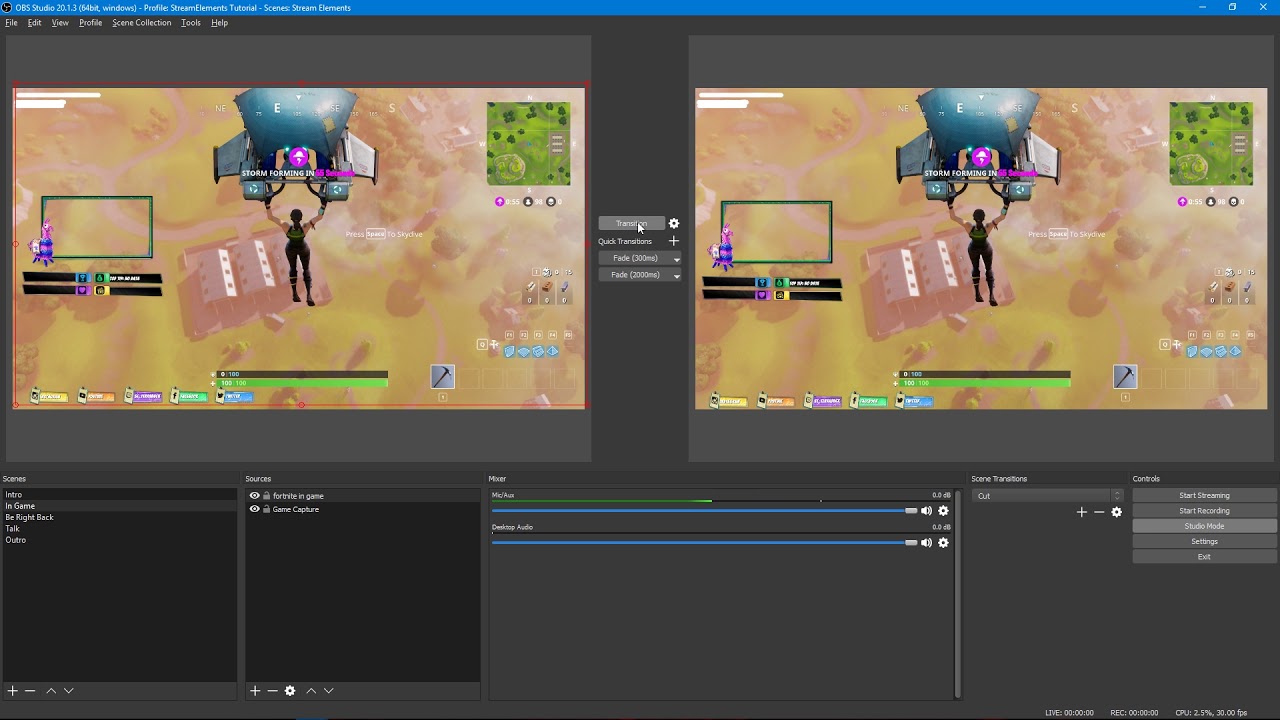
Tutorial #2 - Scene Transitions with OBS Studio Mode ----------------------------------------------------------------------- 🚀 StreamElements 🚀 -------------...
lament blade
Someone in voice support plz
sweet girder
is it more cpu or bitrate intensive tho?
 snow bane
Are people able to stay in chat while you're offline and gain the currency?
clever mango
Just use the setting I mention at the end of the video so that the preview and live are matching after transition. This means only one browser source is open
 shrewd cave
Hi, question. Is there any way to make some sort of 'default' or 'universal' Alert box setting so that if I want to change what my alerts look like, I don't have to manually do it one-by-one for all of my overlays? (like stream starting, in-game,brb,stream ending, etc)
clever mango
Currency is not handed out for being in chat while offline
snow bane
thanks for confirming! @clever mango
clever mango
@shrewd cave you're able to duplicate layers now so if you set up one alertbox the way you want, you can copy/paste it to the others

that's what the button looks like above the layers panel (bottom left)
sweet girder
so i should uncheck duplicate scene, duplicate sources, and swap preview/output scenes after transitioning?
clever mango
I recommend duplicate scene ☑ the others not
sweet girder
ty for your help!
clever mango
but having them all unchecked is fine as well
eager bay
how do i connect my display to my stream setup in obs?
shrewd cave
Perfect, that's exactly what I needed! thank you so much @clever mango !
clever mango
You're welcome 😃
eager bay
?
clever mango
Are you asking how to capture your display in OBS? If so, add a new source and select display capture
If you're capturing gameplay you can use the game capture option
eager bay
i have this but i dont know how to capture my screen
clever mango
You're capturing the screen. In studio mode the right window is live
eager bay
its not there anymore
i found it its display capture
Do you have a video that shows me how to make a display for like folloes or donations?
 lilac basin
okay so i need to learn how this streaming stuff works and how to make a layout lol
 karmic bronze
you don't need to make one as much as import and utilize one
StreamElements
The Ultimate All in One Platform for Streamers
lilac basin
so how do i do that
 coral kelp
hi someone threatened to chargeback one of their donations against me. any idea what i should do? it was through streamelements
pine hemlock
@coral kelp All donations are through paypal. We don't touch money. I would advise contacting paypal
@lilac basin We have a bunch of guides for our service located at https://www.youtube.com/streamelements/videos relating not only to overlays but other stuff
lilac basin
@pine hemlock thank you so much
 native horizon
Moin jemand da der deutsch kann 😄
lament blade
Done @lament blade ! ❤
lament blade
@lament blade thx
 charred sonnet
@native horizon bin nicht vom support aber ja, was brauchst du?
charred sonnet
antons problem had nothing to do with SE, but we couldn't solve it  he had a problem with xsplit and hoped to find someone over here, after some researche we decidet to tweet xsplit
 keen rune
WTB #291219887274328064 privaledges
tight harness
@keen rune Could you link your Discord to your Twitch? 😃
keen rune
@tight harness done (apparently)
 modest egret
The website/overlay doesn't load except for the Help button im using obs classic and cannot use obs studio
tight harness
@keen rune Added you 😃
keen rune
@tight harness why thank you kind Sir/madam 😉
tight harness
I'm a gentleman 😄
keen rune
im sure you are "tips hat"
 viscid steppe
Hi! Quick question. For the Force Field Animated Super Theme In-Game Scene, is there a way to swap out the Facebook or Discord Icon for SnapChat or something else?
tight harness
@modest egret Why can you not use OBS Studio? OBS Classic hasn't been updated or supported in over a year
tight harness
Could you explain how you mean it won't work for you?
modest egret
plainly put it does not work
it drops frames severly, where classic does not
but since classic is not supported this is wasting everybodys time here
thank you again 😃 😃
tight harness
I mean OBS devs don't support it
tight harness
No problem
modest egret
lol
 stuck hamlet
viscid steppe
stuck hamlet
viscid steppe
Not sure where the other options are
tight harness
@viscid steppe I'll have a look for you, some overlays have alternative icons hidden
viscid steppe
You're amazing @tight harness I really love the colors on this new one and would love to be able to use it. 😃
 dense jackal
@viscid steppe was there specific icons you wanted to use other than snapchat?
viscid steppe
Nope. Only snapchat is needed to swap out. I'm the only person in the world that doesn't use facebook. @dense jackal
dense jackal
I don't use facebook either no worries 😄
tight harness
It seems that the icons are pretty specific for that overlay which i'm guessing is down to the fact that they're also animated instead of static 🤔
We could always ask Kireaki when she's about 😃
But I think somebody else made that one
viscid steppe
hmmm. Maybe I'll delete and spread them out evenly?
Thank you for looking into it for me and for your help. @tight harness @dense jackal
tight harness
No problem 
dense jackal

viscid steppe
💜
 vague lodge
Is there some special way of putting hyperlinks in a timer?
tight harness
No, what seems to happen when you try? I've got links in timers (timed messages) and never have any issues
charred sonnet
i think @vague lodge means something like twitch markdowns @tight harness
tight harness
Twitch chat doesn't support markdown, only the panels do
But you can have links in the chat anyway as long as you put the full link you should be fine 👍
dense jackal
we are talking to our designer for more icons in the forcefield theme @viscid steppe https://public.adobecc.com/files/1ETVS0LCDPYGJTFU4PYQS2EOYIHFFF/snapchat.png is one option that somewhat fits the theme

 lone bridge
viscid steppe
lone bridge
viscid steppe
Ohhhh!!!!! THANK YOU!!! throws self in tackle hug @dense jackal
 hoary merlin
Hey there, I just downloaded Stream Elements and am using an overlay. So far it's great. I do have one question.
viscid steppe
Odd question. I have an overlay for my main in-game (Spark Super Animated Theme) and I'm adding in another overlay for other games which is going to be the Force Field Super Animated theme. Why is it when I update the Spark overlay, it changes out the Force Field one?
hoary merlin
Why under things like "Recent Sub" and "Recent Tip" Does it say no data? I imported Stream Labs but that also says no data. Am I missing something?
dense jackal
@hoary merlin the sub is twitch api so I'm unsure as to why most likely if you are a new signup it hasnt yet registered with twitch to grab you API as for your streamlabs I'm not sure why it isnt transferring if you are using our extension but worry not there is an easy fix!
Head over to your overlay manager, than open any of the overlay editors and go to Data in the top left
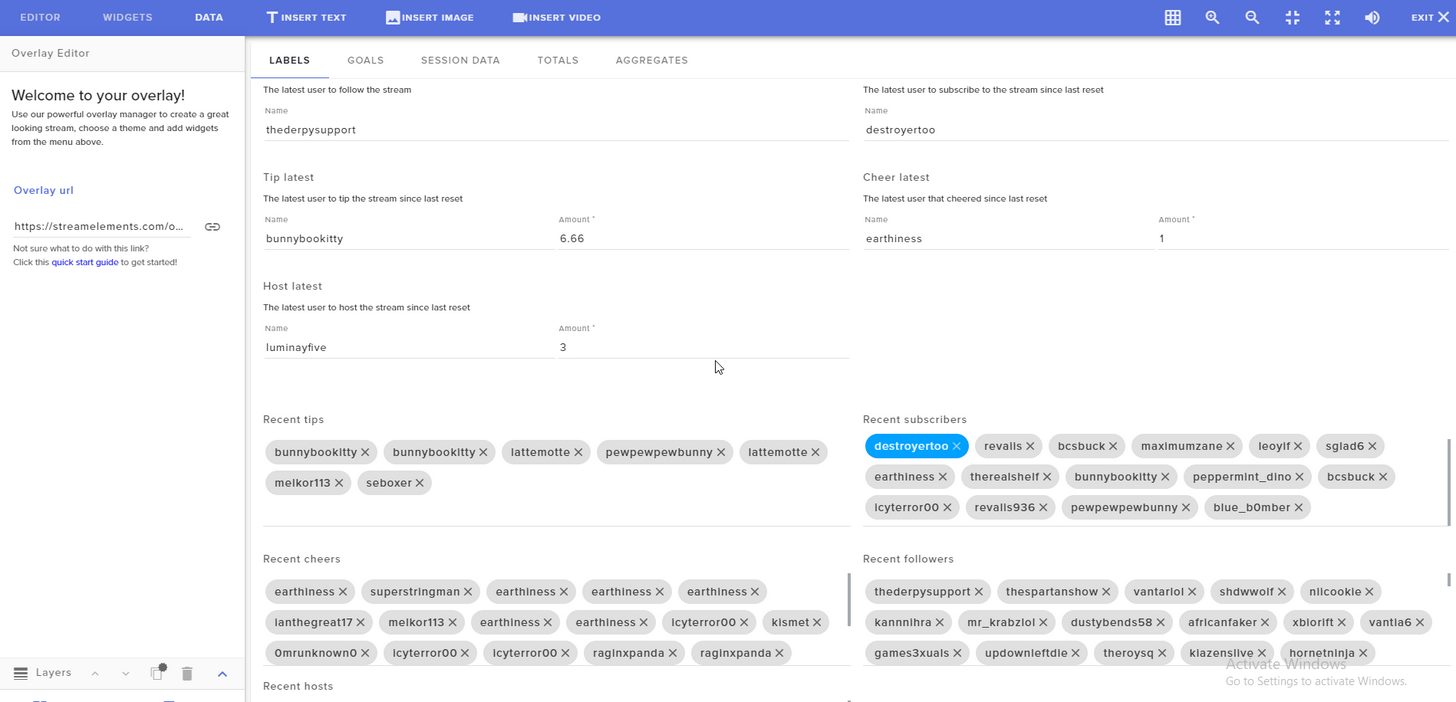
Here you can edit any goal list recent or sub
It will update accordingly from there on 😄
@viscid steppe I'm not sure I understand what you mean editting one overlay for some reason changes another? 🤔
viscid steppe
I Play The Sims alot so I have the Spark Super Animated Theme all set up so the overlay/tip cup doesn't cover the game in weird spots. For games that aren't the Sims, I want to use a different in game overlay, (Force Field). When I go into the editor to change the Force Field Overlay, it completely changes the sims overlay.
It makes them the same one
modest egret
i get this error when trying to reset all time loyalty points, Error: Could not reset leaderboard! any advice?
viscid steppe
Even though I copy and paste different export overlays into OBS, it makes them the same
dense jackal
are you using chrome @modest egret ?
dense jackal
seems to be a bug atm @modest egret not working for me either I'll report to devs!
modest egret
thank you
dense jackal
@viscid steppe but not actually changing them in your overlay manager correct?
viscid steppe
If I'm working on Spark and update, it completely changes the other overlay to Spark.
dense jackal
That is really weird 🤔 I havent heard of this happenning I'll call for some backup
viscid steppe
👍
tight harness
I've also never heard of that happening 
viscid steppe
It almost seems like it's using the same launcher code
dense jackal
viscid steppe
So weird.
tight harness
The codes can be very similar and often are
But there's slight differences in them to make them unique
dense jackal
like pepe memes
tight harness
Exactly!
Okay so I see that the Force Field overlay was last updated ~2 minutes ago and the Sparks overlay was updated yesterday, sounds right?
viscid steppe
For me? Sounds exactly right!
I've been sitting here for two minutes dumb founded. lol
dense jackal
Hacker voice: he's in
viscid steppe
hahahaa!!
tight harness
From what I can see, things seem to be in different locations on the different overlays, or have you fixed the issue manually after it occurred?
viscid steppe
They are in different locations. To fit around the game.
tight harness
Yeah, sorry I thought you were saying that one was mimicking the other one
But from what I can see on my end at least, they're both as they're meant to be
viscid steppe
When I cahnge scenes, they become the same scene
tight harness
Ahh, so this is happening on OBS?
dense jackal
wait are you using the same browser source?
viscid steppe
Yep. In OBS.
So I repaste the launch code for each and then the are the same again.
tight harness
Are you using Classic?
dense jackal
Pepe plays
tight harness
Looks like Classic to me 🤔
tight harness
Classic hasn't been updated or supported by OBS in over a year
lament blade
huh
dense jackal
obs studio is the program the obs has been supporting for the past couple years
tight harness
@viscid steppe I just added them to my OBS as a test using the separate overlay links and it's working fine 😃
dense jackal
nope thats studio
lament blade
nevermind
lament blade
😄
tight harness
It's just super bright mode instead of dark mode
@viscid steppe https://gyazo.com/0edef3324ee284776c16e439b6119da2
 viscid steppe
I go to Scene A and copy and paste the Spark launcher into OBS. I check Scene B and it then becomes the same scene
dense jackal
@viscid steppe I think the problem is with obs is all sources are global
so changing it one place will change it in another
you need two seperate ones for each scene or a browser source specifically for each overlay
viscid steppe
Permission to throw PC with attached OBS out of window?
dense jackal
LOL
tight harness
If you make a browser source called for example browser source and then you go to another scene and you make a browser source and you say you want to use an existing browser source and you choose the same one, it's a duplicate and changing one will change the other
dense jackal
^
tight harness
But if you make a new one for each overlay and call it something different then you're all good 😃
dense jackal
I think we do more obs support in here than SE half the time xd
tight harness
Yes, very true 😄
dense jackal
Honestly a common mistake tho @viscid steppe ❤ we still love you 
viscid steppe
lol!
tight harness
Does that sound like it could have been what was happening to you?
viscid steppe
No idea. Will have to read that smart paragraph a few times.
dense jackal
@viscid steppe I will make vid for u
dense jackal
you are using obs studio though correct?
viscid steppe
Flailing arms with wild excitement! It makes sense and it all works correctly! Tackle hugs!! @tight harness @dense jackal
tight harness
No problem 😄
viscid steppe
I'm SO HAPPY right now!!!!
dense jackal
oh dope
viscid steppe
YOU ARE GODS!
tight harness
dense jackal

viscid steppe

dense jackal

viscid steppe
I seriously cannot thank you both enough! 💜

 tight harness
 dark charm
Hey guys how can I setup song requests on my stream?
dense jackal
Right here @dark charm https://streamelements.com/dashboard/songrequest/settings B)
StreamElements
The Ultimate All in One Platform for Streamers
I also reccomend downloading our desktop app for easy access of song list https://streamelements.com/groundcontrol
StreamElements
The Ultimate All in One Platform for Streamers
dark charm
perfect thank you sir
dense jackal

dense jackal
that's just if you want the mediashare its not required
tight harness
You've got !pause, !play, !skip, !volume and !songqueue 😃
tight harness
If you have the song request page or Ground Control open then you can, otherwise no
dark charm
I dont see an option for songrequest page to play the musc
this is so unneccesarily confusing >.<
I hit play, I have the stream elements song request settings page up, I cant hear anything
dense jackal
and you put your backup playlist there?
dark charm
backup playlist? lol
got it
im retarded
ty, i appreciate the patience
there's literally a button that says songrequest...
....
...
tight harness

dense jackal
hehe its ok bud ❤ we love you
hoary merlin
I gotta say, Stream Elements looks amazing. I downloaded it and have my first overlay. Im still having issues with it recognizing latest subs/donations/follows etc but Ill come back tomorrow for more help. Thanks all! Have a good night.
dense jackal
@hoary merlin didd you see my reply earlier?
Head over to your overlay manager, than open any of the overlay editors and go to Data in the top left https://i.imgur.com/fYTSIyx.png
lament blade
So how does one sellout if I may ask?
dense jackal
$10000 buy in
lament blade
Shit, will you take 50c and a hi5?
dense jackal
close enough but first you need 1. Bot modded 2. Using Overlays 3. SE tipping system setup and in your bio 😄
lament blade
Ah right, okay cool thanks 😄
Am but simple pleb and was wondering. Thanks dude/dudette 🙌
dense jackal
We take all pleb/plebettes now worries
 misty wagon
Senior pleb cause he's old af 
lament blade

dense jackal
@misty wagon will pay the rest of ur $10000 fee dont sweat it @lament blade
dense jackal
Gucci 
lament blade
Thanks 👍
 stuck fjord
hi there is there any1 that can guide me through some things ? Im trying for like 2hrs now to set up my stream with streamelements cause i kinda like it more than StreamLabs to be honest ( dont tell them that 😛 )
I dont realy wanna bother any1 tho , if some1's up to it i'll be on the Support Voice channel 😃
thanks in regards !
in advance*
@everyone
<@&382267076632379392>
 grand ledge
hey i have a problem with my overlays from stream elements showing up in obs can anyone help pls?
dense jackal
we have plenty of guides here pls do not @ everyone @stuck fjord https://www.youtube.com/channel/UCjerlCIbLPQwSnYlClkjDXg
YouTube
Official youtube channel for StreamElements tutorials https://StreamElements.com
@grand ledge whatsup man?
grand ledge
ive watched all guides but my overlay wont show up in obs and i dont get it
stuck fjord
@dense jackal i've been watching the Tutorials but me too i Cant find the premade themes in my StreamElements to use one
dense jackal
make sure your browser source looks like this @grand ledge and you are using obs studio and not classic
they are under the themes gallery tab on the left
grand ledge
it showes now but iall i did was change my resolution is that the only resolution the overlay is compatable with
?
dense jackal
ye the browser source had to be the same resolution as the overlay
grand ledge
will the alerts in the top right still show if i position the box to the bottom left?
and if not how do i change that?
dense jackal
❤
grand ledge

stuck fjord
Indeed , i'm dumb i didnt check .. i was commited to the video and prolly the site's changed by now ! thx @dense jackal you're amazing ! ty man
dense jackal
❤
stuck fjord
girl*
 bold wraith
How can I change my url on an overlay? I copied the same layout because I liked how it looked and altered it in the copy but now the URLs are the same 😦
dense jackal
There is a duplicate button in the overlay manager is that what you used? The URL's shouldnt be the same 🤔
bold wraith
I used duplicate overlay outside of the editing screen
dense jackal
give me one sech I'll look into it
stuck fjord
Sorry again ... Is there anyway i can adjust the images cause for some reason it cuts down things when i change it to 720p
and my resolution is 1680x1050 can i use the Overlays ?
is there any way to adjust the size of the whole theme automatically not manually in each layer ?
dense jackal
I'm not sure why it's not happening to me, is this happening in obs or are you just comparing the links side by side
bold wraith
I launched both of them in my browser and they came up the same url
dense jackal
@stuck fjord when you create an overlay you can set the res to 720p
bold wraith
as well as trying to put them seperately into obs
stuck fjord
yeah i know i did that but it shortens the visible area of the whole Overlay and it ends up cutting staff out showing me a part of the overlay without adjusting everything to 720p and 1080x1050
:/
I'm confused
imma post a photo to help you understand my problem cause i'm guessing you are questioning life when you read my English .. sorry about that :/ not a native speaker
dense jackal
I'm not sure why that is happening @bold wraith I'm sure you have tried duplicating many times I thought maybe it was an issue with being the same browser source in obs
but I just tested my duplication and got two seperate codes 🤔 maybe try again if it doesnt work I'll make sure to tell the devs this is weird bug
in the mean time you can go into the overlay editor and duplicate specific widgets to another overlay albeit more time consuming is not as bad as starting from scratch
ur english is good @stuck fjord !
bold wraith
lmao that's what I'm slooooowly trying to do right now because duplicates are still giving me the same url. So I'm just slowly making my way through these layers. I really appreciate your help!! Thank you!
They should make it so you can copy multiple layers over at once. Just a thought 😛
dense jackal
A fair point! usually that's why the overlay duplicator is there 
stuck fjord
that's what i've been trying to explain
bold wraith
lmao well just in case it fails 😛
dense jackal
I agree 😃
for super themes @stuck fjord you can keep it in 1080p then scale it down in your obs
rare stream
events seem to be broken for me right now on my overlay
it says name has tipped blah blah
but it says name, instead of the actual name
stuck fjord
@dense jackal Dude i'm so sorry to bother you I'm so blind and dumb it's almost sad ... anyway found it .. i was just convinced that i shouldnt put 1920x1080 at resolution but apparently that was the right one and now its fine and awsome ! thank you for your time and I'm so sorry again ! have a Great day 😃
 drowsy lynx
question: what is a super moderator?
dense jackal
Just another role of moderators no actual upgrade in moderation, that can be done here https://streamelements.com/dashboard/account/channels
StreamElements
The Ultimate All in One Platform for Streamers
Also here is a good explanation of what each level of moderation can do
@drowsy lynx
drowsy lynx
ahh, okay. Thank you
dense jackal
gotchu homie 
neat spoke
Hey sorry for asking all the time but how stream store work do people buy credits so they can buy different items from my store?
rare stream
tomathin: did you get a screenshot? i can go back to the tape if necessary
 onyx anchor
Hey guys, I was curious my stream is on right now and my chat cant seem to request any songs. It says all the songs are "too long" anybody able to come by and help?
neat spoke
ok thanks
 agile basin
Hello! Items are not being redeemed via chat even though I have them enabled. Everyone has to go to the store itself and click on it. Help?
 uncut summit
Hey guys, Few Days ago my chat couldn't do song request and today it works but it will at times cut a song short and remove everything in the queue list. This has been happeneing since I noticed the update to shift songs in different orders
Any reason why the songs cut out way early randomly?
atomic hollow
@uncut summit I will make sure to check this out
thanks for the report
no one is clearing the queue via a command?
rare stream
@atomic hollow im having issues with subs just saying name instead of the actual username on the event overlay
stuck fjord
Guys , quick question here , i am using the overlyas right now and for some reason when i Change Scenes from let's say the "brb" one to the "game scene" it takes like 7-8 seconds to actually show my scene even on OBS
uncut summit
Not that i've seen. And this only started happening the past couple of days. 3 days ago no one could add a song but myself and mods. Everyone else go the message internal internet something
stuck fjord
what can i do to fix the delay ?
uncut summit
Coule of days ago my chat got "Internal Server Error"
When they requested a song. And only myself and mdos could. It works now, but the songs cut short sometimes and the queue deletes
atomic hollow
@uncut summit yeah thats a different issue
uncut summit
oh?
atomic hollow
that was fixed
uncut summit
Oh okay
Cool
So I dunno why my songs keep cutting.
I'll look and see if it's my end
atomic hollow
@rare stream thats an issue with the variable in the alertbox
stuck fjord
@atomic hollow got anything for me 😄 ?
dense jackal
 rare stream
its the same variable in the alertbox as was yesterday
atomic hollow
@stuck fjord I can recommend using transition on OBS, since the overlays are cloud based it takes to load them for the 1st time
@rare stream mmmm ok thats not good
rare stream
@atomic hollow hosts work fine, heres my host text
{name} is now hosting
my stream with {amount} viewers!
atomic hollow
i will take a look
rare stream
heres my tip alert
onyx anchor
@atomic hollow I have. Should I try this on something that isnt ground control?
serene granite
@rare stream did you see the word name when the original donation came in
or are you replaying the event from the activity feed
atomic hollow
@onyx anchor let me take a look
stuck fjord
@atomic hollow elaborate please if you can :/ didn't realy get what i should do , sorry
dense jackal
@onyx anchor go here and make sure your maximum song duration is long enough https://streamelements.com/dashboard/songrequest/settings
StreamElements
The Ultimate All in One Platform for Streamers
atomic hollow
@onyx anchor
rare stream
going back to the original on tape
stuck fjord
is there a way to actually download them and add from pc ?
rare stream
oh, huh
the original worked fine
so i guess it was just replays with ground control
atomic hollow
@stuck fjord no
rare stream
i noticed earlier when i started the stream i was using ground control to replay some subs i got while i was offline
and it said name
stuck fjord
okay , so how do i mess with the transition and staff ? 😃
atomic hollow
yeah thats a bug @rare stream
rare stream
😦
atomic hollow
@stuck fjord please increase the transition time in OBS,
stuck fjord
it still takes way too much time , i changed it from like 300ms to 1000ms and even 2000ms , still just takes its time to do load it :/ @atomic hollow
onyx anchor
@atomic hollow I did that. is there a number it should be at? Its not changing a thing
stuck fjord
@serene granite hey man , do you know anything about my Issue here that could help ?
serene granite
the time it takes to load can only be reduced by reducing the elements in the theme
the scene transition effect is a good way of making the tansition looks good.
if you think the transition isnt working, increase it to 8000ms
or change the effect
after you're sure it works, just tweak it.
stuck fjord
so basically what you're saying is that i could be the specific theme's fault for the bad transition thing ( way too heavy or intensive for the programm) and if i'm not comfortable with the way it specificaly works i should try a different less intensive theme ! @serene granite
it*
serene granite
definitely try
but the scene transition is still going to be important, so find out how to use it to your liking
stuck fjord
yeah i know , i'd love it to be instant tho , thats what I'm looking for , i dont realy like the fade-transitioning to something else but i could work with that if it's done smoothly and i quicker than 8k ms .. which is a lot of time ...
serene granite
ya its quite long. try a static theme see if it helps
stuck fjord
@serene granite yeah i'm actually facing the same problem as the other guy now .. all the links from overlay are the same
serene granite
what's your twitch username ?
lament blade
Hi everyone! Can someone help me? How do you do the In-game Chat?
Like it's just the chat see through in the game.
serene granite
on the overlay manager, you have a widget called "your twitch chat"
stuck fjord
@serene granite so i found the problem here , you are recommending to "shut down source when not visible" but thats what makes it so laggy for some reason , the thing is that when i have this "clicked" it slows the transition time ! -> Animation is fine tho.
When i got "UNchecked" it slows the animation on the theme ! -> but transition's okay
i've tweaked the FPS to like 30-40 on the Source but still ...
lament blade
Thank @serene granite ! Does it have like chroma so that it's transparent?
neat spoke
Hey how to media share is working, i wanna make intro to show before stream but i cant upload mp4
 weary mist
@Fnikolai|#4529 Media Share is more a "song request" for videos. If you want to have an intro video in the overlay editor, make sure to convert it to WEBM format, then upload it
lament blade
Helo I tried to use the twitch chat widget but it's not showing my chats when I tested it.
weary mist
@lament blade give me a second, I am going to test it out
weary mist
don't tell anyone, I am supposed to be asleep 💤
lament blade
Hahaha @weary mist 😄
neat spoke
Hey my bitrate is 6000 and i do test stream and i get 5,862Kbps is it good or bad ?
should increase the bitrate?
weary mist
That is good, the max twitch likes is 6k. Most streamers will be under that as it is. I personally stream at 2000-3000
neat spoke
thanks guys !


 lament blade
Hahahhahahaha
atomic hollow

stuck fjord
Guys do i have to customize the Alertbox in everysingle scene there is ? or is there an option to do it for all of them at once !
example : super themes got like 5 different scenes/overlays do i have to customize them all ?
atomic hollow
create 1 alertbox and copy it to all other overlays
there is an option to duplicate widgets to other overlays
stuck fjord
Oh yeah !!! indeed it's under the widget section , thank you so much and sorry about the constant questions ! you're awesome tho , thanks again
 keen wadi
UM i made a mistake not sure if someone here can help or if i have to talk to paypal
atomic hollow
@stuck fjord ❤ ❤
keen wadi
I had changed my email for my paypal from a persioal email to a new email made for streaming, i forgot to update it on the streamelements paypal thing, money is mia O.O
atomic hollow
@ohhellosara#3625 talk to paypal support, they can sort it easily
keen wadi
thank you
 thorn glen
Is there a current issue with Song Requests and Ground Control?
atomic hollow
what issue are you facing?
thorn glen
When a viewer requests a song, Ground Control either white screens and doesn't play it, or it skips and deletes the song entirely.
atomic hollow
on the website it works?
thorn glen
I'm not sure about the website.
thorn glen
It does work on the website.
atomic hollow
so please re-install GC
thorn glen
Will do.
 burnt sky
Is it just me or cant i see twitch chat in streamelement ?
 quartz forum
Can someone please help me? Is there any way to make a notification pop up on the stream when someone follows/subs/hosts?
serene granite
@burnt sky we don't have your chat inside the dashboard on the site, but you can add your chat to your overlay with the 'my twitch chat' widget
@quartz forum create an overlay with the alertbox widget in it
or... use a theme , they all have beautiful alertboxes
burnt sky
thx hectic 😃 i just keep usin chatty 😄 i just wanted to know 😉
 short cape
Is this Chatty somehow better than Twitch's own pop-out chat?
ebon forum
Chatty is pretty much an IRC client with a truckload of options 😃 It is not just a chat client.
I personally use the restream.io chat cause reasons (from the time where i streamed to youtube etc), got stuck on that
short cape
AIght, guess I'll just stick to Twitch's own chat
burnt sky
in the overlay manager, how do i make my images and boxes not "stick" to other objects ? (i mean free movement) 😃
atomic hollow
@burnt sky use your keyboard arrows
burnt sky
❤
atomic hollow

burnt sky
how to ctrl z ? 😄
serene granite
no way to do that unfortunately
just try to save often
and then refresh is your ctrl+z
burnt sky
now i am crying 😄
misty wagon
I usually copy an overlay set before I start working on it, thus preserving a pristine one. @burnt sky
burnt sky
hehe 😄 i used hectic metod 😄 i finally got the things in place without fails 😄
 hollow zinc
In the top right you have a square-waffle-looking icon, click that it will disable snapping ☺ you can also use the arrows. Add shift to that and moves the widget by 10 rather than 1 px ☺
burnt sky
hahhaa omg thx Darko 😄
Okay question 😄 SE.Champion is people who dont fail in Overlay ? 😄
 fast sky
the dashboard seems not to be up to date. mine is not updating the data since 3 days or so.
atomic hollow
which part exactly?
 mild fern
Hi, I'm just wondering, with the tipping, what information gets displayed on the tippers paypal account?
atomic hollow
@mild fern what do you mean? when he goes to paypal what does he see?
mild fern
@atomic hollow I mean if someons tips me, what information is displayed on their paypal statement?
atomic hollow
your paypal account name
mild fern
ahh ok
mild fern
yeh that doesnt help me much either
atomic hollow
why are you asking?
 upper steeple
okay i just got a prime resub and the alert went off twice, one after another
atomic hollow
yeah thats a problem with paypal
mild fern
Im just trying to find a way I can accept donations without giving people all my details
mild fern
if I register a business here all my mobile number and address is listed
I have a pretty unique name
upper steeple
even shows twice in my ground control
 quartz charm
hey guys! i just have a quick question if yall dont mind me asking?
burnt sky
a fix to the twitch viewer list ? my viewers is not getting the loyalty points 😦
atomic hollow
@burnt sky thats a twitch issue unfortunately
@quartz charm ask away
@upper steeple we are checking
 coral lava
does the chat box not show chat unless im live?>
atomic hollow
@coral lava it should
coral lava
not showing in obs but shows in the editor
atomic hollow
if you open in it in your browser?
coral lava
i got it
coral lava
i guess everytime you save it removes the chat imn obs had to retype every save
atomic hollow
oh yeah
coral lava
anyway to increase the size of chat with out making the text bigger if that makes sense?
coral lava
the box doesnt sacle the text with it
atomic hollow
you can control the font size
coral lava
yea but with my box size i need the tezt at 60 and it just doesnt look rifght
atomic hollow
play with it until you find the right fit
coral lava
ugh
lament blade
What i like to do is, First i change the size of the box accordingly to how much will the chat occupy on the screen, then if the font is too small/big, you can change the font size @coral lava
If there is something you specifically don't like about the way it looks, i can try to help you
tight harness
Yeah, basically what ShadowBoxer said 😃
 north dawn
Hey, is there any way to use my spotify for the song playlist instead of yt?
tight harness
Not currently, they refused to give us dev access for the time being
 obtuse dome
Hello! Is there a way to import donations live from Streamlabs to Streamelements so it adds currency to ppl that donate?
upper steeple
wish twitch would fix their api issue with the viewer list cause my viewers still are not recieving currency for watching
 kind shell
Hey, my friend is having some issues with commands, where Viewtime wont count, any solutions?
 fading grotto
My recent follower alert isnt updating only written as name
kind shell
@atomic hollow oh, ok !
atomic hollow
@obtuse dome we have an import tool from streamlabs
StreamElements
The Ultimate All in One Platform for Streamers
obtuse dome
you mean chrome extension? but it doesnt import them live
obtuse dome
everytime there is a new donation on streamlabs you have to import them again
on the go
fading grotto
@atomic hollow yup
atomic hollow
thats a bug
obtuse dome
I know but I've seen ppl with Streamlabs donation page that had automated adding currency from donations
fading grotto
But if it is a live follow the name would appear right? @atomic hollow
atomic hollow
@fading grotto yes of course
quartz charm
@atomic hollow hey Sorry for troubling you again, but how long does it take for streamelements to update the moderation status? cause im already modded, but it doesnt show me as mod in my a/c
fast sky
dashboard is not up to date
obtuse dome
so there is no way to import every donation from streamlabs to streamelements live so it adds currency?
I have to manually import the data from one to another?
atomic hollow
@fast sky what are you showing us?
quartz charm
@atomic hollow No i meant, a streamer made me super mod in stream elements but i still cant access their channel stuff with my a/c
serene granite
If your viewers would donate on your StreamElements tipping page, you wouldn't have to import all the new ones @obtuse dome
atomic hollow
@quartz charm oh
thats a different setting
he needs to add you here - https://streamelements.com/dashboard/account/channels
StreamElements
The Ultimate All in One Platform for Streamers
obtuse dome
@serene granite im not dumb man, I know that but it still doesnt help me, I dont want to use streamelements tipping page simply because me and my viewers are used to streamlabs one, and Im asking if thats possible cause i've seen people do that somehow
serene granite
that's not possible
clever mango
@fast sky did you just receive those 2 follows? When offline we only poll for new followers every 10 minutes. Every 30 seconds while live
obtuse dome
and importing doesnt work, even tho tips are shown currency is not being added
fast sky
@atomic hollow that the recent events are not updating anymore. at your dashboard i have 46 viewers... in reality its 48. i did receive the followers 2 days ago
serene granite
@obtuse dome can you show a screenshot of what's not being added?
 atomic hollow
no
you missed my point
the streamer needs to send you an invite link to his channel
clever mango
from this page https://streamelements.com/dashboard/account/channels
tight harness
Mod & Super Mod are very different to Bot Supervisor, Editor and Full Control
vague lodge
@tight harness Sorry couldn't reply last night. So bascially I got a timer for a affiliate link for Technisports. I got the full link that works if I put it in an email or browser but when the timer goes off in chat it's not a hyperlink. It's just the URL.
tight harness
That's interesting, I mean if you put the link in Twitch chat normally does it make it into a link?
Because while the bot is posting it it actually has everything to do with Twitch chat and nothing to do with who posts it 🤔
quartz charm
Oh so its not enought to become super mod, i also must get a invite link from the streamer?
pine hemlock
Dashboard access is separate from what you believe is a super mod, basically
tight harness
Super Mod doesn't give you any kind of site access
It gives you access to certain chat commands, it can technically give you access to things like song requests if the requirement is set that high, but site access (dashboard access) is entirely different
clever mango
Chat/Bot Levels
100 - viewer
250 - subscriber
300 - regular
500 - moderator (twitch mods automatically placed at this level)
1000 - super moderator
1500 - broadcaster
Dashboard Manager Levels (least to most access)
Bot Supervisor (can add super moderators from dashboard)
Editor
Full Access
https://i.imgur.com/s61Liry.png
 serene granite
I'd add (Can add supermods) next to bot supervisor, makes it clear its above that
quartz charm
alright i see i see so to edit things in his dashboard i have to have dashboard manager access
clever mango
Correct
quartz charm
where can i find the tab to allow that?
clever mango
the streamer invites people by creating a link on this page https://streamelements.com/dashboard/account/channels
quartz charm
ahh ok thanks! it was right there im blind  Thanks alot for your patience and help!
pine hemlock

tight harness
👍
kind shell
Hi again! Having some minor issues with the songrequest system in my friends stream. We as mods and streamers are able to request songs, but normal userlevels/ users get this message: StreamElements: @CupcakeNemi_ could not add song: The song is already in the queue
Im a moderator in his StreamElements dashboard, and cant say that I have these issues on my own stream.
tight harness
Is the song already in the queue? 😛
kind shell
No, its not, no songs in queue o.O
tight harness
Then that's a new one 🤔
kind shell
Added a limit to 350 seconds because some songs might be longer
First it was 5 seconds, which is weird 😛
serene granite
what's the channel name?
 serene granite
just her?
serene granite
is she regular by any chance?
serene granite
no response to her first command at 4:19 ?
kind shell
Not even your song is in the queue
No response as well, probably went to fast for the bto
Bot*
serene granite
have her try again please, she's no longer there now
kind shell
The last song you requested worked.
serene granite
yes
kind shell
She had to go to a birthday party, but im gonna try to make someone else try
serene granite
k
serene granite
ok, let us know if the same error happens to anyone please
kind shell
I will!
The viewtime is still bugged for me as well, i've been in the stream for over 2 hours, and its not counting. Is there anything we're doing wrong?
serene granite
if you're not in the viewerlist then its a twitch bug thats been going on for a few days now
kind shell
The viewerslist is only showing to users: Hairycow and Faegwent
Oh yeah
I've read something about it, but it sais 5 viewers
serene granite


🛠 We've resolved the issue with Viewer Lists not updating for channels. We hope you're as excited as we are. ^RSS https://t.co/z8Hdch1VlR
Likes
343
 Twitter
thats a tweet from 2 days ago