#helpdesk-twitch
1 messages · Page 183 of 1
 tight harness
So seems like that could be it
To clarify, The_Legendary_Bot is the StreamElements bot, i'm just testing the bot name changing feature 😃
 thorn spear
@tight harness I have 188 viewers and 24 viewers in my list
tight harness
So yeah, sounds like a Twitch issue to me 😄
 stone spire
Offtopic, but does anyone know if there's a way you can select gpu to render with on obs
tight harness
For me it's Settings > Output
Then in the Streaming section you've got the Encoder option
tight harness
NVENC is GPU
stone spire
yeah I mean specific gpu
tight harness
You have multiple and you're wanting to choose which one you render with?
stone spire
correct
stone spire
Yeh I read that but I don't really think its true for all use cases
like atm it looks like it's rendering on my second non display card, which is using 20%
 still lily
At first I was streaming with cpu and it worked fine
stone spire
I'd prefer it be on my main card, so I can use the other card for all of another workload
tight harness
Yeah, I was more referring to the first message they put, sounded like they didn't give that option
But I admit i'm no expert in using multiple cards to stream 😄
still lily
How does the sellout channel work?
stone spire
yeh it's a bit strange seeing as most other rendering engines allow you to select the specific cuda/opengl card
I did set the Render openGl with- option in the nvidia control panel the the desired card
but it might require a restart
Also while I'm here, is there anyway to get the follower goal widget to show total followers
like current total/goal
This is how I currently have it: https://gyazo.com/0679202a9e01c95d23be198710bde74a

ew
sorry
 carmine abyss
@tight harness
Can you explain why the devs just deleted all of my activity feed for the past 2 months?
i can see them in my thing testing stuff.
 serene granite
ya, we're trying to fix that issue you had :/
carmine abyss
Will my data cme back?
serene granite
yes, its still there
serene granite
we're on it
it's all part of the fixing
sometimes fixing can be painful, but only for a short while.
carmine abyss
but that data will come back?
 unreal geyser
woah...
my groundcontrol shows somethings that happened 9 months ago
where be my recent stuff?
tight harness
Yes, that's what we were just talking about above, it's being fixed
serene granite
@unreal geyser this is a temporary issue that we're fixing. You can see the new stuff at the bottom for the moment
unreal geyser
newest is 7 months ago
unreal geyser
ok cool
i just find it amazingly ironic, if you will, that every time I am more than prepared to start up the stream, and everythings running smoothly, some update is being done on your guys' side.... So if i am never prepared to stream, then that means... 🤔
Kinda like washing my car, bringing rain...
 floral meadow
Hello i have a question over the stream elements HypeCup
 austere flower
is there anyway to get /dashboard page loaded?
floral meadow
my dashboard is loading
but my last 3 month are not loading lul all is 4 month ago
serene granite
@austere flower the solution is clearing the cache and cookies for our site and then doing a hard reload - ctrl+shift+r
unreal geyser
@floral meadow they're working on it, mine is 9 months ago
floral meadow
ok
tight harness
@floral meadow Did you mention the question about the hypecup?
stone spire
derp I think I found the gpu option
https://gyazo.com/0ceafb550d426ee167714bd0bf1d2375
or maybe that's number of gpus to use
 austere flower
@serene granite method seem to not work for me. cleared cache and cookies 3 times but page is still white
tight harness
@floral meadow You mean you want emojis to go in there?
serene granite
@unreal geyser @floral meadow the activity feed should show properly now
tight harness
@stone spire Looks like that might be it 😃 good to know
serene granite
np, sorry for the convenience
stone spire
did anyone see my msg above about the follower goal
 hushed barn
Hello! Is there anyone that can help me regarding the audio playing an alert?
I changed the alert to a custom jingle, but the default jingle still plays on top of it
 tardy brook
serene granite
tardy brook
serene granite
@stone spire what was the question ?
tardy brook
Can´t get the page to work..
Tried IE, Mozilla Firefox, Chrome and EDGE. Also from 2 different computers. :/
serene granite
@tardy brook please try deleting your cookies and cache, and try to Ctrl+Shift+R
tardy brook
@serene granite Didn´t help :/
serene granite
ok, please open the console and send me a screenshot in PM
in chrome its F12 to open it
tardy brook
Okey, tried IE now.
Will do the same in chrome and send screenshot.
2 sec
I can have an idea though...
I solved it.
You are reliant on domain names that are blocked by ad-blockers.
serene granite
such as?
tardy brook
I´m using Pi-hole.
So I changed to 8.8.8.8 and 8.8.4.4 for DNS.
Then it worked after a "ipconfig /flushdns"
serene granite
ok
serene granite
definitely.
tardy brook
You are welcome.
serene granite
Thank you 😃
stone spire
@serene granite I have a follower goal set up but it's currently taking the percentage complete from like recent follows or something. Is there a way I can get it to be total/goal
current overlay for refrence
https://gyazo.com/0679202a9e01c95d23be198710bde74a
serene granite
You can use the Total Followers widget and edit the text on the left pane and add your /goal
floral meadow
what is the right data for the all time top donater ?
tight harness
When you add the Top Tipper widget by default it's on session which is the current stream
You get a drop down box which you can change to All-time
stone spire
oh no shit @serene granite ahha
is there a way I can get the bar to update based of that lol
tight harness
Nope
floral meadow
last donater is one with 7€ but by top donater is nothing. and i have all time in settings...
 cinder lotus
Is there a problem with the site right now? Dashboard is completely white for me
floral meadow
now the editor crashed
tight harness
@cinder lotus We deployed a fix for this today. Please clear your cache and cookies in your browser settings and reload the website by using Ctrl + Shift + R.
Let me know if that fixes it for you, thanks.
cinder lotus
not helping so far, well, what was the command to add commands via chat? 😄 will do for me
!add command ?
hushed barn
Welp nvm, fixed it. Apparently different sources play different alert sounds even when on a different scene
 stuck hamlet
!command add @cinder lotus
cinder lotus
thanks, worked 😃
tight harness
@hushed barn Correct, that's why we advise people to tick 'shutdown source when not visible' 😃
 lament blade
 fossil thistle
im having the same issue !
stuck hamlet
We deployed a fix for this today. Please clear your cache and cookies in your browser settings and reload the website by using Ctrl + Shift + R.
Let me know if that fixes it for you, thanks.
lament blade
TY
serene granite
@fossil thistle let us know if @stuck hamlet 's solution fixes it
fossil thistle
ok s2
 burnt anchor
Anyone hangin around that can answer some questions about the tip page through streamelements?
stuck hamlet
Go wild
burnt anchor
1: I'm assuming that to have a tip through streamelements vs. directly through paypal, I would have my donate button link to my streamelements tip page, correct?
2: Anyway to deal with chargebacks through StreamElements or is it the same paypal standard, 180 days, etc?
lament blade
Hi Staff of StreamElements. I have a problem I can't see my dashboard. I have simply a white screen. (Sorry for my bad english i'm french ^^ )
tight harness
- Yes correct
- We include a message saying thank you for the tip with the donation, which somewhat helps with proving it was a tip to PayPal
@lament blade We deployed a fix for this today. Please clear your cache and cookies in your browser settings and then reload the website by using Ctrl + Shift + R.
Let me know if that fixes it for you, thanks.
burnt anchor
Ok thanks! @tight harness
All I need to do to set it up to go straight to my paypal is put in my paypal account e-mail correct?
lament blade
@tight harness I have test and its not fix and the page : "DESKTOP APP" have the problem
tight harness
@burnt anchor Yes correct
burnt anchor
thanks 👍
 strong arch
I have a top donations list. In the actual donation page it is accurate. On the OBS form it has one of my donators as 2 seperate people. How would I go about fixing that?
tight harness
@strong arch If you go to Activity Feed on the left, then Widget Data on the right, then Aggregates, then click on Refresh Aggregates, does that help? 😃
strong arch
no. it still shows filthy raven as 2 seperate people
one was a manual entry. I double checked to make sure all data is the same from the manual entry and one is from donations
tight harness
Did they type their name differently? Like even if it's just a different capitalisation?
serene granite
is the difference between the public dashboard on the public tipping page, and the overlay?
that's a known issue that we have
strong arch
yeah the public tipping page is accurate
stuck hamlet
For the overlay, it matters if the email is the same. If it is, refresh your aggregates. (Sean I'm on mobile, can you tell him how) 😃
tight harness
It's the first thing I suggested 😄

 strong arch
all fixed tyvm. had 2 seperate emails and it had to refresh
 tight harness

 misty sparrow
hi guys ive installed obs on laptop so i can have songrequest on my twitch, but i have absolutely no bloody idea what im doin! please help!
 weary mist
@misty sparrow first question. What are you streaming/streaming from (device)
 deft compass
silly question but I'm trying to set up a tip goal and it keeps pulling all of my tips total rather than showing it at a 0 starting amount.. how do I get it to show 0 for a new tip goal?
weary mist
if you are in the overlay editor, go to Data in the top left. Otherwise, go to activity feed, then Widget Data
once there, go to goals. Change the value in the Donation/Tip goal field, then click save
deft compass
thank you!
 quiet valve
Why am I not allowed to type in the sellout chat?
 elfin crypt
How do I prevent "!top online" from showing streamelements, myself and the faegwent bot as the top 3 (of 5) listed users?
weary mist
@quiet valve we have a bot for auto-announcements. If you would like your channel announced, make sure you use SE tipping, the bot is modded in your chat, and you use the overlays
@elfin crypt First, make sure the people you don't want to show up are on the ignore list in your loyalty settings. Then, go to your leaderboard, and set the points for them to zero. Then they will not show up 😃
quiet valve
oh, okay. Thank you so much. 😃
weary mist
@quiet valve what is your twitch name?
quiet valve
elfin crypt
@weary mist Thanks Scalper, I belive I've done both of those things. When I set their points to zero this caused the names to dissappear from the "!top points" list but they are still visible in the "!top online" list. I believe resetting points does not reset the amount of time they are recorded to have spent in the channel
weary mist
ahhh
i missed that part. The online is one that I myself am trying to get the bots removed from, but it isn't high on the priority list right now. But it will come, it is needed
elfin crypt
Yeah it's pretty much a wasted command at the moment because three out of the five listed names are useless
weary mist
@quiet valve I added you to the announcements 😃 You should consider adding panels below your stream. Give some information about yourself, goals, etc, social media accounts, and an image with a link to the tip goal. Makes people stay a bit longer, especially when they can connect to you through your bio
@elfin crypt agreed
misty sparrow
im streaming from ps4 but im using my laptop to manage everything with se too
.. and hav my stream open on laptop also
weary mist
@misty sparrow OK. So, with streaming through a console, if you are not using a capture card, you will not need OBS. If you want Song Requests to be heard by your stream, you have to have the music playing loud enough that your microphone pics it up
elfin crypt
@weary mist Thanks for the help. Is there any other way to edit the output of how !top displays in chat? For example, I'd like to be able to edit it so that there are line breaks between each of the users listed (for a more nicely formatted list) or show the top 10 users instead of top 5? I tried to edit the Default Command and it didn't give me many options. Also thought about replacing it with a new custom command but I couldn't find any variables referring to users at a specific level of the leaderboard. eg. something like ${topuserbypoints.1} ${topuserbypoints.2}
misty sparrow
i dont understand, there is a songrequest on se but the video plays without sound on my laptop?
weary mist
The default commands will have more customization in the futture. As for line breaks, that is not something that will be possible as its a twitch limitation. @elfin crypt I will look at the variables to see what I can figure out
@misty sparrow Then there is something up with your settings, as the video is played through an embedded YouTube player
 pine hemlock
futture
weary mist
lol
stuck hamlet
I have a bright futture
misty sparrow
so how do i get sound, my twitch volume is up and laptop volume and the video too?
pine hemlock
Songrequests play via youtube on your pc's sound
The stream hears it via your desktop audio
misty sparrow
yes but what im saying is, the video is playing on my laptop now i cant hear it
lament blade
Good afternoon. I need help with a doubt. I opened the channel store with the points and added rewards. The rewards are edited with music and a sticker. When the exchange does not appear in the alert box or listen to the corresponding music. Why? I have not done it live just testing it out of live. Thanks for the help
pine hemlock
The video is just an embedded youtube video. And theres a volume slider on the right of it. There's really nothing secret. 
bottom right*
 ebon atlas
when the youtube feature comes out are you able to have youtube and twitch alerts on the same page
pine hemlock
@lament blade Add the store redemption widget to your overlay
@ebon atlas I would assume, but can't confirm
misty sparrow
yes i know, the volume id is full, the laptop volume full also, im currently not streaming but im on my channel does that matter?
lament blade
ok, thanks @pine hemlock !+
pine hemlock
streaming doesnt matter.
misty sparrow
well i dunno then, volume full on everything
do i have to have youtu.be open or something?
misty sparrow
oh i think ive figured it out, i had a joypad charging in the usb, took it out can hear it, sorry!
misty sparrow
so wen im streaming do i actually have to have the songrequest page open on my screen, or will i hear it?
pine hemlock
has to be open :)
elfin crypt
The joypad may have been treated as a sound device in windows and was sending all sound output there
 violet nimbus
could not add song: internal server error
lament blade
what do you think 
weary mist
im guessing you are outputting at 720p|60, 4350 bitrate, using CPU encoding
I don't read german, so no clue beyond that
lol
 indigo bone
streamelements down or something ? also how can i refresh the bot if been up for too long?
weary mist
@indigo bone as far as I know, there is nothing wrong. Is the bot not responding in your chat?
indigo bone
no responding but wasnt giving the in channel currency
song request wasnt working
i think i need to like reboot it but i dont know how lol
weary mist
the bot is not linked to currency
weary mist
I will sit in your chat and keep an eye on it
indigo bone
also song request wasnt working saying internal error
weary mist
it may have been the osng being requested, mine worked fine
 rustic herald
Hi guys
Having a serious issue attempting to open dashboard on the website
All I get is a greyscreen
I've tried to erase cache and cookies and shift+ctrl+r and even restarted router once.
Kinda stuck! wtb > help
tight harness
We deployed a fix for this today. Please clear your cache and cookies in your browser settings and then reload the website by using Ctrl + Shift + R.
Let me know if that fixes it for you, thanks.
serene granite
@rustic herald hold on please, we're looking at a solution for this right now
rustic herald
Much thanks. ❤
serene granite
thank you for your patience 😃
rustic herald
No worries at all ❤
weary mist
A potential fix is to clear your cache and cookies in your browser settings and then reload the website by using Ctrl + Shift + R. This has worked for the majority of people.
 rugged gull
did that
ebon atlas
#imasellout
rugged gull
lol coolkid i sell out hard too!
😃
Honestly Someone Needs to Combine Streamlabs and Streamelements
ebon atlas
i have becuase i multi stream so atm i use stream labs for the youtube stuff
serene granite
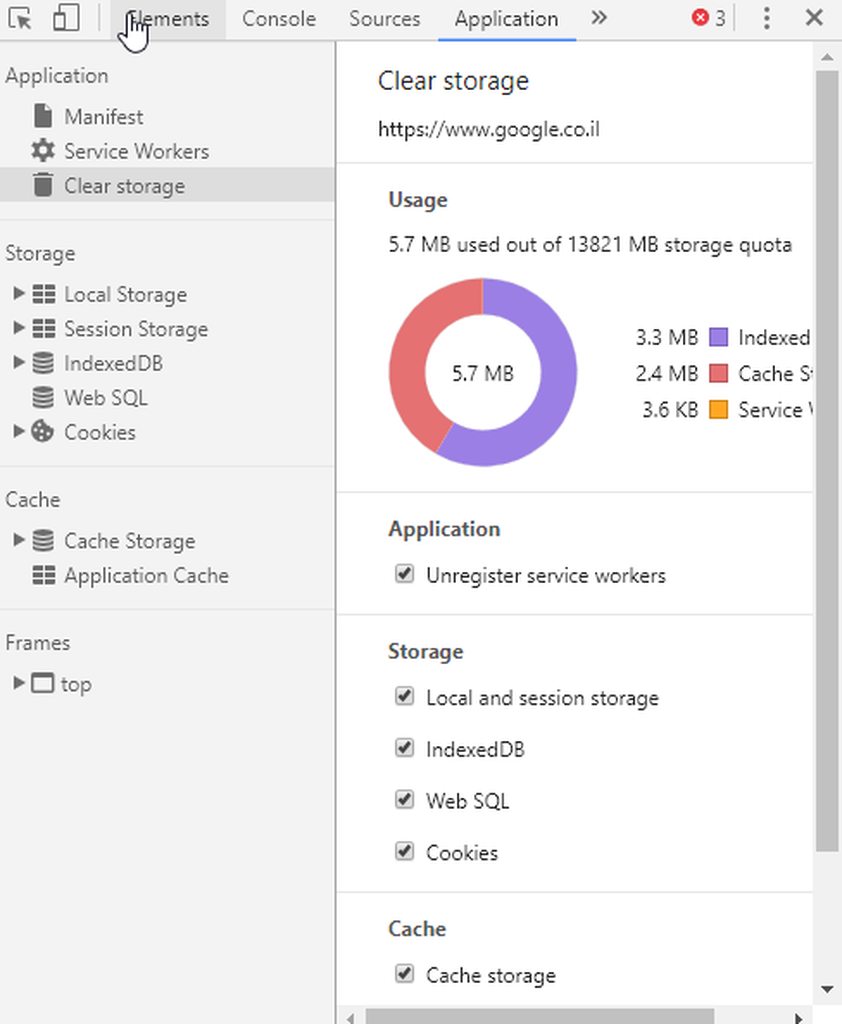
everyone that is having an issue with the dashboard not loading, please do the following when looking at the tab of our dashboard:
Click F12,
Go to the Application tab
Go to Clear storage
Find the Clear Site Data button and click it
Refresh the page
Let us know if it works please
rugged gull
@ebon atlas i use both i think both services together are perfect
@serene granite ...im on firefox
and that doesnt work
period
ebon atlas
@rugged gull its hard becuase i have to many broswer sources becuase it
weary mist
@rustic herald @drowsy lynx @fringe gate , if you could do what hectic asked and let us know if it worked.
rugged gull
@ebon atlas id only use streamelements for the online scenes
weary mist
@rugged gull can you try loading in chrome to see if ti makes a difference?
 fringe gate
weary mist
fringe gate
weary mist
@fringe gate awesome
serene granite
@rugged gull on firefox its under the Storage Tab, then the Local Storage, pick our site - delete all keys
ebon atlas
@rugged gull like 1 service is good but multi streaming scenes get hectic becuase streamelements not supporting yt
weary mist
Not yet, soon though @ebon atlas
ebon atlas
@weary mist i know but as soon as its released i can clean up obs
anyway im gonna go finish my stream
weary mist
👍
 drowsy lynx
I hit F12, where is Clear Storage?
 misty sparrow
how can i link youtube to my twitch?
weary mist
The easiest way right now is to have a panel below your twitch, and the SE bot with a timer than gives your youtube information every so often. As for youtube, there should be a section that you can put your twitch link into as well
@radiant quail everyone that is having an issue with the dashboard not loading, please do the following when looking at the tab of our dashboard:
Click F12,
Go to the Application tab
Go to Clear storage
Find the Clear Site Data button and click it
Refresh the page
misty sparrow
no i mean for songs, rather than people having to copy url all the time, can i link youtube so they just type the titles?
 radiant quail
i am using microsoft edge and there is no application tab when i press F12
@weary mist ^^
 coral lava
im setting up my aerts and go to test them and in obs it cuts off half of my notification
weary mist
@misty sparrow ah, I see what you mean
@coral lava double click on the source, change the width to 1920, and the height to 1080. Click save, then hit CTRL+F. This should now fit your screen
@radiant quail 1. edge sucks, switch to firefox or chrome, lol. 2. Not sure where the same thing is located in edge
@misty sparrow for the moment, we have it disabled because we have a limited number of youtube API calls, and the searches use up a lot of them. I do have a command that pulls from another api if you would like it
tight harness
Edge 
radiant quail
personally i like it simply becasue the logo looks cool XD ill be sure to switch to chrome though. Thanks @weary mist
weary mist
👍
coral lava
@weary mist ty but i feel you guys could improve this a ton. js coming form streamlabs to this..... shouldnt need full screen just a small bx that the alert fits in
weary mist
@coral lava If you set up a blank overlay, and add a new alert box, then yes, it would be exactly like SLabs.
The reason we take the full screen is because EVERYTHING for your overlay can be put onto it
The themes we design for 1920x1080 as that is a common screen size anymore, and it can be downscaled to what is needed
The idea is to reduce load on your CPU/GPU by consolidating everything under one browser source, including text, images, alert box, cup, event list, etc. Everything managed on one page
its all in how you set it up
coral lava
ahh ok right on i got you thank you
weary mist
👍
misty sparrow
i accidentally stopped nightbot being mid but i cant reinstate it, how do i?
mid*
ffs
mod*
the command i mean
weary mist
./mod nightbot (though you can do just about everything with the SE bot that you can with nightbot)
misty sparrow
it says ive banned nightbot, must have pressed wrong thing b4, how do i unban
oh yeah im using se, just makin song playlist on nightbot
tight harness
You type /unban nightbot
misty sparrow
oh wow... i am sooo stupid... thx
tight harness
No problem 😃
misty sparrow
i think i literally typed every other variable imaginable besides that!
 woven hinge
anyone able to give me some advice on how to get Stream elements song request to play on my stream?
weary mist
@woven hinge possible. How do you stream (PC, phone, console?)
weary mist
With PC, you just need to have the website up and running, and it will play through that. Or you can have Ground Control open. For XBox, if you don't have a capture card, you have to have the sound playing near the mic to be captured. Consoles are no where near where they need to be to make streaming easy 😦
tight harness
It's because they can't run the page needed for song requests 
woven hinge
ok, Ill just have to use the I heart App to play music on the x box then, thank you
tight harness
👍
weary mist
👍
radiant quail
im thinking of starting streaming (using your website obviously) but was wandering if there are any tips on how to start strong?
coral lava
ok so im trying to add my own custom sounds and your sounds are overriding them?
weary mist
@coral lava Are these on alerts? Need more informatino
coral lava
yes
weary mist
@radiant quail networking. 100% networking
@coral lava need more information. What alert, etc
coral lava
the bits alert
lament blade
Is the issue with white background resolved`?
weary mist
Check variation settings, those will overide default settings
coral lava
i have changed all of the variations to the one i want yet its still yours
weary mist
@lament blade Not sure, what browser are you using. We have a workaround for firefox and chrome that is working
lament blade
chrome
but i dont have the issue with the browser
its solely obs that cnat display the link
i copy and paste the browser adress for the overlay into "browser source" setit to 1920 and 1080, tick disable with not visible and ok
weary mist
oh, in OBS have you double clicked the source, scrolled down, and hit refresh cache?
@coral lava give me a minute, I will check out your overlay
lament blade
several times
coral lava
anything about 1k bits plays mine anything under plays yours
lament blade
and i copied and pasted a template
weary mist
@lament blade ok, as far as I know, nothing has been discovered that will fix that. Have you tried creating a brand new browser source?
 devout rivet
Hi, I'm having issues with my streams loyalty system. Viewers watching aren't earning currency, mods, myself, bots, anybody. Currency is not being earned. The loyalty system is on the on and upright position.
lament blade
yes scalper, deleted it and reset it multiple times
weary mist
@devout rivet There is an active issue with the viewer lists not coming from twitch 😦 we can't give points if we don't know who is there
@lament blade damn
coral lava
ok maybe its just the test had someone donate bits and it was mine
devout rivet
RIP
lament blade
is this to do with blank white pages when you go to profile or dashboard??
right click->browser source->add the link from "launch layout page" to obs browser source and set it to 1080p
weary mist
@coral lava save, exit the overlay editor, then go back in and test. sometimes reloading the editor fixes residual issues
devout rivet
Ok, so then I have another issue where one of my viewers recieves an error that says "Could not add song: internal server error" and it's only the one viewer.
lament blade
then i get a white box that says "help" in the bottom right as an overlay
weary mist
@lament blade yeah, that is the issue that seems to be happening randomly with people both in OBS and browsers. its actively being looked at
@devout rivet I ahve seen that a few times recently, I am going to bring it up with devs
devout rivet
Ok, thanks Scalper. Have a great day and keep up the good and hard work <3.
 vernal solstice
@serene granite "everyone that is having an issue with the dashboard not loading, please do the following when looking at the tab of our dashboard:
Click F12,
Go to the Application tab
Go to Clear storage
Find the Clear Site Data button and click it
Refresh the page" this worked, thank you! 
lament blade
do i need to keep the "layout launch" browserpage open?
weary mist
no
lament blade
whats annoying is that i can clearly see the layout in the browser
so loading is not an issue, but obs isnt able to process the link
weary mist
hmm, somethings weird with the way obs is trying to grab that link then  always a fun day with tech
lament blade
@vernal solstice I can use it on OBS browser source and interact with it but on chrome/firefox/ie its just a blank white page
vernal solstice
hi zuze, sorry, I dont know. I had the problem a while back and was asking so was just letting Hectic know it worked for me as he asked to let him know
 gray moth
i guess @cinder ibex and Lifeonmarzj should be on sellout list as well. because they are using stream elements system for everything
 glossy flume
Is the website still down?
weary mist
@glossy flume the website is running fine, it seems to be caching issues for the moment
lament blade
@glossy flume I don't think its down lol
weary mist
@lament blade @glossy flume if you do the list that xwingxx posted, it should fix the white page issue in chrome
Click F12,
Go to the Application tab
Go to Clear storage
Find the Clear Site Data button and click it
 turbid needle
The website is white for me
radiant quail
@weary mist what do you mean by "networking. 100% networking" /
weary mist
@turbid needle read 2 lines up
weary mist
@hybrid fox Tell your friends, tell your family, make friends in the streaming communities, hang out in streams you enjoy. Make yourself a known entity
the more people that know you, the higher the chance that they will come hang out when you stream
vernal solstice
yes, this was posted earlier, will paste it again (from Hectic, no credit to me):
Click F12,
Go to the Application tab
Go to Clear storage
Find the Clear Site Data button and click it
Refresh the page
radiant quail
@weary mist okay thanks. i would let my twitter know but as it goes rn i have 0 followers. 😦
weary mist
@radiant quail everyone starts at Zero
Just enjoy what you are doing, be interactive, and have fun. People will come hang out
vernal solstice
@radiant quail best thing to do is start streaming, people can't see you if you are offline 😉
weary mist
took me 2 months before I started getting regular viewers. A year later, I still only get between 5-10 viewers, but its still a blast
hahaha, nice @vernal solstice
radiant quail
okay thanks guys i appreciate your time XD @weary mist @vernal solstice
 burnt sky
My loyalty points is not counting 😦 anyone know a fix ?
glossy flume
awesome, that helped alot!
weary mist
@burnt sky there seems to be issues with twitch and fetching the viewer lists 😦
 surreal spoke
could someone help me in telling me how I disable stream elements tweets in my chat?
serene granite
on the left pane go to Modules under bot, edit the twitter module's settings to unfollow us
or you can disable the module completely.
 serene nimbus
my channel is not geting any points right now... any problems down there?
serene granite
there was an issue with twitch viewer lists earlier
are you seeing a viewer list with all your users?
surreal spoke
thanks a bunch @serene granite , totally new to streaming haha!
weary mist
if you do a !bonus all 1, it will tell you the number of viewers the bot was able to pull to give points
 smoky tide
I would really like to be able to set default text here. Currently, if no session cheer has been received, im scrolling a - 0 constantly. https://i.imgur.com/tGlawkb.png

Top Tipper has it: https://i.imgur.com/MXFPi5D.png
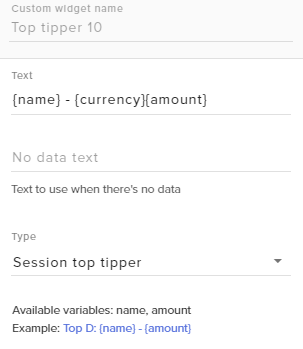
should I make a Idea request for this? Or could this be treated as a "bug" 😛
serene granite
an idea 😃
lament blade
Issue fixed by wiping obs of my harddrive and reinstalling it from the webpage exe setup
 round geyser
I have no idea where to put this, but it might be important to know what when i try to get to either the terms or privacy policy, i get greeted with this
weary mist
Thanks!
round geyser
Any ETA on when i'd be able to get to them? I'd like to have a read through them.
weary mist
@round geyser Not sure, this is a recent issue. I sent it over, so hopefully very soon.
round geyser
Gotcha
weary mist
@round geyser im being told if you go to the home page, then click on the links at the bottom, it works
its just direct links that are scuffed
I can confirm, worked for me
round geyser
Gotcha. From the panel itsself it sent me to the borked pages.
 misty wagon
There is a way around it. If you goto Home and then click on it, it loads @round geyser
lament blade
hi there. Everything is blank on streamelements but the help button. What can i do. Already did the refresh - ctrl+shift+R
round geyser
I noticed. Just wanted to make sure you guys knew that there's something strange going on @misty wagon
weary mist
@lament blade one second, let me grab the fix list. ARe you in chrome? orrr
serene granite
@lament blade
please do the following when looking at the tab of our dashboard:
Click F12,
Go to the Application tab
Go to Clear storage
Find the Clear Site Data button and click it
coral lava
how can i change my profile photo?
weary mist
ty
 halcyon depot
When my viewers try to request music this shows up: StreamElements: @AirCrescent, could not add song: internal server error... what is happening
weary mist
@coral lava let me get the instructions for that, normally it should pull your twitch photo
@halcyon depot I have several reports of this, can you send me the youtube link and the usernames that are having this issue?
lament blade
Still not working after the F12 + Clear Site Data. Everything is still blank
halcyon depot
@weary mist well everyone in my stream besides the mods, and every song
 ripe herald
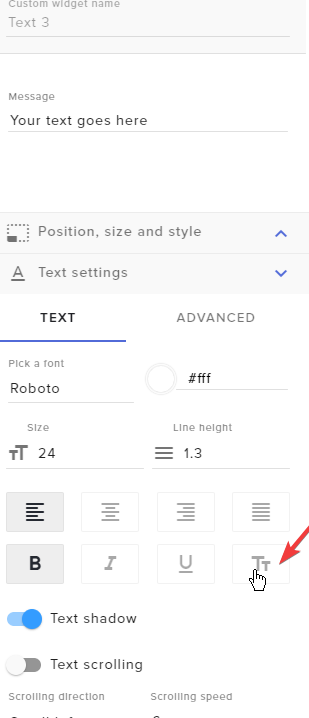
@turbid needle you wanna change on overlay text ot
coral lava
after 30 mins of screwing with my alerts to get them to match what they were on stream labs i find theres an import thing lol
lament blade
Still not working after the F12 + Clear Site Data. Everything is still blank. And yes, im am using chrome
 whole elm
same here
turbid needle
@ripe herald Yes, is there any way to change all of the text wth my name
whole elm
page is white
ripe herald
@turbid needle https://i.imgur.com/PziAZ81.png
 green quail
Hello! My Streamelements bot is not accumulating points for my viewer since this morning. When I do the command "Bonus all 200" for example, it give only the bonus to 2 users. Thank you!
weary mist
@green quail that indicates it is an issue with pulling viewer lists from twitch 😦
twitch is only giving us those 2 viewers that obtained points
round geyser
I'll hook in here quickly for you @weary mist . It seems to be a problem across the board on twitch today that the userlist is broken.
weary mist
@coral lava go to www.streamelements.com/your-username, then click your profile picture 😃
@round geyser ❤
green quail
@weary mist Ok, you know about this. That's good for me. I'll calm down my viewers. 😃
weary mist
you can give points directly to them, if you don't have too many people. If you have a lot, enlist a mod xD
serene granite
please also tweet at https://twitter.com/TwitchSupport

Official support account of @Twitch. Read this! http://help.twitch.tv/customer/portal/articles/1210307
Tweets
18812
Followers
624804
 Twitter
lament blade
Twitter
lament blade
everything is blank....can't do anything. Please help
serene granite
they haven't acknowledged this issue yet, and its been going on for like 10 hours
(the viewerlist issue)
@lament blade what browser are you using ?
lament blade
Chrome
radiant quail
with the "latest follower" aspect of the themes, does the latest follower appear there or do i have to add something in obs to make it appear?
weary mist
@lament blade The issue is currently getting worked on as fast as possible
lament blade
ok. thank you
weary mist
@radiant quail it will appear when you get a new one
serene granite
@lament blade did you follow this https://i.imgur.com/XniwSKa.gifv
radiant quail
ok thank you
halcyon depot
@weary mist is there any way to fix it?
serene granite
@lament blade can I connect to you with teamviewer ?
lament blade
not now...about to start the stream
weary mist
@halcyon depot unknown yet, its a difficult bug to duplicate. It seems to be a user level issue from what I can tell. Working on it
halcyon depot
it was fine yesterday, it started acting up today for me
weary mist
👍
radiant quail
what about the "currently play"? how does that work? can i add full youtube playlists to the song queue?
halcyon depot
nnope
radiant quail
so i have to add each song individually?
halcyon depot
yes
weary mist
@radiant quail you can add a playlist to the backup playlist field in song request settings
this will pull in 200 songs from the list
and will play when you don't have a song request
halcyon depot
really?
radiant quail
okay thanks
weary mist
it only works for requested songs at the moment, but it will pull data from the backup list as soon as we get youtue integration up and running
sorry, half read, lol. busy ass day today
 native cedar
I'm trying to set up a timer that makes a comment about the last chatter every x number of lines but neither ${user} nor ${sender} seem to work in timers
weary mist
correct. both of those variables need a the user/sender provided. we don't really have a last chatter variable, though we have a random chatter one
native cedar
i was hoping it would pick up the sender of whatever message triggered the timer 😦
i guess i can use random
weary mist
it would be cool to have a Lastchatter variable though 🤔
lament blade
this message appeared on my stream chat during a songrequest: @John_Snow88, could not add song: internal server error
weary mist
@lament blade yeah, we are looking into this issue
native cedar
thanks for the help @weary mist and I'll keep an eye out for ${last.chatter} or something similar in the future 😃
weary mist
👍
coral lava
is there someone who can pop onto my stream for a second so i can ask a question with visual so its easy to explain?
whole elm
@serene granite I have this same problem
https://i.gyazo.com/ad4617e3ccc9f55a005234e96751605a.png
 weary mist
at the moment, Spotify denied us dev access, and refuse to talk to us
weary mist
we are trying to track them down at the CES conference in vegas, but thats the best shot we have to get integration right now
halcyon depot
that doesn't sound creepy, but good luck
weary mist
lol
radiant quail
okay well i truely hope it works as this would be a great addition
native cedar
ah re: the Spotify question, I wonder if you could do a similar integration with Pandora
weary mist
🤔
they do have a spotify esk feature now
ok, I have to run and grab food or else I won't ever eat today, brb
 serene granite
@whole elm what browser are you using ?
halcyon depot
restart your pc
whole elm
chrome
serene granite
Please click F12 when looking at our site and follow this https://i.imgur.com/XniwSKa.gifv
native cedar
have you tried turning it off and back on again?
 opal torrent
Is there a way to duplicate the text font , color to a widget text
like total followers for example
whole elm
@serene granite ok its work ty ❤
coral lava
is there a way to use custom fonts in the stream labels widgets?
opal torrent
^^
ripe herald
@coral lava we support only google font currently https://fonts.google.com/
 coral lava
rip feelsbadman
lament blade
radiant quail
- how do i start streaming on twitch? 2) how do i start streaming on twitch with SE
tight harness
Youtube streaming support is coming, but you can use OBS to stream on Twitch 👍
 short cape
Is there a undo function in the overlay editor?
tight harness
Not yet, but it's on the ideas board
short cape
👌
lament blade
 round halo
my overlay isnt showing in obs
 soft heart
im pretty sure obs can be used to stream on youtube as well
weary mist
it can @soft heart
tight harness
@round halo Go to the properties of the overlay browser source in OBS and click Refresh cache of current page
lament blade
weary mist
If that doesn't work, go to %appdata%, then obs-studio, then plugin-config, then delete the obs-broswer folder @round halo
radiant quail
i know i need to use obs XD what i mean is once i click "start streaming" on obs what do i need to do on twitch?
tight harness
Be entertaining
lament blade
soft heart
@tight harness lol
soft heart
^^
weary mist

 pliant hound
suport / comedy channel
radiant quail
-_-
weary mist
we provide memes right alongside support 
radiant quail
basically what im saying is once i press start streaming on obs does that mean i am now live on twitch?
soft heart
yes
tight harness
I'm not sure what else you want to hear? You need to do something, why not try being entertaining? Seems like a good place to start to me 
soft heart
if ur stream key is set up, then u are live when u hit the start streaming button
lament blade
I mean, you do need to fill in your settings to go live
The obs isnt automatically connected to your Twitch account
soft heart
^
tight harness
I generally find that making a nice, warm cup of tea helps
 upper steeple
@tight harness tea is amazing!
tight harness

upper steeple

turbid needle
When i change the position of something in an overlay nothing happens
radiant quail
stream key ... where do i find this?
turbid needle
Twitch dashboard
tight harness
Twitch Dashboard > Settings > Stream Key
 empty solar
sooo uh whats with stream elements page just not loading? i get a white screen and the help button in the corner and thats it (web page that is)
radiant quail
thank you @tight harness i knew you would provide support somewhere along the line XD
tight harness
Yeah, sorry I was just kidding because it was a vague question 😄
turbid needle
Why is it impossible to move stuff from the panel to the left in the overlay editor?
tight harness
Move it how?
empty solar
my dashboard is just a white screen right now.... joy
tight harness
@empty solar A potential fix is to clear your cache and cookies in your browser settings and then reload the website by using Ctrl + Shift + R. This has worked for the majority of people
radiant quail
okay i have entered my stream key, now what? just click start streaming?
turbid needle
Yes
radiant quail
okay thanks
upper steeple
is there a way to change what the current song widget says when there is no song playing?
upper steeple
yeah
tight harness
Not a thing but could be an idea
upper steeple
got it onward to the idea board
turbid needle
I think i successfully fixed the thing by hand
tight harness
Did you figure out why it wouldn't let you?
turbid needle
No
tight harness
🤔
lament blade
 jolly flame
Anyone else got people not correctly receiving points after x amount of time? My viewers are saying they aren't getting any atm
lament blade
@jolly flame Part the bot, log out and then log back in and add the bot back to your channel 😄
 ocean breach
Im using xplit but when i use streamelemts overlay as a browsersource it doesnt load for like 10 seconds after i switch the scene
jolly flame
Thanks Alice 😃
lament blade
Np 
ocean breach
Anyone have an answer? 😄 x
 clever mango
@jolly flame twitch chat userlists are having issues
tight harness
@ocean breach That'll be because it's essentially loading a webpage, does xsplit have any scene transition options?
clever mango
we use those userlists to award points
ocean breach
I will take a look thanks
tight harness
No problem 😃
tight harness
I know OBS allows you to fade transition or preload scenes, I was curious if xsplit also offered that 😃
clever mango
@ebon forum has a solution for this I believe
halcyon depot
any word on the song request bug
 ebon forum
Xsplit can do it without transition, but it has transitions right above the scene collection if needed
ebon forum
it has animated transitions
lament blade
There are animated and non animated overlays 😄
tight harness
Best of both worlds 
lament blade

ebon forum
deutsch geht aber auch
 native horizon
ja habe ja den i9 mit 12 kernen und jedes overlkay mit animation von hier bringt den cpu komischerweise auf 99 prozent auslastung
😄
ebon forum
du hast ALLE animierten overlays auf ein mal geladen. passiert vielen. was nutzt du, OBS oder Xsplit?
whole elm
i cant reset all time leaderboard Error: Could not reset leaderboard!
ebon forum
bei OBS einfach "shutdown source when not visible" bei jedem browser source anklicken
ebon forum
lul
serene granite
wonders if that last word is an klicken, or ank licken
native horizon
ok danke cry
lament blade
@whole elm It was fixed on the beta site, and now it's currently being tested
whole elm
ok
halcyon depot
@lament blade do you know when the song request bug will be fixed
tight harness
Which one? 🤔
lament blade
ebon forum
teste das mal, wenn du weitere hilfe brauchst, sag bescheid 😃 @sacred obsidian Ostrolek#5469
argh discord
halcyon depot
@tight harness could not add song: Internal server error that one
ebon forum
jap das ist es
native horizon
ok 😄
ebon forum
sonst laufen alle overlays gleichzeitig, machen krach und fressen deine CPU
native horizon
cry steht das angebot zur dreamhack noch ?
also muss ich das bei jeder szene mache ?
ebon forum
bei jedem browser source
native horizon
ok
ebon forum
und dreamhack - bin da, klar
native horizon
cool
ebon forum
twitter ist hier im profil, adde mich da und einfach hauen, ich lese das vor ort da
ebon forum
sage ich mir auch 😄
native horizon
hab 1 follower 😄
ebon forum
ich 70 oder so. nu geh das testen, gugg wie die last aussieht
native horizon
ja 😄
mom
muss ich darunter auch ne hacken machen der braucht ja ewig zum laden für das overlay
ebon forum
das es länger lädt ist geplant, ansonsten rennt das immer im hintergrund mir sound, geht nicht anders
xsplit kann damit umgehen, OBS nicht
native horizon
ok aber bei xsplit ist das probleme das im stream alles doppelt zu hören ist 😄
ebon forum
dann hast du falsche einstellungen, ich kann ja mal drüberguggen
native horizon
gerne 😄
 dense egret
Hello hello! Just wondering if the internal server errors are from anything specific?
I'm on my stream and songrequests, currency, and such are not working
halcyon depot
I have told the support group about an hour ago and still no word
misty wagon
We are very sorry for the inconvenience. It's being worked on as we speak. Please be patient.
coral lava
you got rid of the boss?
pine hemlock
@coral lava boss?
coral lava
didnt u guys take over the bit boss?
pine hemlock
Nope
coral lava
hmmm im dumb please continue like nothing ever happened
pine hemlock

coral lava
you should get together with bitbossbattles.io and get connected with them as they use stream labs integration but thye have their own boss now
pine hemlock
It's on our radar. We know people would like it added
coral lava
would only need to allow them to connect to know when we get donated to through you guys it already connects to twitch for bits
or of course make your own and blow everyone out of the water we know u got it in you thanks for hearing me
weary mist
@coral lava we have our own ideas for bitboss, keep an eye out for them in the future 😉
 stuck nacelle
Is this where I go to ask for help with an isssue I'm having? lol
pine hemlock
Yes
native cedar
the bot appears to not recognize subs at the moment? a lot of us are being timed out for links (allowed for subs) in Slade's chat
tight harness
@native cedar Are subs meant to be able to post links? In which case it may be for one of the other spam filters
stuck nacelle
The bot doesn't seem to be recognizing any of the chat commands even though I have it allowed for everyone. Including myself. Not sure what i did wrong
native cedar
@tight harness confirmed with streamer and mods it was for the link -- several of us are getting dinged for it and we should not be
serene granite
@stuck nacelle please try
- On the dashboard PArt Channel
- Log out
- Log in
- Join Channel
pine hemlock
Did this just start? It could be related to twitch dying
weary mist
@native cedar viewer lists are having major issues right now, and that is how the bot gets sub information
native cedar
got it
weary mist
If you ever look in the IRC channel for twitch, all subs have a % sign on their name
native cedar
we were hypothesizing in chat that it was based on badges, but some of us had our badges displaying at the time
i'll relay that info, you're looking for halfop status then?
weary mist
yeah, badges are totally unlinked.
stuck nacelle
@serene granite Have done that numerous times. Is it based on the twitch issues maybe?
misty sparrow
i wana reward my viewers for watching, however i want to reset everyones hours watched so everybody starts from zero today, is that possible?
native cedar
@stuck nacelle are the non-working commands limited to subs and/or mods?
clever mango
@misty sparrow watchtime cannot be reset at this time
stuck nacelle
@native cedar No, they're for everyone. Like the !points, and some of the custom commands. I've made sure that it's allowed for everyone
native cedar
what's your twitch name? I'm not affiliated with StreamElements but I can at least help you narrow it down so you know specifically what to ask about in here
stuck nacelle
Also, no one is getting the loyalty points for wahtever reason. Tynkre is the twitch name as well
native cedar
well the bot is present so that's a start
clever mango
Twitch chat userlists are broken. This breaks many bot features
weary mist
@stuck nacelle twitch is having issues with viewer lists right now
pine hemlock
Twitch is dying which is likely the cause of the issues you're experiencing
stuck nacelle
To be honest, I didn't realize there was an issue with Twitch until after I started having the issues
clever mango
At least a day now
weary mist
it just isn't obvious if you don't have anyone report an issue
clever mango
Yesterday, many streamers couldn't even go live
native cedar
huh it's not even letting me type in your chat @stuck nacelle
clever mango
Seems someone dumped their cup of coffee into the twich mainframe 
native cedar
but yeah I believe the bot won't respond to someone it doens't see in the viewer list, someone from SE can confirm
stuck nacelle
Well damn, it won't even show my dashboard anymore
native cedar
you are still live @stuck nacelle
native cedar
if people are chatting I can't see them either
i'm guessing neither can the SE bot
the only user I see in the userlist is Streamelements
Twitch is screwed right now
tight harness
Yup
stuck nacelle
Anyone know why it's breaking?
weary mist
heh
several reasons
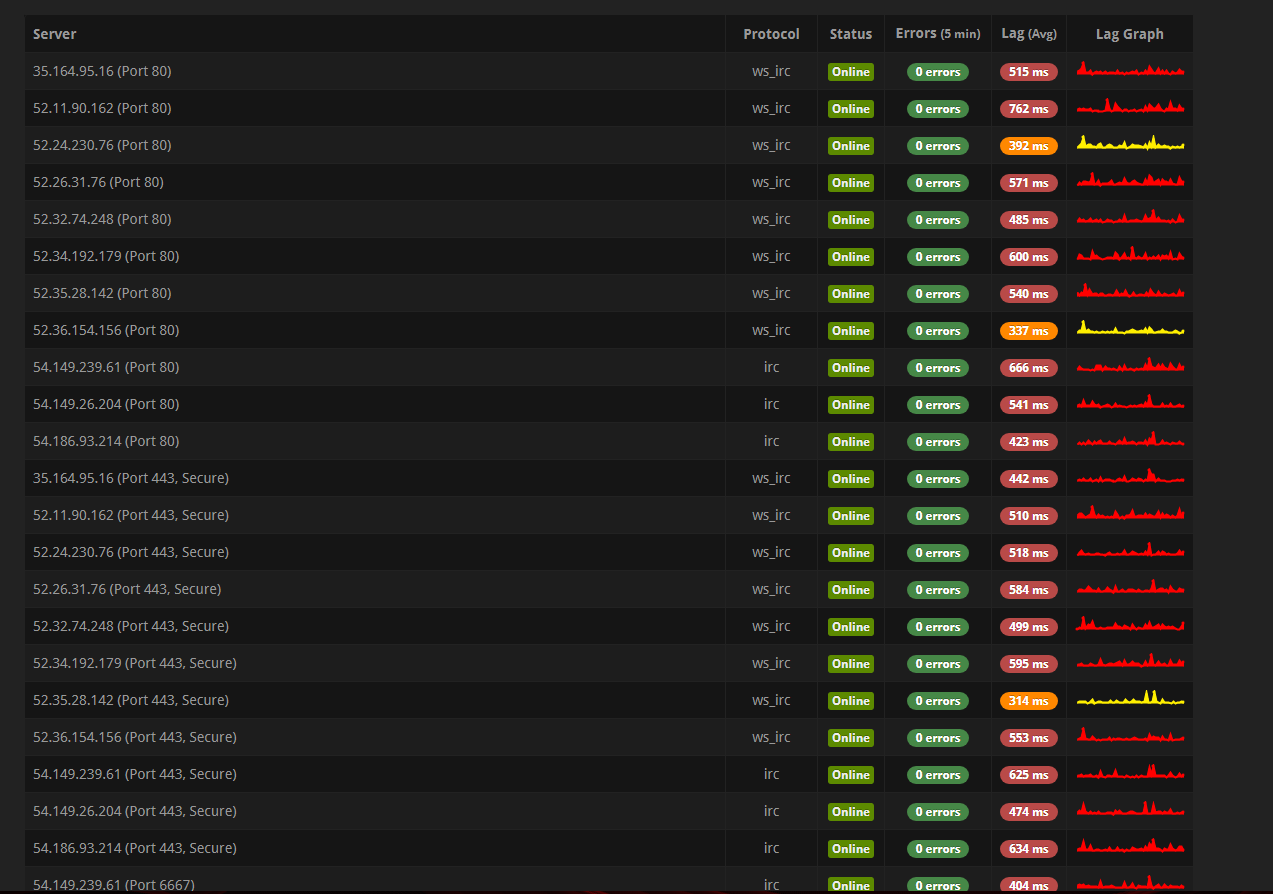
go to http://twitchstatus.com
scroll all the way down
the chat servers are overloading
native cedar
shows everything online for me but a lot of latency
stuck nacelle
But like...how xD
 stuck nacelle
Sad day. Hopefully they pop something up on Twitter or something saying what's wrong
weary mist
heh, there have been issues for a almost 12 hours, and twitch hasn't done anything yet. you could tweet them, it might help
stuck nacelle
Just the Twitch Support twitter, yeah? I don't particularly tweet at people often
weary mist
yeah
stuck nacelle
Alright guys thanks so much for the help
weary mist
👍
clever mango
 neon ore
Is there a way to remove that default beep sound for alerts? Because when I upload a sound to replace it there is that and new one -.-
weary mist
Make sure to check your variations @neon ore
subs and cheers have variations that cause the default to be over-ridden
neon ore
I have checked and still does it... Cleared all sounds and stuff for subscriber
weary mist
ok, click save for me
are you hearing the sound in OBS as well? Or have you not put the link there?
lament blade
Hello, i have problem.
weary mist
@lament blade and what problem is that?
neon ore
Oh okay I closed OBS And not longer hear it... Just the new sound
lament blade
I writting as my friend. He ahve stream at twitch now. He use the settings which give 1 point per 10 minute. Donation and cheer gives point. But vieverw for wathching didint get points. also the stream didnt show any user. only Stream Elements Mod.
weary mist
For the moment, twitch's Viewer Lists are scuffed, so we are not getting the information needed to award points 😦
There is nothing we can do until twitch fixes it
radiant quail
Hi it’s the streaming noob again .... once I start streaming will it get posted into the “sell-out” chat?
Sellout*
lament blade
Soo need wait to twitch fixes?
weary mist
@lament blade yeah
lament blade
Okay, Thanks!
weary mist
@radiant quail If you are using our bot (modded), using our tipping service, and using our overlays, then yes, I can add you to be announced in #291219887274328064
native cedar
chat issues appear to be resolved now BTW
weary mist
@native cedar they do, will see if they stick, lol
 hasty pollen
weary mist
hasty pollen
weary mist
@hasty pollen try this
Click F12,
Go to the Application tab
Go to Clear storage
Find the Clear Site Data button and click it
native cedar
in some channels, at least... Tynkre's still having issues it looks like
weary mist
we will see, im not holding out major hopes yet
native cedar
i take that back, she just had the bot rejoin and it's working now
radiant quail
Okay thanks. How do I use an overlay with obs? Sorry for all the questions I’m totally new to all this
tight harness
weary mist
Using the tipping page we provide

StreamElements
The Ultimate All in One Platform for Streamers
radiant quail
Thanks
 odd forge
Dashboard page is white with only ”help” Button visible. I have tried ctrl+shift+R. Didnt work. What may be the problem?
Oh i see someone had this in discord. Gonna try that
 nova merlin
@odd forge got a solution?
odd forge
@nova merlin yeah, i did this.
Click F12,
Go to the Application tab
Go to Clear storage
Find the Clear Site Data button and click it
Works now
tight harness
Yeah, that's the fix 😃
stuck nacelle
Should be fixed, my only issue still is people aren't gaining the loyalty from being in chat. Any ideas how to fix this?
clever mango
The only way this can be fixed is by twitch userlists updating properly
As soon as it goes back to normal and remains stable the loyalty system will be able to award every 10 minutes
we have to be patient and wait for twitch to fix their end
lament blade
is there a way, if not yet, is it developeable, to have an Item "Mod for a day/week/...", and when the guy is redeeming it, he becomes the mod role without doing anything by myself?
and also unmodding him, if it's mod over a little period
clever mango
Everything can be developed with enough time and money 😉
I created a similar idea on the board. One sec
lament blade
I assume you gonna use custom bot name > the own twitch acc, cuz making someone Mod requires broadcaster rights?
clever mango

lament blade
My viewers like the loyalty system a lot, especially the sound effects 😄 sadly you can't see sound effect redemptions .. (in activity feed/..)
clever mango
I've requested that on the board as well I believe
lament blade
i think i did alrdy too 
lament blade
Hey guys, i linked my twitch to the webpage and all i get is a white screen after.. can anyone help?
clever mango
@lament blade
Try this
Click F12,
Go to the Application tab
Go to Clear storage
Find the Clear Site Data button and click it
 tawny pivot
Actually just try giving it a quick refresh.
clever mango
or that 😃
 maiden coyote
the white screen we found out earlyer today was due to cookies aswell so probs a normal refresh wont fix it at least it didnt with me
 strange lichen
hello
 trim cloud
Just wanted to report a quick bug with the counter overlay element. It's not possible for users to hide this element on their streams after the counter has finished. Going to the overlay editor, hiding it, and saving it does hide it, but only for 1 second. It seems that once the timer reaches 0, the 1 second interval that updates the element keeps firing, and updating the display. That interval needs to be unset once the timer reaches 0, and only start again if a user defines a new timer value.
strange lichen
I started using the new overlay feature and now my stream emotes are lagging and alerts are behind and lagging
tight harness
@strange lichen Did you tick the option 'shutdown source when not visible' for each and every browser source you added to OBS?
clever mango
@trim cloud Are you talking about the countdown widget? Does your widget countdown a specific amount of time or to a specific time/date? I'm trying to re-create this problem.
trim cloud
yes, the countdown widget
and the bug is for both options (setting a date, or setting a hⓂs)
the issue is not visible in the editor, only in the external overlay when viewed in a browser/obs/etc
so to hide the countdown widget I have to first hide it in Stream Elements, then reload my overlay, thus purging the JS interval that is updating the element
weary mist
Temp fix could be to have the countdown on its own overlay, so you can just hide it (shutdown) when not in use
makes it easier as you can hotkey it in obs
trim cloud
My goal is just to report it so it can be fixed eventually. It makes that widget unuseable.
clever mango
Thanks for the report
 fluid basin
Tzalman909 on twitch is now using StreamElements. I manage his stuff sometimes and set up his SE for him. Can he be added to #291219887274328064 ? thank you
 untold sorrel
Hey guys, Im seeing on my Loyalty Points that my viewers aren't getting any points but a bot (Faegwent) is, any ideas why?
clever mango
@fluid basin have him /mod streamelements in chat and I'll add him
weary mist
@untold sorrel At the moment, there are issues with the twitch api for viewers, so we are only getting 2 viewers in just about every channel
untold sorrel
I figure'd that was the case
fluid basin
will do
untold sorrel
Since Twitch seemed to fall apart about 5 minutes into my stream
weary mist
if you do a !bonus all 1, you can use it as a test to see the number of viewers we pull
last time I tried it, only got 2, lol
but you can use the command to give people points directly if you want
untold sorrel
3 lol
Out of 8
Makes sense
lol the 3 people it pulled, myself and my 2 bots
Problem solved! Thanks @weary mist
weary mist
no problem 😃
fluid basin
@clever mango Done
Our main channel on Twitch, CoalitionGamingCrew also uses streamelements for everything. I believe we've also already did /mod streamelements. Can you do our account too please?
halcyon depot
@weary mist when will the song request bug be fixed?
 weary mist
@halcyon depot here is a fix, if you want. But it removes the rules for the moment. Change this to everyone
clever mango
both will be promoted now @fluid basin 🚀
clever mango
are you asking for the fix?
 slim cairn
yes
clever mango
In the image that scalper posted ⤴ change that field to Everyone
this is a temporary fix and can be changed back later
slim cairn
oh shouldve just looked up
fluid basin
You the man! Thanks
fluid basin
is there a way to easily change a 16:9 cambox overlay to 4:3?
i have the "blue electric in game" overlay setup, but its up with a 16:9 cambox overlay
pine hemlock
Our designer @ripe herald may have one that fits but I believe that's an old overlay prior to her designing
Most overlays have extra graphics, that one doesn't
tight harness
Not off the top of my head 😛
fluid basin
the images for blue electric and purple speck and a few of those, the thumbnails show a 4:3 cam box overlay but the actual overlay is a 16:9 box
i keep gettin tricked
pine hemlock
I know the new one that's a super theme has two cam images
But it's animated I believe
fluid basin
:/
 lofty tundra
i cant edit commands using !editcom with stream elements in chat. anyone else have this problem?
tight harness
The command is !command edit and !command options that's why 😄
pine hemlock
lament blade
 weak nebula
Hello i need help 😄
soft heart
hello
weak nebula
Today I stream and the points system for time did not the give points
could you help me with that?
please.
tight harness
@KeppBroccoli#2567 The Twitch chat servers were having issues today, this is why
weak nebula
@tight harness Oh okay , thanks for the help , good nigth n.n
tight harness
Good night 
fluid basin
hi @ripe herald how goes it? Cuda pointed me your way in search of a 4:3 cambox for the "blue electric" overlay. Would you happen to have this image file and are able to share it so i can import into my overlay for use by any chance? It would be greatly appreciated. Thank you.
tight harness
You mentioned a command which doesn't exist
I told you what the commands actually were
 hallow elbow
While adjusting my resolution on my overlay, it is now all gone...
Any ideas?
lament blade
On the website? @hallow elbow
hallow elbow
I went into my stream elements overlay editor, and it's all gone! It's so weird.
pine hemlock
Can try logging out and log back in
hallow elbow
Also, what I was trying to fix, is that the green rectangle is so much bigger than what fits on screen on my OBS. I have to scale it all down. All of the settings are 1920 x 1080.
Yep, tried that, but it's all gone...
pine hemlock
Shouldn't just disappear. I think i've heard of this once. but it came back after a few minutes or so
hallow elbow
Hmm, well, I've since begun to rebuild... All of my images and sounds are still there so at least I don't have to reupload stuff. It was time for changes anyway. Any idea about the resolution issue? Thanks for the help by the way!!
pine hemlock
If your screen resolution is 1920x1080, your overlay should be 1920x1080 - make sure OBS in Video settings is set to 1920x1080 canvas size.
and the browser source needs to be 1920x1080 too
hallow elbow
Hmmm, my display res is actually 1920 x 1200. Should I change all of those to that?
pine hemlock
probably.
 soft egret
Does the stream have to be live for the bot's spam filter to work?
soft egret
I am trying to set up Link Protection since I have been getting a lot of link spam
but it's not working
clever mango
what is not working?
soft egret
I am posting links on another account on my Twitch channel and the links aren't being deleted by the spam filter
soft egret
Oh, thanks so much 😄
clever mango
you're welcome 
 next spruce
viewers are saying they're not obtaining any of my streamer currency...?
clever mango
twitch chat userlists aren't updating properly 😕 servers have been slow or down for a couple days now
the loyalty system relies on the chatter lists to update properly every 10 minutes
 subtle edge
How do I fix the progress on a follower goal?
pine hemlock
@subtle edge Acvitivty feed -> widget data
clever mango
@next spruce !bonus all still works luckily
lament blade
Hello. My viewers cannot make any kind of songrequest: *********, could not add song: internal server error. What is going on?
 rancid jetty
so to use song requests on stream do i need an internet window with the playlist open or is there a way to browser source it?
pine hemlock
@lament blade change this option to everyone - its a temporary fix until the devs solve the issue (users will not be restricted while this is changed, also it does not cost points)
@rancid jetty Requires the songrequest page open, or our desktop app
rancid jetty
theres a desktop app?
pine hemlock
StreamElements
The Ultimate All in One Platform for Streamers
lament blade
@pine hemlock ty
rancid jetty
welp windows defender wont let the installer run so do i need the page that i can edit settings from open or the public page open for song requests?
clever mango
The program hasn't been certified yet by microsoft yet so it is sometimes flagged but you should be able to whitelist it and install anyway
It's been in use for 6+ months and safe
You can however use the site for anything you need
 vital prairie
It seems that the {name} variable is broken on my alertbox. Replayed alerts that displayed correctly are now just showing NAME where the username should be. Please hALP.
clever mango
You are correct. It appears to only be on replayed alerts and has been noted for the devs to look into.
Sorry about that 😕
vital prairie
As long as new alerts are showing up fine, I'm cool. Just dont want viewers feeling cheated. 😃
clever mango
I'll come drop a follow and we'll see
You will be able to replay it after it's fixed 😃
new alerts are just fine
 nocturne moth
Hey guys, song request doesn't seem to be working
chat is getting an internal server error
pine hemlock
@nocturne moth scroll up some messages. There's an image I posted with an explanation
nocturne moth
thanks! saw it!
pine hemlock

 sick salmon
is there a edit for the timer when people recieve points? im on the loyalty settings and it just says the amount people get
 atomic hollow
@sick salmon no, its set to 10 minutes, you can change the amount
 idle flare
hey guys, my viewers aren't getting chips for watching.
i have it set to 10 mins 5 chips each.
 ripe slate
Hi guys, I want to test streamelements but when I log in a see only white screen (Chrome). Am I doing somethink wrong? This is happened at my desktop PC and in PC at work (Explorer)
Only works streamelements.com Dashboard, profile etc. only white screen
 tacit ridge
imported streamlabs for tips / subs. subs dont show up.
atomic hollow
@idle flare thats a twitch issue, there are no viewers list
@tacit ridge subs arent imported from streamlabs, they are from twitch
@tacit ridge what do you want to see?
@ripe slate please clear your cache and cookies
idle flare
can you maybe link me i can't find it 😦
serene granite
change this option to everyone - its a temporary fix until the devs solve the issue (users will not be restricted while this is changed, also it does not cost points)
idle flare
ok thanks
 stable aurora
Hey. I'm having a problem right now where my viewers aren't gaining loyalty points for watching. I've tried unenabling and re-enabling it and no luck.
serene granite
There was an issue with twitch viewerlists not working, so no system can see who's watching
stable aurora
ah.. i did notice that...
serene granite
ya i just came to your channel, i see you, the bot, and 2 ppl in the viewer list :/
stable aurora
yeah I've been seeing that all night
serene granite
you can give them points manually with !addpoints username points
stable aurora
thank you for your help!
ripe slate
@atomic hollow did it and not happened. Still white screen
 ancient iron
is there an issue with Song requests at the moment. all users are getting "could not add song: internal server error"
Mods are abke to request
lament blade
hi are a mod on various channels of stream here on twitch is the problem is that since yesterday users who watch the stream do not receive points like never can you help me???
atomic hollow
@lament blade this is a twitch issue, there are no viewers lists
you can give out point manually
lament blade
yes, but do you understand that people go is it comes from the stream and they are more than 200 spectators but is it a twitch or streamelement problem?
atomic hollow
twitch
look at the viewers list
its empty
the bot doesnt know he needs to give points
lament blade
ok thanks but it's a passenger or perma problem
atomic hollow
its a temp issue
serene granite
please tweet at https://twitter.com/TwitchSupport so they focus on fixing it
Official support account of @Twitch. Read this! http://help.twitch.tv/customer/portal/articles/1210307
Tweets
18814
Followers
625305
Twitter
its been going on for 24 hours now
lament blade
Ok ty



 last tangle
internal server error when doing song request?
clever mango
change this option to everyone - its a temporary fix until the devs solve the issue (users will not be restricted while this is changed, also it does not cost points)
https://cdn.discordapp.com/attachments/199460642975907840/400201290501586965/unknown-1.png


@last tangle
lofty tundra
I'm having a problem with Kappagen. I already have an overlay created in StreamElements + added to my OBS, yet i cant view the overlay in StreamElements to edit it. Instead it's opening a new Kappagen widget named "Kappagen 2". However, it still displays my original cheer cup i have already added to my OBS:
serene granite
username allinpav ? I'll take a look
serene granite
i see you have two overlays, one called "main scenes" which has kappagen and the hypecup on it, and another called "kappagen" which has just the hypecup
did you edit the cup on the mainscenes one?
it seems to have a problem loading
I think it's best to remove it and re-add the widget
lofty tundra
but by re-adding the widget, it'll delete my old settings for Kappagen?
serene granite
not for kappagen
re-add just the hypecup
do you have one overlay loaded on your OBS ?
lofty tundra
both Kappagen and HypeCup loaded on Overylay, yes
serene granite
ok, so let's get back to the problem you're having
do you have the MAIN SCENES one open in the overlay editor ?
lofty tundra
yes, i do now
serene granite
ok, save it for a second please
lofty tundra
done