#helpdesk-twitch
1 messages · Page 175 of 1
 clever mango
clever mango
clever mango
Overlays need to be added into OBS at the full resolution which by default is 1920x1080 and ☑ Shut down source when not visible. Here's a tutorial video.https://www.youtube.com/watch?v=KDvLynUqXI4&t=1s&index=2&list=PL_9rga23xIlJDyaOnO2avbss-PHm28oNs
 eager forum
ok thx lemme watcvh
@clever mango and one more question how do i get a donation link?
clever mango
From the dashboard click on Tipping and set up your tipping page
Then click open my page to get the link to your tipping page
 lament blade
@tight harness u here ?
 tight harness
Vaguely, it's 3:48 AM for me 😄
lament blade
hahah 😄 5:46 AM for me xD but yeah to the poiht
Ground control and the browser reads the SR, but it wont show the song name on my overlay 🤔
i mean the backup playlist
tight harness
Yeah it won't, that's because of the limit we have on the youtube API at the moment
Should be raised when we implement youtube gaming support
lament blade
ahh so its "normal?
tight harness
yep
lament blade
ah god to know ^^ christmas spirit did the thing xD
¨jesus the typos... sry drunk af
tight harness

lament blade
NNnuuuu dun laaf 

but yh gn Leg... Thx 4 help! thx a ton ^^
good night dont let the bug bite
 south tundra
hellooo
hey staff is there a way to search up a person to see how much they have donated?
clever mango
eager forum
@clever mango Hey do u know what the best settings are for a i5 4690k and 1060?
clever mango
There are lot of factors that go into streaming settings
so it's hard to give a "best" settings
eager forum
do u have preferred settings
clever mango
1060 3gb or 6gb?
eager forum
3
 carmine nexus
Hey guys, need a little help with streamelement
clever mango
If you're having encoding overload, lower your output resolution some. After that, try increasing your cpu preset to superfast. Finally you can try to use NVENC encoder which uses the GPU's encoder rather than your CPU @eager forum
carmine nexus
I'm building my own overlay with video but what video formats are accepted?
clever mango
.webm
carmine nexus
]thanks
clever mango
no problem
 copper reef
Hey i use the overlays in my stream! Could i be apart of the sell out stuff?
 misty wagon
If you have bot+overlay+tipping activated, you can
copper reef
I have Bot and Overlay i use Streamlabs for tipping if thats ok?
 stuck hamlet
no
you have to be using us for all 3
@sharp talon Chatstats is going to be reworked soon
 sharp talon
so I just ignore it for now? 
copper reef
ok thank you
stuck hamlet
unfortunately yes Azore
 ionic flare
Hi again @stuck hamlet and also will there ever be a way for mods to edit commands without chat? like a dashboard
stuck hamlet
there is a way.
ionic flare
there is? 🤔
stuck hamlet

StreamElements
The Ultimate All in One Platform for Streamers
 stuck hamlet
You go to the module section of the site and turn them on there
 polar cargo
thks 😄
 dark fractal
Hello I'm Lasbra, I'm looking for some help as I am gonna start doing Youtube with my twitch videoes! I found out you could download a virtual sound mixer called Voimeeter Banana, so I can get my sounds on different tracks. Now I'm looking for help how to do it - I want my microphone - Music (google chrome, SR, youtube music) - Ingame sounds on different channels. So I can cut out the music but still have the ingame sounds! Does anybody know how to? I know it's not streamelements related, but does anybody know?
 weary mist
@dark fractal I actually use Audio Router to route the music to a speaker that I can't hear, and have OBS pick up that speaker
you can mix it with voice meter's virtual audio cables, but I just barely managed to figure that much out
dark fractal
@weary mist but I need to hear it myself while im streaming, but just be able to take it out on my video editer?
stuck hamlet
the only logical way i see you being able to record without music, and stream with music, is having 2 obs' open
one to stream, one to record
dark fractal
There should be a way to have different audio channels through voicemeeter i'm pretty sure
ionic flare
my timezone is eastern standard time, how would I make a time to show my time? like ${time.US/???} eastern?
stuck hamlet
Doesn't matter what Voice Meter does.
If it's going through your stream, there is no way to record something different.
${time.EST} @ionic flare
dark fractal
Yes if i could put it on a different virtual cable, then i could listen to it on audio track 4, ingame sounds track 3, 2 track 2, everything track 1 (track 1 is where i stream from)
ionic flare
thanks 😄
stuck hamlet
Does OBS record on different tracks, or does it compile all sounds into one track?
Cause im pretty sure it does everything into one, no matter the amount of input tracks
dark fractal
i mean here i have the mic, and music/game but i want to exclude music and game from eachother
stuck hamlet
what are you recording with
dark fractal
OBS
ionic flare
I'm asumming watchtime is still linked to points?
stuck hamlet
yes
copper reef
OK ive exported my streamlabs fallow alerts and sounds into stream elements and also set up tipping. I have all 3 set up now @stuck hamlet
stuck hamlet
your twitch panel is still streamlabs
copper reef
oops just switch XD now im good
ionic flare
is there a reason why roulette is showing in my commands list with loyalty and roulette disabled?
stuck hamlet
visual bug?
 waxen spruce
hello
i have a question
people are trying to donate to me
and it says it is pending
is that something to do with my paypal or stream elements?
copper reef
i believe it should be paypal's end it takes 2 days normally to get money into paypal
ionic flare
another viewer can see it also.
copper reef
huh
ionic flare
but it doesnt work.
waxen spruce
on elements
waxen spruce
its not on
waxen spruce
stuck hamlet
that's not our site?
what
You bought a dollar worth of bits from Twitch.
We do not sell anything..
waxen spruce
oh they told me stream elements
then they sent me this
any ideas of how to fix it?
stuck hamlet
who told you that..?
waxen spruce
my viewer
stuck hamlet
im so confused.
waxen spruce
my viewer tried to donate
then it wouldnt let them
and they said it was stream elements
i didnt know
so i told yall
stuck hamlet
That would be a twitch issue. we are not responsible for bit purchases.
stuck hamlet
👍
eager forum
anyone on?
 atomic hollow
@eager forum talk to me
eager forum
@atomic hollow do u know why ppl can hear through my headset
atomic hollow
can or cant?
eager forum
@atomic hollow can
atomic hollow
you have to disable that on OBS
eager forum
@atomic hollow do u know where i go to disable it
 serene basin
Hey, can anyone help me? Snow, and the alertbox not working after I set up the overlay
I copypastad the url, to a browser souce, edited to 1920x1080, I put it to the top of my scene, and only the last follower shows up and changes
atomic hollow
@eager forum dont have OBS here, can check later today
@serene basin is it an overlay just with an alertbox and last follower widget?
serene basin
I made an overlay with alertbox,snow,and latest follower
But I fixed myself, I forgot to toggle visibility back 😄
atomic hollow
@serene basin 
 hexed geode
<@&189392204467404800> <@&382267076632379392> got a question about the alerts if someone can help
im in voice support
atomic hollow
cant voice, can write
hexed geode
Okay. Well im trying to set up the alert box. and set the text up for subs . and there is like a huge gap between the notification and the optional message
i cant see where to adjust it
atomic hollow
the message of the user subbing?
hexed geode
yes
hexed geode
not gap time wise. like I have the notification saying "user has subbed"
and you know the optional message they can put?
its like wayyyyy below
hexed geode
but will my selected image still show?
atomic hollow
yes
stuck hamlet
in the advance tab
stuck hamlet
padding bottom?
hexed geode
tried. it wont move up
stuck hamlet
can you show me your alert right now?
hexed geode
ill try and gyazo it
i have teamviewer if you have that

i want the message to end up on the box. i plan on reducing the font when i can get the position right
stuck hamlet
 serene basin
In streamelements we cant do chat box right?
 hexed geode
I am
serene basin
Oh really
stuck hamlet
Are you sure mach, cause it seems like you're using the third one
 stuck hamlet
Are you using OBS Studio? @snow talon
 snow talon
yes
stuck hamlet
what about your default alert mach?
hexed geode
they are all the same
stuck hamlet
Refresh browser cache in the properties @snow talon
snow talon
ok, let me try
stuck hamlet
save your overlay @hexed geode
snow talon
@stuck hamlet thx a lot, it worked!
 hexed geode
okay
worst case scenario I am just gonna have to deal with it lol. was just curious if i was doing something wrong
stuck hamlet
can you send me the image?
hexed geode
that im using?
stuck hamlet
mhm
stuck hamlet
there's random blank area at the bottom
hexed geode
i can delete those really quick
but it doesnt really change why i cant move the text up
stuck hamlet
i know, but this will help a bit
im currently having internet issues, so i cant look into it much
hexed geode
okay
stuck hamlet
brb
hexed geode
holy shit i figured it out
stuck hamlet

dark fractal
Hey why can't i add a video (movie clip) to streamelements? When I try to put that as the donation video
hexed geode
So if anyone else ever runs into this problem again, here is how i fixed it: Adjust the primary text to desidred height. THEN go to Advanced options of the PRIMARY text, NOT the Secondary and use a negative value (i.e. -40 for mine) on the padding to drag the message (Secondary Text) up to the alert.
stuck hamlet
you're a smart boy mach
dark fractal
what is webms?
dark fractal
https://www.youtube.com/watch?v=z3edZPjQtCQ i mean i need this video, already got the sound on, but I can't add the video

LETS SUBSCRIBE FOR SUPPORT :) Grow ID : c7sky Main World : c7sky Find me on Social Media : Instagram : @c7sky Contact person : c7sky.gaming@gmail.com
stuck hamlet
that video needs to be in WEBM format.
dark fractal
how the fuck to get webm format 😄
dark fractal
oh
dark fractal
@stuck hamlet what if i want it to be 100 dollars +?
 serene nimbus
hello support ❤
need some help with chat cmd
so my !rules are quite long but all in one line
how can I input "enter"
new line 😉
 pine hemlock
You can't @serene nimbus
serene nimbus
😭
I need to find some thing else, streamelements is not working... sarcastic joke 😄
still love you guys 😉
best support ewah!
stuck hamlet
then make a variaton for 100+ @dark fractal
 winter laurel
Hi. Is there a way to rename the bot? I found this topic, where support staff is talking about beta for that feature, but I can't find hestic on this discord server 😃 https://streamelements.helprace.com/i282-modify-the-bot-s-twitch-name#show_add_comment_form_28129
winter laurel
i see, thanks!
 rustic ether
Hey. Just checking, SE can't do conditionals in chat commands, right? E.g. if this then something else another thing?
 quick niche
HI! I need help, if i buy a sound effect, how can it be listened on stream?
tight harness
@rustic ether Don't believe so
@quick niche The streamer needs to have the Store Redemption widget in their overlay
rustic ether
Thanks. I was hoping to be able to set up something like a stream boss using points, but that doesn't seem to be possible. ;-;
tight harness
Ahh I see
quick niche
NICEUH! thx
tight harness
No problem
rustic ether
I'm looking through https://support.streamelements.com/hc/en-us/articles/115000373852-Chat-Commands- rn, and found the !editcounter commands. What does that do?
I can't even find anything about what the counter is...
tight harness
It edits the counter for a certain command, say you have a command called !apples, every time !apples is used the counter for that command goes up one, you can edit the counter to basically change it or reset it
rustic ether
Oh. So it basically just counts how many times a command is called?
tight harness
We added it so people would have a way to reset counters without having to remake the command mainly
Yes
rustic ether
Ah. Okay, thanks
tight harness
No problem 😃
 spark crag
hello there. Why can i not enter a URL link in my OBS studio when i make a new source?
tight harness
Can't see any reason why you wouldn't be able to 🤔
spark crag
there is no option somehow
tight harness
Try following this tutorial: https://www.youtube.com/watch?v=KDvLynUqXI4
tight harness
Are you using OBS Classic?
rustic ether
Last question I swear XD This is the current SE API docs? https://dev.streamelements.com
tight harness
Yes
spark crag
it says obs studio for me
tight harness
I believe that when you install OBS Studio is gives you the option to include browser source as a plugin with your installation, I wonder if you unticked it 🤔
It's rather important
tight harness
Well you don't have browser sources so it seems like you didn't
@spark crag This should help: https://obsproject.com/forum/resources/browser-plugin.115/
spark crag
you are right i unclicked the option during installation. I honestly dont know why
tight harness
Oh well, at least you can fix it 😃
 raven solar
Is there a way to completely reset currency leaderboard for all time? I have 41,000+ users registered and I want to clear it out 
tight harness
@raven solar We did add it recently so you could remove people from the all-time leaderboard but it didn't seem to be saving the fact that they were removed strangely enough so it needs to be looked into by the devs
 ionic holly
i wanna be a #291219887274328064 pls
tight harness
@ionic holly Could you update your Discord to be linked to your new Twitch name so I can check you've met the requirements? 😃
ionic holly
DONE
raven solar
@tight harness 
tight harness
@ionic holly You need to use our tipping page, overlay manager and bot, I can see that you're using the bot at least, your tipping page is still StreamLabs however
ionic holly
alright ill get that sorted. thanks
tight harness
😃
dark fractal
@tight harness what can you do as a sellout? i use all those things
tight harness
@dark fractal It means that your channel link gets automatically posted in the #291219887274328064 channel whenever you go live 😃
Want me to add you to the channel?
tight harness
Done! 👍
dark fractal
The layout thingy is pretty good
But do you know why it says i have 2 more subs than i origianally have?
tight harness
Ahh yes, this is because the twitch dashboard hides some of your free subs, whereas the Twitch API still counts them
So when we pull the number from the Twitch API they give us the number which includes the free subs
 barren pawn
Anyway I can speak with one of the stream elements staff in private? Please??
tight harness
@barren pawn Want to DM me with what you want to say?
tight harness
Do you use the bot, overlay manager and tipping page?
 sudden tiger
yes
tight harness
Well the Twitch linked to your Discord still uses the StreamLabs donation link so you don't 😛
tight harness
Needs to be in your panels on Twitch 😃
sudden tiger
there I added it to the panels, its at the bottom
Ill try to add a image later when I start streaming GTA
tight harness
@sudden tiger I've set it up so it'll post in the channel for you
sudden tiger
ok
 upper steeple
someone just hosted me and i have it set for them to get 250 points when they host and they still have 0
tight harness
Did you have the activity feed open? If so, leave it a few more minutes and check their points again
If it's still not doing it then try re-joining the bot
upper steeple
yes i am live righ tnow
they hosted 6 minutes ago and still nothing
they got the 30 that they earn every 10 minutes but not the 250 for hosting
tight harness
Did you get the host alert?
upper steeple
yes
tight harness
Did you try rejoining the bot?
upper steeple
yes still not points have been given
tight harness
Testing it now
tight harness
Click Launch
tight harness
Where it asks for a URL when you add a Browser Source in OBS
 inland horizon
okay thanks
tight harness
No problem
inland horizon
when i do that all it comes up with is this
but ive connected my twitch already
tight harness
@inland horizon Follow this tutorial: https://www.youtube.com/watch?v=KDvLynUqXI4 - it's a step by step guide
upper steeple
@tight harness any luck?
tight harness
Trying to get somebody from my community to host me to test it, they're lazy 😅
upper steeple
okay
tight harness
Right, they did it
 frigid kayak
Hey! Hope everyone is having a good Holiday season! So I created/working on an alert in After Effects. You can see the WIP here: https://www.youtube.com/watch?v=owiWdXDmGFk&feature=youtu.be I wanted to test it in the Editor, but I ran into an issue of not knowing what kinda of Video file format I can Render that will make it uploadable. I was thinking I could take it back into Photoshop and Render it out as a Gif, but I'm worried it won't be smooth and will have those artifacts around the edges. Any suggestions?
 tight harness
@upper steeple It seems I get the same result, asking the others about it 🤔
clever mango
@frigid kayak video format is .webm 😁
 tame spindle
Any way I could get the image used in the green flare super theme for subscriptions in the alertbox? The gift sub alert is broken
upper steeple
@tight harness okay
frigid kayak
@clever mango Thank you SO MUCH! I'll give that a try! ❤
tame spindle
Guess not. Guess I'll see if Blue Flare is working properly.
tight harness
@tame spindle Do you not remember who to ask these questions to? 😃
tame spindle
@ripe herald Is there any way I could get the image used in the green flare super theme for subscriptions in the alertbox? The gift sub alert is broken in the theme, and I don't have any way of fixing it without that image
Looks like it's broken on Blue Flare too. 
 grizzled sail
Yesterday I encountered an issue where OBS was utilizing 50+% of my CPU and I'm thinking my overlays may be the issue. What ways can I reduce CPU usage from my SE overlays? Assuming that is (part) of the problem
tight harness
@grizzled sail Make sure that you tick 'shutdown source when not visible' in the properties of each and every overlay
grizzled sail
will lowering fps and refreshing cache also help at all?
tight harness
Lowering FPS should
grizzled sail
👍 will do that, thank you
 indigo bone
so i was gettign 2x follow alert sounds, muted the one in the overlay. now getting 1 alert sound. MY question is where can it be coming from ?
tight harness
Either OBS by having multiple overlays open by not ticking the shutdown source when not visible option in the browser source properties or by having the overlay manager open and not muted in the background
 crimson yew
How do I get the StreamElements bot to post how many I have in chat and my uptime without me having to manually post the uptime?
 eternal venture
I also need some help
indigo bone
@tight harness having the hypercup up wouldnt do anything for this ?
tight harness
@crimson yew The variable for uptime is listed in the page of variables, it's ${uptime}
@eternal venture What do you need help with?
eternal venture
I have the song que to work but my chat cant do !sr (link). What could the problem be?
indigo bone
@crimson yew you can prob put it on a timer
crimson yew
I don't think I can/
tame spindle
Quick question about the overlay: When do the 'session' stats reset? Is there something we have to hit on the ground control, or does it detect when our stream starts and ends and count that as one session?
tight harness
@eternal venture !sr <link> should work fine, links and video IDs are the only way to request songs currently and !sr is an alias of !songrequest by default
Check everything's enabled in your song request settings
@tame spindle Session is the current stream
eternal venture
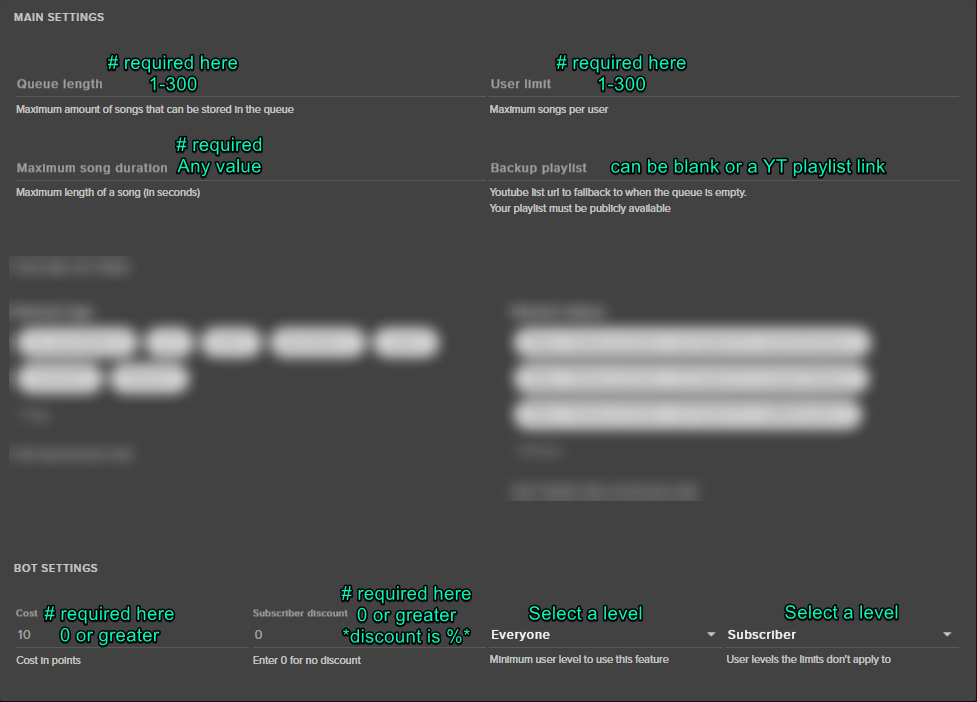
@tight harness the settings of the song request are all on but when i go to commands, !songrequest is turned off and I can't turn it on
indigo bone
hm does running in studio mode mess up alerts on obs ?
tight harness
You can't turn the command on/off in commands
clever mango
@crimson yew you can add any variable to timers
tight harness
It shows as greyed out because the settings are all controlled via the song request page
crimson yew
!song displays the current song playing, too, right?
eternal venture
 clever mango
${channel.viewers} and ${uptime} can be added to a timer
eternal venture
@tight harness are these settings good?
clever mango
@crimson yew If it's playing from the song request queue yes
crimson yew
Alrighty.
eternal venture
@tight harness It says the command is on in the song que settings but it doesnt work in chat
 eternal venture
do i have to have media share on?
tight harness
Nope
eternal venture
i have to have recent events open right?
tight harness
That's for host alerts
tame spindle
Was just testing the bit cup. It doesn't splash very well 😦
Emulated filling a cup with 1 bit bits, then dropped a 100 in it. It didn't splash. So I dropped a 1000 in it. It still didn't splash
tight harness
Getting the cup physics right takes a lot of testing
copper reef
doing one last check to see if i meet the Sellout Requirements I got tips set up the bot is in my chat and My overlay is from the website. I also took the time to add a panel linking to the website incase others want to use the tool.
tame spindle
Turned the bounce up all the way. It... kinda splashed? But nothing like the bit cup on Streamlabs. That's going to be a problem... I've noticed in a lot of streams, there's viewers that love to splash cups.
They'll fill up the cup with 1 bit bits, then drop a 500 in it to splash them all over the screen
Not only does the StreamElements cup have room for a LOT more 1 bit bits, they won't splash well.
grizzled sail
^ my problem with the cup is that my little 1 bits will bounce right out of the cup when it's empty. and changing the "bounce" in the overlay manager doesnt affect the bounce on obs
tight harness
@copper reef Added you
copper reef
thank you! @tight harness
tight harness
No problem
copper reef
for what ever reason tho i can not get rid of nightbot from my chat it says it is gone on my nightbot dashboard but in the actual chat it isn't sadly 😦
tight harness
Yeah, we've heard people say that a lot
 latent dock
I was trying to import my StreamLabs stuff using the Chrome extension and kept getting an error stating to login to StreamElements... after trying everything else, it occurred to me that I probably needed to login to StreamLABS. So, the error needs to be fixed.
 drifting basin
Can anyone help?
Ihave my settings set for 1440x900 streaming but whe nI stream there are blca ksidebars.
tight harness
@latent dock Make sure you're logged into StreamLabs as well, they log you out every day
I've heard before that logging into their site fixes the problem
latent dock
@tight harness I figured that out, I think that error needs to be fixed though.
latent dock
Yes, it says to log into StreamElements, which I was. It doesn't specify that other platform lol
tight harness
Understood
tight harness
1440x900 sounds like the problem to me 😛
drifting basin
I could stream perfect with 1440x900 a while ago.
drifting basin
oh no its not the overlay its the actual stream
I could link you it and show you.
tight harness
Sure, but just remember that questions not related to SE should be asked in #welcome 😃
drifting basin
sorry but still 😛
tight harness
We like to keep this channel related to SE issues
drifting basin
let me start stream
its started
tell me once you're in
it's weird since i havent changed any settings
and its only just started doing that
drifting basin
yeah i stopped i'll start agian hold on
tight harness
That definitely looks like a resolution issue to me
Checking VOD
Check your OBS video settings canvas resolution
drifting basin
drifting basin
I odn't think so I uesd to be able to stream with these same settings.
tight harness
Because this 720p one shows this:
drifting basin
and there was never blac ksidebars.
tight harness
No I don't mean I think it's meant to have the bars 
I meant the values in that picture
Does it happen with other games?
drifting basin
I'm gonna do the auto configuration wizard and see if my settings were changed hold on.
tight harness
Alright
tight harness
If it works in another game then it's probably your in-game resolution setting
drifting basin
they're set to 1440x900
tight harness
If I set 1920 x 1080 games to borderless I sometimes get a black bar
drifting basin
borderless as in fullscreen?
tight harness
Yep
tight harness
Alright
drifting basin
didn't change anything
tight harness
Seems a fairly common issue for 1440p when I had a quick google search about it just then
 spring shard
Well. 1440x900 is a 16:10 resolution. I think twitch streams in 16:9 resolutions.
drifting basin
I'll try streaming 1920x1080
Oh, i'll do 1920x1080 if that's why @spring shard
ty.
spring shard
You can do 1600x900 if you want to have a 16:9 resolution kinda the same you have now.
drifting basin
okay.
What should my in game settings be since I don't have a 1920x1080 monitor?
I have a 1440x900 monitor.
cs and fortnite don't look weird stretched so it doesn't matter.
thank you.
spring shard
Haha, I see. No problem. 😃
Have anyone heard of an issues when updating modules while Roleplaying? I can't update any of the modules for this specific channel, but the other I've tried works just fine.
 gaunt light
@real fulcrum New streamer in Town Support !
tight harness
@spring shard If it says that it had an issue updating modules it means there's an issue with the settings for one of the modules
spring shard
Well, I can't update ANY of them.
tight harness
Yep, that's normal if there's an issue with the settings for one of them
spring shard
Oh. I'll have to check if I can spot an issue with one of the modules then.
tight harness
Basically you need to go through the settings for each one, check if anything has been left blank, check if anything has too many characters, check if any unusual symbols have been added and you may as well check if there's any really high numbers because that can be an issue in some other pages at least
 fringe monolith
@indigo bone did you resolve your alert sound?? I'm having the same issue
tight harness
@upper steeple Question in regards to your report earlier: Was the viewers for 1 or more viewers or was it a 0 person host?
upper steeple
0 cause it was a manual host from a viewer
tight harness
Needs to be for at least 1 to give the points
upper steeple
T_T
fringe monolith
Was having double sound alerts. Now I'm getting one sound after I deleted alert box and made sure "shutdown when not active" is checked. Any ideas where the alert sound could be coming from? Also have sounds muted in overlay editor so it's not coming from there either.
 rustic matrix
hi where is it i need to go to change the welcome follower message thx
stuck hamlet
Overlay editor is bugged sometimes, its best to right click the tab and mute the tab.
indigo bone
@fringe monolith so I have two of the same overlays one just resized. I muted one.
stuck hamlet
@Tre©#2062 ummm 🤔 in the chatbot or visual alerts?
rustic matrix
chatbot so it's in my channel text
indigo bone
@fringe monolith also had to check stream labs alerts since I used to mess with them
stuck hamlet
Go to modules and it's called chat alerts
spring shard
@tight harness Do you know what the character limits are for the settings/messages for the modules? I checked all of the modules but couldn't find anything out of place, empty or too long, or with weird characters.
tight harness
@spring shard Can't remember the character limit from memory 🤔 the other thing is if the bot isn't in the channel, but that's an obvious one
spring shard
Yeah, it's in the channel.
stuck hamlet
250
tight harness
You can use a site like wordcounter to check the amount of characters in the messages if you copy and paste them into there
spring shard
Yeah, what's what I intend to do. Cheers.
tight harness
👍
spring shard
Longest message I found was 135 character.  So, I have no idea.
spring shard
Indeed.
Channel name is QueenE
It's while I'm roleplaying as her that I can't change any of the modules.
tight harness
Can they change any of them?
If you check Chat Alerts settings are they set to at least 1 or 0?
spring shard
Yup, they're either 0 or 1. Except the month resub. They're 1 to 3.
Haven't asked if she can change them. I'll check when she's done with the stream.
 queen current
i have some custom death and kill counter commands and i'm trying to reset them, but i can't figure out how
tight harness
@spring shard I think they should all be at least 1
I have all of mine set to 1, I wonder if that's why it's bugged out
clever mango
@queen current !editcounter nameofcounter 0
spring shard
@tight harness The other channels I manage have some 0 in there. And it still works.
spring shard
I.. have not.. I'll do that now.
Figured it out. There was a a SLIGHTLY darker entry in the Chat Alerts -> Subscribers tab. Deleted it and it works.
Thanks for the help figuring it out @tight harness
tight harness
Awesome, no problem 😃
 timid pulsar
Okay, donations have been broken for days. Just realized I've been getting donations but nothing has been popping up anywhere. Only shows in my paypal
I feel super bad for viewers who donated now
All donation alerts are on, nothing in dashboard either
Just going straight to paypal
 pearl flint
I have proof for @timid pulsar's donations
timid pulsar
It's very unfortunate, this has been going on for days and I didn't even know
tight harness
Do you see anything in here? https://streamelements.com/dashboard/activity/moderation @timid pulsar
timid pulsar
Oh my gosh, how do I turn this off?
tight harness
https://streamelements.com/dashboard/tipping/moderation - Enable moderation (switch it to off) @timid pulsar
 worn cradle
how do i make an alet for when my subs resubscribe
i have the alet box for subs but does it come already with a resub variation?
tight harness
Variations Settings is where the variations are, check there 😃
Also make sure that they Share their resubs with the Share button at the top of the twitch chat
worn cradle
that might be what ir is
cause i have a moth variation where it says thecondition is at least 2
where would it be? he resubbed like 5 minutes ago @tight harness
tight harness
Where would what be sorry?
worn cradle
the thing for him to share that he resubbed
tight harness
Ahh, at the very top of the twitch chat, sometimes it needs refreshing for that to appear
weary mist
If he subbed with prime, he has to refresh
worn cradle
mk
 amber turtle
hey bros ive been workin at streaming and finally got affiliate! how do i set up the subscriber thing its not showing up and i already have 2 subs
(they may or may not be my friends dont judge ;))
tight harness
@amber turtle Relog into the site, so log out and back in
sudden tiger
@tight harness How do I use SE to choose the winner of a giveaeay?
tight harness
@sudden tiger I reported a couple of instances of the Draw a winner button not showing up to the devs yesterday
amber turtle
@tight harness I relogged on the actual site and on ground control its still not showing up
is it because they subbed when i was offline??
tight harness
It'll be because they subbed before you relogged
When you relog the site gets the info that you're affiliate and starts looking for sub info
But before you relog it isn't paying attention to that yet
Hope that makes sense
amber turtle
ohhhh i gotcha i mean they dont care to get like a big extravagent emote thing but i just wanted to know for future reference
thank you it does make sense
crimson yew
I'm gonna keep waiting, but bot hasn't posted one of my timers. the ${channel.viewers}
tight harness
Does it have a much different interval to the other timers?
crimson yew
For interval online it's different from the others by 1 minute.
tight harness
For testing purposes i'd suggest trying to make it that same and see if that fixes it
tight harness
You mean the list of super themes or overlays you've created?
lament blade
yes and actualy vewing them
tight harness
Super themes: https://streamelements.com/dashboard/themes
Your created overlays: https://streamelements.com/dashboard/overlays
Click the pencil to edit overlays, click Launch when you're editing them to get the browser source link
tight harness
https://www.youtube.com/watch?v=KDvLynUqXI4 Follow this tutorial video 😃 @lament blade
lament blade
 Thank you soooo much 😄
tight harness
No problem 😃
lament blade
i have a problem
:I
the theme i used is not showing/loding in obs (i cant see it)
tight harness
What do you see? 🤔
lament blade
black
tight harness
Do you want to DM me a screenshot of what your browser source settings looks like?
@charred elk We don't allow self-advertisement in here
It's mentioned in the pinned messages in #welcome
lament blade
Btw, since my life is fucked etc, I'm next night as always alone at home and sitting in front of my pc, is there a way to use the phone as Webcam for the PC and stream with it the Firework outside of my house? 
If so, is it IRL or what kind?
lament blade
I've never tried this and no idea how it could work
 polar token
HI, I have a question about creating a sub goal counter along with kappa gen emotes on screen. Idk how to edit the current amount of subs and am wondering if it updates automatically in real time or? Also I want to put the sub goal and emotes in separate areas on screen and not all over the place. Thanks!--PLease ping me 
pine hemlock
Edit the amount of subs is located on the data tab in the overlay editor, or under activity feed - > widget data
tight harness
@polar token If you're wanting the sub goal to sync with Twitch and be accurate then use the Total Subscribers widget instead of the Sub Goal bar, the Goal bar will go up one if you gain one but it won't go down one if you lose one. You can edit the Sub goal progress here: https://streamelements.com/dashboard/session (in the Goals tab) but like I say it won't go down, only up. There's an option in the Kappagen settings to have it cover the whole screen, simply don't tick this option if you don't want it to fill the screen.
pine hemlock
🤔
weary mist
@idle flare there should be two buttons in the editor when you click on the cup. I think one is reset, and one is clear. Try both, one will empty the cup
 idle flare
ok :/
weary mist
I'm on mobile, otherwise I would get you a picture of which one
lament blade
ohhhhh noooo
i am trying to make the sounds different for the notificatins but it dose not play the sound!
lament blade
@idle flare refreshed page already? 🤔
 abstract dome
how do you sync mic camera and elgato , the videos ive watched dont work
idle flare
i've done it before and it has not worked, yes.
pine hemlock
@abstract dome 
@idle flare It clears the cup for that session. it will refill again next session due to how its coded I believe
pine hemlock
No
 stable aurora
I have another question! I'm going to do a giveaway and i've been reading and hearing it's illegal to do a sub only one.. but you guys have a sub only option. Can we do that? does it depend what country you're in?
pine hemlock
@stable aurora twitch doesn't care. I haven't heard anyone get anything against them recently. It was a bigger deal before.
Tldr don't worry about it
stable aurora
mk. the posts on reddit i saw were from 3 years ago
im a newb, hopefully they pay me no mind anyway lol
pine hemlock
They won't
 ancient coyote
hello, where might i go to edit the automated chat messages for when people follow/sub/donate etc
atomic hollow
@ancient coyote Modules --> Chat Alerts
 fossil anvil
I want to take out my twitter link on the Profile Page but it wont let me do it it always says error
 crimson quest
Im having issues not sure if they are related to beta or not, posted in beta
eager forum
@atomic hollow did u end up finding the ssetting on obs?
 viscid mango
I had someone suggest that I use the stream store to have a custom sfx play when they join the stream is that possible? I saw the option to redeem for a sfx but I didn't see a way to automate it
stuck hamlet
it is not
viscid mango
so I would need to set up a store item linked to a command for each person?
viscid mango
right I get that
not sure if I like that idea because it will clutter up the store. Thanks for the help
 buoyant scarab
how does one become a sellout.
grizzled sail
i havent changed any settings on my stream, have been streaming everything just fine when all of a sudden im streaming the new cod and getting frame drops so i check my task manager and it says obs is using 50% of cpu. someone told me it may be my overlays so i reduced all the fps values to 30 and majority are shutdown when inactive (i cant shut down the hypecup because any time a new scene loads, it has to refill the cup which causes lag/fps drops for stream). i have done everything obs recommends to no avail. has this happened to anyone else recently? again I want to say that i have been streaming with this setup for some time now and have never had this happen before
buoyant scarab
yeah same here, i need to upgrade my pc but i cant afford it. im doing what i can to stream though.
grizzled sail
i have an i7-6700 non k and only open the applications i need to stream (obs, game, ground control, and one chrome tab up with my twitch dashboard and chat)
buoyant scarab
i have a i5 3570k
everything else is fine but obs is like a cpu leak or something
back when i had my GTX 670 i didnt have a cpu overload
grizzled sail
does obs wrongly say it's only using like 10-12% of your cpu?
stuck hamlet
OBS itself is taking 10-12%, but anything you add to it does not show up in that bottom %
Anywho, what are your obs settings?
grizzled sail
the obs process "cef-boostrap" (there are about 5 of them) are the culprits but i'm not sure what it is exactly
grizzled sail
bilinear downscaled to 760p@30 fps, 3k bitrate, high performance preset and using NVENC encoding
buoyant scarab
grizzled sail
i have not changed any of my browser sources recently, they all of a sudden decided to each use 8-10% cpu
buoyant scarab
also 720p with bicubic and 30fps
grizzled sail
i cleared their caches with no decrease in cpu usage
stuck hamlet
why do you have 5 active @grizzled sail ?
grizzled sail
i have sources for my alerts, store redemption, and overlay (with hypecup) but all alerts are set to shutdown
stuck hamlet
why do you not have them all on one source?
grizzled sail
because i'd have to edit each overlay individually every time i wanted to make a change. so i keep the alerts separate for easy editing. but it never caused a problem befopre
stuck hamlet
you keep saying it never caused an issue, but you also said, you're playing a new game. That new game is potentially taking more resources, leaving less for obs.
but what im getting at is, you said you have 5+ CEF-Bootstraps active. but in your case, you'd only need 3 to be active, your overlay, alerts + store redemption and cup. Correct? That would help to a certain degree i hope.
Alerts+Store redemption overlay for be near 0% when no alerts are playing.
grizzled sail
i'm unsure what each of those CEFs are
stuck hamlet
An easy way to find out would be to kill them and see what disappears
or go over all browser sources again and double check if you have them to shut down
grizzled sail
they are my main overlays with the hypecup it seems
stuck hamlet
You could shut down the ones that aren't in use?
grizzled sail
if i do that the hypecup has to reload on scene change, which either means it resets and i lose all the bits that were in it, or it has to drop them all again and causes fps drops (during one test it crashed my obs because it was attempted to drop everything since the beginning of time??)
or i make 10 different hypecup overlays for my scenes and add in an extra browser source
stuck hamlet
Yea, like i mentioned earlier, you'd technically only need 3 active at all times
overlay, alert + store, cup
that would be best, right?
grizzled sail
i cleared all the cups which has helped considerably
stuck hamlet
Yea, cup uses quite a bit because of the animated tokens
doing the set up i mentioned would be best i feel
grizzled sail
i will moniter it next time i game, if i reach back towards 100% i suppose i'll have no choice >.<
lament blade
Anyone knows why I can't do test follower/subsriber or tip from overlay editor ?
Some kind of bug ?
lament blade
@atomic hollow the issue is that nothing happend lol
I try to do a test donation or jusr test any notifications and nothing pops up
quick niche
hi! is it posible a bot command to share a link which let the spectators share the stream?
atomic hollow
what browser are you using?
lament blade
Chrome, newest version, stable
I tested on multiple browsers
I had this issue previously
lament blade
and when I tried to fix it, the only thing I could do is to re-do the whole theme
atomic hollow
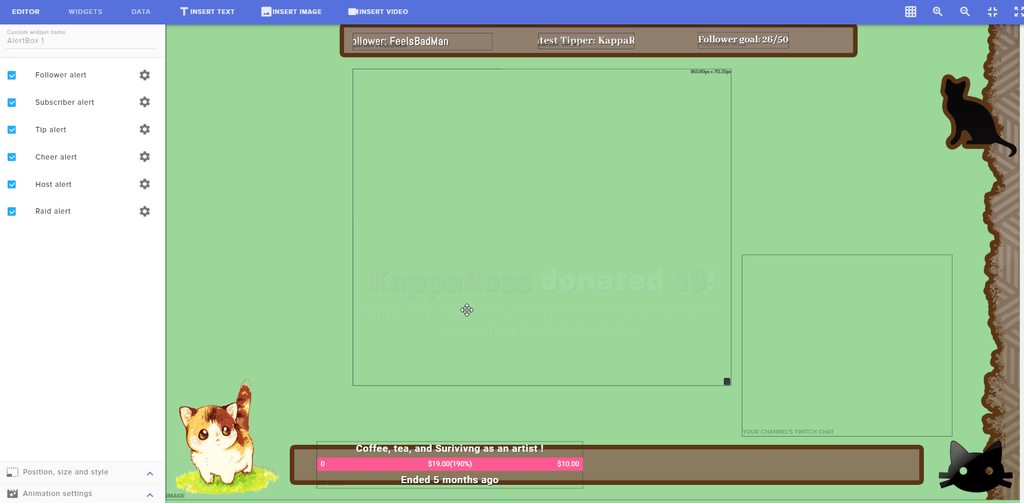
im in your overlay right now and it works for me
atomic hollow
create a custom one
quick niche
aha
atomic hollow
you can have it say whatever you like
lament blade
you mean my overlay si working for you ?
quick niche
i created one to read my last tweet
atomic hollow
yeah
lament blade
weird, so it could only be browser ?
atomic hollow
 lament blade
This one, and everything works for you ?
atomic hollow
all alerts
lament blade
As I've mentioned, last time I needed to re-do the whole layout
atomic hollow
but if it works for me you shouldnt
something is wrong on your end, try incongnito
lament blade
Oh wait. it doesn't ork on my firefox or google chrome
atomic hollow
maybe its an extension
atomic hollow
sounds like an extension
lament blade
I don't have exentions on firefox, and I tried incognito too
I'll try to clear catche or smth, That shouldn't happend. But it seems like it's something on my end
atomic hollow
cache might work as well
lament blade
so technically you should not be worried because it's not any kind of bug related to the website
atomic hollow
nope
lament blade
@atomic hollow And btw, the test donations and cheers are not counted towards anything right ? or logged ? are they automatically deleted/cleared ?
or do I need to manually delete all this test
upper steeple
are maestro cards not accepted when tipping someone through streamelements tipping?
 ebon atlas
When I get a follow the image for the follow takes longer to load. Im using the super themes and the alert pops up but the image is way behind
 unreal geyser
happy new year, gelukkige nuwe jaar, 새 복 많이 받으세요
Just a quick question. How do I activate the default sound for lets say... cheers?
 orchid tide
Hey guys, I'm having trouble adding certain commands on streamelements like the !subs that nightbot has, for example nightbot uses this - $(twitch subcount) people are currently subscribed. But streamelements doesn't pick up the (twitch subcount), what's the alternative?
atomic hollow
@upper steeple if its supported by PayPal so we support it
@ebon atlas try to see if its the same when you launch the overlay (no in the overlay manager)
@unreal geyser its activated by defualt, you can play with it in the overlay manager alert box
@orchid tide in SE its ${channel.subs}
you can see it here - https://streamelements.com/dashboard/bot/commands/variables
StreamElements
The Ultimate All in One Platform for Streamers
atomic hollow
happy new year 😃
quick niche
there is a forum with bots created by the comunity?
 late river
hey there! Quick Question, is there a way to have a Playlist of songs to fallback on if there is no song queue?
late river
Alright thanks!
unreal geyser
@atomic hollow it defaults to another sound effect i used during scaretober, im looking to try and get the default "pling" sound for it
atomic hollow
do you have variations for it?
unreal geyser
yes, when i added a new variation it used the scaretober sound
and when i click to change sound, it does not allow me to choose the default sounds
the reason why i want to change it, is i have a "troll" cheerer, that loves to spam chat with massive amounts of bits, trying to dissuade the troll to not spam the chat
 stoic echo
How can i see my chat on stream?
tight harness
@stoic echo You mean how to let your chat see it?
tight harness
If you need to see it then use the Twitch dashboard (you can popout the chat), or a program like chatty, for your viewers to see it add the Twitch Chat widget in Widgets within the the overlay manager
tight harness
Yes
stoic echo
no way
tight harness
You didn't know you could do this?
stoic echo
not at all
tight harness
 tight harness
😄
stoic echo
I'm new to twitch streaming
tight harness
Ahh, yeah we get that a lot
 novel condor
i need help im trying to stream through obs but my overlay doeant show up in stream
tight harness
@novel condor Tried following this? https://www.youtube.com/watch?v=KDvLynUqXI4
novel condor
also how do i change from dollars to pounds
tight harness
On the left navigation menu, click Tipping, you can change the Currency there
late river
I have no way to Donate to me, yet I got this... What does it mean? https://i.imgur.com/Bz0Ahad.png
 tight harness
@late river They're trolling you, they did /me followed by their message
tight harness
No problem
sudden tiger
It's weird that has never happened to me lol xD
stoic echo
do I make my paypal personal or business?
 ebon forum
@stoic echo business is better. it allows you to hide personal data
stoic echo
k ty
misty wagon
With a free business account you also get acces to financial statements.
late river
What is MediaShare? And how is differeent than song requests?
tight harness
MediaShare is how you show the videos for requested songs on your overlay
There's a widget for it in Widgets and settings for it in Song Requests
late river
So my backup playlist will not show?
tight harness
Correct
late river
Ah ok
indigo bone
im using pretzel to play music how can i link whats playing to the overlay ?
novel condor
how do i put my game behind the overlay tho?
tight harness
We support youtube, plug.dj and dubtrack.fm @indigo bone
@novel condor In OBS? change the layers order ^^
 subtle orbit
Is there a way to consume/use points without redeeming an item?
gaunt light
Dear support ,
I writr to you today asking how am I adding 2 sounds files to my stream starting soon overlay , one is a counting on the last 5 secs and the other as at 0 sec saying welcome.
?
tight harness
@subtle orbit Yeah, the minigames in Modules, Contests, Giveaways, not just the store 😃
@gaunt light You want to add sounds to the countdown widget?
gaunt light
maybe , when it counts from 8 min down
on the last 5 sec a sound files will say 5 4 3 2 1
and then another one will say welcome
tight harness
Nobody's asked for it yet to my knowledge, it'd be something for the ideas board 😃
gaunt light
@atomic hollow work work work !!!
subtle orbit
@tight harness Thanks, I've looked at that but it's not exactly what I'm searching for.. I'm searching for a !consume x points which will trigger a plain text response, u happen to know if this is possible?
tight harness
Consume points? What would be the purpose? 🤔
This is exactly what the minigames are designed for, so maybe i'm just not understanding what you mean
subtle orbit
!use x amount of points will trigger a message @tight harness
tight harness
You can set a cost on commands
subtle orbit
can I make it that that cost will be X what they put in?
tight harness
Commands can be given a set cost, with the minigames they can choose what they put in
 golden thicket
Hi i can't import my alerts from streamlabs with the chrome extension, any help?
 vagrant chasm
Is there someone who can help me about system for stream
 random cliff
hi my stream currency is not showing up in chat
ebon forum
@vagrant chasm depends on what you actually need as a system
vagrant chasm
@ebon forum for example I have only one pc and which cpu I prefer
ebon forum
@vagrant chasm for gaming (max FPS) - higher clocked Intel i7. for streaming - as many cores/threads as you can afford
vagrant chasm
@ebon forum thanks 😃
ebon forum
@vagrant chasm if you want a proper config, think about the budget, your goals and what you actually want to stream and how. stuff can get expensive
random cliff
i launched my streamelements and modded the bot. i put all my settings in for loyalty and nothing will show up in chat
random cliff
how do you change the command name for the points?
because i named the points but i want my chat to type in !tridents instead of !points
weary mist
Go to default commands, click edit on points, add tridents to the alias list
clever mango
@indigo bone couple options for pretzel.. you can use the pretzel twitch panel extension or you could set up a custom command with response $(customapi.https://www.pretzel.rocks/api/v1/playing/twitch/YOUR_TWITCH_NAME) The command will name the current song and link to your playlist
@candid cobalt Ask your StreamElements questions here please 😃
hey, i need some help with a problem. i made a overlay with a sound effect for a follow notification. and when i went to make a differant overlay, i made an alert box for a follow notification and tried to add a differant sound than the first and when i went to test it i can hear both sounds playing at the same time. i have clered the sound and reuploaded but it doesnt work, i can still hear both
 candid cobalt
oh right, sorry i just joined
clever mango
You hear multiple sounds because both overlays are active in OBS. Make sure you ☑ Shut down source when not visible for all overlays in OBS. Here's a tutorial https://www.youtube.com/watch?v=KDvLynUqXI4&index=2&t=2s&list=PL_9rga23xIlJDyaOnO2avbss-PHm28oNs

Tutorial #1 - Adding StreamElements Overlays to OBS Studio ----------------------------------------------------------------------- 🚀 StreamElements 🚀 -------...
 feral axle
@clever mango is there a tutorial for Groundcontroll setting up for my friend
clever mango
There is not but I'll add it to my list
clever mango
want to jump in voice?
feral axle
no thanks
clever mango
ok I'll type up some steps
feral axle
pm it pls
 balmy jewel
Anyone know how to enable the audio for the items?
Like if someone buys an item in chat then uses it, how will they hear the item in game?
clever mango
Add the Store Redemption widget to your overlay(s)
clever mango
Have you set up any overlays on the streamelements site?
clever mango
That's fine to use the graphics in OBS but everything else comes from a StreamElements overlay with widgets added to it. https://www.youtube.com/watch?v=X7XrDdRE7Fk&

Create an amazing overlay with StreamElements, watch our video guide to learn how. ----- Tipping page setup: https://youtu.be/eLzxRkq7tJo Add KappaGen to you...
balmy jewel
ah thanks!
clever mango
Alertbox, text widgets, goals, etc.
you can even import your graphics into the editor as the background so you can easily place your widgets where you want them
@left shore Sorry, advertising/self-promotion is not permitted in this discord. Please see the latest pinned message in #welcome
balmy jewel
ty @clever mango
clever mango
Ground Control Set Up
Download and install Ground Control - https://streamelements.com/groundcontrol
Run the program
Go to settings (cog wheel) and then click on My Account to be taken to the page where the JWT token can be found. Copy/Paste using CTRL+C CTRL+V into the Authentication section of the GroundControl settings.
Keybinding can be set up now in the settings and Songrequest and/or Compact mode can be enabled. Compact mode make the activity feed events smaller so more fit in the window.
Clicking on the moon in the top left of the settings page will enable dark mode for Ground Control
clever mango
@runic isle do you see this on your SE dashboard?
 runic isle
yes
clever mango
Did the user use twitch prime?
runic isle
yes
clever mango
It sounds like they don't have the checkbox at the bottom checked to share prime subscriptions https://www.twitch.tv/settings/prime
If the sub is not shared in chat StreamElements isn't notified
runic isle
His original twitch prime sub worked. are you saying its something he did
clever mango
The first step is to ask him if sharing is enabled on that page
runic isle
okay thanks
 worthy nebula
Hello everyone
clever mango
Hi
lament blade
where can you ban ppl from songrequest system
clever mango
👍🏽 this idea - https://streamelements.helprace.com/i248
lament blade
kk just 24h banned him now xd
clever mango
yea, if they can't chat they can't request
lament blade
"loudest earrape ngga" etc
clever mango

 slender anvil
does stream elements support xsplit by chance
clever mango
Yep
slender anvil
ok good because i just bought a year key for 1 dollar xD
vagrant chasm
happy new year loves from Turkey
 glacial bramble
Hey I mod for a channel that just started using a stream currency... he's wondering how people can redeem them
slender anvil
they can redeem the currency for stream games or through a stream store that you can set up though stream elements
tight harness
glacial bramble
Ok I let him know and he's looking into it. Thanks!
slender anvil
the stream games go through the stream elements bot
glacial bramble
So if he want someone to be able to buy a game with him then he would make an item at that link right?
 stark sonnet
Hellow many awesome stream elements support! I have a question, I dont know if it is a bug, but it involves the stream store. I create an item, upload the image, everything looks good until I actully create the item in the store. The image is way off, even though it looks good in the "submit" section. Sometimes it will show only have the image and so on
any help?
clever mango
200x200 dimensions usually work well for the store item previews
 slim cairn
@glacial bramble they make an item in the shop that can be redeemed by points. They have a choice to redeem it manually, make it play a sound, or give a code. For them to redeem it manually they can either enable the alerts for it and/or it'll show up in their activity feed
stark sonnet
@clever mango How am I able to adjust the dimensions?
glacial bramble
Yeah just figured out that the shop is like merch... he's more looking into just using currency to play a game with him. He has the currency all set up just not sure how people redeem it for a game.
slim cairn
@stark sonnet you can use photoshop or use an online editor. I prefer https://www.lunapic.com/editor/?action=resize
Lunapic
Free and Easy to use online image effects. Try the Resize Image effect.
@glacial bramble that's what manual redeeming is for
glacial bramble
So he would make like a take or redeem command and the bot would take the currency?
stark sonnet
@slim cairn thank you!
slim cairn
@glacial bramble yep, they put the price and once redeemed it will show in their activity feed and they can ask the user in chat for their username and invite them from there.
glacial bramble
Thanks I'll let him know
 merry python
 twilit vortex
There is a version for YT?
slim cairn
I've heard it's coming soon, have no idea though.
twilit vortex
thanks
clever mango
It's in development with no public ETA
glacial bramble
lol Now he's wondering exactly how to make a redeem command, sure keeping you guys on your toes!
slim cairn
https://streamelements.com/USERNAME/store is also an alternative
StreamElements
The Ultimate All in One Platform for Streamers


 clever mango
Are you playing requests in the queue?
clever mango
backup playlist songs don't show in the widget
lament blade
is there #idea alrdy for?
clever mango
because of youtube API limitation right now
lament blade
oh ok :c
lament blade
I understand 😦
clever mango
If you use plug.dj or dubtrack.fm you can add your playlist there and people can request on your room page
glacial bramble
Now the channel owner is having issues setting an item... I hit !redeem squad however e doesn't know how to make squad an item
 sweet nymph
just got a question i know its kinda late... but is it possible to remove player from the "stats" side?
like bots and so on
 mystic wagon
I am having an issue with uploading OGG files for alerts
sweet nymph
dont wanna have differnet bots as top chatters :/ any help?
lament blade
I believe there's a setting somewhere that you can have the top lists ignore certain account, such as bots. I'll have a look.
mystic wagon
Fixed my issue....safari doesn't support uploading the ogg files...used chrome and 👍
 crisp geyser
Hi, Any idea why when i have my overlays full custom, my cpu its 45%, and when i delet somethings on my overlay, the % of cpu goes down, especially when i erease the kappa gen widget.
slim cairn
Kappagen takes up a lot of cpu, it's a known issue trying to get resolved.
lament blade
Most of the overlays, especially kappagen and animated overlays, are going to use a bit of CPU. If you're having trouble, I'd suggest using static overlays or turning down some settings in the kappagen.
 tiny lotus
Is there a way to stop alerts while mediasharing is happening automatically?
glacial bramble
Now the channel owner is having issues setting an item... I hit !redeem squad however e doesn't know how to make squad an item
lament blade
Set up a scene without the alert box for when you're using mediashare.
glacial bramble
Oops I didn't mean to resend that sorry
tiny lotus
I don't want to have to switch scenes to watch a video though
- then I have to replay all alerts that I miss
lament blade
Hide the alerts in OBS then?
slim cairn
@glacial bramble are you saying it isn't showing up?
 fickle idol
is there a way i can edit an existing streamelements overlay?
i wanna remove the top portion but leave the bottom
but its one image
slim cairn
You'd have to do that manually if it's one image
fickle idol
how can i save the PNG tho
glacial bramble
When I hit !redeem squad it says that it's not an item and gives me a link listing the items however there are no items listed. He clearly needs to add items but he's not sure how
fickle idol
it just keeps saving as a "webfile"
sweet nymph
@lament blade no i mean like deepbot
slim cairn
I don't have the file, but @ripe herald might be able to help you with that
sweet nymph
just other bots
lament blade
@fickle idol You can delete parts of the overlay that you don't want in the overlay manager and keep the ones you do 😄
glacial bramble
He doesn't know how
fickle idol
@lament blade i cant though. i want to edit part of this https://cdn.streamelements.com/uploads/f2a1fc02-b50a-4441-ae8d-655ac3cda4e8.png


i wanna remove the top white parts
slim cairn
It's 1 image he can't remove it
Also @glacial bramble tell him to go to https://streamelements.com/dashboard/store/items and add it from there
StreamElements
The Ultimate All in One Platform for Streamers
It should be self explanatory
lament blade
If it's one picture and you want to use only the top parts, then you select the image, go to position, size and style tab and change the height
fickle idol
yeah i wanna slice the top off
tight harness
In most of these overlays they're separate
In that one it seems to be conjoined
But if you do what Alice said and increase the size and then drag it up, it'll hide the top part
 ripe herald
I don't know what is needed but dm me 😄 who ever needs somthing illsend tmr
tight harness
@fickle idol ⤴
sweet nymph
https://stats.streamelements.com/c/lirik its just a random channel now... but thats waht i mean and kinda need help can i remove names for the top chatters list? such they renamed or anything else?
ripe herald
Sec to get on pc
fickle idol
increasing the size is just adding space under the bottom 😕 lol why didnt they make this two separate parts
would have been so much simpler lol
crisp geyser
Thanks @lament blade
tight harness
I noticed that
stuck hamlet
🤔
fickle idol
i mean no offense but its super blurry and part of the bottom is cut out there
ima just keep messing with it until i figure it out
slim cairn
Again, on mobile
stuck hamlet
Thanks for trying Megaline
fickle idol
^
lament blade
@fickle idol Check DM
ripe herald
@fickle idol I'll send you files in the morning
fickle idol
didnt mean to sound like a dick if i did lol
i appreciate you trying to help lol
just frustrated lol
lament blade
What is the name of the overlay?
slim cairn
No it's fine.
fickle idol
i got it @lament blade 😃 Apryl edited it for me on Photoshop 😄
lament blade
👍🏼
fickle idol
thank you everyone though 😃
slim cairn
Sorry for the troubles
 cobalt saffron
i have 40 followers, but when i set my follower goal it says 20 and i cannot change that number, help anyone?
tight harness
@cobalt saffron Sounds like you want the Total Followers widget but you're using the Follower Goal widget instead
cobalt saffron
i want to set a goal to 100, but when i set the goal it shows up as 20/100 @tight harness
tight harness
Yes, the Follower Goal doesn't pull your total amount of followers, the Total Followers widget does that, the Follower Goal does not
Add the Total Followers widget and add "/100" at the end of the text field after the variable
cobalt saffron
alright, lemme try that, thanks for the help, although i think they show fix it by setting the real amount of followers or at least let us change the numbers, anyways thanks @tight harness
tight harness
I think you don't understand, Follower Goal counts up 1 if you gain one and it starts from 0 when you set up with us or if you reset it, so if it says 20 you've gained 20 since you set up or reset, that's correct, it's not wrong.
cobalt saffron
i've just set it up and i haven't streamed in 3 months
tight harness
You must have gained them from somewhere, but either way the Total Followers widget does exactly what you want, it's a common misunderstanding so don't worry about it 😃
I'll brb, time to celebrate the new year here in the UK 
cobalt saffron
i di what you told me now it says 29xxx followers :p