#helpdesk-twitch
1 messages · Page 174 of 1
 strong kayak
this is just for testing 120 is obviouslyt playable but when im streaming PUBG it dips to 30-40 fps ingame and normally its around 80-100
 tight harness
Have you made sure that you shut down all hidden overlays by ticking 'shutdown source when not visible' in the properties of each and every browser source?
 stuck hamlet
Do you happen to be the guy that posted on Reddit about this? 🤔 using Slabs OBS?
strong kayak
No im not. just posted here
I used a single overlay to test this problem
so no i dont have any multiple overlays
and that option was ticked
 weary mist
@strong kayak I normally stream using a fully loaded overlay in PUBG, and don't notice any frame drop issues (cpu sits at 90%). Can you give more information about your setup? More details about the CPU (I have an i7-6700k, 4.0ghz), how are you encoding the stream, what is the encoder preset, etc
the more info, the better we can figure out where the issue might be stemming
strong kayak
I have the same cpu
ive tried everything before. From reinstalling OBS to even Windows itself
but my problem never fixed until now when i removed the overlays
game streamed at the same fps as normal but whenever overlay is turned on it dips
im streaming right now and i can show u the prob
stuck hamlet
I don't know if you answered this, but What is on your overlay?
 neat glacier
Hello everyone. Is it possible to expand the 100Mb capacity in content upload to 1Gb or more? I'm trying to develop a video overlay but I quickly run out of space. Thanks for help
strong kayak
this is the overlay im using
weary mist
I removed the link as it contains secret information
if you tell him the name you have on the overlay, we can look at it directly
strong kayak
Force Field ingame
tight harness
@neat glacier 1 GB or more? that's a lot of storage, how big are these video overlays?
weary mist
@strong kayak I am not seeing that overlay in your My Overlays page
 ember mountain
Is there any donation goal thing
tight harness
Yes, check in Widgets under Stream Goals
ember mountain
Okay thanks dad
tight harness

neat glacier
@tight harness For example for the screen of starting soon only the background video is 70mb, maybe it was me who was doing something wrong in the render but did not get anything below 50mb. As the storage is shared at all just do 2 screens and I no longer have the ability to do anything else
tight harness
Ahh, you see i'd have added the video as a Media source in OBS and added all of the additional overlay things on top of it
Especially when it's 70 MB 
neat glacier
@tight harness I have a web host that I use for my webdesign work, can I host videos and images there and connect with your overlay system?
tight harness
That's definitely not a thing currently nor do I know how viable that option would be otherwise i'd ask you to suggest it in the ideas board
neat glacier
Ok I will, but as I need a solution now I will have to look for alternatives to solve the problem Thanks for help
 clever mango
@neat glacier Do you stream from different computers/places normally and need the video to be portable? If not, it's generally a better idea to render and encode large video files locally in OBS as opposed to through the CEF browser source. The animated overlays that SE offers make use of short webm video files that are looped and easier for the browser plugin to handle.
neat glacier
@clever mango Unfortunately I do not have the capacity to have 2 PCs. I tried to put the local video but whenever I changed the screen in the OBS, the OBS gave error and closed what is happening during a transmission is very annoying
clever mango
Oh that seems strange. I use a single PC and use media source to play some MP4 files. I'm sure that's something that the OBS team can help with at their forum or live chat https://obsproject.com/forum/ https://obsproject.com/chat
 fringe basin
WHAT is the max combo for emotes? Me and my chat spammed maybe like 5000 lines of emotes and when it finished it said 53 combo 🤔🤔🤔🤔🤔
tight harness
5000 lines? 
fringe basin
yeah
our max before was 200 combo
so we wanted over 9000
we spammed avout 5000 I believe
then it Said 53xcombo 
clever mango
If you can recreate the error and then upload the log file that will help them a lot in diagnosing @neat glacier
 atomic hollow
@fringe basin our combo master is @turbid reef lets wait for him to comment
clever mango

UUUUUUUUULTRA COOOOOMBO :D
 turbid reef
there is no max combo, are you sure all messages went through and you didn't get global banned by twitch ?
atomic hollow
@fringe basin ^^
fringe basin
no global banned
Maybe the bot messed up
like it did not post the first message
because someone typed during it but no message showed
🤔
and we kept on spamming
turbid reef
there is also a cooldown but it's only like 10 seconds by default

 woeful nacelle
When I test an alert while live, how do I remove the fake amount from my overlay? For example, if you look in this clip, the "recent tips" were mostly from me testing my alerts in the overlay editor, but I didn't know how to remove them.
https://clips.twitch.tv/LittleShortChoughPipeHype

Twitch
Pokemon TCGO, first time as a Streamers Connected member! Remember, subs are still 20% off! !subsale !charity - Clipped by DrFrIgHtEnStEiN
tight harness
Just reload the overlay, it's temporary 😃
 tall snow
trying giveaway first time in streamelements, no one is able to buy tickets though it started and they have points, what am I missing?
weary mist
do you by chance have the !ticket command turned off in your default commands?
tall snow
Lol trying to find it right now, thankyou 
haha still dont see it in default commands though
¯_(ツ)_/¯
 normal mirage
hey, so i have to ask... i have the star wars overlay and im trying to have the 4:3 webcam image appear on stream but it doesnt want to become visible... idk if its because i have the 16:9 on or not...
anyone?
tight harness
You figured it out?
normal mirage
yes...
tight harness
Awesome 😃
normal mirage
ill be here to ask more along the line
tight harness
No problem at all, we always have someone here
normal mirage
k... later
tight harness
Later 
 harsh wyvern
hey folks quick question, can i use the !command options <name> -level ??? to set kappagen function to allow followers to use it? and if so what would be the numbers to do that?
tight harness
Followers is not a valid level
harsh wyvern
hmm so its all or just mods then?
tight harness
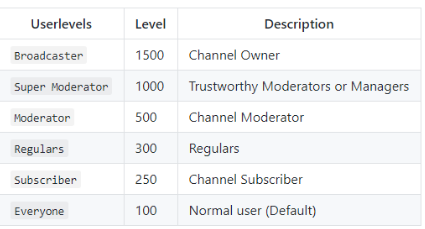
It goes everyone > subs > regulars > mods > super mods > broadcaster
tight harness
300
tight harness
And then you add them here: https://streamelements.com/dashboard/bot/users/regulars 😃
harsh wyvern
oh oh, so i would still need to add them in the UI
tight harness
Yes
harsh wyvern
cant add from chat?
harsh wyvern
sweet thanks
tight harness
No problem
harsh wyvern
hmmm just ran the command !level DJ_BIONIC 30
didnt give me an echo saying it set the level
tight harness
30 or 300?
tight harness
Let me check that's the command
harsh wyvern
kk
tight harness
Maybe you have the command disabled in your default commands btw
Worked fine for me
That was mod I set him to, but the same command
Just I put 500 for mod instead of 300 for regular
harsh wyvern
kk, we checking the streamelements ui to see
harsh wyvern
OH thats why
hmm ok got the level set
but
when i try to set kappagen with this command, it tells me no trigger found. !command options !kappagen -level 300
tight harness
Try without the ! before kappagen
It's not needed other than for the first part of the command
tight harness
I got the same result 🤔
harsh wyvern
i just had him set it in the ui
maybe because it s native system command rather then a user created command?
tight harness
Very possible
 primal skiff
How do we end a raid?
harsh wyvern
it ends on its own?
tight harness
Yeah, not too sure what you mean by end a raid 🤔
harsh wyvern
he is referring to the /raid command
primal skiff
I mean host
harsh wyvern
but that is a twitch commad versus a streamelements command
tight harness
Right, then you do /unhost
primal skiff
When you end your stream you use "raid" for a command and not host
But how to you end It?
harsh wyvern
you can use either
tight harness
But as Abstractamcr said that's a general question, not a streamelements related one 😄 should be asked in #welcome ideally
Tried /unhost?
I just suggested that
tight harness
Thanks 
harsh wyvern
Hey Legendary, why is it that you can't just do @(name) in these commands. annoying that you have to go back and remove teh @ symbol. some of these users have crazy name spellings and special characters its so much easier to use the @ and get them off the list
tight harness
@{user} does work to my knowledge
harsh wyvern
also, you got a link to that knowledge base you did?
harsh wyvern
ty sir
as always thanks so much for your help. one of these days ima buy you a muffin basket
😃
tight harness
No problem, haha thanks 😄
weary mist

harsh wyvern
@tight harness hey you got a link to this discord? is it strms.net/discord?
stuck hamlet
ye
tight harness
Indeed
harsh wyvern
kk ty
 marsh sinew
can anyone give me advice on the values to make the bits and stuff
no matter what i do. the cup doesnt sploosh like it does for stream labs
weary mist
I beleive setting the bits to a high weight, it will increase splooshyness
i didn't mess with my cup settings, and they splash around pretty well
 stable aurora
hello! Having a little issue. I'm working on an overlay that has a chatbox in it. The messages show twice though. I tried to figure it out and I'm not sure what to do about it
tight harness
@stable aurora Shows twice in the overlay manager but doesn't when you add the overlay in OBS
stable aurora
oh? ok i shall try it out. I considered that
tight harness
😃
stable aurora
thank you!
tight harness
No problem
stable aurora
i appreciate you guys always being so helpful
 charred elk
I have a question I am new to streaming and still getting use to everything I stream on twitch. And I’m trying to figure out how to if I can broadcast with obs on Mac without a graphics card and have it linked to my Xbox one I tried searching for videos on YouTube but come up empty handed please help
weary mist
That might be something for OBS forum or somewhere else. We provide support primarily for our platform
marsh sinew
yeah idk why. but i could have follows in there and then a big bit comes in. and it just sits on top
not that exciting
stuck hamlet
Yea sure, if you can get the CSV file.
 blazing wadi
Not sure how to do that...
I think I saw that option , but cant find it at the moment
clever mango
Are the points in the extension or the chatbot formally known as ankhbot?
blazing wadi
in the chat bot
clever mango
Ok follow these steps
clever mango
are they synced?
clever mango
Ok open the chatbot
blazing wadi
ok
clever mango
click the Person icon (connections) in the bottom left
blazing wadi
done
clever mango
Select Cloud
Pick Folder and navigate to your desktop to make things easy. Then save settings
blazing wadi
create excel files?
clever mango
Yes, and Export Currency CSV
blazing wadi
or export to csv
clever mango
create excel files AND export currency csv
 toxic basin
HEY why are my donation alerts going off 5x times
at the same time
they are donating and ruining the streaming experience for other!!
clever mango

Make sure that the checkbox at the bottom is checked for every overlay in OBS (all scenes)
toxic basin
That didn't help 😦
I already had that on my overlay actually
but I had both checkmarks checked in, removed the other one
clever mango
I'll DM you to take a look
toxic basin
Alright that would be amazing. Thank you.
blazing wadi
One more question, how to add user yo ignore list? Like this faegwent. This ignore is greyed out
weary mist
Click in the greyed out area, you should be able to type a name there, then hit enter, then click save
weary mist
👍
blazing wadi
this bot is coming back to list once again
I reset his points, added him to ignore list, but he is there again, on top of thelist
 pine hemlock
@lament blade Check the top pinned message in this channel for the answer to that
weary mist
@blazing wadi I just found that same issue with my alltime list, but not the current list
weary mist
@lapis oriole What browser are you using? (we recommend chrome)
blazing wadi
@weary mist , any solution to this?
pine hemlock
The uploader only really likes chrome
weary mist
@blazing wadi not at this time, I reported it as soon as I discovered it myself (like not eve 3 minutes ago, lol)
blazing wadi
@weary mist , tnx
weary mist
@lapis oriole edge is... on the edge of being an ok browser, but not there
 lapis oriole
so go to goodle chrome then?
weary mist
yessir
 jagged thorn
is there a setting to automatically turn off the bot or disable gambles/reward stuff when a channel stops broadcasting asside from manually parting the bot each time? people are still able to gamble in my chat when I'm not live
weary mist
manually yes, but its easier than parting/joining the bot every time
jagged thorn
as a command from the chat, correct?
tight harness
Yes
jagged thorn
does that just mute the bot response or actually diable the ability to use commands
 old galleon
So teah, i recieved a tip from a viewer, and paypal requires me to accept the donation first.
weary mist
ah, that would be something from paypal. I have never had to accept tips. It would suck for someone like Shroud, who receives an easy 100 tips a day
old galleon
its the first one ive ever recieved so im curious.
weary mist
im curious as well, lol
tight harness
@jagged thorn Muting does still pay attention to what's done in the chat, it just doesn't post responses, if you don't want it to pay attention to anything in the chat you'll need to part it and rejoin it
weary mist
ah, I learned soemthing
tight harness
I just tested it 😄
jagged thorn
i figured... is it possible i can just do !part or something similar from chat and re-enable from dashboard next broadcast?
also on the paypal notice I use a different program for tipping and occasionally have to accept the payment, some are automactic however. so it's on paypals side
weary mist
yeah, !bot part
jagged thorn
yeah that makes sense, ty guys
tight harness
No problem
weary mist
tag team support 👏
old galleon
@jagged thorn ty for the heads up. im going to presume its based on the persons paypal account/location/donation currency.
jagged thorn
yeah i think it may be a user setting? something to do with account status and verification on the senders end
 wispy epoch
Is there a way to edit !commands and/or !giveaways or is the only solution doing it like a custom command by creating one?
I want to show what commands you can use by triggering the command, instead linking and showing all commands (inc. Moderators & Super moderators etc.)
weary mist
you would have to create a custom command and turn off the default commands
wispy epoch
As I thought, thank you. Does that mean that Mods can not create/edit/remove commands now as I turn the default commands off?
Nevermind, there's separate command for it, I think?
wispy epoch
Yes, I can see it - Thank you! I'm editing commands for streamer, so he can just stream and I handle with StreamElements bot 😃 Since we just started to use that bot
weary mist
sweet
stuck hamlet
Hey @wispy epoch I see you're helping Andy
We were just importing custom commands
Is everything okay?
wispy epoch
Yes, I have talk with TerraBuck already ^^
 rugged hare
Heya, just a quick question i'd like to ask.
Recently i changed my twitch username, but the account itself is the same one, yet i lost all stream-currencies i had from all the streamers i watched. Is this intended and i just did not the brightest thing or maybe there's workaround for it?
 gaunt light
@here Any Roblox Streamer here ?
I'm having an issue with OBS and Roblox , I'll explain ...
I'm usually streaming PUBG on ultra graphics with 2000Bitrate to 1260x720/30FPS , with no effort .
That all good , But when I try and stream Roblox , The OBS Goes from 0-3500 KB/s , while its set to stay on 2000 Bitrate , and My stream is lagging like crap .
Anyone suffered such a thing from any other game ?
the obs also stated
"Encoding Overload , Try lowering the Graphic Resolution or Chaning Encoding speed . " - not in this exact words ..
but there should be no reason too as PUBG is far harder for a PC to Run let alone stream .
Thanx for the helper 😄
FYI please Tag me if you answer me 😄
 brave zealot
im having an issue with song request and playlist
 slim cairn
@gaunt light Weirdly enough, the same happens for me. Some things that have helped is to swap between hardware and software encoding, that lowers my dropped frames. Lowering the graphics quality in ROBLOX typically doesn't help so no use in changing that. I think it's an issue with ROBLOX as a whole.
tight harness
@brave zealot What kind of issue?
brave zealot
when i do a songrequest and there is a playlist on the songrequest wont play after song
tight harness
Tried refreshing the page?
brave zealot
i cant it the ground controll app
tight harness
Tried restarting the app then? 😄
brave zealot
i did but the problem still happens
tight harness
That usually does it
brave zealot
i dont know whats going even the website just did it
 lone bridge
Running into a weird issue
I am creating a sub variation in my alert settings for gift subs
This is what I see in overlay manager
(during emulation)
The message is how it should be
in obs
It's defaulting to the old message but adding "gift" in place of the month.
I tried closing OBS and relaunching. Any other ideaas?
@pine hemlock halp
slim cairn
@lone bridge Are you sure you didn't accidentaly edit the wrong overlay? OBS shouldn't do that...
lone bridge
I'm sure 😃
pine hemlock
There's supposedly an issue with the gift variable according to the message in a hidden channel by @clever mango
lone bridge
Thanks Cuda, I appreciate the insight. We still doing a trello board for bugs?
I haven't had time to play in the OM for so long
slim cairn
But i find it weird that it differs from what's showing on the overlay manager.
pine hemlock
Yeah I'm not sure. Terra would know. I haven't messed with it. This months been dumb for me
lone bridge
@slim cairn this isn't the first time I've dealt with this, sometimes my tip goal randomly glitches out and shows something different too.
Also @pine hemlock there's this -- my chat widget is acting spotty. In the overlay manager showing chats multiple times, but not displaying chat at all in OBS. Not from me chatting or the bot chatting.
I'm the best bug finder out there, cuz any bug that can happen will happen to me 😅
pine hemlock
That's known. It's a visual bug on the editor
Oh you said it doesn't show on obs. Hm
lone bridge
Yeah.
pine hemlock
I'd copy the overlay and try using a new url - if logging out of the SE site and back in doesn't fix it
lone bridge
Okay cool thanks my friend
 fair rampart
no reply to the following from last week:
Is there a way to set the timers so they don't all go off at the same interval?
For example, all set for 5 minutes / 10 lines but only fires off one at a time, rotating through them?
otherwise thats a lot to figure out the intervals for different timers
clever mango
Timers aren't set up to do this at this time @fair rampart You can upvote this idea https://streamelements.helprace.com/i369
brave zealot
hello someone tipped to me and it has shown up as alert or last donation
clever mango
Do you have tip moderation enabled here? https://streamelements.com/dashboard/tipping/moderation
brave zealot
yes
clever mango
That means tips must be manually approved before they show on the activity feed and show an alert. You can approve them at the top of the activity feed under pending alerts
brave zealot
thanks also it say a user in block but i didnt block him and he had no message
clever mango
Which page does it say they are blocked?
brave zealot
tip list
clever mango
What is your twitch name? I'll have a staff member look into this when they are available and send you a message.
brave zealot
MadesTV
clever mango
Thanks
 polar peak
Is there a way I could do song requests during my streams without having to hear them in my mic but so viewers can?
I use OBS and have downloaded the SE program as well.
slim cairn
@polar peak there are a few third party audio mixers that can do that for you. I've heard of a built in Windows version, though. Just look up on YouTube about audio mixers and how to use them.
polar peak
I have and cant seem to find one that actually works. :\
the streamelements program lacks the ability to be able to control it through windows' built in mixer. and i have looked into others, tried a couple, and have gotten no where
 west mortar
Hey guys for some reason I was tipped a dollar yesterday and I got no alert for it. It shows on the tip list but as I said, no alert.
clever mango
@west mortar do you have moderation enabled here https://streamelements.com/dashboard/tipping/moderation ?
west mortar
yes
clever mango
That means tips must be manually approved before they show on the activity feed and show an alert. You can approve them at the top of the activity feed under pending alerts
west mortar
oh, thanks
ember mountain
please someone helpmefix the sound deleyhttps://clips.twitch.tv/AggressiveInventiveGoblinHassanChop

i dont know how to fix it
clever mango
For desktop audio click the cogwheel and select properties
Uncheck "Use device timestamps"
clever mango
If it was checked I'm 98% sure that was the problem
ember mountain
okay
 charred oracle
Does stream elements have a quote system in chat like nightbot?
stuck hamlet
yes, it would be the !quote command
 ashen parrot
Heya! Is there a way to get {amount} to have decimals show 0? Am I blind and forgot to check off something? lol
stuck hamlet
That's on the schedule of things to do 😃
 blazing siren
Hey guys, i made a new scene for my Stream with the chat widget, the only problem i have is, that massages show twice. how can i change that? 😄
blazing siren
thanks 😃
 wise sundial
How do I get my own time zone in my chat I setup the command but it doesn't put the right time it's like military time
tight harness
@wise sundial If you have a town near you that you know has your timezone you can use that, for example I use ${time.Europe/London} because where I live shares the same time with London so it's always accurate. It uses a 24 hour clock currently, we do have a post on our ideas board for both 24h and 12h format which is currently under review: https://streamelements.helprace.com/i222-new-time-timezone-variable
wise sundial
So is their a 12 hours?
tight harness
No, it's under review
wise sundial
It's just 24 as of now?
tight harness
Examples of accurate times
$(time.PST8PDT)
${time.Asia/Seoul}
You can specify time zones using locations so LA would be ${time.America/Los_Angeles}
https://en.wikipedia.org/wiki/List_of_tz_database_time_zones
Yes
So yours would be ${time.America/SomewhereInYourTimezone}
wise sundial
I think I got it I put ${time.virginia/(My town)}
And it put the 24 hour platform of the time
tight harness
Yes, 24h is the only format available currently because 12h is under review
Under review means it's not implemented or even started yet
wise sundial
It didn't work lol
tight harness
Yeah i'm testing it on my channel now
Right, you share your timezone with a place called Atikokan so do ${time.America/Atikokan}
Copy and paste it
@wise sundial ⤴
I tested this in my channel and it works
wise sundial
It shows 12:36 when itd supposed to be 7:36 even 24 hour time lol
tight harness
Use the variable I gave you in Discord and in your chat
I made a command with that response and it worked
${time.America/Atikokan}
There you go 😃
wise sundial
Thank you it's right it's in 12 hour time also lol
tight harness
Until it gets past 12 😛 yes
wise sundial
Correct then it will go 13 which is 1 
tight harness
Yes
wise sundial
Okay thank you so much
tight harness
I live in England, we were brought up to use both really 😛
 tight harness
No problem 😃
 steel hamlet
so why do the Animated themes make my stream so slow?
tight harness
They're quite a bit more intensive than static things because there's more happening, one thing you need to make sure of is that you tick the option 'shutdown source when not visible' for each and every browser source you add to your OBS, you can right click on them and click on Properties to change that after you've already added them
Otherwise they all run at the same time
steel hamlet
is that it. That might be it.(the running at the same time) that could totally f it up yeah. never even thought about that. im stil getting used to OBS studio. I was so stubborn and used Classic forever
tight harness
Ahh yeah, Classic is having more and more issues which will never get solved as time goes on
tight harness
I used it for a long time after Studio came out too, a fellow streamer actually convinced me to switch at some point
steel hamlet
I really like the LeagueofLegends scene switcher plugin. it was really smart actually. i cannot seem to get used to the auto scene switcher in classic so now i do it manually with keystrokes but oh well
tight harness
I use a Stream Deck for switching scenes but I realise they're pretty expensive :/
steel hamlet
anyway I have one more question. back in the day I used to stream CSGO too but I cannot get it to run in Decent FPS on stream anymore. (the output FPS is always super low) my hardware is kinda old but it used to work fine for CSGO and League (FX8350@4.5 GTX960 16 GB DDR3)
League works fine in 720p/60FPS btw but CSGO's output is just terrible
oh i use NVENC btw cuz i realize CSGO leans heavily on the CPU
tight harness
I don't play either of them but I'm guessing it has something to do with your hardware being kind of old now
steel hamlet
I dunno hardware doesnt slow down. it has the same performance as a year ago when i used classic it worked just fine. it might be old but its still a 8 core CPU and should easily be able to do 720P
back in the day when i bought this system it was considered decently high end
I do have a Core i7 Laptop that I might be able to set up as the encoding system if i went 2 system setup but I really dont know how to do that
tight harness
It's not unusual for your FPS to drop as your computer gets older though, there's a few articles online about it and the internet is never wrong
gaunt light
I need a champion to come to my stream for a sec to show him some problem
steel hamlet
Ingame FPS is just fine @tight harness its only in OBS Studio that FPS is lower. but that might be because I just dont know how to use all the extra functions of studio over classic
tight harness
For the record I've been into Denatherion's stream and found out what was up 😃
@steel hamlet I never really checked myself whether I had this issue, i've had my PC for 1 + 1/2 years now but I never pay attention to FPS 🤔
steel hamlet
alright. I am setting up my stream now, I did a reformat yesterday to rule out any software interfering
tight harness
Good idea!
steel hamlet
yeah League works fine afaik
sitting live now well over 100FPS ingame so thats gucci i guess
oh btw is there any way to get the current song thing from the overlay directly from spotify?
tight harness
Spotify won't give us dev access yet, so not yet
tight harness
Ahh okay 😃
steel hamlet
it still works that way now I just need to know where to point the nowplaying in the overlay
it scrobbles just fine.
i will try and find out and if i figure it out i can let u guys know so u can write a tut for spotify
lone bridge
Hey friends, struggling to find where the whisper option is for !points command
nm just made a custom one
tight harness
Yeah, only custom commands allow you to choose the response method currently
 hazy musk
Hey, did anyone had a problem with host alerts? Every other alert works perfectly, but any of hosts didn't show up. Could use some help 😃
tight harness
@hazy musk Hey, we addressed this in the top pinned message for this channel, hope that explains it for you 😃
hazy musk
Looking good. Thanks 😄 Gonna ask if it gets complicated again ❤
tight harness
No problem at all ❤
 violet nimbus
How my subs and mods request song for free?
tight harness
Set discount to 100, it's percentage based
violet nimbus
No, I need to have moderators and sabs pay 30, but now it costs for them 0
tight harness
Ohh, change the exempt to a higher level?
I thought you wanted them to have it for free judging by your first message 😛
violet nimbus
I thought that the limits do not apply to the price. And now it turns out that I can not allow them to put long songs for half the price.
tight harness
It was a suggestion to see if that fixed the cost issue, did it? 🤔
violet nimbus
fixed, but this is not right
tight harness
So what you're saying it that you feel that the limits exemption and the cost exemption should be separate?
 candid whale
It seems the donations this month counter is just counting all time for me
tight harness
Have you set it to monthly for the widget in your overlay manager? not heard of that being a problem before
candid whale
monthly total tips to be exact
gaunt light
What the eTA on Super mod on someone ? I've super modded 2 of my viewers but they dont get access
clever mango
How did you do it?
 long garden
Hey, friends! Is there a way to allow viewers to see past redemptions from the SE stream store? I’ve been using the store as a music request system and viewers want a way of seeing how much longer it will be before their song is up.
So basically I’m using it as a queue, even though that’s obviously not the typical way it would be used.
clever mango
They're able to see their past redemptions but not the history for everyone
candid whale
@tight harness I think my imported ones from streamlabs is causing an issue
clever mango
Hmm
long garden
One thing I’ve done is display a window capture of the redemptions page
It works but it’s awkward and cluttery
I’d rather just have a link they can click to see the lot
List*
Basically, what would work best for me is something like the YouTube song request system but without it requiring it to be a YouTube link
My viewers either submit a song name or a link to sheet music, as opposed to submitting actual recordings
clever mango
I see. I'll think about it and get back to you @long garden
It should show once you refresh the page @gaunt light

gaunt light
cant find where i add the people
candid whale
I removed my imported donations and now it's fine @tight harness
gaunt light
other then user mangement.
long garden
Thanks, Terra!
clever mango
100 viewer, 250 sub, 300 regular, 500 mod, 1000 super mod
tight harness
@gaunt light Are you referring to Dashboard access? If so then here: https://streamelements.com/dashboard/account/channels

StreamElements
The Ultimate All in One Platform for Streamers
gaunt light
DOne:
 strange stump
seem to be having an issue with commands. my shout out commands seem to trigger my discord command.
tight harness
@strange stump That's very strange, have you checked the commands' aliases to check they're not linked that way
violet nimbus
@tight harness yeas .
these are two completely different options "So what you're saying it that you feel that the limits exemption and the cost exemption should be separate?"
tight harness
I can see why you feel it can be an option, just nobody has asked for it until now 😄 so it's a new idea @violet nimbus
 lament blade
How do i get my backup songrequest playlist to work? As i just added the link to the yt playlist but nothing happens 🤔
strange stump
im going through it now. seem to have had a few issues over my last couple streams
tight harness
@lament blade You added it to the backup playlist option in settings?
lament blade
 tight harness
Alright, then you go back to the song request page, tried refreshing it?
lament blade
yeah, did twice or thrice, didnt do a thing...But now it plays atleast one song, will look forward if it autoplays next one
Whats is the thing, when u ask about it > then it instantly works always lmao
tight harness
Magic?

 tight harness
Christmas spirit
strange stump
ive had to delete my discord command but it seems to be working now
lament blade
Still wondering it wont show up in the desktop app, prolly normal?
strange stump
2nd question. are there any known issues with on screen (overlay) alerts or bot alerts in chat?
tight harness
@lament blade If it works on the site it should work on Ground Control just the same
@strange stump Check the top pinned message in this channel for info on why you need the activity feed open for host alerts to work and where the activity feed is located
Other than that they should all work with no issues
lament blade
Testing now if the queue works now and if it resumes the backup list
tight harness
Alright 😃
lament blade
Well, the sr worked, now looking forward if it resumes the backup xD
strange stump
hmm maybe that was it
tight harness
@lament blade The moment of truth
lament blade
Yeah 
strange stump
yea its not showing a host i was suppose to of had
tight harness
That'll be it then 😃
strange stump
ok one last question (sorry for being a apin)
tight harness
Nah no problem, what's up?
lament blade
I guess thats why @tight harness is here to help us ❤
tight harness
You got it! 
lament blade
^^
strange stump
a viewer sent me some bits and my cheer notification went off but it was the basic generic notification and not the custom image and sound i set it to.
when i edit my overlays and test them they dont always work
lament blade
Hmmh yeah soooo, it wont resume the backup playlist from Gound Control, only if im at SR tab on browser
strange stump
sometimes it seems to take time to kick in and they work fine after that
but some dont seem to want to work at all
tight harness
I wouldn't take everything you see on the overlay manager's emulator as how it'll appear on OBS, it's not always the same
But yeah, strange if it's not appearing correctly on OBS too
strange stump
hmmm
i just did a double check and my cheer one appears to have reset itself back to generic
ill run some tests and see what happens
no i take it back
my cheer alert should show a gif according to thst but when i test it i get something else
yea i change the image and sound of my cheer alert but it does not change when i test the alert

my raid alert sound has changed to what i set it to but the images does not show up at all
my subscriber alert is doing the same as my cheer alert
 ancient coyote
may i speak with an admin?
strange stump
follow,tip and host all work fine. the others not so much
tight harness
@strange stump Very strange 🤔 maybe try duplicating it to a blank overlay and do some tests there
@ancient coyote What is it that you need help with?
ancient coyote
i would like to know how to disable the donation command from the default commandlist, but it doesnt appear there for me
tight harness
It's !tip in the default command list
ancient coyote
so, !tip and !donate are the same commands, and by disabling !tip they are both disabled?
tight harness
Yes, !donate is an alias for the !tip command, they're the same thing 😃 exactly
So you disable !tip and neither will trigger
tight harness
Glad to help 😃
 hallow elbow
Hi! When streaming, I'm hearing the default sounds for my alerts instead of the custom ones I set up. Any help there?
Loving SEs by the way.
tight harness
Did you set custom ones for the Variations Settings too or just the default one?
hallow elbow
I just tried to set up the default one. Maybe I have to turn off the variations?
tight harness
The variations are created by default and they keep the default settings unless you change them
hallow elbow
Ok, so looking at my follower alert, I have my custom sound and gif and they work properly when I emulate it. Under variation settings it says "You don't have any variations" However the "pick an alert randomly...." is checked.
tight harness
Try unticking that, although without any variations to pick I wouldn't have thought it'd make a difference
strange stump
i think im having the same iffue
except my raid image wont show nomatter what i do
but it seems to be fixing the others
lol also it turns out my spelling suck
s
tight harness
I'll ask if it's an ongoing problem
hallow elbow
Ok, I unticked all of those, however one or two were already unticked sooooo I dunno. On my first few streams, it didn't play any sounds, then it started playing the original default sound, but underneath real quiet you could hear my custom sound. Now it just plays the original default sound.
Thanks for your help!
tight harness
No problem 😃
 warped sierra
afternoon guys, how would i go about setting up a ''keyword'' based giveaway for my stream?
clever mango
At this time, keyword giveaways aren't possible through the giveaway system. You can upvote this idea to show your support for it and get updates of any progress https://streamelements.helprace.com/i515
warped sierra
understood thank you!
clever mango
Let me clarify
warped sierra
@clever mango is it possible to use nightbot souly for giveaways without effecting my other tools used by streamelements?
clever mango
Are you wanting each person to be able to enter their name just once without using loyalty points? @warped sierra
 unborn vault
so I'm trying to get a songrequest command on stream elements, but i cant seem to enable the default command one as it just says "controled by module settings" even though i already changed the module setting
warped sierra
@clever mango correct, just simply typing a certain "keyword" in the chat to enter the giveaway
tight harness
@unborn vault If it's enabled in the song request page you don't need to do anything in the default commands page
If it doesn't seem to be enabling then that means there's an issue with the song request settings
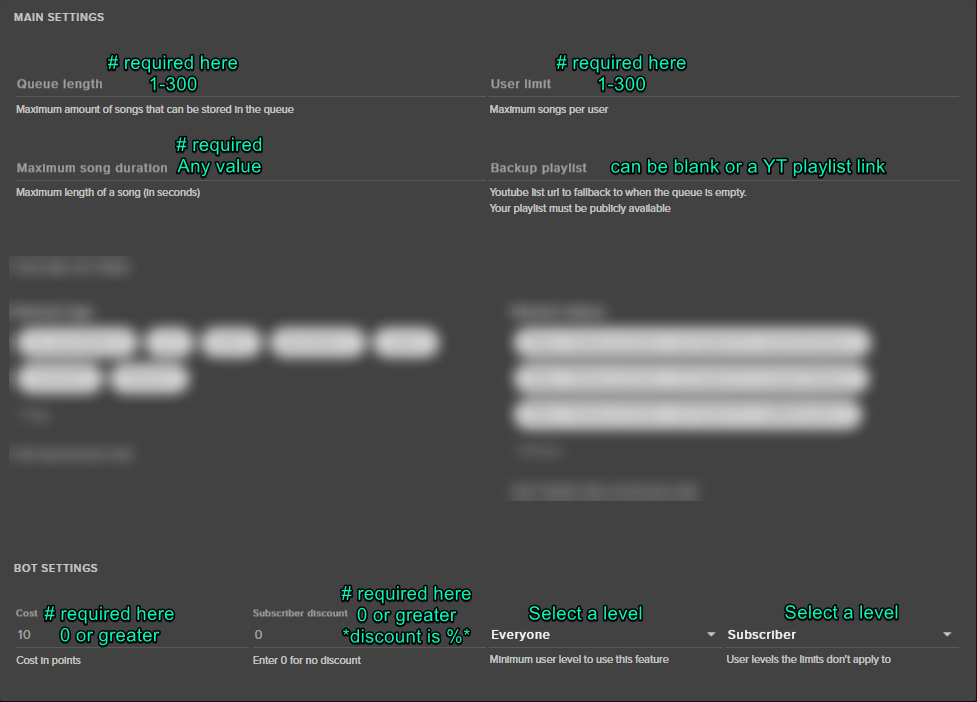
Make sure your settings meet these requirements:
clever mango
That can be done the only caveat being that the keyword right now must have be a !command that you can set. Is that ok? I can show you how it would be done.
unborn vault
@tight harness i got it enabled on the tab on the left, but is it normal that its still blocked on off on the default commands?
tight harness
It isn't blocked on the default commands, it shows as grey too if it's controlled elsewhere
unborn vault
yeh
warped sierra
@clever mango yes thats perfect, exactly what i want
tight harness
But if it's not working then make sure your settings match the requirements of that picture I sent
clever mango
Ok, I'll type out the steps to set this up....
warped sierra
@clever mango i know how to !cmd edit !keyword but i just dont know where the interface is to "roll" for the contestants
clever mango
Set your Keyword
- Go to Chat commands in the left panel
- Select Default Commands
- Scroll down to !enter and click the pencil icon to edit it
- Change the command name if you'd like from !enter to something else
(note at the bottom that !ticket is also an alias but can be removed or you can add your own alias(s) for the same command)
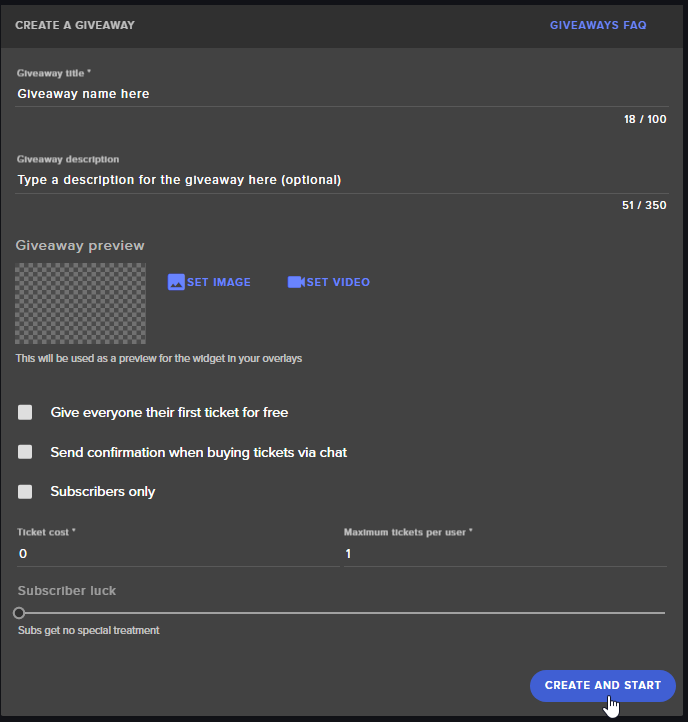
Set up the keyword giveaway
- Click Giveaways in the left panel
- Fill in the information for the giveaway and change the ticket cost to 0 and the maximum tickets per user to 1. You can make it subscriber only, have the bot send a confirmation when users enter, and add a sub luck multiplier to give them a better chance of winning. https://i.imgur.com/YTUP5yJ.png
 warped sierra
@clever mango okay cool, so they would have to type '!enter' for example to be in the pool
i am unable to have a 'keyword' for example '2017' and someone types that in the chat and they are entered
clever mango
it can be any word but right now it needs to have the !
!enter is just the default but you can change that on the commands page
warped sierra
bummer, a friend of mine uses stream elements and is able to set keywords
think ive got it actually
gonna work something out
thanks mate
clever mango
no problem
Maybe it's just me but adding a ! before the keyword doesn't seem like much of a problem and the system works exactly the same as other giveaway systems apart from that
warped sierra
its more of a case that usually in the community i stream in, if you type !keyword in the chat it will give you the correct phrase to type into the chat to be entered, thats how a lot of people have it set up in nightbot
just trying to keep confusion to a minimum
clever mango
Custom command:
!keyword
Response: Type !2017 in chat to enter into the giveaway

 indigo bone
so im getting 2 alerts when i get a follow, checked the overlay and tested that only getting one, any ideas?
tight harness
Check you've got 'shutdown source when not visible' ticked in the properties for the browser sources you've got in OBS
indigo bone
i do
 vapid rapids
hey all this is more of a not-stream elements issue, but my processor has been really choking lately and i don't knwow hat i can do to smooth things up
i have a ton of cef bootstraps running at high cpu usage. i understand those are the browser sources. what can i do to minimize those? i'm chugging in game
tight harness
@indigo bone Then check you don't have 2 alert boxes with the same options ticked
@vapid rapids Check the first suggestion I gave to Monks_Blood just then
lament blade
@tight harness Ay mate, the backup playlist began to work after restarting Ground Control 🤔
indigo bone
i checked my layers only have one alert box . is there built in alerts i need to unmark somepalce ?
vapid rapids
is that for all the sources?
clever mango
@raven yarrow Hi click on Chat Commands in the left panel, then default commands and edit the !points command with the pencil icon next to it
indigo bone
ah ha one of my ending stream scenes didnt have the shut down marked, i wonder if that will fix my issue
vapid rapids
the issue is
all my sources are always up
like, i have everything running on the page
 raven yarrow
is there
tight harness
@vapid rapids Yes, for all browser sources, basically anything you don't want to have running in the background taking up resources
raven yarrow
a way to edit what it says
and just says how many points
trying to reduce the spam
tight harness
@lament blade Excellent! 😃
clever mango
Sure, disable the default command and create a custom command for it 😃
you can then make the bot whisper the person their points if you want
it's an option for custom commands
clever mango
click the variables tab at the top to see what you can use to build your custom command
tight harness
If you won't use them anymore then yeah, sure 😃
raven yarrow
oh btw there was a bug, when i did a give away. people were able to buy more than 1 ticket. when i set max to 1.
vapid rapids
 thanks
tight harness
no problem 😃
vapid rapids
best channel for stream advice 2018
tight harness
vapid rapids
LOL
clever mango
@raven yarrow When was this giveaway?
 viscid copper
Excuse me, why I can't find any of my redeem items?
tight harness
What happens when you type !items into your chat?
 silk gate
how can i change the userlevel of commands as a moderrator in the chat ? for example = the streamer has a pubgkill command, but if i create it, than it's for everyone, is there any variable to edit the userlevel like only for mods ?
clever mango
!cmd options pubgkill -level 500
silk gate
ok thank you ^^
 viscid copper
@tight harness it told me what is available to redeem
tight harness
@rich shadow So what was the question again? Because I thought that was it 😄
viscid copper
I am so confused
I went to the SE website redeemed a streamer's item, but I didn't get the item
tight harness
If it's a Stream Perk then it's up to them to give you the reward
 misty wagon
If the streamer has an issue, they can come to this Discord. It's not for viewer support, sorry
viscid copper
What's do you mean? I am new to twitch sorry
tight harness
If you redeemed a stream perk item and it's something that the streamer then has to do to give you the item then you'll need to wait for them to give you the item, that's nothing to do with us 😃
viscid copper
It's a glyph, not perk actually
tight harness
Well it's not a game code and it's not a sound so yes, it's a stream perk
tight harness
Awesome 😃
Those are the 3 options
And stream perks always have to be rewarded manually by the streamer, they have a history list of redemptions though so don't worry, they'll know you redeemed it
long garden
One more quick question. 😄 Does SE have integration with Amazon Wishlist?
I'm not seeing anything.
misty wagon
https://streamelements.helprace.com/s1-streamelements/ideas Not yet, but you can post/upvote it here
tight harness
No problem
long garden
For now I'll probably have to use SL for that and SE for everything else. Trying to consolidate everything to SE, so I look forward to that addition.
wise sundial
Song request isn't working my viewers can't hear it and it's playing I don't understand why?
viscid copper
@tight harness thank you, I got the problem solved🙏
tight harness
@wise sundial You hear it loudly enough but they don't?
If so, are you using a virtual audio mixer?
@rich shadow Awesome, glad to hear it 😃
tight harness
But do you use a virtual audio mixer?
wise sundial
What's that?
tight harness
Software which can determine what sounds get played where
Because if that's used but not set up properly it can cause the issue you're having
tight harness
And it's not just too quiet?
Because virtual audio mixer software is 3rd party, you'd know if you downloaded it most likely
wise sundial
Where do I download it on using my kindle lol my pc is tore up
tight harness
You don't need it
It's for advanced setups and most people set it up incorrectly anyway 😛
I was just wondering if you already had it
Seeing as it often causes the problem you described
wise sundial
So what do I do now
tight harness
The question I asked earlier was are you sure it's not just too quiet at the moment?
tight harness
Can they hear the other sounds through your OBS?
wise sundial
Obs?
tight harness
Are you not using OBS?
wise sundial
What is that I'm new to this
tight harness
Streaming software
wise sundial
Where do I get that lol
wise sundial
Ps4 lol
tight harness
Are you streaming directly from there? Because there's no way to get song request using the PS4 unless you using a PC as well
Such as with a capture card
So i'm confused how your viewers heard it earlier
tight harness
Unless they just heard it playing out of some speakers
tight harness
Not sure, PS4 doesn't allow browser sources by any means
wise sundial
I know that's what I don't know why
tight harness
If you hook it up to your PC via a capture card you can have it open on the PC and capture both in OBS, but without a PC it's not possible
wise sundial
I don't have a pc
 dusty parrot
Need some serious help plz. Had a guy try to donate last night and it wouldn't let him
tight harness
@dusty parrot Wouldn't let him? Will need more information
wise sundial
So like now my currency system isn't working
 brisk flint
Hi guys! I just red this article: https://streamelements.helprace.com/i322-better-alert-moderation
How can be moderated? I do not saw any options to block for example a follow. Or is it possible to block for example for 1 minutes? How is the streamer noticed in this case? Becase if it is only written in the alert it is not good, because normally the streamer does not check the list constantly. Thanx
tight harness
@wise sundial What makes you say that?
@brisk flint As TerraBuck explained the app Ground Control offers hotkey support to pause and skip alerts, that's one of the main reasons we added hotkey support to Ground Control
wise sundial
Because my !givebucks command doesn't workkkk
wise sundial
I changed it to givebucks
tight harness
Do you know how to give dashboard access? I can take a look
tight harness
Nope, i'll DM you how to do it 😃
wise sundial
Okay I switched it to addbucks and it works I don't know why it doesn't work for it givebucks
tight harness
Ohh, so do you not need me to do it anymore?
wise sundial
I want it as givebucks but it won't do it anymore
tight harness
@wise sundial You have a command called !givebucks already which is for trading points
And you have a command called !addbucks which is for the bot to give people points from an endless amount
!givebucks was disabled
Now it will work
wise sundial
Okay thx
tight harness
No problem 😃
wise sundial
I need to know how to setup a thing where it says someone followed or hosted I forgot
 tame spindle
Good afternoon. Is there any way to rename the StreamElements chatbot? I use Streamlabs Chatbot (formerly Ankhbot), and while I honestly prefer the chatbot that runs on my own PC, there's some modules I like on the StreamElements bot that Streamlabs Chatbot lacks.
 runic grove
is there a way to not permit the stream elements mods of your channel edit the loyalty points?
tight harness
@wise sundial In the chat you mean?
wise sundial
Yea
tight harness
@wise sundial Modules > Chat Alerts
wise sundial
That's right
tight harness
@tame spindle We're actually testing this at the moment to check it's stability, it'll be available very soon 😃
@runic grove Raise the required level to use the commands
tame spindle
Also, is there any way to get an update to the Green Flare supertheme? The Blue Flare has that option for the 4:3 Camera box, but Green Flare only has the 16:9 option.
tight harness
@tame spindle It's possible @ripe herald has it available if it's been asked for before 🤔
runic grove
i mean this screen, they are supposed the things in my store, but they can edit the loyalty settings
tight harness
Ohh you mean dashboard access
runic grove
yea
tame spindle
Would be nice also if the editor included all the default sounds and images in the gallery... If we delete anything by accident, there's no way to restore it.
Other than deleting the whole overlay and starting over.
runic grove
they can add or remove points if they are in the leaderboard, so a option to customize the acces would be a good idea
tight harness
@runic grove Dashboard access is a higher level of access than Mod and Super Mod, so they get more permissions. It has been brought up that some people want this to be more customisable but I haven't heard any updates recently about that
runic grove
it would be surely a good idea 😃
tight harness
@tame spindle If you check the pinned messages for this channel there's some stock files available to download
runic grove
to mark/unmark what options they can control or not
tight harness
A custom option would be good
But it's pretty basic, there's not all of the themes gallery images in there @tame spindle
You can duplicate things from one overlay to another
Not sure if you realised that, but that's one way to duplicate something to an existing overlay if you accidentally delete it
tame spindle
Oh cool. Stock files. I didn't see any of those in my gallery. But I'm talking about the Supertheme specific images. If I accidentally deleted, for example, that bottom image across the screen, there's no way to get it back other than reloading the overlay and discarding all my changes... and if I saved after deleting then I have to delete the whole theme and start over.
tight harness
Ahh yeah, the supertheme images are not available for download, because they're meant to be specifically used as part of our free service, if we have them available for anybody to download then people can download them and use them anywhere, not ideal
tame spindle
If it's a free service, then what's the difference?
tight harness
People using it on our service as part of our free service vs people downloading it as using it on another service, there's a big difference 😛
tame spindle
And I'm not talking about being able to download it. I'm talking about having it included in the image gallery within the editor
Unless you're saying we can download images from that gallery.
 ripe herald
@tame spindle curretnly we dont have that option but in future it will be taken in concideration 😃
runic grove
Oh i forgot, thanks for the help legendary
tame spindle
Hm.. Still on the fence here. There's still some features in Streamlabs I just like better. The Bit Boss. Streamlabs Chatbot as a program on my PC. More stock options in their alertbox. I guess there's no reason I couldn't just use both. God knows my computer can handle having the extra browser sources running.
stuck hamlet
What does a local chat bot do for you? @tame spindle
tame spindle
The way Streamlabs Chatbot is set up, it basically acts as my command center for my stream. Managing my stream title, game, and communities. Raid assist. Loyalty points. Commands. Quotes. Timers. And I can view my chat, including BTTV and FFZ Emotes right in the chatbot window as well.
It's insanely customizeable too. I have commands and timers that will only fire if I'm playing a certain game.
stuck hamlet
But if you blue screen or something, it's all gone 
tame spindle
If I blue screen or something, my entire stream is gone.
slim cairn
for the per game thing you can upvote https://streamelements.helprace.com/i526-commands-reply-different-per-game
stuck hamlet
Per game thing is really good
lament blade
whenever i copy my url into my browser source it doesnt show anything
 timid pulsar
Hey, is there a way to block out swear/explicit words from running on TTS? @ me if you have a reply ❤
tight harness
@dusty parrot StreamElements isn't modded in your channel?
dusty parrot
I thought it was. That might be the problem
tight harness
@lament blade What resolution are you going for?
lament blade
1080p
stuck hamlet
@dusty parrot try parting and joinning the bot again
dusty parrot
I just modded it
tame spindle
Will any of these overlays cause issues if I'm downscaling a 1080p canvas to a 720p output? I'd normally just stream at 1080p (again, my computer can handle it. Freaking beast...) but I've got regulars with slow internet connections, and I'm only affiliate so I don't always have quality settings.
 tawny pivot
Errors like that usually indicates that twitch invalidated the token. So relog and it should be resolved.
tight harness
@timid pulsar If you go into https://streamelements.com/dashboard/tipping/moderation and you click Profanity Filter you can chose options there to filter out bad words
Plus you've got the tick boxes custom profanity protection and standard profanity protection
tame spindle
Man, it's a lot of work, even after setting up these superthemes, to go through them and change everything needed. Have to remove the instagram, youtube, and facebook texts and images, edit the twitter text and resize it so it fits, swithc top donator and recent donations to cheers, resize the text box for my name so it fits, and resize the new follower and subscriber textboxes. And that's JUST on the in game overlay, there's 4 more to work on after that. -_-;;
lament blade
any ideas on why its not visible on my obs?
 novel condor
i started streaming today and the overlay wasnt on any help plz?
weary mist
@novel condor was it showing a help icon in the bottom right?
tame spindle
Is there any way to reverse the in-stream chat overlay to show the most recent chat line at the top and scroll down, rather than start at the bottom and scroll up?
Also, had a question about canvas/output resolution that got missed
weary mist
I don't believe that is an option at this time
weary mist
and as long as you do the scalling in OBS it works fine @tame spindle. I downscale the themes from 1080p to 720p for my stream output
@novel condor 🤔 this is a weird one. Try this for me real fast: Double click on the browser source, and refresh cache
novel condor
am i supposed to be on stream elements or twitch?
lament blade
Im having the same issue as him ^
clever mango
@tame spindle 👍🏽 this idea and leave a comment on Cuda's post if you'd like to see that feature in the future https://streamelements.helprace.com/i240-chat-widget-features
 full seal
May I ask a question about the stream loyalty point store?
clever mango
Of course, no need to ask to ask 😃
full seal
Thank you! Does or can an alert show when someone redeems their points for a store item?
clever mango
Yep!
full seal
How?
full seal
Oh "Store Redemptions"?
clever mango
That's the one
full seal
Thank you ❤
novel condor
to use my overlay do i have to have obs?
weary mist
no, you can use any broadcasting software that supports a browser source
novel condor
@weary mist wait i use an elgato bc i play on my xbox so do i need obs?
clever mango
You need a broadcasting software like OBS or Xsplit. Most people prefer OBS
novel condor
but i have elgato does that work
clever mango
elgato streaming software?
novel condor
game capture?
clever mango
that's a capture card that sends your console A/V to your computer
novel condor
it still has a streaming option
clever mango
Does it support browser sources/web overlays?
novel condor
idk
clever mango
I'm not familar with that program
novel condor
ok it just streams straight to twitch through my twitch account
slim cairn
I don't think it does^
clever mango
ok, use OBS and add a video capture device source
from there you'll select the elgato
slim cairn
Download OBS, it'll be more worth it in the future.
There are tons of tutorials on youtube on how to use your elgato on OBS
slim cairn

In this video we show you how to set up your Elgato capture card with OBS Studio for Windows. ▼ Follow Elgato Gaming: Twitter: http://www.twitter.com/elgatog...
a official tutorial on how to use it
slim cairn
Its all set up the same
clever mango
This channel is for StreamElements support, not general streaming support. Please ask streaming questions in #welcome although googling or searching youtube will be easier
 kind pasture
Does anyone know how I can reset/ clear a tip goal? I changed the info and deleted the widget entirely but it still keeps the same amount from the previous goal
clever mango
@kind pasture Activity feed > widget data > Goals
or in the overlay editor click on DATA > Goals
kind pasture
Thank you kindly, my good sir or madam.
 crimson yew
Is there a way to shuffle music on StreamElements?
clever mango
Yes, you can shuffle the backup playlist with this button on the songrequest page
crimson yew
Ah...
That's a little lame.
I tried posting a url to a playlist and it wouldn't save.
crimson yew

YouTube
clever mango
The link is fine. It's likely another setting that is causing the page settings to not save. https://i.imgur.com/t28AhpK.png
 crimson yew
Where is the shuffle button exactly suppose to be?
clever mango
crimson yew
Thanks dude. Much appreciated. 😃
 sharp talon
can I turn off this? I dont use tips and I dont want to see this everytime I go on the website
tight harness
Have you not activated the chatbot yet?
tight harness
I know one of the things in the list stops it from appearing
sharp talon
import?
tight harness
Nah, pretty sure it's not that because not everybody needs to import
tight harness
Understood
 icy talon
how do i fix this
sharp talon
@tight harness so you dont know how to turn it off 
weary mist
the only way to turn it off is to put in your paypal email address and put the bot in your channel


 tight harness
I knew it was something like that
weary mist
you could try to put in the email address, click the save, then go into your tip settings, and remove the address
sharp talon
that worked
weary mist
also, if you are not using our tipping service, make sure to turn off the command !donate/!tip
sharp talon
dont like that it force you to have tips tho
weary mist
under default commands
sharp talon
thats alot of default commands
weary mist
it doesn't force you to do anything, its there to remind people to update it if they mean to
the !donate/!tip are the same command, one is an aliads of the other
I just don't know which one it shows up under on the default list, so I tell you both
sharp talon
what I meant to say is you should be able to remove that window without entering a paypal
tip i think
@weary mist its back actually
weary mist
ok
icy talon
Can i get some help
sharp talon
well looks like Ill just be using another bot, thanks for the support
weary mist
@icy talon ask your questions, and you will get answers
weary mist
so that means that you need to reduce your encoding settings
icy talon
how
icy talon
this?
icy talon
i dont know all of that i am only 13
tame spindle
That's no excuse. 13 or 36, you can learn. 😛
icy talon
ye thats what i want to do learn
tame spindle
Sure. But using excuses like "I'm only 13" discourages people from teaching. You want to learn? Own that you don't know something, but don't use your age as a reason/excuse/whatever 😛
tame spindle
On the Settings page, in the Output section. What is your current Encoder Preset value?
tame spindle
You've already been told that's not the right one. I said /Encoder Preset/
icy talon
its no there
tame spindle
Another option to help reduce the load on your CPU is to reduce framerate (Twitch non-partners won't be displayed above 30FPS anyway), downscale your resolution (I have a 1080p canvas, but downscale to 720p), or just reduce the number of running background tasks and free up some CPU for the encoder.
 lone lake
what cpu are you currently running and how much load are you using when streaming?
tame spindle
If your encoding preset is already on veryfast, there's not much we can do there. You can try superfast or ultrafast, but if veryfast is already having trouble keeping up, you're not going to get much help there.
Go to the Video section of the settings page. What does it have for canvas resolution and output resolution?
icy talon
 odd mango
On the stream store, after redeeming an item, how do you actually use it?
weary mist
@odd mango The streamer handles the redemptions, SE only provides the platform
tame spindle
Ugh. Ok, @icy talon this might help, but it WILL cause you FPS drops in whatever game you're playing. Go to Advanced, check Process Priority. Set it to High if it isn't already.
This will make OBS encoding the priority for your computer over whatever else is running in the background, but as I said, your in-game performance WILL suffer.
odd mango
How do I become a sellout?
icy talon
thx @tame spindle but sry for stressing you out
tame spindle
Anyone can sellout. The question is if anyone wants to buy.
odd mango
What do you mean?
tame spindle
...nevermind. 
odd mango
Thank you
tame spindle
@icy talon you're not stressing me out. I like helping. If I seemed a little abrupt at the beginning of our conversation, it's more because I was trying to evaluate whether you needed help, or an adult to come do it for you 😛 No offense. If you're willing to learn and can follow directions, I'm willing to teach.
icy talon
coo;
tame spindle
... to be fair, though, sometimes even adults need an adult to come do it for them. Some people are just afraid of technology. -_-;;
And way too many people never learned how to follow directions.
icy talon
ill start streaming tommorrow ill follow u or sub to u send me a link
tame spindle
DMed you a link. For future reference, in discord you can also click on a person's name in the userlist and click on their icon to view their profile. If they have their twitch and discord linked, you can see it there.
icy talon
kk thx
odd mango
<@&382267076632379392> I would like to be a #291219887274328064
tight harness
@odd mango You should link your Discord and your Twitch so we can see your channel
odd mango
Do you want a PM or would you rather I link it in this chat?
tame spindle
Do we have to be using the streamelements chatbot to sellout? I still can't see me stepping away from Ankhbot
weary mist
@tame spindle yea, that is part of the #291219887274328064 requirements
Improvements are coming of course, so keep an eye on us, you might switch in the future
tight harness
@odd mango I'd rather you link your Discord and your Twitch together in your user settings
odd mango
Got it
tame spindle
Dunno... Ankhbot Streamlabs Chatbot really is my control center for my stream at this point.
weary mist
😉
sharp talon
why does it say my name twice? anyway to change that?
weary mist
The way the default command is set up, you can check other peoples points
so if you did !points lord_scalper, it would say Azore, lord_scalper has x points
sharp talon
so if someone else does the command
weary mist
yeah
sharp talon
does it say their name twice?
weary mist
no
it says the targets name, and their name
in essence, $(sender), $(user) has $(user.points) points and is rank $(whatever the rank variable is) on the leaderboard
sharp talon
yeah but lets say you type the command in my chat
does it say @weary mist , scalper has ....
sharp talon
thats midly annoying
weary mist
You can always disable it and create a custom one that doesn't do that
sharp talon
true
misty wagon
Staff only does Coffee, u need to tag Support Heroes
clever mango
@eager forum Have you started setting them up and have questions?
 eager forum
@clever mango yes i still need help
clever mango
Ok, ask away