#helpdesk-twitch
1 messages · Page 172 of 1
 tight harness
 formal pilot
Thanks Legend! I've been very happy with the service. There's something I wanted to bring up during the overlay settings, there is no way to freely move things like on OBS, holding I believe ALT or CTRL let's you move things around without experiencing any "locking" to other windows/boxes.
tight harness
There's a grid button at the top right of the overlay manager
 pine hemlock
Looks like a waffle.
tight harness
 waffles
tight harness
No problem 😃
formal pilot
I've also noticed an issue with every new overlay regarding names not showing up properly
I usually have to go back and readjust them because they aren't centered or too far off to the right
Is that a common issue or a setting?
And by overlays, I'm talking about the ones offered through SE
tight harness
You mean the part where the streamer's name goes?
tight harness
Well the good news is that you can move every widget and change their alignment 😃
formal pilot
Yep! I just wasn't sure if there was something I was doing wrong, like forgetting links and what not >_>
Anyway, thank you @tight harness for your help and @pine hemlock for the waffle hint 😛
tight harness
No problem 😄
pine hemlock

 weary mist
😮 no waffle emote 🤔
 sage hare
i got a question on overlays
tight harness
Ask your question 😃
sage hare
are overlay use only for pc streamers
tight harness
You need a browser source for the overlays, consoles can't do browser sources so you need to use a PC as well somehow, whether you use a capture card or another way, but the overlays will only run on a PC
sage hare
ah okay i don't have a capture card so i won't be able to use the overlays then
 slim cairn
Unless consoles add browser source capabilities cough Sony pls cough cough
tight harness
I think you can use something called Remote Play too, but not heard much about it
pine hemlock
Maybe one year
sage hare
yea i miss my xbox so bad
 fast trout
Is there a way of setting a threshold for the hosts showing in the events list?
tight harness
All hosts will show in the recent events list
fast trout
Is there no way of configuring the minimum like you can with alerts?
tight harness
No, the event list shows all events that you tick the boxes for, there's no minimum setting
sage hare
is there anyway to custom the name of the lv someone is when they have points
tight harness
@sage hare It's been suggested on our ideas board here: https://streamelements.helprace.com/i178-add-ranks-to-the-loyalty-system
Seems like a popular request
sage hare
so rn its still a no
sage hare
seems like its a majority vote
tight harness
Right now we're working on youtube gaming integration, that's even more popular 😄
sage hare
still be nice to custom name lvs
tight harness
I agree 😃
 lyric slate
Could not save settings. ????
tight harness
Depends what it's saying it for, normally means you've either left something blank or put in a value which isn't allowed
lyric slate
I have to fill all the spaces??
tight harness
Yes
tight harness
Got it now? 😃
lyric slate
thank you very much
tight harness
No problem
lyric slate
Another question, how do I make the video not be seen?
lyric slate
"Show Video/Hide Video" they are not on the page
tight harness
It was changed to this:
sage hare
does songrequest for ps4 need a capture card as well
sage hare
i got a laptop
tight harness
That works
lyric slate
Where can I see the image?
sage hare
how would i go about connect it so my viewers can hear the music while i play ps4
tight harness
The image?
 slender yoke
thanks @tight harness for the help today.
tight harness
You're welcome 😃
@sage hare The way I know about is using a capture card connected to a computer, apparently there's something called Remote Play too but I don't know anything about it
@lyric slate You'll have to be more specific than "see the image" 🤔
lyric slate
show video ... I understood so that I did not see the video
tight harness
You're doing this for requested songs or playlist songs?
Because it ONLY works for requested songs
As that is what the feature is meant for, showing requested videos on your overlay
lyric slate
So this option is for viewers to see their videos, right?
tight harness
Yes, on your overlay
So you need to add the Media Share widget to your overlay for this if you haven't already
lyric slate
no no, I do not want you to see the videos, I thought you could do it with the antbot (chatbot) to hide the videos and only listen to the music.
tight harness
Ohh, you can't hide the video because the video is needed for the youtube embed to work correctly
lyric slate
it is understood. It is like the sr system of the nightbot or something similar. true?
tight harness
I haven't checked their song request system in something like 3 years
lyric slate
I just can not hide the video on this bot and the nigtbot. It is the same hehe only that is because it has more tools. it is nice. It has not changed much the other bot that I tell you.
tight harness
Right, but the reason it can't be hidden is because when we had it so the video could be hidden it caused problems until people showed the video, so we disabled the option to hide it
lyric slate
Yes I understand. to benefit you risk risking some functions. Will this function come back?
tight harness
Haven't heard any intention of bringing it back
pine hemlock
We removed it because it caused issues and people complained. Its unlikely to come back
lyric slate
I understand. In the same way, I thank you for your help. what I will do so that I do not consume much internet is to lower the quality of the video nothing more jejeje. I really liked your collaboration. Merry Christmas and thank you very much.
tight harness
You're very welcome, Merry Christmas to you too 😃
lyric slate
If in some future I have another doubt I will return. hehe
tight harness
Of course 😄
pine hemlock
we'll be here
 upper steeple
so i got a raid today my alert went off but there was no text under the gif
i emulate it and still no text
even though it shows tthe text when nothing is being emulated like the little preview thing when it just sits in the overlay manager screen
tight harness
Worked when I just tested it 🤔
 upper steeple

 runic bridge
do we have variables to display the current resub count for subs? eg Kappa x1 (for 1mos) or Kappa x10 (for 10mos) can't seem to find any article about it. XD
for overlays btw.
tight harness
Well, it depends what you mean by overlays
You can have it on the alert box for example
runic bridge
I want it to display on the recent sub box.
tight harness
Yeah, that's what I suspected you meant 😛
runic bridge
@tight harness Thanks! and Happy Holidays 😄
runic bridge
ahhh thanks!
runic bridge
My subcount isn't updating. Do you guys have this issue to. Supposed to be 1 but its staying at 0.
runic bridge
@clever mango My overlay says its 0. Using total sub widget
nvm it just updated.
Happy Holidays! @clever mango 
 clever mango
reset session from the acitivity feed to force an update from twitch
runic bridge
Ahhh... Copy that.
clever mango
it would automatically do it when you go live but you can force it
and happy holidays to you too 😃
 pliant hound
I wanted to create some perks my viewers could redeem with their points but, when I try to create my very first perk, I get an error message saying "something went wrong". Ooops?
tight harness
That means you left something blank or put something which it couldn't accept like a too large number for example
 dry hare
Does ground control only do Music based on your queue? is there a way to implement a playlist via XML file or something?
pliant hound
I think it's because the sentence I'm trying to add for the requirements is too long :'(
tight harness
@dry hare Playlist is added in the song request settings page via the site
@pliant hound Very possible
pliant hound
I wanted it to say "Please don't reedem this perk if I already said I'd be unable to stream longer that day (irl appointments, something unexpected that came up, me being sick, etc)." but... apparently that's too long xD
tight harness
That does seem long
dry hare
Thanks!
pliant hound
I tried another sentence "Have the Regulars rank." and it saved T_T
tight harness
Seems that's it then
pliant hound
I cheated and split that requirement into 2 ^^''
 pliant hound
what's the "access code list" option for?
tight harness
Game codes for points for example 😃
 scarlet ledge
I need some guidance in my streaming
dry hare
aww overlay won't pull from a backup queue?
tight harness
@xlEFlxGhost_888 (MSG)#6795 If it's not StreamElements related please keep it in #welcome 😃
scarlet ledge
Ok @tight harness
tight harness
@dry hare Correct, only requested songs, that's due to the limit we have on the Youtube API at the moment, but we're working on Youtube Gaming integration right now which should change that 😃
dry hare
Ah okay. Makes sense 😄 Thanks again for helping such a silly streamer like me!
tight harness
Nah i'm happy to help 😃
pliant hound
Any idea what the best size should be for the preview images for our rewards?
pliant hound
ok my monstruous image is now visible x'D
tight harness
😄
pliant hound
The cooldowns on the rewards are per stream, right?
tight harness
The cooldowns are just in seconds, or do you mean the amount limits?
pliant hound
the limits
Also, I noticed that on the store you can filter the rewards by newer, subs-only or cost, but when I'm creating them I don't see an option to make the redeem subs-only.
tight harness
There's a tick box for it in the Item Content section, second lot of options when you're creating it 😃
pliant hound
The only options I have there are whether or not redeeming the item shows an alert and if it can be redeemed via chat
other than that, just the preview image, volume of the alert and chat command
tight harness
Did you recently get affiliate?
pliant hound
No, I haven't streamed in years. Just getting everything ready for when I start streaming again. So I guess that option will only appear once you actually have subs. :P
tight harness
Your channel isn't showing you as an affiliate, you need to be able to have subs for the website to give you affiliate options
Yep, you've got it 😃
pliant hound
I recently updated my profile, OBS overlays, website and social media. I think getting some rewards for prices (and coming up with how much each should cost) is the last thing on my to-do list. Unless I'm forgetting something. Which tends to happen. xD
 fleet summit
i gave up on obs because they suck at not fixing coding issues
i use xsplit and bebo only now
pliant hound
what sort of coding issues?
fleet summit
obs always would crash
pliant hound
ah, that sucks :/
pliant hound
technical problems during streaming are one of the worst things that can happen to a streamer .-.
fleet summit
thats why i stopped ussing thier software no issues with bebo or x split at all
they are good
just got a yeti today
the mic
price matched amazon best buy
pliant hound
I think I might suggest Bebo to a fellow streamer as well. She has a potato pc and it looks like it's softer on the cpu than OBS :o
fleet summit
midnight blue
mines ok lately obs has not been coded correctly is why it crashes with capture cards
the yeti is perfectly clear
for a mic
to use its great just got it to work
 crimson quest
hey guys im trying to scale my hyper cup but i cannot find the scale option, ive done it before but for some reason im blanking
i see the bounce settings, duration, change cup, etc, but not scale
 misty wagon
omg i recognize that, have to look it up to
crimson quest
ive done it before but for some reason im blanking
weary mist
its when you pick the cup image
misty wagon
Yes, damn you Scalper I had the answer!!
crimson quest
ah i had to resize firefox to 90%
its not visible otherwise
chromes been giving me issues so i been using firefox
misty wagon
Ugh use Chrome pls, it's what we develop for 
Did you turn off the hardware acceleration in Chrome?
misty wagon
Under advanced settings
misty wagon
Don't buy Macbooks 
crimson quest
lol
nah, i had a bad power supply, appareantly it wreacked havoc
i replaced it, 2 days later the replacement broke
had to replace hard drive as well
looks like my video card may have been damaged too
im testing with a friends 1060 (I have a 480)
but since isntalling the 1060 chrome keeps crashing pages
misty wagon
Looks like your videocard might have been the issue to begin with. Recognize it
crimson quest
power supply was the start def
it had been used in a bit coin mining machine, and i wasnt aware of what that could do to a power supply
person i got it from never mentioned it could have issues
 hoary holly
Does someone know how to make Custom Alerts? I tried to find out on Youtube. But didn't found a good guide
pine hemlock
What do you mean custom alerts.
You just add an alert box and edit the image and sounds, fonts to your liking
 unreal quiver
Any support here?
tight harness
@unreal quiver Ask your question 😃
unreal quiver
I am using a premade overlay and it has the music scroll. On the dashboard i can have it show via youtube link. Can am i able to switch it to spotify?
hoary holly
@pine hemlock Like, If someone donates 1$ it appears a Alert. But if the Donation is higher then 5$ for example. The alert is different
pine hemlock
@hoary holly that feature is called variations and we support that as well. You just configure it in the alert box
hoary holly
On StreamAlerts?
 signal cosmos
uhm hi
hoary holly
Elements*
unreal quiver
yeah
pine hemlock
@unreal quiver we don't have Spotify integration currently. Your best bet for the moment is use the Spotify extension on twitch
@hoary holly yes.
hoary holly
How can I use it?
signal cosmos
is there a way to set a tweetout command/timer just like the one on Nightbot
unreal quiver
@pine hemlock ok thank you! ❤
hoary holly
I didn't found the Section of the Alerts
pine hemlock
Create an overlay, add the alert box widget and you can do what you just explained.
unreal quiver
@pine hemlock do you guys also build stream computers?
pine hemlock
@signal cosmos there's a timer section on the site to do stuff like that but you would need command, I don't think we have it by default
signal cosmos
ah I see
pine hemlock
@unreal quiver we built one for shroud but that was a special event. We can give advice on parts etc generally though
signal cosmos
anything I can do that'll be like that ?
unreal quiver
OH perfect well i will be in contact on some advice when it comes to parts! @pine hemlock thank you!
pine hemlock
@signal cosmos if you can find the command that nightbot used someone may be able to help you make it work with us yes
@unreal quiver no problem
signal cosmos
@pine hemlock nightbot has it as a variable, I can send a screenshot if you'd like to take a look ?
I'll take one more look and I'll contact you again if I can't seem to do it

pine hemlock
@hoary holly my overlays. Create a new overlay. Add the alert box widget.
 lament blade
how do i draw a winner at giveaways
 stuck hamlet
close and draw
lament blade
had 2 go back before
clever mango
@signal cosmos you can use clicktotweet.com to create a premade tweet and link it in a command or timer
that's the best we can offer right now
signal cosmos
I solved the issue thanks my dude @clever mango
clever mango

signal cosmos
I used the custom link from nightbot's command and pasted in to the timer
it's all good
tight harness

 steep valve
I don't know where to put this, but this certainly isn't the best error message
clever mango
Thanks for the report. Could you tell us what steps you took that led to this so it can be fixed? Also, which store is this and item?
@steep valve
signal cosmos
@clever mango is there a way I can just make a command without the !
apart from keywords
clever mango
keywords are the way
signal cosmos
but I don't want it to recognize it as a command if the word is like in the middle of the sentence
signal cosmos


also is there any way to change the ${count} value apart from using the command ?
clever mango
Add it to the ideas board and if enough people want it it will have a good chance https://strms.net/ideas
clever mango
he doesn't keywords
since then it can pick up the word anywhere in the message
he wants "keyword but only as the first word"
weary mist
👍
clever mango
for the requirements?
steep valve
Yeah
And this is in DeathJohnson's store for Vote on Games, but if there's a limit id think this would apply to all places if it uses the same code :P
clever mango
that may be true but the more info we collect the easier it will be for them to track it down and fix it
 dim magnet
when i open in new tab the widgets arent showing up, same with when put them into OBS. any ideas???
 ionic flare
Ok, thank you
crimson quest
Hey any known issues with the bot?
i had two new follows today and I think i was hosted or raided at some point cause my viewers went from like 3 to 16, but i never got an alert. I got a email about 2 follows, but only one gave me an alert, and only one is logged in my dashboard.
lament blade
how long do giveaways last?
stuck hamlet
@lament blade only an editor bug, works fine in obs
@lament blade as long as you want
 dark charm
Is there a way to change the default amount of points a !raffle gives?
Currently rewarding 5k
 proud pumice
@dark charm go to modules and edit raffle settings
dark charm
word got it ty
 ocean field
Hello is there any eta on when mixer support will be added?
pine hemlock
After YouTube is finished. Mixer should be next.
 agile slate
hello everyone any ETA when will be songrequest repaired by that i mean it isnt working 90% of time in ground control app and in web browser it just randonmly stops playing songs? OR for now is there any possibility to add shortcuts "pause/resume" and "skip song" to web browser so i can control it there while i cant use groud control. Last thing i would love to see song name in currently playing widget while my backup playist is playing. Thanks in advance ! keep it up streamelements are great tool 😃
tight harness
@agile slate I haven't had any of these issues with Ground Control while using it, the reason the backup playlist doesn't display the song name is because of a limit we have on calls to the Youtube API, this should be raised when we deploy youtube gaming integration. In regards to shortcuts for the website I haven't heard anything about that because Ground Control hasn't been known to have any issues with hotkeys. The only instance i've had for it stopping playing songs is if a song has been removed from the playlist and is no longer available or not available to be played in my country 🤔
stuck hamlet
Removing the ground control app from %appdata% might help
agile slate
Well i was send mail to SE like few weeks ago about ground control doesnt register songrequests and they reply they are aware of that. So there must be a some problem:D and MR. Onslaught should i just delete that folder is there any reasoning for that?
well i sent*
stuck hamlet
Yea delete the folder, make sure the app is closed.
And then just start the app again, it'll regenerate new files
So if any are corrupted some how, it'll be fixed.
agile slate
Ok done testing now tried few songs so far it works
stuck hamlet
We were aware of small issues. But the way you described it, sounds like the whole system is dead. So the person who replied to your email might have not thought it was this severe for you.
agile slate
but if my backup playlist is playing and i press skipsong to start requested song it doesnt start playing requested song but keep playing backup playlist.
if i let backup playlist end song then i starts playing requested one
 trim badger
Hey there, even though most of the ppl here would be english viewers, could I get #291219887274328064 ? Have been using SE for some months right now and I am very glad to have gotten you suggested by a fellow streamer and now partner
Almost forgot that: twitch.tv/GorthGamingTV
stuck hamlet
Are you using our tipping page, our bot and overlays?
trim badger
Yes
You can see the xmas-overlay in earlier broadcasts (yesterday), the bot is in the channel and tipping link in my panels
tight harness
@trim badger Added you 😃
trim badger
Great, thank you :) Merry Xmas :)
tight harness
Merry Christmas to you too 
lament blade
Hello! i have issue with overlay.I copy the link that i need to put in OBS,i create CRL Browser and paste the link,set res to 1920x1080 and i get just blue button in the right bottom that says Help!
 atomic hollow
can you please refresh the cache of the browser source?
tight harness
CLR Browser? Are you using OBS Classic still?
lament blade
Yes
atomic hollow

tight harness
Classic hasn't been supported or updated by the OBS developers in over a year, upgrade the Studio, Classic is your problem
lament blade
Ok,thanks!
tight harness
No problem 😃
trim badger
Classic Problem?
atomic hollow

 heavy spoke
can I be a sellout monkaS
tight harness
Using the bot (modded), overlay manager and tipping page? 😃 @heavy spoke
 gaunt light
@tight harness my love ?
atomic hollow
@gaunt light you need to start paying 4.99 a month for support
tight harness
 hidden willow
@tight harness i think if i put the overlays on 1080P im a bit laggy why cant i do it on 720P
gaunt light
in the raffle module i removed the pog champion and added my emoticonn but it doesnt show
atomic hollow
the bot is subbed to you?
tight harness
Is the bot a sub in your channel?
gaunt light
@atomic hollow more like u pay me that so i wont
tight harness
Jinx 
gaunt light
nope how do i sub him?
gaunt light
will take some time i was promosied to broadcast from someones head quarter a mo th ago.
month*
atomic hollow
who would be stupid enough to promise that?
tight harness
@hidden willow Have you tried making it 1080p then using Ctrl + F on OBS?
gaunt light
some one that is into boxing apperently
tight harness
And use the downscale option to downscale it to 720p
tight harness
If you downscale it in your video settings then it is 720p
heavy spoke
yes @tight harness
tight harness
@heavy spoke Added you 😃
heavy spoke
ty 
weary mist
@hidden willow when you do CTRL+F in OBS, it changes the overlay to match your canvas, aka, downscaling it to your native 720p. It is how I do it
 tame thicket
Is there a feature where i can have chat on screen. i.e on starting scene and so on @serene granite
nvm found it
weary mist
👍
 astral plinth
My dashboard date is datting 1 month back and I can't set it right 😦 every time it goes back 1 month
tight harness
@astral plinth Ahh, yeah this is known 😃 the statistics are correct, it's just the month displayed is incorrect
If that makes sense
astral plinth
Yeah, all statistics are perfect, just the date, thats a general problem? Any fix?
tight harness
There's no fix for you to be able to do, it's just a slight visual bug
 thick eagle
There's a place to see total amount of donations since using SE, isn't there? I'm too blonde to find it...
tight harness
You've got your tip list here: https://streamelements.com/dashboard/tipping/list and your top tippers here: https://streamelements.com/dashboard/tipping/top-tippers
thick eagle
But there's no place that shows a total? I'd have to add it?
tight harness
Top tippers shows totals
 radiant zenith
hey guys im hainvg an isssue with slots aparently i've messed mine up and no matter what settings i have it on everyone continually losses? anyway to fix?
weary mist
@radiant zenith with slots, the more emotes you have, the lower chance people have to win
so if you have 5 emotes, the chances to win are very low, but having 3 emotes gives a higher chance to win
radiant zenith
ok and the rigged bar has nothing to do with it?
tight harness
The rigged bar for slots is to determine the payout
radiant zenith
ok, i've lowered down to 3 emotes and noone can still seem to win?
I'm not sure what i've done to it lol
tight harness
Less emotes = better chance to win, more emotes = less chance to win
It's something like 5 emotes = 3% chance, 4 emotes = 7% chance, 3 emotes = 12% chance
radiant zenith
ok, thank you for the help
tight harness
No problem 😃
gaunt light
@tight harness my top tiper doesnt show the total but show the largest one time tip
tight harness
Interesting 🤔 I checked mine earlier when I mentioned it and it was all correct 😄
gaunt light
all time top tip ?
tight harness
Ohh, top tip is the one time top tip
Top Tipper is the person who's donated the most over all
gaunt light
oh so what the name of the biggest donator ?
tight harness
Top TIpper 😃
tight harness
😃 ❤
lament blade
which filter you use for avoiding noises at OBS for mic?
weary mist
noise gate, or maybe compression?
 tiny lotus
 So I'm having an issue with the tip leaderboard where it says someone has donated $290.68 over 106 tips, but to my knowledge this person has only donated once and that was $1.69. When searching for him in the tip list nothing comes up and when hovering over his name he doesn't have an email attached like the rest of the people on the 'Top Tippers' list, and it says his first tip was 8 months after his last tip, and I'm pretty sure his last tip was the only time he's ever donated.
Here is what I am seeing:
Here I went on my streamlabs page and found the only donation he has
weary mist
@tiny lotus chekc to make sure there is an email in there. it will lump everyone that doesn't ahve an email address under one person
tiny lotus
There is an email on the streamlabs one
weary mist
but is there an email on the tip in SE
weary mist
if you go to tip settings, then tip list
and make sure to expand the date range, as by default it only looks at the last year
tiny lotus
Oh I see. So when I imported my Streamlabs into SE it lost all of the donor emails?
weary mist
not all of them, it should only happen on CC donations
tiny lotus
Ok, but the original donation was via Paypal
weary mist
huh, thats an odd one
tiny lotus
According to Streamlabs
weary mist
it could be an issue with SL trying to block us, limiting information that can be pulled
tight harness
Wouldn't be the first time they've done that
tiny lotus
Welp at least I know why it's happening.
dark charm
Any way to edit text in a widget to blink or strobe? or change colors?
or is there just the scrolling
tight harness
@dark charm Currently just scrolling but there's been a few suggestions on more options: https://streamelements.helprace.com/search?space=1&q=text
slim cairn
SL should just suck up their death
tight harness

 dusty parrot
Hey, is there a way for mods to trigger a contest, and to decide what the winning option was?
tight harness
You can give them dashboard access
tight harness
misty wagon
lament blade
as I alrdy said legandary and scalper, no timer worked in my stream
tight harness
And we said we'd look into it 
lament blade
Ye
sage hare
Question is there a way to customize the way a bot greets a follower
weary mist
for sure, it is in the module section, under chat alerts
sage hare
Thanks
 toxic parcel
Yo! Can someone explain the !pepes thing to me?
proud pumice
you do it if you want all pepes gone from your bot/website
toxic parcel
& what are pepes
proud pumice


proud pumice
hf 😄
pine hemlock
YouTube it.
 high nova
My sub/resub notifications aren't going off today.
 west gull
I have a quick question, I like the size of the stream elements alert background for the green flare theme, anybody know how big it is so I can try making my own box for it?
pine hemlock
@high nova I would try logging out of the site and back in, if they aren't showing in the activity feed either
pine hemlock
New subs should show. Relogging refreshes your token to twitch
 karmic loom
Hey how do i delete my streamelements account pls?
 radiant garnet
can someone explain to me how I can add a animated overlay to obs?
clever mango
@radiant garnet https://www.youtube.com/watch?v=KDvLynUqXI4&index=2&list=PL_9rga23xIlJDyaOnO2avbss-PHm28oNs

Tutorial #1 - Adding StreamElements Overlays to OBS Studio ----------------------------------------------------------------------- 🚀 StreamElements 🚀 -------...
radiant garnet
aaaaah thank u!!! @clever mango
clever mango
@karmic loom request it by emailing doron@streamelements.com
 crisp jacinth
hey whats the point for the scenes in OBS just trying to stream line and make it easier going between overlays and brb stream starting and thanks for visiting
 sage imp
hey how does it work that i get my channel shouted out in #291219887274328064 everytime i go live ?
karmic loom
@clever mango thanks
clever mango
@crisp jacinth Use scenes to separate the different parts of a stream
@sage imp Did you set up overlay(s), add and mod the chatbot, and set up your tip page?
sage imp
yes @clever mango
 crude turtle
Is it possible for my overlay to have whatever song is now playing on my spotify? It just currently shows now playing no song
clever mango
@sage imp I've added you
sage imp
thanks 😃 @clever mango
clever mango
@crude turtle spotify integration is awaiting approval by spotify
crude turtle
Which sources are currently able to work with overlays for music?
clever mango
SE song requests, plug.dj, dubtrack.fm
crude turtle
Thank you!
 mystic parcel
it's been awile since is streamed and i lost followers. my overlays still has my old number. how do i get it to refresh?
clever mango
Use the total followers widget and reset session @mystic parcel
 willow lava
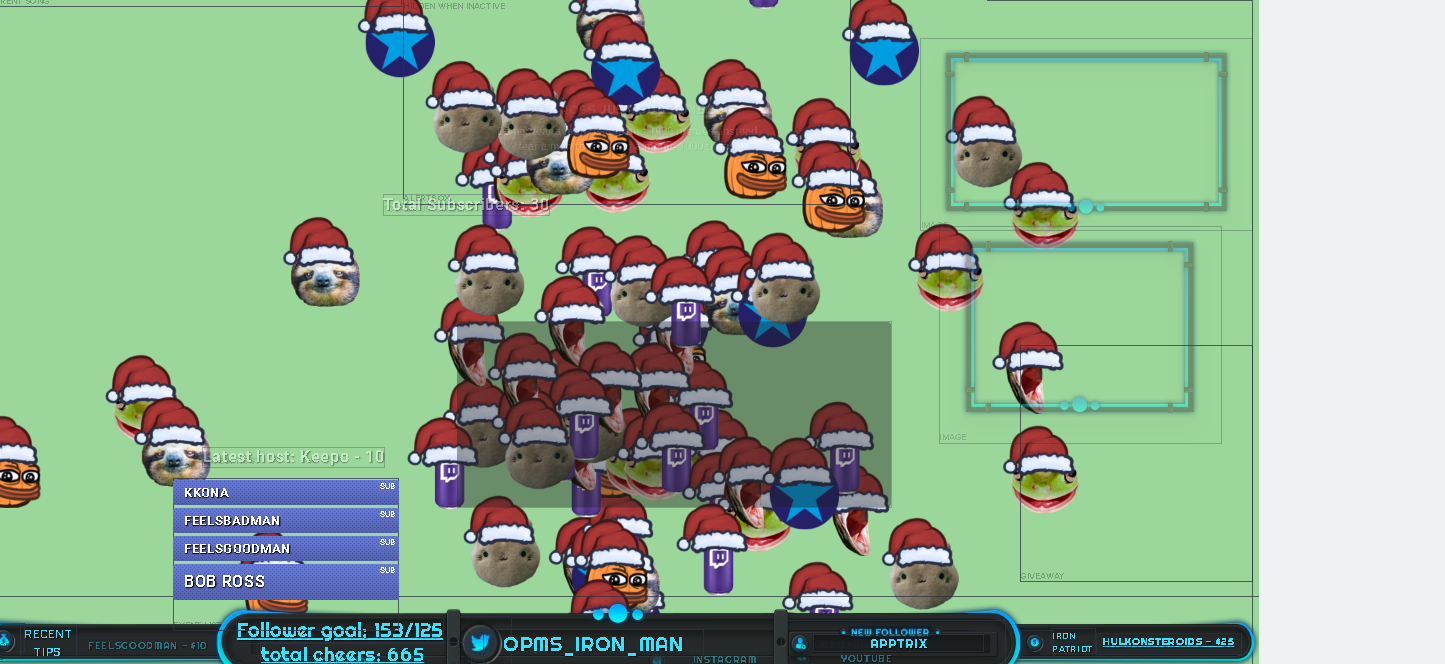
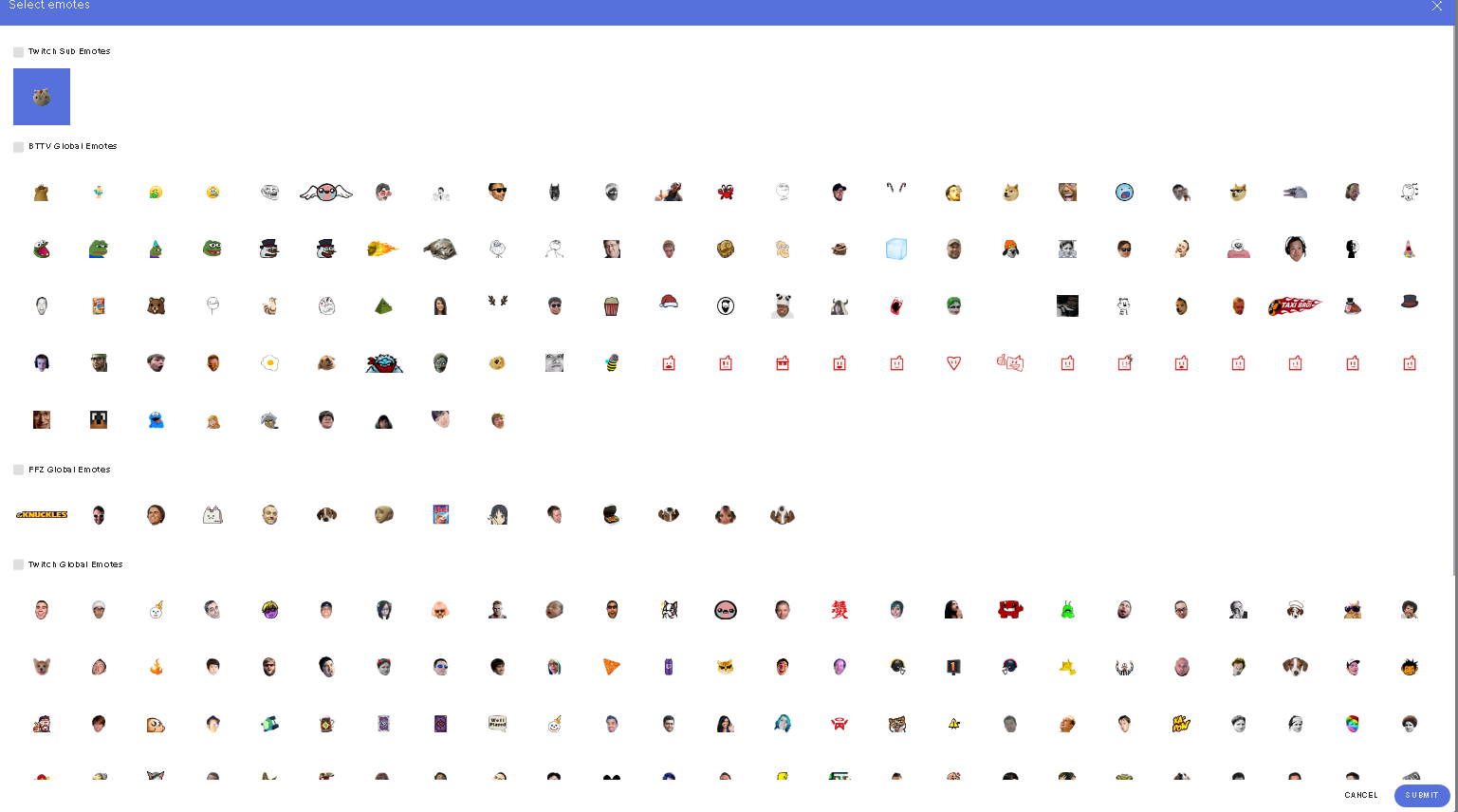
why do a bunch of pleb emotes show up on kappagen regardless of me disabling them all :\ (yes I hit submit) (yes I hit Save)


 last tangle
In contests isnt there supposed to be a start button on past contests so i can restart the same one? I only see copy and delete
clever mango
@last tangle copy and then start the copied contest
last tangle
Ya thats what i do.. I watched a tutorial video on it and the girl just hit a start button over there. did u guys delete that?
clever mango
@[OP-MS] IronMan 千鶴#3407 is this happening during an actual event or a test? Which event(s) have you tried?
willow lava
Using th etests through your overlay creator and also through the !kappagen command
tested all the ones that I set to trigger kappagen (not that it would make a difference as I cant actually make different kappagens per event)
clever mango
@last tangle Contests and Giveaways pages were recently changed, yes
willow lava
ugly orange pumpkin frogs, Blue circles with aqua stars, energy drinks, and snakes show up no matter what I do 😦
last tangle
Okay... I really liked that option.. Made it alot easier.. Everytime i copy it it puts the word "copy" in front so i have to manually go delete it then hit start
clever mango
@[OP-MS] IronMan 千鶴#3407 Try typing !emotes update in your chat, log out and back in and then test again
crude turtle
How do I connect my dubtrack to my stream elements? I dont see the option
willow lava
speaking of restarting contests... is there any way for me to restart a contest and reset the people who entered? I really wish I could set contest presets :/
clever mango
@crude turtle current song widget in the overlay editor. Add the room name which is found at the end of the dubtrack room URL
crude turtle
Thank you!
willow lava
doesnt work, guess I am forever stuck with ugly frogs, snakes, energy drinks, and blue stars ... sucks becasue the ratio of those highly surpasses my sub emote :/
clever mango
@[OP-MS] IronMan 千鶴#3407 I'll look into this further and get back to you
I'm testing this right now with a different account and it's using just the subscriber emote selected. Did you just make add this kappagen widget? If not, please try deleting and adding a new widget as there might be an issue with your current widget.
 oak cove
i do not know how to create an overlay. any help?
atomic hollow
start with this - https://youtu.be/X7XrDdRE7Fk

Create an amazing overlay with StreamElements, watch our video guide to learn how. ----- Tipping page setup: https://youtu.be/eLzxRkq7tJo Add KappaGen to you...
 magic imp
Is there a way to save my alert box set up so I don't have to recreate it for every scene/overlay?
NVM I figured it out!
 graceful spire
hi
i need some help
i'm trying to put an overlay
and i did
but it's not shwoing the whole overlay
iy's just showing up a bit of it
it's like cut
can someone help?
atomic hollow
that means the resolution in your OBS doesnt match the resolution in SE
what resolution is your OBS source set to?
graceful spire
oh ok
can i set it somehow to the rez?
or do i ahve to search for an overlay that res
atomic hollow
graceful spire
?
atomic hollow
you can change a current one
graceful spire
papa bless you man
atomic hollow
but super themes were designed for 1080P
atomic hollow
np
graceful spire
look man
i did what you said
and it did nothign
lemme ssend you screenshot
i even set the pixels on the thing
on the edit
i set it to custom and put the obs res
and it still does this
it shows like only half of it
i don't understand
 serene granite
@graceful spire select the browsersource and push Ctrl+F on the keyboard, what happens ?
graceful spire
literally nothing
it just puts it on the whole
but the overlay still isn't there
i mean 25% is there i guess
atomic hollow
@graceful spire try refreshing the source cache
 fallen sun
where to paste the overlay?
atomic hollow
@fallen sun watch this - https://youtu.be/X7XrDdRE7Fk
Create an amazing overlay with StreamElements, watch our video guide to learn how. ----- Tipping page setup: https://youtu.be/eLzxRkq7tJo Add KappaGen to you...
graceful spire
@atomic hollow i didin't do nothing i did refresh the cahce
i guess
i'm just unlucky
whatever...
atomic hollow
no, you are missing something
graceful spire
well... what is that something?.. i wonder
graceful spire
mostmender_
atomic hollow
you discord profile is outdated
atomic hollow
the resolution is 800X600
atomic hollow
atomic hollow
just remove the cam border from any overlay you use
graceful spire
how do i do that?
atomic hollow
mark it and press delete on your keyboard
graceful spire
on stream elements or on obs?
graceful spire
okk
got you
and one more question
how do i put chat on an overlaY?
let me put it this way
if it shows there is a chat
gaunt light
@tight harness Is there a way to take my tipping page Banner back from the website incase I've removed it?
atomic hollow
no
gaunt light
are you Legendary_Studios ?
tight harness
What ShadowBoxer said
 tame blaze
anyone can help me in obs i have 4 scenes and and when a switch the scene take 3 seconds to appear the overlay
tight harness
@tame blaze Either use Fade Scene Transition or follow this video: https://www.youtube.com/watch?v=W8iWsD2Lq3U
dusty parrot
How can I set up a viewer queue system where they can use points to adjust their ranking?
tight harness
@dusty parrot If you mean like this: https://streamelements.helprace.com/i197-viewer-queue-system then it's Under Review 😃

 south pollen
Hello anyone try overlay in 2560 / 1080 pix?
 silk patrol
@south pollen when creating your overlay/editing its title, you can choose a custom resolution
slim cairn
I don't think that will work well, maybe something like 2560x1440 would be better
It's all on a 16:9 aspect ratio
silk patrol
@slim cairn Ultra wide works, you just have to move stuff because it won't be centered
slim cairn
Yeah but it's a bit more work
silk patrol
true, but it still works
slim cairn
Choose whatever, I just recommend anything on a 16:9 ratio. It's definitely worth going through the extra work for it to fit though
south pollen
yea i know but... when i add Web Display in Game Show with resolution and move some element over 1280 in right is cut
ok but i play games in 2560/1080 😃
silk patrol
only downside with streaming 21:9 content is that twitch doesn't support it, so viewers will have black bars
slim cairn
Try out 2560x1440
silk patrol
it's not the same aspect ratio tho
slim cairn
Ahh I know the issue, check your obs canvas size and see if it's sized correctly
south pollen
I don't use OBS 😃
slim cairn
Xsplit?
south pollen
Game Show
lament blade
Hi there, Currently looking at the OVerwatch Overlay, "Spark Animated Super Theme", and I was wondering is there a way to remove the most recent donation away from the panel thats already been made on the top left of the overlay?
There's things on there like recent folower, but as a small streamer, I dont get any donations, and wouldnt mind it gone as it just says "no data" or does it not really matter?
slim cairn
In the overlay manager select it and press the delete button at the bottom of the left panel
silk patrol
or press the delete key on your keyboard, every super theme is completely customizable
@lament blade
south pollen
@silk patrol Nope viewers will see my 2560 / 1080 without black bars 😃 Game Show manage this very well 😃
south pollen
hmm and now this overlay work fine strange 😛
lament blade
Hello, I have a question about Widgets and OBS.
I'm not the best at OBS so there might be more efficient ways to do the stuff I want to do but oh well!
So I have 2 different Scenes, one as a scene that is my talking scene like a big webcam image and the chat and such. Then another scene for a smaller webcam image and the main gameplay. For these two scenes I have two different widgets for my follower goal and most recent follower. These widgets are created as a BrowserSource for both scenes.
When I use Widget One on Scene One it works, when I use Widget Two on Scene Two it works but then changes Scene One's Widget to Widget Two's widget. I don't know if I'm making any sense ahaha.
tld;dr: When changing a widget an existing widget changes to the new widget
lament blade
@silk patrol @slim cairn THanks I got it! this is so much easier than doing all on my own!
Is there anyway I can get the Icons that are already on there and edit them, so for example they already have a twitter one but no twitch, is there a folder anywhere which has different icons that the editors has donethemselves?
 ripe herald
@lament blade what icons and what theme 😃
 primal skiff
Hello,I'm new to Twitch and id like some help setng ecerytjing up. Anyone willing to help me or co-op??
tight harness
@primal skiff help setting up StreamElements? 😃
@lament blade I'll be on my pc in a moment so I'll be able to read your message then and help
lament blade
@tight harness - Okay, thank youu
primal skiff
@@tight harness I've just downloaded stream and made an account. Now the only thing I need done is the profile pic, overlays, etc.
tight harness
@primal skiff not sure what you mean by downloaded stream but we'll talk more about it when i'm on my pc, firing it up now 😃
primal skiff
@tight harness ok and I ment Twitch *
tight harness
You don't need to download twitch because it's a website
Do you have a streaming program like OBS?
primal skiff
@tight harness no do I need obs? Sorry I'm so bad at those things and ..I downloaded it on my phone.
tight harness
@primal skiff Ahh I see, but you're wanting to stream from your PC right?
@lament blade Reading your message now 😃
primal skiff
@tight harness yes that's right
lament blade
@tight harness - Possibly a simple fix - I want to stream in the new year so I'm new to all of this
primal skiff
@lament blade same bud🙏🙏
tight harness
@lament blade I read it but i'm not sure it made sense to me 😄 sorry
I get that you have 2 widgets and 2 scenes, I got lost at the end 
tight harness
Sure, that's perfectly fine 😃
@primal skiff Twitch is a website so you don't need to download anything on your PC for Twitch, OBS is a program on your PC which allows you to stream, you'll need to download that, there's MANY helpful video tutorials about OBS so that'll be a great help to you. When it comes to StreamElements related things that you're setting up we have a lot of helpful videos to help with that too! 😃
misty wagon
https://www.youtube.com/streamelements/videos Plan a big (toilet) break
YouTube
Official youtube channel for StreamElements tutorials https://StreamElements.com
primal skiff
@tight harness one last (probably) question, what does StreamElement offers?? I've seen some videos with overlays but what else?
tight harness
@primal skiff We are quite literally an all-in-one service, we offer as you said overlays, but also we offer chat stats, stream reports, activity feed, tipping page, song requests (including media share which is showing requested videos on the overlay), a profile page, loyalty settings (rewards for supportive people to your stream), leaderboards, stream store (for your viewers to redeem items from), contests, giveaways, minigames, post tweets in your Twitch chat, chat alerts, user management (regulars, mods & super mods), chat commands, timed messages and even dashboard access so your trusted mods can help you set things up directly on the website
The list is always expanding 😄
primal skiff
@tight harness wow thanks a lot sir. Sorry for wasting your time. If I have any other question I'll come straight to you??
tight harness
You're very welcome, you're not wasting my time, it's a pleasure 😃 either post in here or DM me, either is fine 😄
primal skiff
@tight harness Thank you again. Merry Christmas and happy holidays. Have a nice day😃 🤗
tight harness
No problem, Merry Christmas!  🎄
🎄
 prisma rivet
Is there a way to make bit tips not read what the cheer is aka holiday100 holiday50 and just show them and read the message?
proud pumice
@primal skiff this showcases what we have 😃 https://www.youtube.com/watch?v=VnILUzQ6n98

Every tool a streamer need, in one platform, cloud based and free! https://streamelements.com/ Overlay Manager, Tipping, ChatBot, Loyalty System, Stream Repo...
tight harness
We have a desktop app and a website
The app does a lot but the website does everything, ideally you'll want both
Website: https://streamelements.com
Ground Control (app): https://streamelements.com/groundcontrol
primal skiff
❤
lament blade
Hi I'm trying to set up the tipping on the page, where do I go to get my tipping page? I can se it in on StreamElemants side bar but where's the actual URL for my tipping page I can link on my twitch panels?
Obviously missing something obvious
Nevermind .... bottom right "Open my Page"!
tight harness
You got it 😄
primal skiff
I've seen lots of streamers you !uptime and !wins etc. How do we do that. There no link for those command to add to your nightbot.
tight harness
Nightbot? 😛
!uptime is a default command for our bot, it's available as long as you have it enabled
primal skiff
OHH COOL. Same with !wins?? 👈👈 this command is usually used in Fortnite streams where you type the command and it tells you how many wins the streamers got today
tight harness
Ohh, I'm guessing it's just a custom counter which either the streamer or the mods add 1 to for each win
weary mist
you can set that up with our variables $(count <name>) and $(getcount <name>)
primal skiff
@weary mist ok thank you both!! Goodnight @tight harness
tight harness
Good night 😃
 wintry junco
<@&382267076632379392> quick question why can`t i upload a new image? 😃
tight harness
@wintry junco Which browser are you using?
wintry junco
edge now
tight harness
Try with Chrome 😄
wintry junco
ok thxs 😄
tight harness
No problem
 hexed briar
ic u guys finaly added my idea with the songrequest video feed right into the theme overlay ;3
tight harness
@hexed briar A lot of people wanted this 😄 so yes we needed this!
hexed briar
when i first noticed it i seen it only worked if u had the songrequest page loaded tho
tight harness
Yes, that's how media share normally works 😃
hexed briar
u guys cant just have it working using the !play or !pause or !stop command?
stuck hamlet
No
hexed briar
kinda feel like their has to be a way to do it better like i in-visoned that would not need u to have a web-browser loaded in the background lol
but o well i guess
stuck hamlet
It is not a system on its own. It is an addition to the song requests.
hexed briar
will maybe u guys can improve it over time =^.^= but still its a really nice first step :3
 trail condor
Is something currently disabled with editing custom commands? I'm not seeing the button to edit a command I just created
tight harness
Do you have your window fullscreen and is there a scroll bar?
Because we didn't change anything to do with this, I think the button is just cut off
trail condor
@tight harness that's totally it XD I had the width set to like 1070 and it didn't LOOK like I was missing anything 😛
tight harness
No problem 😄
 spare sluice
Hi there, I had someone accidentally tip as an anon. I've tried to edit the tip under his name but it won't change/update in my overlay. Any ideas?
 spark crag
hi there,
just started using streamelements. but i cannot add the overlay bec i cannot find a spot to add the URL to in OBS
 fossil quest
is there a way to do test follows, subs and ect?
 ebon forum
@spark crag this is done via Browser Source in OBS, remember to set the resolution to 1920x1080 there
@fossil quest yes, in the editor you can trigger all alerts for testing
spark crag
There is no browser source
ebon forum
@spark crag mh? OBS has browser source, unless you have installed it without browser source
fossil quest
@ebon forum Where at in the editor? I'm in one now for a overylay, I see the Alert box for my stream alerts but I dont see anything to allow me to send a test notification
tight harness
@spare sluice Tried reloading your overlay after updating it?
spark crag
Just installed the normal OBS from the website did nothing fancy
ebon forum
@fossil quest try the bell icon in the editor 
spare sluice
tried reloading and tried relogging
ebon forum
@fossil quest bottom left corner right next to the save button
fossil quest
@ebon forum Rip all it have is save and launch there
ebon forum
@spark crag OBS studio definetly has Browser Source, just try to add a new source and you will see it
spark crag
I tried. Unless the version i got is not the studio version 🤔
ebon forum
@fossil quest look at the green field, bottom left corner of that field in the editor, it IS there
spark crag
Did not think there was a difference
ebon forum
@spark crag if you dont mind, reinstall OBS and be careful to include that while installing.
fossil quest
@ebon forum I was zoomed all the way in, I see it now, Thank you ❤
ebon forum
@fossil quest 

tight harness
@spare sluice I'm not aware of any issues with this, in fact I've done it before myself 🤔
spare sluice
@tight harness I've actually done this myself once as well, not sure why it's not working now
All I need to do is go into my tip list and change the tip name right?
tight harness
And click Submit, yeah
spare sluice
yea.. it won't change in my overlay 😦
tight harness
Tried re-adding the widget? 🤔
spare sluice
yep
I went into my widget data and saw that the 'latest tipper' still showed as anon so I tried changing that to the desired username and reloaded overlays, etc.
Now the latest tipper widget is updated but not recent tippers
what does reset session do?
does that wipe all widget data clean?
tight harness
On which page?
spare sluice
activity feed
I can see under my widget data in the activity feed that it shows recent tips as anon still but I cant edit that
tight harness
Basically resets your current session, starting a new one. Meaning that all of your session data is reset and it pulls all of the relevant data (not session data) again
spare sluice
Could that help then, maybe?
tight harness
With the renaming thing?
spare sluice
Yeah
tight harness
I mean my last suggestion would be to remove their donation from your tip list and readd it with their name
 inland tree
im having some issues with my Host Alert
it doesn't go off when someone hosts me
but when i get raided i get both alerts
tight harness
@inland tree Do you have your activity feed open when you stream?
inland tree
i dont believe i do o.o
is it necessary? cause all other notifications work
and when I have it open
tight harness
Check pinned messages for this channel, the very top one
inland tree
i keep getting multiple sound effects
tight harness
Multiple sound effects is from having multiple overlays on OBS without having 'shutdown source when not visible' ticked in their properties (for each and every overlay)
inland tree
wher do i find that option
tight harness
right click on the browser sources you set up for overlays, click on Properties, then tick 'shutdown source when not visible'
And do it for each and every overlay browser source you set up
Otherwise when they go off you can still hear the audio for them because you didn't shut them down
tight harness
No problem 😃
spare sluice
@tight harness thanks! i did what you suggested and that's the only way it worked for me
 empty solar
hey yall, is there a current bug with host alerts not always showing up?
hexed briar
speaking of the playlist thing are u going to fix it so backup playlist will let the video feed play ?
@stuck hamlet or whoever :3
weary mist
@empty solar first pinned message
empty solar
scalper im confused how to make it happen...
weary mist
just keep your activity feed open, either through the website or ground control
while you stream
pine hemlock
@hexed briar not sure what you mean. Backup Playlist video play where? Like through media share?
 carmine abyss
Hey team, I have an open ticket (do not know the number) I reported it to @stuck hamlet and @serene granite was working on it and PM'ing me. the S.E staff made ma a overlay to test and the issue is still ongoing. Is there an update with this yet?
misty wagon
@carmine abyss One is in EU timezone deep at sleep, the other in US timezone probably having an amazing Christmas dinner  Give it a couple more hours 😉
carmine abyss
@misty wagon All good! I replied to Hectic days ago and thought other staff might be able to read the notes or something. I am in Aus so already mif afternoon on boxing day!
misty wagon
Kangaroo boxing?
carmine abyss
Haha i'm more of a foxy boxing kind of person.
stuck hamlet
The devs are on holiday, but they will look into it at some point.
We will let you know when it is fixed. dont worry
hexed briar
@pine hemlock ya the media share feed when backup playlist is playing the show video will not work
pine hemlock
Not sure if it was ever intended to show backup videos
 trail palm
Hello does anyone know how to set up the chat on the side of the overlay ?
weary mist
@trail palm are you talking about adding it? Just go into the overlay editor for the overlay you want, and add a twitch chat widget
 pure lark
Is there a reason why my alerts have stopped populating on stream? Test seems ot work fine, but when I'm live, none of the follow/host/etc alerts seem to work any more.
pine hemlock
Try logging out of our site and back in.
pure lark
I'll have to wait for tomorrow night to see, but hopefully that does it. Replaying alerts seems to show up in OBS, but I will see live for sure.
Thanks @pine hemlock
 bleak garnet
Hey guys... a few hours into my stream, my video and audio start getting out of sync. My internet speed is great. I've gone through pages of Google searches and tried taking YouTube advice... but I'm not sure what to do. Any help or advice is greatly appreciated. Thank you.
 velvet mica
is there a way to set up more than one way to donate?
tight harness
@velvet mica Well Paypal gives you 2 ways to donate, either from PayPal balance or via credit card, but we are also talking to payment services about being able to provide more than PayPal and credit card
velvet mica
just curious actually ran into someone who cant access there paypal and was just wondering if there was another form of payment or something i could set up lol
ebon forum
@velvet mica we are working on other payment options, but no estimated date on that so far. Keep an eye open on the announcement channel.
velvet mica
alright thanks 😃 sorry last question lol sellout? how do?
ebon forum
have our tip link, modded streamelements bot and everything else you like and poke our staff 😃
velvet mica
i think i have all of that lol
velvet mica
thanks!
ebon forum
velvet mica
💖
atomic hollow
just play something in the background that is not copyrighted
like monstercat or something
atomic hollow
hey Sean 
tight harness
Hey
atomic hollow
in your browser
tight harness
It'd sound horrible if you play it on your phone 
tight harness
Ohh you renamed yourself, it's too early for mind games
ShadowBoxer told you, in your browser, on our website, on the song request page
atomic hollow

tight harness
@primal skiff
primal skiff
😂
tight harness
Sometimes all it takes is a quick google search 
primal skiff
You are right!!😅
 spiral cloak
the header size for the tips page is wrong
or at least it's stretching the image i have uploaded to it
even tho i uploaded a 640x200 image
lol
everytime i upload another image it crops off 1 pixel, and stretches it to the right
lol
tight harness
Wrong by 1 pixel?
tight harness
I have done, but 1 pixel
spiral cloak
if it's 640x200 it will crop it by 1 pixel
to 640x199
if you upload a 640x199 image
it'll crop it to 640x198
lol
if you view the image source
tight harness
Alright
spiral cloak
not only this, but it stretches the image
to the right
and cuts off a bit of the bottom
as if it's trying to use a different resolution
the background image is correct though, and even if it wasn't it wouldn't matter too much (it doesn't distort the image when uploaded)
tight harness
Yeah, at first I really couldn't tell because 1 pixel is essentially nothing
spiral cloak
:3
yeah i showed my artist and he noticed it lol
he has a trained eye for that stuff.
tight harness
 wispy thorn
Hi. My SE isn't picking up my hosts - does anyone know a fix for this please?
 hollow zinc

 frozen frigate
why i have so hard delay on my sub notifications sience yesterday.`
@wispy thorn same problem with hosts and subs
tight harness
@frozen frigate Hosts need the activity feed open (either on the site or Ground Control - check the top pinned message in this channel for all of the information on that), subs require the user to click Share at the top of the Twitch chat, once they do that it's instant
wispy thorn
Activity Feed was open, and the hosts aren't showing in that either 😦
tight harness
Was open during your stream?
wispy thorn
Yes it was.
tight harness
I'll keep an eye on it today, I don't believe we've ever experienced anybody having issues with host alerts appearing apart from the activity feed not being open or the minimum amount of people for the host alert to trigger being too high
 old condor
everything
proud pumice
ok checking your profile now
which overlay are you using right now? no facecam - DESTINY ORANGE STATIC IN GAME?
old condor
yes
wispy thorn
Thank you. Last time I streamed was 6 months ago and it all worked then. Hopefully I just managed to close the window
proud pumice
you didnt enable TTS :)
You need to go to the overlay, edit, choose the alertbox, click the gear button, then click on the option for TTS settings here: https://i.imgur.com/qTjmNMD.png
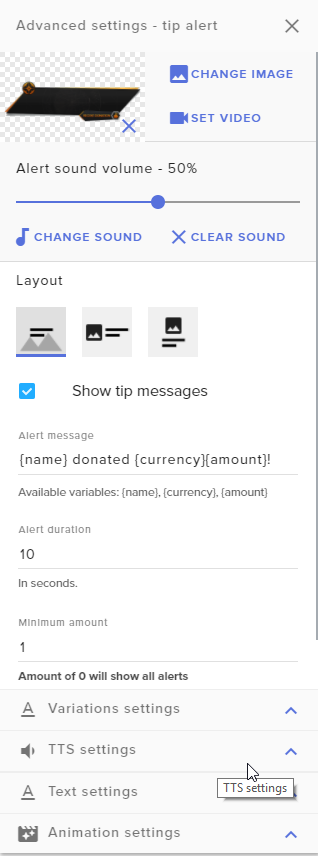
and then enable it
i can enable it for you
since you're mid stream
old condor
yeah that works
proud pumice
you want me to enable it for subs cheers and tips?
old condor
yes it does thanks
old condor
i will and alright thanks
 exotic solstice
Is anyone else having an issue with links being deleted even when permitting users?
serene granite
I'll take a look at your account
exotic solstice
thank you
tight harness
You should also check your twitch settings 😃 https://www.twitch.tv/settings/channel
serene granite
seems like the bot is not banning them if they are permitted
but the link is getting deleted
exotic solstice
serene granite
so ya, its probably your twitch settings, check the link legendary pasted
tight harness
No problem 😄
exotic solstice

tight harness
 hazy mica
Hi, does the streamelements overlay work with OBS normal?
clever mango
classic?
hazy mica
yeah
clever mango
No, it's not a supported or secure program anymore since it was deprecated last year
hazy mica
alright, thanks
 viscid forge
Who was making the super themes again?
exotic solstice
Studio is way better imo anyway, I would make the switch
hazy mica
Studio caused a lot of problems with my cap card for some reason
which is why i still use classic
clever mango
Kireaki and her partner make the themes
weary mist
@hazy mica when was the last time you tried it out? I know there have been many changes to studio that could have fixed your issues
hazy mica
I think around september
weary mist
what kind of issues with your cap card are we talking about?
we have a guy here who is great with fixing things like this
he likes a challenge, llol
hazy mica
the main issue was that studio wouldn't recognize elgato after a few weeks
like i would have to restart studio multiple times for it to show up, and eventually elgato stopped working altogether
ebon forum
ugh. there are a few thing that you can try
a) update firmware on the cap. card
b) update windows to the latest version
c) keep everything else updated
d) clean reinstall of pretty much everything fixes a lot
e) poke the Elgato guys and devs in the OBS forum, they have more knowledge.
and f) ignore that, i cant even fix my razer capture card for months already, it just sits here with a dust cloud on top of it
weary mist

ebon forum
want problems? get a cheap capture card 😄
hazy mica
alright, thanks for the help. I really like the streamelements overlay so it would be nice to use studio, I'll try this out
there's probably a lot of stuff I should update anyway lol
ebon forum
probably. after such a long time it is actually easier to clean install everythiing
ebon forum
yep, nvidia is pumping out drivers like every week, meh
weary mist
lol, I hav ean AMD card right now. though if I save up enough, I am wanting to upgrade to a 1080ti
ebon forum
heh. i look at monitors right now and i kinda dont want to go shopping, that stuff is expensive these days
 final onyx
hi, i want to know what draw back are there to stream elements?
like do streamelements put ads on my stream? take a cut? etc etc
weary mist
Nope, we do nothing of the sort. Everything we provide is 100% free
primal skiff
@clever mango kireaki?? Where is she From? It sound like a Greek name
So if obs can't "hold up" stream elements what can I download then?
weary mist
@primal skiff what do you mean by "hold up"
final onyx
@weary mist then how does stream elements make money lol
primal skiff
Supported*
weary mist
@final onyx we are in the growth phase right now, but we have financial backing of some high level investors 😃 We have plans for making money, but we are trying our hardest to not make the services pay-to-play
primal skiff
weary mist
@primal skiff OBS Studio is supported, OBS Classic is not
primal skiff
Oh ok
weary mist
OBS classic hasn't been updated in around 1 year, 3 months (ish)
sooo it doesn't work well with what we provide
wintry junco
anyone know were i can find info etc on how to make my overlays animated?
primal skiff
Oh sorry I didn't know
final onyx
@weary mist any "negative" consequences of using stream elements now or in the near future, regarding my worries that have been already expressed etcetc?
weary mist
@final onyx everything we are providing now will be free for ever. IF we ever come out with any paid features, only those specified features will be paid, nothing already provided. Other than that, I am not sure what you mean by "negative consequences", lol. We are a young company, but we are working very hard to be the very best
misty wagon
We won't go Revlo is what he means No worries @final onyx
weary mist
haha, yeah, that too
final onyx
i just dont want my potentially audience to be turned off by shady practices nor do i
weary mist
if you find anything shady, please feel free to bring it up with us. We don't hide what we do, we don't charge money for anything. We are open to any suggestions/complaints/compliments. And we will address them asap. 😃 We are here to help you, the streamer, be awesome
we respond pretty timely here, twitter, facebook, email, you name it, you will get a response, and someone to work out any issues you have
final onyx
sounds good to me, btw whats a jwt token?
weary mist
its the security token we use for the API. Everything on the site is pulled from that. You can find it if you click on your name in the top right, then click reveal secrets
its like your API key
misty wagon
@final onyx we are properly funded and have plans for the future that are benefitting our streamers, not take money from them. https://twitter.com/LatteMotte/status/938933561398366209

Wait, you didn't know??? @StreamElements does NOT take a percentage of anything!! We want happy streamers, not poor ones 🙃 FREE as in; No hidden fees, kickback deals, shady tiny print... FREE as in Free of Charge, Free Service, FREE! You don't believe me? Try me! 😎

 Twitter
weary mist
Twitter
weary mist
not at the moment, though it could be an #💭︱feedback-and-ideas. Add it to the site that is linked the the header of that channel, then post the link in #💭︱feedback-and-ideas and I will upvote it
 idle flare
the site that is linked?
final onyx
when stream elements logs into my chat send messages? what exactly is(what i assume is a bot) going to say
weary mist
@final onyx when it joins, it says: StreamElements is running  , then after that, its only what you have turned on in the dashboard
so any commands that are active (check chat commands under default and custom), timers, or modules
 regal nebula
i can't seem to change the picture on bit alerts
no matter what i do it shows a picture of a bit when the alert comes up
tight harness
@regal nebula Have you gone and changed the token for all the different variations?
regal nebula
can i just clear it?
tight harness
Yes, the button which shows as 3 lines almost like steps clears it
 viral sonnet
I'm trying to figure out the song request thing. I know that I need to enable it to get it work but do I have to have YouTube open while streaming? Or api? Something else?
tight harness
@regal nebula https://gyazo.com/8cb795d64d90e71adfff3f25e8505d31

@viral sonnet You just need to have the song request page or our desktop app Ground Control open, one or the other
Ground Control link: https://streamelements.com/groundcontrol
viral sonnet
okay, thanks
tight harness
No problem 😃
 rancid coral
recent tippers: {name}: {currency}{amount}
tight harness
That's what you changed it to?
rancid coral
ya, it starts as just {name}: {currency}{amount}
tight harness
That should work 🤔
rancid coral
lol thats what i thought, i just made a new text box and put it infront of the widget. good enough lolz
also are you same name on twitch, just followed legendary studios. i appricaite all the help. youre awesome
 tight harness
Yeah i'm Legendary_Studios on Twitch, that's right @rancid coral 😃
final onyx
hi, im having trouble setting up my alerts. i have my gif set and sound set but when i emulate the sound works but the gif is no where to be seen
nvm
tight harness
You figured it out? awesome
final onyx
nah, i just said fuck the gif and used an image

 primal skiff
Does stream element have Fortnite overlay
tight harness
Yes we do