#helpdesk-twitch
1 messages · Page 171 of 1
 clever mango
 sick walrus
i need some support with my alert box my overlay manager please
iam just starting to customise one of your pre made overlays to suit my stream... but when i try and customise the sounds for each alert it plays every sound that has been saved, used or assigned to an alert when i run a test... even if i have removed the sound file from my uploads section or cleared the sound from the alert..
i have ticked the obs option to shutdown my overlay when not visible on each of my scenes and still the same problem
anyone online who can help as i want to sirt this asap
 atomic hollow
hey
sick walrus
hey
sick walrus
not on obs... on your website.. and not double sound, but multiple sound
i get the original sound that was added to alert box on the pre made overlay
but when i change the sound to a sound file of my own it plays all sounds includiung the original one
atomic hollow
do you have the overlay open in your browser besides the overlay manager?
sick walrus
no
atomic hollow
never heard of multiple sounds before
sick walrus
ok well its happening now and it down carry onto my stream when i have no browser open.
does"
atomic hollow
DM me your overlay URL and emulate an alert
 gray moth
Is there any way to setup patreon alert on stream elements?
atomic hollow
currently no
gray moth
is it planned in the future? if no... i`ll submit it as an #💭︱feedback-and-ideas
 misty wagon
https://streamelements.helprace.com/i195-add-patreon-support Def upvote it here but I think we also have to wait for Patreon to make some fixes to their API.
 polar gorge
I have my Alertbox on for my overlays, and I'm using the OBS Browser source thing. I don't have more than two Alertboxes for my Overlays, and I'm not in StreamElements Overlay editor. When I'm streaming and I get a follow/donation/etc. (an alert), it plays it twice and one is extremely delayed, and it sounds like cancer. How do I fix that? XD
 tight harness
@polar gorge Have you checked your browser source settings yet whether you have the 'shutdown source when not visible' tick box ticked? You should have this ticked for each and every overlay ideally
tight harness
Alright 😃
polar gorge
Oh, okay.
I did it.
I'll wait until a follow or something happens to see if it works.
Thank you so much.
^-^
tight harness
No problem 
 alpine stirrup
Hey guys, I am lagging a lot while streaming PUBG. Kind of in game, mostly on stream. It looks choppy, laggy, and bad quality.
I have a 7700k and a 980
usually i get 144 fps in PUBG normally
my upload speed is 1.3 megaBytes
what should i set my bitrate to for 720p60fps
 silk patrol
@alpine stirrup try 2500kbps
alpine stirrup
ok
silk patrol
it's a good starting point
alpine stirrup
my upload speed is 10 megabits, but that transfers to about 1.3 megabytes
silk patrol
that's fine, 10Mb = 10000kb. You stream will only use 3000kb
1 byte = 8 bits
10/8 = 1.3
 north cradle
Anyone know how to get rid of this from my overlay?
 lament blade
Ok, hello
Sorry for asking (again 5th time) but is there already some news about the overlay?
(twitch extention)
atomic hollow
unfortunately the project got a massive delay due to rejections by Twitch
north cradle
Beautiful @atomic hollow ! Thanks!
atomic hollow
❤
lament blade
rejections by twitch?
Sounds like "bad bad news"... 😦
atomic hollow
indeed
tight harness

atomic hollow
we dream big 
lament blade
so... it's comming... ever?
or never?
atomic hollow
of course it will but I can no longer give you an estimate
atomic hollow
have a great stream!
 weary mist
I am not available for voice, but I can do my best to type
 sharp wind
@tight harness what a nice guy  7
7
tight harness

 sterile orchid
Is there a way to rather than add points but set them to a speific amount or can you minus points.
would the command be !setpoints?
if there is one kek
clever mango
Yea I believe the default is setpoints
sterile orchid
Cool ty Terra 
clever mango
You're welcome
weary mist
if you want to take away points, just make the bonus a negative number 😃
 vapid rapids
yo
 humble ether
Do you guys have a limit to how big overlays u can duplicate ??
humble ether
Cause i can't duplicate one of my overlays, its just empty when i try to do it.
@atomic hollow do you know ?
tight harness
@humble ether I'm not aware of any issues to do with duplicating overlays
humble ether
nvm, it just took like 5 minutes for it to work ig uess.
it was empty, and now the things are there
SO i guess it just takes some times when u have alot of shit
tight harness
Very possibly
polar gorge
I have my Alertbox on for my overlays, and I'm using the OBS Browser source thing.
I don't have more than two Alertboxes for my Overlays, and I'm not in StreamElements Overlay editor.
When I'm streaming and I get a follow/donation/etc. (an alert), it plays it twice and one is extremely delayed, and it sounds like cancer.
Edit: I did the "Shutdown source when not visible" but it still plays the same alert twice.
How do I fix? D:
tight harness
@vapid rapids Are they default bits? custom bits? do you know what shape you set them to?
weary mist
@polar gorge do you have the browser muted?
Because the tests will cause a sound from the browser and OBS
polar gorge
I'm not in the browser.
polar gorge
All good. 🙂
weary mist
But double check ALL your browser sources to make sure that "Shutdown when not visible" is checked. It might be coming from something you didn't think of. Another way to test is mute them one at a time, test it, and see if the duplication went away
 calm grail
On the current Extra Life Alert Box when getting donations will there be future support for a TTS so if someone leaves a message it will read it outloud?
polar gorge
@weary mist I fixed it. I deleted the Cheer Cup thing and it fixed the problem. XD
weary mist
huh, that is odd. The cup doesn't make sounds
polar gorge
Yeah, I was surprised, too.
Well, I'll take what works. If I run into any more problems, I'll make sure to ask for help again.
Thanks for the assist. Kreygasm
Sugoi, sugoi.
Oh, another question, which you guys might not have the answer for.
Do you know of any emote creators that are also good at typography?
tight harness
That question would be well placed in the #creative-chat channel 😄
polar gorge
Ah, okay. Thank you.
polar gorge
I have an issue with the overlay. I have it set so if I receive a host, it needs to be at least 4 viewers or more for the alert to pop up, but it instead pops up even if the host is 0 viewers. How do I fix that, please? 😮
tight harness
Do you have multiple alert boxes? One with this limit not set? 🤔
polar gorge
Just 1 alert box.
tight harness
Do you know how to give dashboard access so I can take a look? 😃
polar gorge
How do I do that?
tight harness
You go here: https://streamelements.com/dashboard/account/channels you click Editor and you DM me the link, don't send it anywhere public whatever you do 😄
lament blade
During my stream I had a problem with ground control; it was just loading as it refreshed and never ended 
Had to restart it to fix
Is it known?
 native horizon
jemand deutschsprachiges hier der sich mit xsplit auskennt ?
 slim cairn
Nein, aber ich kann Google Translate verwenden, um Ihnen zu helfen @native horizon
native horizon
Ich suche bei Xsplit wie ich filter bei micro benutzen kann
weary mist
is it on the website or ground control
 serene atlas
ground control
weary mist
what happens when you reload ground control?
It might be a song that is not allowed to be played in an embedded player, have you tried skipping it from the embeded youtube window?
 indigo haven
So, according to #291219887274328064 I ask in here to be added to the shoutout list? I've been getting back into streaming and am using StreamElements for all my stuff (I am directing tippers to Extra Life with !donate but !tip still links to SE). Going to be doing a 24+ hour stream starting in a few hours, since I missed November Gameday for Extra Life. Is there any other criteria I would need to meet to get a shoutout? :D [Edit: Twitch account for streaming is grumpyleopardgaming]
lament blade
Is there an option i can set my points from streamelements to ankhbot?
silk patrol
@indigo haven all you need to do is use our bot, overlays and tipping page. I see that you have indeed the bot in your channel and that your tipping page is set up. Since your need your overlays for your tipping alerts to work, I'm gonna trust you on this on :). I added you to the #291219887274328064 channel ❤
silk patrol
lol well, it's 1 am for me rn, but since it's a 24 hours, I guess I'll be able to stop by 😉
btw, you might wanna update your discord profile if you are using that account to stream. Right now, it redirects to yukihyou
@indigo haven
indigo haven
It has both
silk patrol
oh yeah, my bad, I didn't noticed the scroll bar 😃
lament blade
@silk patrol Is there an option i can set my points from streamelements to ankhbot?
silk patrol
@lament blade do you want to export your points from Streamelements to import in Ankhbot? Or the other way around?
 grizzled elk
hey how do i make a sound effect command so that only one user can use it
lament blade
@silk patrol i want it from streamelements and import it in ankh
silk patrol
@grizzled elk unfortunately, you can't create per-user commands.
grizzled elk
i have another question whats the variable on streamelements for $(touser) on nightbot
silk patrol
@lament blade you can ues this external script to export your points to a csv file. https://github.com/Slikrick/streamelements-csv
lament blade
Thanks!
weary mist
@grizzled elk $(sender) targets the person that activates the command, $(user) targets the name placed after the command, or the sender if there is not a valid user
 blissful oak
i have my overlay done exactly the way the vids say to do it and it is not working like it shows on the videos it just shows a "download obs studio" page which i already have
and when i use the overlay launch to preview the overlay it seems to work fine
 last tangle
Why are all my alerts echoing?
 hollow sequoia
I have the bot and overlay but im not on #291219887274328064 channel
silk patrol
@last tangle you need to tick the checkbox called "shutdown source when not visible" in the properties of all your browsersources, in each and every scene
tight harness
@hollow sequoia Have you asked yet?
silk patrol
@hollow sequoia have you configured your tipping page too?
hollow sequoia
yeah i have configured the page and i just wanted to maske sure i was eligible
 upbeat sparrow
I have a question about contests?
silk patrol
@hollow sequoia you can be added then. It's not automatic, we have to do it. what's your twitch name?
@upbeat sparrow ask and we shall answer
 empty anchor
@last tangle @silk patrol Rather than use shutdown source (albeit easier) I muted my notifications in all but one scene, at least when I switch scene there isn't a delay in the overlay re-appearing... Plus if I switch mid-notification it still displays it on the next scene too
silk patrol
@blissful oak I'm not sure about your issue. where does the "download obs studio" message appears? is it on your preview, is it on a separate window opened by OBS? Make sure your overlay link is correct, it should look like this https://streamelements.com/overlay/abunchofletterandnumbers
clever mango
@empty anchor @last tangle shutting down the source is not just about the sound. They should be shut down because otherwise you're running them all at the same time and that uses a bunch of CPU resources
hollow sequoia
Ok thanks for letting me know! its woedi
silk patrol
@empty anchor you should use studio mode instead, which will load the scene and then wait for your input to do the transition
clever mango

empty anchor
@silk patrol @clever mango Thanks guys, I'll take a look 😄
clever mango
https://youtu.be/W8iWsD2Lq3U?list=PL_9rga23xIlJDyaOnO2avbss-PHm28oNs @empty anchor @last tangle
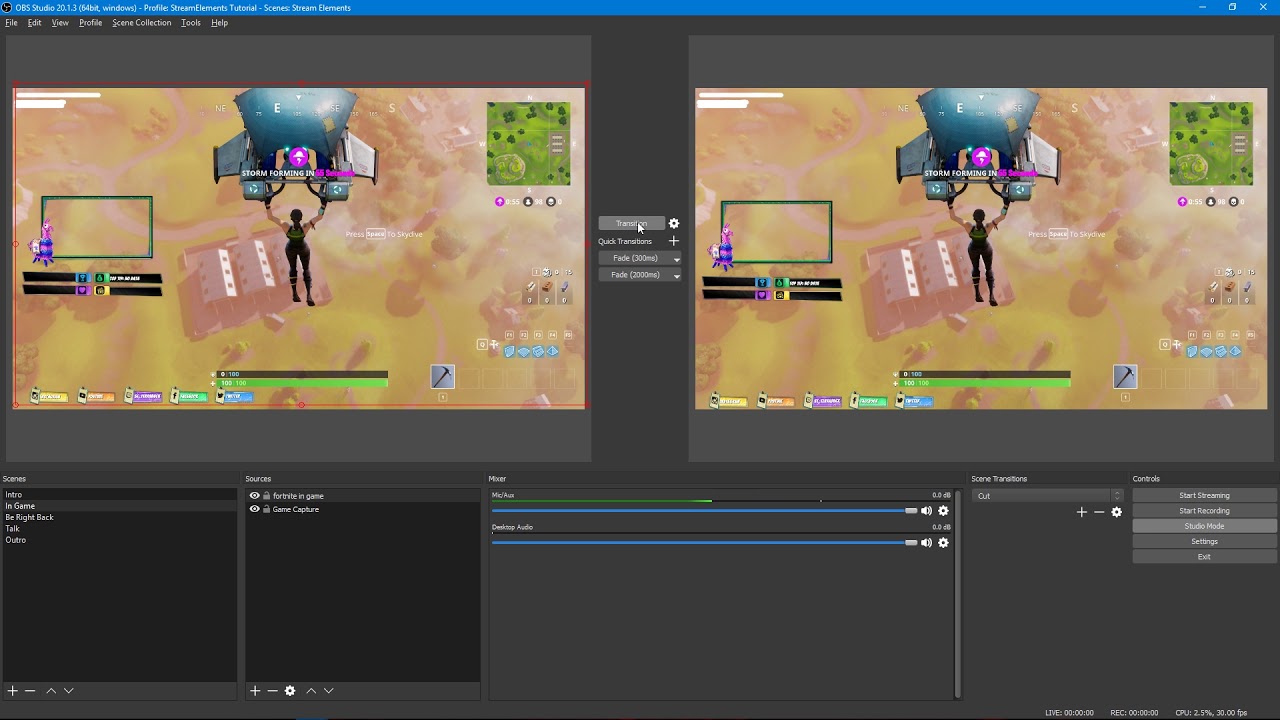
Tutorial #2 - Scene Transitions with OBS Studio Mode ----------------------------------------------------------------------- 🚀 StreamElements 🚀 -------------...
empty anchor
Awesome thank you
Also, while I'm here, would it be possible to be added to the #291219887274328064 channel? 😃
Studio mode works wonders btw, watched your video and set it up with some hotkeys... Didn't even know about that mode tbh!
silk patrol
@empty anchor I added you ❤
 burnt anchor
Is there a way to make a chat command that only followers can use?
silk patrol
@burnt anchor nope, but you can create a chat command that requires a certain amount of points, for example the follower bonus amount 😉
burnt anchor
Ah perfect haha thanks!
sharp wind
YO
what is normal/ acceptable / up to CPU usage for a 720p 60fps stream? thanks
%%%
silk patrol
@sharp wind it really depends of your CPU. also, since it's not StreamElements related, you can ask this kind of stuff in #welcome to avoid flooding the support channel ❤
sharp wind
sorry
silk patrol
no worries
 winged sundial
does streamelements block gifted subs?
someone gifted 4 people subs tier 3 and he wants gist more but cant because it tells him streamelements blocks it
 prisma rivet
Is there a way to make the fonts on all alerts the same without changing all of them individually (variations included)?
clever mango
@winged sundial Nope, there's no way to block gifted subs as far as I know
@prisma rivet once you set up one alert box you can copy the layer to other overlays
 carmine furnace
silly question so if im cutomizing an overlay for say league right? and i want to make a custom overlay for that how do i make scenes for if im in loading screen or in game if that makes sense so sorry if it doesnt
customizing*
 crimson yew
Is there a way where I can have the bot post my uptime, but like a timer? And also update me on how many viewers are watching?
silk patrol
@crimson yew yes, evertyhing you need is over there https://streamelements.com/dashboard/bot/commands/variables
crimson yew
Hell yes. I just copy and put these in my timers, yes? O_o
silk patrol
@carmine furnace there are already 3 LoL super themes with 5 scenes included. https://streamelements.com/dashboard/themes?search=legends But if you want custom overlays, you just need to create one for each scene, and you can copy widgets from one overlay to another
@crimson yew exactly
crimson yew
Thank, dude! 😄 This really helps a lot.
silk patrol
@crimson yew there is already an uptime command in the default commands by the way 😉
crimson yew
oh sweet! Didn't realize. I'll have to go check that out.
silk patrol
same page, just click sur default at the top 😃
 limpid marten
Do i need ground control open to have the keybinds skip alerts or can it be closed?
 vocal umbra
Good morning. Does anyone know if setting up a scene through StreamElements and using that browser source use less resources than setting up a full scene straight through OBS? (I hope the question makes sense)
limpid marten
im sure it would but im not too sure @vocal umbra
vocal umbra
In my head it makes sense that it would, right? 😃
limpid marten
you think it would
 stuck hamlet
It would have to be running @limpid marten
limpid marten
Thanks @stuck hamlet
calm grail
We have SFX setup in our store and when people in chat redeem them they are not playing. Any ideas?
stuck hamlet
Do you have the store redemption widget on your overlay?
stuck hamlet
np
calm grail
Also, I posted this earlier but didnt get a reply.
On the current Extra Life Alert Box when getting donations will there be future support for a TTS so if someone leaves a message it will read it outloud?
stuck hamlet
If it is public info, i dont see why we couldnt do it
calm grail
Yeah like when you donate like via Stream Labs and you leave a message and the bot reads it outloud that is what we are wanting but via the new Stream Elements Extra Life Alert Box. Right now it does not have that option to read it outloud.
 analog quail
Can I switch between twitch and Youtube and have your bot work for either?
lament blade
hey could i get some help?
stuck hamlet
@analog quail We currently don't support youtube.
@lament blade just ask your question, someone will respond
lament blade
well i need help in general
i just started twitch today and i wanna learn how t ouse this website
would be useful
stuck hamlet
I reccomend catching up with some of our youtube videos https://www.youtube.com/streamelements/videos
lament blade
oh yeah thanks
this might help
cheers
im watching how t oset up little sub boxes ect , how/where do i get the little animations from?
lament blade
i can tell from the internet but is there a certan site?
stuck hamlet
oh, well i dont have any in mind really..
stuck hamlet
giphy could be good
stuck hamlet
what is the issue?
 uncut wasp
well I have 3 scenes in my OBS Studio that utilize Streamelements overlays
I was switching from Streamlabs, however now im noticing my CPU usage has gone up to over 70 percent
stuck hamlet
What is on these overlays? and have you ticked the option "Shutdown source when not visible" in all browser sources?
uncut wasp
No, let me try that
well it dropped to 42 percent, still much higher than SL which was only around 9 percent
stuck hamlet
What do you have on your overlay?
stuck hamlet
What are your System specs?
Seeing as your using an animated theme, it can be more resource heavy than Streamlabs, due to the fact that stream labs only has an alertbox
uncut wasp
Operating System
Windows 10 Home 64-bit
CPU
AMD FX-8150 48 °C
Zambezi 32nm Technology
RAM
16.0GB Dual-Channel DDR3 @ 615MHz (9-9-9-24)
Motherboard
ASUSTeK COMPUTER INC. SABERTOOTH 990FX (AM3r2) 34 °C
Graphics
NS-24D510NA15 (1920x1080@59Hz)
1950W (1366x768@60Hz)
4096MB ATI AMD Radeon R9 380 Series (Sapphire/PCPartner) 52 °C
Storage
2794GB Seagate ST3000DM001-9YN166 (SATA) 35 °C
Optical Drives
HL-DT-ST DVD-ROM DH10N
Audio
AMD High Definition Audio Device
sorry, my computer froze and I had to restart
stuck hamlet
i am not familiar with any of those..
Someone else may be able to help, but as i mentioned above, animated themes arent for everyone
uncut wasp
ok, ill switch back then. Thank you for answering.

 normal cloak
hey, i changed my twitch username and lost the points I'd accumulated on several streams using streamelements, is there something to sync the accounts or do I contact a mod on that stream?
stuck hamlet
Unfortunately you would have to contact the mod in that channel.
But also log out and log back in to our system
normal cloak
Alright then, thanks!
lament blade
is there a way to get superthemes as "normal" themes?
 heavy spoke
can I sellout?
lament blade
im so confused
why are my streams so shitty
@stuck hamlet is there a way to change the text of a default command?
I wanna change this Text to just the the link
stuck hamlet
No
 viscid forge
@lament blade You could check our super theme gallery by the way
It holds a few neat examples to play with!
viscid forge
Yes.
We have premade overviews that you can edit to give your stream some nice design.
These are already animated by the amazing SE team, and it may give you a bit more ways to play and learn about our tool 😃
lament blade
well thanks that one problem out of the way
viscid forge
All you have to do then is edit the info you use like social media etc
lament blade
yeah i was watching some on the vids
about it
but my streams are laso bad quality
viscid forge
Oh you mean your actual stream quality to Twitch?
lament blade
yeah
tight harness
Seems low
lament blade
it has to be
otherwise it laggs
i cant play and fps
such as fortnite overwatch
i cant even do lol
im just playing the sims
viscid forge
Is you OBS set to 1080p source?
lament blade
well maby idk but i have a resolution set on 1280x720
viscid forge
Okay, that should be fine.
lament blade
and bit rate 1250
viscid forge
Do you have an old-ish computer?
viscid forge
GPU isn't as important for streaming.
CPU is the place where it hurts, but you get FPS lag while you stream with a year old PC?
viscid forge
Yes, that's because of the bitrate
So the lower your bitrate is the less data gets sent to the stream.
lament blade
so if i make it 2000
viscid forge
Which makes it choppy.
Assuming your internet allows for good upload, you want to push it to 2000-3000
Try to stream with 3000 bitrate, send me a PM with your stream link and we'll go from there
viscid forge
I'll rush to grab food, 4-5 min max.
I'll take my phone with me but respond slower 😉
lament blade
god dammit
i got an ad looping though my stream now
it wont stop D:
and as you can see it wont stop buffering
viscid forge
Can you PM me your stream link?
@tight harness I've moved to PMs to solve the above 😃
 limber rain
Hi guys ! In the themes gallery all the overlays use 16:9 cam. I use a scare one (720p) how can i modify the overlay to fit to my webcam ? it seems that it is blocked to 16:9 when i try to resize it ! Thnaks for the help mates ♥
 hot acorn
YEET VoHiYo - quick question: is it normal that follow alerts will be shown in stream but if someone is donating it isnt shown up not as alert and not in the recent tipper textfield FeelsBadMan
tight harness
@limber rain Some of them have square webcam boxes as well, if they do you can hide the rectangle one and show the square one instead
@hot acorn Check if you have Enable moderation ticked here: https://streamelements.com/dashboard/tipping/moderation if you do then turn it off
It basically means that you need to approve donations before they'll show, turn it off and they'll go through automatically
hot acorn
now i done that and how do i approve these?
limber rain
Ok ! didnt see the square ones in the overlay manager. I'll do that ! Many thanks for the help @tight harness ♥
limber rain
@tight harness I'll dig in the overlays to find the ones who have it 😃
tight harness
Alright 😃
 proud pumice
@viscid forge thanks for helping people out!
 silk mural
Hey, is there a way to set Streamelements as sub so he can spam messages with my channel emotes?
tight harness
@silk mural Partners can get this for free if they email Twitch, anybody else needs to use a gifted sub to do this if they want it
silk mural
Oh I see, thanks!
tight harness
No problem 😃
 past wadi
is there a way to play a custom soundclip using a command like "!sound" or something along those lines?
viscid forge
@proud pumice No problem man! SE is a fantastic product worth helping people with 😃
tight harness
@past wadi You can make a sound item on your store, say for example an item called piano, then you'd have 2 options, you could either do !redeem piano or you could make a custom command called !piano with the response as ${redeem piano} and that would also do the same redemption of the sound
past wadi
@tight harness Awesome! thanks I'll give that a try 😃
tight harness
No problem 😃
 quasi yarrow
Hey, I have a question. How do I open the thing where I can see my chat and my stream on SE?
tight harness
@quasi yarrow Do you mean the Twitch chat widget which displays on your overlay?
quasi yarrow
I'm not sure, But I got into something where I could see my own stream and my chat yesterday. All I know is that you could drag to make the chat smaller and the gameplay box bigger. @tight harness
tight harness
Ohh, I think you're talking about your Profile Page
But I'm not sure about the dragging part 😛
No you can't drag them in the Profile Page 🤔
quasi yarrow
Nope..
tight harness
You don't see your own stream anywhere else on our site
quasi yarrow
Well I remember that I clicked on something that sent me to another URL
And it was perfect
tight harness
I don't believe you're talking about your overlay manager, because you only see the widgets etc that you add to your stream there, you don't see the whole stream
quasi yarrow
I make my own overlays with photoshop so I've never bother clicking that.
So it can't be there no.
tight harness
Then it's a mystery 
 tight harness
Seems like it 😃
quasi yarrow
Thanks a lot for the help tho 😄
 zenith glen
does anybody know how to work with the pre-made overlays i tried using one on my obs but it seems to be a bit big and doesnt actually capture the whole overlay
tight harness
@zenith glen You just need to make sure that you keep it at 1080p on both the website and in OBS, the pre-made overlays are made to be 1080p
 sand elm
Just wanted to give some positive feedback, I'm choosing StreamElements for my bot because of the videos available on YouTube. I have only streamed for a few months and the choices of chat bots and such are overwhelming. Also, having this Discord available is a huge positive. Here I go! 😃
tight harness
@sand elm Excellent to hear and thank you for the kind words 😃
 elder lichen
i wanna be a sellout lol
tight harness
Are you using our bot, overlay manager and tipping page?
lament blade
and i'm using stream elements because @tight harness as the support staff is amazing lol
tight harness
@lament blade Thanks Alice! 😄
 barren rock
<@&382267076632379392> May I be added to The Sellout channel?
tight harness
Are you using our bot, overlay manager and tipping page?
tight harness
Sure, which channel?
 gaunt light
Where i am 😄
tight harness
I've sorted answering Denatherion's questions, don't worry 😄
gaunt light
@atomic hollow I am also Publishing u to new streamer come across my path 😄 if u need a list let me know\
Legendery_studios Should be the CEO here !
barren rock
@tight harness Yes I am
gaunt light
@atomic hollow after I'm done with Legendary I might aswell be a champion myself 😄
atomic hollow
in order for you to become a champion you must come by our offices and get coffee for everybody
tight harness
Yep, we all did that 
stuck hamlet
@barren rock You have Streamlabs linked in your panels.
stuck hamlet
what?
atomic hollow

stuck hamlet
I still see streamlabs in your panels.
atomic hollow
he meant he will get us coffee
barren rock
No what?
gaunt light
@atomic hollow I'm Yaman man , good luck with that 😄
barren rock
@stuck hamlet Ignore him lol, I'm replying to you
gaunt light
@tight harness Neded u for 2 sec i swear 😄 come voice support
lament blade
Hello, is there a way for users to see the number of tickets they have for a giveway ?
i couldn't find any commands
stuck hamlet
to be added in the sellout, you need to be using our overlays, tipping and bot. @barren rock meaning our tipping page in your panels, and no other competitor.
 harsh blaze
hi I have a quick qestion can i use the twitch overlays with old obs?
stuck hamlet
@lament blade There is no command, but they should be able to see on the public page if they havent entered max.
@harsh blaze No., we do not support OBS Classic, and neither do the devs.
lament blade
public page of the giveaway ? ok
stuck hamlet
You should really upgrade
harsh blaze
alright thank you
ya it is just the new obs has a lot of sound delay that I am trying to fix
lament blade
found out, thank you
barren rock
@stuck hamlet I would do the tipping page but I cant, I'm not 18 so I cant have Paypal. Please help me out man!
stuck hamlet
There are rules to follow, Sorry.
stuck hamlet
❤
@harsh blaze https://www.onslaught.ca/s/mk1qt66j.png you can disable this, it should help
 harsh blaze
thank you
 vivid tulip
Hi, I want to know how much streamElements charges for every donation, is like x% or some x# ? I want to start use streamelements but i want to know that, i'm using paypal right now for donations
stuck hamlet
0%
empty anchor
Maybe not the place to ask as it's an OBS question and not SE... But is it possible to setup one hotkey to move between all scenes? As opposed to one hotkey per scene?
But if anyone happens to know... I've tried setting the same hotkey for all in OBS studio but it doesn't work
lament blade
Hey, so last few streams I'm unable to run any commands at all, I did recently change usernames on twitch, any help?
atomic hollow
@lament blade log out and back in from SE, part the bot and rejoin it
vivid tulip
@stuck hamlet reall nothing??
lament blade
@atomic hollow thanks I'll give that a go
stuck hamlet
yes, really, nothing
atomic hollow
@vivid tulip nothing nothing
vivid tulip
thanks 😃
silk mural
Hey guys, is there a way to make the HypeCup do something cool when it becomes full like exploding or something?
 autumn sun
can i get someone in voice for some help
lament blade
How do you setup that if you get a donation that you really get the amount on your payapl
tight harness
@lament blade Why wouldn't you get it on your paypal? 
lament blade
If you get €5 you get like €4 on your paypal... and i donated someone and there was going more from my paypal then i selected
So he gets the really €5 on his paypal
tight harness
PayPal take a fee from transactions, that's not unusual
tight harness
I understand what you're saying, don't worry 😄
lament blade
Haha okay...
But i donated someone and he did get the whole €5 on his paypal bcs there was going more from my paypal
And my question how do i set that up for my own stream so i can do more giveaways
tight harness
So yes, as Perry said you're talking about covering transaction fees
tight harness
Well for now you can just increase your preset amounts to include the fee
lament blade
How do i do that?
tight harness
Where it says Tip Presets, increase the amount
lament blade
Okay thanks!
tight harness
No problem
lament blade
And can i turn off that someone donates he can do a songrequest?
tight harness
Yeah, paid song requests can be turned off in Song Requests > Settings
lament blade
Oh i see thank you so much for your time
tight harness
You're welcome, have a nice day 😃
lament blade
Yeah same to you and merry christmas 😃
tight harness
🎄 
burnt anchor
Anyone here able to help with my stream briefly? It's dropping major frames for some reason but haven't changed my OBS settings recently. Can't figure out what's wrong. I've tried bitrate, framerate, encoding, twitch server, etc.
 pine hemlock
frames are usually ISP related. Upload speed, or bad routing to the twitch servers
burnt anchor
Hmm ok. I ran a speedtest. Getting 1gb up/down right now. Between 930-980 typically
pine hemlock
could try restarting your router or calling the company and see if they see anything wrong on their end for your service
burnt anchor
Aight I'll try that and see. Thanks!
slim cairn
@atomic hollow Next time i visit the middle east ill drive over and hook you guys up with coffee 
 idle burrow
Quick Question, is there a way to make the Top Donator list fit into a grid or table formation? it looks very lazy on my stream just as default
winged sundial
Hey there guys Question. I have a special alert for gifted subs but it doesnt come up at all when a sub was gifted . Any suggestions?
 merry cave
Hey guys I have a quick question
tight harness
@idle burrow That's a new one, consider adding it to the ideas board: https://strms.net/ideas
@merry cave Ask the question
@winged sundial This sounds familiar, trying to think what causes it 🤔
merry cave
@tight harness just trying to figure out how I can use stream elements alertboxes without a capture card on ps4
i know its possible but how?
tight harness
@merry cave Overlays need a capture card
pine hemlock
need a browser source.
But yeah theres no way to use an alertbox without a PC running obs/xsplit that supports brower sources
 languid burrow
@merry cave I use Remote Play for PS4 and set it up as a Window Source
merry cave
ive heard of that process too
pine hemlock
Havent heard of it. but if that works, try it
 slim idol
Could it be that StreamElements do not get any incoming hosts, there is no host in the dashboard/activity feed aswell as no allert. :/
tight harness
@slim idol Check pinned messages, it's the very top one
slim idol
thanks
winged sundial
Yeah trying to figure it out
 north glacier
can i get a support thingy?
tight harness
Support thingy? 🤔
north glacier
something with the battleeye service
 fair rampart
I have an alert set up for each sub tier but it keeps using the regular follow alert instead of the sub tier alert. Is this happening to anyone else?
tight harness
Using the regular follow alert instead of the sub tier alert? 🤔
fair rampart
I just answered my own question. I had a duplicate sub default in variation that wasn't being used.
tight harness
Ohh
weary mist
lament blade
i need some assist with obs
clever mango
what's up?
lament blade
im trying to make my game fullscreen
like in obs so there isnt a black bar
but if i do its to big
it gose outside the screen
clever mango
what's your display resolution?
lament blade
obs settings?
 broken echo
Can you answer a quick question?
broken echo
Can I share a overlay with someone?
clever mango
@broken echo So they can use it?
broken echo
mhm
clever mango
so if you're playing in fullscreen and using game capture it should fill your canvas
tight harness
@broken echo If you really want to but we'd advise against sharing it personally
broken echo
Well I want to make an overlay for a friend
but when I tried to share a link it did not work at all
clever mango
have him send you a manager invite to his dashboard and you can make one under his account
they need to invite you with editor permissions when creating the link
clever mango
you're welcome
clever mango

clever mango
what is your upload speed?
 tranquil bramble
Guys, question, why does my alerts do this? My stream pc should be able to handle alot. But it seems it not goes very smooth, is this my pc, obs settings or stream elements setting?

"do this" - i mean shocking effect
clever mango
@tranquil bramble do you have "shut down source when not visible" checked for every streamelements browser source in OBS?
tranquil bramble
No i load this 1 alert browser source for every scene
tranquil bramble
Yes, should i make multiple
clever mango
You don't need to
what are the pc specs? @tranquil bramble
@lament blade are you streaming now?
clever mango
restart OBS and then go to View > Stats @lament blade
lament blade
yep
clever mango
@lament blade now take a screenshot of your OBS settings under output and video please
and post here
clever mango
@lament blade open OBS settings and take a screenshot of the output and video tabs
clever mango
I thought your canvas and output were 1920x1080
clever mango
the canvas should be whatever your monitor is
so that when gaming in fullscreen the capture will fill the canvas
you can change the output resolution to something like 1280x720 and that will help
max I would go is 1600x900 and that's only if you have dual pc or a monster single pc
again this is for output (scaled)
clever mango
CPU is the more important spec
what do you have?
I recommend 1920x1080 canvas and 1280x720 output
lament blade
yeah playig game is hard
clever mango
so use the nvenc encoder on the GPU
clever mango
where it says x264 select nvenc
clever mango
yes
clever mango
yes
clever mango
yes
lament blade
yeah alright
clever mango
so you use your GPU's dedicated encoder
clever mango
no need
lament blade
@clever mango should i stream all my games 1920x1080 and if it dosnt work dont bother until i upgrade/
?
my pc
pine hemlock
stream at 720p
no point in 1080p streaming unless you have a beast CPU or a dedicated streaming pc
fair rampart
Is there a way to set the timers so they don't all go off at the same interval?
For example, all set for 5 minutes / 10 lines but only fires off one at a time, rotating through them?
otherwise thats a lot to figure out the intervals for different timers
 blazing briar
Heya, could someone please tell me how to reset the dono goal back to 0 after a goal is reached
clever mango
@blazing briar Activity Feed > Widget Data > Goals
or in the overlay editor by clicking DATA
blazing briar
thank you ❤
clever mango
no problem
 ancient jay
so im having issues with my host notification overlay, its been 2 weeks. have redont my OBS overlay and getting kinda mad
clever mango
you're not getting them?
ancient jay
no sir, i get all the other ones like follower, sub and bits
clever mango
check the latest pinned message in this channel
also, don't wait so long to ask if you're having trouble 😃 We're here all the time
ancient jay
well ive been very very happy and normally its on my toaster so yea
clever mango
Gotcha
ancient jay
also my twitch has been connected for as long as i have had an overlay
clever mango
yes, but SE needs to connect to the chat during the stream to receive the host notifications
in order to do that you need to have 1 of the 3 things open during stream
in the pinned message
ancient jay
i have 2 of 3 and the 3rd is download ground controll, which has not been required
clever mango
So during your stream you normally have the SE dashboard or activity feed open the whole time?
ancient jay
on a webpage?
clever mango
yes
ancient jay
no
clever mango
That's needed as it says in the pinned message
ancient jay
when did it change from a link in my OBS as a browser souce?
clever mango
when did what change?
clever mango
It's not required for the overlay to work
It's required for host alerts to be sent from Twitch to StreamElements
ancient jay
so i do have to have it open for notifacations?
clever mango
It's needed for the host alert
ancient jay
so what changed?
clever mango
Dashboard access can be given to other people. These people can access the overlays. The overlays used to make the connection host alert connection but that's a security issue now because anyone with access to the dashboard could get your twitch chat token and chat as you in any channel on twitch.
ancient jay
so can i give you access to make it work like it did for the last 3 months without opening another page?
i have given SE all access to my twitch
clever mango
You can give dashboard access to anyone you want (moderators, family, friends) and if they have one of the 3 open during your stream the host events will be received.
ancient jay
so back to the original, i now have to have the SE webpage open for my overlay to work
?
clever mango
In order to receive host alerts. That's it. Everything else works as it always has and will.
ancient jay
again, when did that change?
clever mango
Over a month ago when the new site launched
ancient jay
well i am extreemly dissapointed
weary mist
The reason behind it is because we have to yuse your twitch oauth token. When we released the new site, we released moderator access. In order to keep your oauth safe, we had to put is somewhere that someone accessing your overlay can't get the token
ancient jay
well i didnt get an email, and it made me get frusterated. if you all would of told me just open the browser and it will all work as normal i wouldnt be in this spot.
weary mist
I agree, it was a rough release. It didn't help we released when everyone was at twitch con as well. We have learned much from this, and should hopefully be more open with what changes where made
ancient jay
i would of just appreciated a email
ok i have 1 more question, my computer is kinda a toaster. i could run twitch, the game im playing (at most leage of legends) and my you tube playlist. and thats whne the computer gets a little sketchy. any advice on how to manage better without eleiminating my music (which ive been told is a drain).?
weary mist
when you say twitch, you are keeping your dashboard loaded up @ancient jay
twich dashboard (for chat I am guessing)
ancient jay
no sir, i can have loaded my game, OBS and twitch to watch my chat
and twitch is open as a browser
weary mist
I recommend not opening chat in the browser, as a browser can be a big pain. Use a third party software like Chatty, it will use a lot less resources
ancient jay
well sir, i tried and it was much much worse, everytine i need to give acceptance to a program and try to run it does not work out well
weary mist
Chatty is just a java based program that uses your oauth token. It runs much lighter on my computer than a browser tab does
 urban wolf
Is there a variable command for the number of bits a person has donated to a channel or a method to set this up?
stuck hamlet
dont think that info is public 
urban wolf
I know of a few streams that have a method to this, but didn’t know if that was something we had here.
 desert vault
how do i get my store items to not need the !redeem in front of it?
stuck hamlet
You would have to create custom commands for them and use the $(redeem itemName) variable
desert vault
now will that take my cooldowns from the item? or will it only ever have 5 min cooldowns
desert vault
cool, thank you very much
desert vault
i cant seem to get it to work
stuck hamlet
What are you doing?
stuck hamlet
its $(redeem ItemName)
ItemName is what you put after !redeem usually
like
!redeem sound
would be
$(Redeem sound)
desert vault
okay so mine is christmas so it would be $(redeem christmas) as the command trigger
stuck hamlet
!command add !christmas $(redeem christmas)
 undone fulcrum
also having an issue, when i get hosted the alert doesnt pop up, but the test alert works fine, ive checked the min host ammount and everything and i should be getting the alert
stuck hamlet
Twitch doesn't have a "notification system" for hosts (unlike follows, subs, raids, etc.) so the only way for StreamElements to know that you are being hosted is to connect through you to twitch. This connection is made within the Activity Feed code. This code is on:
- SE Dashboard page - https://streamelements.com/dashboard
- SE Activity Feed page - https://streamelements.com/dashboard/activity
- Ground Control desktop app - https://streamelements.com/groundcontrol
 tall widget
Is there a way to auto-accept tips? Received my first tip tonight and the notification didn't go off, I found out later it was because I hadn't accepted the tip. Any help is appreciated!
stuck hamlet
Turn off "Tip moderation" @tall widget
tall widget
Awesome, thank you!
lament blade
Does StreamElements offer creation of custom overlays? Obviously w/ pay
I'm a bit too lazy to transfer/make new ones
stuck hamlet
Like you pay us to make one?
lament blade
yeah
lament blade
Aite.
Willdo
Hi there
I'm experiencing lag with some themes
in OBS
eg - Snow fall, explosions, kappas, etc
stuck hamlet
What are your PC specs? and did you tick the "Shutdown when not visible" option in your browser source properties?
lament blade
CPU - amd 9370 8 core 4.4 ghz, Titan X, SSD's, keyboard mouse
Yes
CPU usage runs from 7.0% when not visible, and then up to 84% ish when visible
in OBS
This issue extends to all themes
Running windows 7 x64
stuck hamlet
When you say theme... what does that mean
lament blade
Overlays
Snow, explosions for emotes
that sort of thing
Default browser is Firefox
stuck hamlet
What does your browser have to do with this? 
Open task manager, and scroll down to "CEF-Bootstrap"
lament blade
Done
stuck hamlet
how many is there/
lament blade
4
 willow lava
was the bug where mods could bypass the ticket limit fixed?
stuck hamlet
Don't remember a bug where specifically mods could, but we fixed where people could bypass Giveaway entries.
@lament blade So you have 4 active browser sources on the current active scene?
lament blade
Currently have only 1 active scene
willow lava
it was something like I had 100Ticket cost and 10K ticket max yet the same dude could buy 10K tickets over and over and over
stuck hamlet
CEF_Bootstrap says otherwise @lament blade
willow lava
and they just happened to be mods
lament blade
@stuck hamlet I'll review my browser sources, and make sure they're al shutdown when not visible
stuck hamlet
like i mentioned @willow lava I don't know of a bug specifically related to mods, but we did fix a bug similar to that.
willow lava
it may have not been, after all i removed them from the stream elements user mod list. it just so happened my mods were the only ones capable of affording that many.
I will hope it's the same one >.< it wasnt to long ago maybe 2-3 weeks ago
?
lament blade
@stuck hamlet Checked my browser sources, they've all now have the shutdown source button
willow lava
well, tried it just now and it's fixed. So I guess it was that one 😃 Thanks !!
stuck hamlet
@lament blade if you have 4 CEFs, that means 4 of them are active somewhere... https://www.onslaught.ca/s/v3fiew68.png this is the option im talking about
 lament blade
That's the option I checked off 👍
lament blade
CPU still jumping from 12-45% with one CEF running atm
Base (Canvas) is currently at 1920x1080 (idk if that helps)
stuck hamlet
What's on your overlay?
lament blade
Animated super theme
stuck hamlet
streaming off of CPU or NVENC
lament blade
NVENC
stuck hamlet
I am not familiar with the "amd 9370", but maybe it isnt powerful enough to run an animated theme.
lament blade
Would that also be true about the hypecup, kappagen?
stuck hamlet
Yes, but not as such a high level.
stuck hamlet
we recommed using Chrome for our site, as it was buitl for chrome
stuck hamlet
no worries, you too
tight harness
@hidden willow Seems like you've got the resolution wrong somewhere
 hidden willow
resolution is 720p and i did on the site 720
tight harness
Yeah, probably better to do 1080p on the site and 1920 x 1080p on OBS then downscale it in the settings to 720p
 low mirage
Just got new GIF alerts made, but they came with a green background. Any ways to chroma key out the green screen behind the alerts on stream elements?
 ebon forum
@low mirage you can always use chroma key in OBS if you want it on the whole scene
tight harness
Yes, absolutely, but you need to set the resolution fo the browser source to 1920 x 1080 as well
hidden willow
ok i will try
tight harness
And on the site change the resolution of the overlay to 1080p
If you click the pencil by the overlay's name you can change that
hidden willow
works thanks ❤
low mirage
How do i create a chroma key without selecting a specific image?
or video source?
NVM haha i think i got it
tight harness
No problem 😃
 floral galleon
sorry mate
floral galleon
pfft fuck no
tight harness
Alright, then I retract my yes
floral galleon
this is gonna be my first stream
i have low ass confidence
my confidence is lower than my grades
tight harness
What does your confidence in your ass have to do with anything?
floral galleon
i have no idea
tight harness
You should stream Minesweeper, I hear it's popular these days
stuck hamlet
Solitaire
tight harness
Got it!
stuck hamlet
There you go
low mirage
Why does the stream elements overlay editor always lag my browser like every 10 seconds, even pauses my youtube
tight harness
Are you using Chrome with Hardware Acceleration enabled in your Advanced settings?
low mirage
I am using chrome. How do i check the hardware option?
tight harness
In your Advanced settings 😄 Settings > scroll down to Advanced > open Advanced settings > scroll down to Hardware Acceleration > untick it
tight harness
No problem 😃
limber rain
Which CPU is recommended to use Streamelements with animated overlays ? My i5 6600 3.30 GHz can not run it and OW at the same time :/ Too laggy 😦
hidden willow
someone knows how to reload the counter?
stuck hamlet
reload the overlay
silk mural
Hey guys, is there a way to make the HypeCup do something cool when it becomes full like exploding or something?
tight harness
@silk mural Not automatically, you could add an explosion animation that you can manually trigger
But it's definitely not designed that way automatically
silk mural
Oh I see, thanks 😃
tight harness
No problem
tight harness
Click on Layers to bring up the Layers list then click on the padlock icon by the Layer you want to unlock
floral galleon
When I play and stream, will I be able to see the overlay?
 edgy onyx
I see the overlay when i stream, i usually look at it on my OBS window @floral galleon
floral galleon
i only have 1 screen
tight harness
You're going to struggle then 😄
floral galleon
wow that's a lot of help, @tight harness
edgy onyx
Helps a lot if you have multiple monitors 😃 so unless you tab out of game, you wont see it unless you look at the stream through your phone or tablet
floral galleon
where the FUCK am i going to afford another monitor
tight harness
It's the truth, you need multiple monitors to see OBS and your game
floral galleon
can i use my tv as a monitor.
edgy onyx
If it has HDMI connectivity and if you PC allows multi monitor support yes 😃
floral galleon
f u c k y e a h
edgy onyx
Enjoy rigging your TV up to you PC 😃
floral galleon
this is gonna be a pain in my ass
edgy onyx
Really? Just connect the cable and then when both are connected some PC's auto sense the 2 monitors, if it doesn't press Windows Key + P to extend your displays 😃
ebon forum
@floral galleon try to use "anticheat hook" in the game capture settings in obs. might help to capture games that otherwise get you a black screen
floral galleon
didnt work
but i found the problem
the game is as small as a pixel
but i cant make it bigger
ebon forum
mh? you can use some options to fit the source to the screen size etc
floral galleon
how?
ebon forum
Ctrl+F for example, it will set the game to the full screen size in OBS
ebon forum
yeah the source fits. try to start OBS with admin rights, try to use the 32bit version and tell me what game it is 😄
floral galleon
Choice Chamber
ebon forum
looks like a normal game aimed at streamers mostly, so no idea, cant find anything mentioning that exact problem
you can still use window or monitor capture to avoid game capture issues
edgy onyx
@floral galleon can you upload a screenshot of the properties window for choice chamber game capture source? Want to check the settings you are using in there 😃
edgy onyx
Otherwise like cryonic said, monitor capture will work pretty much every time, as some game disallow game capture with OBS for some reason.
ebon forum
yeah window capture is prefered since it will not show your whole monitor when you alt-tab out
edgy onyx
yeah 😃 it's probably the game doesn't allow full screen capture. It happens with some games.
 fickle oak
hey everyone i have a question about overlays. When i create a static image or video widget can i show/hide it using chat commands? What i want to achieve is basicly displaying a gif/video when someone uses a command.
tight harness
@fickle oak Hey, widgets aren't bound to commands currently, so not at the moment
 marsh sinew
i'm still having an issue with my follows and the bit cup
for some reason whenever someone follows using the christmas bits settings the cup freezes
tight harness
@marsh sinew I can have a look if you like, do you know how to give dashboard access? 😃
marsh sinew
i reset everything andn put regular bits on and it worked
tight harness
Interesting 🤔
marsh sinew
yeah i even switch to halloween adn that was fine
 tulip shoal
how to make store redemption appear on screen
tight harness
@tulip shoal There's a widget called Store Redemptions, add that to your overlay
tulip shoal
and what about if i dont use stream element´s overlays?
tight harness
Then you can't get the store redemptions to appear on the screen, because you don't have an overlay to display them onto
tulip shoal
i have an obs overlay
tight harness
An overlay is basically a browser source, you need it to display anything from the internet into your OBS
So if you make an overlay, add the Store Redemption widget where you want it, add that as a browser source to your OBS, you're all set
 molten plinth
hello
can someone tell me why my subs and donations doesnt show up on streamelements
i imported from streamlabs
help pls
tight harness
All of the widget data is stored here: https://streamelements.com/dashboard/session
You can change some things like the Latest widget data manually if the imported data didn't have the correct format to display that and you can change the Goals and the current session data here too, then any subsequent data will be as intended
marsh sinew
question for future is there a way to go back from the holiday bits to what you originally had without deleting and redoing the whole thing
tight harness
When you remake the cup select don't overwrite
marsh sinew
yeah but for like the holidays i like them
and when i go away from the holiday cup back to the old one you cant go back to regular bits
tight harness
During the holidays you select yes, overwrite. After the holidays remake the cup and it'll use your tokens instead of the holiday ones, I just tried it and it works
tight harness
Well you could duplicate the overlay, remove your regular cup, add the holidays cup, use that overlay for the holidays, then after the holidays go back to your old overlay with the original cup 😃
Saves you from remaking it
tight harness
No problem 😃
 neon sparrow
I got a question about the hype cup, is there a way to make the cup transparent but the lil bits falling in it solid?
tight harness
@neon sparrow Not possible, if you change the opacity then it'll change it for the whole widget
Not a bad idea though, try adding it here: https://strms.net/ideas 😃
neon sparrow
okay, thanks. Would be cool for customization :p
tight harness
Try adding it to that site I linked, that's our ideas board
neon sparrow
okay
tight harness
When you've posted it, put the link for it in #💭︱feedback-and-ideas and discuss it with others 😃
neon sparrow
okay, also, what are those lil things calledthat fall into the cup so i dont sound dumb
tight harness
Tokens
neon sparrow
ty
tight harness
No problem 😃
 jagged briar
i need help with the song request feature
its not working for me
pls someone help
tight harness
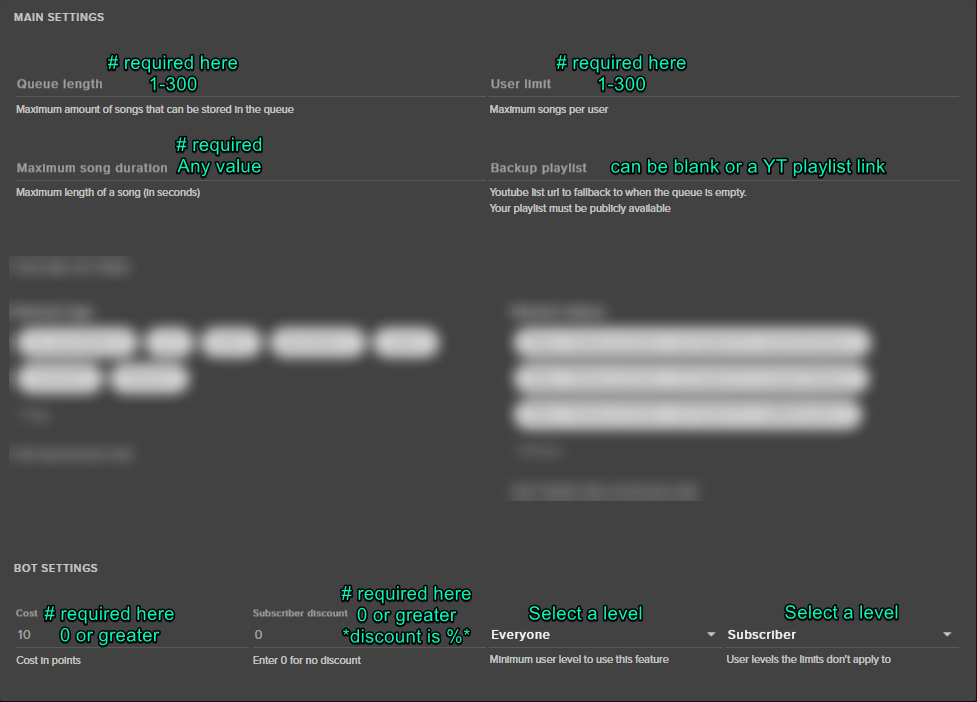
@jagged briar If you check the settings for song request do they meet these requirements: https://i.imgur.com/t28AhpK.png
 jagged briar
but does the song start by it self???
tight harness
Sometimes you may need to refresh the page to get the requested songs list to update
jagged briar
oh so i have to have t\stream elements open
edgy onyx
Yes the webpage must remain open.
Thanks for that picture Sean, i just checked mine and i now realise only my backup playlist would ever work xD not anymore though 😉
tight harness
No problem 😄
And yeah song requests will play through the song request page or our desktop app Ground Control (https://streamelements.com/groundcontrol)
But you need 1 or the other open for the songs to play
misty wagon
@neon sparrow If you tinker with it, you might be able to create a 'black hole', The bits will fall solid but disappear. I've seen it once but wasn't able to recreate and forgot to clip
edgy onyx
Wow cool, i just found out SE has an app ^^ very cool. Installed 😉


 slender yoke
I'm live streaming and received my first tip. No notification. And now I turned on to 10 tippers and it's scrolling random emotes with tips I have never received.
And the tip i just received is on the list online but my overlay doesn't show it
tight harness
Did you import tips?
slender yoke
I don't know what that means
tight harness
When you switched over to us did you bring over any tip data from another service?
slender yoke
I'm not using another service
My donor used the streamelements tip site, donated, and nothing shows up on OBS. But online in my account I see the tip.
tight harness
Check here if Enable moderation is ticked: https://streamelements.com/dashboard/tipping/moderation
If it is that means you need to approve every tip
slender yoke
Yes it is checked
tight harness
Uncheck it 😃
slender yoke
Ok it's unchecked now what do I do with the last tip
tight harness
Approve them here: https://streamelements.com/dashboard/activity/moderation
 dense prairie
hi everyone! i hope you all are doing fine and i wanted to wish you a merry christmas <3
in addtion i wanted to ask if anyone knows how i can add a item in the "stream store" which can only be redeemed by, let's say, a special group of persons. is there a possibilty to add a twitch name as a requirement for example?
tight harness
@dense prairie Not currently, right now it can either be everyone or subs only
Ideas go here: https://strms.net/ideas but check it's not been requested already, if it has then simply upvote it 😃
dense prairie
😄 👍🏻 thank you
dense prairie
🎄
tight harness
🎄
lament blade
can i get some help in speak channel? (dutch)
tight harness
@misty wagon ⤴
misty wagon
@lament blade ben ff eten, add me as friend, bellen/dm we later 👍🏾
 formal pilot
I'm looking for a little help in the support channel, thanks in advance 😃
tight harness
@formal pilot What is it that you're wanting help with? 😃
formal pilot
Regarding tip notifications
tight harness
Are they not showing?
formal pilot
I used to use streamlabs before I went to TwitchCon and was introduced to the StreamElements streamer program at the booth.
Yeah
tight harness
Check here: https://streamelements.com/dashboard/tipping/moderation see if Enable moderation is ticked, if it is then untick it

StreamElements
The Ultimate All in One Platform for Streamers
Having it ticked means you need to approve every tip
tight harness
Not everybody looks up 😛
formal pilot
I hear you 😛
Which is why I was confused as to why they don't even show up on my own activity feed.
I went back to streamlabs website one day to move some things I had made and noticed I had a few $25+ dono's and NEVER knew
I had to apologize to some of my viewers so they didn't think I just blew them off
tight harness
It's exactly the symptoms of having that option ticked, that's why I first assumed that was it
But also, if you have $25 donations on StreamLabs then they're using the wrong tip link
formal pilot
Yeah, moderation is off which is why it's confusing me.
Well then
.>
Maybe that's why lol...
tight harness
It'll only show if they use the SE tip link 😄
formal pilot
I completely forgot about the link hahahahaha