#helpdesk-twitch
1 messages · Page 170 of 1
 zenith rapids
 tight harness
If you have any issues then it'll be useful 😃
zenith rapids
Okay 😃
zenith rapids
So far so good
Okay, StreamElements has gotten my approval. I will be starting to use it.
 weary mist
👍 ❤
 atomic hollow
@zenith rapids ❤
zenith rapids
❤
tight harness

 marsh magnet
Hi, I have a doubt, im supermod on one channel, and i wonder, if theres a window where i or the streamer can check the ban or time people, like "usar had ban from ....mod" or something like that, is there away? thanks
tight harness
Twitch shows who's banned who for the streamer at least in the Twitch chat within Twitch itself
 stuck hamlet
You can use this site: https://cbenni.com/
tight harness
What's the problem? Always best to start with the issue
 autumn lily
I am now strimming i use obs 720p 60fps 4k bitreyt and i use overlay no animation

Look pls
CPU
tight harness
So what's the problem? 🤔
tight harness
But what's the problem?
tight harness
Right, but what's the problem? 😄
autumn lily
I wanted to know why I have a CPU
tight harness
You want to know why you have a CPU? 
 ebon forum
@autumn lily hi. do you speak russian?
ebon forum
@autumn lily короче, процессор у тебя потому что это мозг, без него комп никак жить не будет. А показатель в софте на месте чтоб ты нагрузку видел, без разницы чем стримишь 
autumn lily
@ebon forum Понятно
Просто у меня ни когда таких просадков не было обычно 1% максимум
ebon forum
@autumn lily наш оверлей немного кушает, это не проблема. Пока у тебя не 100% в общем (с игрой итд.) то всё отлично, процессору ничего не будет от пары % лишних.
 stuck hamlet
i know, but he didnt put it in caps, so i thought it was auto correct, or someshit
it was a  moment for sure
or more 
 karmic zephyr
Hey guys, was wondering if I could bother someone for some help setting up the Blue Folds Particles Super Theme overlay?
 forest rune
how can i get my twitch chat on OBS?
stuck hamlet
@karmic zephyr What do you need help with? 😃
@forest rune We have a widget called "your twitch chat" you can put on your overlay.
karmic zephyr
I am trying to flip the "Bottom Part" widget so that it appears at the top of the screen, instead of the bottom. I was hoping to mirror it, so that the orientation was facing down. If that makes sense...
stuck hamlet
Makes sense, but is currently not possible in our overlay manager.
Give me a second 😃
 mild temple
Does SE have a sound effect command option?
forest rune
@stuck hamlet where can i find the widgets? D:
stuck hamlet
You can do that via the store @mild temple
mild temple
OH THANK YOU @stuck hamlet ! ❤
forest rune
im on widget data right now
stuck hamlet

mild temple
And I think you guys have all the same features I want now soooooo
stuck hamlet
You just have to add the widget "Store Redemption" to your overlay for them to properly play on stream.
Takes a bit of setting up, but once it's done, it's 👌
mild temple
Plus I could edit commands and such on the go, like my overlays
ankhbot is only at home

stuck hamlet
@forest rune https://www.onslaught.ca/s/p3kioop2.png
 karmic zephyr
Any suggestions as to what I should do or attempt? In an effort to try and accomplish what I'm looking for? Thank you in advance for all your help 😄
stuck hamlet
Gimme just a minute 😃
karmic zephyr
Sure, thank you kindly.
 karmic zephyr
Yes, sir.
forest rune
@stuck hamlet got it 😃 also i downloaded the xmas spirit super theme, does it also have alert sounds when someone follows? or do i have to add those myself
stuck hamlet
It has alerts 😃
forest rune
how can i change those sounds? ;3 i dont think i will be able to hear those 😛
stuck hamlet
@karmic zephyr Add an image to your overlay, and you should see it in your library on StreamElements 😃
karmic zephyr
Pardon my ignorance, I'm a bit confused as to the instructions.
Go into my overlay editor and then tweak it from insid ethere?
stuck hamlet
yes.
At the top you should see "Insert Image"

once you hit "Set Image" you will see I have added the inverted image there 😃
stuck hamlet
No problem
@forest rune It's just like a regular alert box, you will need to find it in your layers and edit it.
forest rune
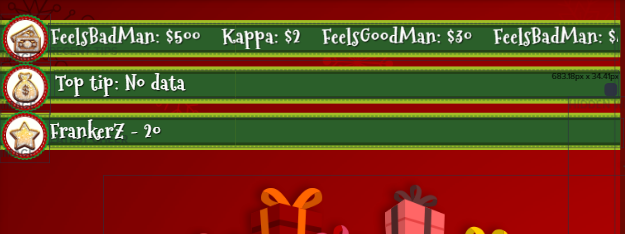
alright and 1 last question 😛 https://i.imgur.com/rLhh5lf.png why is that top tip: no data not changing?
 stuck hamlet
It is propably set to "Session" which is top tip during that stream
you can change that if you wish
forest rune
even if i change that to all time it wont change
stuck hamlet
Do you have any tips? 
 lament blade
What CPU can you recommend me for not being rich
stuck hamlet
i7 8770k 
lament blade
Prozessor: Intel Core i5 6500
Mainboard: ASRock H170A-X1/3.1
Arbeitsspeicher: 8Gb DDR4 RAM
Grafikkarte: nVidia GTX1060 6Gb
Festplatten: 1Tb HDD + 240Gb SSD
Gehäuse: Sharkoon VG5-W Rot
Netzteil: beQuiet 500 Watt
Windows: Windows 10 64 Bit
That's what I have rn
lament blade
Ye but I want to upgrade xd
tight harness
I'm learning German from your PC build list 
lament blade

 empty anchor
Changing CPU might mean changing motherboard as well, depending on if the socket changes
Depends on what you want to change to
But yeah, what you already have is pretty good tbh
weary mist
use PCpartPicker, that way you can make sure everything fits @lament blade
but you might be able to upgrade the CPU to an i7-6700k, the sockets might match. I would upgrade the PSU as well
weary mist
you can then sell off the old cpu, and then your costs are less
yeah, I think the 6700k is 1151 (its what I have)
lament blade
What's psu again xd not used to all words
empty anchor
Power supply
lament blade
Netzteil? 
empty anchor
Yes 😄
lament blade
And upgrading gpu? 🤔
Or is 1060 still fine (I don't stream&play sth like pubg, only kinda simple games)
empty anchor
I think 7th gen Intel processors are socket 1151, so you could go up a generation without changing your motherboard?
If you grabbed an unlocked CPU then you have the potential to overclock if your power supply copes with it
lament blade
Ye I know
empty anchor
I would say 1060 is fine, GPUs aren't cheap atm 😦
empty anchor
4 cores I think?
lament blade
4 is like the minimum
empty anchor
I might be wrong but it's only the new 8th gen with more physical cores
weary mist
the i7 has 4 cores, but 8 logical processors
empty anchor
I like how we can now delete from the all time leaderboard list however whenever I delete and refresh those that I've deleted re-appear?
Just me or a known issue?
I've tried deducting points instead of deleting but they return again once refreshed
empty anchor
As long as it's not just me then haha 😅
tight harness
@viscid steppe It's coming from the Goals bar on this page: https://streamelements.com/dashboard/session
 viscid steppe
oh wow! How do I get here in the future?
tight harness
Activity Feed on the left and then Widget Data on the right 😃
viscid steppe
Thank you! You're AMAZING! @tight harness
tight harness
No problem
 toxic basin
Hello I am back to abuse this great support channel again.
How do I add custom audio/video to my alerts?
Follower/Subscriber/Donation/Cheering/Raids/Hosts

 stuck hamlet
no problem :p
lament blade
Do I have to ask to be on the sellout thing every time or is it automatic if someone already verified it yesterday?
tight harness
@lament blade You were added yesterday 😃 I just checked
lament blade
Yeah So I dont have to ask to be added anymore ? when I go live it just does it automatically?
tight harness
Yes correct
lament blade
I dont know if its like a daily thing Thank you
tight harness
It's posted automatically every time you go live, absolutely
lament blade
Does it take a little bit
tight harness
It can do yeah, i'm keeping an eye out for it to post for you, when did you go live?
lament blade
to process when you go online? Im just curious because I went online and it didnt post so I didnt know
Like 5 minutes ago
tight harness
There you go, it just posted now for you
lament blade
Okay awesome sorry for dumb questions haha new to this !
tight harness
No worries 😃 just a 5 minutes delay before it posts
toxic basin


 boreal dove
Hey guys and gals, any idea why my hype cup keeps crashing resulting in a freeze on obs? Everything else in the overlay seems to work just fine.
Well, strange. The cup works on a copy of the same overlay.
 timid pulsar
Hey theree! I'm curious on whether or not I can copy & paste the christmas alerts (positions, image, etc) into a different overlay?
Like, move an alertbox from one overlay to another
Please @ me if you can help ❤
 icy talon
I need help i have been trying to get this fixed for a while and watched a few videos and nothing is working
tight harness
@timid pulsar You see in the bottom left you've got an icon that looks like this?
That's for duplicating widgets, including to other overlays
@icy talon What is it that you're trying to do?
@boreal dove I haven't experienced the cup crashing myself, is there a lot going on in the overlay with the cup in it?
timid pulsar
Thank you very much ❤
icy talon
ok so i want to stream but when i stream it lags so much its obsered it keeps saying overload and change the video settings on obs
its just a handful
weary mist
ok. Lets see if we can trouble shoot this. When you stream, if you open your task manager, is the CPU getting maxed out?
icy talon
uhhh dont know ill try it right now also btw i am just a 12 year old kid dont know all of this big words
weary mist
@icy talon I hate to inform you of this, but unless you have a parent there while you stream, you are breaking TOS on twitch. The minimum is 13.
 floral pebble
hi guys i have a question is there any way to change my volume of the alert sound?
icy talon
ok well there is no point on streaming then
floral pebble
its standard 50%
weary mist
@floral pebble you can change the volumn in the alerts settings, just make sure you change it in variations as well
 shut ibex
i have a question about OBS? how do you know what bitrate you should use to stream?
weary mist
When you go into the overlay editor, you click on the alert box, then drag the volumn bar. Make sure you are in chrome, as the editor works best there, and will be derpy in other browsers
floral pebble
 weary mist
espectially with the volumn bar
 edgy kindle
@shut ibex Depending on your Upload you'll need to change your bitrate accordingly. For a standard 720p stream i'd recommend about 2400~3500 bitrate.
icy talon
can anyone help me 1on1 plz
floral pebble
@weary mist yes it now works in crome not the standard internet explorer thnx man
weary mist
👍
toxic basin
Does the sub gift variations alerts work? whenever I change the sound/video on either the sub gift alert or the first time subscriber alert it changes the sound/video on both.
The 2 month or more variation works independently though
 fringe pivot
How do I setup Christmas alerts
weary mist
@fringe pivot we have a custom christmas theme available, if you go to the Themes tab on the left hand side, and create that super theme, each theme comes with custom christmas alerts 😃
fringe pivot
Awesome thanks @weary mist
toxic basin
wait nevermind
I was running the sub gift alerts from my dashboard instead of through the overlay editor alert tester
[SOLVED]
 cosmic sand
any know any way for you to have a visible chat while on fullscreen?
since overlay seems to only add it for the viewers of the stream
weary mist
it kinda depends on what you are playing. If you are doing a capture of a console, you can project the scene so you view everything. Personally, I use a third party chat program, since it is lighter than using chrome. But I also have multiple monitors
shut ibex
what bitrate should i use for ~11.45 Mbps upload speed?
weary mist
Minty, Twitch has a max bitrate of 6000, so you would be more than able to maintain that (your bit rate is 11000+)
The best thing to do is do the bandwith tests, and make sure you don't drop frames, and fine tune it, but I believe the 6k will be work fine on that connection
shut ibex
i'm so terrible at this 😓 so i have good upload speed?
toxic basin
Yes you do, you have a maximum of 11000 that you can use but the max you can/should use on Twitch is 6000
cosmic sand
I'm steaming when I do from pc lol
not console
I have multiple monitors but I use them for eyeinfinity setup
edgy kindle
@shut ibex Are you partnered or an affiliate?
 cold pagoda
Where would I get gifs for the alerts? I can easily google gifs but the square would look weird and I would just want an overlay type thing. or is there a way or tool I could use to edit gifs?
weary mist
@shut ibex that has to do with your CPU/GPU depending on the encoding you have chosen
edgy kindle
@shut ibex I'd recommend about 2500-3500 bitrate for your stream then. The higher bitrate you use the better connection people will need to view your stream and without you being either an Affiliate or Partner your chances at transcodes for your stream are low
weary mist
@cold pagoda on the google is the best place, giphy works
 spark gulch
Doing my first giveaway tonight. Anyone have any tips or tricks not covered in the youtube video?
(yes I am using the streamelements tool 😉 )
edgy kindle
Try lowering your bitrate and see how that helps @shut ibex
shut ibex
i haven't changed that yet
tight harness
Ahh 😄
 shut ibex
trying 2750
weary mist
lmao
edgy kindle
It's like i'm invisible 
weary mist
@shut ibex what kind of processor are you running?
shut ibex
...how do i check?
tight harness
Whoops 
shut ibex
uhh core i5???
tight harness
Fixed
edgy kindle
Thank you :P
shut ibex
should i change my CPU Usage Preset?
toxic basin
What output resolution and fps are you running in the video settings? If you're running output resolution at 1920x1080 you can try lowering that to 1280x720 and the fps should be at 30 fps unless you have a really good PC then you can go 60 fps @shut ibex
Resolution and fps weighs heavily on the performance of your stream in my experience.
weary mist
yeah, even dual PC streamers ahve a difficult time with 1080|30
 edgy kindle
@shut ibex Was it the bitrate? :P
shut ibex
actually no; i changed the output resolution and the fps to 30
weary mist
😃
edgy kindle
Ah you so you were trying to stream in 1080p lol
yeah not many can get away with that
shut ibex
i didn't know that! 🤔
thank you so much! i've been trying to figure this out for weeks
 keen wadi
how do you get the time left for a top goal to show
tight harness
@keen wadi Do you have it in compact mode? Because I believe you don't get the time left in that mode but our of compact mode you should do
I think it's called condensed mode actually 😛
 fallen skiff
why does it say i have 0 total subs and i have 10 someone help please 😦
tight harness
@fallen skiff Did you get affiliate recently? 🤔
tight harness
@fallen skiff Is this for a widget that it's showing 0?
fallen skiff
yea even in totals it says 0
tight harness
Try clicking Reset Session
fallen skiff
i did
tight harness
Still nope?
fallen skiff
nothing lol
tight harness
Try logging out and back in 🤔
fallen skiff
still 0 😦
weary mist
@fallen skiff check again 
tight harness
@weary mist What magic did you do?
fallen skiff
oh i thought he was trolling me LMAO @weary mist thank you so much
tight harness
Want to know what he did?
weary mist

tight harness
He clicked on the very same button I told you to click 
fallen skiff
but i swear to god i click it
weary mist
DARK MAGIC i TELL YOU
tight harness
Magic fingers
fallen skiff
Lmao thank you buds have a great day guys!
tight harness
You too 😄
 orchid tide
Hi guys, I recently imported all my donation data from streamlabs to streamelements, and I can see all the donations in my tipping list. However when I try to add the recent donator text or top donator text to my overlay, it doesn't show up. Is there a potential fix for this?
tight harness
@orchid tide When you add Top Tipper for example it defaults to Session Top Tipper which is the tip during your current stream, which if you're offline won't be anybody, so what you want to do is click on the widget, then change where it says Type to something where it will be able to populate with some data, or leave it as Session for your next stream to populate it
orchid tide
I have it as all-time tipper
tight harness
And it says no data?
orchid tide
Yeah, it's blank
tight harness
Can you show me a screenshot? 😃
orchid tide
Sure. give me a moment
weary mist
Casts Black Magic
weary mist
just needed to refresh the aggregates data 😃
but it is straight up, I sacrificed a beer for it
dark magic indeed
tight harness
Scalper's a wizard, i'm his glamorous assistant
 tight harness
 Magic
Magic
orchid tide
So the recent tipper isn't my most recent tip in the list
but locked to the session?
tight harness
Recent Tipper is the latest tipper
Top Tipper for example can be the top for the session, the week, the month, all-time etc
weary mist
the "recent" widgets are linked to the first tab on the widget data page, they can all be set
also "Latest"
those are only filled with events
aka
when someone tips to you
orchid tide

I'm getting the same problem with my recent subscriber and recent donator
sorry, i meant "latest"
Latest subscriber, and latest tipper
weary mist
if you go here: https://streamelements.com/dashboard/session, you can fill in and click save on those widget data:

StreamElements
The Ultimate All in One Platform for Streamers
orchid tide
I see
weary mist
those specific widgets only populate once an event comes through the API from twitch, no from importing
orchid tide
and it will auto update once another person donates or subs?
weary mist
100%
orchid tide
awesome, thank you!
 carmine abyss
hey team, i lodged a ticket 2 days ago just wondering if there was an ETA on it?
weary mist
@carmine abyss do you have a ticket #?
carmine abyss
@weary mist I wasnt given one sadly. It was lodged with @stuck hamlet
 valid perch
Does anyone know if a user can be blocked from requesting songs?
orchid tide
Is there a way to make the names that pop up all capital letters?
https://gyazo.com/de4a3d3399166b542f93ce85492219df LOL wait a second, it just updated the names from when i emulated alerts
 tight harness
Yeah, if you refresh your overlay and don't save it'll go back to what it was at before don't worry 😄
It's just emulating all of the features
orchid tide
Ah I see, will have to keep that in mind
anyways, i think i messed around with the features for the entire day lol
Seems super cool so far, and conveinient! Thanks for all the help 😃
tight harness
No problem, there's always one of us around to help 😄
 narrow shard
So, I got this error today when someone donated "Please contact support to unblock this user" I don't know why they are banned, and I would like to make them unbanned
Like, he is one of my mods....so how can he possibly be banned?
 pine hemlock
@stuck hamlet ^ (?)
narrow shard
stuck hamlet
That would be Shadow or Noam, they did not teach me the ways of the unban
@carmine abyss we are working on getting it fixed
narrow shard
Is this something I need to direct message them about @stuck hamlet ?
stuck hamlet
Let me have a quick look to see what i can do
narrow shard
Ok. Thank you! :)
stuck hamlet
Is there an email provided?
narrow shard
Mine? Or the person who donated?
stuck hamlet
person who donated
narrow shard
Yes there was
stuck hamlet
Alright, please contact @atomic hollow and @serene granite with the username and email of the person is banned, and give them your username as well. 😃
Shadow will most likely answer you first.
narrow shard
Thanks @stuck hamlet !
 misty wagon
no, just things like commands afaik
 dark charm
Oh ok ty
atomic hollow
@narrow shard ill take a look in a couple of hours
 ionic flare
Where can I find or post ideas to be worked on? wondering if there will ever be a way to show default commands on !commands
weary mist
@ionic flare check the header in #💭︱feedback-and-ideas
 charred salmon
Question??
Is there a static overlay that the text is a little larger? The only issue i have is that the widget tittles are a little small and when i try to change it it doesnt fit correctly
weary mist
you are able to change everything in the overlays, including text size. If it doesn't seem to fit, you can always increase the size of the bounding boxes. The images them selves can be resized too
charred salmon
Ok @weary mist nerxt i used to use streamlabs for my scrolling text like my follows and subs but my most recent ones dont show. What would i need to do to get those to always show
weary mist
ah. for that, you can use the "recent XXX" widgets. At first (depending on when you signed up), it might be empty. But they will fill up as people follow/sub/tip to you
charred salmon
Alright, is there away to get my current most recent info from before the overlay is made and or put together?
weary mist
you can see the information on the Data page from inside the overlay manager, or Widget Data page from the activity feed. The "recent" fields are by default empty (when you first join), but will populate as the event triggers
charred salmon
alright so i should be able to change it from empty to recent?
weary mist
the only way to populate it is with events. If you have any on your activity feed, you can replay them before you stream, and they will populate the overlay. At this time, there is no way to manually add to the "recent" data fields
charred salmon
Ok through stream elements how would i replay events i havnt come across that feature yet
weary mist
activity feed, its on the right hand side
charred salmon
Alright and it gives me an option to import my alerts from streamlabs through an extension but when i click on it, it tells me to log into stream elements but already am logged in
lament blade
anyone able to let me know or link me how to setup the loyalty setttings so it intergrates with my stream and also how to setup redeem options for loyalty points
carmine abyss
@stuck hamlet How long are we looking at? It is a bit dissapointing I changed from streamlabs to SE.
pine hemlock

Loyalty system keeps your viewers coming back for more and increases engagement. Watch our video guide and learn how to take it to the max. ----- Got any que...

Stream store is where your viewers can spend their points on cool perks. Watch the video and learn how to set your own store. ----- Join our discord for live...
 graceful yew
sorry to ask, but how to give points to all in the chat again?
charred salmon
Question when i switch my scenes the overlar goes away for a short time then comes back
pine hemlock
!bonus all number
Or !addpoints all number
@charred salmon because it's loading a web page essentially. If you have the shutdown source option selected it will take a moment to load on scene swap.
charred salmon
i did but it just wouldnt show up and once i unchecked it it didnt take as long
pine hemlock
If it's unchecked then it shouldn't take long because it's already loaded, but you'll end up with double alert sounds
charred salmon
Should I have all of my sources checked like that or does that have no effect
pine hemlock
We recommend it's checked because if they aren't you generally end up with double alert sounds and extra Cpu usage.
stuck hamlet
@carmine abyss working hard to get it fixed asap
 velvet root
Hi! May I get some help. please?
I'm such a noob - I can't get the overlay to fit over my entire screen on OBS - the bit at the bottom ends up being like 4 cm above it.
stuck hamlet
Did you set the resolution of your browser source, 1920x1080?
velvet root
Yup
If I try to make it fit, I have to oversize it, making the left side end up a little out of frame.
stuck hamlet
What size is your canvas?
velvet root
Sorry, but do you mean in Streamlements or on OBS?
velvet root
1920*1200
stuck hamlet
Oh.. why such a strange reso?
velvet root
Oh. lol Yeah, I am ashamed. I changed it in OBS and it fits. I'll just go hide now.
Thank you for your help.
 sinful crag
Why wont my JWT Token work on the ground control app? Also, I cant copy and paste the token to ground control and that is a lot to type and it didnt even work or allow me access to ground control. It just kept saying to put my token in on the settings menu.
tight harness
@sinful crag It does allow you to copy and paste it, that's how I and everyone else did it, nobody should have to type out a token that long 😄
In fact, I just copied and pasted it again myself to confirm that it works
sinful crag
Hm maybe I shpuld uninstall and reinstall
lament blade
The normal transaction costs are 35ct +1,9% right? Doesn't matter if business or normal
Since somebody of my class asked me this fact and I've no idea myself 
toxic basin
My donation alerts are not activating when people donate
I really don't understand why
they don't even pop up in my dashboard on streamelements
I had the streamelements donation link URL in my donate panel at the time too
and no donation has appeared on my streamlabs, so the people didn't donate through my streamlabs either
tight harness
@lament blade It'll probably show you on PayPal, it's different in every country I believe
@toxic basin Ohh, do you have Enable moderation ticked in the Tipping page? If so, untick that
That means you have to manually accept tips before they'll go through
The setting is here: https://streamelements.com/dashboard/tipping/moderation
And your pending tips will be here: https://streamelements.com/dashboard/activity/moderation
Untick the option and they'll go through automatically 😃
toxic basin
@tight harness ❤ ❤ ❤ ❤ much appreciated mate. I thought I disabled that before :<
 timber vale
but i have no followers and i use stream elements
tight harness
It's a rule on this Discord, you can be added to the #291219887274328064 channel if you use our bot, overlay and tipping page which will automatically post when you go live, but that's the only way your channel can be advertised in here
timber vale
how do i do that
 silk patrol
@timber vale
-
First, mod the bot in your twitch chat with the command
/mod StreamElements -
Then, configure your tipping page here https://streamelements.com/dashboard/tipping
-
Finally, create an overlay/use a pre-made theme and configure it in OBS https://www.youtube.com/watch?v=jPfhUK7YYuY
 viral sonnet
I've added myself to ignored users in the loyalty settings so that I don't get the points while streaming. But for some odd reason after today's stream I noticed that I had points. Hasn't happened during my other streams. Also nightbot that I use as secondary bot I've added to ignored list and it too had gotten points today. It's not big deal to reset those points after streaming, but it'd be nice if I could just trust that point system really ignores those I add to the list.
tight harness
@viral sonnet Are your points in all-time or current?
 winged sundial
Hello guys and happy Wednesday  I did not receive my stats via email yesterday. Is there changes to it?
viral sonnet
had those in current, all-time I haven't cleaned and I have points there too just because I didn't add myself to ignored list before first stream
(and that all-time/current system confuses me)
tight harness
@winged sundial They should be working as normal, I got mine yesterday 🤔
winged sundial
Yeah I just checked, still nothing there
tight harness
@viral sonnet All-time is just from watching the stream, nothing else can influence it and you can't spend those points. Current can be earned through the Loyalty Settings page bonuses, the minigames, contests etc and can also be spent
viral sonnet
yeah, well those points I removed where in current, but as I've added myself to that ignore list I shouldn't get those at all
but for some odd reason I had some points
winged sundial
Just checked my junk inbox and it is in there. Is there a way to not make it go to junk?
tight harness
@viral sonnet The ignore list affects the current leaderboard, basically prevents those accounts from getting the loyalty settings points, but you can remove things from the all-time leaderboard
 idle flare
i have an obs problem, idk if you guys can help or anyone knows. my display capture resets and doesn't show every time i restart obs. very frusturating. it works for my 2nd monitor but not my main one
tight harness
@winged sundial Yes, there should be an option in your mail to tell it that it's not junk
 upper steeple
did the bot die?
tight harness
Not for me it didn't
tight harness
Ohh, then put your messages in the beta channel
 hushed quartz
Hello im having some trouble trying to edit one of the themed overlays.
The theme is Force Field and i want to use it to stream PUBG but the bottom bars interfere with some of the game HUD, so i want to turn them 180º.
The issue im having is when i try to download the video and import it into a video editor it looks like shit. i guess it's because of the webm format? Any advice?
tight harness
My advice would be to not download the video, that's not what it's intended for at all
hushed quartz
Yea i could guess but, is there any way to turnit around otherwise?
hushed quartz
ok, thanks for the help, guess i'll try a diferent theme
 sand narwhal
Uh Oh... ${time.AEDT} is coming up as 14:48 atm but it's "01:48" ...
Could someone please tell me the Australian Daylight Saying time timecode?
silk patrol
@sand narwhal Look at the pinned messages in that channel, you have to use Continent/Town
sand narwhal
OHHHHHHHHHH... I used just the shortcode for a channel i am a bot manager for and then yeah... i obviously missed needing the continent. thanks @silk patrol
(needing the content on my own channel)
 empty crescent
does anyone know if there is stream elements for mixer or if there will be in the future?
 serene granite
will be in the future.
empty crescent
@serene granite awesome thank you 😄
toxic basin
The top donator currency is wrong, that was 500 SEK not 500 EUR. What do I do about it? I went into the details of that donation and it says 500 SEK on the streamelements tiplist.
silk patrol
@toxic basin Is your currency set to SEK here ? https://streamelements.com/dashboard/tipping
sand narwhal
Australia/Perth is still coming up with the wrong time 😒
tight harness
OBS light theme burns my eyes 
toxic basin
I want it to be in EUR @silk patrol but that donation should not be my top donation since it was 500 SEK not 500 EUR
and my currency is set to EUR
 @tight harness didn't know there was a way of changing it
omg dark theme is so nice
tight harness
Right?! 
toxic basin
thank you sir
tight harness
no problem
 toxic basin
/bee 
 viral cedarBOT
tight harness
viral cedarBOT
tight harness
Can I make a shrine out of it?
toxic basin
sure 
stuck hamlet
Trizze, it's your damn import. it broke everything!
toxic basin
stuck hamlet
A dev apparently knows what the issue is, and has made a task to fix it.
but the best bet is to not set your currency to 7 different things next time
silk patrol
@sand narwhal working fine in my chat, make sure the syntax is correct https://i.imgur.com/sS9eiD9.png
 sand narwhal
Apologies, I accidentally used a . instead of a /
just fixed it. Thanks @silk patrol no idea why i keep mis-typing everything today D:
stuck hamlet
You must be tired
sand narwhal
it's 2:07am for me... lol. i mean this is the stream i mod the most but sometimes i have things to do in the day. also after rushingg all my assessments last minute (most of the coding ones) i have a dead brain when it comes to , . / ] } { etc haha
sand narwhal
Also, this is a streamer i made move to Stream Elements
I talked it up and they decided to be a Stream Elements user 😄
stuck hamlet
thats awesome! 😄
sand narwhal
Ive rebranded so while i'm setting it all up again I thought i could at least bring some current streamers over to the platform. I;m proud to say that this is my fourth affiliate and second partner to bring over ❤
as well as the few new streamers :3
sand narwhal
I believe in this platform. I'm mre than happy to promote and get other streamers to use it 😃
toxic basin
@stuck hamlet always had my donations to EUR LUL it's just because people have the option to donate in their own currency that it bugs out I think don't blame me 
sand narwhal
The current one is @LushenAZN (reminder he's a Mature Audience Streamer)
I don't feel comfortable using the other names until i check with them 😃
Hope you understand
stuck hamlet
Alright, thats okay 😃
 viscid forge
I wonder, long-term, if it would be an option to integrate the (twitch) chat into Ground Control
So that all the alerts, messages and such are in one window for the streamer to interact
atomic hollow
yes, we are looking at that
viscid forge
<nods> Would you also have the current song name (and songs left in queue) on that same front page?
atomic hollow
what do you mean?
viscid forge
2s
So above the "filter" I would have like a bar where it says "Current song, songs left in queue" with maybe pause/next buttons (as I need my hotkeys in games)
So that at least the basic info is available at glance.
So @atomic hollow like this
viscid forge
That way you can have everything in one screen.
lament blade
but please make it "auto-scaling", so when you change window size, that the stats don't disappear
(if you go for sth like this)
viscid forge
Absolutely. Could also put the stats horizontally like the song section
zenith rapids
hey can i get some support
so im trying to edit an overlay
and im having trouble putting the instagram thingy in the exact place
now heres the thing
serene granite
you have two options:
- select the widget and use the arrows on your keyboard to move it
zenith rapids
i removed facebook since i dont use it. i moved discord just fine but im having trouble freely moving instagram
yeah i did it
and it doesnt move
serene granite
open the list of widgets on the bottom left corner, find it, and click the lock icon
hmm.
well you always have the 2nd option
zenith rapids
wdym
serene granite
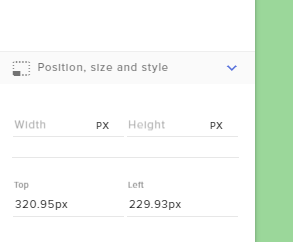
edit its location here https://i.imgur.com/dVQrhMF.png
 serene granite
just select the widget you have right next to it to figure out the exact spot
zenith rapids
wait ok i realized why it doesnt work
the image itself
the borders touch the edge
thats wwhy
 obtuse mantle
hello guys sorry to bother but i twitted moments ago about my twitch chat not appearing on the super theme?
weary mist
@obtuse mantle which super theme, and what scene?
obtuse mantle
weary mist
kk, give me a second
obtuse mantle
ty
anything special i need to do so my twitch chats will show? i could simply just use the old skool (twitch pop-up window and copy the url) trick but thats not really going to look good the scene though
obtuse mantle
so ive been typing stuff on my twitch chat but its not showing though
ok lemme try that
WOAH!!!
that worked
ok
thats embarassing
viscid forge
Haha solved ❤
weary mist
👍
obtuse mantle
sorry guys
weary mist
I use black magic to make things work 
obtuse mantle
you guys rock!
keep up the good work ill continue to use elements and recommend it
bye happy holidays!
weary mist
❤
serene granite
❤ 
 acoustic glade
hello someone here who could help me?
acoustic glade
i have an overlay from streamelements for fifa18 and its animated
acoustic glade
now when i start my stream the videos always lagg
and it tells me coding overloaded
in obs
stuck hamlet
what are your system specs?
acoustic glade
@stuck hamlet wrote you a private message
stuck hamlet
@ebon forum could you help @acoustic glade ? 😃 He speaks German 😃
ebon forum
@stuck hamlet @acoustic glade on my way 😄 let me slide into DM's 
stuck hamlet
Thank you 😃
acoustic glade
ah nice thx
 dry latch
I'm having a similar problem. Task Manager says OBS is using about 12% of my CPU. When I turn on my StreamElements overlay (Kappagen and a few animated santas), it goes up to 75% or more and my system starts having real problems. I have an Intel i5-6600 @3.30 GHz and 8 GB ram. Windows 10 64bit.
If I kill the Santas (sad) and just run Kappagen it still pretty bad. OBS goes from 15% without, to about 40%. That's for an overlay with nothing but Kappagen in it.
Is that normal? Or do I have something set up wrong?
weary mist
KAppagen is quite a resource eater, because its generating new graphics in random patterns
If you want to reduce it, you can change it to just a section of the screen, or not use it.
ebon forum
@stuck hamlet got him, he had all 5 animated overlays loaded at the same time. i7 said > nope 😄
serene granite

dry latch
It's a little surprising that Kappagen uses so much of my CPU even when its not doing anything.
It's not like it spikes when people start spamming emotes. Even if there are nothing happening, just having it activated makes my OBS so unhappy.
Does an i7 handle it that much better? I see other people using Kappagen with no problem. Are they all i7?
stuck hamlet
if you scroll down in task manager to your background processes, how much is the CEF Bootstrap using?
there is no reason Kappagen should be over 10%
dry latch
Let me turn on OBS and see...
And thank you Onslaught! This is encouraging! I really hope that this is something I am doing wrong, because I looooove my StreamElements overlay.
stuck hamlet
i mean unless there's like 100+ emotes on screen, that may go over 10%
dry latch
Even when there are zero emotes on the screen. Just activating it in OBS immediately shoots the CPU usage from 15% (ish) to over 30%.
I'm not seeing CEF Bootstrap in Task Manager under Background Processes.
 copper finch
not a way to import streamelements to discord server yet?
dry latch
Oh, and I had it set in OBS as only 5ps to try and fix it, and still 30% CPU usage.
When I set it normal, to 60fps, it shoots up to 70% usage.
I''m not streaming. I'm not live. No one is spamming emotes. Just having OBS open and my StreamElements overlay active shoots my CPU for OBS from 15% to 70%. That can't be right.
 clever mango
@copper finch Not yet. Many projects are being worked on right now but if you upvote the idea on the ideas board you'll know exactly when the development is started on it. The link is in the channel header of #💭︱feedback-and-ideas
dry latch
70% with kappa and santas. About 40% with just Kappa.
copper finch
okei thx
dry latch
Well, I guess for now I can just keep the framerate down to 10 so my CPU doesn't get totally cooked. My kappagen will be slow, but at least I can still use it.
tight harness
10 FPS? damn
 serene atlas
so apparently i have songs in my queue but the bot keeps playing the "playlist" that's on youtube?
tight harness
Are you doing it from the page or GC?
serene atlas
client
tight harness
Refresh the page
serene atlas
gotcha
 vast gust
can someone open my stream and tell whats wrong or what i should include also?
dry latch
@tight harness Yeah, my overlay is a little sad at 10 fps. But I've been playing with settings all morning and I can't find any other way to use my overlay without my CPU usage going crazy.
tight harness
Broken how?
tight harness
I've had mine running all day and had no issues 🤔
tight harness
The errors don't mean anything to me 🤔 but they'll mean something to some of the staff who understand what it's saying 
 )
tight harness
)
tight harness
Done that in our support staff channel just now 👍
 vapid rapids
thanks my friend 👌
weary mist
@vapid rapids is it ok if we run some test alerts?
vapid rapids
yeah sure let me notify stream
i use streamlabs for alerts
just streamelements for cup
clever mango
/thinking 
viral cedarBOT
lament blade
clever mango
too many cool custom tokens xD
stuck hamlet
so something with the sub token is broken, currently, i disabled sub tokens, i will try and find the issue and reabled when fixed @vapid rapids
 vale ember
Hi there. I’m here for JennyKnits. Her alerts are stuttering and we can’t figure out why. Is there something going on server wise?
stuck hamlet
@vapid rapids I FIXED IT 😄
subs will appear in the cup now!
😃
Well i see she's using a small animated theme and she's also using the cup, if she doesnt have a powerful PC, that may impact preformance.
Also if she has other overlays, she needs to tick an option in the browser source properties to "Shutdown source when not visible" @vale ember
 hazy gust
What's the biggest mp3 file for use with gif alerts? Mine is uploaded but not playing when I test the layout. 67 kb.
weary mist
the only file limit is the storage space we provide (100MB
What alert are you trying to put the GIF on?
@hazy gust
hazy gust
It's a small audio file from full metal jacket
"me so horny me love you long time" 😂
It's in mp3 format and only 67 kb in size @weary mist
weary mist
and all of that does not anwer the question I asked
stuck hamlet
Are you using chrome?
hazy gust
IE right now, I can use chrome if it works better
stuck hamlet
Please do.
weary mist
chrome works better. Are you trying to change the GIF on a Sub alert or Cheer alert?
hazy gust
Sub and followers. The gif works fine (changed the image as well and new gif works when tested)
weary mist
@hazy gust Subs have a default variation, so make sure you change/remove that. Followers should change fine
hazy gust
@weary mist it works great, just need a real browser to test and use on, not crappy IE Edge!
thanks a ton!!!
I recommend streamelements to every streamer i know
weary mist
❤
vale ember
@stuck hamlet she has a big gaming pc. And it’s been working until today
weary mist
Gaming PC and streaming can be two totally different rigs. I had to upgrade my gaming PC to handle streaming. But if the alert is stuttering, it coupld possibly be her CPU is maxing. It will be best if she can come in here, there are a few things we can try, but it has to be done on her rig @vale ember
misty wagon
Every update from browsers, operating systems, OBS/XSplit or even a virus program can screw things up. It's all in the details and if it happened, we much likely know how to deal with it.
 weary gust
what is media shareing widget?
ebon forum
@weary gust same as songrequest, but people can request videos. those can be pre-moderated to make sure nothing bad goes live.
weary gust
how do i modify it for each video
ebon forum
you dont need to, you simply make a playlist or let people request videos, you can moderate them so nothing too crazy goes live and that's it.
 molten brook
Trying to upload an image for an overlay sub-widget. Upload is taking a while tho... like, a long while. Just me or could SE have anything to do with that?
vale ember
Hopefully she just needed a reboot. Will try to help her tmrw. She’s been streaming a long time so who knows what could be wrong. Ty yall
 gray moth
is there any templete for shoutout command? sorry maybe it was asked before but still)
weary mist
@gray moth Yes. Click Create new Command, click the Template dropdown, scroll down to Shoutout
gray moth
is it ok that templete goes with @ @weary mist ?
weary mist
its up to you, it is just a template 😃
 fallow relic
what do i need to have checked in OBS so that my alerts dont play double?
 sharp elbow
Forgive me, I asked a question yesterday and then had to run and make dinner. My Xmas cup isn't working. 😦 Is it just me?
 sharp elbow
thank you ❤
weary mist
@sharp elbow which overlay do you have it on, I am going to see if I can figure out the issue
pine hemlock
@fallow relic browser source properties. Shutdown when not active
sharp elbow
Do I just send you my Overlay url?
weary mist
just need the name of it
sharp elbow
or just tell you the name of it? 😃
OHH sorry I'm blind one sec haha
GAMEPLAY & ART (ALERTS)
weary mist
ty
fallow relic
@pine hemlock shutdown source when not visable?
@pine hemlock or refresh browser when scene becomes active?
dry latch
Oh, @stuck hamlet , you were trying to help me earlier and asked me about my cef-bootstrap and I didn't see it. I just found it. It is huge. Right now OBS is using 50% CPU, the boostrap is at 40% and obs64.exe is only at 10%.
the numbers bounce around.
weary mist
@sharp elbow try it now, I may have fixed it
sharp elbow
Looks good! ^_^ Thank you so much 😄 What on earth did you do to fix it?
weary mist
It was marked as a sprite sheet, so I think that was bugging it out
I just unmarked that, and saved, it was good to go
sharp elbow
You are the real mvp ❤ Thank you!
weary mist
❤
weary mist
OK, it just means I have to do the thing to fix it there as well. Is there anywhere else you are using this cup besides intermission?
sharp elbow
nope 😃
weary mist
done
sharp elbow
Thank you again! ^_^
weary mist
👍
 peak dock
hi I have a very quick, probably dumb question. So, when someone wants to redeem something from the store, the command is !redeem (then whatever you input). Is there a way to forgo the !redeem ? so, the chat would just type !ninjas , as a silly example, and then it would redeem that from the store. IDK if that made sense. Custom commands confuse me even tho they seem simple. Thank you!
tight harness
Yes, you can make a custom command and simply make the response as ${redeem ninjas}
tight harness
Good question 🤔 maybe I derped
pine hemlock

StreamElements - Legendary Live Streaming
Our development team was working extra hard this week on some much requested features and updates, and oh boy, they sure delivered!
It's at the bottom
tight harness
You're right, updated 😄
pine hemlock
If you wanna use that as a guide too @peak dock
peak dock
Thank you @pine hemlock ~ I'll have a read right now
tight harness
It shows on the variables page:
 viscid mango
Is there anyway to use a command to type in chat using my channel emotes without subbing for streamelements?
viscid mango
well I have Frankerfacez emotes also but I wanted to use the ones for my subs
peak dock
yes, I think i was just confused by the example that was given and then confusing myself lol
tight harness
@viscid mango Then you need it to be subbed
viscid mango
so lame
tight harness
There's no way for it to use sub-only emotes without being a sub, if that's what you mean.
dark charm
How do I draw for a giveaway event?
tight harness
@dark charm Click Close Giveaway, then you can do it from the page it takes you to
 near wadi
how do I disable the default !donate chat command? I use a custom chat command and it always double replies with two different commands


 tight harness
@near wadi Go to https://streamelements.com/dashboard/bot/commands/default and scroll down to !tip - you can disable it
 zenith abyss
I've got a friend on Twitter, twitch, patreon. Can I share his stuff in group or is it for members only?
zenith abyss
I'm so sorry! I meant to send that directly to a friend who runs a twitch group that allows for posting promotions and such
tight harness
Ahh I see
 shy stirrup
is there any way to support btc donations with alerts?
silk patrol
@shy stirrup Not yet, we only support paypal. But we are looking into other payment platforms
 bronze brook
hi, how would i go about importing my ankhbot/streamlabs chatbot commands to StreamElements? i know there's an import option but i don't know where to find the commands file.
lament blade
is there a way i can get the bot to ask league related questions or does this bot not do that?
clever mango
Ok, I'll walk you through it
bronze brook
❤ thank you so much
clever mango
If you have a mic we can chat
bronze brook
sadly i don't have my mic atm
bronze brook
ok
clever mango
Click pick folder and choose your desktop
so it's easy to find
click save settings
bronze brook
done ;_
bronze brook
it's only got songlist,data and queue
clever mango
OK click export currency csv
bronze brook
done 😃
clever mango

bronze brook
ok so now i just go into SE and import the ones i want right?
clever mango
import the currency.csv and the data.xlsx
 misty sparrow
guys i cant find my twitch subs link to give to people
clever mango
misty sparrow
I've typed https://suvs.twutch.tv.willobri and the link wont show as a link?
subs*
. twitch*
clever mango
willobri is your twitch name?
misty sparrow
yeh
silk patrol
@misty sparrow it's a / after the .tv, not a dot, there you go https://subs.twitch.tv/willobri
clever mango
⤴
misty sparrow
@clever mango wow im an idiot! thx soo much,! lol
lament blade
Does anyone know about my prior question? Sorry to ask again just curious
clever mango
Can you elaborate on what you want the bot to do?
lament blade
Like a trivia bot
clever mango
There is no trivia module set up for that purpose but you might be able to create a workaround solution using timers and manually rewarding winners
lament blade
Hmm
should I get a different bot along with SE if I wanted that kindof thing in my chat
then
clever mango
That's up to you
Depending on what you want it might be able to be accomplished with the SE bot right now but there isn't a dedicated trivia function built in
lament blade
I was looking for like trivia questions to be asked about a specific game I didnt know if that feature was possible but I dont really know SDE very well
SE*
clever mango
the bot can post timed messages
but it's not set up to award points automatically if someone answers correctly
lament blade
Would I need to manually input the messages then
clever mango
I'm not familar with how trivia bots work in chat
yes the questions would need to be added as timer(s)
bronze brook
some of the commands are not working but will try to figure that out on my own 😃 thanks @clever mango
clever mango
The variables are different. You can use https://streamelements.com/dashboard/bot/commands/variables for the comparable variables and ask questions here if you need help.
I'll give you an example
 bright spade
How can I get my bit cup to empty? I tried clearing it out in the overlays, then relaunching it, but it still shows up full when I open OBS
clever mango
$time variable with streamelements is $(time.timezone) where timezone is found on this page https://en.wikipedia.org/wiki/List_of_tz_database_time_zones @bronze brook

This is a list of time zones in the tz database release 2017c. The list is derived from the zones, links, and rules specified in zone.tab and the 7 "continent files" – africa, antarctica, asia, australasia, europe, northamerica, and southameric...
it also seems like the commands were imported twice so you have duplicates
the uptime custom commands can be deleted as there is already a default uptime command
@bright spade did you use this button and refresh the cache of the overlay in OBS?
bright spade
yes
clever mango
Ok, I'll look into this and get back to you
bright spade
Thanks, I re-did everything and it seems to be working now. See how the next time works. Appreciate the help!
clever mango
It seems that is a current bug and is being investigated. Thanks for the report!
lament blade
Can I use this chat for support for my twitch channel? Or solely for support for the website or whatever?
clever mango
This channel is for StreamElements support. #welcome can be used if you have general streaming questions
lament blade
Thanks 😃
bronze brook
ok will check it out in a while @clever mango and thank you 😃
 prisma rivet
For some reason when someone tips via paypal it isnt showing on my dashboard or alerts but it is showing in paypal
test alerts also work
clever mango
do you have tip moderation enabled?
prisma rivet
yes should I turn it off?
clever mango
tip moderation is manual moderation before alerts show
if you go to your activity feed you'll see them pending at the top
prisma rivet
Thank you so much!
 atomic mulch
Hello! I can't seem to find the right timezone for a time command. I'm trying to get UTC+10. I've tried AET, AEST, AU, and none of them are working. Thank you in advance!
clever mango
+10 all year round?
atomic mulch
Yeah, I believe so
atomic mulch
Ah ok, thank you!
Yep that one did it! Thank you very much ❤ I wonder why the timezone codes weren't working?
clever mango
the variable uses the timezones here https://en.wikipedia.org/wiki/List_of_tz_database_time_zones
This is a list of time zones in the tz database release 2017c. The list is derived from the zones, links, and rules specified in zone.tab and the 7 "continent files" – africa, antarctica, asia, australasia, europe, northamerica, and southameric...
 proper tide
Hi um i have a question
clever mango
Hi
proper tide
is it possible to rotate widget videos in the editor for premade packs?
proper tide
One of these, its an animated item in one of the premade packs that goes behind text and icons. the game i'm playing ti covers so i was wondering if there was a way to make it upsidown at the top of the screen rather than the bottom
i wasnt sure if there was a feature for that or not
clever mango
The editor currently doesn't support rotation of layers (it will in the future) but let me see what I can do for you. Is this the force field supertheme?
proper tide
yeah
clever mango
Ok give me a few
proper tide
I'm just trying to keep all or most of the overlay features at the top so viewers can see the inventory of items.
clever mango
understandable
proper tide
its for ark survival evolved by the way if that helps. not sure what youre doing, but its added screen information.
clever mango
I'm rotating it 180 degrees. That's what you want, correct?
proper tide
yeah
clever mango
@proper tide what is your twitch name?
proper tide
xoXRocketLawnChairXox

Twitch
TRESPASSER The Lost World:Jurassic Park| Join me in the first part in an epic series about dinosaurs and surviving on Isla Sorna!
clever mango
In the overlay editor click on Add Video and then select video
proper tide
alright
clever mango
You'll see the rotated video in there
proper tide
do you mean insert video or am i misunderstanding?
stuck hamlet
Yes, insert video
proper tide
okay i found it thank you for your help
clever mango
you're welcome
proper tide
oh
it uh, didnt quite work
it shows up like this in my obs
i'm not sure if there is anything else that can be done since i can imagine this might have been a makeshift version of it and not an actual feature yet, in that case its fine, i'll figure something else out.
its the shadowing showing up rather strangely
clever mango
I rotated it 180 degrees I can't do anything about the shadows as I didn't create the design
proper tide
thats alright
wait actually hmm
what if the top bar was duplicated?
for some reason it wont alow me to do that
its similar enough without rotation necisary
clever mango
once you select the layer in the editor you can click on the button with the red dot on it at the bottom left which will duplicate it
proper tide
alright i'll try that
nevermind, it wont let me edit the duplication either
it turnes my cursor into a do not enter symbol hovering over both the origional and the duplicate
clever mango
Because the layers are locked
you can click on layers in the bottom left to open the layers panel and find the layer. Click the lock icon for that layer to unlock the layer
proper tide
i figured it out, i feel rather silly now haha thank you
I think i'll be fine from here now that i can edit this.
clever mango
have fun 😃
 cloud solstice
hey there , how to export my stream elements bot commands to stream labs ankhbot ?
weary mist
You might want to ask them, as we don't provide an export on commands. they might be accessable through the API,
 edgy iris
Hey dudes and dudettes! Good morning/afternoon/evening. I’m looking for people who make REALLY nice emotes, banners and logos. I suppose they’d have to draw really well for the thing I need/want. I don’t know if this is the correct channel for it but I hope some of you can hit me up with a price range and allow me to see some work of theirs. Was thinking to go straight to CreativeGrenade but I’m not 100% sure yet, which is why I want to see some of your work if you’re up for it. Please do not be offended if I say it’s not my style, because I’m picky and specific. Get down on that DM and let’s see if we can work together. Thank you in advance! 🐺
clever mango
@edgy iris Artists can be found in the #creative-chat section. I'd post this over there for the best chance at finding someone 😃
 young coral
Umm not quite sure why, but im redoing my overlays and for some reason the chat widget is saying what i say 7 times in the editor, and not saying anything in obs
oh wait
Just readed the ideas channel and saw twitch chat only works in 1080p.....Sigh
 rotund kraken
Hola buenos dias
Una pregunta como hago para poder ver las donaciones que me hacen desde el directo?ç
y otra podriais hacer un s Supertema de el Juago Eskape from Tarkov
gracias
atomic hollow
@olive lintel ⤴
 olive lintel
@rotund kraken hola, si deseas ayuda en español , te puedo ayudar--- escribeme un mensaje directo
 runic bridge
Is there a known bug with the alert box on raid notification? It appears that the raid alert on my end is not showing the image I set. Other notifications are fine, It's the raid notification that's not showing the image. Yelp! XD
atomic hollow
@runic bridge can you try to add the image and sound again?
runic bridge
@atomic hollow No issue with the sound and text. Just the image not showing up.
It's the same image I'm using with the other alerts so not sure why this one in particular is not showing the image
runic bridge
It's the same. Wait let me check
ow dang. didn't notice that
sapphirereg
should be good now
runic bridge
Yeah. I can't seem to fix it on my end.
atomic hollow
checking on my account
runic bridge
Copy. Can you DM me for the update? Might hit bed in a while already 12midnight here. 😄 Thanks for checking on it!
I may not be able to view your response here. But will check.
atomic hollow
will do
 heavy spoke
hello, so recently a couple people have been trying to donate to my stream from different regions and they cant im not sure why any tips or tricks?
clever mango
@heavy spoke Are they donating in different currency than your paypal currency?
And when you say they can't donate where are they being stopped? Is it on the streamelements tipping page or a paypal page?
 quasi abyss
what is the streamelements windows app useful for? Staff?
clever mango
monitoring activity feed (having AF page or app open is needed for host alerts) and song request/media share control. The major benefit is having hotkey support for pausing/skipping alerts and controlling the song request system
quasi abyss
ummmm doesnt stream alerts ACTUALLY have alerts? cant find em
clever mango
There is an alertbox in the overlay manager

Create an amazing overlay with StreamElements, watch our video guide to learn how. ----- Tipping page setup: https://youtu.be/eLzxRkq7tJo Add KappaGen to you...

Learn how to customize your alerts and setup different alerts variations with StreamElements Alertbox ----- Overlay Manager guide: https://youtu.be/X7XrDdRE7...
quasi abyss
if i use the hearthstone overlay, how do i equip the card collection in that tall row of HUD? cause ive never done that before
clever mango
it's call decktracker it's a separate service that you can add to OBS
I've never used it but you can look into it
clever mango
In that case, you'll need to contact paypal
heavy spoke
is it a paypal issue though
because they said they could donate to other streams via streamlabs
clever mango
If they receive an error or are being blocked while on paypal's site it is a paypal issue
StreamElements is just passing the information from the tip page to paypal for processing and then receives notice of the transaction once it goes through. SE never sees payment information.
 indigo haven
So, where exactly is the name of the loyalty currency used? From what I can see, it only seems to be on the items on the store page. The sidebar still says "points" as does the bot when you redeem by command.
clever mango
It's supposed to be shown everywhere (commands, modules, leaderboards, store, contest, giveaways). If you come across other places where "points" is shown please message me and I'll get it noted for the devs.
indigo haven
StreamElements
The Ultimate All in One Platform for Streamers
The sidebar still shows "points"
And the items don't show anything, just the number
clever mango
I've noted the two places you mentioned
indigo haven
Ok, cool. It does show the name in the "edit store" section of the dashboard though.
clever mango
Thanks for the report
clever mango
It tells the user how many they have with the correct currency
But above that it explains how much is earned per 10 minutes
indigo haven
But the top line should say "spots" as well
clever mango
Please send me a message if you come across other places where points is listed so we can get that fixed. Thanks!
indigo haven
Yeah, the only other one was in chat but not sure if that's based on how I was doing it (with a !command to ${redeem item})
clever mango
I'll look into that one
indigo haven
Seems to be
Ok - well that's me done for tonight, updated the stuff with feedback from tonight's stream. Going to get some sleep before my 24+ hour stream tomorrow. 👍🏻
Thanks StreamElements for being fantastic
clever mango

clever mango
no problem
indigo haven
(So, I totally didn't go to bed) ... Is there a way to make a command that works like !addpoints but always adds to everyone in the channel a specific number of points, without requiring any arguments? I want to make a command like !freespots that can be triggered by anyone, with a long global cooldown, that just gives everyone some free spots.