#helpdesk-twitch
1 messages · Page 162 of 1
 clever mango
 autumn lily

 pine hemlock
 pine hemlock
Streamlabs is trying to block us, if it doesnt work - there's really nothing we can do at the moment.
clever mango
you're doing it right @autumn lily
they are actively trying to block the process
just keep trying it and press CTRL+Shift+R after each time
it will eventually go through
 limber ingot
yo can some one help me?
clever mango
yes
limber ingot
my firend followed i get sound but not the gif?
clever mango
in the editor or OBS?
limber ingot
obs
clever mango
what size is your browser source?
clever mango
no, that is correct
check your alertbox in the editor to make sure that your gif is saved for the follow alert
also, check if you have any variations for follow alerts
clever mango
no problem
 lament blade
so if i make this, it will play the choosen sound of this item, instead of the "redemption widget sound", right?
lament blade
it's only a sound
that's why description is "Sound" 😄
anyone can send me the soundfiles he uses for SE alerts? 😄
autumn lily
ok if i don't use streamlabs streamelements have alert box?
 fleet summit
if you change the alert sound you dont need to relink the browser source in to obs right
?
clever mango
no
pine hemlock
if it doesnt update just refresh the cache
clever mango
you don't
pine hemlock
but it should fix
fleet summit
kist curous
just
cude it makes a beep noise but not the sound i had uploaded
cuda is that odd
?
pine hemlock
did you hit save
fleet summit
now its playing it
 white lintel
Hey I have a small question
white lintel
What is the difference between moderator/supermoderator and like bot supervisor etc?
pine hemlock
 white lintel
ye i've seen that but one can be bot supervisior and super moderator for example right?
is moderator and super mod just for the cmds?
pine hemlock
supermod and mod have different access to bot commands
not access to your dash
like those others
white lintel
okay ty very much
fleet summit
how do i see a list of my subs
 tight harness
Go to your Revenue page on Twitch, click on Email me my Subscriber list?
fleet summit
thanks
if i had gigabyte speed would there still be a stream delay
on twitch
i have 231 mpbs to 250mpbs but when i broad cast there is a 20 second delay
tight harness
I have worse internet and less delay, don't believe it's entirely to do with your speed
fleet summit
its twitchs pipline right
 swift parcel
internet in general
white lintel
On what depends the delay then? 🤔
fleet summit
mines 10 t 11
down
just on twitch in genral i use 1280 by 720
for braodcast and 1500 bit rate
unless its my gtx 960 4gb card is the delay
?
white lintel
i think you can go up to 3500 when 720p/60
white lintel
okay
autumn lily
Why if I go to the overlay editor this is not present
clever mango
It's an error in the preview. It was not included in the overlays that have the black background because there is no transparent area for the webcam. The only one that has the cam border is the in-game because it has no background image
if you want you can duplicate the cam border from the in-game overlay to the others but you'll have to put your webcam on top of the overlay
 turbid zealot
How Can I reset the loyalty points ?
turbid zealot
Okey thanks
 ember falcon
Guys, is it possible for the roulette to always payout to a person? I've just won over 10 times in a row while to trying to prove to people it isn't a rigged system
Okay scrap that, I just lost. Although I won 15 times in a row before losing
tight harness
It depends on the rigged bar 😛
ember falcon
It's 50%
ember falcon
I went 18-6, easy points I guess lol
 autumn lily
Ty
autumn lily

I apologize to ask when launching a donate, I can not hear the voice of the donation of the donate as I fix it
all good
 subtle socket
is there an ability to make stream elements bot say something every five minutes?
pine hemlock
subtle socket
am i able to use if in a bot command?
swift parcel
yes timers and commands are seperate
subtle socket
i meant and if statemnet if(random>51)
subtle socket
what's a user level?
tight harness
It's basically a permissions level
 tiny storm
Hello, I'm setting up songrequests and loyalty store for my stream element. One of my store items is song request priority however how do I setup so it will get priority or at least how do I see the link of song peopole requested
tight harness
There's an idea on the ideas board for being able to move songs in the song request list, currently you can't move them yet
subtle socket
How can i make a gamble command with random number (high number win points, low lose pints). i can't findsomething like that
tight harness
That's what raffle is
subtle socket
that's an active raffle
i seek like you do !bet 50. a random number goes out, 60 or above you get double what you bet, 59 and less you lose what you bet
tight harness
You're basically describing raffle where it shows you the numbers 😛
 weary mist
Roulette is what I think you mean. It just doesn't tell a number
tight harness
Raffle is more for multiple people to enter, roulette is for individuals to enter
Also you have 2 versions of raffle, single raffle or multi raffle, this determines whether 1 or multiple people can win the raffle
tight harness

weary mist
👍
subtle socket
how can i make the get started with streamelements go away?
tight harness
I believe if you put in the paypal email it should go away
It's basically if it's not been finished
Import isn't necessary for finishing it
tight harness
You're welcome 😃 glad you're enjoying it!
 hot acorn
Hey There, sry for disturbing some viewer wants to donate, but the donation site wont show up, just a white screen
lament blade
Hey...so I started a month long giveaway two nights ago. Just checked my giveaway page and its showing that the giveaway is only 16 hours old, when it should be saying around 48 hours. Does the giveaway timer reset every day?
 hot acorn
ok, on my site the page also shows up just wanted to know if i'm the only one
FeelsBadMan
 raven sequoia
Hello you beautiful people. First just wanted to thank you for SE. It's pretty great.
tight harness

raven sequoia
Having an issue with Tiltify integration. I got some donations last night that didn't show up while streaming, though other alerts worked. Is there a way to test the alerts?
Also do they show up in the activity logs?
nvm, I think I know what it is. I am dumb.
I didn't add an image or a sound.
raven sequoia
Apparently that's like important or something. idk.
raven sequoia
Yeah no I am just dumb. So much to do. Just completely missed it.
tight harness
It's no problem 😃
raven sequoia
Anyone know a good source for a variety of alert sounds? 😃
 fallow lake
Im having a problem saving my alerts atm. All of them that I changed(and saved) worked minus the Cheer Alert. Any Ideas?
clever mango
@raven sequoia myinstants
raven sequoia
Thanks, @clever mango
tight harness
The site is pinned in #welcome 😃
At the end of the store item suggestions list 😄
@fallow lake When you say it didn't work, what gives you that impression?
Just so I know what's going on
fallow lake
I pressed the little bell thing on the editor page to see if my changes worked and all of the switches that i made changed over minus the cheer alert. I just made changes to my images and sound
*all the changes that I made worked minus the cheer alert sorry for the typos
tight harness
Have you checked the Variation Settings for Cheers?
It could be that you changed the default one but not the variations
fallow lake
awwwwwww rip me ok
tight harness
😄
lament blade
can someone download me a youtube alert sound as .mp3 file?
tight harness

tight harness
Don't you have any friends that you can ask? 🤔
lament blade
no i dont :c
tight harness
Welp
lament blade
Hey...so I started a month long giveaway two nights ago. Just checked my giveaway page and its showing that the giveaway is only 16 hours old, when it should be saying around 48 hours. Does the giveaway timer reset every day?
clever mango
It does right now
but it will continue to run until the giveaway is closed
I'll note that for the devs to see if we can't get an additional unit of time for days
 proud grove
how come even tho i have been given super moderator, i cant edit custom commands from the dashboard?
lament blade
ok...so the giveaway will be fine to run all month? Nothing else will reset except the timer ie. no entries will be cancelled/refunded or anything until I close the giveaway?
tight harness
@proud grove Super Moderator is not the same as dashboard access, dashboard access is given here: https://streamelements.com/dashboard/account/channels and Moderator access is given here: https://streamelements.com/dashboard/bot/users/moderators they're both different features
@lament blade Yes correct
lament blade
sweet thanks
tight harness
No problem 😃
tight harness
No problem 😃 dashboard access has quite a bit more access to features than moderator or super moderator, it's really useful 😃
 strange wolf
how does song request work?
tight harness
Can you elaborate on the question? It works the same way song request normally works 🤔
People request songs, the songs play, if they don't request songs a backup playlist plays
strange wolf
yeah, sorry, i said it incorrectly
so, i got it working, but the musics wont play
it gets to my music list, but nothing happens
tight harness
Do you have the song request page open?
strange wolf
yep
tight harness
Do you have a playlist in the settings?
tight harness
You'll want to do that
strange wolf
working now, thanks
tight harness
Awesome 😃
proud grove
this should allow me full access to the dashboard including editing custom commands from the dasboard correct?
tight harness
That's your choice, you can turn off chat alerts for follows or the alert box for followers
strange wolf
i wont get banned for that... right?
tight harness
This is what Full Control gives you access to: https://gyazo.com/a592b74ba3649aad89e5587ae2ec954d
 strange wolf
it started a few hours ago lol
tight harness
@strange wolf Of course not
proud grove
that includes custom command editing from the dashboard correct?
tight harness
Yes
tight harness
Is is that you don't see the Action buttons?
tight harness
Is your Chrome fullscreen?
proud grove
no
tight harness
Try it
proud grove
didnt fix
tight harness
Are you zoomed in?
tight harness
And the last thing to check, do you see a scroll bar along the bottom of the list of commands?
tight harness
Awesome 😃
proud grove
ty for helping
tight harness
No problem
tight harness
It's fine 😄 at least you know now
 slate glen
Would it be against twitch if I had it when I got a subscriber splooge would go all over the screen
tight harness
What a wonderful question  I don't even want to know
clever mango
ummm I'm gonna go with yes
I'd email twitch support to get the real answer. It might depend on how realistic the alert is 
 eager geode
Hey, I use streamelements for pretty much everything - how do I be a sellout :P?
clever mango
You're in  @eager geode 😃
tight harness
Good question
 fossil coral
is there a way to change the email address my account is tied to on StreamElements?
clever mango
I think it will shortly @eager geode
tight harness
You mean for tipping?
tight harness
Is it a separate email to the one you use for Twitch?
fossil coral
yeah
tight harness
That's the problem, it uses your Twitch email
tight harness
Try changing your Twitch email, that'd be my suggestion 😃
fossil coral
Awesome, thanks
tight harness
No problem
 plain rivet
Is there somewhere we can get a comprehensive list with previews of the different fonts for the overlay editor?
tight harness
It uses Google Fonts
clever mango
https://fonts.google.com for previews
 tight harness
No problem
plain rivet
Apparently StreamElements doesn't support some of those fonts, tho...for example, Old Russian
😦
tight harness
I guess the line has to be drawn somewhere, so many fonts out there 
plain rivet
lol true
Is there a way to display the top 3 spots with loyalty points?
Not finding it in the widgets...
tight harness
Not seen the StreamElements panel extension yet i'm guessing 
plain rivet
Hmmm...my buddy Roach has it on his stream...
clever mango
old russian isn't a google font.. that's why
plain rivet
Blyat 😢
Damn, if I can't display the top loyalty guys, I need to rearrange half my overlay. Crap on a crutch.
Oh well, at least I still have it open in inkscape
tight harness
Not heard that one in a while 😛
plain rivet
Usually Christ on a crutch, but...political correctness will be the death of me
Probably why I'll never be monetized on youtube again lol
Thanks, guys!
tight harness
No problem 😄
 silent veldt
Is there a way to copy an alert box from one overlay and paste it to anohter?
 silent veldt
ah yes
tight harness
Select the widget, in this case the alert box that you want to copy, then click on that, follow the instructions 😃
silent veldt
ty ty
tight harness
No problem
 dense reef
what can my sub do if he cant redeem subs only store items?
clever mango
first step is log out/in on streamelements
see if that fixes it
the sub should do this
 boreal socket
Hello i have a question for you guys
tight harness
Ask your questions and we will have answers for you 😃
boreal socket
So i have a few people that are trying to play with me on stream and i was wondering how to set up a play queue for then to queue up in the chat so that way i know whos next
If thats possible
 proud pumice
That can be done using an item with requirements at the store
They redeem one by one
And you get a list of people on your redemption list
Gud?
boreal socket
i dont have a store set up yet
proud pumice
Its easy, enable it and create one item
boreal socket
i was just wondering if i could add a command and do it that way
clever mango
this will do that
!join will have them "buy" the "join queue" item and then you'll see them in order
boreal socket
im like very new to stream elements and i barely know how to use it
clever mango
want me to walk you through it?
boreal socket
let me try and figure it out first then ill ask
clever mango

boreal socket
So it has to be in a store to be able to play with me ?
clever mango
That's how they would join the queue, yes. They "buy" the queue item in chat or on the store page
it can be free or cost loyalty points
you'll see the redemptions
then you play with them in the order that they come in 👍🏽
boreal socket
yeah true that i didnt know if it was like the other bots ive seen used
clever mango
it's a bit different but the result is the same
boreal socket
oh okay well how do i set up a store ?
boreal socket
ok
clever mango
this will be a stream perk
clever mango
everyone has a store by default
the items are added by the streamer and people who are given dashboard access
boreal socket
okay
Okay so im a mod in a channel but it doesnt show on stream elements why is that ?
tight harness
Doesn't show where on StreamElements?
boreal socket
Like i clicked on my name and then under it says your not a mod for any channel
tight harness
Right, that's on about dashboard access
The streamer can give out dashboard access to people, that's not the same as being a moderator in somebody's twitch chat
clever mango
https://streamelements.com/dashboard/bot/users/moderators is the place where twitch moderators will show up
boreal socket
Oh well hes done gave me access to it but i dont know if it will show up on mine or not
boreal socket
i dont remenber
tight harness
This is where he'd create the link: https://streamelements.com/dashboard/account/channels
boreal socket
hes checking to see if im in there now i think
tight harness
Awesome
 sonic cedar
so everytime i get a follow i have my own sound put ontop the overlay, but i also get this loud ass default beep noise that wont go away 😦
 tawny elk
Is there any support that I could ask a question?
tight harness
@sonic cedar Check your variations settings on the overlay manager and also check you've ticked 'shutdown source when not visible' in the properties for all of your overlays
@tawny elk Yes, what's up? 😃
tawny elk
@sonic cedar Sorry to bother you but I recently started using Streamelements and came across something interesting.. I have the Red Overlay and when I use it on OBS I lose around 60 fps.
tight harness
I think you tagged the wrong person 😄
tawny elk
oh sorry
tight harness
Check you've ticked 'shutdown source when not visible' in the properties for all of your overlays
Otherwise they stay open in the background
tawny elk
I watched a tutorial and I've had that option checked
tight harness
Is it an animated overlay?
tawny elk
No sir
sonic cedar
i've ticked the checkbox you are on about but i cant see the variations settings
i've actually deleted the alert box and used another platform, but still using the overlay, just not the notifier
 tight harness
You deleted the alert box? Interesting 😛
boreal socket
Its still not showing up and i dont know why ?
tight harness
@tawny elk What spec is your PC?
@boreal socket Has your friend sent you the link yet? You need to know that information it's important
tawny elk
I5 3570k @4.4 ghz --- Gtx 1060 6 gb ---- 8 gb of corsair vengeance ram@ 1600
tight harness
@sonic cedar If you've deleted the alert box, saved and refreshed your overlay then it's impossible for it to be coming from our end without the alert box widget
Also for your reference: https://gyazo.com/016dd68400ea72302c6a216d1cc41c66
 tawny elk
I've used other overlays and some that was animated with no issues.
tight harness
What's your CPU usage like?
tawny elk
Depends on the game. Most games it does go above 80% usage since I use NVENC H.64
Sorry it doesn't go above 8-%
80%
tight harness
With the overlay or without?
tawny elk
I haven't tested with that specific overlay..
tight harness
You should check it, 80% seems pretty high already
tawny elk
Ok thanks.. What is weird though is when streaming Overwatch I get around 55-75 fps with that overlay..Alt+tab uncheck it and stay above 120.
I will see the cpu usage difference with and without that overlay..
tight harness
Yeah, also I know I mentioned it earlier and you saw it in the tutorial but i'd check if I was you that there are no overlays still running in the background, it's best to tick 'shutdown source when not visible' for all browser sources otherwise they can drain a lot of resources
We get people mentioning high usage and it's more often than not the cause of it
tawny elk
Thanks I will double check.. Appreciate your time.
tight harness
No problem 😃 time for me to get some sleep, it's 3:32 AM here in England 
tawny elk
Oh.. Have a good night.
tight harness
Thank you, you as well
 lyric hare
If we are doing some form of charity is there a way to link the funds that are raised to a donation goal or is it strictly to what you have as your paypal link etc etc?
 near osprey
I've been trying to import my streamlabs alerts and donations to streamelements but it seems to fail every time. I tried to the plug in for chrome and it told me I need to log into streamelements, but I am logged in. Anyone have an idea?
 remote crow
Hey is anyone around I have a question having a issue but don’t understand if it’s meant to be or what
Running streamelements through OBS like always but my problem is every time I’m streaming once I hit the 6hr mark of my stream the pop ups stop working till I close OBS and restart. Is there something I’m doing wrong? Like a setting I’m missing?
pine hemlock
@near osprey that's because Streamlabs is blocking us.
near osprey
Damn, thanks @pine hemlock
pine hemlock
@remote crow sounds like your connection stops after some hours. It's not a setting or anything. I'd suggest trying an obs reinstall
@near osprey np sorry. They don't like us much.
remote crow
It’s weird cause once I restart obs it’s back to normal
It’s always at the 6hr mark of stream
pine hemlock
Sounds to me like the browser source plugin loses connection for you after 6 hours - but theres nothing on our end for that
 proper shoal
Hello!
We have added all of our MODs to Stream Elements under FULL CONTROL
None of them have been able to access giveaways
clever mango
Do you see them listed here as managers? https://streamelements.com/dashboard/account/channels when you click the drop down arrow under MY CHANNELS @proper shoal
 weak grove
Hello....????
clever mango
hello
weak grove
Have a quick ?....so I'm using one of the super mega packs overlays from stream elements....when I have someone hit the follow button it will not update the " Recent follower" on the overlays....any ideas
The alert comes up and I can see the person on my dashboard...just not on the overlay. I tried refreshing the browser link in OBS...but no joy on it uodating
Err updating
clever mango
twitch name?
weak grove
Necroitis
clever mango
https://streamelements.com/dashboard/session on this page does it list a latest follower?
weak grove
Yes last follower was a person by the name of Chris.....overlay has Troutman....2 follows back
clever mango
according to twitch stroutman01 is your latest follower https://www.twitch.tv/necroitis/followers
 weak grove
Aaahhhhh......Chris just hosted......I see....ok my mistake
 sullen dock
hey, just changed my twitch name, now my streamelements chat commands won't work
i logged out and back in on streamelements
clever mango
log out and back in. Then part and rejoin the bot from the dashboard
sullen dock
thanks man
 oak scarab
 heavy spoke
hey im using stream elemments currently right now and I just added a follow goal my twitch is connected to my stream elements page and my follower goal is stuck at 22/100 by default
I can change how many followers I want to reach but I can't change the 22 or it dosen't automatically update to myu follow count on my twitch page
which is 47
lament blade
@heavy spoke i believe it was there, go to overlay editor, click on the top data and go to goals
weary mist
@oak scarab supermod is just higher rank than mod in chat. You can assign higher end commands (like giving points) that you only want a select few to use. If you want to give dashboard access, you will have to generate a link from your settings page (click on your name in the top right while on your dashboard)
@heavy spoke asteri is correct. The follow goal increments each time you get a follow. If you want exact (and have it decrease when someone unfollows), use the Total Followers widget. This one gets exact data from twitch. You can edit the text to look like a goal
 serene nimbus
how can I remove tip that is in leaderboard?
I deleted in tip list but its still on leaderboard
 noble star
Testing out a giveaway with a ticket max of 2, but I notice that the giveaway is allowing me to buy more than two tickets.
serene nimbus
I had something like this bug but it was only for one giveaway and then everything was ok...
 short onyx
say... Totally new here... would anyone be willing to help me with importing Streamlabs? The tutorial video seems out of date maybe? I keep getting an error message when I try to import... 😢
short onyx
@atomic hollow both I guess? I click Import and the popup asks me to put in the alert URL and download the tips plugin.
I took the URL from the 'Alertbox Widget URL' and downloaded the tips plugin to Chrome.
After downloading the tip plugin I checked the tick box to "Import Alerts" and then pressed "Copy Donations to StreamElements". It then tells me to log in to StreamElements, even though I already am.
When I then click Import again, back in StreamElements, assuming I've done everything I can, it gives me an error.
short onyx
dandannlive @atomic hollow
 raven willow
Trying to turn off some ! commands but they arent listed, such as !store !shop !buy, conflicting with another program.
hello ?
serene nimbus
how can I remove tip that is in leaderboard? because he did a charge back...
lament blade
im sorry but where was i able to put a donation goal on stream elements?
 atomic hollow
hey @lament blade
its in the overlay manager

Create an amazing overlay with StreamElements, watch our video guide to learn how. ----- Tipping page setup: https://youtu.be/eLzxRkq7tJo Add KappaGen to you...
serene nimbus
@atomic hollow yes I did delete that tip
 stone spire
Hey guys, is there anyone to allow song requests without links?
pine hemlock
Video Id or link only currently
tight harness
We did find out a way to get the Video ID just using the video name, then you can use the Video ID it gives you to request the song. Command: !command add !search Here's your video id: $(customapi.https://decapi.me/youtube/videoid?search=$(queryescape $(1:)))
Then you type for example !search Darude Sandstorm
stone spire
I see
tight harness
So you first do !search <song name>
Then you do !sr <Input the Video ID it gives you>
stone spire
gotcha, cool
tight harness
It's because we have a limit on how many API calls we can make from the Youtube API, so we can't have all of the features we want
But it's a feature we want to bring back in the future 😃
stone spire
Are there any plans to implement plain text requests like !sr Somesong here
and just add it as text
tight harness
That's what I was referring to just then 😛
tight harness
Agreed 👍
stone spire
I'm djing so the youtube links are that useful :p
 quick python
is there any way to export commands?
tight harness
No
quick python
ok thank you
tight harness
No problem
serene nimbus
!song - how to turn off StreamElements respond to that cmd?
tight harness
That command is of course part of the song requests feature, if you want to turn off the song request feature you can do that here: https://streamelements.com/dashboard/songrequest/settings
serene nimbus
if I disable it still give the respond cmd
it gives the link to song request page
I dont need that
because I have other stuff that respond to !song cmd
tight harness
Have you tried turning this off? https://gyazo.com/ecc2e69953c33d20b14fdadedf9bfbd7

@serene nimbus
 oblique moat
I can't get song requests to work
tight harness
what have you done so far?
oblique moat
I have enabled song requests via chat and also added a song onto the web page
But music just won't play
tight harness
Have you added a playlist yet?
tight harness
Try refreshing the page and see if it plays then
 olive grail
why wont my overlay fit in obs help!!!!?????
tight harness
@olive grail What resolution did you set?
tight harness
All of them? What did you put in OBS?
atomic hollow
can you let us know the resolution please?
olive grail
to match
tight harness
That still doesn't tell me what resolution you put 😄
If you set it to 1080p on the site and then 1920 width and 1080 height in OBS, what happens then?
tight harness
@oblique moat It works the same as any other song request feature, it works on both the website and via our desktop application Ground Control
atomic hollow
@olive grail and is your StreamElements overlay set to 1080p?
olive grail
it has been lol like i said i changed them to every option lol
atomic hollow
so please make sure the SE overlay is matching to the OBS res and then we can start investigating it
olive grail
just tried it (again) and still not matching
oblique moat
I don't understand how music requests work at all
serene nimbus
Everything is disable - bot still talks....
atomic hollow
@olive grail try doing Ctrl+F in OBs
oblique moat
Oh yeah
atomic hollow
tell me what happens
tight harness
@oblique moat You input a playlist link in Settings, that playlist plays unless somebody requests a song, when they request a song that song plays next, then it goes back to the playlist, unless somebody requests another song of course
oblique moat
But the songs don't play!
 ruby anchor
Much lag on the website ?
olive grail
still not fitting correctly
atomic hollow
@serene nimbus im taking a look
tight harness
You said you don't know how it works multiple times, so I was explaining it to you as that's what you seemed to want
atomic hollow
@ruby anchor please disable hardware acceleration in Chrome settings
tight harness
If it's not in the list even after refreshing the page then it wasn't added correctly
ruby anchor
shadow how do i do that ?
atomic hollow
settings --> advanced --> disable
oblique moat
So do I have the web page open in the background
tight harness
Yes
oblique moat
I guess that is so
Okay
Next problem with it
Song requests don't seem to go through
serene nimbus
@atomic hollow if you can pls DM me about that !song cmd
tight harness
You need either the web page open or Ground Control open, your streaming software has to capture the audio from somewhere
tight harness
Song requests won't activate?
oblique moat
Yeah
ruby anchor
shadow do you know the danish word for it cuse cant find it 😮
atomic hollow
@olive grail please send me a screenshot of what you are seeing
tight harness
Then you've not filled in the settings completely or correctly, i'll get you a picture which shows you how it's meant to be set up @oblique moat
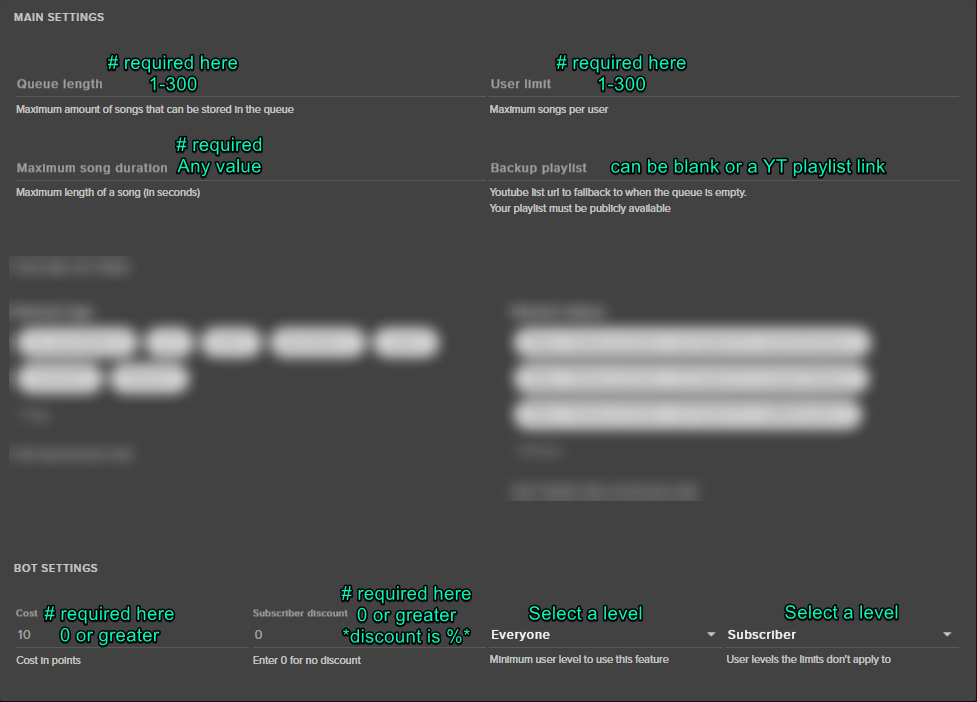 ruby anchor
shadow nvm 😄
atomic hollow
you got it?
ruby anchor
yea 😄
atomic hollow
great ❤
oblique moat
Mine should be fine then
olive grail
this
oblique moat
Oh
I think I know your problem
Scroll bars at the bottom
You need to scroll across to get to the other side
atomic hollow
@olive grail you are talking about the recent follower being cut?
olive grail
ill send what it should look like
pine hemlock
Did you set your browser source size to 1920x1080
atomic hollow
@olive grail you changed the theme to 720p
olive grail
i just did but still doesnt all fit on my friend is having same issue
atomic hollow
pine hemlock
Set your theme to 1080p, set your browser source widthxheight to 1920x1080
pine hemlock
yeah but if your base resolution is 1080p, you'll want it at 1080p
obs does the downscaling
oblique moat
Song requests still don't work
atomic hollow
@oblique moat please be specific
tight harness
When you save your settings does it say that they saved or does it say something went wrong?
atomic hollow
what doesnt work
pine hemlock
are song requests enabled
atomic hollow
@oblique moat whats your twitch username?
oblique moat
The Weak Wrench
atomic hollow
the bot is not in your channel
oblique moat
It should be
pine hemlock
part the bot, log out, log back in, join the bot
tight harness
Right, but it's why the bot isn't there
pine hemlock
and it should work
tight harness
That's because it's controlled on the song request page like it explains 😃
oblique moat
So can I activate it? Or not
Because it would be nice to be able to use !songrequest instead of !sr
tight harness
Yes, via the song request page
oblique moat
Okay
pine hemlock

 velvet wren
Is there a way to do giveaways for followers with streamelements? 😃
or is it subs only?
without the need to spent points that is...
atomic hollow
@velvet wren of course
velvet wren
Ah great 😄
atomic hollow
just do ticket price = 0 and disable the sub only option
velvet wren
Will that allow non-followers to be drawn?
velvet wren
I'm giving away a pretty rare in-game item, but i guess i can make that work 😃
tight harness
Sounds like a cool giveaway, have fun with it 😃
velvet wren
Thanks man,
 distant marlin
can i get a bit of help, is there a way to put amount of global cooldown , when creating the command in chat?
like nightbot has -cd=5 etc
tight harness
Click on Show Advanced
distant marlin
dont have access to site,
tight harness
The streamer can do it, or they can give you access to do it via dashboard access available here: https://streamelements.com/dashboard/account/channels
distant marlin
thank you
tight harness
No problem 😃
lament blade
how can you make videos and clips for sub sonly?
https://imgur.com/a/ADExU
I also increased my settings a bit, you think it might lag? (album, multiple pics)
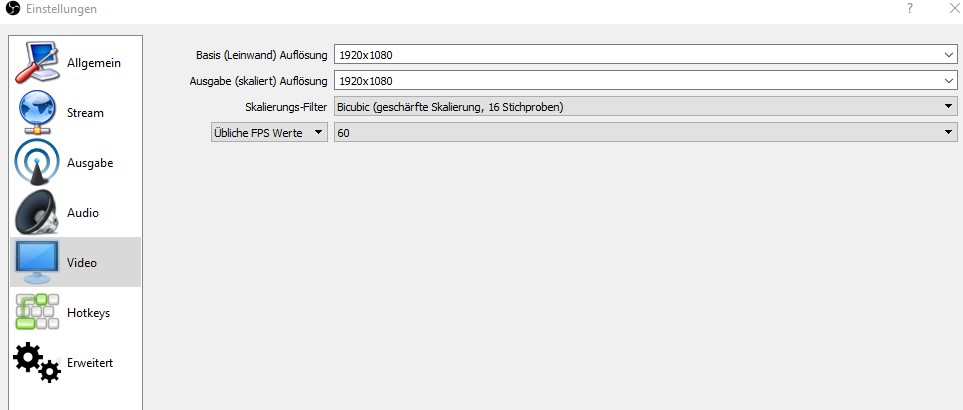 tight harness
@lament blade Welcome to Twitch support in here I believe: https://www.twitch.tv/YourUsernameHere/dashboard/subscription
 pine hemlock
why stream at 1080p
lament blade
why not
 steep tulip
How do you save alert variations? Tried disabling my adblocker as I thought it was that, but nope.
tight harness
Are you using Chrome?
steep tulip
Firefox
tight harness
Try with Chrome 😃
steep tulip
Works with Chrome, ty 😃
tight harness
No problem 😃
 tranquil sequoia
Have a problem with hosting alert. It does not show up. I have checked and double checked to make sure it is active. Everything else works fine except the host
tight harness
@tranquil sequoia What you need to do is make sure that you have your activity feed open somewhere, there's a pinned message in this channel which explains why it's necessary
The very top pinned message 😃
tight harness
Yeah, that's why
The system we use to detect them used to be built into the overlay manager but not all console streamers use the overlays
tranquil sequoia
Ok cool. Well thanks for the help
tight harness
No problem 😃
 serene granite
go to your alertbox widget in the overlay editor, and enter the settings for something that has a possible message such as subscriber or tip
and then there's TTS settings at the bottom
these are for the default alert
and you also have to set it in the variations if you have them.
 slim dock
is there a possiblity of creating a donation goal that takes into account bits and $donations on the same bar?
 stark canopy
Hi guys when i do giveaways some users can purchase more than max tickets? Is this a known bug?
slim dock
also once you want a moderator to be able to access your channel, and you give them full control where do they go on a day to day basis to access the commands?
 stuck hamlet
@stark canopy You mean max tickets? Also, do you have an example of this?
We need a lot more information to look into this
stuck hamlet
@slim dock https://www.onslaught.ca/s/f2vz03cc.gif
 clever mango
@slim dock they log in and then click on this to select the streamers account
stuck hamlet
Also, we have seperate bars for Bits and donation, dont think we've thought about putting them together. You could request that on our Ideas board.
tight harness
I believe the problem with that is that donations aren't always in dollars whereas Bits are
clever mango

stuck hamlet
@stark canopy Was there sub luck, if so, how much? were they a sub? How many points per ticket, how many tickets were max? was there a free ticket involved? Was this through the bot or through the site? All that info is needed to look into this deeper.
slim dock
@stuck hamlet thanks!
will the mods be able to access the page once i give them super moderator automatically? or do i need them to click an invite link i generate for it to work for them?
clever mango
mod/super mod are only for chat bot permissions
slim dock
ok
clever mango
they need a link to access the dashboard
clever mango

slim dock
does a link only work once?
 ruby forge
Hey everyone. Does anyone know how to make the text for the chat overlay when using the transparent backgound something other than grey? Cant read the messages.
clever mango
@ruby forge you can use the custom option for the chat widget and change the background color and transparency
text settings will change the text
ruby forge
I see for the background but is there a way to change the actual text color?
tight harness
If you click right of the font name you'll get it https://gyazo.com/f0727d87d883a07856f7714dad3bfe04

It can be a little tricky to see
ruby forge
thanks so much ❤
 cyan falcon
hi all! I'm having a really odd issue on my alerts widget on stream... it's playing an older song I used to have selected for it, but had then replaced the song on the overlay for a video (plays when someone follows). But now it's playing the song AND the video at the same time... any idea?
wait.. it's not doing it today... one moment sorry LOL. testing now.
tight harness
You need to check that you don't have overlays open in the background, so tick 'shutdown source when not visible' in the properties for all of your overlays, on top of that make sure to check your Variation Settings in the overlay manager that all of your variations are how they're meant to be
cyan falcon
ah okay!! i'll check those now.
it was that easy... okay, thank you :)! @tight harness not sure how i missed one, but i did.
tight harness
No problem 😃
 finite viper
Hello! Is there a way to close a contest early?
I.e. you set it for an hour, but want to manually close it 20 minutes early.
tight harness
@finite viper Yes of course, that's what these options are for on the right: https://gyazo.com/71b772ae8e6f8aa2d56b3755808d0d2c

 vague raven
Potential to win hi I've been having problems with my host notification I tested it seems to work I have variations turned off but everytime I go live and I get hosted you're no longer pops off a used to way before the major update was there something that I have missed I also use my streamlabs notifications meaning they are integrated into stream elements has anybody else had this problem or can somebody fix this problem for me please let me know I hope you guys are having a great Sunday
finite viper
@tight harness you are awesome - thanks!
clever mango
Twitch doesn't have a "notification system" for hosts (unlike follows, subs, raids, etc.) so the only way for StreamElements to know that you are being hosted is to connect through you to twitch. This connection is made within the Activity Feed code. This code is on:
- SE Dashboard page - https://streamelements.com/dashboard
- SE Activity Feed page - https://streamelements.com/dashboard/activity
- Ground Control desktop app - https://streamelements.com/groundcontrol
@vague raven
tight harness
@finite viper No problem 😃
lament blade
hey quick question , if i have the stream elements bot on in my stream will it read off to me when someone new follows ?
stuck hamlet
You can have it post when you have a new follower, yes. @lament blade
 digital forge
Does anyone know of a site in which i can take songs and make Clips of like music or voices or any klinda sounds to make them MP3 to put as alerts for my notifications for my Followers or Subs or Donation Ect Ect...? tag me please if you have an answer . Thanks much appreciated
stuck hamlet
@lament blade In the "Modules" section of our site, there is a "Chat Alerts" one.
That would be what you'd turn on 😃
swift parcel
@digital forge i usually use audacity to record a clip and then edit it down
lament blade
Okay thanks alot !!! 😃 @stuck hamlet
digital forge
@swift parcel is Audacity hard to use if your not faliliar weith that type of work ? editing asnd what not? there was a sitye that i used to use and i cant find it I had it saved on my old desk top and it basically was a site MP# clipper or something like that which you could search songs and then break them down into short sound clips and it was super easy but who knows where that is ! hahah ill try audacity. Is it easy to use?
swift parcel
yeah its easy to use and you can google everything for it. If you really want if you're wanting to pull clips from say youtube > google: youtube to mp3 then use audacity to edit it to where you want everything
digital forge
ok thanks @swift parcel
 proven zealot
Where can I find the link for my browser source to add to OBS for the notifications/alerts?
stuck hamlet
That would be on your overlay editor or the the overlays page
vague raven
@clever mango ive done that like I said was working b4 now after the dark them update it no longer works
clever mango
What I wrote applies to the new website. It changed when managers were able to be invited to access the streamer's dashboard. If you have one of those three open during your stream you will receive hosts in your activity feed. This method of receiving hosts began with the new site.
vague raven
So i have to have open for the notification alert to pop off now ???
clever mango
One of these three:
- SE Dashboard page - https://streamelements.com/dashboard
- SE Activity Feed page - https://streamelements.com/dashboard/activity
- Ground Control desktop app - https://streamelements.com/groundcontrol
Only for host alerts
because as I mentioned twitch does not send them to 3rd party services like other notifications
 torn temple
heeey, with the sound effects redemtion, do i need to add anything into my OBS for the alerts to happen? because ive set them up and it says redeemed in chat, but nothing happens? am i being a noob? surely i need to add something into my obs?
clever mango
There is a widget for stream store redemptions that is added to the SE overlays
@torn temple
torn temple
@clever mango hello, yeah i managed to find it, however, is there a way to get rid of the redeem part? in chat id prefer to just be able to do !hype instead of !redeem hype ? thank youuu
clever mango
yes, there is a new redeem variable that can be added to a custom command

StreamElements - Legendary Live Streaming
Our development team was working extra hard this week on some much requested features and updates, and oh boy, they sure delivered!
scroll down to where it says New ChatBot variable - redeem store item
and it will explain it
torn temple
ah you guys are amazing! thank you so much!
 indigo summit
Any chance we'll see a BULK points updater? I have patreons, and I give them points manually, would really be aweseom to be able to bulk update.
clever mango
Check out the new ideas board https://strms.net/ideas. You'll be able to add your ideas, upvote others that you like, and track their progress with email notifications.@indigo summit
indigo summit
ThanX
 spring niche
This is where to come if you need help with stream elements overlay UI yeah?
clever mango
How can we help?
spring niche
Tons of things, tbh haha. You'll have to give me some time to gather my notes after I'm done with my shift at work. I was just curious if this was the place to come. Thanks! :D
dense reef
Do viewers earn loyalty points on my VOD streams? can i disable it?
tight harness
I believe they do if the Twitch API sees you as live during Vodcasts
But that's the question 🤔
If the API sees you as live then it'd probably be impossible to differenciate between live and vodcast
 slim cairn
I think the definition of live for twitch is an incoming signal from OBS
tight harness
Possibly
 upper steeple
is there any variable for a !lurk command?
clever mango
what would the variable do?
upper steeple
i'm not quick sure, i have so many people try to put it in my chat cause there are other's that have it. I know what lurking is, but not sure what the command does besides maybe say the user is going into lurk mode and then once they deactivate it, it would say something like welcome back from lurk mode
slim cairn
Ah
Typically what a lurk command is, is whenever someone does the command it announces they're going to lurk in chat
upper steeple
^
clever mango
"$(sender) is now lurking"
¯_(ツ)_/¯
use the sender variable and customize as you'd like
upper steeple
is there a way for once the command is put in chat again by the same user it will say that they are out of lurk mode?
slim cairn
They could just say that they're back
upper steeple
lol that too, i'm tired ahaha
proud pumice
@fossil chasm all good? require assistance?
dense reef
So can i just switch on/off "Loyalty enabled" option for vodcasts?
clever mango
you can disable it manually before vodcasts
tight harness
@dense reef This is what we were talking about when you asked the first time 😄
dense reef

lament blade
How do I allow certain items to be regulars only
pine hemlock
Store items?
lament blade
@pine hemlock yep
pine hemlock
Don't think we have a regular only option currently
lament blade
I know there is a subscriber only option but I wanted to make it regulars only since it will be for people to join in multi-player games
@pine hemlock gotcha
tight harness
Makes sense 😃
 astral epoch
quick question, loving the $redeem command fopr store items, but can I add another command after it?
ie I want the sound from the store to play, but also a message in chat?
tight harness
I don't believe that works, pretty sure it gives you the default response
astral epoch
ok just a thought as it would have let me merge 2 commands but all good
 wraith marlin
 winged flume
Use hardware acceleration
 candid whale
Is there a variable for commands to pick a random username from chat? My bot could insult people at random or something
pine hemlock
@wraith marlin Disable hardware acceleration in chrome
@candid whale ${random.chatter}
 sterile grove
Hi I need help
Every other notification works exspect when I get hosts. It does not play a image or sound, it works for raid though
tight harness
@sterile grove check the pinned messages for this channel, top one :)
 fossil chasm
Oh my apologies. Didn’t realize it put me in voice
 potent gale
anything idea why the items dropping into the cup would be freezing just before falling?
clever mango
change the token shape from capsule
capsule tokens freeze at the moment
@potent gale
 charred garnet
why are my stream elerts getting frozen on screen is it a stream elements problem
@everyone
potent gale
@clever mango thank you very much..fixed the issue
weary mist
@charred garnet 1. there is no reason to (at)everyone. 2. That is most likely an issue with OBS. What kind of computer are you running?
charred garnet
sorry for the Eeveryone i did not know and it is not my stream it is doing it on it is my friends im a mod on it
but i will ask him
weary mist
@charred garnet Then we would need to get his information. The alerts don't freeze on 99% of people that use them, so it could be something his computer is coming into trouble using
lament blade
is anyone available to help me via voice chat?
 worn cradle
Hi! So when I steam and someone follows I'll hear it twice, even tho my stream is muted and so is my recording
charred garnet
if u had my friends info could u then tell me if it was stream elements or not
worn cradle
I do have different overlay but similar to the other one with the same sounds n stuff but layed out differently because of the game type
charred garnet
i got the pc part list
weary mist
@lament blade let me plug in my headpohones. be there in 2 minutes
worn cradle
Any ideas?
weary mist
@worn cradle double check all your browser sources in ALL scenes, you should have "shutdown when not visible" checked
@charred garnet I can't say for certain if its his machine, but I can say how well a machine could handle streaming/overlays based on the parts
charred garnet
do u want me to DM u the parts list
worn cradle
Okay, I'll look
weary mist
@charred garnet that will work
 pastel geode
is it possible to use something other than paypal for tipping?
weary mist
@pastel geode not yet, but other payment methods are coming
fleet summit
@pastel geode stream labs can use a credt card i belive
you can do skrill also
that much i do knoe off hand not many people like the whole bit coin thing
but stream elements is better on data streamlabs data is always slow though\
 sweet crescent
I moved everything over to stream elements can I be a #291219887274328064 😄
fleet summit
same
 steel pollen
My channel isn’t tracking points, how do I fix that?
atomic hollow
@紫狐#2267 the bot is in your channel and loyalty is turned on?
@Holiewood#9887 you didnt link the correct tipping page
@Holiewood#9887
wtf
@sweet crescent youre a sellout now
tranquil sequoia
Going back to earlier question about alert for hosting not working. It also does not appear in chat. I don't mind the alert not coming through but the new module for chat notification isn't working for host only (on my end at least)
atomic hollow
@tranquil sequoia hey
in order for us to detect your hosts you will need to have the activity feed or our desktop app open
 next spruce
do super mods have super pwoers when it comes to Dueling? My supermod absolutely owns everyone hahahaha
spring niche
i figured it out
lament blade
hi im new to the product, i'm trying to add chat to my overlay but i have messages doubled, any idea please ?
pine hemlock
They only double in the editor, should not double in obs
tight harness
⤴
tight harness
 crisp rivet
Hello
atomic hollow
hey
crisp rivet
after change my name my chatstats dont work, i see this https://stats.streamelements.com/c/mr_imagination
atomic hollow
part the bot from your channel, log out and back in to SE and return the bot to your channel
 silk mural
Hello, just a really easy question, i can't seem to set up the loyalty settings for subs since i'm not given the chance in the loyalty settings page, do i have to do something to enable it?
tight harness
Did you recently get affiliate? @silk mural
silk mural
Yes, i did yesterday @tight harness
tight harness
All you need to do is log out and log back into the site then 😃 @silk mural
silk mural
as easy as that, thanks!
tight harness
No problem 👍
crisp rivet
@atomic hollow still the same info
"Channel was not found
Tell the streamer to sign up so we could track your memes!"
my name now https://stats.streamelements.com/c/mr_imagination
my name before https://stats.streamelements.com/c/mr_imaginatiion
 tight harness
🔧 🛠
atomic hollow
❤
silk mural
another thing i cannot solve is the fact that the follower sound seems to start playing and then ti starts again in the middle, and it's very bad to hear..i checked the file sound and it is ok.. what can i do about it?
tight harness
Do you have multiple overlays in your OBS without the option 'shutdown source when not visible' ticked in the properties?
tight harness
If you don't tick that option in the properties they still play in the background, yes
silk mural
ok great , ty again
tight harness
No problem 😃
 fervent orchid
Hi, just one small question. The StreamElements website doesnt show channels that I mod. Do I need to do anything on my end to see those channels?
tight harness
If they give you dashboard access you'll see it here: https://streamelements.com/dashboard/account/channels @fervent orchid
Mod and Super Mod aren't the same as dashboard access, just to clarify
fervent orchid
ah ok, thanks for the quick reply
tight harness
No problem 😃
slim dock
everytime i start a contest it starts at 7 minutes when I have it set for 10. Anyone know why this happens? I'd love to fix it
Also is there any plans for an automatic overlay for the contests? or does it already exist?
like revlo had a little bar that would show the stream the betting
tight harness
Not heard of that one before, we'll look into it 😃 in regards to the second thing check if it's on the ideas board already, if it is then upvote it, if it isn't then add it 😃 https://strms.net/ideas
 chrome fable
How do I have to set up the alert box so i get this some kind of banner instead of just text flying in? how does this work?
tight harness
@chrome fable Sounds like you haven't added any image or video yet
When you click on the alert box you'll see this at the top left: https://gyazo.com/522f5185cbbd325d4d52709db189ff6d

You can change the image or set a video 😃
Then make sure to save of course 😄
 inland tree
has anyone else been having issues accessing streamelements through chrome lately?
It works fine on firefox for me but on Chrome it basically craps my internet out
tight harness
Try turning off Hardware Acceleration in your Chrome settings > Advanced settings
 autumn delta
anyone else experiencing serious delay's this morning?
inland tree
nope still weird
autumn delta
trying to figure out if it is on twitch's side or streamelements side
inland tree
its weird. its like a night and day difference
@tight harness could I video call you to show you what I mean?
tight harness
Sure
inland tree
hold on gonna try a chrome restart
tight harness
Alright 😃
tight harness
Ahh 😃 no problem
tight harness
chrome fable
@tight harness that's what iam talking about... it looks like some kind of banner to me
tight harness
@chrome fable Never seen that before, where's it from?
chrome fable
i found a similar one and the guy said he's using streamelements
tight harness
Have you asked him how he did it?
chrome fable
yeah but he didnt respond as he's kinda busy right now 😄
tight harness
He has the best idea how to do it 😄 looks like he did something pretty custom with OBS transforming to me
Like added a semi-transparent bar behind the text then used the transform option in OBS to rotate it slightly
Just an idea
chrome fable
@tight harness
the top part of the banner slides in from left-> right and the bottom part from right-> left
half/half
tight harness
Maybe they used custom HTML/CSS then in OBS, you'd have to ask them
chrome fable
yeah i asked him and he said it's a custom design someone made for him
tight harness
Ahh yeah, sounded like it when you described how it's animated
chrome fable
i see it many times on twitch but didnt find a guide yet 😦
tight harness
Probably paid for it
Our Super Themes have some rather fancy alert animations for free 😃
And if you just want the alert box you can duplicate just the alert box from the overlay to your other overlay and then delete the overlay you copied it from, if that makes sense
chrome fable
yeah but i guess i have to find this html/css files or lines that are used for that kind of alert
inland tree
id say try one of the super themes alerts
its pretty nice especially the animated flairs
tight harness
Agreed 😄
steep tulip
Is there a way to limit how much text that can be in the alert box? So the text doesn't go over the edges of the image ^^
tight harness
Best thing you can do is make sure the alert box is big enough and the text isn't too big
steep tulip
I see, ty. Guess I'll just have to play around with the words 😛
steep tulip
Yeah ty, that's what I was looking for 😄
tight harness
 dusky vessel
Hello, my hype cup has a bit weird position
weary mist
@namitsoo#4972 @tight harness you could easily mimic what that overlay does, by creating a couple different images, and having two or more alert boxes in the same overlay. Then you can edit the animations so that they do the magic you see. Custom Html/css isn't entirely necessary for some awesome alerts
dusky vessel
Sorry, I found the option, thanks to everyone, who wanted to reply 😉
tight harness
I was wondering about that @weary mist as long as they go off at the same time 😄
@dusky vessel Needed moving with the arrow buttons?
weary mist
I have tested many times, and the boxes go off very well at the same time


 tight harness
What's up?
 halcyon heron
when i am switching the scenes in obs , it takes like 5 seconds until the overlay gets applied
what could be theh matter ?
tight harness
That's not just with the Fortnite overlay, that's just a case with all webpages in general
Webpages take time to load
halcyon heron
is there any way to add the same overlay but without the browsser source ?
clever mango
especially ones with graphics (possibly animated)
tight harness
You have a couple of options to get around it, you can use OBS' Studio Mode to transition, effectively loading the next scene before switching to it, or you can do what I do and have a fade transition with a few seconds set for the transition
halcyon heron
image**** jeeezus , shiit keyboard
tight harness
And no
tight harness
No problem
halcyon heron
anyway , if it doesnt bothhers my viewers , i am ok with it
i love thhe fortnite overlay way too much
single handedly made me to switch from streamlabs
tight harness
Awesome to hear 😃
clever mango
studio mode is best for transitioning and you can hotkey everything. There are quite a few tutorials on youtube
weary mist
@halcyon heron you can also add a fade transition that lasts about 3-5 seconds, that has worked as well for some people
halcyon heron
btw , if i gget a new follower/sub/dono , will it appear on screen in real time ? i dont mean the alert , i mean the "latest follower" thing
halcyon heron
niiiice
clever mango
much faster than a program that edits a text file
halcyon heron
yeahh
that was my problem with streamlabs
u had to do a lot of work before u could actually show the latest follower on stream
download streamlabs , choose the text file etc etc
u guys did a great job
weary mist
❤
clever mango
we've got a lot more in store 😉
halcyon heron
like everything u need to run a professional stream , is there , in streamelements
weary mist
tons more, and big plans 😉
 silk void
is there a way to ban specific names etc ? @here
clever mango
ban them from what
tight harness
The leaderboard?
halcyon heron
not like with this over hyped streamlabs
silk void
so if someone put it in chat they would get banned
halcyon heron
u set up streamlabs , and after that u waste like another 2-3 hhours by setting up everything else =))
silk void
like if someone put the word "promocode" or "promo" they would get permo banned
clever mango
you can use the banned words filter under Spam Filters
dusky vessel
@tight harness Yes, it needed moving.
tight harness
Ahh cool 😃
weary mist
@silk void you can use the filters, and it will time them out. As for banning them, there might be a way, but I hav eto test it
halcyon heron
whats the donation cut % u guys take ? (if you take any)
weary mist
@halcyon heron 0%
halcyon heron
damn