#helpdesk-twitch
1 messages · Page 161 of 1
 thin pine
 weary mist
👍
 floral galleon
how do i change the subscriber sound?
weary mist
you are able to change it in the alert box settings. When changing it, also double check that the variations match what sound you want them to play as well
floral galleon
where's the alertbox settings
weary mist
Go into the overlay editor, and click on the alert box, then the settings will appear on the left
 tight harness
@floral galleon See it now? 😃
tight harness
Awesome 😄
floral galleon
time to try streaming "quality" content
and when i mean quality i mean SPIDERMAN VS PREGNANT ELSA GUN FIGHT etc
tight harness
Good luck 

 hearty peak
does kappagen ignore the bot? cause im not seeing the bots emotes show up on it anymore
tight harness
@hearty peak I'm not seeing any ignore list but Kappagen did receive an update recently so it's perfectly possible it changed then
 rotund wave
Easy question. I just change my resolution. From 1360 to 1920. Changed it in OBS source, OBS scale, and StreamElements widget. However the green area in the widget is still the old resolution. How do I make it larger?
 sullen dock
forreal
tight harness
@rotund wave We generally suggest that you keep everything on the site 1080p if you're using our themes and then simply use Ctrl + F on OBS to fit it to your canvas
sullen dock
i need help
tight harness
What's up Nick?
tight harness
I'm there
rotund wave
Well, that worked. Kinda. But it made the text larger and now nothing fits in my borders, etc. Is that the only way to do it?
I literally just changed to 1080. So not quite sure why I need to "fit to screen" when everything is already 1080 but the alert widget area. Is should fit perfectly now, no?
tight harness
Are you using one or more browser sources?
rotund wave
1 widget for followers/donos combined in 1 alert. That is it.
tight harness
And they're all in 1 x 1080p overlay?
 graceful yew
is there a way to run raffles with out it giving points away? Like a raffle for viewers to join a list and a winner is picked, or multi winners are picked for a raid on destiny or other games
rotund wave
Correct. In the alert settings & obs source.
graceful yew
what if im not using OBS?
tight harness
@graceful yew You can change the maximum amount in the Raffle settings within Modules
rotund wave
Issue I am having is the "green" area in SE is only 1470 something in width.
rotund wave
I made.
tight harness
i'll tell you what, i'll DM you some instructions of how to give me dashboard access and then I can have a look myself, I can add it to my OBS and see how it goes, sound good?
rotund wave
I guess the real question is 1470 the max width on the web wdiget? Is there a reason it wont show all the way to 1920. I mean, that'll work too.
tight harness
Well the idea behind my suggestion is that if it works fine for me then we know it's down to the resolution
rotund wave
Superior support in that sense. Much appreciated.
graceful yew
i dont want to give point on a raffle, i want create a raffle to join
tight harness
@graceful yew Raffles is a gambling module, it's designed to give people points. Like I said you can change the maximum amount in the Raffle settings to like 1 for example, but as it's a gambling module and not meant for what you're wanting to use it for i'm giving you that alternative
graceful yew
ok roger that
tight harness
@rotund wave At 1080p on my OBS it's all good and how it's meant to be just going to run an alert box test
So if you see or hear the alert don't worry about it, just me testing 😃
Yep, it's all 100% at 1080p for me
 unique badger
So, I changed the alert sound on my follow notifications and for some reason, it plays the old sound as well, so we get a weird superimposed audio glitch. Has that been resolved?
 stuck hamlet
does it play on the overlay editor?
 slate fern
will streamelement get sponsorsip chances for streamers?
 lament blade
So
Soo.. For the event list...
It all looks like the same, and you might don't know what the most recent alert was. Is there a way to change the colour for the most recent event?
stuck hamlet
@slate fern we currently do not have a road map for that.
@lament blade to my knowledge, there is no way
lament blade
:( #💭︱feedback-and-ideas is there a post about it already?
 wide parrot
Is there a way to get the {amount} variable to have fixed decimals?
stuck hamlet
for stuff like 4.20 ?
wide parrot
Yep
wide parrot
Give me access to the private repo, I'll fork, and submit a PR. It's killing me, @stuck hamlet ! IT'S DRIVING ME MAD! 
😉 ❤
 access to private repo
 weary mist
Double click the browser source, change the width to 1920, height to 1080. then, if your canvas is smaller, hit CTRL+F
 old fern
Is there a FAQ for StreamElements?
 fallow relic
no no i mean on the website its not loading
tight harness
Only a super secret one @old fern 
fallow relic
not obs
tight harness
Try Ctrl + Shift + R
weary mist
did you create a theme, and then change the resolution down to 720p? @fallow relic
weary mist
👍
old fern
#GoodGuyScalper
fallow relic
another question, i try to duplicate my alert box in other overlays
and when i do it doubles the sounds instead of just playing one sound affect
wide parrot
Did you check the 'Shutdown source when not visible' option in the BrowserSource?
(And if you're testing it in the browser, with OBS running, make sure you press the Mute button in the top right of the Overlay Editor.)
fallow relic
@wide parrot ugh tytytytytytyty
 sonic ice
Guys, I am creating my overlay. What should be my overly resolution ?
stuck hamlet
1080 is always good
sonic ice
But I stream at 720P ..so if i keep overlay at 1080p, it wont be an issue...right ?
stuck hamlet
nope, you can resize it in OBS easily 😃
sonic ice
Thanks
weary mist
a quick CTRL+F transforms what ever source to your OBS canvas resolution 😃
 upper steeple
was just looking at my obs on one of my overlays and realized the tip goal doesn't have the fill color there like my others. I have messed with nothing all I did was open my OBS and realized something looked off.
weary mist
Hmmm. Which overlay (name of it) are you using, and I will look at it from ehre
upper steeple
the messed up one is Pink starfield IRL
weary mist
👍
 echo lodge
Whats the link to the ground control application again? I cant find it on the website
 zealous compass
does anyone else have an issue with the bot not responding to commands?
tight harness
https://streamelements.com/groundcontrol @echo lodge
zealous compass
or is it just me?
echo lodge
Thanks
weary mist
@zealous compass have you changed your name recently?
weary mist
@upper steeple I think you found a bug with the condensed version
zealous compass
im just a big derp is all
tight harness
Ahh, yeah you just need to part and rejoin 😄 you got it
weary mist
@zealous compass 👍 😃 We all get those moments 
also, re-link discord, so it has your correct twitch name
 latent coral
anyone else having a really slow response on your dashboard... It is extremely slow for me
weary mist
@latent coral its working good for me. In chrome, go to settings, advanced, and turn off hardware acceleration. that tends to slow things down for some reason
@upper steeple I may have also fixed it. give me a second
upper steeple
@weary mist okie
weary mist
@upper steeple should be showing correclty now
zealous compass
i lost everything yesterday and i had to manually get everything back 
weary mist
Ouch, what happened?
upper steeple
@weary mist tis is, thank you very much. What happen to it?
weary mist
@upper steeple It was missing a height number in the size, which is odd. But I just put the number in, and its back
latent coral
@weary mist Thanks That worked
upper steeple
@weary mist oh that is weird, but thank you very much
weary mist
@upper steeple you know we take care of you all ❤
 lone terrace
Asked a qestion last night about why host alerts are not coming through but on the chat alerts they are there, I have no variations or a mininum set. The person i was working with couldn't figure out and said ask when staff would be on so Im asking again, sorry if this was answered and I didn't see it as i scrolled up ❤
tight harness
Check the pinned message about host alerts @lone terrace 😃
lone terrace
@tight harness where might i find this?
 near topaz
@weary mist I'm in Linux, and the Broswer Source doesn't available here, but thanks for the help
tight harness
@lone terrace Twitch doesn't have a "notification system" for hosts (unlike follows, subs, raids, etc.) so the only way for StreamElements to know that you are being hosted is to connect through you to twitch. This connection is made within the Activity Feed code. This code is on:
- SE Dashboard page - https://streamelements.com/dashboard
- SE Activity Feed page - https://streamelements.com/dashboard/activity
- Ground Control desktop app - https://streamelements.com/groundcontrol
tight harness
Do you have the dashboard open during your streams?
lone terrace
yes on my gaming rig but not on the streaming rig do i need to have it open on the stream rig?
tight harness
Would be good to try
lone terrace
Will do, would having a chrome page open or ground control open which would use more cpu
weary mist
@near topaz much sad face :(
 warm tide
can someone help me with streamelements? im new to using it
tight harness
What do you need help with? 😃
 crude jay
is there a way to connect your spotify for song requests instead of using youtube?
weary mist
@crude jay not at this time, and not because of us not doing it. we applied for access to their API, but they denied us, and won't speak to us 😦
crude jay
well that sucks 😦
weary mist
agreed
crude jay
It would make life alot easier lol
 fading dust
Is there a way to make a text label / widget with the current number of viewers in an overlay?
 clever mango
Not yet but it'll be available if enough people 👍 the idea on https://strms.net/ideas
Search for viewer count and you should find the idea
fading dust
Gotchya, thanks @clever mango
 sick aurora
I need a little bit of help. I'm trying to set up alerts for StreamElements and something is going wrong. The audio and messages pop up fine, but the video that I have set for it is not showing up.
clever mango
Did you add your own video?
Check the variation settings within the alertbox. There are variations by default for some of the events like sub and cheer
sick aurora
Thanks for the help, but I just figured it out. Even though it showed that the video was added, I had to click "Change Image" and reselect it
I kept trying to add it the other way
tight harness
Might have needed saving again for whatever reason, glad it's sorted now
 sage crest
hello! any idea how to fix or how to active auto host alerts on alertbox?
it used to be automaticly
tight harness
Are you getting regular host alerts still or none at all?
sage crest
yeah regular yeah
or not ?
im not sure
i think not
but test event is working pretty good
tight harness
I'm asking because if you check the pinned messages (pin icon at the top right), the first one is about what you need to do to get your host alerts to work 😃
Pinned messages in this chat I mean
tight harness
No problem 👍
Basically, have 1 of those 3 things open when you stream and your hosts will work 100% 😃
sage crest
thx!
tight harness
You're welcome 😃
 slate glen
 who could help me figure out the delay thing/
tight harness
Sure, what delay thing? 😄
slate glen
To make it so that by the time it switches between scenes the next browser os up and running
tight harness
Ahhh, i've never done it myself but from what I've heard it's the Studio Mode button below Start Recording on OBS, then when you've loaded the next scene you click the Transition button
Or what I do is change the transition mode to Fade and set it to a few seconds
slate glen
Oh i usually do hot keys
sick aurora
This editor can be annoying
I swear it randomly deletes things
And it's a pain to get them back
tight harness
@slate glen Hotkeys work 😃
@sick aurora I've been using it since March and i've never had it delete anything I haven't asked it to, nor have we had any reports of it doing that which I've seen 🤔 very strange
weary mist
@slate glen you can hotkey just about everything in OBS. I'll be setting up my streamdeck tomorrow with massive numbers of hotkeys
slate glen
massive? what all you going to hot key
tight harness
Ice cream dispenser, there's a lot of flavours
slate glen
I just hotkey switch scenes
 agile basin
Are the servers down?
tight harness
Fine for me
warm tide
Would any1 be able to help me through teamviewer?
weary mist
@warm tide Of course, give me just a couple minutes while I get myself ready, What is it I can help you with today
warm tide
@weary mist im having a hard time getting my songs to show up on the currently playing text
weary mist
I can talk you through that real fast, if you prefer. Right now, only requested songs (through the bot using youtube), plug.dj, and last.fm will show up. Backup playlists don't show because we are waiting on an api limit increase from youtube before we can pull the information for those songs. Does that help, or is it getting the widget onto your overlay that is the issue?
weary mist
ok, I have teamviewer up. Did you want to jump into a discord call while we do this? I am in TeamViewer Support voice channel
you can DM me your ID and password
 steep pumice
does the kappagen command still work?
weary mist
it should, yes
 royal plover
Is there anyplace where you have advanced tutorials?
weary mist
@royal plover the most advanced tutorials we have are here: https://www.youtube.com/streamelements/videos

YouTube
Official youtube channel for StreamElements tutorials https://StreamElements.com
@steep pumice let me pop onto your overlay and check it out. What is your twitch name?
royal plover
Ah well I guess I'll ask then. If I wanted a video I have inserted in my overlay to play its audio, what format do I want it in?
royal plover
hmmm, I have it in .webm and it's not playing audio, but Ill try the site you gave me
weary mist
hmmm, im not sure if its designed to run the way you want it to for that widget. I think it plays for the alerts, but I will have to ask about the widget
royal plover
I'll probably just have to play the audio separately through another app or something
weary mist
you should be able to put it into OBS, and trigger it with a hotkey
 teal rapids
Anyone know why my cup keeps getting spammed with follower icons?
steep pumice
thanks @weary mist for sorting it out for me
weary mist
@teal rapids That happens when it loads, it is loading in your last 100 events. Once it is full, you can force it to empty and reset in the overlay editor
steep pumice
1st class support. If I could hug you I would
weary mist
❤
teal rapids
Thanks bro
 raven knot
I apologize if someone has asked this or it has been addressed already but I am using streamelements for everything on my stream. The only thing that I cannot get to work is the "Host Alert". I am regularly hosted as the leader of a stream team but the alert never comes up even though it is set up in the overlay.
weary mist
@raven knot first pin 😃
raven knot
Sorry about that they weren't loading for me
@weary mist Ok I am lookinh at my activity feed, what am I changing to make sure the alerts pop up for the hosts
weary mist
You just have to keep it open while you stream
raven knot
the activity feed page? Do I need to do anything or does that cause it to automate?
weary mist
just having it open keeps the link we need to detect hosts. Its magical
 pale nest
I have ground control and activity page open, still not seeing Host notifications.
pale nest
Could it be a setting I messed up somewhere between SE and twitch?
weary mist
@pale nest try logging out and loging back in. What size hosts are these, and are the autohosts?
pale nest
Auto hosts, range from 3-18
Idk why, but could the Better Twitch TV chrome extension cause issues?
weary mist
I don't think so, I have it and my hosts come through fine. I just had a 3 person autohost earlier
it may have been your twitch token expiring, the log out/in should fix that part just in case
pale nest
Hrmmm, I've tried damn near everything I can think of and info here. Next time I stream I'll try to log in/out just before I start(as well as doing it now) hopefully it'll kickstart something.
Thanks for the suggestions @weary mist
weary mist
👍
 ashen viper
Hey, this might be a dumb question, but do you have to run OBS Studios to use the Overlay-plugin from StreamElements, or does it work in OBS Broadcaster Software too?
ashen viper
Ah ok, I should probably download that and do a proper setup then
stuck hamlet
The devs no longer support it
ashen viper
I see, I've just always been using it and never changed, since I've mostly been streaming for friends. Thanks for the reply
 proud crow
Is there a way to disable a timed command with a command?
weary mist
No, not at this time @proud crow
proud crow
Oh. Ok.
Thanks!
😄
Literally asking for a friend.
What settings would you recommend for a timed command that is a bit pesky.
weary mist
make it take longer before it posts again, or put in a single chat line
 wraith marlin
Hello! Is there a way to do a "Daily Goal" without having to make a new Tip goal every day?
it would be nice if the "Tip goal" widget had a option to reset every [blank] hours
 limpid marten
Any news on the streamlabs import?
 pine hemlock
@wraith marlin not currently. https://strms.net/ideas
@limpid marten we were informed it was fixed but, are you still having issues?
limpid marten
i sure am
pine hemlock
Can you try ctrl+shift+r on the import page and see if it changes anything.
limpid marten
@pine hemlock Still saying import failed
i have set my alert box back to all default setting on streamlabs because i thought it may of been something i changed
I did have it imported once, Then i removed it for some reason tried again and yeah since then its kept failing
pine hemlock
Devs are gonna have to look into it again. I'm assuming SL keeps changing something so it fails every time we fix it
limpid marten
Is anyone else able to test it and see if it is working for them?
Also i wanna give a big thumbs up to how responsive you guys are, Tip top
pine hemlock
Someone else who works with us is having issues too, so it's not just you
Doesnt seem to work for me either
well jk
it worked one time
out of 4
Just keep retrying apparently it works eventually
🤔
limpid marten
i shall
if i change anything in streamlabs do i have to import it again or does it just work automatically?
pine hemlock
It imports whatever is current
So if you change something after importing you'll have to do it again
limpid marten
also i was spamming that retry button for about 25 minutes, nothing changed just thought you should know
pine hemlock
I'll let the devs know. Dunno what's up
limpid marten
is there a way to delete my account so i can start fresh? might be a me problem?
pine hemlock
Do you have custom HTML or css on your Streamlabs alerts
limpid marten
nope
pine hemlock
Ok. And no there's no way to delete and restart, but it wouldn't solve it anyway
limpid marten
i tried refreshing the api codes on streamlabs aswell but it didnt help
limpid marten
hey @pine hemlock are you still on? i think i fixed the issue
pine hemlock
Hm
pine hemlock
Yeah I'm not sure why it's only working sometimes though, but at least you got it working
limpid marten
Ty for help lads
 sweet crescent
quick question if I may, I added song request to my channel last night which was great, some great songs also some epic troll songs. Does the song request overlay widget show the title of the youtube video? Tried testing when not live and didnt seem to do anything.
pine hemlock
The widget shows the song name of requested songs only.. Not backup Playlist song names because we're limited by YouTube
sweet crescent
ahh ok, thanks cuda, much appreciated.
need to transfer over my tipping page then im all stream elements \o/ Such a great tool 😄
tight harness
When you're using all SE it feels so good 
 slender yoke
How can i configure the leaderboard panel? All I see is points. I can't configure it for anything else?
stuck hamlet
You cannot configure it, but we have different things on there, you just have to hit the bottom at the bottom of the panel
 tight harness
And more coming soon ™
slender yoke
Oh ok i see that now. But why is nothing showing up in the top chatters and chat stats? Points has plenty of info
stuck hamlet
When did you sign up to us?
tight harness
Was going to say, those are working fine for me 😃
 quasi portal
I could honestly just try it out - sorry for being lazy - can Ground Control output currently playing song to a .txt file ?
quasi portal
Oh there might be an overlay, I should check 😓
tight harness
Yeah there is a widget for it
slender yoke
@stuck hamlet I've been using streamelements for over a month now
quasi portal
Oh only plug.dj / dubtrack.fm ? Nothing for youtube though right ??
stuck hamlet
did you change your name recently @slender yoke
tight harness
We do youtube as well
Plug.dj and Dubtrack.fm are the alternatives that we offer as well as youtube
slender yoke
@stuck hamlet nope. It's been the same since I began
quasi portal
ohhhh, I think the widget text might need an update then, had no idea! that's awesome!
tight harness
slender yoke
@stuck hamlet when I go to the Streamelements page, select Chatstats, then select Open My Stats, it says nothing is there, and in the corner it suddenly has me logged out. When I log in it takes me back to the main screen.
stuck hamlet
the chat stats page always says you're logged out
but it shouldnt be blank
thats really a job for @tawny pivot because he's the only one that knows anything about chatstats :/
slender yoke
Is chatstats related to having chat info in the panel extension?
stuck hamlet
ye
 deep pendant
Streamelements is not picking up my hosts. Says I only had 2 this month on November 10th. Was curious why my alert was not working, but apparently its just not picking them up. Any ideas?
stuck hamlet
We changed some things, due to how Twitch sends host notifications, you now have to have the activity page or ground control open for us to pick up hosts
 still plover
Hi, hav spanish support ? thx
tight harness
@olive lintel is our Spanish support 😃
still plover
wow, perfect 😃
deep pendant
Ground control? So my overlay being open is no longer enough?
tight harness
Correct, console users don't use overlays so activity feed was better for everyone
deep pendant
I user overlay as a console user...
still plover
but, any hav a idea of how to use access code item ?
tight harness
But you use a capture card right?
deep pendant
I do indeed
tight harness
Not all console users do
pine hemlock
The only way for us to get host data at the current moment is having Ground Control open on a pc/mac or the dashboard/activity feed open due to some changes
deep pendant
What is ground control?
tight harness
Our desktop app
pine hemlock
deep pendant
So with this open, hosts will reappear?
deep pendant
Something new for me to play with today, thanks for the help!
tight harness
No problem 😃
still plover
hi
but i use the guide in streamelement web for make a item codes
but dont work
With this command, do I show any animation on the screen?
the gif that I choose and the sound that I want? with a simple command?
tight harness
What kind of animation do you want?
still plover
so that I put a command in the chat and show an animation associated with a sound only for subscribers
 tawdry halo
my SE bot is in my channel, and is modded, but it doesnt tell me when ppl are following/subscribing
tight harness
@tawdry halo Have you checked in Modules > Chat Alerts?
still plover
I know what can be done with the new item code command but it shows nothing on the screen, only in the chat
yes in chat show, but not in screen
tawdry halo
Where is this setting @tight harness
still plover
I do not know if I explain myself
pine hemlock
https://streamelements.com/dashboard/bot/modules @tawdry halo
tawdry halo
Ah thanks
tight harness
@still plover Is this for a sound item?
tight harness
Yeah I thought so, just checking 😄
Have you added the Store Redemptions widget to your overlay yet?
still plover
hmm wait a sec 😄
if I have seen it, but it only shows an alert if someone uses the code, is not it supposed that if they use the code, they would have to see the gif and the sound associated with that code?
tight harness
I was under the impression that only stream perk items show visuals on stream 🤔
still plover
that is, I can not create a command for example "!hello" and every time a subscriber uses it, a gif with a sound is shown on the screen?
only stream perk ? :S
tight harness
I believe so, but I haven't tested access code redemptions yet
still plover
I am testing it but then what is the point of putting a gif or video and a sound if only a warning is displayed in the chatbox? : D
 silk patrol
@still plover you can :
- create a stream perk in your stream store
- add a gif/video and sound
- make it redeemable via chat with the command name 'hello'
- add a custom command called hello with the output text like this
${redeem hello}
if your viewers type !hello in your chat, the alert will be displayed on your overlay using the store redemption widget
still plover
Thanks, I'm going to try it right now! now I tell you
but it only shows the gif associated with the warning, that is, if I create several commands, you always see the same warning, no?
pine hemlock
it shows the image you upload with the store item.
tight harness
You set a gif with the stream perk you make, you set a command to trigger that stream perk, that gif shows when that stream perk is triggered, make a new command? make a new item.
pine hemlock
if you test emulate it, its the same image - try redeeming the item you created
and you will see
tight harness
No problem
still plover
thank you very much, with this the streams become more interactive and it is better for the visits!
tight harness
still plover
well, see you later !!
tight harness

 keen cloak
So, all of my notifications seem to work fine except for tips. When someone tips me, the money goes through to my PayPal and it shows up under the tip moderation area, but it doesn't trigger the alerts or add to my dashboard on the home page. I'm convinced I must have something set up wrong since everything else is working but I've checked everything I can find and can't figure it out. Please help? haha
tight harness
That'll be because you have Enable moderation ticked here: https://streamelements.com/dashboard/tipping/moderation turn it off and they'll go through automatically @keen cloak
tight harness
No problem 😃
 brazen sparrow
Hello! I cant import my deepbot points. Is there a issue with StreamElements?
stuck hamlet
Is there an error?
brazen sparrow
No nothing is happening when i past the API Secret in and go on.
stuck hamlet
did you hit save on deepbot when you reset your secret?
brazen sparrow
yess its the same now since yesterday when i did it
stuck hamlet
Can you hit "CTRL + Shift + R" and after it reloads, hit F12. and try to import again, see if there any errors
brazen sparrow
ok ill try
upper steeple
my backup playlist doesn't replay itself once its done playing all the songs. Will there be something implemented for it to auto replay?
brazen sparrow
@stuck hamlet There is a DOMException "error" Message: "The operation is insecure."
tight harness
@upper steeple Have you checked if it's on the ideas board yet? 😃
upper steeple
no i'm streaming right now lol
tight harness
Okay 
stuck hamlet
@brazen sparrow does the deepbot import say something?
brazen sparrow
On StreamElements nothing is appearing on screen only in the console of firefox is Error already writen (more info about the error: Name: "SecurityError" | filename: "https://streamelements.com/d18f40f13f95_scripts/app-53b1139dcc.js"
pine hemlock
Can you try chrome and show us the console error
pine hemlock
Do you have deepbot running?
brazen sparrow
yess
pine hemlock
on the pc you're importing from
brazen sparrow
not with chrome but the trys before cause of the streaming pc
stuck hamlet
You have to import from the computer running Deepbot
brazen sparrow
yeah i know i did it 10 times but let me install chrome on the "deepbot" PC and try it maybe it firefox
the problem*
okey thank you guys for the fast help its done with Chrome i can tell you i tried it with firefox 10 times and it didnt work :/ maybe other people have the same problem 😄 
pine hemlock
Some features of our site arent firefox friendly at the moment
Once all of our features are done, we'll be working on better cross-browser functionality
brazen sparrow
Okey nice keep it up. 👌
 abstract dome
Does anyone know why I made 270 and I only got 150 out of twitch check?
tight harness
For questions about Twitch payments you're better asking Twitch directly
abstract dome
K
 slim dock
Is there a way to give access to the streamelements main page to mods? It's a bit frustrating that they can only add commands in chat, like i've resorted to giving a mod my password
tight harness
@slim dock Yes, this was added a while ago now 😃 https://streamelements.com/dashboard/account/channels
 rare orchid
Hello, I'd like to now how can i make my Hype cup animate and light up? Right now all my Hype cups does is have a little circle image drop in.
Stream elements youtube video has the Hype cup light up in various colors: https://www.youtube.com/watch?v=SVPAA3ZaKXw

See what the Hype is all about! HypeCup visualizes Cheers, Tips, Subscribers, Follows and Hosts into customizable tokens, that drop into a cup. HypeCup is th...
tight harness
Yeah, I was going to say that I believe what you're seeing there is additional animations beyond the usual effects of the cup
tight harness
No problem
 jolly flame
Yo sexy streamelements people, how do we configure the Streamelements Leaderboards extension to show store items and stuff? I only have a select few atm, or is it because you haven't released those yet?
Like the one on the right side. I only have top points, chatters and emotes
jolly flame
Fair enough! Any idea when they'll be released?
tight harness
No ETA has been released, but they're far in development afaik
jolly flame
Okie dokie, thanks 😃
tight harness
No problem 😃
slim dock
are people still having issues with slow loading screens? somebody said something about turning the acceleration off or something?
tight harness
Hardware Acceleration, it's in your Advanced settings for Chrome
If you turn it off it helps a bit
 distant marlin
Hello. I have issues with $(user) in command
tight harness
What seems to be the problem with it?
distant marlin
It doesn't pick up my input
I want command to say xy gave yx somethin
For xy I set $(sender)
And for yx what ever I do it doesn't work
I tried $(touser) $(user)
Also with {}instead of ()
tight harness
touser doesn't work, that's for another bot
1 sec, just checking an example command which I have which I know works
distant marlin
Yes I know that touser is nightbot, but I trued user2 also
tight harness
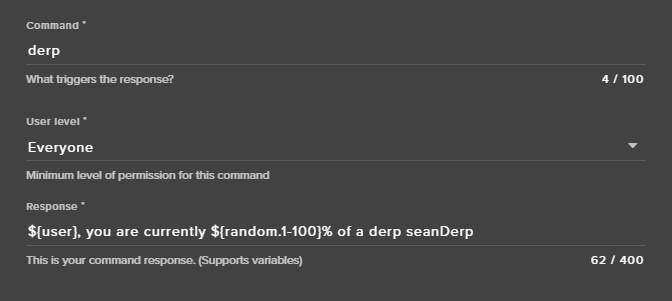

${user} works fine 🤔
distant marlin
But if I want to tag a person
tight harness
Then use ${1}
tight harness
No problem 😄
 crude vigil
hey guys, can i add a timer through a chat command ?
tight harness
Just custom commands at the moment through chat, although both the streamer and anybody with dashboard access can do it via the site
crude vigil
just to be sure a timer is sth the bot will say every 10m or so right ?
tight harness
Correct
crude vigil
alright thanks
tight harness
Timed messages 😃
crude vigil
😉
 inland tree
Hey guys.. I need a bit of help. I'm trying to set up a perk in the Stream Store with a custom Gif and I want to display in on stream... I have the settings on the stream store set, but how do I add it to the overlay?
stuck hamlet
the widget is called "Store Redemption" @inland tree
inland tree
i think i'm mentally challeneged...
 quaint root
How do I manage the song requests with tipping? I enabled the feature but I have 0 clues how to do the managemnt of it.
stuck hamlet
the person would just tip and leave the link on your tipping page, and it will be put first in queue
quaint root
And then it would be played automatically? @stuck hamlet
stuck hamlet
Yes. 😃
weary mist
ahhh, the power of automagication
quaint root
@stuck hamlet I'll try 😄
inland tree
@stuck hamlet do i have to pay any mind to the default sound and image for the store redemptions widget?
stuck hamlet
not if you have them on your item
inland tree
awesome
stuck hamlet
you can actually clear it
inland tree
❤
thanks for the help. glad i chose stream elements to liven up mine and my friend's stream
stuck hamlet
❤
 unkempt totem
ive fixed it on my overlays but on some of the overlays (aco brb is where i noticed it) maybe change the font for twitch chat to white
its blending into the background
 tight harness
@bronze lichen Better to take a screenshot than an actual picture of your screen.
@unkempt totem I remember noticing that too
stuck hamlet
It is a bug right now @bronze lichen The devs know about it! We are going to fix asap
tight harness
@unkempt totem If you change it to Theme: Dark chat it will show up perfectly fine
You'll get a very dark grey background behind it but at least the text will be visible 😃
 bronze lichen
@stuck hamlet thanks.. just 4 info: users can receive the key over chat redeem
unkempt totem
@tight harness yea i know but then it blocks the background
i just changed the font color
just thought you guys could fix that in the backend so others dont run into that problem
tight harness
That works too
 gilded scroll
My chat stats are no longer working since changing my twitch name
tight harness
For your channel or for another channel?
gilded scroll
For my channel.
When I try to "Open my stats" it defaults to my old username. If I manually adjust it to my new twitch username in the URL it doesn't load.
tight harness
Have you relogged into the site since changing your name?
gilded scroll
Yes
tight harness
Says you're not signed up with your new name 🤔
gilded scroll
I'm logged in right now with it 😃
upper steeple
is there a way to just have a random viewer from chat selected as a winner in a giveaway? Like they don't have to enter its just RNG
stuck hamlet
${random.chatter}
pine hemlock
You could make a command and use the ${random.chatter} variable - itll pick a random person
upper steeple
@stuck hamlet @pine hemlock OMG THANK YOU BOTH
lament blade
Is there a way to either disable the All-Time leaderboard or take users off it?
stuck hamlet
you can reset it
 hexed horizon
yae
 snow sand
Does anyone else have an issue with the website? it's incredibly slow atm
pine hemlock
Disable hardware acceleration in chrome
snow sand
Need it sadly you'd be shocked
pine hemlock
Okay well it will fix the website loading slow.
tight harness
Confirmed fix
 dawn beacon
is there a way to reset donation goal?
pine hemlock
Activity feed-> widget data
Goals tab
Or there is a data tab in the overlay manager
dawn beacon
thank u
 frosty crane
Hello, is there a way for only active chatters to get loyalty points? Lets say they need to write something every xx min or so to continue getting points?
pine hemlock
no. its whoever is in chat
frosty crane
Okey, I'll pu it in ideas then, Thanks!
 white fossil
Hey just wondering if there is Ground Control for the mac as well?
I am using my Mac to stream a creative of me redoing my wires and waterloop on my pc
 sharp salmon
is there a donation goal ?
 hexed herald
Is there any way to change the order of things in the store?
lament blade
Edit overlay and go on the top to widgets @sharp salmon
tight harness
I believe it's called Tip Goal in the widgets
There's a few different customisation options with it too so have fun 😃
pine hemlock
any specific alert
tight harness
What cuda was asking you was is it all alerts or just host alerts for example?
sharp salmon
i even deleted and redid the browser source
ok um.. so when i test it. it wont appear on the streaming apopo
app
stuck hamlet
im guessing you're on OBS Classic?
pine hemlock
(obs)
sharp salmon
bebo
pine hemlock
Well that would be your issue
sharp salmon
well i just tested it on obs and its over to the side
stuck hamlet
its a bebo issue, nothing we can do about it
pine hemlock
Thats because your browser source isnt set to 1920x1080
the default resolution for browser sources at 800x600
sharp salmon
guess it has to be the canvas size?
stuck hamlet
It has to match the size that you put on our Site.
pine hemlock
(by default its 1080p)
sharp salmon
that i put on the site?
tight harness
Say you set your overlay on the site to 1080p resolution then set your browser source to 1080p too, so it matches
 sharp salmon
yea got it now lol
tight harness
sharp salmon
i hope for more variety overlays too! 🙏
still plover
Hi, any person help me
again 😄
I have an alert alert for a minimum amount of $ 10. Is there the possibility of creating an alert for the interval from $ 1 to $ 9? thx
pine hemlock
Alert variations @still plover
still plover
yes, but it does not work well, it does not allow to add a range, only an approximate amount, if I put for example 1 and donate 15, it leaves 2 alerts
 dim coral
I kept having viewers in my stream be able to enter a giveaway multiple times even when I only set it to once.
The way I "thought" of fixing this was making the first ticket free and then making any other ticket reaaaally pricy-.... it didn't work so I undid that giveaway too, accidentally pressed " refund tickets ", and viewers got refunded 9999999 currency even tho they " bought it " for free....
In the end I think I got it all to work by disabling !enter and !ticket <amount>
@swift parcel will you be my support hero, once again? 😉
 silk void
can you ban certain words and stuff so like if they put the word in the chat ir permo bans them with the bot ?
 swift parcel
@dim coral best bet might be with a raffle thats via the modules area... since giveaway they're using points to buy tickets though you might have found a bug
stuck hamlet
Perma ban is only possible if you make a command and use the keywords @silk void
We don't have a feature for that, but it's doable
@swift parcel @dim coral Known bug, unfortunately Free tickets get refunded as real tickets.
swift parcel
👍
silk void
because i get these bots in the channel all the time and they use the same text etc advertising a scam so i have to manually ban them while im playing, because i dont get viewers so dont get mods lmao
still plover
I have an alert alert for a minimum amount of $ 10. Is there the possibility of creating an alert for the interval from $ 1 to $ 9? thx plz help me 😃 thx
pine hemlock
 weary mist
@still plover The way the variations work, is that when a dono comes through, it first looks to see if there is a variation that fits it. If you have a minimum of $10, then that variation will only trigger on 10+. If the dono is 9.99, and there is no variation, it will pick the default
swift parcel

Learn how to customize your alerts and setup different alerts variations with StreamElements Alertbox ----- Overlay Manager guide: https://youtu.be/X7XrDdRE7...
ALL THE LINKS!
all for variations
swift parcel
a little sluggish lol sorry
weary mist
@still plover if you want to do a range, set the minimum of the range as the alert you want, then the point you don't want it using that alert, set a new variation. Then only things that fall between those two values will get the alert you set
still plover
I already found the solution creating 2 variables, and between them a range is configured, thanks to everyone for your help
weary mist
👍
swift parcel
@silk void https://www.twitch.tv/settings/channel you can add words in the section "Blocked/Permitted List, powered by Automod" that you can add those certain words/links that the bots are using so automod catches it and you don't have to deal with it (It will not ban the person it will just remove the line from anyone except mods/broadcaster seeing it for moderation in a special box)
 amber turtle
henlo good people over here uhh im setting a dono goal how do i get the same one onto different scenes
swift parcel
do your seperate scenes have its over SE overlay?
 amber turtle
which button is that
ok got it so now no matter what scene im in if someone donates it will fill the bar?
pine hemlock
thats how it works yes
 strange wolf
could I get help? pls
clever mango
 agile lintel
i got everything sorted out im just wondering if i can make it so when people click at my fb logo on my overlay they get a link to my fb page, or is that something completely different?
clever mango
it would require a twitch overlay extension, something we're working 🤔
Please add it to the overlay extension topic on https://strms.net/ideas
strange wolf
sorry, my friend donated me $3.33 dolars, but it did not show on my stream / streamelements site tipping
hexed herald
Is there a specific image size I should be using for the store banner?
clever mango
@strange wolf They donated through streamelements, right?
strange wolf
yep
agile lintel
@clever mango ill just wait for you guys to work on it i was just wondering, love your program
clever mango
do you have tip moderation enabled? @strange wolf
strange wolf
yes
clever mango
then you'll need to manually approve tips that come in
you should see it under pending alerts on the activity feed
tight harness
Or disable it 😃
clever mango
there is a profanity filter
tight harness
Those settings are not linked 😃
You can get the below settings without having Enable moderation ticked
strange wolf
oh, true
i though that if i turned off "enable moderation" it would turn off the other settings
thanks guys ❤
tight harness
No problem 😃
hexed herald
Is there a specific image size I should be using for the store banner?
clever mango
I think kireaki pinned something in this channel about the banner
I'm not sure of the size
 queen viper
my subs arent syncing into my stream elements overlay 😦
clever mango
refresh session please
right side of the activity feed
if you are referring to your total sub count
hexed herald
nevermind, I figured it out. The top streamelements banner covers a portion of the image so I had to just throw in some filler space. Thanks
queen viper
i havent streamed since they subbed, does that have something to do with it
hexed herald
I added about 60 pixels to the top to get what I wanted to look like it was the correct position.
queen viper
i refreashed the sessions and subs is checked on the side but in activites it isnt showing any subs
clever mango
did they sub after you signed up with StreamElements?
queen viper
Yes
its showing a follow from 4hrs ago but not subs
so its showing offline follows
queen viper
not yet
clever mango
once they share it, SE will receive it
queen viper
Sweet ty 😃
hexed herald
are there alerts for when someone redeems points in the store?
If so, where do I edit what image appears and what sound appears?
clever mango
redeeming items from the stream store?
hexed herald
yes
tight harness
Store Redemption widget 😃
hexed herald
or does it use the pic and sound for each individual item?
clever mango
image/sound is the one on the item
☑ this item shows an alert
there are no images shown for sound effects
only sound
hexed herald
ah, so there's no way to have the alert be one image but have a different thumbnail to show what the item represents?
clever mango
just one image for the alert
either the store item image or the widget image if there is no item image
store redemption widget is needed on the overlay for the alerts
hexed herald
OH, i figured it would've been with all the other alerts. Thanks
if someone redeems a sound will it show the redemption alert?
clever mango
it will play the sound
hexed herald
but no image at all?
clever mango
nope, it's a sound effect
hexed herald
will it show in chat that someone did it?
clever mango
yep
hexed herald
Ok, even if they don't redeem from chat?
clever mango
yes, if the store redemption chat alert is enabled
it currently announces any store item that is purchased
hexed herald
was there a reason that this alert is separate from the others? (follow, sub, etc.)
clever mango
I'm sure there is but I'm not sure what it is
hexed herald
any idea why the font color won't change on text settings on the redemption alert?
lament blade
Im on ps4 is their any aay it can work when broadcasting with twitch
clever mango
the only thing that would not work when broadcasting directly from ps4 would be overlays
everything else you can set up and use 
the bot can post alerts in chat when you receive follows, subs, hosts, etc.
it's under moduels > chat alerts
lament blade
:( i wanna boycott lol
clever mango
do you have a decent computer that you could stream from?
if so, get a capture card and then you'll be able to add overlays
 stark canopy
My bot is giving people more tickets then allowed? Is this a known bug?
clever mango
giveaway?
there are currently no known giveaway bugs at this time
is sub luck enabled?
 boreal dove
Question about the new Subscriber Goal widget. Where does the widget pull the sub number from? It's not accurate.
tight harness
How different is it? because it's directly from the Twitch API and does generally include a couple of free subs which Twitch hides from your dashboard
boreal dove
It's off by a very round number @tight harness it's showing 200 more than it should.
tight harness

boreal dove
I mean, thanks for the ego boost but... lol
tight harness
Ahh, sub goal goes up by 1 when you get a sub/resub, it's not the same as the Total Subscribers widget 😄
tight harness
Sub Goal is a widget which goes up by 1 when you get a sub or a resub, Total Subscribers shows your total number of subscribers. If you have Sub Goal that'll be why it doesn't show your total number of subscribers because it's a different widget
boreal dove
No
It does show my total subs, but it's wrong
there is a percentage as to how far into the goal I am as well
It's almost correct, just off by 200. That's why I'm almost sure it does
weary mist
The sub goal increments by 1, when ever you get a sub
boreal dove
Right, so it should decrease by one when I lose a sub, no?
weary mist
it does count resubs and regulars. but it does not decrement or sync with your current sub count
tight harness
No, because it's not the Total Subscribers widget, it's a goal widget
boreal dove
You sure we're talking about the same widget here?
weary mist
only the total sub widget shows the exact sub count
 weary mist
The Sub goal widget pulls from the Goals tab of the data page. That tab only increments, it never decreiments
 finite viper
Silly question... can a mod start a giveaway/raffle?
tight harness
@finite viper Have you given them dashboard access?
boreal dove
Wait, what is the point of this widget then if it does not decriment?
boreal dove
The number in the middle is not resettable nor is it editable so where would that number come from?
weary mist
@boreal dove To count the number of subs in a given period, an #💭︱feedback-and-ideas would be to make it optional to sync with your total sub count
boreal dove
No no
tight harness
@finite viper https://streamelements.com/dashboard/account/channels
weary mist
@boreal dove its editable in the Data tab
from the overlay editor, or the activity feed page
boreal dove
There isn't a data tab, my friend. The only edittable field is the goal
tight harness
You asked what the Subscriber count is for, it tells you beneath the widget in Widgets 😃 https://gyazo.com/c06d37ab70d76eb127a7e71226bcfc9c
 boreal dove
I asked about Subscriber Goal
weary mist
boreal dove
I am using Subscriber Goal
What is that number in the middle for if not to be the total amount of subscribers this person has
There are three widgets, you've spoken about two of them. Both not being the widget I'm speaking of
weary mist
Ok. To edit the number in the middle, its at that tab that y image points to, then click goals
you can change the number, click save, and it will update the number in the middle.
boreal dove
Understood
weary mist
The number is designed to be a "session" based goal. During the period of time you are looking at, you get x number of subs. This does not count un-subs, as there is no notification when you lose a sub, so no way to decriment them. If you want the exact count, the only widget that pulls that is the Total Subscriber widget. I think there should be an option for the Sub goal to sync with your Total Subs, instead of just being a counter widget
boreal dove
Thank you Scalper, this helps. I was very lost with the previous information.
weary mist
no problem, it didn't help we were all throwing information at you, lol
We sometimes go a little overboard when trying to help people, haha
 slim cairn
Some say the champions are robots
boreal dove
Well, I understood the information. Maybe I wasn't asking the right question, also having the data sorta listed in two different locations is a bit strange and I'm not sure I see the purpose.
weary mist

slim cairn
That's why i wear my tinfoil hat everywhere
weary mist
personally, I like the sub goal because It more tells me how much $$$ I made in a set time. The total subs is just telling me how many people are currently subbed
boreal dove
I've been using SE since the beginning, I've never had to use the data tab. That was a first, as well which is probably why I was lost.
Agreed, but that would be for a different purpose wouldn't it?
tight harness
Before it was Activity Feed > Widget Data, that's just a shortcut to it 😃
boreal dove
This is for the reason of how close we are to a milestone which is important in a different case.
Definitely, understood now @tight harness
 south thicket
Heyyo, I just had a quick question on the Tipping in Stream Elements, is there a fee that people pay when they tip? Is that a Paypal thing or is it just a program thing (I currently use Stream Labs)
clever mango
just paypal
tight harness
PayPal will always take a fee, I believe it's something like $0.30 + 2.9% from memory
We don't take a fee or even handle the transaction ourselves, it all goes directly from one PayPal to another
south thicket
Ooh, alrighty thanks for the quick replys
tight harness
No problem 😃
 frank merlin
For some reason my tip alerts and host alerts no longer work during stream but during the overlay editor when testing they appear in obs.
clever mango
For hosts.....
Twitch doesn't have a "notification system" for hosts (unlike follows, subs, raids, etc.) so the only way for StreamElements to know that you are being hosted is to connect through you to twitch. This connection is made within the Activity Feed code. This code is on:
- SE Dashboard page - https://streamelements.com/dashboard
- SE Activity Feed page - https://streamelements.com/dashboard/activity
- Ground Control desktop app - https://streamelements.com/groundcontrol
As for tip alerts, do you have tip moderation enabled in the tipping settings?
frank merlin
with stream elements it is connected with twitch. i use to get hosts then it stopped randomly
clever mango
Do you have one of those three open at all times during your stream?
clever mango
tip moderation means that you or someone with access to your dashboard needs to manually approve tips that come in before they show an alert
they will be in the "pending alerts" section on the activity feed until approved
weary mist
@frank merlin I just checked your settings, and there is no reason tips are not coming through, unless paypal isn't sending the information over. As for hosts, you need to have the activity feed open in one of those links that Terra poste
frank merlin
i downloaded the app.
i had another tip alert from diff site but went to twitch and unnattached it
i then went to stream elements tip page and hit open my page and pasted the link into my twitch button field for people to click on
 radiant crest
We don't have a place where we can see the quotes yet, do we ?
clever mango
not yet
frank merlin
when someone tips there is a tip memo where someone can say something and it appears ons tream
stream
weary mist
yes
frank merlin
I like stream elements heard about it from Kismet
frank merlin
I do have one quesiton. when i try and upload a video with sound for an alert. it only saves the sound and it goes into a gif with the audio not being accepted. so its a silent video ?
weary mist
I think so, you might have to upload the sound to get it to work. I will ask
 potent osprey
Idk where to put this, but could I get an eta on the fix for the issue where overlays aren’t showing up when I use the Bebo streaming software
weary mist
According to Bebo, the overlays don't preview, but they should appear on stream. If they don't, you will need to reach out to Bebo
potent osprey
Bebo said they are talking to y’all, but they don’t have an eta. It’s a known issue over there. Didn’t know if y’all had any different info
weary mist
Nope, thats all I got for you. Wsh I could tell you more
 visual shell
Hey, can someone help me set up some overlays through obs? I'm very new to this
I'm trying to get the Overwatch Spark theme set working
weary mist
@visual shell we have a ton of how-to videos here: https://www.youtube.com/streamelements/videos
YouTube
Official youtube channel for StreamElements tutorials https://StreamElements.com
 vague lodge
Hy folks, I'm doing my Extra Life stream right now and I'm using the Extra Life overlay but it doesn't look like my donations are showing up. They show in the overlay editor but not in stream. I got my ID and everything entered in. Any ideaS?
weary mist
the extra life alerts tend to take a few minutes after a donation to show up. as long as people are donating through the link that connects to your profile, it should register. Also, the alert box does not come with a sound by default, so you should add one
visual shell
Hello Again, that link helped, but I'm still having issues. Can someone possibly vc with me?
weary mist
sure, I am in Chit Chat
limpid marten
if tips come in through the se link but i use an alertbox from stream labs does that matter?
pine hemlock
Nothing will show up
fallow relic
question about streamlabs.... in the sfx is there anyway to command !sfx to show a list of the sfxs you have for your channel?
 errant dock
Hey is anyone up that can elk me?
tight harness
@fallow relic do you mean streamelements? In which case seeing as they're all done through your store you can have people go to your store page and list only the sound items
@errant dock what's up? :)
errant dock
@tight harness stream elements doesn’t seem to be responding to commands and things like that. I went to the page and it says it’s in stream but every time I try using a command it wont work
tight harness
Have you tried parting the bot and rejoining it?
errant dock
Along with chat alerts. Won’t notify me if someone follows or if they sub and donate
I’ll try it right now
tight harness
Sorry on my phone atm :P
errant dock
It worked, thanks
tight harness
No problem :)
 wraith bough
are !addpoints and !setpoints supposed to do the same thing? or have i messed something up somewhere :B..
tight harness
Not quite, addpoints adds the selected amount of points, setpoints sets their total points to the number you put
wraith bough
hmm is there a way to reset the command to default?
tight harness
Reset it to default? Did you make changes to it?
wraith bough
yeah i thought i'd only changed the name to trigger it but apparently i did something else lol ;
lemme try again
yeah my !setpoints and !addpoints both do the same thing
at least, i think they do; they both say [username] set [username] points to [number]
tight harness
They both say that but it doesn't mean they do the same thing 😃
Even when I add points to myself it says I set my points to the number that I have after the points I put have been added
 tight harness
No problem 😃
 old ice
hello
tight harness
Hey
old ice
i got a problem importing my alert box from streamlabs
it either says it just failed or tells me it is not a valid alert box url
it has worked before but i accidently deleted that overlay and wanted to re-import it
tight harness
Do you have any custom HTML/CSS in your alert box?
old ice
no
i also didn't change anything in the alert box since the last time i tried importing when it worked
tight harness
There were some issues recently with importing data from their site although it was believed to have been fixed, unless they changed something again
old ice
so i just have to wait and hope?
tight harness
⤴ Finished in DMs
 livid frigate
I cant save my sub variations  I dont see a save button and the x just makes it disappear
nevermind, you have to be in the text box for the name and press "Enter"
that should be a little bit more obvious imho 
tight harness
@livid frigate https://gyazo.com/111f2a705b7da81c07c693e2079cd618 Bottom right, Save Variation 🤔
 livid frigate
 livid frigate
Firefox Nightly 59
tight harness
Have you tried in Chrome?
livid frigate
its there in chrome
dont know if the issue is there with firefox 57 though, if not it just an issue with the nightly build I guess
tight harness
Our website is primarily built around Chrome for the time being, the reason being that the majority of users use it and OBS, Xsplit etc use Chromium for their browser source plugins
We do hope to make the site function better on other browsers in the future, although seeing as right now it works 100% all okay on Chrome it's not a priority issue
tight harness
Thanks 
limpid marten
@tmGrunty#7534 yo did you fix your issue?
 lapis hemlock
How do I include tips from StreamLabs in to StreamElements, I have already imported the data, but the donations don't show up on the overlay at all?
lament blade
what's "Access code items (Stream Store)"
tight harness
@lament blade As in game keys you want people to be able to redeem on steam after buying from your store
@limpid marten @lapis hemlock We're currently trying to figure out how to get around them repeatedly blocking our access to their API, in the meantime their actions will sadly cause issues with imports
lapis hemlock
Well they are already imported and displayed in my tipping page, they just don't show up in my overlay
lapis hemlock
Top tipper and latest tipper
tight harness
You should see data in your Widget Data, if not, you can input this yourself and then hit Save Changes
stuck hamlet
Try refreshing your aggregates in the Widget Data
lapis hemlock
How do I do that?
stuck hamlet
In the overlay editor, at the top left, there is a tab called "data"
lapis hemlock
Yeah, sorry, I am blind aha
stuck hamlet
dont worry, so am i. That's why i touch my screen like it's braille
lapis hemlock
Ok, so it works now, but it doesn't display the name of the tipper or the tip in the correct currency, it also doesn't display latest followers or subscribers
stuck hamlet
Latest we can't import, you'll have to wait until you get a sub/follow since you signed up with us
lapis hemlock
I did
stuck hamlet
and for currency, what is it displaying as,/what is it suppose to be
lapis hemlock
It's displaying as $6.66 when it should be £6.66
It also doesn't show the name of the user
lament blade
i refreshed aggregates, but recent donation, imported from streamlabs, still doesn't show up in a new overlay :c
stuck hamlet
Did you refresh your labels? @lapis hemlock Cause there's nothing there.
@lament blade We can't import Recents. those have to be done through our site.
lapis hemlock
It's my fault, I forgot to change the currency to £
stuck hamlet
this page is completely empty, so it leads me to believe you reset labels by accident @lapis hemlock https://www.onslaught.ca/s/nito1q4b.png
 lapis hemlock
Yeah I did, refilling that info now
lament blade
@stuck hamlet still not popping up i'll pm u with likn
lapis hemlock
Ok the Tip Latest is not updating on the overlay
stuck hamlet
Did you hit save and reload your overlay @lapis hemlock ?
@lament blade You don't have anything under your recent tips.
lapis hemlock
Yeah, everything else updated, except latest tip
stuck hamlet
let me have a look 😃
lament blade
ye i know, but there should be sth
stuck hamlet
Yes, that is Recents.
you have nothing in your data page
Look at your data page, and look at Recent Tips.
There is nothing there, so we cant display anything.
Same for you @lapis hemlock
tight harness
Gotta have data for us to be able to display your data
stuck hamlet
That Widget is "Recent Tips", not "Latest Tip"
You can change the widget, if that's what you're looking for
stuck hamlet
Unfortunately, you can't. You'll have to wait until you get a tips through our system
lapis hemlock
Oh ok
tight harness
Once they're in though you can remove them individually if for example it's an offensive name 😃
 placid vigil
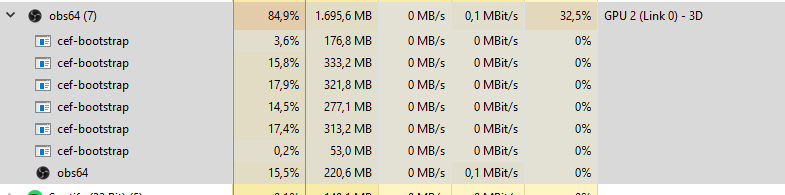
Idk why but since yesterday the BrowserSources for the Overlays from Stream Elements bringing my CPU to explode with 100% Usage
when i delete them its fine 😄 pretty weird
lapis hemlock
Thanks for your help
tight harness
Do you have multiple overlays open without 'shutdown source when not visible' ticked in the properties of each overlay? @placid vigil
placid vigil
yeah i dont have ticked it but tbh since yesterday it worked but i will try to change it
i changed it and its still the same
stuck hamlet
What's on your overlay and what are your PC specs?
placid vigil
Here

Open Broadcaster Software
Hey fellas
im pretty new here, but i dont find any help so far.
My problem is that OBS uses 80%+ of my CPU Usage and im not even started the stream...
its easier than posting it again
stuck hamlet
Well like Legendary said, you have to shutdown your source. I see you have a supertheme with 5 active scenes.. that's going to detroy your CPU
placid vigil
i just added em again and ticked the box but same CPU usage 😄
stuck hamlet
There is noaIf you did so, there should not be a list of things like this: https://prnt.sc/hi4lwq
 placid vigil
okay got i but when ihave the Start OVerlay open it just eat 50% of my CPU usage 😄
i didnt had that 2 days ago 😄
tight harness
What's important is what works now, opposed to what worked 2 days ago 😄
placid vigil
thats right 😄 but i need to adjust my fan speeds now 😄
cuz their so loud at 50% usage 😄
but thx guys 😗
tight harness
No problem
limpid marten
@tight harness i found spamming ctrl + shift + R like 10 times it works
i did it a few times to make sure it was consistant
tight harness

unkempt totem
this may not be the place for it, but does anyone know why the twitch extenstion isnt updating with bits?
only two people who donated months ago are showing up and not the recent ones
tight harness
Which extension? to my knowledge ours doesn't show bits 🤔
unkempt totem
streamlabs leaderboard
tight harness
This isn't StreamLabs 😄
placid vigil
@tight harness tbh which settings would u try to stream with my setup?
tight harness
What kind of settings are you curious about?
lament blade
can you make store redemptions as sub only? i'm on phone, can't check :x
stuck hamlet
Yes
lament blade
k great ty
 subtle socket
anyone here?
stuck hamlet
hello
stuck hamlet
Are you using OBS Studio?
subtle socket
how do i know?
lament blade
you have it like this`?
stuck hamlet
What's your OBS Version, should be at the top of the program.
tight harness
Sounds like Classic
stuck hamlet
You are not using Studio. You are using an old version of OBS, one that is no longer supported
subtle socket
oh damn
stuck hamlet
subtle socket
how do you even get classic
 tight harness
Back when dinosaurs roamed the Earth
subtle socket
alright
subtle socket
thank you, it worked
in the overlay, how do i change the background color for messages in chat? i want it to have the checker theme, but to have an invisible background until a message pops and only it will have a background
 subtle socket
but then each individual message doesnt have a background
i want it to look like the pop messages of streamlabs
that each message has it's own background, otherwise the block is invisble
pine hemlock
We dont have that option currently
subtle socket
oh well, thank you
subtle socket
how do i change text color in chat box?
 honest epoch
i would like to delete a few custom commands and change a few others, but the only way i can is through my stream chat. it doesn't give me a way on the website.
lament blade
@honest epoch https://streamelements.com/dashboard/bot/commands/custom
honest epoch
i can get to the site it won't let me delete or edit through the site
clever mango
@subtle socket select the chat widget and then text settings in the widget panel on the left
pine hemlock
Why cant you get on the site
honest epoch
i can get on the site
 autumn lily
Hi
Help me please
I have problem
I do not understand how to do export with streamlabs in StreamElements
honest epoch
i can't edit or delete my custom commands on the site
 honest epoch
i can see them and disable them
clever mango
@honest epoch are you moving from streamlabs TO streamelements?
sorry
wrong person
@autumn lily ^^
autumn lily
@clever mango Yeah
stuck hamlet
@subtle socket Text Settings


 subtle socket
found it, thank you
clever mango
@autumn lily please try multiple times and press CTRL+Shift+R between attempts
pine hemlock
Yes.
autumn lily
It is necessary to enter