#helpdesk-twitch
1 messages · Page 150 of 1
 tight harness
 silk patrol
@viscid steppe There is also a public page for your giveaway where people can buy tickets
 viscid steppe
Thank you!! 💜💜💜 @strong dock @tight harness @silk patrol
tight harness
No problem 😃
 strong dock

tight harness
@unkempt totem I use that one myself and I see the bottom just fine, are you sure you have the correct resolution set?
 weary mist
@unkempt totem When you say it doesn't show up, is that in OBS, or the overlay editor
 unkempt totem
i use xsplit. yes i have the correct resolution
the info pops up but not the overlay stuff
easier to show you
Now its also the top
 drifting basin
is that you there?
weary mist
if you have windows 10, use snipping tool, that way you don't hav eto take a picture with your phone 😉
unkempt totem
weary mist
im also loading up xsplit right now
unkempt totem
i just took both of those pics with my phone
im noticing on the site, in the editor, it also isnt showing up
weary mist
Give me a second, Let me have a quick look at your overlay
what is your twitch name?
unkempt totem
provengamer
also the twitch chat box is missing
for the record, i havent changed anything
weary mist
how about now
unkempt totem
yup fixed
what was the issue?
ok one more thing im noticing
small thing
i noticed in your pic, you have the boxes around the bottom part
i dont have that
on any of the 5 parts
correction
all are good except in game and talk. neither of those have he boxes around them
weary mist
the issue was that the image for the background was moved up to the top of the layers
unkempt totem
sorry if im being a pain
weary mist
im also thinking it might be best to delete and recreate the theme
weary mist
hmmm
I just created a new one, I named it ACO, and it seems to have all the boxes around it right now
weary mist
@unkempt totem you should see it in your overlay list
weary mist
😉
unkempt totem
ok i dont know what the issue is, but the one i made, doesnt have the boxes, but the one you made does
weary mist
its weird, but as long as it works now, lol
tight harness
Weird  lol
lol
unkempt totem
btw, please tell whoever made the extralife theme, AWESOME JOB
thats my main theme when not playing ACO
tight harness
Kireaki makes the themes 😃
 proud pumice
We'll let her know 
drifting basin
unkempt totem
sorry, new to the server
drifting basin
that's fine.
unkempt totem
i will explore and make sure i post in the right channels from now on
drifting basin
👍
proud pumice
@unkempt totem which horizon
tight harness
Horizon Zero Dawn at a guess
proud pumice
We usually make themes for pc games only, as consoles usually cant use overlays unless with capture cards
 old fern
How can I change my goal for followers? I can't find it
weary mist
@old fern Data tab in overlay editor, or widget data in your activity feed. Then click the goals tab
old fern
When I try to change it from 5 to 10, it just makes it so that I have 10/5, not 5/10
weary mist
oh, you want to change the value you are targetting? You can do that by clicking on the widget. There is a field for that in the settings
old fern
oh, okay 😃 thanks
 winged sundial
Ist here someone here that can help me setup a Giveaway, and answer couple of my questions
tight harness
What are you wanting to give away? and questions can be answered no problem, fire away 😃
winged sundial
Did you get my messege?
tight harness
Yeah, reading it now
winged sundial
thanks
 warm trail
any problem with the site atm ? everytime I enter dashboard it freazes, using chrome
 stuck hamlet
Try disabling Hardware Accelaration
 humble ether
can we disable the way the widgets clamp to the sides of the editor ? 😃
If you move a widget outside the screenspace it automatically tries to go back in
warm trail
does not work, not gona use this anymore
 swift parcel
@humble ether theres a grid icon on the top when you hover the mouse it says "snapping" click it to turn it off
humble ether
thx @swift parcel 😃 ❤
 spark gulch
quick question - Editing a supertheme for my use. The Camera Panel is greyed out. like the below. How do I "ungrey" it?
swift parcel
@spark gulch left hand side theres "layers" click on the up arrow to expand it out showing all the widgets/images/etc and click on the eye icon to unhide it
spark gulch
Thank you @swift parcel
 lament blade
How do I create a new tip goal bar without it adding on my previous donations?
How do I create a new tip goal bar without it adding on my previous donations?
 floral ice
Lemme ask a dumb question: Do I have to launch my overlay to make it active while live?
drifting basin
no
weary mist
@floral ice if you use a broadcasting software that has the browser source, no
floral ice
ok well then im frustrated
weary mist
actually, no in general
drifting basin
Why?
weary mist
just your activity feed to get host alerts
drifting basin
We can help.
floral ice
last night while streaming, anytime I tested my follower alert, it popped, but when I got new follows, nothing...
floral ice
yes it popped in chat
drifting basin
Hm
weary mist
Karl, try logging out of the site, and logging back in. It could be a bad token
floral ice
confirming the overlay didn't pop, gimme a min
 strong harbor
Hello!
weary mist
o/
strong harbor
I was sent here from twitter and I was curious if anyone had a clear way to make custom cheermotes work with the cup! 😃
tight harness
When you add the cup widget it pulls your custom cheermotes from Twitch
strong harbor
Oh really! The last time I tried this not too long ago it required you to have sprite sheets and I could not get anything to work 
tight harness
I can confirm it works now, I have my own and they added themselves when I created the widget 😃
It's worked for a while
strong harbor
I'll test it out thanks!
tight harness
No problem 
 soft belfry
has anyone else had problems with the raid alert in the alert box not working when testing
weary mist
@soft belfry yeah, its a known issue with alert boxes created before raid release. To fix, create a second alert box, deactivate the other alerts (except raid), and it should work fine
strong harbor
Can confirm my own custom cheermotes do not work in the cup  https://puu.sh/ymHz9/95c4e139a1.png
 soft belfry
@weary mist thank you
tight harness
@strong harbor When did you make the cup?
strong harbor
I made the overlay a while ago but I just put it into obs right now after saving it
tight harness
So you deleted the widget and re-added it?
strong harbor
In obs yeah
tight harness
No I meant in your overlay manager
strong harbor
I can try to make a whole new overlay?
tight harness
You only need to remove the cup and re-add it
A whole new overlay isn't necessary but you can test it in a new overlay if you wish
floral ice
nvm it worked i just missed it. sorry dudes/dudettes.
 dense jackal
Just to refresh the widget itself, twitch is constantly updating and changing as we are constnatly updating the cup. If it's the same widget from a long time ago, it may have the same bugs from release. @strong harbor
swift parcel
@lament blade you don't really need to make a new tipgoal -in the editor at the top click on "Data" then "goals" and 0 it out
strong harbor
Ok! That worked thank you very much!
tight harness
No problem
strong harbor
This is officially the best cup out there! will recommend! ❤
tight harness
 Thank you
weary mist
@strong harbor ❤
 dense reef
Hey again guys! I have a problem that alert sound of donation and sub is doubled, therefore it's just horrible noise not sweet music  Can someone explain why this happens even if my streamlabs tab is closed.
strong harbor
weary mist
A common reason for double alerts is having multiple overlays. Make sure you are checking "Shutdown when not visible" in the browser source properties
weary mist
OBS keeps the sources active even if you are not on the scene, unless that box is checked
dense reef
Thank you guys, I believe @weary mist is right. 
 hasty socket
I've got a question regarding song requests. Is it possible to make the default playlist shuffle or can it only play in order?
Also, can the !play and !pause commands work for the default playlist? They don't seem to for me
strong harbor
Oh! Any chance in the future that custom cheermotes will animate in the cup 
tight harness
Is it on the ideas board? I'd be surprised if it wasn't
 torn river
Heyy, can I get added to #291219887274328064
stuck hamlet
Do you use our Bot, tipping service and overlays?
torn river
I do 😄
stuck hamlet
Added you 😃
torn river
Thank you very much!
 visual portal
Can I be added to #291219887274328064 too? I am using all 3 services.
 ancient prism
can I get a large cheese pizza and a large black coffee please

 visual portal
thank you 😄
 desert vortex
How do I change my name on the website?
I changed my twitch name and it wont sync up without the change
sorry -_-'
 clever mango
log out and back in 😃
tight harness
Relog into the site
tight harness
It's no problem, no need to apologise 😄 we get it a lot
 compact stump
cant to find how i can change the default commands 
tight harness
Do you see the Pencil icon? If not your window may not be large enough, can you full screen it?
compact stump
yeah, i clicked on pencil , but cant find how i can change text , that bot send to chat
tight harness
Ohh, the text
You can't change the text for default commands
You can change the settings for them, but not the text
 steady lava
Here is a kinda silly question.... 😃
Since affiliates can now gift subs, is it possible to sub the bot account in order for it to use the subemoticons for an !hype custom command for example? Or would it cause a problem, not at all right?
compact stump
@tight harness in the future we will can change text or it be impossible forever? : )
tight harness
This is possible, no problems there @steady lava
@compact stump The structure of default commands is important, that's why the text isn't changeable, I think the only thing I've heard recently is having them in different languages
Commands have variables in, if those variables are removed then the command no longer works, that'd be bad for an important default command
compact stump
@tight harness exactly what is needed, me just need to change bot text to my language
compact stump
@tight harness it will be such incredible 
tight harness
Much wow 
compact stump
@tight harness 
tight harness
@compact stump
tight harness
Is that Classic?
clever mango
yep
tight harness
Then yeah, discontinued support for over a year
 wraith mulch
is it worth the switch?
clever mango
the clr browser isn't able to handle most 3rd party browser source content anymore and it will progressively get worse since Classic is no longer touched by the devs
wraith mulch
hmmm, last time I tried it, it was still missing features that I had in classic
I'll give it another go
clever mango
like what?
wraith mulch
can't remember now, it's been a while
clever mango
It's come a long way
wraith mulch
cool cool, good to hear!
What's the latest version number?
just to make sure I try the right one
20.1.1 sound right?
swift parcel
would recomment 20.1.0
wraith mulch
ah I see, why is that?
swift parcel
I've been seeing a lot of people say they get audio desync with 20.1.1
wraith mulch
ahh gotcha, okay, I'll give it a shot with 20.1.0, thanks!
swift parcel
make sure you also download the full installer to it as it has the browser plugin already in it
clever mango

GitHub
obs-studio - OBS - Free and open source software for live streaming and screen recording
lament blade
wait you can gift subs
 hushed ferry
Had problems both last night and today with SE:
- EventList worked
- AlertBox did not when hosted or new followers
- In chat notifications did not work when hosted or new followers
Please advise
 slim cairn
you must have the stream elements activity feed or ground control open to receive host alerts.
Ground control is our desktop app
hushed ferry
SE dashboard runs with stream
slim cairn
You must have https://streamelements.com/dashboard/activity open
@hushed ferry
Or you can download ground control
hushed ferry
Never needed it before, having Dashboard open allowed those to work last week
clever mango
did you receive other alerts?
slim cairn
Are you sure it was open aswell?
clever mango
if the event list is built into your SE overlay then it appears to be an issue with the alertbox itself because the hosts and follows were pulled from twitch to SE
 unkempt sparrow
question, when making commands is there a variable that you can use to say the person who types the command can mention another person in chat?
like i want to do a hug command
clever mango
there is a template for !love that you can use
unkempt sparrow
where?
hushed ferry
@unkempt sparrow use $[source] and $[user]
clever mango
when you create a new command you can select from templates at the top of the popup
strong harbor
I have a 1920 x 1080 overlay set up for this cup and I am positioning it and it just clips out randomly and I don't know why https://puu.sh/ymMrn/02e3ffd709.png
 clever mango
which browser @strong harbor?
 hushed ferry
@clever mango so how to fix my alertbox and in chat notifications? Eventlist is part of overlay
unkempt sparrow
thank you @clever mango is the $ for the person you type?
unkempt sparrow
so when i type, chiclets give TerraBuck a hug, what would that look like?
when i type !hug
clever mango
do you want the person using the command to be doing the hugging?
unkempt sparrow
yes
unkempt sparrow
sweet! ty vm ❤
 graceful quarry
When i transfer my csv over to ankhbot, the all time leaderboard for currency seems to be getting messed up... any idea why it would be changing? the current leaderboard is fine, just the all time one is strange
transfer csv from ankhbot*
clever mango
@hushed ferry first, let's confirm that on https://streamelements.com/dashboard/activity you see the hosts and follows from the last stream
hushed ferry
I do @clever mango
clever mango
Ok, log out and back in and then go into your overlay to verify that the alertbox is set up properly. Replay the events from last stream to test the alertbox
unkempt sparrow
@clever mango also is there a suggestion concerning, being able to add sound files to custom commands?
clever mango
not adding to custom commands but soon you'll be able to redeem sounds without using !redeem
!clap
instead of
!redeem clap
unkempt sparrow
ah ok
clever mango
@graceful quarry you're transferring points from ankhbot to streamelements, right? Are you using the CSV import tool on the site?
 misty rover
Is there a command to change the bot's name?
clever mango
@strong harbor that is weird. Does it do it if you create a new hypecup widget?
Bot name cannot be changed at this time
graceful quarry
@autumn granite I am... And it also wont let me reset the all time leaderboard to try to import again
hushed ferry
@clever mango AlertBox appears to be working, with exception of Raids, it says host and then alert never disapperas even though notification is for a few seconds
clever mango
Alertboxes from before the raid update are not compatible with raid alerts even though they have the checkbox. A new one will need to be made. Raid alert can be the only event selected to avoid creating a whole new alertbox
hushed ferry
glad that info is in the set-up
clever mango
@graceful quarry which browser are you using?
graceful quarry
chrome
clever mango
@graceful quarry I'll have an admin look at your account since you'll want to reset the all-time before importing again
graceful quarry
ok thanks
hushed ferry
@clever mango what do i need to do next?
graceful quarry
the account is just this name, btw.. been forgetting to update it here
clever mango
jgigs?
graceful quarry
yes
clever mango
@hushed ferry after setting up the new alertbox for raids you should be good to go. The alertbox is working for the replays right?
hushed ferry
Yes, but what about in-chat notifications, those did not work either?
clever mango
You can verify their settings in the chat alert module and if everything looks fine then you should be fine. There's nothing more that can be done now. Just monitor events during your next stream and if you notice an issue you know how to get a hold of us. It will be easier to test and resolve during a stream
hushed ferry
Ok thanks
dense reef
Is there a way to refresh "recent tips" widget as it is not correlate with my Tip List?
clever mango
There is no refresh but you can remove entries from tecent tips here https://streamelements.com/dashboard/session
that may help
dense reef
@clever mango Yes it helped. Thanks again. And another question Is there a way to sum different tips for one user, so it doenst look like this: viewer1 - $1, viewer1 - $1, viewer1 - $1 ---> but viewer1 - $3
weary mist
not on the recent tipper, but you can do session top tipper for something similar to that. It is like that to display youre "recent" tips
dense reef
Yeah, but top tipper is one person. I want to do scrolling list of my tippers for month, and seems like there is no option to do so
 jovial skiff
Are you able to try out the alerts before going live or smth?
weary mist
@jovial skiff in the overlay editor, you can Emulate them, bottom left
@dense reef hmm, there is a tipper list, let me figure out what the name of that widget is again
jovial skiff
Ok tyyy!
dense reef
@weary mist In "recent tips" widget different summs for one tipper are not stacked, so it floods with same viewer over and over, but it has scrolling option. In "top tippers" widget summs do stack, but no scrolling text option
weary mist
The best I can offer you is the Top Tipper List
This will show your top tippers, with there total amounts
dense reef
@weary mist ok, thanks 😃
clever mango
@graceful quarry this has been reported as a bug and will be fixed as soon as possible. I'll @ you when it's fixed
@graceful quarry Ok so we were able to reset your leaderboards for you. Send me a DM and I'll get your points transferred over
 unborn yacht
Need some help setting up the sub goal widget. I have 42 subs but its showing 132, is there a way I can resync that number or make it correct? xD
clever mango
Are you in the overlay editor now?
unborn yacht
I am
unborn yacht
OOOOOH
clever mango
you can also find this by clicking Widget Data on the Activity Feed page
unborn yacht
I didnt know this tab did that, thanks man! xD
clever mango

unborn yacht
Is there a way to make it not count resubs?
Also-
With 'Recent Subscriber' Widget, Im trying to only get it to show just the latest sub, not all of them xD I try to use the scroll thing but it seems to only go down to 2, and even then it stops showing names
I hate to be such a pain xD
clever mango
the goal will count resubs because it just increments +1 when a sub event arrives. It has been discussed before to have an option to only count new or resubs and I believe this will happen in the future.
Recent subsribers shows multiple, Latest Subscriber shows the last one
unborn yacht
Ah! Ok, thanks! Im sure Ill be back in a sec when I get confused again ^_^
clever mango

 stuck pollen
I'm trying to transfer my currency from AnkhBot to StreamElements but when I try to upload the .csv file it says "couldn't import points : (". Am I doing something wrong?
weary mist
Hey Icemilk, if you have the CSV in user,points format, you can use this site to upload: https://filter.dj/CSVtoStreamElements.html
stuck pollen
Thanks so much!
lament blade
Do you have like a data base or a channel for all those links etc
 misty wagon
We are working on extending our university @lament blade but the world keeps changing faster than we can update it 
lament blade
@weary mist basically the same :P
 blissful sand
raid is broken and host alert ?
weary mist
@blissful sand host alert - Need to have activity feed open in either the site or the Ground Control application
@blissful sand For the raid alert, its a known issue with older alert boxes, but if you add a second alert box, and just disable the other alerts, it will detect raids
dense reef
Another question for great SE support bois 
Why the same item looks like that in store editor and in actual store. What resolution should I use?
stuck hamlet
256x256 ?  i dont remember exactly
weary mist
@dense reef
 warped sierra
Good Evening ladies and gents,
I am trying to frame up my new overlay, but its not updating as I progress (I am testing sizing and placement compared to my OBS layout)
Any thoughts or suggestions would be greatly appreciated.
Thanks!
tight harness
If it's not updating then you may need to try refreshing your overlay, is it not updating on OBS but is updating in the overlay manager?
warped sierra
@tight harness Correct, I was attempting to design my whole overlay in the manager, but maybe I will have each widget as a seperate overlay and add them as browser sources individually so I can adjust directly from OBS
I have also freshed my overlay a few times and nothing has updated on the OBS side
misty wagon
Uhm... alright, @tight harness got this 
tight harness
Alright, what you need to do is to right click on your overlay browser source in OBS, click on Properties, tick 'shutdown source when not visible', then hide the overlay source, then show it, this'll refresh it
If you don't tick that option in Properties it'll just hide it and show it but nothing will change
warped sierra
Understood, I'll give it a shot - Thank you!
tight harness
No problem, let us know if you need any more help 😃
 wary solar
so the gifted subs are not popping up or im i doing something wrong any help?
weary mist
@wary solar not sure what you mean, can you explain more?
tight harness
The regular sub alert you mean?
wary solar
ye
weary mist
likely twitch is announcing those differently to the API, and the devs have to figure out how to work around it
wary solar
the sub gift went live like 1-2 hours i agoo
tight harness
Yeah, brand new
wary solar
even the recent subs alert is not updating
tight harness
You mean the widget?
wary solar
ye
its like the streamalerts not recognizing the gifted subs
sorry if i explain this wrong
tight harness
No doubt because of the same reason
No I'm understanding it perfectly, thanks for letting me know
It's valuable information which we get from your feedback
wary solar
hey its my favorite webiste for this kind of stuff helps me alot
weary mist
the way twitch notifies gifted subs is different than normal subs, so we have to adjust things so that the alert box will pick up the new sub type
 mild frigate
Hey peeps, my alertbox is playing the alert sound/text2speech twice through my OBS Studio (20.1.1). It hasnt always done this. I've tried deleting and re-adding the browswersource in OBS but it doesnt change anything. Any thoughts on what might be causing this? Thanks!
tight harness
Sure, do you have multiple overlay browser sources in your OBS and are do they not have 'shutdown source when not visible' ticked in their properties?
mild frigate
Welp, there it is. Thank you @tight harness !
tight harness
No problem 😃
 worthy harbor
Hello guys. One question, do you know why I don't get an alert wwhen someone do a RESUB ?
tight harness
Was it a regular resub or a gifted sub?
worthy harbor
It's a person who did subscribe for the second month
It has happened with people using prime and normal subscriptio
tight harness
Did they share the resub yet?
worthy harbor
them?
tight harness
Yes
worthy harbor
I don't know... When someone subs they don't have to do anything, it appears on my screen
tight harness
Right, the prime ones doesn't surprise me, prime subscribers can choose in their settings not to announce their subs/resubs, they need to change that setting themselves
Yes they do, they have to share it 😃
When they share it, that's when the alert happens
tight harness
It's a big button at the top of their chat that says Share
If they don't see it, tell them to refresh their page and then it should be there
worthy harbor
Oh. I will tell them. Thanks a lot buddy
tight harness
No problem
clever mango
people with prime must go to https://www.twitch.tv/settings/prime and ☑ Automatically share in chat when I use my free subscription benefit
worthy harbor
That buttom should be near the follow one ?
tight harness
Thanks for the link Terra 😃
worthy harbor
Ok I'll copy paste and this
tight harness
Awesome
 ornate venture
is possible a command like !test count how many times he was used and appeared something like after Test was used 30 times
worthy harbor
It did happen with a non prime user as well
tight harness
Non-prime users have to share manually
tight harness
If they share it, yes, if they don't then no
It's all to do with how we can collect data from twitch, we need that share to get the sub data
clever mango
@ornate venture sorry, I don't understand the question
worthy harbor
Yea but the prime user has it enabled, and I bet the non prime user has it enabled as well
tight harness
The non-prime users don't have this option, they just share it manually with the Share button
That setting is just for prime users
worthy harbor
Hm then it must be something on my side, because it's not popping up on the channel feed from streamelements
but I do se new subs
see *
worthy harbor
Other re-subs?
tight harness
Are you not seeing any or just some?
worthy harbor
Just re-subs
tight harness
Any and all resubs?
ornate venture
@clever mango count and appear how many times the commands has been used
worthy harbor
It's my second month with afiliation, so I guess i'll start to see more examples this week
worthy harbor
It's kinda weird. I didnn't see any message on the chat as well
tight harness
Then i'm confident they just didn't share
worthy harbor
I'll dig with the new ones. So far they have those options set as public
tight harness
That's good
worthy harbor
Honestly I wasn't expecting this feedback
Thank you so much. I really appreciate it
tight harness
Of course, here to help 😃 ❤
clever mango
@ornate venture Like this? Response is This command has now been used $(count testcommand) times change the $(count testcommand) to $(count YOURCOMMANDNAMEHERE)
 burnt garnet
my overlay is not showing up in obs what do i do?
tight harness
What do you see instead?
burnt garnet
nothing
tight harness
Not even Help in the bottom right?
burnt garnet
ya thats what shows up
tight harness
Gotcha, right well this is easily fixed you'll be glad to know 😃 right click on the overlay browser source, click on Properties, you'll see a button on the bottom that mentions Refreshing cache, click on it
burnt garnet
ok thanks
ornate venture
@clever mango ya like this
clever mango
Response is This command has now been used $(count testcommand) times -- change the $(count testcommand) to $(count YOURCOMMANDNAMEHERE)
burnt garnet
dose anyone know how i can refresh my scene on obs clasic?
clever mango
it's a PITA an involves going into the file directory
tight harness
Classic 
clever mango
A lot of overlay features will not work with classic because the program was abandoned over a year ago
burnt garnet
oh
tight harness
You're much better off using OBS Studio 😃
burnt garnet
ya but i dont know how to add my webcam to it im using the ps3 one
tight harness
If you can do it on Classic I'd be amazed if you couldn't do it on Studio
clever mango
Many OBS studio tutorials on youtube
burnt garnet
ok
tight harness
Studio is much better, you'll be fine 😃
burnt garnet
but its annoying me because when i try to add a webcam mine doesn't show up
tight harness
On Studio?
burnt garnet
ya
clever mango
what cam?
burnt garnet
my ps3 cam
clever mango
it apparently doesn't have 64 bit drivers so using 32 bit OBS should make it work
 burnt garnet
oh ok
 pearl urchin
I need some help from one SE Staff
slim cairn
Ask anything and we'll get back @pearl urchin
pearl urchin
I changed my username on twitch and now on SE I had AMD Dollars and now I lost all them with the change
clever mango
points in a streamers channel?
pearl urchin
Yep AMD
 pine hemlock
Thats what happens with namechanges.
You can ask them to add your points to your new name
but theres nothing we can do from our end
clever mango
a mod will need to type !addpoints <yournewname> <points that you had on the old name>
clever mango
are you a mod in the channel? were you given dashboard access to AMD streamelements?
pearl urchin
nope not a mod but showing on my channel under my account
clever mango
can you take of a screenshot of what you're looking at?
 stark crater
is there a way to easily copy a widget across all my overlays?
clever mango
Not yet but it's in development
pearl urchin
https://imgur.com/a/KrYeV here the screenshot
 clever mango
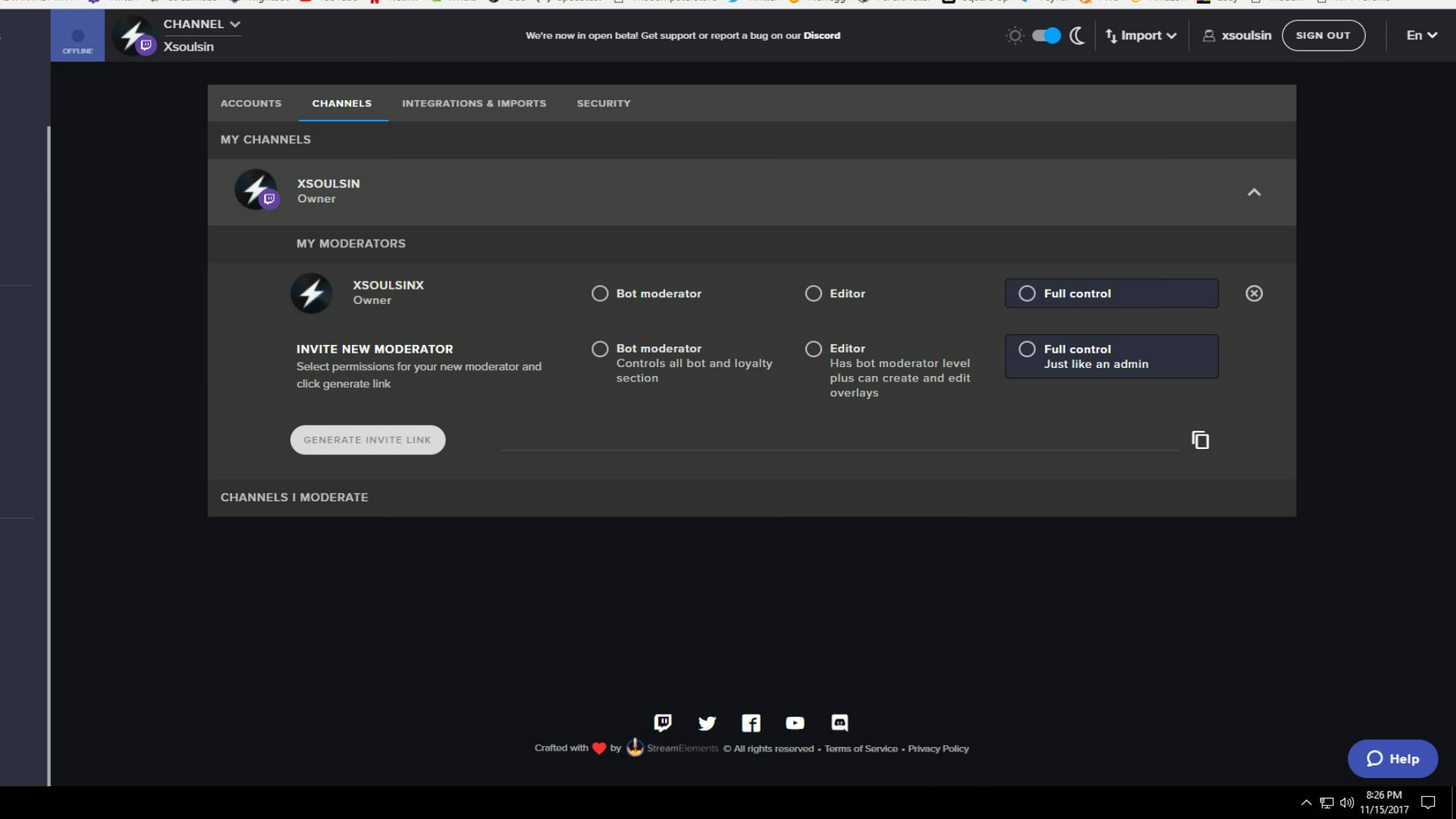
that's where you can add others to your dashboard
is that your new name?
nvm I got it
pearl urchin
k
misty wagon
 woven nacelle
Trying to figure out how to upload a photo onto the overlay im trying to upload but its not .... xD
 junior pine
Is there currently a way to do specific variation alerts for resubs only?
 keen aurora
So, I managed to fix my issue. I deleted the scene/image thing (The browsersource thing where you put the link) and jsut made a brand new one
And it worked with the test, and worked when I resent the follower notification
So I dunno if it'll work on live, but it might've worked
¯_(ツ)_/¯
clever mango
@woven nacelle which browser are you trying to upload with?
@junior pine not at this time
stark crater
i have broken my the text scroll and can't work it out to get it back
pearl urchin
thanks for trying help Terra I see if I can get Amd somehow
clever mango
is it just a regular text layer or a widget? @stark crater
@pearl urchin no problem
pearl urchin
Not sure how to get with them but I will try
stark crater
tip widget
clever mango
did you try whispering them on twitch? @pearl urchin
stark crater
found it
clever mango
 bleak sinew
Hi, I've been having issues with the StreamElements Loyalty system - it seems to have lost track of past points almost completely. I'd love some help
pearl urchin
I am trying that Terra
clever mango
@bleak sinew what do you mean by "lost track of past points almost completely?"
the leaderboards are empty?
bleak sinew
@autumn granite By "lost track" I mean that it's forgotten a lot of points on the "All Time" list. All Time shows almost exactly the same points as Recent, which is weird. A bunch of users who had a ton of points have very very few because they haven't been around as much lately. They don't have their prior points on the All Time list, merely the same amount as in Recent.
They seem to both be a reflection of Recent, without the old points people have earned which should show up for All Time
pearl urchin
@clever mango I am wanting on them to reply back when ever they get to it. I keep in mind to not do that again
clever mango
All-time points are earned by watching the stream and earning follow, host, tip, subscribe, cheer bonuses (if enabled). Thus, points on the all-time board cannot decrease. The curent leaderboard on the other hand is the real-time points for each user and is affecting by gambling, betting on contests, entering giveaways, buying thing in the stream store, etc. so it will rise and fall. It's not unusual for a user to have more or the same number of points on all-time as current if they have spent/lost points.
sounds good @pearl urchin
pearl urchin
thanks for trying to help
 unborn obsidian
is it possible to redo the stream elements alert box back into a super theme overlay?
clever mango
It was deleted from the theme?
unborn obsidian
i had removed it fromt he them because i merged my streamlabs alerts but now i want to make all new stuff and use the streamelements alerts
pearl urchin
Terra how many points did I have so when they get back I can let them know
clever mango
Right now the alertbox can't be added back to the same overlay once deleted. Have you customized a lot within the overlay(s)?
unborn obsidian
i moved some stuff around but i should be able to jsut deal with redoing it and tweaking the alerts from there
pine hemlock
445 @pearl urchin
pearl urchin
thank you 😃
clever mango
@unborn obsidian that would be faster than the workaround solution that I could offer if you had put a lot of work into it
bleak sinew
@clever mango So, All-Time is basically a total of everything they've ever earned, and Current is the same but minus what they've spent/gambled, so they might look similar? That does make sense, but I'm still confused because people have (slightly) more points on Current compared to All Time. One user has 8440 Current and 7500 All Time. I've never had any way to spend or gamble points either. That's odd but maybe it's functioning properly.
However it still seems that StreamElements did a Reset on the points sometime, there's a user for example who had several thousand and watched and chatted every day for weeks. They now have about 1500 on All Time, and passed up by people who watched a couple times in the past week. So only the most recent participants have notable points now. I've never used the Reset function myself, so it must have occurred another way.
One last oddity is that I have several users ignored on the list (such as the Faegwent bot) - when I added them to Ignore in the beginning, I removed their points. But now, they're still on the Ignore list but somehow have earned points and are higher on the list. The function should prevent them from gaining points.
Sorry for talking too much but I really love the Loyalty system, it does everything I want, so I want to figure out these things so I can keep using it
 steep cradle
Hello quick question how to I reset/setup a new overlay size after initial configuration?
pine hemlock
Resolution? https://www.cuda.live/s/vrfgkAd9.gif
 steep cradle
yea found it
thx the faster I asked the fast it would show up
typical but thx loads 😃
clever mango
@bleak sinew did you ever import points from another system?
when editing a user's points only the current board is edited. When you removed the points from faegwent, it zeroed them on the current board. Then you set them to ignore so they haven't gained any on current (still at 0) but they have the points on the all-time leaderboard from before they were set to ignore (615)
That all-time number should not rise from 615 because they can't earn by viewing
pine hemlock
The only thing I could think of a user having more points on current than alltime would be imported
but idk
I don't really use the points system enough to know the answer to this
steep cradle
Another question: After resizing the resolution on the overlays it does not shrink to size. Do I have to do any setting update or the themes are lock to size?
thx
pine hemlock
Are you talking about on obs
If so you need to change the resolution on the browser source to match what you changed the overlay on the website to
steep cradle
no on the site no 3rdparty app atm just on the site if I do preview after its cut in half
pine hemlock
You have to re-organize things after you change the size after the overlay is already created
steep cradle
the ones on the gallery are premade sizes right?
pine hemlock
Themes are 1080p by default yes
steep cradle
that would be why
pine hemlock
If you stream at 720p but your monitor is 1080p you dont need to downsize the overlay btw
pine hemlock
Yeah thats because of the left bar.
Top right corner theres a fit to screen button that will show you all of it
 pine hemlock
sharex
steep cradle
have not use that for ages
pine hemlock
its a great app
bleak sinew
@clever mango This is the first Loyalty system I've used, so no importing.
Right, that makes sense with the Ignore function. Seems to be working fine, Current doesn't show any of the ignored users.
Still not sure why it seems to have reset at some point, there are users for sure who are missing the points they used to have. I guess it will remain a mystery. Also odd that most users seems to have a small amount of extra points on Current compared to All Time, even though I have no ways for them to earn points other than the regular ones.
I guess I'll keep using StreamElements for Loyalty, and cross my fingers that whatever happened to reset it won't occur again
clever mango
Were points ever awarded to anyone with !addpoints? Do you have any bonuses set up in loyalty settings?
There's no logs for points so if something did happen in the past it would be very difficult to track down
 fathom yacht
anyone else having issues with raid alerts?
pine hemlock
Define issue
bleak sinew
@clever mango I do have bonuses, just the stuff in the Settings, like Follow/Cheer bonuses. I assumed those were included in All Time as well, but maybe All Time tracks a smaller criteria?
I don't believe I ever awarded points myself, no.
Thanks for your help anyways! Cleared a couple things up at least
fathom yacht
@pine hemlock I put an alert gif and music in (.ogg format) and nothing NOTHING comes up in the streamelements page when I emulate the event
pine hemlock
Is it an old alert box prior to us adding the raid feature? If so, add a new alert box and un check all the alerts except raid and it will work
fathom yacht
Weird. I'll try it...
pine hemlock
There's an issue with alert boxes that existed before the feature was added.
And to save you the hassle of redoing everything through easiest solution is what I said above
fathom yacht
IT WORKED. Thanks very much!!
 inner trail
any idea why when i get hosted on twitch my alert bot settins list the number of viewers that someone host as "viewers" and not the number?
pine hemlock
You might be missing a bracket for the variable in the message.
inner trail
{name} is now hosting with {count} viewers!
pine hemlock
Oh
Hm
Do you have activity feed or ground control open? That's how we get host data
inner trail
yes i do have the pop out open
i also do have ground control but that is not currently open
pine hemlock
Should still work. Does the activity feed show the number?
 mossy dew
It appears my activities list is not updating? I had two hosts tonight. My overlay didn't react, and my activity list doesn't show it. hi @inner trail 😉
inner trail
yes the feeds always show the right number
pine hemlock
Did you have your activity feed open when the hosts occured @mossy dew
@inner trail can you try replaying the event from the activity feed and seeing if the number shows on your alert? 🤔
mossy dew
correction: i got part of expected reation out of overlay. The event list updated, nothing happened in the alertbox. And yes, I had the activity page open.
inner trail
just replayed the event from the list and it still just said viewers
pine hemlock
Was it a raid or a host @mossy dew .sounds like maybe something related to hosts is messed up on our end though
mossy dew
host. When I was browsing twitch to see who to host, 2 people I followed were hosting me.
pine hemlock
@inner trail I'll mention it to the devs. I'm not sure why the count variable isn't behaving. The only other thing you could try is logging out and back in to the SE site but I'm not sure if it will do anything.
But whenever the devs wake up ill bring it to their attention
@mossy dew the event list on your overlay updated but no alert from the alert box?
If so, I'm betting there's something messed up with host api either on our own end or twitch, which the devs can look at tomorrow
mossy dew
ok, thanks!
inner trail
@pine hemlock tried logging out and back in, still no go
stark crater
my follower goal shows 14 when twitch syas 31?
misty wagon
https://streamelements.com/dashboard/session Go here to edit the data. There might be a discrepancy in the measuring dates so the two numbers don't correlate.
stark crater
ok, thanks
 obsidian sentinel
@misty wagon do you have information on how to resize the overlays for obs? example: PUBG Bullet Rain animated game is only showing the top left box of "social stuff" and the rest isn't appearing anywhere
misty wagon
Keep it at 1080 and resize it in OBS with CTRL+F
Make sure your browser source is 1920x1080
stark crater
how does the sellout work?
misty wagon
When you are fully onboarded to StreamElements, tipping, overlays, bot, we can add you
misty wagon
Thanks! I'll make it happen 👍🏽
stark crater
cheers
junior pine
Does the host alert trigger off of autohosts that meet the # of viewer requirements or only /hosts ?
misty wagon
On any host but Activity Feed (https://streamelements.com/dashboard/activity) OR Ground Control app https://streamelements.com/groundcontrol must remain open during stream to pull host events from Twitch.
obsidian sentinel
well i got it to work finally, downside is the webcam i'm using is set for 16:9 and it's not fitting in the default overlay for it
misty wagon
I'm unsure how that works, the default in all themes is 16:9 and a bunch of them also provide 4:3
dense jackal
Most superthemes have both 4:3 and 16:9 webcam options although one is translucent @obsidian sentinel
obsidian sentinel
i'm using logitech hd pro c920, but it's not fitting to the default 16-9 "widget" is that normal?
is that a normal issue?*
misty wagon
I'm unaware of that issue but a couple experts will be online the coming hours and I hope they can answer your question.
obsidian sentinel
sounds good 😃
unborn obsidian
can we do test alerts or not yet?
dense jackal
@obsidian sentinel here is mine make sure your resolution is correct here as well
@unborn obsidian Do you mean testing donation follows subs etc?
unborn obsidian
yea
dense jackal
We've always been able to do that 😄 Bottom left of your overlay editor
to the right of save hover over the bell and choose the alert you want
dense jackal
np B)
unborn obsidian
how come raid alerts wont trigger?
dense jackal
We don't have a set alert sound image for that yet, and it is also a bit buggy atm because it's so new from twitch 😄
stuck hamlet
There was an issue when raid were released, you need to create a new alert box.
unborn obsidian
ok
raid alerts are that important right now... jsut set a alert and wanted to test
misty wagon
Right, the next shift is here. Goodnight 💤 
unborn obsidian
arent*
obsidian sentinel
@dense jackal i've tried to change the resolution before, but it just turns my webcam off 😦
dense jackal
🤔 make sure you change resolution to custom instead of device default? I've tried to change it with device defualt before and it jsut turns off
 magic mirage
Hey there. Having sone issues. I just got affiliated last night and I have no option for bonus loyalty points for subscribing.
magic mirage
That did it. Thank you.
obsidian sentinel
i matched everything you had setup, and it turned off still
i just had to do the correct math to get it to work again 😃
dense jackal
so it's working now?
obsidian sentinel
kinda, the webcam doesn't fully fit into the border, but that's alright
unborn obsidian
i know i ask alot of questions butttttttttt do i have to set every alert in the alert box for every scene i make or will it stay with the curent settigns until i change it?
obsidian sentinel
"not an employee" but make it personal to what you want to do for alerts
unborn obsidian
i know... i jsut want to know if i have to keep setting each alert when i make a new overlay
obsidian sentinel
if you attach files to your "dropbox" it'll be easy enough to recreate an overlay, from what little i've tested
dense jackal
We are working on a better wat to copy your alerts from one overlay to the next. Right now what you can do is in the overlay manager you can duplicate any overlay you have and edit from there.
@unborn obsidian
unborn obsidian
what if im using a super theme?
dense jackal
You have to remake the alertbox for now
but like I said, we are working on making it easier to reansfer alertbox's between overlays right now
unborn obsidian
sounds good 😄
 orchid zealot
Hi! Two things; I have everything running through Stream Elements, how can I participate in the sellout? Also, I set up my bot to give points to viewers who follow, host, tip, and sub yet it’s only giving out points for people who are in the chat for a length of time. Anything going on with that?
 vapid narwhal
Hello! I'm having trouble with my Follower Alerts in my Overlay. The alert sounds plays twice at almost the same time causing an echo. Any help is appreciated!
pine hemlock
@vapid narwhal Do you have the overlay manager open, and obs open with your overlay in it?
vapid narwhal
Yes.
pine hemlock
mute the overlay manager in the top right corner
unborn obsidian
are cheers alerts having the same problem?
i set the image and sound but its playing the default even after i saved it
pine hemlock
Variation settings @unborn obsidian
They need to be changed to the same sound or deleted if you dont want variations
unborn obsidian
can i jsut have it set the same image and sound for any amount?
or do i have to manually set them all?
pine hemlock
The only reason the variations are there for the cheers are for the different bit images for the specific bit amounts of 100-1k-5k-10k
you can remove them if you want all cheers to have your image/sound
I added you to sellout @orchid zealot - as for the points, can you double check your loyalty settings - because I know they've been working recently. I just tested my own follower bonus, and I know that the tip bonus is working correctly as well
unborn obsidian
thanks for the help cuda 😄
pine hemlock
If its not registering try going to https://streamelements.com/logout and logging back in, this refreshes your token between twitch and us and fixes small things like that
orchid zealot
Thank you for adding me! I’ve got different point values for each of them so I know viewers should be getting something. It was a few of my viewers who pointed it out to me that they weren’t getting points for hosts and follows. I had a viewer be my guinea pig and host me. The alert happened but when they checked the leaderboard - no points. I’ll try logging off and on tomorrow before stream and let you know if that worked.
pine hemlock
Okay. ty
obsidian sentinel
is it possible to get echo alert notifications because of multiple scenes using alerts? i have the editor muted, but i'm still hearing echos or multiple alerts going on
or when i do test tip, i'm hearing 2 different sound clips playing, i even cleared the sound and readded the sound i wanted to use
unborn obsidian
will the Resub alert show hjow many months or is there a line of code we have to put in it?
 zinc sleet
question, when i change the game status how do i switch the overlay to the other overlay i created for the game?
i thought you just change the game status on twitch
unborn obsidian
are you talking about using a specific overlay for a specific game?
unborn obsidian
make the scene for the game. then add the overlay and hotkey the scene when you change your game
zinc sleet
does it matter the url for the browser course is still the same?
unborn obsidian
it shouldnt be the same if they are different overlays
zinc sleet
i duplicated the overlay as opposed to creating from a blank
unborn obsidian
they dont have different urls?
zinc sleet
nope
that's why i thought you have to switch to the other overlay by changing the game status
oh wait
nvm
im stupid
it is different
the last 5 letter were the same
nvm
unborn obsidian
haha you did what i did for a while
i always looked at the last couple characters
nvrm i figured it out
 acoustic atlas
Hi guys. I sent an email to doron@streamelements.com a week ago, and I haven't gotten a reply. Is that email address still valid? I found it on the terms of use webpage of streamelements.
pine hemlock
What do you need help with? you could just message one of the staff here like @serene granite @acoustic atlas
 next spruce
anyway to get sub gifting show up on my alerts?
tight harness
Because it's new it likely sends something different through the API so something new will need to be made for these 😃 they only came out last night
 atomic hollow
we are working on it, will release asap
pine hemlock
soon™
steep cradle
Where can i fin the accepted term for text like i.e: {streamer}
*find
?
And hello again 😃
and also thank your for the support
😉
silk patrol
@steep cradle If you are on one of your overlays, when you click on a widget with a text message, you can see available variables for that message. https://i.imgur.com/Nk7YcSi.png, if you are messing with commands, there is a variable page here https://streamelements.com/dashboard/bot/commands/variables
 steep cradle
perfect thx
hmm it is not show has you mentioned
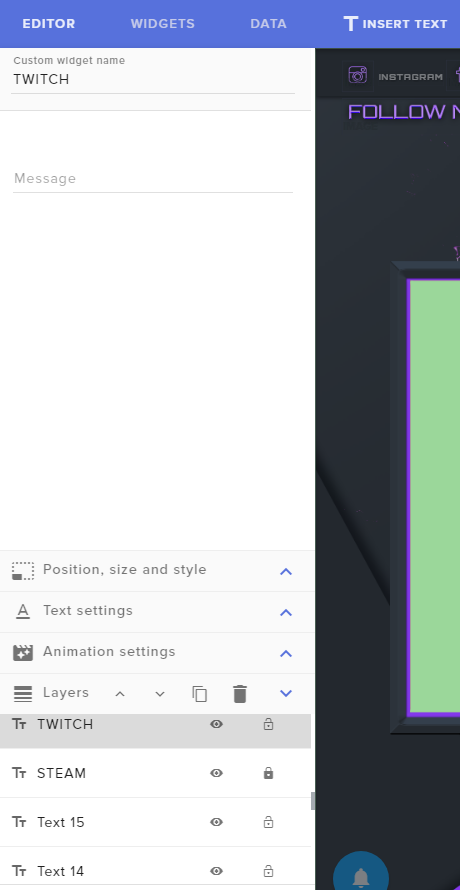
and on the vairables list {streamer} is not there
*variables
tight harness
That's because it's just a standard text label that one
There is no variables for that one, just type your name
Variables are for things that tend to change, your name won't change that often 😛
 scarlet pier
Hey guys, can anybody tell me how i can set a Multiplier for Subs? (Loyalty System)
tight harness
Do you see the slide bar on your Loyalty Settings page?
tight harness
Recently became an affiliate?
scarlet pier
3-4 months ago
tight harness
All Affiliates and Partners should see this on their Loyalty Settings page (https://streamelements.com/dashboard/loyalty), the only exception to that is usually when people recently become Affiliate and they haven't logged out and back into the site yet to refresh their authorization
Worth a try though, try logging out and back in, then see if you see that bar 😃
scarlet pier
yeah now it works 😄 ... but actually i was affi. before i moved to StreamElements 😄
ty bro
tight harness
No problem 😃 glad it worked
wary solar
any update on gifted subs not showing or if u know when they will update streamelements to catch those?
tight harness
ShadowBoxer said earlier today: "we are working on it, will release asap"
So it's coming, soon ™ 😃
With brand new features it takes a tiny little bit to make the changes, some people get a heads up, others have to adapt
scarlet pier
one more question. If i get Donations via Tipee can i add Points for Loyalty on SE or does it only work if my donation page is on SE ?
tight harness
Only works with your donation page on SE
scarlet pier
Okay, and cheers the same yeah?
tight harness
Cheers go through Twitch, i'm confused what you mean
scarlet pier
nvm xD got it
tight harness
silk patrol
@steep cradle {streamer} is an overlay only variable that can be used on basic text widgets and it will return your twitch username. It's very convinient, because if you change your name, it will be updated automatically, this way no need to update your overlay every 2 months 😃
 native lotus
heyGuys 1. Question : i cant edit custom commands on chrome? just Enable? .. on iphone it is possible.. whats wrong in here
wary solar
alright thanks for the reply 
silk patrol
@native lotus your screen resolution / window size might be too small. You can scroll to the right with either SHIFT+MOUSE WHEEL or using the scroll bat at the bottom of the list
native lotus
@silk patrol thank u it worked, but 1080p is to small? 😛 i have another question. from work your website works perfectly, but at home, where i am streaming at, its lags, and is loading every klick like 20 sec. ? i changed ips, doenstn help
silk patrol
@native lotus 1080p works fine, maybe it is because your window wasn't in fullscreen. For the lag issue, try disabling hardware acceleration in chrome
tight harness
It's in Settings > System
 pulsar whale
are the alert box raid emulations in place? I can't test mine, just wondering if it's cause i'm doing soemthing wrong.
tight harness
The previous alert box that you had in place won't allow for a raid to be emulated but a newly made alert box will, what we're suggesting to people is that they make a second alert box with just raids ticked and then simply untick it from the original alert box you made, then all alerts will work, it's something we're working on 😃
If you don't want 2 alert boxes it's possible to remove your original alert box and simply add the same settings, graphics and sounds to a new one which will have raids working as intended
Sorry for any inconvenience 
pulsar whale
all good, still working on the "Copy widget from another overlay" thing?
tight harness
Yes, it was officially stated that progress on this started yesterday
pulsar whale
Nice!! i'm excited
tight harness
Many people are 😄 it's very much needed!
I'm sure it'll make a lot of people happy 😃
pulsar whale
I'll leave raid alerts for now, not that i'll need them for a while :p
tight harness
I can't say I've experienced a raid yet myself either 😛
I guess I should give it time
pulsar whale
I should be careful, I didn't have sub alerts set up when I became affiliated, then someone subbed ... 😳
tight harness
Whoops  awkward
I hope you thanked them thoroughly 😄
That should make up for it 😃
pulsar whale
Yup, she then made me some emotes too.... can't thank her enough
 kind epoch
Hi guys, anyone having issues with Subscriber goal not updating?
tight harness
Are the people sharing their subs?
 delicate ibex
Do people earn loyalty points when the stream is offline by being on my channel too, or only when it is online?
old fern
I think it's only when you're online
clever mango
They only earn when online but can gamble and such while offline
strong dock
For shared subs does the alert gonoff when the shared sub is purchased or when the other person visits/ annoucnes?
tight harness
When people click Share for subs/resubs it will still trigger the alert but I don't believe there's anything yet for the gifting part
strong dock
Ok. I just wasn't sure
Dodnt know if it was similar to resubbing when u grt the obtain to share the resub
tight harness
I believe it's a different API call, so it'll require a little work 😃
lament blade
i changed twitch name, do i have now to relog to SE?
lament blade
kk done
tight harness
lament blade
it says Asteri now instead of asteri 
tight harness
Good 😛
tight harness
Yes 😛
tight harness
So you're bothered that people will wrongfully think you know how to use capital letters?
Capital letter for a name, everybody knows this 😃
tight harness
I think the opposite, agree to disagree
 upper steeple
how come sub gifting doesn't set off an alert?
 serene granite
we're on it, hopefully we'll support it very soon.
upper steeple
okay
tight harness
It's a different API call, so it'll require a little work 😃 but as hectic says they're on it 😃
upper steeple
it doesn't even show in the activity feed either?
silk patrol
@LordFluffyButt#4737 Well it was released 18 hours ago, our devs are the best, but still....
tight harness
kind epoch
@tight harness No, the subs are individuals
tight harness
No, I'm asking if they clicked on Share
kind epoch
I don't believe they did
tight harness
When they click on Share that's when we find out they subbed, if they don't click on Share then we don't find out
kind epoch
Normal way of subscribing to a twitch channel
tight harness
That's the root of this problem, ask them to click on Share
Okay, I think you're getting confused with gifting subs and sharing
Share is just the button at the top of a twitch chat which has always been there which sends a message in the chat saying they've subbed
If they don't Share then that message doesn't appear and therefore we don't find out about it
tight harness
Yes, that's it 😃
kind epoch
Roger that
 marsh sinew
awesome i was so confused yesterday. alert went off but nothing popped up and then newest sub didnt update
clever mango
tight harness
It's in the works 😃
clever mango
that share button sends the subscription info to streamelements
upper steeple
the share button is only for resubs not gifted subs
clever mango
yes, twitch prime subs (new and resub) that have sharing enabled in their twitch prime settings and paid resubs need to manually share with the button above the chat
new paid subs and gifted subs are automatically shared (The devs are working on receiving gifted subs information from twitch)
 steady onyx
is their a way for the follow goal not to count people unfollowing and re following?
clever mango
what channel?
 wind hamlet
 weary mist
I was able to make a contest on my own, what is specifically wrong that you are experiencing
 weary mist
so the broadcaster needs to pick the winner for that contest before you can move to the next one
clever mango
a winning option needs to be selected
clever mango
try both options?
wind hamlet
sec
clever mango
@steady onyx all of the goal widgets work on a counter so they just increase when the specific event happens. The same person shouldn't be able to trigger multiple follows during a single session. They can however unfollow/follow each stream. Nothing can be done about that at this time.
If you'd like an accurate total follower count, use the "Total Followers" widget
the total followers widget can be set up to look like the follower goal
wind hamlet
ty
clever mango
 soft ice
hey i am trying to make my donation goal bar bigger but its so small you cant even read what it says on the stream
tight harness
Have you tried changing the settings for it yet?
clever mango
The bar size changes with the inner text size
soft ice
thanks terra XD
also is there a way to make it less blurry?
forget it. resize fixed all issues
tight harness
Yep
 coarse heath
Random praise: SE ppl? I LOVE SE! I hadn’t streamed in a long time from my cosplay room and went back in yesterday and BAM! One simple Add browser source and all was ready to go with your awesome layouts... it even updated my new twitch url/name automatically! I love you guys. Big hugs
tight harness
aww thank you yvonnalynn 😄
clever mango

coarse heath
THANK YOU!!! I recall yesterday thinking, “oh god! I’ll need to take a couple hours to reload images , layouts etc because I had only been streaming games and omg! I was so tickled pink it was so easy. I tell everyone about you guys
Oh and the amazeballs support - instant discord support instead of weeks on email or twitter with others. Just love Love love nothing but love
tight harness
worthy harbor
@tight harness Sorry for the spam. I've had new Re-subs today with Twitch prime. No one of them appears on the screen when they re-sub. I had a regular re-sub, he did apear.
tight harness
Did you ask them to check that setting?
worthy harbor
Yep I did. They have that option enabled
Maybe it has something to do with my afiliation?
I don't have a partner. I'm afiliated
tight harness
I wouldn't have thought so
Otherwise we'd have lots of affiliates with this problem
worthy harbor
What would you check if you were having this issue ?
tight harness
That setting 😛
worthy harbor
It's not on my side and they are telling me that they have it enabled
Also by default it's enabled
Also I don't want to spam but i'm checking
And in another alert webpage this do work
It appears on the feed.
tight harness
You could try a new alert box?
tight harness
From the overlay manager
worthy harbor
Hmm. I guess that woudn't work since this doesn't appear on the feed
On my recent events I don't see the re-subs
tight harness
Ohh I thought you said it did
worthy harbor
No no. I do see it in another webpage, diferent from streamelements
So I guess somehow streamelements it's not getting this information
tight harness
Ahhh I see
Tried relogging I'm assuming?
As in log out of the site and back in
Which renews the authorisation between the site and Twitch
worthy harbor
I did sign out and sign in
tight harness
Alright, not that then 
weary mist
@worthy harbor with prime, after the resub, they have to refresh their page and announce it
worthy harbor
XD
weary mist
thats what I found
tight harness
I think they've told them that, that was one of the first things I suggested yesterday
Ongoing problem 😄
worthy harbor
I did make sure they have the option to share the re-sub to the feed
Wich is allowed by default
tight harness
And you told them to refresh their browser and then check if the Share button is there?
worthy harbor
No. I didn't.
stuck hamlet
Then we did not see it either.
The other site you see it on, im going to guess you mean StreamLabs
worthy harbor
I'm silly Legendary. I though they had to allow it on the twitch prime section
stuck hamlet
They have a special connection with Twitch, this makes it so they see all subs, unfortunately, we do not have this special connection.
weary mist
they have to do both, unfortunatly
clever mango

tight harness
It's no problem, you know now what to tell them 😃
stuck hamlet
If you don't see it in chat, we don't see it either.
worthy harbor
Gotcha
stuck hamlet
Bummer, but we are working around this. 😃
worthy harbor
Awsome work guys.
stuck hamlet
Hopefully they will like us one day
tight harness
worthy harbor
Thank you. See you around ^^
tight harness
No problem 😄
 brisk hamlet
Before i think about posting to idea board i need to know if this is possible with the tools SE already has. As a creative streamer i want viewers to be able to cheer "x" amount of bits and get to pick a theme for me to draw. The name of that theme goes into a random generator and when im ready to pick one i could click on the generator or use a command and it would pick from the names that i input. Is that doable? Lol
weary mist
that would be against Bits ToS
you can not promise something for bits
@brisk hamlet
https://www.twitch.tv/p/legal/bits-acceptable-use/, section B iii
tight harness
Rules 
clever mango
It wouldn't be an automated process but you could do something like this with paypal tips through SE. The themes names could be placed in the tip message and you could add them to a tool like https://wheeldecide.com to pick one on stream

Wheel Decide
Can't decide? Wheel Decide for you! Set your own custom choices and then spin the wheel to make the random decision (lunch, movie, anything!)
stuck hamlet

clever mango
You CAN add something like this wheel to the ideas board. Would be neat to see as an overlay widget
 weary mist
yes, tips would be a way to do it as well, or certain sub levels/tenure. but again, still manual
just bits have a VERY strict policy of what they can be used for
strong dock
Link me so I can up vote that shiz
tight harness
strong dock
When it's on the idea board. Haha
clever mango
yeaa between the 20-40% surcharge on bits and the ToS they don't make bits very appealing
and now you can buy bits in the mobile apps but the surcharge is even higher (thanks apple)
tight harness
That's true, they make them pretty difficult to sell
strong dock
I only get bits for call out of the bit headhancho
And they grt them free while they are watching
 uncut quarry
Is there a way to set an Alertbox to also show when someone is gifted a Subscription?
clever mango
Soon
weary mist
™
tight harness
It' s being worked on
clever mango
yea for people buying bits on mobile just go to https://twitch.amazon.com/bits in your mobile browser to buy. Buying in-app hits you with a surcharge on top of the normal surcharge
serene granite
google & apple want their 30% yo
clever mango
apple
when twitch began allowing bits to be purchased in the iOS app they made android app purchases (which didn't have the extra surcharge) also have it
 twin thorn
i can even buy bits and get charged on my phone bill now In the Netherlands with tmobile as mobile provider
weary mist
add that to my list of ❤ google
clever mango
android app had bit purchasing for a while because they didn't want to take a cut from twitch
twin thorn
yeah but Amazon didn't have payment options besides credit card
weary mist
payapl for bits is their next target
 patent merlin
Are we able to export points?
twin thorn
is that confirmed scalper ?
weary mist
of course, the API is open for everyone to pull their information, it is what the site uses to run @patent merlin
stuck hamlet
You can with this: https://github.com/Slikrick/streamelements-csv/releases/tag/0.2.0 @patent merlin
weary mist
@twin thorn the twitch blog themselves
clever mango
they're two money hungry giants
stuck hamlet
i saw dat
weary mist
twin thorn
nice thanks!
clever mango


 weary mist
lmao
clever mango
@patent merlin just a heads up because we're here to look out for streamers, if you move your points to an extension loyalty system they don't allow you to export. Your points then belong to them 😉
patent merlin
Well
I am actually a dev myself
Was looking to design a system kinda like revlo for rewards
Since StreamElements doesn't seem to have any support for that
tight harness
Have you seen our Stream Store?
clever mango
patent merlin
Or it's not very good and rounded anyway
clever mango
SE is always accepting ideas and looking to improve
Check out #297092117933719552 for the newest additions coming to the stream store
weary mist
what are you looking for in a rewards system @patent merlin
 edgy kindle
I believe they're talking about the pre-configured rewards such as the 2x gambling, mod for a day, etc stuff like that
clever mango
All is possible with time
weary mist
@patent merlin also, keep in mind that the store hasn't recieved as much love as we want it. SE has only been in open beta since around the beginning of the year. Change is always coming
Just like winter 
patent merlin
Yeah Stream Store is not comparable to Revlos
clever mango
We would like former revlo users to enjoy the SE store as much as they did revlo's. Feedback is always appreciated
weary mist
What specifically are you looking for, you are being very vague
patent merlin
Or just Hire me as a dev 
Anyways I'll have a look into it and come back with some suggestions, I'm sure you guys could dev it faster than me
Just the ability to easily add custom rewards
clever mango
https://strms.net/ideas is the ideas board
tight harness
Stream Perks is custom rewards 😃
patent merlin
I haven't actually compared the 2 in depth much, I haven't done much streaming as of late
tight harness
It's in there, possible you missed it
patent merlin
But feedback from my users is that it's just not anywhere near as equal or perhaps easy to use
clever mango
It's hard to improve when the feedback is "it's not good enough"