#helpdesk-twitch
1 messages · Page 148 of 1
 atomic hollow
 lament blade
I speak Flemish, belgian dutch. Some little differences from the Netherlands dutch..
It's like the English in the USA, and the English in the UK. They understand each other but it's still different.
 tight harness
True
lament blade
@tight harness So long for typing one word 😂
tight harness
I was reminded of something recently which said English - United Kingdom (Traditional), English - American (Simplified) 
lament blade
You have Candy and Sweets... Both are known in both countries but one is form the UK, the other from the USA.
tight harness
There's loads of them 😛
 lament blade
can i somehow block streamelements from kappagen??
 ripe laurel
The Kappagen is a widget that you can omit from overlays and there's a default command if you want to disable that too @lament blade .
lament blade
i want to like block a specific user
since when SE appears in Chat with an emote, it will be shown on the Kappagen Widget
but I only have it set for subs 
 dawn wasp
Just wondering - is anyone else getting host notifications from the bot in chat/in their activity feed? The last host according to my activity feed was 11 days ago but I know we've definitely been hosted since then :/
 serene granite
@dawn wasp do you stream with ground control running ?
dawn wasp
I don't think so? What's that?
serene granite
It's an app for PC/Mac, but it seems like you stream from mobile
dawn wasp
yeah I'm pretty much 99% mobile
serene granite
Do you have the activity feed open when you're streaming?
dawn wasp
no I don't have the screen real estate for it 😦 I pretty much just have the streaming app and chat
dawn wasp
it's weird because follows, cheers, etc still come through
and hosts used to
any ideas for workarounds in the meantime? Would it help if I kept the activity feed open or grabbed the app?
thanks for looking into it 😃
serene granite
hosts are very different in the way twitch notifies "us" about them, they don't come through the same way as other events do.
we recently had to make some changes due to security concerns, which is affecting mobile streamers. We're working on it though!
dawn wasp
ahh I see - what do non-mobile streamers do that makes it not affect them if you don't mind me asking?
serene granite
they have the dashboard/activityfeed/ground control running when they stream
BTW, raids are not affected by this security issue as they come in as a regular twitch alert, so we actively encourage people to use raids 😛
to us it really feels like raids are the better thought out version of hosts
dawn wasp
yeah but raids don't have a chat alert yet 😦
100% agree - I really like them
I might try to keep dashboard running on my pc at home in the meantime
but if there's any other way I can help please let me know! Thanks again for investigating 😃
 jolly swallow
have someone a great idea for the stream store? Im sitting here with no ideas and the tutorial video dont really help me..
serene granite
hmm, @misty wagon has a great list of the best stream stores on our site
 fiery lake
I've just noticed that my streaming PC was spiking like crazy because of Ground Control.
It doesn't have much CPU left but Ground Control was happily munching on 11-12% CPU at all times. If I bring up the activity feed in Firefox in a separate screen it doesn't even hit 1% CPU load for basically the same thing.
I have the feeling it doesn't like my CPU for some reason
I don't have this issue on my gaming PC.
 pine hemlock
@turbid reef ^
Did anything about gc get changed that one day?
Maybe @sacred edge would know
serene granite
letting them know
 devout wagon
what's up with the website being slow? it usually freezes
tight harness
Anywhere in particular?
devout wagon
mostly from dashboard, the overlay editor works fine though
like I click a button like charts and it freezes my browser and then finally loads
using chrome
tight harness
Chrome is good because the site is built to work best with Chrome, can't say I've experienced any freezing while just browsing the site though 🤔 weird
lament blade
Me neither, didn't had problems in Chrome
Try ctrl + shift + r
devout wagon
mmm not as extreme before just a lil laggy and wierd
 ripe copper
what am i supposed to do if i claimed an item from the store and nothing happens
tight harness
Was it a stream perk item?
ripe copper
whats that
tight harness
The opposite of a sound item
ripe copper
it was a mousepad
tight harness
Then it'll be a stream perk item, the streamer has to do them manually
tight harness
They see it when they look in their store redemptions history
And if they have the store redemptions widget in their overlay it can also trigger an alert if they have it set up to do that
ripe copper
nah there want any alert and there was 15k viewers
tight harness
That's possibly why there was no alert
ripe copper
so i just wait?
tight harness
Yeah, it's down to them to check their history
tight harness
That'll be so they know where to send the mousemat
 honest blaze
So Ground Control is having issue for me in regards to loading properly and also not adding song requests in the queue 😕
ripe copper
i didnt get asked for it when i redeemed tho xd
 sly bough
Hi everyone! I got a question. It might sounds silly but... If I choose the "only subscribers" option in a giveaway, and "give everyone their first ticker for free" also, it gives tickets only to subscribers, or everyone?
tight harness
They choose what you get asked when you redeem something, you need to discuss that with them @ripe copper
ripe copper
ok thanks
tight harness
@honest blaze This problem has just started for you today?
@sly bough I'd like to think that only subscribers could join even in that scenario
pine hemlock
Try uninstalling and reinstalling ground control. You might be stuck on an old version @ @honest blaze
sly bough
@tight harness ok, thx!
tight harness
No problem, probably best to run a test giveaway to confirm beforehand, can't say i've tested that particular scenario
honest blaze
Yeah I just installed it today
pine hemlock
I'll let someone else look into it. I'm at a car shop, can't try anything on my end
Lol
honest blaze
I'll download the newer one because I installed the older one and updated it in app
pine hemlock
Oh. Yeah give that a shot. If it doesn't help we can look into it further
honest blaze
Ok thanks
 bronze lichen
Servers have any problems? Im working for Overlays, and SE is down 😄
503 Service Unavailable
No server is available to handle this request.
devout wagon
is it stream element goes wonky day
atomic hollow
hey guys, please hard refresh Ctrl+Shift+R
 dapper sequoia
503 Service Unavailable
No server is available to handle this request.
bronze lichen
tried already, its not loading
serene granite
@dapper sequoia we're on it!
sly bough
me neither >_<'
bronze lichen
blank screen and at the right corner in blue "help"
dapper sequoia
yeah the same was with the tipping page, just a blank page 😦
devout wagon
back on the dashboard
dapper sequoia
can't relog
 trail condor
Yeah, I'm doing work, hitting save, getting the notification that save happened, and then it's not saving... I'm losing a lot of work right now. 😦
dapper sequoia
503 Service Unavailable
No server is available to handle this request.
bronze lichen
devout wagon
this website is making my browser freeze and I don't know why
bronze lichen
Slaxer, deactivate hardware acceleration
 stuck hamlet

 ebon forum
works fine in germany, who has a VPN - try that before the fix is online
devout wagon
wait what
serene granite
@dapper sequoia that answer wasn't for you.
dapper sequoia
it doesn't matter dude
devout wagon
where's that option @bronze lichen
dapper sequoia
Currently looking for a solution for my channel and as I see...
it will not be yours :/
stuck hamlet
@dapper sequoia  Im not quite sure what you mean, the answer wasnt directed towards you, the issue you're having is being resolved right now.
lament blade
I can't put songrequest
bronze lichen
@devout wagon youre welcome 😄
 unique ore
@lament blade might need to log out and back in to your dashboard
 fast topaz
I remember seeing a thing to download for something and i didnt downlaod it at the time just wondering if it has anything to do with things i can do stuff for song requests?
i can't find the download link anyway
fast topaz
yes thanks 😄
tight harness
No problem 😃
fast topaz
no idea where to find that link on the site though XD
tight harness
Activity Feed page
fast topaz
oooh okie thanks
tight harness
And then on the right there's a graphic that links to it
fast topaz
okie good to know incase i need to reinstall ^_^
tight harness
Indeed 😄
 dense glen
how do i go about making my bit cup smaller? every time i reduce the size of the frame area it doesn't reduce the size of the cup, but it gets chopped off instead.
tight harness
There's a setting on the left for Cup Scale I believe
I mean I know there's a setting, I just believe it's called Cup Scale 😄
tight harness
You see the gear/cog next to Change cup? https://gyazo.com/081382d341c1abbb6f2a259357a76a3c

Click on that, it's in there
dense glen
doing that now
tight harness
Awesome 👍
dense glen
ah ha
got it. thank you. i had to reduce the font scale of my browser to see it, which is why i couldn't see it in the first place. 👍
tight harness
Ahh I see, no problem 😃
 quick shard
tight harness
quick shard
tight harness
😄
 thick path
So lately my host alerts havent been working on stream and idk why cause when I go to overlay editor everything seems to be working perfectly fine, anyone can help me with that ?
 echo hound
Is there Youtube/Youtube Gaming support?
tight harness
You need to have 1 of 2 things open, either your activity feed on the website or Ground Control (our desktop app), only for host alerts, everything else will work perfectly fine without it @thick path
@echo hound Not yet but it's coming
echo hound
When?
tight harness
I don't believe a public date has been given yet
thick path
So i have to have activity feed open in the background for my host alerts to go off ?
tight harness
Or the desktop app Ground Control yes
thick path
Ohh okay thanks for the help 😄
tight harness
No problem 😃
 graceful quarry
I'm having some trouble importing my csv from ankhbot into stream elements. I changed the format of the file to Name,Points and it's still saying "can't import"... Is there something else I need to do?
stuck hamlet
try this: https://filter.dj/CSVtoStreamElements.html @graceful quarry
 pseudo fog
@turbid reef is there a way for the bot to reply to a command with 2 messages?
or a way to break the message character cap?
or anyone here who knows what theyre doing 
 turbid reef
no, there is no easy way to do that @pseudo fog

 winged sundial
Good afternoon everybody. I have a sr question. Yesterday i put a bunch of URL's on the banned video list, when i just checked all those URL'S where gone. Is it still saved somewhere? How does it work?
graceful quarry
Is there a way to make the bot capable of using sub emotes?
tight harness
@graceful quarry If you're a Twitch partner you can request that Twitch do this for you, otherwise no
@charred oracle Have you checked that TTS is ticked and the TTS volume in the settings at the bottom left of the overlay manager when you click on the alert box?
@winged sundial All my links are still there 🤔 it's meant to keep them stored
winged sundial
All mine are gone
i just added some again the re clicked the page and they are also gone
Yup just checked again all gone
 charred oracle
@tight harness the volume is up and it is ticked its just cheers that wont TTS
 copper sapphire
Maybe I missed it but is there a way for a person to !tweet and have it automatically send out a tweet that they are watching my stream.
 weary mist
there isn't one built in, but you could create a custom command that could do that
copper sapphire
How so!
weary mist
if you look up on google, you can generate a link that posts a specific tweet, and people just need to click on it, and then click the tweet button. Its been a while since I looked it up, but I know its possible
copper sapphire
Awesome thank you I’ll look into it @weary mist
 dark nest
i was wondering if there was a font preview list anywhere
weary mist
@Minfilia#1460 fonts.google.com
dark nest
thanks!
tight harness
@winged sundial Strange 🤔
@winged sundial As long as you're clicking Save Settings at the top right I can't see why it'd do that
 hallow harbor
would it be better if i copied the overlays and put them into my stream as a image? and only run alerts from the website?
tight harness
@charred oracle I'm wondering if it's an issue with the variation settings, each variation has it's own text-to-speech settings, so that would mean that the TTS Settings you see at the bottom are just for the default alert
If you go to Variation Settings then click on the gear/cog for the different variations you can check the tts settings for each of the variations
lament blade
hey, i updated my twitch name, how can i edit it on streamelements though ?
tight harness

charred oracle
Ahhh I understand so does cheers not have TTS?
tight harness
@charred oracle It does, but it has 2 settings for it, the TTS Settings by Variation Settings is for the Default alert (1 bit alert), then you have Variation Settings which shows you your different variations of the cheer alert, if you go in there, then click on the gear/cog for the different variations then there's TTS settings within that menu as well
And it's those settings that change the TTS settings for your variations, which would explain why it looks right in the regular TTS Settings but why you're having problems
charred oracle
I see the variation settings now, I did not realize that was a thing, Thank you sooo much! This makes a lot more sense
I really appreciate your help @tight harness I fel like I never would have found that resolution on my own so quickly!
tight harness
No problem, you're more than welcome 😃
 livid ingot
I still cant add my custom effect for host raid yet
 clever mango
custom effect?
livid ingot
Got that in, but nothing works on the test
lament blade
Hey, idk wtf but somehow the streamelements.com/dashboard keeps freezing on me, common problem or nah? I use chromew
clever mango
If you're trying to set up a raid alert it needs to be done in an alertbox created after raids were added to the alertbox. Although the checkbox is there for all alertboxes, only the new alertboxes have the updated backend to support the raid alert.
clever mango
You can create an entirely new alertbox or just make an alertbox for only raid alerts
clever mango

@lament blade Head to your chrome settings > advanced settings and disable hardware acceleration. This should help.
lament blade
ok, trying it out now ^^
Thanks m8 seems like it worked! another guestion, am i supposed to add the overlay source as BrowserSource and then modify the resolution by my streams res, as i tried to fit it on screen and it f*cked the whole overlay totally xD I'm using obs
clever mango
when you add the browser source set the resolution to 1920x1080
then you can fit it to your OBS canvas with CTRL + F
lament blade
okok testing the thingy now c:
clever mango
 lament blade
hmmh so, if i take overlay thats tagged under "variety" do i need to make multiple browser sources like that u have on that image?

if i understood this right 😄
seems so lol xD i'll contact u again if i have any problems, but thanks for the help this far..I was rly annoyed when the site freezed all the time, thought about giving SE up, but seems great via support and all the stuff it has +1
clever mango
yes, one browser source for each overlay
normally they each go in different scenes so you can switch between them
Follow the image I posted above for each one that is added
lament blade
yeah did so, but what about that END one? is it like just to keep up for a while after "ending" the stream? 😄 and then comes up the offline banner i'
ve uploaded to twitch
clever mango
it can be used for the last minute(s) of the stream before going offline
it's all optional and can be edited of course
lament blade
yeah thought so
atm editing ^^
hmmh got anyidea do i need to disable nightbot or smth to not get double alerts?
nbot + streamlabs perhaps
clever mango
yep, no need for nightbot
lament blade
ok cool, gotta check that streamlabs tho xd
clever mango
just delete any SL browser sources in OBS 
clever mango
and switch your tip panel link on your twitch to the streamelements tip page
lament blade
👍
hmmh where might it be in the twitch settings? feeling rly stupid atm coz slightly drunk and trying to set up the stream lol
or you ment the "donate button" link?
clever mango
go to your twitch channel and there is a button below stream to edit the panels
lament blade
yeah xD
Btw I noticed in my stream today that my backup Playlist didn't update to ground control
clever mango
if you change the playlist you'll need to restart the program
lament blade
I even restarted my pc like 4 times between
Since I changed it alrdy the day before
 ebon dust
any luck with my timers @pine hemlock
 soft canyon
Why if use the past contest to play another with the same options.. the contest start with the past votes/points?
lament blade
@clever mango hmmh how does this contest thing work, the widget specific...
clever mango
when a contest starts it will show on the overlay
lament blade
lets say i play T7(tekken) , do i need to start the contest every single match or?
clever mango
@soft canyon I haven't heard of this happening. Can you describe what you did so I can try to replicate the issue?
@lament blade That's all up to you. SE provides the tools and the streamers use them how they'd like.
lament blade
- how does it declare if i lose or win? i just click a button how the match ended?
clever mango
create a contest and test it out
lament blade
okok ^^
soft canyon
@clever mango
Well in contest i can "play" the past contest for use this options/title/award in points, but if i press the "history" button and play contest for this page the contest initialized have the same votes, of past contest.. its how to "continue the past contest" and not start new contest.
clever mango
OK, I see what you mean. I'll check with the devs about this
soft canyon
this and if edit contest past you need reload for view changes, not autoreload and cause bugs if you play the past contest if you not reload the page.
 thin atlas
Pls Help! I've set up my Super Theme Overlay, copied the URL and set it up in OBS but it only has half (left side) of the scene. Any ideas?
clever mango
@thin atlas when you add the browser source it needs to be added at the full resolution (1920x1080)
clever mango

 long garden
I have a very irritating problem to report. I used the test function on my donation alert overlay to make sure it was working properly and it reset my current donation goal to the amount of the test.
I now am unsure of what the amount was before and will have to go to some trouble to manually change it.
Not sure why that would happen.
tight harness
Did you try refreshing your overlay?
Emulated events are only temporary to show the effect of the events, they don't save
long garden
i went to the overlay, then data and the amount listed there was correct, so I manually updated there
why would the test have any effect on the current goal at all, though?
that seems very strange
tight harness
If you emulate a donation then it's going to show that test donation increasing your goal to demonstrate that the goal is working as intended, but as I explained that is not saved by any means, if you refresh the overlay it will return to the correct amount in your Widget Data page
long garden
i see
however, it didn't add it to the goal
it set it back to zero and added it to that
so the goal was at $244 and it set it to $10
I understand what you're saying, though- if it were to work as you described that would actually be very useful. That's quite a good idea.
tight harness
It is strange that it reset in that case
long garden
Right. Anyway, sorry if that came across as harsh. I'm mostly enjoying SE and I appreciate your quick feedback!
tight harness
No problem, I'll ask around to see if any of the other support staff have heard of this happening
clever mango
@long garden When the goal changes based on emulation, you can refresh the page or exit and re-enter the editor and it will return to the goal progress before testing
 quasi laurel
I'm new to the stream element familey and I wanting to know if has a built in alerts section for like when someone follows,subs ect? or do I need to use stream labs for that ?
 untold smelt
Song Requests aren't immediately updating in the Ground Control Desktop App
clever mango
they aren't showing up in the queue?
untold smelt
correct
clever mango
is the bot posting confirmations?
clever mango
go ahead and request some. I'm watching the stream
clever mango
Strange.. I'll see if I can replicate the issue
untold smelt
it might have been because queue was on the default playlist?
and had trouble wanting to switch over to the Song Request playlist?
dunno
I'm not a pro with APIs
clever mango
was the default playlist playing when the request was made?
untold smelt
yes
clever mango
Ok
It should still add to the queue and play when the song finishes. I'll do some testing
untold smelt
k
 gaunt zealot
Any way to export points to a .txt file?
 misty wagon
From where @gaunt zealot
clever mango
you can use this tool https://github.com/Slikrick/streamelements-csv
 clever mango
The team would like to but spotify doesn't make it easy to integrate and use their API
There's definitely a possibility for it. Depends more on Spotify allowing the integration
gaunt zealot
Gotcha
lament blade
Ok im here @misty wagon Im needing some help is there anyway i can join vc with you?
@misty wagon I have a couple questions about the commands for mods
gaunt zealot
I'm struggling over here to figure out how to run the .cmd I don't see one
from the tool https://github.com/Slikrick/streamelements-csv
clever mango
Top/Current or Alltime
First, edit the config.toml. Then run the .cmd for the leaderboard of your choice
gaunt zealot
I read the readme
I don't have those 2 files
I downloaded it thourhg a .zip
wasn't included
clever mango
did you download the windows version?
gaunt zealot
I don't see any options
 forest ocean
Hey, I'm trying to set up an Image Rotator but I'm having 2 weird issues;
- I can't upload any more images (i'm only at 11.7% used) I can drag/drop an image but the upload button doesn't do anything.
- When images that are uploaded rotate, they seem to flicker before the animation effect happens.
anyone run into these problems?
I removed an image I uploaded about 5 minutes ago and now I can't reupload it, same thing happens. I can drag/drop but can not click upload
clever mango
which browser are you using?
forest ocean
using microsoft edge atm
pine hemlock
Yeahhh...
forest ocean
I've been using edge for awhile and never had this issue
and i use chrome for my main account
pine hemlock
If we said chrome would let you upload correctly, would you believe us?
clever mango
The editor and uploader specifically run best in chromium browsers. Other browsers will run the rest of the site without issue but these two aspects are built/optimized with chromium in mind for compatibility with OBS's browser plugin which uses chromium.
pine hemlock
the flicker is also an edge thing.
Which wont matter when its in a browser source, since browser sources are chromiumm
but as far as previewing it in edge, it will flicker
 stark canopy
Is the bot site laggy?
pine hemlock
Are you using chrome? If so, turn off hardware acceleration
stark canopy
Where is this setting?
clever mango
chrome://settings/
scroll all the way down to Advanced
Then scroll all the way down to hardware acceleration
 keen aurora
So, how do i import my stuff from Streamlabs?
pine hemlock
after you import your overlay with your alertbox will be here: https://streamelements.com/dashboard/overlays and you can edit it further if you wish to add more widgets, etc.
keen aurora
How do i test it?
clever mango
There's a blue bell at the bottom of the editor
keen aurora
So, what do I do if the test works, but then when people actually follow it dosen't work? (Tat's the issue I had with Streamlas)
*That's
clever mango
You shouldn't have that issue here 😉
But if for some reason a follow alert doesn't play (unlikely if you set everything up correctly), the event will be in the activity feed and you can replay it
keen aurora
Bleh. I half wish I could jsut wipe everything form Nightbot, Streamlabs, stream elemtns, and do it all over
 mystic oar
Actually, I am having problems with testing raid alerts in the editor
keen aurora
Nowthat I know how stuff works
mystic oar
everything else is golden :/
clever mango
@mystic oar the raid alerts are new and require the new alertbox
mystic oar
ahh
pine hemlock
@mystic oar add a new alert box and un check all the other alerts besides raid alert if you don't want to set everything up again
mystic oar
also getting some freezes (using chrome beta per a tech support guy here's suggestion)
clever mango
@keen aurora you can start fresh right now with streamelements
@mystic oar
Go to chrome://settings/
scroll all the way down to Advanced
Then scroll all the way down to hardware acceleration and uncheck it
keen aurora
I've been using Stream Elements (I switched like, three months ago)
But I'm worried bout if stuff I had set up with Streamlabs/Night Bot if it'd affect Stream Elements for pop ups
(Such as like, a follower pop up going to Stream Labs and not Elements, and thus not showing up)
If that's a thing
clever mango
events are sent to all 3rd party services that you connect to your twitch so that's not an issue
you can remove all streamlabs browser sources that you've added to OBS
weary mist
you can always go in and remove connections from those others, that way you know they won't be interfering (if you are worried about it)
 keen aurora
Eh, I switched the streamlabs alert ox lnik with Elements
So I'll see if it works
(If i get anyone today, but who knows)
clever mango
Are you aware of the differences between the two in terms of the browser source sizing?
pine hemlock
If you aren't getting alerts, are you using obs classic?
lament blade
It does not help that, it keeps telling me that it is not possible to save the data.
keen aurora
Sizing? I didn't know I had to worry about sizing.. I didn't change any sizes (Just usaed the deafult sizing that OBS uses) and tested it, in which it showed up
I'm using OBS 20.1.1 if that matters
clever mango
@keen aurora streamelements overlays are 1920x1080 by default and need to be added to OBS at that resolution and then scaled to the canvas
pine hemlock
@lament blade you have to make sure all fields on that page have a number within the specified ranges on this screenshot
keen aurora
The text seems a bit small, am I able to adjust that?
clever mango
It's all adjustable in the alertbox settings
lament blade
before it worked without problems, now it turns out that you do not want to activate the songrequest
clever mango
remove the playlist link and try to save
keen aurora
Hmm.. I made the font bigger in the alertbox setting, yet on OBS it's still the same size. Or am I using the wrong thing?
clever mango
refresh the overlay in obs
pine hemlock
Did you hit save
mystic oar
advanced? where?
clever mango
@lament blade it could be the screenshot but your link appears to be missing https:// at the beginning of the link. That will make the setting save fail
lament blade
I have the solution to my problem n.n
I was telling them not to activate the songrequest, activate it and click on "save" and say it could not save ...
the solution that I just found: unlink the twitch account with streamselements, thanks for your inexperienced help n.n
mystic oar
umm bottom of which page, not seeing it
clever mango
Type chrome://settings/ in the browser
scroll all the way down to Advanced
Then scroll all the way down to hardware acceleration and uncheck it
lament blade
the solution can be even in the most basic and does not need any experience in programming
idiots
clever mango
@lament blade I assure you we are very experienced
pine hemlock
Have a nice day
mystic oar
it's already off
lament blade
I solved the problem without your help xD
mystic oar
I'm toying with an animated overlay if that matters
pine hemlock
You can try swapping back to regular chrome to see if it helps.
lament blade
thanks for nothing, bye bye
mystic oar
ivan, you are a computer god, you should apply to like commodor 64 or something
 graceful ocean
Could I get some help in the Voice Support room when someone gets a chance?
pine hemlock
Lol
mystic oar
well, that is what I have, chrome beta, per tech support here, with that disabled. All of that I checked in on
a lot of times, it freezes loading the overlay
clever mango
I'm using chrome beta with HA disabled and don't see issues except occasionally if loading the editor with animations and a hypecup. That will take time to load.
 hearty peak
hey asking for a friend, she has chat alerts for when people donate and stuff enabled
but the bot doesnt replace the {amount} or {user} with their stuff
any tips?
mystic oar
yea but it's not a matter of time, it freezes, I get a message. though yet it is animated with hypecup (why is that optimized so roughly)
clever mango
It's the first version of the editor and SE is still relatively new (open-beta). The next version of the editor will be much improved.
@graceful ocean I'll be there shortly
pine hemlock
I replied to lime on his stream
clever mango
graceful ocean
@clever mango ok thanks!
clever mango
 dapper sun
Is there a way to copy my alert settings from overlay to overlay?
pine hemlock
Currently no. We're looking at adding it in the future.
dapper sun
Cool that it's being looked into, at least. Can't wait for it be added!
 pine hemlock
I don't think we've changed anything yet. But then again I wasn't on most of the day. We did have a discussion about it early this morning though
ebon dust
Maybe hit me up with a DM if you figure it out? I want to use streamelements.. but I'm going to have to go with something else in the meantime
pine hemlock
Yeah. I sent you a dm
 heavy scarab
Cant seem to get the Raid alert to work, using the PUBG animated bullet theme
weary mist
@heavy scarab for the moment, you will need to add a new alert box, and disable all the other alerts but the raid alert.
heavy scarab
so two alert boxes, one for raid only ?
weary mist
yeah
heavy scarab
ok thank you 😃
So i guess my question now is how do i get the alert image to be the same as the others from the PUBG theme?
 faint oasis
the website isn't loading for me, not sure if it's me or on your end. Confirm?
 lapis anvil
Site isn't loading for me...as well as Ground Control.
 ancient iron
looks like its down for me too
faint oasis
Glad to know it's not just me.
lapis anvil
Or, the site will load, but no data available.
clever mango
Devs are on it. Sorry about the inconvenience.
lapis anvil
All good. ❤
faint oasis
No worries, Thanks for the fast response!
 trim cloud
yeah whole thing is down
ancient iron


 faint oasis
Things are working on stream, like the timers and games, but I can't get into the site and the like, it's still just a white page w/ nothing but the help button in the corner xD
 eager lynx
@faint oasis they jsut got it back up
faint oasis
refreshes again
ancient iron
nah still down here
faint oasis
aah, there it goes. lol. Refresh wasn't working, it's up now!
I had to go to the main page and go back in that way
lament blade
its still down here ;-;
ancient iron
^^
faint oasis
Went back down, and my song queue wouldn't load, just an fyi there.
It was empty and it was full of over 2 hrs of requests. ;.;
ancient iron
Ripped
think we just have to wait for official update
might be up and down for a while
misty wagon
Wait, I wasn't supposed to touch that???
ancient iron
Trip over the powercord ?
misty wagon
JK, we are rebooting and it's being worked at
clever mango
misty wagon
My pleasure to call people awake
lament blade
faint oasis
So, I def shouldn't uninstall Windows to fix, right? =P
misty wagon
Yes, upgrade that Win 3.11 to Windows 10, I heard good things about it.
clever mango

lament blade
lol now i keep getting 503 service unavailable
misty wagon
We upgraded you from a 502. You're welcome
lament blade
lol
faint oasis
Cheeky xD
lament blade
ay its starting to get back up
faint oasis
Slowly like an old man in the morning
lament blade
like me in the morning
 fringe moat
same issue here at me 😦
 next spruce
yeah my song request is down
fringe moat
page is down
 shy stirrup
sub alert not working no feed info, white page after relogin
faint oasis
'scuffed server' Kermit going crazy on that typewriter...
ancient iron
Loads but when i try add a Hype cup widget i see no Cup on the overlay editor
clever mango
Devs are working to repair the site right now and it will be back shortly. Apologies for the inconvenience.
faint oasis
nope, 503 error now lol
lament blade
ancient iron
@proud pumice jumped the Gun ??
 supple mantle
just joined the Discord to ask about that ^
 spring cosmos
Server must be down
faint oasis
Agreed Finn, I laughed at that
lament blade
lol
winged sundial
 thick eagle
🤣 I love these guys/girls
lament blade
lol it shows up for a second, teases me with the dashboard, then goes blank again
 zinc sleet
is there server issues? not able to log into the dashboard and no alerts or song requests are playing
lament blade
yo is the bot down?
clever mango
Apologies for the site downtime. The dev team is now repairing and upgrading the servers.
 cobalt estuary
is there an ETA?
lament blade
them site be scuffed by a 503
zinc sleet
ETA?


 edgy geyser
@na you asking WHAT an ETA is? estimated time of arrival, lingo for whats the timeframe for getting X done
misty wagon
Depends how fast @clever mango is running and chasing after the bot while carrying a broomstick.
faint oasis
THings are working in stream chat, like the bot is functioning with commands, just can't access the site itself to see things or access the song queue
zinc sleet
i know what the lingo is, but it is still commonly used to get an estimated time
faint oasis
Broomstick or hammer?
zinc sleet
thank you for the grammar lesson though @edgy geyser
misty wagon
He already used the hammer, why you think it's down! 
clever mango
The dev team is repairing the servers as we speak. It will be back up as soon as possible.
 daring bear
I thought the website was back up. Started getting everything setup with my new overlay. Clicked save. Got ripperinoed

 lol
faint oasis
lol
faint oasis
lol! Someone was playing Hammer time at the wrong time....
clever mango
An announcement will be posted here as soon as the site is back running at 100%
lament blade
Yeah sucks
 jolly roost
nice
 grizzled sail
guy in my stream is giving me bits but theyre not falling into the cup they just kind of appear.. is this bc SE is down?
jolly roost
yeah mine is giving me issues and obs went to crud after the fact
grizzled sail
and not all the alerts for bits show
misty wagon
Yes, it's being worked on as we speak.
 spark gulch
yeah the site is down, they are working on it
 analog kraken
thanks
 sharp nest
I'm in the middle of a stream and my Chrome browser after logging in is white with only the help bubble. My OBS is also not able to grab from the site. I was going to ask if it was a server wide issue or just me. But from the messages it seems there is something up.
jolly roost
ok sooooo lol. it took me forever to set up obs. I thought it was the feed and tried to redo it
now I cant get the capture game to work
jolly roost
yes they are working on it
 agile basin
😦
weary mist
@jolly roost some games don't like game capture. Try window, or desktop for a last resport
clever mango
Apologies for the site downtime. The dev team is now repairing and upgrading the servers.
jolly roost
it is warframe
i watched the Youtube videos. THe lady that put them on is awesome
ok coming up little by little
overlays are not up but dashboard came up a little
sharp nest
Thank you for letting me know. I'm sad that I refreshed my OBS cache. Because I just started getting a lot of traffic and my set up looks ugly without your pretty overlay
I also failed a mission in my game that was going well lol
daring bear
Actually since im in here i have a question not regarding the downing, Everytime i open StreamElements website in another tab while my Twitch Dashboard is open my browser lags and 80% of the time crashes
atomic hollow
Can you please try to disable hardware acceleration in your chrome settings? @daring bear
daring bear
Firefox
misty wagon
All back up, bot back in the cage, things work again.
jolly roost
is there anyone that knows OBS real well? lol
spark gulch
Suggestion to the team (and I fully support and appreciate you all) - When incidents happen you should post something about what and why of what happened, then what is being done to fix it going forward
 spring linden
I agree with @spark gulch, but great job on the quick turn around!
pine hemlock
@daring bear site is built to be most optimized with chrome. I'd recommend trying it at least if you're having problems. Sometimes chrome needs hardware acceleration off like shadow said though.
 proud pumice
@faint oasis @lapis anvil @ancient iron @trim cloud @lament blade @fringe moat @shy stirrup @winged sundial @supple mantle @spring cosmos @zinc sleet @lament blade @cobalt estuary @edgy geyser @daring bear @lament blade @jolly roost @grizzled sail @analog kraken @spark gulch @sharp nest @analog kraken @agile basin
Hey guys, deeply sorry for the loading issue, can we get you guys and girls a 20$ Steam giftcard to make up for the headache?
daring bear
?
lament blade
lol
daring bear
Im sorry i only accept bits.
shy stirrup
work for me!
cobalt estuary
sure lol
daring bear
But yeah on the down low.
lament blade
i only accept memes
spark gulch
@proud pumice thats not really needed honestly. Stuff happens, I fully understand (did devops at a game company before). Just communicaton helps since we are partners as far as I am concerned
daring bear
I once tried memeing, Havent recovered since. Been stuck in my wheelchair ever since. Dont meme.
proud pumice
thanks @spark gulch we know its not needed, we proud ourselves in legendary service, when we make a poo-poo we wanna make it up to you all
@daring bear our meme support crew can help you back on your feet
or your unicycle
 lament blade
i need your finest and dankest memes @proud pumice
daring bear
Honestly i just started using you guys about a month ago. Best stuff ive used.I mean theres streamelements. Then theres LSD. Id say Streamelements is 10/10 LSD is about a 8/10
proud pumice
the dankest memes are kept under high security
@daring bear can we quote you on that? SE > LSD?
daring bear
Sure.
proud pumice
defo one of the best quotes i've seen
waiting excitingly for demboots to write smth
 brisk hamlet
is anyone else having trouble with editing their commands? the option isnt there for me 😦
lol 😄
hearty peak
bot is having issues atm NOT
brisk hamlet
oh ok
shy stirrup
I switched from steamlabs months ago. StreamElements is the future 😉
proud pumice
@brisk hamlet scroll right?
brisk hamlet
oh yes i love streamelements
proud pumice
@hearty peak not anymore
daring bear
Honestly. Why have 50 tabs on obs when you can have it all neat and clean. @shy stirrup
shy stirrup
@daring bear exactly
proud pumice
@brisk hamlet guessed the resolution wasnt fitting properly xD
brisk hamlet
no lol but thank you
proud pumice
@shy stirrup ILY 😄
brisk hamlet
you guys are awesome
proud pumice
no you are!
daring bear
Actually I'm having a issue with scrolling. It won't even scroll for me I have to save then exit then hop back into it to esit.
clever mango
try holding shift and scrolling with mousewheel
also there is a scroll bar at the bottom of the commands
if the window width is lower than the page width
proud pumice

clever mango

proud pumice
feels strange using your own face emotes
hearty peak
listen @proud pumice never tell me im wrong again
proud pumice

daring bear
Will give 4$ to someone to give me 4.45$
pine hemlock
🤔
brisk hamlet
proud pumice
@hearty peak imma stream snipe you @ fortnite for a 1v1 fist fite
clever mango

proud pumice
yah ill frag his team first
pine hemlock
Nice healthy cat snack
jolly roost
@proud pumice hello
proud pumice
hai
pine hemlock
hearty peak
Kappa Kappa Kappa
jolly roost
can anyone tell me why OBS would all the sudden not game capture a game that it was
pine hemlock
because its obs
clever mango
game?
jolly roost
warframe
hearty peak
get ready @proud pumice
pine hemlock
Agilefoot add a new game capture, try alt tabbing from the game a few times after you add it
If that doesnt fix it, i got nothing
lament blade
Why aren't the words I banned showing up under "Banned Words"?
daring bear
Why is @proud pumice attempting to sell me drugs.
supple mantle
Wow, Stream Elements ❤
lament blade
Regarding Link Proection, when I whitelist the homepage of a website, will that domain be whitelisted or just that specific page?
pine hemlock
Should be domain
lament blade
@clever mango Is that ^ right?
clever mango
yep, https://twitch.tv/ will allow any twitch link for example
lament blade
Thanks
 wheat sable
I am tryng to import my alerts over from streamlabs and when i do they dont seem to work with streamelements
is there anyway i can fix that?
clever mango
What isn't working?
wheat sable
the alert itself.
it has certain css files and stuff that are built for streamlabs. is that goiong to be a problem for your site?
pine hemlock
We don't support css currently
wheat sable
oh ok so i cant use my alerts.
pine hemlock
Not with custom css, for the time being
wheat sable
ok will you be implementing custom css anytime soon?
pine hemlock
I dont have a specific eta or anything. It's something we do want to do though.
 old fern
I can't find the 'browser source' in OBS, even though I have the latest version 🤔 any tips?
clever mango
If you don't see browser source when adding a new source, you'll need to do a reinstall of OBS studio
old fern
I'll try that
pine hemlock
theres an option while installing to not install the browser source, you might have done that on accident
so yeah reinstall
clever mango
help tab?
jolly roost
lol
clever mango
You're in the support channel if you need help with StreamElements
jolly roost
right
had a question about them. was told they dont conflict. yet if I was to want to take off the wizebot how would someone go about doing so
clever mango
you can type /unmod wizebot in chat and then go to https://www.twitch.tv/settings/connections and remove the connection for wizebot
 feral stratus
Hey, I just started setting up my Stream Elements stuff and I was wondering if I could unlink/delete the data from StreamLabs. I'd rather it be fresh and I didn't think about it until after I did the sync.
clever mango
alertbox data, tips, or both?
feral stratus
Both, please and thank you. 😃
clever mango
Alertbox is easy. You just delete the imported alertbox overlay from My Overlays page
And you can create new overlays from there or the themes gallery
feral stratus
Cool cool. Thank ya.
clever mango
As for tips, you'll want to go to https://streamelements.com/dashboard/tipping/list
and delete the tips there
feral stratus
Thanks! I missed the option on the bottom of the screen.
It says alot that at 3 AM I can get help from you guys when I haven't even started using the service. Thanks so much. 😄
clever mango
You're very welcome
sharp nest
@proud pumice Aww. That's so nice of you. But I don't wanna take anything from SteamElements. I actually really like to use your stuff and I'd like to see you all keep your money and continue to grow~ -- So sweet of you to offer, though! edit: Very temping ofc, and it'd make a good story for my viewers since they saw it happen, right? But yeah ANYWAY. Thanks for being so helpful. Stream was a success either way. Have a good night!
 acoustic totem
hello again! Have another question about notifications. I downloaded the app so that the host notifications would activate but since my last host notification now my subs are not notfiying on the stream. Am I doing something wrong? Had a new sub tonight and it is not updating on the overlay.
clever mango
Did they share their subscription in chat? Twitch Prime sub?
acoustic totem
they did and it updated in the chat and on the LayerOne dashboard that I use, just not in stream elements.
clever mango
is the sub showing in your activity feed?
acoustic totem
not in stream elements.
clever mango
There was a server issue earlier this evening which may have something to do with this if the sub occurred during the outage
acoustic totem
it shows the resub and the host as of 3 hours ago and no notifications since.
I tried resetting the feed in the webpage too and it still is not showing.
oh, well the outage might be why, I just have been struggling with my notifications for over a week, so just figured it was something I was doing wrong.
clever mango
If you saw this notice in chat, then it is likely that the sub occurred during the service outage and SE missed the event. https://i.imgur.com/nJcTYRD.png

You can update the latest subscriber manually here https://streamelements.com/dashboard/session
so their name will show in latest subscriber overlay widgets
acoustic totem
thank you so much! I think that was absolutly what happened!
Thanks for the link too. I put their name in there.
 viscid forge
Awesome 😃
 zenith nova
Hello support
I have question when someones tips me and he puts youtube url then how i can show it on stream
atomic hollow
you need to have the song request page open
or use our desktop app - https://streamelements.com/groundcontrol
atomic hollow
looking
clever mango
you can display capture the youtube video in ground control
if using the browser then use window capture (requires browser hardware acceleration to be disabled)
atomic hollow
I dont see any song requested
atomic hollow
yeah I see it
atomic hollow
i dont see the youtube link in the donation
atomic hollow
but are you sure it was added to the donation?
atomic hollow
let me try and donate
atomic hollow
❤
lament blade
For what is quote thing actually intended to be used
tight harness
The quote command?
Basically if you or somebody in the chat says something worthy of being recorded for people to see in the future, something funny for example, you quote it
@lament blade Makes sense? 😃
lament blade
Hm can you deactivate it
tight harness
Sure, disable the quote command
lament blade
I'm thinking in turning my stream in right a or b, it only would exist in b
A = more professional
B = memes and trolls and fun etc
tight harness
https://streamelements.com/dashboard/bot/commands/default - scroll down to !quote add/remove and flick it off to be disabled
I've been streaming for 3 years and 2 months, I try to keep a healthy balance of both 😄
lament blade
Well I stream now 4 months or sth and reached 400 followers just yesterday
Affiliate is not worth to say tbh, I don't want to have many subs tbh
But I'll turn it off and decide later ty
lament blade
I usually figure out most stuff when I'm pc, but on phone or during stream I prefer asking 
tight harness
That's alright, we're full of answers, like an answer piñata
 tropic nova
how do u get the overlay to a lower rez i tried changing it but it just cuts 90% of the image
tight harness
You can leave it as 1080 on the site and then simply resize it in OBS, there's actually a shortcut in OBS (Ctrl + F) and it fits the source to your canvas
tropic nova
@tight harness thankyou 😃
tight harness
No problem 😃
 subtle chasm
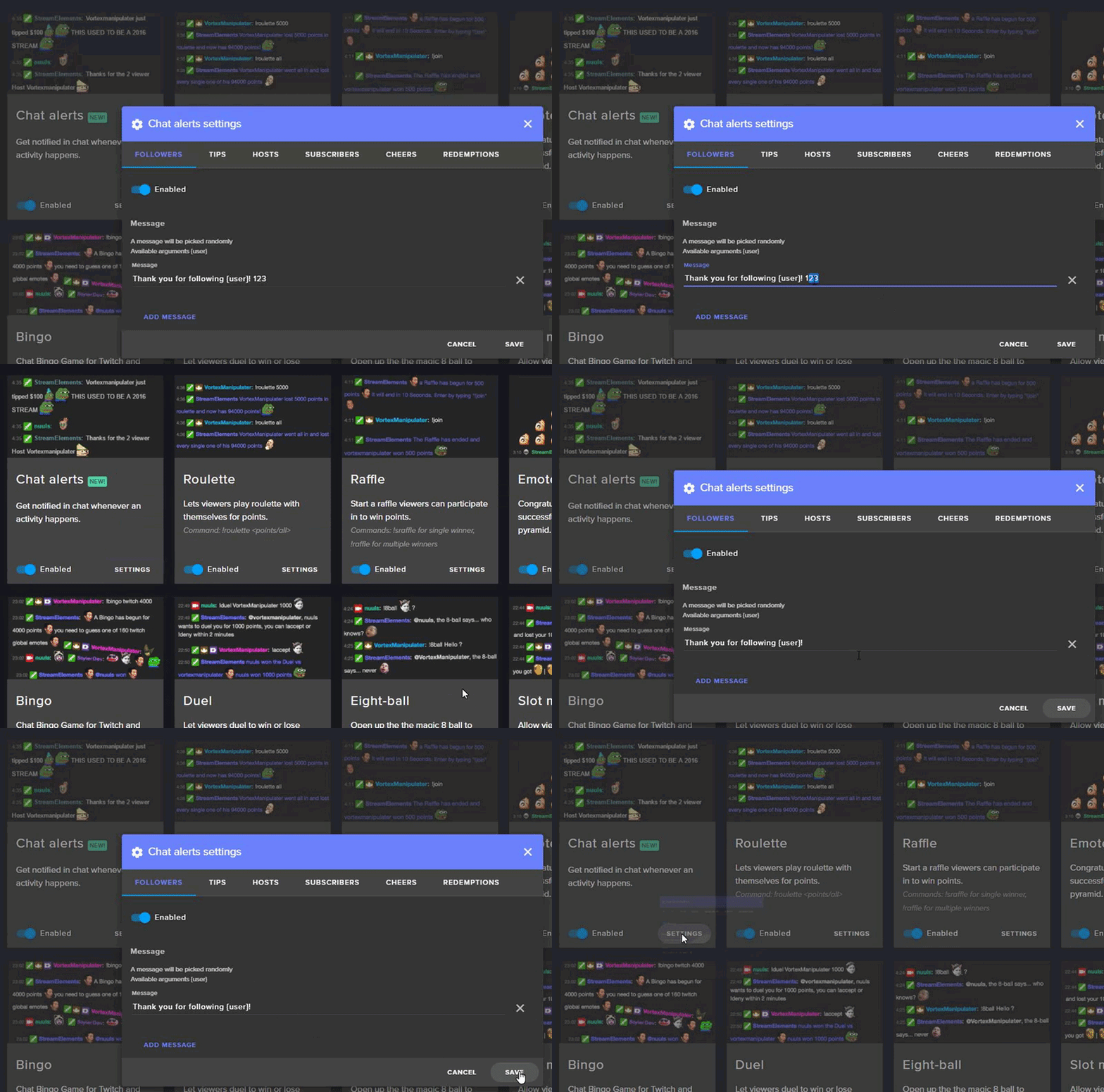
So when i try to enable chat notifications in the modules section it gives me an error, they stay enabled until i click out of the screen but when i return they are disabled again and anything custom input in has been erased. Help? A bug or something?
tight harness
I'll have a look, one sec 😃
Seems to be working here, are you clicking Save in the bottom right once you've made the changes?
@subtle chasm
subtle chasm
Yes i am @tight harness
 subtle chasm
Okay i will give that a shot this afternoon. Had to get to work. I willnlet you know if it works, thanks.
tight harness
Sounds good 😃
 dense reef
Hello beautiful SE community :)
I know that this service is in beta but is there any news about another payment options for viewers (e.g. QIWI)?
serene granite
we're in active development of additional payment methods
can't give an ETA, but it's sooner rather than later
btw, i'd love to hear your opinion of the russian localization of the dashboard @dense reef
(if you had a chance to check it out)
dense reef
Haven't had a chance to try it, but I will. Thank you for answer 
tight harness
That's very helpful, thank you 😃
atomic hollow
@zenith nova bug fixed
winged sundial
Good morning guys. Question: is there a way to copy and add existing widgets into one another? Or would i have to start over in a brand new overlay?
for example if i want to make a whole layout and add my existing widgets into it, is that possible?
lament blade
http://prntscr.com/h9wwyk so my overlay was saved correctly but when i went to edit it i saw everything moved down

its a pain in the butt and this is the 5th time in the span of 1 hour
tight harness
@winged sundial It's not available currently, but it has been mentioned before many times, it's more complex than it sounds but I know it's something we want to implement eventually
winged sundial
@tight harness Ok thank you so much 😃
tight harness
@lament blade What browser do you use?
lament blade
chrome
tight harness
Alright, that's good, that's what we recommend people use, just asked because other browsers cause a few problems
What resolution did you set?
lament blade
720p
tight harness
Try 1080p for me and see if that fixes it, it can always be resized to your canvas in OBS with Ctrl + F
 tight harness
Alright, well that's good 
lament blade
when i load the editor again it says page not reacting
so lets open it in a new tab first
ok it works now
but the cup position resets every time
tight harness
The cup is loaded fresh and empty if you reset the overlay at the moment, there are plans to have it reset with the previous contents (the tokens)
If that's what you mean
lament blade
i mean i used cup position to change the position and that position reset
tight harness
If you change the position and click Save it shouldn't reset the position
If you don't save then I can see why it'd reset to the original position
lament blade
i did save
tight harness
I'll test it now
Alright, I moved the position and saved, closed the overlay manager and reopened it, just going to see if it's in the new location or the old one
It's in the new location as intended, didn't reset
lament blade
ok
tight harness
Try Ctrl + Shift + R to refresh your cache
Because I can't replicate the problem at all 🤔
lament blade
i already fixed it myself, i refreshed cache like you said
tight harness
Awesome good to hear 😃
 idle flare
is there a way i can have streamelements yell out reminders every 15 mins or something
tight harness
Timers, it's on the bottom of the list on the left of the website
 rigid quarry
Not sure if its been asked, but is there a bug with host not popping up with alerts?
 silk patrol
@rigid quarry We changed the way hosts are detected. You have to have either the activity page opened (https://streamelements.com/dashboard/activity) or ground control launched (https://streamelements.com/groundcontrol)
rigid quarry
Meaning I need a browser source running while streaming? @silk patrol
Or a separate app?
silk patrol
@rigid quarry A browsersource is a source in OBS. i'm talking about the actual webpage opened in a browser or the windows app running on your computer
you can open the activity page on another pc, tablet or even a phone
rigid quarry
Oh, I was hoping it wasn't on the same page, because I like the low cpu usage of SE. Another open window would render that ineffective 😋
Thanks for the help ❤
 autumn hazel
Hallo i need some help
silk patrol
@autumn hazel Ask here and we'll do our best
silk patrol
What's your issue?
tight harness
Have you checked your Variation Settings?
It's possible you cleared just the default alert but you didn't clear the variations of the alert box
autumn hazel
how i do that?
silk patrol
@autumn hazel Make sure you check the "shutdown when not visible" checkbox in the properties of all your browsersources. Variations are inside each alert, at the bottom
tight harness
On the left in the white section of the overlay manager
Down at the bottom of that section it says Variation Settings
tight harness
If you're wanting to clear sounds then you'll want to clear the Variation sounds yes because otherwise if those variations trigger they'll still play the default sound set for the variations
autumn hazel
can someone come to the voice support its easy that way
tight harness
We're in the middle of a meeting right now, apologies
silk patrol
@autumn hazel it needs to be ticked, you can click on the "refresh cache" button below to make sure your overlay is up to date in OBS
autumn hazel
again i hear both of the sounds i put
and i cleard the sounds
cleared*
sry bad eng
tight harness
You saved the changes?
autumn hazel
yes
tight harness
Did you reset the cache like Alucard said? Also you need to make sure you don't have the sound on in your overlay manager and your OBS open at the same time, otherwise you'll hear the sound from both
silk patrol
@autumn hazel Do you have multiple scenes?
 cosmic elm
Is there a way of purchasing multiple of an item in the Stream Elements store?
tight harness
At once?
cosmic elm
At once
tight harness
No, the redeem commands are to be used individually
autumn hazel
ok i think i got it
cosmic elm
Since there is an 'Amount' column in redemptions
silk patrol
@autumn hazel then check all your browsersources in all your scenes to make sure the checbox is ticked in the properties
autumn hazel
@silk patrol @tight harness i fixed it ty very much
tight harness
That's individual redemptions, people can redeem it multiple times individually if that's what you meant
cosmic elm
The 'Amount' column is just always 1 all the way down
autumn hazel
@tight harness @silk patrol ❤
tight harness
The item quantity?
cosmic elm
Yes
tight harness
That's how many can be redeemed until it's sold out, if you set it as -1 it's infinite
cosmic elm
Sure, but if someone wants to buy 10 of one item for example, they have to buy 1 10 times
So it's 10 entries in the redemptions list, each with 1 amount
tight harness
Yeah, that's how it's meant to be
cosmic elm
Why though?
tight harness
Because when somebody redeems an item it triggers an alert, a chat message and a log of that redemption in the redemption history, that's how it was designed. I think what you're wanting is to be able to input an amount of an individual item you want to be able to redeem at once, which would then have to calculate the cost timed by the amount you want to purchase
It's probably possible, but it's not how it's designed
You can suggest it on the ideas board and see if anybody else wants it, https://strms.net/ideas
@cosmic elm ⤴
cosmic elm
Thanks, that's what I want, I will suggest it
tight harness
No problem 😃
 tranquil bramble
Are there any known issues with displaying top donator all time? When i check the tipping page and see top donator is see the correct person, but when i go to overlay editor and add the top tipper all time, it's showing the guy in 2nd place, any toughts?
subtle chasm
Sorry I am still getting the issue i have taken a screen shot. at this point i have gone in and changed all of the bit/donation minimums to 1 and saved them, but i still got the same error.
misty wagon
@tranquil bramble you can edit/search/add tips here https://streamelements.com/dashboard/tipping/list
@subtle chasm what module are you changing?
subtle chasm
all i am doing is enabling the chat alerts.
it always give this error and nothing saves.
even the default ones do not stay enabled.
misty wagon
Logout, log back in and try again pls
tranquil bramble
Did you even read what i wrote? lol
My 2nd place donator is showing as top donator. Any known issues with that?
misty wagon
I'm sorry, no I did not fully read it correctly.
tight harness
@subtle chasm I have a suggestion, set tips and cheers to 1 and then save
@tranquil bramble No known issues with that, if it was set to top monthly donator instead of all-time donator I could see it doing it
misty wagon
If that doesn't solve it, we need to have one of the bot admins look at it @tranquil bramble
tranquil bramble
Yep top Monthly donator seems to work, but all time isn't working.
Alrighty, no problem. Please note the issue to the developers and i'm happy
subtle chasm
@tight harness i did that. and @misty wagon logging out and back in did not work. i logged out of both twitch and stream elements and logged back in. still getting the same error.
misty wagon
I'll ask one of the admins to look at it @subtle chasm
untold smelt
Is there Loyalty Settings for subscribers?
i.e. get 1000 points for becoming a subscriber?
clever mango
Yep
subtle chasm
thank you @misty wagon
weary mist
@subtle chasm you could be one of the ones that joined during a breif period where the default values for the modules where not filled. You should be able to go in and set some of those, and that will make the modules work again
 proper token
hi guys, is possible to reset all time leaderboard?
tight harness
Do you see the red button that says Reset?
 fallen remnant
I need hulp ❤
misty wagon
🚑 or 🍔 ?
tight harness
@proper token Interesting, difficult to test without wiping my own leaderboard 🤔
proper token
@tight harness i know 😛
fallen remnant
Song request is v buggy like the default playlist only plays first song then ends and max length doesn't do anything and when a song cannot be played it just freezes queue
;-;
much sad
very cry
tight harness
@fallen remnant Did you hide the video?
tight harness
As in on the song request page, do you see the video for the music video playing or did you hide it?
fallen remnant
I see it
fallen remnant
my stream elements page has been running v slow lately idk why
tight harness
There was something where if the video was hidden the player wouldn't go to the next song
fallen remnant
believe it masy be to to with that
it goes to next song
but not when on default playlist
like when no one requests
fallen remnant
can you link your p[laylist and ill test it?
tight harness
Sure i'll DM it to you
fallen remnant
cheers
thick eagle
There was some info about host alerts not working but i've now lost it in the mix of messages. Any word on this?
weary mist
@thick eagle Host work, you just need to keep the activity feed or ground control open so we can detect them
thick eagle
Why do follows, etc. not require the same thing? One more thing to have open on my pc... ugh
weary mist
its the way twitch announces them. We have to have a weird connection with them to gather the hosts data. We had it in the overlay before, but that was insecure. Having it on the activity feed is better. You can even open it on your phone if you want, the feed just has to be open
misty wagon
You only need one browser tab open compared to the past where we had so many things open.
stuck hamlet
Not for raids. no.
weary mist
Raids are new, so not 100% sure if they need to have certain pages open. However, you might need to create a new alert box and just have it set up for raids, as the backend of the alertboxes are being difficult with updating
thick eagle
Alrighty.
weary mist
if you need me to do anything, just send me a DM. ❤ @thick eagle
thick eagle
Yeah, i'll probably message you with some questions in a few. Will be going through things later this afternoon. Thanks hun ❤
weary mist
👍
 wraith mulch
@clever mango Yes! I've had the same layout for months and it suddenly stopped working on stream. It works in the overlay manager in the browser though
clever mango
@wraith mulch what OBS version number do you see in the top left of the application?
 lament rampart


 misty wagon
I'm in your channel @lament rampart are your panels not loading or is this an error on my side?
Ur in, it's my side something going wrong
and thanks! 
tight harness
One of us, one of us
misty wagon
U are to desperate when the silence hit @tight harness It's getting scarier 
tight harness
Am I not allowed to celebrate now?
 ornate venture
how can i clean an old goal to starts a new one ?
clever mango
DATA tab in the editor, then Goals