#helpdesk-twitch
1 messages · Page 145 of 1
 weary mist
weary mist
weary mist
:+1:
 frigid ingot
Hey Team, any news on when streamelements will be working with Mixer platform?
I can see we already have the link button just not enabled
 edgy kindle
@frigid ingot From what I've heard Mixer will be after Youtube intergration
 lament blade
Hello. I am trying to edit/delete custom commands and timer commands in the streamelements web area not on my channel itself. I believe I was able to do so a while back but I am now unable to do so. I am only able to do so on default commands. I tried this in multipul browsers and I'm getting the same effect. Is this an intentional change? Is there anything I can do to remove commands inside the web version? Can I get rid of timer commands or will they stay in there forever and I can only disable them? Thiis seems very inefficient...
 silk patrol
@Josie_97#6402 your screen resolution might be to small. Try to scroll to the right using shift+mouse wheel or the small grey bar at the bottom of the command list
lament blade
You are right. i'm not on my regualr setup but on my boyfriends this week and his monitor is setup for a different resolution...so very very sorry. Thanks much. Jez feel like an idot. I knew this was wrong. Next time I'll make sure to check! I was able to do this before!! Thanks @silk patrol !!
silk patrol
No worries. Don't feel stupid, it can happen to the best 😃 ❤
lament blade
Yeah still feel like a dope!! haha have a great day!!
lament blade
are you allowed to use the SE Panels with Photoshop to edit?
 stuck hamlet
Euh, yes
lament blade
k great
 sonic kiln
So last night I tried turning on song requests, in the settings it would say that setting could not be saved and when going back to main sr page it would go back to disabled. Any help would be appreciated. Thank you.
silk patrol
@sonic kiln Have you tried today? It might have been a glitch since it seems to work right now on my end.
also which browser are you using?
 fallow lake
Hey yall! maybe im just overlooking it but if there a way to put in timed messages? Like if i wanted the bot to say something in the chat every so often
 swift parcel
left hand side all the way at the bottom "Timers"
fallow lake
yep over looked it haha thnx @swift parcel
 strong dock
U all ever figure out what happen last night via twitch chats merging or whatver?
sonic kiln
@silk patrol I haven't had a chance to check. I will after work. It was chrome, also
lament blade
Hi i was wondering why tips dosent show up on the stream or on the site
silk patrol
@lament blade you have to use our tipping page in order to see tips on your dashboard/overlay. Right now, your panel redirects viewers to your paypal page
go there, click on the "open my page" button in the lower right corner and copy the link from the new tab. then use that link in your panel
lament blade
so i should use https://streamelements.com/wiggen4lajf/tip
this insteed of the paypal link?
silk patrol
exactly
lament blade
okey thanks 😃
 drowsy basin
Wondering if someone could help me with my overlay
weary mist
ask away, and we will do our best
drowsy basin
So I have a image that comes down, I have to adjust line high to get the text in the correct place but I can't seem to get the secondry text to go closer to the primary due to not being able to do - line height
weary mist
is this an alert?
 weary mist
drowsy basin
weary mist
drowsy basin
that only makes it go down
weary mist
hmmm
drowsy basin
can't do minus line height
weary mist
mind if I do a quick test?
drowsy basin
go ahead
weary mist
hmm, that is something I am going to play with. I know you can put in a secondary alert box, and not have an image (just text), and then align it that way. Maybe try that, but have no "... has donated..." text, so it only shows the message? Then line it up
drowsy basin
alright I'll try the latter for now, could you let me know if you figure out a way to do it otherwise?
weary mist
👍
drowsy basin
Thanks buddy
 clever wharf
hello?
weary mist
@clever wharf Hello 😃 Ask your questions, and someone will answer them 😉
clever wharf
i want to know how to use the Green Flair on OBS
weary mist
@clever wharf use the URL when you launch the overlay, and paste that into OBS Browser Source. Make sure to change the width to 1920, height to 1080, and check the Shutdown when not visible box
you can watch a ton of videos here on how to set up https://www.youtube.com/streamelements/videos

YouTube
Official youtube channel for StreamElements tutorials https://StreamElements.com
clever wharf
o thx
 misty wagon
https://www.youtube.com/watch?v=jPfhUK7YYuY that one specifically 😄

Super Themes are stunning, professionally designed overlays you can use as it is or customize. Get Super Themes now: https://streamelements.com/dashboard/the...
 stark jewel
how can i see what has happened on my stream? like is ther a way to see who followed donated ect
 tight harness
Yes, click on Activity Feed on the left of the site
drowsy basin
trying to add a 4th alert box for cheers but when I edit it to cheers my 3rd alert box used for the dono message changes with it for some reason @weary mist
fixed
must of been a bug
weary mist
👍
 wraith sandal
how do you lower the volume in Song Request so it becomes mild background music versus MASSIVELY LOUD music? it's so loud even on the bottom bar that it becomes crazy difficult to do ANY level of audio whoring.
that's absolute bottom level for both youtube and SR
weary mist
you can turn it down in your volumn mixer
wraith sandal
like, desktop?
silk patrol
@wraith sandal song request page -> volume slider https://i.imgur.com/DzTs3ey.png
 wraith sandal
yes. that's all the way down to the bottom bar. and the desktop slider is not necessarily the point either. i want to level out my music so that I get more in game noise over the music. the music to complement the stream, not the otherway around.
youtube, bottom bar. volume slider in SR, bottom bar. desktop, normally high to audio whore
silk patrol
I just did a test and the volume slider works as intended. Try to refresh the cache of the page to see if it fix this issue. If it didn't maybe your requested song has a 3000% volume 😃
how to refresh cache : CTRL+F5 or CTRL+SHIFT+R
wraith sandal
i'll try a test with a couple other songs, but it was doing the same with at least 2 other songs
thumbs
volumes are all the way down but any higher and i'm in danger of blowing my headphones and /or eardrums
plus the cache refresh completed but no change
weary mist
@wraith sandal did you turn it down using this?
that is how I balance my audio for my stream
silk patrol
Issue found : Microsoft Edge. our website is optimized for Chrome
I tested the exact same song in my song request, and volume changes according to the slider position. no ear rape here
@wraith sandal
wraith sandal
<3
stark jewel
guys, is there any way to add a d-goal?
wraith sandal
the slider does kind of work for it as well buuuutttt
 clever mango
@stark jewel yes, add the tip goal widget to your overlay
wraith sandal
it could go to a 1 lol
and the ear rape still happens with chrome. HOWEVER the audio leveler works a bit better with the chrome
silk patrol
Microsoft Edge is like one of the worst browser out there. people should stay away from it if you ask me
there is clearly an issue on your side tho
wraith sandal
i just want to know where at this rate then lol
silk patrol
¯_(ツ)_/¯
strong dock
Is it any different in ground control?

 cinder lotus
is the bot not working properly right now?
 nimble owl
 tough horizon
betting in contests from chat doesn't seem to work but you can thru the web page
weary mist
@tough horizon the bot was very recently restarted, it could have been offline/restarting during that time. I recommend parting and joining the bot again
wraith sandal
@silk patrol pure ear fucked lol but i think i have mine handled now. it's not going to get any lower at this rate. ... my ears are ringing lol
i do thank you though! i'll be poking about
strong dock
Is it streaming that loud or just thru ur headphones that loud?
tough horizon
@weary mist well i just did that and it doesn't seem to have helped any. perhaps you can take a look at my chat and tell me if i have fucked up somewhere? 💙
weary mist
@tough horizon try it now
weary mist
@zenith nova can you be more detailed by what you mean? Saying they don't work could mean a dozen things
 zenith nova
now just black
zenith nova
lol worked
tough horizon
@weary mist works!  thank you
zenith nova
Thanks
weary mist
@tough horizon you had the bets default command turned off 😉
I turned it back on for you
 gray moth
what is the prefix to metion the user before the actual variable? is it a $ sign?
weary mist
yeah, so $(user) will either target the user you define when callling the command, or the person calling the command if user is invaild
zenith nova
I have another problem with contest i can t close the contest
if i preesss refund then comes another
gray moth
and how about amount (if we are talking about bits donations and other staff) i want to make a chat alerts
 regal thunder
can't get the bot to join my chat button not working... anything going on?
tough horizon
@weary mist  😏 smh thanks
weary mist
@gray moth for chat alerts, you can just go to the modules, and activate the chat alerts modules
@regal thunder give me a second, I will check on it
regal thunder
welp @weary mist i think it's running now http://prntscr.com/h7fauv
 weary mist

regal thunder
still no command is working
gray moth
$(user) supported the stream for $(amount) $(currency) thank you! is this good or it won`t give correct response?
weary mist
give me a second, it might be derping about with that kind of spam
@gray moth as long as you are using the chat alerts module, yes
regal thunder
ainght @weary mist let me know what's wrong when you can
gray moth
yep.. i was talking about it @weary mist
weary mist
ok, lol, im trying to catch up
 naive beacon
My commands have stopped too
I'm mirroring a channel I mod for to test them out and they just stopped working
weary mist
@gray moth for the modules, you do not need the $
@naive beacon if you check announcements, the bot was restarted very recently. It now has to rejoin ALL da channels. you can force it to part and rejoin to get to the top of the queue
naive beacon
Thanks I missed that
gray moth
what do i need then @weary mist ? it gives wrong answer.. maybe because of brackets {} or maybe wrong brackets [] ()
weary mist
@gray moth the example I am looking at uses {}
{user} just subscribed for {amount} months in a row PogChamp
curly
{user} just tipped {currency}{amount} PogChamp
gray moth
alright! thank you)
weary mist
@zenith nova I am not showing a contest currently running on your dashboard
regal thunder
now overlays not working Kappa
 pine hemlock
Right click your browser source, properties and scroll down and refresh cache
regal thunder
aight thanks @pine hemlock and @weary mist ❤
 thick zealot
do you guys have a fade in/ timer when certain things come out and in?
clever mango
At this time only the image rotator does this type of thing
thick zealot
can i add text with it?
weary mist
its image based, but that doesn't stop you from creating images with text on it
 soft canyon
Any form to if disable the bet command in bot, the overlay for contest not show the !bet <custom>?
weary mist
if you disable the bet command, then people won't be able to bet except through the site. Is that your intention?
@soft canyon
soft canyon
Yep, because the viewers spam so much the command in chat.. and dont see "pretty(?"
i prefer they use the web for this
weary mist
ok, then I would recommend adding that to the #💭︱feedback-and-ideas board
There is a link in the header
soft canyon
Ok, thanks.
weary mist
👍
 tacit pendant
uhm, is the site bugging atm?
tight harness
In what way?
tacit pendant
https://i.imgur.com/GbMJ6Jz.png this way
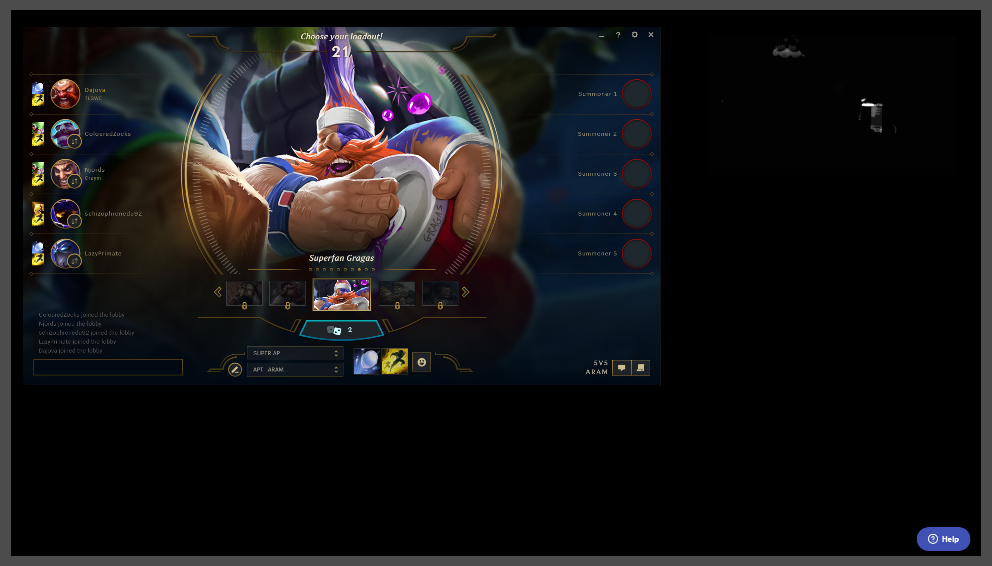
supposed to be a overlay there, now it just says "help"
hmm
the game overlay works, but not my client overlay
wierd
both are based on the lol legendary super theme
weary mist
double click on source, scroll down, click refresh cache
 jovial bronze
Hi, I created an overlay for item redemption and added the widget for item redemption. Though, when people redeem a sound effect perk it doesnt show up on OBS, only on the overlay editor. How can I fix this?
jovial bronze
if someone redeems a sound effect, where does it play?
tacit pendant
@weary mist fixed itself after a match
weary mist
@Precaution#4355 the sound will play through the store redemption widget, but it will not show an image
@tacit pendant 👍
jovial bronze
I see. So for it to work all I need to do is have the overlay link launched in a browser to capture audio.
weary mist
yessir 😃
jovial bronze
Thank you for the explanation.
 feral mist
can anyone help? im tring to change my sub gif but it wont change from default
sub alert gif*
weary mist
@feral mist check out the variations, there is one by default
feral mist
ah thats what i was missing. TYVM!
 novel furnace
Might be a silly question, but is there a way to edit the advanced themes? I love the Destiny 2 animated one, but I don't have an instagram or facebook account for streaming. I can hide the names, but not the icons for each social media platform. Is that possible to do and I'm just missing it?
clever mango
Individual icon layers can be hidden or deleted in the layers panel (bottom left)
 ripe herald
as terra said 😄
clever mango
If you can't click on something in the editor it's because it is below another layer. You can still select the layer from this panel though 😃
 lament widget
In the Overlay editor, is there a way to add an outline around the text?
 verbal arrow
Lately when I stream this Help button shows up on my overlay
weary mist
there is a shadow, but no outline as of yet
@verbal arrow double click on the source, scroll down, and click refresh cache
verbal arrow
Thank you @weary mist
lament widget
@weary mist Yeah, I saw the shadow but would prefer an outline :p
Testing out the Overlay editor to see if I like it
Also Im assuming I would add margins to the data fields (like follower) and align center to keep the text centered when the text updated?
weary mist
yea 😃
you could even create two alert boxes, and position the image in one corner, and have the text in the other. How ever you want it
lament widget
Andddd Im assuming theres no undo button? LOL
clever mango
Not at this time. Editor v2 will be in development soon and will be a massive improvement on the current version. Undo/redo is something that will be seriously considered in v2 along with other requested features from the ideas board linked in #💭︱feedback-and-ideas
novel furnace
I can't wait to get home and check this out. Thank you so much for the help. It's super appreciated 😃
weary mist
@novel furnace 👍 we will be here when you are ready
strong dock
@lament widget no undo. Save often. Back out and redo if needed. Can always copy an overlay and adjust the copied version too.
weary mist
good advise 
strong dock
@novel furnace I use the d2 red theme since release. I've modified it quite a bit. Feel free to take a look ;)
Ya I usually save after every adjustment.
Lol can watch my extralife set up stream and see the proof. Haha. Had to leave and reload a few times.
weary mist
haha
strong dock
Need to grt that all finished tonight.
novel furnace
I will look for sure, @strong dock - thanks!
novel furnace
Okay, so just looking at the theme in the editor right now, it seems the bottom section is on a layer entitled "Video 3". I can only seem to either turn that entire layer on or off, not just the social media icons. Is there a step I'm missing? Thank you 😃
weary mist
what are you trying to accoplish
novel furnace
I just want to remove the facebook and instagram icons.
I've figured how to remove the words.
weary mist
you can click on the icon, and hit delete to remove it if you want
or go into layers, and hit the hide button
novel furnace
So, I can't click on the icons, when I do, it highlights or selects the entire bottom part of the design.
And in the layers, it's "Video 3"... but that layer is the entire bottom portion of the design.
I just want to remove the icons, not anything else.
weary mist
ah
novel furnace
I hope I'm not totally missing something here and making you angry...
weary mist
that means that the layer that you are clicking on is above the one you want to delete
you can move them up
novel furnace
I've done tech support, I know how frustrating it can be 😃
weary mist
haha
novel furnace
It seems the entire bottom section is one movie... icons included.
strong dock
@novel furnace of uncan wait til later I can send u blank one...
Or maybe @ripe herald could swoop in and save the day 👀
novel furnace
Oh wow, really!? That would be very much appreciated 😃 Thank you, @strong dock
strong dock
Tbh inthink mine is static tho and not animated
novel furnace
So, I'm not crazy. You can't just remove them easily then, from this theme?
strong dock
I don't recall off hand
ripe herald
animated are as one part
static not bu not sure i have to check it
dont remember now
novel furnace
Okay, I feel a lot better 😄
strong dock
Ya same. U sent me kne but don't remember if it is animated or static
@novel furnace uncan always cover it with something else
Icon*
novel furnace
Very true... and I'll do some work either way to get it the way i want it.
Thanks for the help though - all of you. 😃
strong dock
I'm at work on mobile. But will check tonight if mine is static or animated
ripe herald
yeah just checked animated does not have option to remove it
strong dock
Was thinking it was static cause I changed it to save cpu
 valid pagoda
Redemptions don't seem to work for a user who changed their Twitch name.
 hallow harbor
What and how does "Regulars work"
Also i made this person mod but they dont have a sword in my chat
or do i gotta mod them through twitch?
pine hemlock
You have to mod someone in chat. People automatically get mod role on the dashboard if they have mod in chat as well
Regulars means they arent restricted by chat bot restrictions, like anti-linking etc
hallow harbor
ah good i need that
because stream elements instantly times ppl out
ok someones bot says "Store is now finished go here to redeem" without doign a command
how do i do this?
weary mist
that is a timer, all the way down to the bottom on the left hand side
weary mist
one is while you are online streaming, the other is while you are offline, not streaming
and then chat lines, there has to be that many lines of chat before the timer will trigger. That one helps prevent spam if there is no one chatting
pine hemlock
Theres a chat widget in the overlay manager
@hallow harbor If 5 minutes have passed and 100 lines have past then it will post the message yes
lament blade
thanks
hallow harbor
@weary mist thanks bro!
 long garden
Hey folks, is there a way to set cooldown per user for stream store items?
I see global cooldown, of course
But like, I want to make it so each user can do a thing once per day
That would be super useful
weary mist
I beleive that is something that has been requested
long garden
To be specific, I do a music stream where I take requests
I want to limit how many times per stream each person can request a song
But the only option currently is the global cooldown
hallow harbor
So will this whisper them in the chat or in there twitch inbox?
if i set to whisper
pine hemlock
whisper. nothing is sent via inbox
hallow harbor
Well i seen this box that if i spoke to their 8ball it sent the answer to my twitch inbox
was annoying
 reef swallow
Hi friends, my chat widget is completely blank. It's worked before. I've tried removing it and adding a fresh one but the problem still exists. Anyone know of anything else I can try?
weary mist
give me a minute, im going to look at it now
reef swallow
Okay, thanks!
weary mist
@reef swallow can you log out of StreamElements website, then log back in?
reef swallow
Just did it
weary mist
works now 😃
lament blade
Help
reef swallow
Odd, I don't see it on my end 😦
lament blade
How i add commands on streamelements chat
reef swallow
Oh jk there it is, thanks! ❤
lament blade
....
weary mist
@lament blade !command add/remove/edit/options/show
Valid flags are: -cd (number) -usercd (number) -cost (number) -level (number) -type (say, whisper or reply) -count (number)
weary mist
I would recommend checking out the variables page. Log into our site, then navigate to Chat cOmmands, then Variables tab
 thin pine
new here.. lol i found a theme i like as a overlay i chose it, how do i get the main theme to show the game capture? do i need a new level?
layer?
weary mist
@thin pine the game capture is something you manage in broadcasting software, like OBS, xsplit, or bebo
thin pine
ok, how do i make it so the theme i chose is over the game capture?
weary mist
that is through a browser source in the broadcasting software of choice. you can see how to add them to OBS in one of our many video tutorials on youtube: https://www.youtube.com/streamelements/videos
YouTube
Official youtube channel for StreamElements tutorials https://StreamElements.com
thin pine
cool thanks
weary mist
Like i said @lament blade, check out the variables section of the dashboard. The $(customapi.url) variable will work for you
 void meadow
Bug report the widget for chat box is mixing things up such as who said them and what they said
lament blade
I dont find
weary mist
each command that pulls an api is different, so I can not make one on demand that might suit your needs
void meadow
i was streaming this morning and had a few viewers jump into my discord to tell me that what they were typing was not what was comming up on my stream chat box
or that the chat box at them mixed up
lament blade
I can do that on stream chat?
weary mist
@void meadow I heard there were some major issues with twitch chat lastnight/this morning
I would recommend testing it again as things seem to have straightened out
void meadow
ok
weary mist
@lament blade any variable there can be used when creating while in stream. Or, you can have the broadcaster give you the first level of access to their dashboard (for bot), and you can create it there. You have access to more options that way
lament blade
This should work?
weary mist
no, the variable is $(customapi.url)
weary mist
if you are accessing an API, then !command add google $(customapi.www.google.com) will do something, but it might not return anything, as that url doens't give any API responces
weary mist
I did say that the URL you provided wouldn't return anything
lament blade
lament blade
Aaa
weary mist
lament blade
And how i get the user input?
weary mist
$(1) is the variable
pine hemlock
works fine
!rank enterusernamehere
[17:15:24] <cuda> !rank cuda
[17:15:26] <streamelements> Unranked - Sem winrate disponivel!
strong dock
Lol i just want my emote api command to work. Haha fail.
 final stream
Is !songrequest just broken right now?
weary mist
hey @final stream, is it your channel, or someone else's? it should be working fine right now
weary mist
aside: link your twitch to discord, and anyone can just view your profile to get your twitch name 😉
@final stream the song requests on your channel are disabled. you can change that setting here: https://streamelements.com/dashboard/songrequest/general
final stream
Well damn I'm dumb lol.
weary mist
😉 its ok
if you would like, I can set up a search command, so people can still search for a song through chat, and the bot will return the video ID they can then use for song requests
@final stream
final stream
Dude the champions and staff are so awesome. Scalper just basically revolutionized how I deal with my music.
weary mist
😊
 viscid forge
And see
This is why you choose Stream Elements, @final stream
Easy management, awesome support and the largest streaming community to boot!
^_^
pine hemlock
 fathom gazelle
viscid forge
fathom gazelle
viscid forge
Did they work before or?
 junior pine
I've imported my alerts from streamlabs and see them as their own overlay but can I merge that overlay into another one? Or add the stream labs import straight into an overlay?
pine hemlock
Theres no way to merge them currently. It's a feature we want to add in the future (copying a widget to another overlay). Theres also no way to import them straight into an overlay
You could do this and have your overlays as one browser source, if you dont want to have two seperate sources:
https://www.cuda.live/s/fqgej8g0.png (Obviously taken from another reply to someone else, but it relates to you)
 junior pine
Thanks, I will try it before the next stream.
Is there a way to change the image icon for an overlay?
weary mist
sneaks in @junior pine  sneaks out
junior pine
Hi Scalper, thanks for the help on the support chat earlier (I think that was the name it showed any way :P)
pine hemlock
Theres no way to edit the image above the overlay name for an overlay already added - only when creating a blank one you have an option to select a game that populates an image.
if thats what you meant
junior pine
That is what I meant. I was editing a template one and the overlay image no longer makes sense
 acoustic totem
there is a spot to go in layers that you can unlock the set images and edit that layer. I have done it on my premades to make it more transparent.
junior pine
Not a huge deal, but may have to go back and make a new one from scratch to 'fix' it 😛
junior pine
The images on the 'My Overlays' page. I see where you can name, launch, delete, edit, or copy an overlay but not where you can change the icon image. - Is that what you were talking about as well?
pine hemlock
Yeah thats what i was talking about. ok we're on the same page
answer still applies

weary mist
And yea, I was that guy, lol
junior pine
Alrighty. Thanks. I will make one from scratch I guess lol
Anyway, stream time for now. Maybe I will have fully transitioned from streamlabs by the next one. Thanks again
pine hemlock
np. we're here if you need us
pine hemlock
Have you changed your username on twitch recently
 broken bane
Sometimes alert go though, and sometimes they don't. This just started happening last week. Is there a fix? Viewer get a little upset when they don't see if after they send bits, or raid me with more than 10 ppl. Thanks
weary mist
What is your twitch username? It isn't coneccted to your discord profile @broken bane
lament blade
how do i get a clear chat??
weary mist
lol, I mean your discord profile. You can connect to twitch, and it will show your twitch name when someone views it. Right click my name, and go to profile, you can see what I mean there
@broken bane which overlay do you use
@lament blade I believe refreshing the overlay will clear chat
lament blade
thanks
broken bane
I used the orange - but them made my own images.
weary mist
@broken bane I mean, which one do you use for alerts. I am going to test it
broken bane
ah ok the overlay name is carrot-layout-art
weary mist
@lament blade it delays the time before a message shows up in the widget
lament blade
ok thanks
broken bane
@weary mist thanks btw for your help
weary mist
yup
hmm, seems that the alerts trigger when I replay them. For the hosts, please make sure you have the activity feed open, either in the site or ground control.
If neither of those are open, then we have no way to detect a host
@broken bane
broken bane
ah I did not know I needed this to be open when I have OBS running.
Actually, today I have the browseropen to the song request section whenthe alert for the host not show, but later the follow alert did.
So, if I want to use song request, do I need to have two tabs open then? one for alerts ad one for SR?
 weak garden
I no longer have my chat showing on my screen. 
 deep flint
Anyone know why I keep getting "Couldn't import points :/" when trying to import Ankhbot Currency.csv into StreamElements ? I've been trying for 2hrs now but ccannot find anything 😦
weary mist
@broken bane I recommend using ground control, lets you use both
pine hemlock
@deep flint make sure the csv is in NAME,POINTS format only
weary mist
@weak garden was it workeing before? Try logging out and back in
deep flint
@pine hemlock I will see and try. 😃
I'm still getting the same error.
NAME,POINTS
koentjuh_,50
pine hemlock
can u send me your csv file in a DM
deep flint
Okay 😃
weak garden
@weary mist Hasnt worked all day today, worked last few weeks
weary mist
yeah, the log out and log in sounds like it should work. Could just be an expired token
 low beacon
Guys I was wanting to know, is it possible for a channel mod to manually set up a command to be on a timer to say sometime ever so often or is that streamer only
weary mist
they can set it up, but they have to be given access to the dashboard, first level

 brazen cosmos
When an item is redeemed in store, that has a set number of itmes left (ie. not set to -1) and that item is rejected by the streamer, it refunds the loyalty points, but does not reset the number of items left.
I set the Number of items to 20, redeemed item, then refused it, number of items in store after refund is still 19
brazen cosmos
cool
deep flint
Anyone else getting "There was an error updating the module" when trying to modify a module ?
weary mist
@deep flint go into the settings and make sure that the fields have values before activating
 orchid zealot
Hello! Question on the stream store - I have the stream store widget up on my overlay, and three items in my open stream store. However, the alerts are not going off. I have the "Redeeming this item shows an alert" checked in the stream store for all three items. What am I doing wrong?
I also have uploaded the images and sounds to each item in my stream store.
deep flint
@weary mist They do and it won't let me change anyting because of the error.
pine hemlock
@spring cosmos Sync? no. Seperate companies and api's
stuck hamlet
@deep flint what module?
deep flint
Seems like for all of them. I'm still new to SE, was there anything else I had to set up first?
Also it seems like when I'm redeeming an sound alert nothing is playing. do you need to be live in order to make that work ?
deep flint
Thanks, modules are working now 😃
pine hemlock
You dont need to be live. do you have the store redemption widget on your overlay @deep flint
deep flint
No I don't use any SE overlay (I have my own overlays in OBS created)
Is that needed to make it work? Though it would just send the sound through my browser
pine hemlock
Yeah, they require an overlay with the redemption widget in order for the alerts/sounds to work
deep flint
Hmm.. I'll look into it and see how it looks
stuck hamlet
@deep flint Overlays aren't graphics, we call those themes.
Overlays can have whatever you want on them, they can have labels, they can have alerts, there's a lot of customization in our overlays.
deep flint
Ahh like a browser source in OBS if I understand correct, I thought it was indeed a graphical overlay haha
 elder ocean
Having an issue where turning on Bot Modules results in the following message being displayed: There was an error updating the module.
Tried this on fully up to date Chrome, as well as IE, and Edge.
Curious if this has been seen before
stuck hamlet
@elder ocean Go to chat alert module settings and then change tips, cheers to 1
they should be at 0
pine hemlock
@deep flint Yeah. 'overlays' to us contain alerts, widgets, and images if you'd like. we also have superthemes which are premade graphical overlays that have alerts too
deep flint
I'm good for now if it comes to graphical things 😃 .
I was wondering tho with the sound redeem, is it possible to "delete" the play button from the store so viewers can't hear it first? (More for like a troll redeem 😃 )
stuck hamlet
so they dont know what they are redeeming? no
 narrow sage
So, i'm new to Stream Elements and I am trying to add modules. I've already activated and added Stream Elements as a mod on my Twitch Channel but every time I try to enable a module such as duel it tells me there was an error updating modules
stuck hamlet
Go to chat alert module and change tip and cheer amount to 1 @narrow sage
narrow sage
That worked! You're frickin' awesome!
 fleet summit
is there away to make auto messages on stream elements bot?
@everyone
@serene granite is there a way i can set up a auto message
 serene granite
bottom left, Timers section
stuck hamlet

fleet summit
whats a good timer for a message with out over spamming
stuck hamlet
You know best, it depends how active your chat is.
fleet summit
its kind of slow since i am a new affiliate
stuck hamlet
Then every 20 minutes with 5 chat lines?
fleet summit
yes
stuck hamlet
I meant those for settings
fleet summit
i see what your saying in the options for it it can be multipal messages off and on also right
got it thank you
 atomic hollow
@serene granite @ebon forum ^^
serene granite
In English, or in Russian ?
 spring cosmos
English.
I am unable to edit the text as well as it has been inserted as an image.
lament blade
when someone follows i hear the follower sound double
spring cosmos
If you're using two different services like StreamLabs and StreamElements it will do that
atomic hollow
@lament blade make sure to mark the "shutdown source" in all sources in OBS
serene granite
@spring cosmos can you screenshot this?
lament blade
alright ty @atomic hollow
spring cosmos
I can indeed
serene granite
thanks !
spring cosmos
It is a very beautiful Overlay and very well crafted just the spelling error caught my eye
@serene granite ^
atomic hollow
I deleted cause it shows your private key
atomic hollow
i got it
spring cosmos
There you go
atomic hollow
thank, already sent to the designer
serene granite
damn Ls
serene granite
ya, it's next on the list
spring cosmos
Sweet as! @ Me when ever a Call of Duty, Battlefield, CS:GO, Destiny 2 or GTA V ones are done ❤
spring cosmos
That is dope as man!
That is actual dope as!!
Also are you guys aware of the issue of replacement of text and stuff?
spring cosmos
Ah okay just letting you guys know about that, I dunno if I have noticed any other real issues
A personal one is me not using Snapchat or Instagram, never had a good enough phone to start using either of them and I don't use social media much on my PC apart from, Twitter, FB and Discord
serene granite
the social media stuff is completely modular though, you can delete them
and there are other icons for other social media platforms, they are defaulted to hidden but theyre there
strong dock
Oh sneak peaks?

@serene granite hey buddy. There still delay on goal bar or was it just the server load this weekend?
serene granite
for extra life?
we poll their API every 30s for that, i dont know how much time their system takes to update
 hoary crystal
Hi guys. Im trying to make a response so that whenever someone says LUL in the chat, the streamelements bot will replicate and respond LUL aswell. Any of you guys know if this is possible?
strong dock
Ya just knew saturday there was delay so just trying to be prepared for mine this weekend ;)
atomic hollow
@hoary crystal just create a custom command that does that, you have an option to add "keywords" that dont require "!"
strong dock
^ beat me to it.
hoary crystal
Thanks! 😄
 final haven
Is there a way to set a tip goal that doesn't show my total tips of all time? I want to set one, starting today, starting at $0, but when I add the widget, it shows my goal as already met, and shows my total tips of all time.
atomic hollow
@final haven you can edit it here - https://streamelements.com/dashboard/session
final haven
@atomic hollow Got it!! Thank you!
tight harness
You're best off leaving it at 1080p on the site and then resizing it in your streaming software
atomic hollow
^^
 fossil anvil
Yeah but my PC can't hold that much resolution...
strong dock
I set everything to 1080p. Then just output from obs via 720
atomic hollow
your OBS can scale it down
fossil anvil
Oh ok
tight harness
Yep, Ctrl + F
 serene nimbus
can I remove my self from leader board?
I need points to giveaway from time to time but without them I cant do it...
!givepoints - you need points to give and some viewers want a 1st place on leaderboard 😄
tight harness
!addpoints adds points without the need for having them to send
serene nimbus
this command works same as give points?
silk patrol
@serene nimbus it will give you points straight away. givepoints will give your points to another user
silk patrol
you also have !setpoints that allows you to set a specific value.
serene nimbus
no I dont need that one
but would be good to remove my self from all time 😄
only reset is the way to go?
silk patrol
yup, but it will reset everybody, not just you. and the reset button only works for the current leaderboard. you can't reset the alltime
serene nimbus
grrr
well Ill keep it for now...
nobody looks there
most are looking only at curent 😃
atomic hollow
you can reset your own points
serene nimbus
I did
silk patrol
@atomic hollow Resetting put your points to 0, but you'll still be on the leaderboard. he wanted to be able to remove himsleft from it completely, which would be neat
atomic hollow
got it
 coarse heath
Hi guys - does stream elements have an alert for when someone chats in your stream?
silk patrol
@coarse heath unfortunately no
weary mist
though it is a requested idea
silk patrol
you can create a greet/hello command, and add keywords like "hello" or "HeyGuys" if you want a greeting alert
coarse heath
Np. I love you guys! And yay! Glad it is requested. If I play games that need immersion or am doing an irl stream, it’d be nifty
Kk. Thx & as always you are wonderful @silk patrol
silk patrol
if you want your viewers to be able to trigger an alert, you could always set something like a store item. This way they can play a sound whenever they want you to look at the chat
 versed merlin
I’m looking for a command to add a set amount of points to everyone in the channel currently (like give all users 1000 points) how would I go upon doing that
weary mist
!bonus all <numberOfPoints>
bonus is the alias of !addpoints
but that will do what you want 😃 @versed merlin
 pallid torrent
So I'm having an overlay widget issue -- my 'latest follower' widget isn't listing a follower at all. I've tried readding the overlay, moving the item -- I didn't want to delete and re-add yet though. Any other ideas?
serene granite
Did you recently sign up to our platform?
We only know of followers that followed since you signed up
pallid torrent
Nope, I've been using for over 2 months
And got a follower 3 hours ago
What it's showing right now
weary mist
have you recently reset session?
pallid torrent
I haven't, should I try that (but it wouldn't update until someone new followed, right?)
weary mist
also, what is your twitch name?
pallid torrent
shinino_kage
stuck hamlet
@pallid torrent sometimes the box is just too small, try stretching it out on the overlay editor, see if it appears
weary mist
that is the exact case, lol
stuck hamlet
😃
pallid torrent
Lemme move it around
pallid torrent
Got it, I'm dumb 😃
stuck hamlet
You're not 😃 Common issue
versed merlin
@weary mist I just tried the !bonus all 1000 the hot said it gave the points but no one got them
serene granite
it only gives them to people in the chat when you perform the command
versed merlin
@serene granite I have a sub in chat checking his points and he still has the same number
weary mist
im about to join chat
serene granite
try a quick bot resync just in case
Go to our dashboard, click on Part Channel, log out, log in, click on Join Channel
weary mist
kk
versed merlin
Thank you so much for the support @weary mist
You guys really made my stream so much better, brings a tear to my eye really
weary mist
👍
@versed merlin sit down with me one day, we will transfer your regular list, and get you set up on SE song requests 😉 then you don't need multiple bots 😃
versed merlin
Definitely
@weary mist omg reason I use nightbot is the for the search by type song name artist name and the playlist can exceed 200 (dunno why it’s limited for streamelements)
weary mist
the limit on the playlist is because the youtube embeded player only loads 200, which sucks. As for the search, we have a couple options for that, 1 of them a command that can pull the ID. We have a much lower limit that nightbot since we are newer, and youtube dropped the initial API limit companies get
personally, it takes me 12 hours to get through one 200 song playlist, and I am pushing to have the option of multiple playlists that you can switch between
plus if you have active people requesting songs, you will have a much longer run time on one 200 song backup list
 quasi skiff
I'm having some trouble setting up sound effects in the store redemptions. For some reason when someone redeems one, it plays, and a second instance of the audio plays over it as well, almost like an echo. I've checked to make sure I didn't have 2 widgets on the overlay, and have tried deleting the store redemption widget and putting it back on.
clever mango
Have you set up multiple overlays with store redemption widget?
quasi skiff
I had originally added it to each of the overlays on the super theme, but I thought that might be an issue so I removed it from all of them then just added it to a single one.
clever mango
Ok, and you have one editor window open only? Is OBS running? Alert sounds can play through any overlay that is open so we should check that only one instance of the overlay is running first.
@agile rover Not at this time. It could become an option in the future.
quasi skiff
Yes, only one editor is open. OBS is running. I have each overlay as a different scene on OBS.
clever mango
Let's close OBS or mute the browser tab or OBS so we can eliminate that as a cause
The editor has a mute button in the top right or you can mute the tab by right clicking it and select mute
 agile rover
Another question can I make my own overlay through mobile even tho I don’t have obs or a laptop at the moment ?
clever mango
Creating an overlay would be hard to do on mobile but once created you can use an overlay with a mobile streaming app
quasi skiff
When I mute in the editor it still echoes, but if I mute the tab it does not seem to
clever mango
 Ok, just a moment
pine hemlock
Do you have the overlay launched in your browser?
quasi skiff
I only have one tab open, and its the editor.
clever mango
The editor mute button seems to not mute the item redemption sounds but does mute other alert sounds. I'll report that. In terms of the double sounds, the sound is playing from your overlay in OBS and the editor so that would be where the double sound is coming from.
Unless you mute the editor tab as a whole
or close OBS
When emulating just be aware that any active overlay with alertbox/redemption widget will play sound. When working in the editor, I either mute my editor and have OBS open or close OBS.
quasi skiff
Ok, so since the editor mute button wasn't muting those sounds it was playing through when I thought it was muted. Got it. I think I'll have one more issue to work out, but I'm going to try to troubleshoot it for a bit and if I can't work it out I'll get back with you.
pine hemlock
just dm @clever mango whenever

 smoky tide
for my alerts, no matter what I change the animation settings to, they still just slide down, and slide up. Is there a different process to change each alert type and it's variations?
pine hemlock
Is it an imported alertbox
smoky tide
as in an image/video file? yes
pine hemlock
no i mean from streamlabs
smoky tide
no
lament blade
uhm if i want to go to my streamelements page i get an error
pine hemlock
what error @lament blade
lament blade
{"statusCode":500,"error":"Internal Server Error","message":"An internal server error occurred"}
pine hemlock
Can you try using Ctrl+shift+r @lament blade
clever mango
@smoky tide there is only one animation in/out per alertbox and it's found here
pine hemlock
Nah i think they changed that @clever mango
Its per alert now
At least thats how mine are working.
smoky tide
yeah each type of alert has it too....but no matter where I change, I can not actually get my alerts in/out to change
pine hemlock
Can you make a new overlay with an alertbox and try it on that overlay
smoky tide
yeah was thinking of doing that. Maybe this one is just FUBAR.
pine hemlock
Sometimes widgets do weird things
I dont want to suggest re-adding it because you probably already customized it, but its kinda sounding like that might be the answer
but i want you to test a new overlay first
clever mango
seems to be working fine here on google chrome
I have different animation for follow and sub for instance
I'll test one of my older overlays. It could be that the older alertboxes didn't have the ability and weren't able to be "updated"
smoky tide
so, the animation settings on the alert box versus each type's animation settings, how do those play together?
one trump's the other?
clever mango
individual would take priority over the default alertbox animation
smoky tide
so since each type has one set (and you can't turn it off) there is no need for the global one I am thinking? 🤔
pine hemlock
there isnt
clever mango
The way I understand it.. the alertbox animation settings only apply to events that don't have an animation setting already
pine hemlock
There's animation settings for every widget, but none of them do anything other than the alertbox.
But they way its designed we cant remove it I believe.
(at least this is what i've overheard)
So, until editor v2 is out its just kinda there for all widgets
smoky tide
gotcha
lament blade
does SE has any emotes on his own? or prime emotes / nitro emotes?
to use in a command response
pine hemlock
Just the ones on the www.twitch.tv/streamelements page - nothing crazy. Also if the bot is subbed to anyone else, technically you could use their emotes
if you can find a way to see who the bot is subbed to
lament blade
don't think so
if I change this one to mod, will the bot response to the "FeelsGoodMan" in the Chat from "normal" viewers?
clever mango
it will respond to Moderators who use the command
clever mango
 What are you wanting to happen?
lament blade
when someone writes monkaS, the bot responses elementsS 😛
that's why I asked .. wanted miniKappa or however it's named ^^
clever mango
just leave it as everyone then
clever mango
bot responses can be sent when someone uses a !command or a keyword
lament blade
yup, but only keyword, which i wanted, doesnt work
clever mango
there has to be a command associated with the keyword, yes
clever mango
did you specify the target(s)?
lament blade
just let it as it is
clever mango
what did you type in chat


 lament blade
let me try again
okay SE has Twitch Turbo, anyone has a list for twitch turbo emotes?
(sorry for writing your name, cuda xD )
clever mango
lament blade
oh really only those
lament blade
never saw #/ lol
lament blade
the purple one are fine, just wanrted to konw for stuff like KappaHD etc, which prime has
clever mango
yea, the bot account does not have prime
 olive arrow
Hi. I’m having a problem with my alerts. Tests all work but they don’t work when supposed to. The recent follows and host are not working also. I got a good host last night and it didn’t even show up in the activity on dashboard. Please help!
weary mist
@olive arrow for hosts, please make sure to have the activity feed open, either in the webpage or through Ground Control, those are the only was to detect them currently
olive arrow
So I need to have the dashboard open when I go live @weary mist ?
The last thing in my recent events is from 7 days ago but I’ve streamed every day.
clever mango
https://streamelements.com/dashboard/activity OR Ground Control https://streamelements.com/groundcontrol open during stream to pull host events
@olive arrow try logging out and back in to refresh your twitch token
olive arrow
Should I log out after every stream? And in before every stream? I have not even gotten and stream logs in a week!
Like I always have it open so I don’t get it?
weary mist
no, just every now and then a log out-in will help to refresh our token with your twitch account
As for the activity feed, it MUST be open to detect hosts
olive arrow
Ok so if the activity feed is not open it will not detect anything? I never had to have streamlabs open!
clever mango
Since you just refreshed your twitch token, during your next stream let us know if you are not receiving alerts at all
weary mist
lol
@olive arrow JUST hosts. Everything else can be detected without it open
its a weird thing with the twitch API, where we have to have an active connection from you somehow
only hosts are effected. Follows, subs, and bits come through fine even if you are not streaming
olive arrow
Ok well if everything else works why is there nothing in my feed for 7 days? Because I didn’t log out and in in that long?
clever mango
It's could be that your token between SE and twitch expired a week ago so they weren't sending us anything
weary mist
⤴
olive arrow
So a log in and out will fix that?
clever mango
Since you just logged out/in you should have no issues going forward. Just log out/in every couple weeks and you'll be fine
olive arrow
Ok thank you all. Your guys support and service is excellent. Hopefully this does the trick!
I does really suck that I had my biggest host ever and most viewers ever and it didn’t even register. ☹️
lament blade
😦
 barren pawn
hello i was wondering if could get help with my overlay?
clever mango
ask away
clever mango
If it doesn't require personal information being shared, it's best that we communicate here so that other support members can help if needed. Other SE users who are reading this channel might learn something from the conversation as well.
I deleted the link since that contains a security token
But I have the link
now what is happening with this overlay?
clever mango
I'm seeing a blank overlay
send me the link again in a private message please
I don't see anything. Please click launch in the bottom left corner and then Open in New Tab
That link should be different than what you sent
please copy/paste that one in the DM
clever mango
one moment
I sent you a GIF
Ok, I'm not sure what's going on with this overlay but I can't see anything. @weary mist could you take a look?
lament blade
did he save or (de)activate it in the layers? 
clever mango
It appears to be visible from the picture above
barren pawn
??
clever mango
I'm checking if a support admin can take a look at your overlay from your account since I cannot see it
weary mist
Are you moving the widget, or trying center text
weary mist
Try moving the text widget itself, click then use arrow keys
barren pawn
works now, damn it sorry for all this trouble, but now i want add a few more widget but they dont have the skin that come withthe dfault of what your given, what do i do?
weary mist
You can change the settings of the widgets, so font and color to match
clever mango
thanks @weary mist 🤜🏽🤛🏽
weary mist
@clever mango 💟
barren pawn
what i mean is how do i get exactly like these one with the background etc?
clever mango
with the text in the middle of the box?
barren pawn
not the text
you see the way its a box with text on the top and the man at the side and space for the text?
that...
sorry
clever mango
I'm not exactly understanding what you want but the two images you posted are from different parts of the overlay. The part where the streamer's name goes is different than the box where a stream label like "new follower" would go
barren pawn
i dunno how explain it 😢
clever mango
It's a pre-made layout so there are some things that are not customizable and it seems this one of them. IDK if this helps you but you can move the text widget layers (the white text) anywhere
barren pawn
alright for the pre-made layout, theres no way to get new layouts for different types of text youmight use e.g for bits donated?
clever mango
which theme are you using?
barren pawn
GREEN FLARE SUPER THEME
i didnt type it caps, i just copy pasta so 😛
dont shout? 😢
barren pawn
recent bits
clever mango
@barren pawn I've asked the artist if she can create this when she has time. I'll message you when it's done
barren pawn
may i ask a kind of unrealted question? i want to edit my bits settings on my twitch page
but i cant see the setting

 tacit shuttle
i'm working on some crazy weird integration, is it possible to make streamelements post chat events into a seperate channel from the channel it's running in?
clever mango
No, I don't believe that is possible
barren pawn
thanks ❤ you've helped me a lot ❤ 
barren pawn
can i have a little more help, when i linked my twitch account with streamelements, my profile picture wont show
any help?
lament blade
https://streamelements.com/yourtwitchchannelname
idk your twitch name, you are not linked to it, so i cant give you the correct link , just an example 😛
add it here
had same
 sinful phoenix
Is there a way I can give permission to my subs to add quotes?
clever mango
Yes, make the default !quote command a subscriber minimum
they add with !quote add "quote text here"
barren pawn
alright, so how do you fid out the size of the final overlay?
lament blade
You mean 1920x1080? Or am I stupid cuz learning Maths
clever mango
you downscale it to 1280x720 in OBS
viscid forge
Do you?
clever mango
Please leave the overlays at 1080p on the site
viscid forge
I always have my overlay set at 1920x1080 in OBS
clever mango
canvas or output?
clever mango
that's correct
the browser source is 1920x1080 because the overlay dimensions are that size
but go into OBS settings > video
the downscale happens before sending to twitch
I recommend downscaling 1080p canvas to 720p output
viscid forge
Oh I don't do that atm.
clever mango
since 1080p requires a ton of CPU and high bitrate
lament blade
that's what i have, is that good or bad 
clever mango
that's fine asteria
if you want to lower CPU usage from there you can lower the fps
lament blade
My cpu can handle it with my settings easily 60% avg I think
clever mango

lament blade
But imagine you have an I9 etc.. :o
viscid forge
Well even if I'd downgrade, couldn't stream PUBG reliably on my PC :'0
clever mango
a lot of people struggle to stream that 
viscid forge
Yea, dunno what I want to stream that would make people watch 😂
lament blade
@viscid forge Trackmania 2 stadium
Up to 500 English viewers, a French guy alrdy had 80k+ during a French cup where he didn't allow anyone to stream #welcome 
viscid forge
Mmm I am so incredibly bad at trackmania x)
lament blade
Where's the problem, just integrate in community and you can get viewers easily
barren pawn
One of the widgets i've added is refusing to move, it wont react when i click on it, nothing
silk patrol
@barren pawn make sure it's no locked in the layers panel on the left
@ivory sentinel what do you mean by freezing?
 ivory sentinel
@silk patrol wait i open my translate 1 sec
silk patrol
@ivory sentinel where are you from? we might have some support champions speaking your language
ivory sentinel
@silk patrol turkey 😄
silk patrol
then google translate it is LUL
ivory sentinel
ahahaha
I am using Obs too, but the transitions are getting stuck late @silk patrol (bad translate) 😦
ivory sentinel
When I entered the site and installing the delays occur @silk patrol
silk patrol
are you using OBS Studio? by freezing/getting stuck, do you mean that it takes a second to load? like black screen then the overlay appears.
 narrow sonnet
I want to only have an alertbox
Like just not in the overlay but seperate
In OBS
silk patrol
@narrow sonnet you can create an overlay with only an alertbox and then use it as a separate browsersource in OBS. That's what I actually do. Make sure you set your browsersource size at 1920x1080, even with only an alertbox on it
@ivory sentinel maybe a clip can help. keep in mind that animated themes use video files. so it can be pretty difficult to load depending of you CPU/internet connection. Also, an overlay is a webpage, and just like any other webpage, it has to load. So it will never be instantanious, it takes a second or two
ivory sentinel
@silk patrol okay wait i open
narrow sonnet
When i put the link in the CLR browser it only shows help right bottom corner
silk patrol
@narrow sonnet are you on OBS classic?
silk patrol
you need to switch to studio. a lot of features are not properly supported in classic
then you're screwed 😃
classic has been discontinued a year and a half ago.
ivory sentinel
@silk patrol https://clips.twitch.tv/BlindingMistyWrenchNomNom
 silk patrol
@ivory sentinel that's a normal behaviour. Like I said, a webpage has to load. nothing we can do about this. Only fix is to use studio mode to preload the overlay
barren pawn
for the countdown timer on my tsrating screen is there any way to get it to automatically restart the timr?
 zinc hollow
Hey guys, sorry if this problem was reported before, but I'm not sure what to do - I'm using updated OBS studio and StreamElements overlay. Today, I replaced all my alert sounds in SE and deleted original ones from my SE library. Everything works well in preview, but my OBS plays both sounds - previous one and new one - every time alert triggers. I don't have other browser sources on and I cleared the cache both in OBS and in my browsers. What can I do?
viscid forge
Okay so here's one of two problems.
Do you use multiple scenes that have the same alert sounds, in OBS?
That you swap between?
ivory sentinel
@silk patrol Thank you for helping me ❤
viscid forge
If so, you need to set the option to hide it when inactive
So that it doesn't ping you twice.
zinc hollow
Yes, it is set up and alerts in different scenes are also hidden just in case.
silk patrol
@barren pawn the timer gets resetted when the overlay is loaded. switch scenes and it should be back to its default value
viscid forge
Did you double check all of the scenes? I had this before as well.
weary mist
triple check that you have "shutdown when not visisble" checked in all browser sources
viscid forge
zinc hollow
Yes, but the problem is not with new alerts happening twice - it's with the old alerts (deleted from StreamElements and never used anywhere else) that happen.
Yes, it's done.
weary mist
litterally, go through 3 times, because I have missed 1 or two each time
lament blade
Ty scalper I was about sending the same
viscid forge
Mmm.
silk patrol
@zinc hollow also check your variations
narrow sonnet
Im now trying
viscid forge
@narrow sonnet Sup?
zinc hollow
Checking variations right now to make 100% sure.
silk patrol
@viscid forge Brat is switching from OBS classic to Studio
viscid forge
Ah yea.
If you need, Brat
I can be on voice support in a moment in Dutch.
After I grab something to nom on.
lament blade
@zinc hollow
Make sure btw to only have one source open - OBS 😂
Had myself once the browser open and was wondering
narrow sonnet
@silk patrol it works but i cant see it
zinc hollow
All variations all fine, basically everything sounds 100% correct in StreamElements preview. There is no existing scene in StreamElements that uses my old alert sounds right now, but OBS still somehow cached them and they play over my old alerts.
silk patrol
@narrow sonnet if you only have an alertbox on your overlay, that's normal then. the alertbox is only visible when an alert occurs
zinc hollow
There are no others browser sources in my OBS except the new alerts from StreamElements.
narrow sonnet
https://gyazo.com/d4fab1337bd54be8fdc1012eb9e9b1f2 Beeldscherm=monitor
 zinc hollow
Yes, it display the same thing that StreamElements overlay do but adds the previously used sound.
narrow sonnet
How can i test the alertbox
zinc hollow
It plays the new sound as well, adding old sound over it.
lament blade
@narrow sonnet bottom left in overlay editor
zinc hollow
No other sources are in the scene or other scenes.
silk patrol
@narrow sonnet open your overlay, there is a blue bell icon in the lower left corner
viscid forge
@narrow sonnet Heb je een microfoon? Ik kom over 5 min op voice support.
lament blade
@zinc hollow you maybe have the overlay editor and obs parallel open?
Crazy how I can understand Dutch xdd
Without knowing any word
narrow sonnet
Kan niet praten @viscid forge
silk patrol
@narrow sonnet Make sure you have those values in your browsersource properties https://i.imgur.com/5jTXn77.png
 lament blade
Can't speak ^
narrow sonnet
Rest van het huis ligt al te slapen
zinc hollow
@lament blade I have overlay editor muted, but again - it's not the problem of duplicated alert sound, it's the problem of old sounds from StreamElements still existing somewhere and playing over new alerts in OBS (only).
narrow sonnet
@silk patrol https://gyazo.com/d4690070f7325238a84fd3c23dbacd0b


 zinc hollow
They do not play in StreamElements preview, only when I test the same exact overlay in my OBS.
I hide it, no sound plays. I unhide it, both alerts play at the same time.
Old one AND new one.
zinc hollow
Asteria, I hide that one particular layer and both are muted, so it doesn't come from external source 😄
silk patrol
@narrow sonnet first, you need to check the box called "shutdown source when not visible", or you will hear your alert multiple times. then as for why it's not working, would you be OK with teamviewer support?
narrow sonnet
No, srry i dont want teamviewer
i dont really trust. srry 1 pc already destroyed by a sh*thead with teamviewer
serene granite
who me? :/
zinc hollow
To sum up, 1. I replaced old sounds with new ones in StreamElements today, deleting previous ones. 2. Everything works well in StreamElements preview. 3. OBS displays message/gif the same as in current layer, but plays 2 sounds - old one and new one - from one and same browser source. 4. I cleared the cache of OBS and browsers, restarted, nothing helped.
silk patrol
no worries I get that. But as a company, we have trusty people in here. It's up to you, we'll try to help you no matter what
weary mist
hav eyou tried removing the old source completely, and remaking the browser source?
@silk patrol @Brat#5218 how about discord screensharing?
lament blade
@zinc hollow
Mute obs in windows setting or close it and try to simulate just to make sure xdd idk I've no idea
If still not working, delete (all) obs scene(s) and remake one to test? 🤔
No idea tbh maybe I missed sth
But I'm nub haha, even I ask for help
silk patrol
@narrow sonnet something might still be missing/misconfigured. I'm like 99% sure I can make it work in less than 2 minutes with TeamViewer 😃
narrow sonnet
I am getting the same link for every overlay
weary mist
which browser are you using?