#helpdesk-twitch
1 messages · Page 144 of 1
 silent zealot
When I'm on the edit screen it shows correctly but when I refresh the overlay page it shows last updated x days ago
 atomic hollow
can you please try Ctrl+shift+R?
silent zealot
Done
atomic hollow
try now
silent zealot
Same
atomic hollow
mmmm, last thing, try log out and back in to your SE account please
 echo lodge
Hi @lament blade ! I'm looking for some help with my OBS/Streamelemeents Alert Notifications. My alert notifications have been working for me for a long time now. and all of a sudden they stopped showing up on my OBS and my stream, but when I "test" them on my overlay in streamelements they work fine.
 swift parcel
@echo lodge did this happen after you recieved notification you could join the affiliate program? (I took a quick look of your channel and as the post)
echo lodge
Yes it did @swift parcel
silent zealot
No progress @atomic hollow
atomic hollow
let me try myself @silent zealot
@echo lodge please refresh the cache in the browsersource in OBS
echo lodge
Hah wow I never even saw that button! WIll do, thanks!
Also quick question, should I bve running the template from the browsersource at 30fps or 60fps if my stream is running at 60fps?
swift parcel
@echo lodge also if you fill that info out to start getting subs etc, log out and back in of SE (part and rejoin the bot and refeshing the cache of the bowser source as well)
echo lodge
Ok thanks @swift parcel I will do that
silent zealot
I guess I'm bugged then... again @atomic hollow
atomic hollow
do you see it though?
 long ridge
@ebon forum mal ne Frage....wenn ich Cooldowns einstelle....zählen die auch für Mods?`
 ebon forum
@long ridge da steht alles drin. cooldowns für was genau?
long ridge
für zB !slot?
ebon forum
@long ridge da steht alles, wie die cooldowns funktionieren. ich kenne mich mit den commands nicht so super aus, ich nutze sie nicht.
 stark jewel
ok ive set the donation things manual, will it get updated by itself now?
and how can i test alerts
 clever mango
yes, the data will update when viewers use your streamelements tipping page
Test alerts by using the event emulator (blue bell at the bottom of the overlay editor)
stark jewel
wait, so they cant tip VIA Paypal?
swift parcel
they are tipping through paypal. The page is basically a middle man so you can get an alert
SE takes NO money
stark jewel
how do i set that up? 😃 so its just like streamlabs? and can i change the music when for instance some 1 donates to me?
stark jewel
if i want to add for instance sub goal can i change it so it doesnt say 0/50?
i found it nvm
 gaunt zealot
Is there any way to receive donations through StreamElements without using PayPal?
stark jewel
i cannot find whwre i cna change the music
 edgy kindle
@gaunt zealot Not yet but we are working on new payment methods
gaunt zealot
@edgy kindle Any Idea on when it will be launched? I don't want PayPal charge backs
edgy kindle
I'm not sure but hopefully soon; It's been a long requested feature
 sharp hare
In ground control or the settings someplace, is it possible to set your default playlist to shuffle/randomize?
gaunt zealot
@edgy kindle That's a make or break feature, without it I will be forced to move to a different supporting website
stark jewel
i mean to change the music of the tip alert. is that possible?
edgy kindle
@stark jewel You'll need to edit your alert box in your overlays
swift parcel
@stark jewel https://www.youtube.com/watch?v=8LVRd2X4HvU

Learn how to customize your alerts and setup different alerts variations with StreamElements Alertbox ----- Overlay Manager guide: https://youtu.be/X7XrDdRE7...
gaunt zealot
@stark jewel Yes, just click on AlertBox then the Gear Icon next to the Alert you want to change (Tips for you)
stark jewel
u guys are the best ❤ ty mods
sharp hare
anyone able to answer on the random thing?
atomic hollow
mmmm, I think thats youtube settings
sharp hare
well, you can shuffle the playlist in the youtube player when you are watching from their site, but the streamelements player just seems to go in order
atomic hollow
yeah, so there is no way to do that, can you add it here - https://strms.net/ideas
?
 atomic hollow
would you look at that
sharp hare
oh, the shuffle in the queue will shuffle default playlist too? didn't see that
clever mango
It shuffles but there is no feedback from the button when it happens (something I've requested)
atomic hollow

sharp hare
nice
clever mango

 brazen cosmos
i'd like to sellout plz
edgy kindle
@BloatedNikNak#4019 Are you using Overlays, Tipping, and the chat bot?
brazen cosmos
got the bot and overlays, custom made ones. going to be migrating the tipping shorty. need to do that first?
edgy kindle
At least put your email in 👌
brazen cosmos
done
clever mango
Welcome and thanks for streaming with StreamElemetns 🚀
edgy kindle
@clever mango ^that spelling 
clever mango

stark jewel
should i link ur guys site in my stream panels? would that be good ? u guys ROCK
atomic hollow

edgy kindle
You can~ Or simply tweet out on twitter 
 barren zephyr
OK... was talking tosomeone in the chat but when I click a link the windows changes and the help goes away and no longer shows on the screen.. :/
clever mango
Here are some StreamElements graphics that everyone can use to spread the word https://drive.google.com/open?id=0B_o7yg7xdNlgb19rd2s4c0hlN1U
 lament blade
is there any League of Legends command support or/and spotify support?
Is there a way to keep the song on my playlist on song request that I've addad myself?
clever mango
@barren zephyr you were probably chatting with @serene granite or @atomic hollow
edgy kindle
@lament blade Right now you can use a customapi for league.
http://gotme.site-meute.com/api/v1/dashboard @lament blade
It offers customization of the outputs and everything
Just make sure you read what is available
stark jewel
one more thing, do i have to have streamelemets up in order for alerts ect to work?
lament blade
alright @edgy kindle ty
 earnest ginkgo
hi is anyone here that can help me?
lament blade
was there any important update last days?
atomic hollow
@earnest ginkgo sure
@lament blade some minor things, we added some text to speech features and fixed a lot of bugs
earnest ginkgo
So in my overlay for the alert box. I used to have custom sounds and it changed them back to the default sounds I guess a couple days ago. Now whenever i put a new sound in it doesnt seem to actually update. It keeps playing that default sound
lament blade
nice loading mistake hahAA
no worries, refresh helped xD
 lament blade
btw i changed my twitch logo, and it doesn't appear on SE, relog/.. didn't help
atomic hollow
yeah, known bug, go here and upload one manually - https://streamelements.com/tmasteria
lament blade
ty :P
Can you already add a text in Store Items as you can do in $Donations?
clever mango
Add text to show on stream?
clever mango
Nope, but you can 👍🏽 it on the ideas board
lament blade
which also appears
clever mango
seems a bit dangerous though....
clever mango
twitch trolls aren't going to link google.com though 
lament blade
i don't want to advertise any gamepages related the to game i stream ..
which is basically a database of community stuff
 cunning ocean
I'm trying to update an alert variation and there's no save button so it never updates
lament blade
can't you just use this one?
cunning ocean
no, it opens a new box to change the alert but there's no save in it, so when I x out it's not saved'
clever mango
@cunning ocean Sounds like you might not be using chrome. Please try that.
cunning ocean
dang, I'm in firefox. Is that the only fix?
clever mango
Yea, you're not seeing it because the editor and uploader are designed with chromium in mind right now and haven't yet been optimized for other browsers
 long pasture
StreamElements alert box seems to not be showing hosts for me lately, is this just for me? I've tested it in the overlay editor and it works, but when someone drops a fatty host on me it's all crickets
stark jewel
i need some advice., when i wanna start my stream the "Stream is starting coundown is at 00.00 when it start countin down when i start to stream?
clever mango
@long pasture press CTRL+P and check the latest pinned message 😃
long pasture
thanks!
chargme I think you have to set what it counts down from in the overlay editor
clever mango
@stark jewel did you make the overlay or is it pre-made?
long pasture
I stream using a potato computer, do you happen to know whether the browser page or ground control takes less CPU/RAM?
stark jewel
its from ur site @clever mango
long pasture
(using chrome)
clever mango
how much ram?
long pasture
8gb
clever mango
clever mango
if you were to use GC do you not use chrome then?
long pasture
ya
clever mango
then use GC
long pasture
thx
stark jewel
i got the overlay on streamelements
clever mango
@stark jewel the countdown restarts when the overlay becomes active
 soft sierra
@echo lodge I'm having the same issue as you
clever mango
so refresh the page and it will restart
long pasture
One last Q, does it cost to become a #291219887274328064 and if so how much? (im poor)
stark jewel
but on my obs it isnt restarting xD
clever mango
no cost
- Add the bot to your channel and /mod streamelements
- Add the StreamElements tipping page link to your twitch panels
- Set up overlay(s) and stream with them
long pasture
already been doing all 3, SE is the best bot imo
clever mango
one sec
long pasture
twitch name is same as discord name
ty! ❤
I really like the overlay editor, the tipping page, the customizable commands, and how you can import from streamlabs and nightbot
clever mango
@long pasture You've been added. Thanks for streaming with StreamElements 🚀
long pasture
Thank you! ❤
atomic hollow
❤
stark jewel
i love this stream site ❤ can i also stream with u guys?
my twitch is same as discord
clever mango
@stark jewel you can refresh your overlay in OBS by double clicking the browser source and pressing OK
stark jewel
i figured it out 😄 ❤ tyty
lament blade
hi
how do i delete streamelements lol
and can i delete my streamelements profile page
atomic hollow

clever mango
@stark jewel It looks like the bot isn't in the channel yet. Click join from the dashboard and /mod streamelements 😃
@stark jewel You've been added. Thanks for streaming with StreamElements 🚀
lament blade
can u delete my streamelements profile page LOL sorryyy
i pressed part channel
but its still there
clever mango
profile pages cannot be deleted
lament blade
forever?
can u delete the leaderboard and whole streamelements loyalty system for u
clever mango
you can reset your leaderboard and disable loyalty
lament blade
oh how can u disable it
clever mango
Loyalty Settings page on the left of the dashbaord
 unique ore
Hey couple questions...
1 - is there a way to do a "count up" on editor? I'd like a timer that starts at 0:00 and starts counting. Can reset to 0 on refresh
2 - is there a way to have a translucent background play with alert box animations? I have an alert box that has to appear over text on overlay and they get jumbled as there's not any separation so if there was a way to do a background on alert box animation I could do a see-through grey box or something...
lament blade
is it disabled now lol https://gyazo.com/5507b875b13fb44881911bc62031fec7
 clever mango

brazen cosmos
when sfx are triggered via store. where are the played from as can not be heard via stream
clever mango
store redemption widget
lament blade
so i disabled loyalty
but the leaderboard is still public
lol is there a way to change the name or delete it
my streamelements page
clever mango
You are able to reset all of the points so everyone has 0. No one is earning points since you disabled loyalty. You're not linking the leaderboard or the profile to anyone, right? I don't see the problem.
If you go to your twitch connection settings, you can completely remove the connection between twitch and streamelements which means your SE account won't do anything. But the profile and such still remains.
lament blade
okay love u terra
is the song feature linked up anywhere?
like can u listen to a playlist on youtube or where is the queue from?
clever mango
I don't understand
clever mango
but why?
lament blade
so it doesnt show there
clever mango
they don't do anything
clever mango
You're stressing yourself over nothing 
clever mango
I do not know
 next spruce
Is the imported tips fixed yet? 😃
unique ore
Hey couple questions...as I wanted to make sure I wasn't overlooking anything...
1 - is there a way to do a "count up" on editor? I'd like a timer that starts at 0:00 and starts counting. Can reset to 0 on refresh
2 - is there a way to have a translucent background play with alert box animations? I have an alert box that has to appear over text on overlay and they get jumbled as there's not any separation so if there was a way to do a background on alert box animation I could do a see-through grey box or something...
lament blade
is it okay terra!!! should i capitalize anything in it
clever mango
- Not yet, I think it's on the ideas board
- The alert image would need to have the translucent background already
@lament blade looks fine
unique ore
@clever mango Ty :)
lament blade
@clever mango okay thanks love u again
how long do u think that something like that can be patched?
clever mango
I don't know if/when that policy will change. I just provide support 😃
lament blade
oh okay!!! ty
so its okay i dont link the profile so no one can ever see it again right? LOL
unless they just search streatchelements/my username
 hoary trail
Quick question, when an alert is played, what is it played through so I can hear it? I am getting duplicate audio when an alert is played, even when I have all the scenes hidden...
 ripe herald
@lament blade well if you dont link it no one will search for you 😃
 pine hemlock
@hoary trail do you have the shutdown source when not visible option checked in your browser source properties?
lament blade
okayokay tytyty
when streamelements updates, are the updates/patch notes uploaded anywhere to check?
hoary trail
@pine hemlock there we go lmao, I thought that was in actual OBS settings so I couldn't find it, rip. Thank you ❤
pine hemlock
We post announcements in discord for new features. We also generally have a pop-up that shows on the website with major changes @lament blade
Yw @hoary trail
lament blade
okay thanks love u @pine hemlock
next spruce
Thanks @clever mango
 modern echo
Is there a method to edit existing commands or delete obsolete ones? I don’t seem to have that functionality.
clever mango
@next spruce I'm told that they are still working on the fix as it's a bit complicated. I wasn't given an ETA.
next spruce
Ok thanks for getting back to me
clever mango
@modern echo far right side of the commands page on the dashboard
If you can't see it youll need to scroll right with the scroll bar at the bottom
modern echo
Thanks. Might be my screen size.
pine hemlock
Yeah you can zoom out and see it
 azure crescent
Hi, I could use some help importing my streamlabs tips info. Thanks
pine hemlock
@azure crescent
Get this extension: https://chrome.google.com/webstore/detail/streamlabs-export-to-stre/ieknafncicchjncjiegckipdjnakialh Sign in to your streamlabs, and sign in to your streamelements in another tab, and then: click import!

Export your Donations and Alerts from Streamlabs straight to StreamElements
azure crescent
@pine hemlock I have done that, but I think it still didn't update on my tip page. The leaderboard is empty
pine hemlock
If you go to https://streamelements.com/dashboard/tipping/list and change the dates do you see your imported tips?
azure crescent
It shows me these, with amounts, but the leaderboard still doesn't see them
The first 2 are from when I only used streamlabs. I added the link to only the stream elements one, because during my stream I got the latest one and it didn't alert me in stream. Only my paypal email alert told me
pine hemlock
Seems like imported tips currently dont populate the leaderboard.. the devs are aware of the issue though. I don't have an ETA for you unfortunately @azure crescent
azure crescent
@pine hemlock thanks for the help!
pine hemlock

azure crescent
@pine hemlock Sorry one more thing. These stats aren't all correct either
pine hemlock
What's incorrect about it @azure crescent
azure crescent
It only has the correct followers, but for the month tips and bits they are 0 which isn't right
pine hemlock
Were you using our service already when you recieved the bits/tips? If not, thats why they aren't tracked.
We have no way of detecting what occured prior to you using us unfortanutely
@lament blade Make sure your friend has the bot joined in their twitch channel
also make sure under "modules" he/she has Chat alerts enabled
In the chat alerts settings, if they want followers to be announced by the bot make sure followers is checked
lament blade
done all that
pine hemlock
Try parting the bot and rejoining it. It should work like normal
lament blade
is there a duplicate layer option in the overlay editor?
 pine hemlock

lament blade
looks like it works
pine hemlock
@lament blade 
 cursive ermine
hello! I just wanted to thank the support team for showing up and checking on the bug so quickly yesterday. I love what you're doing! Keep it up!
also, what does it take to be a sellout 😮
pine hemlock
Just have to be using our bot, overlay, and have our tipping page under your stream which you do so i'll add you @cursive ermine
cursive ermine
awesome! ty
 proud pumice
- np @cursive ermine whatever it takes to get your stream running smoothly 😄
 hallow harbor
when i use the event emulator it doesnt drop my custom cheers .
proud pumice
that 0.5 tickets was a hoot
cursive ermine
😂
proud pumice

pine hemlock
Don't believe so. Your c ustom cheer emotes will work if people use the default cheer though
the emulator is random tho
 low mirage
Is there a way to make the kappagen emote and bits smaller? they are quite big compared to the rest of my minimalist overlay
pine hemlock
Yes there is a slider for that in the kappagen settings
 weary mist
kappagen has a pixel size slider bar
low mirage
Excellent thank you. dont know how i missed that. Is there a similar option for bits using the hype cup?
pine hemlock
If you change the size of one of the bits it will give you a prompt to change the size for all the other bit images yes
hallow harbor
i prob spent like 3 hrs + messing with the cup
pine hemlock
 still arch
any way I can make the cheer cup keep the cheers in it forever? it 're sets every time I change scene on obs atm
swift parcel
Dev team is working on that @still arch
No ETA though as I don't know what else they're working on as well
 graceful quarry
I'm trying to import the csv from ankhbot, and it just stays on the importing screen with the little circling loading icon... i've tried signing out and back in, and making a new file to import... any way around this?
still arch
sweet ty 😁
low mirage
@pine hemlock where is the option to change bit sizes?
pine hemlock
@low mirage https://www.cuda.live/s/71sohx3w.gif
 pine hemlock
@graceful quarry Is the csv file formatted as NAME,POINTS
pine hemlock
ye
pine hemlock
np
 cosmic elm
I'm having problems hearing my alerts through OBS, but the stream hears them fine. Any ideas? When I test it, it mostly works fine apart from a few weird issues like TTS not saying anything to me and images disappearing after the incoming animation
pine hemlock
Is your obs muted in your sound mixer?
Thats the only way the stream would hear it and not yourself
Or your desktop audio is muted
cosmic elm
I hear the occasional alert, but most are silent
pine hemlock
What version of obs are you running
and if you emulate the events, do they work fine on the website in the overlay manager?
cosmic elm
The TTS does not work at all it seems
graceful quarry
I changed the format of the cvs file and edited out all of the hours entries, and it's still doing the same thing... Does it just take a while or is there something else i should change?
Thank you, btw, for helping all of us
pine hemlock
TTS only works for tip/cheer/sub alerts. Do you have the option enabled in your alertbox for tts to be enabled?
@graceful quarry Can you send me your csv file
cosmic elm
Yes, everything looks fine in the config
But it's just not working in either OBS or the overlay itself (the TTS)
azure crescent
Haha umm.. on the topic of the cup. It looks like my obs cheer bit missed the cup or something but on elements it stayed? It this cuz it's just a test?
Maybe it was just a glitch.. The next one stayed in
edgy kindle
I believe that may be because the physics of the cup/weight of the bit?
Did it bounce off the cup or simply missed?
pine hemlock
@cosmic elm Can you try ctrl+shift+r when you're in the overlay manager and emulating a new tip or something that uses tts
Im not sure why it wouldnt work
edgy kindle
nvm i misread
cosmic elm
Still not working
pine hemlock
@cosmic elm Can you go to https://streamelements.com/dashboard/account/channels and click full control and generate a link and dm it to me so i can look into it further?
cosmic elm
done
lament blade
Overlay alert "copy" already released? I want a new overlay now, since helloween is rip
I know it's in idea list 
Wrote it in wrong channel before 
 elder schooner
When entering the amount of stream currency viewers earn for watching is like per minute?
So if i put 5 would it be 5 per minute?
pine hemlock
@elder schooner per 10 minutes
elder schooner
Oh ok thx
pine hemlock
 lament blade
www.cuda.live
I like your offline banner, looks like made with skill  compared to mine :c
lament blade
Mine is like an Screenshot with shit xd
Btw is there a winter overlay AND Christmas overlay and maybe Silvester overlay too, planned?
 misty wagon
Ur welcome
lament blade

misty wagon

pine hemlock
yikes
lament blade
But can anyone answer my question 🤔 I kinda want a snow overlay tbh 
misty wagon
A snow overlay? gimme a sec
But serious, Seasonal Greetings will not be missed, just be patient 🎅🏽
 strong dock
aww im about to use that @misty wagon haha
misty wagon
You are welcome @strong dock
Mind you the small print (in white) that it's Beerware
lament blade
Seasonal, but winter is not in front of Door rn :c okay in Norway maybe, but not in 🇩🇪
strong dock
lol
 granite whale
Hello Dear Support group
misty wagon
 how may we help you
misty wagon
I don't interfere with tech stuff. I only bring 
 and say
granite whale
OK the thing is, i felt in love with ur site today (usually i use Deepbot). I want to try Stream Elements out during my next streams, but i have an issue while importing the currency from my Deepbot
is it a common issue?
soft sierra
Oh okay sorry thanks
granite whale
ah ok 😄
soft sierra
Hootener (One of the Gamewisp devs I spoke to) said that he'd bring it up with Styler
that it was on Streamelements end
:c and Styler confirmed it
from screenie
granite whale
im sure that i do everything correctly, i even bought the VIP access today just to try it out (didnt help)
soft sierra
was just wondering I was giving a time estimate of 7 days
granite whale
So no idea about my Deepbot issue? :<
pine hemlock
@granite whale Do you get any errors when you try to import
granite whale
its just rolling and rolling (loading)
nope, its just like it would be hanging
now i downloaded firefox and will try it out there
granite whale
only chrome ?
i tried it on IE before and i know its not working on it 😄
i tough it might be an browser issue
pine hemlock
It might be an issue on our end. We just patched a problem with csv imports but its not pushed to live yet
Can you send me your deepbot api key so i can get the error to show to the devs @granite whale ?
granite whale
damn, is it maybe somehow possible from your side to import my files if i Provide you the API secret
pine hemlock
I probably cant import it, but i can help the devs find the issue
granite whale
Sure, should i make it somehow private?
im new on discord and dont know how to do it lol
pine hemlock
Click on my name and paste it in the message box
clever mango
Because it's enabled/disabled in the module settings
 empty solar
which are where?
misty wagon
empty solar
got it thanks guys
 solid stump
is there a way to request songs using a search feature rather than having to get a youtube link?
pine hemlock
Not via the default command
edgy kindle
@solid stump Because of how Youtube works we had to disable that feature for now
solid stump
:/ ok thanks
edgy kindle
We do have a workaround @solid stump Let me see if i can find it
pine hemlock
@clever mango
 young sand
Can i see my twitch chat on the streamelemets website
pine hemlock
We dont have an embedded chat on our site, no
young sand
Okay thank you!
pine hemlock
Sorry, np
clever mango
@Demon#6958 Create a custom command
Command: !search
Response: Here's your video id: $(customapi.https://decapi.me/youtube/videoid?search=$(queryescape $(1:)))
That will provide the viewer with the video ID for whatever they search. They use this video ID to then use !sr <video ID>
solid stump
ok ill try it out thanks
clever mango
Keep in mind that it uses a 3rd party API to search so if it breaks we can't do anything about it
solid stump
alright hopefully its built in soon
clever mango
I hope so too
 final stream
Any idea why there is a help button on my stream that is not in my overlay?
clever mango
It's related to page cache. Double click the browser source in OBS and scroll down to refresh cache.
final stream
You're the real MVP Terra
 verbal depot
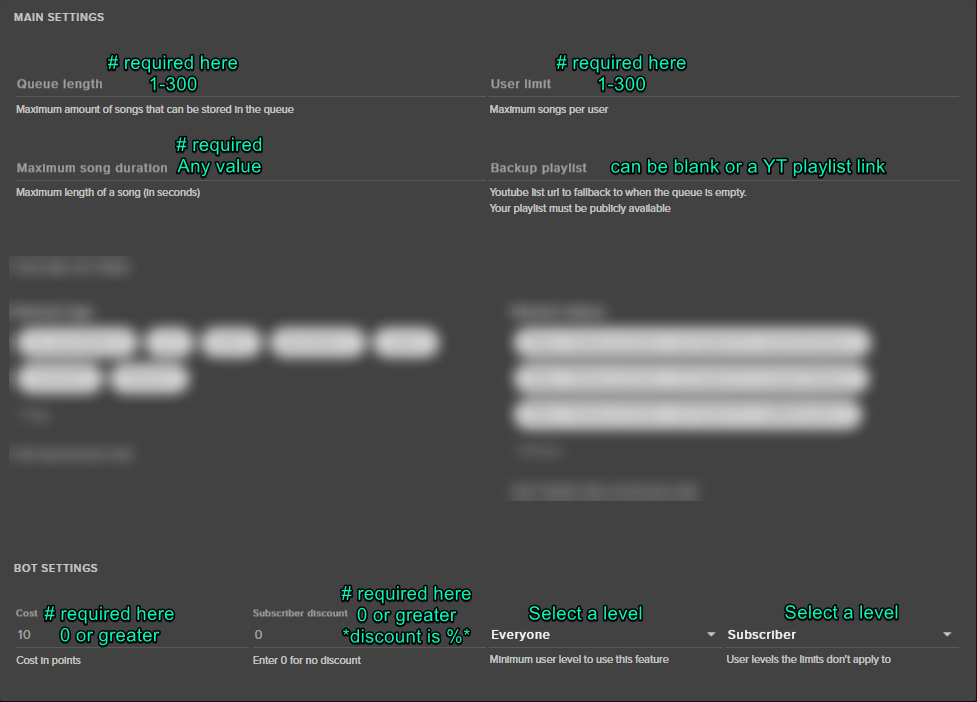
I'm encountering an issue with the songrequest section... I'm trying to add a backup playlist via youtube link. However, everytime I click on Save, it throws me a "Could not save settings." Is anyone else getting this?
clever mango
@verbal depot https://i.imgur.com/t28AhpK.png This will fix that
 verbal depot
@clever mango It still prompts me with "Could not save settings"
clever mango
screenshot your settings please and send it to me in a message
 calm grail
Is there a way to export a report to Excel of all activity over the past few days that shows follows, cheers, hosts, etc?
 full sorrel
Streamelements is not shouting out hosts in chat even though the module is enabled, possible causes?
pine hemlock
I dont believe theres a way to export stuff like that @calm grail
calm grail
Alright thanks. I know you can do it on Stream Labs I just didnt know if Stream Elements offered that feature or not.
pine hemlock
@full sorrel We require you to have either your Activity Feed or our Ground Control app to be open in order to obtain host information
@calm grail Might be something we can add in the future, sounds decent.. but currently we don't have any support for that :(
calm grail
Thank you @pine hemlock
pine hemlock
@full sorrel Theres a few complications with host events. Basically, it used to be linked in the overlay but now with the new feature of giving people access to your dashboard - they would be able to get your twitch token if we left it the old way. So for now, we have to require the activity feed (on the dash) or the Ground Control app to be open and it will work
full sorrel
Ah, gotcha. Thanks a bunch @pine hemlock
pine hemlock
If you dont already use it: https://streamelements.com/groundcontrol
 carmine pollen
I had a question about the Loyality feature of Stream Elements. If a user on Twitch changes their name, does the program track the user name or like the user ID?
clever mango
It's by username. Users who change names will need to have their current points added to their new name
carmine pollen
Thank you for the assistance 😃
 fickle hamlet
Is it possible to pull tweets from an account that isn't mine into chat?
clever mango
Yea, check out the twitter module
fickle hamlet
I could only find it for new tweets, replies or retweets that came from my account. Not when someone else tweets
fickle hamlet
Oh I thought I had to own the accounts that were tweeting. Thanks
clever mango
nope 😃
fickle hamlet
Awesome 👍
clever mango
all lowercase but it can be any account
fickle hamlet
Will it post when I'm offline? Can it?
clever mango
Always running
fickle hamlet
Thank again!
clever mango
unless you disable the module
fickle hamlet
Gotcha
 versed merlin
is anyone having a problem with the bot timers not working?
 stuck hamlet
i havent seem amy issues, what seems to be the problem?
earnest ginkgo
anybody able to help me?
i am able to change all the sounds for everything in the alert box but i cant do it for the sub button. Can someone help me with this?
stuck hamlet
@earnest ginkgo check the variations
earnest ginkgo
You are awesome!
weary mist
@versed merlin are all the requirements getting meet? Chat lines must be meet along with the duration
 clever leaf
Any news on when the cup is gonna retain bits, subs follows etc?
stuck hamlet
That is currently not in production
clever leaf
Someone said not long ago they were working on making it so that bits and shiz was retained throughout streams..
instead of resetting the cup every time
 silk patrol
@clever leaf it's planned, just not there yet
versed merlin
@weary mist yes all requirements have been met, all the other timers go off instead of the new one
I’ll try setting the chat lines to 5 so it can be guaranteed and see what happens
 mental minnow
Hello support 😃 Is Streamelements planning more services for the tipping page? Like Skrill, payssafe cards? That would be nice, because not all viewers like paypal. thx.
mental minnow
@atomic hollow wow, great! thx you very much. And thx for your hard work! greetings 😃
atomic hollow
❤
 left moat
about the song request in Streamelement
When the player is playing song in the auto playlist, it does not list what the current song name is.
stuck hamlet
Yes, this is known, it is due to the fact that we are limited on Youtube API points. so we can't poll for playlists currently.
 obsidian kettle
anyone know how to make an allert smaller instead of cutting it of. I have a gif for one of my allerts but when i make the allert box smaller it just cuts off part of the gif instead of making it smaller
 normal quarry
Hi, I have changed my twitch name and ever since, streamelements doesn't seem to update any of my dashboard stuff such as recent followers etc.
stuck hamlet
@normal quarry Logout of SE and log back in
@obsidian kettle it shouldnt do that, can you send me the gif in pms?
normal quarry
I have, no change
my latest follower was from 11 days ago
so ever since then, it doesn't update
obsidian kettle
emulate a follow see if it does now
 gaunt light
Looking for the Guy/Girl Who is incharge of New Overlays

 queen laurel
wenn ich im chat !points eingebe passiert nichts
gaunt light
Pretty great , I've merged into the biggest israeli community on discord
atomic hollow
@ebon forum German ^^
gaunt light
@atomic hollow If you will have me I would stream 😄
ebon forum
@atomic hollow i know, i sent him here 😄
gaunt light
can we talk Shadowboxer on one of the voice chats ?
gaunt light
2 Question that u might find intersting
ebon forum
he cant see his points in chat, the loyalty system is active. any ideas?
atomic hollow
ok
queen laurel
yes he is not work on chat
silk patrol
@queen laurel what's your twitch name?
silk patrol
@queen laurel the bot was muted in your channel. I unmuted it, it works now
queen laurel
ok thx
mental minnow
I have an problem, if iam get an top tip, i cant see it on the top tip labels!?
silk patrol
@mental minnow Do you see the tip in your recent events? Which widget are you using?
mental minnow
@silk patrol no i dont see anything in Labels (recent tips) and iam using label:top tipping. For Label: Top Tippers, also no data. And i had transfered from streamlabs since iam joined here into streamelements. 😃
silk patrol
@mental minnow Have you imported data from StreamLabs? We can't see tips from before you joined us unless you import them
mental minnow
@silk patrol i can only import alerts from streamlabs! The data imported by your admins since iam joined! 😉 And yes, thats why iam confused now 😦
silk patrol
@mental minnow here's how to import your tips.
Get this chrome extension: https://chrome.google.com/webstore/detail/streamlabs-export-to-stre/ieknafncicchjncjiegckipdjnakialh
Sign in to your streamlabs, and sign in to your streamelements in another tab, and then: click import.
Export your Donations and Alerts from Streamlabs straight to StreamElements
mental minnow
@silk patrol but if iam look in m yTip list / Top Tippers in the Tipping page, then i see my three entrys, but not in my labels
silk patrol
what's your native tongue by the way?
mental minnow
@silk patrol german ^^
silk patrol
@ebon forum can provide you some german support if you want
misty wagon
Calling Herr @ebon forum telefoon bitte
ebon forum
yo wazzup?
ebon forum
okok schon da 😄 bin noch am essen
ebon forum
@mental minnow seit dem ich englisch, russisch und deutsch kann 😄
misty wagon
Actually support in I think 10 languages?
mental minnow
@ebon forum omg...na prima und ich schlag mich hier auf englisch rum ,akppa 😄
ebon forum
@mental minnow wo brennt es denn?)
misty wagon
subtitling: who burned down the shed?
ebon forum
pretty accurate translation
 fathom yacht
Is there a cheers leaderboard?
mental minnow
@ebon forum brennen weniger, eher das ich versuchen wollte zu erklären, das mir meine Top tipper Einträge nicht in meinen Labels angezeigt werden. Zur Information, als ich von Streamlabs auf Streamelements gewechselt bin, wurden meine daten von einem Supporter Eures Teams vom StreamLabs übernommen. Die Einträge stehen zwar auf der Hauptseite, aber nicht in meine Top Tipper labels... nun nein nun kann ich keine daten mehr importieren..da ich bei streamlabs meinen account derweilen gelöscht ahbe ^^
fathom yacht
or a way to access the biggest cheers in the channel? All I can find is the aggregate and it has one name across all of it because I had a very large cheerleader recently. I need the other people's names and stuff, much as you have with donations.
misty wagon
*subtitling: ... *
ebon forum
@mental minnow und was ist nu genau das problem? SL haste gelöscht, die alten Daten sind importiert
misty wagon
@fathom yacht you mean as in an extension?
ebon forum
@mental minnow top wird angezeigt, die frage ist nur die aktuellen oder die alten
fathom yacht
or even just as a list in the darn website.
you don't have a cheerleader/bits extension, do you? I couldn't find one
mental minnow
@ebon forum das Problem ist nocheinmal, das die importierten daten bzw. den letzten top tipper nicht in den Labels angezeigt werden! Ob nun Top-Tipper oder Top-Tip Widget!
ebon forum
@mental minnow da muss jemand reinsehen, ich übersetze das mal für die kollegen
fathom yacht
@misty wagon any suggestions?
mental minnow
@ebon forum danke dir ersteinmal für deine hilfe ^^
misty wagon
https://www.twitch.tv/p/extensions @fathom yacht
ebon forum
@mental minnow kriegen wir alles hin, muss erstmal kollegen fragen^^
mental minnow
@ebon forum alles gut, bin ja hier..ich warte 😉
ebon forum
@mental minnow das ist aktuell ein bug an dem wir arbeiten, sollte heute noch behoben sein. aktuell muss man das noch per hand machen
mental minnow
@ebon forum wie manuell, den top tipper hinzufügen oder das man die daten noch nicht von streamlabs transferieren kann? ;P
ebon forum
@das muss man per Hand in der Session eintragen aktuell - sagte der Kollege
fathom yacht
@misty wagon YEAH I know what extensions are, but streamelements doesn't have any. So if I go through streamlabs and get an extension there, WOOHOO it has none of my information. It won't show who's a bitleader etc. Streamelements has it all.
ebon forum
@mental minnow ist aber bald behoben, daher nicht kritisch. wenn du das heute brauchst, muss das halt per hand gehen
misty wagon
Our extensions are coming. We simply don't want to launch something that does not add to the end goal; making your life better.
 fallow lake
How can i become part of the sellouts?
mental minnow
@ebon forum jo das hatte ich auch schon früher probiert! dennoch steht trotz Eintrages und speicherung, immer noch No data in den Widget drin 😉
atomic hollow
@fallow lake just have to use our bot and tipping service
fathom yacht
@misty wagon is there a way - in the meantime - to see a list of top cheerers - similar to how you can see the data for all the donations - so I can put a leaderboard manually in my panels? Right now I can only find information in the aggregate and it has one name for each thing listed. I'd like to have my top 5 all-time cheerers, etc like I can see with donators.
mental minnow
@ebon forum ok dann hatte ich doch die richtige vermutung, das es sich hier um einen Bug handelte. Dann warten wir 😃
ebon forum
@mental minnow die basteln ja gerade dran rum, wird in kürze behoben, gib den jungs bissl zeit, sollte morgen passen
mental minnow
@ebon forum alles klar, vielen lieben dank für deinen Support
atomic hollow
@fallow lake added you ❤
fallow lake
@atomic hollow I have it set up now 😄 the tip link is in my bio and i have my alerts on stream
ebon forum
@mental minnow danke. wenn was ist - einfach hauen, immer 😄
fallow lake
@atomic hollow thnx!
mental minnow
@ebon forum werde dich mal aden...alles klar hauste rein 😉
ebon forum
@mental minnow joa 
fathom yacht
@misty wagon does anyone know how to access that info?
misty wagon
@fathom yacht it comes from the Twitch api so anyone theoretically can access it (but it requires a lot of programming skills)
 dapper grove
hello can someone help me to import my streamlabs tips
stuck hamlet
Hey Levox
atomic hollow

dapper grove
hey
stuck hamlet
You can use this extension: https://chrome.google.com/webstore/detail/streamlabs-export-to-stre/ieknafncicchjncjiegckipdjnakialh
Once installed,
Sign in to your StreamLabs account, and then sign in to your streamelements account. You can then hit the rocket on the top right to import!
but We are pushing a fix soon for imported tips, so it would be best to wait a few hours 😃
dapper grove
oh okay 😄 thank yo so much for answer
fallow lake
Thanks again @misty wagon and @atomic hollow for helping me out 😄
atomic hollow
❤
lament blade
hi, if i get an alert then i get multiple sounds bcs i have more scenes how do i fix it?
silk patrol
@lament blade You need to tick the checkbox called "Shutdown when not visible" in the properties of all your browsersources in every scene
lament blade
yes but if i hit that and load the scene the scene needs to start up again
is there an onther way
?
 tidal wigeon
@stuck hamlet Hello Onslaught. I'm one of the many people who have messaged you with technical issues. I am the one have trouble with the overlays and camera feed on OBS. I just get a coloured, flashing square. I have no idea whats happening. help please?
gaunt light
Went live thanx to Stream Elements the Best company ever !
 manic quest
👌🏼
stuck hamlet
I don't know exactly what your issue is, i'd have to teamviewer and test somethings out @tidal wigeon
silk patrol
@lament blade you can use studio mode and transitions, this way your overlay will load before you switch
silk patrol
because it has to load 2 overlays at the same time. Another trick is to create 2 separate overlays. One for alerts and you shut it down when not visible, and one for everything else and you keep it loaded all the time. But that only works if you only use one overlay for all your scenes. if you use multiples, they will eat your CPU
manic quest
having alot of alrets and overlays for your scenes puts alot of pressure to your cpu
alerts'
lament blade
yeah understand that but the other piece
misty wagon
Welke gedeelte?
misty wagon
We hebben vrijwilligers in 20 landen  "
"
lament blade
aaah
misty wagon
We hebben een company call in 2 minuten, DM mij dan kom ik er later op terug. Ik ben de sukkel die de aantekeningen moet maken 
 twin hedge
GGs on the Extra Life theme, thanks so much for that!
 soft ice
hey i been trying to get my alert box to work. i can get everything exept tips working. when someone donated to me yesterday the tip alert did not show up.
 tight harness
Do you have tip moderation enabled?
soft ice
no
tight harness
Any pending tips here? https://streamelements.com/dashboard/activity/moderation
lament blade
imagine that im streaming and using my spotify playlist if someone request a song does the bot puts firts or am i gonna have 2 songs on my background playing at the same time?
soft ice
no pending tips there.
it will still show the alert even if someone dont put a tip msg right?
tight harness
Correct
soft ice
then i dont get why it wont show the tip alert. it shows follower alert and all else.
silk patrol
@lament blade We don't have any spotify integration yet. The song request only works our integrated youtube player
@soft ice what's your twitch name?
soft ice
its wolferuu
 candid mulch
Hey everyone, just wondering why my tip songs won't move up in the queue? Anyone know?
silk patrol
@soft ice I can't see any tips on your leaderboard. Do you see it on paypal?
soft ice
yep i know i got the tip. couse its on my paypal. also the leaderboard did not update when he tipped.
candid mulch
Same exact thing is happening to me @soft ice
soft ice
so you dont get tip alerts either?
stuck hamlet

well @candid mulch you have StreamLabs linked in your panels
sooooo, we cant see those tips, you wont have alerts on our end for that
candid mulch
Ahhh, i see I see. I'm working on my stream and panels today IRL so that might explain things
but I should import all of those points over before ditching that right?
silk patrol
yeah, you should import first, this way you already have some data to work with
candid mulch
maybe a silly question, but it's asking for alert box url. Which do I input?
candid mulch
I was so confused
silk patrol
@candid mulch don't quote me on that, but I think it's the overlay link you use in OBS
 soft ice
i use the overlay for alert box etc. might that have something to do with why tipping alerts wont show?
candid mulch
success !!!!
stuck hamlet
@soft ice How many tips haven't shown?
soft ice
i only gotten 1 tip since i started using streamelements. i am not that a big streamer that i get lots of em :p
silk patrol
@soft ice are you still using streamlabs alertbox or the streamelements widget? You need to use our widget for tip alerts to work
soft ice
but it did not get saved on the tip list
i use the overlay program on your page.
then i chose the alertbox on stream alerts
silk patrol
stream alerts?
soft ice
my overlays. then widgets then stream alerts then alert box
AlertBox
Centralized widget for subscribers, followers, tips, hosts and cheers.
silk patrol
oh yeah, I've never read that sub title 😃
candid mulch
I think I did everything right, can you see the tip now?
silk patrol
then as long as you have that alertbox with the tip alert enable, it should work
soft ice
mhm thats what i figured but it dosent show anything.. thats the wierd part. folowers etc show...
 silk patrol
@carmine knot yup
 carmine knot
great ty
stuck hamlet
I don't know why it didnt work before, hopefully it works from now on..
soft ice
thanks for checking it out! much apricieted!
stuck hamlet
np
candid mulch
can you double check mine please? I had a $42 dollar tip the other day that didn't come through, probably because I was working on integrating stream elements without importing from streamlabs?
silk patrol
@candid mulch your leaderboard on the tipping page is disabled, so I can't confirm that tips are there. But if you see them on the tip list then it's all good
candid mulch
It went through paypal and stuff
silk patrol
since your panel is still using streamlabs, I can only assume that that tip went through SL and not our end. It should be there after the import
candid mulch
I searched for stream elements leader board and cannot find, is there a link?
silk patrol
go there to enable it https://streamelements.com/dashboard/tipping/leaderboard, then it should appear on your tipping page
carmine knot
can you song request in chat using words instead of a URL?
soft ice
and @stuck hamlet is also got put into the tip list. so now its 100% wierd it dident work before.
stuck hamlet
You have 1 tip on StreamElements @candid mulch Because you still have StreamLabs linked on your Twitch Page
silk patrol
@candid mulch here's how to import your tips, in case you don't already know
Get this chrome extension: https://chrome.google.com/webstore/detail/streamlabs-export-to-stre/ieknafncicchjncjiegckipdjnakialh
Sign in to your streamlabs, and sign in to your streamelements in another tab, and then: click import.
Export your Donations and Alerts from Streamlabs straight to StreamElements
stuck hamlet

this is what i mean
the person who donated to you, probably donate through StreamLabs because they clicked the panel
candid mulch
I think I can I think I can...... I think I did!
My tips are now directed through the correct location.
stuck hamlet
😄
carmine knot
can you song request in chat using words instead of a URL?
stuck hamlet
No, but we have a slight work around for that, unfortunately split in 2 commands
carmine knot
Feel free to explain it if you want.
stuck hamlet
Trying to get it
silk patrol
@carmine knot You can create this command Here's your video id: $(customapi.https://decapi.me/youtube/videoid?search=$(queryescape $(1:)))
it will return the video id, then people can do !sr <videoID>
stuck hamlet
Q: Can my viewers request songs by searching youtube?
A: Yes 
https://i.imgur.com/rORZ0Fl.png
https://i.imgur.com/D6TcYiR.png
Response is:
Here's your video id: $(customapi.https://decapi.me/youtube/videoid?search=$(queryescape $(1:)))
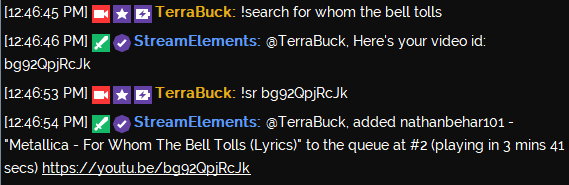
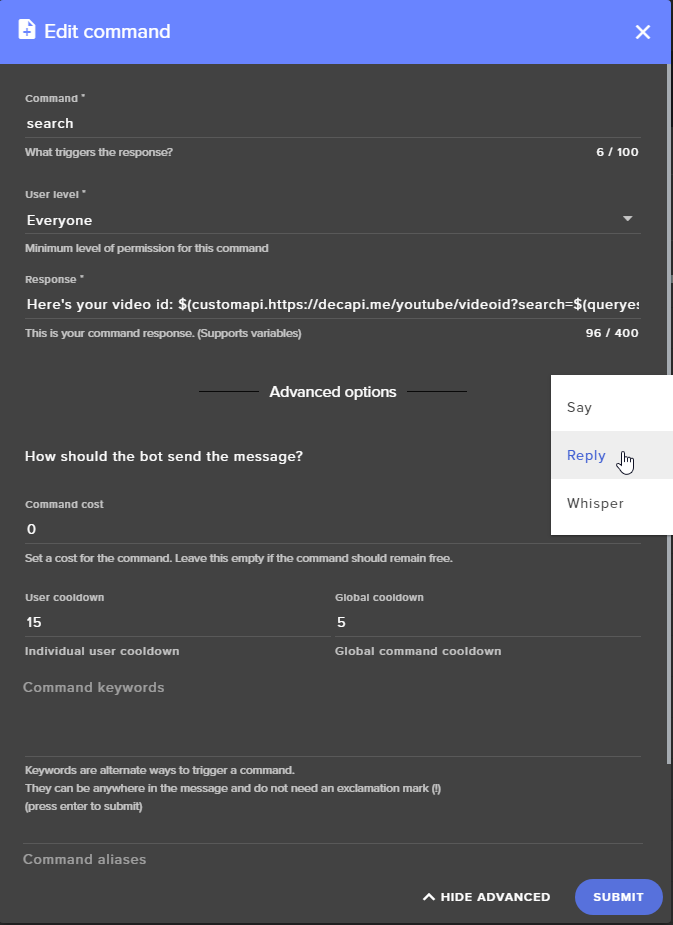
yea that
silk patrol
2fast4u @stuck hamlet
weary mist
lol
candid mulch
okay, now my subscription alert didn't come through. Any ideas?
silk patrol
@candid mulch are you using an overlay on our website with an alertbox?
candid mulch
yes... It just delayed about 4 minutes from the time user subbed and told me and then alerted
I imported my overlay alerts from Streamlabs
is there are more efficient way to do that?
I just integrated it this IRL session though, so maybe my OBS needs a restart
final stream
Any one know if there is a way to put like a little youtube window in your stream? More of an OBS question but I thought I'd ask, you guys know your stuff,
stuck hamlet
Sub and Tip alerts should never be delayed @candid mulch
candid mulch
It delayed for about 3-4 minutes and then gave me 3 notifications
I muted streamlabs notifications
pine hemlock
@final stream Window capture, use filters to crop it
candid mulch
tip is still not making the song come up next in the queue
obsidian kettle
Eeeh idk what hapened but this is what my overlays look like now in OBS
They look fine on the site but on OBS they become that
weary mist
double click on the source, scroll down, and refresh cache @obsidian kettle
obsidian kettle
The irony here is that i found that button and tried it just as you typed that but thanks. Never had that one happen before
stuck hamlet
CTRL + F
weary mist
⤴
lament blade
nice overlay 😄
obsidian kettle
I tried twice now to comission custom ones to be unique and all that and neither case was i really happy with em so for the time being i'm just using this theme with my own "custom" allerts
 lilac falcon
hmm anybody knows why a follower is not showing in the activity feed of streamelements? he also followed a friend of mine, which is using moobot and there he got a message that the user is blocked
obsidian kettle
Banned account perhaps
lilac falcon
yeah might be, but shouldnt i get a warning or notification about it then? cuz it was also not showing in the chat (like streamelements bot usually does)
candid mulch
tips still aren't giving song priority, or even letting the song show up in queue for that matter... suggestions?
also, is there a way to convert donation goal ticker from streamlabs to stream elements? Is there a goal amount somewhere in the overlays?
pine hemlock
I dont have an idea for the tip song priority. Theres no way to import the donation goal from steamlabs -> SE. The goal amount is located under the 'Data' tab in your Overlay Manager - it can also be found on the Activity Feed -> Widget Data
We'll test it on our end though
candid mulch
okay, thanks
 nimble owl
hey guys is there a way to show chat on stream? like with the chat box in streamlabs?
 serene granite
ya, it's a widget in the overlay editor
your twitch chat I think it's called
it's in the bottom of the list of widgets
nimble owl
okey thank you ^^
serene granite
np 😃
 cloud solstice
Hey boys and girls , I tried to import my streamlabs alert box into stream elements , I keep getting "insert a valid URL notification , I used to extension you guys have on google chrome but nothing appeared . can you guys give me a step by step guide on how to do this properly ? thank you .
serene granite
heyo, can you PM me your streamlabs alertbox URL?
nimble owl
hectic is the chat only visseble when im live ? cause i copied the link and put it into a source on OBS
something is scuffed
 upper whale
my friend is getting a HELP symbol in the bottom left right corner of his obs. His Alerts aren't shown in stream
pine hemlock
@upper whale Right click on your browser source -> properties, scroll down and refresh cache
@thick zealot What part of the site
 thick zealot
my overlays
pine hemlock
Are you getting any errors @thick zealot - if you press f12 does the console show anything in red, other than gamewisp related things
cloud solstice
@serene granite inboxed you buddy 😃
thick zealot
i have no clue
pine hemlock
What are you trying to change that isnt saving
pine hemlock
Can you try ctrl+shift+r ? does it still show up after you do that
pine hemlock
Can you press f12 to open the console on chrome and press save and see if any errors show in red, if so can you screenshot them?
thick zealot
there are 22
pine hemlock
Are there any that arent gamewisp related
Is it just a text box? or a different widget
pine hemlock
Do this for me and i can look into it without those
Click full control and generate a link, dm me the link
and tell me which widget you're having issues with
 violet nimbus
clever mango
violet nimbus
clever mango
@violet nimbus This will be fixed for the the contest and giveaway widgets
 terse hinge
Hello, I can't seem to find where to change the messages the bot says when someone follows and etc. I need to change the name of my points and it doesn't seem to do that under loyalty settings.
pine hemlock
https://streamelements.com/dashboard/loyalty Currency name = points name
https://streamelements.com/dashboard/bot/modules Chat alerts, settings is what your looking for to change the messages @terse hinge
terse hinge
oh jeez, i didnt see that before haha, thanks!
pine hemlock
 proper idol
When anyone tries to tip me it comes up with a "paypal error", what could cause this?
 placid abyss
How do I get leaderboard on obs
pine hemlock
@proper idol Mistyped paypal email probably
proper idol
Ive checked, its the right email
pine hemlock
its either the email is incorrect or theres something wrong with your actual paypal account
proper idol
Is there something i have to set up with my paypal to recieve tips?
clever mango
Once you've signed up with paypal with that email it should work
Your tipping page is returning a paypal error 503 service unavailable when clicking Tip which means that something is wrong on the paypal side
terse hinge
Hello again lol, so under chat alerts settings, will resub alert continue if i dont the month of resub?
add*
So like it currently has 1 and 2 months, will it go beyond that if I don't add more?
clever mango
It will use the 2 alert for beyond
terse hinge
ok thanks
weary mist
@proper idol what country are you logged into paypal as? Certain places can't recieve payments, but can send them. Check to see if your country supports recieving money through paypal. Also responding to your support ticket 😉
proper idol
I think ive found the issue with my paypal account, they want me to verify my card, but evidently i dont have any cards linked. Thanks for the help anyways. I will try contactin paypal to fix this
proper idol
well unless there is a live chat for paypal somewhere it seems it will have to wait until costumer service opens tomorrow
weary mist
😦
 oblique marsh
Hey @weary mist How ya been!
And on another note, Im having issues with my alerts being cut off. I finally got them imported over, but they dont show correctly like they should, If anyone is available to help me out, I would really appreciate it (currently live so I can show you what its doing)
twin hedge
this happened to be over the weekend. When adding the browser source in OBS make sure in the properties tab you set it to 1280 x 1080 @oblique marsh
thats what fixed mine at least
lament blade
Isn't it 1920/1080
clever mango
@twin hedge is correct. The overlay is 1920x1080 resolution so it needs to be added in OBS at that resolution. If it then doesn't fit the canvas in OBS, you can use CTRL+F to fit it to the canvas.
@oblique marsh

@twin hedge and @lament blade team effort
lament blade

twin hedge

lament blade
spmHype (rip) kuruH (rip)
Good evening, i am a new Stream Elements user and i have quite some questions, can i ask them here or is it easier to do that in voice chat?
clever mango
@lament blade If you're brand new it might be best to check out StreamElements youtube channel which has tutorial videos https://www.youtube.com/streamelements/videos

YouTube
Official youtube channel for StreamElements tutorials https://StreamElements.com
lament blade
will check that first, thank you
clever mango
We're here to help if you have further questions though 😃
oblique marsh
I do have it set to 1920x1080 and its still being cut off. its only showing up in a quarter of the window
@twin hedge & @clever mango
lament blade
Ctrl + F @oblique marsh
clever mango
click the browser source and then press CTRL+F to fit the browser source to the canvas
lament blade
Blond is the excuse for, I see
clever mango
I'll show a gif if that will help
oblique marsh
Terra would you mind helping me in DMs where rude snipy people cant comment?
clever mango
just a sec I'll post a GIF that will show it
weary mist
@oblique marsh busy day for me, but TerraBuck will take great care of you ❤
lament blade
@clever mango just a quick question, the Chat screens in the overlay, do they show the chat automatically or do i need to set this up myself?
weary mist
@lament blade if you are using themes, they should have the chat widget prebuilt into it
lament blade
i am setting up the Black Gold theme
weary mist
all themes should have the chat widget prebuilt into it, though you might need to add it to the ingame, I can't remember if those will have it on it automagically
lament blade
for the ingame i dont want the chat on screen, only for the other screens.
weary mist
then you should be all set 😃
lament blade
nice
and just added the cup
for the rest im going to play around with it before askinjg 500 questions haha
weary mist
👍
lament blade
Remember deleting variations for cheers 🤔
oblique marsh
@clever mango Thank you so much for helping me get that fixed!!! @weary mist Dont even worrybeautiful, Terra took care of me perfectly. Thank you both so much!
weary mist
@oblique marsh I am glad he helped get it all fixed. ❤
queen laurel
i have a question the loyality points have this points @ end of the year a reset automatly to zero?
dapper grove
hey guys, i have to use obs classic right know and stream elements overlay is not working on it. what can i do to fix that
weary mist
unfortunatly, upgrade to studio
dapper grove
its not an option, i have to use classic
weary mist
obs classic hasn't updated in 1 year and 3 months
What is the reason to having to use classic?
queen laurel
ok thx
dapper grove
it has minimize network impact setting and i have to use it
otherwise it causes many ping problems
when i use that overlay there is a "?help?" on bottom right corner
weary mist
Studio has come a long way with improvements in those regards. The problem with classic is that the CLR browser source hasn't been updated to include the necessary things to read our sites.
For that specific thing, try refreshing the cache on the source
swift parcel
@dapper grove they added "low latency mode" in 18.0 of studio (which was a while ago) which is the same as minimize network impact in classic
strong dock
^
There was also a program that let u find the best server but now it's built in to 20 i think?
swift parcel
yup
dapper grove
oh okay im going to try this setting right know
strong dock
But let's be honest.... darkmode. 😎
I switch to studio when it was multiplaform... haha
And accidently continue to use multi until discovered I had wring icon pinned to desktop toolbar when I was trying to install my stream deck.
 lean dome
Can I ask for help here? my kappa gen overlay is not working. it just shows huge Help button on screen
clever mango
@lean dome double click your browser source in OBS and scroll down to refresh cache 😃
lean dome
I seems to somehow work in obs studio
but I use OBS Classic for streaming
I dont see refresh cache option there
clever mango
Sure
weary mist
stupdio does come with a GPU option, so you can take it off your CPU @PIOS#9860
strong dock
Something in the last update cut mine in half
Was like "yay" more animated stuff go!!
candid mulch
I'm having the same problem with the overlays, only showing up in a quarter of the stream even with the right size
clever mango
@candid mulch did you import an alertbox?
 jolly flame
Quick question, trying to set up a command which has one of my sub emotes in it, they don't show up at all, any reason why? Apart from the fact Streamelements isn't subbed to me? 
candid mulch
everything is imported, But i'm starting from scratch building game scenes and the scene itself is the first thing I'm adding; to which it's only a quarter of the size
clever mango
@candid mulch does your OBS browser source look like this but with your overlay link? https://imgur.com/l8fxFGV
weary mist
@jolly flame its because SE isn't subbed to you
the only way to get it subbed right now is if you are partnered
jolly flame
Ah ok yeah, makes sense obviously, thanks 😛
lament blade
Well, affiliate gets every streamer xd
Add a bot(SE) , open on phone twitch app - enough
candid mulch
yes @clever mango
clever mango
and is it now filling the screen in OBS?
the browser source that is
not just the alertbox
candid mulch
it's fitting now. Okay cool, will have more questions for sure later 😃 Thank you for your help! @clever mango
 soft canyon
Any form if i turn off the bet command to now show in overlay the bet command?
 lone terrace
Question. When doing your alerts should i only put the sound on one of the scense and mute the rest?
Because feel like if not then i will hear double the sound from all scense activaing correct ?
swift parcel
@lone terrace in the other scenes check "shutdown when not active" in the browser source properties
lone terrace
Wouldn't that take a bigger hit on cpu usage having to avtive the scence every time i switch to it?
and then mid alert if i switch scene would the alert carry over
swift parcel
if they're different overlays yes you will hear the sound echo/double
if its the same it won't (it's a global source in OBS studio) --so maybe make an overlay with just the alerts and paste it in all the scenes
lone terrace
i think i will just go through every scene and mute the audio and just leave it on for one scene
 simple axle
Hey there guys! Any idea if its possible to make a donation goal include multiple sources, like bits AND tips? Right now it looks like I can only have seperate
No idea if its possible or not
swift parcel
btw i was just testing any spikes when turning overlays on/off i saw nothing horrible
lone terrace
when i do so it takes a long time for the overlay to pop back up
swift parcel
@simple axle not atm, though twitch tos for bits say you can't give bits for donations/financial support
so not really make it an apparent thing to do
simple axle
@swift parcel Oh interesting, we were just saving up for a new electronic. Sounds good then, understandable if its got some TOS issues
swift parcel
(apologies my brain is derping hard on words tonight hope that makes sense)
clever mango
If you've got multiple overlays in OBS, not shutting them down will keep them all running at the same time and be a big tax on the cpu
swift parcel
studio mode combats the lag for loading up a new scene and its overlay as well
clever mango
^
swift parcel
👍
long pasture
Is there anyway to make sound effects redeem with a single word command i.e. !airhorn instead of !redeem airhorn?
 bright ember
is there a setting to ensure points are being earned for watching, some have been watching but points don't increase
clever mango
if you don't think they're earning points, log out and back in on streamelements
lone terrace
Anoter question. For twitch affilates is there a way we can give the bot a sub so that we can use our personal emotes in commands and such?
swift parcel
Sub gifting will be coming soon, but I don't know how it works completely (thats a twitch thing)
lone terrace
I figured so didn't hurt to ask beccause i know kappagen allows for the emotes
thanks
clever mango
kappagen can use the sub emotes even if the bot isn't subscribed
or maybe I read that wrong and you already know that
lone terrace
haha yea knew that one i was just wondering why kappagen can and the bot can't
but i understand thats a twitch thing
❤
swift parcel
taking a guess since theres a website that shows everyones emotes for their channel, you can pull from the api for the image
dont need to be subbed
lone terrace
Any info on if we are getting a streamlabs twitch extension?
streamelements i meant lol
strong dock

 lyric totem
Anyone else's Browser Sources cause massive frame drop in OBS after the windows 10 fall update?
gaunt zealot
My alert will not change from the damn shark. It's only on the Subscriber alert. I removed it all saved and tried, I removed from the uploaded files and reuploaded, and I tried closing the browser and reopening it too.
swift parcel
@gaunt zealot have you checked if there are any variations enabled on the alert?
weary mist
⤴
gaunt zealot
@swift parcel I did not, and there it is. Are Sub variations new or am I just a noob to subscribe alerts
weary mist
those have been there for a while, most people don't see them
 ornate hearth
what's the size for the store item images? Mine have all expanded
 white orbit
is there a way to ban a song from being requested
weary mist
@ornate hearth there is no real size set. Are you talking about the image that is show in the store, or in the alert
ornate hearth
In the store. After the update they have all gotten resized or lost their resize and are too big for the item window @weary mist Is there any way to fix it?
What I'm talking about is this. There has to be a set size so they show up correctly.
weary mist
let me ask about that
pine hemlock
376x186
weary mist
oorrr cuda to the rescue, lol
pine hemlock

thats what it gets resized to
butttttt.. on the store page on the dashboard it says: https://www.cuda.live/s/sgp0hg0e.png

Soooo

376x186 is the public page
ornate hearth
Well, I can confirm that 376x186 fits just fine so I'm going with that. Thanks @pine hemlock
 last niche
how do I get chat to be displayed for the overlay boxes?
last niche
widgets page on the site?
last niche
I see now. I didn't go that in depth....
I also can't get my streamlabs alerts to import. It keeps saying the URL is invalid
am I supposed to copy the one I would use for OBS?
pine hemlock
yes. but try using this extension instead
https://chrome.google.com/webstore/detail/streamlabs-export-to-stre/ieknafncicchjncjiegckipdjnakialh
Sign in to your streamlabs, and sign in to your streamelements in another tab, and then: click import.
Export your Donations and Alerts from Streamlabs straight to StreamElements
last niche
so if I click on the box with alerts and then click the green donations button I should be good to go?
pine hemlock
not sure what you mean by that . Once you import, it generates an overlay here: https://streamelements.com/dashboard/overlays (Streamlabs imported alertbox)
That contains your alertbox that was imported for Streamlabs , if you hit the launch button, thats your overlay url you put into obs.
if you're talking about the checklist, yeah make sure everything is done
last niche
I see something in my overlay, but I don't see a launch button
pine hemlock
https://www.cuda.live/s/67a8nprf.png the button that is blue is the launch button. you can also find your url on your overlay in the editor here: https://www.cuda.live/s/y7o9gywx.png


both give the same url
last niche
so I just add that as a browser source in everything I want it part of?
pine hemlock
Yeah. you add that url as a browser source and your alerts/anything else you add to your overlay will be on obs
last niche
brilliant! thank you!
 orchid zealot
Hello! I had a subscriber but my "newest sub" widget didn't activate to show the new sub on my overlay. They subbed with Prime. Would that have something to do with it?
 abstract dome


 pine hemlock
@orchid zealot Does it show on your event list on the dashboard?
@abstract dome Depends on which cheer the user uses. https://www.cuda.live/s/rppcw0mq.png


Theres no way to disable it currently
orchid zealot
@pine hemlock Yes, it shows up on my dashboard list as [the subscriber] has subscribed to you (Prime)
It's also in Ground Control too
orchid zealot
No. I've recently converted from Stream Labs to Stream Elements, and I've had two resubs and that new sub in the space of a week, but nothing's shown up on the overlay
Everything else works though (new follower, new tip, etc)
pine hemlock
Can you edit your overlay and try removing the widget and re-adding it
orchid zealot
Give me a minute, then
that seemed to do it. The new widget shows the newest sub. Thanks! Weird, though - it's the exact same widget I had before. I am using an overlay that has everything already there (the Orange Peel one), so I never put in the follower/sub/tip widgets - they were already there. Maybe it's a glitch with the initial overlay?
pine hemlock
Dunno. We've done a lot of updates recently that might have just thrown a few things off like that it seems.
Weird things happen from time to time
orchid zealot
👌
low mirage
Is there a way to set up the "song playing" widget up to my youtube instead of song request. dubtrack.fm, and Plug.dj?
stuck hamlet
the backup playlist? Unfortunately, not at this time.
 muted locust
Hello, I have setup two different stream alert styles one for the intermission and one for in game but when I play the test notification, I hear double sound. Why is that?
weary mist
the reason for that is your broadcasting software has both overlays loaded, thus both alert boxes are triggering. The best way to stop that from happening is to check the box in the browser source settings "Shutdown when not visible", and to either not use studio mode until you need to transition, or to have another scene that has nothing on it to swap the preview to.
muted locust
okay, let me try that and I will keep you updated. thank you so much
lament blade
Hi all, quick question. I'm probably being daft but can't seem to get this to work.
I'm trying to get the bot to return an argument phrase, not just a single word. Specifically I'm trying to get it to say in chat what item was just requested (in this case, a song request in Rocksmith).
I used ${user} has just requested the song: ${?????}
If I put ${1} It only returns with the first word of what they typed (if they typed !rsr Hotel California, it would only say "has just requested the song: Hotel")
I'm sure it's an easy fix, but I can't figure out how to make the bot return the full argument, and if I put something like ${1:9}, the command just stops working completely
muted locust
@weary mist I fixed it, finally. thank you so much!