#helpdesk-twitch
1 messages · Page 142 of 1
 pine hemlock

 stuck hamlet

pine hemlock
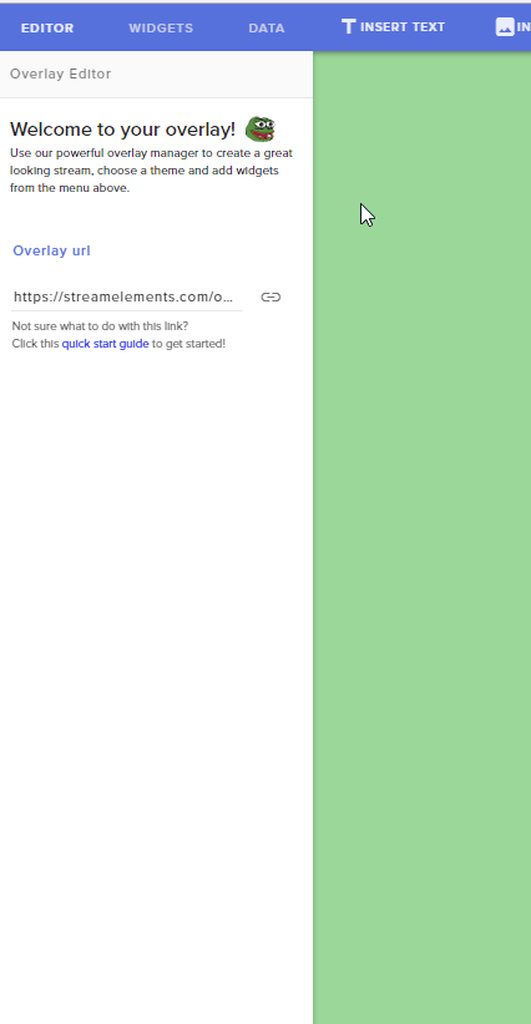
To edit your goal text/end date you have to edit the actual widget
 pine vault
ah thank you sooo much! I'm still getting used to the Streamelements user ineterface I only recently swapped over from Streamlabs so I appreciate the help ❤
 jagged stream
BaBoonOW
 crisp fog
Hello. How do I make custom messages for new followers?
stuck hamlet
Meaning as chat alerts?
crisp fog
I think so
 viral gale
Hi. what does "item quantity" regarding store items mean? Is it per user or for everybody? Is it the limit available for this stream or forever?
 snow forum
@viral gale you can limit the amount that is within your personal store.. setting the item to -1 will make it so there is infanite amount of them
so, if you only want a certian amount of something, set that amount number
 clever mango
@viral gale Total quantity available. It does not auto-replenish but can be replenished manually in the store dashboard
viral gale
ah ok
and the "global user cooldown" time, is that per user or for everybody. I guess everybody since its called global?
snow forum
Global is all
viral gale
okok. So I cant limit the amount one user can buy, only limit the total sales. Damn. Well, thanks a bunch for helping!
stuck hamlet
https://streamelements.com/dashboard/bot/modules head to the chat alert settings and add messages there @crisp fog
 gaunt light
so whats the eta on youtube support pps ?
 misty wagon
@gaunt light keep an eye on #announcements It's not going to happen today or tomorrow so it won't help asking it every other day. 😉
 strong dock

 final stream
Overlay will not show over anything
sudden;ly
I can see that it's there when I switch to my brb scene but it will not show my main overlay. It's the top source
final stream
I did
I read before I asked
I copied the overlay, deleted it from obs, added again, showing now. Lets see when I launch a game
Thank you
 tepid grove
So, anyone else having issues with the website being extremely slow today? I'm playing around with settings, but everything takes at least 30 seconds to load.
 lament blade
nop, it's fast for me, try ctrl+shift+r
tepid grove
What is that command, because it helped.
lament blade
"The Ctrl+Shift+Refresh headers mean that any caching servers along the way should return a fresh copy of the page, and should also not cache the page for any future requests. In other words, the next time the page is requested, it should either use a previous cache of the page or request a fresh copy, but should not use this one."
tepid grove
Nice. Thank you. That helped a lot.
lament blade
I'm editing my overlay .. Addet a DonationGoal ... can you somehow change the Textsize INSIDE the Donationgoal? I only can change it outside 
clever mango
 clever mango
Save in editor and refresh in OBS
Is your browser source the same dimensions as the overlay?
clever mango
Default is 1080p on site
lament blade
okay i have same issue when i launch it in a new browsertab
so it's NOT obs related
Boo! Animated Super Theme
any idea?
or can you reproduce it?
clever mango
DM me your overlay link
strong dock
is it me or is widgets slow? changing a font and its taking 30-60 seconds to reload fonts to be abel to choose another one
lament blade
for me all good, try ctrl+shift+r 😃 @strong dock
stuck hamlet
@strong dock have you seen a new secret widget? 
strong dock
lol what do u think im changing text on....
stuck hamlet

strong dock
it may be my pc. gonna try the other one
you remember the issues i was having with alerts and scary alerts and normal both playing sounds
ya well i copied the alert overlay. then went back and edited out the normal one.... so id only have scary for october. well going abck and normal alerts are missing from both now . 😭
strestr
wuh whoa... how do u test the alert? 
stuck hamlet
tip alert
strong dock
naw.
lament blade
on the bottom left
strong dock
thats paypal dono. spawns normal donation alert
lament blade
in overlay editor
strong dock
i know how to emulate the alerts. 😉 referring to testing new widget alert
clever mango
This button emulates both
 molten mango
if the streamelements bot leaves the channel do you still get the stats sent to your email?
\
stuck hamlet
yea
lament blade
how i get my donation goal starting at 0?
because it's kinda funny, that the donation goal widget actually works with the "imported" donations, but the recent donation etc doesnt 
lament blade
i see thanks 
maybe I'll stream in a few minutes with overlay, if noone else goes live 
lament blade
i meant of the current stream i am watching 😛
 cyan geyser
hey guys, for loyalty settings is there anyway to give subscribers x2 loyalty per 10 minutes, so if i set standard currency as 10 units per 10 minutes, could i somehow set subscribers to get 20 currency every 10 minutes?
 stuck hamlet

strong dock
does new widget have variation settings? 👀
that one comes from a friend from EL discord
stuck hamlet
should be on the loyalty page @cyan geyser ?
cyan geyser
ye onslaught it use to be, but its vanished lol
strong dock
ok. making sure i wasnt missing it. i forgot that was part of the normal alert widget cause i never use it and someone was asking
stuck hamlet
np
 ember maple
I would like to become a dirty sellout!
clever mango
@ember maple What is your twitch name?
ember maple
TheNoiseHERO
clever mango
@ember maple I've added you 
strong dock
one day ill be a sell out...
 charred geyser
Hey peeps! I'm about to try and make the change over from Ankhbot to Streamelements tonight before my stream, the functionality seems to be fairly similar but less resouce intensive. Is there anything I need to be wary of with this change at all or should I expect a fairly smooth transition here? 😃
misty wagon
Better FPS perhaps, can be a shock 
charred geyser


I set it all up the other day, just been going over my commands, a friend on mine had games going through streamelements last night and it sold me haha
 knotty warren
Currently streaming - All my browser sources were frozen. Hid/unhid them, now shows nothing. Alert box not functioning either. Refreshed cache. Replaced link. Still blank.
 floral ice
@here hello all. anyone around to help with an issue?
knotty warren
⬆ ⬆
 wary fractal
my page is being very slow today
knotty warren
If anyone could help me get back up and running so I can continue streaming, that would be awesome. Thanks in advance.
cool
stuck hamlet
@knotty warren Try refreshing the cache
knotty warren
@stuck hamlet Read above
stuck hamlet
Are you using OBS Studio?
 idle burrow
Hey, if i add the recent subscribers widget does it get information that happened before i added the widget?
stuck hamlet
Yes, but not before you signed up to SE
idle burrow
I got my first sub and i wanted to add a recent sub widget but it isnt showing any info on the stream
stuck hamlet
when you got this sub, were you signed up to se?
idle burrow
i have been signed up to it for awhile, but i wasnt on SE at the time
happened when i was offline
idle burrow
no, i dont see any sub info on my SE dashboard
knotty warren
@stuck hamlet Yes, I am using OBS Studio.
floral ice
@stuck hamlet my notification images show up in the SE browser preview, but show as broken in obs...
knotty warren
None of my info is showing up on screen, for any of my scenes/sources. I have refreshed cache, hid/unhid the sources, replaced the link, etc.
stuck hamlet
send me the link @knotty warren
knotty warren
Which one
knotty warren
Ok I sent it via DM
stuck hamlet
@floral ice make sure you're using the proper Resolution
idle burrow
I dont see the twitch revenue page...
stuck hamlet
idle burrow
oh on twitch, yeah i see that, thought you meant on SE lol
 ornate eagle
Hi, so i'm a mod for someone's SE bot, so it just might just be that i don't see/have access to it, but is there a way to make it so that loyalty points are turned off when the channel has gone offline?
pine hemlock
@ornate eagle loyalty points only work when the channel is online
ornate eagle
@pine hemlock thanks for the info 😄
 edgy geyser
something ive noticed with ground control... If you leave it on for multiple days, itll stop updating the feed. Is this intended?
floral ice
@stuck hamlet i have it at 1920x1080...
 vocal leaf
what are the time/date formats SE can display? I want to set up a simple command to display weekday, date & time for CST
floral ice
the proper res in SE or OBS... can you gimme the deets on that so i can check everywhere?
pine hemlock
@floral ice Browser source needs to be set to 1920x1080 in the properties
If nothing is showing with the proper resolution set for the browser source, make sure the url is correct and scroll down and hit refresh cache
 vagrant sun
Hello, my alerts and overlay stoped working, link is correct, i have tried to re-do the entire process of creating the scene, nothing works. I use obs (classic) and i have them in 1920x1080. In obs there js just a "(?) Help" sign in the source 😢
pine hemlock
Right click browser source, go to properties, scroll down and hit refresh cache @vagrant sun
 forest ocean
Everytime the channel gets a bit donation the alert freezes and stays on screen, is there a fix?
vagrant sun
cant find it T_T
pine hemlock
Try the cache thing I just told the other @forest ocean if it doesnt fix anything let us know
@vagrant sun https://www.cuda.live/s/td47ogat.gif
 vagrant sun
@pine hemlock currently using the other obs 😢 is this a problem then?
pine hemlock
Classic hasn't been supported for over a year.. soooo things eventually break. Theres a way to clear cache with classic but im not sure how.
vagrant sun
Oh, its ok i get it 😦 i have both, is just this works better for me, idk why. Anyways, thx u ❤
pine hemlock
If you can google/find out how to clear the cache of the clr browser it will work again.. its just the devs of OBS don't support it, and we obviously dont either @vagrant sun
If you want it to work you can duplicate your overlay on the SE site and use the new URL @vagrant sun
thats the only way around it

vagrant sun
@pine hemlock didn't work, i give up. It's okay, i will try to use the obs studio then ❤
 dusky latch
Hello? Anyone here who can try and help me out? I am trying to use the Web based overlays, but when I put the browser source in my OBS all I see is a black space and the little stream elements help icon in the bottom right corner of the obs preview.
vagrant sun
@dusky latch Seems like "Right click browser source, go to properties, scroll down and hit refresh cache " is the awnser XD
dusky latch
I just read the above post lol thanks @vagrant sun Ill try it!
 sturdy grove
Does SE have an setting that alerts the broadcaster whenever someone joins the chat?
pine hemlock
@sturdy grove Nope. If you want something like that check out chatty or something similar
 orchid zealot
Hello! Question - why do my bits disappear forever from my cup when I change from an OBS scene with no cup back to a scene with the cup? They also disappear when I turn off OBS and turn it back on.
pine hemlock
@orchid zealot We don't have a proper way to have it save currently. We're aware of it though
Sorry for now
charred geyser
Hey is there a way to change the bots name?
pine hemlock
Not currently.
charred geyser
Alrighty, good to know 😃 Just saved me searching for the option for the next hour haha
orchid zealot
Thank you @pine hemlock !
pine hemlock

dusky latch
Thanks for the help!
 swift matrix
been looking around the website help section, is there away for make a logo for facebook or twitter a hyperlink/clickable? If its on the site I can not find it.
 chrome echo
hi guys .question . for donations and avoiding trolls who use the charge backs to stab you .
whats the best element to use for that do i go for paypal or patreon or what ?
 mighty bridge
there's any error with tipping page? every time that I tried to save something it says "There was an error updating your tipping page!" 😦
 serene granite
@mighty bridge taking a look now
 clever leaf
Anything new on the cup maintaining the tokens that pop into it throughout streams?
 wicked snow
@ is there a reason i must approve my tips to show up on stream? even if theres no message at all let alone one with profanity
chrome echo
if it doesnt show profanity some people love to see ther message show up .
 latent mirage
heyhey ! hyper cup why does clear every single time when restart my obs? im missing something?
 sterile panther
hey guys is there anyway to get donations to pop up on chat without having to accept them each time, i dont really want to have full unmoderated and all, but at the same time i dont want to have to accept everyone. Is there a middle ground? Thanks in advanced
serene granite
i suggest disabling tip moderation completely
and enabling force login to twitch
plus if someone ever donates something naughty, block them
you will VERY quickly be rid of the trolls
https://streamelements.com/dashboard/tipping/moderation here is where you disable tip moderation
also, ground control has two great buttons for this
sterile panther
Thanks so much, @wicked snow i think this kind of answers yours as well, wierd we had same issue, but thanks so much!
serene granite
pause alerts (when you are doing something important and dont want alerts to roll over it)
stop alert (if theres something naughty being shown right now, that just gets rid of the alertbox)
@latent mirage you're not missing anything, it's just a feature we havn't implemented yet (cup refilling when you restart obs)
latent mirage
ohhh coolio @serene granite thanks alot
sterile panther
hey, sorry another question, i would like to add my twitch chat to my overlay, is that done through elements, or elsewhere? thanks a head of time! ❤
misty wagon
@sterile panther If you goto my alerts, edit an alert and add the chat widget
You will encounter a lot more questions now so take some time to watch a couple tutorials here https://www.youtube.com/streamelements/videos

YouTube
Official youtube channel for StreamElements tutorials https://StreamElements.com
https://youtu.be/X7XrDdRE7Fk <-- that one to start with

Create an amazing overlay with StreamElements, watch our video guide to learn how. ----- Tipping page setup: https://youtu.be/eLzxRkq7tJo Add KappaGen to you...
clever leaf
no one? 😮
pine vault
Hi how do I make it so autohosts dont trigger an alert?
misty wagon
@pine vault 
https://imgur.com/l8fxFGV
☑ Shut down source when not visible is important. It needs to be checked for all browser sources.
You can upvote the idea here to make it an option in the platform itself https://streamelements.helprace.com/i307-disable-autohost-alerts

@clever leaf Missed your question, it's in the pipeline but no other ETA than Soon ™
clever leaf
no problemo 😛
strong dock
Woo hoo finally out!!
I didn't test the widget last night but does the goal bar work either team I'd or just stand alone player id
At work so can't test it might self and some asked
serene granite
For now participant id only, we plan to add team id too
 chrome fable
Does anybody know if streamelements has plans on implementing a follower goal bar ?
strong dock
@serene granite ty
stuck hamlet
It could be done. You can request it. in #💭︱feedback-and-ideas there's a link to our request page 😃
chrome fable
@stuck hamlet streamelements already replied to my tweet 😃
 solar cloak
Question, I changed my name on twitch is there someway for the points I earn on streams to be connected? I noticed it switched to two separate accounts.
 frank oriole
@lament blade I am having an issue with my Loyalty Points. I have no subscriber slot for points or a Subscriber view points bar. Is anyone else having issues with this
serene granite
@solar cloak no way to merge it, but the streamer can manually add points to your new user
 versed merlin
does streamelements music widget support nightbot? while i love the stream elements bot not being to search by song name and artist name and being stuck with only 200 songs on the playlist makes me sad
if it doesnt support nightbot is there a way it can?
 gilded girder
could i add sportify to streamelements so the songs i listen to is in my overlay
clever mango
Not at this time. There might be an integration in the future
versed merlin
is streamelements planning to improve its current music player?
 tight harness
Most things get improved which is why we ask for ideas on the ideas board, the music player is no exception to that 😃
strong dock
Can I get a shout out to the awesome devs. Much  to them ;)
Nkw that stream elements is connected to my extra life donations does that make me a sellout?
chrome echo
true that a terrific effort
serene granite
sup
 formal ivy
i want a LOL overlay but it is hard af
serene granite
what's your canvas overlay on OBS
formal ivy
i use 1680x1050
serene granite
ok so that's 16:10 when our superthemes are 16:9, i got a trick that will help you but it might make things look a tad squished
select the browsersource on OBS and hit Ctrl+F on the keyboard
sorry, Ctrl+S
stuck hamlet
CTRL F?
 weary mist
make sure you set the width and height for the browser source to 1920x1080
then do what hectic said
formal ivy
i dont have a PC screen i use a TV screen
with HDMI wire
And its the best resolution for my screen imo
weary mist
ok. Lets try this step by step. Can you send me a pic of the browser source settings? DM it to retain privacy 😃
I would teamviewer, but I am not at a good place to do so
 calm grail
I had a question about the new Extra Life Widget. I noticed on the Widget it says Extra Life ID and when I enter our team ID it does not work. Does this widget currnetly only work for individuals? Please advise.
clever mango
Individual IDs only at this time. SE is looking to add teams as well but I don't know when this might be
calm grail
Thank you for letting me know. That is unfortunate but I understand. We are hoping to fully integrate over to Stream Elements because right now we are using Stream Pro for our team and alerts for Extra Life. Stream Pro is no longer supported and if it goes down a person is stuck with no backup option for a donation goal that is tied into a team on Extra Life.
 verbal thistle
anyone knows if theres a widget that can show current viewers^
clever mango
Not at this time but I believe it's been suggested on the ideas board. Check out the link in the header of #💭︱feedback-and-ideas
 tacit pendant
You can, but then you have to get Snaz to get them. that's the only program i know that can do that
strong dock
@calm grail hey man. I know Link. ;)
calm grail
 @strong dock
 thorny glen
hi
pine hemlock
weary mist
thorny glen
its posibble a supermod reset points?
serene granite
sup @wind hamlet
weary mist
if you are just supermod in chat, you can use !bonus <username> <negative points> to remove someones points
 wind hamlet
Hi
pine hemlock
wind hamlet
Is it available to send points between accounts?
thorny glen
but remove all poros from all? the streamer reset every month but cant if she is playing
wind hamlet
we have a redeemer of a Dragonlore from our store i'd like to know if the dawgs are 100% legit made
thorny glen
can i?
weary mist
you will want todo that from the dashboard @thorny glen
wind hamlet
givepoints can be made between viewers?
serene granite
yes
wind hamlet
gambling is off
pine hemlock
Then givepoints is the only way for a user to give points to another user
Unless one of your moderators used a command
Supermoderators*
pine hemlock
Supermods can set a users points, or give points to everyone/a specific user.
wind hamlet
@serene granite where did the giveaway thing go
u could see who bet on what
i tried to g ive some one now
it said this
i did !bonus willelitenkille 1
it said Verified StreamElements: @wind hamlet , set willelitenkille Dawgs to 385
pine hemlock
Yeah. it added 1 point to his points.
If you want to set someones points to only '1' you use !setpoints username 1
wind hamlet
where did the giveaway thing go
u could see who bet on what
and how many and so on
it would pop up on the streamers frontpage profile
clever mango
I believe you're looking for contests
They pop up on the public SE profile page when started
There is also a widget that can be added to overlays in the overlay manager
lament blade
Can anyone write in short words how giveaway through streamelements works?
no time to watch any video :c
clever mango
Viewers are using your points to purchase tickets and enter the giveaway. Each ticket has the same winning odds, but viewers can purchase more tickets (via chat or giveaway page) to increase their chances. You can give subscribers a ticket multiplier or make the giveaway only available to subscribers. You can choose 1 or more winners.
lament blade
Is it possible to have a seperate icon picture for a super mod (regular mod has a sword. Super mod has a different sword)?
clever mango
You can set custom mod icons with a browser extension like FFZ but it's only visible to those with that extension
I don't know if you can have multiple mod icons though
 cloud plinth
Is it normal for StreamElements alone to use about 15-20% cpu as a browser source in OBS?
clever mango
It can depending on your hardware and what is in the overlay
lament blade
it's using more than streamlabs/..., since you load a full overlay, and not only an alert box (correct me if I'm wrong  )
)
cloud plinth
Okay just making sure if that was normal
clever mango
It's only using more if you're including more in the overlay (graphics, scrolling text, animated hype cup with animated tokens)
lament blade
Kappagen xD
clever mango
That as well
cloud plinth
I have an overlay, no scrolling text, and alerts set up
I also have kappagen enabled
lament blade
as more you have, as more cpu it takes
cloud plinth
Alright. Maybe I should disable kappagen
weary mist
If you limit the area kappagen, it will reduce usage while still keeping the hype
@cloud plinth
cloud plinth
Cool thanks for the tip 👍🏼 @weary mist
serene granite

 tall mica
is it possible to use custom fonts for the overlays?
serene granite
not unless you upload images of the text
we support all Google Fonts though, its quite a huge list: https://fonts.google.com/
 tall mica
I'm specifically making an overlay for overwatch, and I wanted to use their fonts for stuff
serene granite
check out the overwatch supertheme then, our designer is amazing at finding google fonts similar to ones used in games
tall mica
I can technically override all content text in obs
serene granite
true
tall mica
confirmed, using
.content { font-family: "BigNoodleTooOblique" !important; } works as expected
tall mica
ikr lol
that's the name of the italics font overwatch uses 😛
it would be nice to be able to either use "invalid" fonts on the overlay, or be able to assign a special class for texts
Teko is very very close though
might as well use that
strong dock
Can always submit to the idea board @tall mica check #💭︱feedback-and-ideas for link
@tall mica
wind hamlet
i meant the odds
where are they found, they could be found udner contests when a contest is made
pine hemlock
Odds for what
 summer iris
@serene granite how do you actually use one of the google fonts on an overlay?
serene granite
you choose them on the text settings of most widgets
serene granite
@summer iris https://i.imgur.com/eyhrwjr.gifv
 feral axle
weary mist
feral axle
weary mist
@feral axle what issue are you having?
summer iris
@serene granite thanks for the gif but i cant use all of the google fonts from the drop down list
feral axle
Like i hear it on Site and not on my friends obs
weary mist
not sure what you mean by that @summer iris
ok, so if its playing through the site, then it is an issue with OBS not playing it properly. I wish I had OBS on this computer to test it, lol
weary mist
That is not a google font, that is an external one
feral axle
We can hear it through Streamlabs on obs and not SE
summer iris
weary mist
summer iris
oh is that a thinkdust font
weary mist
yeah
summer iris
i assumed that all the fonts on that page were google fonts
i made an ass out of myself
feral axle
@weary mistWe can hear it through Streamlabs on obs and not SE
weary mist
its good, lol. I think if you have it installed on your computer, you can use the OBS css stuff, but you will have to play and see
@feral axle I am trying to figure out why
feral axle
@weary mist of topic question wats the Variable for cmd count
weary mist
there is $(count), but that one is limited. if you use $(count name), you can then use $(getcount name)
@feral axle sent DM
lament blade
the "train count" widget only works for subscribers, atleast when i want to emulate it
clever mango
!points
weary mist
@crisp fog
 hushed ice
quick question. the montly top donator resets at the beginning of the month or does it work on a 30 day basis?
clever mango
30 day
hushed ice
ouch 💔
 toxic parcel
is there a way to get the date to show up with a variable? I know that there is ${time.timezone} but that only shows the time
 shy stirrup
is there a bug with host alerts? tests work, real hosts dont show up
clever mango
@shy stirrup Please check the latest pinned message in this channel 😃
@toxic parcel All available variables are listed on the variables page. I don't believe there is a date variable.
shy stirrup
@clever mango ty 😉
strong dock
Oh wow. Didn't know pinned messaged was a thing
No wonder my host weren't working.

Thought it was me being too into the game
 trail condor
Question: Is it possible to rotate images/text/widgets?
weary mist
lol
 that one
trail condor
that one
trail condor
rotation?
strong dock
Can't transpose at all
U can dow load the image. Makena he change and upload it again
misty wagon
 undone dune
 flat geyser
Hi quick question, there seems to be a box in the overlay I can't delete, can you you not delete all of them?
clever mango
If it's below another layer it can't be clicked directly but you can select it from the layers in the bottom left corner of the editor
Click layers and the panel will expand
flat geyser
Oh you're a doll. Thank you!
 minor flame
is there a way to do both date and time? I found time, but can't find date anywhere... or should I use an external API?
clever mango
Use it where?
minor flame
chat command -- like i want to do !time
so viewers can see the current date and time where i'm at in IRL
clever mango
The time variable just gives time right now. You could use an external API
minor flame
does the api need to be only http or only https? the example in the variables section is a little slim
clever mango
I believe both work but give it a try
 dire cloud
is the tipping system refundable?
clever mango
Tips go through paypal and they support refunds
pine hemlock
Obs would be the best place to ask for advice on stuff like that.
 twin goblet
Yea i realized i was in stream elements AFTER the enter button 😉 thankss
pine hemlock
Lol np
twin goblet
gotta get that stream handled before i get to ask you guys the fun questions. Thanks for the quick response
strong dock
Question... does the time event reset with extra donation?
pine hemlock
Goodluck with that setup. Dual pc stuff isn't fun
strong dock
👀
clever mango
are you asking about tip train? @strong dock
clever mango
It should work. If emulation resets it then the real donations should as well.
strong dock
Sweet
@clever mango can u set parameters on it?
Like any tip. Or has to be <5 or <10
Lol
If in stream forn20+ hours don't want a dollar dono extending my time. Hahaha
 grim dune
What if host alerts don't work even when you have the activity feed pulled up during your stream? Same with cheer events for me. I've had this problem for like a week
stuck hamlet
Cheers not showing up!? If you go to loyalty tab, do you see the bonus for cheers? @grim dune
stuck hamlet
Sounds like an expired token, log out and log back in 🤔
clever mango
All tips will reset the timer and increase the counter @strong dock
grim dune
@stuck hamlet well the cheer emulator is now working. So hopefully that carries over to the stream. Thanks so much!!
stuck hamlet
😄
 manic blade
Hey, I'm having trouble with my HypeCup. I recently got affiliate and the cup seems to work for both Follows and Donations, however Sub and Cheers are not working with Hypecup, and I actually can't seem to get test events to run for those. The pop-ups are working properly when those events happen naturally, however they are not working with the HypeCup. Not sure if anyone has any solutions here?
stuck hamlet
@manic blade Log out and log back in, and then try 😃
manic blade
Same thing that fixed my last issue. 
clever mango
@strong dock I apologize but I gave you incorrect info. EL donations are not connected to the tip train widget 
 acoustic totem
Ok, I fell like an idiot, but I cannot figure this out. How do you set the tip goal to $0 to start? Mine keeps reading all of my donations I have ever gotten, lol. I am using the Tip Goal widget? Am I using the wrong one? Thanks for helping in advance!!
lament blade
Go on Editor Data Goal
 swift parcel
go into the overlay editor> hit data at the top > and edit tip goal progress
lament blade
That moment when you write in discord and can't see if anyone else is writing, on phone 😔
weary mist
lol, it happens all the time to me
 clever mango
better to find out now 😕
 next spruce
Hi, I've gone to delete a single viewers tips because he had a name change so I needed to re-import his tips under his new name for leaderboard and it's completely deleted all of my donations from yesterday!?!?!?
strong dock
Since u all are competing for answers... someone give me a better answer than @clever mango
swift parcel
404: Better answer not found
lament blade
XD
Can't you just import them by yourself again? You should see it in activity feed / ground control
strong dock
Ya ud be able to rerun previously activity
weary mist
@next spruce hmm, so no tips from yesterday are showing, but all previous are?
strong dock
Just 1 by 1
next spruce
Good call, to stressed out to even realise. It shouldn't do that though. That's 30 mins ill never get back lol
i clicked that top box beside "when"
to select all of his donations
and it just deleted that entire days tips....
that's a bug
acoustic totem
Thank you all so much for the fast answers!! I will go see if I can do that. 😃
lament blade
You still have money on your PayPal? Maybe he refundend
acoustic totem
OMG.. when you don't even know a tab is up there, lol. Thanks again guys for the help!!
all fixed. 😃
lament blade

stuck hamlet
@next spruce Ground Control is just a copy of the site
next spruce
Ok that's really dissapointing lol
This is a nightmare.
When I click the option under "Add Tip" to "Import Tip" so that it shows an alert and shows on the leaderboard - nothing comes up?
weary mist
there is still a way
next spruce
no alert - leaderboard isn't updated?
weary mist
open paypal
next spruce
yeah im doing them through paypal now
weary mist
ok
next spruce
but there's no way of telling using my mimimums
weary mist
if you need help, I can do a few
next spruce
I'll have to watch my entire stream back now
what is this supposed to do?
is there a delay?
weary mist
I noticed it not popping the alert a few days ago, I believe it is a bug from the release of v2
stuck hamlet
it's broke
next spruce
Ok, when they fix it - will it re-sync or will I have to redo them all again?
 solar wind
for word blacklist, is there a way to block strings containing a letter sequence?
floral ice
@stuck hamlet it's me again. here are screenshots of my issue. as you can see, I have the resolution set to 1920x1080. the images shows in SE preview but not in OBS. any ideas?
stuck hamlet
you've tried refreshing the cache?
floral ice
yes
stuck hamlet

floral ice
lemme try a different image
stuck hamlet
please do
floral ice
but this one was working fine before
strong dock
Have u closed and reopened obs?
stuck hamlet
this is definitely strange
floral ice
yes same thing was happening last night
ok jpeg worked. now imma switch back.
hey it works now
fuckin bug
stuck hamlet
floral ice
thanks for helping me work through it.
 untold estuary
Am I not supposed to be able to edit default commands? Like the giveaway one? I want to add to the text that it outputs.
clever mango
Only custom command responses can be edited at this time
untold estuary
Dang
Can someone edit specifically for me?
I just want the giveaway command to also remind people how they can enter with the ticket command, instead of just giving the link.
Or is there a workaround for this?
weary mist
the giveaway command has custom logic to detect if there is a giveaway running. You could create a secondary command for more information, life !giveawayinfo
weary mist
at the same time as the default one?
clever mango
Yep
weary mist
🤔
clever mango
pine hemlock

strong dock
can i enter?
clever mango
Sorry @strong dock I ran out of test so I had to close it
untold estuary
WTB more tests
pine hemlock

untold estuary
So you made your own custome command called !giveaway
And then just used an alias
IDK why I didn't think of that
 weak parrot
what are the overlay tokens and twitch tokens for? am i mising something ? i just use the URls and such for overlay
clever mango
@weak parrot the overlay token is a part of your overlay URLs and the twitch token is for connecting SE to your twitch. All yo uneed to do is copy your overlay URLs into the broadcasting software.
weak parrot
ok thats what i thought. but figured would ask about it since it was there . lol
lik if i was missing simpler way to add my overlays or somehin =p
 rocky lion
hello... does anyone stream with 2 pc here?
strong dock
🙋
do we know if team support launched yet for EL widget?
im assuming all the devs are  and didnt get it finished today
pine hemlock
@rocky lion Not many people do. Its complex
If its SE related feel free to ask, if not - i'd check out the OBS site
rocky lion
it's about bandwidth usage using superthemes in streamer pc while I'm playing in another pc
weary mist
No, it runs of your tip data. You can refresh it though to force it to recalculate @next spruce
@rocky lion can you elaborate on your question?
clever mango
Hey @next spruce a temporary solution is to hide the widget on your overlay and insert a text layer in that spot with the name and amount. If someone new takes the top weekly spot, you can remove that text and unhide the widget. As onslaught mentioned, debugging the manual import is now a high priority
If you'd like I'll take care of this for you since you're streaming
sterile panther
hey, im an issue uploading a pic for a follower notification picture, no matter how many times i push upload it just sits there
clever mango
Which browser are you using? @sterile panther
clever mango
The uploader and editor work best with google chrome at this time. Please try uploading with chrome.
sterile panther
ok thanks will try that
 jagged estuary
Is there a way to get my "offline" playlist to show up on the stream or is it just for requested songs?
clever mango
local songs on your computer?
jagged estuary
No through the backup playlist in the settings for stream elements
clever mango
Oh, at this time the backup playlist songs can't be displayed because of youtube API limit
the widget can show requested songs and songs playing in a plug.dj or dubtrack.fm room
jagged estuary
I was trying to use dubtrack but i couldnt figure out how to do it, it was doing the no song thing as well i couldnt figure out how to get it connected
clever mango
when you're in a room, the name that is added to the widget is the last part of the page URL
jagged estuary
Okay ill try it real quick
ty
Holy it worked that time, i was doing it but i was copying too much
next spruce
@clever mango thanks, just ended stream anyway. Will have to wait until it's fixed
clever mango
Sorry to hear that, mate. The offer still stands. DMs are open
 tawdry wagon
Hey guys! Just got into Streamelements (switching from streamlabs and ankhbot) Is there a way to give ranks to viewers who have dedicated their time to my channel! ❤
pine hemlock
We don't currently have a rank system such as that but I feel like someone may have submitted that idea already. If not, you're welcome to add it. If it's on our idea site, up vote it :) http://strms.net/ideas
tawdry wagon
I gotcha! I hope it gets implemented! ^^ I loved it on my previous system!
bot/stream help*
pine hemlock
It seems like a common request so it should be implemented at some point.
 rose shore
Hi there. For some reason none of my viewers are getting any currency when they watch. It’s been going on like this for awhile now...is there something I missed? Or am doing wrong?
pine hemlock
Verify your loyalty settings are enabled then try logging out of stream elements and back in on the site.
And then next time you stream if you notice they're not working we'll look back into it. But generally points don't function when the connection between us and twitch gets lost. Logging out and back in refreshes that connection
jagged estuary
Hey guys, is there a way to speed up the loading when changing scenes? I have multiple scenes and when i change it black screens for anywhere from 3-12 Seconds?
 azure narwhal
Heloooo!question, is there a reason as to why I did not receive those emails after the streams? Nothing urgent, I know I can just look at the stats on my dash but I didn't get the email on my last stream. I think their pretty cool.
Thanks in advance!
jagged estuary
Mine usually takes a few to recieve i always get those though
lament blade
@jagged estuary you use obs Studio? Try to use Studio Modus, so you can load the scene already
For me it only takes 1-3 seconds, a tiny animation for scene change is enough
 tiny smelt
Hi support, I looked at your tutorial video on youtube on loyalty system, It has a Cheer bonus and Sub multiplier. However I cant find it on my page (I am an affiliate)
and i cant see my cheers calculated to my stream revenue, its weird
stuck hamlet
@tiny smelt Logout of SE and log back in
stuck hamlet
You're awesome 😃
tiny smelt
cant believe i hvnt re-login since affiliated =.="
 jolly basin
Hello is there a setting that changed where after you stream you get a stream report from StreamElements Stats? I just started streaming the past 2 nights and the last email report I got was from 10/5/17
stuck hamlet
it shouldnt of removed you from the mailing list randomly
 empty lion
so i just ran into a serious issue with the streamelements overlays
jolly basin
@stuck hamlet does it show the info on the website too?
stuck hamlet
not listed like the email, no. :/
If you send me your email, i could have someone check if you were removed
or your username
jolly basin
it's gruntled on there as well too
stuck hamlet
Alright, ill try and remember
jolly basin
Thank you 😃
 misty hare
Hi, I took about 2 weeks break from streaming, I’ve been back for a couple of days now and I haven’t received any stream report emails.
stuck hamlet
🤔 this is beginning to be recurring issue
misty hare
🤷🏻♀️
misty hare
Going to bed too 😂 night
misty hare
It’s 1:30 am in California
pine hemlock
True
misty hare
@pine hemlock ich bin aus Deutschland 😂
pine hemlock
I assumed you lived in Germany 
pine hemlock

misty hare
Well I need sleep, kids wake up to get ready for school in less than 5 hours 
pine hemlock
Night night
jagged estuary
@lament blade Thank you for the advice and defintely going to be using that, much mroe effective
lament blade
You are welcome
serene granite
yo @lament blade
 elfin goblet
@Here, how do i change my social media account address in my public settings?
 turbid reef
@elfin goblet https://streamelements.com/dashboard/profile 😄
elfin goblet
@turbid reef none of the fields are editable
 royal gorge
@here hi my stream elements page wont load on any browsers so my overlay isnt working but the bot is still in my channel chat how do i fix this?
 median hollow
royal gorge
median hollow
royal gorge
@median hollow thx so it isnt just my problem 😄
 hallow harbor
Is there a way to make it where only followed people can gain points/join raffles?
pine hemlock
Don't think so currently @hallow harbor
If the site isn't loading.. Try ctrl+shift+R in Chrome.
For overlays. Right click browser source, properties .. Scroll down and refresh cache
 ornate lichen
Not like it's a big thing, but is there a way to set multiple communities at the same time through the bot commands?
pine hemlock
Seems to be loading for me. Was a little slow the first time though. Try refreshing your cache and see if it loads. If not, try again
@ornate lichen I'm not aware of a way to do that currently.
@elfin goblet theyre all editable for me.
ornate lichen
SeemsGood thanks
pine hemlock
Try on chrome
elfin goblet
I see what it is now...It must be a UI default value because I cannot delete what is there but if I start typing something it deletes the default text
elfin goblet
No worries. Now I see the difference. The text is a bit dull when default and white when user entered
 fossil anvil
Can any Staff check if i'm in the Extra Life team?
Is bit confuse the website (Extra Life) to find persons/teams.
 gentle imp
will we get back the subscriber bonus loyalty part back on currency settings?
want to change it but not showing for me
I do notice subs are getting my old setting so that is working fine
pine hemlock
If you don't see the slider for sub bonus for loyalty points.. Log out of the site and back in
 atomic hollow
@gentle imp
lament blade
Hi there. I am having trouble with integrating the twitch chatbox into the stream. I added a BrowserSource to OBS and it shows a dark box in the size that I defined in the overlay editor. But the text won't show up. However, the chat text is shown in the overlay editor. But not in OBS. What am I doing wrong?
 soft canyon
in OBS show the black box?
Additional you can check this. https://blog.streamelements.com/1-minute-twitch-stream-setup-89a6c73c85b9
StreamElements - Legendary Live Streaming
Setting up your Overlay with StreamElements is quick and simple. In case you need help, here is a guide to help you with the initial setup…
@lament blade
lament blade
Thanx Doc. I use the "latest follower" widget as well in my overlay which works absolutely fine. It is just the chat that refuses to work. I can change the theme of the chat box from black to white, then in OBS the chat box turns also from black to white. But the text of the chat is not shown
serene granite
@lament blade did you change the resolution of the overlay from the defaults?
like 720p and 1080p
serene granite
ok, lets try to fix sync
please go to the dashboard, click on Part Channel, log out from SE, log in to SE, and click Join Channel
lament blade
ok...gimme a sec
I went to dashboard, parted chat, signed out, signed in via twitch, join channel...problem remains the same 😦
streamelements is a mod, but I guess thats not the problem
Screenshot OBS (white box is the chat)
Screenshot overlay editor
If I switch to dark theme, so will the browsersource in OBS. But still no text is shown
serene granite
lemme take a look
lament blade
sure. thanks
serene granite
what's your twitch username ?
lament blade
BlindSpectator85
serene granite
what version of OBS are you using?
lament blade
thanks hectic...it was the resolution
serene granite
sweet
lament blade
funnily enough this only seems to affect the chat box.
clever mango
soon™
 weak schooner
is there a way to have multiple "redeem stores" boxes on an overlay but only have it linked to certain commands? ie: Dance Party to play 4 boxes where say jump only does 1 certain box?
 ornate orbit
where can I import my tips from Streamlabs/ twitchalert ? he said I need to be here
stuck hamlet
Hey honey, mind if I DM you about this? (:
ornate orbit
yes please
gentle imp
ty @pine hemlock and @atomic hollow
atomic hollow
❤
lament blade
Hello I am here now
 rose thicket
How soon will Extra-Life team IDs be supported?
lament blade
Boo! animated Super theme for Halloween
serene granite
and you want a horizontally flipped version of the cambox ?
@rose thicket its in the works. no ETA.
lament blade
yes
ok thanks
All thenes are in 60 fps or 30 ?
Another help, please... sorry em, ... the button of rounded icon of facebook don't interessing me, but i search the Telegram in ALL themes.
 hallow depot
Not a support question but just wanted to say the new Extra Life theme and support are amazing. Streaming 25 hours for Extra-Life this weekend and super excited to use them!
weary mist
❤
a few of us SE champions are going to do the same 😉
or at least do as much of the 24 hours as we can, lol
hallow depot
Doing 25 here because in the spirit of the event i'm going 8am-8am and daylight savings will roll us back an hour midway through 😄
2am is so much fun, I'm doing it twice.
weary mist
lmao
serene granite
😄
weary mist
thats awesome
serene granite
be sure to use our countdown feature with a "to date"
and tell us how it behaved when the time rolled back
hallow depot
Good idea, i'll set that up in my overlay tonight
If you never hear from me again it'll be because it sucked me into a black hole.
clever mango

lament blade
when you duplicate an overlay, will it also copy alert settings?
 thorn glen
How do you connect Extra Life to StreamElements?
weary mist
it should have all the same everything as the original @lament blade
@thorn glen when you are setting up the alerts/goals, it will ask for an ID
you just put your extra life ID there, and it will start pulling data
thorn glen
Where exactly?
thorn glen
And where exactly do we find the Extra Life ID?
weary mist
go to https://www.extra-life.org, log in, go to your profile, click view page, then its the numebrs in the URL:
thorn glen
Thank you. @weary mist 😄
lament blade
hey guys 😮 any way to disable chatstats for my channel? 🤔
weary mist
@lament blade not at this time. Chatstats are generated from publicly available info from twitch, so we actually collect them from everyone
lament blade
that's okay, thanks for the reply 😃 👍
lament blade
@weary mist What link do I need to put into SE so that clips are whilelisted
Thanks ❤
weary mist
something like clips.twitch.tv I believe
clever mango

clever mango
https://clips.twitch.tv/ is what I use
lament blade
hi stream elements team im having issue with my sub alert could anyone help me?
lament blade
everytime i play the emulate for the sub the default shark costume guy pops up even though I disabled it
serene granite
no problem 😃
 vast heath
Is this where i ask to be a #291219887274328064? 😃
weary mist
its decent enough, lol. Got the bot modded in channel, tipping page linked, and use our overlays?
vast heath
Yes.
weary mist
-verified, and added 😃
vast heath
Thank you very much. 
weary mist
👍
 magic imp
Help. Not only are my hosts not showing up through my in stream alerts, but looking at activity feed it doesn't show them either at all.
weary mist
make sure you have the activity feed open while you stream
 hardy hound
Help. how do i get stream elements to be a sub? 
weary mist
Twitch is tricky with how we have to pull the host information, and we have it keyed through the activity feed @Kairon#9406
@hardy hound If you are a twitch partner, you can email partner support. If not, there really isn't a way. Twitch is a pain like that
hardy hound
you have to be partner? what if i'm an affliate.
weary mist
twitch has to give the bot a lifetime subscription. They only provide those to partners 😦
I ahven't seen anyone that is an affiliate get twitch to sub the bot for them
clever mango
They will be enabling subscription gifts in the future so that might be a way to purchase a sub for the bot
hardy hound
clever mango
might .. we'll have to wait to see if it will be possible
 latent creek
Hello, anyone have the url to enter on the Link Protection to Whitelist clips ?
clever mango
weary mist
👍
 long garden
hey folks, simple question: I'm setting up my first donation goal in SE and by default, it's setting my starting amount to the total amount of donations I've received while using SE
how do I set it to 0?
clever mango
Are you in the editor now?
long garden
yeah
clever mango
Click DATA, then Goals
clever mango
This can also be done from the Activity Feed by clicking Widget Data
long garden
is there a reason that the default starting point can't be 0?
i've never once wanted to start a donation goal higher than 0
clever mango
I'll check on this
long garden
just food for thought. Perhaps the system works differently, but in SL whenever I'd start a goal it was set to 0 by default, which is definitely preferable
just one less thing to do
lament blade
^
weary mist
I like it, though it may take some re-working of the goals. Right now, we track one goal. Thats why it never appears to start at zero. It auto-increments as tips come in. But it would be an #💭︱feedback-and-ideas to have the ability to manage multiple goal's, and possibly set the values per goal, maybe via variable?
snow forum
^^^
lament blade
hey SE im having trouble getting my SE overlay link match in with my obs browser source, my stream ele overlay looks fine but when i copy the link to my obs browser source the top quater is chopped off?
clever mango
@long garden @lament blade @weary mist https://streamelements.helprace.com/i415-allow-users-to-edit-tip-subscriber-follower-cheer-goal-starting-amount-in-the-widget-settings-where-the-goal-total-is-already-set Give it a 👍🏽
serene granite
@lament blade set the browser source resolution to the same one as it is on your website (most likely 1920x1080)
lament blade
Ive done that @serene granite still having the issue
serene granite
what is your OBS canvas resolution?
 shadow oxide
@support Is there a way to permanently select a default volume for song requests? It resets the default every time I stream and it's entirely too loud so I have to add a song and change the volume every single stream.
lament blade
actually I loaded my SE element and this been moved down whith white blank on top
am I able to send you the overlay link so you can see
serene granite
ya in PM
weary mist
@shadow oxide does this happen in both ground control and on the site? Mine always stays the same personally
shadow oxide
@weary mist Never used ground control. No idea what that even is. No interest in using it.
weary mist
It's just the desktop application to see your activity feed and play song requests at the same time.
The only things I can think of is that the site isn't storing your settings (cookies/cache disabled), or you play youtube videos at other points and increase the volumn there. Since you use the embedded player, it will take your settings from youtube
 drowsy basin
Just got affiliate, how do I see my subs and cheers now on SE/GC?
 proud pumice
lament blade
proud pumice
lament blade
I hear double alert sounds in my obs when I use the emulate in SE I also turned down my SE sound web browser and I can still hear double track playing on my obs is this because I have two scenes on my obs with alerts from the SE overlay
weary mist
Make sure to ✅ "Shutdown when not visible" in the browser source settings
clever mango
for every browser source that has been added to OBS
lament blade
oh right gees you guys are amazing thank youso much
tall mica
did team support for extra life trackers arrive already, or will it come out later?
hallow harbor
can i edit the size of bits?
weary mist
lol
and yes, you can change the size of the bits. if you click the cup, then go to cheer settings
misty wagon
https://streamable.com/k43hv ⬅ that is an ugly cup, but still you can make your own with just a search for transparent/animated gifs on Goolge
 snow forum
congrats @drowsy basin !!
misty wagon
And I was lazy so I reused it for Halloween with a different cup https://streamable.com/6003g

@hallow harbor and you can use anything as your own customized bits. Viewers love that
tall mica
more stupid questions because I'm dumb
does Top Tip show data about Extra Life donations?
weary mist
I don't think so
 pulsar sierra
is there a module for extralife donation announces in chat?
weary mist
I believe we only currently have alerts, though I will ask about chat alerts
clever mango
On-stream alertbox and EL tip goal widget
pulsar sierra
bugger haha, friend of mine is streaming direct from ps4 so sadly those wont help him, Thank you for getting back to me so quick
 slim cairn
It should do that automatically 😃
hallow harbor
i figured the bigger the chear it would knock em out its not let me try again
slim cairn
It should?
the physics engine is built the bigger the amount of bits, the larger weight. You do need a few bits to get it started though
tight harness
Size and weight are different values
weary mist
you can have a larger size, but same weight
but same size and bigger weight could cause more dmg
 clever lodge
i need help with my obs and streamelement
weary mist
go ahead and ask away, we can't help without questions 😉 @clever lodge
clever lodge
i dont know how to set up the obs
weary mist
are you talking about the overlays in OBS
clever lodge
yes
weary mist
https://www.youtube.com/watch?v=UuweQah3v00&t=9s <<-- this is our initial setup video. Plus, you can watch how-to's about many things StreamElements related there

Setting up StreamElements is easy, learn how to in this video, hosted by Twitch Partner GIRLvsDUMB - Got any questions, or just want to say "Hey"? Join our D...
clever mango
@clever lodge When you add the overlay to OBS you change 800x600 to 1920x1080 and ☑ Shut down source when not visible. Then click on the overlay in the OBS canvas preview and press CTRL+F to fit it to the canvas
If the canvas is not already 1920x1080
clever lodge
thank you
orchid zealot
Hi! How do i get rid of the text wrap-around on my stream store items? I've got words being cut-off half way through and starting on the next text line. It looks unprofessional.
clever mango
Thank you @orchid zealot. I've reported this to the devs and they will do their best to get this fixed as soon as possible.
orchid zealot
Thanks!
 astral isle
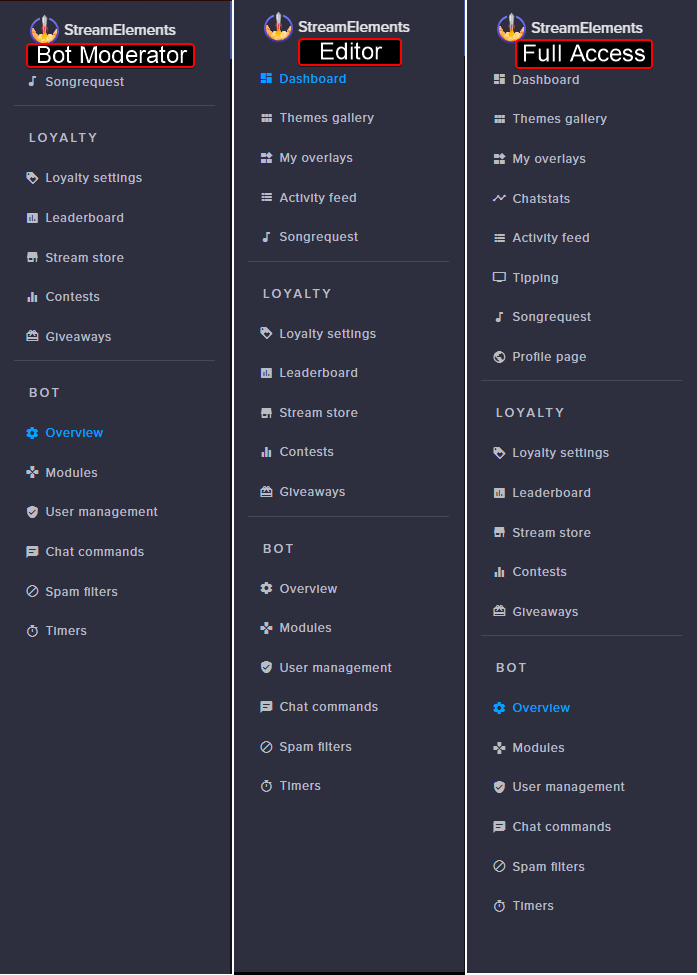
Hey everyone, i tried searching it in the search bar, but couldnt find it, so here i go: can a mod set up a timer or can only the streamer set it up in the timers tab? Would be kinda helpful to set up temporary timer without disturbing the streamers game.
clever mango
Anyone that the streamer grants dashboard "bot moderator" level access to can create/edit timers
astral isle
well i am a super mod but i guess i missed the option. which one is it? 😄
clever mango
Super mod grants high permissions with regards to the chat bot
but it doesn't allow you to access the streamer's dashboard
astral isle
ohh
i see
well i need to have a serious talk with the streamer then. 😄
thanks for the fast reply!
(as usual 😇 ) 😄
 astral isle
thaaaanks 🙂
clever mango

strong dock
oh no... how do i go back to normal cheers from halloween ones?
or just delete and add new?
 charred condor
Your overlay still has the steam icon rotated in the wrong direction
clever mango
@charred condor which overlay specifically?
 valid jay
Am I blind or is there a donation goal hidden really well? Lol
pine hemlock
Overlay manager -> Theres a tip goal widget. To reset the goal amount, its under your Data tab in the overlay manager @valid jay
valid jay
Love u @pine hemlock!
pine hemlock

valid jay
Lol seriously ty
pine hemlock
your wife will be upset @valid jay
turbid reef
rub me cuda
stuck hamlet
!rub
 tawny pivot
👆
valid jay
@pine hemlock lol crap... abort!
lament blade
need help with a donation goal....the defaul $3611 is showing in the middle of mine, and showing at 100% funded when its not lol
is there a way to reset the widget?
pine hemlock
There's a data tab at the top of the overlay editor. Under goals you can change the number towards the goal
If you need to change the goal total, then you edit the widget
@lament blade
lament blade
Yeah I did that already, changed it to $200 which is showing on the donation goal bar...but its still showing as 100% completed with $3611 earned
hard to explain
pine hemlock
Are you wanting it to show no progress toward the goal?
lament blade
yes because no one has donated towards it yet
pine hemlock
If so there's 2 ways to reset/change progress. Overlay editor has a data tab that allows you to change the amount towards the goal.
Or... You can go to activity feed, widget data and it's essentially the same as going thru your overlay manager @lament blade
Just set tip goal progress to 0 and save
lament blade
that worked, thank you so much!
pine hemlock
Yw
hallow harbor
How do i get them to knockc these oout
 snow heath
need help can some one come to the voice chat
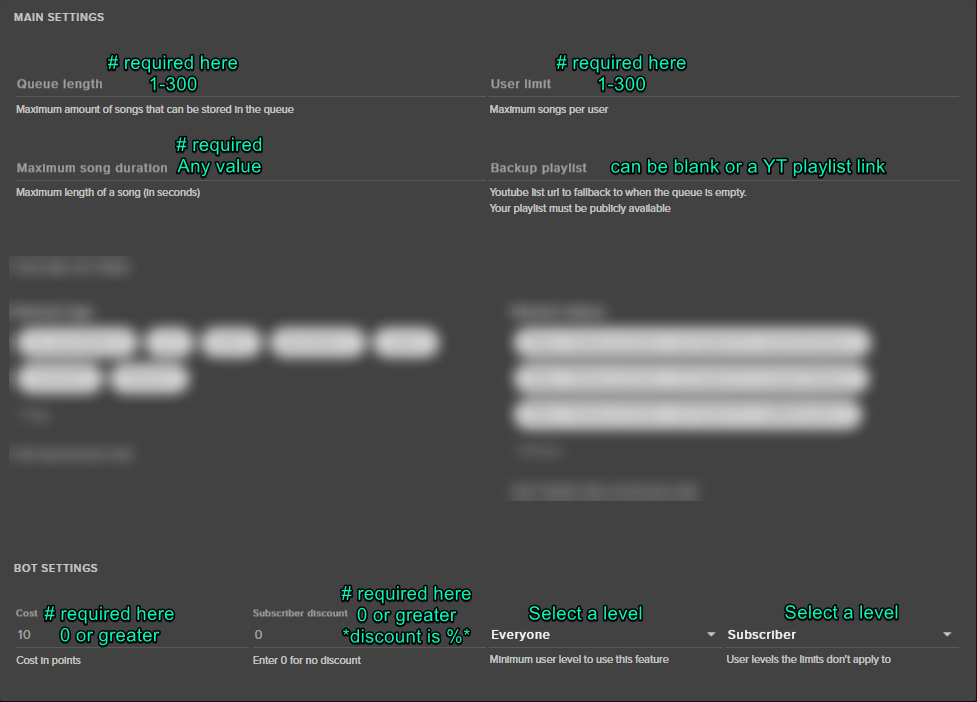
song request page will not allow me to save any settings
weary mist
@snow heath make sure each field on the settings has the proper items https://i.imgur.com/t28AhpK.png


 snow heath
@weary mist oh ok thank you
clever mango
Each token in the cup settings has a weight setting from 1-500
snow heath
issue with commands wonce one is made i cant edit it or delete it
clever mango
that combined with increased "bounce" in the main cup panel will make for more "sploosh"
strong dock
aw man these extra life overlays are amazing... but good gawd the load times in SE overlay editor...
 faint oasis
Can't seem to be able to get the alert to work for store redemptions...
weary mist
to test the store redemption widget, you need to actually redeem an item
faint oasis
Yes, I've had a couple chatters type the redemption code and nothing has happened
I did it as well and I got no alert or sound as I've set them up. I resaved and refreshed, still nothing. Dunno about the other alerts (like follow, sub ect)
faint oasis
@weary mist Yep! I have it under my alerts overlay. I tested it with a simulation, but I didn't test it in stream or OBS
but I'm live atm, so a couple ppl tried to use the redeem command and nothing happened. Other commands are working just not hte store widget
weary mist
I will check out your settings, and if you don't mind, I will test it as well
faint oasis
I don't mind, thx.
weary mist

drowsy basin
@proud pumice @snow forum sorry I couldn't reply earlier, was streaming and had notifications off. Thanks alot. Just wondered how I would get on the bot in this discord so it announces when I go live? 😛
misty wagon
@drowsy basin you qualify as you have the full platform integrated up to the tipping. Will dm someone to make it happen. PS: it's 6AM for one of the guys you tagged 😉
drowsy basin
It’s 4am for me, sleep is for the weak 🤔
misty wagon
edit your msg 😉
5AM here, no need to tell me but still I'm gonna sleep like a baby in the next hour 🍼
misty wagon
15 hour working day, old af, get on my level
 muted locust
Hello world
misty wagon
muted locust
how are you buddy @misty wagon ?
misty wagon
Chilling before sleeping NarinMiles. chilling before 💤
 smoky tide
seeing some weird things with Ground Control and Song Requests. Not actually updating the list, couldnt skip a song. Think GC is sick 😦
 fleet summit
is there a way to have a certain song play when someoone follows or subsribs to you in twitch
misty wagon
@smoky tide post it in #helpdesk-twitch pls
@fleet summit sure https://www.youtube.com/watch?v=8LVRd2X4HvU&t=236s

Learn how to customize your alerts and setup different alerts variations with StreamElements Alertbox ----- Overlay Manager guide: https://youtu.be/X7XrDdRE7...
smoky tide
is this not #helpdesk-twitch?
misty wagon
think it's time for me to goto bed
fleet summit
@misty wagon thanks bro
weary mist
@smoky tide there are some minor issues like with song requests. Reloading GC will refresh the list
fleet summit
it legs when i click on overlay
misty wagon
@fleet summit If you have Hardware Acceleration on in Chrome settings, turn it off and try again.
 fallow lake
Hey so i gots a question. my currency isnt appearing when my viewers type it in my chat. it is turned on and still nothing. Any ideas?
charred geyser
Is there a way to view all created quotes?
misty wagon
Not at the moment @charred geyser
@fallow lake add the alias powpucks to the points command in the advanced
charred geyser
@misty wagon No problems, thanks dude
misty wagon
@fallow lake
fleet summit
the stream elements is different then the video cus the update
misty wagon
@fleet summit well possible, we are crafting new ones but the gnomes are still lagged out from Halloween. Is it a big difference?
fleet summit
no not at all just sometimes the wiget box is missing
misty wagon
Oh that's fine. Last week the bot was missing and we had to go after it with a broom. No worries, will be solved but thanks for telling us.
fallow lake
thanks @misty wagon you the MVP!
 humble coral
Is it just me or is the bot just not talking
It's not saying anything
Actually...It's not tracking anything
I don't have two recent hosts in my activities
NVM
a little troubleshooting and it works.
 brisk hamlet
haiii! im trying to upload a new gif for a sub alert and its telling me i have no more storage left, yet at the top it says im at 85 mb out of 100
 upper steeple
So I figured out why my tip goal was resetting itself when i changed my follower goal progress in widget data. If you accidentally click the Tip goal progress before you hit save it doesn't recognize the number if it has .98888 or whatever number it may be behind it.
You have to make the number have no decimal place for it to save it.
shy stirrup
So i had activity feed open and still did not receive host alert 😦
gaunt light
@ripe herald Youtube support ETA? 😄
 ripe herald
2019 
gaunt light
@ripe herald For Real ?!@3/1/@$