#helpdesk-twitch
1 messages · Page 141 of 1
 slender yoke
 stuck hamlet
@exotic wren have you tried flushing dns? 
 frosty otter
He wanted me to log out of streamelements and back in to create a new token.
stuck hamlet
@slender yoke go to properties and check "Shutdown source when not visible"
you have an overlay loaded, right @frosty otter ?when streaming?
frosty otter
My Host and Follow alerts stopped working a few days ago. They worked just fine for months before that.
 exotic wren
just tryed flushing my dns and still doesnt work
frosty otter
Like I said above, they show up when I go to the overlay manager and do a test. I assume that means they are still loaded properly.
 clever mango
@frosty otter Check the latest pinned message in this channel. The way that SE receives host alerts from twitch changed recently.
 lusty latch
Just wondering if anyone can help? When the jar is used on my overlay (when bits fall into it) it causes a lag problem and I drop frames. Just wondering if I could do anything to fix this? It didn't do it when I used the streamlabs jar
 weary mist
there could be a couple reasons for this.
when you through bits in there, watch your task manager CPU usage. Does it hit 100%? This can cause frame drops. Also, open your task manager, and see how many CEF-Bootstrap's you have active with OBS open (no need to start streaming for this test)
@lusty latch
clever mango
StreamElements hype cup actually uses less cpu and memory in comparison to the other cups out there 
 ember falcon
Hey guys, I have a store redemption which plays a sound. In order to play that sound do I need the store redemption widget active or can it come through the alert widget?
clever mango
Store redemption widget
ember falcon
Alright thanks, sadly I now have to go ruin a suprise xD
clever mango

lusty latch
@weary mist I'll just check now :)
weary mist
👍
lusty latch
@weary mist 10 cefbootstraps are active
weary mist
that could be where your issue is
lusty latch
@weary mist and CPU only went to 50%
weary mist
the idea of SE is to reduce those down to just 1, or just 2-3 if you want more seperation
lusty latch
Ah okay
weary mist
Don't forget, you were not streaming, and likely didn't have a game open
I barely touch 20% when I just have OBS open, as I only have 2 CEF-bootstraps
lusty latch
How do i cut down on the bootstraps?
weary mist
make sure to put "shutdown when not visible" on your SE overlays (makes those bootstraps go away when not being used), and see about combining a bunch of those sources if they are all used for the same scene
lusty latch
Okay thanks :)
Is there a way, if I have an overlay I already use, to merge it with another one?
As I have my normal overlay but ive got the Halloween overlay as well but didn't want to start my overlay again on top
So is there a sort of way to copy one on top of the other if that makes sense?
Sorry I'm typing on my phone and its harder to say what I mean for some reason haha
 drifting steeple
@cakerins#1872 Just to chime in, I would say you're also like me in that you prefer to set anything that has visuals on a page to stay active. If so, then ya, it does kinda hurt. I leave my main source active, then other sources I leave inactive including the pages.. If you're using OBS and you don't like the idea of having the page delayed in loading, one thing you COULD do is use the Studio Mode feature which could queue up the load. This should in essence lower down CPU usage until its needed unless you have a specific hotkey setup.
Huh. Didn't tag him... ok.
clever mango
@slender yoke ⤴
weary mist
same for @lusty latch
100%, check each broswer source properties so that the "Shutdown when not active" is checked, then when they are not visible, it won't load them, thus reducing CPU usage
you should be able to cut down at least 5-8 of those bootstraps just by doing that
 dry prawn
Hey
I have a bunch of "cef-bootstraps" in my taskmanager
I have 3 of them, shouldnt it be 1?
I've removed anything else from other scenes etc
weary mist
if you only have 1 source in your scene, yes
if you have multiple sources in the same scene, then those others will be showing as well
dry prawn
You know what, they were actually old bullshit from streamlabs still lingering
like the eventlist + the jar
Removed them and voila
weary mist

dry prawn
now lets just hope destiny runs well tonight
slender yoke
@drifting steeple I did what @stuck hamlet suggested and it still eats up CPU...not as bad, buy why would I take 12-13% CPU usage over 2-3%?
drifting steeple
@slender yoke Do you have hypecup?
slender yoke
On one scene yes @drifting steeple
drifting steeple
remove it for now and try checking usage.
clever mango
It's because our browser sources include everything, including the graphics and text widgets.
slender yoke
@clever mango but the blog that streamelements just released says having everything in one browser source uses less CPU....I'm seeing the opposite
clever mango
It is when comparing apples to apples
Add just a cup, chat, and alertbox to an overlay
and then compare it with another service that offers cup, chat, and alertbox in 3 seperate widgets
Everyone is able to use their own graphics added to OBS with StreamElements widgets
It's the graphics through browser source that some computers can't handle
slender yoke
I have a chat box, follower goal, cup, and events all in separate browser sources. With my webcam I'm only at 3% cpu. Putting that all in the streamelements overlay i am at 10%
I guess I'll just do what works for me.
drifting steeple
Did you check without the hypecup
slender yoke
Same without the hypecup
clever mango
The hype cup uses fewer resources than other cups out there
drifting steeple
the last time I tried, hypecup was using too much of my resource, but I also know that my CPU is not the same as everyone elses since its an i5-4590. Without the Hypecup, I actually get about 2% less when everything is going off at once.
compared to my previous overlay manager
it depends on everything that is done including animations.
clever mango
Resource usage will vary based on system specs but the gif above shows when directly compared with the others on the same system, the hype cup will perform best
 summer iris
hi, is there a waqy to sync up my twitch followers with streamelemts so that they are correct?
clever mango
Yes, reset your session on the activity feed page.
This will force a data refresh from twitch and will update your total followers widget
summer iris
its that easy. thanks
 strong dock
Sub only giveaway huh
.. hmmm
clever mango
 paper swift
Rookie Question...
Can I run more than 1 giveaway/contest at once? (im stuck at car mechanic w/no Internets to look up!) Thank You.
clever mango
One at a time. Between the bot handling viewer interaction with contests/giveaways and the overlay widgets, it would be real messy with multiple running at a time.
ember falcon
I have another question about the store widget. If I turn the alert sound volume to 0% does that just mean that it won't alert the streamer that something was redeemed but will the sound that gets redeemed still play properly?
Slight background, I have a store item to play a scary sound. When it gets redeemed all I want is for the scary sound to play. I don't want the alert box making a fuss about something being redeemed
clever mango
@ember falcon Try it out and let us know. I'm pretty sure the volume will be based off of the item's volume that was set in the store
you can test it at any time
ember falcon
Okay, I'll try. also if a stream is live will any changes to an overlay go through instantly when I click save?
It's hard to test because it's not my stream, it's my housemates and I'm trying to scare her 😄
clever mango
Most do but there may be occasions where the overlay needs to be refreshed in OBS
ember falcon
Alright
I have to wait for the right time to test it but I'll post back here if it works
clever mango

paper swift
@clever mango Thank You. So leads me to my scenario... I have a sub only giveaway going now in my stream. I raffle off raid spots during my stream. What would you suggest I do? Raffle module is just for points right? There’s no queue or list?
My giveaway isn’t going to be done for a couple more days but I start raid carries tomorrow.
And side note...you ALL are awesome. I never got this kind of support/feedback from my previous bot/loyalty sites.
 worn vortex
Hey i have problems with the site. My screen is white, i can only click the help botton
ember falcon
What I was testing does indeed work
 pine hemlock
@worn vortex if you're using Chrome try clearing your cache
worn vortex
@pine hemlock im not. im using firefox
 dense prairie
hi and good night everyone 👋🏻 i wonder if there is a posibility to add kreditcard or direct transfer to the tipping options?
 edgy kindle
@dense prairie Not yet but hopefully soon; We're working on adding new payment methods
worn vortex
@edgy kindle nope still not working have tryed that
dense prairie
@edgy kindle good to know, parts of my viewers dont use paypal 😦
edgy kindle
Hmm weird..try visiting the main page; http://streamelements.com and then clicking to go to your dashboard?
worn vortex
@edgy kindle nope even that is not working. AND i have deactivatet my add blocker fully
edgy kindle
Well adblocker wouldnt interfere with the page
What version of FF are you running?
 drifting steeple
working here as well and using 56.0.2 64-bit
worn vortex
@edgy kindle i use 64 bit, but its sayin all is updatet
edgy kindle
Well for now you may need to use Chrome, sad i know :< , but refreshing your cache should have fixed the issue
It worked for me the other day
worn vortex
@edgy kindle i dont use chrome, i allways use firefox, and it worked for 2 days ago
drifting steeple
I'd also say try using Edge if you have it just to see.
edgy kindle
Yeah I know but right now the website is designed to work best with chrome, again sad i know ;-;, but we're working on fixing that
Been part of SE since June and I've ran into minimal issues with FF however there are some issues as such with the editor
worn vortex
Its the same with edges and internet explore
drifting steeple
just curious. Change your DNS
cause the only other thought outside of DNS is to use a VPN. If it works on one of the 2, its an ISP issue.
edgy kindle
@worn vortex Try doing a hard cache clear; History > Clear Recent > Unselect everything except Cache & set Time Range to Everything
 visual cypress
Might have been answered before, but for the overlays I make do I need to set the resolution to what my native resolution is, or what the resolution I'm scaling to is.
 grim dune
Hi there! So, my cheer alerts and my host alerts still are not working, even with the activity thing pulled up
edgy kindle
For your overlays you need to set your browser source to 1920x1080 and with the source selected hit CTRL+F
visual cypress
I see, thanks!
edgy kindle
@TheStinkRat#2247 Are you currently streaming?
grim dune
@edgy kindle no Im not
 surreal sapphire
If I have a billing question, who should I direct that at?
weary mist
ask away
 gaunt light
can we use SE for youtube now ?
surreal sapphire
I'd rather not just talk about it in open chat 😉
gaunt light
@ripe herald still no eta on coping
 ripe herald
It wont be so soon
weary mist
@gaunt light Very close for Youtube
gaunt light
no problem hope it wont take too long.
 tough quarry
Any suports online?
weary mist
always
tough quarry
My viewers can't donate for some reason :S
weary mist
ok, give me a minute, and I will check your account out 😃
tough quarry
Thank you 😃
weary mist
@tough quarry what is your twitch name? The one you have liked with discord is old
tough quarry
dustyduelist
weary mist
if you relink with twitch, it will fix that 😃
tough quarry
How do i do that :p
weary mist
through your user settings. Also, if you want users to tip and show through our overlays, you might want to update your panel link to http://www.streamelements/dustyduelist/tip
it is still showing StreamLabs tip page
@tough quarry
tough quarry
Working on it
weary mist
👍
 dense condor
Hi guys is something wrong with the ground control? When I open it it says something is wrong on our site.
drifting steeple
Seems good here.
weary mist
@dense condor when was the last time it worked for you. also, are you still able to get to the settings?
clever mango
@dense condor are you using a mac?
dense condor
I am using a reg pc and last time it worked for me was before the spooky update
clever mango
If you haven't already, try uninstalling through control panel and reinstalling https://streamelements.com/groundcontrol
Or before that, you can try restarting the PC
It's working normally here although it did have a hiccup a fews back and a restart fixed it
dense condor
Ok will try that
 long reef
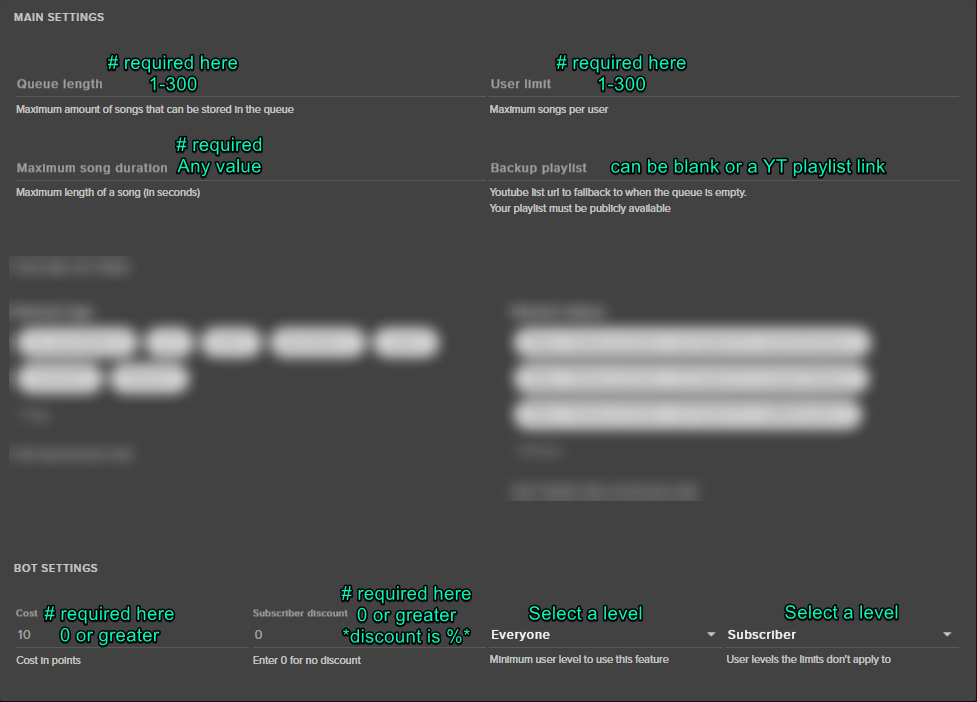
Hi guys, on the website whenever I enable song request and click save settings there is a pop up saying "could not save settings"
clever mango
@long reef Please screenshot your SR settings and post here
you can DM it to me if you'd like to do that instead
 hallow harbor
@clever mango i believe you said look into this the other day for play list

plug.dj
Join a party. Be a DJ. Or just listen. Enjoy music together and chat with people from around the world right now.
correct?
clever mango
yep
hallow harbor
any news on when people can just sr without the link?
clever mango
Nothing new to report. Still waiting on youtube, unfortunately.
hallow harbor
Hmm my friend is able to get sr without a link but isn't on S.E
unless it changed recently
clever mango
SE could use SR searching (it was available in the past) but youtube would shut it all down very quickly because of how many SR are being made and our limit
Hence why we're waiting on youtube to increase the API limit that SE has
 austere ridge
Do I need to stream from a computer in order to use the songrequest ?
weary mist
you just need to have the song requests page open. Though, it does play through your speakers
so if you are mobile, you need to have something that can pick up the sound
 tribal tulip
Is there a way to get streamelements follower totals to resync with twitch?
clever mango
resetting session from the activity feed
tribal tulip
Cheers
 misty wagon
No news till the full YouTube integration is up and running
 opaque night
Hi, is it possible to change the bots from "StreamElements" to sth else? Or is that fix?
weary mist
not at this time, but you can go to https://strms.net/ideas and upvote the idea to get notifications on when that changes
opaque night
Okay, thanks! 😃
misty wagon
You can if you want, hire @weary mist to sit in your channel. He can be any kind of bot you want. I hired him to be my door-bot tomorrow night 
weary mist

 barren stratus
Was curious as to why everytime I press save settings in song request it says "could not save settings"
clever mango
@barren stratus https://i.imgur.com/t28AhpK.png
 opaque night
Lol @misty wagon
misty wagon
What's with all the blurring??? Are these the JFK playlists?
barren stratus
thanks
 white ocean
Hey, need some help, can I use the widgets from StreamElements without using any streamelements overlay, currently my overlay is already set in OBS as an external images. Otherwise I will have to redo the whole thing all over again.
weary mist
the only way to use the widgets is through the overlay. You don't need to put images in (though we recommend at least uploading them and having an overlay set up, just in case you want to stream from someplace other than your home computer (or something really bad happens to your PC, like an arrow suddenly protruding from your harddrive)). But the setup time you spend on it is well worth it. I haven't had to make any changes to my overlay in months. And if I do, I can do it from anywhere, including when I am at work (don't tell my bosses)
 serene granite
here's how to do it easily: screenshot the overlay on OBS and add that as an image as the lowest layer and them when you add seperate images it'll be easy to align
 tropic epoch
Hey! I spoke with you guys at TwitchCon and I had some feedback Iwanted to give yo uguys, but I totally blanked when I actually got to the booth haha... Not sure if this should be in support or ideas? SOrry in advance. >.>
-
Whenever refreshing my CLR browser (because Stream Elements sometimes freezes), or if I'm refreshing to make a change, the HypeCup clears out every time and that can make the stream kind of sad
-
Goals data, for followers it doesn't account for unfollows/deleted accounts, so the data is incorrect.
weary mist
@tropic epoch
- This is known, and something we are working to fix.
- What I recommend for the goals, use the total followers widget, and change the text to look like a goal. The total followers widget pulls directly from twitch
tropic epoch
Awesome, thanks! ❤
weary mist
❤
hallow harbor
ok trying to get this right
can i use the plug.dj with your guyes song request (backup Playlist) in S E
hallow harbor
ok so i plug this into my overlay?
clever mango
you're trying to get the songs to show in the widget?
hallow harbor
yea
hallow harbor
terra lol man im lost on this plug dj how do i get the url for the playlist
paper swift
I reset my activity session yet my Follower Goal Widget is not showing my proper follower count. What am I doing wrong?
however the Total Follower Widget is correct
weary mist
Follower Goal widget is not designed to show your exact follower count. If you want, you can customize the text on the Total Follower widget to turn it into a Goal widget 😃
paper swift
@weary mist TY
weary mist
👍
 little notch
i need some help
stuck hamlet
just ask 😃
little notch
need help on how to set things up
stuck hamlet
anything in specific, or do you need help with everything?
stuck hamlet
https://www.youtube.com/watch?v=X7XrDdRE7Fk this should help you. Sweetfeet
 cloud plinth
Is there a way to slant text?
stuck hamlet
oh
cloud plinth
Like right here I’d like it to match up
cloud plinth
Oh okay. Thank you
little notch
there is no theme
stuck hamlet
that has everything you asked about
hallow harbor
@clever mango thanks figured it out too 😛
another question for yall how do i change this photo?
pine hemlock
Change your profile picture on twitch
pine hemlock
Where are u seeing that current image?
pine hemlock
On the left if you mouse over the image
theres a picture icon that shows up
You can upload an avatar like that
 swift parcel
robot
hallow harbor
really appreciate the help here people
swift parcel
or attack helicopters
pine hemlock
I identify as ellen
 lament blade
So I had today some problems with !sr (Songrequest).
I used this feature now the first times, through GroundControl and through the Browers...
When someone requested a Song, it instantly skipped to this Song, but didn't start playing sometimes.
How can you turn this "autoskip" off?
lament blade
i just streamed some hours ago
okay not some, its already 0.20
but at like 16 i ended
maybe 17 (5pm cet)
pine hemlock
Did it start playing the requested song immediately? or did it just change the title of the song?
It should wait for the current backup playlist song to finish
lament blade
the song got "skipped", turned blackscreen, new title and i had to press "play" myself i think
atleast that happened sometimes
pine hemlock
Was this on the website or ground control
lament blade
ground control
pine hemlock
okie. we'll look into it
lament blade
on website it just stopped playing once or twice idk
pine hemlock
Yeah it does that for me on ground control too. i'll bring it up again. someone is working on songrequest stuff currently as well
lament blade
this autoskip is total shit
 limber summit
Hi, i'm here to see if i can get my tips transferred from streamlabs to streamelements?
lament blade
@limber summit there's a trick idk if im allowed to share
limber summit

lament blade
oh and also another thing i had in ground control !! :D
it says in twitch chat "queue #1" always, no idea why. I also restarted ground control, people refreshed twitch etc, every song was queue'd 1
not sure if the song got queued then also in first, i didn't really pay attention for it :c
and a partnered streamer in my chat was then like "yo what the fuck go back to your old settings" 😦 😦
limber summit
soo.?
lament blade
@weary mist so i can send him it in private?
stuck hamlet
@limber summit how many tips do you have? 😃
tropic epoch
Oh! I had one more question/suggestion, related to the image rotator. Is there a way for there to be an option to have images slide into each other? ATM the images fade/slide away, leaving a blank space between images. It would be nice if there could be an option for the slides to transition directly into each other.
stuck hamlet
Alright @limber summit
stuck hamlet
You can dm me if you have many to transfer.
 crisp kestrel
hello, what is Global Cooldown and what is User Cooldown on bot commands?
weary mist
global is a cooldown for everyone, user is per person
pine hemlock
but global overrides user in situations
weary mist
and vise versa
lets say global is 60 seconds, user is 30
I use the command !test
derp
pointless to have global higher than user
global is 30, user is 60
I use !test. I now can't use it for 60 seconds. Cuda could use it after 30 seconds though
global will stop spammage of the command, but user will limit how often a single person can use it
crisp kestrel
so i wanna place some meme commands but i dont want my chat to spam them more than 1 time for ex..
pine hemlock
Set a high global cooldown
pine hemlock
60 would mean that every minute a user could use the command, but the same user has to wait 2 minutes
weary mist
❤
pine hemlock
@lament blade C:\Users\yourname\AppData\Roaming Delete Ground Control folder and your song request problem is fixed btw
pine hemlock
Yeah the top tip is bugged
pine hemlock
I complained about it already dont worry
lament blade
C:\Users\yourname\AppData\Roaming Delete Ground Control folder and your song request problem is fixed btw
NEUE NACHRICHTEN
deleted the folder
limber summit
all the dates are correct.
pine hemlock
Restart ground control now @lament blade
 little notch
there away someone can do it for me ?
weary mist
You are able to give people moderator access to your dashboard, and let them help if you want
lament blade
Host alerts is not working 😦 !
swift parcel
@lament blade You need to have the streamelements website open or the ground control app open
swift parcel
Twitch changed how hosts are called up,
lament blade
so is it gonna be like that for ever with stream elements? or are you working on fixing it ?
swift parcel
Depends on if twitch changes it again
lament blade
well, i guess its time to say goodbyw to stream elements now 😦 ! so many problems iv had since i started using this 😦 ! now i need to have more stuff open.. nah, not gonna happen! 😃 thanks tho !
when I have one fucking donation through streamelements, my layout won't look shit anymore xD
Edit: With Layout I meant this Overlay with recent Donation etc. 😃
but someone just for a donation through streamlabs (typing link in browser, i had it before :c )
swift parcel
@lament blade I'm sorry that a twitch api requirement has caused a serious issue. And I'm unaware of any other issues you have had in the past if you have even asked for support we can help with it
lament blade
to react myself to it, someone recommended me Streamelements, I took a look on it and it had a great first impression. So I give it a try for quite a while and also keeping in mind, that you have first level support, atleast during the beta
on Streamlabs, you get 0 attention usually, Support not helpful at all, Ankhbot is the worst one anyways
 sharp flax
does SE have a welcome bot for lurkers, or be getting one?
stuck hamlet
if they are lurkers, why would you call them out?
swift parcel
No but my personal opinion, calling out lurkers is bad.
stuck hamlet

sharp flax
well I want everyone to be welcomed and I'd like to know who is watcing
lament blade
and what will you do when you get a host? 
sharp flax
so when they come in I can address them
lament blade
the bot spams 150 people? xD
weary mist
I use Chatty app to view twitch chat. I can see who is here, but I don't call them out
I don't want them to run away
sharp flax
ok fair enough @weary mist
swift parcel
There is also http://gettc.xyz/ that I use but like scalper I like to see who's there but I don't call them out
sharp flax
you can use that with SE?
sharp flax
ok thanks, I just like to know who is there
 snow forum
When creating an Item in my Store, do I need to make it a command in my chat first, then creat the item to go along with it ?
lament blade
just create the item, that's all (atleast that's all, what I did)
snow forum
❤
lament blade
viewer can redeem it with !redemm [itemname]
but @devs, can you like put a message to an item you want to redeem?
I didn't found anything related to this.
misty wagon
I hate to be called out as a lurker or right after I walk into the chat. Doesn't give me time to look around and almost forces me to instantly participate.
lament blade
^
snow forum
I agree on the Lurker portion, I alwats say hello to new people, but sometimes people just like stopping by and not talking.
lament blade
there's a big streamer sometimes just joining small streams to chill before he starts his big streamer. he also joins my stream (I know it because he accepts 6months+ subs as twitch friend through your friend started watching)
He is usually lurking. If he would be FORCED Chat, as Partnered & Big Streamer .. wow .. 
some people just want to chill without chatting 😃
snow forum
^^
hallow harbor
will gifs get added to tips through S E
pine hemlock
 Could be looked at in the future.
Search or add your ideas here: https://strms.net/ideas
 nocturne schooner
so i am trying to use one of the free overlays. but i am not going to be using a face cam. is there anyway i could change it and just put a gif or a picture there?
and how do i reset the timer on the stream starting soon overlay?
swift parcel
yeah just select the camera box to either delete or to change the image to a gif that you can upload
also I believe the timer resets every time you reload the overlay? (like if you have a scene for starting and have "shutdown not active" on the source)
weary mist
👍
snow forum
I've uploaded a GIF multiple times under the Cheer section, and for some reason it stays on the regluar bit cheer symbol. Is there a reason for this ?
- thanks-
 proud pumice
@snow forum check the variation settings
bits have different variations for each number
😃
@stuck hamlet too slow bud
snow forum
Beautiful. right in front of my face ❤
I love the fast responses, you guys are really great!
 celest wasp
is there a way to get the overlays to load faster when transistioning between scenes on OBS? I have good internet but it seems to take awhile still
lament blade
I think @proud pumice never replied to me  :(
:(
proud pumice
about what dear @lament blade
weary mist
@celest wasp that is a caching thing with OBS. I use studio mode so I can load up a scene, then transition
lament blade
@celest wasp I addet an animation between scenes and it loads faster aka same loading time but you don't notice the black screen
celest wasp
I like both of those idea's,
Not sure how to do the animation thing but I can probably figure it out
lament blade
Can't tell you from bed, but Easy to find by urself or with Google.com or maybe anyone else here can help you :P
Important: Pictures don't work!!
proud pumice
inb4 asteria becomes support champion? xD
lament blade
Only because I have no school atm xd Thursday 12 hours school again :c
proud pumice
:<
lament blade
Usually I'm not 24/7 on discord, but always trying to help when I'm here xD
I'm 12 class, last year school, I don't really want to fuck it up #welcome 
I can't login through Google on my phone in the idea page, on pc it works
nocturne schooner
how do i turn on TTS?
weary mist
you can turn that on in the overlay editor, when you click on the alert box, go into tip/sub/cheer settings
lament blade
In overlay on alert settings
 peak plank
does anyone else have a problem with the follower goal not showing the right follower amount
lament blade
I want my pc to write in ultra fast :c 480 keys a minute with less than 10 mistakes over 5 minutes xD
weary mist
@peak plank that widget just shows the number of follows since you last reset the goal. If you want to use the real follower count, go with the Total followers widget, and edit the text to look like a goal 😃 That one pulls from twitch regularly
nocturne schooner
in the overlay editor?
peak plank
ohh i see! thanks a lot ive been looking everywhere lmao
weary mist
@nocturne schooner
lament blade
Remember to remove bit variations, I also got Jebaited on it
Suggestion: remove the given variations, that will make it a lot easier for all users
weary mist
once we get a library of defaults, then I will push for that 😉
lament blade
Still waiting for the library xd
Wasn't it before like "you have to renew the full overlay to get it(atleast a lot)"
And then I said sth like "save settings under > library" 🤔
 unique badger
Standard question: Notifications playing twice. How do avoid?
pine hemlock
Double click your browser sources and enable "shutdown source when not active"
@unique badger
weary mist
yes
unique badger
thanks!
nocturne schooner
in the overlay editor how do i move something forward?
lament blade
If you mean just move, click it and move
Or did you mean move into Foreground?
nocturne schooner
like i have a gif and i want to move it behind the face cam overlay
so how do i move a video in front of or behind another video
weary mist
there is a layers tab on the bottom left. you can move them up and down there 😃
 hushed ice
hmmm one of my overlays has peaks of 80-90% CPU :/ any ideas why that might happen?
nocturne schooner
thanks
weary mist
@hushed ice 1. what kind of cpu are you running? 2. if you open the task manager, are there more than 1 or 2 cef-bootstraps? or is it just one using that much
hushed ice
- i5-4460
- there were more, but i closed the sources until i found the culprit
other than that it was normal, but once in a while it went to 80% for a couple seconds
pine hemlock
Was it during an event? Like a follow or something
Spikes can be semi normal during an event playing. If you have Kappagen it could be the cause too
weary mist
ok, make sure you go through your sources and ✅ "Shutdown source when not visible"
that will at least limit the number of bootstraps you have
hushed ice
hmm i think i few of the times it was during an event but a few others it wasnt. I also checked the "shutdown source when not visible"
ill try to pay more attention next stream and see if i see any patterns
weary mist
are you running OBS in studio mode?
weary mist
cool
hushed ice
maybe it was just OBS being himself... so next stream ill check if it keeps happening and try to see some patterns
pine hemlock
Try refreshing the cache of your browser sources (its in properties as well, just have to scroll down) Let us know if you have issues again
Someone else had a similar issue yesterday too
hushed ice
alright, thx guys
oh yeah, i also had an OBS update just before the stream
maybe that + not refreshing the cache had something to do with it
 sonic egret
@stuck hamlet my Sub Luck Bar is Back!! Thank You!! Appreciated!! 😃
 outer geyser
trick or treat is not working for me?
weary mist
trick or treat is a special image widget, so you can add things to your overlay. Click the widget, and then you can select an image or an animation to fill it
@outer geyser
unique badger
Sounds still playing twice.
Sounds playing like 2 minutes afterwards, too, for some reason
weary mist
make sure you go through your sources and ✅ "Shutdown source when not visible"
 terse canyon
Are there any ways a mod can add custom tip amount alerts without me knowing?
like $4 for a screamer sound or whatnot
supermod of course, but curious
weary mist
only if you give them overlay access
 astral epoch
in the activity tracker is there a way to ban harassing accounts easily short of going to their twitch page?
weary mist
Not that I am aware of, though someone else might know more than me
astral epoch
kk - just getting some harassers tonight
weary mist
:+1:
 fossil snow
Has anyone been having trouble with lag when you first open up the steamelements website?
snow forum
Can I directly put a picture as a command through my chat, or does it have to be linked to a picture on a page somewhere
weary mist
you would have to link it. twitch chat is not designed to really send a picture except as an emote
snow forum
Alright, no worries, that's what I was assuming, I just figured I would ask and see if someone knew something I didn't.
weary mist
@fossil snow there could be a couple reasons for this. 1. Chrome has hardware acceleration on by default, turning this off can reduce lag. 2. Adblock extensions can cause slowdowns as well. Incognito tabs can be used to get a clean version of chrome (no extensions, cookies, cache), so you don't have to uninstall anything
 arctic kraken
I am trying to import my tips from streamlabs and it said to come here?
 olive loom
hey I just was curious on the status of the bug smushing, will there be an update with a bunch of bug fixes soon?
 olive loom
xD
arctic kraken
@weary mist can I send that info via PM?
weary mist
sure
 charred garnet
@everyone is this where i report a bug
weary mist
you bet
charred garnet
i found a bug where when i am making an overlay the website becomes unresponsive the web page will freze up and then i am forced to refresh the pg resulting in loseing all the edited work that i did to the overlay that is if i forget to save.
weary mist
which browser are you running on?
charred garnet
firefox
weary mist
I recommend at trying it out on Chrome. The site is optimixed for chrome at the moment, and the overlay editor seems to have the most bugs in other browsers
charred garnet
oh ok thanks
 warm iris
question if I have my pay linked and when I get a donation does stream elements take a percentage?
coz I didnt get the full amount I was donated and was wondering why
warm iris
okay didnt think so
 faint copper
So I found some serious issues with StreamElements today.
For the last few days I've had issues with my notifications. Hectic assisted me in refreshing everything and even went into my channel to see if things were updated.
The issues is, all alerts worked minus Host alerts.
I updated all of my scenes, all of my alerts, all of my sounds, all of my variations today.
I was streaming, and was hosted, yet no Host alert activated. I opened my SE dashboard in Google Chrome, and was checking things out when I got another host, and it activated properly. I assumed it was fixed, so I closed the dashboard.
I received another host, and it did not activate again. I decided to leave the dashboard open, just to see if your update requires it to be open. I got another host, and it worked perfectly fine, in fact my next 4 hosts alerted without issue.
I use StreamElements so I have everything in 1 Browser Source in Xsplit, so I don't need to have so many things open. Requiring me to keep another browser tab open so that alerts activate is counterproductive. Is there any way we can get this fixed? I prefer SE, but I will need to switch back to StreamLabs or Muxy if I need to have multiple things running just for my alerts.
stuck hamlet
Do you have the activity page open or the ground control app? @faint copper
faint copper
Activity page via Google Chrome browser
stuck hamlet
yea, that isn't a bug. We require this for host, basically the way Twitch notifies us about hosts is a little weird, so in the backend stuff we are doing tricky things while you're on that page to fetch alerts.
faint copper
This wasn't the case until you had your website update. Are you telling me this is the way it's going to be from now on?
stuck hamlet
For now yes, we will hopefully have another solution soon.
faint copper
OK thank you for that. I will switch back to StreamLabs and check back later this year to see if yall fixed SE.
stuck hamlet
so having the activity page or our desktop app open is a big issue for you? @faint copper Asking for feedback to give the team.
faint copper
It's not a huge drain on my PC if that's what you're asking. I use SE to limit the things I'm using. I previously had 23 sources in Xsplit, but switching to SE I was able to bring that down to 7. I don't see the point in bringing another thing back into the fold just because of some new update. It's more of a principal vs a real need. There are occasional games where I do close most browser tabs to have the available CPU, so SE would need to be closed for those. It's basically just going backwards, and I prefer to use services which are innovating and improving their business vs backpedaling.
You say the Desktop app will prevent this issue?
stuck hamlet
Yes.
 restive lantern
none of my host alerts are coming through 😦 i see the twitch notifications in chat, but streamelements doesn't pick it up in chat or in alerts BibleThump
faint copper
Seems like a ploy to get me to download it. Not by you specifically mentioning it, but by making the browser service less useful. Like Apple slowing down old iPhones. just not my thing
stuck hamlet
I understand, but what you're saying is, you had 23 with another service, and now you have 7, but you'll go back to 23 because you don't want to "add" one thing? Seems counter intuitive
faint copper
Well I could start accepting tips via CC again, so that would help lessen the hurt for me. Will consider downloading the desktop app, just not a fan of the direction the business is going.
stuck hamlet
@restive lantern something changed in our update, you now have to have the activity page open, or have ground control open,
@faint copper we're not forcing you to download the app, if you don't want to, don't. You can open the activity page on your browser and minimize it.
Those 2 things just allow us to connect to twitch properly to get the notification.
Our business model has not changed, we don't have a secret agenda. We are here for the Streamer, and trying to make the best service out there. An all in one platform
This is what we need to do, because twitch doesn't have a specific API for hosts, so this is our current issue. We will hopefully have a resolution soon.
faint copper
I understand. Not sure what changed to require this, I hope yall can fix it. I'm temped to switch and I know a few other streams who have already switched today. Just wanted to figure out the issue and voice my concerns. Like I said, I hope you can fix it, and I hope you publish an update letting us know. Have a great night, and thanks again
stuck hamlet
Good night.
 fast crater
Anyways, now that that's over.. I'm having issues uploading webm files. Is this a known issue? Stream Elements just doesn't recognize them as an uploadable file.
fast crater
no, should I?
stuck hamlet
Yes. Please try!
Our website was built to be best on Chrome. It should work when you upload it.
Are you finally moving everything over? 
fast crater
That fixed it. You're my hero
 fast crater
Hahaha, this is the same onslaught??
stuck hamlet
Of course!
fast crater
Wait, I vaguely remember saying you did work for SE. Is that right?
fast crater
I've got a call with you guys tomorrow, actually.
stuck hamlet

 polar gorge
How do you turn off a donation on stream? For example: Someone using a different variance of the n-word and I want to turn it off.
stuck hamlet
Who are you talking to?
fast crater
Adam from marketing
fast crater
You help this dude, I'll let you know after the call
stuck hamlet
If you use ground control, you can set a keybinds to skip too @polar gorge
I'm a pro multi tasked @fast crater (; if you ever need more help, you actually follow me on twitter too.
fast crater
Haha, thanks @stuck hamlet
restive lantern
m i s takes were made thinking i just couldn't hear my alerts and turning them all to max 
stuck hamlet
Oh man 😮
stuck hamlet
Ground Control is our desktop app
restive lantern
@stuck hamlet so does it just detect that the activity stream is up? Sometimes I have to close chrome completely because of my CPU ;_;
oh
wait what
linku
GIV PLS
ONSLAUGHT I WILL HUG YOU SO MUCH NEXT TIME IF U GIV
nevermind
i found it
restive lantern
LOL
polar gorge
@stuck hamlet Thanks for the help. 😃
 dusk dew
Anyone know how to go about doing a multi stream? (2 webcam feeds on one stream)
 shut chasm
Hey guys. Any idea where I can find the "hide video" button for song requests?
pine hemlock
It was removed from the site because it was created problems loading songs/Playlists since YouTube doesn't load while the player is hidden
shut chasm
Oh, Thanks @pine hemlock Anyway to turn the quality of the video down then?
pine hemlock
It should use your YouTube settings. Change the quality on a video on YouTube, I think that changes all of them.
Alternatively you can download our ground control app. Should still be able to click the song request button to hide the player
Activity feed - > ground control banner on our site
shut chasm
@pine hemlock Where would it be on the ground control app? I do have it. Maybe I'm blind. Thanks so much for your help!
pine hemlock
The music symbol icon. If you click it, it should minimize the song request stuff and the video. If you don't see it, check the settings for Ground Control and make sure song requests are enabled
shut chasm
Oh got it! Thanks! @pine hemlock
lament blade
Hello everyone ! SO on one streamer's giveaway that was running for a bout a month some of the people lost their tickets. I had around 120 and now it's 66 :/
Is it some kind of bug ? or are they still there but it didn't calculate them properly ?
 desert prairie
Still requesting a export points button.
so I can periodically have all my points locally incase something happens with your site.
I really think you should implement this feature.
lament blade
Hello, When is the new Extention comming?
(19 minutes later... Hello? Anyone answer please?)
 atomic hollow
@lament blade hey
lament blade
@atomic hollow hello
atomic hollow
the 1st phase of the extension is coming soon, I cant supply a date yet but it shouldnt take too long
@desert prairie there is a really simple way to do it with our API
lament blade
@atomic hollow I've already tried all the existing one's but no one of the exisiting extentions, like streamlabs are good enough becuase of the need of logging in to your twitch account to receive points.
I hate that my viewers NEED to log in to twitch when I use streamlabs. And I hope this is going to be that perfect one extention. Panel AND overlay 😃
lament blade
@atomic hollow And do you have a deadline?
atomic hollow
no, sorry
lament blade
Before the end of the year? The first Quarter of '18? 2029? 3015?
atomic hollow
1st phase this month
lament blade
So that's BEFORE DECEMBER?
atomic hollow
yes
lament blade
That's enough I need to know. I'm still using streamelements. Don't 😟 😉. Thanks and L8⃣ter ❗
atomic hollow
❤
lament blade
So, no information why the giveaway is kind of bugged with the tickets ?
I had 120 and now it's 66, the username of the streamers is islandgrown11
The ticket's just suddenly dissapeared
 burnt sky
I am having a problem with streamelements taking long time to responds when clicking around in browser - is it just me ? and do anyone have a fix for it ?
atomic hollow
@burnt sky are you using Chrome?
burnt sky
Yes
lament blade
Thanks for the help
burnt sky
Thx shadow 😄
atomic hollow
@DivineKataroshie#5628 we just did a few giveaways the last few days and they all worked fine, i dont understand the issue I think
@burnt sky my pleasure
@lament blade ❤
lament blade
@atomic hollow damn such a shame :/ you see I have this pages on auto load when I launch chrome, like the default pages
and it might just not take some of them into account
because I didn't refresh the page or smth
so it technically is quite big bug but whelps
kind of my fault
I mean if your script and servers are working just fine then it means that must caused the issue
 versed merlin
morning everyone, first off i'd like to say i love stream elements it has made my stream so much better since i started using it
I'm having problems adding a tip to my stream from the tipping page
no notification is popping up and ive filled in all the details, any help with this would be great
atomic hollow
@versed merlin hey!
thanks for kind words
do you have an overlay with an active alertbox?
linked to your OBS of course
versed merlin
yes
atomic hollow
ok let me see
versed merlin
thank you
atomic hollow
so you got a donation and no alert showed up? @versed merlin
versed merlin
No, I’m trying to add a donation a user sent me using the “add a tip” option
And import it into the stream
atomic hollow
ohhhh
versed merlin
It used to work but today nothing
versed merlin
Yea that’s where I’m doing it
atomic hollow
Are you checking the "Imported Tip" checkbox?
versed merlin
Yes
lament blade
Imported donations are also not shown in recent donations etc
 sleek acorn
my stream store sounds are no registering in stream? any ideas?/
versed merlin
@lament blade yes that is also correct @atomic hollow its basically like the tip didnt register at all, i really loved this feature...
pine hemlock
Its on the bug list @versed merlin
lament blade
Someone said me, donations only work with donations from SE itself
@sleek acorn add the widget for it, I think it's named redemption
versed merlin
@lament blade it used to work perfectly, then now it just doesnt, im trying to register a donation someone sent me for my birthday, @atomic hollow also it isnt giving the user any stream currency for donating, @pine hemlock was it just added?
pine hemlock
Was added yesterday when it was noticed, yes. Its probably in relation to our new site
versed merlin
@pine hemlock i dont think it's in relation to the new site, now that i scroll through my tips i have 1 from a month ago that apparently didnt register either
pine hemlock
what do you mean by didnt register?
versed merlin
i mean it basically did exactly what it is doing now @pine hemlock, i described it earlier in my initial post
lament blade
imported donation?
versed merlin
yes
pine hemlock
I mean.. It's on our bug list and we'll be looking into it. I can't give you an eta on a fix though. Currently we have a lot of issues that are being worked on with the new site.
There's nothing that you can do on your end to fix it, its just an issue with coding
sleek acorn
thank you @lament blade
versed merlin
Ok, thank you. I’ll inform my viewers @pine hemlock
pine hemlock
Tips alerts still work. Just not manually added tips
limber summit
erm, my newest donation and top donation arent showing up in the widgets on the stream overlays, but they are in my top tips under tipping
also, my latest follower is incorrect
and i only have 1 activity.
atomic hollow
hey Joe
limber summit
👋
atomic hollow
can you please try to log out and back in?
to your SE account
if you just signed up you wont see past activity
limber summit
i havent..
atomic hollow
ok
limber summit
also, that follow is from 4 months ago, but ive had many followers since then
atomic hollow
did you try to log out?
limber summit
yup, just relogged, everything is still the same
thats on my stream
i had to set the newest donation
atomic hollow
can you please go here - https://streamelements.com/dashboard/session
--> session data
and enter is manually?
was the tip processed by SE?
atomic hollow
so you will need to add it manually for the time being
limber summit
but, i want the all time top donation
not just the session top
will this still work?
 radiant zenith
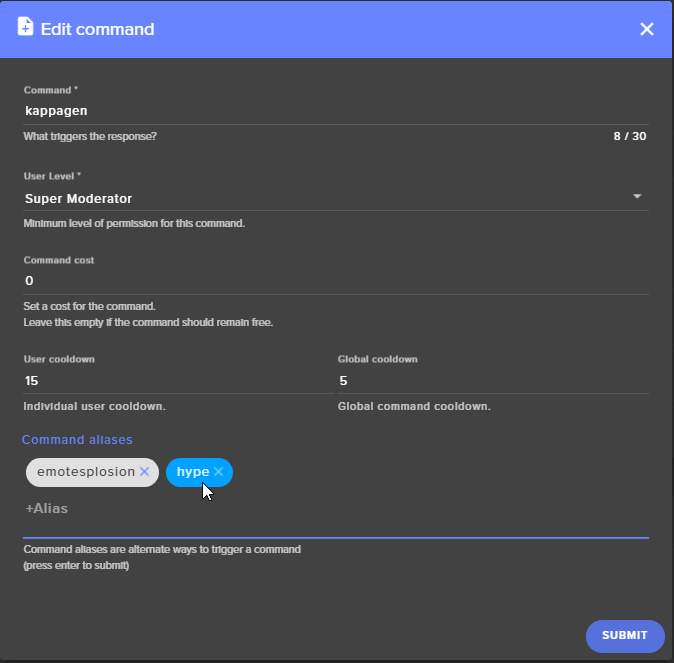
Any way you can set a command for hype in chat? Like play a media clip you already have uploaded in the store and maybe with emote explosion?
limber summit
ah, yes i see, thanks for the help 😄
atomic hollow
❤
radiant zenith
Im sure you can, im just a noob lol
radiant zenith
Can you set up a command in chat that plays an item you have uploaded to streamelelments. Like i know you can use !redeem to redeem an item, but i was curoius if can set a seperate command and just as a chat command
clever mango
 radiant zenith
I may not be explaining myself very well, but you know what i mean @clever mango
clever mango
if you add hype to the kappagen default command
you can create a custom kappagen emotesplosion at any time
do you have an emote in particular you would want to use?
As an example, if you add hype to that default command you could type !hype PogChamp 100 and a 100  emotesplosion would happen if you have the kappagen widget on the overlay
radiant zenith
Ohh ok, i gotcha
 hasty prism
Hey all! I'm wondering about the alert echo issue. I've just made the move over to elements and loving it except for this. I switch a lot between scenes and having to turn browser sources off makes the transitions pretty ugly. Any possibility of this being fixed in the future or as anyone found another workaround? I haven't had this issue with any of my other alert systems. Thank you!
lament blade
you hear the sound doubled?
hasty prism
Yep. ONly way to fix it has been to turn off browser sources when not using them in the scene
lament blade
hasty prism
Yes as I said in my first note, that makes the transitions pretty ugly. And I've never had this issue with other alert systems.
I do love everythign else though! this is the only thing that Im trying to figure out.
swift parcel
using studio mode to load up the next scene before you transition to it helps
clever mango
All browser sources take time to load. The less data (less graphics) in the source the faster the load time. Studio mode or longer fade transitions can remove this load time from showing on stream
summer iris
how do you enable studio mode?
clever mango
There is a button in the bottom right of OBS for it
but you can also hotkey it
@summer iris
hasty prism
So chances are unlikely that this will be messed with then?
summer iris
thx
weary mist
the problem is OBS caching
hasty prism
how come other alert systems don't have this problem? just curious
it's so far unique to elements
clever mango
What do you have in your overlay?
swift parcel
because you're loading up a full overlay vs just alerts
clever mango
^
weary mist
⤴
hasty prism
OKey doke! thanks!
weary mist
the file size is massively different
swift parcel
especially if you are loading overlay assets and not just alerts through our overlay
hasty prism
perfect! now I grok. thanks!
swift parcel

clever mango


swift parcel
@summer iris some more info on studio mode https://www.youtube.com/watch?v=5xFA4zCIptA

Studio mode can take your livestrream and recording to the next level. Check out what it does and a couple of ways I use it on my livestream. Be sure to give...
summer iris
awesome
so the preview scene will load up before transistion, that is really usefull
clever mango
yep
summer iris
all other scences will remain unloaded
clever mango
I recommend entering studio mode for the transition and exiting after the transition
because the preview on the left is "live" and can play sounds
All of that can be hotkeyed
 timid wolf
Im probably just overlooking it, how do I get the bot to say stuff every so often without me typing a command?
swift parcel
its all the way on the bottom left side "Timers"
versed merlin
or you can do what i did, which was enable 1 scene to have the notifications enabled at all times in my case the brb scene, and disable sound in the other scenes and keep them shut down it actually works pretty great
exotic wren
so i cant open up stream elements in any browsers, i have tryed empting my cashe, scanned my computer and removed any threats, changed the setting in crhome i was told to change and still nothing
stuck hamlet
Do you know how to bring up the console?
exotic wren
as in the cmd?
stuck hamlet
Nah, as in browser
exotic wren
i do not
exotic wren
yep its open
hallow harbor
Just curious how long does the bot take before saying your streaming in sell out channel?
nvbm
LOL
nvm lololol it went
like 2 mins
exotic wren
min 35ms and max 198ms average 117ms
stuck hamlet
no packets lost?
exotic wren
nope 0%
stuck hamlet
okay, go to your browser and hit F12
and try to load our page
something on the left should show up, go to the console, any errors?
exotic wren
is it ok if i dm you a pic of what its showing
stuck hamlet
sure
atomic hollow
@stuck hamlet if the pic is cool send me as well
 wet ether
Hey guys. Needing a bit of help with songrequest
Well, not me, but my mate who is currently streaming
How do you set up the songrequest to play the video on stream through OBS?
If he uses window capture, it shows a black box on stream. If he loads a browser url box, it gets stuck on the login page
weary mist
you will have to do the browser source. Once you get the source set up, right click on the source, then click interact. He will have to log into the site, then navigate to the soung request page
alternatively, he could do a desktop capture, but that requires additional monitors, and he could easily drag something in front of the video on accident
wet ether
I'll let him know
 thorn glen
Is there a way to sync Currently Playing with our back up playlists?
weary mist
Not yet, but it is something that we have planned. TL'DR: Youtube API limitations, should be working with youtube integration release
 median marten
Hello - I was looking to import my tip and donation information from Streamlabs to Elements... and the contact us link brought me here
stuck hamlet
Hey Ninja, let me dm you 😃
 gloomy comet
Hi, im having issues in the songrequest feature where its not letting me save, whenever i press save settings i get the error "could not save settings" even when i havnt changed anything, ive tried restarting browser and such to no sucess, any fix or is am i not alone having this issue?
clever mango
@gloomy comet https://i.imgur.com/t28AhpK.png
gloomy comet
Thanks!
 brazen cosmos
is there a way to add SR via API?
$readapi(https://decapi.me/youtube/videoid?search=$msg)
brazen cosmos
^ 👍
clever mango
To answer the question, it's not possible. We hope to have SR searching in the future when youtube raises our API limit
 jaunty sedge
streamelements is lagging for me like hell in chrome. is it a known issue?
works flawless in edge, but in chrome for e.g. songrequest page starts playing backup list - but still shows the settings page
clever mango
@jaunty sedge If hardware acceleration is enabled, disabling it helps most users. I'm not having any issues using Chrome Beta with HA disabled.
Also check that your chrome is running the latest version. It recently updated.
 ancient prism
@weary mist @wet ether he could also capture the video from the ground control app if he uses that.
strong dock

austere ridge
Can I use song request if I stream from the tv or no
brazen cosmos
@clever mango is there a way to use that api so it pulls the link? even if it just drops it in chat?
brazen cosmos
lol
im playing with something
maybe get it to whisper the user, so they can request that way
clever mango
brazen cosmos
sweet
clever mango
Here's your video id: $(customapi.https://decapi.me/youtube/videoid?search=$(queryescape $(1:)))
is the response
brazen cosmos
genius
clever mango
😊
Thanks for the inspiration
I'd have never thought to try that even though I'm used to using that API
clever mango
It can't respond to itself
timid wolf
Thank you for the info, you guys rock
brazen cosmos
ok. worth a shot
clever mango
Yea, it's too dangerous for a cloud based bot in many channels
clever mango
np
brazen cosmos
can the bot whisper?
brazen cosmos
ah ok.. hence why /w does not work 😉
clever mango
right
brazen cosmos
i like it 👍
clever mango

 spare sage
Is subcount having an issue rn?
stuck hamlet
Shouldn't be.
spare sage
Noticed on testing event subscriber it does the alert and Total subscribers [count] actually goes down in number
when I tested sub goal sub goal number was changing each time one moment it was 45, then it was 69
stuck hamlet
I think those are just emulation effects, shouldnt break you're you're actually live
spare sage
 my concern is that im looking at a players overlay right now in my obs and its showing count all over the place, the number ideally should be accurate even when that is displayed correct?
clever mango
After you're done emulating, if you refresh the overlay in OBS it should return to normal
spare sage
Also sub goal should reflect overall correct?
Oh and you guys while I am here, having admin mode makes managing players so much easier.
Best feature 2017
weary mist

clever mango
Sub goal is a count widget that increases on new subs but isn't always accurate as it doesn't pull data from twitch (it doesn't decrease). Total subscribers widget could be used as a goal if you edit the text around the {count} variable
spare sage
Ok, good to know. Thank you.
weary mist
total subs pulls from twitch on a regular basis, so it updates if the number is incorrect
 unreal geyser
theres just a help icon on my stream overlay... the actual overlay is gone, aside from kappagen
clever mango
double click the overlay and refresh cache
brazen cosmos
can you use line breaks in bot responce? or able to get the bot to post a second line as a second responce (not sure if what i mean is clear)
stuck hamlet
Nope
brazen cosmos
                     Line 2

or

StreamElements: Line 1
StreamElements: Line 2```No line break, and no double responces for 1 command
brazen cosmos
thanks
brazen cosmos
🤣
pine hemlock

clever mango

brazen cosmos
is there a way to add quotes via UI?
stuck hamlet
Not currently
stuck hamlet
import what exactly?
weary mist
im guessing quotes
brazen cosmos
yes, quotes. Sorry
clever mango
The leaderboards are blank?
clever mango
Did you change your twitch name or password?
 grave pelican
nope
clever mango
what is your twitch name?
grave pelican
ashketchum113
this is the first time i have this problem
im finishing the store, the points were perfect
just today i got in to see them and "no data"
clever mango
are you looking on the dashboard or public page?
clever mango
log out and back in please
brazen cosmos
i have the same issue ^^
 coral lava
so my halloween them just stopped working mid stream
clever mango
@coral lava Please refresh the overlay cache by double clicking the overlay and select refresh cache
coral lava
thank you
lament blade
for obs studio the studio modus, with loading the scenes, you press on a scene, wait until it shows up, and then you press the button (in german übergang)?
clever mango
yes if übergang moves the scene on the left to the right



 clever mango
then exit studio mode
lament blade
just wanted to know if i guess right how it works 😃
because maybe a big streamer goes to streamelements 
and I have to be able to answer all his questions :c
misty wagon
@lament blade that's amazing, but let us help you 😉
lament blade
@misty wagon i told him to join this discord but he declined
lament blade
fxcg hdthfrttfrhjk
clever mango

weary mist
fjiewnoanbiabf
 crisp fog
Can Spotify be used with SE?
stuck hamlet
unfortunately not
crisp fog
Crap! 💩
 tawny crest
Is SE down or is it just my isp that refuses to connect to it?
serene granite
please hit ctrl+shift+r
tawny crest
how rude of cache to mess with angular 😛 tnx alot though
serene granite
np 😃
strong dock
Is #announcements channel broke? 
serene granite
?
 tight harness
Seems fine for me
 molten flare
Is anyone else having problems loading the overlays in OBS? It doesn't load them, but I can access them fine in my own browser. I've re'added them in OBS and restarted OBS + PC, but it doesn't work? :/
pine hemlock
Browser source -> Properties, scroll down and refresh cache
molten flare
Thanks!!
 pine vault
hi I recently imported my alertbox from streamlabs and now my host alerts arent showing? All the rest are fine like my donation, sub, follow, bits and I've checked the settings and tested it but ti's still broken? pls halp 😄
pine hemlock
Host alerts now require our Ground Control app to be open, or the activity feed on our website.
pine vault
oh ok cool and where is the ground control app?
pine hemlock
Theres a banner on that same page I linked or, https://streamelements.com/groundcontrol
pine vault
ah sorry I must've missed it! Thank you so much for the quick response 😄
pine hemlock
no problem
grave pelican
is there a streamelements app for pc?
or i just have to work with it in the webpage
clever mango
grave pelican
thanks
is there a way to get alerts with images on the stream?
sorry for the ignorance, im new
i use OBS
pine hemlock
Make an overlay on our site, add an alert box.
Video guide of our overlay manager: https://www.youtube.com/watch?v=X7XrDdRE7Fk

Create an amazing overlay with StreamElements, watch our video guide to learn how. ----- Tipping page setup: https://youtu.be/eLzxRkq7tJo Add KappaGen to you...
grave pelican
@pine hemlock thanks
i already have follower alert, sub, etc.
i wanted new alerts for the store, i mean, when someone get an item, get an alert
understand my idea?
weary mist
if you add the store redemption widget to your overlay, you can set an image when creating the item, and it will use that image (for stream perks only)
grave pelican
but the image will appear on the stream?
grave pelican
when someone gets an item, where i can see that? to give them what they want
weary mist
in the upper right of the sotre redemptions page, there is a button for redemptions. this will populate with redeptions to be approved
grave pelican
ok, thanks
i cant find the redemtion page xD
i open the store, then what
i found it, thanks
lament blade
idk why but the overlays dont want to update on obs T-T
like they are hidden
is streamelements down or something?
ancient prism
nope
stuck hamlet
shouldnt be
pine hemlock
@lament blade Browser Source -> Properties, scroll down and refresh cache
faint copper
StreamElements down or something? I can't open the website
pine hemlock
Ctrl+shift+r
faint copper
weird. Refresh cache?
faint copper
ok thanks
 brisk quarry
Yeah mine is doing the same thing.
stuck hamlet
CTRL + Shift + R should fix this
pine vault
how do i end a donation goal and start a new one? I cant seem to figure it out?
stuck hamlet
In the overlay manager, head to the "data" tab, and just reset your donation goal 😃
pine vault
I still cant see it anywhere I'm sorry to be a bother once I learn it I'll know it for next time >///<