#helpdesk-twitch
1 messages · Page 140 of 1
 keen pier
I see.
keen pier
i get it now. I was missunderstanding the whole thing. I thought i could put multiple overlays in 1 source; like "starting soon" or "BRB". This are just things like alerts, cups, labels.... i get it now
thnx for the helpo and sorry to waist your time,
 weary mist
@keen pier no worries, don't hesitate to ask questions here 😃
 strong dock
needing to flip an image on his horizontal...
 grand snow
Hello, I was confused about something under Loyalty Settings. In a stream I moderate, under 'Cheer bonus' it says 100. Does this mean for every bit donated 1 loyalty point will be automatically added to the viewer who cheered?
 misty wagon
weary mist
misty wagon
weary mist
@Uberhund#7989 its per 100 bits donated
 clever mango
The current editor doesn't support layer transformations. It's a feature that will be considered for Editor v2
grand snow
@weary mist so if someone cheers under 100 bits they will not be automatically bonused, but if someone cheers say, 1000 bits, they will receive 1000 points automatically from the bot?
clever mango
Also important to note that the cheer must be 100+ bits to gain a bonus.
Cheers below 100 can't be added together to get a bonus
weary mist
@Uberhund#7989 exactly as terra said. If I send you 100 bits, I would get the bonus
if I sent 1250, I would get 1200
grand snow
Okay I was just wom]ndering because mods have been manually bomnusing points to 100+ bit donations
I understand now, thanks for your help!
 split willow
Hello  guys i'm using streamelement on Twitch, Youtube, and mixer. I do stream games like PUBG and CSGO. Can you add me as #291219887274328064
Thank you very much! 
weary mist
give me a minute, and I will check you out 😃
split willow
Sure
weary mist
@split willow Done. You can also add a panel with your tip link so it is easier for people to find on your twitch page. Thanks for using StreamElements, and look out for our Soon™ to be released youtube integration
(mixer coming soon after that)
split willow
Cool thank you very much! 😃
 dapper nacelle
Is there any way to change the timezone on my StreamElements dashboard?
clever mango
There is not. Are you seeing incorrect times somewhere?
dapper nacelle
No the times are fine, it's just the "followers today" and similar carry over to the next day for me
Just because of my time zone
clever mango
Do your streams go into the next day?
clever mango
The Followers today and tips today use the 24hour clock so you could have followers and tips earned on two different days if the stream started on one day and ended on the next.
dapper nacelle
Oh, I see
So followers gotten the prev day during the stream will show today because the stream continued to the next day?
clever mango
Followers before midnight will count for the previous day
Followers from midnight and beyond will count for today
dapper nacelle
Ah, okay
Does the dashboard go off US time? Cause I'm in NZ so that might be what's up
weary mist
more isreal time
dapper nacelle
Okay, no biggie... just wanted to check. Thanks :D
grand snow
When I try and update a streamers game through the StreamElements site it says 'Error!'. Any way to resolve this?
clever mango
what access level do you have?
grand snow
I have full access
clever mango
Thanks, reporting this to the team. For now, you can use the chat command to change game.
grand snow
Okay thank you!!
 swift parcel
Possible that you might have to be added as an editor through the broadcasters dashboard on twitch?
grand snow
I am an editor as well on twitch
swift parcel
ok so it is a general bug then
clever mango
🐛 
 lament blade
Hello, i am new to Stream Elements. I just set up the hearthstone animated overlay but the alerts seem to be coming up with a few minutes delay
clever mango
Are you live?
lament blade
No, could that be the reason?
clever mango
Yes
When offline, SE polls the twitch API less frequently. When live, it's much faster.
lament blade
Oh, i see. Thank you.
 wary basin
I am having an issue with the subscriber alert image not updating. Can anyone help me with this?
 paper parcel
hay everone dont know if ya can help but how can i get streamelements into a moderater instead of a viewr please
weary mist
@wary basin does the image work when you emulate a 1 month sub?
@paper parcel /mod streamelements
type that into chat 😃
 @clever mango
weary mist
so you might have a default variation, bottom left of the editor
you can remove that, and it will work with all the other months
or edit it to suit your needs
wary basin
Not seeing the variations, is it under layers?
 nimble agate
Can you change the name of the bot?
weary mist
@wary basin
@nimble agate not at this time, though it has been suggested at http://strms.net/ideas
you can upvote it there
wary basin
Got it, thanks!
weary mist
👍
lament blade
where can you activate !duel, since it's not activateable
 drowsy basin
I have a overlay which I am trying to add a chat box to. However when someone types in the chat it displays it 11 times
@clever mango
clever mango
@drowsy basin Is that in the editor or in OBS?
drowsy basin
editor
drowsy basin
alright lemme check
clever mango
@lament blade activate it in Modules
lament blade
i see ty
drowsy basin
@clever mango tryna change the colour of the highlight on tips
however when I click the tab
I can't see all the way to the right
clever mango
@drowsy basin Sorry about that. It's being fixed
drowsy basin
alright ty
 woeful nacelle
I just launched my new game layout for the first time, but it's only showing up as a plain blank screen in XSplit. The starting soon layout works fine but not the game one.
lament blade
so i created a new email and connected it to paypal, its tmasteria@outlook.de, so if you'd update the donation window to the latest one, you only see the paypal email and not the full name 😄
 pine hemlock
@woeful nacelle Most of us don't know much about xsplit unfortanutely. Can you try duplicating your game overlay on our dashboard and trying the new URL?
If anything @ebon forum can help you when hes awake for xsplit problems
 thin mauve
So I'm very new to this and seem to be doing something wrong when setting up my overlays, they aren't displaying the animations during my stream.
 edgy kindle
@thin mauve Are you by any chance using OBS Classic?
lament blade
still not working :c
thin mauve
How would I know if I am using classic or not?
edgy kindle
Top left corner of OBS
If it doesnt say Studio or 20 but rather v0.6 you're using classic
thin mauve
20.1.0
thin mauve
Thats what my icon looks like, yes.
edgy kindle
Alright good; @thin mauve For you overlays what widgets did you enable?
thin mauve
in OBS or streamelements?
thin mauve
yes, I have an alert box.
edgy kindle
and did you put the saved& launched Overlay URL into your OBS as a browser source?
thin mauve
I have all the alerts enabled.
I have placed the link into OBS as a browser source, yes.
edgy kindle
what width/height did you put for your browser source?
edgy kindle
alright and did you remember to CTRL+F(fit to screen) for the source?
edgy kindle
Alright so in your overlay editor click on the blue bell in the bottom left corner of the green area and simulate an event such as Follower; As soon as you click it swap over to OBS to see if it shows up
edgy kindle
Then you should be fine now
thin mauve
hmm, all of this worked up until I went live, then it stops working unless I manually simulate the events.
do I need to have the window launched during the stream?
edgy kindle
Hmm how many scenes do you have?
thin mauve
2
edgy kindle
and do you have the overlay enabled on both of them?
thin mauve
yes.
edgy kindle
what about the option to Disable source when not in use? you'll find that on the browser source properties
*shutdown not disable
thin mauve
on both, they are checked, yes.
edgy kindle
Alright and are you aware that you will not see them locally on your screen but rather on OBS or if you have your stream open?
thin mauve
Yes, I am aware, I watch my stream while streaming.
just for quality control, of course. 😛
edgy kindle
Then I am not sure what could be the issue. Can you start up your stream for a few minutes? I'll give you a follow to see if they are working properly
edgy kindle
@thin mauve Open your OBS on stream
@thin mauve http://puu.sh/y9vuO/3b92b3c6ae.pngTheir servers seem to be having delays

You can go ahead and shut your stream down 👌
@thin mauve
 sterile void
Hello support team! Is there a way to configure a chat command where it'll use a user if specified, or a random chatter if none is specified? For example:
!slap -> (randomchatter) has been slapped
!slap @user -> (user) has been slapped
 carmine yew
Quick question, not sure if its a known issue or just something on my end. My friend made me an editor for his account, I'm trying to help set up his overlay but everytime I try to access his overlay it just shows a blank editor page instead of what the overlay actually consists of.
thin mauve
Sorry I have all alerts from Discord off while streaming. Thank you again @edgy kindle
edgy kindle
@thin mauve Just remember that the overlay source needs to be above everything else for your sources
thin mauve
I think it's on twitch's end that I keep missing the alerts.
4-8 seconds of delay is normal for my stream but not 4 min....
edgy kindle
@carmine yew Right now that is a bug we're trying to work out for Editor/Full Access however we are sorry for this inconvienence
thin mauve
and after about 2 hours I have to refresh to hold down the delay.
edgy kindle
@thin mauve Your stream delay was fine however twitch API is what was being slow so sending data, such as a follow, can be delayed
carmine yew
@edgy kindle ah ok, thanks so much for the quick reply
clever mango
Twitch servers are definitely experiencing issues at the moment. The 2nd and 3rd directly affect StreamElements services.
edgy kindle
@heyfelicia#9579 I'll take a quick look
sterile void
thanks!
edgy kindle
@heyfelicia#9579 For your random user ${random.chatter} is the variable
For a specified user it's ${1}
Currently without a custom api i dont know how you would create what you're wanting in a single command
sterile void
ah bummer, thanks tho @edgy kindle !
 slim cairn
just a little typo i found
actually wait no... the dot above the i is so close it's basically connected to the bottom part
 abstract dome
should my bitrate be higher or lower if i want to take up less pc power
swift parcel
bitrate doesn't matter it's the resolution and FPS you want to stream at that effects it
woeful nacelle
@pine hemlock @ebon forum Tried duplicating it and using the new URL, same thing. Still didn't work.
I think I figured out the problem. The overlay's resolution was too high, causing none of the overlay graphics to appear in the box.
pine hemlock

woeful nacelle
Yeah, that's what it was. I thought it would resize the overlay to fit, but forgot that it actually crops it.
 viral gale
Hi, when creating a giveaway the FAQ says I can add subscribers luck, but I have no such option?
swift parcel
@viral gale did you just get affiliate?
viral gale
a few days ago, but I can se subs in activity feed etc.
pine hemlock
Sub luck feature is currently missing on the new site. At least for affiliates
Probably partners as well
Devs are aware of it.
 smoky tide
where can we go to report bugs? noticing no copy in tabs for link protection https://i.imgur.com/U9YyVsf.gifv
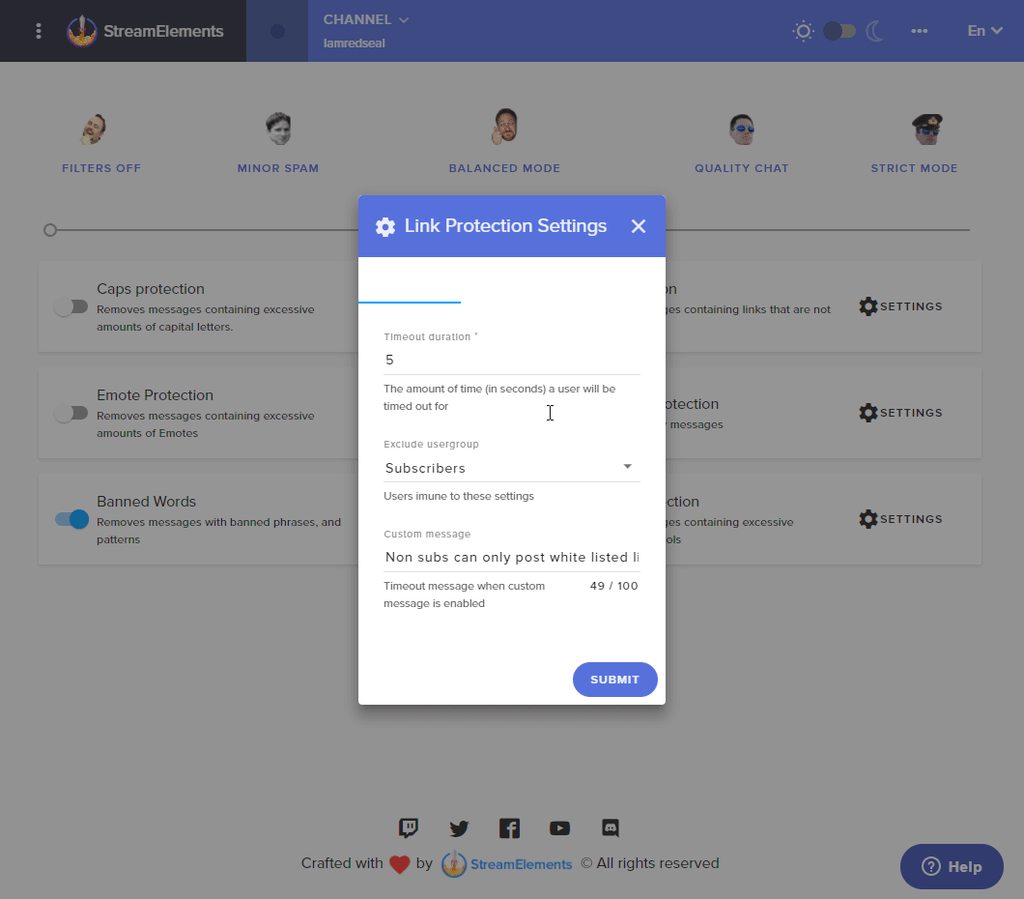
both reg and dark mode ☝
clever mango
Thanks @smoky tide
smoky tide
👍 btw, the new update looks amazing!
just got backk from out of town. going through it now. Im in love! ❤
 sleek quiver
Any idea why i stopped recieving my emailed stream report?
 cobalt galleon
is there a command in chat to clear the chat? like other bots have /clear ?
 fleet void
hello any one there i could ask forhelp ?
 pure crag
For the currency system, what if someone cheers less than 100 bits
How much currency is actually given?
fleet void
i just cant get streamelements to fit in my obs , it only shows part of it ?
 ebon forum
@fleet void what resolution do you have for your overlay?
ebon forum
@fleet void make sure you put 1920x1080 when importing the browser source and then just press Ctrl+F (fit to screen) once you have the browser source selected
this will automatically center the overlay and resize it to fit the screen
fleet void
maybe im doing soem tyhing wrong caue it till dont fit lol
ebon forum
rightclick the browser source and check if the resolution for that in OBS is 1920x1080
should look like that with your overlay link instead of obsproject link
ebon forum
does it fit now?
ebon forum
enjoy your new shiny overlay 
fleet void
yeah i need to make my own later lol , but for now im using the blue black csgo one hahah
www.twitch.tv/blueturtle1234 im going to stream for 30 rightnow maybe more but sleep soon lol
thanks ttyl 😛
 errant dock
hey i need some help with the stream elements loyalty points
 atomic hollow
talk to us
lament blade

errant dock
so it says its on but when i try using it in chat the bot wont respond
im using !wings
errant dock
@atomic hollow @lament blade
atomic hollow
hey @errant dock
you changed the name of the points
but you didnt change the command
you can add an alias to the !points command here - https://streamelements.com/dashboard/bot/commands/default
errant dock
@atomic hollow thank you
 unborn obsidian
does anyone know if they will be making a seperate program for Stream Labels Like Streamlabs does?
lament blade
Hi I’m still not getting the alert sounds for store redemptions. Has there been any updates? I can see it in chat and I can see the alert box on screen but still no alert sounds and I’ve tried it with diff sounds. The sound doesn’t come through in the editor as well when I test it.
atomic hollow
no need for labels
 serene granite
do you have the store redemption widget @lament blade ?
lament blade
Yes I do. It was working fine a few weeks ago but not anymore
atomic hollow
@unborn obsidian we have a desktop app - https://streamelements.com/groundcontrol
if thats what you meant
lament blade
I also haven’t changed anything when it suddenly stopped working. The only thing I’ve done is try different alert sounds but none of them work
serene granite
@lament blade let me take a look
atomic hollow

lament blade
Thank you @serene granite
unborn obsidian
@atomic hollow is it possible to grab the images and sound clips from streamlabs from integrations or nah?
unborn obsidian
how do i add them to a custom overlay i make on the website?
unborn obsidian
how do i add it in the editor?
i add the widget but it jsut gives me this stupid shark dancing gif
atomic hollow
I just looked at this overlay and it doesnt have the shark
and he is not stupid!!!
unborn obsidian
XD
im sorry
am i able to add the alert box in another layout edit or do i have to jsut add both sources to obs and size them there?
atomic hollow
you can either do the 2nd thing or just duplicate the overlay as many times as you need
lament blade
@serene granite any luck?
serene granite
sorry for the delay, I'm gonna have the dev take a look at it
 flat vessel
anyone on that i can have a chat with?
flat vessel
am having a bit of trouble seeting up do you have voice coms?
serene granite

Create an amazing overlay with StreamElements, watch our video guide to learn how. ----- Tipping page setup: https://youtu.be/eLzxRkq7tJo Add KappaGen to you...

Learn how to customize your alerts and setup different alerts variations with StreamElements Alertbox ----- Overlay Manager guide: https://youtu.be/X7XrDdRE7...
lament blade
so monthly top donation shows "no data" for me. I only have streamlabs imported donations for now
but i have .. 
 stuck hamlet
You may have selected "session"? @lament blade
stuck hamlet
🤔 could you head to data tab in the overlay manager and refresh the aggregates?
stuck hamlet
Yea, reset it
It's just miss labelled
Should say refresh
Once you do that, it should work 😃
 autumn cypress
Is there a way to see a list of all the quotes that have been added?
 silk patrol
@autumn cypress Not yet, but it might happen in the future
stuck hamlet
(:
lament blade
so now my donations are rip AND my followers 
cobalt galleon
May i ask! I saw someone have a 'mystery box' in their shop. Like a box that you get a random item from their store from.
How is this possible to create ?
silk patrol
@cobalt galleon The streamer would have to handle the random part. We don't have anything to achieve this
cobalt galleon
i see...
and i saw someone have like a 'buy 1h more points for everyone ea 10 minutes.
Is that the same? that it will be something the streamer will have to regulate?
silk patrol
yup, we don't have a "make it rain" option like it was on revlo. But this has been requested https://streamelements.helprace.com/i386-automated-stream-perks-in-the-stream-store
 terse canyon
hey guys ... is it possible to twist the sources?
for the widgets i mean
I'm thinking about getting this for my intro/intermission/outro
https://videohive.net/item/tv-studio-background-loop/19341388?s_rank=17

VideoHive
QUICKTIME – photoJPEG -25FPS
1920×1080 FULL HD
TV Studio Background Loop
serene granite
you can do it on obs with a filter i think
terse canyon
hmm, that or maybe just fade this as a background and keep it alll flat.
https://videohive.net/item/tv-wall-51/7211691?s_rank=15

 gaunt light
So @misty wagon @ do we already have Copy from one Overlay to the other?
@ripe herald Better ask you this 😄
silk patrol
@gaunt light not yet. right now you can duplicate the whole overlay and then remove what is not needed
clever mango
Upvote this idea if you'd like to have it in the future
https://streamelements.helprace.com/i258-copy-a-layer-widget-and-it-s-settings-between-overlays
It's something that will reviewed for editor v2
 tight harness
I know many people want that, it will be a nice feature 😄
 proud pumice
@tight harness 
 ripe herald
@gaunt light no 
tight harness
It's a very anticipated feature but I believe it's more complex than it sounds 😄
ripe herald
i guess 😄
 uncut sapphire
So I feel silly for asking but what exactly triggers Trick or Treat? Or is it just a constant? If it's a constant, why does it have fade in and fade out settings?
Also, is there any way to change the Kappagen emote spam to the Halloween ones used for the Halloween Hype Cupe?
Thanks!
clever mango
They are constant. The alertbox and store redemption widget are the only widgets that support enter/exit animation at this time. The rest do not yet support it so the settings are more of a placeholder for future development.
@uncut sapphire The halloween hypecup uses special tokens that are only available with that hypecup. Kappagen uses emotes that can be typed into the channel's chat.
lament blade
I imported myself the donations, but they also don't show up
clever mango
From streamlabs?
lament blade
streamlabs didn't work
clever mango
Ok I'll DM you
lament blade
oh right there was sth
clever mango
sth?
lament blade
sth = something
clever mango
Working now  👌🏽
👌🏽
lament blade
okay so i see now top tip
but not recent
and the top tip only works for sessional top tip XDDDDDDD
serene granite
go here https://streamelements.com/dashboard/session and click the aggregates tab , and click on the refresh aggregates
let us know if that helps
uncut sapphire
Ok, thanks for answering my questions! @clever mango 😄
lament blade
@serene granite it just killed even my followers (basically everything) before but i can try again
 fallen basalt
can we put !songrequest to work withou t youtube link? Just saying: Californication for example?
 solid stump
Is there a way to rename the chat bot? i have a seperate "bot" account
clever mango
@CafezimDigital#1661 Not at this time due to a youtube API restriction
@fallen basalt
lament blade
still not working @serene granite
clever mango
Not at this time. It will be considered in the future. @solid stump
lament blade
same as before, no recent donations, and top donation only works for sessional (but it's 7 days ago)
 quiet plinth
how to remove a bot command
clever mango
@quiet plinth your browser or screen's horizontal resolution is smaller than the width of the page. Please scroll right with the scroll bar at the bottom of the page or use shift + mouse wheel down
 smoky lark
Anyone else having problem with Giveaways
I cannot add subluck at all
The slider bar for subluck is gone
clever mango
It's being worked on right now and will be available again soon. Sorry for the inconvenience.
grand snow
Just so you know the problem I had yesterday: When I try and update a streamers game through the StreamElements site it says 'Error!', has not been fixed yet
smoky lark
@clever mango Thank you sir appreciate it
clever mango
@grand snow The dev team is aware and working to fix this. Thank you for your patience.
lament blade
Hey! Not sure if its just a problem on my side, but I cannot turn on song request (or even make any changes to it) - i get a "Could not save settings." pop-up every time 😦 This started happening a few days ago - before that it worked just fine.
clever mango
@lament blade Please take a screenshot of your SR settings and DM it to me. Thanks
lament blade
ok gimme sec
grand snow
thanks
clever mango
@grand snow I was just informed that right now this is intentionally disabled for mods on the dashboard. The commands are available to moderators in chat to change title and game.
grand snow
@clever mango alrighty thanks
 honest blaze
do the halloween stuff go away after it's over? because i like my little reaper friend who's in the stream
serene granite
no, and we hope to bring more.
honest blaze
ok cool because i wanna keep em all ❤
pure crag
For the currency system, what if someone cheers less than 100 bits
How much currency do they earn
clever mango
Currency bonus is only for cheers 100+. This matches the bonus for tips greater than $1
 covert wren
is it ok if i was a sellout?
clever mango
One sec while I verify..
covert wren
ok
clever mango
@covert wren Please add this link to your twitch panels and I'll add you https://streamelements.com/robbietehrotten/tip
covert wren
ok. where are the panels?
clever mango
on your channel below the video player
covert wren
ok
gotta add an image for the tips thing.
Finished. https://go.twitch.tv/robbietehrotten
 clever mango
Got it. You're in. Thanks for streaming with StreamElements 🚀
covert wren
you're welcome.
tight harness

 oblique thorn
Hey guys!
Does StreamElements chat widget capture the Halloween Emotes from FrankerFacesZ?
drowsy basin
Hey, Would it be possible to get calibri added to the font list?
clever mango
SE support over 800 google fonts https://fonts.google.com

I'm sure there are some that are close
 twin thorn
^ when i used branebot they gave us the css class name so you could overwrite it in obs , so you could use a local installed font ,any change we can get the name classes streameleemmts uses?
twin thorn
thanks ladymatrix:)
swift parcel
here's the idea board link for custom html/css boop the button!
 silent zealot
Hey 👋
Still not able to change currency on tipping page to BRL any fixes coming soon? Maybe an estimated time?
misty wagon
@silent zealot
`Brazilian Real
Note: This currency is supported as a payment currency and a currency balance for in-country PayPal accounts only.`
That means it's out of our hands and in the hands of Paypal. We will continue research on how to be able to offer you service. Soon ™ there is hopefully better news.
lament blade
interesting events
clever mango
yes
lament blade
that's the only new follower i got => offstream, and after i did all that
cobalt galleon
Hello! 😃 Im trying to get redeem items from shop work in the chat. But it doesnt seem to be working. I have selected in the item that u can redeem in chat.
clever mango
The bot isn't responding to commands.
Did you recently change your name or password on twitch? @cobalt galleon
@lament blade I'll look into this and get back to you
 proud marten
Hello! Anyone has a bit of a lag when switching scenes in obs? I have a super theme halloween overlay set up and everytime i switch scenes the overlay takes a second to show up
clever mango
sorry, that was a reply to lillamartin
lament blade
im stupid xD
thanks
clever mango
@lament blade I can't replicate the issue here. Please try readding the widget. https://i.imgur.com/SVhzzVh.gifv
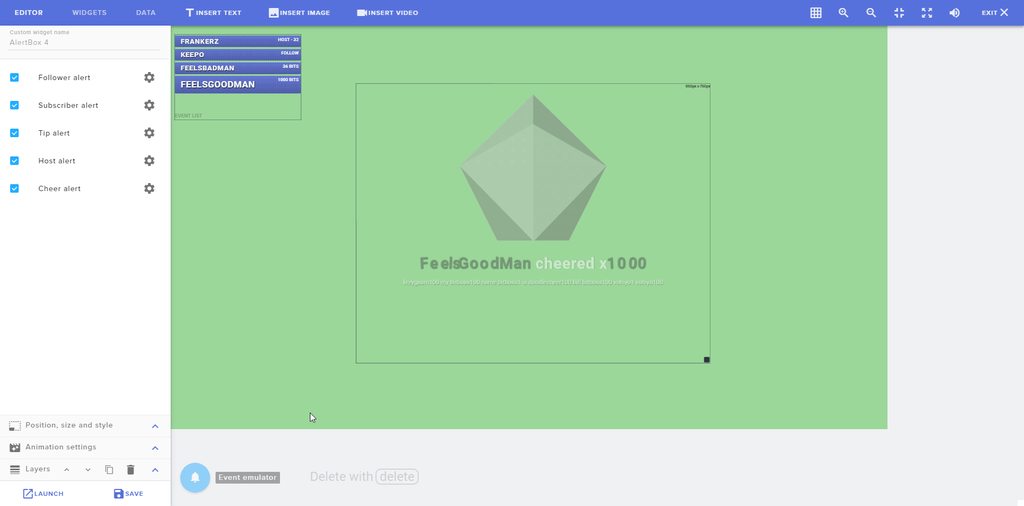 lament blade
other overlay ive choosen
okay I addet some "test alerts"
but why the imported follower, tips, cheers, dont get shown?
pine hemlock
Because they were prior to you using our system.
It probably only shows the events while using us
Not before us
 timid pulsar
Hi, any way to remove someone who followed from my event list?
clever mango
@timid pulsar Activity Feed > Widget Data or DATA in the overlay editor
you may need to refresh your overlay cache as well
timid pulsar
Wait, so I go to activity feed first?
timid pulsar
Okay, I'm in the editor
timid pulsar
Alright, clicked data
clever mango
you will see recent followers and you can click X on them
timid pulsar
Thanks ❤
lament blade
tried even different browsers
pine hemlock
The devs are pushing a lot of updates, might have something to do with it
Idk I'm on mobile can't do much testing.
cobalt galleon
@clever mango he is responding to commands. Just not the redeem commands
pine hemlock
Is the redeem command enabled in chat commands?
clever mango
@cobalt galleon The bot is in your chat but is not responding to commands. Please part and join from the StreamElements dashboard
 sour burrow
i have obs now @stuck hamlet do i need it for overlays if so could you be helpful for set up i like the halloween idea
PM with info if you could please as i dont want to miss a thing as im off here now
stuck hamlet
you need a streaming software for overlays, so yea. you'd need obs
sour burrow
i got it
stuck hamlet
i can link you a video if you'd like
sour burrow
please ❤
stuck hamlet
Create an amazing overlay with StreamElements, watch our video guide to learn how. ----- Tipping page setup: https://youtu.be/eLzxRkq7tJo Add KappaGen to you...
@sour burrow
 acoustic linden
how do I give someone supermod?
acoustic linden
ty
lament blade
what is supermod btw?
tight harness
It's basically just a higher level of mod, then you can assign certain things like commands to require that access level
 hallow harbor
What do you guys use for playlist etc?
That compatible with current song playing widget
pine hemlock
YouTube Playlists generally
clever mango
to have a playlist show on the current song widget, I recommend looking into plug.dj
you can add a playlist ito your "room" and SE can pull all song data from the room
unborn obsidian
can the website not handle the overlay creator? it keeps locking up >.<
pine hemlock
Update your chrome and disable hardware acceleration @unborn obsidian
unborn obsidian
thanks @pine hemlock
 violet nimbus
When will contests work in overlay? Still not displayed.
unborn obsidian
still freezes =/
clever mango
@violet nimbus being worked on right now
violet nimbus
@clever mango Just checked, even a new overlay created - nothing appears
 visual cypress
Hey so question in regards to the Store items? If I make an item that say has a quantity of 10, and start streaming for a few hours. The quantity is depleted by end of stream. Will it then replenish even if I start streaming again 2 hrs later, or for instance if my OBS Crashes and I have to start stream again does it replenish it?
clever mango
@visual cypress No autoreplenish but you can edit the item's quantity from the dashboard stream store
visual cypress
So, if I understand correctly. The resource is finite no matter how many streams I do a week, and I'll need to go into the dashboard to refill it.
clever mango
Yes, if a limit is set for the item. -1 would be an unlimited quantity
 swift dome
My streamelements bot is not seeing hosts anymore 
clever mango
Please check the latest pinned message in this channel 😃
swift dome
oh okay
do i need to keep them open on the same pc as the one that OBS is running on?
swift dome
seems like a downgrade imo. i hope it'll work if i open it on my phone. my pc will be overloaded if i keep it open while streaming :/
clever mango
How do you monitor events that happen while you're streaming?
swift dome
ankhbot has an events tab
and it uses less resources than any of my browsers or groundcontrol :/
lament blade
ankhbot is the worst i've ever used 
 grim dune
Hi there! My emulate cheer events is not working. Is there something I can do to fix that?
clever mango
@grim dune Not working as in no cheer alerts are showing when you emulate?
grim dune
Yes 😃 I don't think they're working when Im streaming either
clever mango
Do you see Subscribers and Bits on the right side of this page? https://streamelements.com/dashboard/activity
grim dune
I do
clever mango
Which overlay are you having this issue with? Have you tried emulating with other overlays?
grim dune
I just have my main overlay, But ill test with others real quick
clever mango
what is this main overlay called?
grim dune
Oh god don't juudge me. Its called "Meow? - Copy - Copy" (but, its the only copy)
clever mango
Ok, someone will look into this but please check if the problem persists in other overlays
thanks
grim dune
Sure! Sorry, my computer decided it didn't like SE and wouldn't load another layout to test. Have it pulled up now, will check. Thanks so much!
@clever mango it does in fact persist into other overlays
It is both with the Alert box thing and the hype cup that it says "nope"
lament blade
hello, i'd like to tip my fav streamer but everytime i try and i logon my paypal it gives me an error saying "We can't process your payment right now, so please try again later. We're sorry for the inconvenience." anyone had this before and has a possible fix?
swift parcel
Get in contact with paypal
 marsh sinew
anyone else having some slow issues with the streamelements right now
my overlay is freezing and the ripcheers arent dropping
 fleet summit
how do i see the new followers when i stream when they click on follow?
misty wagon
You can download the Ground Control app from the activity feed or get an (old) cellphone/tablet/laptop
No @marsh sinew nothing perticular right now
Have you turned off Hardware acceleration in Chrome?
misty wagon
@marsh sinew Ground Control was for @fleet summit 
Hardware Acceleration you can turn off in Chrome > Settings > Advanced > scroll somewhere near the bottom
fleet summit
not sure where to get it from
misty wagon
https://streamelements.com/dashboard/activity on the right
lament blade
@clever mango okay when i have 4 more notifications, my event list is fixxed 😄
fleet summit
still new to stream elements
slim cairn
What is the definition of new 
fleet summit
still getting used to it
it says windows defender smart screen prevented me from instaling
slim cairn
what is the definition of used to it
 scenic radish
hello can i get some help? im trying to import from Deepbot, i put in my API and it wont work. This happened a few months back too. @here
 ember falcon
Hey guys quick question about store redemptions, is the user cooldown for all users or just the person who used the command?
fleet summit
i have grownd control installed
swift parcel
@ember falcon for all users
ember falcon
Thanks
swift parcel
@scenic radish Do you have a VIP account with Deepbot?
scenic radish
yes i do @swift parcel
fleet summit
if i click the moon then it shows followers right
swift parcel
no
that just turns the program into night mode, just keep the program up and as people follow etc it will show them
fleet summit
that is so cool
swift parcel
make sure you hit the arrow to take yourself out of the settings area
@scenic radish let me talk to someone who will be able to help more as I haven't done any deepbot importing and want to make sure that it's not bugged
 manic blade
I have the cheer cup set up, but when I get bits it doesn't drop any in? Did I miss something when setting up the widget? I've double checked the bit events individually and they appear to be set up properly. Follows drop in properly.
 orchid burrow
guys why does a help button keeps popping up in my stream?
it's the overlay 100% confirmed
swift parcel
Did you put in the overlay through browser source or window captured the browser? @orchid burrow
orchid burrow
browser source
never had this issue
happened 2 times today
idk why
@swift parcel
uncut sapphire
For tipping, what's the "Force users to login and use their actual username?" I'm assuming it helps with tracking donation and maybe prevents issues with donations or something but I'm not exactly sure how.
swift parcel
Yeah its so no one can troll with tips etc
well be less likely to troll due to having to log in
uncut sapphire
Gotcha. Does it register them different on our end though? I'm assuming if this wasn't switched on they could just put whatever name they wanted or something for the donation?
misty wagon
Indeed
It prevents mostly discriminating and troll names like Lady Matrix said, but on your end when on, it simply shows the Twitch users.
swift parcel
@orchid burrow what version of obs are you using?
 fathom shoal
Having trouble with my host alert not working anyone else got the same?
swift parcel
@fathom shoal need to have the webpage up or Ground control up (its due to how twitch does host alerts now)
fathom shoal
The Se Web page? That would make sense lol
swift parcel
yes
fathom shoal
Also anyone having issues with the last obs update my shit was laggy as hell last night on twitch but obs preview was fine and I hadn't changed any settings D:
And i use game capture aswell so im a but confused 😕
 bronze nacelle
is it normal I cannot edit commands through the dashboard?
fathom shoal
You have to go to commands tab i think
clever mango
@fathom shoal specifically, it needs to be the Activity Feed page that remains open
bronze nacelle
im in chat commands tab
clever mango
@bronze nacelle Your browser or monitor horizontal resolution is smaller than the page width. Please scroll right. There's a scrollbar at the bottom.
bronze nacelle
clever mango
That white bar is a scroll bar
clever mango
trying zooming out
 fast crater
Anyone know of a good .mov to .webm converter?
clever mango
Check the pinned messages in this channel 😃
fast crater
Been on convertio. Unless you pay monthly you're capped at 100mb (which is around a 5 second limit for ProRes 4444). Know of any one time purchasable software?
clever mango
Do you have adobe media encoder?
fast crater
No
clever mango
premiere pro?
fast crater
I use final cut and motion
 clever mango
for premiere pro/media encoder
@fast crater Handbrake might work https://handbrake.fr
fast crater
I'm looking again at handbrake options. Is there a plugin I need for it to convert to webm?
clever mango
I haven't tried handbrake personally so I'm not sure
I just saw vp8 and vp9 support on the site
 paper swift
Hello. Is there a way to make giveaways and/or contests, Subscriber Only? As opposed to the luck Modifier? Thank You.
edgy kindle
@paper swift You can look in #297092117933719552 👌
clever mango
Or better yet, press CTRL+F5 on the giveaways page
paper swift
Thank You Both!!!
swift parcel
@orchid burrow right click on the overlay browser source and hit "Refresh Cache" or something that button let us know if it keeps showing up
clever mango
@snow forum here is where you can ask all StreamElements related questions :)
If you don't wish to use the SL imported alertbox you can simply create a new overlay and make a new alertbox or delete the alertbox from SL on the "Streamlabs Imported Alertbox" overlay
orchid burrow
it didnt show up again after I messaged u guys here
so only 2 times so far
what's the button supposed to be? @swift parcel
 snow forum
@clever mango perfect. Thank you again. Much appreciated! 😃
unborn obsidian
any reason as to why none of my overlays are loading now?
clever mango
@unborn obsidian What version of OBS do you have? Top left corner of the program
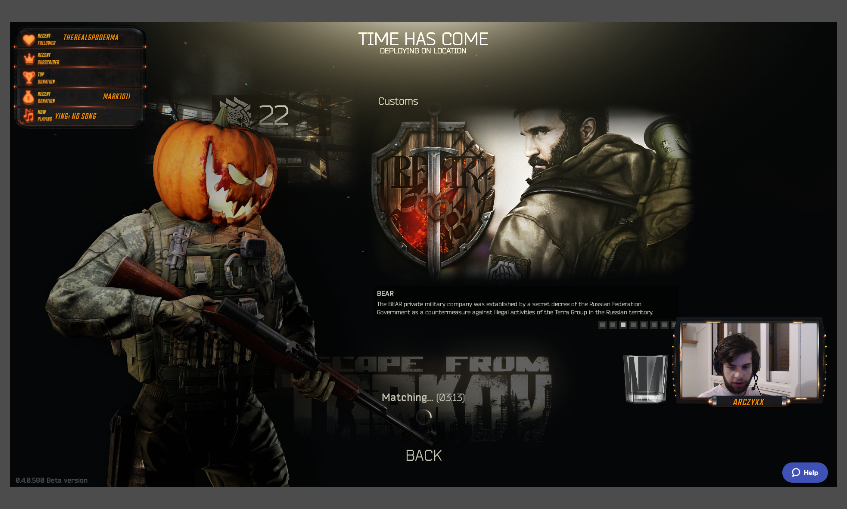 orchid burrow
third time
unborn obsidian
then opened it again and they wont load
pine hemlock
Refresh your browser source cache @unborn obsidian
orchid burrow
refreshed cache again
unborn obsidian
how do you do that?
clever mango
@unborn obsidian double click your overlay source and scroll down to refresh cache
unborn obsidian
ok that fixed it for now
should i check the refresh box?
nvrm that looks like shit
clever mango
Updates were pushed in the last hour to fix some things on the site. This sometimes will cause overlays to do funny things but resetting cache will almost always fix things.
unborn obsidian
ok
lament blade
Or just kill it even more xdd
Could this update having issues with notifications not going through?
Sb in my chat told me he got no follow alert and I also didn't had it 
clever mango
If the follow alert didn't play, it should still be in the activity feed and can be replayed
But no, the updates should not have affected any alerts.
terse canyon
Can I create a command that will timeout the user for a random amount of time?
possibly within set parameters?
clever mango
yea
clever mango
command response is /timeout $(1) #ofseconds
1 is better than user because if there is no user target it will timeout the person calling the command (unless of course that's you)
terse canyon
Right?
clever mango

clever mango
$(random.1-100)
that will pick a number from 1 to 100
ah nevermind
I don't think that will work in the /timeout
I'll test
IT WORKS!

use $(1) though, not $(user)
unborn obsidian
is there a way to reset the timer on the countdown overlays?
with a hotkey or something like that?
terse canyon
is there a limit to how high a number I can set for random?
clever mango
@unborn obsidian timers are reset when the overlay refreshes
so you could hotkey to hide/show the overlay browser source
unborn obsidian
ok
 clever mango

terse canyon
wot? XD
clever mango
you missed the $(1)
pine hemlock
/timeout $(1) $(random.1-5640)
terse canyon
you didn't post that! XD
clever mango

clever mango
🅱ROKE
terse canyon
@clever mango what happened 😉
clever mango
@terse canyon is this command meant for the person using the command to be timed out?
terse canyon
yes
clever mango
if so use $(sender)
terse canyon
wait, did you just time yourself out? XD
terse canyon
wait, say again
clever mango
replace 1 with sender
terse canyon
@clever mango so it worked? 😉
clever mango
enjoy the command
 upbeat yarrow
Can't change the settings on the songrequest bot, any ideas why ?
pine hemlock
@upbeat yarrow You cant have any blank values in the settings. also if you use the number 0 for Userlimit it wont let you save.
 dire venture
I just opened up obs and my stream overlay is not showing up. Its always worked. Logged into stream elements account, and everything looks fine. Copied the URL again and tried replacing it, still nothing. Any suggestions? Is there an active stream elements issue?
 tacit heart
I cant set up the chat bot please help I already set stream elements as a mod
upbeat yarrow
@dire venture I actually don't have any blank values
pine hemlock
@upbeat yarrow can you screenshot your settings
dire venture
I didn't say you did, @pine hemlock did lol
pine hemlock
@dire venture Double click on your brower source and scroll down to refresh cache - does it work now?
dire venture
Aawesome @pine hemlock, that worked, thanks, didnt even know that option was there
upbeat yarrow
Oh yea, my bad lemon, screenshotting the settings rn
dire venture
I can start my stream now, phew lol
 granite burrow
how do i begin the process of moving my existing points database (deep bot) to stream elements?
dire venture
thanks for the assist
pine hemlock
@tacit heart What do you mean by setting up the bot. All the filters, commands, modules etc are located on the dashboard
What settings are you tryingto change @upbeat yarrow
upbeat yarrow
@pine hemlock Trying to change the backup playlist
tacit heart
@pine hemlock It doesnt work in my rwitch chat. Also how do I test if it works in my chat?
Twitch*
pine hemlock
Use a command, if it replies - it works, if not.. part the bot and rejoin it
tacit heart
Still don't work
 plain rivet
Ok my overlays just stopped working in OBS
pine hemlock
@plain rivet double click on the browser source, scroll down and hit refresh cache
@upbeat yarrow I can change mine.. what error is it giving you?
plain rivet
@pine hemlock Got it, thanks
pine hemlock
@upbeat yarrow Change your queue length to 300 or less
tacit heart
@pine hemlock Do I have to be live? It still dont work I parted it and join back
upbeat yarrow
@pine hemlock I reset my access token and it fixed itself it seems, thanks for the help !
pine hemlock
@tacit heart No you dont need to be live. what are you trying to accomplish exactly
tacit heart
@pine hemlock None of the commands work in my chat im trying to make it work
pine hemlock
Have you changed your twitch username or password recently? @tacit heart
tacit heart
Yes
pine hemlock
Also can you give us your channel name
ok
Log out of the website and log back in
and then part the bot and have it rejoin again
tacit heart
@pine hemlock Out of StreamElements?
pine hemlock
Yes
When your change your name, our site doesnt recognize it until you log out and back in and it reuathorizes with your twitch account
Then you have to have the bot leave and rejoin for it to join your new channel name
tacit heart
@pine hemlock It still shows my old Twitch name do I have to log out of twitch aswell?
pine hemlock
Shouldn't have to. Try logging out and pressing ctrl+f5 before logging back in
tacit heart
@pine hemlock It still shows my old name
pine hemlock
https://www.twitch.tv/settings/connections Ctrl+f Streamelements
Disconnect
and try logging out/in again from our site
tacit heart
@pine hemlock Thanks it worked I really appreciate it I was stuck looking stupid for a while
pine hemlock
All good. Usually its just a simple log out and log in but oh well at least it works
 thorny roost
host alerts still down? o_O
unborn obsidian
having a problem adding an overlay... i copy the link fromt he site and when i add it, it shows a different overlay
pine hemlock
@thorny roost Keep ground control or your activity feed open and host alerts will function correctly
@unborn obsidian refresh cache of the browser source
unborn obsidian
i did
thorny roost
If I have the feed open, will that echo the alert or just play it once?
pine hemlock
@thorny roost Feed is just text. It wont play any noises. It just needs to be open in order for host alerts to function
@unborn obsidian What version of obs
thorny roost
oooh, weird that it went back to needing that open. but thank you, I'll keep that tab open
pine hemlock
Can you try adding a new browser source and adding the link, then refreshing the cache again?
lament blade
is anyone having issues with their CPU being eaten up with brower source??? i have a brand new 8700k and i reset the cache ... and i was playing on the PS4 and my CPU was at 60% - 70% being used in OBS. 4 hours ago I played DBD on PC and i had no issue what so ever.
after whatever they did - all this started happening.... is it just me? or has anyone else experienced this?
hallow harbor
So to get in the sell out change my donation button which I need to change the image says pp(PayPal) needs to be tips from stream elements?
pine hemlock
@hallow harbor Just needs to have your link in it
@lament blade What version are you on?
Obs ^
hallow harbor
Oh ok well maybe I can get added I can send you my streamand you can see? People's tipped through it already
pine hemlock
Also, do you have the option "Shutdown source when not visible" on your browser sources. This helps fix CPU usage and prevents hidden browser sources from using resources when they're not visible @lament blade
@hallow harbor When you add the link to your panels, use the bot and overlays you can message us and we'll add you yes
lament blade
20.1.1 (64bit) and yes i have shutdown source when not visable
lament blade
everything was fine up until 8pm est and i signed off... and then when i tried to hop on again after walking deadddd at 10 pm est - it was bad. hopped in here and saw to reset the cache which i did and that allowed my browser sources to work again but the CPU was out of control
i do - i went through them all... i have 3 scenes
pine hemlock
Not sure what to suggest. OBS forums might be a bit more helpful on the matter..
Can you try reinstalling the latest obs version and seeing if that helps anything? Your scenes will still be there if you install another version
If anything, maybe going back a version might help too
lament blade
I can... just in the task.manager under obs... it said itt was the browser sources ... 3... that were eating it up
clever mango
@lament blade There should only be 1 CEF-bootstrap running in task manager. Each one is a browser source. If there are more, then some browser sources are running in the background.
Do you have any browser sources that are not from streamelements?
lament blade
I have my kappagen separate and 1 other one... I didn't want to take the time to add the custom stuff to every brb, stream starting, stream ended... so I have a separate kappagen/stream alert
I don't
And then like my overlay is active but that's it... as far as browser source
clever mango
The kappagen widget can be pretty resource intensive, especially if it is enabled for the full size of the overlay and/or the emotes are large size. The alertbox should not be using CPU unless showing an alert.
You can reduce your Kappagen usage this way: https://i.imgur.com/MqEhoQF.png
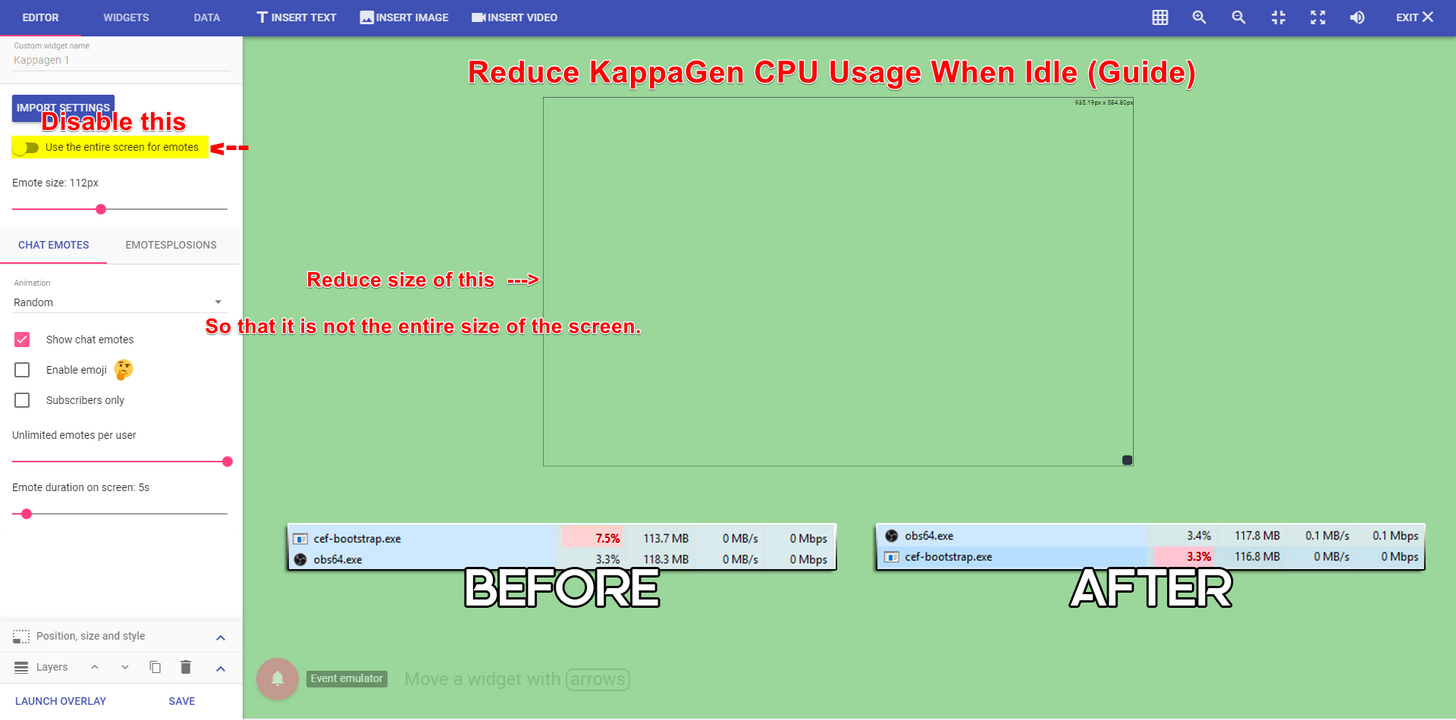
All together, I would estimate your 3 browser sources were using about 20-25% usage
lament blade
But everything was fine at 8 pm ... that's what's so confusing... I didn't change anything other then reset the cachw
clever mango
I wish I could say something SE related changed at that time but nothing did :/
It's very strange to all of a sudden have a spike in usage like that
pine hemlock
Maybe the kappagen cache needs to be refreshed as well? Not sure really
unborn obsidian
putting a new source in worked... that was weird tho
lament blade
I don't know... it's super unfortunate and frustrating . Esp cuz of the known issue with assassins creed which I was able to stream earlier and now I can't.
Ya, it's really strange
I had to reset the cache on every browser source from stream elements none were working when I came back to stream at 10 pm
I guess i could try making a new scene?
I don t know... well thanks
clever mango
@lament blade I gave you a follow. Send me a message with your next stream time and I'll try to be there to take a look 😃
 eager lynx
Hey I was wondering if SE is having issues right now? My OBS won't load your overlays, but they're showing up if i follow the link through my browser. Been working great till just now. Just showing a little Help box when the browser source pulls up from your website. I can pull up facebook, and google as a browser source without an issue.
clever mango
@eager lynx Are you using OBS classic?
eager lynx
No
clever mango
Ok, double click your overlays and refresh the cache
eager lynx
Overlay working fine in my browser, but not through browser source in obs, it was working a few minutes ago. Can you clear your cache from OBS for browser source?
pine hemlock
Browser source
clever mango
Yes, double click your overlay browser source and then Refresh cache
eager lynx
that did it. I didn't know that existed. Thanks
lament blade
Aw thanks so much @clever mango !
 fathom yacht
@clever mango do you know when they might be updating the issues with the newest version of mac OBS and SE?
Using the old OBS version is causing me problems with sound syncing
clever mango
@fathom yacht I'll check with the devs in the morning and let you know what I find out. Thanks for reminding me 😃
clever mango
I'm confident that there will be an update today (monday) for GC on mac. I'll check on it as well.
fleet summit
i had to do a reinstal of windows but my other hard drivers are not showing up how do i fix that?
think i found it
 high egret
could someone help me remove the ding at the start of my donations?
 feral wing
either its just me or my overlays arent showing up on obs they were working when i went afk for 2 minutes and went back to my gameplay overlay and my overlay isnt showing
my brb and talking scenes work
pine hemlock
@high egret Go to your overlays on the site, edit the one you're using. Click on your alert box, click the gear next to tip alert, clear the sound and save it.
@feral wing Browser source -> properties, refresh cache
 verbal thistle
anyone available for help please^
 indigo bone
hey how do u turnm the video off on song request page? i cant find it since the update!
 tiny smelt
Hi my streamelements overlay stopped showing mid-stream, and after i ended the stream i tried to restart ground control also my computer but nothing shows up on OBS. Any idea what went wrong? (overlay was working perfectly fine couple hours into stream)
uhh ok it suddenly re-appeared.... so weird
pine hemlock
@indigo bone We disabled that because it was preventing loading of songs
You can hide the videos still on the ground control app https://streamelements.com/groundcontrol
high egret
it still has the ding sound at the start of donations
feral wing
did u save 😛
high egret
@pine hemlock
pine hemlock
If you hit save, and the sound still occurs. Refresh your browser source cache on obs
@tiny smelt We pushed a few updates on the site, its a cache thing with obs. If it happens again just open your browser source properties on obs and refresh cache ( you have to scroll down to see the option)
tiny smelt
OH thanks @pine hemlock that explains, will keep that in midn
 plush bobcat
For some reason, I can't edit or delete my timers anymore. Any help?
verbal thistle
@high egret you mean a ding when there an alert that appears right?
plush bobcat
Wait nvm. Just saw that there was a horizontal scroll bar that was hiding those options lol
verbal thistle
@high egret i have the same problem . and i tryed making a new account and new layers with a new twitch . and i wasnt getting those dings on alerts ... i think it might have something to do with the other application you linked ( revlo , stream tip ect )
@pine hemlock you know anythin about that^
 tribal pivot
Under the tipping page settings there is an option that says ' Force users to login and user their actual username. ' what exactlly does it do?
pine hemlock
If you hear an old sound after changing it. The cache for the browser source needs to be cleared. Also turning on the setting in browser source properties called shutdown when not active will prevent double sounds
@tribal pivot it forces users to login with twitch before tipping
verbal thistle
@pine hemlock its not an old sounds
pine hemlock
So what is the issue
verbal thistle
everytime i receive an alert ( follow or donation whatever) before the sounds i uploaded for the said alert plays theres a ''ding''
but the thing is
pine hemlock
Okay and do you have the shutdown source when not active option checked in your browser sources
verbal thistle
if my obs is NOT on i dont hear it , if i only simulate an event from the website only it doesnt have the sounds
and like i said . i made a new twitch account + a new stream elements with it and it doesnt have the ding
can this be because when ic reated my account i have imported stuff from source like streamlabs , streamtips ect
pine hemlock
Can you remove the sounds from your overlay and re-upload them and see if it still occurs. Did you read the message I posted before this
verbal thistle
i did that 20 times
i edited the sound clip myself and theres no ding in it
and like i said , it doesnt have the ding on the streamelement website / editor . jsut when it plays on my OBS
pine hemlock
You still haven't answered my question
verbal thistle
clearing cache and setting the shutdown when not active
i did both
still does the ding
pine hemlock
If you don't hear it on the website then you shouldn't hear it on obs. Do you have old browser sources that shouldn't be there? Do you have additional scenes with browser sources? Those should have the shutdown option checked as well
verbal thistle
no its the only source on
and thats why its strange
because i only hear it on OBS
pine hemlock
Duplicate your overlay on the website and try the new overlay url
verbal thistle
doesnt work
is there a way to reset our account / setting ons treamlabs?
because im pretty suree it has something to do with imported data from third partys
 upper steeple
I think i just found a bug when I change a goal on tthe widget data page and hit save it resets my tip goal that I never even touched
verbal thistle
liek i said cuda , i created a whole new twitch and made a new layer that was the same sounds for the alerts and i wasnt geting the ding
pine hemlock
All importing does is copy your sounds and images. So no there's no unlinking that we can do. I understand your other account/overlay doesn't have the sound but if there's no sound on the site, there's no reason for it to be on obs.
All the answers I've provided should have fixed it.. But Idk why it's still occurring. Try reinstalling obs?
@upper steeple ill save this for later so we can test it. It's 230 am and I'm in bed. Lol
verbal thistle
@pine hemlock you got a min for a teamviewer ? ill show you . iam french and its hard to explain correcly
upper steeple
@pine hemlock okie no problem
verbal thistle
it will take a seconds
omg
i fixed it
it was coming from another browser source
pine hemlock
Told you.
verbal thistle
another layer
pine hemlock
Anyway. Goodnight
pine hemlock
You're fine. It happens
 frosty otter
Is something wrong with the connection to Twitch? My alert box stopped working when people host the last few days, but it works just fine when I run a test host on the overlay manager.
 untold carbon
I feel like I'm supposed to use Variants for this but, I'm a little lost on what to put for Condition & Required Amount. I'm looking to have my follower alerts randomize, for example. Help plz. 💙
atomic hollow
@untold carbon hey, for follower alerts just create new variations, there are no conditions
frosty otter
Oh yeah, follower alerts are doing the same thing. No alert when I am getting a follower the last couple days, but alert just fine when testing on the overlay page.
atomic hollow
you are not getting follower alerts at all?
frosty otter
No follow or host alerts except for the testing ones.
It worked just fine the last few months and I changed nothing.
atomic hollow
overlay or chat alerts?
frosty otter
I don't think the chat bot has been saying it either, now that you mention it.
frosty otter
I've done that.
atomic hollow
weird, let me check something
frosty otter
My event list doesn't seem to be updating properly until I do that too. It keeps the testing ones listed on it.
Then if I refresh the source on it the testing ones clear.
atomic hollow
and do you see the follows in the activity feed?
frosty otter
Yeah
Vernify, my last follower, was 2 days ago and it did not show on the alert. It didn't show on the event list until I refreshed the cache.
atomic hollow
ok, did you try to log out and back in from your SE account?
se well get a new token from Twitch
frosty otter
None of the hosts over my last several streams have given an alert, but each time I do a test it works.
I believe my last re-login was about a week ago. I will try doing that again to generate a new token.
Do I need to disallow on the Twitch page? Or just "Sign out" from Stream Elements?
atomic hollow
just sign out
frosty otter
Alright, I've done that. I guess now I need to stream and see if that fixed it, then @ you later?
atomic hollow
yep
frosty otter
Thanks for your time! 😄
untold carbon
Thank you, @atomic hollow . What would I put to have it randomize for tips of any size...? 😃
untold carbon
Ohhh. Thank you so much, @atomic hollow . 😃
atomic hollow
❤
 kind jacinth
When I edit one of my overlays, everything is lagging! Is there a way I can fix this? And also, is there a way I can transfer all the options form an overlay to another of mine?
 agile basin
Hello! My follower count is a bit inaccurate. It's giving me about 10-15 extra followrs in terms of number. It's important to have the right amount of followers for a goal im doing... Thanks!
atomic hollow
@kind jacinth are you using Chrome?
and you can duplicate an entire overlay only atm
@agile basin go here please - https://streamelements.com/dashboard/session
go to Aggregates --> Refresh aggregates
kind jacinth
@atomic hollow Yup, I'm using Chrome!
Oh ok, and I also saw that when I duplicate an overlay and I edit the copy, the originary overlay gets edit too! How can I prevent this?
atomic hollow
ok, 2 things:
- in Chrome settings please disable the harware accelration option
- that should not happen, please hard refresh the site - Ctrl+Shift+R
kind jacinth
Ok @atomic hollow ! Thank you so much for your help! ;w;
atomic hollow
❤
kind jacinth
Oh shit, @atomic hollow the hardware acceleration option was already disable! D:
atomic hollow
really? and site is still slow for you?
kind jacinth
Let me check again
 opaque fable
Sound effects from redemtions has stopped to work after the last update, any way to fix this? it will only play sound when clicked on in shop, and not when redeemed in chat :/
 radiant snow
is someone available to help me with an issues?
kind jacinth
@atomic hollow it seems it's all ok! uwu
ebon forum
@radiant snow what issues do you have?
radiant snow
my leader board keeps telling me "user does not exist"
as well as my alerts not working
ebon forum
does this happen in the overlay editor too, when you test the alerts there?
radiant snow
nope
ebon forum
what OBS version do you use?
radiant snow
studio
atomic hollow
hey @radiant snow
radiant snow
hello
atomic hollow
which leaderboard are you referring to?
radiant snow
dashboard leaderboard current
atomic hollow
in order to fix the alerts you need to clear your browser source chance on OBS
radiant snow
right
radiant snow
ok
lament blade
how can you make a poll? 😄
atomic hollow
there is no poll widget, you can use Contests if you like
 slender yoke
Is it possible to change the sounds on the events in the Halloween overlay?
never mind lol
swift parcel
lol yeah you can
slender yoke
I didn't see the gear icon next to each lol
swift parcel
👍
 tacit pendant
Whom did i message about adding my stream to the bot in #291219887274328064 again?
stuck hamlet
Are you using our tipping/overlay and bot modded in your stream? @tacit pendant
tacit pendant
yup
stuck hamlet
added @tacit pendant
tacit pendant
@stuck hamlet nice thanks
 proper wasp
good day all, streamelements used to be able to give extra loyalty points to subs but im unable to find it now
proper wasp
unfortunately i only see follower, tip & host
stuck hamlet
@Dodo#3763 logout, and log back in
atomic hollow
@Dodo#3763 can you please log out and back in please?
stuck hamlet
bamboozled
atomic hollow
wut
clever mango

stuck hamlet
@proper wasp
proper wasp
im checking out for a streamer im moderating for
proper wasp
thanks onslaught, i'll ask em to try it
stuck hamlet
np 😃
 drifting grove
I having a problem. uesing Premade overlays from Streamelements. when stream with them ingame fps drops. disable them fps is good. its not CPU or GPU or RAM . stream quality dont change
stuck hamlet
Did you check "Shutdown source when not visible" ? in the properties of the browser sources
drifting grove
its makes overlay invisible for 2-3 sec when swithing from one to another
clever mango
Browser sources have to load just like any other webpage. If you don't check that for all browser sources, every one is running at the same which is terrible for performance.
 lyric lance
When resizing the subscriber combo widget it does not take effect in OBS
clever mango
Using a fade transition or studio mode when transitioning makes this loading not visible for stream
stuck hamlet
@lyric lance This is a known issue, and this widget will be deprecated.
lyric lance
ahh ok so no fix now then? haha
stuck hamlet
yea, no fix.
stuck hamlet
Apologies.
upper steeple
so the !songqueue command doesn't work when i type it in chat
clever mango
@upper steeple I don't see !songqueue on your public command list
upper steeple
@clever mango i got to the default commands and it says i can't mess with it that is controlled by the module
 carmine flicker
Hi there. For the past week I have not been getting host alerts. Nor are they showing up on activity feed. All other alerts are working properly. Host alert works according to the overlay editor, but when streaming they are not being triggered. Any ideas what could be causing this?
clever mango
Top pinned message in this channel will fix this 😃
carmine flicker
oh, well damn I just woke up and didnt even notice the pins up there next to all the stuff in the header
Thanks for the quick reply though
 exotic wren
so i dont know how to ask this but i cant seem to open any webpages of stream elements
stuck hamlet
@exotic wren what happens?
exotic wren
every time i try to use a link or go to a website i get "this site can't be reached"
lament blade
when you repeat an alert, in the event list it will be doubled :c
#im onstream, so you can see it by urself .../tmasteria
clever mango
It's a repeated alert so that is normal. Emulated alerts disappear from event list.
stuck hamlet
@exotic wren that sounds like your isp is blocking us or something.
have you tried ingcognito?
exotic wren
yep still didnt work
stuck hamlet
mobile device that is on 3g or something
slender yoke
I have to confess I like your widgets, but your blog about using all-in-one overlays using less cpu is quite the opposite for me. I used all 5 of your Halloween overlays, and even deleting my prior overlays, and adjusting all settings, my CPU was still over 20% with the overlays. But if I just use individual browser sources from other sites for chat, tip jars, event notifications, etc, the CPU usage drops to less than 3%.
serene granite
Was the supertheme animated?
stuck hamlet
 + did you shut down the overlays so they weren't running in the background? Also, chat, tip jars and notifications do not compare to full themes that have several different assets on them.
opaque fable
The sub multiplier for affiliates is bugged again 😦
clever mango
how so?
opaque fable
the sub multiplier doesnt take any effect 😃
mine is set to 3x for subs, but everyone gets the same
clever mango
log out and back in
your twitch token expired
@upper steeple I've reported it to the dev team. Thanks
 midnight bloom
Hey! Can someone help me import my tips from Streamlabs? All I can import is my alerts  thanks
 tranquil totem
that's exactly what i was gonna ask ^


 exotic wren
any suggestions on how i could get steam elements to work in my web browser
stuck hamlet
i asked, did you try on your phone with data, not on your wifi
exotic wren
i cant use phone data
exotic wren
i have 4 in chrome but it doesnt work on internet explorer or firefox
frosty otter
@atomic hollow My problem persists. I just ended a stream. None of the hosts generated a chat or alert box response. I did a test host on the overlay manager and that showed up.
stuck hamlet
what was the fix shadow gave you? @frosty otter