#helpdesk-twitch
1 messages · Page 139 of 1
 unique ore
What's the "idea" behind the train widget timer? Like how/what do people use it for?
 strong dock
This widget would countdown but get set amounts of time added for a sub, tip, cheers, etc
 clever mango
It's either a sub train, donation train, or follow train in each widget @strong dock
unique ore
I get what it physically does. But I haven't really thought about a time I'd actually use it
clever mango
We're confusing two seperate widgets here...
The train widget counts down and resets to ex. 5 minutes every time the event happens
This "subathon" widget starts with ex. 3 hours on the timer and and counts down. Every time an event happens (sub, tip, cheer) a set amount of time is added to the time that is counting down. It extends the stream time.
That subathon widget is not available at this time
unique ore
Subathon I can think of use cases....
Train not so much still 😂
clever mango
the train also has a counter so viewers can see how many events have happened without breaking the train
It's a "game" that viewers like to play and can keep subs,tips,follows coming regularly
 silk patrol
@unique ore A lot of streamers uses trains. People will be more enclined to tip/sub/follow to keep the counter up
unique ore
So litterally, "how high can we get it?" for the viewers?
clever mango
yes
unique ore
Does the widget store session records by chance?
clever mango
No, it resets with each new session
Trains are made to run during one stream/session with a new train beginning in the next stream/session
 wary sapphire
if the train widget counts down to 0 , without a new event happening ,the counter resets?
clever mango
Yes
wary sapphire
oh okay
 dense egret
That's a cool function!
unique ore
I mean does it show the highest it's gotten on that session or do you lose it once it resets
silk patrol
@unique ore you lose it, it's not saved anywhere
unique ore
Kk
clever mango
It's saved in the VOD 😉
dense egret
Has anyone else had the issue of the song requests glitching randomly? Like I have 2 songs in queue, they play, then someone tries to add a song after it swapped to my playlist. It then goes silent, no music till I refresh the page. It never use to do that but it's been like that for over a week. Just curious if that was a thing?
silk patrol
@dense egret Yeah, we are experiencing some issues with the songrequest tool right now. Some are due to how Chrome/Youtube handles playlists. We are looking into it
dense egret
Thank you! I appreciate all the hard work 💖💖💖
clever mango
@serene nimbus I'm doing some testing right now on the widget
 ocean eagle
Im having issues getting contests to show up in the editor or OBS, I've tried re-opening the overlay and removing + adding the contest widget, but still whenever I start a contest it doesn't seem to show anywhere other than chat
 weary mist
I am looking to see if I can dupliucate on my end @ocean eagle
strong dock
@clever mango ya I grt it. Will Def put the donation train to use soon of things when things are implemented 
clever mango
@serene nimbus It is bugged currently and I've reported to the devs. As a workaround, you can make the widget appear by refreshing the overlay. This widget however will remain on that overlay until it's hidden or deleted from the overlay editor. All of this will be debugged and back to working normally
weary mist
@ocean eagle total bug. I have added it to our bug tracker 😃
ocean eagle
Okie dokie, so it's not just on my end @weary mist ?
weary mist
yeah, I tested it with my overlays, and it didn't work either. It could be a residual bug from the v2 upgrade
 tall snow
I was just able to paste color codes in (e.g. #d1e04c) to text settings until i closed tab and reopened stream elements as it was gettin laggy, now the color selector pops up everytime
https://puu.sh/y8vIw/d3d3c40005.png when i click in the text field to type a color in

on Vivaldi
clever mango
I see this. I'll report it as text settings are being worked on right now.
@tall snow being fixed right now for an upcoming deployment
tall snow
thanks o/
is that also why Hype cup just broke? 😄
er wait, thats not whats broke. i have some weird Help box in bottom right not sure which source yet
oh yes it is, hypecup and kappagen both giving me Help icon now 
clever mango
@tall snow in OBS?
tall snow
yes
clever mango
which version?
tall snow
i see it, and it worked 👍
clever mango

clever mango
@upper steeple I've got a temp solution for you for song request settings 😃 DM me a screenshot of your settings page please
 calm creek
Hi! Since the new StreamElements website was launched, my overlays have not been visible in OBS no matter what I do. Any suggestions?
clever mango
@calm creek which version of OBS are you using? Top left corner
calm creek
0.659
clever mango
That's an old version of OBS that is no longer supported (since September of last year)
please visit https://obsproject.com
to update to the new version
calm creek
but that is strange... I have updated OBS xD
 flat rampart
studio and obs classic are two different platforms
studio is the newest, supported one
if that makes any sense
flat rampart
actually I have a question myself 😛 ... I'm a moderator for somebody that streams and he has shared the invite link for full control but even though I should be able to edit overlay and such it shows me the different overlays and I click to go in the overlay editor but as soon as I get in the overlay editor its blank, shows no layers etc. even though on stream there is clearly stuff going on
clever mango
@flat rampart This is being worked on by the dev team but currently only the streamer can see the overlays in editor
clever mango
The editor is receiving a lot of attention right now because it didn't port perfectly from v1 to v2
flat rampart
Alright good to know
clever mango
But it will be up and running soon
flat rampart
awesome, will there be a post in updates/announcements once its all done?
clever mango
Absolutely
clever mango
you're welcome
 lyric totem
I've been having issues with alerts not showing up over the past couple days, like hosts and bits, when I test them in the overlay editor they come through, any thoughts?
clever mango
@GoodBitey#4598 Please check the latest pinned message in this channel for what is required for SE to receive host data
lyric totem
Ah well damn, that will do it, I use a capture card, does it matter which PC I have Ground Control open or does it just need to be open?
clever mango
It just needs to be running and connected with your SE account using the JWT token
lyric totem
Roger that, well I love EZ FIXES! Thank you!
 hearty flare
Hello! I have a question about the donation goal bar settings. Is there a way to animate it so it is not on screen all the time but appear in and out from time to time (like every 5 minutes or so for example)? I could not find anything in the settings. Sorry. Thanks 😄
silk patrol
@hearty flare Unfortunately no, but that is a great idea. Feel free to request it using the link in the header of the channel #💭︱feedback-and-ideas
hearty flare
Ok Thanks 😄
 verbal spear
hey quick question for you guys. i am using the stream elements notification system but how do i get the txt files so i can use it in the overlay when a someone follows or when someone tips
weary mist
@verbal spear we are a cloud based service, so if you open your alert box overlay, you can add the stream labels as widgets (upper left hand corner)
all those "text files" are on the cloud, no need to have them on your computer
you can edit them in the data tab, which is right next to the widget tab
 narrow terrace
any reason why SE does a timeout on another bot or user for posting a link...when link protection is not on?
i was hosted last night and it timed out the other bot AND the hoster!
weary mist
do you have a screenshot of it? because if your link protection is off, it is not going to time anyone out
when you saw it, was it <deleted link>?
@narrow terrace
 pure crag
Is there a way to draw from a giveaway without having to close it?
I want to use it to name in game things after ticket buyers
Or viewers
But me having to close the giveaway ruins that
weary mist
not at this time
there could be a couple different ways to do it
there is a ${random.chatter} variable
also, raffles that people can enter
pure crag
I want it to have a built up pool like in a giveaway
 misty wagon
Use a giveaway 
pure crag
...
weary mist
lol, ignore latte
he doesn't always read everything
you could always add it to https://strms.net/ideas, then post the link in #💭︱feedback-and-ideas for people to upvote 😃
misty wagon
I'm old af 👓
clever mango
@wispy oak please double click the browser source and refresh the cache at the bottom
narrow terrace
@weary mist this is all I could show based on the video, just a person commenting about it:
 wispy oak
Thanks @clever mango
weary mist
hmmm, its weird because none of your spam filters are on. Let me know if it happens again, and get a shot of the whole thing
@narrow terrace
wispy oak
oops
lyric totem
Hey all, question... how can I get the stuff in the cup bouncy enough so that when a thing drops in it makes the cup go boom?
 pine hemlock
Change the weight variables for the tokens
lyric totem
Does that mean I have to do math?
 tight harness
Not really, it only goes up 0.5 at a time so it's really easy to work out 😛
 jolly ice
I am trying to use SE bot to update the stream title and game, but it just says "Error". What's up with that?
 golden geyser
Try relogging @jolly ice
jolly ice
worked
golden geyser
Great! 😄
jolly ice
❤
golden geyser
💙
pine hemlock
💜
misty wagon
💚
 lament blade
i'm live with SE overlay and bot 
misty wagon
I'm eating, sorry
lament blade
oh 
misty wagon
You need to buy new net, it lags out after 3 seconds, same after reloading 2 and 3
golden geyser
How does one buy a new net? 
tight harness
Any fishing store 
weary mist

misty wagon
https://streamable.com/qano3 Dunno, but I feel bad for @lament blade now
 golden geyser
The buffers are real
lament blade
Hold up we them boyz
jolly ice
Do SE have like a LoL integration to show players your current rank and LP or do you have to manually put that in?
weary mist
@jolly ice we don't have anything at this time. We where trying, but we were denied api access
lament blade
I have some problem with my Alert Settings
when I change the sound of cheers, it still plays the "standard" sound..
jolly ice
Check if you have anything under Variations settings
There are a few in there by default
 swift parcel
^^
lament blade
oh thanks i deleted all variations 😄
jolly ice
They are overriding the default settings so if someone cheers you with like 50 bits, one sound is played and if over that, another sound
it's very flexible
lament blade
okay i deleted now ALL variations, and it plays now both sounds 
jolly ice
If you have OBS or XSplit open at the same time you need to hit Save
lament blade
it's
- [my sound]
- [standard sound] + [text]
i don't have anything else open
unless a game and a stream i watch
jolly ice
CTRL F5?
lament blade
too
lament blade
but i can life with the double 😄 it's acceptable :x
swift parcel
do you have obs/xsplit open at the same time as the website editor?
lament blade
again, no
Only a stream i watch and a game
- this one streamelements tab
and discord 😄
swift parcel
left hand side open up the "layers" area theres a little carrot arrow on the right side of the sidebar to let you do it. Make sure there's no extra alert boxes
lament blade
okay it's google chrome effected
on firefox i don't have it

just tried it in another browser
jolly ice
What where the requirements to get in the sellout channel?
golden geyser
Tipping Page + Bot in your stream! @jolly ice
jolly ice
Both done
lament blade
and I think using the Design too no?
in description
my stream is /tmasteria and i use all, but im not in #291219887274328064 listed
jolly ice
me nether, I use SE for everything, bot, overlay, donation page etc
clever mango
It's Bot, Tipping page, and Overlays (custom or theme)
jolly ice
I have those
clever mango
what is your twitch name?
lament blade
i have them too i might stream in like 3 or 4 hours who nkows
/TMAsteria
clever mango
You've both been added. Thanks for streaming with StreamElements 🚀
jolly ice
Thanks mate!
 cobalt galleon
the !addpoints command to give all users in a chat is it like this then !addpoints 200 all for example
?
pine hemlock
!addpoints all 200
cobalt galleon
tyvm! 😃 Was a litle confused in the information page on that command
silk patrol
@lament blade you need to tick the « shutdown when not visible » checkbox in the properties of every browsersource in every scene
lament blade
Ill try that
jolly ice
I am setting up the Lojalty points with the tipping feature thing.... Is it set so if I set it to 50, they will get 50 points per 1 dollar they donate?
so like they dolate 10 dollar, they get 500 points?
pine hemlock
Should yes
jolly ice
alright
lament blade
wait where is it, i searched it on my first day and didnt found
pine hemlock
wheres what
lament blade
getting points for $
pine hemlock
Loyalty settings, theres a tip bonus box
pine hemlock
yes
jolly ice
perfect
lament blade
oh i see
so if i set 100 for subbing, is it 100 for 5$ sub, 100 for 10$ sub and 100 for 25$ sub?
pine hemlock
I think its a base amount @lament blade - i dont believe it differentiates between tiers
 dim coral
Anyone having issues with the bot? The bot ignores half of the commands in chat for me.
HELP 😃
lament blade
are they activated?
dim coral
They are
it's like commands liek !slots
half of the time someone does slots it works, sometimes it doesn't
I removed the cooldown
It's just random. it can be completely silent for like 30 seconds, someone does slots and then it ignores it
was fine last week
Haven't changed anything since
 dense jackal
🤔 Try removing the bot from your channel and then adding again
lament blade
is the bot mod?
dim coral
Yes
Wait
it has a global " moderator, bot " rank tho
no, not anything more than that.
pine hemlock
You have to have it modded in your channel
Bot role is something bttv gives bot accounts
dim coral
" StreamElements is already a moderator of this room. "
pine hemlock
ok
dim coral
because it's a global mod
pine hemlock
Well its not but sure
Can you check your chat commands and change the cooldown on the !slots command to match your module settings @dim coral
dim coral
updated it, let's see what happens next.
 heavy spoke
hi do I have to approve every tip that I get on streamelements because there was no profanity or anything like that and I still had to approve the tip?
strong dock
There's a trick or treat widget?
pine hemlock
@strong dock its animated assests for your overlay
 lost ridge
Can any help me with setting up the twitter module, not sure on what it does and where, thanks
pine hemlock
Twitter module relays your tweets and has an option to relay your replies and retweets to your chat via the bot.
You just add your twitter handle to the "Follow" portion
 lost ridge
so @pine hemlock i can't have SE tweet to my twitter
 stuck hamlet
no
pine hemlock

stuck hamlet
There's a twitch setting for that
 sour burrow
Hey i just connected with StreamElements for my twitch channel but not sure how to connect to PayPal was wondering if anyone could help please
stuck hamlet
just head over to the tipping settings and type in your email 😃
sour burrow
I did this but when i type !soph the link gets deleted
pine hemlock
Is your bot modded?
stuck hamlet
do /mod streamelements in your chat
clever mango
It's not currently modded 
 stark canopy
Can i not start multiple giveaways?
stuck hamlet
nope
 zenith nova
stuck hamlet
zenith nova
stuck hamlet
if you want alerts on your stream, you'll need to use this page @sour burrow https://streamelements.com/whiteninjasoph/tip
sour burrow
Okay cheers and could you explain more please im sorry
Thank you for your time
And would stream elements have to stay as a viewer?
Im so knew to this i just know how to stream and game aha
clever mango
When your viewers tip you, they need to go to https://streamelements.com/whiteninjasoph/tip first and input their name, amount and message. When they click tip, they will be redirected to paypal to pay. This way, StreamElements can see the tips that are sent through paypal.
That is why you linked your paypal email in the tipping settings
sour burrow
Ahh right are you a streaming community?
Thankyou. So you guys can see also this is nice!
 obsidian kettle
Is that boo theme broken?
stuck hamlet
no
obsidian kettle
It looks pretty in the previeuw but it looks like shat when i use it
 muted locust
I was wondering guys, is there a way to add MP4 video as background video on SE?
clever mango
The orange text?
clever mango
Are you using OBS studio?
obsidian kettle
yeah
stuck hamlet
what orange text? next to the pumpkin?
lost ridge
If I'm streaming from OBS in 60 FPS would i need to put my browser source at 60 FPS or can that go down to 30 FPS?
jolly ice
Did you set the BrowserSource to 1920x1080?
lost ridge
Yes @jolly ice
strong dock
@pine hemlock yep. Was tweeted. Pretty sweet. Gonna ad that tonight for a short #frightnightfriday b4 stranger things marathon
obsidian kettle
this screenshot i put there is from the streamelements editor
so this aint OBS's fault
jolly ice
I uploaded a image in #welcome. Can some guys go there and give some opinions on my overlay? Uploaded it there since it isn't a support madder
stuck hamlet
are you talking about this? @obsidian kettle https://www.onslaught.ca/s/rcgwihnm.png
 stuck hamlet
theres widgets there. you may have no data for it to place there.
obsidian kettle
?
stuck hamlet
theres widgets there. you may have no data for the widget to place there.
stuck hamlet
Do you know what a Widget is?
 ripe herald
I think i know what is problem 😄
obsidian kettle
yes but if thats the problem should it not be broken for everyone and not just me?
 clever mango
jolly ice
clever mango
jolly ice
Can I change the name of the SE bot in the Twitch channel?
clever mango
Not at this time @jolly ice
jolly ice
ah
obsidian kettle
Oh
stuck hamlet
this box is for latest tips @obsidian kettle https://www.onslaught.ca/s/lbtz8wym.png

you have no latest tips
it will display nothing
this box is for latest sub https://www.onslaught.ca/s/lp9nnhvh.png

you have no latest sub
it will display nothing
You can remove these widgets and add other ones to fill the blank, if you desire.
lost ridge
I have a question about the loyalty settings, how cani give extra points for people that sub and can i give them extra points per minute?
stuck hamlet
@lost ridge Can you sign out of SE anmd sign back in?
😃
You'll see the options on the loyalty page afterwards!
lost ridge
Ahhh, yes, thank you
stuck hamlet
No problem!
 unkempt forge
@edgy kindle reposting what i wrote yesterday:
someone said the other day that the reason the webpage crashes for me might be due to browser extentions in chrome, so i tried firefox where i dont have any extentions at the browser crashes whenever i go to the stream elements page. anyone know what's up? I want to run a giveaway but can't
You asked what exactly is happening. I go to make a giveaway in chrome and either right away or after i enter text in a few fields, the page just freezes. I can't click anything. In firefox, i have no extensions (something I was told might cause an issue) and the whole browser crashes. The page freezes and when i click on anything the browser goes grey and Im forced to kill the program.
Stream elements freezes on me often in chrome, not just for giveaways.
 odd bolt
Hey everytime someone donates with my stream elements donate link tje donatioms dont appear in recent events and dont do a alert either anyway to fix that?
 edgy kindle
@odd bolt Turn off Tip Moderation under Tipping;
@ELFinSOX#2056 I'll take a look into that now
dense jackal
@edgy kindle he said he has approved it already
edgy kindle
@ELFinSOX#2056 Seems to work fine for me https://streamelements.com/thederpysupport/giveaway/59f39feaffd4330001a65cd1
As you can see I use ff myself
stuck hamlet
head over to https://streamelements.com/dashboard/activity/moderation @odd bolt
your tips were NOT approved
@dense jackal 
I approved them.
to remove tip moderation: https://streamelements.com/dashboard/tipping/moderation
dense jackal
❤
 worn linden
When I import all my stuff from streamlabs to stream elements, How do I make sure my alerts and everything got transfered and are working?
stuck hamlet
head over to: https://streamelements.com/dashboard/overlays
and you should have an overlay called "imported streamlab alert box" or something
 proper shoal
@here can someone let me know if it's possible to turn off tipping via stream elements altogether? ❤
stuck hamlet
Remove your email and hit save?
proper shoal
let me try (thank you)
worn linden
I imported it and when I go to launch nothing comes up
proper shoal
So that worked as far as, people cannot donate anymore
but I wish that page just did not exist
because we use stream labs and it's confusing for people we have 2 places to donate
stuck hamlet
If you're launching it, nothing will show up , until you get an alert. @worn linden
proper shoal
proper shoal
lol
we are going to
but it's up to 1ce to do all the switching lol
I am trying a temp fix to ease the confusion ❤
worn linden
@stuck hamlet I want to test it to make sure its working and it all got imported
proper shoal
but not to his obs
worn linden
make sure the donations and followers and subs is correct
stuck hamlet
Hack into the mainframe @proper shoal
stuck hamlet
Then don't launch it, just go to edit it, you'll find the emulate button @worn linden
lost ridge
just tried to find the quoting system, when i type !quote #, it bring up a message saying no quopte found, but i can't find where to add and manage them
clever mango
they are added in chat with !quote add TYPE QUOTE HERE
the first one you add can then be shown with !quote 1
if you add more they become !quote 2, !quote 3 and so on
lost ridge
so there's no GUI?
clever mango
There's no place on the dashboard to manage them at this time
lost ridge
OK
unkempt forge
@edgy kindle well shoot. Idk why it's not working for me. I dont want to have to stop using it 
clever mango
You can create a public google sheet to display the quotes available
edgy kindle
@ELFinSOX#2056 By any chance have you done a cache refresh?
lost ridge
@clever mango it added a #0, how do i remove that
 viral gale
Hi, I just became twitch affiliate but my stream elements seems to not acknowledge subs. No sub stats, they dont show up in activity feed etc?
clever mango
Please log out/in
cobalt galleon
Hi! Im trying to move all commands and alerts over to streamelements to focus the entire stream on just this amazing portal. My biggest concern atm is alerts. Atm i have 'alert boxes' from other portals. SE doesnt seem to have this you need to create an overlay to have alerts? Correct?
edgy kindle
All of our alerts are in a single overlay
You just need to add the appropriate widgets
cobalt galleon
Ya okey! 😃 Spontanious reaction is that it will take up a bit more of ur CPU with an overlay instead of an alert box.
Correct me if im wrong
edgy kindle
For our alerts you only use a single browser source url unlike others that require multiple and while yes the more you add the slightly more it'll use CPU wise but you're able to customize what your overlays look like without all those sources in OBS
misty wagon
And gain game performance with OBS on a diet 😉
 unreal basalt
So real quick can anyone explain to me how a stream machine works? Like I know why it works but not the whole process of like setting it up to capture what another PC is doing?
 violet nimbus
Ordering music through the application still ALWAYS plays video.
Contests are not displayed in the overlay and are malfunctioning.
lament blade
why streamelements already has my PENDING sub emotes?
stuck hamlet
yup
 delicate wharf
Is there a way to simple set the animations, font settings for all alerts in the alert widget instead of individually editing each one?
strong dock
hey hey... so before i dive in... should i do my trick or treat widget on my alerts overlay or my cup overlay?
unkempt forge
@edgy kindle is a cache refresh something i do in my browser or stream elements?
strong dock
omg theres soo much to it... is there a video yet?
misty wagon
@delicate wharf use a (Super)theme set. At the moment we cannot copy / transfer yet
strong dock
oh wait. is ur just image pack? neat.
jolly ice
I just started streaming but haven't been placed in the sellout channel
I have been added there earlier today
nvm there we go
 coral kelp
if a user has a kanji name it shows up as "is" instead of the name
it should be "ら十モ尸廾 is hosting my stream etc."
but its not
lost ridge
any reason why my "back up play list" isn't being populated on my "now playing" widget on my overlay?
stuck hamlet
YouTube API limit. We are trying to get it raised. But that's really why, YouTube limitations.
 burnt silo
Hii, so subs arent showing up on the streamelements dashboard 😦
swift parcel
@burnt silo did you just get affilate?
burnt silo
yeah
swift parcel
log out and log back in so the website can see the change! 👍
burnt silo
oh okay 😄
 inland mist
 hallow harbor
How do i get my store redeems to play on screen?
will sound effects not play a image?
When someone redeems something it doesn't pop the gif up
golden geyser
Check your settings on your Alert Box in the Overlay you’re using. There’s a separate setting for each notification type. @hallow harbor
golden geyser
Hmm I could’ve sworn, sorry I’m on mobile at the moment or I’d assist further
 hearty peak
we down atm?
hallow harbor
Another question is there a way to get my "current song" to read correct song
dense jackal
don't believe so @hearty peak what seems to be the issue?
@hallow harbor are you using plug.dj or dubtrack
dense jackal
whatsup tink
 sweet elbow
Currently, the overlay I have to show my alert box isn't showing up on OBS.
I have CLR browser and it has worked before.
But now OBS has updated and it doesn't work anymore.
I tried to get a new version of CLR browser, but it still does not work.
dense jackal
are you using obs classic?
sweet elbow
Yes
dense jackal
it has some really nice features as well
sweet elbow
May need some help with it. xD
dense jackal
One moment
it currently only works with song requested songs and plug.dj and dubtrack.fm
we plan on getting youtube integration there and also making it so you can request a song by just the name opn not the link (we used to youtube switched it up on us)
hallow harbor
ah, so delete the currently playing for now..
Ok can you help with another situation
hallow harbor
My "store redemptions" are not playing the gif on the stream
hearty peak
just had a couple alerts that havent shown up
dense jackal
donations? or just in general at random?
@hallow harbor sometimes a gif doesn't loop correctly if it's not a perfect loop try converting to webm. or another vid file
for instance the alert comes up and it plays once as it's coming up, doesn't loop correctly and ends up not showing up
hallow harbor
Its redemptions
i have gifs for them
with sound effects
when i redeem one of those it should pop up in the "present" looking box right?
it did redeem up but doesn't show on screen
dense jackal
Yes sorry I've been testing myself
clever mango
@hallow harbor Are those items stream perks or sound effects?
clever mango
Sound effects have no visual alert. They are purely a sound effect
hallow harbor
k
clever mango
The image is just for the item in the store
dense jackal
as long as it's a gif
hallow harbor
Gotterdone
clever mango
you're the best tomato I know
hallow harbor
Is there away to make my redemptions now cost points?
Just for me
i have to keep giving myself points and it puts my in the lead
I don't want to be on the leaderboard
clever mango
redemptions cost the same for everyone
but you can change the item cost at any time
delicate wharf
When editing text for alerts, when I attempt to change the Highlight color, the color selector popup is hidden behind the edge of the Text Setting panel so I cant access the swatch or edit the RBG code
any ideas?
clever mango
Thanks for the report. It's a visual bug that we'll get fixed.
delicate wharf
So until then I can't change those colors correct?
clever mango
It's not easy to do because of the behavior of that color selector but if you're able to highlight and erase the box next to it you can input a hex or rgb code there
delicate wharf
yeah I tried that. I willl just wait until that bug gets squashed then
clever mango
Sorry about the inconvenience. It should be a relatively quick fix.
 vocal leaf
does SE only track points for users who are logged in?
pine hemlock
yes
 ebon iris
I've been trying to import my users/points from Deepbot to Streamelements but nothing seems to happen when I click import. I def have VIP with deepbot, I have tried restarting deepbot and also creating a new secret code but to no avail. Are there any known problems with this at the moment?
 red parcel
Hey guys
In my dashboard, the date always defaults to the previous month, i.e. September 27th.
just a heads up
pine hemlock
@red parcel What part of the dashboard?
@ebon iris I don't know anything about deepbot so i'm gonna let someone else reply to you
red parcel
the main dashboard
edgy kindle
@red parcel If you're refering to the graph what you're seeing is a past 30 days graphs.
http://puu.sh/y8YZw/1c7c970a43.png
 edgy kindle
Sadly not but you can always post the idea on our request website and share it in #💭︱feedback-and-ideas for people to upvote. https://streamelements.helprace.com/
 humble coral
What would cause a slight bit of wierd consistent jumpiness in the stream
when I have zero frame drop
and I'm not even averaging 65% cpu with a peak use of 85%
edgy kindle
@humble coral Depends, do you alt-tab alot?
humble coral
I mean, I don't alt tab and i stay in game and then I flip to the stream
and the stream where I was in game is still slightly jumpy
edgy kindle
Hmm what game?
humble coral
Destiny 2.
I'm not remotely utilizing 100% resources.
I also have OBS to run at higher than normal priority just in case.
edgy kindle
Do you use any widgets/overlays?
humble coral
Game input > webcam input > Stream elements overlay
it also doesn't actually show 60FPS in the stream
edgy kindle
Okay what do you use in your overlay/do you use a super theme?
humble coral
it's being rendered at ~30ish in the twitch
yes I do
I use a super theme
the CS : GO blue theme
edgy kindle
Super theme could be an issue; Try replacing it with a normal theme, temporarily, to see if your stuttering clears up
humble coral
I'm utilizing 10% of my maximum upload rate (3k)
That actually did it.
Sadface.
Odd, considering I have that set to render at 60FPS also
edgy kindle
Super themes use a lot of animated files that are a webm format so that could cause some stuttering.
humble coral
That's dumb considering my computer can well more than enough handle running a double instance of OBS before reaching peak use
oh well.
Why would using a web based overlay cause stream lag
edgy kindle
You can still use the supertheme else where but for now you a regular theme for ingame 👌 We'll see if we can fix the stuttering with our super themes
edgy kindle
I'll get back to you if there is something that can be done
humble coral
Ok
Yeah once I removed that overlay from display my twitch stream was able to easily render 1080p60
edgy kindle
That might be an issue there too lol It's a poor choice to stream 1080p60fps unless you're partnered
edgy kindle
Ah alright
humble coral
Lucked out this stream
😄
Yeah, otherwise most times I render 720
I check it when I first start up to make sure
edgy kindle
720p30fps is usually the recommended for affiliates
Allows the whole audience to watch unless your connection is literally snail level
humble coral
Ah
Once someone told me to make sure to see if scaling was available when I start
is that true?
If I see it, will it be available to all
or is it just for me when I happened to reload the page
edgy kindle
I'm not sure personally; As a user with 3gigs of ram and a poor 3.2ghz dualcore intel processor 720p30fps @ 1600x900 reso downscaled to 720p I dont try much high quality stuff lol
humble coral
Aw
Okies
Fortunately I'm in a position to handle that and I get frustrated when I get choppiness, but I figure it's not me, it's twitch
and it makes me sad
but, I gotta earn that position to stream the way I want lol
edgy kindle
Yeah a lot of people who are new to streaming think they'll get away with 1080p60 right off the bat but then blunder why they arent getting any viewers or their stream is choppy/buffering
humble coral
Lol
Yeah, gotta watch to see if your stream got set with transcoding each instance
Otherwise you're just gonna screw the little guy
I think I'll lower it since It's not for me to watch
I guess my thought process is I want others to experience the high quality I'm getting, but that's not how it works across the intertubs 😓
edgy kindle
Yeah sadly not though you could probably, not aware of your schedule, do like highquality streams on like a weekend or something once a week as a bonus
humble coral
I'm already having to scale my display because I have a 2k ultrawide, so a lot is lost
I'm squishing 3440x1440 into a 1920x1080 space (or really 1280x720)
an odd side effect is I can cram all overlay graphics into the black spaces created
edgy kindle
lol wow
humble coral
Yeah.
I get black bars across the top and bottom
21:9 vs 16:9
3440x1440 vs 2560x1440 difference in rendered space
edgy kindle
Yeah some odd reason when i'm using my computer(shared tv monitor with pc/cable box) i have black bars at 1600x900 but when i'm on my tv its fine
edgy kindle
I think the original size is like 1336 or something
humble coral
would it be fair to render 1080p30
or is that still a bit much
should I just stick to 720p30
edgy kindle
You might be able to get away with 720p60(if possible?) but i mean the human eye can see an average of 30-40 fps
humble coral
the human eye can actually see an infinite amount of FPS lol
what matters is how perceptible it becomes at higher numbers
hence why it seems unreal when you watch a 240fps tv (I think it was 240)
or some stupid high number
right click your desktop and hit display settings
you should see an image of both monitors right next to each other as rectangles
if one is bigger than the other
edgy kindle
I dont have that option because it's a single TV lol
golden geyser
One screen pleb 
golden geyser

humble coral
golden geyser
at least its UW
edgy kindle
I have a second monitor now however my computer's HDMI port(graphics card) is being used for my TV and the only other port for output is the old blue cable
 edgy kindle
Honestly i'd never be able to go back to a screen lower then 37" lol
humble coral
It's 32 but it's a 2k the res is more than enough. I said that after playing on a 65" 4k
edgy kindle
Well I sit in front of mine just like you do
golden geyser
My brother sits right in front of his 60 LOL
 sonic egret
what happend on Stream elements??
humble coral
I was getting choppiness but, I can use it now just fine since I'm not trying to be a superstud and run 1080p60
LOL
edgy kindle
@sonic egret What do you mean?
sonic egret
Nvm sorry.. its on my Obs hehe..
edgy kindle
@sonic egret You using Studio or classic?
 marsh lagoon
Is there a way to get my overlay to have my current music player as a Now playing for songs, or is that not possbile at the moment due to my overlays being browser sources
stuck hamlet
Music player on your PC?
marsh lagoon
yeah i mainly use FUbar2000
stuck hamlet
Unfortunately, that's not possible
marsh lagoon
so i would need to use a 3rd party program and modify the text to match my overlay as close as possible
 bronze lichen
Any ideas why the Dashbaord is feezing like 10-15 seconds all the time??
pine hemlock
@bronze lichen Make sure chrome is up to date and disable hardware acceleration
chrome://settings/help in the chrome url box - it will update itself
chrome://settings/system
Disable hardware accel ^
bronze lichen
@pine hemlock Thank you. It works now. Phew, i thought what happening here after i left Deepbot for your Service
pine hemlock

 tender iron
Are all widgets supposed to look like a blue Help-icons nowadays or is it just my problem? 😅
stuck hamlet
Just your problem 🤔
tender iron
It happened when the website's design was changed
stuck hamlet
Are you on OBS Studio?
tender iron
OBS Classic
stuck hamlet
Yea. That would be your issue.
OBS Classic is no longer supported by us, or by the OBS devs.
I suggest you upgrade.
Classic hasn't been updated in over a year.
tender iron
i have it too, but classic had some plugins that studio still doesnt have :/ FeelsBadMan
stuck hamlet
Like? 😃
stuck hamlet
What does that do? 🤔
tender iron
it changes my OBS scene when i go to in-game and out of it
stuck hamlet
Detects the game scene and switches accordingly?
Ah okay
You can easily accomplish that with keybinds.
tender iron
(ofc i could do it manually always, but why do it when its possible to automize?) xD
stuck hamlet
Because it's an outdated program!
tender iron
true....
stuck hamlet
I believe in you! You can do it! :p
A lot of other people have switched
They are all happy, less CPU usage and more customization!
tender iron
care to give an example video?
 pine hemlock
🤔
 pine hemlock
I dont know what video we're talking about
stuck hamlet
Thanks bb
 plain steppe
thank you guys for the help and the tip for turning off hardware acceleration
pine hemlock
👌
plain steppe
i was trying to customize and overlay and chrome did not like it
stuck hamlet

odd bolt
so ty @stuck hamlet for helping me out with my problem yesterday but is there a way to have your tips be automatically approved or do i have to do it manually everytime?
stuck hamlet
Turn off tip moderation 😃
odd bolt
ok ty
 kind jacinth
So... the song request is still bugged? D:
 olive cosmos

 upper steeple
@clever mango okay so used a playlist with no deleted songs, playlist plays fine, but page still doesn't notice when people request songs until I refresh the page
 analog meteor
Hey guys im trying to setup my stream overlay but when i paste the link into obs and adjust size and fps, it only says "help" in the bottom right corner and my overlay doesnt appear ...
has anyone had this problem before ?
 fresh flint
Hey everyone, I'm new to StreamElements, is it normal that the Dashboard is laggy as hell? I can't do anything, my Chrome is frozing everytime I open the Dsashboard.
misty wagon
@fresh flint check if hardware acceleration is off in chrome settings
analog meteor
i have tried restarting obs severall times and also made a new overlay but everytime i preview the stream it only says "help" in the bottom right corner just like on the mainpage were it takes you to an instruction video ... 😫
fresh flint
It's on
misty wagon
Turn it off, that will fix it
Also first time you load certain widgets like hypecup, it will take a bit.
misty wagon
@analog meteor sorry for not being able to answer that one right now. I know there is a solution but am on.my cellphone making it hard to access the helpfiles. Another support will respond. Sorry for the inconvenience
analog meteor
No problem time doesnt matter at this point ... have been trying for an hour or so anyways
I can send screemshots if it helps .. 😄
*screenshots
stuck hamlet
@analog meteor you're most likely using obs classic right?
stuck hamlet
Use OBS Studio.
We do not support OBS Classic anymore, and the OBS Devs do not either. It has not been updated in over a year! 😃
analog meteor
Aaaah ok i just used it because i still had all my settings from back then ill try Studio thx 😄
stuck hamlet
No problem
cobalt galleon
Im trying to set som groundrules with permitions and banned words and such. It seems like the link protection u have to choose either to exklude regulars or subs?
Can you not set it to both group of viewers need permits to post links?
stuck hamlet
If so, it is not possibility yet. But I haven't discussed it with the devs
cobalt galleon
or only exclude mods and admin ofc... but
stuck hamlet
I would suggest making an idea on the ideas board
stuck hamlet
No worries
unreal basalt
How do I edit or delete a custom command?
tight harness
The pen or the trash can icon on the custom commands page
If you don't see it you may have your page either zoomed in, not full screen or your resolution isn't wide enough to show it without scrolling right
 serene nimbus
can stream elements block /me cmd?
swift parcel
no
serene nimbus
can some one give me offer how can I disable it?
swift parcel
I don't believe you can.
 golden surge
I tried adding text to speech when someone donates but the person reads it up twice at the same time
flat rampart
do you have both obs and the editor open?
had that happen to me once and that was my issue 😛
flat rampart
question: If I'm in "Widget data > Aggregates" is there any way to change those values in there? (I'm a full access moderator for a streamer)
because some of the values are wrong and need to be edited
swift parcel
What data is wrong?
flat rampart
weekly top tipper, weekly top tip, monthly top tip
and every thing else I'd love to edit since the import from streamlabs will screw everything up
and also the totals tab honestly
I'd love to know how to edit that one
swift parcel
possible you can atleast get around it in "session data" for atleast top tip?
flat rampart
session data doesnt work sadly
clever mango
on the activity feed when does it say the last session started?
flat rampart
"Current session started 14 hours ago"
clever mango
try refreshing session and aggregates. Those two pages are updated automatically through the twitch API but it's only going to show data from the time the streamer signs up with SE and if twitch doesn't have API issues (happens somewhat often unfortunately)
clever mango
because of SL imported tips?
flat rampart
not even
we decided not to import because of all the issues others seemed to have so we're still purely running streamelements only
streamelements data*
 crisp wing
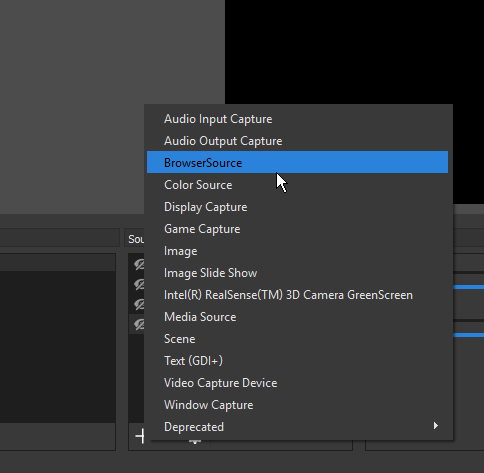
Hi, I have a question. I am trying to add widgets and have followed the steps on the video up to the point where I add a browser source, but I cannot seem to find the option to add a 'browser source' anywhere?
flat rampart
but sometimes when somebody donates it comes through as "anonymous" even though they entered their nickname and all, but once we change the "anonymous" to the right name it won't update with the right amount
clever mango
@flat rampart keep in mind weekly is last 7 days, monthly is last 30 days. It's not based on Sunday-Saturday or the 1st of the month to the last of the month
flat rampart
ye we figured that one out
but the donations were within the same time frame
but appart from that my main thing is, am I able to edit any of the values to correct stuff? because from what I can tell, I can't 😦
flat rampart
is it gonna be a option?
or will it never be
because thats a big issue we're running in to
not being able to manually adjust
weary mist
If you reset the data page, it should recalculate the aggregates
ripe herald
@crisp wing you add in OBS https://i.imgur.com/TzqopwA.png
 weary mist
Anything greyed out auto-calculates
flat rampart
reset means everything goes back to 0 ?
clever mango
I recommend using "force users to login" so that you don't have any issues with anonymous tips. If you have anonymous tips, they can be deleted and added in manually. ☑ Imported Tip at the bottom of the New transaction popup
weary mist
@crisp wing if you don't see what kiriaki is pointing to, you will need to reinstall OBS and make sure to install with the right packages
clever mango
There are no current plans to allow for manual adjustments to that data.
crisp wing
Ah, right. Will unistalling remove all previous adjustments ive made to OBS?
weary mist
@flat rampart reset normally means zero, but when it comes to the totals and aggregates page, it either re-pulls the info, or recalculates it
flat rampart
hmmm ok
ripe herald
@crisp wing yeah cause if you have old OBS it's not updated long time now, we do recommend OBS Studio https://obsproject.com/
crisp wing
Right ok, thanks for the help : )
flat rampart
@weary mist that just goofed up everything argh...
I know its not on the table or being worked on but I suggest being able to manually adjust the values because that would make everything much easier
on a side note, being able to manually set the start and end of a week when it pulls data for weekly top tipper etc (same for monthly) would be best aswell honestly because every streamer will have a different day they'll decide who is top for incentives etc.
this one in particular has the deadline on friday
 coarse heath
Hi support! I realized why my bits weeent showing up like the cute gif I made! It’s because they go they twitch and use their gifs 😦 IS THERE A WAY to have bits go they stream elements instead or just tips and donations?
clever mango
@flat rampart What did you reset? Session?
clever mango

weary mist
@coarse heath In your overlay, click on the alert box. Then cheer settings. Then on the bottom left, variation settings, that is where you can delete or change the default variations
clever mango
 coarse heath
Hemmmm.... I did that but it still does the twitch pyramid. My follows, hosts etc all work great tho
Perhaps it makes a difference what interface the cheer donator uses? ie muxy etc @weary mist ?
I’ve been working on my overlays with y’all’s help, cleaning up a lot of user errors etc & seriously everything looks great except the cheers @weary mist which still show up like default twitch cheers
muted locust
Hello SE World
coarse heath
Oh wait!! I get it @weary mist !
coarse heath
It worked!! I did have to delete all the other defaults even tho I’d asked them to not be chosen randomly But that’s fine I never wanted them. So yay! Thanks bunches @weary mist
weary mist
@coarse heath no problem. Keep in mind, those defaults were set up with different cheer levels (1 bit, 100 bits, 1000 bits, 5000bits), so that is why checking the box didn't work. That box (randomly choosing) only works when there are multiple variations for the same level (ie 4 different images set for 1bit donations)
coarse heath
Ah ha!!!
 slender yoke
why doesn't the follower goal widget have my current followers listed? It says 1.
clever mango
It's a counter and doesn't reflect old data from before using StreamElements. You can edit the goal progress from Activity Feed > Widget Data > Goals
Or in the editor click DATA (next to widgets) > Goals
It will count up when you get new followers but it won't decrease if anyone unfollows
slender yoke
there it is! thanks!
tight harness
There is a Total Followers widget, it sounds like that's more what you were after
clever mango
 will reflect the data that twitch has
muted locust
@tight harness can I ask you a question my friend?
tight harness
Of course
muted locust
I was wondering if I could add an .MP4 video background to one of my overlays
tight harness
To temporarily show?
You could add it as a Media source in OBS Studio then bind it to a keybind to show/hide it
muted locust
I was trying a bunch of things to only one overlay
I mean, using the media source in OBS is the last resort XD
since that's what I have now
but just to take the load off of the CPU
 ripe oracle
Is it a official Bug that i the Edit Overlay Site dosent load while you are Moderating a onther Channel? Cuz when i try to edit one Overlay on my Channel it functions just fine >.<
clever mango
It's being worked on right now so mods are not able to see the overlay editor.
It will available again as soon as possible.
lament blade
hi! Is it possible to show current playing song from spotify?
pine hemlock
We currently don't have spotify support
lament blade
ouh okay,thanks for the answer
 simple crane
Is it possible to set a maximum amount for the points of the roulette and slots feature?
slender yoke
So 2 problems: 1. my store sound effects don't play when redeeming them. 2. notification sounds for things such as hosting repeat indefinitely in the background. how do I fix this?
 grim quarry
Hi guys, has anyone had this problem when creating an overlay, nothing will show up other then a help button in OBS (unclickable) Was working 100% fine for me until yesterday when this just changed. https://imgur.com/a/DdrOz
 pine hemlock
@slender yoke Do you have the redemption widget on your overlay? Also to fix the sounds, check the "Shutdown source when not visible" button on your browser sources.
@grim quarry Browser source properties -> Refresh cache at the bottom
@simple crane I dont think theres a way to set a maximum currently. only minimum
misty wagon
There is not as ⬆ Cuda said but by changing the user and or global countdown you can limit the gambling. Also you can enable/disable the module so if you go for a toiletbreak for example, turn some of the modules on, turn off when back. Points are only gathered when stream is online too 😉 The idea for a maximum can be upvoted in the url showing in the #💭︱feedback-and-ideas channel description.
grim quarry
Sorry @pine hemlock is this refresh button only available for obs studio? cant find it on the classic version
pine hemlock
Yep. Classic is not supported by the devlopers anymore and sadly things break like this over time for stuff that isnt supported.
I'd suggest moving over to studio
This tool helps convert your scenes: http://obs-converter.rodney.io/
grim quarry
thanks for your help mate!
slender yoke
nice thanks! @pine hemlock
 rocky orchid
Hey there. I've been having an issue with Ground Control since the update. It keeps telling me 'Something is wrong on our site...' and for the life of me I can't figure out what's wrong. I've updated my JWT, I've completely removed it from my machine and did a fresh instal but I'm still getting the same message
clever mango
Mac?
rocky orchid
Yes
clever mango
The GC dev is aware and working to fix and update the mac version. Sorry about the inconvenience.
rocky orchid
Oh awesome! It's okay, I just thought I was doing something wrong
clever mango
@rocky orchid Until this is fixed, please have the Activity Feed open during your streams so you get host data from twitch https://streamelements.com/dashboard/activity
One of the two must remain open for host data/alerts to be received
rocky orchid
Yeah that's what I've been doing since the issue started. Thanks so much, I'll keep an eye out for the update
clever mango
👍🏽
 gaunt hill
this is an odd question... but how to I make the overlay fit my OBS -it too HUGE!!!!
clever mango
Are you using a theme overlay or custom?
gaunt hill
one of the existing super themes
clever mango
Ok, what size is your OBS canvas? Settings > Video
clever mango
When you add the overlay to OBS use dimensions 1920x1080 in the browser source properties
Then use CTRL+F to fit the browser source to the canvas
gaunt hill
gracias
clever mango
de nada
 drowsy basin
hey, I have myt donation alerts set up and the testing works hbowever when someone donates no alert shows
and it doesn't show in my notifications
 rocky lion
hello everyone
does anyone knows how to setup 2pc for streaming? 2 laptop in my case :/
clever mango
@drowsy basin Sounds like tip moderation is enabled which requires manual approval/denial of tips. Go here https://streamelements.com/dashboard/tipping/moderation and disable tip moderation if you don't want to manually approve them as they come in (done on the acitivity feed under Pending)
drowsy basin
@clever mango there is nothing under pending either
clever mango
Is tip moderation enabled on that page I linked?
drowsy basin
I see now
you had to load the donation page to approve
it doesn't come under pending
clever mango
It is supposed to show them there. Did you click pending to drop down the items?
drowsy basin
it only showed when I opened my donation page as approve or deny
not in the pending tab
 finite mural
The bot doesn't post in chat when someone redeems something. If I miss it popup on OBS I don't see who redeemed what. It used to post a notification in the chat as well. Is this a bug, or is there a setting that may have somehow been changed that I need to set back?
lament blade
my stream along, i couldn't see the top donation of the month. it was 1 week ago my last donation was yesterday
I have choosen "monthly"
it said sth with No Data
clever mango
@finite mural First, check Modules > Chat Alerts > Redemptions
lament blade
pls @lament blade me, since I'm going now out for half an hour
 agile orchid
hi @stuck hamlet i sent u and email and i want to know hot to configure the obs studio for i3
 opaque night
Hi, is there a way to skip donations and sub in case they have an offensive message in them?
I cant find an option
clever mango
@opaque night Yes, it's called Tip Moderation. Tipping > Tip Moderation > Enable moderation
All tips will need to be manually approved before they show up. This is done on the activity feed pending section or the tip moderation page https://streamelements.com/dashboard/activity/moderation
 orchid ledge
ok so on the destiny animated red overlay my notifications arent showing
they show in chat but not on overlay
pine hemlock
@agile orchid I don't think you'll be able to stream much on an i3. If you have a decent graphics card you can use gpu encoding
I3 isn't meant for video encoding
opaque night
I see, thanks for the help! @clever mango
pine hemlock
@orchid ledge is your alert box visible on your overlay in the editor? Does emulating the alerts via the editor work?
agile orchid
@pine hemlock yeah i know but i want to use the stream elements overlays and they are not available any more for obs classic
lament blade
Can anyone help with how would I write a Raid command. To post the streamers URL and such.
clever mango
@lament blade you can use the "shoutout" custom command template and edit it into a raid message
Once the template has been loaded, you can edit the command name to !raid for example and the response
!raid <streamer name> would be typed in chat
lament blade
Thanks
pine hemlock
@agile orchid studio has a setup wizard that automatically adjusts your settings
I'd recommend using that for your scenario
orchid ledge
everything is visible and works upon emulation
clever mango
@orchid ledge Are you using OBS? If so, which version?
@agile orchid Also, take a look at this https://blog.streamelements.com/8-obs-tips-to-make-your-stream-run-smoothly-a8d634b34bce

StreamElements - Legendary Live Streaming
In an ideal world, we would all be using a brand new NVIDIA GeForce 1080 Ti graphics card with an Intel X-Series processor.
 lilac turtle
Quick question. When do paypal payouts from tipping happen?
and also, do you guys plan on adding bank accounts to payouts? im not a big fan of paypal
 woeful nacelle
This isn't directly about StreamElements, but ever since the last Windows 10 update, my webcam has refused to work. I uninstalled and reinstalled it, and downloaded and installed the appropriate software from Logitech's website, but it still won't work, even though the Properties window says "the device is working properly". I was wondering if anyone here could help. It's the Logitech HD C615.
edit: Figured out why. BitDefender had suddenly decided to block it. I changed BitDefender's settings and it works now.
orchid ledge
im on version 20.1.0
clever mango
@lilac turtle You'll have to check with paypal about their withdrawal policy. More payment processors are coming soon.
coral kelp
why arent my commands working? how long after adding a command does it take for it to work
i was typing.
in the wrong chat.
im an idiot.
oops
lament blade
Why when I add my twitch Emotes to commands, they only show the text code when I type it in chat?
clever mango
Are they sub emotes?
lament blade
Yes they are.
clever mango
The bot isn't subbed to you so it can't use them
When twitch allows sub gifting you might be able to purchase a subscription for the bot
lament blade
I'll look into that. Thanks
 solid stump
is there a way to remove someone from the leaderboard entirely rather than just reset their points?
i added a custom user to test and cant get rid of it
silk patrol
@woeful nacelle If it's not SE related, try to keep it in #welcome to avoid spamming the support channel. thanks ❤
woeful nacelle
Well it sort of is, because I would use the webcam in a stream. 😉
clever mango
@solid stump Not possible at this time
agile orchid
Hey im trying to capture LOL in game but when i put "capture game" and the option and all that it doesnt show
And yes im in a custom game
silk patrol
@agile orchid If it's not SE related, try to keep it in #welcome to avoid spamming the support channel. thanks ❤
 quick shard
@solid stump what are you using to track your users? Do you have a separate bot?
solid stump
just streamelements
quick shard
@solid stump one moment
Is that person a moderator, regular or both?
Also, is there a specific reason you no longer want that person on the leader boards? You can PM me if the reason is not something you want public @solid stump
Nvm, I see why
solid stump
the user doesnt exist its a custom nonsense user i made up to test something else
but the setting only resets their score rather than remove them
regardless
quick shard
There is a little garbage can to the right of the username
Did you try clicking on that?
silk patrol
@DreamAngelCore#5238 that garbage can will only set the value to 0. As Terrabuck said earlier, there is no way to remove someone from the leaderboard
quick shard
There has to be some way, I am going to test somethings out and let you know
clever mango
I promise there isn't a way to delete a user.
silk patrol
@DreamAngelCore#5238 Terra and I are called champions (blue role). it means that we have a better understanding of how the tool works. trust us 😉
clever mango
We appreciate you trying to help other users. It just isn't possible.
quick shard
uh huh
lilac turtle
@clever mango I had a 1 dollar tip and it never showed up in my paypal account. not sure when you guys process them. thats all, no worries
clever mango
Payments are sent from the viewer directly to you on paypal. StreamElements doesn't handle any money. SE just handles the process of connecting the two parties together and collects the transaction data so that information can be used in overlay widgets.
Please verify that your paypal email is correct in the tipping settings.
 cyan geyser
hey guys, im trying out the h'ween themes but the overlay seems to be running at like 8fps, anywheer to change the fps?
clever mango
editor or OBS?
cyan geyser
obs
clever mango
studio?
cyan geyser
on the editor it's perfect, on the browser source where you add it, despite it being set to 60fps, it seems to be laggy
yeah obs studio
clever mango
What cpu do you have?
clever mango
how many overlays have you added to OBS?
cyan geyser
currently, 1 overlay is active
theres 2 overlays plugged in, ones hidden, one is showing
 worldly plover
Question: Hosts and Autohost events are not triggering in StreamElements. Any clues as to why or what I can do to troubleshoot this issue?
clever mango
@cyan geyser what is the FPS saying in OBS?
cyan geyser
okay, so this is interesting, not really sure if its related so go easy xD
2 proccesses called " CEF-BootSTRAP were running, i simply ended one and the overlay is perfect now
interesting..
clever mango
@worldly plover please check the latest pinned message in this channel


☑ Shut down source when not visible is important. It needs to be checked for all browser sources.
worldly plover
Okay, so to clarify, Activity Feed must be open on a tab in order for host events to be recognized and triggered with the alertbox?
clever mango
Yes, or use Ground Control
worldly plover
Okay cool thank you!
 compact relic
Hello, how can I join the sellout section? xD
clever mango
I've verified that you're using SE tipping, bot, and overlays. You're in 😃 Thanks for streaming with StreamElements 🚀
compact relic
Woot :3 Thanks
 worldly wharf
Just a Heads up: On Safari > Mac The Trick or Treat Widget doesn't preview. Works great on my PC & Mac via Chrome.
 keen pier
Hello. Im trying to do this "Loading your overlay from a single source means that your CPU only has to load one source instead of several, which will reduce CPU usage by a lot." but i dont see an option to have multiple overlays in 1 browser source. Lil help please.