#helpdesk-twitch
1 messages · Page 133 of 1
 clever mango
 drifting grove
Thenx @clever mango
clever mango
But it still begins counting down when the overlay becomes active. It's just not going to restart itself because it's goal is to countdown to that date/time.
It's a good point though. I forget that the widget does support counting down to a specific date/time
 storm venture
Hello, today I discovered this super tool. I can not find a price list anywhere. I do not believe that such a comprehensive service is free.
storm venture
That's what I'm going to do, I already know about the 3 streamers who put your tool on.
Including me and my Destiny site stream profile
 silk patrol
@storm venture Paying for streaming services? Is this 2003? 
storm venture
Every bot who does something more is paid.
 proud crow
storm venture
proud crow
storm venture
I've already started programming my own BOT because they did not suit me.
silk patrol
This one will suit you
storm venture
Yes
silk patrol
all in one, completely free and fast support
 storm venture
@silk patrol What more you need 😃
silk patrol
I know right 😃
 ruby linden
hello a streamer which i am mod in, enabled the create command (!command add text) but it doesnt work i tried it on my stream in its working perfectly why should he do?
clever mango
What is the channel name?
ruby linden
treeboydave
clever mango
👍🏽

 clever mango
All good 👍🏽
storm venture
I have a question why the raffle can take points? I use a raffle to choose a teammate for the game.
 lament blade
Hey guys, can anyone help or give advice in a voice channel quick?
clever mango
Sure, join voice support. I'm helping a few people
 paper sedge
Erm
clever mango
@storm venture I don't understand. The raffle module gives points to a single person or multiple people
paper sedge
er, whats the difference between this and labs..?
Ive used labs for awhile but... i heard about this so..
clever mango
What is your first language? Maybe we have someone who can assist you better 😃 @storm venture
 muted heath
since i started use stream elements, my obs crashing while im streaming or everytime i wanna close it, any idea why ?
silk patrol
@paper sedge We are 100% free, we have everything you need and more : overlays with premade themes (animated or not), chat bot with custom commands and access to external API, loyalty points with minigames like gamble and a stream store for perks and sound effects, tipping page with no fees and tipping presets that are optimized for mobile, and many more to come
 brisk flint
Hi! How can I reset a counter incresead by ${count <name>}?
 tight harness
!editcounter
brisk flint
I just found 😃 thanx however!
tight harness
No problem 😃
brisk flint
Reset went not really well...what is the problem?
 viscid forge
What happens with !editcounter chicken 10?
brisk flint
- 3
- set to 10
- still 3
Bad counter name?
sure! 😃
Noob 😃
Or? where do I set the counter name?
viscid forge
Not sure, I have to pop out temporarily.
But this solves most of the issue so far right aside the counter name?
brisk flint
I turned them off/on, and voila works 😃
Hm....I have a new question!
Is it possible to have a command which than starts via SE bot a new one? Like I say !resetchicken, and this calls the !editcounter chicken 0 command?
Not, or?
tight harness
The bot can't chain commands, so no
storm venture
@clever mango Czech, I ment raffle module to take point.
clever mango
The raffle doesn't cost anything to enter
storm venture
Well giveaway works the way I meant.
clever mango
yes, giveaway tickets are purchased with channel currency
storm venture
But you need to create always newone
brisk flint
Can I somehow combine the variables ${user.lastactive} and ${random.chatter} in a timer? I would like to get an information of a random chatter when he/she/it was last time active.
I mean does have lastactive an input user name or similar?
clever mango
last active would not work in this scenario
it uses the target from a command or the sender of the command
 visual shell
Hello, I'm very new to stream elements and obs. Can someone walk me through on using sn overlay? I have an overlay created and copied and obs open
clever mango
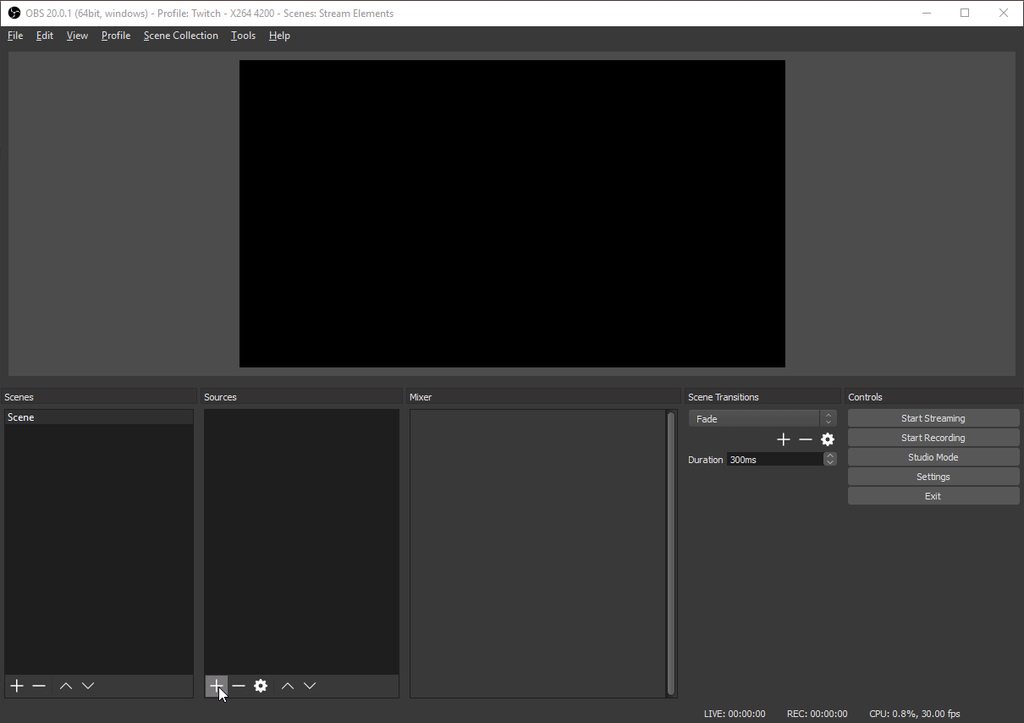
Stream Elements - Legendary Live Streaming
Setting up your Overlay with StreamElements is quick and simple. In case you need help, here is a guide to help you with the initial setup…
brisk flint
@clever mango "it uses the target from a command" could you provide please an example?
 regal birch
In the song request tab, when someone requests a song - it doesn't play automatically for me.
I have to refresh the page for the request songs actually to queue up.
clever mango
This is a known bug and will be fixed
regal birch
Okay, thank you. 😄
visual shell
Yeah, this is what I'm getting. Not my actual overlay
clever mango
message me your overlay link
visual shell
Here, or pm?
clever mango
private message
 faint copper
I would like to have one semi-transparent box on the screen (about 25% of the screen width) and have my stats cycle through on that. So it'll show recent follower, then change over to Recent sub etc. I don't want it scrolling, just change over like a photo album thing. I could make the semi-transparent thing myself using an image for the background, but how do I do the rest using StreamElements Layouts?
 scenic granite
on my overlay, the top tip isnt updating, can someone help me troubleshoot please
clever mango
I'm bad at multitasking and I'm helping someone in voice support. I'll be with you all as soon as I can.
scenic granite
no prob terra, i can wait, finish with that person. ill wait
clever mango
@faint copper There is no way currently to do this as you would need to have a "text rotator" type of widget that can cyle through multiple text widgets. Please suggest it on the ideas board
@scenic granite What is the widget that you are using?
scenic granite
dunno lol, im new to all of this, just set up my overlay from the themes gallery
clever mango
Click the text and let me know what it says at the top of the widget settings in the left panel
scenic granite
top tip 20
clever mango
Would you like me to remote connect with you via teamviewer? It would be the fastest way to diagnose and fix this.
scenic granite
sure ill dm u with info
clever mango
@keen carbon Tips that go through streamlabs cannot be seen by StreamElements system. That's why we developed our own tipping page so that the data can be passed through to the overlay widgets, the bot, and the loyalty system.
 keen carbon
idk why i use 3 diffrent bots
clever mango
TBH I don't know either 😛
keen carbon
they all do the same
clever mango
All-in-one simplifies your life
keen carbon
ya
 hexed herald
Anyone else having issues creating variations for sub alert box? The just won't save
they*
clever mango
are you using event emulator to test?
hexed herald
yes, just does the normal subscription alert
Basically I want everything to be the same though except the text. Could it be getting confused because I'm using the same image/sound?
hexed herald
0 right now
tried editing the default
didn't work
so i deleted and tried to create a new one
didn't work
clever mango
chrome?
hexed herald
yep
clever mango
OBS open?
hexed herald
not right now
clever mango
Any other overlays open anywhere?
clever mango
yes, one overlay at a time
so what you want is the exact same image/sound but for the message to be different for resubscribes?
clever mango
is 2+ all the same message?
hexed herald
i'd settle for that
right now they're all one
because variation just disappears when I hit save
clever mango
just a second
hexed herald
np
hexed herald
{name} is a Goofy Goober and just subscribed for the {amount} month
clever mango
k
amount is just a number I believe so you'll want "for {amount} months"
I'm testing
hexed herald
i'd be reading it like "for the {2} (second) month"
tight harness
Another interesting variable for subs is you can include the {tier} variable if you wish 
clever mango
not yet legendary 
tight harness

hexed herald
yea, I'm just having trouble doing any of them right now...
tight harness
I had a feeling that'd be the reaction
clever mango
hexed herald
so.... what am i doing wrong?
clever mango
Are you ready for the catch....
hexed herald
yea
clever mango
That's on the new site 
It's not working on the live site
But the new site is VERY close
 clever mango
You're not going to have to wait long...
hexed herald
i guess that's fine. at least i'll stop hitting the brick wall
any idea of timeline?
clever mango
All I can say is you're not going to be waiting very long...
clever mango
No problem
hexed herald
another question
is there a way to make the tts not say the emotes in cheer alerts?
clever mango
No, that's how it works right now
hexed herald
ok
 woeful nacelle
On my last stream, I received a host but didn't know it until later, because the alert didn't show up in chat even though it should've. https://www.twitch.tv/geodude96
 tight harness
Did you set a minimum of viewers for the host alert?
woeful nacelle
I didn't care about a minimum so I left it at zero.
hexed herald
Also, has anyone had it where the fonts don't save on your alerts?
it always switches back to Roboto?
tight harness
I vaguely remember having this once a long time ago 🤔
hexed herald
having my problem?
hexed herald
@clever mango now my cheer variations aren't working
I did it on another overlay last night though
 maiden fjord
My alerts are duplicating when i have OBS open and when i am live. I have disconnected from the other alert bot I used. I have reset everything in my Layer-Alert. It sounds great on the website. But when I open OBS to test, or go live there's duplicate sounds about half a second behind the first alert. Please advise.
 delicate ibex
Does the host loyalty point bonus trigger every time an auto host hosts you, or only the first time?
tight harness
@maiden fjord Are you sure you're not hearing it on OBS and the site? hence the duplication
maiden fjord
no. I can hear it on stream as well
I got a new sub yesterday and it was embarassing
the whole stream could hear it
tight harness
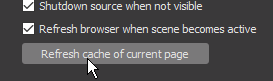
@maiden fjord Have you checked if 'shutdown source when not visible' is ticked in the properties of the overlay browser sources
maiden fjord
i will double check
tight harness
Because if you have multiple scenes with the overlay and that's not ticked they're all still technically open and you can hear them all
maiden fjord
it is checked\
tight harness
But if you tick that you're sorted
Well i'm sure you've not got 2 instances of OBS open, you say you don't have the overlay manager open, so that tick box is the only other possibility
You have to do it for all of the overlay browser sources in all scenes
maiden fjord
you are amazing @tight harness I had 1 BRB screen that didnt have it checked
where can we donate? I feel like I need to pay for this service
tight harness
Glad it's sorted now
There's nowhere to donate to StreamElements, just spreading the word about us is enough
clever mango
Spreading the word is better than any monetary donation 
maiden fjord
I have been!!! ALL over out local KC twitch and of course in my stream!!!
 honest blaze
soo how come streamlabs has blocked their imput 😕
I was hoping to carrying over those tips
clever mango
We've been wondering the same thing 
delicate ibex
Does the host loyalty point bonus trigger every time an auto host hosts you, or only the first time?
hexed herald
@clever mango are variations down for everything? I was able to get bit variations on one overlay last night but it's not working on a different overlay?
clever mango
which one?
 hot pike
Any ones that are safe and do the norm
clever mango
We're basically just using NowLive to announce StreamElements streamers when they go live
hot pike
ok
clever mango
There are discord bot directory sites that can help you find one
hot pike
thanks i really apreciate the help
 white ocean
Hey, I am using the pre-available themes, I need to amend the messages for the follower, subscriber etc. by adding new wording and differnet immages how can I do that for hte existing overlay themes
hexed herald
Anything going on with bit variations on overlays? was able to create differences last night but nothing saves today.
tight harness
@white ocean Click on what you want to change, you'll notice that a section will appear on the left to edit what you've clicked on, you can easily change it there 😃
white ocean
@tight harness thanks
tight harness
@hexed herald Isn't that similar to what TerraBuck was talking to you about earlier?
hexed herald
We were talking about the sub one earlier.
Last night I changed variations for bits on one overlay.
Today I can't change it on any.
tight harness
I'll ask why that might be
So yeah, it is the same thing you and TerraBuck discussed earlier
It's already been reported
 lyric relic
I have a quick question I think, why when I add the overlays to my broadcast software the cpu runs high?
tight harness
Did you add multiple instances of overlays to OBS? If so, make sure that you right click on each of the overlays, click on Properties, tick 'shutdown source when not visible' for each and every one of the overlays
Otherwise they all run in the background
lyric relic
Ok I have to see if one of the broadcast softwares I use has that
tight harness
Alright
lyric relic
I use xsplit and vmix but I will check with them on that setting but thanks
tight harness
Ahh I see, I don't use xsplit so i'm not sure, I know cryon1cang3l does
lyric relic
The one I been using the most is vmix since I can put social messages from Twitter in
tight harness
Ahh I see
lyric relic
I will contact them but thanks for the info
tight harness
No problem 😃
 wanton dagger
Can I ask about the notification in my stream for donations?
clever mango
What would you like to know?
 vital jackal
Hiya is there a way to import the stream elements bot into my discord channel ?
clever mango
Not at this time but it's been requested a lot on the ideas board https://strms.net/ideas Head on over and give it an upvote along with other ideas you'd like to see happen.
vital jackal
OK thanks, I appreciate the quick response! What's a good bot to use on discord ?
clever mango
I would check some of the discord bot directories like https://discordbots.org/

Spice up your Discord experience with our diverse range of Discord bots
There are many many options
vital jackal
OK thanks :)
 drifting sluice
hi! anyone available for a dm?
clever mango
Sure
 misty wagon
@drifting sluice ❤
woeful nacelle
So, just wondering if there's an answer for the problem I posted above, or if it's something that will soon be fixed, or whatever.
 serene granite
did the host show up in your activity feed?
if not, are you streaming from console?
we currently detect hosts through the overlays, so you must have an overlay loaded anywhere (it can be blank) for hosts to show up
woeful nacelle
No, it didn't. And yes, I am/was streaming directly from the PS4.
serene granite
ok
so if you have a PC you just need to load an overlay on a browser tab
can be an empty overlay
woeful nacelle
Oh, cool. What else would that do for me besides including dono messages?
I didn't know I could still do that.
serene granite
that would just allow us to detect hosts that come in
clever mango
I replied to you in #💭︱feedback-and-ideas Geodude
serene granite
np
woeful nacelle
My computer is like 7 years old so it can only handle smaller/older games and definitely can't do game captures from consoles while streaming, so I wanted to find a bot that could post stream alerts in chat, so I could stream directly from my PS4 and still have at least some form of alerts. Glad I found this one.
clever mango
We're glad you did too
 grim prairie
how do i reset my TIP GOAL? it is taking donations from before......
clever mango
Are you in the overlay editor right now?
grim prairie
yes
grim prairie
i got it
clever mango
Then select GOALS
clever mango
you can edit a lot of widget data and reset session from there. This can also be done from the activity feed by clicking on Widget Data
grim prairie
or mam... dont want to assume gender
clever mango
You're welcome
 stuck hamlet
Mam
clever mango

 jovial bronze
if i create a voice effects redemption, how do I incorporate it to play during my stream?
clever mango
Add the store redemption widget to your overlays
jovial bronze
and then does that go to obs
 opal trail
hi
having an issue. it seems everyone is able to song request without it costing like it should, 25 points, everything is enabled, and it isnt set for mods to be excluded from this so im not sure whats going on
 upper steeple
any news on why song requests doesn't auto play queued songs when your on your backup playlist?
opal trail
also, do they need to have hosted withviewers to get the bonus points
upper steeple
no matter what i do, it won't save my variation volume when i change it. I have upped it multiple times now and as you can see there is no save button on that screen. So I click save on the variation screen and it doens't save the volume change.
tight harness
@opal trail did you set a discount for points for any level of people?
@upper steeple also I haven't heard any update on that yet, and we're aware of variations not saving, that was reported last night
opal trail
no i didnt set a discount for points for any level
tight harness
Ahh okay, the reason I asked is because some people set the discount to a number higher than 100 when that's actually a % so any number 100 or more would make it free or even give points to people for requesting songs
I only just woke up so I'm starting my computer up now, I'll check if it's on our bug reports page first of all
opal trail
thank you!
tight harness
I don't see it on there, I wonder if anybody else is experiencing this
opal trail
hmm idk ;-; ill try to play around with it
 vapid storm
Alertbox test works. But on stream it doesnt
tight harness
@vapid storm That means the problem isn't with the overlay or anything else on our side, what streaming software are you using?
vapid storm
using OBS
obs studio
oh nevermind, it was working just how long it was on stream for was put really low
idk how
vapid storm
👍
 terse canyon
Help!
lament blade
if u guys could make a download abel application instead of having it on chrome it whould be amazing
 olive lintel
@lament blade check on the right here: https://streamelements.com/dashboard/activity
@terse canyon tell me more about your problem
terse canyon
i type this in chat and it gave that out put
"!setgame minecraft"
olive lintel
But the game name actually change... right?
terse canyon
i donno
olive lintel
terse canyon
think it was the same already
okay, so the title changed
hmm
check again
just changed to irl the same way
olive lintel
terse canyon
weird
olive lintel
now it's back to minecraft 😃
olive lintel
let me do some test
terse canyon
kk thx
olive lintel
@terse canyon I "posted" the error in the dev chat, as soon the dev wake up he will see the problem. 😃
terse canyon
okay cool 😃
lament blade
someone has problems when try to change overlay resolution? seems always displays at 1920... ^^?
tight harness
Make it 1080p then resize it in OBS
 unkempt sparrow
good morning
i have a question
When you are setting up your stream store and you add a sound to something, will it play in your stream as well or just for the user who clicks on the item?
stuck hamlet
You need to add the "store redemption" widget on your overlay for it to play on stream
unkempt sparrow
also lets say you have an emote only reward and you see someone purchase it, is there a way that can be done automatically without me having to type emoteonly in the chat
Ohhh gotcha for the widget thing, let me look
tight harness
That can't be done automatically, no
unkempt sparrow
ok thank you
i am setting up some stuff today, I might have more questions. Thank you for all your knowledge
tight harness
We're always here, if you've got any questions just ask when you have them 😃
 strong dock
aight need some help with hype cup
got icons and all adjusted to how i want them but when things stack they arent touching... is there a setting for that?
clever mango
each token
strong dock
body bounds?
clever mango
that's the one
strong dock
hm
guess ill play with it and see
theres 2 for minium and still not touching
bhahaha. it was set to square and im using a circle icon

clever mango
strong dock
is there a way to do a whole day of events other than 1 at a time?
clever mango
Just one
strong dock
trying to work with new spooky theme... i cant put aything on bottom of the overlay
actually looks like half the stuff on bottom isnt loading
clever mango
strong dock
yep multiple overlays
clever mango
Boo? Gore? animated?
strong dock
boo
tight harness
Sure those layers aren't locked?
strong dock
right but when they load they flash for a second then all go away
im live right now come watch
i get that they are locked but u should still be able to see them
tight harness
Them being locked wouldn't stop them from loading, I missed that part
Would just stop you from editing them
Unless you unlocked them
strong dock
right
@clever mango its this pc some how. brought SE up on my stream pc and works fine
unkempt sparrow
does stream elements have macros?
silk patrol
@unkempt sparrow  What do you mean by macros? What are you trying to do?
 torpid wren
Is there a setting I'm missing to make the cup not reset when switching scenes?
strong dock
u have to turn off shutdown source
clever mango
@torpid wren that's the behavior right now. It will be changed in an upcoming release
strong dock
i just spent 30 mins earlier created a cup only browser source lol so i could have it not reset
unkempt sparrow
well i would like to just hit a key/macro to give my viewers a set amount of currency
torpid wren
Ahh ok. Thank you 😃
silk patrol
@torpid wren What you can do to prevent this is create 2 overlays : one with your alertbox/store redemption widget, and another one with everything else. make sure you shutdown the alert overlay when it's not visible using the checkbow in the browsesource properties, and do not shutdown the other overlay, this way it will always keep the data loaded
strong dock
^ what i did
silk patrol
@unkempt sparrow then no. you can use the !addpoints command for that
strong dock
@unkempt sparrow u have stream deck? can set a button for the add points command
unkempt sparrow
no i dont have stream deck
 karmic anvil
Why does the total follower widget display 0 follower and not the correct number?
tight harness
Could you try deleting the widget and re-adding it and then telling me if it still shows 0?
karmic anvil
Yes it still shows 0 follower but i have 289 atm.
tight harness
Could you try logging out of the site and then back in for me?
karmic anvil
Still the same problem 😦
tight harness
I'll try adding the widget to my overlay and see if it works, 1 sec
Works fine 🤔 https://gyazo.com/64d17ce882e44a640e384882ab1a1d75
 silk patrol
@karmic anvil in the overlay editor, you have a data option in the top bar, go there then click on totals and hit the reset button
karmic anvil
@silk patrol this works thanks 😃 
tight harness
I'll remember that for next time 
 sharp wind
@clever mango hey man have you had an issue where PUBG freezes when trying to have it open with obs at the same time aka streaming it
:/
im updating my gpu drivers ... some forum says it might help
clever mango
PUBG freezes on it's own 
clever mango
I've not noticed any link between having them both open and having freezes
sharp wind
aight 🅱
sharp wind
tera i need to ask somthing if you have a min
 deep pendant
Im having some issues with "Chat Alerts" only showing follows, but not showing hosts or other things that should be showing up. Any known issues? Or am I missing something
clever mango
Are you using overlay(s)? Are you a console streamer?
deep pendant
OBS, console through my elgato
clever mango
do you have an overlay loaded in OBS?
deep pendant
I am using my own images in OBS for an overlay.
If I was a console streamer, would it still be possible?
clever mango
A streamelements overlay needs to be active in order to pull host data
tight harness
You can upload your images to our site and still have your overlay as it is now, but it's required to have an active overlay from our site for those host alerts to work
clever mango
It can be a blank overlay running in the browser but there needs to be an overlay active during the stream
deep pendant
Okay, so the follows can be pulled just from the bot through the profile, but hosts and others need to be done that way?
tight harness
Yep
clever mango
Only hosts require the active overlay
deep pendant
Awww, now that is some interesting information. That changes things 😃 I appreciate your help
So if I am a console streamer, then what would I have to do to get the host thing to work? Or would it not be possible?
tight harness
Set up an overlay and put it into OBS, as TerraBuck said it can be a blank one
deep pendant
I mean, if i streamer through my console, and not OBS at all. like the xbox streaming app
clever mango
This requirement is actually going to be changing soon to a different method with the release of the new website but we'll discuss that when the time comes (very soon)
I think it would be a good idea anyway to setup an overlay with an alert box and maybe some text widgets to place over your game 😃
Streaming with overlays isn't possible when streaming directly from console
deep pendant
so the host information cant be pulled at this time, yes? (for a friend)
deep pendant
so stream through the console, but leave the overlay on the PC running, this will give the bot information for the host feature?
clever mango
That will work if streaming directly from console but I thought you were sending to PC via capture card?
deep pendant
I am, but a friend is not. He is just through his console and would like the same information on his stream to appear
Im attempting to set it up for both of us
clever mango
Yes, have him create a blank overlay and launch it in the web browser when streaming
deep pendant
alright, we will test this tonight! Greatly appreciate the support
clever mango
no problem
 weary mist
<3 @clever mango
clever mango
 @weary mist
lament blade
Anyone have a min for some help in Whitelisting?
clever mango
Sure
lament blade
So I know where to find the Whitelist area in SE but I dont know what link to put in the area. I want to Whitelist Clips from my stream so people can share without getting timed out
clever mango
only from your stream?
lament blade
Yes
clever mango
There's no way to ONLY allow clips from one stream
but you can allow all twitch clip links
lament blade
ah ok
unkempt sparrow
is there a way to automate some of the stuff you can put up in the stream store? or plans to help streamers make it automated?
clever mango
Automation isn't there yet but that would be something to look into in the future
unkempt sparrow
ah gotcha, i want to put something like emote only chat and when someone redeems i have to actually type it and then undo it after the time is up
so automation would be nice there
clever mango
no mod(s) to help you?
unkempt sparrow
not atm, i just started streaming about a month ago
tight harness
Getting some mods would be useful, do you have any regular viewers who are helpful and you feel that you can trust?
I'd suggest adding mods gradually, it's a bad idea to have too many because I've been told many times before that too many is off-putting
 sharp bluff
when trying to add an alert variation, I can set all the options, but it won't save. I've tried basic options like name, event, duration, as well as filling the whole thing out. neither effort produces a variation in the list.
clever mango
Alert variations are not functioning properly right now. They will be working on the new website that is being released very very soon
sharp bluff
thanks for the update
 coral kelp
any reason songs from "Topic" channels on youtube can't be played with SR?
clever mango
I'm not sure what that is
coral kelp
Provided to YouTube by Universal Music Group International Feels Like We Only Go Backwards (Young Dreams Version) · Tame Impala Feels Like We Only Go Backwar...
this song
for example
its on a "Topic" channel on youtube, playing songs from channels with the word "topic" in the name cause the song to freeze or get instaskipped
clever mango
coral kelp
every time a viewer has tried to request one for me its gotten skipped or it didnt load or it did load but i had to click play manually
clever mango
It shouldn't be skipped but the other two scenarios are known and will be fixed as soon as possible
 muted locust
Hello
I have a question
do you take a % on donations we receive and if so, how much?
 burnt silo
Hii, is there anyway to have the song request feature not need a link, i.e. just a name etc... ? I can't see one, but im really tired so i might be being blind
clever mango
Not at this time because of a limit from youtube
SE is working with youtube to have this limit raised which could hopefully allow search again
burnt silo
okay thanks ^^
 lime wolf
hello , is there a way to save our alert box and just copy it to another scene? Regards
clever mango
Not yet, it's been requested on the ideas board. Feel free to join and upvote it and add other ideas you have that would make SE the best
lime wolf
thank you 😃
clever mango
you're welcome
 tribal tulip
within rewards, say I want to add a Discord invite, is that possible to include the invite code within the redemption process?
if not I can always do it via whisper manually 😃
tight harness
Sadly not, not yet anyway
Stream Perks have to be done manually for now as this allows you to do anything, we do want to add some automated rewards in the future from what I've heard
 cyan falcon
Hi @clever mango ! I'm Dreadstuff from Reddit!
cyan falcon
Haha hey! So, my issue again is... when the browser source is active while I'm in a game of League of Legends- the frames drop (to about 40-35) while I keep it capped at 60 anyway. My stream notices the lag and it was pretty bad :/
clever mango
Are you able to voice chat?
cyan falcon
I am!
clever mango
 soft ingot
Am i able to add a layer on teamplate that ive edited? i mean instead of the New follower i change that to Top Donator
tight harness
Yes, if you don't want new follower you can delete that and then go to Widgets and add Top Donator instead, then use the text settings for the other text widgets to see what text settings you want to set it at, does that make sense?
misty wagon
@soft ingot the tinkering is the great part. If you are unsure how something works out, just start a test set of overlays and try out whatever you want.
soft ingot
@tight harness yes that im aware of, but i want the hm lemme send a pic
i have a rolling text with top donator for example
and instead of new follower i want donator
with that design if u know what i mean
:b
tight harness
You can unlock the layer if it's locked (click on the padlock in the layers section) and then change the text to say Top Donator, yeah 😃
clever mango
With that theme the text is built into the graphic
 ripe herald
clever mango
ripe herald
clever mango
BOOM
ripe herald
replace with this
tight harness
Ahh, is it part of the image? 😄
clever mango


ripe herald
soft ingot
oh cheers
ripe herald
or this
soft ingot
how did u do that
ripe herald
magic 😄
clever mango
😄
tight harness

soft ingot
one more thing
how do i get the newest subscriber to be auto put in that image?
or do i have to manually add the name
clever mango
Add the latest subscriber widget 😃
tight harness

tight harness
Then you need to move it in the layers list so it's infront
soft ingot
yea
figured it out right after i asked ;/
well thx for the support
appreciate it alot
clever mango
You're welcome
tight harness

clever mango
Click the text and edit the properties on the left panel
soft ingot
oh alrite :)
clever mango
Have you had someone subscribe since you signed up with SE?
soft ingot
yes
clever mango
Click the DATA tab
clever mango
When did you become an affiliate?
soft ingot
not yesterday but the day before
clever mango
Have you logged out/in of StreamElements since you became affiliate?
soft ingot
my english :p
clever mango
That is needed after becoming affiliate so that the twitch token resets and we can pull subscriber/cheer information
clever mango
you can add the name of the last subscriber in that data tab
but if you log out/in it will allow future events to work properly
soft ingot
tight harness
Didn't you add it into the Data page like TerraBuck said?
soft ingot

tight harness
Once you've changed it just hit Save Changes
 neat sigil
Hi does streamelement support YouTube stream?
I was linked with twitch but now I wanna switch to YouTube
clever mango
Coming soon
tight harness
Really soon ™
 feral axle
When will u guys become for Mixer / Youtube /Smashcast #Soon ™
tight harness
I know Youtube is coming really soon, I don't believe any date has been publicly announced yet for any of them
misty wagon
The current status went from Soon ™ to ASAP ™ which is very hopeful 
feral axle
For Youtube and Mixer?
misty wagon
YouTube for now, other platforms are planned after. One step at a time 😉
tight harness
👣
feral axle

cyan falcon
Hey Terra- I'm live on stream now and still getting lag :/ in-game though so can't troubleshoot
@clever mango had to switch scenes due to the frame drops (viewers saying)
 worn linden
Why cant I import my stuff from streamlabs into stream elements? I really dont want to have to remake all my alert stuff
I want to switch to yall but I dont want to redo everything
tight harness
@worn linden It's sadly because they blocked our API access
clever mango
We are wondering the same thing but they aren't responding
worn linden
So no eta then on when it would be available then?
clever mango
They changed their policy suddenly a couple weeks back
worn linden
That sucks
tight harness
Indeed it does
clever mango
The best thing would be if streamers contact them about this
worn linden
Ill send them a message I get 15 viewers a stream so they probably dont care what I have to say lol
tight harness
They should care what everybody says, if enough people show discontent with their policy they're more likely to change it back
ripe herald
Or not 
tight harness
I guess that's down to them 
cyan falcon
Hey @clever mango hopped into the voice support 😄
cyan falcon
Woops.. I hit the restart.. brb lol @clever mango
clever mango
no prob
brisk flint
Hi! I can't use the contest page, because it is like takes 2 minst to load the page. Could you please check it? thanx
tight harness
I'll check it now
1 sec
Took less than 2 seconds to load for me 🤔
Is it literally just that 1 page?
 slim cairn
@brisk flint ^
tight harness
Loaded quickly for you too megaline?
tight harness
Ahh awesome 😃
tight harness
 brisk hamlet
when setting the limt on item quantity in stream store, is it per stream?
tight harness
Not per stream, no, it's overall
slim cairn
It's per person
brisk hamlet
ahh ok, thank you 😃
slim cairn
?
brisk hamlet
oh lol
slim cairn
when i tested it it was
tight harness
Not when I tested it it wasn't
tight harness
I've had different people claim it's all gone when other people did it
brisk hamlet
i set up a doodle on demand item but i only wanted it to be redeemed like 2 times per stream. so im not doing them over and over. in case im working on something important
tight harness
Which is how it should be
The idea is to change it to a different value then change it back to 2, so you can change it to 3 when it's all gone then change it back to 2, then it'll be 2/2 again
tight harness
No problem 😄
brisk hamlet
sweet, this is awesome. thanks again ❤
tight harness
No problem 😃
 crimson quest
anyway to change the color of that blue banner on the tips page? or is that just default? Not the banner section we can change but a blue bar on top of that
tight harness
I believe that's the same for everyone
crimson quest
ok
crimson quest
that one yeah
clever mango
ah yea it can't be customized
tight harness
I figured it out by checking a few different people's tip pages 😄
crimson quest
ok thx lol
tight harness
I wonder if it's been suggested on the ideas page yet for it to be changeable 🤔
crimson quest
hmm dunno
 abstract anchor
Hey can I get help?
I'm doing a test stream and my overlay isn't showing the song that I'm playing?
misty wagon
@abstract anchor did you add the widget named 'current song' on your overlay set?
lament blade
Just one simple question, them i'm out, how do i get money to send when tipping someone, cause it keeps saying something is going wrong when i hit the tip button
clever mango
Are you trying to tip a streamer right now?
lament blade
yes
clever mango
channel name?
lament blade
MarthXY
 inland plume
i asked the streamelements bot to leave my chat like 2 weeks ago and for some reason its still there
please help
clever mango
Which browser are you using @lament blade ?
lament blade
Chrome
clever mango
Hmm
serene granite
@inland plume is it responding to commands ?
inland plume
yes it is
lament blade
Seems that it breaks when i add a YT link
serene granite
try !botpart in chat
clever mango
Ah, thanks for that. I'll test that
serene granite
sorry, !bot part
inland plume
still not working. odd
clever mango
Did you include a start time with the link?
lament blade
i just set it to 0
clever mango
ok
serene granite
@inland plume after typing !bot part is it responding to commands ?
inland plume
nope
serene granite
k so its gone, just takes a while for the viewerlist to refresh probably
clever mango
Interesting. Ok well I'm glad it's working now
 echo hamlet
do you have to have the overlay webpage open for alerts and such to go through?
 summer lava
hello ?
clever mango
abstract anchor
@clever mango LatteMotte 👻 - Today at 6:53 PM
@abstract anchor did you add the widget named 'current song' on your overlay set?
clever mango
@echo hamlet on screen alerts work by adding the alertbox widget to an overlay
hexed herald
the follower alert is somehow playing two sounds simultaneously. anyone else haivng this issue?
abstract anchor
yes I'm using a premade overlay on the themes gallery
echo hamlet
i mean do you need to have the overlay launched for it to work?
 humble coral
Any staff here
hexed herald
follower alert is playing both the old and new sound
humble coral
I want to note I've found a way to replicate the "lag out" error
hexed herald
I even deleted the old sound file
clever mango
Wait, I'm sorry. I'm trying to help @echo hamlet right now.
humble coral
Ok
clever mango
I'll get to everyone
clever mango
It's ok
echo hamlet
so after you create an overlay and add it to your stream software, you can click the button in streamelements to "launch overlay" which will open a blank webpage where the alerts are sent
do you HAVE to have that webpage open in order for them to be displayed on the streaming software through the browser source
clever mango
@echo hamlet Launching the overlay in the browser is the same as launching it in the software. Having it running in OBS is enough.
echo hamlet
ok thank you! 😃
clever mango
@abstract anchor where is the song playing from?
abstract anchor
@clever mango I've tried using both the stream elements website aswell as the ground control app
clever mango
Song requests or backup playlist?
abstract anchor
backup playlist
clever mango
Backup playlist songs do not show in the widget due to a youtube API limit. We're working with them to request an increase.
Only requested songs and songs playing in plug.dj and dubtrack.fm rooms
abstract anchor
okay so there's nothing I can do rn?
clever mango
Not at this time. Hopefully once they increase the limit we'll be able to provide that in the widget
sharp wind
Add yt playlist to plug dj profit
clever mango
^ works
clever mango
@hexed herald Are you running OBS at the same time as the editor? Do you have any other overlays open in chrome?
@abstract anchor Wait, my mistake. If the playlist only plays one song it's because the video is hidden. Unhide the video to load the full playlist
hexed herald
yea
seems like all the alertbox stuff has had trouble saving or just overlapping for me lately
clever mango
Do you have follow alert variations?
hexed herald
i don't
abstract anchor
the playlist is all public videos
clever mango
The actual video player is hidden
the video player needs to be showing in order to load all songs
clever mango
Is it not happening anymore?
lament blade
I'm on phone, WLAN ripped
clever mango
streaming from phone?
lament blade
No from PC, but my WLAN doesn't work atm
So I decided to turn off my pc, and going on phone into sleep soon
Almost 3 am
clever mango
@weary hull How can I help?
strong dock
does the hype cut reset every day? stream session or what? or obs session? i streamed this morning and i pull it up and now its empty
clever mango
It will reset when the session ends
strong dock
humble coral
I've found a way to replicate the error where the overlay editor locks up
misty wagon
@humble coral can you dm @serene granite with screenshots if possible. He can relay with dev/design. Thanks
serene granite
^
 hallow harbor
How do i get rid of this?
clever mango
That's a twitch extension. You can disable it from your twitch dashboard. Click on Extension Manager on the left side
misty wagon
You can't get rid of that. I have no extensions installed and still get those
It's indicating there is an extension avail
Just move your mouse away from it and it will be gone
 empty solar
is stream elements lagging for anyone else?
misty wagon
No issue here
 thick zealot
Hey is there a limit on bit variations ?
I'm trying to add a new variation and it's not working
tight harness
Variations seem to be having problems at the moment, it has been reported already 😃
thick zealot
Okkkkkkk
tight harness
Sorry for the slow reply, just woke up it's 8 AM here
thick zealot
Ty
 serene nimbus
I dont see one thing what would be good for me. Turn off my store in one click?
tight harness
Am I missing the first part of this conversation? 😄
When you say you don't see one thing what would be good for you what are you referring to exactly?
serene nimbus
sorry my english... I need a button to turn off store
OK skip that I have other more importan thing...
Some of my subs are not on Recent Subscribers data
how can I add them?
tight harness
Your subs need to share their sub in Twitch for them to show up, if they don't do that then they won't show up
I understand what you meant initially now as well now that you reworded it 😄
To turn off your store you need to disable each item in the store
serene nimbus
If I deleted my subs data still how I can bring it back?
Store - hmmm I have to many items to do that lol :D
tight harness
If you deleted your sub data then there is no way to bring it back because you've deleted it, you'll need to wait for it to populate with new data
serene nimbus
omg that feels bad man ...
have only few subs and they are deleted lol
oh well
we learn some every day ...
if some one resub will they apear as a new sub?
tight harness
Yes 😃
tight harness
I'm not there, but those who are seem to be having a good time
serene nimbus
well Im happy to have you here 😉
tight harness
I live in England so it'd be far and expensive for me to go anyway 😄
 hoary crystal
What is the new deadline for the new dashboard? 😄 Definitely exceeded the 48 hours LUL 😄 😄
Sorry im just really excited for it to come out 😛 I cant stand bright websites xD 😄
ripe herald
It's tested and some bugs are being fixed so everyone can enjoy it as bug free site #48
🔍 🐛 🆓
hoary crystal
Alright thanks 😄 always more bugs then you expect, that needs to be fixed xD as a computer science student, i know 😄 (somewhat) 😛
ripe herald
damn 🐛
 zealous agate
Hi, I'm new to stream elements and setting up for the first time. Most things are going smoothly, but I'm having some trouble customizing bits of my overlay? With the Alert Box widget-- TTS, changing the alert gifs, and creating (or deleting) variations-- the Save button at the bottom keeps disappearing. I found a work-around for the most part (I do one change, the Save button disappears, I click Insert Text, then delete the new text layer and trail my way back to where I was and THEN hit the now-reappeared Save button), but that's not working when I try to create new variations for Tip Alerts, specifically. By contrast, creating a new subscriber variation posed no special problems. I'm assuming something this big and systematic is a known bug and will get fixed, but in the meantime... does anybody know a workaround for creating new variations for Tip Alerts?
stuck hamlet
What browser are you using @zealous agate ?
zealous agate
Firefox, updated about a week ago
stuck hamlet
Our site is optimized for Chrome. So have a look with that 😃
You shouldn't have any sort of issue like this in Chrome
zealous agate
Fah, Chrome. Alright, I'll check it out. Thanks!
tight harness
You can use Firefox for everything else of course, just with our site you're best off using Chrome 😃
 wheat torrent
Hello! 😃 I got a donation on 5$, but cant find out where i can transfer those from StreamElements to my paypal
zealous agate
...Alright, the Save button is no longer disappearing, but it still won't save my variation. I hit Save Variation on the popup window with the settings, and the window closes, but no new variation appears on my list here. It still says I have none.
serene granite
@wheat torrent the money always goes straight to your personal paypal, they are
zealous agate
...And when I go back to try again, I get to text color and it just closes the popup entirely
serene granite
@zealous agate we're experiencing a problem with the alertbox variation right now
zealous agate
Ah
serene granite
fix is already done, testing it right now
hopefully out today/tomorrow at the latest
zealous agate
I'll try again on Monday, then. Almost everything else I wanted to set up went very smoothly, and it won't kill me to lack variations for a few days when I've already lacked them for 2 years. xD
Thank you very much for the info!
serene granite
np , thanks for being patient 😃
wheat torrent
even tho it's a business paypal @serene granite
serene granite
the email address you put on your tipping settings page is where the money is sent
its sent directly from the donator to that email address
doesnt go through us inbetween
wheat torrent
ok, thanks @serene granite
tight harness
@wheat torrent I also use a business paypal, doesn't make a difference 😃
wheat torrent
just cant seem to find it anywhere, maybe ive setup something wrong @tight harness
tight harness
Always worth double checking the paypal email you inputted into our site
wheat torrent
its the right one, but havent confirmed it for some reason
 gaunt light
@ripe herald Are you here?
ripe herald
Yeah
gaunt light
@ripe herald Can you come on voice support
wheat torrent
Problem solved @tight harness @serene granite, i had'nt confirmed my e-mail on paypal for some reason! Thanks for the help tho, have a great day 😃 😃
serene granite
np 😃
tight harness
Awesome that it's resolved now 😃
zealous agate
So, more a general question, because I think I saw this information already and can't find it again, how does Stream Elements work with broadcasting? Do I need to do anything to connect it to OBS, or is it automatic since it's linked to my Twitch?
serene granite
you need to add the overlay's launched URL to your OBS as a browser source
zealous agate
Ahhhhhhh, yes, I DID see the info before. This sounds familiar. Thanks!
serene granite
😃
 unreal basalt
So I got my follower notification working but for so e reason it sped up the gif that plays by a ton. Is there any way to change the speed the gif plays at in the setting or will I have to go back into photoshop?
tight harness
I've never heard of it doing that before
My gifs are playing at normal speed just fine 🤔
unreal basalt
Thats i have 2 versions of the same gif, one fast and one slow but they both play at the same speed
tight harness
Is 1 a variation?
unreal basalt
Its not a huge deal, if I have to get used to it I will since it still looks alright but I was just curious
No I've just tried switching the 2 out
I've tried deleting them from the selection menu and re adding them just in case it was something odd like that but they still play at the same speed
tight harness
If they're 2 separate files with 2 separate names there's no reason for them to play at the same speed 🤔
unreal basalt
Yeah thats whats been confusing me, maybe there was something I messed up on while making it in photoshop
lament blade
where can i change the donation sound etc, and are there already some available preset sounds?
tight harness
@lament blade Go to My overlays, click on the pencil icon for the overlay you want to edit, click on the Alert Box, click on the gear/cog icon next to Tip alert, click on Change Sound
There is a preset sound, yes
lament blade
only the given sound :x when i click on change sound, i don't have different sounds to choose (FIRE BALL SUPER THEME
overlay)
tight harness
Yeah change sound is if you want to upload a sound of your own
lament blade
would be great to have some options there
clever mango
No image/sound library at this time but the internet has a couple
lament blade
not everyone has a sound library on his harddrive
clever mango
for sounds https://myinstants.com
 tight harness
You don't need one with sound libraries online like this 😄 ⤴
clever mango
for images/gifs check imgur or giphy
 violet nimbus
ignor setting doesnt work
violet nimbus
@clever mango Many thanks
clever mango
tight harness
Guessing that worked then 😄
lament blade
so i addet now 21 sounds, there is "play" button, but when you want to click on the next sound the play button, the previous one WON'T stop, so you hear to two sounds parallel
you can even reclick this sound and it will be played itself multiple times instead of restart
clever mango
This is usual behavior but after the new site is released, we'll see if it can be improved.
tight harness
It's because there is no tip data, this changes when you get a tip
If you go here: https://streamelements.com/dashboard/session then go to the Session Data tab you can change that manually and then hit Save Changes, but you'll need to know what your Top Donation was
serene granite
this is a session based widget, meaning it will start off fresh at the beginning of every stream
you can edit the text it shows to be completely blank in the widget's settings
so that box on your overlay will just be empty until there's a first tip of the day
or... you could change the wording a bit too, maybe something like "No tips today. Be the first!"
😃
lament blade
oh it's about sessional ?
serene granite
that widget is session based afaik
serene granite
even weekly too 😉
clever mango
^
lament blade
oh i see thank you
and the alerts you have to change for start ingame end etc always, a global feature for this would be good 😄
lament blade
done 👍
clever mango
There are many ideas on that site you can upvote or you can add your own if they're not
tight harness
Ahh, if it's on session still that'd explain it
 minor sierra
Something wrong with the website? Cant go to streamelements and the scene's in obs arent loading in.
lament blade
yes check #270206314561404928
minor sierra
Lel my bad
 ornate venture
Someone have this image original to translate to other language ?
ornate venture
@clever mango done
 floral egret
I copy pasted my JWT Token and it says that I input an invalid JWT Token O.o
floral egret
Is Streamelements buggy rn?
unreal basalt
Ok so the gif plays at normal speed on the browser but when I play it on OBS it's fast
Maybe the frame rate?
serene granite
@floral egret we just quickly upgraded the site, try to refresh the dashboard and write any spoecific issues you have
 obsidian kettle

 unreal geyser
uhh... groundcontrol tells me invalid JWT token, i have confirmed that it is the correct one...
misty wagon
@unreal geyser might have been around us updating, clear cache, try again pls
 serene granite
no need to uninstall, ground control will auto update very soon
 north cradle
Unable to approve redemptions from my stream store? Nothing happens when I click the checkmark. Closed and reopened tab, logged out and back in. Nothing.
misty wagon
⬆ sorry for the inconvenience, it will be sorted soon.
clever mango
 The dev team are actively working on the site, deploying updates in real time as reports come in. We thank you for your patience during this transition to the new, upgraded site.
Troubleshooting Steps:
- Log out of the website
- Hard Reload: CTRL + F5 or CTRL+Shift+R
- Chrome Settings > Advanced > Clear browsing data > Clear from beginning of time ☑ Cached images and files"
- Log in
ripe herald
- Come here and flame @clever mango if it still doesnt work
gaunt light
@clever mango Come on voice support , Customer support God , please
lament blade
leaderboards are back btw
serene granite
^^
unreal basalt
Is there a way to have the song request open without having a window open?
Like a browser source?
gaunt light
Only trough Ground control
misty wagon
or use that old Nokia phone
upper steeple
is the site still updating?
gaunt light
@clever mango Having a problem , Website shows and lunch my overlay 100% perfectly , But obs shows black screen . on all Overlays
upper steeple
cause nothing is working on my overlay and ground control is saying i've entered an invalid JWT token
 gaunt light
How do u refresh
upper steeple
i did
gaunt light
And i've exited and enter 10 times already
upper steeple
and reopened ground control and got that message
ripe herald
 gaunt light
dont have it onmy OBS 20.1.0
ripe herald

ripe herald
♥
ripe herald
your choice 😄
ornate venture
with refresh worked 😃
upper steeple
getting this message on ground control "you entered an invalid JWT token
clever mango
Ground Control is being updated
ripe herald
Hold on bois
clever mango
Thank you for your patience
ripe herald


 gaunt light
that hamster is TErra buck
trying to answer us all 😄
While Kireaki IS really asnwering .
stuck hamlet

misty wagon

gaunt light
Anyone have an idea how to make the Webcam Window which is 1260/720 Pixel , Fit my made Pixel one ?
misty wagon
He's a beast alright
ripe herald

unreal geyser
ive made a seperate window for streamelements(the web page) and am currently using my dashboard as ground control for the notifications, that could be a temporary workaround 😄
clever mango
Yes, please use activity feed on site currently. Ground Control will be pushed shortly
We will post here as soon as it updates
 warm umbra
i'm testing out the giveaway option on streamelements, but the person helping me testing it out can't enter the contest. we've tried the "!ticket 1" command, and the "!enter" command, but nothing happens
stuck hamlet
We are currently pushing updates to the site, so testing currently isn't a good idea. Once the site is stable, please try again 😃
unreal basalt
I forgot how to get the song request to not show the vid
clever mango
Click the eyeball. The player needs to be showing for backup playlist to load though. That's a youtube requirement.