#helpdesk-twitch
1 messages · Page 128 of 1
 spare sedge
 tight harness
That's right, if you still don't see anything then you may need to refresh your overlay's cache on OBS, you can do this by right clicking on the overlay browser source in OBS, clicking on Properties then ticking 'shutdown source when not visible', then you simply click on the eye to hide it then again to show it, this will refresh the overlay 😃
spare sedge
can i use the dashboard to test events?
 open crag
yes 😃
 stuck hamlet
Better to use the emulator on the overlay manager
spare sedge
can you elaborate?
tight harness
Bottom left, there's a pink circle with a bell icon in it
stuck hamlet
When you're on an overlay, editing it, at the bottom left there's a pink circle to emulate events.
tight harness
You can test both preset or custom events to test all of your variations too
spare sedge
Yes i can see that now, thank you
tight harness
😃
spare sedge
got a lot to learn about streaming hehe
tight harness
I've been streaming for just over 3 years so feel free to DM me with any questions you have
spare sedge
PM maybe? xD
tight harness
Same thing 😄
spare sedge
xD
tight harness
PM - Private Message, DM - Direct Message 😄
tight harness
You mean for the bot modules? On the dashboard there's a button on the left that says 'Modules', just click on that 😃
spare sedge
yeah... saw it... im damn blind to miss it lol says "BOT" like....... ..,
can anyone sugguest on OBS settings for a stream?
iv seen so many diffrent stuff on youtube and different settings that im clue less to what i should use.
tight harness
It's because it generally depends on a few factors like what you can manage with your PC and internet
I'm just going to get a drink, i'll brb
open crag
I'm using their auto settings, works for me 😃
spare sedge
5MB upload i7 4790k GTX 980 TI
 final haven
Is it worth attempting to reset session for SE to detect subs? I disconnected and reconnected it with Twitch and it didn't seem to help.
I know that it is getting all of the other data accurately, because I unfollowed/refollowed from my personal Twitch acct and it showed my follow immediately.
tight harness
and i'm back 
open crag
wb (=
final haven
@tight harness No, just on my dashboard!
tight harness
I'm a bit confused what you're expecting to show there, past subs prior to your reconnect won't show on your dashboard, that's what TerraBuck was saying earlier
final haven
Ahhhhh, makes sense. Hopefully it will start picking them up before my stream later!
tight harness
It'll pick up new subs from the moment of the reconnect, it won't pick up past subs prior to the reconnect
I hope that makes sense
final haven
@tight harness Makes sense! I hope the reconnect did the trick. Thanks again.
tight harness
No problem 😃
 jovial valve
does stream elements just thank people for following in chat or do i have set that up?
jovial valve
ah
 wanton sluice
So. I added the kappa explosion to my overlay. Seems to work so far. Have so see how it does in an actual live deal.
 cloud plinth
Is anyone here familiar with el gato chat link cable?
 echo gust
Is there a way to reset a death counter command (${count deaths}) to zero without deleting the command?
wanton sluice
Oh. While I’m thinking about it. Goals. They reset on their own? Or do I manually need to reset the session somehow.
tight harness
They don't reset on their own, nope
cloud plinth
Nvm I figured it out
 fossil current
i got an overlay and it has a current song but what is that current song from because i do have music playing but nothing shows up
 swift parcel
if you're playing music from the backup playlist through SE it won't show song names due to the amount of API calls to youtube we're limited to
if people request songs thats when the current song will show a name
but if you're just playing music from spotify etc won't capture
fossil current
ok thank you
wanton sluice
@tight harness then how do I reset it? I seem to be missing the button.
 misty wagon
https://streamelements.com/dashboard/session see the tabs
tight harness
⤴ then click on Goals, change it to 0 and hit Save Changes
wanton sluice
Oh OK. I thought it was something I needed to do with the overlay but I wasn’t seeing it
I will have to actually look at the website once I get home. Mobile browser doesn’t show it correctly
At least now I know where to look
 plush gulch
So how does one use the overlay? I am a bit lost atm.
wanton sluice
Last thing. Since I no longer have to worry about custom bot names and that headache. I never change my name when Twitchell out it back in the day and I have been thinking about it. How hard would it be to re-sync the pot once I change my twitch name
Bah. When twitch allowed it. Sorry :/
wanton sluice
And it’ll keep all of the event history?
tight harness
I don't believe so 
wanton sluice
Then never mind. Besides that all of my consul profiles as well as bad on that and steam are all the same so no reason to rock the boat
 foggy dome
How can I set up a store and where do I go to do that?
stuck hamlet
 warm pilot
is it possible to make a theme go from 1080p to 720p?
stuck hamlet
the Presets? no. but you can resize it in obs
 clever mango
Just add the browser source as 1920x1080 and use CTRL+F to fit it to your canvas
 hushed ferry
To have a preset library of songs, I understand SE does not yet support this, only song requests. Is there a work around? Using NB for it now, but would prefer to scrap NB all together
swift parcel
there is the ability to take a youtube playlist and use it as a backup
hushed ferry
how?
swift parcel
if you have a youtube playlist link go to the dashboard > songrequest > settings and theres a spot where it says backup playlist
hushed ferry
Ok, see that, thank you. What if you dont want to link a public playlist / no YouTube account?
hushed ferry
Ok, may just resort to NB for preset songs until feature built into SE, my eclectic EDM and 80s synth rock taste not on any one list
Thanks @swift parcel
swift parcel
@hushed ferry also search on out ideas board here to see if it hasn't been shared yet : https://strms.net/ideas
clever mango
What you're looking for would require the playlist to be created and stored on the site. SE songrequest works differently.
I like the idea and would upvote it on the ideas board
hushed ferry
Must admit I am not a big fan of the ideas board, it does not accept SE login that is pre-authenticated from Twitch
clever mango
The ideas board is managed by helprace
If it were a streamelements site, that would be possible
hushed ferry
or just use OAuth from the Twitch API
clever mango
What's wrong with twitter, facebook, or google account?
That's their decision and not something we can control
hushed ferry
FB haha
clever mango
Well, it is what it is. The site is there if you'd like to request ideas and/or upvote ones that you agree with.
 delicate ibex
If I make a timer with "!social !giveaway" those commands aren't triggered when the timer goes off and the bot posts it. Why not? They are enabled and work when I test them manually.
 gentle pivot
Has anyone else had issues with getting their chat widget to show up in OBS? All of my other widgets and overlays work fine. Can't seem to get this one to work
delicate ibex
okay, thanks
clever mango
@gentle pivot What version of OBS are you using?
gentle pivot
@clever mango Studio 20.0.1
clever mango
What are your browser source dimensions?
gentle pivot
475-585
clever mango
bingo
Use 1920x1080
The overlays are imported at their size on the site
then they can be adjusted/repositioned
hushed ferry
@delicate ibex @swift parcel should not the timers be able to pull from the commands though, that way if you update commnad, timer is updated simultaneuosly rather than duplicated?
gentle pivot
ahh ok gotcha. so make sure it's always 1920 x 1080 on the site?
swift parcel
Timers are their own thing they don't pull from the commands list
clever mango
@gentle pivot The green space in the overlay editor is your entire OBS canvas
gentle pivot
OK
clever mango
so you need to match the browser source size to the size of that overlay on the site (which is customizable except for theme overlays)
wanton sluice
I set my overlay in the editor to 720 P but I’m wondering if maybe I shouldn’t send it to 1080 P for editing sake and then just have the software stream at 720
gentle pivot
@clever mango makes perffect sense. Thanks for the help!
wanton sluice
Matter fact let me go get that shot
clever mango
@wanton sluice I would make the overlays on the site the same size as the OBS canvas unless they are supertheme or theme overlays which do not resize on the site (needs to be done in OBS)
All super theme/theme overlays are 1920x1080
wanton sluice
At the time I just did 720 P because that’s what I actually help with the broadcast at but selling the overlay itself to 1080 P gives me more screen space to work with I guess you could say
Never mind I see what you’re saying now.
 toxic yarrow
so my subs are not showing up in my activity feed
i logged out and back on because i had this problem last night and the support agent said to do it and there is no way to know if it is working because the old ones wont show
well i just got a new sub and again IT IS NOT WORKING
can someone please help?
toxic yarrow
i did
 pine hemlock
When you log back in does it ask for your twitch authorization?
pine hemlock
sec
toxic yarrow
ok
pine hemlock
can you go to this page
and ctrl+f and search for streamelements
when does it say it was added?
toxic yarrow
StreamElements Added 2 minutes ago
toxic yarrow
disconnect it?
pine hemlock
no
toxic yarrow
kk
pine hemlock
does that sub show up on your dashboard?
pine hemlock
on streamelements
pine hemlock

toxic yarrow
my feelings exactly
pine hemlock
We'll have someone look into it
toxic yarrow
feelsbadman
k
thank you
im about to go live in 9 mins
lol
can they msg me on twitch or even here ?
pine hemlock
We'll message you here. we're looking into it
 twin quarry
so question for yall
toxic yarrow
THAT ONE SHOWED UP
twin quarry
so i put in a follower goal and it says 34/50 when i have 48 followers
pine hemlock
@toxic yarrow ok fixed
pine hemlock
@twin quarry https://streamelements.com/dashboard/session goals tab, change the follower goal progress
and hit save
twin quarry
sweet thanks a bunch!
pine hemlock
np
wanton sluice
Speaking of the session page, is there a way to get there straight from the dashboard or do I actually have to go to that website specifically? I don’t see a session tab any work on the left so I was just curious
Probably doesn’t make a big difference because the dashboard is getting updated less than two days so everything‘s gonna change anyway but.
clever mango
 but also there is a direct link to it https://streamelements.com/dashboard/session
you could bookmark it
wait ... uh nvm
cuda already linked it
no, it's not directly on the dashboard page
wanton sluice
I already have. It just seems like it’s one of those “hidden“ areas that don’t have a link on the main dashboard area
OK that’s fine. 😉 Inquiring minds and all that
stuck hamlet
hey cuda
pine hemlock
no.
stuck hamlet
i appreciate you
pine hemlock
wanton sluice
Aha. I KNEW I’d seen it somewhere before. Just couldn’t remember exactly what I had to get to it
pine hemlock
Its a little hidden
I think you can get to it from the overlay editor somewhere too
wanton sluice
On the activity feet over on the right there’s a little tiny box below the checkboxes for all of the events that you track
One has an edit for widget that out but there is a reset session right next to it
pine hemlock
Yeah the "data' tab in the overlay editor https://www.cuda.live/s/bAc7wd24.png

4Head
wanton sluice
Thing is I’m on the activity page all the damn time and I can’t believe I did not see it
As well as a link to the infamous “ground control” that I didn’t know existed until somebody linked in here
Reading...
Is hard. 
wanton sluice
Yeah exactly
pine hemlock

cloud plinth
Is there a way to make it so that a !command makes a noise happen?
stuck hamlet
only through the store, and it would be !redeem name
you can change redeem to whatever you'd like
cloud plinth
Gotcha, thank you
 strong dock
does Eastern Time zone not have dark mode yet? lol
clever mango
You have to enter the cheat code on the site
 weary mist
⬆ ⬇ ⬆ ⬅ ➡ ↖ ↘
 hallow depot
I'm probably missing a super obvious button. But in the super theme I'm using there's a border square for 4:3 cam and one for 16:9. How do I swap which one is displayed/used?
 lament blade
Hi everyone
clever mango
Open the layers panel in the button left and hide one of them @hallow depot
lament blade
Need some help
strong dock
👀 @clever mango
hallow depot
Well now I feel stupid, thanks @clever mango
clever mango
It's ok 😃 Welcome
lament blade
I am trying one of the new themes and I cant get it to size correctly
clever mango
Leave it at 1920x1080 on the site
Resize it in OBS
The browser source will be added to OBS at 1920x1080 and then you can use CTRL+F to fit it to your canvas
clever mango
ok, then what is not sized correctly and where?
lament blade
it automatically defaults to 800 x 600
I changed it to 1920 x 1080 and now it works
Thanks!
 sharp spoke
Ay! for the host alerts for bot modules is there a command I can put in that will shout them out after the default chat message?
pine hemlock
@sharp spoke Chat commands, +new command, Command template "!shoutout"
add it, !shoutout username
sharp spoke
I can add it this?
clever mango
No, it would need to be a seperate command
 graceful hearth
Guys how do I fit my overlay to screen I forgot what buttons?
 long garden
is there a way to make the dashboard display my stats for cheers that day as opposed to the whole month? I'm much more interested in the daily amount
misty wagon
All support got their weekly smoke & peebreak (maybe we should let them pee more often.. hmm) I know neither so let's wait a minute. If you hear a loud aaaaaaaaaaaaaaaaaah it means they are done.
weary mist
Aaaaaaaaaaaaaaaaaahhhhhhh
misty wagon
^^ done!
weary mist
@XTREME#6705 ctrl+f
misty wagon
Ah OBS question!  sorry, got it now
weary mist
@long garden that isn't an option yet, but there is a huge update coming, so I will let you know once that is released
 waxen basin
hey hi quick question
misty wagon
It's not going to be a quicky if you don't share the question 
waxen basin
True. Anyways, StreamElements keeps showing on my viewerlist even though i've disconnected and unlinked the bot. How do I remove it? I've already tried banning and blocking it.
weary mist
Hmm. Let's try this. Log out of streamelements, clear browser cache, log back in, join the bot, then part the bot. Let me know if that works
Banning and blocking a bot will only stop it from typing, not remove it from the channel
misty wagon
Or it's homesick, or it liked your content. People say the bot has it's own will. Or perhaps it's close to Halloween.
Let us know if it's solved.
weary mist
Can you unban it for me? I'll try a different way
waxen basin
I unbanned it
weary mist
Ugh, I can't see viewer lists from mobile. Can you do a ctrl+shift+r on your twitch page, and tell me if it is still showing up? I know twitch can sometimes be special with showing bots that have been parted.
I parted nightbot 4 months ago, and it still shows up in my viewer list -.-
waxen basin
Nightbot was no issue, but this is actually making me tilted lol.
misty wagon
^^ same, counted 8 bots in one channel today. We will look into it but seeing we are having a big update very soon, let's look at it after. Untill then you have another viewer. Sorry for the inconvenience
waxen basin
Haha it's not a big issue, but I can deal with it for now. Thanks for trying at least.
weary mist
Even unbanned, the bot doesn't seem to be responding to commands that are active from what I could see. Let me know if it does. DM me directly
 agile basin
Is it possible to ban someone from donating to you?
Streamlabs has it as an option and I would LOVE if elements did as well
 dense jackal
Currently not @agile basin , but it is planned 😃
 edgy geyser
@weary mist you can see viewer lists from mobile, click the viewcount
sorry - reading up what i missed hah
(at least from the offical app)
weary mist
Lol, no view count of the person isn't live
edgy geyser
oh. true. Doy..
 solar hedge
hey
so i just changed my twitch username
but it's not updating on my streamelements page
any idea?
like for some reason my recent follower isn't updating as well
on my overlay
 grizzled sail
my subs still arent updating @atomic hollow
cloud plinth
How can I get added to the “Sellout” channel?
stuck hamlet
use bot and have it modded, use our overlay and our tipping 😃
then message shadow or hectic
solar hedge
@stuck hamlet i did, but it's not working still
as in my recent follower isn't updating
had to manually change it
stuck hamlet
it wont update, it'll update once someone else follows. that alert you got while SE thought you were named something else is skipped
cloud plinth
What is their usernames?
stuck hamlet
@atomic hollow and @serene granite
Shadow and hectic.
cloud plinth
Thanks. Sorry there’s like 10 shadow people in here didn’t know which one lol
stuck hamlet
No worries 😃
 coarse heath
Has anyone had issues with the oh so nifty countdown to stream time! overlay cutting the stream off? I totally love it , but each time I’ve used it, even if I turn it off before it gets to 0:00 it still shuts down my stream (obs studio on twitch for reference)
stuck hamlet
what do you mean shuts down your stream?
strong dock
My SE alerts were almost immediately after I ended stream but now they take some time. Any reason why?
strong dock
Ya
stuck hamlet
We give people the chance to reconnect if it wasnt intended to go down.
around 10-15 minutes.
strong dock
Ya. So if u do disconnect and then stream longer does it count both?
stuck hamlet
it should be on one report if you reconnect quickly enough
strong dock
Is that adjustable? I'd like it more instant.
stuck hamlet
It is not.
strong dock
Well poo. I get the reasoning. But ya I liked it directly. Could tweet after stream with some of the invoice when it was relevant.
Oh wells
warm pilot
will stream elements tell me when someone resubs?
 tiny lotus
When people charge back can I ban them from donating?
I don't really want it to happen again
 heavy orbit
Hey, I have some slight problem with the bot. I've changed my name on twitch and now the bot no longer answers commands  I've tried loggin out and back in but nothing changed
warm pilot
have you tried disconnecting and reconnecting the bot @heavy orbit
 ancient wigeon
Ahem. My hype cup is dropping in my tip icon for the host event.
I require assistance in this greatly important matter Kappa
heavy orbit
@warm pilot Yeah.
Wow, I did it again and now it worked ...
There's a way to translate default commands or modules output (I've already translated the 8ball answers) but things like 'the 8-ball says' I find no where to be translated
grizzled sail
@stuck hamlet both widgets and the data, doesnt show up in my activity
tight harness
@grizzled sail What kind of widgets and data?
tight harness
You mean in here? https://streamelements.com/dashboard/session
 upper steeple
Why does the backup playlist not loop once it reaches the end?
actually its not at the end, its stuck on a song and won't go past it even if i hit the skip button
this is in ground control
 silk patrol
@LordFluffyButt#4737 make sure the player is visible, or it won't play the next song
upper steeple
i'm looking at it the entire time
it played the backup playlist fine yesterday when i was on the activity feed on ground control
now its just stuck
silk patrol
¯_(ツ)_/¯
upper steeple

silk patrol
I don't use the song request because I need to be focused when I play games 😃
tight harness
I use the song request feature, the only time I have the problem of backup songs not playing is when the video isn't visible 🤔
upper steeple
i just put the same link in tthe backup playlist in the main settings, saved the settings and restarted ground control
but its still stuck on the begining song
i can't skip anything
hold up
i got it
youtube went weird on me thats what was causing the problem
silk patrol
👍
upper steeple
YEP GOT IT WOOOO
clever mango
Backup playlist doesn't loop at this time. It's known and should be fixed an in upcoming release.
 normal crystal
hello.. the list of my Top Donators from "Top Tippers" and from my donation page is different
tight harness
Did you import tips from elsewhere?
grizzled sail
@tight harness the latest sub widget. do I need to reset my session? the sub happened when i was offline, when im online is works just fine
normal crystal
yes from labs.
 humble coral
Why if i have more than one timer with similar times does only one post a message when the timer triggers?
tight harness
@grizzled sail It should update even if you're offline, mine does 🤔
silk patrol
@humble coral Timers have a 1 minute interval to prevent them from spamming your chat
tight harness
The other one never goes off?
clever mango
@humble coral same line requirement?
normal crystal
@tight harness i think I made a mistake too. I think I imported twice from streamlabs? is that possible? And is there a way for me to download an excel file of my tips then update it?
tight harness
Yes, if you imported twice then it'll double the amount
humble coral
I even tried reducing one by a single line and minute to 4/14
silk patrol
@humble coral Timers have a 1 minute interval to prevent them from spamming your chat
tight harness
And no, there's no way to download an excel file of your tips to update it
humble coral
Not the same one but any timer blocks all other timer posts for a minute?
grizzled sail
@tight harness had this problem the other night too, shadow manually had to put the sub in my activity feed but the follows worked fine
tight harness
Yeah, they have the ability to do certain things that we can't, if it's something we've had to ask them to do before then it's best off asking them 😃
 gaunt light
is there an eta for song request via name search ?
clever mango
Youtube has to increase the amount of API requests that SE can make first
Then it can be considered along with showing backup playlist songs in the current song widget
wanton sluice
I’m assuming YouTube charges $ for x amount of api calls?
tight harness
Not to my knowledge, we just have a cap
clever mango
I don't think this is the case
wanton sluice
Ah ok. Was just curious what the cap was for then. Or what would prevent it from increasing .
clever mango
I believe that StreamElements' upcoming integration with youtube will help their case for an increase but we shall see
 viscid forge
Well, without a cap you could technically flood YT to the point that their infrastructure shits itself.
wanton sluice
This is interesting really. Youbget something and it just works. Without realizing all the stuff that has to happen on the back end.
upper steeple
how come it still shows the last song playing in the now playing widget when my backup playlist is playing now?
wanton sluice
I like all this technical stuff. Lol
viscid forge
Not sure, Fluffy.
clever mango
Very much so.. things that seem simple to most can be very difficult to design/manage on the backend
swift parcel
when the backup is being played it doesn't pull due to once again the API restriction
gotta make sure the limit isn't hit @upper steeple
upper steeple
@swift parcel limit?
usually when it goes to the backup playlist it says no song in the widget
wanton sluice
Especially now. With all the new users
viscid forge
@upper steeple So basically. Youtube limits the amount of times you can ask it "Hey play X song" and other info. The back-up playlist doesn't send these requests because else the limit is hit too easily.
swift parcel
youtube API limit if we poke them too much it becomes an angry bear
viscid forge
And if the limit is hit, YT basically gives you the finger and denies the requests.
upper steeple
i'm not asking about requestts
clever mango
@upper steeple in my experience when switching from requests to playlist the last requested song remains in the widget
wanton sluice
Out of curiosity. What is the limit? I’m sure it’s got to be pretty high as it is.
viscid forge
@upper steeple In order for SE to see what song you play, they must call the API to see
So they HAVE to make calls/requests to enable that.
viscid forge
@clever mango Yes. And that is because of SE not making API calls to request currently played videos that weren't requests due to that breaching the limit.
 analog forge
i'm surprised they're anywhere near the limit
clever mango
Not sure I can discuss numbers but it's high. Just not high enough to meet our current demand.
viscid forge
The YouTube Data API uses a quota to ensure that developers use the service as intended and do not create applications that unfairly reduce service quality or limit access for others. All API requests, including invalid requests, incur at least a one-point quota cost. You can find the quota available to your application in the Developers Console.
Official wording of Google 😛
For those wondering.
analog forge
yah, you get 50M units a day, it's like 50-100 for most callss
viscid forge
Projects that enable the YouTube Data API have a default quota allocation of 1 million units per day, an amount sufficient for the overwhelming majority of our API users.
If I were to make a new application today, I automatically get 1 million units
clever mango
From what I've been told, it requires about 14x the requests to search as opposed to using a link
analog forge
a search is 100 units
clever mango
right
swift parcel
damn
clever mango
URL is 7
swift parcel
O_O
viscid forge
    A simple read operation that only retrieves the ID of each returned resource has a cost of approximately 1 unit.
    A write operation has a cost of approximately 50 units.
    A video upload has a cost of approximately 1600 units.
i have 50M units on my account
clever mango
monthly?
analog forge
daily
clever mango
That's a dream
analog forge
why i was surprised they're hitting it
but who knows what's going on with the system, i'm sure they've got it handled
wanton sluice
I’m not complaining in the slightest.
analog forge
yah, there are always ways to make things better, i always kept my dream list next to me of stuff to do
wanton sluice
So. If I’m to understand this right. To request a song by name costs 100 units. But only 7 if done by url?
wanton sluice
Well. Screw it then lol. Searches by name is nice. But at that cost we can deal with url.
At least it’s there
upper steeple
@clever mango my backup playlistt has once again stopped playing
clever mango
When switching from playlist to request? @upper steeple
upper steeple
@clever mango yeah when there are no more requests
it won't go past the firstt backup playlist song
clever mango
Is the video player open?
upper steeple
yes
clever mango
hmm
If you're using ground control and a hotkey for play/stop does that start the next song? Or repeat the first song?
upper steeple
its just the firstt song of tthe playlist, i can't hit skip cause nothinghappens
i did this earlier and i had to reput the link to the playlist back in on the settings and reopen everything
and i'm using ground control
clever mango
I'm sorry about that 😕 There are a few bugs that have been noted and we hope can be worked out as soon as possible. Thanks for the feedback and your patience with this.
 lyric totem
Is there any particular reason why TTS reads out bits? Like if someone donates the special bits, kappa1 kappa1 kappa1 kappa1, it just reads it out, people like to fill up the cup with pennies and so I get like a nice little song where TTS reads out every single bit, anyway I can prevent this?
tight harness
It's been suggested on the ideas board for things like emote/cheer prefixes to be ignored by TTS I believe
That's where it'll be if it's been suggested already
 hoary crystal
You probably can't help me with this one, but I'm going to ask anyways 😛 Whenever someone follows my channel, I hear both my old alert from streamlabs and my new alerts from streamelements. I disconnected streamlabs from my twitch account, i deleted the overlay that i imported to streamelements and i also deleted the scenes in obs which had streamlabs browsersource in them. However, i still hear the notification from streamlabs (I recognize the sound)... I hope any of you guys have had the same issue at one point, and can help me fix it 😃 Thanks in advance! 😄
silk patrol
@hoary crystal Are you sure that there isn't another browsersource running in another scene in OBS? Also make sure you don't have 2 alertboxes on your StreamElements overlays. It sometimes happens when people import their alertbox from StreamLabs, forget about it and then add another one to start from scratch.
wanton sluice
When did importing from streamlabs become a thing? Last I saw SL wasn’t allowing it.
hoary crystal
I still have some scenes with streamlabs, but i disabled those layers, and also, I dont even use those scenes. However on streamelements, I have two overlays. One for alerts and one for labels.
Maybe I should just delete my old scenes containing streamlabs from obs, even though I dont use them
silk patrol
@hoary crystal yeah, you should delete them, making them invisble keeps them active unless you have ticked the 'shutdown when not visible' checkbox
@wanton sluice it isn't a thing anymore, but it was a few weeks back
hoary crystal
Oh, where do I find this checkbox? I'll try this first
silk patrol
right click on your browsersource -> properties
wanton sluice
Damn. I just missed it lol. @silk patrol I set up like 4 days ago.
hoary crystal
@silk patrol found it! Thank you so much! 😄
silk patrol
weary mist
@wanton sluice are you looking to import your alert box or tips, or both
wanton sluice
Its a moot point by now @weary mist Ivevset those up manually.
If I could the only thing I would actually import is time watched from brane. Fir points stuff.
But again. Moot now. Community has talked it over. We came to an agreement
I managed to get the kappa explosions going.
I had missed a spot in xsplit to allow 60fps. And everything works fine until I enable physics/gravity on the cup.
Long as I leave it off I’m good
silk patrol
@wanton sluice if are able to export points from branebot into a csv file, you can import them into SE. But as you said, it's kind of irrelevant now 😃
silk patrol
never to late https://filter.dj/CSVtoStreamElements.html
wanton sluice
I was thinking I’d have to go one by one lol
silk patrol
your csv file needs to be formatted like this : username,points
wanton sluice
Wow. Guess I should have asked sooner.
Let me show you what I have. See if it’ll work.
Stringman sent it to me so I’m assuming it’s correct
weary mist
It won't bring in hours watched, but points will come
 indigo bone
hey can you copy your hypercup and paste it to a new overlay somehow?
foggy dome
Pron
 chrome spire
Anyone got any advice on the song request? I’ve added a YouTube playlist and I’ve set it up but it isn’t playing in my stream and it’s saying what it’s playing with my overlay
tight harness
@indigo bone You can't yet, although this is on the ideas board already and pretty highly voted iirc
indigo bone
@chrome spire do you have streamelements open on the song req part ?
tab i guess is the word
thanks @tight harness
tight harness
@chrome spire Do you have the song request page or Ground Control app open? That's how you hear the music
chrome spire
Yeah and I can hear it but not on the stream
tight harness
If you can hear it then your stream should unless you've done something with your audio
 abstract dome
Does the irl tv mobile app allow the streamelements overlay
tight harness
Yes
abstract dome
But I have to sub right?
abstract dome
Yeah
chrome spire
Ok where do I find this ground control app
abstract dome
Because it says 5 dollars a month
tight harness
chrome spire
Thank you
tight harness
For IRLTV Pro? Possibly, I don't use it so i'm not sure, sorry
abstract dome
It’s fine but I don’t want to sub if it doesn’t work
tight harness
I know you can do it with IRLTV, I'm just not sure if you need to sub to it for you to be able to do it
If you can't do it without subbing, then yes
Ahh, here we go "MrAlucardDante: if you are on ios, you can use irltv (you need to buy the pro version)"
 noble marsh
Hi, when i'm using the overlay on OBS Classic, the subscribe alert doesnt work. Anyone knows why?
The others alerts are fine
tight harness
OBS Classic, that's why, it's not been updated in a year
 crimson quest
Get OBS studio
tight harness
⤴
chrome spire
Ok so in ground control do I need the audio on or can I mute it ?
If I mute it will it mute it on stream?
tight harness
You need the audio on, just as you would on a browser, otherwise they can't hear it
tight harness
You can try routing your audio with an audio router
chrome spire
Right ok thank you
 quasi portal
Is there a Widget for permanently showing the current giveaway somehow? It only pops up when you activate one right? 🤔
coarse heath
Hi @stuck hamlet well I press “start stream” on obs as usual but once the countdown overlay is over I I change to my gaming one, the stream stops and I have to restart it.
 earnest pewter
When I copy/paste my overlay URL to my OBS, the overlay looks zoomed in and doesn't fit to my stream, how can I fix that?
tight harness
@quasi portal Have you tested it? I believe a change was made not too long ago to do with this
viscid forge
@earnest pewter Did you set the size correctly?
viscid forge
Wait a moment Cat.
earnest pewter
Okiedokie x;
quasi portal
@tight harness I think the last time I tested was a month ago-ish maybe a bit more, will give it another go, thanks!
viscid forge
@earnest pewter
tight harness
@earnest pewter You can try Ctrl + F, should fit it correctly then
earnest pewter
I fixed it, grazie. c; ❤
viscid forge
❤
tight harness
Awesome 😃
 drifting steeple
I have just been messing around with using points. One thing I kinda want to know in terms of leaderboards, is there a way to exclude a user from appearing on the leaderboards without having to exclude them from gaining points?
tight harness
Nope
You might be able to still give them points manually after excluding them, but putting them on the list will stop any automatic points from being given because that's the purpose of the list, for yourself and bots etc
drifting steeple
ya. I just figure if I could give myself a set of test points to double check and make sure I have everything right, I just don't want them on the leaderboard. I think I noticed the other day when I did a give everyone points I still gained points which is a bit of an annoyance.
weary mist
I go through and remove points from myself regularly, I keep enough to do any redemptions if I need to test them
hoary crystal
Anyone knows how to make a command that shows my local time? 😄
drifting steeple
not bad. Thanks!
weary mist
@hoary crystal use the time zone variable, and the time zone information pinned in this channel
hoary crystal
Thank you so much, do you think you can give me an example of an actual command? 😄
tight harness
Sure, i'll send you mine, 1 sec 😃
The time for Legendary_Studios is ${time.Europe/London}
drifting steeple
wait, it has those definitions for timezones?
tight harness
Yep
tight harness
I think both work
hoary crystal
@tight harness thank you so much!! 😄
tight harness
But I prefer this way 😄
And I know it works because I use it
I pulled that directly from my commands list
drifting steeple
well I would to considering that being in AZ, DST is not exactly observed for the most part
misty wagon
All those confusing timezone codes... Amsterdam <--- one timezone! 
tight harness
The UK is just one timezone too 😄
 tight harness

 spice dirge
Hello! Was wondering if I could shorten the alert sound duration for subscriber and follow settings on overlays? I can't find that option... maybe I need better glasses.
stuck hamlet
We play the full sound you upload to our site, so the only way to shorten the sound would be to re-upload a shorter audio file
stuck hamlet
No problem 😃
 unique ore
There was a file floating around a week or so ago, for combining overlay elements back into one..... Anyone have it still?
 oblique galleon
QUESTION! . . . Can I sync my followers with twitch? The "Follower Goal" widget is so far only working from the time i started using streamelemnts. it seems :/
tight harness
Have you tried using the search feature in Discord to find it? Because I have literally no idea what you mean 😛
viscid forge
@oblique galleon Yes. SE can not retroactively tell you that sadly.
unique ore
@oblique galleon you can set the starting amount in widget data
tight harness
⤴
oblique galleon
A Gazilion thanks guys! ❤ the best as usual 😄
unique ore
@tight harness yes ;n; I can't remember the name of the poster sadly. It's the person that was here helping with branebot users
misty wagon
@tight harness @unique ore prolly means the solution @swift parcel gave. Calling the @swift parcel Lady Matrix to the Frontdesk please.
tight harness
Was just about to ask if you meant LadyMatrix when you said Branebot 😄
unique ore
YES! @misty wagon
swift parcel

unique ore
Thank you!
misty wagon
Doing 80's retro jumpstarts my brain I guess  (Nirwana - Smells like Team Spirit playing)
swift parcel
this is it @unique ore
unique ore
Sorry @swift parcel, was trying to find your seoverlay for combining sources and couldn't remember your name for search
Thanks for posting again.
tight harness
unique ore
Thanks for the help @tight harness @misty wagon
swift parcel
note only combines stuff that are going to be in one scene all the time if you have to toggle it etc won't work
tight harness
I didn't do anything other than being confused 😄
misty wagon
run out ❤ emoji's
tight harness
There's one
unique ore
@swift parcel right. I'm wanting to see how much of a cpu difference it makes for me.
I keep having an issue where I have to restart my PC to fix. But OBS with my sources, and an app called stream avatars are pushing my cpu to average 95-98%
unique ore
?
viscid forge
Did you see Legendary's blog post
tight harness
Is this the start of a bromance? 
oblique galleon
Is there a way to somhowe have ur Leadoboard for tip in a Panel on twitch? Like a panel-addon ?
unique ore
Yes @viscid forge
misty wagon
Are you offering support on our bromance, then yes
tight harness
Bromance counselling 
unique ore
@viscid forge a lot of what @@tight harness had is stuff I was already doing. The way it's behaving is like a memory leak, only with cpu. So trying to track down where it happens at as I've changed a lot on my computer this past week.
I feel I shouldn't be having the issues I'm having. My rig is i7-6700k, radeon r9 390 w/8gb vram, 16gb ram.... So it's not a crap machine
misty wagon
I think it is crap, pack it up and send it to Amsterdam. I'll take care of it 
 ebon forum
only in exchange for a truckload of weed
viscid forge
Is that a problem with OBS or the game you're streaming?
unique ore
@misty wagon oh ok (grabs a box and ups tspe
tight harness
You should also send him a bag of Haribo in the box with the computer, as a thank you for accepting it
misty wagon
⬆ nods
unique ore
@viscid forge it's exasperated with OBS running.... But it's higher either way
@tight harness @misty wagon or real absinthe
viscid forge
OBS always strains your PC a bit, but I wanted to check as some games have beyond normal levels of memory leak
Think PUBG
unique ore
I'd almost take that offer to try the real thing
@viscid forge Yea. It's before I have a game running so.....
I use about 4 SE sources, Stream avatars app, I changed my sound setup to use voicemeter banana and chevolume
tight harness
A lot of companies here send tiny bags of Haribo in the box with orders 😛
Technology companies I mean
unique ore
You say haribo and I think the gummy bear company
tight harness
I mean, they're close 😛
unique ore
But anyway, my 4 SE sources are main overlay, hypecup, kappagen..... Can't remember 4th off hand. Maybe it's just 3
unique ore
The animation files are local (this is a custom overlay) so my main has no animated elements
upper steeple
I have unchecked tthe show cheer message on my cheer alert, saved it and refired a cheer and it still shows the message
unique ore
The hype cup and kappagen do obviously when they fire. My main has the alert box and text stuff
@upper steeple might have to change it for the variations if still present
wanton sluice
@silk patrol I just imported my points from the brane. Thank you.
upper steeple
@unique ore always forget the variations thanks
unique ore
👍
upper steeple
so i just made a playlist on youtube put the url in for my backup playlist and it only plays the first song of the playlist for the backup playlist. This is without any song requests in the queue.
stuck hamlet
the player must be visible for the whole playlist to load.
stuck hamlet

upper steeple
had to refresh >_< blehhh
hmm any reason some of the songs don't auto play in the backup playlist?
stuck hamlet
they are working for me on your account
so im not sure what is wrong
and you've told me the player is visible..
upper steeple
yeah the player is visible when it switches to the next song of the playlist i actually have to press play
its doesn't auto play
stuck hamlet
maybe 
upper steeple
don't know where that is
pine hemlock
I actually dont know if thats a setting for playlists
Maybe clear your cache for youtube. not sure tbh
upper steeple
okay so it doesn't auto play if you skip the song in the backup playlist, if you let the song play all the way through it auto plays the next
tight harness
Weird, never had any problems skipping songs in the backup playlist before
 fast topaz
i has a question im wondering if theres some chargeback protection through the tipping stuffs?
fast topaz
oh okay
pine hemlock
More payment options are coming soon™
clever mango
In StreamElements tipping settings you can require users to login with their twitch account on the tipping page. This will help limit and fight chargebacks
@hot pike are you using chrome?
 hot pike
clever mango
hot pike
clever mango
Try that please as certain elements of the site work best with chrome including the file uploader
tight harness
 plain rivet
tight harness
plain rivet
tight harness
There's a Twitch chat widget if you click on Widgets when you've got your overlay manager open
unique ore
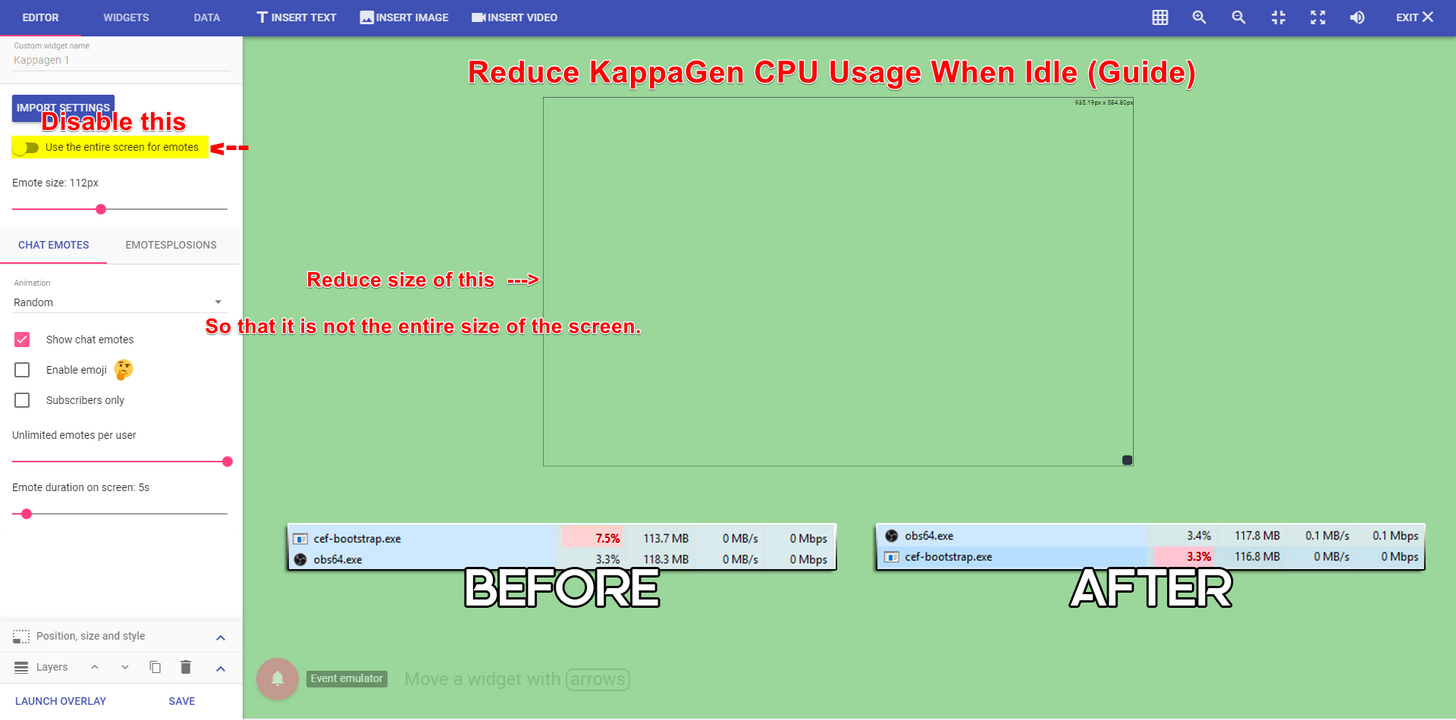
Ok so i found out that it's my kapagen source that's eating up my cpu (i put it in it's own source so that I could change one part and have it changes easily between scenes, instead of having to change it in each scene)
was there a link that showed about optimizing kappagen if you were having problems? or pointers? I'd prefer to keep it seperate so that if i ever wanted to chagne it again i could.
 unique ore
kk
 astral isle
anyone experiencing issues with the bot right now?
tight harness
What kind of issues?
clever mango
I asked it for a meatball sandwich and it gave me tuna 😠
astral isle
well I (as a supermod) dont get any bot replies but everyone else does 😄 refreshing didnt work
i might try "turning it off and on again" 😄
 hasty briar
My commands aren't working so yeah i am @astral isle
clever mango
Twitch is having issues at the moment and it's affecting the bot
hasty briar
Alright
clever mango
We'll keep everyone updated here
astral isle
thanks. it seems to work now and then, but yeah. 🙂
 spring shard
Aren't twitch always having issues though? 🤦
astral isle
just thought there might be an issue to report 😄 since it didnt work just for me, everone else was doing fine (who is no mod) 😄
 cunning summit
anyone able to see how many points i have in a giveaway
i dont remeber how many i put in
o hey @clever mango
how are u man
clever mango
It's not possible at this time to see that information
I'm doing well. How are you?
spring shard
Can't you see it on the website though? Like as in the Giveaway Link on streamelements?
cunning summit
@spring shard not when u enter through chat
spring shard
Oh I see.
clever mango
If you have not bought the maximum, you might be able to view tickets bought on the giveaway page
cunning summit
ok i cant see that so does than mean im max?
spring shard
Might be a suggestion: To add something when you check points. Like "You have 100 points [300 in conest]" or something.
cunning summit
@clever mango ive had a problem entering giveaways b4 and they check how many tickets i had in
clever mango
It should be. Try purchasing a ticket
 clever mango
Yes, you have the maximum
cunning summit
o ok
i mustve been high when i entered the rest of the tickets lmao
cause i dont member shit lmao
spring shard
Haha
cunning summit
thanks
 jolly swallow
how to reduce the fps drops when kappagen goes active?
jolly swallow
thanks!
clever mango
It is not. Maybe in the future.
The idea can be upvoted on the ideas board https://strms.net/ideas
 undone shoal
Is it possible in the chat commands to enter enter, or break lines so that everything is not on the same line?
clever mango
No, twitch chat (IRC) doesn't allow line breaks
undone shoal
but deep bot, if use /r/n its say various message
clever mango
example?
clever mango
Ah ok
clever mango
It would need to be in 2 seperate messages as you said
Please request it on the ideas board
undone shoal
try again
Case: Cooler Master HAF 932. \r\n CPU: Intel I7 6700k 4.7 Ghz overclocked. \r\n MotherBoard: GIGABYTE GA-Z170X-Gaming 7. \r\n Monitor: Eizo Foris @ 240hz. \r\n Power Supply: Corsair AX1200 - 1200W. \r\n Ram: Corsair Vengeance LPX 32GB (4x8GB) DDR4 3000MHz. \r\n Sound Card: Creative® Sound Core 3D chip. \r\n Ssd: Corsair Force GT 250GB. \r\n System Operation: Windows 10 Pro 64 Bits. \r\n Video Card: GeForce ® GTX 1080 G1 Gaming [8GB] .\r\n Webcam: Logitech C920 Full HD. \r\n Internet Link: Vivo Fibra 300 Mbps Download. \ 150 Mbps Upload
clever mango
I see
undone shoal
this codes input in bot
undone shoal
you can add this idea for me? plx
clever mango
Sure
pine hemlock
There's probably limitations with that. But I'm not a developer so Idk. The difference is that deepbot is a local run program with one account on one channel. If our bot sends multiple lines per message for ever user,, there might be conflicts with twitch limits
Just a thought
You can add it anyway

 fallow rampart
Hey, can someone help me with an overlay issue?
tight harness
What seems to be the issue?
fallow rampart
So, I selected an overlay
But I think it's too big? It only shows the left end and the bottom part where all my social media would be isn't there.
tight harness
You mean when you add it to OBS? then you're inputting the wrong resolution for the browser source
tight harness
Do you know the resolution of your monitor?
dense jackal
or possibly, check the obs settings and make sure the browser source is 1920x1080 or whatever you set it to
fallow rampart
😮
Ctrl f did make it fit to screen but the overlay must be bigger than my monitor
tight harness
Hmm 🤔
fallow rampart
Is there a way to compress an overlay size?
I would have asked elsewhere but it doesn't look like SE has a help forum
 hollow ether
SE?
fallow rampart
StreamElements
tight harness
SE - StreamElements
hollow ether
The more you know
tight harness
If you right click on the overlay browser source and click on Properties you can change the resolution there, but you need to know what resolution to set it to, if you click on Settings then Video in OBS it should tell you what the Base Canvas resolution is, that's what you want to set it to
clever mango
This is the 24/7 help forum. Welcome! 
hollow ether
But what if everyone that knows all answers are dead? OwO
tight harness
There's a few of us, we'll live
hollow ether
K thanks
tight harness
You're welcome 
clever mango
@tight harness and twinkies are indestructable so we've got you covered
tight harness
They sell twinkies in the supermarkets here in the UK in a tiny part reserved for US products, everything is super sugary in that section
clever mango

tight harness
I just wonder how long them twinkies have been on the shelf
tight harness
They have a really long life, like the sun.
coarse heath
Was talking. With onslaught earlier but didn’t hear back. Can someone from SE reply whenever its convenient (oh and plz tag me in it 😃 Here is my question> I press “start stream” on obs as usual but once the cool new countdown overlay is over, whether I wait for it to get to zero or click off it beforehand to show my main overlay, when the counter gets to zero,the stream stops and I have to restart it. Heard of this? The countdown to the stream starting is essentially a countdown to the stream stopping on its own and I have to restart it.
clever mango
There is no way for the overlays to force OBS to stop streaming @coarse heath so this must be an OBS issue
 hidden phoenix
Does this discord deal with OBS issues as well?
clever mango
As far as I know, this is the only setting that would cause OBS to stop streaming automatically @coarse heath
Most of us don't mind helping with specific OBS questions (especially related to StreamElements) @hidden phoenix
What's up?
hidden phoenix
sorry was in a game.
 brisk flint
Hi! I just created a contests and after I closed it, edited, and wanted to delete one option, but after save, the option stays forever. When do you fix the contests option? I think I reported this bug also before!
hidden phoenix
So my stream is experiencing frame drops and I know it isn't my internet because I meet the requirements. I think it is my hardware or my OBS settings but I'm not sure.
clever mango
Editing contests is for creating a new contest. It uses the settings for that contest as a template for a new one.
Once you hit save you click Create Contest to start the new one
brisk flint
And the last one is the new?
None of the latest contest is without the deleted line. So this is bug
brisk flint
If I click on one of the 4 (edit contest) and click save after edit, I expect, what I edited is edited! Where is the from me edited one then?
clever mango
It is not editing that contest directly. It uses that contest as a template which can then edit for a new contest
@hidden phoenix What are your PC specs? CPU, GPU, Memory
brisk flint
Please try the same, but delete only one option! 😃
You will see that you will get not 3 options rather than onyl 2
Where is my other options?
And actually this is the "Will I win the next game" context and not the one I edited.
"You will see that you will get not 3 options rather than onyl 2" --> As a new contest, but if you check the one you edited you will get still the 4 options.
Even in your video it jumps back to the "Will I wint the next game" 😃
clever mango
Yes, I see that now. Thank you. I've reported it and it'll be fixed as soon as possible.
brisk flint
I thank you! 😃
See you! 😃 I go sleep now 😃
And if there would be more than 10-12 options would be also nice 😃
Or a given number, like between 1 and 100 they could choose. But this is a request I know 😃
clever mango
Yes, please add it https://strms.net/ideas
 delicate prairie
HOW DOES one get points
pine hemlock
Configure loyalty settings, be in stream for 10 minutes
delicate prairie
Thank you leafy
coarse heath
Odd and ok @clever mango idk how that’s possible but I thank you so much for replying!!! Have a great night
 brisk nest
Hi everyone!
I use Nightbot/Streamlabs and enjoy the "Regulars" role. I'm checking StreamElements and it looks much better.
But is there a way to favor regulars during giveaway (like Nightbot). Also is it possible to sync roles with Discord?
pine hemlock
There's no way to favor regulars during a giveaway. We also currently do not have a discord bot, but the idea has been brought up here: https://streamelements.helprace.com/i180-add-a-discord-bot if you wanted to log in and upvote that, staff is currently looking into it as an option
Im not sure how roles sync with discord, if thats a nightbot discord bot thing we currently dont have that capability. Discord itself has the ability to sync twitch users but thats all I am aware of
You're welcome to search for your other ideas, and add new ones to the board and they can be voted on an reviewed by staff though
@brisk nest ^
brisk nest
Haha thank you so much @pine hemlock for the super fast answer and all the details! I think I might switch anyway and wait for the Discord sync (my stream is tiny so manual work isn't a big issue for now).
Also is it possible to rename the bot? I didn't find anything about this in the settings so just making sure
pine hemlock
Not currently. may be a feature at some point. Also on the board: https://streamelements.helprace.com/i282-modify-the-bot-s-twitch-name
brisk nest
Oh thanks I'll go add my vote then :)
pine hemlock
good good
stuck hamlet
Ask away :)}
stuck hamlet
 stuck hamlet
Nope, they decided to bloack us and restrict their users from exporting, holding their data hostage.
There is nothing you or we can do at this time.
 jolly eagle
oh
stuck hamlet
except ask them why on twitter
As a user, you may ask them why this has been done.
But currently we have no answer to why
delicate prairie
I’m about to protest
stuck hamlet
If you get an answer, let us know 😄
jolly eagle
ok ! thanks anyway 😄
stuck hamlet
i hope that doesnt stop you from switching over tho
humble coral
Well
I didn't see a 3440x1440 version so I scaled it
Then just uploaded it back
#ultrawideproblems
delicate prairie
Can I have someone DM? Like I need someone who can help me set this up
 grand gale
For some reason when someone donates, the message appears censored. How am I able to change this?
They are not saying anything bad, and most of the message is censored except for some letters and vowels
stuck hamlet
Look under tip moderation, you might have some unwanted settings.
Tipping Settings > Tip moderation.
grand gale
Thank you
 hearty isle
weary mist
hearty isle
weary mist
!cmd edit
stuck hamlet
@grand gale was it fixed?
crimson quest
I have tweeted SL to ask why they are blocking, I don't think I'll get a response though but I was curious lol
stuck hamlet
crimson quest
Also wondering, my manually add donation date idea on the ideas board was according to a email changed to under review, how can we tell the outcome? will someone post on it?
stuck hamlet
Dev said they will look into it, but it got thrown down the rabbit hole as the dead line appraochs for a big update :p
ill keep you posted!
crimson quest
awww, tell them that rabbit hole is dark and lonely and it doesnt wanna be in there
😄
 last ivy
Hi, I got a tip today and it showed up in "My Tips" but not on my dashboard nor as an alert. :(
It's set up just fine and I have the money in my paypal.
stuck hamlet
You may have tip moderation on, which then means it need to be accepted before coming up on screen
check your settings 😃
last ivy
@stuck hamlet ahh thank you so much!
grand gale
@stuck hamlet yeah it was sorry for the late response
stuck hamlet
@grand gale no problem, what was the issue, if you dont mind me asking? 😃
 haughty nebula
My friend is using your overlay widget thingy on her stream and it is showing she has 119 followers when she only has 96 fix it pls ;-;
stuck hamlet
 willow urchin
me esta fallando el chat al recibir los mensajes a mi overlay
upper steeple
Is there a bug where ground control only plays the first song of a backup playlist? I have the video player open and when it gets to the end of the first song it doesn't go to the next. I know we were trying to figure this out yesterday. It only seems to be doing it on groung control right now
stuck hamlet
no known bug for this
upper steeple
ugh why me
stuck hamlet
Can you show me your ground control?
upper steeple
just screenshot it?
upper steeple
one sec
was messing around with my playlist and now it brings up the whole playlist, when it originially didn't. Now it looks like this after I messed with my playlist on youtube
it didn't have the skip button on the youtube video before when i first opened it
did that yesterday too
stuck hamlet
when you loaded up GC, was the player visible?
stuck hamlet
If theres no skip button, thats because the whole playlist didnt load
Skip button = whole playlist
upper steeple
but when I first opened GC it didn't load the entire thing
even though the video was visible
stuck hamlet
Very strange, some things changed in chrome, so that might be affecting how playlists are loaded.
upper steeple
 chrome why you so dumb sometimes
stuck hamlet
looks like chrome bamboozled us once again
upper steeple
is there a way to make the max number of songs per user unlimited or do we just have to put a high number?
stuck hamlet
just put it to 99
upper steeple
👌
stuck hamlet
maybe try -1
 terse canyon
hey guys, dunno who helped me before ... but yeh, ground control is seriously borked
it's stuck on "full screen" still O.o
stuck hamlet
Most likely Terra, he's everywhere 
terse canyon
reinstalling atm
stuck hamlet
Reinstalling probably wont work.
terse canyon
true but I haven't tried it so far XD
stuck hamlet
removing the folder from %appdata% might tho
stuck hamlet
terse canyon
shush you 😛
dunno if it was deleting the appdata or the reinstall, but FIXED ❤
okay, off to horror games :3
sooooo many programs to open now! O.o
stuck hamlet
95% sure its appdata
stuck hamlet
Yes 😃 i believe so.
stuck hamlet
Feel like my 960 is starting to struggle
terse canyon
ME 2 XD
lol
MSI here
This is my planned upgrade - https://pcpartpicker.com/list/K73p7h
stuck hamlet
I go for generic cases, i dont really go for fancy
anything that does the job thats lowest price
most likely blacked out like my current one
terse canyon
lol
stuck hamlet
TwitchCon in 7 days
pine hemlock
I like big towers
terse canyon
okay, going live. ttyl ❤
pine hemlock
More room to work with. doesnt feel so cramped idk
Ive had my haf932 for years
dont need to replace it
pine hemlock
yeah well its also made out of steel
i was working on cady's pc last night and i hate the plastic feel
also idk how her case even gets airflow
pine hemlock
idk manny bought a small ass midtower
i told him no
i made him order a haf x
I just redid my thermal paste and swapped the fan position around
I really want a bigger cpu cooler
or a second fan
to make one pull in and one push out
pine hemlock
ya i dont have a dual
dude this twitch bug where it says people are permabanned
my fucking whispers are insane


 molten flare
I have a question regarding overlays: If my stream/screen is 1080, but I'm downscaling it to 720, what should I choose at the beginning when creating an overlay?
pine hemlock
1080
When you insert it into obs make sure the width and height are 1920 x 1080 as well
weary mist
Then downscale in obs. Much easier
 modest python
I just streamed and it doesn'r show anything on my stream elements
tight harness
You may have to elaborate where you don't see anything and what you mean by this
I just loaded the SE website up and I see everything as intended
modest python
It says that i haven't been streaming while I was streaming
tight harness
Where do you mean? On the website? in the Stream Report? Where?
Because the website doesn't necessarily say anywhere that you've been live, it shows Recent Events, is that what you mean?
modest python
ok thx
 frosty remnant
So, something about Kappa Gen, I've just ignored until now... There are Two Gummy looking emotes that don't appear anywhere on the emote list - both appear when nothing is selected at all.. I've seen the widget used without the emote... am I doing something wrong?