#helpdesk-twitch
1 messages · Page 126 of 1
 spring cosmos
Yes I know how dumb england is for their pricing as well, just as bad as us, we're an english colony so that is where we get our dumb ass pricing from
 tight harness
You're welcome 
spring cosmos
@swift parcel I'm am a retard so I will probably screw this up but thanks heaps!
 swift parcel
If anything just DM me if you need some setup help
spring cosmos
It was removed?
swift parcel
shouldnt be?
spring cosmos
tight harness

swift parcel
oh you're trying to open it up on your computer
right click and edit it from your downloads folder
swift parcel
in between the " " quotes where it says "SeOverlay Here" aka replace SE Overlay Here with the url
spring cosmos
Ah yes okay just double checking thanks heaps!
 robust jolt
I seem to be having this problem where tips dont show up in my acticity feed or alertbox. The box is checked and other alerts such as host are alerted but not tips
swift parcel
bad brain no autocorrect
robust jolt
In fact tips aren't being tracked at all recently
swift parcel
how long have you been using streamelements?
just recently added and been using something else?
robust jolt
Nearly a month now
tight harness
The bot is picking them up apparently https://gyazo.com/51caa653c2a65fb3dc70eee2d91d6cf2
 spring cosmos
Is there a way I can rename each one so I know what overlay each one is?
robust jolt
The pencil next to the names should allow you to edit the names.
 clever mango
@spring cosmos Are you combining all of the rocket league overlays?
swift parcel
@spring cosmos just making sure you're not putting different scene overlays into that one? its all the browser sources for that one scene
clever mango
from that screenshot you sent earlier?
swift parcel
yeah if you need to manually turn off any of them because they're an AFK screen or a different scene gotta leave those out
yeah
sorry if I misunderstood ya
spring cosmos
Okay so I have to leave out intermissions/BRB's, stream ends and starts?
swift parcel
yes
spring cosmos
Then does having this AIO make a difference?
clever mango
LadyMatrix's tool is for combining overlays that go together and will be displayed at the same time
spring cosmos
OOOOOOOOOOOOOOOOOOOOOOOOOOH
spring cosmos
I meant I need one that puts all of my overlays into a single place so that I can switch between them so my cpu doesn't get fried
clever mango
You're taking AIO too far 😃
spring cosmos
No no no it is fine! My fault I misunderstood!
clever mango
This is all widgets, labels, etc in one overlay 😃
clever mango
but you still have different overlays for different scenes
spring cosmos
So what does this mean? I must have misunderstood it
OH JOKES
I read it my bad ahahah
clever mango
It means that with other services, there is a browser source for alert box, one for cup, one for tip goal, one for recent donations, etc..
With StreamElements all of those are combined using the editor into one browser source
No problem @spring cosmos
Glad you got it figured out
swift parcel
@thick zealot edit your overlay and go into Data on the top area of the overlay editor
er wait
 thick zealot
waiting
spring cosmos
Still didn't help with all those tips, guess I'm not streaming 😦
swift parcel
@thick zealot you just need to edit the goal of how many you would like to reach? Or do you need to reset how many have already followed towards that goal?
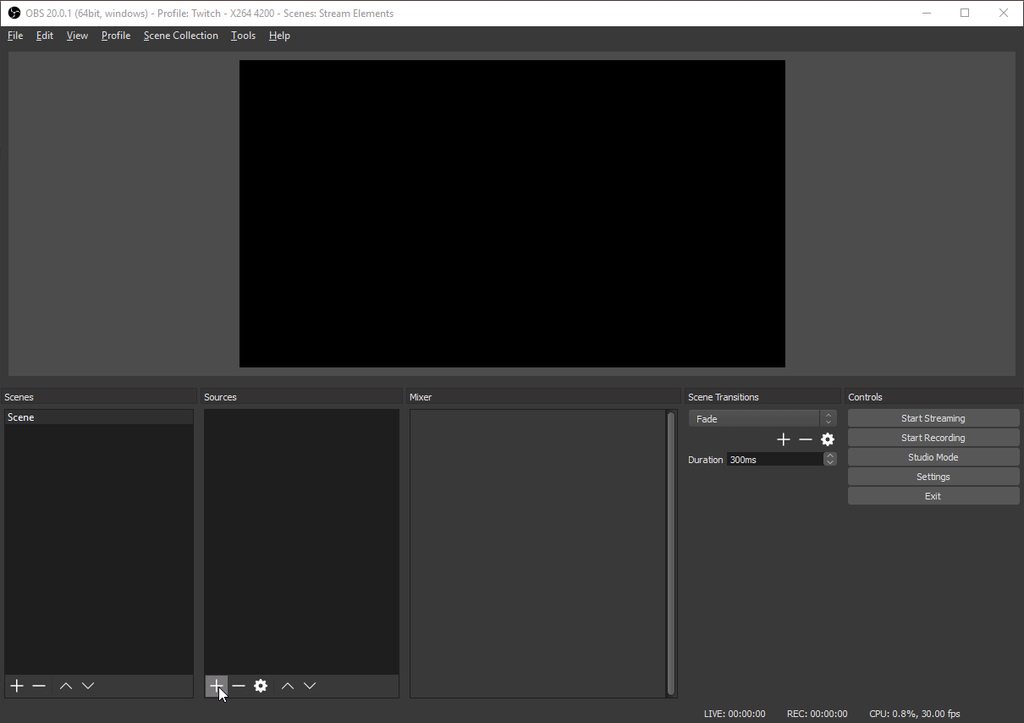 thick zealot
i have 110 followers and 4 subs, id like it so that it shows 110/120 and auto updates when i get a new follower to 111/120
clever mango
You have them already created so just go into the properties of each one @spring cosmos
spring cosmos
But I have them all set up already?
swift parcel
And you did add the follower goal widget from widgets
thick zealot
@swift parcel ye
clever mango
They are shutting down when not visible @spring cosmos ?
spring cosmos
No
clever mango
So every one is running at the same time
spring cosmos
I am not streaming because of my CPU usage
swift parcel
click on the widget from the layers area and on the left it'll have "goal amount"
thick zealot
@swift parcel , voice support?
swift parcel
@thick zealot
thick zealot
ty
swift parcel
no problem
spring cosmos
Does anyone else get that bug where sometimes your display capture doesn't show up until you click 3 or 4 hundred times
 mossy gyro
@tight harness how do I edit my overlay on streamelements ?
 atomic ridge
Does SE have the ability to let you run multiple commands at once from one single command?
Like if I had a !command01 and !command02 command, it there a way to make a !command03 that runs the first two at once?
clever mango
Display capture? No. Sometimes issues with Game Capture.
spring cosmos
No Display Capture that is what I am using
Thanks so much that actually helped heaps!! My chances of streaming are great again!
clever mango
@atomic ridge the bot cannot trigger itself
atomic ridge
Boo. Ok. Thanks for the quick response!
clever mango
That would be dangerous because of possibility of looping command/response and then global ban
atomic ridge
I can see the issue that could cause. I can also see the cool things you could build with it. Fair enough! Do you know if Store Items can trigger commands?
clever mango
Anything the bot posts cannot trigger a command. So as long as the bot is not posting the trigger, it will work.
clever mango
Unless you're partnered, I would not stream 1080p
 upbeat topaz
I stream 1080p60 / 6000kbps. I'm affiliated, but still.
 wanton sluice
Just out of the blue, but is there a way in the bot to trim the length of an audio file that I want to use for an alert? I uploaded an alert audio but it’s a three minute long song that I just wanted to use a little part of. Depart I want is the very beginning of the song so I didn’t find any way to clip it however, even though I have the alert duration set to 12 seconds, it’s still plays the entire song long after the alert is gone.
 wispy tinsel
is there any way to get the browser source from SE to load faster when switching scenes?
wanton sluice
@swift parcel ah ok. Will do 😃
swift parcel
make sure you don't overwrite the song and save it as a seperate file
upbeat topaz
For 4500 bitrate, I'd do 1080p30 or 720p60.
wanton sluice
I do 720p60 with 2200 br
It’s fine
I might be able to push it to 2500 but I only use a single PC so no sense in killing my hardware
upbeat topaz
Stream might be ok, but I'd be surprised if their isn't quite a bit of pixelation during fast action scenes etc.
swift parcel
bitrate does nothing to cpu usage fyi. its just what you're encoding
1080p60 works the cpu more than 720p60
wanton sluice
I don’t seem to notice any pics relations. If I try to raise it up more than 3000 though I keep getting complaints of people getting nothing but buffering
err. Pixelation
upbeat topaz
What is your ISP's upload speed limit on your plan?
wanton sluice
I’ll give it a shot see what happens what’s the worst thing that can happen right?
Oh my upload hovers around 90 Mbps
 ancient prism
views have to be able to view it tho
wanton sluice
But. Not partnered
ancient prism
and the bit rate is what affects them
 pine hemlock
Are you an affiliate
 edgy geyser
cuda you literally have your finger in every pie where twitch is involved o_o
swift parcel
if you get transcoding as a affiliate (which you have priority to if theres space) people can lower it if they dont have the bandwidth
upbeat topaz
I rarely get quality options for my affiliate account. Usually it's source only.
pine hemlock
2200 is low for a 720p60 if you're playing hit movement games
wanton sluice
Most of the time I get it but sometimes I don’t and the only way to know is after you go live
upbeat topaz
Sometimes I see quality options in my stream.
ancient prism
its better to have slightly worse quality and have viewers than great quility and a stream that no one can watch
swift parcel
it all depends on time you stream, and game
edgy geyser
https://stream.twitch.tv/ <-- some other specifications per stream quality want
pine hemlock
@edgy geyser something like that
upbeat topaz
Yeah, the stream site shows that the limits for ingestion are higher in general now... not that 3500 everyone keeps referring to everywhere.
wanton sluice
I’m not sure if I can change my bit rate on the fly without ending the stream. I’ll have to check
swift parcel
yes you can
pine hemlock
you can if you're using cpu encoding
edgy geyser
shinyou have to end it
pine hemlock
not with gpu
upbeat topaz
If with OBS, you have to stop streaming first.
edgy geyser
^^
wanton sluice
Guess I’m lucky then. CUse I don’t use obs
upbeat topaz
I use Quicksync H264 on quality mode.
wanton sluice
I’ve gone back and fourth between h264 and nivec. It depends on the game some games one works better than the other it just all depends. Some games are more CPU bound than others
upbeat topaz
It also depends on the quality settings.
wanton sluice
I don’t have a horrible CPU but again I don’t have a dedicated stream PC either yet
upbeat topaz
Not sure if nivec has quality / balanced / speed options
pine hemlock
It does but setting it on auto works
upbeat topaz
I'd probably go balanced then and see how it goes, then adjust future streams based on the playback.
wanton sluice
I have been thinking about trying opiate studio because I hear it’s gotten better over the years. The thing is I just renewed my license for x split
So I’ll give it until the license runs out and then switch over if I have to
upbeat topaz
With my old PC, I had to use the software that game with my capture device. With the new PC I got, I went to OBS Studio. Was a bit of a learning curve, but seems to work nicely.
wanton sluice
And I have xsplit set to quality I believe. I’m a sucker for eye candy lol
It’s ultra or nothing
pine hemlock
Yeah i dont know anything related to xsplit anymore
upbeat topaz
Is there anything xsplit does that OBS doesn't do?
swift parcel
allows you to control audio volume of the browser source
thats the only one real thing that xsplit does that obs doesnt do
wanton sluice
When I got into it I started street from the PS4 so when I built my PC I didn’t know Abe from Adam about this stuff.
clever mango
Xsplit costs money and uses more resources. Nope.
wanton sluice
By chance though the motherboard on my PC is from MSI which included a free year license for x split. Plus a few streamers that I watch used it and they liked it so there we are
wispy tinsel
is there any way to get the browser source from SE to load faster when switching scenes in obs?
wanton sluice
As far as what’s different between them it’s basically like Intel and AMD. They both pretty much do the same thing but nothings in the same place and it’s all named different
clever mango
Nope, that's up to OBS to change @wispy tinsel
wispy tinsel
thank you
clever mango
Browser plugin hopefully will improve in the future
upbeat topaz
Hopefully OBS gets more optimized browser plugin support. Using browser sources really brings the cpu up.
 sharp linden
I just dream of the day I dont have to shut down the browsersource so we don't have to wait for them to load. That will be a grand day indeed!
clever mango
Well there are more reasons than just usage to shutting them down
namely the fact that they play audio
and you don't want them playing audio when they're in some other scene
sharp linden
Literally the only thing I miss from SL was not having to shut down the sources in other scenes and having that instant switch. Well, support here is far better as well ;)
swift parcel
well if the overlay is the same over the scenes it won't echo (or it shouldn't since its a global source in obs)
wanton sluice
I’m still using a hybrid because I haven’t gotten everything moved over yet. So far I have the alerts and the tipping set up but I’m still using the event log the cup and the bit boss from stream labs. It’s a slow migration but eventually I’d like to keep everything in one spot
 proud pumice
@sharp linden treating scenes/echo/shutdown is same in SE and SL
you can make a scene global source and use it ones, without the need to shut down
but if you create multiple scenes, gotta shut down source
wanton sluice
Only gripe I have. If you can call it that is having to have the song request tab on screen for music to play. But it’s a minor thing. I just pull it’s own tab off to the side somewhere and minimize
wanton sluice
Like I said it’s minor I’ve just accidentally closed it without meaning to on more than one occasion while I was trying to set things up in other tabs
proud pumice
you can also hotkey pause/skip via ground control
wanton sluice
Didn’t know about that lol. I’ve literally started using this six hours ago so I’m still kind of reading on it
proud pumice
step by step... 😄
wanton sluice
In between trying to make sure my kids don’t kill each other you know
wanton sluice
If I had looked into the sooner it wouldn’t of been a big deal. The problem is Branebot shut down almost overnight. I came home from work one time and went live to find out that nothing worked. Come to find out they made the decision to shut the bot down for good.
Needless to say the fact that it was highly unexpected was an understatement
clever mango

wanton sluice
^
clever mango
We're fortunate that @swift parcel and @analog forge have joined us here to help 
proud pumice
yeah we try to make it nicer on you guys to move your stuff
wanton sluice
That’s why I’m here actually. Superstringman Is the one that pointed me this direction. Confidence went way up when I heard that he was joining you guys
swift parcel
Yeah the server we were moving to just broke everything
wanton sluice
At least I’m lucky. I’m next to nobody in the grand scheme of things. Would’ve been a different story if I had like 200,000 followers or something
swift parcel
And if we tried to keep going it wouldn't have come back for a while it was that broke
wanton sluice
I can’t see my play mu to be honest I can imagine the headaches of constantly moving and then Twitch seems to change every five minutes
Can’t say I blame you
swift parcel
so string decided to just stop there (which it was very much his decision and I don't blame him I would had done the same)
wanton sluice
I read in one of the menus something about stream elements tracking goals for like follows and subs and stuff but I have yet to actually figure out how to set that up.
That one of the overlay modules I missed?
wanton sluice
OK I’ll dive into it some more my first order was getting the basic alerts going
Then I’ll just move down the list
swift parcel
😄
wanton sluice
It’ll be nice not to have five bots trolling my channel lol. As it is I had to get a muxy account
upbeat topaz
I have 4 in mine, lol. Muxy in discord, StreamElements, PhantomBot, and Nightbot. I should get nightbot removed soon, but it's mainly for Super Mario Maker.
swift parcel
i just have 2.. though the other is just to handle my popup gifs i do
soo all it does is watch
wanton sluice
I tried using phantom by and I got an error every time I try to use it. Plus I wasn’t too thrilled about having a bot were the PC had to be on to use it. One of the things I liked about Branebot was that a hung out in your channel off-line and awarded points the people watching your VOD. I have Muxy because the panel for top bits required it and now that I have it using it for Discord is very nice. I have moobot because it’s the first one that I know and when I started I was directly from a PS4 so I wanted something that let me know when people fallowed etc. I just got rid of night Lotta because I was looking for a replacement and it looked like nightbot did pretty much the same thing moobot did. I don’t know that I’ll entirely be able to get rid of the moo. But at least if I can go down to three I’ll be golden
swift parcel
well stream elements does loyalty points as well
and has a store hence why we recommended it as it was practically us with some differences
upbeat topaz
I don't even know what to use with the store, besides the couple viewer game sessions they can request.
wanton sluice
That’s basically what I was looking for. As I said earlier I don’t do a ton of giveaways. I’m too small for that so it’s mainly a song request thing. However when I do end up being 42 enough to do a special giveaway I wanted to be able to reward the long time loyalists over the ones that just popped in because I was giving away free stuff
@upbeat topaz I’m the same lol. But the fact that it is their offers an option to do something with it later
upbeat topaz
I wish Streamelements would allow the alltime leaderboard to mimic the current leaderboard.
I had the alltime reset because it had a couple bot points.
Now my current has more points on a user than the altime.
wanton sluice
I Went back and forth over how to handle the points for existing viewers. After talking to a few of them we just made the decision to be fair I just resent everything so they put everybody back to zero. I was going to try to go through the west and set people up kind of how they were. But I know I would miss a few names and I did not want to forget anybody
But like I said most of what I do is song request related anyway and since I primarily do storytime games the songs aren’t usually on u less I’m doing a multi day. Overwatch. Battlefield. Etc. So for the time being I set the price for song requests two free for the next couple months or so and then I’ll set them back on once people build a balance again
 misty wagon
@wanton sluice make a viewtime command and combined with the following command you get a good understanding of your current viewers loyalty. Based on that you bonus those people a couple points 😉
!command add !viewtime ${user} has spent ${user.time_online} watching .....custom txt this is the chat version, you can add it there or tru dashboard
wanton sluice
The other option I had his eyes people come in the channel that I’ve known for a long time and I know they come by regularly just throw them 100 points to get them started
clever mango
@upbeat topaz Current points for users is typically more than all time. This is because all time is only increased by the loyalty payouts. Current points is affected by gambling, contests, point bonus commands, etc.
wanton sluice
Whoever said that all I do is play games needs to be slapped.
I hear that all the time for myself and for others. If they only had any idea what went on behind the scenes right
clever mango
Someone can lose all their points gambling but the all time still reflects the amount they've earned by watching
misty wagon
and points are only gathered when stream is online. Points can be lost when stream is offline
wanton sluice
@clever mango Do the ranks go off of all time then I assume?
Change my avatar picture. I figured this was a little less scary than my rage face constantly
clever mango
@wanton sluice there are leaderboard rankings for both current and all time
the !leaderboard command uses current
wanton sluice
In the chat though when they check their currency and it gives a rank is that based off of the all-time list or the current?
clever mango
current
spring cosmos
Is there any Battlefield Super themes
clever mango
No, but new themes are added all the time. At least 3 are coming this month
upbeat topaz
Do you all find that viewers prefer streams that have the full game shown with overlay parts on top of the game capture, or having an overlay section beside the game and putting stream info there?
Hrm, maybe that should go into general, lol.
upbeat topaz
ok
 wraith laurel
How do you insert overlays into obs?
clever mango
Stream Elements - Legendary Live Streaming
Setting up your Overlay with StreamElements is quick and simple. In case you need help, here is a guide to help you with the initial setup…
wraith laurel
thank you 😃
edgy geyser
other side note - theres no way to customize default commands? for exmaple i'd like to have "1song" not just be "current song [x]"
twin - minimalistic when in game, when out of game, make it sleek and simple
thats how i do it, and how most people i've enjoyed do it, so i've taken a page out of their books
also nevermind - figured by trial and error.. default and custom commands do not overwrite nor conflict but run paralell to eachother... interesting
pine hemlock

 molten mango
my overlay keeps freezing when i add an image for my follow alert. Any idea why?
 toxic knoll
changed my twitch name, now streamelements doesn't come into chat.
swift parcel
log out and log back in @toxic knoll
@molten mango I assume by overlay you mean browser that you're using to work on the overlay? If you use chrome turn off hardware acceleration , if you don't use chrome - use chrome
pine hemlock
@toxic knoll log out and in on the site and part and join the bot
@swift parcel also if they still have site issues have them try Chrome beta. The latest Chrome version (stable) is giving some ppl crazy Cpu usage numbers on our site
swift parcel
👍
its getting late for me so im missing a few things here and there lol
brain is running low needs a recharge
speaking of nini
pine hemlock
Lol get some rest
misty wagon
Late? oh wait, 5AM hah ni ni
molten mango
@swift parcel ill try that out
wanton sluice
installed ground control. Most excellent Smithers..
 atomic pumice
Hey guys, quick question is it possible to see Activity Feed logs from months back?
upbeat topaz
When creating overlays, is there a way to see your overlay in the manager instead of seeing the name of the game you choose for the overlay?
 dense jackal
are you looking for donations or just events in genreal @atomic pumice ?
atomic pumice
Actually trying to find some specific subs that subbed tier2 and 3 over the course of the past 45 or so days
@dense jackal
dense jackal
So we have a search history for donations as for subs you would need to scroll back
should record everything since you added it to your account
@upbeat topaz I'm a bit confused by your question, you mean see a picture of your overlay instead of your reccomended game?
atomic pumice
@dense jackal Where should I be looking, I am in the Activity Feed and it goes all the way til 'A Month Ago' it says. I know there were some more prior to what it shows here.
dense jackal
It should keep track of everything if you have a very high amount of the alerts make sure you have only subs checked
If you are sure you have had SE more than that time however I'll make sure to report the bug 😄
atomic pumice
Is there a way to see when I implemented SE?
Maybe that is the case and I just didnt remember the day I started using
dense jackal
Even I don't have that data unfrotunately @atomic pumice
 weary mist
@lament blade which browser are you using?
 lament blade
@weary mist All good. Must have just glitched out for a minute.
upbeat topaz
@dense jackal Yeah. That way I don't need to remember the name of every overlay and how it was setup.
dense jackal
Unfortunately not right now, but I do like that idea! You can add that to our idea board here https://streamelements.helprace.com/s1-general/ideas
upbeat topaz
ok
 next spruce
Which CD does the routlette module actually use? The one in Module > Roulette > Settings OR Chat Commands > Default > !roulette > Settings?
pine hemlock
Module roulette settings I would assume.
If you want to be safe just match the numbers since I don't have a solid answer currently

next spruce
yeah problem is I can't match the numbers - 300 second CD on the default command and 1800 or higher on the module settings
pine hemlock
Wait..
@next spruce looks like it uses the module cooldown numbers
I just tested it
next spruce
thanks
pine hemlock
np
lament blade
I just had a question about overlays if anyone can help?
 stuck hamlet
Ask away
lament blade
So I've made an overlay and I'm not entirely sure how to use it in stream. Do I launch and then put the url in OBS or is it something else?
lament blade
Do I just set it to my native resolution?
stuck hamlet
You would set the browser source to the same size as the overlay on StreamElements.
lament blade
Ah okay, thanks heaps
lament blade
And if I edit it do I have to repaste the url? Or does it just automatically update it (if I edit it on the overlay manager)
 silver burrow
Is anyone aviable to help right now?
pine hemlock
@lament blade automatically updates as long as you hit the save button/
@silver burrow Ask away
silver burrow
I am getting this error
StreamElements: Invalid user or channel
when using this code $(urlfetch https://2g.be/twitch/following.php?user=$(touser)&channel=$(channel))
silver burrow
I tried that, but it was missing a braket and gave me something like this
Then I added the braket at the end and the same error occured of "invalid user or channel"
pine hemlock
sorry discord messes it up
${customapi.https://2g.be/twitch/following.php?user=$(user)&channel=$(channel)}
there u go
stuck hamlet
But we have a followage command

 azure dock
Anyone else have a problem running stream elements with chrome?
It's so laggy for me it's incredibly frustrating
azure dock
I am using it with Microsoft edge right now and it's working better than with chrome
azure dock
Lol not meaning to be
 atomic hollow
shouldnt happen, I am checking
pine hemlock
@azure dock turn off hardware acceleration
if that doesnt work try the chrome beta.
azure dock
How do I shut off hardware acceleration
 silk patrol
@azure dock You have to go into chrome settings (3 vertical dots in the upper right corner), then scroll to the bottom to show the advanced settings. It's one of the last options at the very bottom of the page
azure dock
Oh got it thank you
It doesn't seem to be working, no other sites are lagging with chrome I don't understand
stuck hamlet
curiousity, are you on a small screen?
azure dock
No, just an average size monitor
atomic hollow

stuck hamlet
Hmm 
azure dock
sighhhhh
It might be working a little better
I just don't want the issues to arise and I start lagging in League
while streaming
stuck hamlet
So you're not on a laptop?
pine hemlock
You don't need the site open while streaming
stuck hamlet
yea 
stuck hamlet
You can you our App for SR
silk patrol
stuck hamlet
and Twitch website for Chat
azure dock
O actually I knew that part, I mean I guess I'm noob sorry, but for the alerts and stuff having obs up will just show me my alerts in real time?
But for song requests on stream elements, and the playlist I thought the website had to be open
silk patrol
@azure dock Yep, you will see/hear them in real time in OBS, but if you want an event list similar to the one you see on your dashboard, as well as the song request, just use ground control, our windows app, which you can download here https://streamelements.com/groundcontrol
 wild edge
I'm having some issues with viewers trying to access the stream store.
tight harness
Are they accessing it on Chrome or another browser?
wild edge
I do !store and nothing shows up
tight harness
🤔
wild edge
Still does not show up in chat
wild edge
Thanks
 pulsar whale
Hi All, new to the server - I've switched to stream elements to organise my overlays, however I have a slight issue. Finally got my alert box set up how I like it on an overlay, but can't find a way to duplicate that alert box in another overlay, am I missing something? or does each overlay require the alert box set up each time?
tight harness
There isn't a way to do this yet but it's a feature which has been requested a lot recently on our ideas board, it will be done 😃
pulsar whale
Thanks for the info, I'll stop looking :p
silk patrol
@pulsar whale In the mean time, you can duplicate your overlay and remove everything except your alertbox
pulsar whale
yeah, i was considering that being the next option.
silk patrol
also, you can create an overlay with just your alertbox, this way you can use it on multiple overlays
pulsar whale
yeah, i used a default set of overlays, just to get off the ground, until I realised the issue. have a few options, just wanted to make sure I wasn't missing something on the site 😄
 idle flare
is there a way to setup a !shoutout command, like nightbot has?
tight harness
Yes, there's actually a template for it already, go to create a command and select the command template 'shoutout'
tight harness
No problem 😃
wanton sluice
@azure dock use the dashboard on twitch. It seems less intense than just going to your channel. Or. Worst case. I used my cell phone with twitch app on chat only mode when I started.
silk patrol
@wanton sluice by adding /chat to you twitch link, you'll get a window with only the chat in it. way better than the dashboard since the page doesn't have to load everything else
wanton sluice
Learn something new everyday oh. And disable the beta site. Dunno why but it’s buggy
Even better 😃
silk patrol
Yeah beta site is beta. And extensions such as FFZ don't work great with it
 low beacon
Did they even let bttv live in beta
silk patrol
¯_(ツ)_/¯
azure dock
@wanton sluice thanks I use the dashboard right now. For alerts u suggest the ground control app?
silk patrol
@azure dock give it a try, it has a dark mode too
azure dock
Okay cool thanks I'll use the /chat to make it simpler and check out the control app.
tight harness
The ground control app is awesome, i'm sure you'll like it 😃
wanton sluice
@azure dock can confirm the ground control app is pretty awesome for music. As for alerts. As long as you have the browser source in OBS or whatever right you don’t need the website or ground control running at all. OBS will handle it.
silk patrol
@wanton sluice Having the event list is always a good thing, because if you are very focused when playing something like PUBG or you get raided, you won't be able to acknowledge every follow/sub/etc
wanton sluice
Just keep in mind tho you need to gage the browser source unmuted for alert audio
Yeah I keep mine up for events. It’s nice. But if resources are that much of a premium., it’s something to think about
I built my pc last year. And it’s overkill kind of. Or was. It’s aging a bit lol.
But. Whoever thought of the external app (ground control). Bravo
 serene granite

wanton sluice
Love the fact you can shut off the actual video player part.
serene granite
Thanks for the praise.
We're always looking to improve it, so if you have any ideas please post them on https://strms.net/ideas
wanton sluice
@serene granite never seen anything like it.
It’ll be nice once I get the event list, goals and a couple other things incorporated into SE. then I can have one source instead of 6. I’ve noticed the more sources it’s pulling from the more cpu gets eaten up
toxic knoll
so, after renaming myself, in my stream elements settings it still had my old name under the broadcaster under user management. I deleted it, but now I'm not sure how to add myself back with my new name under broadcaster
serene granite
@toxic knoll please visit https://streamelements.com/logout and then log back in
 lunar crypt
ty
serene granite
@wanton sluice that's the whole concept of SE. One browsersource instead of 6 means a lot less resources in use 😃
tight harness

 mild frigate
I'm having an issue with getting my alertbox to play the proper gif that i designated to play. It still plays the shark dancing gif for my subscriber alert. Follwer alert, tip alert and host alert all work but subscriber and cheer dont seem to respond to me changing the gif alert for it.
mild frigate
gosh darnit! sorry haha im dumb
low beacon
I might be in here more frequent soon, thinking about possibility of streaming for fun
wanton sluice
That got me too @mild frigate drove me mad
mild frigate
@wanton sluice I checked out the variation settings for the subscriber alert but it doesnt seem to want to play the gif. Do you happen to remember the settings you set in the variations tab?
stuck hamlet
So the way we set it up as, is the Default variation would say how many months someone has resubbed for.
The Default one just says "x has subbed"
wanton sluice
Oh. So there’s a different one for sub and resub?
Might have to take another look. Everytime I fire off a test it always says resub
silk patrol
@jolly sinew contests can only be started via the web interface, but dashboard access for supermods will be a thing soon
 jolly sinew
thanks
pine hemlock
Soon ™
 quick mulch
Hey Guys it's me again. So I've started going over the 8obs tips. I've noticed that I don't have NVENC or VCE. However, I do have QSV. I believe that's my built in graphics card because I haven't installed one myself? I have an Intel HD Graphics. I've never messed with any of my settings before and I'm wanting to try out these 8 tips to see if the streaming actually is less strained on my end.
Right now my encoder is set or software x264, do you think it's safe to change it to the QSV?
weary mist
Honestly, it wouldn't really matter (from what I know). Intel graphics use the CPu as it is to do all the things, so it might be just adding an extra step
tight harness
Haven't heard of QSV, then again I hadn't heard of VCE either 
quick mulch
Good point Scalper. I should probably leave things as the are since everything is built in. I guess it would make since to do changes if I actually installed a graphics card seperate from everything else.
weary mist
👍
you might want to consider the graphics card anyways, as it will take some strain off your CPU
tight harness
Maybe I should just take out the words NVENC and VCE and just leave it as Hardware to be on the safe side
weary mist
parethesis would work better I think
pine hemlock
No idea what QSV is
weary mist
()
silk patrol
Qsv is also known as quicksync
tight harness
Are there any others?
pine hemlock

silk patrol
It’s basically the hardware encoder of intel embedded with intel’s igp
pine hemlock
Why would you want to stream off intel gpu
tight harness
Poor life choices
weary mist
lmao
silk patrol
Only those 3 exists because intel-nvidia-amd
tight harness
Right, I can add that in then
silk patrol
Here’s a side by side comparison of encoder with explainations https://youtu.be/jludqTnPpnU

Is Ryzen REALLY the best consumer CPU option for video encoding and game streaming? Let's find out! Visit https://www.squarespace.com/LTT and use offer code ...
quick mulch
To be honest Cuda I would rather stream off Nvidia, unfortunately the comp wasn't built with it, #poorlifechoices lol. Also Nvidia quit making the card that would be combatable for me. This is a factory built comp not self built so I am limited on what I can do. 
tight harness
Added in QSV, thanks for the information 😃
pine hemlock
@quick mulch F
quick mulch
Thanks Cuda I enjoy being graded. 
tight harness
I thought he was pressing F to pay respect
 quick mulch
You have no idea lol
tight harness

quick mulch
Quick Question are you guys working on making it possible to sync up with Extra Life by chance? Itstead of having to use streampro and their overlay system, you pretty much have what is needed. It would be a convienience to be able to manage the tipping system etc, with extra life as an option. Does that make sense?
tight harness
It's definitely been mentioned before, have you checked if it's on the ideas board yet?
quick mulch
I haven't
tight harness
quick mulch
Thanks
 lapis nimbus
Hey guys im new to using streamelements. I need to know how to import a coded altert into the system. its like a .css coded alert. Would be awesome if you could help me with that.
tight harness
So it's custom css?
It's on our ideas board and it's currently under review https://streamelements.helprace.com/i188-custom-html-css
lapis nimbus
i got it from a friend. if u want i could send it to you.
pine hemlock
We have no way to support custom css currently
lapis nimbus
Ah ok.
weary mist
well, there are "ways", but they can take a while
you can create a gif of any images that happen. then mess with the css in the browser source in OBS to see what things you can make the text do, but I think that is the best we can offer right now
lapis nimbus
i want to archieve something like this. Is there any way to do that? Would be awesome if you could tell me how this is done. ( sorry that it comes twice^^).
weary mist
Heh, 90% mobile right now, and on the worst internet. But DM me, and I could have a look later tonight after I get home
 dense quail
im having an issue where my top donor has 2 seperate entries
can any one help me out?
Pillarn is his name
i just need to the two entries merged
quick mulch
Hey guys me again. The PX dimensions of our profile banner on StreamElements Please? I am having a bit of difficulty.
weary mist
@dense quail is this on the leaderboard on your tipping page?
quick mulch
I meant my profile banner to be specific.
dense quail
@weary mist yes
lapis nimbus
@weary mist ok i dm you
weary mist
@dense quail I'll take a look at it
@quick mulch I can't remember off hand. Hoping one of my other support guys chimes in 
@lapis nimbus 💙
quick mulch
I have Gimp I'll play around and figure it out. I dont' have anything to do but cook BREAKFAST WHICH IS BURNING ON THE STOVE! ~RUNS~ 
 wispy dirge
@here How do I subscribe the StreamElements BOT to my channel?
serene granite
you're going to need to contact twitch partner support for that
they can give the bot a free sub
 hoary crystal
Hey guys I'm having some issues with your website. It's freezing a lot in my browser. Is this a known issue and do you have any tips on how to fix it?
serene granite
are you using Google Chrome ?
hoary crystal
Yes I am
serene granite
are you seeing this happen on specific pages of the site?
hoary crystal
No it's really the whole site that's freezing after using it for some time, but the pages I visit the most are overlays and chat commands
hoary crystal
I think it's the latest: Version 61.0.3163.100
serene granite
ok thanks
we received a bunch of reports for this so we're still accumulating data
and we're actually very very close to releasing an entire new dashboard, so there's a good chance of that fixing it
hoary crystal
Awesome, btw thanks for coming to my channel and say hello 😃 Do you have any idea when the new dashboard is coming out? within this month?
serene granite
yes, definitely within this month
hoary crystal
Alright, well thank you so much. I will be looking forward to it!
serene granite
stick around our discord, that's the best way to hear of everything first 😃
 indigo tartan
how can i activate loyalities... when i write in chat !cookies... nothing happend... what do i have to make in SE to activate it?
weary mist
if you have your loyalty settings turned on, then go to your chat commands, deflaut commands, edit the !points command, and add cookies in the alias field, hit enter, then save.
indigo tartan
ahhh oki thanks
 late shuttle
Hey lads, it's my Antivirus blocking many things from the application Ground Control... If anyone has a tutorial to efficiently disable any control made on the installation AND the application itself, i'm down for that, cuz it's hell down here x)
tight harness
So it was your anti-virus in the end?
stuck hamlet
Disable Anti-Virus, best work around 
weary mist
⤴
proud pumice
guys
try logging in to SE
some people are getting error on twitch login
but it works for me
tight harness
I suggested that he disables his anti-virus before, he said it didn't make a difference
late shuttle
Yes but it's different things from BitDefender
stuck hamlet
im hanging, but got in @proud pumice just slow
late shuttle
BitDefender is i have to say, complicated
tight harness
I got in
proud pumice
@stuck hamlet did u get in in the end?
stuck hamlet
yes
proud pumice
looks like twitch is having issues
weary mist
yeah, it took me about 10 seconds
stuck hamlet
@late shuttle i really dont know what to tell you except to disable it :/
quick mulch
Hey guys its me again. I've been messing around on gimp to try and figure out my Profile banner dimensons and have learned that it's a wrap dimension. It's not the common Box dimension people would be used to. Let's say if you were to use an image that you would use for a cup, it kind of loops around unless you cut it off at a stopping point and move the image to center. Atleast the work I am doing on gimp is behaving that way once I upload my test. So as it stands the borders on the left side and the right side of the profile banner are going to be pretty thick. What I've done is made a 1500 x 500 box dimension on gimp and have been using colored dots to figure this out. 1500 px by 500 px fits for a good clear picture. It's the viewing area that is needed to be figured out. you guys might consider making a template for people to make their profile banners.
late shuttle
I also need to protect the path to the app from analysing the app i think
It's a pain in the ass to setup
Not only that, also, firewall, etc etc
tight harness
@quick mulch I'm glad you figured that out because I had a look in the chat history and found nothing
quick mulch
@tight harness Thanks for that. I guess ONce I am done I'll upload my finale template to you for gimp anyway. I
quick mulch
@tight harness Here you go. this the best I can do for a template for the User Profile Banner Dimension Template. It's done with gimp but saved as a png file.
tight harness
That works 
 oblique galleon
Hi guys, is the HypeCup only showing Tokens for a short duration? Cus mine resets , specially when changing scenes ? :S
tight harness
If you shutdown the source it currently removes the tokens, that is planned to be fixed 😃
Or rather changed 😄
oblique galleon
Thanks ❤
 polar eagle
Anyway to autogreet a specific user when they speak in chat? (no big deal just wondering if it could great my girlfriend when she says hi) 😛
oblique galleon
I have to manually transfer some tips, but they dont show up in my overlay "top donations" etc. Can this be fixed?
tight harness
@polar eagle Not a feature currently, check the ideas board to see if it's on there 😃
@oblique galleon https://streamelements.com/dashboard/session Should be able to change that here: https://streamelements.com/dashboard/session
To go back to the auto-greet idea though, I know many people don't like it, especially lurkers. Something to consider
polar eagle
Oh I hate auto greeters, but I think it's very different if it's prearranged with someone
Context with things like that is everything 😃
tight harness
I think there's certain occasions where it's not so bad
Yeah 😃
Definitely needs some planning
silk patrol
@polar eagle What you can do is create a greet/welcome command, and add keywords like 'hello'. This way when people type hello, they are greeted by the bot
oblique galleon
Oh so manually imported tips cant be shown on the Leaderboard ? :S
tight harness
@oblique galleon Sure they can, mine do
polar eagle
I'll just make the gf a !gf command 😛
tight harness
😛
 acoustic linden
This is isn't exactly a question about StreamElements, but you might still be able to help. Anyone know how to record full screen window capture on OBS?
oblique galleon
Oh u have to tick the "import" tip
silk patrol
@acoustic linden use the game capture source, if it's not working, use the window capture source
it's recommended to use game capture, but some old game don't work. so use window capture instead, if it's still doesn't work, you can use screen capture, but that's risky and way more resource heavy
acoustic linden
Window Capture works, but its not showing up on the entire screen, it has black bars
silk patrol
@acoustic linden is it a game?
silk patrol
then why don't you use game capture?
acoustic linden
I don't really understand how to use it
silk patrol
it's the same thing as window capture lol
acoustic linden
but its still not showing on the entire screen
silk patrol
by default it will capture any app in fullscreen, you can tell him to capture a specific window
try to resize your source
acoustic linden
ok
lament blade
can i use my music with ankhbot on my overlay ?
lament blade
yea wich i cant add songs 2 xD
tight harness
Sure you can, it's a song request feature, that's what it's for 😃
lament blade
but it dont let me :3
tight harness
You mean a backup playlist?
lament blade
or is it only for paying people ?
tight harness
Are you referring to a backup playlist?
lament blade
this when i add a song 2 it nothing shows in queue
tight harness
Click on Settings and you'll see a place where it says 'Backup Playlist'
Put the playlist link in there
wanton sluice
@tight harness while we’re on about the cup.
I’m assuming it auto empties everytime you go offline
@lament blade this not is weird. You actually have to create the playlist in YouTube itself.
tight harness
It does currently, but it won't soon ™
tight harness
You don't have to create a playlist, you can use a pre-made one
lament blade
so i will also have to edit the overlay ? since the overlay is not connected to the bot ?
wanton sluice
Well. Assuming you don’t already have one
I had to make one because I use Spotify usually.
tight harness
If you're going to use our overlays then you might as well use our song requests, you'll want everything to talk to each other, and naturally all of our feautres talk to each other
Using another program for song requests is just going to cause complications and no communication between features
wanton sluice
Cool thing about it is tho. Change the playlist on youtube it’ll update itself in the bot
It’s the same url
lament blade
but i am using both the overlays and the bot currently but the overlay say currently playing: no song
so they are not connected ?
tight harness
That's because no songs have been requested
It doesn't show backup playlist song names
weary mist
with the backup playlist, it doesn't pull the song (yet). it WILL update upon a song request
wanton sluice
I meant to listen to music. I hadn’t created any playlists because I personally never used YouTube for it.
lament blade
well thats just annoying
tight harness
There's a simple reason for it, it requires an API call from youtube, we have a limit of how many of these we can do
lament blade
then i wont be using the bot
weary mist
in the interest of keeping song requests active for everyone, we had to limit to just song requests to show up. But we are working on a lot that will increase that limit, along with other fun things
wanton sluice
It’s not like say moobot or how brane was where it showed the playlist on the site I think is what he’s getting at legendary. It’s a tad confusing at first ichi. But it works well. Especially with the ground control
tight harness
The bot just takes the song requests, there's a lot more to the bot than just song requests
lament blade
hai hai back to ankhbot i will check the bot in a year there it will probaly be updated
weary mist
check at the end of the year, 12 months is a bit long, lol
there will be a LOT changed by then
lament blade
i can immagen more overlays 😉
weary mist
there is only 1-2 people working on overlays, but adding overlays doesn't require coding. There is a huge re-write of the entire system that has been happening 😛
Back and front end are getting a tune-up
wanton sluice
Now. If only there was a way to run overlays on a stream from the ps4 without a capture card.
Chop chop 😉
weary mist
lol, if only we could fix that from our end
tight harness
We're not in the business of miracles
weary mist
that is an issue directly with the software the consoles provide for streaming
 ebon forum
dont think they will implement support for overlays on consoles in the near future
and if - it would be Xbox since Microsoft owns Mixer and they might be interested in it. Sony - nah
wanton sluice
I know. Guess I forgot to show my sarcasm flag
weary mist
haha
wanton sluice
Good news tho is. I’m off work now. So I have a couple hours to work with some setups.
Does each overlay you make have its own url?
wanton sluice
Ah ok. Was wondering how to differentiate between live brb and end
But if they’re done deferent urls that makes things easy
weary mist
😉
tight harness

tight harness
I read this as "he can be caught"
weary mist

weary mist
sometimes it is very beneficial to be "caught"
wanton sluice
True. Which is why I’m not a coder. I’d go cross eyed
wanton sluice
I’m going to be home soon yay. And hour and a half of just me some music and the bot.
Wait. That sounded way wrong
swift parcel
barry white/marvin gaye stream 😄
swift parcel
a singer
wanton sluice
I guess I should warn you that while I do have a serious side 99.9% of the time I’m a joker
weary mist
a lot of us are like that, haha
wanton sluice
Only problem with that is. 90% of the time I’m the only one laughing
swift parcel
but text makes it hard to "hear" the jokes 😛
weary mist
yeahhhh
swift parcel
lol
wanton sluice
:sarcastic query: who’s Marvin gaye?
weary mist
lmao\
wanton sluice
So. Just to be clear. For sub alerts. The main alert is for new subs and the default variation is for Resubs starting at 2 months?
weary mist
by default, yes
wanton sluice
On the overlay to test a subscription it seems like the only option is the resub tho. Every time I click it that’s all that ever comes up. Is there not a test for the main one?
Because if that is the case I screwed it up and the default variation will fire on the first sub even though it says Resub. Lol. I Must fix that ASAP.
I didn’t notice in the text there was a difference
weary mist
lol
If you use the 1, it is the initial sub. There is also custom, which you can define different parameters
wanton sluice
I did keep the default dancing shark though for hosts. Even made a reference to Sharknado
wanton sluice
@weary mist You have a Twitter? I want to send you something to take a look at but apparently it is too large to send through Discord
tight harness
weary mist
@ Lordscalper
wanton sluice
Ok. Sec
tight harness
wanton sluice
Got ya.
weary mist
UNTAG YOU CRETIN
tight harness
😂
wanton sluice
Haha
 tight harness
pine hemlock
🍆
tight harness
🍑
weary mist
butt
wanton sluice

weary mist
see? they look almsot exactly the same
tight harness

 tight harness

weary mist
lol
 broken crescent
Hello
trying to help a friend and would like to know for my own knowledge. how do you request a song by title? i try but it says you must provide a valid youtube id or url
it works fine with a URL just not a song name/title. thanks
 spring shard
As far as I know it's not currently possible. Something to do with how YouTube has their API or something.
tight harness
Yeah you can't currently request songs by title, we have a limit on how many youtube API calls we can make each month, to allow that would surpass our current limit, we are looking to have the limit raised
broken crescent
Ah ok thanks. Had a friend switching from Nightbot and couldnt get it to work so she was asking me so i was digging into it 😃
hoary crystal
Any of you guys know how to create a twitter command where the response shows your latest tweet?
tight harness
${lasttweet.USER}
spring shard
Use ${lasttweet.<TWITTER HANDLE>} I.E ${lasttweet.Tjockas}
tight harness
😄
spring shard
Damn, LS so fast 
tight harness
Like sonic
spring shard
I've heard endurance is a great feature to have 
tight harness
I have it where it counts 
hoary crystal
Thanks a lot guys!!
wanton sluice
What determines an api call? Or you mean the types of calls.
Because every request calls the youtube ya? How could you possibly know how many SR will be done?
tight harness
We have a limit on how many API calls we can do, each API call costs us a certain amount of 'points' lets say, we know that using the song name to do the requests takes up more 'points', so we don't use this method, it's the same reason we don't call the name of the song for the overlay unless it's a requested song, songs from the backup playlist will just say 'no song'
wanton sluice
Now if only I can get the web source to stop freezing / stop responding when I turn on the hype cup and kappa wigets
Oh ok. So it’s a type of call
It’s not like you have a million points and every song request made takes 1
That would be literally impossible to judge
tight harness
Correct, we have so many 'points' to use and each action takes up a certain amount of 'points', so unless we get more we have to be careful what choices we make in regards to API calls
wanton sluice
So using !currentsong or whatever only works during active requested songs
tight harness
Yes
At least this is my understanding of it, i'm by no means a developer 😃 but this is what I've been told
wanton sluice
Not to keep comparing to brane. But we liked the overlay that showed the album art and song name on screen. From YouTube. Along with who requested it.
The last part especially. So if the song sucked we knew who to blame for it. Haha
Maybe that might be why a lot of bots don’t do as much. Saves them on the API calls 😉
tight harness
If you knew how many song requests we receive it'd probably be easier to understand 😛
wanton sluice
I like the ground control app tho. The player is nice.
tight harness
We did used to have the feature, but we kept hitting the cap with that, which is why we disabled it
wanton sluice
I’m assuming once the backup playlist can be shown an ‘add current song’ to playlist would t Be too hard
Wouldn’t
So what happens if you reach the? The feature just deactivated? Or they charge you for it
Reach the cap
 terse canyon
I might have to go back to my simple overlay setup.. Pc is struggling to stream with the new layout :/
terse canyon
Or possibly go down to 720p30 :/
wanton sluice
I may end up doing the same too. Kappagen is nice. But I’d rather have the cup
clever mango
I think youtube just begins denying the api calls once the limit is hit so SR would be down
wanton sluice
Apparently I struggle to do both.
tight harness
That'd be my guess too Terra
wanton sluice
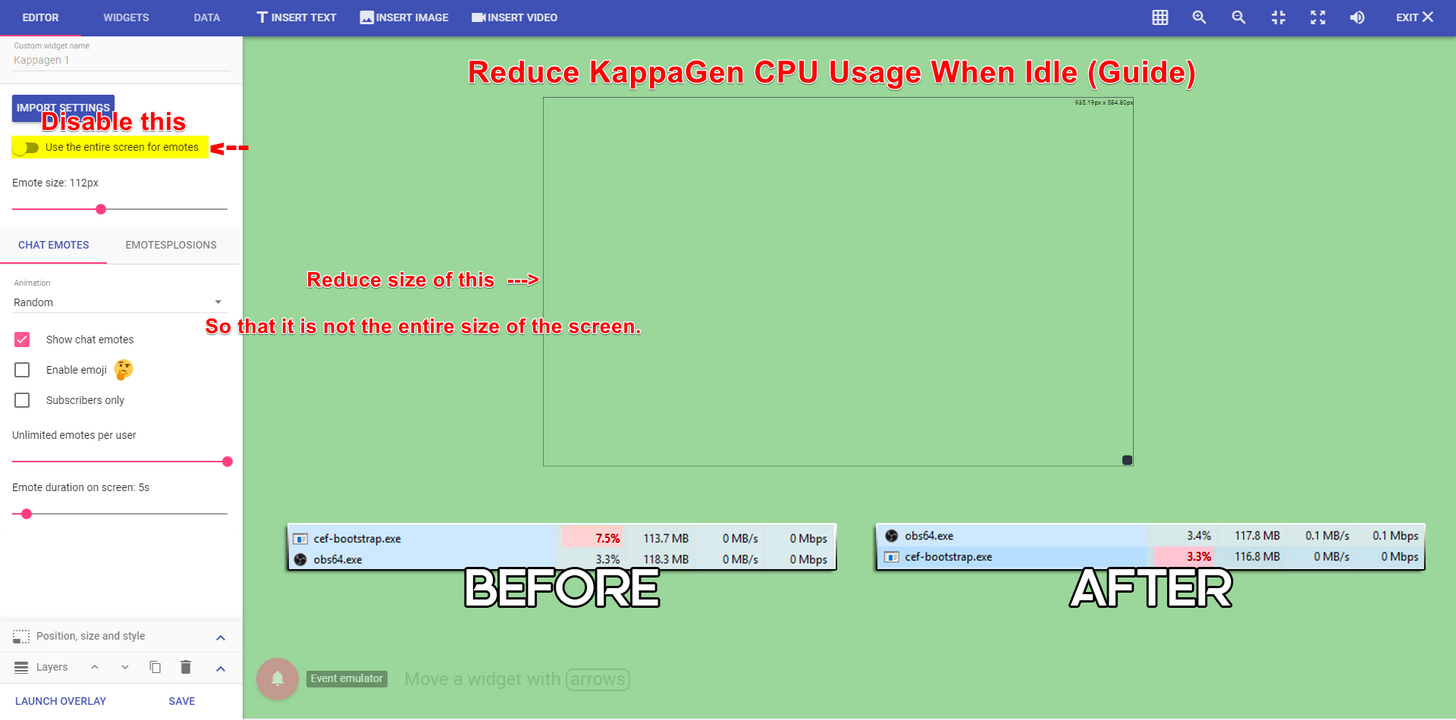
But I was just running defaults. Still have to try makin emotes smaller and reducing the number to like 100
clever mango
Kappagen and the cup are the heaviest widgets
wanton sluice
Physics on or off?
 wanton sluice
I’m at my kids dance class atm. But I’m gonna try variations of smaller emotes. Maybe turn off explosions for everything but tips. Or subs.
And I don’t need 400 emotes. Lol. 50-100 will do.
Ah. So if you don’t use entire screen they just go inside the box area
clever mango
Correct
terse canyon
My KappaGen is the width of the screen and roughly 75px tall
misty wagon
Stop bragging
 sinful phoenix
Um.
I don't if anyone else has reported this bug but stream elements doesn't play song requests automatically
I have to literally puase my game everytime to make sure it starts playing the very first requested song until it gets empty again.
clever mango
This is a known bug but thanks for reporting 👍🏽
If you're using ground control you can set a hotkey so you don't have to leave your game to press play
sinful phoenix
Ground Control?
clever mango
StreamElements has a desktop app
It's great for monitoring the activity feed and handling song requests. More features will be added to it in the future.. 
sinful phoenix
Don't know why the website can't have an option or at least play song request automatically... ¯_(ツ)_/¯
clever mango
It's a bug. It will be fixed.
sinful phoenix
@clever mango Where do you find your Authentication Key?
spring shard
The JWT token? https://streamelements.com/dashboard/account/information
clever mango
⤴
sinful phoenix
@spring shard Is there another type of Authentication Key related to Stream Elements? 🤔
But thanks.
spring shard
Well, there is an API token on the same page as well. But I have honestly no idea what it's used for. I guess it's for when StreamElements communicates with other websites.
clever mango
@sinful phoenix What do you need this "Authentication Key" for?
sinful phoenix
🤦
spring shard
I'm guessing he wanted the JWT token for the Ground Control app you linked. xD
clever mango
¯_(ツ)_/¯
lament blade
Can i switch the PayPal account to a different one? Cause I'm helping out with a charity
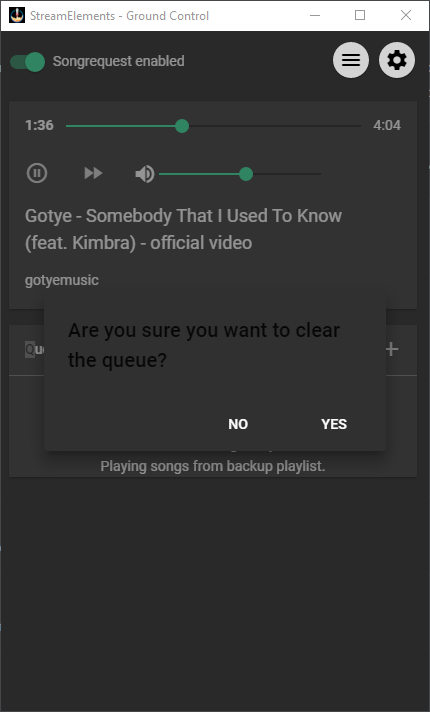 clever mango
Thanks for the feedback. I'll note it for the devs.
sharp linden
Quick Q, does the bot commands support Markdown? AKA putting a link into a single word?
 vital jackal
Hiya on my channel it isn't counting points that people earn for being in chat
Anyone around ;)
swift parcel
@sharp linden no as twitch chat doesn't do it
@vital jackal log out and relog in? and double check loyalty is turned on
sharp linden
Ahh, duely noted
sinful phoenix
@sharp linden Twitch chat runs off something called IRC, it a very simple but not very complex chat platform
(Well that's what IRC is in a nutshell)
sharp linden
I figured, but man that would make some chat commands look sexy as F***K!!
misty wagon
Hi, everyone here is happy to help you but please refrain from tagging random people. If you know them, send them a dm please. If you do not, just wait for someone to come in and help. Thank you kindly.
 copper pollen
Hey guys! I've been recreating tips so that I can get my top donors over from streamlabs, this is all good but is there a way to keep them on the leaderboard but delete them from recent events?
misty wagon
Add one, see what happens. I'm unsure on this one.
copper pollen
Yeah they are in recent events am I able to get someone in the back end to delete recent events once I'm done? Is that possible? @silk patrol sent me here 😃
clever mango
If you delete the tip from "My Tips" page, does the event remain in the activity feed?
copper pollen
Yes it does but it also removes them from the leaderboard.
An ability to back date the event or just remove the event while the tip staying on the leaderboard is what I'm trying to sort if you know what I mean
clever mango
I understand now. I don't think there is a way to accomplish that. The leaderboard figures are tied to events in the system.
copper pollen
Is there any other way for me to sort the information to be able to be imported from streamlabs?
misty wagon
Jump in voice for a sec, txt might be to flat to understand what you are trying to achieve 😃
lament blade
do i need to set up a donation page on streamelements to get the loyalty points automatically added for the donations.... or would it work even if the donation page is from twitch alerts?
spring cosmos
Is there anywhere we can use to get for example Battlefield overlays or World of Warships overlays?
clever mango
@lament blade The donation page is required because otherwise we are not notified of incoming tips. SE is built as an all-in-one tool where everything (bot, tipping page, overlays) work together
lament blade
okay ty c:
clever mango
@spring cosmos Not available through StreamElements but I'm sure there are other places on the net that offer stream graphics for those games
lament blade
when will streamlabs allow people to import to streamelements again?
 mystic oar
I am using OBS, have a steamelements premade (but modified) overlay, and there's like this cut off around the border
clever mango
@lament blade StreamElements has contacted them to find out why they are restricting users from accessing their own data (tips, alert settings, loyalty points) and to see if this can be resolved. At this time, they have not been cooperative. StreamElements is recommending all streamers affected by this to please contact them via social media. The more streamers that they hear from about this the better.
@mystic oar All theme overlays are 1920x1080 so please set your browser source dimensions to that resolution and fit to your OBS canvas if needed with CTRL+F
lament blade
how to put videos if you can not upload videos?
lament blade
oh right
 cloud plinth
When I try to play music during my stream all audio goes completely out. No idea what I’m doing wrong. These are my setting in obs
Okay so I just played it back on twitch and a message came up saying the audio was muted because of copyright issues.. is there any way around this?
 timber crown
I'm looking to find how to add commands to Stream Elements. Somehow my "shout out" command got deleted
can anyone help please and thank you
misty wagon
!command add/remove/edit/options/show Valid flags are: -cd (number) -usercd (number) -cost (number) -level (number) -type (say, whisper or reply) -count (number)
${1} is awesome and deserves your follow. Check them out at twitch.tv/${1} They were last seen playing ${game ${1}} <--- this is a shoutout command, (!sr <username>), if you want to do something similar, you could add ${2:} to the end (for your raid message), and anything after the username will be put in the ${2:} spot
^^ courtesy of Scalper
 rigid cargo
Apologies, I just realized that I should have posted this here: I've recently switched over to elements and everything has been going well for the most part, but last night I noticed that my tip alerts aren't showing up on stream when someone donates. I can emulate a tip and it works fine. This is the case on both a pc and a mac. Thank you for the help!
timber crown
thank you very very much @misty wagon
 charred ermine
Is there a way to make a sound play with a command that is not a !redeem command?
serene granite
@rigid cargo did you change the link in your twitch panel to your Streamelements donation page?
rigid cargo
@serene granite I did. Just double checked. Should it be https:// for the start of the url?
The tips from last night also don't show up in the leaderboards
serene granite
you see them on your paypal account ?
atomic hollow
@rigid cargo you have tip moderation on
you have 2 pending tips
go to the acitivty feed and approve them
and disable this option if you dont need it
rigid cargo
@atomic hollow omg that's it. Thank you very much! @serene granite yes I was seeing it there.
Lol feelin dumb 👏😅
atomic hollow
it happens 😃
edgy geyser
um - what/where is my jwt token? trying out you're alls ground control app
serene granite
here: https://streamelements.com/dashboard/account/information and click on show secrets
cloud plinth
Anyone know the answer to my question?
atomic hollow
@cloud plinth youre looking for a way around Twitch copyright?
cloud plinth
Yeah is there a different way to do it?
atomic hollow
just play music that isnt copyrighted
 silk rivet
hey @atomic hollow in support 😛
atomic hollow
😃
cloud plinth
Lol how do I know if it’s copyrighted though?
atomic hollow
google non-copyright music 😃
cloud plinth
Hmm okay. I wish I could just use Apple Music or Spotify lol. Thanks for the info 👍🏼
 grizzled sail
maybe i’m just missing it but is there a way to see recent subs? not showing up in my activity feed or overlays
silk patrol
@grizzled sail That's weird. You can check on your twitch dashboard to see if they appear. If you can see them on twitch but not in the activity feed, let us know
grizzled sail
does it matter that i’m offline?
they subbed while offline
(i just got affiliate lol)
want to make sure it’s all up and running beforehand though
silk patrol
Did previous subs appear in your activiy feed, or is it your first sub?
grizzled sail
first sub
silk patrol
try to log out and log back in, sometimes the twitch link gets lost because of the status change
grizzled sail
i don’t have the exact time but within the last half hour
 frozen barn
Hey, I need help with the theme gallery. After I click Create and type in my own overlay name, what do I do exactly?
silk patrol
@frozen barn you can edit it in my overlays or just grab the displayed link and use it as is
frozen barn
Alright, thanks.
atomic hollow
watch this please - https://youtu.be/X7XrDdRE7Fk

Create an amazing overlay with StreamElements, watch our video guide to learn how. ----- Tipping page setup: https://youtu.be/eLzxRkq7tJo Add KappaGen to you...
@grizzled sail ping me when you have the info, ill take care of it
grizzled sail
@atomic hollow username is jardio, i manually added it in the data section of one of my overlays. just want to ensure it’ll update automatically from now one
atomic hollow
once you get the 1st live sub it should be in order, i will add this to your activity feed
grizzled sail
alright i’ll wait and see how that works then and if i have any problems with it i’ll bring it up but fingers crossed. thanks so much!
atomic hollow
@grizzled sail its there, go over your overlay widgets to make sure its all good
grizzled sail
just pinged my alerts and is showing up the dashboard. thanks for your help and the follow!
atomic hollow
❤
silk patrol
@cunning summit What's your issue?
 cunning summit
im trying to enter a giveaway
and i cant enter ticket
i used chat to buy a original 1k and now i can buy the rest of the 4k to get in max
@silk patrol u there?
ok i have to go now bye
silk patrol
Sorry I was on a break. You might have reached the maximum tickets available for that giveaway. When you'll be back, can you share with us the name of the channel you were trying to buy tickets from?
 candid palm
hello is there anyone available for a help question?
silk patrol
@candid palm always, ask and we shall answer
candid palm
Awesome, I am having troubles finding if there is a way to use your own custom sound for alerts like follows and such
silk patrol
@candid palm it's pretty easy. when you go into one of your overlays, go into your alertbox settings and then you can customize everything
candid palm
you know i was just thinking on that.. i have been using the super themes and didnt think to check their allert bot settings lol
silk patrol
this video explains how the alertbox works https://www.youtube.com/watch?v=8LVRd2X4HvU

Learn how to customize your alerts and setup different alerts variations with StreamElements Alertbox ----- Overlay Manager guide: https://youtu.be/X7XrDdRE7...
candid palm
I also accidently deleted a window i wanted from one of the super themes, was trying to see if i can get it put back without having to redownload the whole super theme and lose all the changes i made lol
I do apprecaite the help, and have already convinced a couple of my friends to switch over simply for the help you give on here already
silk patrol
if you don't hit the save button, just exit the overlay and open it again, and changes will be reverted back to the previous save
candid palm
lol i hit the save then realized i wanted the picture for a change lol, i will just have to work on it again lol
silk patrol
thanks, you too ❤
 gaunt light
Hello guys i need some help and question if anyone got time to Voice Chat ?
about Stream elements so i'd like a developer or one of thier staff
silk patrol
I can't voice chat right now, but feel free to type your question
gaunt light
As a New streamer I'm struggling with all the bots and all the Streams website ( which i wont publish here )
I want a " All in One " Kind of solution
silk patrol
well you're in the right place then 😃
silk patrol
of course
you might wanna check our youtube channel, as everything is explained here https://www.youtube.com/watch?v=UuweQah3v00

Setting up StreamElements is easy, learn how to in this video, hosted by Twitch Partner GIRLvsDUMB - Got any questions, or just want to say "Hey"? Join our D...
tight harness
We have many widgets available 😃
gaunt light
oh oh that awosome . But what about Timers? that are preset?
And how can i remove some of the Default commands of the chat?
Or change thier Discription atleast to customize it to my twitch theme?
silk patrol
timers are available, it's at the bottom of the menu, you can disable default commands, and some of them can be recreated as custom commands, you can't change the default command output
silk patrol
you can't remove them, but if they are disabled, they won't be visible on your public command page
tight harness
You can't remove default commands because they're generally pretty important, you can choose to disable them if you want but you should always have the ability to re-enable them if you change your mind
silk patrol
BTTV is a browser extension that adds emotes to the twitch chat
gaunt light
I'd wish you guys made some Default timers which we can change thier Discription so we wont have to deal with expressing it
tight harness
You mean this? https://streamelements.com/dashboard/bot/timers
hoary crystal
Hi guys. I have an issue in the overlay editor. I can't change the image in the subscriber alert and i can't clear the image either. The default shark keeps showing up. I can edit any other alert but the subscriber alert.
gaunt light
thats empty for me 😄
tight harness
Yes, because you haven't added any yet
silk patrol
@hoary crystal check the variations, a lot of peeps miss it
gaunt light
@tight harness One other thing 😄 in the Offline Overylay . How am i spose to geet it on twitch without an active streaming off that ? since its a Updated image and Twitch doesn't support it
silk patrol
@gaunt light timers are more of a personal thing, they are pretty easy to create
hoary crystal
Thats it @silk patrol thank you so much!
gaunt light
I also choosed the Gold black Overlay , And when i edited that Message it was way out of your picture is there a way to fix it ?
silk patrol
@gaunt light the offline overlay is something streamers use to say "stream is ending," if you want an image to be shown when you are actually offline, you have to set it on twitch
gaunt light
oh ok
I dont mind share screen with one of you 😄
to explain excally what my problem is 😄
silk patrol
have you tried to resize the widget?
silk patrol
you would need to resize it on your end
gaunt light
Well i've deleted it due to incompetence can you guys send it to me so i re add it ?
I dont want to start all over again i've changed everything
silk patrol
if you haven't saved yet, exit the overlay and open it again
 ripe herald


