#helpdesk-twitch
1 messages · Page 122 of 1
 lyric trellis
 tight harness
It was brought up recently, it's definitely been requested 😃
 deep rivet
is there a way to give everyone in the chat points?
 swift parcel
!addpoints all <points>
 patent wraith
Hey, i asked long time ago about people not getting points in a channel i was moding, those one were good, but a new one seem to have same issue
 pine hemlock
Try having them log out of the SE site and log back in @patent wraith
patent wraith
Oh, is that gonna sync their points or something?
 weary mist
sometimes the token expires, and logout/login refreshes it
patent wraith
Ok, thanks ! I'll tell them next time 😃
I'm talking about viewers, not streamers, dunno who you were talking about ^^
weary mist
oh, viewers?
patent wraith
yes
weary mist
There are 2 things that can stop them receiving points when everyone else is getting them. 1. They have to be in the channel for that 10 minute time period, and 2. twitch could not be including them in the viewer list when we pull it. Normally, 2 comes from 1, but it sometimes can be caused by twitch being twitchy
patent wraith
Is the bot increasing at the end of the 10 min?
weary mist
the 10 minutes is how long they have to be there to get the loyalty points
patent wraith
So, they have to be there 10 min in 1 stream to be able to have their points? Even if it's 2min + 8min?
weary mist
yes. 10 minutes straight
patent wraith
Okey, i understand now, thanks ! Gonna see with them what's wrong 😃
Thnaks for the explanations too 😃
weary mist
👍
 lament blade
Is there a way to disable the Custom Command module?
 clever mango
You don't want any custom commands?
 raven sequoia
Hello. I am having an issue with users not being able to add quotes via !quote add "quote text"
Also curious if the fallback youtube playlist for songrequest can be shuffled? It seems to always play in order.
weary mist
@raven sequoia 1. The add portion of the command is mod and up. 2. The backup playlist can be shuffled with the shuffle button
raven sequoia
@weary mist Thanks! Is it possible to make a feature request to allow anyone to add?
weary mist
 ancient wigeon
what the hell is going on in here?
I need a new battle to fight
thinks
Say, when might we see the mod dashboard? Kappa
clever mango
inb4 goo sad
ancient wigeon

clever mango
xD
ancient wigeon
Did you miss me?
lament blade
No sir @clever mango
ancient wigeon


 steady sage
anyone able to help with overlays?
clever mango
Sure
steady sage
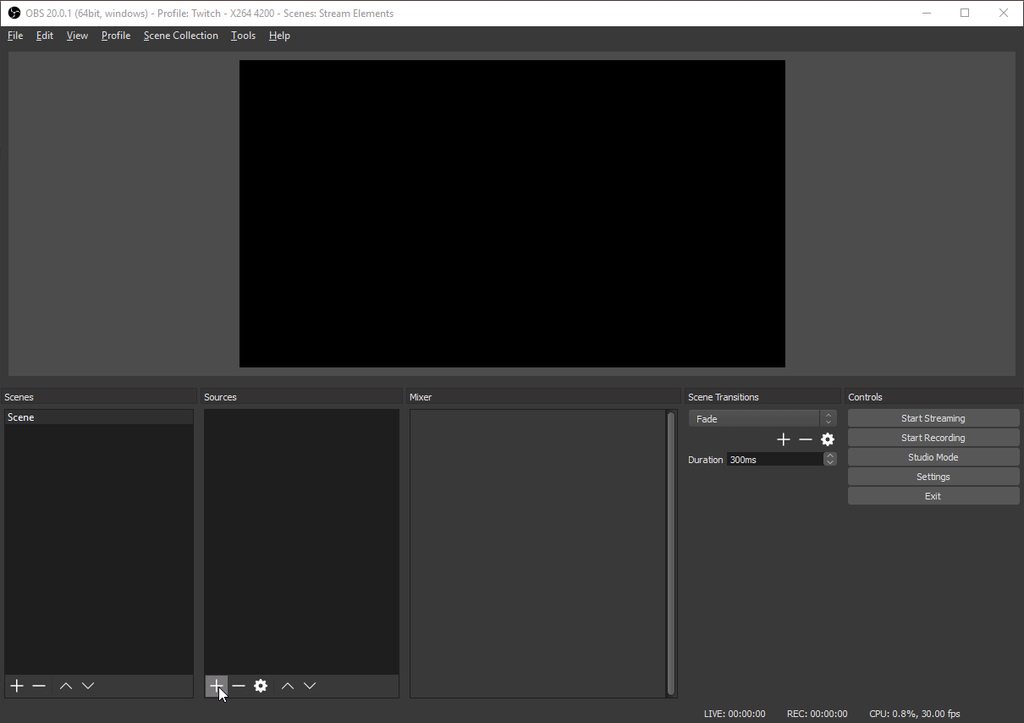
im having a hard time bringing over a stream overlay from your super overlays to my obs
not sure how to do it
clever mango
Here you go: http://i.imgur.com/jfAazwC.gif
 steady sage
okay let me try ty
 strong dock
my host alert isnt changing sounds
pine hemlock
Did you hit save after changing sounds? and after that did you go into your browser source properties and refresh cache?
strong dock
im saved and im doing it live in the editior
tried 3 different sounds and its doing a default previous one
ok so i had two different alert systems and i hide one or the other depending on what im streaming
but the test feature and when im streaming is mixing them
follower and host from one and bits and such from the other
 thick zealot
how do i get bit donations cup to show up on obs
 trail whale
Is there a way to have stream elements and nightbot run together without them both responding to a command? And if I mute stream elements will it still announce new followers?
pine hemlock
@strong dock Do you have any variations set?
@thick zealot Add a the hype cup to your overlay. save it. and enter the overlay url into a browser source in obs
strong dock
tried with and without
pine hemlock
@strong dock Do you have shutdown source when not active checked?
strong dock
should be
pine hemlock
@trail whale You can toggle certain commands off if there are duplicates between the two bots. https://streamelements.com/dashboard/bot/commands/default
strong dock
yes it is
strong dock
urgh also kappa gen not reconizing new bttv emotes.  2doay lol
pine hemlock
type !emotes update in your chat
and also log in and out of the site
bttv emotes should update
As for the dual sound im not sure. Ctrl+f5 when in the editor, do you still have double sounds?
clever mango
refresh the cache of the overlay with kappagen?
strong dock
yep still not working on kappa and some alerts paly both sounds
and even when i hide both it still plays the host sound
handt tested the rest cause im live
change scenes and kappa showing new ones via explosion
but not chat
 tepid brook
Anyone know how to add a command as a moderator using Stream Elements?
tepid brook
I see, thank you!
strong dock
kappa finally worked
thick zealot
how do i change it so that my sound effects dont double on obs or elements? which one do i lower?
clever mango
☑ Shut down source when not visible for all overlays in OBS
If you have the editor open at the same time as OBS, mute the editor - top right
thick zealot
ty
if i shut down the source when not visible, will it still work?
ohhh wait i see what youre saying
ok ty
its still not being muted
its still doubling
thick zealot
yes overlay is open in chrome
clever mango
Ok, so it's playing there and OBS
 true bobcat
Hey guys!
I’m having a real problem trying to get my gif to play as my Sub alert
I have it set right but it still shows the left shark
clever mango
Variation settings 😃
true bobcat
Ahhh ok haha thank you!
 ivory rock
Is there a way to have multiple alert widgets with different corresponding url's? (i.e. follows, donos, bits, normal size but subs full screen)
clever mango
Yep, just add two alert boxes to an overlay
disable sub alerts on one and enable only sub alerts on the other
all in one URL
the beauty of 
ivory rock
they would have the same URL? wouldn't that mess up browser source capture if ones normal size and others full screen?
clever mango
Nope 😃
One alertbox in the overlay handles subs and the other handles everything else
weary mist
@ivory rock our overlays run at full screen, so you can pretty much do anything with them
clever mango
^
thick zealot
cheers arent using the appropriate sound i selected for it
clever mango
Check the variation settings
thick zealot
youre a god
 coral kelp
why does the streamelements site lag my browser
thick zealot
but its still doubling
clever mango
Do you have OBS and the editor open at the same time?
Any overlay that is open and has an alertbox plays sounds. Mute the editor if your OBS is open or close OBS
weary mist
@coral kelp that could happen from having an extension on your browser akin to adblock
could also happen if you haven't updated chrome, one of the recent ones introduced a weird bug ewhere it would take a lot of power
coral kelp
im on canary
but it happens on stable regardless
doesnt happen on firefox
and i still get lag even with every extension turned off
ill check again but i dont think its on my end
clever mango
Is this every page on the site?
coral kelp
yeah
weirdly enough i think i just fixed it by enabling one of my content blockers but not the other one
and also clearing my cache
eh actually no
its still there
clever mango
I'm using beta with HA enabled
coral kelp
its just not very responsive, compared to firefox at least
clever mango
Haven't experienced any issues
coral kelp
with what
clever mango
hardware acceleration
 next spruce
My chat widget isn't showing anything on my OBS? It suddenly stopped working?
coincidentally my host alerts don't show at all now, either
next spruce
is that for me or?
weary mist
yessir
next spruce
awesome thank you Scalper 😃
weary mist
👍
pine hemlock
👎
weary mist
❤
pine hemlock
🙄
weary mist
😉
 bright compass
Haveing bot issues bot stops working for a few mins then catches up
 next steeple
Question.
How do you tell the bot not to delete links? ive went to everything in order for it to allow
next steeple
its off.
clever mango
Then the bot isn't deleting links
They could be deleted by twitch link settings
check your twitch channel settings
 wild bay
Stream elements not working for anyone else right now?
 ornate lichen
weird, trying to do shoutouts and pulling up the commands link but SE isn't responding. chat notifications like resubs are working tho
clever mango
The bot restarted. If you don't see it in channel please part/join from the dashboard
wild bay
none of my commands are working, even after parting and joining
probably just playing catch up then, I assume?
ornate lichen
Yeah me neither
ornate lichen
Yeah waiting for it to work 'cause I wanna shout people out in RGS' channel LUUL
 untold estuary
@clever mango bot is still not working even after part/rejoin
clever mango
Sorry about the inconvenience. Devs are working on the bot to get it back up and running.
Will be back ASAP
ornate lichen
thanks for letting us know
wild bay
Thanks for the quick response! @clever mango
 ornate juniper
so is it down for everyone?
clever mango
I'm not sure who is affected
ornate lichen
RGS and my channel are at least.
 vale jacinth
Whats the best way to retry to find out if it is also this stream?
 toxic parcel
yep same here.. :/
clever mango
Sorry about the inconvenience. The bot is down at the moment and the dev team is working to get it back up and running ASAP. Thank you for your patience.
ornate lichen
❤
 rapid vault
my bot's not responding and I've had it part and rejoin my channel twice already :/
clever mango
Sorry about the inconvenience. The bot is down at the moment and the dev team is working to get it back up and running ASAP. Thank you for your patience.
vale jacinth
space, read Terra's comment.
 misty wagon
We are on the case, please be patient and in meantime have  and some
rapid vault
gotcha, thanks ❤
 vocal leaf
is SE having issues? bot is unresponsive
clever mango
Sorry about the inconvenience. The bot is down at the moment and the dev team is working to get it back up and running ASAP. Thank you for your patience.
vocal leaf
any estimate? going to have a giveaway soon
clever mango
I don't have ETA details
vocal leaf
kk, thx
misty wagon
We are running after it but it evolved. Became real fast but I'm sure we'll catch it soon
weary mist
I am working on those enhancements to my broom, hopefully I can sweep it away
thick zealot
here are my navy issued running boots
running shoes*
itll help
also im still hearing double
 high notch
Hi my channel twitch.tv/shipwreckshark and i have made the bot leavw and come back several times and still my commands wont show while I am live rn
 dull prism
how do i change the icons that fall in my hype cup?
misty wagon
I think Scalper needs those shoes. We trained him in a secret UK location ( ㊙ ) with a guy named Potter and he got real good with the broomstick.
clever mango
The bot is now rejoining channels and should be live again very soon
vale jacinth
Thanks for amazing support team guys ❤ ❤ ❤
thick zealot
so because im hearing double, should i launch the overlay? and then it would stop?
vocal leaf
bot is back, everyone is happy. good job 😃
misty wagon
I'm off to bed, have a good one all and don't eat to many
clever mango
I will provide teamviewer support for you if you'd like
weary mist
⤴
 vale anchor
bot still down for me
clever mango
Is it in the channel?
 tawny pivot
Just restarting a few things, give it a second.
 stray hawk
alright 😃
clever mango
Memelord has spoken
 stuck hamlet
I NEED IT NOW THO STYLER
vale anchor
@thick zealot I had the same issue - create a new EMPTY scene and tell me if you're still hearing the alerts when it's up and you do a test


 vale anchor
it IS alive! good stuff
pine hemlock
Until styler breaks it again
vale anchor

tawny pivot
Spreaking of which, going back to bed 
thick zealot
does anyone know why stream element cant support mp4 files, and where i can convert an mp4 to something thats supported by SE
clever mango
That's a big video 
thick zealot
its my pb
vale anchor
4 u 
 thick zealot
personal best haha
question, stream elements, does it have a feature that can reset a video with a hot key?
clever mango
When the scene re-loads it will reset the video
and you could hotkey the reload in OBS
clever mango
like bitboss?
clever mango
Upvote it on the ideas site please
It's not something SE has now but will have in the future
clever mango
@thick zealot in regards to the video, the browser source plugin will require a huge amount of resources to play it. It would be best to run that file locally in OBS.
thick zealot
obs wont let me do it either 😦
stuck hamlet
What video format is this
MP4? We don't take those, if you'd like, you can send the file over, I'll convert to webm and we could test how much it uses.
thick zealot
no no, my bad, itll let me add it, but i cant hotkey to reset it
vale anchor
I use mp4 for my intro in OBS and it works like a charm
thick zealot
idk how to reset it
weary mist
there is an option to force it to play from the beginning when it is visible
stuck hamlet
There is a setting for this.
 buoyant sigil
does the Hype Jar reset after switching Scenes or is it just me?
thick zealot
for example, if my run dies, i press f1 to reset my timer and project 64, i then press space to start thre timer and pj64
weary mist
@buoyant sigil something that is being worked on
buoyant sigil
oh okay 😃
thick zealot
i want to do the same for the video
stuck hamlet
Have you looked at the obs settings at all for the video?
thick zealot
😦 yes
stuck hamlet
Like scalper and I said, there is a setting to reset the video if turned off/on.
You could set a key bind to do this
thick zealot
step by step me plz
 bronze karma
Is there a way to import commands, quotes, and currency from a .csv file (from Branebot) also does StreamElements allow for utilizing a custom bot name?
weary mist
@thick zealot do you have the option to add a VLC video source?
weary mist
then hotkey to make the source active, and it should play one through and make inactive and ready for the next hotkey
stuck hamlet
@bronze karma we can only import currency from CSV. Also no custom bot name
bronze karma
Rgr that. How can I go about importing currency? @stuck hamlet
thick zealot
where do i go to hotkey it
weary mist
stuck hamlet
https://filter.dj/CSVtoStreamElements.html @bronze karma
bronze karma
Thank you very much sir! o7
ornate lichen
hey all, I'm trying to edit the tip goal widget but somehow I can't scroll to the color change properly:
https://gyazo.com/36adb32570a14d8d72f0268e6dc59319
I tried scrolling down and up but it is blocked by the other collapsible settings.

I found a workaround by opening the layers collapsible menu but I think that shouldn't be working like that?
 scenic nova
Hi I think the giveaway widget might be broken. I'm a mod for Drgluon (who's currently streaming) and I think the widget is stuck. The giveaway is completed in the dashboard, but the giveaway widget still says "Waiting for a winner to be drawn"
Is there anything I/he can do?
 silk patrol
@bradnak#3859  As a mod, there is nothing you can do. We are working on dashboard access for supermods. The broadcaster must close the giveaway and draw a winner for it to be displayed on the widget
 languid cipher
Need immediate assistance in regards to using BEBO to livestream PUBG
silk patrol
@languid cipher ask and we shall anwser
The thing is, bebo has it own bot, overlay and streaming software. StreamElements is made for OBS and we have our own set of feature. i'm not sure if you should ask for help here
but feel free to ask anyway
languid cipher
im pretty confused
silk patrol
Simple fix : switch to OBS Studio 
silk patrol
also, if you are a bebo alpha partner, you have access to a 24 hour live support, you might wanna go there
languid cipher
yea i always use stream elemtsn
they are trying to get me to use BEBO
LUL its not working
MingLee
 atomic hollow
lul
silk patrol
good ol OBS works like a charm
 muted delta
quick question, did anyone when they got to join here, they got locked out of their accounts?
 frigid bluff
Hey i got a question.. So when I run a contest.. StreamElements responds to each person telling "You have bet blah blah blah" is there anyway to disable him from telling them they bet to make the chat less clustered?
silk patrol
@frigid bluff Unfortunately no
@muted delta what do you mean by locked out? I guess the answer is no since none of my account had any issue
muted delta
When Mr.Unkown sent me an invite, the moment I entered, it locked out my account.
I couldn't log in and I could only get this screen.
frigid bluff
hi shadow
muted delta
is it normal for the SE staff in here to seek out streamers who use stream elements, go to their discord, and invite them?
atomic hollow
hey @muted delta
Mr Unknown works for us, we try to greet new users of our platform and see if they need help with anything
which account are you locked out from?
muted delta
well. i am not any longer, but it was this one.
just was trying to look into that message that is from discord, and it seemed EXTREMELY rare. so just was very hesitant. apologies for any assumptions.
silk patrol
no worries, Discord probably thought you were a bot or something that's why it requested an authentification
atomic hollow
its all good, we come with good intentions
muted delta
and when I sent the verification code, it did not send. obviously not your fault.
muted delta
okay. thank you, both of you. ❤ much appreciated. I feel low key bad since I may have panicked to keep my information safe and banned him since I've just never heard of people going through their discords.
 deft vault
If it's all just coincidence apologies . It's just seems sketchy when someone going by Mr. Unknown shows up at our discord at 2am , prompting the streamer to join this server , and then it locks her out of her account
muted delta
so if either of you guys can get a hold of him anyway, i already messaged him an apology, but if you can give my condolences.
muted delta
yeah, i'm just glad it was all a misunderstanding more than anything.
atomic hollow
❤
muted delta
much appreciated for explaining as well~
oh. i did wanna ask a question, Mr. Unknown was mentioning about how to change the order of song request
or some kind of extension that you guys have.
muted delta
thank you! much appreciated. also. i seem to have my slots broken. I am not completely sure how to fix it.
apologies for all of the problems
muted delta
I trid to reset it but it still won't ever have a person win.
atomic hollow
so no one wins?
silk patrol
that slider doesn't determine the winning chances, only the payout
silk patrol
here is how it works :
The slider increases the payout if you manage to win
Less than 100 on the slider means people will not win money over time using the slot machine. 80-100 is a good range
less emotes = higher win chance
5 emotes = 4%, 4 emotes = 6%, 3 = 11%
actual formula : n / n^3
n = number of emotes
silk patrol
❤
muted delta
Okay, much appreciated! Thank you very much!
 wicked oriole
I copied the overlay url into a BrowserSource into OBS, but the sound will not play in OBS when I claim a sound clip from the store. I have added the store widget to the overlay. It plays if I have the editor itself open though when I claim it.
silk patrol
@wicked oriole is the checkbox at the bottom of your store item ticked https://i.imgur.com/YCO0Rnk.png
 silk patrol
my bad ^^
is your browsersource size matching your overlay resolution ? 1920x1080 for a 1080p overlay? also check if your sound settings in OBS are set correctly. a browsersource is a chrome webpage displayed inside OBS, so if it's working in the editor, it should work in OBS
finally, are you using OBS Studio?
wicked oriole
I set the overlay size to 640x480, and that is what I set the BrowserSource to also. I know my sound settings in OBS work because when I run a test alert from Streamlabs the sound plays through OBS. I am using OBS Studio.
silk patrol
that's an unusual resolution. is your monitor at that resolution, or are you just downscaling for streaming?
wicked oriole
I don't want there to be any other things on the overlay so I just set the box to the size of the alert Id be using for the store.
I changed the resolutions to 1080p on the overlay in Stream Elements and the BrowserSource in OBS
No change
silk patrol
oh, this is not how we work, your overlay resolution should match your base canvas/windows resolution. some widgets will experience scaling issue
can you send me your overlay link via DM?
wicked oriole
The part I dont understand is that the sound works in the editor when i claim it from chat
But when I copy the link into OBS and close stream elements webpage it doesnt play through OBS
silk patrol
^ solved
tight harness

 heady lance
Hi all! Just trying to figure out how to launch StreamElements bot for my channel and how to add it as a moderator.
silk patrol
@heady lance when you access your dashboard, you have a join channel button on the right. to mod it just type /mod streamelements in your twitch chat
heady lance
Thanks @silk patrol
 tiny helm
how do i remove the bot ?!?
atomic hollow
!bot part
silk patrol
 hoary kindle
Hi guys, the redeem in my stream elements store hasn't been working recently :/
stuck hamlet
What hasnt been working? Redeeming, or the alert?
hoary kindle
I don't think I set up my alert right because it has never worked for me haha but the redeeming was fine until recently. Now it takes the currency from my viewers but either nothing shows up in redeems for me at all, or something will show up but if I click the accept or decline nothing happens
stuck hamlet
hmm, lets have a look 😃
hoary kindle
thanks :3
stuck hamlet
So, to get this right, it takes their points, but does not give them the reward?
hoary kindle
the accept/decline doesn't show up for me but they tell me it takes their points
 hoary kindle
none of that shows up for me
hoary kindle
looks like it
stuck hamlet
Alright, do you have any adblocker?
hoary kindle
no, should I?
stuck hamlet
no no :p just making sure haha
hoary kindle
okay haha
stuck hamlet
so you see nothing on this page?
hoary kindle
the link you gave me I do, but for example the last 3 in there.. I only saw 1 when I went to the redemptions page and I wasn't even able to accept it
when I was streaming yesterday and they used their points, I only saw the 1 but coudln't do anything with it
the other 2 didn't even show up at all
stuck hamlet
Hmm, strange.
hoary kindle
when I go to the page myself I see no pending redemptions
when I click your link I can see them
stuck hamlet
oh
hoary kindle
yours is the history I guess?
stuck hamlet
yes
hoary kindle
but I didn't accept/decline those ones that are listed
even the ones from a month ago didn't show up when they redeemed
hoary kindle
u.u
stuck hamlet
Let me poke around 😃
hoary kindle
for sure :3 thanks
stuck hamlet
They were pending before, right?
hoary kindle
Yeah at one point they worked fine
strong dock
Never figured out why bot was doing both alerts last night. Ended up making a copy to save the current. And deleted the one I didn't want playing.
Tbh may not try to get it to work until after October. Just gotta grt scare alerts fully working
stuck hamlet
bot doing both alerts? wat
 eager goblet
can someone help me figure out how to get an aditional decimal place on my overlay? someone donated 4.20 but it only shows 4.2 ._.
 stuck hamlet
This has been noticed, and will be correcte in the future. 😃 we do not have an ETA unfortunately
 raven solar
Been using SE for weeks, and loving it. Upon starting my last stream, store redemption alerts weren't going off on stream. Never had this issue, didn't change any settings.
This something on SE's side?
stuck hamlet
They were working fine before? @raven solar
raven solar
Correct.
stuck hamlet
We'll have to look at this deeper, because you are the second person reporting this.
raven solar
Any chance I can recieve an update before 9pm(EST)?
stuck hamlet
I will try my best. 😃
strong dock
@stuck hamlet ya I was streaming last night my alert overlay has two different alerts set up
One for normal default alerts. And one for my scary streams
And live alerts and test alerts were pulling some from one and some from the other. Even tho i had the normal one hidden.
 mild jacinth
How do i make StreamElements visible in chat? For some reason hes cloaked from view
stuck hamlet
make sure your only using the scare theme and refresh browser cache @strong dock

i see it @mild jacinth
mild jacinth
But doesnt show in chat. i thought i saw a setting somewhere for "Hide" streamelements from chat view. But cant remember
stuck hamlet
We do not have something like this
mild jacinth
Maybe its a twitch setting or my nightbot perhaps
strong dock
@stuck hamlet ya j did a few times. But was live so. Gonna check tonight and see how it's working
mild jacinth
Thanks buddy
weary mist
@mild jacinth try a couple random commands, like /unban StreamElements and /unignore StreamElements, that will make sure it isn't blocked from your view via twitch. then !bot unmute should unmute it if you made it muted
 spring shard
Heyo fam. Is it possible to edit Command Keywords in the chat? I.E !cmd option !test -keyword banana
silk patrol
@spring shard Hey! Unfortunately nope, it can only be done on the website, same thing for aliases. Feel free to upvote this idea and add a comment for the keyword part https://streamelements.helprace.com/i221-add-alias-using-chat-command
spring shard
Thank you @silk patrol Guess I'll have to wait for the dashboard option. ❤
 idle burrow
Hey, i was streaming last night and as I got followers I realized both the default sound and my custom sound played. I tried working with it, but it made both sounds play more than once afterward.
stuck hamlet
Are you sure you dont have 2 alert boxes? @idle burrow
 serene granite
check the list of widgets on the bottom left
the boxes could be exactly on top of each other and you'd never notice
idle burrow
I don't know where you mean
idle burrow
i have so many things there
weary mist
what is your twitch name?
serene granite
scroll through it and see if you have more than one alertbox
idle burrow
lemonsupreme7
stuck hamlet
Do you have 2 different overlays on your OBS?
weary mist
thats what I am thinking
idle burrow
i mean, i didn't think so, i can check it
stuck hamlet
If not, refresh the browser source cache.
 final isle
team question, on the Dashboard it says a different number under Followers Today vs what it says in the Statistics, any idea why?
stuck hamlet
You would do this by, Right clicking the source > Properties > Scrolling down > Click Refresh.
Also make sure "Shutdown source when not visible" is ticked
what statistic @final isle ?
final isle
the graph
stuck hamlet
final isle
the bar graph says 3 new followers for yesterday but in the Followers Today it shows 31
tight harness
I don't have today's data on the graph, the latest it shows is yesterday's data
idle burrow
It's still happening btw, i click emulate subscriber event and thedefault and my own play. I thought I removed the default sound
stuck hamlet
did you do as i said?
final isle
@tight harness looking through recent events too shows a lot more followers than whats being shown on the graph for yesterday
tight harness
Hmm 🤔
stuck hamlet
I see your issue, but i dont realy have an explaination for it 
idle burrow
@stuck hamlet yeah i refreshed the cache, i don't think its an OBS issue
stuck hamlet
So you hear both when you're on the site with OBS closed?
idle burrow
right
i even removed the sound i set so there wouldn't be anything and still after i add it, the default plays
serene granite
@final isle we had some issues with the bot's connection to twitch earlier. It's possible that the data being skewed is due to that
stuck hamlet
this seems highly unlikely
oh yea @serene granite forgot about that
im on your overlay now @idle burrow and i hear no sound when i play an alert
idle burrow
wtf...
idle burrow
yeah idk man, i got the followers one to work, now the subscribers one just doesnt play at all
idle burrow
removed it but added the custom. I think I might have gotten it straightened up, but these alertboxes weren't showing on the stream yesterday, is there something i might not have clicked?
stuck hamlet
as hectic mentioned above, we had a slight hick up with our system last night, they should work perfectly fine
serene granite
just to confirm, you're using OBS studio ?
idle burrow
Yeah i am
serene granite
ok
idle burrow
Thanks for the help fellas
stuck hamlet
wait a minute @idle burrow  are you using sub alert for follows?
idle burrow
I don't think so..
stuck hamlet
You do not have a sub button, so the sub alert should not show up
Alright. If you're sure of it 😃
idle burrow
where tf my sub button at
stuck hamlet
You need to be an affiliate or partner to have one
idle burrow
aghhh
serene granite
we actually posted a blog post on the road to affiliate and partner
https://strms.net/partguide worth a read

Stream Elements - Legendary Live Streaming
Passion and struggle explains the road to Twitch Affiliate then on to Twitch Partner.
 mellow heart
Just got a overlay and could use some assistance 😄
tight harness
What seems to be the problem with your overlay?
mellow heart
Nothing at all, just needed some quick guidance, I am familiar with OBS, but I'm a little confused on the animation that I bought and want to know if theres anything different, its the battlegrounds, the the videos have a watermark as well afterdownloading
 frosty zealot
bought?
tight harness
Yeah, that confused me too
Also, watermarks? There's no watermarks on our super themes 
frosty zealot
where did you download from @mellow heart ?
frosty zealot
o...k...
tight harness
I'm very confused 😂
weary mist
90% chance he purchased graphics from some other site, and has uploaded them here
 open zealot
hey guys, anyone has an idea, how to reset donation goal? reseting current session doesn't help at all
open zealot
oh god, that was so easy 😃 thank you mate
tight harness
No problem 😃
mellow heart
i didn't buy from some other sight, i bought from you guys.... want my receipt?
site*
when you watch the clip on windows it shows some dumb watermark, then when you put it in OBS it goes away
stuck hamlet
We do not sell anything.
If you bought something from someone and they said it was from our service, you most likely got scammed.
All of our content is free,
weary mist
⤴
tight harness

stuck hamlet
 cloud plinth
Ground Control app won’t open up on my pc. Already tried restarting the pc. Everything else opens fine. Should I delete it and re-download?
silk patrol
@cloud plinth good idea
tight harness
Also worth making sure your anti-virus isn't wrongfully blocking it
 odd bolt
so aletrs sounds wont go off while im streaming
stuck hamlet
What are you streaming?
odd bolt
destiny and league
stuck hamlet
do they work when you're not streaming?
odd bolt
yea perfectly fine
its just when im streaming the sounds dont go off but the graphics do
stuck hamlet
do you by any chance has a potato computer?
odd bolt
nope
 edgy kindle
@odd bolt Do you by any chance have different scenes for league? Example being Client/Lobby and In-game?
odd bolt
nope same scenes
stuck hamlet
I was asking because sometimes when a pc cant handle everything, it would skip the sound.
odd bolt
alerts used to work well before when i used stream labs
serene granite
@odd bolt what version of OBS are you using ?
odd bolt
19
serene granite
maybe try updating to the latest one, it has a lot of improvements compared to 19
we even made a blog post about the new features of OBS

Stream Elements - Legendary Live Streaming
As a streamer, you always want to have the best software and technology ready to use, and OBS studio is the go-to streaming platform for…
odd bolt
ok ill update after stream
 astral isle
Alright, the streamer wants a command in which a timer can be activated, and when he doesnt kill a boss within 30 min, that "alarm" (or chat message) should be send. Is there a way for a (Super-)mod to create a command in chat, which activates a timer with an amount x and an output message "yy"?
tight harness
Not a thing currently, sounds like something for https://strms.net/ideas and then see if other people want it
odd bolt
im not streaming anymore and the sounds still dont work?
and now they dont work at all
i think ill just go back to my old overlay
 drifting blade
stream elements is throttling my cpu to 100% just from opening the editor browser. I removed everything inside the overlay editor and still same result any ideas?
tight harness
@drifting blade And you're not doing anything else?
pine hemlock
@drifting blade Disabled hardware acceleration in chrome. if that doesn't fix it, download the chrome beta.
The current chrome version is causing issues for some users. I have to use the beta myself too
 serene heath
Allright, weird Q....I have song request enabled....when someone comes into the stream and requests a song but doesn't have the points to do so it says this...."@username, requesting a song costs 20 Rab...Bits, you only have 0.".................is there any way to change that generic message?
clever mango
Not at this time because default command responses cannot be customized. I think this will be possible in the future.
serene heath
i certainly hope so, it gets tiring explaing to the new viewers i dont want troll tracks or racist shit playing and if they follow they have enough bits to request
AKA i'm lazy AF
weary mist
lol, you can set a timer for that
tight harness
I was thinking the same thing 
serene heath
i mean ya, but it spamming chat every _ minutes is blah
i dont have enough of a following for the bot to be drowned out by chatters as of yet
weary mist
you can have it every _ chat lines, so it doesn't spam it unless you have active people
every 15 minutes, with 5-10 chat lines, if no one is talking, it will not post it
serene heath
hmmm ty for that scalper i didnt know that
tight harness
Timers are great, and very useful 👍
tight harness
That too 
 cunning summit
hey @lone bridge
cunning summit
how are u @tight harness
tight harness
I'm good thanks, how about you?
strong dock
So looks like I'm not only one with issues with alert sounds
lament blade
i need help
stuck hamlet
Sure, what's up?
lament blade
Im really confused on the super themes
or just the themes
can u come in team veiwer sup[port?
stuck hamlet
I'm currently not available for that
stuck hamlet
@clever mango maybe?
clever mango
Hi, I'll be right there
cunning summit
@lament blade i would help you but i have no idea what a super theme is @clever mango mind if i join u guys to learn?
 ocean eagle
Is there a problem with viewer lists currently? My chat say they are not receiving points for watching
Tried parting + rejoining with the bot
tight harness
@ocean eagle That normally fixes it, you can try logging out of the site and logging back in
misty wagon

Super Themes are stunning, professionally designed overlays you can use as it is or customize. Get Super Themes now: https://streamelements.com/dashboard/the...
tight harness
Refresh what? the page? that wouldn't do anything because the points are stored on our end, not locally
cunning summit
oh ok
i dont know just trying to help. i dont know much now ill learn tho
i was just thinking the bot wasnt picking up the fact that they were in the chat
tight harness
That can happen if Twitch's chat servers are having problems, there is a 3 second delay with their chat servers so it's possible, but refreshing wouldn't fix that i'm afraid
cunning summit
oh ok
misty wagon
It's actually slow
tight harness
It's a typical Tuesday for Twitch right?  @misty wagon
strong dock
ok so if i upload a song. test a song. select that sound. but then it plays the alert sound for the other set of alerts that is hidden... why does SE hate me?
cunning summit
it just does lmao 
tight harness
Are the hidden alerts set to 'shutdown source when not visible'?
pine hemlock
I asked that last night
strong dock
yep asked that back when i set it up and was told it wouldnt
either i missed it or just now noticed haha
ok so a hidden alert will still play the sounds
strong dock
ok well thats my issue
tight harness
You're essentially only hiding the visual aspect of it
strong dock
gotcha
well let me load the the one that JUST has the alerts i want and see if its playing correctly
astral isle
is there a way to implement a chat command that shows for how long people have been subscribing? (!followage)
pine hemlock
!followage is a default command and it shows how long people have been following for
strong dock
ok yep with the other alerts deleted it works
pine hemlock
For a subscription age command you'd have to us an API
strong dock
SOB. worked. guess im glad im running same alerts all month
pine hemlock
lol
tight harness
Glad you got it working
tight harness
The tokens? when you edit the individual tokens there's a token size option, change that
strong dock
aw gawd so i have to change each one. gotcha
pine hemlock
If you change the size of the default cheer it will give you an option to change the rest of the cheers to the same size
strong dock
ya it did. noticed that. 😉 ty
thru all the testing it keeps reseting the cup so just tyriing to make them a bit bigger haah
so an api bot isnt working for me
or am i not able to link to other custom api?
pine hemlock
you can link to custom apis
strong dock
ok well let me make sure the api link is correct still
 hollow atlas
Hello 😄 i'm having issues whereby the the overlay won't show in OBS
Was wondering if someone could assist
tight harness
Have you already added it as a browser source in your OBS?
hollow atlas
Yes I have
tight harness
Deleted it because you're meant to keep your overlay link private, but I saw it
The problem I saw from your screenshot is that you're using the default resolution that it gives you when you add a browser source, you didn't set it to the correct resolution (your monitor's resolution)
tight harness
No problem 😃
 tough juniper
Hi all, is there a way to make the giveaway widget fade in and out and not be persistent on the screen? I've set the animation settings with the hide option set to 15s
tight harness
So you already have it set to hide after 15 seconds but it isn't hiding after those 15 seconds?
tough juniper
Yes that's it.
When i launch the overlay or in OBS it just shows as a persistent image
weary mist
That's a known bug @tight harness
strong dock
hm ya api isnt working
doesnt give me an error that it cant connect tho. wonder if i need to be live
tight harness
@weary mist Good to know, didn't see it on the bug reports page 🤔
tough juniper
@weary mist @tight harness Many thanks, glad it wasn't something simple I was doing 
I'll just remove it until there's a fix
weary mist
@tough juniper a little workaround I have found, if you do a small browser source just for the giveaway, you can just hide the overlay after you close the giveaway, hotkeys work well for that. And when you have the shutdown when not visible checked, it will reset the overlay so that the giveaway widget is not there
Just in case you still want to use it :)
tough juniper
Nice! thanks for the help, i'll for sure have a look at it
lament blade
How would I go about disabling the custom command module in the bot?
tight harness
You mean as in just disabling all of the commands in the custom commands section of the site?
pine hemlock

these sliders enabled and disable
pink is enabled
Im not sure what you're meaning to do though
lament blade
Ik how to disable singular commands, but I dont even want the module enabled
pine hemlock
So you dont want any of the bot commands enabled?
lament blade
Correct
pine hemlock
You have to manually go through and disable them all under the default commands
Is there a reason why you don't want them?
I dont understand.
lament blade
I use ankhbot and dont want any conflicting commands, but want the stream report
Like the command to add commands for both is !command add and I don't want to add commands to both bots
pine hemlock
You could change the name of the !command so that it wouldn't be the same
lament blade
how so?
pine hemlock
The bot isnt even needed for a stream report. but this is how you would change it: https://www.cuda.live/s/wsylfabe.gif
 lament blade
thanks
 mystic gull
So. can you use custom bits in the hypecup or nah?
i asked like 4 times never saw the answer
plz @ me with answer lol
pine hemlock
I believe custom cheer emotes are added automatically now.
But you can also upload your own images to replace bits too
mystic gull
hmm. need to test it then because it didn't drop fro me last time someone used custom cheermotes
like the ones from twitch
aka the tksCheer emotes
pine hemlock
Delete the cup and readd it to your overlay. The latest update makes it so your custom cheers are added
pine hemlock
Np
 lone bridge
hi @cunning summit! 😃
 lethal rapids
hi! sorry to pop in like this but my friend and I cant figure out why the bot no longer works. She recently changed her name on twitch, but is there somethign she need to do for the bot to function again?
pine hemlock
She needs to log out of the site and back in
 hasty steppe
does SE support browser sources?
pine hemlock
Our overlays go in browser sources yes
lament blade
Hi
hasty steppe
I mean from another source. I wanna use some sources from the discord overlay kit, and integrate it into SE rather than having a million "layers" in OBS
lament blade
Can someone help me figure out how to transfer points from phantombot to streamelements?
pine hemlock
You can add images to the overlays, yes @hasty steppe
pine hemlock
Nope
hasty steppe
basically you can create an overlay with the voic e chat etc from discord and it spits out a browser source like SE
...would love to see SE utilize this feature TBH
clever mango
Yes, it's possible to combine these. Just a second
pine hemlock
@lament blade if you can export your points from the other bot into a csv file we can import it yes
lament blade
ok
hasty steppe
if SE used the discord API to capture the voice chat icons as they light up when people speak, it would be amazing, or if I could input the URL from the discord overlay kit into SE so it's only 1 source coming out of SE
lament blade
Where do i go to import?
lethal rapids
hi again, shes done that but still nothing works anymore
clever mango
@hasty steppe download this, open it with notepad and replace the SEOverlay here parts with your URLs
then add this html as a local browser source
HT: @swift parcel
hasty steppe
ah I see what you're saying.
not sure it would work for what I need as I need to crop each separate overlay
lament blade
I seee where to import but... it only gives you the options of importing revlo, streamlabs, nightbot, and 2 others.
 proud pumice
@clever mango Whats that file? 🤔
lament blade
I'm importing from phantombot.
hasty steppe
I was just curious if within SE, I could add an outside overlay source, and crop it within SE, and only have 1 output
clever mango
It's magic @proud pumice
proud pumice
elaborate 😮
clever mango
Multiple browser sources into one
hasty steppe
probably wouldn't be very hard to implement with SE - just a suggestion
clever mango
Hi @lament blade I can help you with this
hasty steppe
but thanks for the help anyway
ornate lichen
Hey I have a streamer wanting to import all of her quotes from Deepbot. Is it possible?
I would type it all out but the fact is that we have 100+ quotes 
clever mango
Importing of quotes isn't a thing at this time
pine hemlock
No way for us to import quotes atm
ornate lichen
Okay thanks
lethal rapids
It didnt work. Shes changed her name before and it worked fine with no issues. This time however its not doing anything
pine hemlock
Part the bot and have it rejoin
 broken aspen
I tohught so? I've had it a while.. anyway to check?
clever mango
do you pay per month?
broken aspen
When I put in the deepbot code it just loads forever and never finishes on stream elements
clever mango
2 things - deepbot VIP $5 is required to gain access and use chrome to import
broken aspen
okay I paid the 10.. so if I make it VIP now will it still work?
clever mango
that should make things work
 tiny lotus
bot down again
 nova iris
bot is down on the stream i am watching
toxic parcel
^^^
pine hemlock
@tawny pivot
clever mango
Thanks for alerting us. The bot will be back running shortly.
toxic parcel
Alright.. thank you
 long garden
Hey friends, had two big problems tonight with SE stuff...
- Bot stopped responding to all commands mid-stream
- tried to turn down volume of an alert. Didn't work, so I removed the sound entirely from the alert. That didn't work either, it's still there full volume.
Oh, i see i'm not alone
haha
clever mango
For the volume, make sure that you're saving and refresh the overlay's cache in OBS
long garden
i did all of that
saved, then took the browsersource URL out
and put it back in
should i delete the source in OBS and put it back in?
long garden
i appreciate it! Don't have time at the moment but I'll tinker with it tomorrow
Maybe just a random bug
 analog forge
bot is down in k1ckstand's channel, this a sitewide thing?
pine hemlock
Yes. It'll be back shortly
clever mango
https://giphy.com/gifs/vv41HlvfogHAY Twitch Tuesdays!
 toxic parcel
lol
broken aspen
If the currency is added now through streamlabs do i turn it off on deepbot?
So they're not getting double?
i mean stream elements
clever mango

 abstract basin
uhhhh has anyones bot just stopped working
made it leave and join the channel and nothing
broken aspen
mine stopped working last night a few times
clever mango
The bot is down currently. Devs are looking into it. Thank you for your patience and we apologize for the inconvenience.
frigid bluff
can anyone help me? For some reason I cant get my audio sound to work for my sub alert but Donations, Follows etc work just fine
frigid bluff
thank you terra
 tough dirge
Same, bot is in chat but not responding to any commands :c
clever mango
The bot is currently down and the dev team is looking into it. Thank you for your patience and we apologize for the inconvenience.
tough dirge
Thank you @clever mango
frigid bluff
Also this isnt really StreamElements related but I havent been on twitch in a while... How do I edit my pannels?? Didn't their use to be a edit button in top right?? I dont see it anymore. https://i.gyazo.com/b16e06878ef85556528794ad612a5359.png
 lament blade
You have to be in your dashboard
clever mango
Is that how it works on the beta site?
frigid bluff
where at in my dashboard cake
clever mango
If that's the beta site @frigid bluff just reload with the stable and you'll be able to edit
toxic parcel
Twitch Beta 👎
clever mango
twitch broke all kinds of stuff with beta
frigid bluff
how do I get off beta?
frigid bluff
ty
 winter night
Hey guys - what's the status on the bot? I can't get any commands working yet~
analog forge
they're working on it, having twitch issues
 hushed folio
thanks @analog forge was about to ask the same thing
clever mango
Twitch is doing some weird things....
 dense jackal
Twitch tuesday 4head- Terrabuck
clever mango


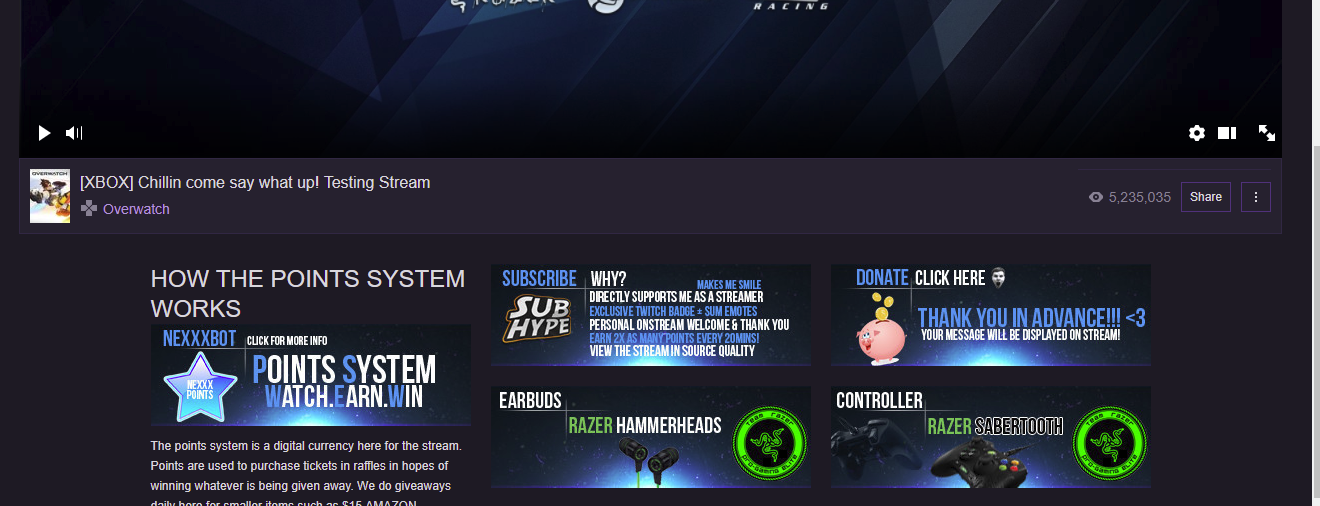
We've identified a problem with twitch chat servers affecting our chatbot, stand by while we investigate if they're under maintenance. https://t.co/zdeOdaMRGZ
 Twitter
analog forge
Twitter
analog forge
hey to be fair, twitch only breaks their back end on days that end with y
clever mango

misty wagon

weary mist
@analog forge haha, you know it 😃
hushed folio
@analog forge its almost like you know from experience 😉
next spruce
My !Giveaway command isnt working in my Twitch chat but all my other ones are?
ive disabled my default !giveaway one
clever mango
We've identified a problem with twitch chat servers affecting our chatbot, stand by while we investigate if they're under maintenance. https://t.co/zdeOdaMRGZ
Twitter
next spruce
ohhh ok cheers haha
 jagged thorn
bot's not working in my channel atm, anyone able to help a brotha out? https://www.twitch.tv/tacoosrs/
clever mango
We've identified a problem with twitch chat servers affecting our chatbot, stand by while we investigate if they're under maintenance. https://t.co/zdeOdaMRGZ
Twitter
jagged thorn
tyvm
weary mist
😃
 dull blaze
Hey! Is this where I go to get help?
weary mist
yes 😃
dull blaze
Hello!
I recently did a name/url change in Twitch and now I can't get my bot back in the channel
weary mist
log out os SE, clear cache on browser, and log back in 😃
it will refresh the token we have with twitch
dull blaze
All the points and stuff will still be there?
weary mist
yup
dull blaze
Ah! Great! Thanks
I was afraid to log out because I didn't know if I woul d be able to get back in
weary mist
😃
 hard trench
Hello , I'm a new streamer, and using Stream Elements. I have a few Questions:
- Can I make a custom command the notifies the follower that they got X number of {currency} for following?
- is there a command the will direct the viewer to the Stream Store?
weary mist
- yes, you can create a timer that says it every x minutes, or add it to the chat alerts module when someone followers, it would tell them.
- !store
stuck hamlet
Yes, and !items
weary mist
both work 
stuck hamlet
by default? im not sure
hard trench
Thank you for 2. about number 1, I meant as soon as a new viewer that press the Follow button for the first time, I wish to have a message that tells him a Thank you note and a text that says they got X {currency} for following. hope you understand what i mean.
stuck hamlet
you can set that up in the modules.
hard trench
ahh never got to that part...I'll check it out.
 chilly viper
@serene granite hey man 😄 sup! the bot isn't working for me! already tried part and rejoin, mute and so on... earlier everything was ok! help me please, i'm live right now 😛
clever mango
It's the middle of the night for him
We've identified a problem with twitch chat servers affecting our chatbot, stand by while we investigate if they're under maintenance. https://t.co/zdeOdaMRGZ
Twitter
chilly viper
@clever mango oh! thanks! 😄
clever mango
You're welcome
 winged sundial
was wondering viewers all worried about the sr lol
hard trench
I'm fiddling with the Modules now. on the follower section I wrote: " Thank you for following {user} 😃 You have received 150 ${pointsname}. " Do I need the $ sign? What the $ sign is meant for anyway?
proud pumice
looks like the chat servers are back to normal
bot should reconnect to all chats now
weary mist
yay
raven solar
Just in time.
hard trench
anyone for my last question?
weary mist
oh right, sorry
I don't think the $ is required for the modules
that is for custom commands if you want to use variables
 smoky tide
seems like the SE bot is unresponsive to commands in my channel for some weird reason.
clever mango
Restarting bot now
pine hemlock
Bot is reconnecting
pine hemlock
You can try that to skip the queue
smoky tide
all good. ty ty
pine hemlock
yes
smoky tide
damn you (beautiful) people are quick with responses ❤
clever mango
@hard trench the only available variable in the follow alert is {user}
toxic parcel
What can you expect.. its the best bot to be ever created
weary mist
@toxic parcel ❤
hard trench
@clever mango so {pointsname} will not work there?
clever mango
right
not for follow alert
It lists the available variables
above the box where the message is
weary mist
pine hemlock
I mean if you're just putting the name of the currency
why dont you just type the name of the currency
why do you need a variable

hard trench
Thank you guys
 last tapir
Any updates to the twitch chat integration error?
Wife is currently streaming and people keep asking.. ugggg
pine hemlock
You mean the bot not responding? its rejoining now.
hard trench
In the Tips and Hosts modules I should keep the amount on zero? The bot will correct it by itself? (according to number of host viewers, or the Tip amount) or do I need to change it myself?
 stoic geyser
Hi there! I seem to be having trouble using my command for SE's currency viewing in my stream. Any advice as to why or if I need to adjust something?
pine hemlock
@hard trench it will update itself
@stoic geyser we had some connection issues but the bot should be rejoining and you commands should work again
stoic geyser
^ I'm asking the same question, aren't I?
pine hemlock
Nah
 rustic glacier
why dont my commands work?
stoic geyser
Nothing yet.... 😦
stoic geyser
Ahhhhh.
 sharp elbow
bot down?
weary mist
should be coming back up
weary mist
progress, lmao
 fallen basalt
😦
raven solar
Thought they just resolved their issues?
pine hemlock
It should be reconnecting to chats now. This may take a few since it has many channels to join and it has to be throttled because twitch doesnt allow thousands of connections at once
toxic parcel
❤
raven solar
Awesome, thanks for the update.
pine hemlock
slowly but surely
 raven glacier
well, Song requests are working on my end, but no other commands
I'll just give it a few hours
pine hemlock
I would usually say part and rejoin it but that hasnt solved anything for me
so i dont advise
untold estuary
Didn't solve for me 😦
smoky tide
its ok....still ❤ u. And the fact that you guys are here easing our queries is great! 👍
 olive lintel
Twitch is experimenting with his new website. Go.twitch.tv this is the root of the problems.
weary mist
give it a bit, the team has been dragged by their hair out of bed, and are tied to the table till things are fixed 😃
pine hemlock

 astral epoch
tell them no spankings til its working scalper
lament blade
when will the bot be back up
weary mist
@astral epoch 👌
@lament blade as soon as the figure out how to get the fix in place. They are working hard at it 😃
sharp elbow
Thanks for yalls hard work ❤
misty wagon
Champs from 20 countries so always someone was just in bed 💤 5AM for me, good excuse to make a sandwich
 charred oracle
Just want to say thanks to all of Stream Elements staff and users! You are doing great and our stream is better each day with your community helping!! AmnesiaNightGame Loves StreamElements! 👾
weary mist
❤
lament blade
ty
 mystic girder
is streamelements stop working?