#helpdesk-twitch
1 messages · Page 121 of 1
 stuck hamlet
and are you sure SE is the one using a lot?
 radiant zenith
its showing cef-bootstrap using and extra 15% cpu
stuck hamlet
@viral siren Streaming software like OBS? Not likely at all.
radiant zenith
well 17 now =/ and that at idle
 viral siren
Would be cool tho change new overlay directly wich game you gonna play
stuck hamlet
Im not sure what you mean, but you can create multiple scenes on OBS and have mutiple overlays..
viral siren
in that way
stuck hamlet
@radiant zenith annnnnnnnnnd you're confident SE is the one using 15%?
radiant zenith
even with my removing bitboss browersource it stays jacked up 15%
 lament blade
If i make a donate panel button at the button where do i get the link to put with the button for stream elementS?
viral siren
like download new overlays directly and game on, on the program if there gonna be one i n the future
stuck hamlet
@lament blade https://streamelements.com/dashboard/tipping at the bottom ''Open My Page''
@radiant zenith try refreshing the cache of your browser source
viral siren
looking on overlays no one have done a marvel vs capcom infite yyet 😦
lament blade
@stuck hamlet ty
radiant zenith
first things i tried to do
viral siren
mostly game that i play
stuck hamlet
@radiant zenith https://www.onslaught.ca/s/rtg3t8gr.png this is your overlay on my OBS

are you sure you're using the latest version of obs?
radiant zenith
its up todate, weird why would it be going crazy like that then on my end?
 next spruce
Can you please explain "- More tokens for subscribers and donation variations" a little more? Where do I access these new variations/what are they? Cheers 😃
stuck hamlet
I can only think of System/OBS issue, but i really dont know 
I'm guessing you're using ''NEW OVERLAY2 - COPY''?
radiant zenith
no, selected exsisting source
 radiant zenith
ohh, yes sir
stuck hamlet
@next spruce default variations for the cup. just more images to them
viral siren
any twitch overlay also 😄
stuck hamlet
@radiant zenith Try removing the overlay and shutting down OBS
reboot and re-add, lmk
next spruce
ahhk thanks mate
stuck hamlet
Geek, this was my CPU (i5) when i tested one alert https://www.onslaught.ca/s/sAu0jog5.gif

Shouldn't really go past that ever.
especially on an i7
radiant zenith
right, its been working fine since ive been using se and then just out of the blue it started blowing up, didn't make any changes or update anything.. I even removed sources from the overlay
and that seemed to work
could their be any other reason why it could be causing that?
stuck hamlet
that seemed to work.
What exactly?
And I'm a bit stumped.. if you were to tell me you're using cup + KappaGen, that would be different. But just a few things like that, should never take that much
radiant zenith
removing the link from obs and shutting it down then readding it. dropped it back down to 0.2%
stuck hamlet
Oh okay good.
So this leads me to believe OBS was the issue. I cannot tell efficiently
 sterile panther
is there a way to set up a bit boss on stream elements?
stuck hamlet
We do not have a widget for bit boss, but are looking into the idea of it 😃
sterile panther
ok thanks!
 hybrid lichen
I'm trying to help a friend get his chat box working on his overlay ... he has the streamelements bot added to his channel and modded, but nothing is showing up, any suggestions?
twitch - quillbit ... he is streaming at the moment
thanks
 weary mist
@hybrid lichen a lot of time that can happen for a couple of things. either a token is expired, or he changed his username recently. Normally, a log out, and log back in will fix that
on the streamelements.com site
hybrid lichen
thanks I am going to get him to give it a try
nope no luck 😦
I wonder f we missed something in the set up ... we got the bot, created overlay, added to obs ... did I forget another step?
stuck hamlet
@hybrid lichen make sure the overlay is set to 1920x1080
weary mist
in obs
stuck hamlet
yee yee
weary mist
👍
hybrid lichen
thanks guys
stuck hamlet
no problemo
 weary mist
❤
stuck hamlet

hybrid lichen
now back to working on my overlay and stufff
 unique ore
Does the "My Points" page not work right now?
stuck hamlet
It does not, and will not. It's being killed soon. @unique ore
stuck hamlet

Maybe it'll come back.
But it was working and then the whole "revlo died" situation, the DB got too big to keep track.
unique ore
Lol
Maybe not make that page work in real time? Have it cache and only update fully when loaded for a user one every so many hours? Take some of the load off and as long as you put a disclaimer stating that it's not accurate.
Not the biggest deal.... But meh
 undone fulcrum
is there a donation goal bar available?
stuck hamlet
ah yes
 pulsar sierra
not exactly a normal question but would anyone know how to strip the videos of the alerts from templates out to be standalaone
stuck hamlet
what videos?
 atomic hollow
he means animated I think
stuck hamlet
so static alert with animated overlays
stuck hamlet
oh

now i understand what he means
just remove everything from the theme except the alert box 😃
 young coral
Is there a way to make a quote system?
stuck hamlet
we have a quote system
stuck hamlet
we dont have a page for it unfortunately
young coral
😢
stuck hamlet
for now, its all done through the bot
young coral
Okay cool, time to look through the bot stuff 😄
ummm is there a particular variable? or something?
 torpid wren
I'm working on subscriber alerts, when I hit emulate subscriber event it shows up as the dancing shark instead of the image I uploaded, but when I hit the 1 star next to emulate subscriber it comes up with my image. Is the dancing shark going to pop up when someone subscribes or the image I chose?
torpid wren
Do I delete the variation to fix it?
 pine hemlock
If you want the same image for all months yes
stuck hamlet
I would add your image + sound to the variation
torpid wren
Yay! Thanks ❤
pulsar sierra
weird question, do I need to install the google fonts to use them on stream elements? only a handful seem to work
stuck hamlet
98% of google fonts should work.
 ruby forge
Having an issue where all of my alert sounds get played twice. Any ideas? I only have OBS up so i should only hear it once.
New sub/follow sounds etc
stuck hamlet
Do you have 2 overlays open @ruby forge ?
ruby forge
no it was just on my ingame scene
stuck hamlet
yes yes, but how many SE overlays do you have on your obs with Alerts on them?
just one?
ruby forge
one overlay per each scene on obs
stuck hamlet
Go to each scene and on each overlay, right click, properties and tick Shutdown source when not visible
and then refresh the cache as well
pine hemlock
Refresh cache is lower on the properties
torpid wren
Why aren't subscribers showing in my recent events? Do I need to enable that somehow?
ruby forge
thank you ❤
torpid wren
Uhm, a month ago maybe?
stuck hamlet
have all your other subs shown up?
before today? or did you just notice the issue today?
torpid wren
I just got the button, someone subscribed yesterday while I was offline, I'm trying to repeat the event
stuck hamlet
ahh, sign out of SE and sign back in
we may not see you as an affiliate due to it being recent
this will update your account and your token, future subs should show up in this case 😃
unfortunately, the sub you got before logging out will not be recorded on our end 
torpid wren
FeelsBadMan Thanks for letting me know. 😃
stuck hamlet
No worries, if you have any other issue, please do let us know 😃
pulsar sierra
It seems to trip up on the "handwritten" style google fonts like permanent marker, architects daughter. Had a lot that wouldn't work
stuck hamlet
Hmm
pulsar sierra
would the template I was using be a factor? I can't think why it would, just very odd
pine hemlock
Some don't function correctly but its usually the ones with a number in the name. havent heard of your issue yet
stuck hamlet
@pulsar sierra Do be a favour, pick the font you want, click on the green part (basically the background) and hit save, reload the page.
Sometimes it bugs out like this.

mine seems to be working
pulsar sierra
worked a treat, thanks @Onslaught
pulsar sierra
while I've got you, any way to add an outline to text? Like a black outline, meme style, for weant of a better phrase haha
pine hemlock
I don't believe it's possible currently. Just shadows, sizes, colors, alignment, and styles.
pulsar sierra
cool, thank you both again
 lyric trellis
I am trying to center the text of my alerts over the webm file but it doesnt seem to allow this? is there a way to do this?

 lyric trellis
ill try that right now. thakn you for the suggestions
any way to preveiw fonts? sorry im new to StreamElements
or use custon fonts?
the text amrgin worked BTW thank you!
stuck hamlet
we use fonts.google.com
lyric trellis
thank you
viral siren
Are you guys gonna sell tshirts
pulsar sierra
next random question.if I incorporte gamewisp does that defauklt become a subscription alert?
pulsar sierra
Brilliant, thank you
 clever mango

 flat olive
so on the website when you get the overlay, it has an offline option. how do i set this as an image?
pine hemlock
What do you mean
flat olive
no the stream offline
clever mango
Can you show this with a screenshot?
Or are you using a theme and can tell us which theme?
flat olive
nevermind
 bright junco
Just added a "Tip Goal" to one of my Overlays and it is already saying £5 out of £500 has been filled in. Any way to reset this?
clever mango
@bright junco Click the data tab next to widgets
This can also be accessed from Activity Feed -> Widget Data
bright junco
Thanks! That worked! 😃
 quick mulch
Hello, It's me again. So I've been adding songs to my songrequest feature for my stream for when I go live. When I play the music, the streamelement isn't showing the song being played. These are youtube links that we are allowed to add to the song que. It used to work just find until about maybe within this hour perhaps? I dont know the exact time frame on that. Nontheless, When I play the music from the ground control it's not registering the song being played in the overlay feature. Does that make sense?
quick mulch
Well no not like that I don't think. I am doing the copy past link from the direct song page. The !sr youtube link. I can add them it's working on that. I can play them. It's just not registering the song. Make sense?
clever mango
Is the problem with the song playing or is the problem with the song name not showing in the overlay?
quick mulch
I just noticed the problem on it. When the Song scroll on my obs showed: no song. I then checked the overlay on the Stream element site and it's doing the same thing. I double checked to make sure I have song request checked instead of the other music options. Make sense? So the problem is the song name not showing in the overlay.
clever mango
Please remove and re-add the widget
young coral
:3 when you find what you need at the same time ask for help :3
quick mulch
Thanks friend. I believe that's fixed.
torpid wren
How do I adjust the sound levels on the alerts?
pine hemlock
Open you overlay on the editor, click on the alert box. If you click the cogwheel next to the type of alert, theres a sound volume slider for each

 clever nimbus
Is there a quote system?
bright junco
Any way to show what song is currently playing on the SE Ground Control software?
Using a youtube playlist
 cosmic elm
Is anyone else here experiencing issus with LP atm? None of my viewers are getting points atm.
pine hemlock
@clever nimbus !quote add
clever mango
@bright junco not with the playlist because of youtube API limit currently
pine hemlock
@cosmic elm try logging out of the SE site and back in
bright junco
ah ok thanks
 tight harness
@clever nimbus A page for it on the dashboard is on the ideas website 😃
pine hemlock
I don't think theres an import for quotes atm
clever mango
Currently there is no way to import commmands or quotes from a CSV. I believe the devs are working on it because of the BraneBot situation but we don't have an ETA yet. Manually importing is the only way at this time.
pine hemlock
The team uses this site to priorities new features, @clever nimbus - you're welcome to add a like to the idea for it to be a possible higher priority than our other ideas
https://streamelements.helprace.com/i242-quotes-tab-in-dashboard#item_comment_block_25544
 serene granite
https://streamelements.helprace.com/i192-wishlist-on-tipping-page
is there any service that has this feature already?
I'm trying to see what it looks like
clever mango
streamlabs has wishlist
serene granite
do you know of a streamer that uses it?
clever mango
I've seen it used but it's not super common
Let me see if I can find one that I'm following
serene granite
I see the way it works and looks on their dashboard, just wondering how ppl actually end up using it
clever mango
They usually add a wishlist panel
which directs to the tipping page where the wishlist items are
serene granite
this just doesnt seem too exciting.
 tawny vapor
If I have more than one timer the other ones will not process
weary mist
@serene granite it could be pretty nice if people can put their wishlist on there, and people can donate that way. Might see more people using it if it's provided
clever mango
@tawny vapor please screenshot this page and we can help https://streamelements.com/dashboard/bot/timers
tawny vapor
Where shall I post it?
 split haven
The image selected for my subscriber alert in the alert box widget is not working. All others work fine, but the subscriber alert goes back to the default dancing shark.
clever mango
Here is fine or you can DM me if you'd like
tawny vapor
popoftwo
I have disabled the top timer and re-enabled still does not work. I have changed the lines and time as well .. same results
clever mango
For the top timer, it will post when 67 minutes have passed while online AND 15 chat lines have been sent. When offline, it's when 60 minutes have passed AND 15 chat lines have been sent.
tawny vapor
I have set it to 15 mintues and 5 lines and still does not proc
and the offline is actually turned off
tawny vapor
i was streaming for 3 hours this morning and the chat was active but the second timer was the only one that proc
tawny vapor
ok
clever nimbus
Does song request have to remain open on dashboard for it to play the background playlist.
clever mango
yes, either the song request page with the youtube player or the ground control app (link in this channel's header)
tawny vapor
popoftwo 2nd timer
 velvet wren
Sup dudes, got an issue with my sub alert - it's not updating the image i want to use, even if i remove it and add it back. - any ideas?
stuck hamlet
Check the variation tab 😃
velvet wren
Thank you 😄
Too many options in Stream Elements (a good thing!) i just feel spoiled and get confused haha.
Coming from that other platform... which shall not be named.
 strong dock
every day i get up and refresh SE dashbord looking for 🕷 ... 🔜
split haven
@velvet wren I'm having the same exact issue
Stuck with Shark?
I've gotten it to appear once, then mid-alert it switched back. 😄
velvet wren
@split haven It turned out it was the variation alert, so if someone subs for 2 or more months it was using the default alert for that.
as @stuck hamlet said 😃
stuck hamlet

split haven
Oh these guys.
 tired forge
Anyone have any issues with an SE overlay not working properly within OBS and having to force refresh it?
split haven
With their reading comprehension. 😉
clever mango
We offer voice support 
split haven

clever mango
@tired forge What type of issue?
lament blade
Get started with your new overlay
Launch overlay
When I click it it's just a white screen
Help?
tight harness
That's because you didn't add anything to the overlay, white is the default background for browsers, if you add nothing to show up on your overlay then you're not going to see anything until either something happens like an alert for example or if you add something like an image or text to it
lament blade
How do I add stuff?
tight harness
In the overlay manager (the page with the green background)
@lament blade https://www.youtube.com/watch?v=X7XrDdRE7Fk Video guide here for how to do this 😃

Create an amazing overlay with StreamElements, watch our video guide to learn how. ----- Tipping page setup: https://youtu.be/eLzxRkq7tJo Add KappaGen to you...
tight harness
Do you know how to add a browser source in OBS?
tight harness
Right click in the 'Sources' area on OBS, click on BrowserSource, put the link where it says URL, set the Resolution to what the resolution of your monitor is (typically 1920x1080)
lament blade
Ok
tight harness
If you're having multiple Sources with an alert box (which the Super Themes do), you'll want to make sure that you tick 'Shutdown when not active' in the Properties (right click) of the overlay browser sources
 jolly flame
Yo, I've set up some store items with sound effects, I've tested them with OBS open and no sound effect played. Probably being really dumb but any reason why it didn't work? I'm guessing there's something else I need to do for it to know that a sound should be playing, like some kind of browser source?
tight harness
@jolly flame Make sure that you've added the Store Redemptions widget to your overlay in the overlay manager, this is how the sound is played
jolly flame
Ah that's the one, I knew there'd be something else  thanks
tight harness
No problem 
velvet wren
cef-bootstrap is using a shit ton of memory on my system - This is to do with the browser source in OBS, being caused by the Hype cup.
streaming at 4500kb/s | Very fast | 720p 60fps - OBS cpu usage while not streaming ~15-20% preview disabled.
Added the hype cup, while not streaming - 50% cpu usage, unable to start stream as it would just hit 100% and overload encoding.
Damn that Hype cup uses a ton of cpu...
Like, i don't exactly have the best cpu in my streaming rig - but the Hype cup uses more CPU than my Elgato HD60 Pro 😐
clever mango
It uses 5% cpu for me which is exactly the same as the other cups out there
tight harness
Also uses very little for me
clever mango
How many CEF-bootstraps are actively using CPU?
velvet wren
1 - at 1% cpu usage
If i add the hype cup to my overlay it spikes up to 30%
 twin thorn
 pulsar dune
Is there a way to have your youtube playlist on a loop in sonqrequest? Because it won't accept the YT loop selection. It just stops once it reaches the end of playing the standard songs. Which is a bit annoying.
 solar salmon
how do I delete my account?
velvet wren
I added hypecup to it's own overlay - The cef-boostrap process that is the Hypecup is currently running at 16-17% usage, 167mb of memory.
 swift parcel
thats awkward for the cup to do that does it have stuff in it?
clever mango
@velvet wren I have an i7-6700k running a fully animated overlay with scrolling text and the animated hypecup
velvet wren
Must just be my i5 then, ill run without the cup.
clever mango
Try 30fps or lower bitrate or upgrade hardware
tight harness
@pulsar dune It does not loop, Youtube allows you to pull 200 songs from the playlist, you can shuffle the songs by clicking on the shuffle button at any time, this shuffles all of the songs into a new order, what I do is shuffle it until the current song is a very low number, then it's essentially back at the start but in a new order
clever mango
@🎃 𝖙 𝖗 𝖎 𝖈 𝖍 👻#9991 Accounts are not able to be deleted
tight harness
If you mean unlink your account from Twitch you can do that here: https://www.twitch.tv/settings/connections @solar salmon
clever mango
^
tight harness
But as TerraBuck said, there's no way to "delete" an account
solar salmon
I don't get why that is...
I mean, I input info...why does that now somehow belong to you?
it's ridiculous
tight harness
We can ask the staff if it's even remotely possible from their end but there's no way for you to do it yourself
 dense wing
Hi... I'm having some issues with viewers getting points. I have it set to 10 pts per 10 min, and my subs get x2 so they get 20 pts per 10 min. But my subs in particular (not sure about regular viewers) are going on like 30+ minutes with 0 point gains... does anyone know whats wrong?
tight harness
@dense wing Could you try logging out of the StreamElements website and logging back in to start with? 😃
dense wing
Ok, I've done that. Hard to tell if it's working properly again tho, and unfortunately I'm at the end of my stream so I can't go testing for another hour to see if it's functioning properly 😦 It does still give some amounts of seeds, it just wasn't giving it every 10 min like it should've (someone who was trying to check on his points: "did one at 22:11 and i got 20 since the previous 10 mins, 22:26 no seeds, 22:37 no seeds")
tight harness
@dense wing That normally fixes loyalty stuff 😃
dense wing
Okay, great! 😃
bright junco
Do you guys have any donation thing where instead of money the viewer can buy items for the streamer from a list? Like a wish list
clever mango
We were actually discussing this just a few hours ago in this channel. Is this something that you would use or do you see other streamers using it?
 midnight plume
I use to use streamlabs, and i added some donations into the stream elements tip part, and i want it to add it to the overall tip goal, how do i do this pls? coz its just showing the ones i receieved when i started using stream elements !thanks
clever mango
Two places to edit your widget data ...
Activity Feed >> Widget Data
In the editor click on Data tab in the top left
midnight plume
hmm sorry im on widget data, then what do i go to?
clever mango
Goals
midnight plume
ahh okay got it, thanks so much!
bright junco
@clever mango i've seen a few streams using the wishlist feature
this is the sort of thing i mean
those guys have it
It just donates the said amout and has an alert like the Stream Stores Redeem feature
to say that person has bought it
I used to use that but moved everything over to Stream Elements
clever mango
Right, we're just not sure it's a feature that many are using so we'l like to come up with a better, unique way of going about it. The wishlist idea is on the ideas board so if you have any suggestions or feedback feel free to add a comment on the idea.
bright junco
Will do!
clever mango
Would you want it to be exactly like SL wishlist? I just don't see many streamers using it....
bright junco
I did not mean everyone uses the SL wishlist i just meant like that as an example
I just think it would be a good idea but if people want other stuff over the wishlist thing that's cool also
clever mango
Just using them as an example since they were mentioned in the idea
clever mango
It's definitely something that the team is looking at right now
bright junco
Good stuff
unique ore
@clever mango @bright junco the labs wishlist isn't a bad idea. The only way you can really improve on it is if you can tie into actually buying the item directly for the streamer. But their implementation is good. I used it when I was using their service
clever mango
As I mentioned before, no idea is a bad idea. However, some ideas will be useful for thousands whereas others might only be used by a limited numbers of streamers. That has to be considered when planning new features 😃
bright junco
I agree 😃
unique ore
Right. I was just adding to the conversation on it.
clever mango

unique ore

 molten raft
Hey I just recently changed my Twitch.tv name and now can't get the bot to connect to my chat. Any thoughts?
clever mango
log out and back in on SE 😃
molten raft
tried that
oh
got it workking
parted channel, logged out, logged in, joined channel
clever mango
yep
molten raft
Thanks!
 drifting steeple
So coming over right now from StreamJar, I notice that as I made the overlay similar, CEF-Bootstrap uses more CPU by far on StreamElements.
I'm on an i5-4690 and I understand that its not the best in the world at this point in terms of basics, but how is it that an overlay, I am getting 1.2-3% on idle, but 8.5-12% on idle on a StreamElements overlays?
(Idle means nothing active or showing other than static images). Otherwise, it seems with animations, I seem to gain 2-8% of usage so far which is about expected. Just wondering why the high use otherwise
clever mango
DM your SE overlay link. Do you only have one added to OBS?
drifting steeple
HypeCup seemed to add another 3% even when nothing is going on yet as well and it doesn't even have physics on.
sure.
Also, to be clear, I did try the overlay on 60 FPS, but it was using almost 20% on idle.
clever mango
So this overlay is static image(s) and your event list. Anything else?
drifting steeple
hm. Ok, let me test
clever mango
Try this...
drifting steeple
wow that was it
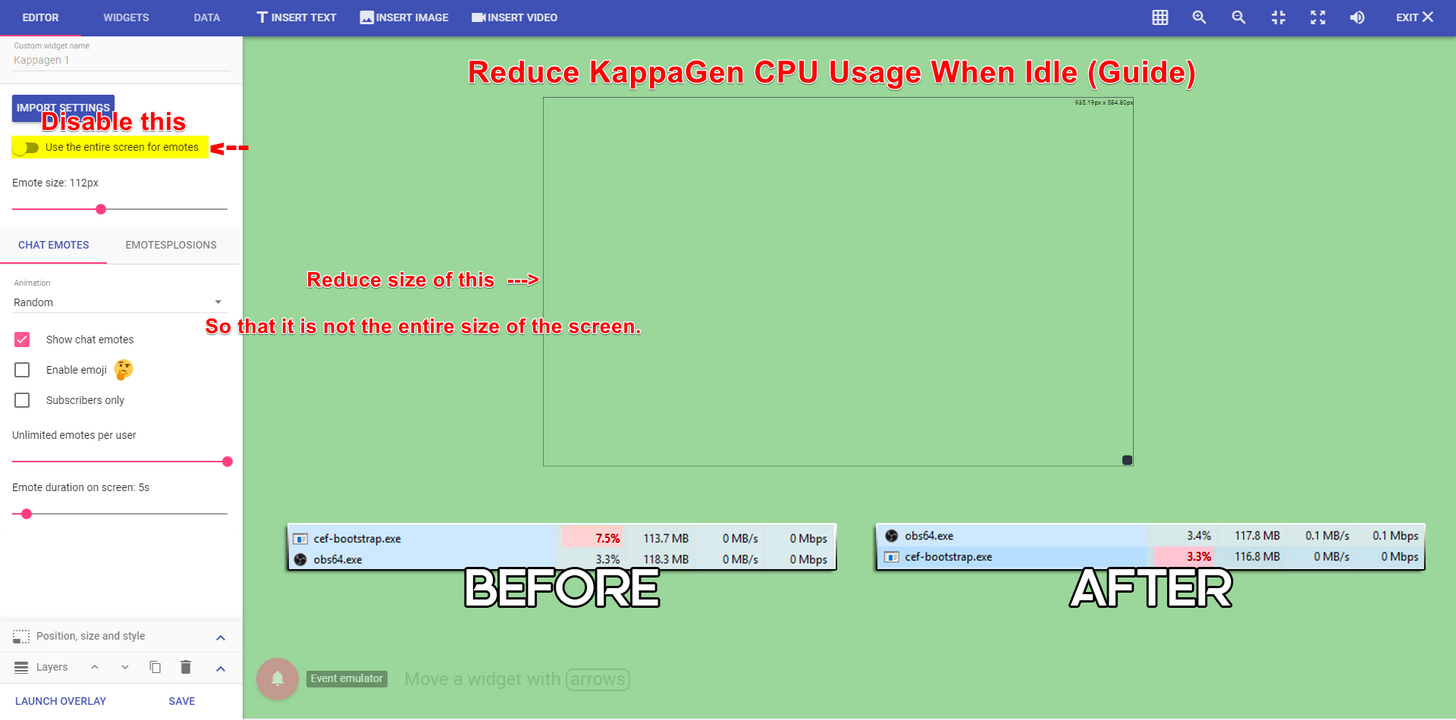
so kappagen on idle uses a ton. Is it just doing invisible animations then?
clever mango
I mean I'm idling at 3% with an i7
It could be
I honestly don't know how it works
drifting steeple
cause testing various single emotes, it was only going up by about 2% at most. A Kappagen explosion seems to only bring it up by 8%.
and that was waiting about 10 seconds in.
clever mango
Kappagen can be used with lesser CPU's with these settings https://i.imgur.com/MqEhoQF.png
 drifting steeple
Alright. I'll give it a shot. Otherwise, I'm impressed with it so far. Thanks!
 abstract dome
clever mango
abstract dome
clever mango
It loads perfectly fine for me
clever mango
clever mango
have them try chrome
@drifting steeple your alerts scared the absolute crap out of me until I realized it was still running the overlay in OBS 
 thorn loom
HELP. im trying to set up my overlay and there is no browser link option
how do i get that?
clever mango
Are you in the editor?
thorn loom
in obs
clever mango
Do you have the link?
thorn loom
yes
thorn loom

tight harness
When you install OBS Studio it asks you if you want to include BrowserSource with your install, yes you do.
clever mango
You should see this @thorn loom
clever mango
tight harness

pine hemlock
 real ore
Anyone else having trouble with the streamelements overlay page? It's being really laggy for me
swift parcel
Like going to edit it through a browser?
real ore
that and just navigating around my dashboard is really laggy
tight harness
Not noticed it being laggy myself
real ore
Maybe it's because I'm in chrome?
swift parcel
Ive noticed it become laggy if I spend a lot of time in the editor and on chrome as well
usually just restart the whole browser
tight harness
We actually recommend that you use Chrome so it won't be that
pine hemlock
@real ore Try turning off hardware acceleration in chrome
If that doesnt work try downloading the chrome beta. The latest chrome update is causing some issues with certain pcs and our editor
 frozen skiff
Alertbox as a whole doesn't seem to be working at all, is it bugged atm?
Hosts and Follows work, nothing else does. Any fixes?
 hushed ferry
Any way to add a playlist to song requests like in Nightbot? then viewers can request songs.
clever mango
Not currently @hushed ferry Check out our ideas board where I believe that feature has been requested https://strms.net/ideas. You'll be able to add your ideas, upvote others that you like, and track their progress via email notifications
@frozen skiff It should all be working. Probably just a setting in the alertbox
 echo hound
Is Streamelements planning on doing a Twitch extension like Streamlabs does?
clever mango
Yep, stay tuned
clever mango
I haven't been given details yet
If I were to approximate an ETA I would say sometime this month
 limpid token
hey, anyone ever have a problem where only 1 alert will play in OBS, and then won't play again until the scene is switched?
the alerts play fine in the launched overlay window
 quasi grove
I'm having alot of problems getting overlays to show up on my OBS -- I've already watched the how-to video a few times, but I still can't get it to work & I don't know what I'm doing wrong
clever mango
I can't say I've heard that before @limpid token
limpid token
😦
clever mango
Did you make the overlay or is it a theme? @quasi grove
quasi grove
I took the theme & made it an overlay, then tried to put it into OBS as a media source, but nothing shows up on-screen. I've also made sure its visible & set as the top layer
clever mango
which how-to video?
limpid token
yeah which one, the one i see on their site says browser source
clever mango
Overlays use browser source
Media source would be for a local media file
You'll need to reinstall OBS
quasi grove
nevermind, it does say browser source
quasi grove
is there a way to try & update it without re-installing?
clever mango
If you don't see browser source, it was never installed
quasi grove
Oh, okay. Thank you, I'll try that
It's downloaded & I now see the option to add a Browser Source -- thank you!
limpid token
😃
weird, so, an uninstall with removal of settings fixed it, then soon as i closed OBS and reopened it, it started doing the same thing again
clever mango
DM me your overlay link please @limpid token
 lusty delta
Hello everyone! I'd like to grant access to my trusted mod to edit commands and other stuff in my Stream Elements. Is there any way I can do that without giving him my token?
 slim cairn
Ofc @lusty delta
Go to the dashboard
On the side menu go to user management
Press add new super mod and then he should be able to edit commands
lusty delta
Oooo, how to I share with him my Stream Elements? I just give him the link and he can start typing in new commands?
slim cairn
@lusty delta Currently stream elements doesn't have a feature for him to access the dashboard
clever mango
Soon
slim cairn
But he can do it manually with a command
!command edit (command) (what to edit to)
Or
!command add (command) (what you want the command to say)
lusty delta
Alright, thank you! I'll be waiting for the day when mods can come on to my dashboard :3
clever mango
That will be a big day for all of us and it's not far off 😃
 vale anchor
I just watched the Hype Cup vid - where do I enable those nifty animations (on the cup itself)?
vale anchor
ah, ok, got it
 terse canyon
hey doods, can yall give me an explination on how to do polls and giveaways using SE and the bot?
 sonic canyon
As we are coming from Branebot I'd like to ask if there is the import feature added already? I have gotten our quotes, currency and watch time infos as well as our commands. Any way to quickly just import these .csv files?
I cannot find Branebot under the import settings. Will this be added soon?
 west gull
Is it possible to have multiple users be able to access the website to help assist with importing and remaking all of my overlays?
stuck hamlet
@sonic canyon the only thing that you could import from brane would be points
@west gull we are currently working on dashboard access, but not available yet.
sonic canyon
Will there be extended import options added for former branebot users?
stuck hamlet
@terse canyon poll can be done through the contest tab. We have a command called !bet to go along with it.
I don't think so unfortunately, the devs are quite backed up on work currently. I will ask around tho.
west gull
Well, I will most likely be moving to StreamElements right after I can get help from the original creator of my overlays, even importing them from stream labs did not recreate my existing alerts very well. Thanks for the help though
 deep brook
usernames are always lowercase throughout SE, is this ever going to be fixed?
stuck hamlet
@west gull could you explain what broke from the import?
@deep brook I don't believe that's a bug. We just use Username instead of displayname.
west gull
I imported my entire alert box, and all of the custom images, and none of the settings were recreated, tried to do it twice if thats imprtant
stuck hamlet
You could request the change in #💭︱feedback-and-ideas + our site for it
west gull
and it didnt even create the new overlay like your guide says it would...
stuck hamlet
SL sometimes changes their API slightly to mess with us I believe m :/ so this might of been the cause. Let me hop on my PC and check it out with you 😃
Could you try again @west gull The import is wortking on my end.
west gull
Just tried again, still nothing it says "import successful" then there is no new overlay created
 west gull
tried on firefox and chrome, both with no success
stuck hamlet
Our site is built to work best on chrome, so when navigating the site, its best to stick with chrome.
but if you say you tried with both :/
west gull
I was able to successfully import my nightbot with no issues, streamlabs just isnt working
stuck hamlet
Could you sign out of both services and sign back in to SE, and try again?
west gull
I can give it a shot
stuck hamlet
if this doesnt work, i will have a dev look into your issue specifically.
west gull
Still nothing, I had all this setup in streamlabs, and just want to get rid of the tons of sources
stuck hamlet
Ill have to get a dev to look at this, i dont understand why you wouldnt be able to import. :/
 scenic nova
Hi A question about subscriber alerts in Alertbox. I'm asking for a streamer who just had the alert flash on and off screen during the alert time. Is it because of a custom animated image on it?
west gull
Thanks for the help @stuck hamlet I can work with what I have for quite a while
scenic nova
A link to the vod showing the issue: https://www.twitch.tv/videos/179087983?t=02h28m03s
 stuck hamlet
let me have a look 👀
@west gull devs are in office in an hour 😃
@scenic nova so the issue is it blinking?
scenic nova
Yes, the same image was used in streamlabs previously and it never used to blink like that
stuck hamlet
Do you know if the file is a webm, or a gif?
scenic nova
its a gif
 crisp kestrel
hello and good morning, does SE have the alert box that shows history of follows tips etc ?
stuck hamlet
Id love to get the file to test with it @scenic nova if possible
does this happen everytime?
or just this once?
We have an activity feed yes, we have a widget for recent tips and follows, yes. @crisp kestrel
scenic nova
thats the first time we noticed it. We're still transitioning to your overlay system
crisp kestrel
@stuck hamlet whats its name?
stuck hamlet
the widgets? recent follows, recent tips
crisp kestrel
so its not like a box that it has them all together
stuck hamlet
im not sure what you mean 
crisp kestrel
like: Name1 - FOLLOW, Name2 - HOST, Name3 - TIP etc
crisp kestrel
i think yes 😛
scenic nova
@stuck hamlet this is the file
stuck hamlet
so all the recent activities in one widget, for your overlay @crisp kestrel ?
crisp kestrel
yeap like "history" box
 polar eagle
Is there any way I could implement a custom quote system? Or add another one it would be usful to have two of them. If not no big deal. Just wondering if anyone knew of a way 😃
stuck hamlet
@polar eagle You could find an external site that does quote system type deal and you could make an api command for it.
I know one of our champions had found one, but im not sure what it was called.
@scenic nova do you know how long he'd like the alert to be?
scenic nova
he said 25 seconds please @stuck hamlet
scenic nova
We have a song that plays with it
stuck hamlet
does he want it looping? or just play once and stay there
scenic nova
play once and stay while the song plays then fade out
stuck hamlet
aight
west gull
I got it to the point that I was able to recreate all my alerts, just wasnt able to import it
west gull
Not anymore, just dont quite understand why it wasnt able to be imported
stuck hamlet
I don't either, ill definitely poke the team
 untold estuary
Is there a way for me to display "X number of subs needed for new sub emote" that does not require manual labor? Or is there no Twitch API that can pull this data?
serene granite
there's no twitch API that gives sub points status, only total sub count
stuck hamlet
there's no endpoint for that, we would have to calculate it manually, which twitch wouldnt like us doing :p
lament blade
Hello how do I get from these overlay only the Allter box? Just make an overlay for me
stuck hamlet
Please don't link your overlay.
Just talk to us, what would you like exactly?
You just want the alert box from a theme im guessing?
Just remove all other layers.
lament blade
Well I would like to have the Allert address of this overlay which is yes of SE
ah okj
ahh ok thx
pine hemlock
 muted heath
can i somehow change when my viewers become regulars ? ican not find this option
pine hemlock
Pretty sure you have to manually add regulars
muted heath
oh, can mods in my channel also do that ?
stuck hamlet
Super mods can, or you can change the level of the command to just mods
'!level' successfully set ${user}s level to ${2}, you can reset it with !level ${user} reset
this is the command you're looking for 😃
muted heath
thanks alot ! 😃
stuck hamlet
no problem 😃
stuck hamlet

muted heath
hehe , ok ! 😉
 ornate lichen
Hey one of rgs' supporters said this:
SE donation page is really not mobile friendly. It wouldn't scroll for me. I had to request the desktop version of the page just to see anything. And it still went right back to the top of the page whenever I started typing. With my keyboard blocking half the page. So I couldn't read what I was typing. Also, it wouldn't let me change the display name, which is less fun.
stuck hamlet
if it didnt let them change the display name, thats because she has force users to log in enabled
Also, we are aware of the no-scroll and are working to fix this.
The person that was having these issues, were they using chrome?
ornate lichen
I would assume so, but I'll ask to make sure.
stuck hamlet
You know what they say about assuming right? 
ornate lichen
I meeaaannnn most of us use chrome Kappa
stuck hamlet
ye ye
ornate lichen
Yup he confirmed it's Chrome.
tight harness
Chrome is what we recommend 👍
 runic sigil
Hi, can you tell me if in the streamelements have any coomando that looks like the ankhbot heist?
Another question, why does not the browser's automatic translation option appear in streamelements? It would help me a lot.
stuck hamlet
We don't have bank heist, but are looking into making one.
and we are also working on translations.
 silk patrol
@runic sigil the automatic browser translation is integrated in your browser, we don't have anything to do with that. To bring it back, you can right click on the page, and you'll see a translate option
runic sigil
Thank you @stuck hamlet !The people in my live really like the heist.
Thanks. I saw it here @silk patrol
muted heath
i have playlist playing in my ground control, but in overlay its says "no song" am i using wrong command ?
silk patrol
@muted heath If it's the backup playlist, we can't pull the title from this
muted heath
oh, so can i put like 50 songs playlist into Q ?
silk patrol
sure
muted heath
but, if viewers gonna sr one, its gonna be on top of my requested songs ? 😛
silk patrol
it should be added to the botttom
muted heath
eh, hopefully you will add option to read backup songs too 😃
silk patrol
@muted heath this is due to Youtube API limitations, nothing we can do about that right now
muted heath
kk, thanks for info !:)
 wooden grail
Is there any way to reset the cheer goal tracker? Since this is a new month I'd like to restart it.
stuck hamlet
you can do so either in your overlay on the "Data" tab, or in the activity feed, "Widget data"
wooden grail
Beautiful! Thanks so much @stuck hamlet
 foggy dome
Hi
silk patrol
@foggy dome 
foggy dome
Could you help me?
stuck hamlet
I could, depending on what you need
silk patrol
@foggy dome just ask and we'll do our best
foggy dome
Ok, thanks
My first question is, could we implement one of the bots into our discord?
stuck hamlet
we don't currently have Discord integration
foggy dome
Ok, thanks
My second question is, how can we set up a shop with this bot?
Like A twitch shop
Where you can buy stuff with twitch coins
stuck hamlet
you would set the shop up on our website, and people could redeem through the bot
foggy dome
Ok, how easy is it to set up commands for the bot?
silk patrol
easy peasy lemon squeezie
foggy dome
How many possible commands are therw?
silk patrol
as much as you want
foggy dome
So we can make it to where you can do like, "!punch
You have punched blah blah blah in the face
stuck hamlet
yes
silk patrol
that's like the most basic command 😃
 misty wagon
Add a counter to make it a thing 😛
silk patrol
⤴
quick mulch
Hello Everyone it's me again. Having a bit of an issue with the widget system it seems. I logged on to get the stream ending overlay together and placed how I wanted it. The thing is I noticed that the song playing was still showing, and I've had ground control closed over night. Also doing the recent sub for the followers instead, when adding that widget, canceled out the song playing widget in a way of just shutting it off. I tested this buy turning on ground control to allow the music to play and see if it would trigger the widget to go ahead and show the music playing. Well it didn't. So what I did is just now delete the widget for the songs being played and added it back, fixed it's position and the color and when I did that see...well my followers widget was canceled out and I'm having to remove that widget and replace it again and such. Is this normal?
tight harness
Never heard of that before, very weird
quick mulch
Yeah it's acting pretty strangly
stuck hamlet
tested this buy turning on ground control to allow the music to play and see if it would trigger the widget to go ahead and show the music playing. Well it didn't.
was it a requested song?
ruby forge
so i followed @stuck hamlet s instructions on refreshing cache in obs and im still getting double notification sounds
stuck hamlet
I also told you to shutdown your source
ruby forge
yeah i did that
stuck hamlet
and you insisted you had it done
well then it's impossible to hear to, you should verify. 😃
ruby forge
Its weird it doesnt actually show the alert twice but plays the sound twice
tight harness
Unless you have 2 lots of OBS open or your Overlay Manager open 🤔
stuck hamlet
That's because it's playing on another scene.
silk patrol
@quick mulch Ground control is basically a copy of the website, so the current song will still be displayed even if ground control is closed. As long as you have a song in the queue, the title will be displayed
ruby forge
i just triple checked everything you told me 😃
silk patrol
@ruby forge you have clearly missed one
quick mulch
@Onslaught @silk patrol Well yeah I'm all well and good for the songs on que to still be showing. That's not the issue. The issue is the widgets canceling out eachother when their added.
silk patrol
@quick mulch do you save everytime you change something? I've never seen this issue
ruby forge
they are all checked
stuck hamlet
and you're sure there isnt another?
foggy dome
I have another question
stuck hamlet
and you're sure you've hit refresh on all?
ruby forge
yes sir
silk patrol
you need to check every browsersource, in every scene, not the just one from a specific theme
foggy dome
I have a question
ruby forge
yes i did that @silk patrol
stuck hamlet
just ask @foggy dome
foggy dome
Ok, where can I find the download for the bot?
stuck hamlet
You cannot download the bot.
foggy dome
Oh
stuck hamlet
It is all in the cloud.
stuck hamlet
To your twitch channel?
foggy dome
Yes
stuck hamlet
on your dashboard, on the right
"Join channel"
@ruby forge Would you like to teamviewer?
foggy dome
Ok
ruby forge
sure let me install it real quick
quick mulch
Let me explain it this way. This overlay I haven't put it on obs yet. This is still on the site. I'm working on the stream ending over lay from the theme I have picked. The text for sub I've changed to follower, because I'm not affiliated or partnered. I can only do followers. So that's changed on text. Subscribers is removed. Text put in its place for Followers. Then the widget for followers is added. When that happened it canceled out or rathers topped the widget for the songs. That's when I though I might have needed to open ground control and see if the widget for songs played would trigger to show again. Like I said it didnt'. Ground control is now shut off as I presently don't need it open. I only opened to test it. So right now it's closed again as I noticed it didn't trigger the widget like I thought it might. So I did what I was requested to do yesterday, remove the song playing widget and add it back. Fixing the position and color, saving it ofcourse. But then noticed that my followers widget stopped working. So I was like what the heck is going here. Thus my reason for contacting you.
silk patrol
@quick mulch using the sub widget for follows make no sense as it will pull subs data, so the text will never be updated. All text labels exist for follow, sub, tips, etc. Why not using recent followers?
strong dock
 🕷
🕷
ruby forge
alright @stuck hamlet ive got it installed should i pm you?
stuck hamlet
sure
quick mulch
No mate. The sub widget is removed and the followers widget is put in it's place.
foggy dome
I'm about to get the bot. Thanks guys for all of the help you have provided
stuck hamlet
Seems to be working for me: https://www.onslaught.ca/s/om56keif.gif
 quick mulch
Ok now see this is what I just had to do. Go to my activities feed and click repeat.
and now it's showing like it should
stuck hamlet
it has been working, i was trying to figure out what you meant..
but since i logged on to your account, it was working
stuck hamlet
maybe just a visiual glitch, hit save and refresh next time, it might fix it. (lets hope there is no next time)
silk patrol
@quick mulch btw, are you on chrome? just making sure
quick mulch
I use chrome now yes been using chrome for the past year.
silk patrol
ok great
quick mulch
Buy the way i'm really glad youguys have this service now. I like the animations already done it beats trying to have multiple platforms open like rainmeter and all that. I've had like 5-6 things open and it's been so laggy. Now it's just stream elements and hopefully I don't have to have stream labs open for it to register the tips or anything. It would be a true blessing to just have the game, ground control and obs open.
 ancient prism
you could always move tips over too
 lilac aurora
I'm new to StreamElements, came from StreamLabs.
My issue right now(yh, it's nothing too serious):
On my most recent donations, it shows old ones, instead of the... well, more recent ones.
Anything I could do to fix that?
tight harness
Yeah, you can change all of your session data here: https://streamelements.com/dashboard/session
silk patrol
@lilac aurora Your donation link on your twitch panel is still set to muxy. If you want new tips to appears, they have to go through us, we don't pull live data from other platfoms
lilac aurora
Oh damn, there actually is a good way to manually fix it
Still on the setup, thanks for the headsup 👌
silk patrol
you're welcome 😃
 serene granite
are you using google chrome?
 chilly veldt
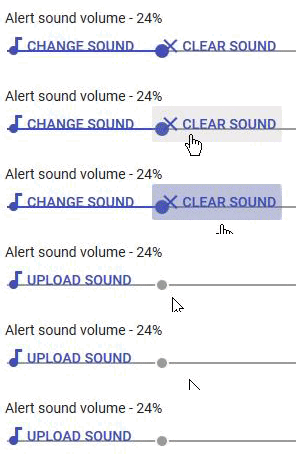
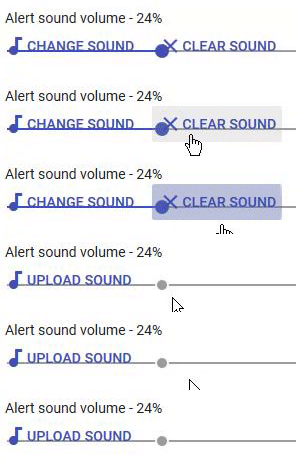
so once the circle is underneath the clear sound button, I can't access it anymore
Firefox
serene granite
please try with chrome, as our entire system is developed for chrome
OBS browser sources are chrome, etc.
chilly veldt
don't have Chrome
I can just remake the command anyway, just figured I'd mention this in case it's not known ^^
tight harness
It's known, as hectic said our website is developed to work with Chrome, the fix is to use Chrome 😃
 eager otter
How do I add a default theme video object back??? i acadently deleted it 😦
Something like this but for itips
tight harness
There's no undo if that's what you mean
eager otter
Can I add it back?
tight harness
When you add in a theme it adds in all of the assets for it, they're not saved individually
silk patrol
@eager otter as long as you don't save, you can just hit exit and open your overlay again
 ripe herald
@eager otter
velvet wren
Can i ask a question that isn't really to do with Stream Elements, but to do with Twitch itself? Since there's a ton of people here that might know the answer.
 brisk flint
Hi! Is the store item redemptions lookup working? I treied to filter some redemptions from my store, but I could not get any filtered result from the search function. I tried many things, but could not find out how it works.
I mean redemption history.
silk patrol
yep doesn't seem to work, nothing happens when you hit search
brisk flint
I can see in the history only 3 months old redemptions. Is this "log" cleaned up somehow? Like only 3 months old redemptions are searchable? Because I missed one important one, where I should send a mug to somebody, but it was actually in 2017.06.02 😦 And the viewer just now complained that he did not get the mug.
silk patrol
@brisk flint have you tried switching pages using the arrows in the bottom right corner?
serene granite
@brisk flint note that the list is separated to two
redemptions that were approved under https://streamelements.com/dashboard/store/redemptions/history
and the waiting to be approved/declined under https://streamelements.com/dashboard/store/redemptions/items
 fluid blaze
I need help with the stream store thing, if someone redeems the product, how does it popup on my stream? Where do i find the url? Thanks for help 😃
 hollow zinc
In the overlay editor you'll find a widget called Store redemptions
add it to your overlay, and if you've checked the "Redeeming this item shows an alert"
It will show every time that someone redeems an item of type "Stream perk"
Items of type sound effect play the sound effect immediately.
but you still need to have the widget for that to work 
fluid blaze
When i add the widget, there is a gift, but how do i add the one i made before, in the stream shop?
hollow zinc
The icon and text will be replaced with the correct data once someone redeems an item
fluid blaze
When I buy the product, it doesn't show up in obs for some reason.
But it comes up in the overlay editor
fluid blaze
@serene granite That was the problem, I forgot to save it, thanks for the help everyone!
tight harness

atomic hollow
brisk flint
@serene granite, @silk patrol for sure I tried 😃 And I know that there is 2 kind of lists. First I thought I will search in history, but search seems not to work at all. Then I searched by my eyes, then realized, that it looks like only 3 months old history are saved. I woundre is it true?...probably, but then I lost some data...does not matter.
quick mulch
Hello it's me again and not sure what I am doing wrong. It's about the Stream Elements twitter moduel. I have it enabled. I've tested making a tweet on twitter and it's not registering on the twitch channel. I can though make a post on my twitch channel and it shows on my twitter. What am I missing or doing wrong here?
 trail walrus
Can I change my tips to come in £ instead of $?
Am dumb
please ignore me ❤ love you all
serene granite
@brisk flint i doubt data is only saved for 3 months but its possible, will need to check
@quick mulch did you follow yourself in the module's settings?
quick mulch
no
serene granite
that's what you're missing then 😃
silk patrol
@quick mulch you have to put the twitter handle you want the bot to post in the twitter module. Also don't forget to press enter when you type a name, and it has to be in lowercase
@brisk flint the search filter is clearly not working, i'll report it.
quick mulch
Thanks guys it works now.
I'm usually pretty savy but. I'm a noob to alot of things.
 marsh niche
Ayone around for a little support?
tight harness
We're always around 😃 what's up?
marsh niche
Amazing!
I'm having some trouble with adjusting the volume of SFX in the redemption store!
No matter what I set it to, all effects seem to play at max volume
tight harness
You know the Overlay Manager? On there you added a Store Redemption widget, when you click on that you get options on the left hand side, one of those options is 'Alert Sound Volume', this is a slide bar, adjust it to your preferred volume and then click Save 😃
marsh niche
Holy @#$# hahah DUH
You're awesome. Still getting used to overlays and this whole streaming thing. Thanks so much!
tight harness
No problem
marsh niche
Oh wait. That only solves half the problem.
tight harness
What's the other half of the problem?
marsh niche
Im' trying to adjut the sound of each individual redeemable within the store. It looks like that slider in the overlay editor is for a different type of store event, because it won't let me adjust the slider at all.
So like
That's what I'm trying to adjust.
trail walrus
tried a different browser?
serene granite
i think the sound bar on the store item is relevant for sound effect items only
not sure though, give it a try
marsh niche
That's what I'm looking for. I'm trying to lower the volume of sound effects redeemed.
I'm finding when they use the command in chat it's a bit too loud, but changing the alert sound volume in the screenshot doesn't seem to change anything
tight harness
The thing I suggested is meant to reduce the sound of all sound effects which it sounded like is what you wanted, because you said they were all very loud at max volume
marsh niche
Okay, that would definitely be perfect. But yeah, all options in the panel are greyed out and unuseable. Maybe it's because I don't have any other redemptions available other than SFX?
"The alert settings apply only to items of type Stream perk that have Redeeming this item shows an alert enabled."
tight harness
Ahh that'll explain it, so that option only affects the sound played when somebody redeems an item you have to deal with manually, that does make sense, the reason I thought that'd change the overall volume is because you need that widget for sounds redemptions to play but as it explains it's separate
So what you were doing in your screenshot is right 🤔
marsh niche
Okay cool yeah I think we were both just havign trouble communicating what my actual issue was.
So yeah, I went into the store and checked out the sound volumes individually, but even set to 30% it doesn't lower the volume when they're used.
tight harness
Mine is normally at 50%, I lowered it to 10% and saved it then gave it a test and it was still the same volume 🤔 I'll ask around and see if anybody else knows about this
marsh niche
Yay bugfixes! ❤
Thank you!
By the way, I think it's just a levels thing? I dropped mine down to 5% and it did lower it a little bit, but not much
tight harness
Yes, there's a part in the bottom left of the Overlay Manager for emulating alerts/events
It's got a bell icon in a pink circle and it says 'Event emulator'
 true bobcat
Ohh ok I see it thank you!
tight harness
No problem 😃
true bobcat
Man I’m having trouble... I have it playing a gif but I only want it to play once... not loop like it’s doing
lament blade
How do I change the names of dule etc.
true bobcat
When I created the gif in photoshop I have it set to only play once
tight harness
@lament blade You can change commands, check your commands page and look for !duel https://streamelements.com/dashboard/bot/commands/default
lament blade
thanks @tight harness
marsh niche
Thanks for your help @tight harness . I did get it to work, but it just looks like you gotta bring them down realllly low.
If you want me to PM you videos of the differences, let me know.
tight harness
Still seems weird, I've told the others anyway 😃
true bobcat
Is there a font preview of all the fonts that stream elements used?
Every time I switch fonts the editor locks up for about 30 secs... it’s hard to preview them all
pine hemlock

We use all those fonts
Also you can try turning off hardware acceleration in chrome, may help
true bobcat
Ok thank you!!
 scarlet pier
Hello guys, is there a way to set the currency games like a "currencyraid" ? like the heist method on ankhbot etc.
tight harness
Check out what games we have in 'Modules' on the dashboard, if there's something not there that you want check if it's been asked for here: https://strms.net/ideas - if it has been suggested then upvote it, if it hasn't then suggest it 😃
scarlet pier
ok thx
tight harness
Np 👍
 iron hamlet
Hey there, i have a Problem, I cant reset my Tip Goal. How do i reset the staus bar?
pine hemlock
yw 
silk patrol
@scarlet pier it's already there in case you haven't found it yet https://streamelements.helprace.com/i196-new-chat-module-heists-dungeons
 lapis vault
Hello, I have a question: can I log in in the panel of a stream that I'm super-modding? The streamer is not an expert and I would like to help him more efficiently.
pine hemlock
soon™
lapis vault
Woah, lovely! Can’t wait to have that
Do you have a reference article? Or it’s inside information? :p
 swift sky
Hello! totally new to stream elements, just wondering if some1 could answer a few questions 😄
First question: How do my viewers listen to their music? I cant find a browser source URL for OBS. Am I supposed to keep stream elements open in the browser?
unique ore
Stream elements music page or ground control app @swift sky
swift sky
Oh there is actual program? How cool
unique ore
Yea it's helpful. Also has alert activity list
pine hemlock
swift sky
Great, another question: Can I upload an entire youtube playlist?
Or do I have to go song by song?
pine hemlock
You can add a backup playlist on the site yes
 shadow narwhal
So I was sad that Branebot just shit down its service, but I've heard from a few other streamers, and from the owner of branebot about streamelements. Is there a way I can import commands and user currencies without having to manually do so? I have the csv's here
swift sky
@shadow narwhal right there with u
unique ore
@swift sky on your song requests settings you can do a backup playlist that plays when nothing is requested. But it has to be public or unlisted. Can't be private
shadow narwhal
Also, haaii
unique ore
Wow.... Brane shut down?
swift sky
yeah branebot gone!
pine hemlock
We have a tool to import your users and points, as for commands im not sure: https://filter.dj/CSVtoStreamElements.html
strong dock
Never heard of branebot.
swift sky
@unique ore I clicked song request, is the next click settings or public page (for uploading playlist)
pine hemlock
https://streamelements.com/dashboard/songrequest/settings theres a spot for your youtube playlist url
unique ore
@swift sky you go to settings. You'll need the url for the playlist
swift sky
I see amazing!
Next question: (thanks in advance)
If i want my viewers to be able to purchase sounds with loyalty points, how do I go about picking sounds/commands etc?
shadow narwhal
Yeah, I was like "What is going on with my bot today... and yesterday?!?" then I saw a post about it, and had to look around for a next solution.
And that's great, thanks @pine hemlock
unique ore
@swift sky in the store you can set an item as a sound effect. You have to upload the one you want to use.
swift sky
This is such a good bot @shadow narwhal im actually kinda happy we got shut down, this bot much better
i just feel bad for brainbot devs, good guy he is
unique ore
@swift sky @shadow narwhal brane was one I was looking at before I found SE
swift sky
@unique ore ty 😄
shadow narwhal
The feature set looks very robust here, but yes, I agree, the devs there were awesome. I hope they get t to collab with streamelements, they were on to some cool stuff
swift sky
u sure are!
shadow narwhal
Speaking of hahaha
I hadn't seen it yet, but does this bot also have soundboard features?
pine hemlock
@swift parcel is here helping with branebot users
shadow narwhal
dooope
pine hemlock
I dont think we have a soundboard atm
swift parcel
Store has soundboard functionality so to speak but use points
pine hemlock
true
unique ore
Sorry to hear about branebot @swift parcel
shadow narwhal
That works, just like branebot did for me, I'll add some to that
pine hemlock
If theres any features you'd like to see, be sure to add them here https://strms.net/ideas :)
shadow narwhal
@swift parcel do you know of a way to import commands from branebot?
swift parcel
just remove the image and alert sound from the store redemption widget in the overlay and its a soundboard
nope all manual to reinput stuff
pine hemlock
unique ore
@shadow narwhal you can set cost 0 if you want to make them free. The store items can also be set to redeem by command
swift sky
@swift parcel where can i go to find these default sound boards? I see upload sounds when creating new store item, but nothing in there by default
unique ore
@swift parcel there's actually an option for sound effect that overrides the alert sound and won't show the gif
@swift sky ⬆
swift sky
@unique ore where is this option? 😄 I am creating a new store item, ticked sound effect
pine hemlock
There's no default sounds, you'd have to upload your owns
swift sky
I see
unique ore
@swift sky it's on the first step of adding an item
unique ore
👍
shadow narwhal
Perfect! Gonna have to dig in today to get everything set up
unique ore
@shadow narwhal plan a few hours playing with everything. Especially when you get to the overlay section.
foggy dome
Can I interview one of you guys for school?
misty wagon
me me me me, wait, can your teachers handle Dutch humor?
stuck hamlet
@dense jackal
misty wagon
Yes pick Tomathin, gimme a sec
foggy dome
They may be able to lol
misty wagon
Future son in law!
pine hemlock
xdddddddddddddd
 dense jackal
im inting
foggy dome
I was told to interview someone that has spent a lot of time doing something they enjoy.
Lol latte
misty wagon
Just to be clear, this is his public Twitter pic.
Isn't he adorable... he could date my 18yo daughter whenever he wants
foggy dome
...
foggy dome
Can I PLEASE interview one of you????
misty wagon
I ❤ my job and all of you 💝
unique ore
@shadow narwhal @swift sky bit of advice, decide early how many different scenes you are going to run. If you're going to have a bunch, some stuff like alert box/kappagen/goal widgets you might be better suited using in its own overlay so that you aren't duplicating settings 7 or 8 times and have to change it 7 or 8 times when you decide to change something.
dense jackal
sure I got some time
pine hemlock
interview @dense jackal
foggy dome
Ok, no cursing
dense jackal
is it recorded?
unique ore
Aaand the conversation has completely shifted Lmao..... Damn typing on phone
misty wagon
yeah take @dense jackal
foggy dome
No, I have quote you though
shadow narwhal
Good advice @unique ore thank you
unique ore
@shadow narwhal I found myself switching 13 scenes just to update what I wanted for kappagen. So I removed it from all 13 and gave it its own scene. And just use that as another source.
shadow narwhal
ooooo
@unique ore when you say scene, do you mean similar to how OBS or Xsplit handle scenes?
shadow narwhal
iiiiinteresting. Is there an advantage to using the scenes on streamelements vs obs?
unique ore
But in practice, for reasons I mentioned, some items it's easier to keep separate
The overlays they have are beautiful for one
You can break down some of the load on OBS by just having a browser source or two
swift parcel
@shadow narwhal if you've seen stremx etc the overlay builder is similar its a webpage where it holds the alerts, highest tipper etc so you don't need a ton of sources
shadow narwhal
hhmmmmm
swift parcel
thats what pyro is meaning
swift parcel
yes nice to have
shadow narwhal
Thats kinda a big deal actually, lol
 wary bramble
hi, can viewers receive information of contests via whisperer? so chat is cleaner and not with that mega spam of !coins
pine hemlock
@wary bramble Not that im aware of currently
 glass fog
Hey guys I wanted to know if you have a design service where I can have someone do a branded content/design overlay with scenes etc.
misty wagon
Checkout the #creative-chat channel @glass fog
 drifting sparrow
Saw some discussion about this but for clarity lll ask again. Is there a way to have say global widgets. I say that b/c if you have like 6 scenes in SE then creating a widget and making it identical on each overlay is a real chore.
clever mango
drifting sparrow
Will do @clever mango
clever mango
That's the new ideas board https://strms.net/ideas. You'll be able to add your ideas, upvote others that you like, and track their progress via email notifications. #💭︱feedback-and-ideas is best used for idea discussion
swift parcel
If the widget doesn't need a different spot in all those overlays make an extra overlay with those widgets.
drifting sparrow
Thats what i was trying to avoid @swift parcel
Guess i could add it to my Kappagen Overlay
swift parcel
I have a nifty trick to then merge it to one browser source so it won't eat cpu too much
drifting sparrow
Do tell lol
clever mango
Oh?
swift parcel
1 second
 brisk hamlet
haii! is there a section where i can see the amount of time i streamed? either by session or week etc.? i see the stats sheet and where it tells you how many followers, tips and hosts you had but no time
pine hemlock
Another good way to reduce cpu usage is using GPU encoding (NVENC for nvidia cards, generally 970 or newer)
drifting sparrow
^ that doesnt help with the sources being pulled in tho
especially the animated ones
pine hemlock
@brisk hamlet I'm not sure we have a time streamed count currently
brisk hamlet
okie dokie, thank you!
clever mango
twitch dashboard can show time stats for the last 30 days I believe
drifting sparrow
Yea go to dashboard then stats on the left
brisk hamlet
awesome! i will check, thanks again ❤
swift parcel
@drifting sparrow edit this and replace "SE Overlay here" with your URL of the overlays. (make sure you have the url inside the " " quote marks
then you put this in your browser source and it pulls from SE
two overlays one browser source
drifting sparrow
interesting. Thanks @swift parcel
weary mist
huh, thats cool
drifting sparrow
Could i add a thrid to this also?
swift parcel
yup just copy and paste the <div line as a whole
drifting sparrow
well crap. Thats cool
swift parcel
and put in what you need
pine hemlock
🤔
clever mango
https://giphy.com/gifs/real-mvp-jeter-xdEAArhWF50cM @swift parcel


 wary bramble
hi, can i add manual responde for the winners of contest?
and manual response when people say !points
or i cant edit that
swift parcel
changing what people use to see their points? Yes
go into user commands > make a new command > use the drop down in command template to pull the info that !points uses > rename the !points line to what you want viewers to use and save it
pine hemlock
wary bramble
thanks :d
 tidal whale
hey when i put my overlay from SE onto obs it cuts off most of the image
needing help
swift parcel
right click the source in obs and transform> fit to screen (or ctrl+f while the source is selected) see if its just a resizing issue
pine hemlock
^ that and and you might need to edit the width and height of the browser source to 1920x1080
pine hemlock
https://youtu.be/UuweQah3v00?t=114 Shows you how to add the source and change the size. After you change the resolution size you can press ctrl+f to fit it to screen

Setting up StreamElements is easy, learn how to in this video, hosted by Twitch Partner GIRLvsDUMB - Got any questions, or just want to say "Hey"? Join our D...
tidal whale
so doing 1920x1080 helped show whole image but now its awkwardly small lol
this is gunna be an adventure
pine hemlock
Click on the browser source and ctrl+f it should size it correctly
pine hemlock
np
wary bramble
bot doesnt show whispers D: is it bugged?
weary mist
@wary bramble can you explain that more?
 trim cape
Hey, So i am having issues wiht overlays, the don't show up on the browser source for OBS studio, OBS Classic, Xsplit. I dont know what the issue can be? any suggestions?
clever mango
@trim cape what have you added to your overlay?
trim cape
Twitch chat, Timer count down, Alerts, Recent follower, sub and dontion etc and my custom graphics for the background of the overlays
clever mango
Did you follow these steps? https://blog.streamelements.com/1-minute-twitch-stream-setup-89a6c73c85b9
Stream Elements - Legendary Live Streaming
Setting up your Overlay with StreamElements is quick and simple. In case you need help, here is a guide to help you with the initial setup…