#helpdesk-twitch
1 messages · Page 113 of 1
 forest ocean
 stuck hamlet
Modules > Chat Alerts
 mystic girder
oh thanks !!
stuck hamlet
@forest ocean so you're telling me this image is 1920 wide?
forest ocean
yes
stuck hamlet
Alright one sec
stuck hamlet
@forest ocean alright so i know why it isnt keeping it original size, i think
forest ocean
😮
stuck hamlet
So basically it has to do with keeping width and height correlated,
because the height is ''smaller'' in a sense, it doesnt keep the width. 
You could try removing the ''nothingness'' in the picture
forest ocean
hm, i think I know what you mean, i'll figure something out.. thanks!
stuck hamlet
i was able to make this: https://www.onslaught.ca/s/3Ac4d4o5.png @forest ocean

im guessing is what you'd like?
 stuck hamlet
Custom CSS 
forest ocean
nope
just an image in photoshop on a canvas that is 1920x1080
i had no issue in streamlabs with them
i used the import feature and it didnt work
and i tried to upload them fresh
I even made that black and white one to double check
 stuck hamlet
ahhh
forest ocean
when i click it it has a bounding box across the ENTIRE image, even the missing area
stuck hamlet
let me see if i can work some magic
forest ocean
😄
stuck hamlet
owait

just have this: https://www.onslaught.ca/s/vstlvti0.png @forest ocean

it should work like you wish 😃
stuck hamlet
i derped there for a second
 pine hemlock

forest ocean
i didnt even try those
 forest ocean
well @stuck hamlet Thanks for the help!!
stuck hamlet
no problem 😃
 storm dawn
hi, I got the problem that my overlay keeps reseting my follower count to 0 every day and I have to type the number in the session data tab every time again. Any idea how to fix it? Btw in the session data tab any information about tippers is missing but the overlay shows it right instead. I already tried to reset the whole session but nothing changed
 weary mist
@storm dawn so session data ressets 15 minutes after the end of your stream. If you want the total count, then make sure to use the Total follower widget
storm dawn
@weary mist thx, I will try this. thanks for your help
 fierce forge
Can some one fix this for me? Check out ${1}, they are playing ${game ${1}} at https://twitch.tv/${1} Their fabulous self's where seen here last on ${{1}.lastseen}

 tight harness
Yeah, the problem is the $%7B1%7D bit, it just needs to be ${1} instead too
 clever mango
Check out $(user), they are playing $(game $(1)) over at twitch.tv/$(1).
The problem is actually with the ${{1}.lastseen}
The variable is ${user.lastseen}
tight harness
But $%7B1%7D is wrong too right? 😛
clever mango
Maybe, I thought they just inserted random symbols/numbers there but i'm not sure 😛
Last seen will give you the amount of days and hours
Check out $(user), they are playing $(game $(1)) over at twitch.tv/$(1) . Their fabulous self's where seen here last ${user.lastseen} ago. << @fierce forge
 atomic hollow
fabulous 
clever mango
Daddy's home!
atomic hollow
@clever mango hey bro
clever mango

fierce forge
Ok thanks. Its good now
 robust fjord
Hi, i spent a few hours working on my channel through obs with stream elements and after i was done implementing all the features i cant use my obs it only crashes when i try do anything. Anyone available for assistance ?
i also speak swedish besides english if that helps 😃
pine hemlock
Reinstall obs? never heard of obs just crashing - i would check their forums with your obs logs: https://obsproject.com/forum/
robust fjord
The problems accured after implementing stream elements overlays
pine hemlock
Whats your pc stats
if your program crashes by just adding a browser source, then i'm not sure what to tell you
robust fjord
Thats what puzzles me aswell
amd-8370 black, gtx960, ssd disk etc. so pc is strong enough
pine hemlock
I would just start with reinstalling obs. don't really know what to tell you. Check your log folder for obs see what it says
Shouldn't be possible to crash obs by just adding a source
robust fjord
I know 😃
But obviously i managed something others havent hehe
But ill check obs and if i cant find anything i reinstall, its just 5h that i dont wanna loose 😄
pine hemlock
Reinstalling obs shouldn't affect your scenes
Also if you set up your overlay through SE then its still saved on the site and can be re-added
robust fjord
Oh yeah your right, think the hours of pixel settings that freezed my brain 😃
Thx for taking the time, and if i find anything that might cause this i come let you know
pine hemlock
gl
 shut glacier
Anybody have the formula for a shoutout command?
tight harness
Check out ${1}, they are playing ${game ${1}} over at twitch.tv/${1}. They were last seen here ${user.lastseen} ago.
stuck hamlet
@Nemki#6248  and there is template commands when you add one through the site
 lament blade
@tight harness Thanks so much I was just about to ask this as well.
 serene granite
its actually in our templates for custom commands

there are a few other good ones hiding there 😃
pine hemlock
is this a gif for ants @serene granite
nvm i got it
it opened the imgur page not the direct link
and i couldnt see shit
serene granite
imgur wants that sweet sweet ad money from views
pine hemlock
same
 pastel abyss
Is anyone else having trouble with their top donator and recent donator info showing correctly?
stuck hamlet
What seems to be the issue? @pastel abyss
Have you tried refreshing your aggregates?
Are you sure you're using the correct setting inside the widget?
robust fjord
Hi im back, tried to communicate with OBS but not very helpful, but i managed to narrow down the problem. When i got rid of all the streamelements overlays i get no more crashes.
Any ideas what can cause that ?
weary mist
depends. What kind of system are you running? (processor)
 molten shadow
Hello i am having problem to set the overlay, the link for my overlays show the image cropped, how do i use it in xsplit, is not webpage url?
stuck hamlet
@molten shadow webpage url, custom resolution, 1920x1080
robust fjord
I narrowed down the issue with the overlays that when doin custom to 1920x1080 the crashes accur
but when just adding the overlays with default i dont get crash
stuck hamlet
Are you sure it's 1920x1080?
weary mist
if you click the source, it should pop up with the settings. can you clip that?
weary mist
if you are using a theme, you need to leave it at 1080p, and resize it in your broadcasting software
and can you edit out your link? it has your api key in it
molten shadow
i didn t understand
weary mist
must be 1080p, set your browser source to 1920x1080 in xsplit, then resize to fit your canvas
molten shadow
thanks will do it
worked thanks - https://s26.postimg.org/l2nz1e261/screenshot_2696.png
 robust fjord
Narrowed down my prob to: it crashes only when: 1. 1080p 2.when switching scene profile or exit obs.
Seems like it works to stream with no crashes so far
 lofty forge
When doing overlays, is there anyway to stop it snapping to places and just allow it to be moved freely?
stuck hamlet
@lofty forge there's a grid at the top
lofty forge
(facepalm) it was that simple
 shy aurora
Hello people i am new here, i got a question about S.E , someone said he made me SuperMod, where do i check if it worked how do i go to his dashboard ?
tight harness
@shy aurora Dashboard access isn't available yet, it's in the works
shy aurora
owh oke 😦 know about how long it will take ?
tight harness
It's a big project, it's difficult to say exactly but I believe it's close
shy aurora
oki thx 😦
 thorny canyon
Hi hello, my tips aren't going to my paypal. Streamlabs is working instantly though.
But the donator got charged for their streamelements donation and it didn't go through to me still.
tight harness
StreamElements does not hold payment at all, check you put the correct paypal email in your dashboard
 livid sierra
Does anyone happen to know if there is a custom command variable that outputs the username of the last person to follow your channel?
 paper marten
How does #291219887274328064 work
pastel abyss
@stuck hamlet Basically my top donator and recent donator aren't showing correctly. how do I refresh the aggregates? And what settings should be on in the widget?
thorny canyon
@tight harness It is correct. It's been set up for awhile now too.
Like idk why else it wouldn't go through.
streamlabs is first, streamelements second. both around the same time, he got charged twice overall.
lofty forge
@thorny canyon could be that it is trying to draw x2 payments from the same transaction and failing
pastel abyss
Okay my recent donators are showing up now but my top donator is showing 'no data' on obs. When I go to my widget data labels there is no title for top donator. Is there a way to add it in?
 shell gyro
Trying to figure out how to remove !donate from my streamelements bot
or just disable tips from it
 idle flare
@here i need some more stream element help, specifically with an alert box. I am going with a blank theme, as I have a set background I want to use. If someone can help me please pm me
tight harness
@livid sierra No there isn't
idle flare
lol
tight harness
@paper marten You need to use all of the SE features then you ask a Staff member
livid sierra
@tight harness Ah, no worries.
tight harness
@thorny canyon I'm not sure, like I said SE doesn't touch any money that gets sent, it goes straight from the sender to your paypal
idle flare
@tight harness is there a way to get around the 33 cent fee on $1 tips?
tight harness
@pastel abyss Top Tipper is Top Donator
1 sec, going through all of the messages seeing as it seems none of the other support staff are around 😛
idle flare
thanks take your time
lament blade
Np i can wait
tight harness
@shell gyro You can disable most commands if you go to Chat Commands from your dashboard and then look in Default Commands
shell gyro
doesn't work
in fact I can make a new !donate command and then there's 2, and the StreamElements bot will do both of them
the current one doesn't even show up on the list
tight harness
@idle flare 33 cents fee? is that from paypal's end? If so, no way to fix that, seems like a crazy high fee to me
tight harness
I know SE doesn't touch any tips at all, the money goes straight from the sender to the receiver
idle flare
it is from PP end
shell gyro
streamlabs tips charge me the same fee
idle flare
alright.
shell gyro
so probably from PP
idle flare
i fixed my other problem
shell gyro
Honestly all I want to figure out is how to completely disable tips for now, since I'm using streamlabs for it
lament blade
@tight harness hello there i puttend on SE who have the sub can earn 3x points but don't worm my sub pick all the same point why?
Work*
 naive beacon
is there anyway for a streamer that i mod for to give me full access to their stream elements page so i can see all settings
tight harness
@shell gyro Have you tried disabling this command? https://gyazo.com/7e8a203c0d8e610abc4a0d7179009137
 tight harness
@lament blade You mean the different tiers of sub? Not sure I entirely understand, sorry
Yeah, command alias 😃
shell gyro
yeah didn't think of that. good catch
tight harness
@naive beacon Not yet but it is in the works, pretty far in development
No problem 😃
lament blade
I will try to explane my normal viwers with no sub earn 10 points (virtual) for 10 minuts of streaming and i putted who has got the sub earn 3x points
naive beacon
@tight harness any info you can share on when it might go live
lament blade
But when my viwers with sub earn 10 istead of 30
tight harness
It's been in the works for a while, it takes a lot of work because it has to be extra secure to give that kind of access
@lament blade Ohh that's weird, these are Twitch subs?
tight harness
I know we had this problem a while ago but I'm sure I heard it was fixed 🤔
naive beacon
@tight harness thanks for the info trying to help out my stream right now with a new setup and its kinda a pain without full access but good to hear thats its coming soon
tight harness
I can ask about it but I don't think we'll get an answer until tomorrow
lament blade
So you know how to fix that ?
tight harness
I don't recall it being something that users could fix, I believe it was a bug at the time, I remember testing it a long while ago, like I said I can ask
lament blade
Ah okay sorry i didin't see so is a bug?
tight harness
It was, I thought it was fixed a long while ago, but I'll ask 😃
tight harness
Maybe i'm missing some information, we'll see soon enough
lament blade
Hope i can have a gold response cause my viwers
Report me that bug
And they want the x3 if they sub
tight harness
Of course 😃 I understand
 worldly scaffold
@tight harness can you help?
tight harness
With what?
worldly scaffold
im really confused on setting up a layout for twitch
tight harness
The Overlay Manager?
worldly scaffold
idk what im doing hoonestly
tight harness
We have a lot of youtube videos which walk you through setting up

YouTube
Official youtube channel for StreamElements tutorials https://StreamElements.com
 cerulean basalt
hi is there anyone online that can help me?
weary mist
@cerulean basalt always. as your questions, and the answers wil appear 😃
 marsh sinew
so i'm having issues
i just had two donations, no alerts show up, its in the tip history, but not on the recent events
HELP
cerulean basalt
thanks man 😃 my question is about the super themes. I was wondering if i could get the actual template for one of them because when i stream the bitrate reduces the quality of it from what i was told
if you need to know which overlay it was the overwatch one @weary mist
weary mist
@marsh sinew do you have tip moderation enabled
weary mist
@cerulean basalt not sure what you mean about that. If the bitrate reduces the quality, then having them on your PC or from the site isn't going to make a different. the bitrate that you stream effects everything, including anything you include directly through OBS
@marsh sinew its all good 😃
cerulean basalt
@weary mist thanks yea i had to check cause my stream told me it was all pixilated but thats normal since it was bitrate not being super high
but yea also i was wondering if you guys are allowed to give out the overlays files to some users
stuck hamlet
That would be going against the purpose of SE.
 idle reef
Dear, stream elements, I love the service and your bot. I do have a question that I couldnt answer myself. How do you get the bot to post messages in chat whatever time delay I pick? Like every 10 minutes I want it to post my twittter or something. I went through the modules and settings and couldnt find it. -with much love Hungover_Again
weary mist
@idle reef all the way down at the bottom, timers 😃
idle reef
❤
 still helm
How do i change my username? cause i changed username on twitch, so now my channel have different url, and it didnt changed automaticly at streamelements.
weary mist
log out, clear cache, and log back in
cerulean basalt
i was asking about the overlays because im very lost in where i can change the data for the overlay
i haveno idea how to change the donations to bits
lament blade
Ok I'm making my first overlay
And I don't know how to make it to where i can see like how to put my elements
Like put a screenshot of the game to work with?
Can anyone help?
weary mist
if you want to put a screenshot to work with, you can add an image widget
 terse canyon
I found a YT video that has a stream elements ... intro? hard to explain it. where can I link?
 safe crown
Im having a small problem with song request
My backup play list only plays the first song on the list
clever mango
@terse canyon you can link it in general or here
@safe crown the video player needs to be visible when the playlist loads
terse canyon
I've DMd scalper, but here it is too
https://youtu.be/xOPvtFxAunc

StreamElements provides all the tools twitch streamers need for free! try us now: https://streamelements.com Bot, Overlays, Loyalty Store, Tipping system. Al...
Thanks for the tag btw, it's the only way I've set it for me to get alerts on here
clever mango
Sorry, I misread your message. When you said SE intro I was thinking it was an intro tutorial lol. This video would be better in #creative-chat
like an intro to SE
 sly moat
i am having trouble with the chat emotes, they do not appear but the emotesplosion works fine, and the chat box does not work either, can you help please?
clever mango
in the editor or in OBS?
sly moat
obs
clever mango
what version of OBS are you using?
forest ocean
Hey, How do I use the Twitter Module? - I cant seem to get it to work
clever mango
Classic is no longer supported by OBS. The CLR browser plugin doesn't work with many features
Studio 👌🏽
sly moat
ok thank you for the trouble shot, will download studio asap, love streamelements
clever mango
@forest ocean show me your module settings please with a screenshot
forest ocean
{twitter.com/kappa123} like that?
 buoyant nimbus
IM having some issues with host alerts playing the sounds for multiple variations. I have 2 variations set with min of 1 user and a min of 3 users. If it triggers the 3 user variation it also triggers the 1 user variation sound and plays it at the same time. Is this intended?
clever mango
Do you have multiple overlays in OBS?
And if so, do you have ☑ 'Shut down source when not visible` ?
clever mango
For all overlays right?
buoyant nimbus
looks like a couple may have got missed. But I use only 1 overlay for alerts.
buoyant nimbus
yeah I have both set to an at least number
clever mango
I believe there is an exact option
buoyant nimbus
Ill give it a go.
clever mango
 tiny lotus
after a certain amount of time in chat do people get automatically put as a regular? My list has people in it but ive never added anyone
buoyant nimbus
I think I got it figured 😛
clever mango
@tiny lotus I've never heard of this
tiny lotus
hm. maybe one of my mods did it then...
the person in question has 7 days offline time and almost 3 days online time
clever mango
the only regulars I have are ones that have been added using !level or in the dashboard
there is no auto-add for levels
 night wren
I have a problem elements is not posting anything in chat
clever mango
Is the bot in your chat? Is it muted?
night wren
Not muted and yes in chat and modded
night wren
Okay
 young coral
Does anyone know why when i window capture ground works or any other desktop program it goes black? I have hardware acceleration on chrome turned off
clever mango
I'm not sure
 indigo bone
hey how can i have my cheer cup stay on multiple overlays, and with its contents ?
safe crown
@clever mango Thank you! that worked
clever mango
@indigo bone currently, the only way to do this is to have the cup on its own overlay and NOT shut that overlay down when not visible
indigo bone
@clever mango okay im sure they are working on that, thanks!
clever mango
They are
night wren
@clever mango I think parting and joining fixed it I will know for sure tomorrow thanks
 wraith cradle
@everyone need help some in spanish?
 obtuse patrol
Its a shame u dont use the streamlabs API, I know you have your own tip system etc, but I just cant seem to move away from it especially seeming the BitBoss' out there that support tips to heal/take down bosses use streamlabs tipping system.
wraith cradle
need helpp!!!!!!!!!! i hear twice a sound who i delete and teh newone? what can i do
 scarlet pier
hello i am new a streamelements and i want to put into the commands the command api for rainbow six siege stats. (for ankhbot it was) /me "$readapi(http://rainbowsix7nightbot.herokuapp.com/rainbowsix7.php?platform=uplay&nick=$msg&command=rank) || $readapi(http://rainbowsix7nightbot.herokuapp.com/rainbowsix7.php?platform=uplay&nick=$msg&command=stats)" -> can i put a api in StreamElements aswell? if yes: how xD
clever mango
Check out the variables under the chat commands tab
There is a readapi variable
${customapi.link-to-api.com}
what is the command that you are using? @scarlet pier
safe crown
When playing music from a playlist, the overlay does not correctly identify the song. However, when veiwers request songs it works fine. is there a fix for this?
 frosty zealot
not currently. that has to do with the current state of allowance that YouTube gives us through their API
it is known though, and as soon as YT lets us we will be able to correct it.
safe crown
Fantastic. Thanks for the prompt reply!
frosty zealot
no problem, it's what we're here for 
pine hemlock

terse canyon
I know this is probably a LONG ways away, but the overlay editor REALLY needs a redesign.
too many options XD
all amazing, but still. haha
clever mango
Site redesign isn't too far off
pine hemlock
atomic hollow
yes
pine hemlock
@atomic hollow hi dad
atomic hollow
very soon
terse canyon

atomic hollow
hey boy
pine hemlock
n o
atomic hollow
step son for now
terse canyon
nuuuu XD
 atomic hollow
with time
terse canyon
been subbed for weeks and still doesn't show up in discord
maybe gotta rescync

YAY XD
robust fjord
Hi, sorry to cut in. I was wondering how tips work, is there any delay or does it appear on like paypal instantly?
clever mango
They will be on paypal immediately
pine hemlock
Paypal handles it all, should have no delay
robust fjord
hmmm, i got a tip yesterday but cant see it on paypal. and i know the person is not fake tipper 😃
pine hemlock
Make sure tip moderation is off or else you have to manually accept/deny tips
Tipping settings -> tip moderation at the top
pine hemlock

robust fjord
The alert showed and stream elements has it registered
clever mango

robust fjord
yes, just 2 min ago i checked the paypal setting 5 times 😄
clever mango
is it possible the money was sent in a currency other than your default currency?
I've heard that those have to be accepted on paypal site
robust fjord
I can double check that again, where are thoose accepted on paypal ?
pine hemlock
it would show in your recent activity on paypal but you have to accept it manually on paypal
wraith cradle
ii have activate that option
clever mango
I think you may need to contact paypal since the tip was sent but it's not showing on their end
wraith cradle
buy i think its a problem with my obs
because if i change the profile woorks fine
but if i want to use my main profile sounds twice and a diferent song :S
clever mango
OBS profiles have different OBS settings so maybe 
robust fjord
Think ill contact them and see if there is a hidden option i missed or something 😄
clever mango

wraith cradle
fuck im gonna collapse
scarlet pier
Terrabuck i didnt use a api for it atm cuz the same api from ankhbot doesnt work 😄
clever mango
I was going to say that api appears dead
robust fjord
I found the problem on my paypal issue
So now i just need to fix, it was a spell mix of 2 email adresses 😄
clever mango
robust fjord
ok, next question 😃 can i reverse the tip on streamelements page or does the guy tipping need to reverse it himself ?
 orchid ledge
any way to prevent the tip cup from resetting everystream?
clever mango
@robust fjord that's done through paypal
robust fjord
Ok, so he needs to do it since the issue was my paypal didnt get it 😃
clever mango
@orchid ledge Not yet. I believe it will be fixed in the next cup update
orchid ledge
@clever mango thx
robust fjord
Thx again all, now im off to run into more "problems" and i bet i see you soon again hehe
clever mango
Slot Machine:
The slider increases the payout if you manage to win
Less than 100 on the slider means people will not win money over time using the slot machine. 80-100 is a good range
less emotes = higher win chance
5 emotes = 4%, 4 emotes = 6%, 3 = 11%
actual formula : n / n^3
n = number of emotes
 odd scarab
Is it possible to never win?
clever mango
technically no but adding many emotes makes it near impossible
Every pull of slot machine uses
actual formula : n / n^3
n = number of emotes
Each one is independent. You could win 100x in a row or lose 100x in a row at any odds
according to the formula that's a 2.8% chance of win
but streaks mean nothing
The gambler's fallacy, also known as the Monte Carlo fallacy or the fallacy of the maturity of chances, is the mistaken belief that, if something happens more frequently than normal during some period, it will happen less frequently in the future...
 dense sigil
I'm unable to upload images through Microsoft Edge to my overlays. When I click the upload button nothing happens. This is what shows in the console: https://i.imgur.com/6S7M0Mv.png
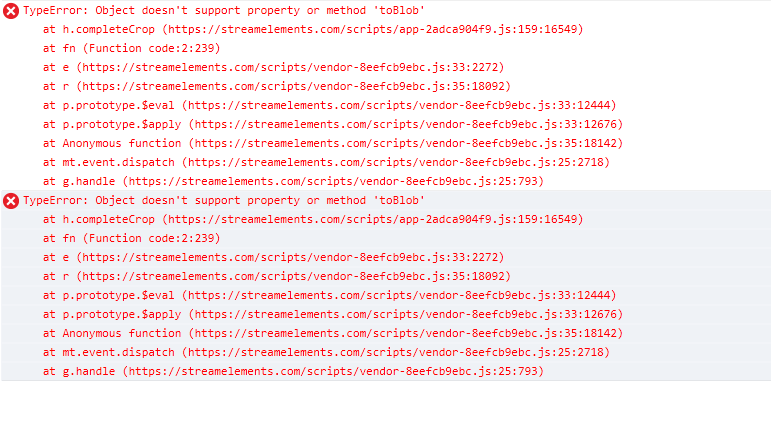
In chrome it works.
clever mango
The site is designed and optimized for Chrome
dense sigil
Probably yeah, but in any case I was in need to use edge and came up with this problem. 😄
Having to manage multiple twitch accounts is horrible.
scarlet pier
is it posibelle to play !gamble or !slots without a curreny volume? ... for example: !gamble (atm i need example: !gamble 100) ... same with slots 😃
clever mango
no free gambling 💰 😛
scarlet pier
means i need gamble and a amount of my currency yea?
scarlet pier
ok ty 😃
idle flare
@here hey guys, i have my backup playlist set for songrequest when no songs are requested, but it seems to playt he first song in the playlist and then stop
clever mango
the video player must be open when the playlist loads
idle flare
what do you mean
idle flare
how do you know 😮
pine hemlock
common problems
pine hemlock
👌
atomic hollow
@idle flare we love you
idle flare
no i love u
@atomic hollow
I LUV U MOAR
with the help of stream elements i am going to be #1 streamer NA
atomic hollow
following you already bro
idle flare
@here music seems to be freezing a bit.
anything i can do to fix?
maybe don't have the stream elements tab open so video isn't playing? :/
stuck hamlet
or download the desktop app
stuck hamlet
you can find it on the activity feed tab
clever mango
right side
idle flare
nvm
stuck hamlet
you can also hide the video once the playlist is loaded
idle flare
gotchya, thanks guys
😃
So frustrating, computer crashes when I stream. Like I can play gta v, but not stream poker?
pine hemlock
most people have a minimum of 16gb these days but it could be a bunch of different things
if your pc is just turning off its usually heat related
idle flare
it doesn't turn off, it freezes everything
clever mango
memory could definitely be the problem if you have multiple poker windows open, chrome, ground control, OBS
 tidal swallow
so i'm having issues with alerts triggering two stream in a row? is this a bits cup issue? because this it totally not cool 
live now so please help if you can
@stuck hamlet helped me last time
tidal swallow
don't know if you remember me from the other day but we had this exact same issue.
you helped me
stuck hamlet
yea i remember
tidal swallow
OBS studio
tidal swallow
20.0.1
stuck hamlet
ok
tidal swallow
was working just fine all stream until now
stuck hamlet
Can you do me a favour, duplicate your current overlay, with the cup, and then remove the cup on one of the duplicates.
use that one for a while, and lets see if any issues occur
If so, we'll have to look into the cup
tidal swallow
why did you guys have the cup before, remove it, then release it to beta if it's still having so many issues? just take it off until it's fixed.
i guess i could
clever mango
the only way to have a better cup is to release it in beta and get feedback
stuck hamlet
The cup before and this cup are completely different, a complete rebuild. And there's no way of us knowing all the issues with it until proper testing is done.
tidal swallow
cool
I get that @clever mango
but seriously, it's every stream now and this unacceptable.
stuck hamlet
 when you try to help but get called annoying.
tidal swallow
well it is annoying to have to do all this stuff while i'm live and i've already been here about this issue twice now
stuck hamlet
Yea, but i didnt cause the issue. iom simply trying to help.
tidal swallow
so put in the new URL?
stuck hamlet
Yes.
clever mango
@tidal swallow Almost all of us are streamers as well using the product. We understand how frustrating it can be. It's just a reality of beta that things will be released, break and be fixed/improved upon
tidal swallow
cool story
thanks guys
i guess i won't come to this support if you're going to patronize me
tidal swallow
i'm sorry i'm frustrated but i was on this bot when it first came out
tidal swallow
YUP
i could've fixed this myself if that's what i was going to be told because that's what i have to do every time
stuck hamlet
The reason i told you to remove the cup was to see if the cup is the issue
or if its an obs issue
tidal swallow
alerts and bits cup are not compatible as far as my stream goes anyway
stuck hamlet
because we have not seen anyone else with this particular issue
tidal swallow
one breaks the other
well i could've done the same thing with the cup and it still would've worked probably
that's how it went last time
stuck hamlet
I'm just trying to help the situation. Like Terra mentioned, we are all streamers. We understand the frustration behind it.
tidal swallow
how long will the cup be in beta? i don't want viewers expecting something they won't get. it's not that i'm necessarily annoyed at the bot, i'm annoyed at the complaints from viewers lol
stuck hamlet
The cup could be in beta for a month, or two... really depends how fast we can pin point issues and improve.
We arent looking at a specific date.
You could also try having the cup on a seperate overlay.
There is different solutions here
tidal swallow
at least you guys got someone on for people outside the EU timezone #GodBlessOnslaught
maybe i'll try the other overlays
stuck hamlet
We have people based everywhere actually 😃
tidal swallow
well back when this bot was first introduced, it was impossible to get support on my time zone
it was always, "wait until XXX gets on"
stuck hamlet
Understandable, you joined when the company first started going public, we've grown from that stage.
tidal swallow
yeah, Perry used to be my personal contact back when they did that
i'll set up the two overlays tomorrow and see how that works. thanks for the tip
stuck hamlet
They are still around, they still kick here and there, but obviously have bigger tasks at hand now, as the company keeps growing.
tidal swallow
and as bitchy as i might come off to you Onslaught, i swear i don't mean it personally. it's all just straight up frustration
stuck hamlet
No problem, aplogies for the issues, we're trying our best.
tidal swallow
thanks so much for all the help!
switched back to the old on and no alerts are working again
going back to the no bits layout for the rest of the night but just so you guys know
stuck hamlet
Why did you switch back to the old one?
tidal swallow
because cup > no cup? lol
stuck hamlet
Alerts > no alerts?
tidal swallow
i get a lot of cheers usually so it's important to me
stuck hamlet
I understand it's important, but i told you a work around.
For some reason your obs isnt allowing it.
You can have 2 overlays, 1 for cup, 1 for alerts.
tidal swallow
like i said, i'm going to the no cup for the rest of the night but i just wanted to let you know.
stuck hamlet
Alright
Thank you for the information.
but i am using your overlay on my obs, and it is working fine.
tidal swallow
even tried the fix from the other day and that's not even working now so i figured it was worth a mention
stuck hamlet
I'm starting to think it might be your system not being capable of handling all of this.
tidal swallow
that's definitely not it.
overlays were working 200% fine for me until the cup release
this must be a cup issue
stuck hamlet
Yes, the cup uses a lot of resources.
tidal swallow
on my PC? that should still be totally fine
 lean birch
What is your PC spec @tidal swallow
stuck hamlet
The man that made the cup
lean birch
I lose a whole 2fps running a Full Theme with cup
stuck hamlet
he will help you 😃
tidal swallow
i'm not even using my PC to stream really. i'm on CC
lean birch
Hmm, So with alerts and cup, the cup fires the alert but the alert does not...
Sounds like an events issue, not specific to cup issue
tidal swallow
nah, not really @lean birch . with the cup, things work for part of the stream then after a few hours, it all cuts out except my regular recent follow, donator, etc.
lean birch
hmmm ok
tidal swallow
i have had these events up and running just fine for a while and it wasn't until the cup that i've had this issue of them suddenly not working
lean birch
could be a memory leak somewhere, I will have to run it for a few hours to test
Longest Ive done with the cup is about 1.5 hours so far
tidal swallow
i've been up for 8.5 hours and everything broke about .5-1 hour ago
lean birch
so about 7 hours smooth sailing
tidal swallow
YUP
oops
yup
i got alerts and only came in here when i noticed because viewers were complaining
lean birch
Before I subject myself to 7 hours of streaming to nothing... The next version of the cup is very close to release. Id love to hear from you after that happens. To see if it resloves the issue.
tidal swallow
oh good! thank you
when will the new cup release?
i don't want to bog down support until then
lean birch
Out of my hands at this point... Going through a bit of testing... I suspect within a few days
tidal swallow
can you have someone tag me when it is?
 tawny pivot
lean birch
tawny pivot
lean birch
Sure @stuck hamlet 😉
stuck hamlet
good meme
tidal swallow
Styler! :pplnxt
stuck hamlet
will do
serene granite
we will tag everyone when its out , since its going to be so much better 😃
tidal swallow
thanks, guys
lean birch
fingerscrossed
lament blade
In my stream the viwers can earn 10 points in 10 minits
And the sub can do 3x faster
But don't work
Why?
So(?)
stuck hamlet
in your stream?
lament blade
Yeah
stuck hamlet
Let me have a look
it'll take a bit 😃
Anyone speciffically not getting 3x?
or every sub?
stuck hamlet
Alright
stuck hamlet
Yea, checking
@lament blade you have viewers get 5, and subs get x2
so they get 10 each 10 minutes
stuck hamlet
stuck hamlet
no problem, let me know if you have anymmore issues 😃
 broken juniper
Sorry to ask but how xan i have just on bot to say on thing i have 3 of them saying the same thing but yours is showing the comand not what its suppose to say??
clever mango
Hi mario can you give an example?
broken juniper
Ok u want just your bot to say like we have 3 ppl watchin now.
I*
I love yours but how can it only combined to just one comand?
Like can it emerged into one u did with streamlab and nightbot but ankbot no.
 broken juniper
Lol all good
clever mango
I want to help though
broken juniper
Ok for like giving a shout out it saying it 2x
clever mango
two different bots are giving the shout out?
broken juniper
Like touser but other bot saying the name
clever mango
What does your shoutout command on StreamElements look like?
pine hemlock
if you imported your commands the variables may not be correct
clever mango
^
broken juniper
Oo ya the other bot saying it ok but your bot saying the comand instead.
So i have to shut down other bot to make it work?
clever mango
Please post the response that SE bot is giving so that we can help you correct this
broken juniper
Ok i have to go on my pc
clever mango
I see your commands now from your public commands page
The problem is like @pine hemlock said. The formatting is setup like the other bots used. We just need to convert to use the SE variables 😃
One second
broken juniper
Just like its saying how long ive been playing saying comand? Ok its loauding
clever mango
By the way, do you know where to find the variables?
broken juniper
Its the comands rite?
clever mango
Chat commands and then click on the variables tab
Those are the pieces that you can use to make custom commands
broken juniper
Ok
clever mango
I'll help you with the shoutout command and then you can use the variables to fix the others 😃
of course we'll be here if you have questions
broken juniper
Ok cool so sorry guys
clever mango
Not a problem at all
we're here to help
Make sure to give $(touser) a follow! $(twitch $(touser) "{{displayName}} was last seen playing {{game}}") . You can follow $(touser) at twitch.tv/$(touser)
old command
clever mango
Make sure to give ${user} a follow! They were last seen playing ${game ${1}}! You can follow ${user} at twitch.tv/${user}
new command
broken juniper
Ok
I think its nightbot
Make sure to give $(touser) a follow! $(twitch $(touser) "{{displayName}} was last seen playing {{game}}") . You can follow $(touser) at twitch.tv/$(touser) .
cuz ankbot ok
like yours tho
broken juniper
Check out my friend $target last seen playing : $game | at their channel : $url | make sure to drop them a follow!
clever mango

clever mango
I'm in your twitch chat now
broken juniper
ooo ok
clever mango
Ok we need to edit that !so command
broken juniper
ok yurn him out but now
clever mango
huh?
broken juniper
night bot off
clever mango
ok
broken juniper
ok
clever mango
we need to go into the custom commands section
find the !so command
click the pencil icon
broken juniper
my second one is good ive noticed
clever mango
second one?
broken juniper
ya check
Check out my friend $target last seen playing : $game | at their channel : $url | make sure to drop them a follow!
broken juniper
were that?
clever mango
right side
That's how you can edit the command
Once you click the pencil icon I want you to erase what it says for RESPONSE
and paste this >>> Make sure to give ${user} a follow! They were last seen playing ${game ${1}}! You can follow ${user} at twitch.tv/${user}
broken juniper
ok
clever mango
done?
broken juniper
ya
clever mango
how many shoutouts commands do you have?
broken juniper
just the 2
pine hemlock
why do you need 2
clever mango
you also have !so2 though
broken juniper
cus someone put the 3rd one
broken juniper
cool!
lament blade
can anyone help with the problem please?
pine hemlock
whats the issue
clever mango
@broken juniper on the custom commands page click the trash icon next to the !so command
lament blade
For some reason backup playlist works only for the browser not with app "Ground Control" it just plays one song and then stops.
tight harness
Do you have the video hidden in Ground Control?
lament blade
Yeah
pine hemlock
You have to have the player shown for the playlist to load
tight harness
That's why, you need to have the video showing, click on the Eye symbol and it'll show
lament blade
Oh, i see that fixes the problem thanks a lot
pine hemlock
👌
clever mango
post it in #💭︱feedback-and-ideas please
livid sierra
I've scouted around and I can't seem to find an answer, but is there any way I can get quotes to activate on a timer?
shut glacier
Anybody able to give me the next step for uploading my CSV file from ankhbot to StreamElements? 😃
stuck hamlet
@livid sierra it is not possible.
@shut glacier anhkbot has what as a CSV?
is it points?
livid sierra
@stuck hamlet Ah, any plans to make it possible at all, do you know?
stuck hamlet
i havent seen this request
shut glacier
yeah i have the points CSV just dont know where to import it lol
stuck hamlet
you can ask in #💭︱feedback-and-ideas
tight harness
Quotes on a timer is definitely a first 🤔
stuck hamlet
https://filter.dj/CSVtoStreamElements.html for you @shut glacier
shut glacier
hmmm I must be doing it wrong... Says no users found
shut glacier
wtfyote,Nem_isLife,85815,2285,0,9/16/17 11:33```
is the format its indo i have to get just points?
stuck hamlet
we cant take rank hour raids lastseen
we only do name,points
so youd have to edit it.
shut glacier
alright thanks @stuck hamlet
stuck hamlet
np np
shut glacier
does Stream Elements have a way for users to check hours?
stuck hamlet
you can make a command for that yes
 stuck hamlet
shut glacier
So when im uploading my CSV in the proper format for the leaderboard which one am i supposed to upload first All Time or Current ive tried both and it keeps doubling the points on one of the leaderboards. xD
clever mango
Only one, current in your case
shut glacier
Will the All Time leaderboard adjust later on? lol
clever mango
Importing current should make the all time match it
You can reset your boards and try again
weary mist
the alltime leaderboard is based off given loyalty points, I am do not currently know if there is a way to import them (it does not count increases from gambling, !bonus, etc)
shut glacier
Well i can import them from the site @stuck hamlet gave me. but when i import one and then attempt to do the other it doubles which ever one i uploaded first.
clever mango
You only imprt once
Current or all-time
I've always used current with no issues
From ankhbot
shut glacier
and it will adjust both current and all time leaderboards?
weary mist
have you gotten the points to appear in the alltime leaderboard?
shut glacier
I have yes but it basically makes me decide between Alltime or current one leaderboard will be at 0
which is what im trying to avoid xD id like them both to just match for right now
until people start winning points and what not
clever mango
@tawny pivot the CSV import site.. does the user import using both current and all-time or one of the two and it matches the points for the other board? Thanks
Importing from ankhbot
clever mango
Nemki is reporting that when they import current it leaves all time blank. Is this normal?
atomic hollow
yes, I think it might replicate after X hours, need to check
 rigid mortar
hello, im sry i`m new i got the problem that my stream elements url is visible via browser source in my obs, so i see alaways the login screen in my frame
pine hemlock
did you launch your overlay and copy that url @rigid mortar
atomic hollow
just an FYI, Eidrm built that tool so Styler isnt the person here (even though he might be able to help as well) @clever mango
clever mango
Thanks
shut glacier
Okay ill see if it just auto updates after a while thanks for your help 😃
rigid mortar
overlay works fine @pine hemlock but i mean the url for my alerts
pine hemlock
Can you show us what you mean?
pine hemlock
Do you have an extra browser source you shouldnt have open?
stuck hamlet
pine hemlock
Thats what happens when you add a browser source and input the wrong url
stuck hamlet
do you have an extra one for your alerts
rigid mortar
ok, but where i can find my right url sry for the alerts
rigid mortar
ah ok
pine hemlock
If you add your own you'd be multiplying the alerts
broken juniper
whats jwt token for groud control?
rigid mortar
so i have to customize my overlay
pine hemlock
Your theme overlay has your alertbox in it, yeah
its under layers when you open it in the editor
pine hemlock
@broken juniper https://streamelements.com/dashboard/account/information shows your jwt token for the app
broken juniper
nice so it will do the alerts i did/
pine hemlock
The app shows your recent followers, subs, alerts etc, and allows you to control song requests, yes.
 floral seal
how do I link my scoial media in the overlays
pine hemlock
Open the overlay in the editore and find the layers/click on the area of text you want to edit
@floral seal
floral seal
@pine hemlock thank you
pine hemlock
yw
 empty needle
Hi, songrequest is not working properly for me (or I'm doing something wrong). I have settings like: 550 secs song duration, one song costs 100 points. But people can request songs even 2 hours long and SE doesn't take away points (in leaderboard -current people points don't update after refreshing).
empty needle
did you mean my case?
stuck hamlet
yes
empty needle
then sure, go on, i'm switching for ankhbot sr for now.
lament blade
am i blind? trying to sort soundcloud for songrequests but all i see is yt yt yt
lament blade
Oh, sorry i was so sure i head read that somewhere
rigid mortar
upload a video file but no supported format i s a video file?
pine hemlock
webm is the video format we support
You can convert to webm with https://convertio.co/
rigid mortar
thx
still helm
how do i get in sellout channel here?
 mental mauve
hi guys, do you guys all use stream element for kappa gen ? i dont wanna use S E cause i already have al my stuff 😦
pine hemlock
Kappagen is a part of SE now. You could create an overlay with just Kappagen and use it but switching to us would be better :)
mental mauve
okay okay. Well my stream is very themed so having a stream element bot doesnt work for me... if i could change the name i would switch
like all my stuff is already set up. all my overlays etc.
weary mist
@still helm As long as you are using all of our tools (Tipping page, bot in channel and modded, and overlays), then just DM shadowboxer or Hectic that you are ready to sellout with your twitch link
pine hemlock
You don't need to switch all your stuff just to use kappagen, if you don't want to switch over (although we'd love to have you 👌 ) Just create an overlay with the kappagen widget and add it as a browser source.
rigid mortar
is there any way to test the alerts?
pine hemlock
Bottom left of the overlay editor theres an emulator
weary mist
@mental mauve cuda's right. Just adding kappagen will not require anything else. Maybe one day in the future, we could discuss the full switch, and the benefits (just discuss, no strings attached). ❤ Let cuda know if you run into any issues when adding Kappagen 
 unique ore
@mental mauve it's worth it btw
 nova sable
Hi there 😃 i edited a super theme to 1280 x 720 but it is still in 1920. any tips?
weary mist
keep it at 1080p, and edit it in your broadcasting software
all the elements of the theme are designed for 1920x1080
but since 1280x720 and 1920x1080 are both 16:9 aspect, they scale perfectly in the broadcasting software
@nova sable
nova sable
ok will try thanks
mental mauve
Ty for your help guys. Ya stream element looks like its well done. My bot is anhkbot id have to do everything manually. Have a good daaay
nova sable
didnt seem to fix it it is still halfway cut off
weary mist
check your OBS broswer source properties, make sure you set the width to 1920, and height to 1080
nova sable
fixxed it thank you 😃
 neat wasp
After the first song has been played off my backup playlist, it won't continue playing the next song. it will like pause. https://gyazo.com/ff694a1f91cfa3125fc06ddf58e4dc6b

nm.. fixed it xD
shut glacier
would it be possible to edit the !duel command and add.... !duel random -- picks a random person from chat to duel them?
tight harness
No, the command is not able to be edited
weary mist
you could create a command they can run before they duel to pick a random chatter, and they will get the choice to duel that person
!cmd add random random user: ${random.chatter}
that command will pick a random person
mental mauve
so guys, i wanna test the Kappa gen explosion thing for sub. but how do i activate a test ?
so see how itd look like on stream
stuck hamlet
at the bottom left, the pink circle called "emulate"
weary mist
you can also do !kappagen in chat


 weary mist
yeah
mental mauve
emulate.. wheres that
frosty zealot
at the bottom, the faded red circle
mental mauve
ohhh okok
stuck hamlet

mental mauve
got it 😃 ty
weary mist
@stuck hamlet xd
mental mauve
look how weird that is guys, even if on the website its in the midddle of the screen, on my stream the explosion is not even in the widget square

its like completely on the right
weary mist
change browser source settings, width=1920 height=1080
weary mist
😃
 final isle
does anyone know if there is a way to currently get a list of all donators and the total amounts the usernames have donated?
tight harness
Yeah, on the dashboard click on My Tips
weary mist
hmmmm
that is actually something I am not sure about
My Tips will show you all your tips
but
final isle
@tight harness yeah that shows just all recent tips, i wanted to see if there was a roll up to easily determine who is top etc.
tight harness
Ahh I see
final isle
i also know about the leaderboard on the tipping page, still just curious if there was a way to get all users over all time $ amount
weary mist
There isn't a way to do it yet, though all the information is there
 viral wagon
Hey, Binciz' !subs command is broken. It counts Nightbot and herself as a sub. Is there any way we can make the command show the correct amount? 😁
tight harness
That is technically the correct amount, the Twitch dashboard removes non-paying subs but their API still shows them included in the sub count
viral wagon
Oh, ok so there's nothing to do about it then really. Thank you for the quick reply! 
 quick moss
hello guys... is it possible to import my data from "ankhbot"??!?!
tight harness
Yes, if you can export your data into a CSV file in the format of :name,points you can import that data to SE
quick moss
thx
 minor sierra
Question, is there something wrong with the alerts atm? Someone resubbed tier 2, and streamelements didnt show it, but it does pop up on stream labs.
tight harness
Did they share it?
minor sierra
Uhm he upgraded. But it isnt on the streamlabs website either, like as in the eventlist ont he dashboard.
tight harness
I mean, when they resubbed, did they share via Twitch's share button that they resubbed?
Because that share event is what triggers the alerts
minor sierra
No, he did a whole new subscription. He had a 5 one and went 10. But streamelements isnt showing the sub/resub at all now
tight harness
Yeah, if he didn't click Twitch's share button then it won't make an alert, that share event is what triggers the alert
minor sierra
Oh yeah but not just the alert. Like on streamelements itself it isnt showing either. The website.
tight harness
Without him sharing the event it won't record anywhere
The dashboard shows recent events as in recent alerts, if there was no alert because they didn't share the resub then that makes sense why it doesn't show on the dashboard either
lament blade
hello. how do I add music in the background while streaming?
tight harness
If he refreshes the stream and sees the Share button then clicks it that should fix the problem (provided that he has the Share button there)
@lament blade There's a button on the left of the dashboard called Song Requests, there
minor sierra
Hmm. Yeah I understand now. I'll ask him tomorrow. If that doesnt fix it, I'll be back haha. Thanks!
lament blade
yes I see that then what do I do next?
tight harness
Go to Settings, put a Youtube playlist link in the space which says 'Backup Playlist' 😃
Then when you have the song request page open during your stream it'll go through your playlist
Make sure to leave this page open with the video showing
 thorny sequoia
This isn't really StreamElements related but is anyone good at creating panels for a stream? I've been averaging around 20 viewers and have been streaming for about 2 weeks. As of now my panels are complete trash and am looking to make them better but not sure how. If anyone is interesting in helping me out a little DM me and I could feature you in a "Top Contributors" panel below the stream!
tight harness
@thorny sequoia I'll DM you 😃
thorny sequoia
sweet 😃
tight harness
Sent
lament blade
ok now which screen do I have too keep open for them to hear my music ones I start streaming?
do I need youtube open or just streamElements?
weary mist
just streamelements. You can either keep the Song Request page open, or have Ground Control open
lament blade
sorry what's ground control?
tight harness
It's a Desktop App that StreamElements created
It allows you to do a few things like song requests and activity feed
lament blade
I need assistance. How do I add the new hyper cup on my Super Overlay?
weary mist
open the overlay editor for that overlay, click widget, then click add under Hype Cup (beta)
lament blade
ok then do I add a URL?
 misty wagon
Guess you got this right? I'm gonna head over to the 🍩 factory for a fresh batch.
 safe canyon
Hey guys, I had a quick question: when I launch the overlay in stream elements, can I just exit the tab afterwards (I use activity feed to look at my followers) or does it need to be open my whole stream
thanks in advance guys!
frosty zealot
@safe canyon you launch the tab to grab the URL, then copy paste that URL into a new browser source in OBS or your streaming application.
only really need to open it the one time.
safe canyon
so I don't need to launch the tab ever again to get the sound bites as long as its in my obs browser plug in?
tight harness
Correct
lament blade
i hate too keep asking questions but i am in my overlay and i clicked on overlay editor and also clicked on the Hyper Cup beta and i see all the settings but the cup doesn't show on the editor area.
tight harness
You added the cup but it doesn't show? 🤔
tight harness
Try removing it and readding it 😃
weary mist
It also sometimes takes a bit to load the first time. Lots of equations to run
tight harness
The hype cup widget
tight harness
What did you do? 😮
 long garden
I imported donations from streamlabs
because i wanted leaderboards and stuff to be correct
i didn't realize it would automatically give all my viewers points based on every donation they've ever given
i didn't want that to happen, since we just introduced points a week ago
now all of a sudden there are users with a kajillion points
tight harness
You can go to Leaderboard on the dashboard and remove points if you wish, you'll need to do it manually though
long garden
yep
tight harness
Or remove everybody's points
long garden
that.... would take forever
and if i take everybody's points, then people who donated in the past week will lose what they got for it
it makes sense what happened, but i'd strongly encourage adding a warning when you important stuff like that
tight harness
Yep, no way around it i'm afraid, looks like you're going to have to do it manually
I feel your pain 😦
If you selected that you wanted to import points then it makes sense that points were imported, it's down to the user to say what they want to import 😃
 cedar grotto
Yo trying to set up my store redemtion on the overlay, the test works but when something is redeemed the widget doesnt come up can anyone help?