#helpdesk-twitch
1 messages · Page 112 of 1
 civic lotus
i have no variations..
from the 5 alerts 1 sound is playing atm. the others do nothing
 tight harness
Ahh tip alerts 🤔 you could try removing and re-adding the alert box widget then assigning everything back to how it was (should still be stored on the site and just needs to be selected again)
civic lotus
i will try that now, just a sec
now i dont have my super theme alert popping up just a shark:P
how do i change it back? or do i have to get that theme again?
tight harness
Yeah, you'd have to get the theme again
It has been asked for individual components from themes to be shareable across to other overlays on our site, to simplify the process basically
civic lotus
but when i try to click the sounds in the sounds tab the sounds that i want is not playing but then an other is...
tight harness
Perhaps try removing the sound and then readding it in that case 🤔
civic lotus
did nothing
i will be back on this but i need to go..its a shame cause i had so many fun sounds;) let me know if you know a bit more
 lament star
Good timezone 😃 Small question. Is there a list of the syntax for the command adding/editing through chat ? Like how do i make it moderator-only when i add the commands through chat ?
 weary mist
yeah, let me get that for you
!command add/remove/edit/options/show
Valid flags are: -cd (number) -usercd (number) -cost (number) -level (number) -type (say, whisper or reply) -count (number)
 silk patrol
you need to use options to edit the flags, edit will just edit the output text
weary mist
Keep in mind, the -count (number) only works on commands with ${count}. If you use ${count name}, then you need to use !editcount name +1/-1/1
silk patrol
you can also use !cmd
lament star
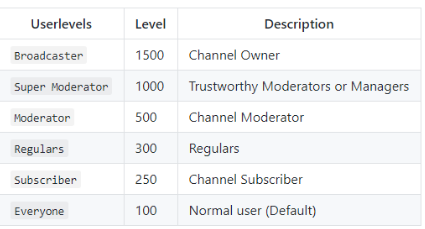
Thanks 😃 I'm guessing mod is number 4 and super mod is 5 when it comes to levels ?
tight harness
Mod is level 500 and Super Mod is level 1000
weary mist
 lament star
thank you !
Love it ! Thank you the quick response and the great product you've been building ❤
tight harness

 sturdy hearth
All my point are working but when someone host i still have to give them points is there a way to fix it?
weary mist
hmmm, I have heard that a few times. are these hosts more than 0 viewer hosts?
and the alert is poping, right>?
weary mist
It looks like it is on the bug board, so that part is good. Just so I can add more information, are you using the whole SE suite (tipping, overlay, bot, etc)?
sturdy hearth
yes
weary mist
ok, thanks 😃
sturdy hearth
not tipping
 mental kettle
hey
 stuck hamlet
You are using an overlay tho, right? @sturdy hearth
sturdy hearth
everything but for followers yes
mental kettle
So streamelements has been really cool so far, I just have a (probably noob) question
ill wait a bit until brandi is helped ^^
stuck hamlet
@mental kettle go ahead
silk patrol
@mental kettle ask away, we are a lot here providing help
mental kettle
Oh okay cool, so we finally got a sub button so I wanted to take it to the next level with the chat. I added the loyality system for currency, and now im confused with the items they purchase in the stream store, none of it is showing up after they redeem it?
I redeemed it myself but just deleted it because i couldnt figure out how to see it in my (inventory?)
 stable sigil
Are there any other stock to use other than the dancing shark ? trying to get converted over as fast as possible - and just realized i was over dependent on the other guys stock gifs
 pine hemlock
@stable sigil search for some random gifs on the internet =p
silk patrol
@mental kettle you need to create an overlay and add the store redemption widget to get an alert. to see your pending redemptions, you need to go in Stream store then clcik on the redemption button in the top right corner
you can also use ground control, our windows app available in activity feed to see all your recent events like followers, redemptions, etc
stable sigil
@pine hemlock been going that route too - just doing a scramble to get over on this because its so much better than what i had
pine hemlock
Yeah we dont have a collection of gifs currently
mental kettle
ok mralucard im trying again, round 2
tight harness
Fight? 
stable sigil
@pine hemlock all good - just making sure i wasn't missing something obvious. thanks for the quick answers !
silk patrol
cue the mortal kombat song
mental kettle
haha
tight harness
We have a collection of memes, sometimes they get loose 
mental kettle
so i redeemed the item i made, is there a way for the users to show the items they have redeemed in chat or some list somewhere to show? other than the alert widget on stream
pine hemlock
Stream store -> redemptions button ?
mental kettle
well hold on i might be using this wrong
 mental kettle
the items im selling are virtual items, not like "ill do 10 pushups" so i want them to be able to see the items theyve bought
silk patrol
@mental kettle nope, you only have the alert option for everyone to see it, or the redemption list that is available only to you, unless you capture chrome and add it on stream of course
mental kettle
capture crhime?
pine hemlock
chrome*
silk patrol
damn I can't word today lol
mental kettle
oh okay yeah, okay thanks! i was using it wrong then.
now i need to create an inventory system somehow to use with all this cool stuff elements has 😅
tight harness

 wide schooner
Hi..is there a way to make a store item only redeemable by sub's ?
stuck hamlet
This feature is being worked on
wide schooner
sorry was that an answer to my question ?
stuck hamlet
yes
wide schooner
oh ...k...thanks
 proud pumice
@wide schooner its pretty close to being done. Maybe even start of next week
 lament blade
Guys you got to sort out the Text to Speech in Alerts.
This puts you behind StreamLabs
https://www.youtube.com/watch?v=pFkbu-957TI
This is crazy
Should not be reading out the Emotes

Kappa Alerts from Stream Elements Bit Boss Boat1987 in Action -- Watch live at https://www.twitch.tv/bankrollgrind
Turned off until you sort it out
weary mist
I added that to our bug board @lament blade
 past garnet
im wondering how i give a mod some management on my site and if its aslo customizable, joined voice chat if someone got time
weary mist
@past garnet We are working on getting Mod access to the dashboard. It is coming
past garnet
ah so its not currently there @weary mist no wonder i cant find it then
weary mist
haha yeah
weary mist
heh, giving and ETA for tech stuff is tough. Somedays things go right, and others nothing works. SE is a small team, but it is top priority (alongside youtube integration). It is taking a LOT of work to make sure it comes out right the first time, and no vulnerabilites to your data
past garnet
i do understand that
if you consider some translation i could provide help into Norwegian
thanks for the quick reply
weary mist
👍
 winter night
Is there any way to allow one of my mods to have access to my streamlabs, for admin purposes?
weary mist
@winter night 6 lines up
winter night
thank you!! Sorry I didn't read that first >.<
weary mist
👍
lament blade
Hi I have still problems with sub count and commands title and game.
stuck hamlet
what is the issue?
lament blade
Can´t change game and title with command and also when I try it through SE page
and sub count still showing 0 even I had sub during stream
stuck hamlet
Let me know if that fixed it
lament blade
okay so SE page is working but nothing changed with commands and sub count
stuck hamlet
Sub count should be good now
i fixed that
Commands, i restarted the bot in your channel.
i just cant talk in your chat
stuck hamlet
np np
weary mist
👍
 north glen
How do i edit KappaGen via chat commands?
stuck hamlet
what do you mean edit
you cannot edit KappaGen through commands, but you can create an explosion
north glen
How?
stuck hamlet
!kappagen 100 EMote(s)
north glen
Okay thanks
lament blade
could i get some assistance about the overlays
 lost current
just added a timer to my account. Interval offline set to 30 minutes, but it has been a couple of hours and I do not see anything in my chat
anyone home?
 frosty zealot
@lament blade where are you at so far?
lament blade
i have maded some settings on the bots and so on.... and i found a nice theme overlay from the themes gallery and i would like to use those but i dont know how to set it up
Why do the tip service from Streamelements not transfer the donations via PayPal by friends? Because so you have to pay fees (1,9% + 0,35€)
 winged sundial
i have a problem with the twitch chat box. It show the text in the preview once i enter something on twitch but it doesn't when imported to obs. All i see is a black box
frosty zealot
it will be a black box until there's chat activity and it doesn't cache so it will only show activity while it is active @winged sundial
winged sundial
ok thank you
frosty zealot
@lament blade have you edited the overlays to your liking already andready to use them? if so, from your overlays you can hit "launch overlay" and copy the URL that is in the new window
lament blade
well.... im trying to figure some out in here with the overlay atm
frosty zealot
what parts?
lament blade
i removed some stuff from there that i dont use... like twitter, facebook, ect
frosty zealot
that's fair, then hit save?
lament blade
done
and i have puttet it in the OBS... how do i get the follovers and the other stuff now to work on there
weary mist
@lost current does the timer have any chat lines? If that is the case, you need that many chat lines regardless of how short the timer is. If you set it to 0 chat lines, it will trigger every 30 minutes
 fallow hatch
is there any way for me o get rid of the webcam overlay?
weary mist
@fallow hatch if you go into the editor, click the webcam frame, and hit delete, it should remove it. Just make sure to click save when you are don't to commit the change
lament blade
or does it work automaticly
fallow hatch
Editor?
weary mist
I think you used a preset, which should have alerts there. You can press the emulate button to see the alerts with a fake event
@fallow hatch on the overlay you want to edit (after creating it), click the pencil that is below the name of the overlay, it will bring you into the editor
fallow hatch
Found i thank you so much 😄
 strange grail
How can i hear my Redemption notification in a 2 pc set up. Currently i have the overloard link tab open, but unless its the tab u currently have open i cannot hear the audio.
frosty zealot
@lament blade sorry for the delay, it should work automatically as you have new activity. you can test with the alert emulator buttons in the editor.
lament blade
i modified a lot one of the overlays and i think i got it to work.... thanks for the help that you provided
 ocean comet
Can I change the text in German? Bot Default text ?
stuck hamlet
You can disable the default commands and crate custom ones with their name
ocean comet
okey Where ?
weary mist
@strange grail that's a tough one. You could keep ground control open on the PC you are playing on, that should give you a visual. And if you only keep one page open on your gaming Pc, having the overlay launched is your best bet right now
ocean comet
i found thx
 shut glacier
Just curious but what payment methods does Stream Elements accept? or is it only paypal?
 clever mango
All payment methods that Paypal supports - bank account, credit cards, debit cards
 sharp spoke
I had this same issue yesterday still cant find a fix: but for the bits.. I want to make a single bit = 0.01 bigger bc its the size of a dot right now but even when I change the token size its the size of a "."
clever mango
More payment processor options will be coming in the future
weary mist
@sharp spoke there should be an update coming soon that will make it easier to change that
sharp spoke
awesome! thank you!
shut glacier
Thanks again Terra
weary mist
@paper ferry did you swap out the widgets for new ones?
 paper ferry
I deleted the entire overlay and readded it
 misty crypt
Can I put default commands in custom commands?
weary mist
@paper ferry remove the widgets themselves and readd them
sharp spoke
I am probably missing it is the "bit boss" function under widgets?
clever mango
There is no "bit boss" at this time
sharp spoke
my fault
weary mist
terra for the snipe 
paper ferry
@weary mist removed and re-added widgets still says no data so yeah your stuff is still broken
 weary mist
@paper ferry which widget, there are a couple that show different things with similar names
paper ferry
Top Tipper doesn't work
weary mist
@paper ferry are you changing this to alltime?
weary mist
at this time @misty crypt, you can not call commands with commands. The bot ignores itself
misty crypt
Are there any plans to add that or work arounds for what I'm looking for? I want to be able to have viewers use points to execute certain commands that would have predefined parameters.
weary mist
you can define a command cost already on any command, so that part is done. What sort of things are you looking for them to be able to redeem?
misty crypt
The image is an example of a few things:
!burn: !addpoints ${1} -50 (cost:300)
!remedy: !addpoints ${1} 150 (cost:300)
!potion: !addpoints all 50 (cost:300)
weary mist
I see I see, those are cool ideas. how you have to do it right now is through the API, which there is a link in the #dev-chat channel, in the header
misty crypt
Thanks for the tip. I'll take a look
weary mist
Let me know what you find out, I am interested in that idea
 unique ore
On the bingo module.....do you have to do oone emote at a time?
clever mango
yes
misty crypt
As a temporary workaround, I have nightbot reading the !remedy command to say "!addpoints $(1) 150" so that ends up giving points correctly. Can I have two addpoints commands in one line? It looks like I can't set that like I can with a custom command.
 crimson meteor
My alerts/overlay just went out on my... like not working
sharp spoke
having some trouble with the chat box.. cant see the text made sure text color could be visable
weary mist
@crimson meteor can you DM me your link?
@sharp spoke not sure if you where asking a question, or answering yourself
sharp spoke
Sorry, its a question I made sure the text color would be visable but I still cant see anything pop up in the chat box
possibly doing something wrong?
weary mist
hav eyou changed your name recently?
sharp spoke
my twitch name?
weary mist
yes
sharp spoke
no I havent
weary mist
k. can you DM me your overlay link, and your twitch name?
@crimson meteor can you DM me your overlay link?
sharp spoke
I actually think I got it!
weary mist
😃
shut glacier
any way to adjust the maximum amount people can bet on roulette?
weary mist
not the max, yet
shut glacier
😃 np
 thick eagle
Is there a way for me to whitelist links from say twitch? I see where I can do it but when I put in a link, it does nothing? My followers are still getting timed out? I want to be able to whitelist all twitch links if possible?
shut glacier
Anybody have suggestions on the "best" overlay setups. As in do you make on per game/scene just curious what everybody else is doing before i get going lol
weary mist
I have per scene/game, so I use the super themes. Those give me different things in different scenes. then I do multiple super themes, and I have a general theme for everything else
shut glacier
kk i assumed thats the best way to go about it but wasnt sure lol
weary mist
whats best is what ever works for you 😃
thick eagle
Yeah, it doesn't whitelist it... purges instantly
I want subs and mods to have immunity.. and everyone else able to post twitch links, is that possible? :/
clever mango
what link is being purged?
thick eagle
any twitch link
clever mango
please give me an example
clever mango
And SE bot is definitely the one purging?
thick eagle
7:46 GunneySgt has been timed out for 5s by streamelements.
I mean.... yeah.... lol
7:46 tugrt has been timed out for 5s by streamelements.
😃

 tawny pivot
/* can also be used as a wildcard.
thick eagle
Okay, so my whitelist isn't actually showing up?? 😕 I'm putting in links and it's not giving me a list anywhere, guess that's the problem? 😕
clever mango
Are you pressing enter after typing them?
thick eagle
I was 😕 Let me just relog
shut glacier
when making multiple overlays how do you keep the same cup throughout all?
clever mango
Add it to every overlay or add it to it's own overlay and have multiple browser sources in OBS
shut glacier
hmmm decisions xD
stuck hamlet
doesnt have www
 strange meadow
just had someone cheer (bday cheer) 2385 and the cup did not respond. but when testing it works fine. even repeating the cheer did not drop anything in the cup.
thick eagle
lol... so no way to just have an entire site whitelisted? 😕
stuck hamlet
put twitch.tv ? 
clever mango
have you added https://twitch.tv/ to the whitelist?
stuck hamlet
@strange meadow Current issue with random numbers
strange meadow
ok thanks
 terse canyon
@weary mist hey dude, how would you think to make a chat overlay look like it's on an old DOS computer?
ya know, the green text on black display
cmd prompt style
 tidal swallow
hey, i just had someone donate bits to me and the cup didn't fill at all. what's up?
 timid yacht
Anyone on for voice support atm?
tidal swallow
just realized the alert isn't even popping up either.
stuck hamlet
That's very strange @tidal swallow is it in your activity feed?
timid yacht
@stuck hamlet Do you do VC support? lol Just need simple Overlay walkthrough is all. Nothing too complicated. 😄 Kinda just a refreshment tbh. Haven't set one up in a good bit.
tidal swallow
i ended up having to reinsert the url but alerts still aren't working
tidal swallow
just had a host and nothing. everyone confirmed.
stuck hamlet
But is it in your activity feed @tidal swallow
timid yacht
Sure, that'll work. I need video for the Store Redeem widget overlay setup.
tidal swallow
yeah, the bot announced it in chat too but the alert didn't go
today's the first day i've had this problem.
stuck hamlet
So when you emulate, do they show up?
@timid yacht I'm in bed right now, on my phone. If you go to YouTube and Search "StreamElements" you'll find it 😃
tidal swallow
hang on. currently live
stuck hamlet
Or go to general and click on one of the welcome messages
timid yacht
Oh you're in bed? Damn dude, didn't mean to bother if you're trying to sleep. I'll look up what I can. 😃 Get your rest. You work hard. 😃
tidal swallow
nope, not even working in emulate suddenly
stuck hamlet
So something is broken on your overlay, are you sure your link is proper?
tidal swallow
it's not even working on the site now
tidal swallow
haven't touched the coding of this overlay in weeks
stuck hamlet
None of them are working?
stuck hamlet
This might be an issue 
tidal swallow
yeah, it is being a serious issue for me right now 
stuck hamlet
Even emulation doesn't work?
tidal swallow
yup
stuck hamlet
All of them?
stuck hamlet
Alright, let me get up 🤔
tidal swallow
alerts are still on and visible. checked the layers.
 viscid steppe
Are tips broken? None of my tips were sent to my paypal today. I have the link through SE>
stuck hamlet
whats beeping on your stream @tidal swallow 
tidal swallow
sorry, that's a machine in the background of my game.
viscid steppe
I haven't changed anything
tidal swallow
i can't continue because serious story is happening but i don't want a string of alerts to cover up dialogue.
that's why i really wanted to take care of this fast
tidal swallow
you can see my list, right? PS2
stuck hamlet
@viscid steppe Tips should not be broken.
tidal swallow
tips were working for me earlier, @viscid steppe . maybe double check the url is correct?
viscid steppe
I got an email that tip was received. But now I have to go through and "claim" them all
But these people are US
viscid steppe
weirddd
tidal swallow
if people donate from a different currency, sometimes you have to claim them.
i've had it happen to me before.
stuck hamlet
Do you not hear that @tidal swallow ?
tidal swallow
get what?
stuck hamlet
Do you have "shutdown when source is not visible" ticked?
tidal swallow
no
stuck hamlet
Alright, go to properties of the browser source, and hit "refresh cache"
viscid steppe
Thank you for the help! That worked. 😃
tidal swallow
in OBS, right? sorry, i'm still somewhat new to PC streaming
stuck hamlet
yes
tidal swallow
was always a console streamer
stuck hamlet
Right Click source, properties, refresh
tidal swallow
okay
stuck hamlet
is it done?
tidal swallow
ytes
yes*
i don't know why fixing in OBS would make me see the test alerts on the site, though
they're still not showing up there
stuck hamlet
Can you go to the scene where you're using this overlay?
They are showing up for me
this is weird 
tidal swallow
i know!
they're not showing up for you either, right?
i can try restarting everything, i guess. just very bizarre
tidal swallow
yes
stuck hamlet
tidal swallow
are they showing up on stream when you emulate? viewers say they haven't heard or seen anything
stuck hamlet
no they aren't thats the weird thing
tidal swallow
right?
i guess let me try putting in the url in OBS again. maybe something happened?
 tidal swallow
i had to full reset the browser source.
stuck hamlet
very very strange
tidal swallow
so i guess for people who have that future problem? let the rest of the staff know?
tidal swallow
i mean, the url didn't change at all because everything else was indeed working
pine hemlock
Pretty sure @lone bridge says she has to do this as well
tidal swallow
well, if someone else is as bizzare as me. lol
stuck hamlet
stuck hamlet
@lone bridge
pine hemlock
I think she mentioned sometimes it just stops working and she just re-adds it if im not mistaken
tidal swallow
well i should get back to stream but this might be something worth mentioning.
thank you for all the help, Onslaught!
pine hemlock
goodluck
 lone bridge
The overlay you mean
 modern birch
Hi, is there a way to move a song up the queue?
pine hemlock
Songs requested through tips get set to priority if you have that option enabled, other than that currently I don't believe theres a way to promote songs unles you remove the ones infron of it
 graceful hearth
Hey guys can you help me out
clever mango
Ask your question and we'll try
graceful hearth
Well im trying to preview and or create my super overlay but it wont load just a black square screen
clever mango
are you using obs studio?
graceful hearth
yea
clever mango
And you're using a super theme overlay correct?
stable sigil
working on a giveaway - when i use !enter i get back messages. when one of my users does - it buys the ticket but no response ?
graceful hearth
is there a specific size?
clever mango
Your browser source dimensions need to be 1920x1080
graceful hearth
for both
clever mango
for the browser source
graceful hearth
and for Obs?
clever mango
It's easiest if your canvas dimensions are 1920x1080 but if it's not you can use ctrl+F to fit the overlay to the canvas
graceful hearth
Ok ill try it real quick
 gusty raptor
quick question, how do you change the alertbox volume of an overlay within superthemes?
(copied my question from general since I just realized that this is a channel for support lol)
clever mango
alert volume is changed within the alertbox
click on the alertbox layer
and then the type of alert that you want to edit on the left
gusty raptor
"life alert"
jkjk. Anyways, thx.
I never draw in any crowds, but I am trying to get a flashier setup
graceful hearth
@clever mango Thanks so much fixed it appreciate your help
 weak prawn
so how do you add just a store element to your stream in obs im not worried about anything else atm do i have to create an overlay for it..? if i do how do i just add an existing store item
clever mango
Create an overlay and add the store redemption widget
 agile basin
So if I wanted to have a charity stream, and wanted the same overlay for placement, but wanted different gifs and sounds for donations- would I just duplicate the overlay I have, and then change that stuff in the new one? It wouldn't change my normal set up for regular sounds and gifs would it?
Just curious on the interaction of donation gifs
 ripe herald
@agile basin It will change only on that overlay new one 😃
 clever owl
hello @everyone
got a quick question to ask about the giveaway feature.
does the giveaway feature work with multiple streaming platforms at the same time? I use ReStream to multi-stream my content to both Twitch and YouTube.
tight harness
There is no youtube integration yet, you'd have to get people from youtube to enter through twitch
clever owl
@tight harness thanks for the clarification. Are there plans to making this happen?
tight harness
Youtube integration is coming, yes 😃
clever owl
looking forward to it.
been searching for a giveaway option for my stream, but the options out there aren't very clear about this.
 mellow thorn
My supertheme animations are super laggy in obs. Anyone know whats wrong?
pine hemlock
whats your pc specs like
mellow thorn
Stream pc got an i5 3570k clocked 4.2 8gb ram. Elgato capturecard and 950 graficscard
Ssd and some other stuff etc
pine hemlock
are you on obs studio 2.0.x
 lilac garnet
I've been trying to set up songrequests, but the backup playlist only plays the first song.. (Firefox)
pine hemlock
Our website is designed for chrome
Don't know if songrequets work correctly on firefox
You can also download our ground control app and use that for events and songrequests @lilac garnet
Go to activity feed and theres a banner for Ground Control on the middle right of the page
lilac garnet
I'll try that, cheers! 😄
mellow thorn
yes obs 20.0.1 sorry for late responde. are live atm XD
 summer shell
Hey there!
The website lags a lot for me. Can I get any help?
I barely have anything open honestly -
Just OBS, Opera Browser and spotify.
It's lagging so much its barely usable.
pine hemlock
Turn off hardware acceleration in chrome
summer shell
I use Opera
pine hemlock
ok well the site is designed for chrome
not opera
@mellow thorn Not sure what to suggest, you have a lowerend i5 and the animations might be too much?
 summer shell
I never denided Chrome is the most used browser.
I just said that not everyone uses it. Google supports Firefox too.
I can't see a reason to not extend to all users, even if just a 4-6 %
pine hemlock
 im not a web dev. dunno. I think we have other stuff that needs priority over expansion of browser support currently though
summer shell
That's alright I just threw it out there as a suggestion ^^
 agile sundial
This may be a weird question but is there a way of having the 0 at the end of a donation to be seen on stream? For example, instead of $4.2 is it possible to show $4.20 ?
mellow thorn
hmm okey
pine hemlock
@agile sundial no, its a bug we're working on getting it fixed. it's been brought up
 sudden basin
guys is it possible to make the bot reply with a random response each time a command is used
so if i typed !love the bot would reply with a response & if i typed it a second time it would reply with a completely different response
stuck hamlet
No
sudden basin
ah ok nps
lament blade
Probably being an absolute derp over this, and not sure if this is the right place to ask, but does anyone know why my songrequest commands are greyed out? I have it enabled, but the mods can't use the commands. They're greyed out in the commands options, and it says they're controlled by the module settings.. but the music feature isn't in modules? 🤔 The music stuff has its own section and I have the whole thing enabled. Not sure why it's not letting myself or my mods use any of the commands.
silk patrol
@lament blade this is a visual glitch. as long as you have enabled the song request module here https://streamelements.com/dashboard/songrequest/general and the chat setting here https://streamelements.com/dashboard/songrequest/settings , it will work (just tested it right now). Also you need to use a youtube link/id, people can't use artist/title
lament blade
@silk patrol Mine must be bugged in a different way then.. I have it enabled in both areas but neither I, nor my mods, could use any of the commands during last nights stream. People could add songs absolutely fine; that whole side of the module worked fine.. but no one could use the greyed out commands.
tight harness
Which commands are greyed out? 🤔
lament blade
Songrequest is also greyed out, but my viewers could add songs fine 🤷 But that's in the "everyone" command list, the rest are under mod
So maybe it's a glitch with permissions?
silk patrol
oh I haven't tested those commands, I thought you were talking about the songrequest (sr) command. we will have to investigate then
stuck hamlet
They are greyed out because the Song request setting takes care of those
lament blade
Aye, I assumed that, but they still can't be used by neither myself nor my mods, so I was just trying to figure out what exactly I was doing wrong
 lament blade
Yup, enabled in both areas
stuck hamlet
is the bot muted in your channel?
silk patrol
@stuck hamlet you need to read a few messages above boi 
 lament blade
People could request music just fine, but none of my mods could use the mod commands for volume etc
I've got SE doing as lot in my chat, so I assume it's not muted
silk patrol
@lament blade are your twitch mods StreamElements mods as well?
stuck hamlet
thats your channel btw
lament blade
Yup! Some are super mods also
stuck hamlet
the screenie i just posted
lament blade
Oh really? Well shit, it wasn't working last night
stuck hamlet
Can you come to your chat and test it right now?
lament blade
I thought I was being an idiot and hadn't ticked something. Maybe it's because I enabled it during stream and it glitched
Yup, gimmie a sec!
stuck hamlet
😃
lament blade
Well don't I feel like a pleb  I should have probably re-tested before commenting, I do apologise
stuck hamlet
no worries haha
lament blade
I think it glitched because I added it during the stream, maybe it didn't register properly. It wasn't working for us last night but seems absolutely fine now!
stuck hamlet
is there a mod somewhere that you could call apon to test?
lament blade
Yup! I got a few hanging around in Discord, I'll ask one to pop in
Much love to you @stuck hamlet  Thank you for helping!
stuck hamlet
np 😃
lament blade
i have songrequest can i run it with youtube?
silk patrol
@lament blade songrequest only works with youtube 😃
 lusty hazel
clever mango
lusty hazel
clever mango
No
 pale nexus
Hello guys. I have some issues here with subscribers loyalty settings. They recieve standart amount of points such followers. I was trying to fix it by rejoining to stream, but it was same, no differences. Can u check it please, maybe it's on ur side. Thank u
 thorn spear
Is there a FAQ anywhere? I can't find one.
clever mango
There is not
Between https://support.streamelements.com/hc/en-us, https://youtu.be/UuweQah3v00, and this discord, all questions can be answered 😃
tight harness
There is a support staff member making one, but it's not complete yet
silk patrol
@lusty hazel nope, no way to download it, but even if you use your own design locally, you would still need an alertbox for follows/subs/etc, so it wouldn't use less cpu
 solar star
Is there CSS support for Stream Elements?
clever mango
Not at this time
solar star
Will there be support for CSS in the future?
clever mango
It's possible but there are no immediate plans for it as there are quite a few fixes and projects being worked on right now
SE is in open beta and growing fast
shut glacier
Just wondering but how do my mods actually use the "Tipping Moderation page" Ones trying to find it and cant seem to xD -- Also i thought i read this already but, will mods have there own dashboard at a later date?
clever mango
Currently there is no way for mods to access the tipping moderation page
stuck hamlet
Add them here: https://www.onslaught.ca/s/nz1y61uA.png


 clever mango
Mods WILL have access to a modified version of the dashboard in the future
stuck hamlet
Supermods *
shut glacier
awesome 😃 looking forward to that
is it possible to request songs through song names etc?
clever mango
No, just youtube URL or video ID
shut glacier
okay ty ty
 hoary isle
Hey all, I'm having issue with chatbox overlay. I see chat when I launch the overlay but its not showing in OBS at all. StreamLabs chat is showing in my OBS without any issues.
clever mango
Are you using OBS studio?
hoary isle
yes
clever mango
theme overlay or custom?
hoary isle
just trying to use the chat widget
stuck hamlet
Dismensions?
clever mango
so that is the only thing in the overlay?
stuck hamlet
under 1280 doesnt work for some reason
hoary isle
yes, only chat overlay
stuck hamlet
so you have to set it to 1920x1080 and scale it
hoary isle
under 1280 doesn't work?
clever mango
^
hoary isle
thats weird but ok i'll try that
do i have to set the widget to 1920x1280 as well or just the browser source?
hoary isle
does custom overlay not work as opposed to dark or light?
clever mango
I use custom just fine
hoary isle
hmmm, i see the users now but not the actual text
clever mango
what color is the text?
hoary isle
oh i see, why is text black lol
clever mango
default
winged sundial
is there a way to set a goal with a bar, so i can have it look like the tip goal?
stuck hamlet
Im confused to what you'd like
tight harness
There's is a tip goal and a cheer goal with a bar already, are you on about a sub goal? 🤔
 maiden grotto
hey guys! in the overlay editor
is there a way to show top bit donator instead of top donator
obviously just changing the text where it says 'donator' to whatever but in the code next to it what should i put?
maiden grotto
oh ok, i'm a complete noob to editing the themes so if i'm struggling i'll come ask hehe
imma give it a go
stuck hamlet
👌
tight harness
No problem 😃
winged sundial
@stuck hamlet @tight harness I am talking about like for a sub goal or a follower goal displayed as a bar such as the tip goal
tight harness
Ahh okay, yeah not a thing currently, we do have a sub thing but it's not the same as the tip/cheer bars, sounds like a #💭︱feedback-and-ideas
stuck hamlet
good idea, but not possible
shut glacier
When making subscriber variations do you have to make a variation for every month of a sub or would it default back to the previous sub
varition set for:
1 month
3 month
6 month
-- somebody subs for 4 months does it pick 3, 6 or default to 1?
im bad at explaining my mind xD so i hope you all get it lol
weary mist
@shut glacier you can do it either way. When setting the variation, you can choose exactly 3, which will ONLY trigger at 3 month. Or, you can choose at least 3, which will trigger for 3, 4, 5 months (assuming you have the exactly/at least 6 months)
shut glacier
Awesome lol thanks for understanding my thoughts xD
weary mist
xD
winged sundial
and oh btw i asked yesterday a question about the chat widget. It did show in the preview on streamelements once i typed something in chat. So i was told it would start to work once i go live. I streamed for 5 hours last night and the twitch chat box stayed just a black box. and there was plenty of chat messegs. how can i find out and make it work properly?
 upbeat topaz
Would it be possible to allow the goal widgets to auto-reset after a period, like every month? Currently you have to re-do the start / stop every time it ends.
shut glacier
Would it be possible to have a duel leaderboard? I would love for my viewers to be able to boast about how much they actually win and have the numbers to back it up xD --- something they try to do already but fail lol
tight harness
@shut glacier There are 2 leaderboards, 1 for points for viewing and 1 where points are rewarded for minigames and supporting the stream, already a thing 😃
@upbeat topaz You can already do session, weekly, monthly and all-time widgets
shut glacier
i meant for the actual duel command sorry.
as in a leaderboard that shows who has won the most duels
tight harness
Then you'd have a rather large amount of leaderboards 🤔 lol
If you had one for every module
upbeat topaz
@tight harness I don't recall seeing those for goal widgets.
tight harness
You set an end date for goals
So you can effectively set it to a day, a week, a month etc.
shut glacier
haha true enough but you could set it to a 50 max leader board just wins nothing else
tight harness
Sounds like that's something for #💭︱feedback-and-ideas 😄
upbeat topaz
Exactly. You have to re-set it each time it ends. I'd just like one that auto-resets after each week / month etc.
winged sundial
anyone know about the chat widget i asked earlier? Can't seem to get it to work
 sage frost
I can't get the ''Current song'' Widget to work, or am I retarded?
sage frost
Well. It says that I could either use Dubtrack, Plug.dj or Songrequest and I'm trying to use Dubtrack but when I enter the room name to my dubtrack room nothing happens. Is there something else I need to do?
stuck hamlet
is there something playin in your dubtrack room?
sage frost
Yea
stuck hamlet
cool i have the link please?
winged sundial
@stuck hamlet and oh btw i asked yesterday a question about the chat widget. It did show in the preview on streamelements once i typed something in chat. So i was told it would start to work once i go live. I streamed for 5 hours last night and the twitch chat box stayed just a black box. and there was plenty of chat messegs. how can i find out and make it work properly?
sage frost
Should I post the link here or in PM?
stuck hamlet
here
doesnt matter
@winged sundial currently has an issue with it. the dimensions have to be 1920x1080 for it to work
i see the issue @sage frost
you set this as your room name Viiikiee
your room name is actually twitchtvviiikiee
stuck hamlet
sage frost
I'll try again


 sage frost
Ah
 strong dock
hey hey! when u have alert box set up. but marked as hidden
sage frost
There we go
strong dock
do the sounds still broadcast or no?
stuck hamlet
depends if you have "shutdown when source is not visible" ticked
sage frost
Ty for the help, even if it was a simple issue 😛
stuck hamlet
if you have it hidden, it will not show on obs
no worries @sage frost thats what we are here for :p
sage frost
😃
strong dock
i know its not showing on obs. i cant tell if the audio files are playing
it some sound like they are and some dont
its almost like a slight echo
but it depends on which alert im testing
stuck hamlet
it shouldnt
strong dock
ok thats what i was thinking
stuck hamlet
nothing should show or play if hidden
strong dock
is there a way to see which "sound file" i have set to each alert?
stuck hamlet
The names of them, nope
strong dock
dang it... lol . no worries. ty
shut glacier
totally a OCD thing but any idea why these havent changed? (and yes they have been changed) lol
im just try to load some temp images for now but my OCD cant handle it lol.. xD
shut glacier
yeah it super odd ill redo them i actually had another streamelements loaded maybe thats it.
Ohhh so when editing the preset variations in the hype cup it doesnt change the small image. got it 😃
Im busy in the support tab today... lol
Can somebody tell me the body weight of normal cheers with no variation?
shut glacier
haha all good i just dont want all my stuff to sink to the very bottom xD
winged sundial
@stuck hamlet Ok thanks i think that fixed it
strong dock
how does one make it to be a sell out?
 frozen skiff
I have some problems with my overlay on stream elements if anyone is available to help me troubleshoot
silk patrol
@strong dock you have to use our bot, overlay and tipping service. If it's the case, then DM Hectic or ShadowBoxer
frozen skiff
And I guess I can be a sellout if that's the requirements =p
silk patrol
@frozen skiff Sure, just tell us what your problem is
frozen skiff
I have two problems right now
silk patrol
@strong dock why tho?
frozen skiff
The first is a chat widget doesn't want to show on the stream
strong dock
using gatherbot beta currently
frozen skiff
So I can't have the chat on the screen
strong dock
mainly SE for ovelray related things and chat commands/bot
frozen skiff
Rather, chat isn't on the screen for the stream
It's appearing in the overlay editor though
silk patrol
@frozen skiff the chat widget currently has a bug. the dimensions of your overlay have to be 1920x1080 for it to work
frozen skiff
So the chat HAS to be 1920x1080 to show up?
silk patrol
overlay
silk patrol
of course
frozen skiff
Or rather, stretch the image?
kk, and then my second problem is really similar
Except this problem is the bits donations with the alertbox widget
Same problem?
silk patrol
nope, what's the issue?
frozen skiff
Same with the chat
It shows up in the editor but not on the stream
No sound or gif plays for specifically the bits alert
I've removed all of the variations
silk patrol
@frozen skiff maybe setting it to 1080p will fix it, but that's a weird issue as I've seen it working on many different streams
you can always try to log out and log back in on SE website, sometimes it helps to re-link SE and twitch together
silk patrol
you're welcome
sage frost
Can I ask about stuff that's non-related to SE?
tight harness
Of course but it's not guaranteed that we'll know the answer if it's not related to SE 😛
sage frost
Well. I'm having problem with my Audio while streaming. The people I'm talking to and the music sounds awful. (The backround sounds overall sounds awful)
 unkempt oasis
What do you mean awful?
 analog idol
Are you using a good mic? Did you mix the sounds so each source is balanced to each other?\
sage frost
I'm using a G430
unkempt oasis
Do you have a sample/VOD I could listen to?
sage frost
frosty zealot
There are two voices in that, which is you?
Your keyboard sound can be suppressed by using a noise gate in OBS
And G430 is a gaming headset. The mic quality on that is not going to be nearly as clean as a stand-alone mic would be.
tight harness
Headset mics 
sage frost
Sorry that I'm poor
unkempt oasis
You are sounding pretty clear, have you got any filters added to the Desktop Audio Capture in OBS?
frosty zealot
@sage frost I’m sorry, it wasn’t a judgement, more just a statement of fact.
analog idol
Better performing than webcam mics lol ;~;
sage frost
I do have 2 filters on. Noisegate and noisereduction (have no clue what it's called in English=
)
analog idol
Compressor probably?
frosty zealot
Possibly compression.
sage frost
ye
frosty zealot
For the noise gate, you want to adjust the open gate and test by typing until your keys can’t be picked up.
That will keep the keyboard from keying the mic to open.
There are ways to suppress the keyboard sounds even while you’re talking but a lot of that has to do with mic position and being able to really keep that away from “hearing” the keyboard.
sage frost
I could probably buy a samll foam popfilter.
frosty zealot
Not even that, I’m guessing you were the louder of the two voices in your clip?
sage frost
Yeah
frosty zealot
It didn’t sound like it was popping at all to me in the little bit in there. So that’s fine.
sage frost
 frosty zealot
I’d say that’s fine to be honest. Just need to gate the keyboard out
pine hemlock
sounds fine
noise gate works well for background noise just have to toy with it
if it doesnt you can buy o-rings for your mechanical keyboard if you have one
reduces the noise
sage frost
I got Razer Blackwidow from 2013
analog idol
Yeah my keyboard is too loud to gate out without it blocking my voice lol, so I put it high enough to get my mouse clicks and try to avoid typing
sage frost
If someone can check my stream again then you will hear what I really have trouble with.
What should my audio bitrate me on? In OBS Studio
analog idol
What is it right now?
sage frost
160
analog idol
Shouldn't be an issue, I think
Can I make an overlay with StreamElements to share with multiple channels? We all stream tournament matches, it would be nice to have an online version of an overlay so we all can standardize
pine hemlock
Could make a design sure but alerts wouldnt work correctly
analog idol
Yeah we won't need alerts because the matches are streamed on delay anyways. My cohorts are lazy and won't make a nice overlay if I forcefed them a tutorial lol, so if I can set it up myself it would be nice
sage frost
I still wanna figure out why my backroundsound sounds weird, like if they are talking in an empty room 🤔
analog idol
Well are you?
I don't think a headset mic is directional, so its acoustics will change based on the room
sage frost
I sound fine, but backround programs like Discord or Spotify sound awful.
analog idol
Is there an issue sharing my overlay link with others? What can they do with it?
tight harness
It's something that we wouldn't recommend being posted and we're told to delete any messages or screenshots which include your overlay link, if somebody takes your overlay link they could impersonate you to an extent, it's meant to be kept private
analog idol
Impersonate me? As above, I'm looking to make a standard overlay for a tournament, if that would work without issue it would be nice
tight harness
You can give it to friends if you want them to use the same channel and overlay/alerts as you, i'm just saying that you shouldn't give it out lightly
When I said we delete messages or screenshots with the link in I meant if they're posted in here
analog idol
Ah, makes sense. Also makes sense that alerts won't work correctly because it's on their channel instead, but I won't use them anyways.
How do I resize an image in the overlay editor?
tight harness
Drag the bottom right corner of the image
And it'll shrink it as much as it can feasibly be shrunk, or stretched
analog idol
Oh, just changing the "position, size and style" numbers doesn't do that?
tight harness
Changing the size values will also do it 😄
That's just the easiest way if you're not looking to make it exactly pixel perfect
analog idol
Hmm I guess it was max feasibility at 400 by 225 lol ;~; it was a pretty lo qual image 😛
 visual kernel
When I launch the hypecup in browser it works but I can't get it to show up in OBS. 😦 🔫
pine hemlock
Did you hit save in the editor? Can you delete your browser source cache too (in obs)
 minor eagle
The sound for my alerts sounds with reverb/duplicated. I deleted the import from streamlabs, and added sound individually to each alert; no difference.
 brisk hamlet
Haii! I am trying to set a "power up" system where you go up a level after you have earned X amount of currency in the channel from time watched. is that something that can be done straight from stream elements or from another bot that i would have to import? i
tight harness
@minor eagle Do you have the alert box on multiple scenes? If so, makes sure that you have 'shutdown when not active' ticked in the settings for the overlays with the alert boxes in it, otherwise you will hear the sound for all of them whenever an event happens
@brisk hamlet Not currently although this was brought to our attention recently
brisk hamlet
@tight harness thank you! im still new to streaming so im trying to figure out the best way to setup stuff. didnt want to get another bot if stream elements had it 😄
minor eagle
I removed the SE Alerts and use the one from SL via OBS; still same issue. Wonder if it might be something else. I can try removing the SL alert and adding again via SE. Where's the "shutdown when not active" option? @tight harness
tight harness
Right click on the browser source in Sources, click on Properties, it's at the bottom of that menu, providing that you're using OBS Studio
minor eagle
Oh, so the "shutdown source when not visible" option...do i need to check also "refresh browser when scene becomes available"?
tight harness
I tick that too, that's up to you
But the "shutdown source when not visible" option will stop the alerts from playing in the background from other Scenes
minor eagle
I'll give that a try. Thank you @tight harness 
tight harness
No problem 😃
analog idol
I have my overlay in two scenes and I don't hear an echo. Should I just "dont ask dont tell" it lol, or will it eventually echo?
tight harness
You possibly have the option already ticked?
analog idol
Nope, because it stays loaded between the two
tight harness
No idea, sounds lucky that you haven't had problems with it happening, it's always been a thing for as long as I can remember 😛
minor eagle
Tbh, it didn't happened before; only when I started using the SE alerts. But I'll still give it a try.
maiden grotto
hey guys quick question
in the overlay editor
is there a way to copy one asset from one theme to another?
for example an icon or an image that's already part of a certain theme to another one?
tight harness
Not yet, it's been requested though
maiden grotto
alright, thanks!
 young coral
Is there anyway to track how long a user has been watching all time?
tight harness
There is a command I just can't remember what it is and it's not on the command list it seems 🤔
 worn pivot
I am still trying to switch all my alerts from muxy to streamelements but all my alerts coming from SE are echoing/going of twice and it sounds from different sources. I got the "shutdown when source not visible" checked but it still goes off twice. Is that because I have streamelements open in the browser as well as in obs?
tight harness
If you have the overlay manager open then yes
But you can mute the overlay manager with the speaker button
worn pivot
ah nice thank you - I'll test that - however, I was streaming and it went off twice and I am pretty sure I didn't have the editor open. I double check though 😃
agile basin
Is there a way to test what the chat looks like in elements? Or do I have to go to my channel and spam text to see it
maiden grotto
you can go to your channel, click the gear icon and under Chat> pop out
then you get a nice little chat window popout to do tests without taking much space
that's what i'm doing right now 😛
agile basin
It also appears I cant get the chat to lock "permantly stick"
it will always fade out even if I check the perm box and save 😦
and thanks for the popout chat tip @maiden grotto
Nevermind- im just dumb
❤
lament blade
Trying to get the hype cup to work but when I input the overlay link into obs, the cup doesn't show...
agile basin
I know it sounds silly- but did you press save on your new cup?
lament blade
I did, yes
Hit save, then exited, then grabbed the obs link
also, when i go to emulate a ch eer event, it doesn't put bits in the cup...not sure if thats normal or not
 patent cosmos
My Overlays arent fitting in my screen. I am trying to use super overlays and its cutting off the right side i would say 40% of it isnt showing up in browser when i hit launch nor on OBS
tight harness
You've set the wrong resolution for the overlay in that case, make sure that when you add it to your OBS that you set the correct resolution
patent cosmos
i think i got it figure out i was messing with the resolution. It still doesnt show the overlay all the way in the browser when i hit launch but i got it working in OBS and thats good enough for me
 pulsar solstice
I would like to display something like a donation Goal on the Overlay. Do you have something like that?
lament blade
Hey everyone, I just started my stream and the bot seems to be down.
Its not muted or anything, t just isn't responding to any commands.
What should I do? Is there a way to reboot it?
 rotund flame
It's down in another stream as well
lament blade
Oh really? Dang... That sucks. My viewers are so sad that they can't play with their loyalty points.
tawny pivot
Try parting and joining the bot
lament blade
@tawny pivot That worked.
tawny pivot
👍
lament blade
Pass the message along to others having problems!
 viscid forge
Quick question, perhaps I missed it but how would I shuffle the youtube playlist if no request have come in?
 sacred heron
yeah we tried parting and remoding SE but commands are still not working
pulsar solstice
@tight harness
 torn frost
Heyo, I was wondering if there is a way I could setup Streamelements to take subs/etc from youtube, or mixer as well!
weary mist
@torn frost we are working on youtube, and mixer is next 😉
sacred heron
@tawny pivot does stream need to be restarted after remodding SE?
viscid forge
@weary mist Quick question. Can the default playlist for music be shuffled in the future (or now?)
As in that it doesn't keep playing the same order
 acoustic harbor
Hey, I was wondering if there was a way I could like, relink my twitch account to Streamelements? I changed my Twitch url and Streamelements still has my old one
weary mist
@viscid forge you can shuffle it now 😃
@acoustic harbor sign out, clear cache, and sign back in
maiden grotto
is there a game !roll or !gamble in the stream elements bot?
my viewers love that game and since i'm switching bots its really important for me ):
torn frost
@weary mist what kind of eta are we looking at?
sacred heron
@maiden grotto you have to enable the module
torn frost
If I may ask
weary mist
@maiden grotto if you chek the module section, there is a !roulette, which is very similar to gamble
you can add the gamble command as an alias in the chat commands/default commands section
sacred heron
theres roulette, duel, and, slot machine
viscid forge
@weary mist Trying to figure out how lol. I started using it today and I am now struggling with the desktop thing, along with that shuffle for the Fallback playlist.
tawny pivot
@sacred heron No let the stream be on 😄
Changes should apply the second you hit save.
maiden grotto
thanks guys
sacred heron
yeah it said SE was active in chat but the commands still arent working (im being tech support for Chloecanary's stream) lol
@tawny pivot
tawny pivot
Let's have a look
 alpine surge
is anyone else's hype cup not appearing in OBS studio?
sacred heron
@tawny pivot thanks looks like its working now
tawny pivot
@sacred heron Should be resolved 😄
Let me know if it happens again
sacred heron
will do! Thanks again!
alpine surge
is it possible to have two different browser source URL's for separate things? LIke my Bit jar moves around per game or whatever I'm playing
viscid forge
Just make a scene for each game.
tawny pivot
For sure, just create two seperate overlays 😃
viscid forge
And then switch them 😃
I wish SE allowed for social media to be defined centrally lol
maiden grotto
no chance in the developers adding 'BOT' to the name of the bot right?

should we kick the bot after we're done with him on the channel?
i've seen services like nightbot asking for people to do that so it consumes less resources
for everyone else
pulsar solstice
@tawny pivot SE has a feature like "viewer count" ? I would like to display how many people are currently watching the stream
clever mango
There's a variable for it
pulsar solstice
Is it possible to edit the points and hours by users?
clever mango
current points, yes
pulsar solstice
SE doesnt count Hours right?
clever mango
I'm pretty sure it's tracked but not displayed at this time
pulsar solstice
Hmm would be nice if the bot can display it with a command
clever mango
check variables 😉
pulsar solstice
Hmm no what I mean is a points and hours as a table where I can edit for users 1 by 1? I am looking a way to transfer the data by AnkhBot to SE.
For example a User already has 300 hours. Now if I change the system he would have 0 hours again. So I am looking for an opportunity how can I edit the hours like editing the points in the table dashboard @clever mango
 crimson fog
Quick question on OBS why does the overlay lag, and how can I fix that????
pulsar solstice
@crimson fog what do you mean by lag? Are you using a Video Animated Overlay?
crimson fog
yes
pulsar solstice
Yes I have the same problem. Your CPU isn't good enough
crimson fog
No sir I beg to differ
pulsar solstice
Just use a normal Overlay without Animation
clever mango
@pulsar solstice Sounds like a #💭︱feedback-and-ideas. SE doesn't import hours and hours are tracked from the time the streamer signs up with SE. There's also no way to edit hours at this time.
pulsar solstice
@clever mango ah ok thank you
clever mango
Have your asked your viewers about whether they would be mad about losing their hours? It seems a bit insignificant to me...
They also would still have their hours tracked going forward, both online and offline.
@crimson fog what are your pc specs?
crimson fog
@clever mango AMD FX 8300 Eight Core Processor, 16 GB memory
@clever mango GTX 970 graphics card
clever mango
And what game are you playing? Which animated theme are you using?
crimson fog
I"m playing off the PS4, Siege animation and I'm playing Siege
clever mango
And by lag are you talking about frames skipping/missing?
crimson fog
Nope just the overlay
clever mango
Yes, are the overlay frames skipping/missing?
crimson fog
Yes , but the stream on OBS is not
so the stream is running fine just overlay skipping
clever mango
Have you monitored your cpu usage while it's running with the game?
crimson fog
my CPU usage is running aroun 18-21 percent which I don't think that would make it lag
clever mango
If the overlay is lagging, either your internet speed is not bringing in the overlay data fast enough or your CPU is bogged down trying to render/encode the animation
18-21% total system cpu usage?
or for OBS alone
crimson fog
On OBS I think
crimson fog
Let me check
 coarse bison
Is there a discord bot for stream elements to manage subs?
clever mango
The animated overlays are running through OBS browser source plugin which is CPU and memory intensive. Your CPU is a quad-core with hyperthreading and 4 years old. It willstruggle to render,encode, and stream the animated overlays in addition to the game. Most streamers use the static versions unless they have a newer i7 or ryzen processor.
@coarse bison There is not
crimson fog
@clever mango Ok so I need to upgrade to an i7
clever mango
If you really want to use animated overlays through SE a newer processor (i7 or equivalent) will be required. Keep in mind there are static versions available for all of the animated ones.
gusty raptor
Does Stream Elements have dank memes?
clever mango
SE servers are powered by dank memes
The devs eat them for breakfast, lunch, and dinner each day
lament blade
Hi, im trying to add a follower goal widget to stream but for its not giving me my correct follower amount, how do i fix this?
pulsar solstice
@clever mango is there a donation Goal as widgets?
clever mango
Yes, it might be called tip goal
lament blade
@pulsar solstice theres a tip goal, if thats what you mean
pulsar solstice
Ah ok thx
clever mango
@lament blade you can edit your goal data under the data tab within the editor
pulsar solstice
@clever mango how do I know if a feature request was accepted? 1 month ago I requested a feature for the SongRequest. Now I would like to know if it was accepted or not?
lament blade
ahhh sweet thanks terra
pulsar solstice
I am on vacation so I can't really test it on phone browser just asking 😃
clever mango
@pulsar solstice There is a new feature request site coming soon. Many of the requests from the discord are being added to the site. Once it launches if you don't see yours you'll be able to add it
lament blade
The Hypecup beta, can you use that to replace the alertbox?
clever mango
They are different widgets but if you wanted to only use one you could
lament blade
aight, imma give it a try
 rustic glacier
Does anyone know why the Hype cup keeps clearing? I had it with a couple things in there and randomly they dissappear. Its really annoying
stuck hamlet
Randomly they disappear or are you switching scenes/closing obs? @rustic glacier
rustic glacier
does that do it?
and no not really, I just minimize OBS. someone told me in chat today that the tips they put in there disappeared
agile basin
Whats the process on a charity stream?
How do I link the charity donation page to them, while still recieving alerts?
stuck hamlet
@rustic glacier it shouldn't clear on its own if you didn't change anything. I'd like to see an example.
@agile basin you could link it directly to their PayPal if they have one? Or just keep the money and then forward it to them?
We don't really have anything specific for charities
rustic glacier
IDK exactly when it happend, all I know is they gave a bunch of bits to fill the cup and later it cleared.
is there a way to make it permanent befcause having it clear every time I close OBS is not cool
stuck hamlet
Not currently. We are working towards that.
rustic glacier
Cool, so it is a feature coming then?
BTW talk to someone about adding the Stream Boss thing lol. Its awesome and I really wish you guys had it
stuck hamlet
Yes, it will be a feature.
We'd love to have a bit boss type thing, but we currently have other projects we are working on 😃
lament blade
Animated Overlay Causing issue with me also, 7700k @ 5.0ghz, using two PC setup, to 4790k @ 4.8ghz. Regardless of what OBS I use, framerate plummets. just an fyi.
happens in preview window without streaming
accidently hit record in above scrnshot
pine hemlock
Can you show us your obs settings
lament blade
ofc sec
pine hemlock
just curiosity
lament blade
mid-game, 5 mins
These two PC's are using NDI plugin for streaming setup
main PC's settings, as thats all you can really alter
it lags in that preview window before reaching the 2nd pc.
removing NDI doesn't not resolve
pine hemlock
well your downscale filter doesnt need to be set to lanczos it can be the default
you arent going to see a difference in quality
I have no idea how dual pc setups work
lament blade
adjusted - still persists
NDI, gaming pc is just sending frames over network at about 150mb/s
streaming pc recieves and encodes
pine hemlock
So you're not using a capture card
lament blade
nope
pine hemlock
I mean your cpu is capable, idk what else you got going on. Whats your cpu running at in task manager
lament blade
in game
not sure what changed, this issue is new. I've been using this layout for a while
pine hemlock
Can you right click your browser source and go to properties and try clearing the cache on it?
pine hemlock
I mean, has anything changed on your end? did you just add the second pc? I'm not sure that streaming over network to another pc that streams to twitch benefits anything but you said it doesnt matter if the plugin is disabled?
Im unsure of any changes to super themes recently.
Is there a reason you're streaming at 1080p 60? no ones really going to benefit from that other than maybe you're vods tbh. Most twitch viewers internet isnt going to fair well with that. Not even the top streamers on twitch stream at 1080p60
You can get similar results with 720p60 with lower encoding presets and it might make your obs fps situation stop.
I would really advise a capture card for dual pc though, ontop of what i mentioned above. Sorry i don't really have a better solution overall though
lament blade
it does stream at 720, 1080 out to 2nd pc then downscaled again to 720.
i don't stream 1080 due to mobile viewers lol
i have a capture card but I have nothing but problems with a 1440p 144hz monitor
second pc has been here for a while, symptoms persist with a barebones OBS with nothing installed. thats how I narrowed it down.
It's ok though, just wanted to mention it. it's not like im going to stop using streamelements lol
swap from animated for a while to something else
pine hemlock
What capture card do you own? an external elgato?
lament blade
i sold it due to NDI really gaining traction with obs and is now being used at tourneys
yes =\
probably just obs' browser plugin
clever mango
the overlay browser source on the streaming PC is set to what Resolution and FPS?
pine hemlock
And do you have "shutdown source when not visible" checked on your browser sources
clever mango
Wouldn't the game be the only thing streamed from the gaming PC to the streaming pc?
clever mango
But why stream everything twice? It seems like the game alone should be sent to the streaming PC which then adds the overlay, etc
pine hemlock
Also you should check the box for shutting down the sources for browser sources
(i dont know much about dual pc setups, like i said)
lament blade
box checked
i allow for the streaming pc to encode only, so i can set encoder to slow and have nothing else being used except for straight encoding, and also to hear alerts.
Ill swap it over, sec.
tanks the fps still
=\
clever mango
Could you DM me your overlay link?
lament blade
yeah even encoding slow im running 50% cpu usage on the stream pc
pine hemlock


Idk
I run at 48 fps and its stable
but thats 1080->720 downscale
and i use nvenc encoding
Fresh install of obs, see if it still occurs?
lament blade
doing it now
pine hemlock
i have a 4770k and a 980
so im pretty sure something is fucky on your side and im not positive what exactly?
lament blade
yeah something within obs
winged sundial
@stuck hamlet How can i set it for my Hype Cup not to reset after i close down obs?
stuck hamlet
We do not have this option yet. It is in the works 😃
pine hemlock

pine hemlock
you too 
terse canyon
is it possible to change the tip goal's look?
stuck hamlet
To an extent. Sure.
terse canyon
hmmm
lament blade
Does streamelements take a cut from donations? Or is that paypal?
 forest ocean
Hey, I'm having an issue setting up my notifications;
My image stretches across the entire screen, the image is 1920x1080 to match the canvas size in OBS. After I uploaded the image and set the size to 1920x1080 in SE I tried a test follow and the image is smaller than the bounding box and doesnt go across the entire canvas
weary mist
@lament blade paypal, we don't touch the money
lament blade
okay thank you!
stuck hamlet
Could you show me? @forest ocean
forest ocean
the image is 1920x1080 in photoshop, i made this as a test because my actual notification did the same thing
and under position, size and style, I set the width and height to be 1920x1080 to match it, but there are huge spaces on each side
stuck hamlet
You're sure this image is 1920x1080? Can you send me the file?