#helpdesk-twitch
1 messages · Page 109 of 1
 upper steeple
same with bday10 and kappa
but when you emulate a cheer it shows kappa, bday etc in the cup
 formal zinc
@stuck hamlet i think the issue is that when i tried to make one the very first time, i didnt pay attention when it asked the resolution (and keep in mind i picked one from the "themes" page). So it made it to 1920..... well xsplit doesnt have a fancy "fit to screen" option like obs. but i HAVE to use xsplit. so i tried to delete all the overlays it put in "my overlays" and start over. But i'm guessing its just keeping that original option of 1920, bc when i tried to select that same overlay again, it didnt ask for the resoluion
now i can click on "create blank overlay" but then cant add any of the themes to it..... so im at a loss here
 stuck hamlet
gimme a few minutes
formal zinc
👌
stuck hamlet
All of our Themes are 1920x1080. so forget about fixing it SE side.
Let's fix it Xsplit side
btw, why do you HAVE to use xsplit?
formal zinc
partner
stuck hamlet
you're a partner with xsplit?
formal zinc
well technically, the organization i own is, not me personally, but yes
stuck hamlet
i didnt say you haha
formal zinc
ohh lol
stuck hamlet
i meant like
 pine hemlock
I think onslut means he's trying to install it
stuck hamlet
eww
formal zinc
haha
stuck hamlet
yea i have the cancer on my pc right now
formal zinc
huh
stuck hamlet
my xsplit: https://www.onslaught.ca/s/mal1pjqw.gif

i can resize fine
can you show me the settings of your WebPage?
formal zinc
 stuck hamlet
happens to all of us
upper steeple
when i repeat activites from my activity feed for example blah blah cheered bitboss10 the hype cup on my obs doesn't drop anything. Same with bday and kappa
but when you emulate a cheer it shows kappa, bday etc in the cup
Was just repeating this in case it got lost in the mix
stuck hamlet
oh yea, forgot to answer you, pubg had my interest
im pretty sure thats suppose to be like that
stuck hamlet
emulations of course, it's for testing purposes
I'll mention it to the team, to see if it's meant or not tho
but to me it makes sense not to repeat cup things
upper steeple
it refires cheer1 etc fine
upper steeple
just doesn' show other cheer motes
stuck hamlet
then broke i guess
upper steeple
gotcha
upper steeple
cause if its not working on a refire pretty sure its not gonna work when its a real cheer
stuck hamlet
for custom cheers, it currently doesnt work for 2-99
but works on 1/100/1000
i believe

something like that
it's gunna be fixed
upper steeple
i'll hold off on the hype cup for now, but i'll keep fiddling with it see if anything else is buggy
stuck hamlet
there's a new engine tomorrow for the cup, but we'd like to hear about bugs to see if it'll effect the new build
upper steeple
👌 will do
 swift solstice
so i cant seem to get the twtich chat widgit to work?
 edgy kindle
@swift solstice Are you using Studio by any chance?
 lament blade
is there a way to get rid of the LUL emote from the emotesplosion? it's on no matter what I do.
 clever mango
Kappagen widget settings has a tab for emotesplosion. You can choose the emotes
@swift solstice If you're using OBS classic you should really upgrade to OBS studio on the OBS website. OBS classic is deprecated and the CLR browser source is quite broken
 thorn oyster
May I ask if there is a way to remove a name from the "All Time" leaderboard for loyalty points? It's been fun hearing people joke about catching up to others and I'd rather not have them competing with Moobot and this faegwent program that pops up in a lot of streams.
clever mango
Names are not able to be removed currently. You are able to zero a user's points on the current leaderboard and exclude them from earning points in the future
 upbeat topaz
Any chance on the site being allowed to work on 720p monitors correctly? When I try to edit some of my overlay settings on the left column, the edit area goes above the DIV border and there's no scroll bar to scroll up to the toggle to close the edit bar for the text / animation / positioning etc.
lament blade
@clever mango I know. I have all of them turned off except the ones I want to use and that one is there no matter what.
clever mango
@lament blade Is it the twitch or BTTV emote?
Try refreshing the cache of the browser source that has kappagen
clever mango
Fixed on stream 
lament blade
Thanks so much @clever mango!
stuck hamlet
24 minutes Terra? whatchu doing? taking your sweet time!? 
this needs to be cut in half! need to support more
clever mango
Quality over Quantity 
stuck hamlet

clever mango

 weary mist
 need to bring more people to support then
 next spruce
is there anyway I could have a dev of mine make an API for !song using this site? http://youtube-playlist-randomizer.valami.info
stuck hamlet
that site doesnt look like it has api?
pine hemlock
make it have one @stuck hamlet
stuck hamlet
sure
stuck hamlet
Not a module, its controlled by Song request
clever mango
song request disabled = !song disabled
next spruce
I need to disable it
without disabling song request
because im going to use twitch eco for !song
clever mango
you can rename the command
 vocal wren
@hasty steppe @silk patrol thank you for the message back, so am i muting somthing in the webpage or the obs.. if i mute the webpage completlly wont that mean i wont hear the music on the song requests.. could you tell me how to do this.. step by step.. im not quite sure what you mean.
 green solar
Hey
I have a short question that is probably obscenely obvious, yet I cant seem to find it
Just do @green solar when you get back to me, because I only have mentions and messages turned on for my notifications. It isn't urgent or anything, just get back to me when you have the time
stuck hamlet
you should probably ask your question first
green solar
Oh right, sorry
Whoops
Where is the themes button now? I can't seem to find it anywhere. Upon that, how can I change the AlertBox animations to have more than just "Left Shark"? I see a lot of streamers do it, and it seems professional, kind of like it is built in, and not made or found themselves
I know WHERE to change the animations, just not how. I saw the YT video on using the Overlay editor, and the themes button is replaced by a "Data" button now
pine hemlock
Theres a themes gallery button on the left side navigation panel after you login.
To change the alert image, add an alert box to your overlay, click the cogwheel and hit change image and upload your own image
You should use chrome while vieiwing the site if you're seeing weird things atm
green solar
Yeah, I use Chrome, thanks for the help. I knew it was obscenely obvious XD
pine hemlock
@vocal wren Not sure what you're having issues with, If you have the song request page open it has nothing to do with double follow alert/host sounds. You don't need the overlay open on the site if you have it in your obs. also make sure that "Shutdown source when not visible" is checked under your browser source properties
make sure you dont have multiple overlays with alert boxes as well
green solar
Another question, any idea what kind of alerts I should use? Like, size and accepted formats? Is it possible to use GIFS, and if so, how can I make the BG transparent like the built in one?
pine hemlock
Gifs support transparency, find something on the web if you don't know how to create gifs. You can resize the alerts if your image is large after you upload it
@green solar
green solar
Awesome, thanks
Thats all from me for now, I gotta spend these last 20 minutes to get an Overlay for my stream
vocal wren
@pine hemlock i have my obs open with my layout on streaming, i also have the webpage for stream elements open on the song request page.. when i get a follow the music plays double with about 1sec delay but my viewers only hear it normal.. its just annoying on me realy.. where is that shutdown on source option please
 vocal wren
tried that.. its still doing it.
pine hemlock
Are you positive theres no other sources with a follower alert? Not sure how you're only hearing it twice and not viewers
You can try refreshing the cache of the browser source under the source properties too
green solar
Is there any way to reduce the resolution of super themes without offsetting everything?
I stream on 720p60, not 1080p
pine hemlock
Is your resolution 1080
green solar
I stream at 720p, but my base resolution is 1360x768
pine hemlock
I dont think they downscale correctly without you having to move things
green solar
Oh, alright, awesome
 ebon forum
did i miss something about xsplit again?)
pine hemlock
Think we solved it
next spruce
Is there an option for super mods to be able to shut my stream off? (in extreme cases - maybe I fall asleep etc)
 tight harness
To my knowledge there's no way to shut your stream off other than through your stream software or an employee of Twitch shutting off the stream for whatever reason, such as you falling asleep etc
 wooden moss
Hello! I apologize in advance for mistakes, I don't know English perfectly.
I am asking for help!
I am intresting in flying smileys on the screen.
I was looking for how to do it, but in the video there is only an old version of the site.
Please, help me, I want it on my stream! 
 silk patrol
@wooden moss
- Go into
My overlays - Create an overlay (if you don't have one already) and edit it using the pencil icon
- Go into
Widgetsusing the top bar - Add the
Kappagenwidget - Configure the widget to your liking
- Save and launch the overlay.
- Copy the link from the new tab that opened in your browser
- Add a browsersource in OBS Studio, paste that link you previously copied and put 1920x1080 for the height and width.
- Enjoy!
wooden moss
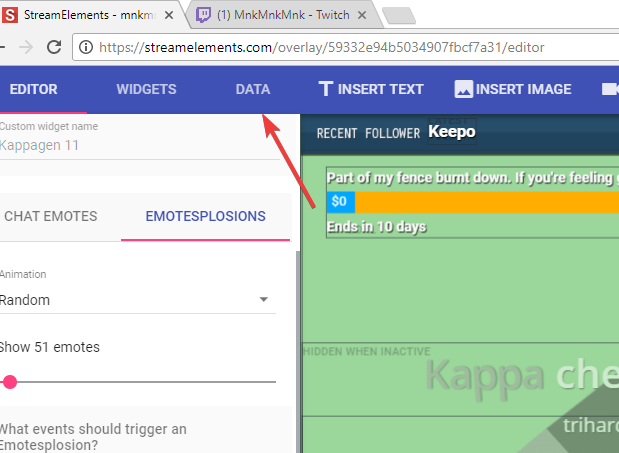
@silk patrol I'm sorry, but I can't deal with 3. =_= I don't understand where is "widgets" 
silk patrol
@wooden moss once you have created your overlay, edit it using the pencil icon, then it's at the top
silk patrol
You're welcome!
wooden moss

silk patrol
@wooden moss I'd follow you if I'd speak russian, but all I can say is Privet and Karacho 😃
 nice!
silk patrol
nice!
silk patrol
@wooden moss of course, it ranges from 1 to 60 seconds
 serene nimbus
is it possible to rotate the image I uploaded?
tight harness
Not yet but it was suggested relatively recently
serene nimbus
uhhhhh
tight harness
You could rotate it outside of the overlay manager and upload the rotated image that way
But you can't use the overlay manager to rotate it if that's what you're asking, but like I say that was suggested recently
 oblique galleon
Helo? Why does my overlays say "no data" on recent followers etc, does it not import this from the twitch account or what? :S
silk patrol
@oblique galleon we can't know your events from before you joined us. it will get filled up from now on
oblique galleon
Thanks! 😃
 echo shuttle
Heya! The animated League of Legends overlay is lagging like heck just on the preview on OBS without even turning the stream on, any tips?
serene nimbus
is it possible to add a transparent square on the background?
silk patrol
@serene nimbus you would have to do that before uploading the file. The editor displays file, it's not a graphical tool like photoshop
serene nimbus
but I cant download the IMG fails of a default themes 😭
silk patrol
@echo shuttle can you share you PC specs? animated overlays are pretty heavy, since your pc has to load multiple video files
@serene nimbus oh. which background are you talking about?
echo shuttle
Oooo how do I do that
silk patrol
@serene nimbus there are plenty of ways to do what you wanna do, you just need to be more creative 😉
silk patrol
@echo shuttle just tell us what CPU you are using
silk patrol
@echo shuttle an i5 is barely enough to stream in the first place, so it won't allow you to use animated themes
silk patrol
@echo shuttle should do yes, but I can only recommend ryzen, more cores for less money
silk patrol
of course
silk patrol
I can, but since you would need a new motherboard and probably ram if you have an old i5, it might be faster for you to look at pre built systems
silk patrol
keep in mind that i5 only have 4 cores and 4 threads, a decent setup to stream requires 4 cores and 8 threads, so an i7 and above, or ryzen 5 and above on AMD's side.
echo shuttle
mmmmm
silk patrol
and it's not about quantity of ram, newer chipsets uses ddr4, if you have an old system, you might be on DDR3
echo shuttle
God damnit haha
 rocky cloak
Hello! Can you help me? Can i make different alerts for different store items on the overlay? Or i can make only one alert, witch will show on the screen, whenever someone redeems different items? Or I do something wrong  thank you 😃
silk patrol
@rocky cloak Hi! the text will always be the one you type in the store redemption widget settings, but the alert will use the sound and the image you put on your store item, so it's different everytime. if you don't put any image/sound on your item, it will use the one specified on the store redemption widget
this way you can have a default look for basic item and specific looks for special items, or you can make them all unique snowflakes
echo shuttle
Oh and one last thing thanks for the help so far - how come my overlay is saying no song when I have stuff playing on spotify?
silk patrol
@echo shuttle if you look at the current song widget, you'll see that it only works with plug.dj dubtrack.fm and our song request feature that uses Youtube
echo shuttle
ahhhh damn
rocky cloak
@silk patrol if I understand you, I can use one "Store redemptions" widget on the overlay. And, then people redeem different items, this widget shows different alerts, which i make when create items?
silk patrol
@rocky cloak nailed it
rocky cloak
@silk patrol thank you so much!
 severe palm
Hello, I'm a mod in a stream and the streamer is having problems with the bit cup. The one appearing on screen is not the one she is choosing in Stream elements settings. I have a clip showing the problem. Just looking for ideas on what it could be so I can point her in the right direction
https://clips.twitch.tv/RockyTenderNuggetsPipeHype
upper steeple
did the fixes on the hype cup get pushed out today?
weary mist
@severe palm did she hit the save button upon selecting the new cup?
severe palm
hmm didnt change cups at all, new one came out of no where
silk patrol
@severe palm you said : The one appearing on screen is not the one she is choosing in Stream elements settings. So maybe she forgot to hit save when choosing a cup.
What she can try to do is go on the overlay editor, delete the cup widget, and add it again. This should fix the issue
Also, if she was using the old cup from months ago, we just released a new one, so it might be why she sees the default design of the new cup.
echo shuttle
Is there a way to change the overlay webcam widget size? Struggling atm im in the editor
severe palm
No worries, I'll pass that on. Thanks guys.
silk patrol
@echo shuttle yes you can rezise it. if you click on it once, a small black square will appear in the lower right corner, allowing you to resize it. but keep in mind that it will keep its aspect ratio, in case you wanted it to be 4:3 instead of 16:9
echo shuttle
For some reason its not the right size for my logitech 1920x1080 webcam?
pine hemlock
Don't forget you can resize and crop your cam in obs itself
echo shuttle
The Width and Height is all messed up 😒 Ahh that might do it
How do you crop it without messing up the aspect ratio?
Like stretching it etc
pine hemlock
Add a filter to your cam source. Pretty sure it's just called crop
silk patrol
@echo shuttle if your webcam has a resolution of 1920x1080, it has a 16:9 aspect ratio, so it should fit. you might have screwed the preview in obs
silk patrol
you delete it and add it again, if it's a premade one from a supertheme, you have to reset the whole theme
echo shuttle
Ah.. Ty
silk patrol
also, if you haven't saved, you can just hit exit and go back and everything will be back
echo shuttle
It doesnt fit in either 1920x1080 or the device default option in obs settings I'll show you both..
Device Default Setting
1920x1080 option
Theres blocks either on top or on the side?
stuck hamlet
@ripe herald
 ripe herald
@echo shuttle I can send you other files cam similar, but this theme was not done by me so i don't have those files
tnx @stuck hamlet ♥
 cinder lotus
maybe someone can help me: I have imported the donations out of twichalerts and while cheers, subs and so on are completely correct it is not showing me the right stuff for donations. Is it not possible to use the twitchalerts for donations and have it showing in Streamelements after? I thought after the linking it is changing the info correctly between both sites
echo shuttle
So its the webcam overlay thats wrong or is it my webcam thats wrong?
ripe herald
i would say webcam overlay 😄
echo shuttle
Is there one thats similar?
😄
echo shuttle
Ahhh Pogchamp ty mate 😄
ripe herald
np 
weary mist
@cinder lotus no, all we can do is import the tips. If you want tips to show up in SE, you would need to use our tipping page. We don't take any money, offer more customization of the page, tipping presets, and even tip moderation
cinder lotus
ah I see, the problem is that you are only allowing paypal right now
and I would like to have credit cards as well
pine hemlock
Credit cards can be used via PayPal without someone logging in to PayPal.
pine hemlock
Been that way for years
 serene granite
anyone that goes to your donation page and isn't logged in to paypal will see a page asking them to enter their credit card
serene granite
😛
pine hemlock
I was aiming for the reaction
 long garden
Hey folks!
I just imported my commands from Nightbot and it mostly worked, but one thing is a bit of a disaster...
the "quotes" command got totally borked
SE is both giving me "quote 0" for every command and simultaneously saying it can't find a quote
Having similar problems for other context-based commands
 brave sundial
I'm having a issue where my gamewisp subscriber alert doesn't pop up even though I have successfully integrated my gamewisp account with my stream elements
pine hemlock
The variables aren't the same between nightbot and SE which is the issue with your following command. You'll have to manually edit those. Our variables are listed on the site where the bot commands are located.
I'm not sure if a nightbot import imports quotes
stuck hamlet
@long garden we don't use touser, we use ${1} 
stuck hamlet
@brave sundial That would unfortinately be due to Gamewisps API being down.
long garden
There's an SE quote command, right?
stuck hamlet
yes boss
 limpid urchin
To create animated Overlays: What type of files are supported?
brave sundial
@stuck hamlet ok thank you
stuck hamlet
Gif and webm @limpid urchin but definitely recommend Webm
limpid urchin
thanks
 clear axle
what's the requirement for chat logs to show? mine is blank and i'm not sure why
tight harness
Has anybody spoken since you enabled it?
clear axle
yes
 zenith nova
hELLO'
i have little problem 😃
with streamelements
i got one subscriber but streamelements didnt accepted it - also doesnt came any alert and stuff, but in twitch i can see the new subscriber
serene granite
you don't see it on https://streamelements.com/dashboard/activity ?
clear axle
same^
weary mist
but did the alert show up via twitch chat when the person subbed?
zenith nova
its very important beacuse i got giveaway soon and he sohuld get instantly 250 points etc
and subscriber bonus 😦
serene granite
are they on your chat right now?
weary mist
you can do !bonus <username> 250, and !level <username> 250
serene granite
ask them to check if they have a Share button at the top of your chat
weary mist
or that ^^
serene granite
if the alert of the sub didnt show up on your twitch chat we won't get the alert either
zenith nova
in chat there was alerts
alert
i mean showd
may i post picture here
u mean that alert ?
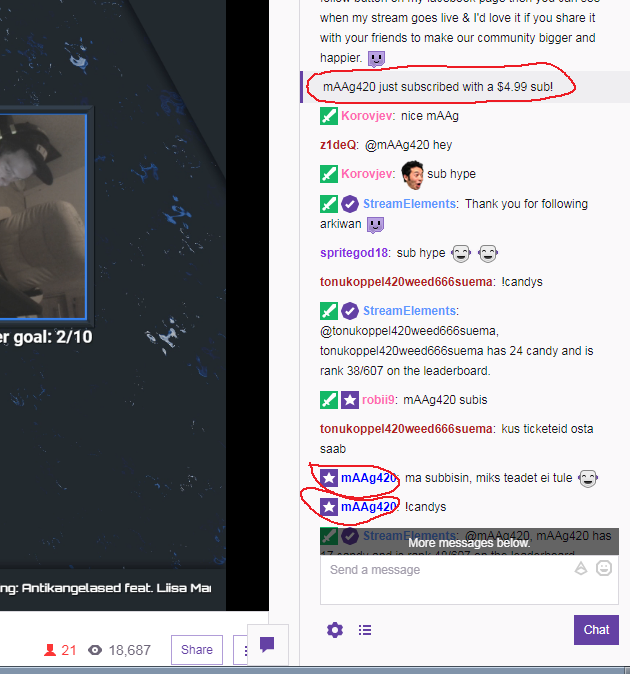
there u can see that he subbed...
serene granite
ok. did you change twitch username by any chance?
zenith nova
i changed my username like 3-4 months ago
serene granite
yea but it wasn't that, since your screenshot shows a follow alert
zenith nova
but today i got one subscriber more and that showed nicely in chat and alert and everywhere
serene granite
what's your twitch username?
pine hemlock
He's looking into it.
zenith nova
nice big thanks for helping - just, i should roll the giveaway
but subscribers got higher change
stuck hamlet
You mean sub count went up?
pine hemlock
Hes a sub so his chance would be higher
serene granite
ok, seems like we missed the sub alert because some connection to your channel got reset, but the system is now aware this user is a sub so they have higher luck and get more points for viewing
zenith nova
what should he get automatically
serene granite
you just need to give them the 250 points manually
pine hemlock
 pine hemlock
He is a sub, so yes his chance will be higher.
pine hemlock
You never asked that question but you can reply his alert if you see it in the activity feed and it should populate in the overlay
serene granite
nah its not in the feed
zenith nova
yeaa - wait trying to find her
serene granite
we didnt get the alert
serene granite
make sure you give them the points manually, the rest can't be changed
pine hemlock
You can go to Activity Feed -> Widget data and manually enter the username under "subscriber latest" and hit save changes and it will add the users name on your overlay if you want.
Next sub etc will count if the system is working correctly yes
 hot finch
in the overlays how do i change from $ to £ ?
serene granite
change your currency on https://streamelements.com/dashboard/tipping
 marsh gate
Just waiting for streamboss like Streamlabs⏲
 rose geyser
I have a couple of questions I'm still farely new to twitch I was wondering if someone could help me set up my overlays
marsh gate
@serene granite yeah I mean bit boss sorry😅
 lone cipher
Question: Is there an easy way to reset a ${count} variable?
weary mist
yes
if you are using ${count}, then !cmd modify <command name> -count 0
if you are using ${count name}, then !editcount name +1/-1/0
@lone cipher
lone cipher
Does SE support command aliases? Like, having the SE bot call !editcount name 0 itself rather than a moderator doing it?
stuck hamlet
Yes support alias, but not self commands like that.
lone cipher
Ah k. Just trying to find workarounds for features that Nightbot has that are missing
 sly breach
When I go into advanced settings for my subscriber alert and cchange the image when i press test subscriber alert its still at the defualt
weary mist
@sly breach remove the variation 😉
sly breach
thank you!
serene nimbus
Hype cup confirmed with 52 new followers!
 echo hound
Hey @everyone - is it possible to make the donation goal start counting now instead of all past donations or whatever it's currently counting?
Like a "Lets pitch in for ___'s surgery!" kind of thing
weary mist
@echo hound yeah, you can set the value in your widet data
echo hound
All I'm seeing is "goal".
weary mist
you can get there either through the editor or activity feed
echo hound
I set it to 250$ because we need 250$, but right now it says $979 (100%)
But those 979 are money I made in the last month
Nothing to do with this campaign
echo hound
Ahh thanks
Very appreciated
Is it possible to somehow combine tips and cheers in the same progress bar?
weary mist
not at this time, though I believe it is a feature request
echo hound
Alright, thank you
I can imagine it would be a bit tricky since partnered people will get different sums from bits depending on where we live 😃
Taxes and whatnot
weary mist
yeah. we do have a cheer goal bar though, so that is useful for any area
echo hound
Eh yeah, but right now our campaign is 250$
So.. do I put like, 200$ in tips and 5000 in bits? 😛
But 5000 bit != 50$, it's like 35$
And then what if someone donates 250$ in tips, we don't need bits anymore, etc.
You get the idea
weary mist
I would go for the $250 in tips, mainly because you have top wait 45-60 days after the end of the month to get the money from bits. Tips you get right away
echo hound
yup
sly breach
is there a way to reset my tipping settings?
 weary mist
👍 I put pics up a bit as well, about 20ish lines
echo hound
what
weary mist
wut
@sly breach are we talking about the tipping settings for the overlay, or the settings on the Tip Settings page?
sly breach
on the tip settings page
weary mist
I do not believe there is a way to reset to default at this time
is there something specific you want to change?
sly breach
I wanna know what the default tipping presets r
weary mist
kk, give me a minute, and I will ahve them
sly breach
ight thx
weary mist
3.33, 4.20, 6.90, 13.37 are the ones I know off hand
sly breach
ight, thank you
echo hound
It's a shame that when a winner for a giveaway is chosen
It doesn't display the winner
On the widget
Overlay widget
It just says "Waiting for a winner to be drawn..." forever
No real information
weary mist
I believe something like that is also on the feature requests list. It should be, isn't the first time I have seen this
 upbeat tree
You guys might want to fix the Hype Cup https://clips.twitch.tv/SoftCulturedWheelPogChamp
 weary mist
whats wrong with it, it looks like it works fine for me
upbeat tree
The Bit cheers are shown and the alert sound is played for them that I have set, but my alert sound for the donation doesn't work
Nor is it played
weary mist
so what you are really saying is there is something wrong with the tip alert sounds
upbeat tree
If I turn the hype cup off the Donation sound is played and the gif is played
weary mist
ok, I will let them know about the conflict
upbeat tree
I guess, I think more or less the hype cup is over riding the sound and gif/video be played for the alert box
 hasty steppe
for the hypecup it says body type, I have it cet to circle, does that affect how the "coin" moves inside the cup or what exactly is that?
weary mist
yes. if you turn on the wire frames option, you will see the shapes that the bodies of the sprites are. Those define how they interact with each other and the cup.
hasty steppe
ah, nice! I'm working on creating custom "coins" for everything now. whew
lament blade
Hello!
weary mist
the frames will only work on the editor, so you don't have to worry about them showing up on stream
so you can leave that on if you like
@lament blade whats up 😉
lament blade
I'm new here, just joined.
weary mist
welcome 😃
lament blade
Trying to figure out how to use the overlay thing got the url but idk what to open on my obs studio to use the url for
hasty steppe
lament blade
Help
tight harness
@lament blade What do you need help with?
hasty steppe
@lament blade in OBS, click the + and then BrowserSource, the site will give you the URL, plug that into OBS and you're set
lament blade
I was on and after my net crash i relod the live
And my vwers lose the points
How is that possible?
tight harness
Which points in particular? for a certain event like a Contest or a Module?
tight harness
Which user?
hasty steppe
@lament blade did that work?
lament blade
checking it out now
tight harness
Did they !roulette all?
lament blade
I dunno cause he says to me
Was 400 and i see it 1 horu ago
You can check it ?
From a log?
Cause i crashed 10 min ago
weary mist
we don't keep point logs. But at this time, the only way people would be losing points would be because they are gambling them, or using commands that take them. Since the bot is cloud based, a crash on your end would not cause people to lose points
weary mist
so 99% chance that if he went down in points, he caused it him(her)self
hasty steppe
the ratio?
weary mist
@lament blade when you set up the overlay, did you change the width and height?
lament blade
width and height
hasty steppe
ah
weary mist
it is in the browser source preferences
needs to be width = 1920, height = 1080
then if your canvas is a different size, hit ctrl+f to resize it (after changing width and height)
lament blade
ah ty
weary mist
ty vish, I am not at a pc with obs
hasty steppe
NP, I fight with OBS daily so.. haha
lament blade
Do you guys put the brb, starting up in one scene scoure?
or do you guys put it in seperate places
hasty steppe
I have a separate BRB scene
and I can switch between scenes with a hotkey on my num pad
it's good for pee breaks 😄
For one of the games I stream
so on my numpad I just hit "2" and the BRB screen pops up (hotkeys have to be set to do that)
hasty steppe
I use discord for voice
hasty steppe
I'm not following lol
lament blade
when you want to move your overlays into obs it says "Grab your scene links to your obs"
then it gives here is a url to brb, start, end, etc
there is one called talk and i'm not sure what i would personally use it for
hasty steppe
oh I have no idea
lament blade
yeah
idk either xD
Do you know how to restart the countdown for starting stream? ;c
hasty steppe
I know by just re-typing the time it starts it over
I havent used SE for countdowns I use a 3rd party software for count down/up.
actually, SE needs a count UP and I'd use it
hasty steppe
I use it to track how long we've been playing, because at 2 hrs in we take a break, then play another 2 hrs. Sometimes I lose track of time and don't look at the clock. If the timer were to go off in 2 hrs and play some sound/animation it would be nice 😄 hint hint wink wink
lament blade
ah
I see that these presets already have a chat box for me, but I don't really like the placements since I already have my own chat locations, so I guess some odd picture can fill in the slot. xD
hasty steppe
perhaps. I'm always messing with my overlays and changing things around
lament blade
^true
hasty steppe
Is there a way to create a line break in the alert messages?
lament blade
line break?
hasty steppe
nevermind, figured it out lol
 swift wing
My skip button on songrequest doesn't work someone send help 😢 🔫
hasty steppe
a simple SHIFT+ENTER created a new line
swift wing
🤢
lament blade
lol
hasty steppe
I'm picky about the anime I watch
lament blade
cause my channel theme is aheago faces
..
( ͡° ͜ʖ ͡°)
I need to find the right ones to put as images to block the chat box thing I can't get rid of.. thing is I have to be very CAREFUL what kind I choose.
 proud pumice
@weary mist @swift wing needs help 😃
hasty steppe
I think I might have found another bug?
hasty steppe
When in cheer variation settings, then I go into the individual settings for each bit, Under the Highlight settings if I click the colored circle and the color selector opens, it doesn't properly save the color I choose. But if I type in the Hex code for the color it does.
so the selector is borked I assume
weary mist
@swift wing for the song skip, are you using the skip button in Ground Control, the song request page, or the comand from chat !skip?
swift wing
sorry @weary mist , but idk it'll just not work on both
randomly
then sometimes work
also while I have you, my chat isnt showing on stream, but it is on the website
weary mist
I tested it on all three just now, and the only time it didn't work was on the chat command, when playing off the backup playlist
swift wing
hm
weary mist
as for the chat not showing, could be a couple things. First, which broadcasting software are you using?
weary mist
ah
Classic hasn't been updated in 1 year and 12 days. The browser source on it doesn't have the things needed to handle the overlays 😦 Studio should fix that issue
weary mist
@hasty steppe verified bug 😃
hasty steppe
🙌 YAY I did a thing
 tiny lotus
Can someone teach me how to follow variations work? I can't figure it out
 analog idol
Does the 5000 bits donation fall through the cups for anyone else? (Not that I expect to ever experience that problem lol)
clever mango
Yes, it will be fixed asap
analog idol
Ah okay
clever mango
@tiny lotus If you set up variations, there are multiple alert options available when someone follows. In order to do this, Pick an alert randomly when more than one matches must be checked. If it's not only one of the variations will be used.
 toxic parcel
Is there a minimum amount of bits that has to be cheered to appear in the cup?
clever mango
Nope
lament blade
I have a picture I want to use to cover up a chat box in my new layout but not sure if it's "twitch" allowed if anyone wants to help verify that tell me and i'll pm you the picture
clever mango
 I guess I'll volunteer
lament blade
lol I went with a different picture.
weary mist
lol
analog idol
If I hit "prevent cup from moving", it appears slightly below where it should be. Then when I hit "put cup upright" it moves slightly up to where it should be
Before
After (where I want it)
pine hemlock
click upright and move the widget down manually?
seems to just be a visual issue with that specific cup image
cup is still in beta and is being worked on
analog idol
I've tried it with multiple cups, and they all spawn too low. It's an easy fix to just tap "put cup upright", but that's what a beta is for!
 agile basin
If I want my alerts to be differing sizes- do I need to create a seperate "alertbox" ?
 restive lantern
@valid thicket Do you guys per chance have a sample sprite sheet/template that would be ideal for the cup? the animated stuff looks fantastic!
Disregard! I could "save as" the sub animation to see the layout! :)))
Actually - anyone know if there's functionality coming to differentiate tiered subs? E.g. add variations for $5, $10 & $25 subs/resubs?
restive lantern
@stuck hamlet i can see the trigger for tier, and how to include the tier in the message, but not create a variation for a specific tier
by trigger i mean the test/preview
stuck hamlet
Definitely, also wanted to mention to the team adding cheer variations so we could test 👌🏼
Will write it down
green solar
I have a question
stuck hamlet
What do you mean by body type? 🤔
restive lantern
that's already a variable for (i believe) the collider on that particular element to dictate how it interacts with the physics - just one of the other variables ^^
stuck hamlet
Ask away @green solar
green solar
Is there any way to reduce the lag for the Stream Elements website? Even when my CPU is completely free, the website lags to hell and back. It's way worse when I'm streaming, because a lot of my CPU is away from Google Chrome
restive lantern
@green solar i noticed some lag also, it's gotten a bit better, but i can see the scrolling from the bit cup lagging atm
stuck hamlet
🤔 you guys experience lag when loading the site?
green solar
Almost every time I click on any menu button, or the sidebar, it takes about 2-7 seconds to respond
I have as much as a 15 second delay between clicks while streaming
stuck hamlet
Oh wow.. that's rough. What are your specs David?
So strange cause I'd expect it to happen to everyone, not just some people 🤔
green solar
Card name: AMD Radeon (TM) R7 370 Series
Manufacturer: Advanced Micro Devices, Inc.
Chip type: AMD Radeon Graphics Processor (0x6811)
DAC type: Internal DAC(400MHz)
Device Type: Full Device
Device Key: Enum\PCI\VEN_1002&DEV_6811&SUBSYS_20151682&REV_81
Device Status: 0180200A [DN_DRIVER_LOADED|DN_STARTED|DN_DISABLEABLE|DN_NT_ENUMERATOR|DN_NT_DRIVER]
Device Problem Code: No Problem
Driver Problem Code: Unknown
Display Memory: 10191 MB
Dedicated Memory: 2028 MB
Shared Memory: 8163 MB
Current Mode: 1360 x 768 (32 bit) (60Hz)
Monitor Name: Generic PnP Monitor
Monitor Model: unknown
Monitor Id: WET0154
Native Mode: 1360 x 768(p) (60.015Hz)
Output Type: HDMI
That's my video card
stuck hamlet
And your CPU?
green solar
Hold on, let me just get it from canyourunit.com instead of a DxDiag
stuck hamlet
Just check your system properties 
green solar
Oh shit. Duh. Damn im an idiot. I way overthink this crap XD
green solar
My system is a little outdated, but it runs every current AAA game on Ultra, shouldn't be lagging like this
stuck hamlet
Any errors in the Chrome console?
green solar
Let me check
stuck hamlet
Preferably a screenshot
green solar
Anything important there? Most websites give me two or three errors either way, most are irrelevant
hasty steppe
curious, is there a way to get the twitch chat widget to display bot messages too?
green solar
Just now realized there is a desktop app. Trying it out now, I'll keep you updated if it's laggy as well
restive lantern
@stuck hamlet sorry to bug you, thought of another one 😃 there are hype cup variations for 4.20, etc, but there is no option to set "exactly" that amount like with alerts. That might be handy too!
agile basin
Im testing out a custom variation for a tip amount of 4.20
However, when I go into the "emulate" with a custom amount of 4.20, it changes it to 4.2 and my custom variation doesnt work
green solar
@agile basin I made one too XD
restive lantern
@agile basin make sure you go into the advanced section and remove the sprite sheet if it's not a sprite
green solar
My custom variation works, with the new sounds, but it also is 4.2. I think it just does that
restive lantern
same thing happened to me 😃
restive lantern
sec
agile basin
and how do I view my variants?
restive lantern
green solar
I gotta say, I have quite possibly the best $4.20 variation there is
restive lantern
oh lol i'm getting ther weirdest bug that i can't really describe without a wall of text
agile basin
hmmm
stuck hamlet
@green solar can you check if the site is lagging in incognito?
green solar
No problem, gimme a sec
agile basin
@restive lantern Are you on the overlay tab? Mine looks a little different
stuck hamlet
Mobile support 
green solar
While slightly more responsive, it is still laggy. Maybe one second or so is shaved off, but it still has a 1-5 second delay for each button I press
restive lantern
@agile basin yes
stuck hamlet
Do you have any extensions enabled in incognito? @green solar
restive lantern
@stuck hamlet i'll try to record a video 😃
stuck hamlet
Dope 😃
green solar
I do not
stuck hamlet
Visual is always best for QA
agile basin
It works just as 4.2
green solar
Just hit a 10 second lag spike when pushing a button
agile basin
But I want it to be 4.20 ;.;
stuck hamlet
strange David, I'll check with the team, but your issue seems isolated. Is it taking a while to load, or just when "ticking/unticking" things
green solar
Same @agile basin
stuck hamlet
What seems to be the issue @agile basin ?
I can mention it to the team to support both
green solar
It's with everything. When loading the site it lags, when pushing the menu button it lags, when ticking something it lags, the only thing that has no lag is scrolling through pages and the overlay editor
agile basin
It cuts off the 0 when you have a specfic tip amount.. such as 4.20. So instead of 4.20 you get 4.2, which is technically correct- but it doesnt work for the joke.
green solar
Songs dont lag either, as long as I dont click into the tab
If I so much as click the tab, it causes Chrome to stop responding for 5 seconds or so
stuck hamlet
Alright. Hopefully this will be resolved with the new site design, David. Coming soon, but I'll ask.
green solar
Thanks
green solar
Only with StreamElements, yes. No others have caused me issues like this
If a visual is more helpful, I can record a short one minute video so you can see what is going on with my stuff
stuck hamlet
@agile basin need to understand a bit more, what is cutting out the 0? The alert?
green solar
I have the same issue as her, the alerts always say "BLANK donated $4.2!"
stuck hamlet
@green solar sure, with the console open, that would be great.
The cup alert or the actual alert? I can't remember if the actual alert allows it or not right now 🤔
hasty steppe
Hey Devs, you should add a justification setting for the text layers. So if I want to make it 2 lines, and centered etc.
restive lantern
@stuck hamlet here you go! https://youtu.be/fY0fLFJJUoM
TLDR; in the browser, tests trigger fine, but in xsplit my tips variations use the images for hosts and vice versa 😃

As you can see in the video, I have variations set up for incremental tips, as well as incremental hosts (getting bigger/more weight with more tips/hosts). T...
stuck hamlet
You made sure to same @restive lantern ?
hasty steppe
and maybe put fonts in the font so you don't have to click on each one to see what it looks like. Just a suggestion
stuck hamlet
And maybe clear cache on xsplit?
Idk how xsplit works 
@hasty steppe fonts.google.com is what we use.
Go wild
stuck hamlet

stuck hamlet
🤔shouldn't be, now that would be a unique bug, can you change the name and let me know?
Ty ty
agile basin
@stuck hamlet Yes, the alert is cutting off the zero. in the "Required amount" tab when you input 4.20, it saves it as 4.2
hasty steppe
but text justification would be a nice little touch 😉
restive lantern
Yup that fixed it!! 😄 Now if only I could copy this widget with all my variations into my gameplay overlay as well 
stuck hamlet
xd
If it's just cutting it off in the "required amount" field, I don't see an issue, but if it's cutting it out on the alert, that's an issue.
agile basin
I am not sure about the cup... I just downloaded this today haha. So far its only the alertbox. But it is with any amount.... For instance instead of saying "Someone donated $4.00!" it says "Somone donated $4!" And any amount that ends in 0... so "Someone donated $6.3!" instead of 6.30 etc.
hasty steppe
Hmm not sure if it's my browser or an actual bug, but when I split a text layer into 2 lines, and then change the font, it borks everything and I have to reload the page, or takes a very long time to load the font
green solar
@stuck hamlet I have the video recorded, I can upload it in 10-15 minutes. I gotta go for a bit right now
stuck hamlet
@agile basin ty ty I'll mention
stuck hamlet
@hasty steppe 
hasty steppe
@stuck hamlet lol I'm good at finding little bugs here and there apparently
green solar
@agile basin We have the same gif for out 4.20 variation XD
hasty steppe
it also wont let me put spaces before the text to "center" the first line I'll just have to use 2 text layers for now
stuck hamlet
You can Left/centre/right text.
hasty steppe
not if it's split into 2 lines
stuck hamlet
Whatchu mean 2lines?
hasty steppe
If you create a text layer and type stuff in it, and hit SHIFT+ENTER it creates a line break, giving you the ability to type on a second line
but it doesn't allow you to add text justification like center the lines, etc if you do that
That's all 1 text layer with a line break after the first word
stuck hamlet
One sec
 hasty steppe
oh wow.. I'm dumb haha
I don't know why I was thinking that was for underline etc.. well thanks haha
stuck hamlet
Np np
agile basin
When creating my overlay- can I rename my alertboxes? Its a little confusing when I see "Alertbox 1" "Alertbox 2" etc. (I want each to be differing sizes. )
(hence multiple alertboxes)
stuck hamlet
Yes you can
hasty steppe
@agile basin right on the top
stuck hamlet
It's at the top
agile basin
Ahhh I see.
It was a little hard to see 😛 tytyt
Is it possible to group them? Like in photoshop?
Or would you just create multiple overlays for one "scene"
hasty steppe
as far as I know you can't group (cant even group in OBS)
I create a separate "scene" in OBS, and use a different overlay if I need to
stuck hamlet
I don't think we provide groups, but cool idea. You can make multiple overlays for one scene. But remember the more browser sources, the more CPU usage.
hasty steppe
the only thing I don't like and it may not even necessarily be SE, is that if I have one overlay on Scene 1 and an overlay on Scene 2, when I switch scenes, SE blinks off then back on, rather than a smooth transition.
OOH, if you uncheck 'Shutdown source when not visible" it remains smooth!
so it's an OBS thing
stuck hamlet
You can utilize studio mode it'll help.
Well yes and no, We recommend that option for 2 reasons
If you have multiple overlays with alert boxes, it'll play multiple sounds. And if you don't shut it down, it'll use more CPU (not an issue if you don't have anything very demanding on your overlay)
hasty steppe
oooh that makes sense, studio mode it is. Basically just give it a sec to load the overlay before transitioning over
stuck hamlet
Yee 👌🏼
hasty steppe
I just need to make sure to not have another scene in the 'studio' because it still plays a 2nd sound if there's an alert
it will take a little getting used to, but nothing huge
stuck hamlet
You could make a custom transition down the road that takes roughly 2 seconds
hasty steppe
I'm limited to Cut or Fade
 frosty zealot
you can make a video file that is stored locally and have it play once and hide when you activate the scene.
your SE overlay will load in the background while that video plays.
stuck hamlet
there's new transition options, no need to make it hide. Just use it as a transition @frosty zealot 😃
hasty steppe
I wish OBS had more than 2 transitions but that's just nit-picking
stuck hamlet
The last option, something we don't really recommend cause #oldSchool, you could have 1 overlay for alerts and the rest regular overlays
It have like 4 now?
Swipe up/down, cut, fade, custom
stuck hamlet
What obs version are you on?
hasty steppe
running 20.0.1
stuck hamlet
Newest is 21 I think 🤔
hasty steppe
it says no new updates avail
stuck hamlet
Well nvm
frosty zealot
not in the public build, I think that's the beta branch Onslaught.
clever mango
Bottom right near start streaming
stuck hamlet
It's in the public one
clever mango
Stinger transitions plugin was added allowing for custom transitions
hasty steppe
website even says 20.0.1 is newest
frosty zealot
stuck hamlet

clever mango
Click the fog wheel
stuck hamlet
Yea ^
pine hemlock
fog wheel
stuck hamlet
FOG WHEEL
pine hemlock
dog wheel
pine hemlock
nothing happewns when i click it
frosty zealot
pine hemlock
but ok
clever mango
I hate autoforrect
clever mango
Xd
stuck hamlet
Tf
frosty zealot
I haven't seen those options either for the transitions.
clever mango
I'm on mobile but that version definitely has more
hasty steppe
the site says "Choose from a number of different and customizable transitions for when you switch between your scenes"
yep.. 2 is a number haha
clever mango
What's the plus sign bring up?
 midnight plaza
how do i pull my jwt file so i can export my loyalty settings
clever mango
Are you in the center of studio mode or at the bottom right by start streaming?
pine hemlock
its normal
clever mango
No it's not
stuck hamlet
 hasty steppe
in the center
hasty steppe
the bottom right doesn't have anything
pine hemlock
who uses transitions anyways
clever mango
Go to transition section bottom right of OBS
stuck hamlet
Stinger is custom btw
hasty steppe
just Start streaming, Start recording, studio mode, settings and exit
clever mango
To the left of that
hasty steppe
yeah.. only 2
pine hemlock
lul
stuck hamlet
ty
hasty steppe
pine hemlock
😡
clever mango
Redownload OBS maybe because your version has it I promise
hasty steppe
how is it you have more than 2? lol
stuck hamlet

hasty steppe
I just upgraded like 2 days ago to this version lol
pine hemlock
did u click the gif
midnight plaza
does anyone know how to export your loyalty settings to jwt for streamlabs?
pine hemlock
😡
stuck hamlet
well first off JWT is a token
clever mango
Cuda pls
hasty steppe
ooooooooh
stuck hamlet
so im not quite sure what you mean. 2nd, before you switch over, you know that SL doesnt support Mobile/Console users, which forms up about 43% of twitch users, right @midnight plaza ?
hasty steppe
💡
midnight plaza
what do you mean it doesnt support mobile or console users?
hasty steppe
you have to click that plus sign to add them. that's dumb they just don't come default in the drop down haha
stuck hamlet
Mobile users will not receive loyalty points for viewing your stream.
so you didnt look at my gif @hasty steppe
dope
midnight plaza
how does that even work?
lament blade
Wait is one of these cups supposed to be Destiny Themed?
stuck hamlet
you mean, how does it not work?
green solar
So minor glitch again
hasty steppe
@stuck hamlet I did, but I didn't put 2 and 2 together I thought it was the plus in the center
lament blade
UGH I LOVE IT.
green solar
I have a variation on my AlertBox for tips of 4.20. I changed the sound and GIF. For some reason the default sound plays, and the new sound
stuck hamlet
Anywho @midnight plaza Now that i have informed you of this, you may find your JTW here: https://streamelements.com/dashboard/account/information
lament blade
@stuck hamlet Yep using it now, gotta tweet about this.
midnight plaza
any idea if SE will be doing the extensions?
green solar
@midnight plaza Yes it will be
pine hemlock
Right click on your browser source and click the box to shutdown source, and scroll down and reset the cache @green solar .
stuck hamlet
If you switch to SL, SL doesnt support exporting at all, so you wont be able to re-add your loyalty points 😃
haha, no worries @midnight plaza The Extensions look appealing from the outside, but they do have many downsides.
Tho i will admit, some of them are pretty cool 👌
We will be doing some pretty awesome things with it as well
If you'd like, please drop your suggetions in #💭︱feedback-and-ideas of what you'd like to see in them 😃
clever mango
SE didn't release an extension on Day 1 for a reason. You can be assured when there is one, it will be the best it can be.
pine hemlock
yep, hype cup has a custom d2 cup
clever mango
yes, there are a bunch of new hype cups available
stuck hamlet
yes dis one https://www.onslaught.ca/s/iexlg9xl.gif
 green solar
I have no clue how to do that in OBS @pine hemlock. I just deleted my BrowserSource and re-applied it, yet it still didn't work
clever mango
And before long, custom cups will be possible through SE 
midnight plaza
whats the purpose of "prevent cup movement"?
pine hemlock
Cup can tip over
midnight plaza
from being full?
pine hemlock
yes
stuck hamlet
from be knocked over
pine hemlock
from be knocked over
stuck hamlet
It doesnt default tip over when full
midnight plaza
this the destiny one?
green solar
I figured out it doesn't do it in the actual website, but for some reason it does with OBS
pine hemlock
right click on your browser source, properties, scroll down click the refresh cache button and seelct shutdown source when not available and hit ok @green solar
green solar
I did all of those steps, still only works on the website, and glitches on OBS
green solar
Yeah it did, but for some reason it does it outside of the variation too. I'm just gonna remake the whole thing.
Just remade it on one that used to work before, still does it.
I can go live to show you guys what I'm talking about, it's really weird
Oh, place is dead. Alright then, I can get by for now. I;ll screw with settings until it works
hasty steppe
what are you trying to do?
green solar
Oh hey
I have a variation set up so that it has a certain sound at a certain donation amount
hasty steppe
sorry was watching youtube haha
green solar
But in OBS, and only in OBS, it plays the default sound too. The website functions fine with no default sound, but OBS does not. It plays the new sound AND the default together
hasty steppe
did you clear the cache on OBS?
green solar
I refreshed the cache, changed the overlay, went to a new scene, deleted the browsersource, all of that
hasty steppe
on the overlay mute the sound too so you only hear what comes from OBS
green solar
I did
pine hemlock
I just did what you're doing and i only hear the new sound so idk what you've done
green solar
I muted the browser, then OBS to see which one was doing it. It is definitely OBS
pine hemlock
do you have two browser sources
green solar
Nope
pine hemlock
show me your variation
green solar
pine hemlock
try just setting it to 4.20 instead of 4.2
green solar
I did, it automatically does that
Shows up that way on the Alert Box too
I can record a video of my settings and variations with my settings and such as well if it helps you, just let me know what you need me to get in the video
stuck hamlet
What's your twitch name
green solar
Davileye_Game
stuck hamlet
Whats the name of the overlay you're editing?
green solar
Red Flare Super Theme or something like that
Specifically "RED FLARE IN GAME 16-9"
And an event just now triggered and scared the crap out of me, even though I have been out of the Overlay editor for two minutes
pine hemlock
because onslaught is probably testing it
green solar
Oh, makes sense
 green solar
I'll record a video and show you, it's weird
stuck hamlet
Nah, i believe you
im just saying works on mine
so basically what im saying is, your shits fucked up
hasty steppe
lol
green solar
Damn
stuck hamlet
@green solar is the gif correct?
green solar
Gif works fine, and the sound plays, it just has the default sound playing too
 pine hemlock
 tell us what it was
stuck hamlet
if there was another overlay, Cuda gets a lick
green solar
I figured different scenes couldn't play different sounds. I was wrong. It was my "Starting Soon" Overlay causing issues.
hasty steppe
I kinda have a weird thing too, when I click "emulate subscriber event" it shows the default image, but when I click the star with the 1 next to it, it shows my custom one
green solar
God I'm an idiot. Free lick Cuda
 hasty steppe
nm fixed it hah

 stuck hamlet
np np
green solar
Well, I'll probably be back next time I do something stupid. I definitely do love the StreamElements thing though, even though it has its fair share of lag sometimes
hasty steppe
lag?
green solar
Thats apparently only an issue I have, so its all cool
Oh right, I need to get that video to you Onslought. I gotta re-record it though, since I accidentally got my facebook info in it
hasty steppe
only lag I experienced was when I had about 30 tabs open in chrome
 winged ingot
I have a problem with the song request, i entered a backup playlist for song request but it only plays the first song of the playlist and it doesn't play the rest
green solar
I just re-recorded. I went through several tabs to show that it had no lag on other sites, only streamlabs
streamelements, not labs
clever mango
@winged ingot unhide the video player
When the first song begins the video must be open in order to load the full playlist
winged ingot
ahhh i see ok, thanks
 pine hemlock
turn off hardware acceleration in chrome?
stuck hamlet
Doesn't seem to lag that much 🤔 could be a fault of tablet mode too.
Your screen being too small.
That too, hardware acceleration
green solar
I have a 32" TV at 1360x768 resolution
stuck hamlet
And for some reason it's using tablet mode
green solar
What's tablet mode exactly?
stuck hamlet
side bar is hidden
green solar
Huh
Anyways, having hardware acceleration off MASSIVELY reduced it. It wasn't that bad in the video, but when I actually stream it is so much worse, exceeding 10 seconds ocassionally, and usually having a 1-6 second delay otherwise
I now hsave very little lag on the site, thank you Cuda



 green solar
I wonder why it's doing that
clever mango
Resolution
stuck hamlet

 green solar
Huh. Do you want to know my monitor specs, or is it just gonna be this way as a resolution issue and not necessarily a hardware issue?
stuck hamlet
Reso issue i think
you could change it, but 
hopefully tablet mode will work properly with new site design
green solar
Nah, 1360x768 is good for me. 1366 is native, but 1360 works better for me, no clue why
Besides, tablet mode probably isn't causing the lag, it's probably more a layout choice than anything
The hardware acceleration thing worked wonders for me
green solar
I do have one final question. Is it possible to have too many games?
green solar
Oh thank god, I needed moral redemption
pine hemlock
I just want pizza. Or McDonald's