#helpdesk-twitch
1 messages · Page 106 of 1
 calm zephyr
 tight harness
https://streamelements.com/dashboard/bot/modules - Click on Settings under Eight-ball
Then you see Responses?
calm zephyr
yeah thats right i have it already done the responses but i mean ehm the text behind do you understand what i mean ?
calm zephyr
Mhmmm ok but anyway thanks for your time bb
 quiet girder
well i got a problem :S i just got a suscribe. i can see it it "twitch inconemy" but not anywhere on the bot ? what to do 😦 ?
tight harness
Did you get an alert?
tight harness
Then it's more than just the bot, the bot is just the chat side of things
Did the person share the sub?
quiet girder
no i dont think so 😮 ?
tight harness
Then that's why, they need to share it then it will work
quiet girder
oooh thx bro 😛 it wortks ! ❤
tight harness
No problem 😄
quiet girder
next problem :/ kappagen keeps sending som other emoji than that 1 i want :S
why that :S?
it mixes them 2
tight harness
Did you select the one that you don't want as well? (highlighted in a blue box)
 tight harness
Yeah, are any others highlighted?

 quiet girder

 tight harness
@quiet girder Try deleting the Kappagen widget and re-add it 😃
tight harness
Awesome 😄
 uncut isle
Hi. I imported commands from nightbot. My timers I want stopped now. So I logged into nightbot, stopped timers I wanted stopped, imported nightbot commands again (nightbot is no longer in channel) old timers still running on SE
tight harness
So stop them in SE
 grim kiln
hey, is it possible to choose which emotes are used for individual alerts?
tight harness
Is that not what you're wanting? I'm a bit confused 😄
 valid pagoda
points given to people who host does not seem to be working, anyone else having this issue?
uncut isle
@tight harness it is. But Ive looked in chat commands
And Im not see where to stop timers. I see my commands though
Seeing*
Before I came here I assumed if you could intigrade commands you could stop them in SE
tight harness
It's not in Chat Commands, it's in Timers 😄
grim kiln
@uncut isle go to your Stream Elements, then go to timers at the bottom of the list on the left then in thecolumn that says "enabled" click the pink dot to disable them
uncut isle
Ill look again. I did not see them before
uncut isle
I do now. I wasn't looking from the drop down menu (am on my cell)
Thank you for your help. Sorry to have been a bother 🌹
tight harness
No problem 😄
 cloud solstice
bros when is the fifa /pes super themes coming ?
 dense portal
Is anyone else having problems with StreamElements not responding in the Twitch chat when you call a command? :/
tight harness
@dense portal My commands are working fine, just tested
@cloud solstice Not heard anything about super themes for these yet
dense portal
Hm, that's odd
tight harness
Try parting the bot via the dashboard and then getting it to join again
 tiny lotus
Sometimes when people cheer/donate emotes replace basic words like 'Hi' in their messages. How do fix?
tight harness
What kind of emotes?
The bot can do emotes of channels it has a free sub to and BTTV emotes for your channel, do you mean that?
tiny lotus
no so if someones message is 'Hi I like your streams' instead of the overlay saying that it says '(Heart Emote) I like your streams'
but in ground control it says 'Hi I like your streams'
tight harness
That's odd 
 upbeat vortex
Hello! Question!:
Can i carry out a giveaway even though the stream is offline, and end it like in about 2 days?
 clever mango
You can run a giveaway from the SE site by going to the giveaway tab
And the giveaways cannot be automatically ended. They'll run until you stop them
upbeat vortex
right, so I can make a ggiveaway last like 2 days
tight harness
Yes
upbeat vortex
Thanks!
tiny lotus
in chat is says hi
here is a gif of what shows up

i love you, lemme see that pp boy
is the message
tight harness
That doesn't look like a global emote
tight harness
BetterTTV?
tiny lotus
not in my channel
tight harness
It's pretty confusing 🤔
clever mango
I've seen that emote before 🤔 one sec while I find it
Wait, I'm confused... is it hi or love ?
tiny lotus
its love
clever mango
so it said love in the chat alert?
tiny lotus
Yes
clever mango
ok just checking
tiny lotus
i love you, lemme see that pp boy
 empty solar
curiosity, when i do !setgame "world of warcraft" then do !game its not changing the game....
any clue why?
tight harness
Shall do
 next spruce
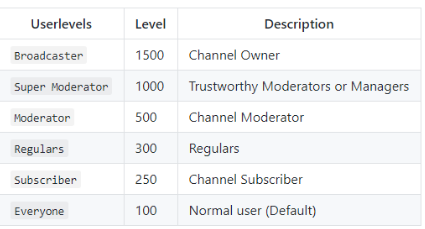
what is !level used for? What's a user level?
 empty solar
thx guys
tiny lotus
What qualifies a regular?
tight harness
You decide, in User Management on the dashboard you can add regulars there
 lament blade
Hey
tight harness
Hey
lament blade
Hello, where can I adjust the Donater Goal? (TIP)? The Goal is supposed to be a CPU I do not find where I can adjust the text to it and Euro goal
sorry for my bad englisch
tight harness
Did you set Currency to Euro here? https://streamelements.com/dashboard/tipping
 clever leaf
I appear to have a problem with Kappagen... but I also recall this not being the crrect channel to go to, correct?
tight harness
It is now, we merged them into one
clever leaf
Oh...
In that case: The widget has disappeared from my 'overlay'... but not from actuality...
It's still there, with it's default size and my settings...
but it's defaulted back to absolute default...
lament blade
I search the TIP Goal 😦
clever leaf
I can add a new kappagen to the same overlay, however, it just adds one to the scene rather than doing anything to the old one.
tight harness
@lament blade Tip Goal is in Widgets in the Overlay Manager
But to change the currency to Euro you do that at the link I gave you
@clever leaf If there's problems with the old one then one of the things we suggest is removing the original and adding a new one, might not be a bad idea
I mean, that goes for any widget
lament blade
And how can I defend the Donate Goal
clever leaf
but it's in the imported alerts I have from streamlabels.
tight harness
Defend the donate goal?
clever leaf
Does that change anything?
lament blade
I search the Donate Goal
tight harness
Kappagen was it's own thing, it wasn't a part of Streamlabs, in regards to widgets you can remove any of them and add them from scratch, any widget made from an import is also able to be made manually, the data just uses our pre-existing widgets to display the data
lament blade
uuh my english bad
 storm storm
asking out of curiosity but is there tts for the chat
tight harness
@lament blade What is your first language?
 vivid scaffold
Hiya! My monthly tips are not updating to September, I've tried to edit them but on my overlays it keeps showing random tips from last month. Is there a way to fix this?
lament blade
German
tight harness
@storm storm TTS for what part of the chat? All of it?
@ebon forum Maybe you can help @lament blade better, he speaks German but his English isn't that good 😄
 ebon forum
@tight harness sure, he can message me directly
tight harness
@lament blade Can you do this? ⤴
ebon forum
just give me some time, kinda busy right now, he can type everything he wants 😄
tight harness
Of course 😄
clever leaf
@tight harness My issue, pardon my poor previous phrasing... Is that I had kappagen and imported alerts from streamlabs in the same overlay... but for some reason, kappagen has now vanished from it, but it's still an active thing in the overlay - it's just not there to edit, or remove.
lament blade
?
tight harness
@vivid scaffold Is this a recent occurrence?
@lament blade Message cryon1cang3l, he speaks German 😃
The other blue person 😄
vivid scaffold
@orchid galleon it hasnt refreshed for a couple weeks now. My last stream was before PAX on August 30th and its still saying my monthly top is from last month
lament blade
is that online ?
tight harness
On Discord
 soft canyon
what time is over 50:00 but in page show the correct time (0)
tight harness
Legendary Sins must hate me by this point, people keep tagging them thinking they're tagging me 
soft canyon
or this another time?
storm storm
@tight harness aall except for emotes and cheers
clever leaf
You read my issue legendary? Still recommend just starting over?
tight harness
@vivid scaffold If you go here: https://streamelements.com/dashboard/session , click on Aggregates and click on Refresh Aggregates, does that help?
We did give the sessions page a complete overhaul recently
@clever leaf Yes
clever leaf
(yeah you did, and it's bugging me :P)
tight harness
It was for a good reason, it needed to be more functional
vivid scaffold
@tight harness I tried that and it still isnt updating
clever leaf
Only thing that bothers me, is that it doesn't track current follower numbers...
but it works off a counter...
shakes angry fist
lament blade
i have wrote a dm to german support
 misty wagon
👍🏽 super!
tight harness
@vivid scaffold I've got a feeling that Monthly Top Tipper doesn't automatically reset on the 1st of every month like you suspected it did but rather from when you last reset your labels it starts counting the first month from then
clever mango
Monthly is last 30 days
tight harness
Yep
@storm storm Are you saying that you want literally everything apart from emotes and cheers put into your chat to be read out in TTS? 
soft canyon
what?
tight harness
Ohh whoops 
storm storm
yea
tight harness
That sounds awful
clever mango
@soft canyon I'm having trouble understanding your question
tight harness
Why would you want that?
storm storm
reason is im physically disabled and can't speak well at all
soft canyon
Well my question is in overlay for contest the "TIME" en overlay is the " Time left" showing in web for vote or is another type of time?
clever mango
For contest it would be the time remaining to vote
tight harness
In that case it makes sense, I'm just glad you didn't want it for a memey reason
storm storm
no lol
tight harness
But there's probably other programs that do that for what you type, would you really want everybody's messages read out loud?
It's definitely something for #💭︱feedback-and-ideas either way 😄
Not a feature currently
storm storm
easy to hear others then having to look over every 3 min
tight harness
That's true, I guess I can just see people using it for the wrong reasons
As in people typing inappropriate things and if it's read out it's not like you can purge it
clever leaf
@tight harness howcome your counters aren't drawing from live numbers, but rather from a set point, going up?
tight harness
That's because it's a follower goal, not total followers
clever leaf
(always dropping a follow gaining such etc.
tight harness
We recently added total followers which updates every 2 minutes
clever leaf
O.o
tight harness
Sounds like you're using the old follower goal widget
clever leaf
why have I missed this?
tight harness
It came with the session page overhaul
tight harness

 regal iris
how to give everyone on the leaderboard points?
clever mango
You can only give points to everyone in chat with !addpoints all <number>
ebon forum
got him so far
 feral carbon
How do I get the overlay to show up in OBS
 upbeat wind
I need to ask a question. I have StreamElements set up on a streamer's channel and I have the chat alert modules on, but when I do a host, it doesn't show up on chat. Is there something I'm not doing correctly?
clever mango
@feral carbon add the overlay URL as a browser source
@upbeat wind What are your settings for the Host Chat Alerts?
upbeat wind
They're set the same way as those are.
clever mango
Is the host showing in the activity feed?
upbeat wind
No.
upbeat wind
A host.
clever mango
I'm curious if it was triggered automatically or by /host
upbeat wind
I simply hosted the channel. Did it at least three times and nothing. It works in other channels I mod for.
clever mango
Are other chat alerts working and showing in Activity Feed?
upbeat wind
Follows are showing in the feed.
clever mango
I'm looking into this. May I have the channel name?
upbeat wind
grumpasaurus4
 amber sorrel
I have this bug on KappaGen emote generator from chat widget
It just doesn't show all emotes that was put in chat. Like if I put six Kappas, maybe five will show at times, or four at times.
@clever mango Just wanted to make the developer team aware of that. It shows all (Six Kappas for example) of them in the widget but doesn't all come up on OBS.
Thanks. Love the KappaGen ever since it wasn't even affilated with stream elements. 😃
clever mango
What size is your OBS browser source
It needs to be the same size as your overlay size on the size
default is 1920x1080
amber sorrel
Going to double check
Yeah everything is the same for me. 720p on overlay. and Browser source, 1280x720
Maybe i should just re-do the overlay. Like just restart it but can you please tell the devs to test it out
I believe it's a bug.
clever mango
DM me your overlay link please
amber sorrel
done
 narrow terrace
I have had the same issue as far as Hosts not showing up with SE. It's from a person I know, they avg 10-20 people hosts, I see it from the other bot I use, but not from SE. I'm sure it's just a bug.
amber sorrel
Great support @clever mango  (rare pepe)
What fixed an issue just now for me was just starting over from scratch with my overlay. @narrow terrace Scrap your current overlay and remake it. (If you feel like it ofc)
Just going my experience
clever mango
Different issues
narrow terrace
I don't use the overlays 😉
amber sorrel
Oh okay, mb.
clever mango
@upbeat wind @narrow terrace I've done a little bit of research and I think I've got an idea of what's happening
@narrow terrace said he is not using any SE overlays in OBS. @upbeat wind Is the streamer who is having issues with hosts not using any SE overlay browser source in OBS?
upbeat wind
No. They're just using a console to stream. I thought the alerts were for chat, though.
 weary mist
interesting
clever mango
Bingo
In order for us to detect hosts we have to be logged into chat as you. (twitch limitation)
We are able to do that when you have an active overlay
weary mist
nicely done terra 😃
clever mango
There is a way around this for console streamers
upbeat wind
I'm all ears.
clever mango
If the streamer creates an overlay within SE overlay manager and has this overlay open in a browser tab while streaming, the hosts should come through Activity Feed and Chat Alerts
From what I'm reading, the overlay can be blank. It just needs to be created and open during the stream so that SE can recognize the host s
@narrow terrace Try this ⤴
valid pagoda
i have an overlay open and working for sounds via redemptions, chat alerts work fine but my hosts don't receive their points
clever mango
⤴ should fix this
upbeat wind
@clever mango okay, thanks. I'll try that.
valid pagoda
@clever mango does that mean it is a known issue and it is being fixed?
clever mango
Sorry @valid pagoda I didn't fully read that
how long has it been since the host?
No hosts are being awarded points?
valid pagoda
i had the "hosters" check immediately, no points
weary mist
how many viewers where the hosts for?
valid pagoda
noticed this yesterday
clever mango
It can take up to 10 minutes I believe
valid pagoda
one was zero
clever mango
since that is the loyalty distribution interval
clever mango
Yep, if it shows in activity feed and the person isn't given the bonus within 10 minutes let us know
clever mango
No, only the event (follow, host, tip, cheer, redemption)
valid pagoda
yeah that showed, cheked their balance, still never received points
works for following BTW
they had zero viewers does that effect it?
narrow terrace
Ahhhhhh
clever mango
What is the bonus you've set for hosts?
valid pagoda
200
clever mango
The number of viewers should not matter as long as the alerts triggered and you're seeing it in activity feed
valid pagoda
yeah see it in the chat too
lament blade
I'm doing a giveaway for Destiny 2, but I started it as a test to see if it would hide after 30s like I set it to but it has not.
So does it just show on the overlay until I close the giveaway?
valid pagoda
i will test it again and get back to you guys with screenshots 😃
clever mango
Thanks
@lament blade The giveaway widget should disappear according to your widget settings
lament blade
Hmmmm, well it doesn't seem to be doing that.
clever mango
I'll see if I can reproduce it on my end
lament blade
kk
clever mango
@lament blade This appears to be a bug. Thanks for reporting it.
clever mango
Click on the text and you can change the wording 😃
weary mist
@next spruce
next spruce
where is that my friend?
 blazing vigil
Hello, On the slots module what is the best setting for it. I have been playing with the slider bar to see what is the odds of winning and losing but all I can get is losses. I really dont want it set to lose alll the time . I would like it to be more of a 60/40 to wins and losses. Thanks in advance !!!!
clever mango
Here's how the slot machine works:
blazing vigil
??
clever mango
The slider increases the payout if you manage to win
Less than 100 on the slider means people will not win money over time using the slot machine. 80-100 is a good range
less emotes = higher win chance
its like 5 emotes = 3%, 4 emotes = 7%, 3 = 12%
actual formula : n / n^3
n = number of emotes
slot machine is designed to be difficult to win but has huge payouts
 stuck hamlet
slot machine is designed like a real slot machine
blazing vigil
Ok thank you very much for your time @clever mango @stuck hamlet
I use them both ty again
 gritty pine
If a viewer changes their name do their points transfer to the new name?
clever mango
They do not transfer automatically
gritty pine
alright, thanks!
lament blade
was the cup ever fixed to catch the cup
clever mango
A new cup will be released soon
weary mist
We have made a few tweeks to the cup, it will be awesome 😃
 unique ore
is it normal behavior for the songrequest on ground control to default to a video if the playlist is changed?
nvm....i've worked it down. If i close the app while video isn't shown.....next time i open it it only plays that video i closed on. If i open the video (eyeball icon) and close with video open, it opens just fine to the list.
 buoyant hull
👌🏻
 bronze finch
When selecting a font for events. Are there any simplistic pixel fonts? 😮
I can't seem to preview the fonts without clicking them one at a time
 hollow zinc
https://fonts.google.com you can see them all there
 bronze finch
All 847 of them work? 😮
hollow zinc
Most of them. People have reported some fonts not loading but most should work.
bronze finch
YAS! VT323 works well!
Thanks Darko!!
11/10 support ❤
Oh wait..
spoke too soon xD
Font doesn't load on my obs x_x
Should I download the font to make it work? 😮
clever mango
refresh your browser source
bronze finch
ok!
You guys are too good!!!
Wish I could share what my overlay looks like now x3
 heavy junco
Are there any horror style fonts in the chat overlay?
clever mango
I'm sure there are some within the 800+ that are supported 😃 https://fonts.google.com/
 vocal umbra
Not entirely sure if this is the correct place to ask this. I am currently using StreamLabs. Been looking at StreamElements for a while now. Can I use StreamLabs and StreamElements in conjuction with eachother, or can I safely move over to StreamElements and drop StreamLabs?
tight harness
StreamElements provides everything you could ever want, you only need to use StreamElements
vocal umbra
That is great news. Thank you.
 lament star
Is there a roadmap somewhere for when certain features get released?
heavy junco
my chat isnt working inside OBS but it is inside the editor.
stuck hamlet
@lament star there is no public road map right now.
@heavy junco what is the overlay resolution?
heavy junco
1080
stuck hamlet
Do you have an anti virus? 
heavy junco
yee
stuck hamlet
that might be the issue, could you dm me your Overlay and ill test on my end before proceeding?
its working on my end
@heavy junco
I know this is a heavy thing to ask, but you could try uninstalling your anti virus.
clever mango

 upper steeple
I have a question, everytime I use the !emote ffz command it never shows the emotes that I have on FFZ but when I do !emote bttv it shows those.
upper steeple
got it thank you @clever mango
clever mango
pfffft
stuck hamlet
he's got the competition shook
tight harness
I completely forgot about that command
 west jasper
Hey guys
I was wondering if there is a feature where you can reward subs in the loyalty system?
F.ex with a multiplier, I see there is at slider on your webpage, but cant seem to find it when I want to adjust
 silk patrol
@west jasper yes, viewers will get extra points when they sub, and they have a sub multiplier when they are watching your stream. it's on the loyalty settings page, but you have to be a partner, affiliate or using a subscription service (gamewisp)
west jasper
affliate with twicht right
silk patrol
yes
 unreal geyser
want to test the cup, streamlabs still got access, but according to the widget editor on your website, no animations are done into the cup. is it because streamlabs is active?
west jasper
wierd cause I was recently affliated with twitch, last week
west jasper
Ok, i'll try
stuck hamlet
what @unreal geyser ?
silk patrol
@unreal geyser we are not streamlabs/working with them
unreal geyser
ok, i would like the followers, bits, and donations to fill the cup on streamelements, im trying to test that, but it seems not to add anything to the cup
sorry, just woke up, had a hangover, english is my second language... difficulties, lol
silk patrol
@unreal geyser the StreamElements cup isn't a thing anymore, it was removed because the new and improved version is on it's way
stuck hamlet
We removed our Cup, so im not sure what you're talking baout :p
yeee what he said 
Working on a new one 
unreal geyser
oh balls, i still got mine showint 😄
west jasper
It worked! Thx guys
lament star
That would explain why it doesn't work though xD
stuck hamlet
haha
i guess you guys still have the widgets, but if you check the widgets tab, its not ther e:p
clever mango
I'd be suprised if the old cup even worked anymore
unreal geyser
heh, well i cant wait for the new cup, its the only thing holding me back from switching
clever mango
we can't wait either
 sand sonnet
Good day. Is there a way to stop a specific user's loyalty from being tracked? For example, another bot, who cannot gamble or use its own currency since it will be automatically ignored?
 serene granite
ya, add them to the ignored users list here https://streamelements.com/dashboard/loyalty
sand sonnet
Ah, there is a way through the dashboard.. I looked but couldn't figure it out, guess I was being daft. Thanks, Hectic.
What about emptying the user's existing wallet?
you can take points via commands, iirc?
stuck hamlet
yes @sand sonnet !setpoints user 0
cloud solstice
hey folks !! any news on the Youtube integration ? how long do you guys estimate this project to take ?
sand sonnet
Brilliant, thank you for your help, folks.
stuck hamlet
@cloud solstice We currently have no ETA.
unique ore
I'm having a bug on my stream with the contests.....
stuck hamlet
what seems to be the issue?
unique ore
Me and a viewer are testing it.....the overlay it seems to be multiplying the true fund
Mibu bet 125
Pyro bet 200
Streamelements fund 975
325*3=975
or (125+200)*3=975
copy/paste from our records so i could report it....
actual fund was 325 but overlay was showing 975. Contest page showed correct amount and it seems that it's rewarding correct amount
just overlay is janked

 unique ore
and what are the rules for the betting? winning pot divided amongst all who bet or is it based any on how much you bet in?
i can get screenshots too if that helps as it's been reliably doing it
stuck hamlet
Can you refresh your cache on OBS? Mine seems to be working properly
unique ore
never been asked to do.....where do i do that on obs?
stuck hamlet
I believe it is winning pot divided by how much you bet
Right Click BrowserSource > Properties > Scroll Down > Refresh
unique ore
that seems to have fixed it
unique ore
ty 👍
stuck hamlet
np np
serene granite

 prisma horizon
is there any way to automatically asign users to regulars after X amount of hours watched?
weary mist
@prisma horizon not yet, though it has been requested a few times. I think it's on the feature request list
tight harness
Yeah it's on the list
prisma horizon
@weary mist ok so for the time being I've just gotta do it manually then, thanks for the reply 😃
 carmine jacinth
Tried scrolling through to see if someone else asked this but I'm having an issue with the SE overlays. I don't stream in 1080p (need to upgrade my computer before I can do that) and I can't seem to get the overlay to match my resolution. It stays at 1080 while i'm streaming on 720 and the overlay just extends offscreen. Anyone know how I can fix this? I use Xsplit Broadcaster to stream
stuck hamlet
Is it possible to make sources smaller on xsplit? 🤔
I haven't played with it too much, you can ask @ebon forum
carmine jacinth
I'm not sure if I'm even using the correct source to be honest. I'm adding it as a ebpage because it's the only way I know how to add these things
ebon forum
hey hey
carmine jacinth
Webpage*
lament star
You can specify to make it 720p when you create the overlay right ?
carmine jacinth
In SE?
ebon forum
@carmine jacinth you still go and set the source to custom resolution 1920x1080
and then fit it to your scene
carmine jacinth
I did it
XD
My brain just couldn't enter that sequence of functions for some reason
carmine jacinth
Thanks a bunch! @ebon forum
ebon forum
and then pull that till it fits xD
ebon forum
Xsplit is a huge mess sometimes
specially when you need to stream NOW
and shit does not work
carmine jacinth
There is a lot of information to deal with
carmine jacinth
.>
 pine hemlock
There's a reason no one uses it anymore
ebon forum
anyway, if you need some specific Xsplit settings, hit me up directly, i know that piece of broken bits pretty well. even have premium sitting around doing nothing for the past 9 months
pine hemlock

ebon forum
and i paid for it 😛
pine hemlock
Sucks when a free program works better
ebon forum
i have issues with OBS tho, but at least its free
lament star
I just renewed mine xD Love me some xsplit 😃
ebon forum
so cant complain too much
carmine jacinth
Iunno all in all Xsplit has been working fine for me.
ebon forum
when you go crazy, you find the limits of the software pretty fast
carmine jacinth
Fair
ebon forum
and it is hungry, really hungry
streaming at 1080p 60fps with it pushes even my sixcore i7 hard
ebon forum
OBS is a bit easier on the CPU
and has more options, but some stuff works only in Xsplit
like streaming to multiple platforms without a restreaming service or your own server
with Xsplit you can stream 720p to twich and 1080p to youtube, but dont ask about the CPU usage in such a scenario xD
carmine jacinth
LOL I've streamed to both before but not with difference Res;s
ebon forum
depends on the settings, different quality will force double encoding ^^
 ashen swallow
Why doesnt my alerts get imported from streamlabs when i go i have seen the guide on the youtube channel and it doesnt show up the overlay
silk patrol
@ashen swallow when you import your streamlabs alerts, it create a new overlay
ashen swallow
ye i saw the video, but there is no new overlay
You don't have any overlays
An overlay is a window that contains your stream preferences.
Create your first overlay to start customizing your stream
silk patrol
@ashen swallow try importing again, maybe something went wrong
ashen swallow
still the same
silk patrol
the import might be broken, SL keep changing their api for whatever reason
we will investigate, thanks for letting us know
stuck hamlet
Shouldn't be broken
ashen swallow
reseting my api didnt work either
ashen swallow
maybe something is wrong with streamlabs
stuck hamlet
Nope strange, this is working for me 🤔
ashen swallow
guess i will just edit it myself to look like the streamlabs one*
stuck hamlet
@Premi#6826 can you sign out of SL and SE, then sign back in to SE and try again?
ashen swallow
Oh ye last thing, is it possible to have a widget you can keybind to go up and down in numbers? to count my chicken dinners
silk patrol
@ashen swallow there is one, but it works with a chat command
ashen swallow
Ah okay thanks
 vital swift
How can I make the command !song work with my deafult playlist? It only works if someone puts something in queue.
stuck hamlet
It is not possible currently, due to YouTube limit our API requests.
vital swift
But it works with the overlay feature right?I haven't tried it yet.
I'm new to StreamElements but loving it already. Good job to teh staff
 weak lodge
I am not sure if anyone has mentioned this, but it would seem that after an "update", the KappaGen: Widget is broke, outta position and not the correct pattern. When I do a test and then save, it is restored, until the next stream/day.
tight harness
Tried deleting the widget and re-adding it?
 hollow garnet
If the Bot is Muted in stream do my viewers still get Currency?
 tawny pivot
Yes.
hollow garnet
Are the commands still accessible like "duel" and currency?
Thank you for your quick response
 hollow garnet
ah right now i between 2 bots for over lays and when i was testing our the Destiny Super theme i had both notifications going off
Which btw was a little laggy for me, any recommendations to make the Super theme less laggy? or is that just on my end?
tight harness
You can enable and disable certain features, but for commands the bot can't reply with responses if it's muted
hollow garnet
makes sense
 lusty hazel
is there a way to add a play list to stream elements?
tight harness
Yes, when you go to the Song Request page, click on Settings and there's an place to input a playlist link in there 😃
tight harness
I know you can definitely do it on the site, maybe on Ground Control too 🤔
lusty hazel
cant see option to, maybe an idea to add it 😛
kinda want to stick on a playlist for my self and viewers
got it now man tnanks
tight harness
On GC or the site? I'm curious if it's in there 😄
lusty hazel
on the site its just a back up playlist though 😦
tight harness
Yeah so if people request songs that takes priority, otherwise that plays
tight harness
Ahh, you wanted more playlists than one?
lusty hazel
yeah
tight harness
Somebody mentioned this the other day so I believe it's already been suggested, would probably need a re-design for it to be implemented though so not sure how easy it'd be to do 🤔
lusty hazel
nae worried not me that has to design it 😄
but hats off to the people who do it
i can barely Hello world
ok its added to the web site but not playing on ground control
nm has now just restarted it
cheers for help
tight harness
Yeah, just got to make sure it's open somewhere and that the video isn't hidden, then it should play fine 😃
 earnest quest
I was wondering if the super theme animations start to lag out a bit such as the league of legend ending/brb overlay, what should I do?
tight harness
Have you made sure that the overlays that are not open are 'shutdown when not active'?
earnest quest
doing that right now
 blazing briar
heya - does anyone know if there is an example list for the fonts used in the overlays please
blazing briar
okay thank you ❤
 gray pagoda
What's the difference between a mod and a super mod on streamelements and what can they do?
clever mango
That's up to you 😃
But super moderators can have higher permissions than moderators
gray pagoda
oh ok. I don't see where I can manage mod or super mod perms tho.
I'm in User Management tab
silk patrol
@gray pagoda one main difference that is being worked one right now : dashboard access for super mods, so they can do everything for you
#LazyStreamer
clever mango
good point
gray pagoda
oh ok, so super mods will be able to access my dashboard. Guess I'll just do mods then. Don't want anyone touching my settings LUL
 sharp karma
Are we ever getting the BIT cup back?
silk patrol
@gray pagoda you can also use the user level in the song request, if you want mods or super mods to be your personal dj
clever mango
@sharp karma It won't be long 😃
gray pagoda
I've actually been using another bot for song requests. I'm checking out the streamelements stuff tho.
sharp karma
I mean i was told on 07/30/2017 that it would be 7/14 days - You can see why im starting to lose faith
clever mango
It's worth the wait. I promise.
But I totally understand the frustration about the timelines that were given
gray pagoda
are they gonna add the ability to search a song by name instead of requesting by url? I prefer that because a good majority of my viewers watch on mobile and it's a pain to request songs on mobile if you have to grab the link
stuck hamlet
@gray pagoda We had this feature, but due to our popularity, the Youtube API limited us.
We are looking at possibilities of bringing it back
weary mist
@sharp karma Trust me, it's close. As with any programming, bugs can come up at the worse times and push things back. But it is very close, I could almost lick it
gray pagoda
damn, ok
silk patrol
@sharp karma Would you prefer a very bugged version now, or a polished version later? 😉
tight harness
Can confirm big projects take time
stuck hamlet
where are you from?
 gray pagoda
Memphis area
silk patrol
@gray pagoda check the pinned message
stuck hamlet
try ${time.US/Central}
 frigid kayak
Hey quick question. I set the song request up so people who weren't subbed could spend 100 pts to add to the Que. But, for some reason it isn't adding them to the list. Is there a known issue for this or maybe just me? Thanks!! 😃
gray pagoda
no that's still wrong
I did !command edit !time The current time for Tangled_Skies is ${time.America/Memphis}.
IT said successfully updated
but it stil gave me 20:33
⌚ Current time for Jinx is 3:34PM (15:34)
gray pagoda
I went by what the pinned message said
silk patrol
@gray pagoda america/memphis doesn't exist, find the corresponding timezone
stuck hamlet
fuck the pinned messaged 
gray pagoda
ok I did it your way.
silk patrol
@stuck hamlet So fuck Perry?
gray pagoda
It worked! Thanks
silk patrol

stuck hamlet
@frigid kayak So everyone camt queue songs, but subs can?
gray pagoda
Can I turn off the exempt usergroups in banned words setting? I don't want any of my users sending certain words.
regular or not
stuck hamlet
Are these people requesting songs have enough points? @frigid kayak
silk patrol
@gray pagoda of course, you choose which banned words you want
frigid kayak
@stuck hamlet Yes they have enough points and I have it set to everyone
silk patrol
@gray pagoda oh I read example, no you can't unfortunately
frigid kayak
 gray pagoda
Is there a suggestions channel then? I would like to see that added.
stuck hamlet
silk patrol
@gray pagoda yes #💭︱feedback-and-ideas
that's actually a good one, pretty sure devs have forgotten the option
stuck hamlet
HAHA
frigid kayak
Gotta tell chat WHATS UP YO
stuck hamlet

frigid kayak
❤
 hallow meadow
hey there! If KappaGen is bugging out for me, is this the place to get help with that? 😃
stuck hamlet
Right here 😉
silk patrol
That's why I always @ people I'm talking to
hallow meadow
excellent. I have my KappaGen to just happen in one small box on the screen (the emotes then appear on a dartboard) and without making any edits or changes, all emotes have begun appearing just in the top left corner of that box.
I'm trying to edit my overlays now but can't seem to find a fix
silk patrol
@hallow meadow is use entire screen for emotes disabled?
hallow meadow
It is, yes
clever mango
Which animation is selected? How large are the emotes in relation to the box?
hallow meadow
The Blur animation. And they're at 50 pixels which is maybe...1/100th of the box? I have a screenshot if you'd like to see the issue
clever mango
DM me your overlay link please
stuck hamlet
Id like to see the issue @hallow meadow 👀
earnest quest
I was wondering if there is a way to rotate images when editing overlays
tight harness
Not currently, it was suggested recently
weak lodge
My apologies.. there is so much to read through here.. I didn't see if there was anyone suggesting a fix for the broken kappagen widget
clever mango
Are you having a problem with Kappagen, @weak lodge ? It's working fine here
weak lodge
@clever mango I am, yesterday the splosion wasn't correct. I took a look at it, didn't change anything. Saved it, tested and it was all fine. This morning, it was borked again.. did the same thing and it was fixed.. again.
clever mango
A fix was just deployed for kappagen 👍🏽
weak lodge
OH.. cool thanks @clever mango
 candid frigate
Subscriber Total widget will now no longer add resubs, correct?
weary mist
@candid frigate it should not, and it should sync with what twitch says are your subs
candid frigate
I set up the widget last week, and on my Sunday stream it did add resubs.. Now when I opened OBS today, it is back down to the correct number. I hope it works from here on out? crosses fingers
weary mist
Was that before the update posted in the #270206314561404928 channel? They made session updates last week so that it would no longer count resubs and sync with twitch
@candid frigate
candid frigate
After. I was waiting on the edge of my seat for that annoucement, haha.
vivid scaffold
my sub alerts are not showing up right now but my follow alerts on the same scene are
weary mist
Let me know if it happens again @candid frigate
candid frigate
Will do! Thanks, Scalper! 😃
clever mango
Are these sub alerts that you're emulating in the editor? @vivid scaffold
 shy stirrup
are the twitch extension for SE?
lament blade
So does SE support songrequest with !sr without a link?
clever mango
Not at this time due to a youtube API limit
weary mist
Twitch extensions are available for any person or company that feels like making them. The way it was described to me, it seems pretty simple to make them. One thing to remember though, upon release, the extensions will ONLY be for desktop viewers, so you would be excluding mobile users for the moment.
lament blade
is there also a twitch server with SE support then?
shy stirrup
i just got them and i see there are some made by muxy and steamlabs, will SE be making any?
weary mist
@lament blade Not sure what you mean by that
 south shale
hey hey
anyone have a link for gamewisp overlay integration? cant seem to figure where to set that
weary mist
@shy stirrup we could, but it hasn't been decided yet. Plus we are working on some huge releases for the near future as it is :)
That whole excluding mobile is annoying, when 40% of twitch are mobile viewera
shy stirrup
i see
weary mist
@south shale top right of your dashboad
south shale
id say there is more web then mobiel for sure
 lusty yacht
Hence 40% lol
 weary mist
@south shale so any gamewisp subs should in theory come through as a sub from twitch. The problem we have faced is the unreliability of gamewisp servers/api. Unfortunatly there is only so much we could do from out end
 vagrant scarab
Hello all. Looking to get some help please 😃
clever mango
You've come to the right place
vagrant scarab
So I noticed recently that there was background tasks running and I figured out its connected to StreamElements. cef-bootstrap. I guess it's from BrowserSource. Is that supposed to be running? It's been taking up a lot of my cpu
 remote thunder
Am I special
how do i export data from streamelements into a csv?
I don't see the option
clever mango
You are correct. CEF-bootstrap are the browser sources and should be running for any active browser source. This is why you want to "Shut down source when not visible" for each browser source.
That way browser sources that are not visible/streamed are not running in the background taking up cpu resources 😃
remote thunder
found it
vagrant scarab
ah okay. Where would that be? Please excuse my noobness
clever mango
It's found in the properties for each browser source
 sturdy grove
im sorry if this is the incorrect place to ask, but how do i get the points earned by my viewers into a csv file?
vagrant scarab
ah okay. Found it. Will try that out. Thank you so much!
 drifting hemlock
Is the ability to search through redemptions in the search bar not working? I cant figure it out for the life of me!
weary mist
@drifting hemlock are you doing it through the history, or current redemtions
drifting hemlock
@weary mist Current redemptions.
weary mist
hmm, interesting. It isn't working for me either. I will add that to the bug board 😃
drifting hemlock
@weary mist Fantastic! Thanks for the hasty response!
weary mist
👍
 final cedar
is there a way to export streamelements loyalty?
weary mist
@final cedar are you looking to import to StreamLabs?
remote thunder
im looking to export to streamlabs
weary mist
 same thing
final cedar
yes
weary mist
Either way, StreamLabs has set up an import tool, that is the way to get your points. Hopefully for your viewers they set it up right. I just want to point out to you, your mobile viewers won't be able to use points, play games, etc. There are no chat commands what so ever.
next spruce
In regards to the duel module (which is awesome btw), I've got mine on a 1800 second user CD. Is there a way this can reset if the viewer's duel isn't accepted? Because I believe if they offer to duel another viewer and that viewer denies it, they have to wait another 1800 seconds anyway.
remote thunder
@weary mist It's asking for a csv file
tawny pivot
We don't provide a CSV export.
clever mango
Stream Elements has a public API
 pseudo cedar
Hi, I'm using Streamelements and I recently changed name on Twitch and now Streamelements wont update my stats or anything. How to change it to my new twitch since it doesn't do it automatically
weary mist
@pseudo cedar all you have to do is log out, clear cache, and relog back in
it needs to refresh your token
pseudo cedar
Thanks @weary mist but it didn't really help. Atleast it has my new name and all but it still hasn't updated my new followers and stuff. Latest follower for me is 12 days ago according to Streamelements when I got 3 new followers today according to streamlabs
weary mist
Unfortunatly we can only get that persons information if the event happens. Since it wasn't connected to your name when the event happened, the api is not telling us of it
its more of a we listen, the api tells us. If we were listening at the wrong phone when they called, we didn't get the information
pseudo cedar
Ah alright. So since it wasn't connected at the time they doesn't pop up?
weary mist
correct, because the API has already announced the event. It will only announce once, and who ever is listening at the time will get the information
but your widget data should pull the correct follower count information
 timid yacht
Hey is there a way to import Points from Phantombot to SE? I don't see it on the list.
 proud pumice
@timid yacht get a csv/excel file with the users and the points, and our service managers will do the rest 😃
clever mango
Found these instructions on their site.
Once you have an excel/csv just post here and we'll take care of you 😃
timid yacht
Alright so just post the file in the support section? After I have it ready...
timid yacht
Ohhh okay thanks 😃
I'll let you know once I have it then 😄
I'm helping another streamer move over from Phantombot to SE 😛 11th streamer I think now, I've gotten to switch over.
clever mango
And the SE family grows... 
weary mist
😃
timid yacht
Oh Yeah, I always recommend it to every streamer. Even have fully setup the bot for multiple streamers I mod for too. #1 bot in my book.
weary mist
❤ ❤ ❤
timid yacht
Oh yeah I know, I'm looking forward to the rest as well.
 median rivet
Hey guys having an issue with Kappagen, emotes in chat are not popping up anymore on stream. I'm pretty sure this issue started when I changed my password on Twitch and had to change my stream key as well. Any ideas?
clever mango
Is this happening right now? The devs pushed out a kappagen patch earlier today.
Ah I see you are streaming so the answer is most likely yes
weary mist
most likely a logout, clear cache, and log back in to make sure the site gets a new auth token
median rivet
hell ya thanks all that worked
clever mango
Awesome, have a great stream!
 high temple
I know extensions just became active, but are they something streamelements will be getting involved in or strictly staying with the traditional overlay?
clever mango
Stream Elements does plan to get involved 😃
There are some big, exciting projects being finished right now. The goal is to have an extension available before TwitchCon
high temple

clever mango
Hey @next spruce Sorry about missing your question earlier
Are you sure your UC for Duel is 1800 seconds? I'm showing a maximum limit of 300
 storm tangle
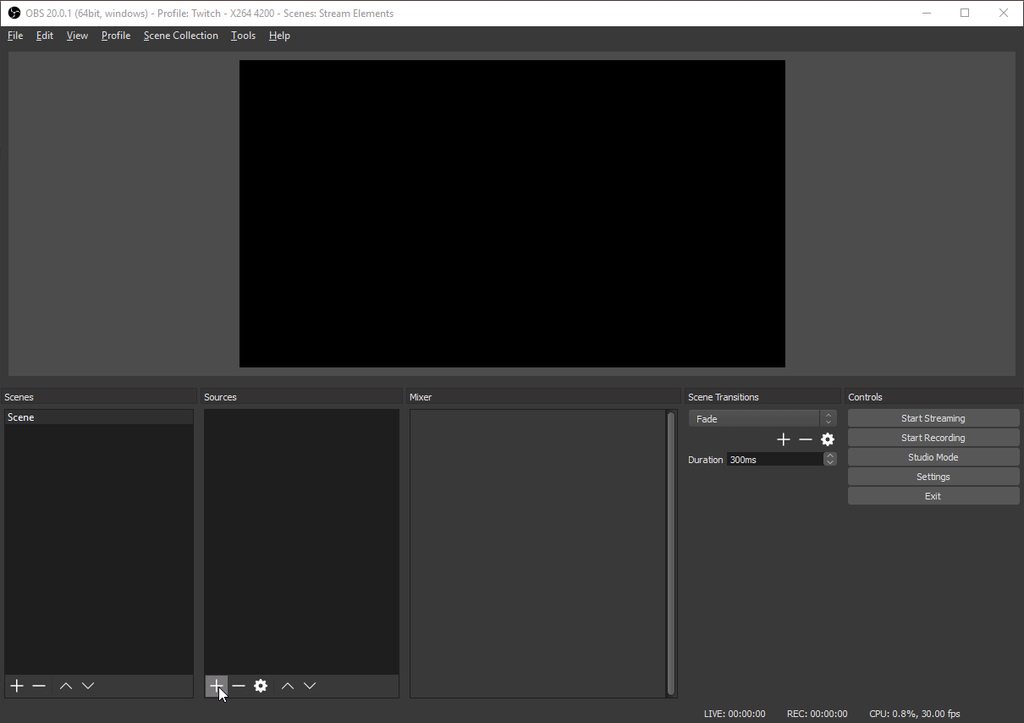
When I go to setup StreamElements on OBS the guide video says to click Browser Source. It doesn't seem to exist. Do I have the wrong OBS or what?
clever mango
Which version do you have @storm tangle ?
storm tangle
I downloaded the newest version on there website
 deft lichen
I have a question, Why is it that on certain Twitch channel chats I can't the see commands? If I redeem a store item for example it works but it just doesn't show up in the chat for me, same for song requests etc. It has been going on for a while now and this isn't for every channel because I can see them just fine on my own and others so it seems to be only for a few?
clever mango
This is likely because of the streamer's command settings
Hard to say though without that streamer being here to chat
deft lichen
Alright, thank you for the quick response! I was just curious because it seemed odd that I couldn't see things on certain chats when before I could 😄
clever mango
Customization 
storm tangle
@clever mango See that's the problem. I follow those exact steps but Browser Source doesn't show up
clever mango
That is quite strange
storm tangle
clever mango
What does it say in the top left of the OBS window? The OBS version information
storm tangle
20.0.1
clever mango
Yep, it comes with it so something weird must have happened during install
clever mango
Reinstall fixed it?
storm tangle
The plug in was not enabled. Usually it auto does it. Apparently I just didn't click when I was installing.
clever mango
Ahh 👍🏽
@next spruce I see what you are talking about now with the duel. It does seem that !deny still forces the user cooldown. I will check with the devs to see if it's possible to not enforce the cooldown in these situations. Thanks!
clever mango

 uncut isle
hey Terra
I'm trying to import my royalty points from Deepbot but it's nnt working
I copy and paste the secret API from deepbot into the import dialog
but nothing happens
the bot is up and running as well
clever mango
From what I understand, Deepbot only makes the point information available through the API for "Deepbot VIP" customers
uncut isle
I'm a VIP
clever mango
Hmmm ok I'll look into this and get right back to you
uncut isle
Alright, I'll be right here
clever mango
@uncut isle Are you using google chrome?
clever mango
Yes please 😃
uncut isle
On it
clever mango
The site was designed and optimized for Chrome
uncut isle
Well, that worked! I don't know why I didn't think about this before 😄
I'm a web dev, I feel dumb now
stuck hamlet
Ez fix. terra bucks got the competition shook
clever mango
Welcome to the StreamElements Family @uncut isle. We're here around the clock to help 😃
uncut isle
Thank you 
next spruce
@clever mango Thanks for getting back to me. Yeah I've got a CD of 1800 which is perfect
thanks for looking into it. Some viewers getting upset waiting that long and not being able to do it etc
 desert dirge
anyone able to help me with a few questions
stuck hamlet
What's up?
desert dirge
i have a few questions on the cpu usage of the animated overlays
stuck hamlet
Go ahead..
desert dirge
might be a bit easier if u are able to come to voice chanel
stuck hamlet
I cannot right now. Could you explain?
desert dirge
i can try when using normal overlays everything is fine with obs but when using the animated overlays it brings cpu usage up by around 15-20% and i work with a coupole different streamers and they have seen big dips in preformance in the games they play because of this and just wondering if theres a reason for such a big load on the cpu
this is on obs
i really like the premise and what the site does for streamers i recommend it everytime i can but i am curious about this preformance issue and how it affect the overall experience for the viewers as well as the streamers
pine hemlock
Animated overlays use more resources. You can try streaming off of your gpu instead if it helps your Cpu usage.
stuck hamlet
Also don't forget to shutdown the source when not visible. This will lower CPU usage when having multiple scenes.
desert dirge
i do recommend that but i was just curious about how much is getting used during the animated overlay 20% increase seems excessive and we have done that yes
desert dirge
i have an i7 4770k
pine hemlock
Are you using KappaGen too
desert dirge
but i have recieved comments from a few other people that use animated overlays and they also have seen preformance drops in general when playing games when frames matter
i do not believe so
stuck hamlet
Of course the animated themes are going to take more resources, that's just logical. It's possible to see drops, but nothing crucial, especially with an i7
You can check how much CPU it's using when you open up Task Manager
And find the correct CEF-Bootstrap
desert dirge
i do expect it to tkae up more resources that only makes sense but its not for me these are form a few people that told me about them and i just wanted tosee if maybe we were doing something incorreclty
desert dirge
no i have double checked that with them
stuck hamlet
Alright 🤔
desert dirge
now as a way to find a solution or an answer i added a animated overlay to obs that i have made and it doesnt seem to imapct the cpu usage as seen before is there a way to download the overlays so it minimizes cpu usage?
desert dirge
could u elabrate?
stuck hamlet
Long answer: StreamElements is build in the cloud to store all your data without having to worry about ever losing it if you bluescreen, or all your stuff is erased from your PC. You'll be safe knowing that it's in he cloud ready to be used. Or if you're going to an event (Twitchcon soon), you can easily transport your overlay to a PC over there if you wanted to stream there.
Going to a friends house but don't want to build your entire obs scene, well with SE it's EZ PZ. 1 link and you're done
That should be our slogan, "WITH SE ITS EZ PZ"

desert dirge
i understand that view point makes sense but im just concerned with the few people having preformance drops but still would like to use the well designed animated overlays
if the issue is just the way obs has to bring in the animation and then render the animation then im satisfied with telling them to use static overlays for now on i was just wondering if that option was available
stuck hamlet
Also another thing that Cuda mentioned, streaming off your GPU instead 👌🏼
Will take a load off your CPU
desert dirge
maybe as a feature to download there pre set up overlay from the my overlay page might be helpful but if that isnt the dirrection of what your looking to do thats fine i was just curious
yes most do but still having that cpu increase on a machine already using mulitple resources its hard in some cases to spare the 20%
but i will just recommend to them to use the static overlays when needed
stuck hamlet
It should never use 20% unless you're in an intel pentium.
I'm rocking the i5-4470, and it caps at about 15%
desert dirge
i checked it on my system multiple times when under load in game when out of game with game closed the usage of just the overlay in all cases was around 15-20%
stuck hamlet
The browser source itself or obs as a whole?
desert dirge
the main issue they are having is currently with player unknown battle ground and that may just be an obimaization issue with that game i just wanted to make sure with you guys if we were doing anything wrong and that is just the scene it self obs doesnt use half of that i currently have it open while idle with an animated overlay playing looped its solid at 6-7%
stuck hamlet
Oh god PUBG 
I play that without an overlay and it lags
It's not the best game to test with tbh
desert dirge
like i said it may be an issue on there end and poor optimization i just wanted to bring it up with you guys and they usually play at 60 frames or higher and witht the overlay drops to 30-40 ish range
it seems to kill their frames when having the animated overlay while playing that game only seems to really happen on this game
not sure wshy this is the case i was just curious
pine hemlock
Pubg uses a lot of Cpu. If they want a decent experience try gpu encoding. If all else fails maybe the animated overlays aren't a smart choice
desert dirge
i believe they use gpu encoding that is what i have recommended to them already as a solution but still seems to happen
i will just recommend them using a static overlay for that game but i did want to make you guys aware of this issue
clever mango
Remind them that they're free to use the static in-game overlay while using the other animated pubg overlays
That's what I do given the way pubg runs right now
desert dirge
ok that is what i will tell them i just wanted to double check with you guys
i do appreciate your time thank you for answering my questions
 hexed herald
is there a way to have a command fill in someone's twitch url if I just put in their display name?
a variable for that?
clever mango
https://www.twitch.tv/${1}
hexed herald
the url is always the same as their username correct?
clever mango
yes
hexed herald
it could in theory be different from display name, then?
hexed herald
then why are there two different fields?
pine hemlock
?
hexed herald
if username and display name are the same, why not just have one consolidated username?
pine hemlock
what are you referring to
hexed herald
someone's twitch username and their display name
clever mango
What is a display name?
pine hemlock
the display name only changes capitalization
hexed herald
ok, cool
stuck hamlet
@pine hemlock he means when people have Asian letters.
stuck hamlet

 stuck hamlet
@hexed herald Display name and Username can be different, thats why we choose to use username, and you should too 😉
 delicate bloom


 silk patrol
@delicate bloom Pareil
buoyant hull
Oh Boy @stuck hamlet ! 
unique ore
ok i'm dumb....but can someone tell me how the kapagen box works in practice?? I see what it does when i test, but i have never gotten to see it do anything on a follow or anything.
unique ore
I have it configured mostly on default settings... But on a follow it doesn't trigger. But it works when I do a test alert in the overlay editor
I figured I'm missing something due to it mentioning emotes/user
tight harness
Did you not tick it to trigger on follows?
clever mango
What are you emotesplosion settings?
unique ore
Yes, as it triggers on follow event in trst
clever mango

unique ore
I'll be back at my computer in a minute.
On mobile right now so can't pull it up
obs scene and editor showing side by side working with follower test
showing emotesplosion settings
stuck hamlet
so whats the issue?
stuck hamlet
have you changed your name recently?
unique ore
never have changed it
unique ore
all the alerts trigger just fine....it's just the kappagen bit that doesn't
stuck hamlet

Our Alerts and KappaGen get information from the same place
so they should work
have you tested this online or offline?
unique ore
online on streams....offline right now with obs open.
stuck hamlet
Seems like a strange issue. Id have to see it in action not working
 tropic nova
has anyone worked out how to keep your cheer sounds through all overlays without haveing to re add them
stuck hamlet
Unfortuantely that is impossible at this time @tropic nova but what ive seen many people do is go old school and use 1 overlay for just alerts
 fiery adder
Is there a way to get past the top 1.000 viewers using the API call? For example show the top 20.000 viewers? I can get the top 1.000 viewers using this API call:
curl -H 'Authorization:Bearer JWT-TOKEN'
-X GET https://api.streamelements.com/kappa/v1/points/nuuls/top/1000
But as soon as I go over 1.000 viewers, I get the following error message: "Amount must be between 1 - 1000"
fiery adder
yeah, but what if I want viewers 1001 to 2000
stuck hamlet
yea that should be doable
one sec
let me get it


so what you're looking for it https://api.streamelements.com/kappa/v1/points/stylerdev/top/10?offset=1000
at least should be
 burnt sky
Do streamelements have a subs counter ? 😃
tight harness
Yes, it's in Widgets 😃
burnt sky
Okay cool ill keep looking 😄
I found it 😄 A while ago i asked about host loyalty bonus (not working for me), is the error fixed ? ill try to test it my self today again 😃
 crimson fog
Hello I need help
tight harness
What do you need help with?
crimson fog
I would like to know how to resize green screen for OBS
tight harness
Resize green screen? As in you have a green screen behind you for your webcam to chroma out?
And you want to resize this?
⤴ taken to DMs
Fixed 😃
 solemn grotto
Hi, i changed my twitch username and my streamelement points were cancelled in every twitch channel i watch. can anyone help me with it? can my points be restored?
 unkempt river
Hi, i'm just asking me some question about SE:
First we have an amount of Data are we able to upgrade the data available in any way?
And about the Tips we can only add a paypal way to pay? To add card or by flooz or some other way like paysafe cards etc...
solemn grotto
my previous twitch username was sakkewa and now figmenthh
silk patrol
@solemn grotto points are tied to your name, you need to ask each and every streamer to give you your points back
solemn grotto
Thank you for info
silk patrol
@unkempt river Hi, by data do you mean images/sounds/videos that you upload to use on your overlay/store? Do you really need more than a 100MB? I have 22 store items, each with their own sound and image + 4 images on my overlay, and I only use 14% of that. Right now, you can only use paypal, but keep in mind that people can still pay via credit card even if they don't have a paypal account. We are talking with payment services to get other options
unkempt river
@silk patrol Yes i'll probably need more than 100MB i might use some loops on background and it take a lot... But without the vids i'm fine atm.
Some of my viewers tried to donate without paypal and they didn't found a way without.. But maybe there but if actually you are talking i'll wait 😉 Ty for your help !
silk patrol
@unkempt river No problem, if you really need more space later, we can look into it. Paypal don't want you to pay without an account, but the option is there
 serene nimbus
Im not getting overlay from streamelements (my internet is ok)
hmm now working...
strange
silk patrol
it takes a second to load in OBS
silk patrol
keep in mind that an overlay is a webpage, if your overlay is very cluttered, if your internet is slow or if your PC isn't powerful enough, it can take some time to load
serene nimbus
Its not the first day I use SE
few weeks already
thats why I asked once where is the server located and one should be in sweden but I have a fealing that sweden sometimes is dead and thats where my overlay loading time takes more than 30s
 dim sorrel
I'm trying to edit a premade overlay, the pink starfield one. In the preview it shows there is a "now playing" but when I download the overlay its not there. Anyone have that image? I really want that on my overlay :p
serene nimbus
I really like SE but this overlay delay are forcing me to use something else 😭
silk patrol
@ripe herald Jennasis theme #FakeNews?
dim sorrel
@serene nimbus I was having a bit of trouble with mine loading too, but then I jut found out I had way too much stuff on it and thats why it had trouble loading. the more images and text and gifs you hae the longer it takes to load
dim sorrel
ahh thats strange then D:
serene nimbus
I like it as minimal as posible my self
but as I said my internet is good inside country and neighbour countries thats all... if its further that can be the problem
silk patrol
@serene nimbus We are severals streamers using our overlays in the scandinavian region, and they are working just fine. The issue might be on your end.
serene nimbus
im on 4G but its very stable, had problem only once and then I couldnt even get on internet
silk patrol
@dim sorrel you can give a big hug to @ripe herald
 ripe herald
😊
silk patrol
@serene nimbus maybe your mobile carrier is doing some shady stuff then