#helpdesk-twitch
1 messages · Page 99 of 1
 stuck hamlet
 kind kindle
Roboto isn't working.
 tawny pivot
Does it reset if you reload the overlay?
 next spruce
nope
stuck hamlet
Whats your sub count Ron?
next spruce
183 I think
stuck hamlet
you're a partner?
next spruce
yeah
its my sub goal thats not working
should be 0/5 after a reset but it stays at 4/5 from last session
stuck hamlet
i see it at 0 now
next spruce
yeah that works but recent tip didnt reset after I put int a test event
 weary mist
@lyric totem sorry for the late reply, but the cheers have variations, so check/change/remove those if you want the sound to change
 fleet void
So my channel collects candies, and I would like to make a command called !CandyKing that shows the top person on the leaderboards name. I need some help writing the message in custom commands to do this. I can't find an obvious way with the variables listed.
 clever mango
I like the idea but it's not currently possible with the variables available
 edgy kindle
@fleet void You can do something similar like !top points
fleet void
Thank you TerraBuck. Good to know. I can play with that Derpy. thank you too
edgy kindle
It shows top 5 people @fleet void
 thick eagle
More bot derping.. not showing follows, not responding to 98% of commands. 😦
stuck hamlet
Will add it to Styler's list 
 knotty warren
Is "Top Cheer" bugged right now?
next spruce
Have there many any issues regarding inconsistenices in the number of coupons some viewers have?
weary mist
@next spruce not that have been reported
@knotty warren what are you seeing with the widget?
next spruce
are you able to look at viewer logs for coupons?
NVM he changed his name lol
sorry.
 runic cove
I'm having a few issues with the Song Request feature. I see the quick description says that it should accept video id, url, or name of the song, but it's not working unless I use the full url. Also, it doesn't seem to actually make use of my set max song duration.
clever mango
It currently will only work with URL
This is because of a limit that we have with youtube API
runic cove
That part isn't too big of a deal for me, as I can get around it. The max duration is the bigger current issue.
clever mango
People are able to request songs longer than the max?
runic cove
I haven't tested it live yet, but I've been able to through the account of one of my mods. Consistently putting things in that are 10 hours long.
Is the fact that it's a moderator in my channel perhaps bypassing the limitations I've set?
clever mango
I think this is it
runic cove
Is there any way for me to set moderator limitations?
runic cove
Ah, there we go. It was indeed set in moderator. Thank you!
One more quick one. Is there currently any way to customize/disable the response SE puts in chat to things like entering a song into the queue?
clever mango
Not at this time as it's a default command and the response type can't be set. Custom commands can have the response type set in advanced settings for each command
runic cove
That's what I thought. Thanks!
weary mist

 lyric totem
@weary mist No worries, thanks for the assist, I added variations with their own custom sounds, those sounds play, but also like a normal bit sound, it does it for the variation tips as well, like a little ding sound
weary mist
@lyric totem that sounds like you might have another overlay that is playing
double check to make sure that you have the "Shutdown when not visible" box in the browser source settings
lyric totem
@weary mist Ah good call, will do, thank you again!
 tiny lotus
weary mist
tiny lotus
weary mist
@tiny lotus read up a couple lines
 slim dune
Is there currently or will there ever be a Stream Elements Discord bot?
clever mango
It's a future possibility
 upper steeple
i justed change my sub count and follower count but now sub says 0 and follower says 1 on my overlay o_0
i went into my overlay and the subscriber count has been changed to session sub count and the total sub widget doesn't show my total subs it shows 0
same with the total follower widget it only says 1
no mattter what i do the follower count and sub count won't reflect the numbers in my activity feed under edit session
stuck hamlet
@upper steeple It is currently cached, we are going to be flushing it in a couple of hours, you can use Reset Session next to the edit session button to hopefully fix it
upper steeple
already tried that didn't work
cause i don't want to reset everything i only want to fix those 2 things so i only hit the reset button next to the follower count and sub count
stuck hamlet
Hitting resetting the whole thing should fix all of them
upper steeple
nope still says 1 and 0 on the counts in my overlay
okay numbers are back but they won't change when i change them in edit session
and my recent tip widget has nothing now, lastest follower and lastest sub have nothing
even though i hit save on the edit session nothing saves cause it follower count and sub count still say 0 in the edit session when i go back to it
stuck hamlet
you can replay your last follow, and tip
like i mentioned, it's cached right now, so it may not cooperate
upper steeple
so thats why my recent tip widget shows nothing?
stuck hamlet
Delete the widget, and readd it
upper steeple
i did
upper steeple
okay, thank you though for helping
lol when i switch scenes and go back to my overlay everythin resets showing nothing T_T sad days
 humble ether
Is it possible for mods to start giveaways through the chat ? 😃
 silk patrol
@humble ether nope, they can start raflles but not giveaways
 alpine wyvern
I had a top donator with €30, but after the bot was offline yesterday and someone already donated €5 is the new top donator with €5, how can i have that €30 donation on top again?
Because when i do top donator all time, it's still the €5 donation
silk patrol
you can edit the session values here https://streamelements.com/dashboard/session (Activity feed -> edit session)
alpine wyvern
Thanks sir
silk patrol
You're welcome, sir? lady? i don't assume genders 
 tight harness
Fellow life form 
silk patrol
⤴ human being works too, unless Reptilians are a thing #illuminatiConfirmed 
tight harness
I don't like to assume species
silk patrol
👍
upper steeple
has the cache been flushed for the session data? cause my last sub, recent tips widget and recent donation, ttotal subs and total followers is wrong and won't change even if i change them the edit session part
 outer flare
Good morning, Until today I had a list of recent followers scrolling across the top of my overlay but it appears to not be working I have deleted and reloaded the widget (recent followers) but it still shows no names. Any ideas on this?
upper steeple
we are waiting on @tawny pivot to gett back on everything cause when they added the new session widgets they haven't flushed the cache
tawny pivot
@upper steeple Have you tried resetting the session?
 stray venture
Hello, is there a way I can reset my tipping goal bar or is that not a current feature?
 lament blade
https://streamelements.com/dashboard/session @stray venture
upper steeple
@tawny pivot @tawny pivot yes and it got rid of everything but when i try and change the counts they don't change on my overlay and when i refire the latest sub and follower they disappear once i change scenes
stray venture
@lament blade Thank you!
tawny pivot
@upper steeple On it!
 hasty chasm
So yeah I emailed twitch about the making bots subs the response was that they dont offer it to affiliates
silk patrol
@hasty chasm you can use your free sub if you want
hasty chasm
How would I do that? o-o
silk patrol
@hasty chasm don't know since I'm not an affiliate, but I know that affiliates have a free sub and they give it to whoever they want. Maybe in your dashboard, or ask twitch support
 river saddle
Is there a way to create a chat command where the bot responds with multiple lines, vs just one entry?
 obtuse patrol
they dont offer the free sub to bots for affiliates "yet" partners they do
 young steppe
Hi all, I have kind of a problem with the songrequest. There is this backup list system that seems to be a very good idea but every time it pops out it's the first song of the playlist that is played. Is there a way to change things on streamelements or youtube to make the backup playlist pick up a random song on the playlist instead of always plaing the first one ? Thanks for help
silk patrol
@obtuse patrol they do actually, I've seen many affiliates with their bot subbed
@young steppe The player has to be visible or only the first song will be played. If you use the shuffle button on the playlist, they will be played in a random order
silk patrol
@dense adder T2T ?
 dense adder
text to talk\
my animations and animation sounds all work but T2T doesnt, no voice... i tried sub alerts and cheer alerts\
 frosty zealot
Have you made sure TTS is turned on for the alerts? It doesn’t default to on.
dense adder
yes sit, both in the main settings and in the variation settings
yes sir
any thoughts??
silk patrol
Working for me, have you checked the minimum amount setting ?
dense adder
its at 0
frosty zealot
I've broken my cheer settings, hold one.
in your variations settings, have you chosen a voice?
dense adder
Hey Scalper!!
weary mist
heh, sorry for the late responses, I was driving to work 
dense adder
yea Ive even tried all of the voices thinking that may be the issue but none of them work
young steppe
@silk patrol thanks !
dense adder
no worries Scalp, I really appreciate ur help
weary mist
weirdly enough, I jsut tested it on my alerts and it seems to be working.... hmmm
frosty zealot
it's working on mine as well
dense adder
yea, my animations work, my animation sounds... just not the t2t, i just checked the recording of my last stream and it didnt work for my last sub
frosty zealot
I did have to recreate the alertbox to get it... but I think that's because the last time I did anything with it we were trying to fix another completely different issue.
weary mist
Glue, can you DM me your overlay link?
silk patrol
yeah works fine for all of us, have you tried removing the alertbox widget or at least adding a new one if you don't want to lose everything you've done ?
dense adder
yes sir, deleted the widget and tried a defult one, still no t2t
silk patrol
silly question, but is your windows volume muted ?
dense adder
no, the animation sounds work just fine
silk patrol
@young steppe btw you have been logged in voice chat for a long time. No problem with that, but it's using your bandwitch for no reason 
dense adder
i thought it might be a sound file issue on my end but I just watched another streaner and heard their t2t
weary mist
give me a second glue, derpitudes happening at work 
silk patrol
since it's working for everyone else, there is a strong probabilty that it's an issue on your end 
weary mist
kk @dense adder emulate a sub
welp, something is up on your end @dense adder, I heard the TTS
lovely lady too
dense adder
really?? I can hear others t2ts so wouldnt I be able to hear mine?
weary mist
I would think so, but tech confuses me some days
dense adder
is there maybe a file I need??
I would think that if I can hear others then its not a sound file issue... Im just baffeled
weary mist
im just as baffled. What browser are you using?
dense adder
regular old IE
weary mist
something that HAS been effecting OBS is anti-virus. but normally it effects the whole overlay, not just parts
dense adder
just updated my sound drivers and still nothing
weary mist
have you tried chrome yet?
also, are you using OBS studio, latest version?
👋 @lament blade
lament blade
Fellas we got a problem and I cant figure it out my friends. Damn you @weary mist
lol
You ready for my rants
lament blade
Ok...........
weary mist
rant away my friend
lament blade
Lets start.... First, I've had many new subs and donations not alert yesterday for what ever reason
super sad
dense adder
Scalper.. just tried chrome, it worked...
weary mist
@dense adder ❤
lament blade
Welcome to SE @dense adder
SE is making me sad @weary mist
😦
I dont want to be sad
lament blade
lol
weary mist
did the subs populate in your activity feed?
weary mist
did you notice if they were announced in chat?
weary mist
It might be something to do with that
lament blade
ok FINE
tawny pivot
2 things i want you to do quickly.
lament blade
Oh shit
tawny pivot
- Reset your session. -> https://i.imgur.com/gsVfDgF.png
- Logout and login again.
 lament blade
If I do that wont that reset my donation bar back to $0
tawny pivot
The tip goal should remain untouched.
lament blade
Thank you @tawny pivot
upper steeple
@tawny pivot did you fix everything? ^_^
tawny pivot
I'm working hard to get some things resolved
lament blade
I reset
tawny pivot
Perfect 👍
lament blade
First time talking with you @tawny pivot I'm Josh btw. @weary mist is my boyfriend ❤
 lament blade
Nice to meet 😃
I see you at the top of the list. You must be smart or one of the top dogs or both 😃
lament blade
Oh don't tempt me Kappa
tawny pivot

tawny pivot
Anytime
dense adder
Much appreciate Scalp!
upper steeple
@tawny pivot counts still aren't saving in the edit session when i changed them and they aren't changing on my overlay
 radiant zenith
I'm sure this has already been covered somewhere but the cheer cup no longer working? I don't see the widget option anymore?
tawny pivot
@upper steeple I am aware of the edit session thing you're talking about.
Currently trying to resolve parts of it.
upper steeple
@tawny pivot okay is that also things to reset to nothing when i switch scenes?
tawny pivot
Potentially yes.
weary mist
@radiant zenith we are working (very close) on a new one. keep an eye on #270206314561404928 for when it is released 😃
 livid orchid
I need help
radiant zenith
okie dokie, love the work you guys are doing! last questions is bitboss compatible ? I could have sworn you guys had a built in variation
lament blade
@livid orchid just ask...
weary mist
@livid orchid we are here, asking your question gets a faster responce
weary mist
@lean valve whats up snow
 lean valve
but for some reason, when I select one just for follows, and the other one for the rest
it changes in both
like...
weary mist
make sure to click off the box on the green field before selecting the second
and that you are using chrome
if that doesn't do it, save, exit, and reload overlay editor
weary mist
make your changes on one alert box, then click into an empty part of the editor, then click on the second alert box. forces it to clear what your previous selection was
 indigo tinsel
I have a question too. Can i ask? x)
lean valve
I did that it still didnt work
weary mist
@indigo tinsel Ask away, though we limit the number of questions, so don't waste them on asking if you can ask
(just kidding on the question limit)
indigo tinsel
nice to know xD
lament blade
Heyaa, is there a way to update title and game via chat command? 
 halcyon pumice
XD
the new game mode invasion it come out i dont know cause my league not working
weary mist
@lament blade of course 😃 it is !settitle and !setgame, supermoderator commands by default
@lean valve you are using chrome, right?
lament blade
ah thank you! i tried update and just game but it didnt work  thaanks ❤
lean valve
@weary mist No worries mah dude, i just exitted and reloaded it.
@weary mist ty for the amazing help!
indigo tinsel
Im trying to make a Overlay, everything is going fine and its pretty easy, tbh. My problem is that I need that the total follower count... well... Count the total and not the Today followers? And the event list too, It could be amazing if it dont reset everytime I reset the stream...
weary mist
I thought that the event list should retain events on the single overlay its on... I will do tests on that part. As for the total followers, that should be working now. that was just VERY recently updated. still kinda in testing because it hasn't been officially announced
upper steeple
@weary mist i thought that is what styler is currently working on
indigo tinsel
oh, well, my bad them I guess
upper steeple
cause its not saving when you edit session and when you change scenes it resets itself
cause i have no latest sub, follower or recent tips, donation and my counts are wrong on total followers and subs no matter how many times i go into edit the session and hit save it doesn't save it. So Styler said tthat they are trying to resolve all of it @weary mist
indigo tinsel
(maybe its my bad because I should change the Total Followers: {count} for... I dont know, Total Followers: {totalfollowercount} ?
 languid raven
Hi! Is there a way to trigger a Kappagen emotesplosion by both mods and subs? At the moment, I just have it set so that mods can trigger the command, but I'd like subs to be able to as well 😄
tight harness
@languid raven If you go to your default commands list and edit the !Kappagen command you can change the Minimum requirement, Mods are above Subs so changing it to Subs should work
languid raven
@tight harness But then only subs will be able to trigger the command, and not the mods anymore, no?
Oh wait, I see what you're saying! I read it wrong 😂 I'll change that and see if that works, thank you 😄
tight harness
No problem 😄 I hope it works 😛
languid raven
I'll come back if it didn't 😏 And also if it did work, thanks 😛
weary mist
@indigo tinsel it should work with the default way it comes up (sorry, work spiked)
 final hare
hi 😃 I'm having a good bit of trouble trying to setup the Songrequest (Backup Playlist) by putting in the link and it wont go past the first song. Does anyone have any ideas on how I can fix this?
indigo tinsel
Its okay, I have time. I asked a friend to follow me. Not it stay at 1. That means that the count just count since I have the StreamElements Overlay instead of take my total follower count FROM TWITCH. @weary mist
Maybe I sould give permissions in some way? I really dont know.
weary mist
the count from twitch is VERY new, so I don't know much about it yet (like maybe 24 hours old). you can edit it to match twitch at the moment by going to activity feed -> edit session
indigo tinsel
OH I SEE !!! Thx a lot ! 😄
final hare
does anyone use the song request or know anything about the backup playlist?
weary mist
yup, whats up @final hare
final hare
hi 😃
can not get the playlist to go past the first song
the backup youtube plalist that is
weary mist
make sure to put the video visible on the player, then reload the page 😃
halcyon pumice
am
final hare
didn't really load the playlist :/
 radiant garnet
Quick question everyone. I noticed in variables/commands there is a {user}. I didn't see a {touser} am I missing something? I just want my raid/shoutout commands to work
 viscid steppe
I set up a super theme today and I'm not getting tips/bits/sub donations pop up/alert on stream. Followers pop up fine. Any suggestions?
weary mist
@final hare if you make the video visible and reload the page, it should load in the playlist you entered into the backup section. is the playlist private or public?
@radiant garnet {user} is the variable to target someone, where {sender} goes to the person calling the command. For Shoutouts, you can load the template, and adjust it to your needs as well
@viscid steppe there could be many things for that. are tips/bits/subs showing up on your activity feed?
for 1, you don't have the tip page updated to the streamelements one, so there is no way that we can detect those
final hare
it's public and I refreshed it didn't improve the situation, I'mma keep trying
final hare
LMNAO
I'm on chrome and sure
and it like is IDK wont go past the 1 song

YouTube
don't make fun of it LMAO
weary mist
lol, I didn't even look at the songs. but I was able to laod that list into my backup playlist, and it loaded 89 songs
weary mist
screen shot your settings as well @final hare
radiant garnet
I'm pretty sure I tried it and it didn't work. So what ur saying is if I put the command back to ${user} and then save it then in my chat do !shout random person it will shoutout them?
@weary mist ^
weary mist
weary mist
@radiant garnet ${user} returns the person you target, aka !so lord_scalper will return lord_scalper. but if you used ${sender}, !so lord_scalper will return jrsmooth
@final hare did you reload the page after you made it visible?
if you look at the top corner of my image, it shows the 1/89
radiant garnet
Ok thx I'll look at it again and see if it wokrs
weary mist
@radiant garnet let me send you the logic for the SO command I use
radiant garnet
Ok thx much appreciated!
weary mist
@radiant garnet Check out ${1}, they are playing ${game ${1}} at https://twitch.tv/$(1)
 final hare
and it works so TY TY ❤
radiant garnet
Ok cool
Scalper#2854 ok I just did it and I put the command in my chat and I did !raid then one of my friends and my name was imputed in the command
Nvm @weary mist the {1} worked but not the user thx!
 rotund jay
At some point, I saw where to add/configure a cheer cup but I can't find it - was I asleep and dreaming or can someone post a link to it?
Also - is it possible to add scrolling text to an area of the screen?
scrolling like a stock ticker
weary mist
@radiant garnet thats weird
@rotund jay you probably saw the cheer cup a couple weeks ago. We removed the old one in prep for the new cup that is on its way
@rotund jay as for the scrolling text, pretty much all text widgets have the option to make the text scrolling
rotund jay
Thanks - I'll try it out in a little while - hoping to run a ticker of information across the bottom of the screen to try and get people's attention a little better.
 whole vector
I have a question !! Is it possible for me (for the ussers ) to translate default commands? When I try to Edit them there is no message, and I don't know how to change them to put them in spanish
weary mist
several of the defaults can be updated using custom commands (like !points for instance)
there are w few that use custom logic that don't give you that choice at the moment
 zinc nova
Hello, so I have a problem, sorta a problem, idk if it's just an obs problem but when using the super themes it ends up using a ton of CPU, like a ton, there's browser source plugin that shows up in task manager that uses multiple cef-bootstraps.exe (Browser source plugin) and about 3 or 4 of them will use about 10 to 12% of cpu and when I play a PC game I can't use any of the super themes because it eats so much CPU, now idk if theres something I can do about this other than stop using the super themes since I am using just one computer to stream and play PC games.
 ruby anchor
i need some help...
my feed did reset after i did restart my computer...
top donation and all the other stuff is gone...
stuck hamlet
@zinc nova you should use the option "Shutdown source when not visible"
It'll decrease the CPU a bunch. May I ask your specs?
 fresh furnace
stuck hamlet
fresh furnace
stuck hamlet
@ruby anchor we should have new widgets for that, feel free to look into it.
I have no date on YouTube support, we are very busy currently with other things, but YouTube is still top priority
 jaunty thunder
does xsplit work with the overlays. Because i can't get it to work.. It's a black screen.. I can't find a instructional video for xsplit. Like the OBS one.
zinc nova
@stuck hamlet Is that an option? I was looking for something like that but couldn't find it. I have an i7 4.00Ghz (OC to 4.50) and 32 gbs of ram, 1060 gtx
That helps a whole lot tho thank you, holy sh*t
 ebon forum
@jaunty thunder yep it works.
stuck hamlet
Glad I could help @zinc nova also, studio mode is great for loading times
ebon forum
@jaunty thunder https://www.youtube.com/watch?v=xKGAF8-t7sU

I am officially in the StreamElements Support Team right now with the release of that video. It is an awesome tool for streamers. You can check it out here: ...
 strong dock
when will destiny purple super theme go live? I needs it...
stuck hamlet

strong dock
Hopefully before monday... would be good timing just fyi
I hear there's Theresa certain pc beta going live
 trim cloud
Is there an ETA on having the API finished? I swithed over to Stream Elements, but sadly that means my bot (PhantomBot) is not able to get updates on Tips any more, so awarding loyalty points for tipping is something I've had to give up to use Stream Elements. (Loving it so far!)
stuck hamlet
We have a tipping page, and a loyalty system that gives points for tips 🤔
I'm unsure what you mean
weary mist
⤴
lament blade
hello im helping a person with alerts but if i would like to change te sub alert the shark is still gonna be back, how could i change this?
do i need internet explorer?
stuck hamlet
I'm guessing your loyalty system is on your bot, if that is the case, why not use our system @trim cloud
@lament blade check variations 😃
Usually #1 issue is that people don't check variations
Also, we work best on Google Chrome
trim cloud
I love your overlays and other features, but I have no desire to use the Stream Elements bot. I would much rather use a more robust and customizeable bot like Phantom Bot, and use Streme Elements for the great alerts and other features. It's great that you offer a bot, and I'm sure it's a wonderful bot, but it just does not meet my needs. Looking forward to the API! 😄
weary mist
what kind of stuff do you look for that you use phantom bot for 😃 we like learning
zinc nova
I'll definitely try that thanks
ruby anchor
@stuck hamlet Yea its the same
trim cloud
custom scripting, having a bot with its own name, discord support, and most importantly a bot supported by a team of developers whos only goal is to focus on developing a great bot. When you try to be everything to everyone you often end up spreding yourself a bit thin. Don't get me worng, I think it's awesome that Stream Elements offers a bot, but I would much rather stick with Phantom Bot.
trim cloud
I know. But since I switched tipping over to Stream Elements my bot is not able to respond to tip events, as the Stream Elements API is not finished for tipping. I'm not looking to have 2 loyalty systems.
stuck hamlet
My point is to use our loyalty system and call onto our API for the values through phantom bot
Now if phantom bot can't call to API, that's not very customizable 🤔
trim cloud
it can, but it would seem the goal would be to interface directly with the tipping API. (https://github.com/StreamElements/api-docs/blob/master/tips.md) which is currently a blank document
stuck hamlet
Our API is done, it's just not documented, if you know how to navigate the network tab you'll be able to find what you're looking for. I have given you the easy option, but be my guess. 😃
 dense sigil
Having a small problem, top donation, last donation, last follower and last sub just stopped with working: http://i.imgur.com/IXar1Ro.png
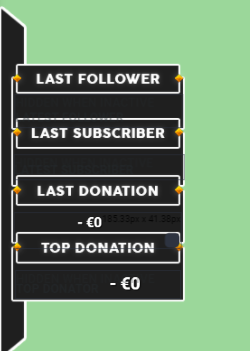
This is inside the editor
stuck hamlet
Hey @dense sigil can you go ahead and reset session?
 wispy dirge
I'm also having trouble. My raffle chat commands won't enable after enabling the raffle module.
viscid steppe
Hi, @weary mist Looked further into this. Bits, follows, and hosts show up on my feed. Tips do not.
dense sigil
Oh yeah good idea will try that out. 1s
stuck hamlet
@wispy dirge they should be enabled but still greyed out.
Have you tested it?
@viscid steppe are you using our tipping service 🤔
stuck hamlet
I'm guessing Alerts work?
weary mist
he is not @stuck hamlet
stuck hamlet

weary mist
@viscid steppe did you change your tip page like I recommended? We can't not detect tips from other services
wispy dirge
Nope they're still unenabled and greyed out
dense sigil
Alright, donations are working agian, but last follower is still not showing up @stuck hamlet
viscid steppe
I'm dumb. How do I access the tipping service? @stuck hamlet
weary mist
there is a tipping page on the dashboard 😃
you can set up all your settings there, then click "Open tip page" to see what everyone else sees.
If you copy that link, or type !tip in chat, it will be what you want to put into your panels
stuck hamlet
@dense sigil try updating your widget. Removing it and adding it again.
dense sigil
Gonna do that
viscid steppe
Hmmm... More dumb questions. How is this tipping page different from Twitch?
I plan on leaving Streamlabs and with them, all I had to do were link the two.
wispy dirge
downtoquest
weary mist
you can have tipping presets, it links to our alerts, and it allows automagic addition of loyalty points
viscid steppe
Hoping I can just link these
weary mist
plus a few special moderation options
you can have custom word moderation, along with replacing "bad" words with "happy" words, which you can completely customize
dense sigil
Yeah replay last follow worked @stuck hamlet cause it wasn't working in all overlays.
stuck hamlet
Dope
viscid steppe
I apologize for being so inept. Where exactly do I link things up? Is there a walk through video, maybe?
weary mist
https://streamelements.com/dashboard/tipping <-- here is where you play with all the settings, and https://streamelements.com/tip/roryplays is your tipping link
weary mist
that link you just need to put into your twitch panels.
wispy dirge
yeah i just realized it's working, the switches are just inaccurate
weary mist
the settings are where you put in your paypal email address, and I am looking to see if we have a video with details about tipping
viscid steppe
I'll test this out. Thank you for your help! @weary mist I really appreciate it!
I'm kinda overwhelmed
weary mist
😃 let me know if you need any more help later, I am a bit tied down right now, otherwise I would offer more in depth assistance
stuck hamlet
Like I said, they stay greyed out/might not look right
wispy dirge
gotcha. it can only be initiated by my mods, right?
stuck hamlet
It's set default to mods, yes
wispy dirge
cool, thanks 😃
viscid steppe
Thank you for your help too, @stuck hamlet I think I'm figuring it out. 😃
viscid steppe
👍
stuck hamlet
Peach 
weary mist
!top something womething
 rough cradle
theres no parameters for it
rough cradle
oh i thought that was like for your top position you ever where
stuck hamlet


#Destiny2 is out soon & we launched 2 new Super Themes for you to play with! Check out “Red Ghost” preview for @DestinyTheGame #SuperThemes https://t.co/wPnWs7GYvz
 Twitter
strong dock
Twitter
strong dock
@stuck hamlet haha ya I saw that tweet. I thought it was a tease. I didn't catch it saying launch
So the "out soon"
stuck hamlet
Yeee
weary mist
xd
 cunning niche
I have a question.
weary mist
yeah, for the specific user you are looking at @rough cradle
rough cradle
what would be the variable for it under a custom command?
instead of !top alltime like !candyking instead
weary mist

cunning niche
Currently what is everyone loyalty pay out by the min? I'm just trying to get a clear Idea what maybe a average number is.
weary mist
@cunning niche for loyalty, it is all up to you. everyone has something different, and as long as you keep it in sync with the store, it should be fine
rough cradle
👍🏽
weary mist
👍
 lone bridge
I SEE HOW IT IS SCALPER
weary mist
lone bridge
AH. thanks 😃
lone bridge
Wow, how have I never gone here
it's amazing. Been using SE since April and I always manage to learn new thing about it
weary mist
hahaha
cunning niche
Thx
stuck hamlet
@rough cradle DM if you need anything you fool 
strong dock
Rip power nap b4 stream... dang it @stuck hamlet
stuck hamlet

weary mist
strong dock
Shh.... I know
stuck hamlet
Hack it to be purple 
strong dock
That's what I use currently with my current one
omg is there a reverse or back option in editor?
stuck hamlet
No
weary mist
don't save
strong dock
ya my issues was a made a few changes and then something silly and realized i hadnt saved yet
weary mist
lol
rough cradle
hey fool, ok i'll do that next time @stuck hamlet
 tall raptor
Maywhether
weary mist
maybe
 warm nest
Has anyone ran into an issue with a ding sound happening in OBS when you have something going off in your alertbox? Like a ding RIGHT before your alert sound
tight harness
Do you still have default variations?
warm nest
Yeah, no variations at all
What weird is when I have SE up and do the test, no ding
but when I open OBS, ding
stuck hamlet
Oh hey Tom
stuck hamlet
As I mentioned on Facebook, have you looked through your OBS to make sure there is no unwanted links?
warm nest
Yeah, I even made a new scene with a new overlay, still got the ding sound
its a ding with a slight echo
warm nest
ANY alert. Followe, sub, cheers/bits
strong dock
look at ur audio sources. is two audios showing hte "ding"
stuck hamlet
Could you take a screenshot and show me what your obs looks like?
warm nest
Sure, what settings ya need to see?
stuck hamlet
That's pretty hot Tom
stuck hamlet
Could you open up the browser sources, all of them? And tick "shut down source when not visible" and also "refresh cache"? 😃
Alrighty
warm nest
Yeah, the uh shoutdown wasnt enabled
lemme see if that fixes it, sec
I already did the cache
Okay, that MAY have fixed it
I wonder WHAT was doing it
I bet I know
the starting soon, or done screen
stuck hamlet
You could test them as well, one of them has to have the alert on it that isn't customized
warm nest
Yeah, its working now 😄
this was gonna drive me nuts, I only noticed it legit lastnight too
stuck hamlet
Glad it's working! 😃
lament blade
Why with the YT playlist we can use only plays 200 songs, is there a way to change this?
warm nest
SE, you guys are the real MVP, also that destiny 2 overlay is 🔥
clever mango
@lament blade This is a restriction based on youtube api limit. It's not something we can change at this time.
lament blade
Sad face 😦
 jaunty barn
Hello?
clever mango
jaunty barn
i have a situation i do not know how to fix
clever mango
Go on....
jaunty barn
the overlay is not the right size when i put it in my resolution on OBS
the overlay is too small than resolution i put in
clever mango
Your OBS base canvas, browser source, and SE overlay dimension should all match
The standard size for SE overlays is 1920x1080
Is your browser source set set to 1920x1080 in the source properties?
jaunty barn
yes
halcyon pumice
:/
clever mango
Is your canvas size 1920x1080?
jaunty barn
may i ask, what is the canvas size?
clever mango
Also, are you using OBS studio?
jaunty barn
yes
clever mango
Set your canvas to 1920x1080 and your output can be whatever resolution you want to send to twitch
jaunty barn
okay so i set it, but the overlay words and such are still too small
they arent where they are the the editor
clever mango
This is all changed through the editor
If the OBS preview does not look like your editor, refresh the browser source
jaunty barn
okay
before i do, then i launch the overlay in the browser, the overlay is the same way it is on OBS
i have one set so the latest follower is in the bottom left corner, but when i launch it in the browser or shown in OBS, the latest follower is in the middle left
and not the corner
strong dock
dunno if this would be support or feature request
but any chance i could get a sep overly for d2 alert theme?
edgy kindle
D2? Diablo 2 or Destiny 2?
edgy kindle
We have a few D2 themes in works if they havent already been released @strong dock if thats what you mean?
edgy kindle
What exactly are you asking for? "Seperate overlay for D2 alert theme"?
strong dock
the themed alerts
they are built in to the 5 overlays
id like just an overlay with JUST the destiny 2 alerts images
so i can do it as a sep browser source so i dont have to edit/ adjust the alerts in each sep overlay
edgy kindle
or simply delete everything excluding the alert box
Theres multiple ways of doing it
edgy kindle
Just remember the super themes use webm files so when you're uploading them for alerts use "add video"
strong dock
naw i can just dup an overlay and then remove them all
ok got that to work
so if i wanted to replace the silver ghost with the black ghost.... what would be the easiest way?
am i able to save the webm file and put it in my uploads and then insert it in the other overlays?
yep worked. lol nvm
lament blade
can stream elements detects auto hosting, because the alerts gettings insane also in chhat
or how to setup that
edgy kindle
@lament blade You can set it up for alert with a minimum amount iirc
lament blade
so
so te problem is
the streamer that im working with is getting a lot of auto hosting
with 100 views or more
edgy kindle
For alert box he can indeed turn those off too
edgy kindle
Auto-hosts are the same as regular hosting from what i understand; it just automates it for you
lament blade
i think ur alright
but i think i needs to be integrated because 500 auto host is different then 10 live real viewers, because maybe the streamer would like to support the smaller streamers
i think so
edgy kindle
If he's getting hosted for 100+ viewers it's most likely a normal host.
clever mango
But aren't the auto hosts typically coming with very minimal viewers? Like between 0-2?
edgy kindle
Autohosts usually happen with 1-2 viewers
lament blade
when u are a popular streamer you get so much auto hosting
i rly like stream elements
clever mango
And if you use the method that @edgy kindle showed above, it should eliminate 99% of autohosts from showing an alert
lament blade
but i need also phantombot to block the /me in the chat to moderate
but the streamer is gonna change the alertsd
so ty again
Is there a way to get a list of user online time in stream chat?
clever mango
${user.time_online} Time the user spent watching the Stream
Check the variables tab under Chat Commands
clever mango
Sorry, misread your message. We don't have that information included on the leaderboards but please add it to #💭︱feedback-and-ideas and we'll try to add it in the future
viscid steppe
BIG thank you to @weary mist and @stuck hamlet for the help with the tipping page. I think I have it figured out! The YouTube video really helped! 👍
 cunning ocean
I switched over to streamelements and changed all the links to my donation page and now donation alerts will not go off. The test alert works but for actual donations nothing
clever mango
Do you have tip moderation enabled?
If so, the alerts are pending your approval before they will show up.
 swift solstice
is there currently a way to have the twitch chat as an overlay through streamlabs?
weary mist
im actually not even seeing the bot in your channel @cunning ocean, let alone a tip link
@swift solstice no clue about StreamLabs, but through us at StreamElements, yes
clever mango
No worries. You can add chat to your overlay using the chat widget
weary mist
⤴
swift solstice
is that the module?
cunning ocean
@weary mist it's technically mt GF's stream EmmaLayne
weary mist
ah
cunning ocean
I do all the setup for it
 placid sparrow
does anyone know a way to do songrequests without having the browser page open?
weary mist
@cunning ocean check out the activity feed page, and see if there are pending alerts
placid sparrow
ty
weary mist
clever mango
It will show all of your events and you can manage song requests
weary mist
looks like you found it @cunning ocean 
clever mango
Bonus: HOTKEYS 
strong dock
ok soo i did the duplicate overlay. nothing but the alerts. and they work and everything fine.... but theres no transform box in obs. i cant move, adjust or do anything with it... :/
placid sparrow
yeah sweet cheers
frosty zealot
What happens when you select the new source in obs @strong dock
From the source list.
cunning ocean
@weary mist yes, there should be some discription of what tip moderation is, all there is is a toggle and below it profanity settings, I thought I was just turning on the profanity filter.
it's been on for so long, there was a lot of missed donations
swift solstice
So i found the widgeet was already on there but it doesnt seem to be showing the chat
for some reason:p
strong dock
@frosty zealot think it might be my obs
frosty zealot
I'm sure it's that 😉 might still be able to offer a little help
strong dock
ya rebooting it now
weary mist
@swift solstice have you changed twitch names recently?
strong dock
iya so its all of my OBS
not that one scene
lol no transform boxes. and cant adjust anything
gonna reboot whole pc cause everything 10 mins ago was working fine
@frosty zealot im an idiot
some how i enabled lock preview
strong dock
yes
but after i messed with a bunch of settings in editor. added more stuff to it.
rebooted obs twice
rebooted pc
lol
frosty zealot
sorry 😦 I didn't even think of that as an option to look at
typically that's not an accidental option to click
strong dock
i originally thought it was because there wasnt any static objects in the overlay at first
ya i didnt either
untikl i couldnt click any of my sources... on any scene
so started going thru the drop downs to see what i may hve clicked
frosty zealot
ah well.
 past sedge
Hey guys anyone else not able to log in to their dashboard? I just keep getting rerouted to the home page
frosty zealot
I'm not having issues @past sedge
edgy kindle
@past sedge Try CTRL+F5 to refresh your cache and go directly to the homepage and click login if you're trying to access your dashboard from a bookmark
past sedge
@edgy kindle It didnt work :/
edgy kindle
Are you using chrome?
past sedge
yes
I figured it out. I had a vpn running and thats what caused it. Thank you for the help 😄
edgy kindle
Alright lol
weary mist
@swift solstice you might need to force a reset on it. Refresh cache, log out and back into the site with a ctrl+f5
viscid steppe
does anyone know where I can see the quotes that have been added?
stuck hamlet
There is no place of listed quotes.
weary mist
you can add quotes, you just can't see the ones that are added
viscid steppe
thank you! 😃
strong dock
Urgh. If these overlays are too cpu heavy I may cry... and need static ones stat
clever mango
Computer specs? How many browser sources are running at one time?
strong dock
just doenst like video ones tbh
chat bit boss alerts sourche and red ghost are browser sources
its actually a lot less than i use to run
clever mango
Chat and events are split off?
clever mango
yikes
strong dock
its not actual twitch chat. but "chat events"
think of it as SE store purchase alert
but if i have all static overlays i hardly have any issues
but going live in a bit so will test out the new d2 ones
clever mango
There's no doubt rendering and encoding the animated overlays requires a good setup. The game the streamer is playing is of course another variable
clever mango
You should have no issues then as I stream animated overlays on my single PC
clever mango
2
 agile sundial
My followers count on stream has reset to 0
How do I get it on the real follower count??
clever mango
Activity feed -> Edit session
agile sundial
Thanks but it's not changing? 😮
clever mango
I'm looking into this. There were some updates pushed recently.
clever mango
Follower count is now being pulled automatically from twitch 1 hour after the stream ends. I'm sorry that this doesn't help you right now but it should update after your stream.
This applies to subscriber count as well
weary mist
should. let me know if it doesn't
 glossy thistle
how do i see where i last spoke in chat?
viscid steppe
I have the same problem with followers not being counted
glossy thistle
this chat?
clever mango
Search box might help
glossy thistle
yes ik that but how?
 brazen cosmos
clever mango
brazen cosmos
clever mango
Thanks 👍🏽
brazen cosmos
Np 😃
Is there a way to grant mods access to my SE account, and give limited access?
brazen cosmos
Thanks
glossy thistle
i dont have the "from" option
brazen cosmos
just start typing your name
glossy thistle
can u just copy what scalper replied to me?
clever mango
you type "from:" and then your name+usernumber which is found by clicking your name and then view profile
brazen cosmos
@glossy thistle you put the overlay link in the broadcasting software you are using
brazen cosmos
what software are you using?
glossy thistle
where do i put the pubg overlay link into obs
weary mist
I heard my name
clever mango
You add a browser source
brazen cosmos
dont mean to step over @clever mango
glossy thistle
browser source?
brazen cosmos
ooo loves a handy gif
clever mango
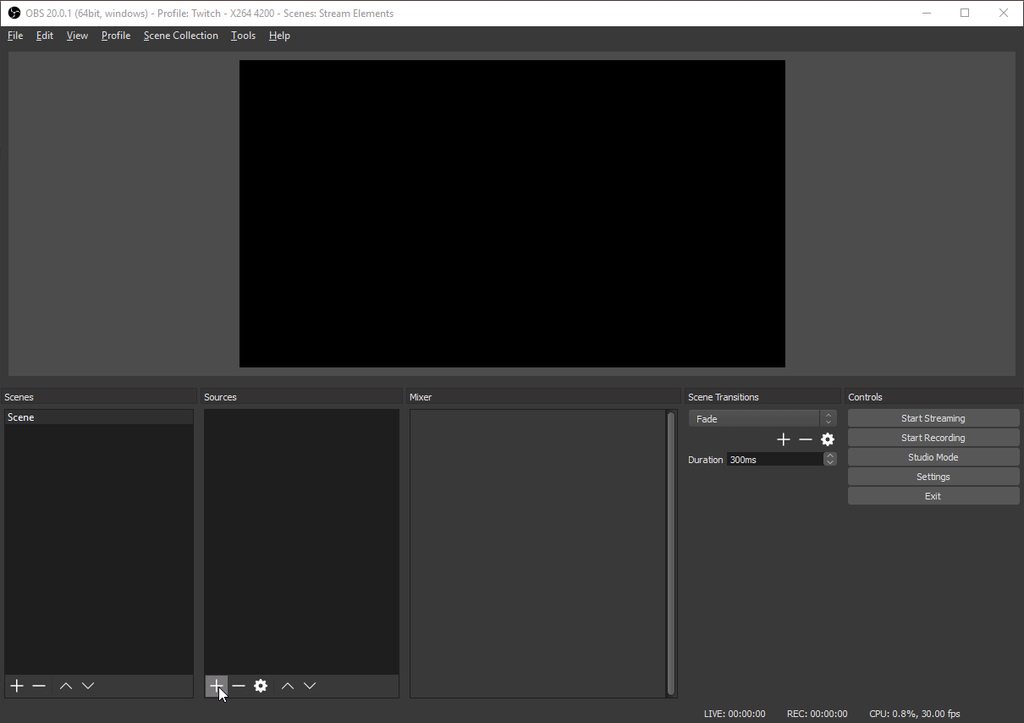 brazen cosmos
thats a very handy gif 🤣
weary mist
very much 😃
strong dock
its working ok. it snot topping out.... thank goodness
glossy thistle
"could not access the specific channel or stream key." fixes?
brazen cosmos
is there the ability to add songrequests via a search api
$readapi(https://decapi.me/youtube/videoid?search=$msg)
strong dock
halp! song request for another bot are trigging timed commands and i have timed commans turned off
clever mango
@brazen cosmos Not at this time due to our youtube API limit. It's possible in the future with a higher limit
brazen cosmos
ty
agile sundial
@clever mango When you said follower count is being pulled - what do you mean?
It won't show my total followers?
strong dock
its litterally spamming timed messages every other line
clever mango
StreamElements timed commands?
clever mango
Are you live?
clever mango
Ok i'll come by chat
 fast stirrup
hi
brazen cosmos
hey @fast stirrup
fast stirrup
quick question can you use streamelemnts with youtube gaming?
brazen cosmos
im not sure, @fast stirrup im not support, i cant see any reference on website. someone will confirm shorty im sure 😃
clever mango
Youtube gaming integration is a very high priority for us right now
glossy thistle
@clever mango thx for the help
fast stirrup
thanks
 cobalt niche
Hi, is it possible to block someone from tipping?
clever mango
@agile sundial your counts should update 1 hour after your stream ends and will be synced with twitch from now on. If this doesn't happen, let us know and we will look into it. We just updated the way the counts work and will continue to improve it.
weary mist
@cobalt niche there might be a way for that, but through paypal I think
clever mango
@cobalt niche What you can do with StreamElements is required tippers to login with their twitch account before tipping. This should deter almost anyone who intends to chargeback, if that's what you're worried about.
This can be enabled in the tipping page settings
 wise flax
I have a question about viewers who cheer in order to get loyalty points, as allowed by StreamElements. There are very heated discussions on reddit as to whether or not this violates the Twitch ToS, more specifically what I will attach to this message. Can anyone tell me if it is indeed against ToS and if it is why does StreamElements have it as something their website offers for streamers? I don't want to implement something that could possibly have me violating the ToS.
 robust fractal
i have a qustion is it possible to find an over lay on the internet and insert it in
weary mist
@robust fractal you can put any image you want into the overlay editor
@wise flax twitch hasn't officially said no to this as of yet, though it is up to streamers to make the best choice for their stream
wise flax
Thank you for answering @weary mist. That's kind of a worrisome response, so I'll just rather not toe that line and not allow it until an official answer is given from Twitch. Thank you. 😃
weary mist
yeah, thats what I feel as well.
don't worry, if twitch takes an official stance on it, and it isn't good, then most likely we will deactivate that bonus. it only makes sence to
robust fractal
thanks i got it
 bronze nacelle
is it possible to have a hyperlink in a command?
clever mango
Sure
stuck hamlet
No it is impossible to have a hyperlink in a command @bronze nacelle
Twitch chat does not allow that.
weary mist
ohhh, you mean like <a=www.google.com>test</a> kinda thing
bronze nacelle
hyperlink =/= link
stuck hamlet
:p
weary mist
upper steeple
@weary mist do you know if styler got the edit session count stuff fixed in regards to the cache being flushed?
weary mist
he was supposed to have
stuck hamlet
Cached Flushed, 1 hour post stream all data should be proper. Edit session page currently could be broke, you shouldnt have to edit anything tho, because everything should be accurate
upper steeple
@stuck hamlet but when i change scenes nothing carries over to the other overlays, it resets everything and my counts are not correct
latest sub, follower, recent tips and recent donation are all blank when they shouldn't be. i can't change follower count cause its wrong or sub count cause itts wrong too. Nothing saves.
stuck hamlet
Please hit the reset session (I know you've done it) also make sure all widgets are up to date.
They should have new options
upper steeple
so reset again?
weary mist
the reset worked for me
upper steeple
@weary mist nothing changed
weary mist
did you close and reopen the overlay?
upper steeple
just did and it doesn't save it, i switch scenes on obs and its all gone
upper steeple
@weary mist i hit reset session and it doesn't change anything, my subs are still wrong cause it doesn't update with ttwitch I know that. But nothing on latest follower or sub. Recent tips are gone and recent donation are gone as well
weary mist
all the recents and stuff reset, but the "Total" widgets now pull live from twitch. or mostly live anyways
that update kinda fudged the other parts, but it should update properly as you get followers
upper steeple
it did yesterday but it resets when i opened obs today and when i switch scenes
so latest sub is blank and latest follower is blank along with recent donation and my recent tips widget
weary mist
those ones will be blank until you get a new one. you should be able to update recent donation and have it stick.
upper steeple
just did and it didn't
weary mist
that is very odd, because I just did it and it updated on my end
upper steeple
yeah it updates but when i changed scenes it goes away
weary mist
upper steeple
weary mist
im honestly stumped
upper steeple

weary mist
I ahve changed between like 5 different overlays in OBS, I have checked several in editors, but it still exists
its one of those things that makes you want to rip out your hair, lmao
upper steeple
yes cause it is upsetting me
i reset session this time everything disappeared in the counts in the edit session
weary mist
ok
upper steeple
now i have to re-enter all my vaules
even going to a new overlay and putting in one of the widgets it doesn't display anything
weary mist
stupid question, but you are hitting save on the edit session page, right?
upper steeple
yes
weary mist
chrome?
upper steeple
yes
weary mist
(covering all the bases)
upper steeple
this is after i hit reset session and then put in the follower goal count and sub goal count
 versed matrix
Hi guys, someone know why all my overlays information of tips, subs, follows is not showing on the stream? Yesterday it works
weary mist
@versed matrix are you talking about alerts or the text widgets
versed matrix
Text widgets.
weary mist
there was an update a day or two ago that cause those to derp a bit. Reseting the session tends to work, then as you get new events, it should populate those fields.
upper steeple
@weary mist well i'm gonna go stream, hope it gets figured out
weary mist
@jaunty pathFluffyButt#4737 I poked styler again with your information, so hopefully I will hear something back about it
 terse canyon
tips on stream store items?
weary mist
@terse canyon I always find people like to "make" you do things. You can also check out 1ceprime's store, he has a decent stock
terse canyon
link?
weary mist
lament blade
for the store redemption widget, i need this so a sound get's played right? can i disable the animation somehow so that just the sound plays?
weary mist
@lament blade if you make the item you create a sound effect, it will only play a sound
if you want to make something that is approvable, then yes. you can remove the image from the widget, and not assign an image when creating the item
terse canyon
@weary mist I'm showing $179 donated in the stream goal widget, that amount doesn't show up anywhere. help!
i've live with it now if yall can help
lament blade
^ solved
lament blade
is it possible to exclude users from the leaderboard?
tight harness
@lament blade Yes, you go to Loyalty Settings and add people to the Ignored Users section 😃
lament blade
ops, i'm an idiot xd thx. oh and the store items, is it possible to show a video/gif when someone redeems it, or only sounds?
tight harness
The sound items will only play a sound, the other option will be able to play a gif if you upload one for it
lament blade
haha this is perfect thank you so much @tight harness https://i.imgur.com/5DZkILT.png



 tight harness
perfect
terse canyon
@lament blade and everyone. Is it possible to create a link to the tip page that pre-fills an amount into the tip field?
 restive drum
for some reason my alerts are playing their sound 3 times when they activate
silk patrol
@restive drum make sure you ticked the "Shutdown when not visible" checkbox in your browsersource properties in each and every scene
restive drum
thank you kindly
 rough sedge
hi guys how are you? Just started using streamelements... there's a way to reduce the 1080p animated overlay to 480p? and yes, I have a terrible connection sadly T_t
clever mango
Yes, you can downscale your output resolution to 480p in OBS but leave your canvas resolution at 1920x1080 which is the native resolution for the super themes
rough sedge
i use xsplit and when I downgrande my output the layout stays as 1080 and doesn't scale down, and only happens with animated overlays, not fixed ones
clever mango
I'm not familar with xpsplit but I'm sure one of the SE champions uses it and can help
I'll ask around
rough sedge
thanks a lot in advance ❤
 echo jasper
Hi gang, top cheer widget seems to be broken? Even when set to top cheer all time?
 sudden basin
Hey Guys im new to StreamElements & was wondering does it support everything that StreamLabs supplies & is it 100% secure ?
stuck hamlet
We provide a lot of services and yes we are 100% free and secure.
@echo jasper you cannot set values with our new Session system, we calculate who has the biggest cheer by what we see on your account.
@rough sedge have you tried changing the resolution in SE itself?
echo jasper
Thanks @stuck hamlet - the issue I was having is that it wasn't displaying anything. I did a session reset and issue is resolved.
stuck hamlet
I'm not that familiar with all things related to themes, but you should be able to resize everything 😃
rough sedge
@stuck hamlet tried to do it but doesn't seem there's an easy way to do so
stuck hamlet
Glad to hear it @echo jasper 😃
rough sedge
@stuck hamlet no apparently on xsplit doesn't work so far, just for static images from SE
stuck hamlet
Hmm 🤔
rough sedge
I'm on stream right now
if you want I can explain you the problem live ^_^
so you get what i mean
stuck hamlet
I only know @ebon forum and @gentle hinge that use xsplit
I can tune in in 30ish minutes. Currently on my way to work.
stuck hamlet
👍🏼
 arctic pond
hey is the follower total count being wonky right now for anyone else? count is 18 instead of 500 something both on the total and by session overlay elements.
tawny pivot
Try giving your session a reset.
stuck hamlet
@arctic pond please reset your session and reload your overlay. Let me know if that fixes it
Good morning Styler
tawny pivot
arctic pond
it worked thanks 😃
stuck hamlet
👌🏼
arctic pond
is there a recommended session reset period to avoid bugs?
stuck hamlet
We just updated our session system, that's why we need people to reset. There should be no more need to ever reset your session 😃
We have new widget options to support it as well
echo jasper
Is there a way to get back my recent follower and recent sub name after the reset? (Fixed - I just replayed the most recent events from the dashboard page.)
upper steeple
@stuck hamlet is there a way to have the latest sub widget save the latest sub cause its not saving when i switch scense
cause i still have no latest sub on my overlay unless i refire the alert and follower count and sub count can't be changed in edit session
stuck hamlet
@tawny pivot can you look into the lady's issue?
Things seem to be completely broken for her
upper steeple
this is my edit session right now @tawny pivot
sudden basin
@stuck hamlet are we able to rename the chat bot
 pine hemlock
Currently no
sudden basin
oh ok nps
stuck hamlet
I'll have a look in a second lord
viscid steppe
Morning, everyone! Still setting up Stream Elements and I was wondering if there's a way to add sound effects? Like if someone types, !hi into chat, I have a sound effect happen?
Also, Does SE have a polling system?
clever mango
Sound effects are triggered through the stream store
Add sound effects to the store and viewers use !redeem or any alias you create for the !redeem command followed by the sound effect name Ex:!redeem laugh
You just need to add them to the store and then add the store redemption widget to your overlays
viscid steppe
Thank you! @clever mango I really appreciate your help. 😃
I'm looking to see if there's a polling system as well. Also, for link protection settings, links aren't allowed by anyone in my chat, (I get trolled a lot) is there a way to not let anyone post links, even subs?
I only trust my Mods with links
clever mango
There are no polls currently
pine hemlock
Spam filter unbot "bot" on the left side shows you the moderation settings
 compact ferry
Hello. 😃 The data for my widgets for Latest Tipper, Subscriber Goal, Follower Goal, etc. are not syncing with my Twitch. It worked the first time perfectly, but when I went to my second stream, all the information was gone. Thanks for the assistance. 😃
clever mango
@viscid steppe Do you have anyone added to the Regular level with SE?
viscid steppe
Yep. I'm there now. But I don't want subs or regulars to post links. Is there a way to not let them? Or do I have to allow?
I don't. Just starting set up. @clever mango
clever mango
You could use twitch's moderation settings for links. That should ban all links
viscid steppe
There's so many amazing things here with SE that it's literally taken me 3 days to set up. I seriously LOVE SE and I'm so excited about it!
clever mango
In your twitch channel settings
viscid steppe
After many years, I'm leaving my other broken bots behind!
upper steeple
@compact ferry same thing is happening to me when i switch scenes in my obs
viscid steppe
ohh! I can! Thank you, @clever mango You're brilliant!!
clever mango
Happy to have you here
viscid steppe
I'm pumped to be here! 😃
compact ferry
@upper steeple Glad I'm not alone...for me was just when I started OBS back up to stream.
upper steeple
@compact ferry yep basically the same thing it all disappears
they are looking into itt
viscid steppe
I have the same issue. @compact ferry
Is there a way to link my Discord so it announces in a channel when I've gone live?
 buoyant sigil
for Super Theme Alerts and windows, it seems really hard to increase the image size as well as Font size. is there just a base default that we can't increase or am I doing it wrong?
and yeah what RoryPlays said. I use MuxyBot for that
posts stream stats too in discord after you end
viscid steppe
I have a separate bot as well. Was hoping to cut down on all of my bots. 😂
buoyant sigil
hm yeah I keep messing with the Position, size settings for Super Themed windows and they basically don't move. I'd like to make certain windows bigger along with the font that is inside of them. Specifically the Alerts window
 urban dust
anyone know how to change the number of followers you have from the follow counter? it as correct the other day but is now displaying 0
sudden basin
Hi is there any way to auto reset my STREAM STARTING SOON Countdown Timer as once it hits 0:00 it does not reset when switch back from a different scene ?
rough sedge
@stuck hamlet hey i had to close the stream because I'm going to work, ill be back later take care!