#helpdesk-twitch
1 messages · Page 71 of 1
 weary mist
 frozen stump
hi, i am having troubles with setting up alerts. I am uploading a webm + sound file, but when a video is select for alert, the sound is not played. how do i get around that ?
 surreal spire
ueah got one follow as i just strated using it about 30 mins before ending stream but didnt update but thanks ill try again tomorrow and see if it works and follow up with you guys
started*
weary mist
@surreal spire ping me if you have any issues, I am free all day tomorrow. I will probably be streaming, but I will see what I can do 😃
weary mist
Thanks for the cake obvious wink
surreal spire
Spelling is off today lol
LUL ^
lol forgot to ask i have 3 subs is there a way to do sub goal with thoses 3 already making sub goal 3/5 ??
surreal spire
or just use cutom text?
surreal spire
yeah on overlay found widget but want it to say 3/5 not 0/5
weary mist
change it on Activity Feed -> Edit Session
surreal spire
again thank you so much cant believe i didnt see that...very helpful community i like it 👌 👍
 proud pumice


 atomic hollow
@surreal spire ❤
weary mist
 sighted
 upbeat tree
@weary mist
What other servers are you on? Cause I feel at some point I've seen your username and profile picture in another discord
weary mist
like 50, lmao
upbeat tree
And only reason I remember is because every time I see your Profile pic I think "dang.. it looks so weird"
mk lol
weary mist
tho we only have this server in common
weary mist
ahh
upbeat tree
ever been hype squad?
weary mist
yeah... i will have to do that at some point
upbeat tree
?
weary mist
had some connection issues, lol
 tight harness
Same
upbeat tree
I posted "you ever been in hype squad" and you wrote "yeah... i will have to do that at some point"
confusded me so much xD
what server region is this server on?
weary mist
not sure. I just have crappy internet sometimes. I didn't even get that hype squad message
lol
upbeat tree
huh
Well I lost connection on my server too
I feel like a region might have been mass ddossed but I dun wanna assume nuthen
tight harness
I'm lucky to have a VIP server so the connection is more stable 😄
tight harness
I'm a Discord Partner / Twitch Partner so I get perks like a VIP Discord server 😎 lol
weary mist
😛
tight harness
And free Discord Nitro 
tight harness
I'm not paying too much attention to it right now, probably an auto host 😛
upbeat tree
idk lol went to your channel
tight harness
I haven't hosted anyone since 8 PM yesterday so I'm quite certain it's auto hosted them 😄
 tiny trench
Re did some alerts from stream labs. Trying to import my streamlab alerts but nothing is happening?
weary mist
@tiny trench we are working on that. ⤵
weary mist
even better 😃
upbeat tree
But importing alers from stream labs breaks if you had multiple follow variations
proud pumice
streamlabs changed their api without telling anyone (yey thanks streamlabs)
the devs already fixed the import and it will be available later today
tight harness

tiny trench
oh okay thanks guys :3
 river idol
Hey, how can you add an editor? Or at least have someone that can see and modify things from your dashboard?
tight harness
@river idol Mods and super mods of the bot can use the mods and super mods commands here: https://streamelements.com/dashboard/bot/commands/default at the bottom of the list, but they cannot access your dashboard directly
 silk patrol
@river idol but it's being worked on and will be an added feature
river idol
Alright 😉
tight harness
@river idol You can add mods and super mods here: https://streamelements.com/dashboard/bot/users/moderators
river idol
Thanks 
tight harness
You're welcome
 lament blade
so for giveaways its only letting my viewers purchase their ticketds once can this be fixed so they can continously purchase until they reach teh max allowed with their currency
tickets * the *
silk patrol
@lament blade we are aware of the issue and it's being looked at
 vital jackal
Hey guys I need some support setting up song requests in my stream using stream elements and how to link to observe so the music plays and can be requested through stream elements
tight harness
@vital jackal This should help you understand how the song request feature works: https://support.streamelements.com/hc/en-us/articles/115000366131-Song-Request & this is where to set up and use the song request feature: https://streamelements.com/dashboard/songrequest/general , if you don't want to use the website to play the music every time you stream you can also download Ground Control here: https://streamelements.com/groundcontrol which also has the song request feature built-in

StreamElements
Jump to section
Song Request is great engagement tool for your Stream, let your viewers use points to play their favorite song in your stream.
Song request settings button index
Butt...
 fiery jetty
Is there a way to make a "make it rain" item in the shop?
tight harness
@fiery jetty Yes but you'd have to be the one to make it happen once it's purchased, it wouldn't automatically happen
 frosty glacier
HeyGuys im new here! Was wondering, how do you clear out a donation goal and start a new one? (at $0.00 ? )
frosty glacier
thanks so much
atomic hollow
❤
 tiny trench
Can I show my current songs on stream with stream elements?
 stuck hamlet
@tiny trench where is it from?
tiny trench
i usually use nightbot
and i could copy a text file and place it on obs
but now that i use stream elements as my music bot i was wondering if i could still do the same
stuck hamlet
You can use our overlay manager, and the current song widget
tiny trench
oh ok ty
 clever mango
Some widgets are not allowing text scroll even though they have the option. I was trying to have the follower goal widget scroll. Regular text scrolls just fine.
 silk patrol
@clever mango reported, thanks for letting us know
clever mango
Hi what's up
 zinc oxide
i have a question about the Stream Elemnts bot ^^
a friend of me is using ankhbot atm and she wants to convert the points from ankhbot to Streamelements , is there any possible way to do it automatically with an file?
silk patrol
@zinc oxide you can contact ankh staff and ask them if there is a way to export a csv file formatted this way : username,points. Then just use the revlo import tool
clever mango
It should be possible as long as the file is formatted correctly
Yep, what @silk patrol said
zinc oxide
ok thanks
lament blade
ehm guys.. I have a stupid question... How do I test alerts?
stuck hamlet
In the overlay manager, "Emulate" > Choose one
https://www.onslaught.ca/s/bcqz425b.png @lament blade
 lament blade
Thank you
 minor sierra
Here I am again haha. But a question about the alerts. My follow alert, the gif at least, gets out a synch after a several uses. Refreshing the overlay editor(closing it and opening it) and testing it again still lets it stay out of sync. The only way I get it back into sync is when I remove the image, and add it again. And then we start from the beginning again. So what I mean with out sync is: The alert (the gif) starts like 1-2 seconds in. And puts the first 1-2 seconds that are missing, at the back. Is this a known thing for those gifs? Or is it recommended to add other kind of alerts?
 warm zealot
Is there a way to modify a user's watched hours on the leaderboard?
 sacred yacht
Is there a quote system anywhere?
silk patrol
@sacred yacht yes, !quote add <text> to add one, !quote <number> to display it and !quote remove <number> to remove it
it only works in the chat right now, but a UI will be added on the dashboard
sacred yacht
Thank you!
silk patrol
@warm zealot you can edit their points on the leaderboard (only for the current, not the alltime. The all time leaderboard can only be resetted.) there isn't a stat for watched hours
sacred yacht
Anyone know if you can batch add a bunch of quotes from another bot I was running before?
silk patrol
@sacred yacht you cannot unfortunately
sacred yacht
Thank you
 dreamy prairie
Hi is there anyone who can advise me re current song playing saying none in obs when there is and its linked to stream elements please?
or where i can find how to resolve this ?
 thick eagle
Wondering if someone could help me out creating a new overlay for a donation goal? I am wanting to import donations that were sent from streamlabs but I see no option to start the goal with an amount already received?
weary mist
@thick eagle you can edit the amount that it is showing at Activity Feed -> Edit Session
proud pumice
Hey @weary mist do you require support?
weary mist
@dreamy prairie in the overlay editor, there is a current song widget. it will show the current requested song, we are working on getting it to show the backup playlist songs as well
@proud pumice anything from you
proud pumice

 timber granite
Can Super Mods do Giveaways? If so, how?
proud pumice
right now only streamers can
soon, we'll add option for supermods to login as streamers
and then they could too ;D
timber granite
Thanks!
thick eagle
Thanks for the help!
 sly temple
 dreamy prairie
thanks @weary mist i was using the current song widget but on my overlay it said current song: none for some reason - i've given up for now.
tight harness
@dreamy prairie It'll be best to wait for the fix to come out for it and then test it again
 ripe laurel
@hearty peak try setting your resolution to 1920 X 1080 on your BrowserSource properties and see if the text shows up.
 inner hound
when I put the backup playlist on songrequest it only plays the first song  Also there is an issue with the songrequest by title
 hearty peak
@ripe laurel what?
ripe laurel
@hearty peak i thought you didn't have text showing in chat but when i looked back i saw you were one with the centre aligned text and not one with the chat not showing up issue. Sorry!
 unkempt oasis
@inner hound You need to have the video showing for the backup playlist to progress past the first song. If you unhide it, it will work. As for the songrequest by title, it has been temporarily disabled as we have hit our API call limit. We are talking with Youtube about getting it increased, so it will be back
lament blade
when ever I get an alert instead of the alert I get a black screen on my alert
tight harness
@lament blade Does it fill the entire alert space or just where the image in the alert is meant to go?
lament blade
Just wondering is there a way to test alerts on the site make sure there working?
The whole thing
tight harness
@mystic zealot You can emulate events in the overlay manager
lament blade
Oh ok thanks 🤗 I'm new to this @tight harness
tight harness
@lament blade Does it appear the same in the overlay manager or just on OBS?
tight harness
Ahh xsplit 
tight harness
Overlay manager is where you put all the widgets and alerts etc on the website @lament blade
lament blade
That seems to be working fine in the overlay manager
zinc oxide
@silk patrol hey Dante 😃 i have a question about your Bot , is it able that the MODS / Supermods can use the Site of the streamer to open/close contests for the streamer like in revlo?
tight harness
@lament blade Then it sounds like it will be something to do with your xsplit settings 🤔
lament blade
Overlay stuff from other sites work
 left jolt
Hi, i am an affiliate my subs and viewers aren't getting points every 10mins
i watched one of my subs look at his points after 10 mins and it did not increase
tight harness
@lament blade If it's working when tested on the SE website then there's nothing wrong on that side, doesn't leave many other alternatives
@left jolt Just to confirm you've set up all of this already? https://streamelements.com/dashboard/loyalty
zinc oxide
@tight harness can u help me with my question maybe?^^
tight harness
@zinc oxide Of course! to answer your question that is not currently a feature yet however it is something that we're currently working on because a lot of people asked for it 😄
zinc oxide
@tight harness okay thx for the info 😃
tight harness
@zinc oxide You're welcome 😃
left jolt
@tight harness update: my subs are getting 50 still when they are set to x2 (should be getting 100)
50 is for my normal viewers
tight harness
@left jolt Just checking if it's a known issue
 inner sonnet
Hi. On the overlay manager i was wondering if there was a way to display just your follower count for the current stream? All i see is the option to show "Total followers". Same question could apply to sub count also as i didnt see a option for just "current stream" count.
tight harness
@inner sonnet Add total followers anyway and then edit the count here: https://streamelements.com/dashboard/session , you can reset it each time you stream and it'll then be an accurate counter of how many followers you've had for that current stream, same goes for sub count
left jolt
@tight harness any ETA on fix? my subs are salty lol
inner sonnet
@tight harness that works. Thanks
Oh 1 other thing. does SE have something like wizebot where it announces new follower in chat along with updates on viewer count every 30 mins or so?
Ok should have wrote these down lol. Also a way to change the size of the cheer cup? Its too large and when i change the pixel size all it does it reduce the size of the overlay box and cuts off part of the cup.
tight harness
@left jolt That's understandable, I can confirm that this issue was first noticed this weekend and it seems to only be happening for affiliates that we know of, so far very few people have reported it which means it's unclear whether others just haven't come forward or whether it is a relatively isolated incident, the good news is that the staff know about it and that it's being investigated
@inner sonnet What we do have is https://streamelements.com/dashboard/bot/modules - you can enable Chat Alerts, then you'll get chat alerts for various different events like people following and all of the other things, for follow alerts currently the only variable is {user}, if you'd like to see a count variable added then suggest it in the #💭︱feedback-and-ideas channel
@inner sonnet You should be able to change the size of the cheer cup in the overlay manager without issue 🤔 drag it from the corner 😃
inner sonnet
All that dragging it does it cut off the top half of the cup. It doesnt actually change the dimensions of the cup. saying that cutting off the top half of the cup is a ok size just have to see if the bits will stay in it but it wont look right if it ever fills up.
thanks for the modules. I started the whole process last night at like 2am after streamlabels kept messing up on me.
So still figuring some stuff out.
left jolt
@tight harness thanks for the info
tight harness
@left jolt You're welcome
@inner sonnet I see what you mean after doing some testing, doesn't look like you can resize the cheer cup, sorry about that, could be another thing to suggest in the #💭︱feedback-and-ideas channel 😄
inner sonnet
I will head over there and request that along with maybe some other styles like streamlabs has. Thanks for the help. Happy Holiday.
tight harness
When you resize it simply changes the drop area for the bits it seems
inner sonnet
yeah
tight harness
Happy Holiday to you too 😄
inner sonnet
1 more thing. is there a direct link on the dashboard somewhere that i am missing to the /session link you gave me earlier? I dont see one so i just bookmarked https://streamelements.com/dashboard/session
tight harness
@inner sonnet Click on Activity feed on the left then Edit Session on the right
inner sonnet
You're the man 😉 or woman if it happens to be 😉
tight harness
I'll leave you guessing 
inner sonnet
tight harness
Nah, i'm male
inner sonnet
lol
ripe laurel
The cheer cup is being redone and a new one is coming out soon. There's a small preview somewhere if you would like to see it @inner sonnet .
 vague raven
I know it's a holiday I just want to know is there any news on the fix on the bot giving points to host and cheers followers so forth my viewers are asking when it will be fixed
weary mist
@vague raven as far as I know, that should be working. It works fine in my channel
ripe laurel
Points should be given automatically. At least the follower one does as i don't have cheers or hosts to check.
weary mist
I have seen cheers get points. I don't get hosted often, so I don't see those. There is also a difference between an autohost and a host
vague raven
Yes I know but as far as I know I've gotten cheers today and host today and I haven't seen the bot give any points is there a notification that it does like meaning in the chat or does it just do it behind the scenes?
weary mist
there is no notification, it just awards the points behind the scenes
weary mist
the sup reward should be working, the sub multipier for affiliates is buggy right now, so they are looking into it
tight harness
@weary mist Beat me to it 😄
ripe laurel
Edit it again to say sub too @weary mist 😉
vague raven
Ok ty happy forth
 neat helm
Can i get the dimensions of the Banner on the Profile page please? Trying to make a Banner for my page 😃
disregard lol page was zoomed in so it looked wrong 😛
tight harness
@neat helm Glad you figured it out 😃
clever mango
Does anyone else think regular and subscriber levels should be switched?
There are some things that regulars who come in often but can't subscribe should be able to do but subscribers should have more priviledges
 scenic radish
can anyone help me import the deepbot points to streamelements? i cant find the api key the instructions are referencing  @everyone
tight harness
@scenic radish We believe that Deepbot only allows you to access their api key if you pay them for VIP 
scenic radish
i have VIP ; - ;
scenic radish
montly
ripe laurel
The Api Secret Key, check your Deepbot in Master Settings menu under the name API Secret.
scenic radish
i managed to find it, but it didnt work, im retrying.
 ocean eagle
Not sure if anyone else has reported it, the loyalty points per 10 minutes don't seem to be working currently D=
ripe laurel
The affiliate multiplier has been reported and is being looked into @ocean eagle 👍
scenic radish
ok, are there any plans to allow a rename of the bot? as in link it to your personalized bot account.
clever mango
possibly in the future
scenic radish
okay thank you! that would be fantastic, whenever it happens
ocean eagle
It's not just for subscribers, all users seem to currently not be earning any points @ripe laurel
clever mango
I'll come test in your room
 weak schooner
ok I created a sound & gif image for the store redemption. How can I get the "video" to stay on my screen for the entire duration? Do I have to modify the alert duration of the widget in the overlay? If so that only goes up to 20secs.
upbeat tree
If the sound is longer then 20secs then I think the sound will keep playing and the image will just go away
tight harness
@weak schooner You'd be better off having a 'Media' source on your OBS and manually trigger it when the item is redeemed
@scenic radish Renaming the bot has been brought up before but it makes more sense for us to keep it as StreamElements for the time being, as TerraBuck and RadicalZoey said it's a possibility in the future but no immediate plans for it 😃
weak schooner
Yeah I figure that I might have to do that. I ended up shortening everything to the 20secs. for now.
scenic radish
ok, id totally pay for the ablity to have a custom bot tho 
tight harness
@ocean eagle incorrect point distribution is being looked into, it was brought to our attention recently, I'm sure we'll inform everybody when the problem has been fixed
ripe laurel
There's discussion to possibly add custom bot name as a premium feature, but it's just an idea for now.
tight harness
Amongst other premium features of course 😉
scenic radish
@ripe laurel Yes thats what i meant!
 oblique crag
@vague raven Check out the right side of the screenshot. This is found on your loyalty settings menu.
I used to have a click to tweet command that would input:
Like what you see? Tweet out the stream! $(tweet Come hang out with @twitterusername and me while she plays $(twitch game) on Twitch! linktotwitchpage)
But it no longer works. Is there a different way to get it to register the current game, etc.?
 steep siren
Hey! Just wondering if there was any update for the subs getting the right amount of 2x,3x,4x,5x for the points?
tight harness
@oblique crag There's a list of all of the variables you can use here 😄 https://streamelements.com/dashboard/bot/commands/variables
 slate rose
Hi, I have a question about Subscriber Luck. It tells me I can give subscribers up to 10x chance of winning a giveaway if I adjust the bar. However I do not see the bar right now. am I just blind?
tight harness
@steep siren If you look up slightly in this chat you'll see that we were discussing it very recently this evening, like I said then "incorrect point distribution is being looked into, it was brought to our attention recently, I'm sure we'll inform everybody when the problem has been fixed"
@slate rose It does seem to be not showing for people other than partners currently, we discussed it with the staff yesterday and it's being looked into to my knowledge
slate rose
Alright, since a streamer I'm currently modding for is doing a channel giveaway soon and wanted to give subscriber slightly higher chance of winning. I didn't see the option on his screen earlier on either (He is an affiliate)
tight harness
@slate rose I see, before I knew about Stream Elements I used to use a chrome extension called Twitch Giveaways, it simply plugs into into the Twitch chat as a button at the bottom of the chat, it opens a new window and allows for the streamer to have sub luck, I would suggest they use that for the time being if it's crucial
slate rose
Alright, thanks for info. ^^
lament blade
@scenic radish it doesn't say confirmed but it worked when I did it
 strong basalt
Is there anything I have to do for my subs to be recognized by the bot? Some of my subs aren't getting the sub rate for currency
stuck hamlet
This is an issue we are currently investigating.
 minor kindle
A few quetions :D
Is song request still bugged to where it gives a ton of coins instead of taking them? Any update to contests to not spam the chat? Any news on the new bit cup?
 untold estuary
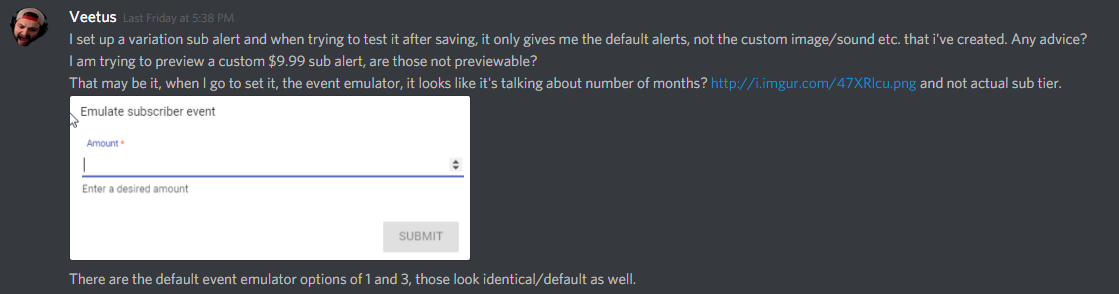
Anyone here been able to test the tier 2 and tier 3 sub emulated tests? I cannot figure out how to do it.
vague raven
Can someone please explain the tweet module to me and how it works I would like to implement it
tight harness
@minor kindle I'm not aware of those 2 issues still being present, also the new bits cup is coming soon 😃
@untold estuary I'm pretty sure I managed to test them fine previously 🤔
tight harness
@vague raven It puts a message into the twitch chat of what the people you put into the list tweet, so you add everybody who's tweets you want to be put into your chat into the list and it'll post their tweet directly to your chat when the tweets go out
@untold estuary I believe so
vital jackal
Hey so I'm trying to play music on my stream through desktop audio but it's not coming through my headset ? Anyone know what to do ?
untold estuary
@tight harness how? One sec
@tight harness I posted about this earlier and no one responded
Instead of regurgitating it all, look here: https://i.imgur.com/0qD86Zv.png
 minor kindle
@tight harness I reported awhile ago about Song Request giving viewers like 200,000 coins. It was confirmed to be known. So just asked was it ever fixed. Regard contests, I'm speaking of bet confirmations. A way to turn that off if we don't want it.
weary mist
@minor kindle make sure on the discount, you put in 100, it is a percent based discount. So if you have over 100, it would give them bonus points
tight harness
@untold estuary Just tested it myself, it seems that you're right and it only emulates the default sub, would be worth suggesting it in #💭︱feedback-and-ideas if you want this feature
minor kindle
@weary mist awww
 maiden rose
!setgame and !settitle says "something went wrong while trying to update the game."
I'm sorry if this is a repeat question ;-;
minor kindle
percentage. Got it.
untold estuary
This doesn't seem like a feature request though @tight harness and more like something that got forgotten while making this feature?
 west canyon
so after I changed my name on Twitch I notice I have 0 loyalty points on all the channels I should have the points on is this normal?
tight harness
@untold estuary The emulate feature was made before the new tiers of sub, so it is a feature request
@west canyon Yes, as they're name based
west canyon
oh damn ok =/
tight harness
@west canyon The streamers can search for your old name and give your new name the points, but they'll all need to do it individually and of course it's their choice if they do it or not
vital jackal
Hey so I'm trying to play music on my stream through desktop audio but it's not coming through my headset ? Anyone know what to do ?
stuck hamlet
is your headset plugged in 
vital jackal
Lmao yeah 😂😂
weary mist
what are you playing the music through?
upbeat tree
Is there a way to move the cheer cup? When I put my mouse over it. It give me like a error symbol
tight harness
@upbeat tree I messed around with it earlier when testing and it moved just fine without any problems, no error symbol either, very strange
stuck hamlet

 dull prism
how can i get the bot to announce things on a timer ?
upbeat tree
@stuck hamlet
https://gyazo.com/2f8d9401c4d7f6e2fce9b6f4d93b8ecf
 dull prism
i mean willl it annouce it in the twitch chat like wizebot can ?
stuck hamlet
Zoey, Refresh?
stuck hamlet
@dull prism I have no idea how wizebot works, but yes it will announce it in chat
upbeat tree
and still having it
stuck hamlet
is it the first thing on the list
 tight harness
@upbeat tree It was a problem with the order?
clever mango
One of my overlays that I have set to a custom res of 1600x900 keeps reverting to 1440x900
upbeat tree
@tight harness
I had my "Alerts layer locked and the cheer cup was under it
clever mango
@dull prism what do you want announced in chat?
tight harness
@upbeat tree Good to know for future reference 😃 thanks!
 worldly plover
Question: Streamelements doesn't appear to be showing notifications on my channel when a follow or donation event occurs. I did have Streamlabs enabled in the past but I no longer use it (and do not have a source for it in my OBS anymore, just the StreamElements one). What am I doing wrong here? If I run a test follow/sub the event appears to go off in OBS as expected.
tight harness
@worldly plover By notifications you mean chat notifications?
stuck hamlet
So it works for a test, but not for real alerts?
worldly plover
Not chat notifications, but on-screen event notifications. I had a new follower a few minutes ago, but it didn't register with StreamElements. It registered, however, in Streamlabs. Oddly enough, I also got a pair of donations, that didn't register in Streamlabs, but did register in Streamelements, however, notifications did not play on stream.
weary mist
what are you dimensions on the browser source in OBs
tight harness
@worldly plover It's also worth mentioning that if you make any changes to your overlay you will need to restart your SE browser source in OBS for it to update, this includes ticking the shutdown when not active option while you hide it and then show it
stuck hamlet
Could you do me a favour and log out, and back in? 😃
 static wasp
Anyone know if there is a way to link Design By Humans notifications or if it is even possible?
tight harness
@static wasp You mean have it post chat notifications when somebody buys something from your DBH store? if so, sadly not at the moment
worldly plover
Okay, I logged out of SE web and back in, and restarted my stream as well.
stuck hamlet
Air, Unfortunately, i believe that would be something DBH will have to authorize.
worldly plover
I'm having another follower jump on to unfollow the channel and follow it again to see if thhe notification pops.
stuck hamlet
That won't work.
tight harness
Refollows don't always trigger alerts
stuck hamlet
we have a system in place to prevent "spam" follows.
worldly plover
Oh well damn lol.
tight harness
It's for your own good 😛
clever mango
Ok, it's not resizing the overlays but it is showing them at incorrect dimensions when I click the "edit overlay" button
stuck hamlet
Terra, even after CTRL+ F5?
clever mango
I'll try that. What does that do?
worldly plover
Hmm, alright, so I'm wondering if Streamlabs is possibly interfering with the follow events on Streamelements? Or possibly a config error on my end, but not sure where to look to see...
clever mango
Yes still shows 1440x900 after Ctrl + F5
worldly plover
I did manually put in tippers into their respective widgets on SE, and they do appear properly in OBS and on stream...so that part works at least.
upbeat tree
Shouldn't there be physics to the cheer cup? So when a cheer of higher value hit the other cheers out
clever mango
yes, and I have a feeling it will be in the new cup
stuck hamlet
lmao Zoey, the current cheer cup is potato, we made a new one.
upbeat tree
When will the new one be releashed?
 olive lintel
@worldly plover do you have the widget "alert box" in your streamelement's overlay?
stuck hamlet
ssss- gets ready for Zoey to be upset Soon 
nah, but for real, it should be in the coming week.
clever mango
upbeat tree
ahh shoulda guess soon ™
worldly plover
@olive lintel Yes, AlertBox is active and enabled in SE Overlay
upbeat tree
 always saying new stuff comes. and the gives us the smallest things lmao
stuck hamlet
Rider, StreamLabs isn't going to interfere with SE. probably something not set up properly
worldly plover
All 5 event boxes are cuirrently checked
tight harness
@upbeat tree Just think how we feel knowing all the cool stuff coming soon but not able to say what and/or when 
upbeat tree
 There should be a SE tester team. Who gets like all the new buggy stuff to test on streams
tight harness
That'd be us 
upbeat tree
Can I be you?
stuck hamlet
That would mean having to make something to support that
and you would hate to wait even longer while they created that 😉
upbeat tree
lmao
tight harness
I don't think my girlfriend would like you being me 
upbeat tree
@tight harness I am sure your girlfriend is very lovely and would love me 
worldly plover
Just double checking my settgins in SE, everything appears to be where it should be. what I find odd is that the dashobard in SE doesn't show my two most recent followers, but the dashboard in SL does, yet it's reversed for the two donations I received. The donations appear on SE's dashboard, but not on SL's dashboard.
upbeat tree
@stuck hamlet Going to be honest, Just want the Now playing widget fixed ;~;
olive lintel
@worldly plover if you type the "!ping" command on your channel's chat, do you have a respond from the bot?
stuck hamlet
for backup playlist?
upbeat tree
yup
upbeat tree
and why is that
stuck hamlet
Because, we would have to call to youtube to find the song title and post it, so that would drain our quota even more. BUT, yt is lifting our quota (whenever they decide to) so it will be implemented.
upbeat tree
But it displays the song title on the song request page, why can't it be pulled from there?
Like a value that gets set
worldly plover
@olive lintel yes the !ping command gets a response from the bot
ripe laurel
@clever mango i notice when i click edit overlay beside the name the size showing is the last one i made and if i want to change anything like the name i change the size before saving. If not i just exit it to preserve the size. I currently have mine as 1366x768 and when now that shows up upon clicking edit overlay.
stuck hamlet
thats just basically an embed
that doesnt cost anything
putting it into a widget, the way our widget is set, would be pulling from the api
upbeat tree
can't you set the embeded to like a value and output that to the the currently playing
;~;
Man
stuck hamlet
That would be creating some more things for basically no reason
Once the quota lifted, we will be able to support that.
upbeat tree
okay v,v I will wait some more..
ripe laurel
@worldly plover donations would show on the dashboard of the source people donate from. So if they use a streamlabs link it would show up there and StreamElements would show tips through the SE page.
stuck hamlet
You can go bug yt about lifting our Quota
upbeat tree
Where can I bug them at?
stuck hamlet
im kidding :p
upbeat tree
I will bug them
ripe laurel
Oh @upbeat tree i think i figured out why my game wasn't showing lol Sometimes i don't right click OBS Studio to run as admin 😹
upbeat tree
lmao
stuck hamlet
something about the engineers having to do something for us
worldly plover
@hardy mossM True, I think the main issue now is figuring out why follow and tip events are not triggering an AlertBox event on stream.
@ripe laurel rather
ripe laurel
Do you have tip moderation turned on @worldly plover ? Not sure about the follows though.
upbeat tree
@stuck hamlet Also why do we need to use a valid URL or video id for requests?
stuck hamlet
So youtube's API works in a very special way. We get allocated 1m points to spend every single day. (capped at 16m a month)
Searching a song costs us ~100 points, meanwhile direct urls only cost 7. We currently have so many people using songrequest that we had to disable the search feature until we can get these limits increased.
Keybinds
upbeat tree
mk
stuck hamlet
Still a quota issue, basically
clever mango
@ripe laurel interesting... as long as it is not actually resizing the overlay I'll deal with it showing a different res
upbeat tree
Does every user on youtube get this API and limits?
stuck hamlet
yes
upbeat tree
@stuck hamlet Why don't you require the person who wants to use Song requests for their streams to use their own API key?
stuck hamlet
Im guessing here, but i dont think YT would like seeing thousands of api keys coming from one ip
upbeat tree
:/
worldly plover
@ripe laurel No, tip moderation is currently not turned on
ripe laurel
You just have to change the name/game/set the size once @clever mango and then you can just go to the overlay editor. I've only started renaming mine as i copy one one overlay and adjust for other scenes 😺
worldly plover
And yeah I find that odd too that the follow events triggered on Streamlabs but not Streamelements
weary mist
@upbeat tree there should be good news sometime this week on the song requests. if not then next week 🤞
upbeat tree
mk
tight harness
And if not, sometime around Christmas
upbeat tree
And ya know what.. if not the week after.. soon ™ ;~;
stuck hamlet
hahahah
like Hectic said the other day, we try not to use the word soon on things that arent currently being worked on.
worldly plover
Ooh! I wonder if deleting Streamlabs from my Twitch Connections in my Twitch settings would help resolve the issue
ripe laurel
Not sure how that would help with tip alerts but follows maybe? Worth a shot. You'll probably disconnect streamlabs eventually anyway 👍
worldly plover
Yeah, sadly they don't offer a method of disabling the account entirely, but hopefully disconnecting it from the Twitch account will help. I'll try and play around a bit and see if anything fixes itself on its own.
ripe laurel
Have you had past donations show up @worldly plover ? Would you please confirm you have the AlertBox for Tips enabled in the AlertBox widget?
stuck hamlet
StreamLabs is not interferring with your alerts
let's just cross those off.
Now doing a hard reset with SE might help
Logging out, Removing them from access on twitch settings, Hitting CTRL + F5 on the SE front page and logging back in.
 dim garnet
Hey folks just a quick question. I have done a full reset on the session, and it keeps putting the Tip monthly top donation back to what the last month was. Is it supposed to do that?
worldly plover
@ripe laurel I can confirm that alertbox for tips is enabled. And no, out of the two donations I've received, neither have appeared as an event, and I had to manually put them in as tips, however, I think that may be because of where I had the link to on my Twitch page, which I've already fixed.
ripe laurel
Had a few people forget to update links as well 👍 Now you just have to wait for your next donation!
dim garnet
😮
stuck hamlet
like actual month you're in
ripe laurel
Or what's show on your dashboard i think.
dim garnet
wonder if theres a way to make it a month by month thing? like actual month
worldly plover
@ripe laurel Alright I've done a fuull reset as previously sugggested, I'll wait and see when a new follower joins/tips and report back, thanks for all of your help guys!
stuck hamlet
Ill have to ask when the devs are awak how exactly it works 😃
Rider, what is your channel
worldly plover
stuck hamlet
@worldly plover DM me your SE link
Also, what obs are you using
should of been my first question 
upbeat tree
ripe laurel
@maiden rose are your commands working yet? If not, try parting the bot and rejoining it from your dashboard.
clever mango
How often does the twitter module check for tweets?
stuck hamlet
Shouldn't have to
clever mango
my tweet from 10 min ago hasn't shown up
sacred yacht
Anyone know if there is a way to do custom CSS with Stream Elements?
stuck hamlet
Terra, you have made the bot follow your account?
clever mango
stuck hamlet
we should mention that
ripe laurel
Every time i see that i think he's picking his nose.
 vast wren
so my hosts have been real hit and miss lately
 tranquil horizon
Hey Im having an issue where my subs cant use the roulette module for some reason but my foloowers can
nvm
lol
 mortal pollen
When someone hosts or subscribes, I have it set for them to recieve loyalty points for that. However, there is no notifications theyre getting the points or change in their points that they recieved it
 gentle hinge
Same @vast wren with the MIA host alerts
clever mango
I haven't noticed issues with host alerts. What is your minimum amount for host alerts to show up?
mortal pollen
I have it so every host gets 200 loyalty points
upbeat tree
Dang that is allot of points
clever mango
Sorry, I meant the minimum number of host viewers required for alert to show up
How many points do viewers earn/10 minutes @mortal pollen ?
mortal pollen
500 points every 10 mins
clever mango
😮
mortal pollen
I don't understand, using high numbers breaks the system or something?
There shouldn't be a problem with how many points you choose to give out.
clever mango
no, not a problem at all
I was actually replying to @gentle hinge with my post
I'm not sure what is causing your alerts to not show up
mortal pollen
Hmm, okay. Is there anyway to refresh the bot without losing my settings
gentle hinge
@clever mango terrain think it was set to 0, not at the ppc now to double check
Butt yuou might have called it
clever mango
@mortal pollen you can have the bot part and rejoin the channel
that won't mess up anything
vast wren
ill see if thatl help
mortal pollen
Okay ty @clever mango
dim garnet
ouch i jhust deleted my main overlay, ugh cant believe i deleted the wrong one!
dont suppose there is an undo button? lol
 frosty lantern
😥
dim garnet
the entire thing, ugh
was testing another layout
and went to delete and didnt check the name lool
my fault its ok lol
 dense ginkgo
Can supermod access dashboard yet?
clever mango
I might make duplicates of my layouts now just to be safe. That sucks Junior
dim garnet
Yeh def
 knotty warren
Easy mistake to make. I did the same thing. It is because of the order they appear in when you copy or create a new one.
Any problems with currency today? Viewers not gaining any for me.
Live right now
Also, all of my widgets are working except for Recent Cheers. Is there a known issue with that?
clever mango
I have an OBS question. My monitor is 1920x1080 but I want to stream at 1600x900 (same AR). Should I be making 1080p overlays and set my base canvas resolution in OBS to 1080p and then downscale to 900p for streaming? Right now I'm creating 1600x900 overlays and have base canvas and output in OBS both set to 900p.
knotty warren
CORRECTION: Some viewers are gaining currency and others are not.
 serene granite
@clever mango if your base canvas is 900p in OBS, but you're using monitor capture / gamee capture and those are 1080p, then its probably wrong to set it up like that
regardless of that, SE overlay should just match your OBS canvas
clever mango
game is 1080
I think I need to switch everything to 1080p and then downscale with OBS to 1600x900
serene granite
yup
if you're capturing a 1080 game in a 900p canvas in OBS im pretty sure it will just not show the entire game :/
clever mango
I get everything so I guess it's downscaling when capturing the source?
 cobalt niche
I'm hearing double alert audio 😛
clever mango
and since it's same aspect ratio it's ok
serene granite
yes, let OBS downscale and you should be finee
@cobalt niche make sure the OBS browsersource is set to shutdown when inactive
clever mango
clever mango
@serene granite is the real MVP though
 ancient iron
Hi all, I'm having an issue with my Alert overlay and the font used. when i perview the alerts the font comes up correctly as i have set it (Molle) when i get a real follow or host the font on screen is the default Roboto. I have checked the settings and they are all saved correctly so not sure what is causing the swtich back to default. any advice ?
ripe laurel
Did you click on Save on the bottom of the overlay @ancient iron ?
ancient iron
yes
have gone back in and re- checked and re-saved about a whole bunch of times and everything looks ok.
ripe laurel
Do you only have one overlay? Would you please log out, hit <Ctrl><F5> and log back in again and see what the font is set to?
ancient iron
I have 2 overlays in one. Kappagen and the alert. I have tried 2 browsers on 2 diffent computers both show the settings correctly
interesting this is that when i preview it shows up correctly in xsplit so i assume all is fine
but then during stream a follow comes through and its defaulted
if i hit the emulate alert During stream that works but again the nextg follow is defaulted
ripe laurel
OBS Studio is the recommended streaming software so what i'm familiar with.
ripe laurel
Do you know if it pulls web fonts as well?
ancient iron
it must be doing what it needs to because the preview works correclty
ripe laurel
You don't have to post the code. lol Not sure if someone can identify it or anything but those should be kept to yourself..
ancient iron
i can reset it can't i?
i was going to ask if you can view that while i do a preview follow and then if u can do a follow and we can see how that works ?
ripe laurel
You can try disconnecting and reconnecting it under twitch settings or resetting API.
ripe laurel
Resets your fonts?
ancient iron
no the url
its hard to test as the issue only happens on a real event the emulated ones all work as expacted
ripe laurel
Duplicating it would give you another URL to use as a BrowserSource.
ancient iron
yea i just did that and have added it to xsplit i guess i will have to wait till i stream to see what the effect is
could you do me a favour and hit follow on twitch to trigger a real event while i monitor ?
currently preview is working with corect font on the duplicated alert.
 unique badger
Is there a way to make the bot shut off all functionality after stream ends and start when stream starts? I don't want my users gambling all their points off stream 😛
ripe laurel
You can !bot mute @unique badger
Then just !bot unmute when you start if you don't want to make it rejoin from dashboard.
unique badger
thanks!
serene granite
@ancient iron can you pm me all the details, I'll look into it later
olive lintel
The bot is giving loyalty point during a VODcast. is it possible to turn this off? @serene granite
serene granite
I don't think we have that as a toggle afaik
upbeat tree
@olive lintel Vod casts are treated as live streams I am pretty sure.
No way to toggle it
 slate meteor
how come when a viewer request music it says: could not add song: You have requested too many songs
I set my stuff at 0 so they can do as many as they want
ripe laurel
@ancient iron i found this: Changing the font of the Web Display
You can use other fonts for the Web Display.
Just add "font-family: 'your-font-name';" to the body property in your CSS
To use fonts that are not installed on your system (ex. Google Fonts) just add the import line to the top of your CSS
@import url('url-to-your-font-css');
But IDK how that would work with BrowserSource.
stuck hamlet
that doesnt seem to work
ancient iron
I don't think its font related as the preview shows up in the browser source correctlu. if the issu was font related the preview notification would have the same issue
ripe laurel
IDK lol PM SEhectic the details and hopefully he can help. Sorry :/
ancient iron
Yep, thanks for your help all the same
 thorny agate
Hey, i have had some big problems the last 24 hour. My overlay link that i use in xsplit stop working after 5 to 20 min after i update the link from streamelements to xspilt, please help me. It is like it get frozen and no alerts are coming up when i stream!
stuck hamlet
That sounds like an xsplit issue.
ancient iron
Have you tried refreshing the layer?
thorny agate
Yes @ancient iron around 20 times
ancient iron
That's the only suggestion i have. Hopefully support can assist.
thorny agate
thx @ancient iron
weary mist
@thorny agate try opening the link in a browser and seeing it it continues to work longer. That is the only way we can know if it is SE or xsplit. I don't have any experience with that program, so no clue what sort of derps it has
 graceful adder
Do we have 'Rank' setting for viewers?
ripe laurel
There are levels that you can set viewers to.
Subs are 250, regulars 300, mods 500, supermods 1k.
graceful adder
Ah right, cheers 😃
thorny agate
I will try OBS insteed of xsplit @weary mist
zinc oxide
Hey i have several questions about the bot 😄
anyone here who can help me for like 5-10minutes?
silk patrol
@zinc oxide sure, go ahead
zinc oxide
I already got the answer that u are working on the bot so that Mods / Supermods have access to the Streamers bot, how long will it take to finish it? Can Mods / Supermods handle Songrequests via chatcommands like play the song / stop the song / skip the song? Is there any option to make giveaways for subs only ( couldnt find it yet ^^ )? And to the contest, you cant really see how many points were bet on Lose / win / draw and is there a command for the viewers to check how many points they won in the contest, when the contest had been ended? Is it possible to set some counters for example if someone made an ACE in CSGO, the viewers can type !ace and the counter will count 1 counter up? And there is the option to add quotes into the "quotelist", is it possible to make a timer, so that the bot picks a quote randomly and post it every 15minutes?
i know its quite a lot of questions 😄 but i was working like 3-4 hours on the bot yesterday and i couldnt figure out a solutions for the questions yet ^^
silk patrol
@zinc oxide No ETA on the super mod access yet. And we don't know how it will work, so I can't guarantee that they'll be able to manage song request. You can use Ground control, our windows app, to use keyboard shortcut to skip songs (it can be downloaded in the activity feed page).
There is no way to make sub only giveaway right now, but subs will have access to what we call sub luck. Based on the multiplier you set, subs will get more tickets for the same price. it's only visible for partners right now, but should be available to affiliates and gamewisp users soon.
There is no command to show how many points people won when the contest end. they can type !points before and after the contest to see the result.
There is a ${count} variable that you can use in custom commands, it will count how many times the command has been used, incrementing the counter by one everytime. Just create your !ace command like that I did ${count} aces.
Timers can only return text, the bot won't acknowledge any command sent by itself. You would need to create a timer for each quote.
Hope this helps a bit, and feel free to ask if you need any other info
zinc oxide
nice thx for your response 😃 i will come back if i have more questions 😃
atomic hollow
@silk patrol fuckin MVP
 quiet stag
hi there! is there a way to integrate Stream Elements in Discord?
tight harness
@quiet stag Not currently, it is a requested feature but it's not that high on the list at the moment
tight harness
@quiet stag There's a huge list of requested features, we have to prioritise what people want the most first of course 😄
quiet stag
of course 😃
tight harness
Thanks for understanding
quiet stag
thanks for the answer ❤
silk patrol
@zinc oxide @atomic hollow 😊 you guys are too nice to me 😻
zinc oxide
I just made some counters ready 😄 is it possible to check how often the counter had been counted MrAlucardDante?
i guess not because its the same like the problem with the quotes i guess ? 😛
tight harness
@zinc oxide Correct, it's not possible
zinc oxide
k thx ^^
unique badger
Yo, basic question, if I import commands from nightbot, is there a way to save the number counters?
I have a !puncounter and it reset to 1. Is there a way to rectify that?
silk patrol
@unique badger unfortunately not, you have to start from scratch
unique badger
MY 425 PUNS! NOOOOOOOOOO!
zinc oxide
Is it possible to split the Loyalty Settings? i want to give followers 2 points each 10 min and subs 4 points each 10 minutes
tight harness
@unique badger ${count} in the command will display how often it's been used although it will start from 1
unique badger
;.; alrighty, had to check. Thanks!
tight harness
No problem
silk patrol
@zinc oxide yes, you can use the sub multiplier
zinc oxide
hm i dont see that multiplier on my page 😮
silk patrol
np yw
zinc oxide
im subscriber in my friends channel and if i look at her page it says "xxx rewards 2 points every 10 minutes" but it should say 4 points every 10 minutes, because im a sub isnt it?
silk patrol
do you mean on her public page ? It's not displayed but it should work
zinc oxide
yes okay ^^
 wanton jetty
Any ETA on when the Giveaway sub luck is going to be fixed @tawny pivot
 vocal granite
Hi
Sorry for the inactivty @atomic hollow If you want what i support in spanish i can do that for SE
atomic hollow
@crimson nebula still need help?
vocal granite
Si alguien necesita ayuda en español solo escribame
Always working for SE @atomic hollow i love the project ♥
 snow bane
Question on subscriber count, will it be able to tell if someone doesn't re-sub?
tight harness
@snow bane At the moment it simply counts up how many subs (including resubs) you've had since you last reset the session, it's doesn't actively keep checking with Twitch how many current subs you have because this requires a lot of data requests, the best thing to do if you don't want to be checking it throughout a stream is to check at the end of the stream and edit your session if you want it to have your current values
snow bane
ok thank you! @tight harness
 smoky lark
Any update on the bugs/feedback on the Giveaway system?
 split socket
good day im having troubles on fitting my streamelements with my obs
tight harness
@split socket You mean the resolution?
atomic hollow
strat with this - https://youtu.be/X7XrDdRE7Fk

Need help setting up your Overlay Manager? Got any questions, or just want to say "Hey"? Join our Discord server: http://bit.ly/DiscordStreamElements https:/...
split socket
thnx
 celest sky
Is there any feature that puts what song is playing currently, on your overlay?
tight harness
@celest sky Yes the 'Current Song' widget on your overlay editor, click on Widgets at the top
silk patrol
easy peasy ^^
celest sky
Aha, thanks!
tight harness
You're welcome
knotty warren
Is there a known issue with the "Recent Cheers" widget?
Mine isn't showing any information on any of my overlays
Never has
Cool
weary mist
@knotty warren not sure if anyone responded to you, but yes, it is a known issue
knotty warren
No one did. You have any idea how long it has been?
Considering altering my overlays if it is not going to be addressed soon
weary mist
it has been a few weeks at least. I would recomment hiding that one item, then when it is fixed you can just unhide it. It is what I have for a couple of things
tight harness
I can confirm that Latest Cheer is working at least, this could be a good alternative meanwhile
knotty warren
I have it hidden, but with the way my overlay images are designed, it is in a box/category labeled specifically for that ("Recent Cheers"). I'm just going to go into each image and edit it to be labeled something different until it is fixed.
tight harness
Well at least you'd only need to remove an s for "Recent Cheer"
Then the Latest Cheer widget would work fine there 😄
knotty warren
Here is a tip/insight for anyone who has experienced simultaneous alerts going off, leading to you needing to use the "shutdown source when not active" option on your overlay(s)...
People like myself with a Stream Deck (or macros/hotkeys) are accustomed to seamlessly being able to switch scenes with the tap of a button. Using the "shutdown source when not active" option introduces the issue of your overlay taking 1-2 seconds to load and become visible when switching to a new scene. Personally, I switch scenes quite frequently, but even if I didn't, having empty space beneath your camera or in other areas where things should be covered up looks unprofessional. The fix I found for this was uploading my overlay images (tick boxes, labels, cam borders, etc) to SE, arranging all my widgets and text in accordance with the image, then hiding the image in the overlay so that only the text shows. Then, I added the overlay images to OBS for each scene. Now, the image is always there (never has to load in), and the only thing that takes 1-2 seconds to show up is the context for each ticker box or label (last sub, recent donations, etc).
@tight harness You make a good point, but I might choose something that is more ideal for a long space being filled because of how my overlay is designed.
silk patrol
@knotty warren Someone suggested an even better solution. Create an overlay with everything on it except the alertbox widget and do not shutdown this source. Then create another overlay with only the alertbox and store redemptions on it, and makes it so this source is being shutdown when not visible. Since the alertbox and store redemptions are the only widgets making sound, this is the only thing that need to be shut down. This way, even your texts (follow count etc) won't appear/disapper everytime you switch scene
knotty warren
I appreciate the simple suggestion though @tight harness 😃
@silk patrol Would I only need one "alert box only" overlay or would I need to create one for each of my scenes?
silk patrol
only one, since OBS sources are global
knotty warren
Hmm.. But it will always be active, right?
silk patrol
not if you check the "shutdown when not visible" checkbox
knotty warren
If the same source (alert box) is on each scene, there is never a time when it isn't active
silk patrol
it will only be active in the scene you currently are, not in the others
weary mist
that is actually a pretty good solution, since you can still have different designs on different overlays, and just have to put the alert box global one in
knotty warren
But as you said, it is global. If a single source is active in one scene and that source is part of another scene, it is active even though that other scene is not visible. I'm not trying to disagree with you by any means...only trying to understand. When a source is shared between two or more scenes, the "shutdown when not active" option is void, because it is either active or it isn't. I just tested this theory with a different source.
weary mist
i think I will try to set that up on mine tonight
knotty warren
@silk patrol
weary mist
@knotty warren the idea is that since you only have the one source for alerts/redemptions, there is only one possible place for sounds to come from, so there would be no reason for that check box
knotty warren
Thanks! I got that much. I understand that completely. I was only elaborating in regard to my original question which was "Would I only need one "alert box only" overlay or would I need to create one for each of my scenes?", but it seems I have answered it myself lol.
silk patrol
i tried it myself and it works fine, the source will be active in your current scene and not in the others. and you only want to shutdown the alert source, not the "overlay design" source
silk patrol
also don't forget to put the store redemption widget in the "alert only" overlay, since it makes noise too
knotty warren
You can do it either way- indiviual alert boxes for each scene (and shutdown when not active), or one alert box source that is used in every scene (which voids the option because it will always be active)
I appreciate your time and attention @silk patrol. Thanks!
silk patrol
You are more than welcome 😃
celest sky
@tight harness Sorry for bothering you, another question - do I have to install plug.dj or dubtrack.fm if I just want to play my own stuff and have it register?
tight harness
@celest sky If you go to the settings in the Song Request feature you can add a URL for a backup playlist if that's what you mean
Then you can play your own stuff if nobody requests anything
stuck hamlet
turn off song request, have a backup youtube playlist.
but im guessing you mean you have songs on your computer you'd like to play
celest sky
Yeah
stuck hamlet
We unfortunately don't support that.
 jaunty kite
Hi! I think i have a bug to report (Sorry for bad english, if anyone talk spanish, feel free to talk to me 😃 )
tight harness
Sorry my Spanish is very limited
jaunty kite
No problem, I'll try in english, but don't laught at me! ^^
tight harness
I promise
jaunty kite
I think the "redeemable via chat" option in "stream store" it's not working :/ can anyone confirm that?
I am trying to redeem one item from my store in the twitch chat, but i dont have any redemptions after that
tight harness
Just tested and it worked fine 😮
I'm live now so I got a viewer to test it for me
stuck hamlet
Is the options enabled?
jaunty kite
the comand is "!redeem galleta"
tight harness
Hmm 🤔
 stuck hamlet
The bot is muted
stuck hamlet
on your dashboard, on the right side
 stuck hamlet
Can you part the bot, have have it rejoin.
zinc oxide
onslaught my streamer has the same problem
jaunty kite
done @stuck hamlet , i'm gonna try now
stuck hamlet
Can you do the same Moschino?
zinc oxide
part?
stuck hamlet
yea
zinc oxide
okay and then rejoin how?
will points and leaderboard still be available?
and redeems?
and chat commands?
still not working 😦
stuck hamlet
Channel name?
stuck hamlet
no problem 😃
stuck hamlet
It has to be typed in properly.
zinc oxide
ye it was typed in properly and the bot also respond that he spent points for the redeem but she couldnt see him ^^
but i guess its working now
thx onslaught
stuck hamlet
No problem.
hearty peak
any known issues with hitting the repeat button not working?
 thorny roost
I'm having an issue where the Overlay isn't Centered when I put it in OBS...HDLegion told me to ask here to see if anyone can help.
ripe laurel
Hello @thorny roost Did you match your OBS Studio BrowserSource resolution to the resolution of the overlay you created?
thorny roost
they're set to the same value, and it cuts off part of the image/text on the Alert.
ripe laurel
Does the alert look cut off when you emulate in the overlay editor?
thorny roost
Yeah, I hit Emulate, watch it in obs and its cut off.
ripe laurel
You can move it on the overlay editor if it's cut off there as well.
thorny roost
its not cut off in the editor, its in the center, its only cut off when it appears in obs.
ripe laurel
Did you recently move the alert? If so, you may have forgotten to hit save on the bottom.
thorny roost
I've been working at this since last night, i'm gonna try to downscale it even more, maybe 800x600, see if that works
ripe laurel
Would you please try logging out of SE, hitting <Ctrl><F5> and log back in an see if the alert widget is centred when you go back in? Are you downscaling the sizes or just on OBS?
gentle hinge
When you / we figure it out it's go ing to be something silly.
 neat hinge
s there a way to have regular set after so mutch time of beeing in the stream or do i have to manual do it ever time?
ripe laurel
I have my stuff set to 1366x768 so i can see things full size on my laptop. I'm wondering if you scaled the overlay itself and it's working weird.
thorny roost
its working just fine now, its just massive cause its set to 800/600 now lol!
ripe laurel
At the moment it looks you or a mod have to do it manually @neat hinge .
weary mist
!level <username> 300 <--- is the chat command
ripe laurel
You can resize it with the bottom right corner dark square and then click save @thorny roost 👍
thorny roost
Yep, resizing now back to 1080, seeing if it works. if not...i'll live qwith 800/600 lol!
gentle hinge
Good stuff there @ripe laurel Props! 
 👏
👏
ripe laurel
I just woke up so i don't trust myself yet @gentle hinge 😹
thorny roost
gotta go to 800, it wont show up with anything else.
ripe laurel
The alert or the overlay? lol
thorny roost
the Alert wont show up in OBS if its not 800/600. -_-
 turbid wyvern
Anyone have an issue when they first sign up and none of their stats are showing up from twitch such as follower, bits, etc...
weary mist
the basic stats are for anything that the bot records, If you just sign up, it hasn't recieved any information @turbid wyvern
you can edit the current follower count in Activity Feed -> Edit session
ripe laurel
Have you tried reducing the text size @thorny roost ?
thorny roost
having it at 800x600 is working for now, and all text is reduced, it wasn't the text being cut off before, it was half the Overlay not showing in obs.
As it sits, its working.
ripe laurel
Oh the overlay itself. You can try right clicking the BrowserSource, go to Transform, and then Centre to screen or play around there but as long as it's working 👍 If you decide you want to change it later, feel free to ask more questions 😸
thorny roost
Alright, Thank you for your help Lucky. 😄
 proud crow
This may be a stupid question, but how do we support you guys (besides using your services)?
unkempt oasis
@proud crow Just spread the word about StreamElements
 vivid trail
@proud crow A follow on twitter would be appreciated 😃 https://twitter.com/StreamElements You can stay informed about the latest tutorial videos and updates too 😉

http://StreamElements.com
Premium Streamer Tools for community and revenue growth
Tweets
667
Followers
1195
 Twitter
turbid wyvern
Twitter
turbid wyvern
@weary mist so it doesn't work like streamlabs and pulls up previous data when it connects with twitch?
weary mist
Not at this time, though we could in the future. we are still in beta, so there is a lot still being worked on
ocean eagle
Hey guys, my loyalty system seems to have broken again. Non of my viewers are receiving points for watching every 10 minutes. Image for reference
tiny trench
thanks for the stream lab update guys!
For the song request bot on streamelements will a playlist be available soon? And it says it can take youtube url and song titles, but the bot doesn't accept song tittles it request only for youtube urls?
stuck hamlet
Youtube limited up on us of API calls, so we can only do URLs. :/
For now, will be fixed very soon.
tiny trench
oh okay 😃 ty ty
stuck hamlet
What do you mean playlist, like as a back up?
tiny trench
yeah, for example in nightbot streamers can have their playlist, so if no one request it plays that. And once someone request it's first to play. (request =#1priority) So the playlist is permanent unless editted
stuck hamlet
We have a backup playlist 😃
tiny trench
u do? O: i must be doing something wrong! xD
stuck hamlet
tiny trench
ty so much!
stuck hamlet
Fixed @ocean eagle btw.
vital jackal
Is anyone around for tech support
stuck hamlet
What seems to be the issue @vital jackal ?
tight harness
You were ShadowBoxer, who are you now?
atomic hollow
Shadownotfunny
 vital jackal
Hiya
tight harness
@vital jackal We were asking what the issue is that you have
vital jackal
Quick question , how did you get music through your headset whilst using song request on stream elements ? I'm trying to sort out my stream but it doesn't seem to be working and I've tried everything. Thought maybe I've missed something ?
 royal frigate
hey guys I need an answer to something, I have set all the loyalty settings up and when I type !coins which is my streams currency it doesnt bring up anything, why? Thankyou
vital jackal
I've literally tried everything like I can get the audio through obs since its desktop audio but no idea how to play it through the headset too because I've got the elgato as the playback source
 dawn wasp
Guys is bot broken? We're not getting subs announced in chat 😭😭😭😭😭😭
tight harness
@vital jackal You need to make sure you have either https://streamelements.com/dashboard/songrequest/general open or song requests through the Ground Control app
 edgy kindle
@royal frigate You have to manually change the command in your default commands
!points is default
vital jackal
@tight harness I have but I'm not getting anything through my headset but I can see the audio in obs
tight harness
Do you hear the music playing?
edgy kindle
@vital jackal Make sure you have the audio settings in OBS properly outputting to your headset
 final isle
Team, i see on the giveaway facts is says you can add subscriber luck but i do not see that bar when i click on giveaways
tight harness
@vital jackal Are you sure you have the right playback device selected as default?
vital jackal
@edgy kindle how do I do that ?
ripe laurel
@royal frigate if you go to Commands and add a custom command you should see a template for !coins in the list.
vital jackal
@Legendary_Studios I think so but also I'm not entirely sure
vital jackal
OK I see that
proud pumice
sounds like @vital jackal chrome audio goes to a wrong output source ;p
tight harness
@vital jackal If you had the right playback device selected and you have the right page open playing the music then you'd hear the music, if you hear the music then your stream will hear the music, seeing as you don't hear the music you've either not got the page open or you've got the wrong playback device selected, seeing as you say you have the page open that leads me to believe you have the wrong playback device selected 🤔
edgy kindle
@vital jackal http://puu.sh/wCtlI/7b1cd33989.png

You can set your audio preferences here
vital jackal
@Legendary_Studios you are right so how do I change that
tight harness
@vital jackal Also make sure your audio from Chrome isn't muted in your Volume Mixer
vital jackal
My desktop audio device is the monitor connected to my pc
tight harness
@vital jackal This is your volume mixer, it looks like this
Make sure it's not muted
vital jackal
It isn't muted 😉
tight harness
@vital jackal This is the playback devices menu, make sure you have your headset selected as default
Right click on this icon in your task bar to access these:
vital jackal
@Legendary_Studios on mine it as the elgato capture as default
And it doesn't allow me to change it
Like it changes for a second and I get music then it cuts
tight harness
@vital jackal Are you streaming on your PC or a console?
vital jackal
Pc
tight harness
@vital jackal Do you need to use your capture card to stream? It's not usually necessary on a PC
tight harness
It sounds like your capture card is causing the problem because it doesn't want to let you capture the headset audio while it's capturing your console's audio
olive lintel
@vital jackal it's time to contact Elgato support team for help (they have an amazing support )
tight harness
@vital jackal If there is I'm not sure what it would be, as Nanito said the problem is not originating from Stream Elements
vital jackal
Ooh , ok so contacting elgato is the move ?
vital jackal
Oooh my apologies, I appreciate your help thus far though
tight harness
No problem sorry I couldn't help more
olive lintel
@vital jackal they have an amazing support team. don't hesitate to contact them
 quick laurel
@tight harness Just want to tell you it is amazing the job you do here, and how much patience you have. Keep up the good work!
tight harness
@quick laurel Thank you 😄 it's nice to be appreciated
I do have 2 years of professional technical support experience, that's my secret
quick laurel
It's easy to tell, you are very good at what you do!
royal frigate
guys how do i make my coins give out 1 coin every 1 minute instead of 10 coins every 10 minutes???
can i change it in the loyalty settings
olive lintel
@royal frigate maybe is like that for performance purpose. Why do you want 1 per minute instead 10 in 10 minutes?
royal frigate
just do so it updates quicker for my viewers @olive lintel
tight harness
@royal frigate I imagine it'd require a lot more work to do it that way which would affect performance, hence why it's 10 minutes instead of 1
olive lintel
tip: when I was using revlo I had it at 1 per 2 minutes. now I have it at 5 per 10 min. This give me more constants views. 😃
@royal frigate but answering your question, no is not possible atm to lower the time.
 sinful obsidian
Sorry if this has been asked before, is it possible to only give active chat members points? I do not see any settings in the loyalty section. The "chatty program" allows people to earn points and never be active in the room.
tight harness
@sinful obsidian Not a feature currently but sounds like a feature request 😃 feel free to suggest it in #💭︱feedback-and-ideas
 misty wagon
@oblique belfry English only, sorry no habla Espangol;
Have StreamElements join your channel (from your dashboard) and then type /mod streamelements in your chat. I can look for someone speaking Spanish.
sinful obsidian
thanks @tight harness
olive lintel
@oblique belfry but I speak spanish.. DM if you want support 😃
misty wagon
Gracias @olive lintel  Maybe DM him seeing you wrote that in English 😛
olive lintel
😃
misty wagon
See General for his original question.
 south shale
anyone have !caster command that works with Streamelements? my old one doesnt seem to pull in what the streamer was playing here
tight harness
@south shale Mine for example: Check out $(1), they were last playing $(game $(1)) - twitch.tv/$(1)!
south shale
ooooooo 😃 no more (touser) nice ok thank you
 sturdy grove
I mod for a friend who recently started using SE, but he doesn't really know or understand how to use the Twitter bot module. Does it allow you to type in chat and it tweets it out, or does it only rely tweets from your Twitter into the chatroom?
tight harness
@sturdy grove It relays tweets from the chosen Twitter accounts into the chatroom, correct. It doesn't tweet out for you
sturdy grove
Thank you. I'll let him know
misty wagon
${1} is awesome and deserves your follow. Check them out at twitch.tv/${1} They were last seen playing ${game ${1}}
Follow ${1} at https://twitch.tv/$%7B1%7D He was last streaming ${game ${1}}
Follow ${1} at twitch.tv/${1} [Last stream: ${game ${1}}
 zealous salmon
misty wagon
zealous salmon
misty wagon
Give your users all 10.000 points and all of these games. I bet after they stop drooling 🤤 not one of them is asking for the bet or gamble command
oblique crag
Having an issue where my tips are duplicating? And not showing properly on the tip page leaderboard. In reality, I've only had $16 in tips, and a total of FOUR tips, not 8 tips for a total of $30 as displayed on the top right of my dashboard.
 paper ferry
Any reason SE won't load in Chrome? This happen yesturday too. For a few hours I couldn't access the browser then it works fine. Now it not working again. I had to switch to Edge to use the browser.
oblique crag
@zealous salmon If you go to modules, you can see all the various "betting" commands, and minigames.
tight harness
@paper ferry Wish I could help but i've never had any issues opening SE in Chrome, infact I do it multiple times daily without any issue 🤔
frosty lantern
^
paper ferry
yeah I keep it tabbed 24/7 but now it just doesn't work all the time anymore
tight harness
@oblique crag It does seem to have been noted previously in our bug reports so this is being investigated
tight harness
@zealous salmon Yes
frosty lantern

paper ferry
Another Issue i'm having is my streamlab tip import top donator is always wrong on SE. I import and get a random amount for a person who isn't my top donator. Then I re import and it picks someone else. I've imported 3x and still don't have the correct all time top donator registering
tight harness
@unique badger We're ready
unique badger
oh shit, this is support. My bad
tight harness
@paper ferry I believe there are known issues with the StreamLabs API currently, if I recall correctly they changed it without telling anyone which caused issues
paper ferry
ok
 soft canyon
Any form to see all avaible contest in channel?
tight harness
@soft canyon Your contests or somebody elses contests?
soft canyon
other streamer.
tight harness
@soft canyon When they create a contest they can click on 'Public Contest Page' and then provide people with that link, the link will only be for that specific contest though
tight harness
Correct
It's better to assume that not all contests should be public knowledge, some may be private contests amongst certain individuals
soft canyon
ok..
because streamer not public contest and set disable bet command >.<
tight harness
I'm sorry I don't understand what you mean
snow bane
For the giveaway function, is there a way to buy more than 1 ticket after the first time?
weary mist
@snow bane that is something that was intended, but isn't working. It is on the to-fix list
snow bane
got it! thank you! Do you think it'll be done before the end of July?
cobalt niche
Is there any way to edit the quotes created from chat or not without deleting them? Also is it planned to save dates and games of quotes in the future?
misty wagon
@cobalt niche there are currently no new features planned for the quote system. You can add them to the feature request list.
cobalt niche
@misty wagon Damn
ripe laurel
How do i add a level command? I end up with this: successfully added command -level1000. If i put a space after level i get successfully added command -level -_-
This is what i was trying to do.
weary mist
switch the command name to come before the argument -level
ripe laurel
lol Making some progress. Will try with a space
StreamElements: -level(1000) Follow StreamElements: -level 1000 Follow StreamElements: -level (1000) Follow 😾
weary mist
what are you trying to get @ripe laurel
ripe laurel
A supermod only command lol
weary mist
!command add !test hi -level 1000
ripe laurel
weary mist
why is there an edited on the end of that
 waxen spruce
can i get a voice support to help me
olive lintel
@waxen spruce which is the problem?. drop the question and if it needs further support (voice) I can help you
stuck hamlet
For levels, the flag goes before the command name
how would the bot know what is suppose to be in the command or not?
oblique crag
I've had a couple people say that the tip page isnt giving them the option to pay the fees for paypal, to tip me an even amount. Any confirmations on this
stuck hamlet
Hey scarlet 👋🏼 I believe that is something we can add. Quite an oversight on us.
oblique crag
@stuck hamlet no problem. Muxy had the option- And it was great! But it was so funny to see all the odd tip amounts on my paypal account.
stuck hamlet
I understand. I told the boss man (; I'm sure something will be added
oblique crag
thanks! You rock
stuck hamlet

 jolly basin
I have a quick qustion, is there a feature in StreamElements that can play a 'ding' sound whenever someone chats or mentions your name? I guess similar to the follower and host alert sounds in the overlays.
ancient iron
Is there a way to disable host alerts when its an Auto host in the alert overlay ?
stuck hamlet
Usually increasing the number to something higher than 0 will do the trick
@jolly basin no. But you can drop it in #feature-request
jolly basin
@onslaught, thanks! I think it wou;d be a nice option for small streamer like me don't get a lot of activity in chat and focused on the game I miss chat activity sometime if I'm not constantly looking lol
ancient iron
nah im getting autohosted with 4s and 5s . some channels have a lot of permenant lurker
will add it to feature request
ripe laurel
Does the tipping page Force users to login and use their actual username not work? I have that set but there's still an option to leave black to be anonymous and it still goes to PayPal's page.
@stuck hamlet i keep getting successfully added -level or successfully added -level1000, -level(1000) so IDK what i'm doing wrong when adding the -level before the command i want 😾
 sacred ermine
Any word on exporting points and when it's gonna be available ? Your bot works half the time chat is getting annoyed and so am I 😦
olive lintel
Streamelements doesn't catch my subs 😦 ... 2 subs without alerts :(.. and Streamlabs catch them.
 next spruce


 olive lintel
@next spruce and I atm
ripe laurel
Haven't gotten points since i used them all over half an hour ago.
serene granite
@ripe laurel can you check alerts? I'm on a bus
olive lintel
@serene granite yep.. I have problem with the alerts. 2 new subs and the alerts doesn't show up
ripe laurel
Stream i was watching is ending. Best i can do is emulate or find another stream maybe @serene granite
stuck hamlet
@ripe laurel command -level add
olive lintel
well.. maybe it was a hiccup from the bot.. now the bot is showing alerts. Ty @serene granite for coming to the stream.
 viscid scroll
Good morning, is there a way to make an hours watched command?
atomic hollow
${user.time_online}
stuck hamlet
${user.time_online} is the variable you're looking for @viscid scroll 😃
!command add !time ${user} has watched ${user.time_online} of this stream!
atomic hollow
no 😦
viscid scroll
Ok thats not a problem thanks
ripe laurel
Laptop froze, had to hold down the power button again, still can't figure out how to make supermod command. Putting -level with or without parenthesis with or without space after !command and before add doesn't get a reply from the bot. Putting the -level after !command add gives me successfully added -level. Putting -level after !command add !commandname puts the -level in the bot response for the commandname. Sun is up and i'm going to sleep. Hopefully i can figure this out later.
untold estuary
Anyone know why the sub count shows I have 19 subs when Twitch shows me having 16?
atomic hollow
probably an issue between SE and the Twitch API, you can update it here - https://streamelements.com/dashboard/session
upbeat tree
Did the website go down?/API/Something? Songrequests where working fine and I was listening to it on ground gontroll. But someone cheered and it showed up on ground controll but didn't show up on OBS/overlay manager for anyother 5 minutes
And all the follows where delayed by like 10 seconds
 tawny pivot
We're just quickly pushing out some updates 😃
tight harness
Updates
untold estuary
@atomic hollow still my !subcount command shows 17, the total sub count in the overlay shows 19, and my Twitch dashboard shows 16
tight harness
@untold estuary Did you change this one?
untold estuary
Am I supposed to manually change it?
tight harness
If it's wrong, yes
silk patrol
@ripe laurel you can change the level of a command this way !cmd options <name of the command> -level <user level>
tawny pivot
The subcount is actually from twitch, but the list of heavily cached from their end.