#helpdesk-twitch
1 messages · Page 67 of 1
 stuck hamlet
 onyx willow
are supermods a thing yet? i know you can make someone a supermod but am i able to edit another uses settings if i am one?
 weary mist
its on the list, there will be an announcement when it hath been released to destroy the world
onyx willow
ah alright. any eta on it?
weary mist
not set yet, they have a lot being worked on at the same time
but it is a high priority
 deft folio
hey just wondering if anyone know if there is an option to set up giveaways
 restive jetty
giveaways hypu
 untold estuary
Any reason there's a delay in SE compared to Stream Labs? I had two alerts going and SE was a good 15-30 seconds after the Stream Labs one...
 celest walrus
Hello. How do I disconnect or shut down my accolunt?
stuck hamlet
I personally have not had this issue.  could be that SE isn't pulling api every 2 seconds
i really coulnd't tell you.
 void slate
how can i edit the number of followers i have on my goal
i can't find the "session" link
weary mist
Activity feed - edit session
stuck hamlet
void slate
ty
celest walrus
Anyone know how to end TOS with StreamElements?
I want the link severed. Shut down.
stuck hamlet
To disconnect: https://www.twitch.tv/settings/connections
I don't know any other way. 
celest walrus
I'm a moron for not thinking of that - thanks, sir.
stuck hamlet
@celest walrus Can i ask, why you want this?
celest walrus
StreamElements ad is appearinjg in OBS. NOt a fan of forced ads, etc.
stuck hamlet
what exactly do you mean by ad?
weary mist
there shouldn't be an ad
stuck hamlet
We don't put ads on our overlays
weary mist
^^^^^^^^^^^^^^^^^
stuck hamlet
I'm guessing you mean KappaGen letting you know it's moving to StreamElements.
That's literally the only thing i can think of
weary mist
No
celest walrus
Who initiated that?
stuck hamlet
You're just using the old link
have you read it?
it tells you that link wont work anymore
so you need to switch
that's literally all it says
for 60 seconds
celest walrus
What link?
stuck hamlet
The currently KappaGen link you're using
Looks something like this https://cbenni.com/static/kappagen2/?channel=
celest walrus
I don't know what kappagen is
stuck hamlet
Please provide me with this "Ad"?
celest walrus
I don't use kappagen
stuck hamlet
Please provide me with this ad
celest walrus
The ad is exactly what you say it is. When I start OBS, the news about kappagen and streamlabs appears.
stuck hamlet
Can you give me the link to what is doing that?
weary mist
streamelements *
untold estuary
Says I had two subs in the recent events section of the dashboard http://i.imgur.com/dJ26OOX.png but it does not show up above here: http://i.imgur.com/RR0MFOc.png


I tried relogging to see if that would make a difference

 ripe laurel
@Geoppetto Hosseltoff#4939 do you mean the home page? You probably have to update your URL in your browser source. The widgets are displaying the home page right?
weary mist
@untold estuary the day has rolled over already where the servers are, so the new day has begin
stuck hamlet
Servers are set to UTC, i believe.
 worldly wharf
Hey guys.. my bot just went down... How we looking?
weary mist
its still showing up in your chat, what do you mean by down?
 upper monolith
Experiencing the same here. The bot has stopped tracking activities and not playing alerts.
worldly wharf
Now showing the alert on stream.. no sub pop ups.. follows... etc....
weary mist
k, got it
ripe laurel
lol If he comes back tell him to remove browser source or update the URL 👍
stuck hamlet
i tried to halp, but he's very emotional right now and skipping over my messages
im going to bed now
👋
worldly wharf
Getting Host alerts.. but not sub or Follow alerts... I think all my peeps broke the internet. 😛
ripe laurel
Try refreshing cache under the bottom of properties for the BrowserSource @worldly wharf. Do they show up if you have the editor open at least?
 strong basalt
Any ETA on when we can pay for a custom bot name?
 opaque comet
How do I change the overlay resolution after creating the overlay?
ripe laurel
Edit button on the Overlay manager page @opaque comet Pencil icon.
 coarse salmon
@ripe laurel hi there! still no luck with the chat overlay 😦
weary mist
@strong basalt not yet
ripe laurel
I have no idea -_- It might even be an OBS issue.
strong basalt
damn, okie. thanks for info ^_^
 final isle
need help, lots of subs but no alerts. pls send help.
weary mist
working on tracking down help, send cheesecake
final isle
@weary mist cheesecake on the way
ripe laurel
@coarse salmon a temporary fix would be to launch the overlay and use a window capture on just the chat box 🤔
final isle
do we have any type of ETA for when alerts will be fixed? also causing the new follower and sub widgets to be incorrect too.
also not showing on my dashboard in stream elements too
worldly wharf
My activity feed is also not showing subs & follows.. only hosts.. 😛
 sturdy grove
Question, if i wanted to offer a discount for subs (ie: they spend only 25 points on songrequests as opposed to the regular 50, do I type in 25 (the amount i want them to pay) or 50 (the actual percentage amount) on the line for discount?
 onyx anchor
so I was using streamlabs before and then i switched over to elements
but why isnt elements picking up my subs?
nor is it picking up any item redemptions?
ripe laurel
@sturdy grove discount in points i would set to 25 since that's how many less points they would spend.
Can't help with the subs as i don't have any but do you have the store widget in the overlay @onyx anchor ?
ripe laurel
Do you see any redemptions on https://streamelements.com/dashboard/store/redemptions/items ?
ripe laurel
This is the widget i'm talking about, not the alert box. Looks like the bot is slacking and someone needs to get it back on track.
onyx anchor
yeah I have that added
weary mist
@final isle @worldly wharf @onyx anchor event alerts are in a tizzy, I am trying to get ahold of someone for that
@sturdy grove the percent you want
@onyx anchor are you redeeming stream perks or sound effects
 echo hound
Hey, someone just subscribed. It told me in chat "PascalVZ just subscribed with a $4.99 sub!" but StreamElements didn't pick it up. What gives?
weary mist
event alerts are in a tizzy, I am trying to get ahold of someone for that
echo hound
thx
onyx anchor
same issue as @echo hound !! It doesnt even show up in my stream elements log.
 frigid flare
Umm none of my subs are coming up in my activities feed or setting off alerts ?
onyx anchor
@frigid flare it seems to be happening to a lot of us
 frosty lantern
were working on it
 dense jackal
We are currently waking up the devs to get this fixed ASAP we appreciate your guys' paitence 😃 @echo hound @onyx anchor @frigid flare
 worn crescent
Okay sounds good 😃 I was having the sub issue too 😃 thanks team
frigid flare
umm
so people cant donate to me in like 4.20
its forcing them to do $4 or $5
is that meant to be happening
dense jackal
No it should not be

 sick sedge
how does one get on the sellout list for when they start streaming? 😮
ripe laurel
As long as you have the tip page, bot modded, and overlay set up, post your channel here and one of the admins can add you 😹
 torpid quiver
Hello everyone! Quick question: Is it possible to define the max SIZE of a Animated Pic ex. a cheer icon? I want to have a MAX height for the Frame, but when i do that it cuts the image both on the upper and lower size!
onyx anchor
is it possibly for the overlay to cause my OBS to lag up? Like if I have too much stuff?
ripe laurel
Only thing i can think of is dragging the bottom corner to resize. You'll also have to position the text where you want it. Maybe someone else can chime in. I'm not big enough for cheers 😾
Not sure about the OBS lagging. Everything's in one overlay with one URL but i don't know much about the data side of things. I'm just a small time streamer lol
 upbeat tree
BTW Ground controlls music controll is broken
torpid quiver
Just as an example:
 tawny pivot
@frigid flare That's just browsers being stupid.
ref (streamlabs) https://i.imgur.com/zxjtdDM.png
 torpid quiver
 ripe laurel
Are you using Chrome @torpid quiver ? Mine resizes when i move the corner around.
I have white arrows on mine.
I mean if you really want to see what it looks like on my end i can record a short vid and convert to a gif lol But my laptop may take a while.
@torpid quiver if you have one of the other two options it resizes. I switched to the one in that gif and it got cut. Then i switched back and it wouldn't resize again until i switched again.
So change to one of the other two and emulate and change to the last of the other two and it'll resize again. Seems like the middle one doesn't like being resized.
torpid quiver
ok let me try that
torpid quiver
Nope, tried a different browser but only the textbox is rezised but the icon stays the same size / cuts off on the border of the Box! 😕
ripe laurel
Did you switch so the text isn't to the right of the gif? Like have the text on top or on bottom. Those worked for me.
 wispy ingot
@silk patrol hey man
 silk patrol
hey
 fiery lake
Good morning everyone! Is there any ETA on when we'll be able to let the bot greet a first time chatter?
I go through my vods and I notice I do miss people sometimes among my regulars
would be handy
 fiery lake
in the Overlay manager, go to Widgets at the top
and then you can create an Alertbox
the sub alerts are in that
silk patrol
@wispy ingot yep, you can really customize your overlay to suit your needs
silk patrol
of course
when you customize a widget click on change image, then you can upload and use you image
silk patrol
@wispy ingot not from dropbox
 silk patrol
just drag and drop file from you computer, like you did on discord ^^
silk patrol
@wispy ingot since you used the image widget this will be always displayed on your overlay
if you want an alert when someone subs, you need to use the alertbox widget
wispy ingot
ah shit
can you jump in a voice channel with me and walk me through it?
and by walk i mean use baby steps lol
silk patrol
I'm still at work right now, but we have some cool videos that can help you a lot https://www.youtube.com/watch?v=X7XrDdRE7Fk.

Need help setting up your Overlay Manager? Got any questions, or just want to say "Hey"? Join our Discord server: http://bit.ly/DiscordStreamElements https:/...
wispy ingot
oh @rapid tapir works here, sup mate o/
silk patrol
check out the initial setup video too, to understand all the things you can do with streamelements. Yep Cbenni is here, KappaGen is now exclusive to StreamElements
wispy ingot
1 last thing with the sub alerter, do i have to make a seperate onne for twitch prime subs?
or do they coincide together?
silk patrol
they are merged together
prime, regular and gamewisp subs are all the same for the alertbox
wispy ingot
so i dont need to make a latest subscriber alert
just an alertbox
they do they same thing?
silk patrol
@wispy ingot the latest subscriber widget is a text widget that shows the latest sub all the time
wispy ingot
yeh i want it to be when someone subs it pops up for a few seconds
stuck hamlet
I'm on mobile Dante 😉 get them fingers working!
wispy ingot
with my picture
stuck hamlet
Alert box is what you'll need to set up
wispy ingot
I'm sorry guys, im stupid when it comes to stuff like this
silk patrol
@stuck hamlet some people are working 😉
wispy ingot
i fix airplanes for a living, cant make a sub widget after work LUL
 silk patrol
I wish I could be too
wispy ingot
alright where do i go from here? https://gyazo.com/e3b8b4d0096207b41b8521ae450e0b70

i have the box, but if i press insert image it makes a new box
silk patrol
@wispy ingot click on the gear next to sub alert
 silk patrol
Yep
on the bottom left corner there is a red and white bell, hover your mouse on it and you'll see emulate sub event
click on it to see the result
wispy ingot
damnnn
that looks good
where are the standard sounds though? for when someone subs
silk patrol
they are not provided, so if you want to keep it, don't change it ^^
silk patrol
there is one by default, when you emulated the event you heard a sound ^^
@wispy ingot you can find copyright free sound on google if you want to change it
or you can use this website, but be careful, copyright infringement can be a thing https://www.myinstants.com/index/us/
 wispy ingot
ooo
thank you 😃
well i have a pretty standard sub alerter now
least ill be prepared for later
could you point me in the direction of someone who is good at making emotes by any chance?
silk patrol
check the #creative-chat channel, there are some amazing people there like m.o.o
wispy ingot
okay 😃
 lime ice
Hello, I've got a question about StreamElements
I have created some redeem within streamelement with alerts for my stream, do you know how can I link those alerts to my OBS ? thanks
stuck hamlet
@lime ice Overlay Manager
lime ice
So I have tu create a overlay within StreamElements and add it on OBS ?
lime ice
Alright, thank you
fiery lake
Just a little report, guys. Yesterday, I think before the affiliate patch, I was getting double notification sounds with a strong delay. I could hear the original in OBS and then sometimes minutes later it'd happen in my browser
The only thing I had open was the activity feed, nothing else
when I closed the activity feed it stopped happening
 atomic hollow
hey mom Im on TV
 lament blade
So, i just started using the Streamelements, and so far i like it, but now i got into troubles :/ i have imported some donations i got from ppl before i started using the streamelements.. When i imported thoes donations, i did it in the wrong order, so i deleted some of them, and added again to the them in the right order, so that "latest donator" would show right.. but now the "all time top donator" count is wrong, it seems to be counting the donations i first added, but then deleted, they are still beeing counted so that my top donator is right now at twice asmuch as he should be, and i cant figure out how to change this 😦 ! in "My tips" theres only the tips that have been made.. rest is deleted..
atomic hollow
you can edit it here - https://streamelements.com/dashboard/session
lament blade
hmmm, i just changed it all so that all numbers are right, but still it says twice as much as he did donate :/
i reset all numbers now, monthly, dayly and weekly top donator shows 0 as its supposed to... the "alltime" one is still 33$... and wrong 😦 !
 vast wren
Hosts haven't been showing on my stream or on the SE stats
I have obs set up and have 2 over lays depending on the scene
silk patrol
@vast wren probably related to twitch api, they are working on a stream i'm watching now, but they are late. twitch servers are a bit crushed by all the partenerd affiliate hype
 brisk flint
"kozaka - Last Tuesday at 7:59 PM
Event emulator for item redemption is not working."
@weary mist Yes, I had 😃 it was somehow not ok, but now it is working. Thanx!
 hollow zinc

silk patrol
@visual pollen unfortunately no
lament blade
noone who can help me with my issue?
silk patrol
@lament blade one of the dev have to look into it, we don't have access to your dashboard
@atomic hollow ^
lament blade
well, i did reset my whole dashboard, the all-time-top-donator just does not reset :/
atomic hollow
@tawny pivot can you reset donations please?
lament blade
@atomic hollow shouldnt it work when i reset it my self? i tryed deleting all my donations on the page, but its not getting reduced in the top-donator counter. and when i add them again, its keeps adding up 😦
atomic hollow
seems like a bug that we need to fix
lament blade
okey 😃 I will stick around on this discord channel, and hope someone responds later 😉 thanks for the help so far 😉
 stoic geyser
Hey! If Cheers get stuck on stream, any thoughts what the problem is? bits just freeze over the cup on stream
atomic hollow
yes
wispy ingot
i cant seem to get my overlay to work 😦
atomic hollow
have you watched this video?
Need help setting up your Overlay Manager? Got any questions, or just want to say "Hey"? Join our Discord server: http://bit.ly/DiscordStreamElements https:/...
wispy ingot
yeah
i made the overlay, clicked save, thenn launch overlay, copied the clr browser link, pasted that, set it to 1920x1080
and it doesnt pop up on stream
atomic hollow
twitch username?
wispy ingot
tarulihs
atomic hollow
the overlay is empty, it just includes an alert box for subs
wispy ingot
what did i do wrong then?
are you in the stream?
i could literally show you what i did quick then you can show me where i went wrong
silk patrol
@wispy ingot you did nothing wrong. since you overlay consist of only a sub alert, you won't see anything unless you have a sub
wispy ingot
i did get a sub
atomic hollow
im there, but the overlay is empty, it doesnt have anything visible
wispy ingot
and nothing came up on the stream
silk patrol
try to emulate a sub, it should appear on obs
atomic hollow
OBS Classic so bad 
 final cedar
when making a command I see underneath it says "supports variables" what are variables?
restive jetty
Have you guys reached out to Twitch yet to get SE added to the list of Broadcasting tools on twitch.tv/broadcast ?
brisk flint
Is it possible to change the cheer up effect? I changed the image and the sound, but it seems that it has no effect:
restive jetty
@brisk flint check under variations. There's a variation for each major breakpoint
brisk flint
I don't want and have no varioations.
restive jetty
So you removed all the variations from it then and saved it?
should start taking over the default then
 stone crater
Hey if change name in twitch will points go on or are rest?
atomic hollow
we are talking to Twitch today actually 😃
brisk flint
I had not set any variations 😃
restive jetty
@brisk flint they are built by default. You'd need to remove them
Awesome @atomic hollow
brisk flint
😃 What I did. I added the gadget, and set the image and sound as it is visible on my screenshot. Variation is not touched. But now I set the first variaton and it works. Means that the "Advanced settings - cheer alert" settings are not considered just the variations. Or?
This is a bit weird.
 gray moat
Cheers get stuck on stream. Does that happen to anyone else?
silk patrol
@brisk flint when you emulate a cheer it does a random amout, so sometimes variations are triggered
brisk flint
Oh...now I get it. As default some variations were set. This then overrides the default one. Now as I changed the first variation, it has been changed. Now I get it.
So if i would delete all the variations, probably the default/global one would be taken.
restive jetty
Right.
silk patrol
@brisk flint same thing for subs and tips
brisk flint
Ok, thanx for the help!
 ancient wigeon
continues to be stoked for the new cheer cup thats apparently coming
Seriously though - great job people
tawny pivot

weary mist
@ancient wigeon somewhere, there were a couple previews, haha
 coral lava
I've been gone for a bit but any word on the giveaway ticket implementation? And using points to buy tickets etc?
weary mist
@coral lava that is so very close, we are just pulling it out of the oven and setting it to cool
coral lava
Boom just what I wanted to hear.
 elder mango
HI I have just made some variations for the different $ Tier levels for subscriptions. When i test them however, they don't show and only the main sub alert plays. Help, please.
weary mist
I wish I could help, but I have no experience in that
elder mango
cool cool @weary mist ❤
weary mist
close, lol
tawny pivot
secret sneakpeak
elder mango
lol
tawny pivot

elder mango
oh
weary mist
damn it, did I miss the super secret sneak peak
elder mango
I blinked and it was gone
weary mist
he is such a tease
elder mango

tawny pivot
here's one 
https://i.imgur.com/NorxDaW.png
 restive jetty

weary mist
ugh, so excited
elder mango

silk patrol
@elder mango subs variation are only used for the duration (number of months when you re/sub)
elder mango
oh so we can't set variations for the 9.99 and 24.99 tiers? @silk patrol
silk patrol
unfortunately no
elder mango

elder mango
Well at least it ain't broke 
 junior shore
My alerts weren't showing on my stream. In my dashboard they were fine but OBS was showing different.
weary mist
@junior shore there were some issues last night with the bot. are they still not showing on stream?
junior shore
I ended my stream I won't be back until next friday.
 candid cargo
Can the bot whisper back responses?
restive jetty
For custom commands, yes
candid cargo
just use /w ${user} blah blah ?
weary mist
@candid cargo you can actually set it in the settings when you create the custom command, just view the advanced settings
 hearty peak
what is the resolution on the profile page banner?
candid cargo
Derp, didnt see the advanced at the bottom. Thanks!
weary mist
@hearty peak not too sure on the exact size, but it is about as long as twitch, just thinner
silk patrol
@hearty peak try 1920x150px, also you need to change it here or it won't be registered https://streamelements.com/dashboard/profile
 quartz quiver
ok need help from start
weary mist
ok. first thing I noticed from what you said is that you are experiencing emotes getting cut off
quartz quiver
im at the widgets kappagen part to add
weary mist
ok, do you have that set up so the kappagen uses the whole screen?
 quick shard
@tight harness how do I get JUST the overlay to upload
and I have moving parts in it
hearty peak
erm are MP4s not gonna be supported on the uploads?
 tight harness
When you've finished making your overlay you have an option to Launch it, once you've launched it you can copy that link, go into your OBS and make a Browser Source and put that link as the URL for that Browser Source
quartz quiver
ya says for full screen
weary mist
@hearty peak not at this time, webm is the way to go for video
tight harness
Then you'll have your overlay in OBS with just 1 source instead of dozens 😄
weary mist
@quartz quiver perfect. Now in OBS, can you open the settings for the browser source?
quartz quiver
ya
weary mist
make sure you set the dimensions to 1920x1080
silk patrol
@tight harness don't forget to @ people, because sometimes we can't tell who you are answering ^^
quartz quiver
the clr browser right
weary mist
@quartz quiver oh dear, do you have obs classic?
quartz quiver
yes i got both
weary mist
100% recommend using studio
classic hasn't been supported by obs in several months, let alone received an update
the new browser source (while it does have its flaws) works better
quartz quiver
i use classic all the time. hold on i will switch
tight harness
OBS stopped updating Classic at the end of 2015 I believe
quick shard
@tight harness sorry, this is dumb, I hate this. I am already frustrated that I have to re make my overlay.
@tight harness I need none of all the stuff you guys havev, everything is already set up
weary mist
@quick shard you do not have to remake everything. The idea of having everything in the source is so that you can braodcast from any machine, and have your overlay set up. For the moment, if you just want kappagen, create a blank overlay, and add the kappagen widget. Use the URL that it provides, put it into obs, and make sure that the dimensions are set up properly
quick shard
ok
weary mist
as time goes on, you can migrate everything to us, as we are trying to be your one-stop-shop for streaming
plus, we will help you do everything if you need it
tight harness
Agreed, you can update it over time if you wish to, there's no immediate rush to set it all up at once if KappaGen is all you want for the moment
weary mist
@quartz quiver I have to run to do some observations at work, but any other blue would be able to help you
@quick shard we have some pretty good stuff planned for the next several months, so keep an eye on us 😃
quick shard
Well, I have streamlabs for all my alerts, gamewisp for subs, it would be nice to do it all in one spot, but just the thought of setting all of that up is a daunting thought
and I am affiliated so I have that too
tight harness
@quick shard I admit I felt the same at first, but I'm glad I did the switch
quick shard
So when I import all my Nightbot, streamlabs, gamewisp and Deepbot stuff comes over?
What if I want to keep using Deepbot for my points? Does importing them make double points?
oh, and games and stuff
Or do I just disable the stuff I don't want to use
 dawn wasp
Hey is there any way to access a counter from another command? So every time we eat an ice cream we can increment it, then people can check how many ice creams we've eaten without adding to it?
silk patrol
@dawn wasp nope, but somebody requested the same things two days ago with beers ^^. you can either use the random variable, or the count variable that count how many time the command was used
 vast hawk
So, im making my self a new overlay and want the same alerts that i use on my "ingame" overlay. But when i add alerts to it its reset.
quartz quiver
ok i need help from begin onn obs studio
 narrow cipher
Hi-de-ho! Store redemptions are not showing up on stream 😃
 blazing briar
heyas - any updates as to an eta when mods can have access to dashboard or has it been done and i missed it please
lament blade
@proud pumice @tawny pivot did any of you see my issue earlier? and maybe got time to help me now 😉 ?
 eternal locust
Is there a way to have the eventlist allways showing the last events?
hearty peak
what should i do if a gif image isnt working properly when uploaded to and put in an overlay
eternal locust
like when i switch the scenes it allways only show events that happened after switching scenes
tight harness
@quick shard No it doesn't double points, games you'll still have to have as an individual source in OBS, you can see on the SE website what you can import
Sorry for slow replies, currently streaming GTA at the same time 
 celest sky
I just find everything to be pretty intimidating, I get easily confused xD
vast hawk
So anyone knows how to duplicate my alerts? I refuse to make em all again lol took forever to get everything aligned
quick shard
import tool
silk patrol
@celest sky check out our university if you want step by step instructions https://www.youtube.com/channel/UCjerlCIbLPQwSnYlClkjDXg/videos

YouTube
Official youtube channel for StreamElements tutorials https://StreamElements.com
vast hawk
import from streamelements to streamelements?
quick shard
oh...
vast hawk
I already have alerts setup on my "ingame" overlay.
quick shard
@celest sky I am the same, I am already annoyed
silk patrol
@vast hawk you have a duplicate button on the overlay list
vast hawk
hm ok lemme have a look
quartz quiver
ok im on obs studio now
quick shard
so now, I made my streamlabs alerts and kappagen overlay, how do I get the info to put the darn thing into OBS?
 dense plaza
hello, I wrote to you on Twitter and I got link to Discord. I have a issue, I use StreamElements for few days, but I don´t see my followers from Twitch on the web and also there is no "latest" follower in my overlay
quick shard
NVm found it
wait, maybe not
idk
I am so confused
when I launch it, do I just copy/past the link into a browser source?
vast hawk
Ok i got it now. I had to duplicate my old overlay and remove all the other things that wasnt gonna be used in a afk screen. A tip would be to have a save preset for all the changes you do to a thing so its super simple to import on a new scene. Thanks for the help tho 😃 ❤
dense plaza
@DreamAngelCore yes, in overlay manager you have a link, copy/paste it to OBS
quick shard
there was no link, I just launched it and did a copy/past of the url in the adress bar
I only see launch, edit, delete and duplicate
Plus, it is NOT showing my latest sub, just the two before that
dense plaza
@quick shard open overlay manager, open/edit your created overlay, on the left side you will see "Overlay url", or at the bottom there is a button "launch overlay", and there you can copy link from the address bar
quick shard
well, lets see if this works...
worn crescent
are sub alerts in the recent events section working? 😮 i don't see the name of a sub i got last night
quick shard
The pictures I set up for streamlabs alerts are not coming through, it is just the text
@worn crescent same: Plus, it is not showing my latest sub, just the two before that
hearty peak
GIF image wont play in alert box. just shows up static. What do?
quick shard
@hearty peak same
worn crescent
ye same. im only asking because im not sure if i should manually add bonus currency now for subbing like i have SE set up to do, or wait until they show up? IF they show up? 😮
dawn wasp
Thanks @silk patrol how would I use the random variable to count?
quick shard
all this over a stupid Kappagen
dawn wasp
Problem with the count variable is that you can't check count without incrementing it 😦 unless there's like a ${count.othercommand}?
quick shard
The sound is good, the text is too small but I want the darn picture
dense plaza
@atomic hollow can you help me? I don´t know who to quote, you are in staff, sooo, I hope you can help me :D
I have a issue, I use StreamElements for few days, but I don´t see my followers from Twitch on the web and also there is no "latest" follower in my overlay
quick shard
Your stupid thing added a bunch of fake donations and changed my stuff, I had to fix streamlabs... not impressed. I removed everything but kappagen.
ancient wigeon
streamelements doesn't interfere with streamlabs at all - if something happened, it was a you issue, not a streamelements issue
quick shard
Funny how everything was fine until I messed with this...
quick shard
yes
atomic hollow
and what happend?
@dense plaza you need to add the latest follower widget to your overlay
quick shard
idk, all of a sudden I had more tips than I actually have so...
atomic hollow
you go to "my tips" and you see tips you never got there?
atomic hollow
❤ its all good
hearty peak
any knowledge why the gifs arnt working?
tight harness
@hearty peak For which feature? I use gifs for my follow alerts and they seem to be working currently
atomic hollow
what do you mean?
 rare sundial
@atomic hollow I have a problem with the chat overlay. It doesn't show up on stream anymore. It did a few days ago^^
Uh. It shows up, but doesn't show the messages*
atomic hollow
@rare sundial make sure nothing hides it in the overlay manager
rare sundial
It works normaly in the overlay manager. Just not on stream^^
upbeat tree
Anyone else recieve minor lag When using Kappagen/SE overlay?
It doesn't make sense why it would cause lag but I can;t find any other reason...
hearty peak
it only plays when i first upload it and then every alert after that its just static
tight harness
@hearty peak That's very strange, I've had exactly 38 gif alerts go off today and every one of them worked without a problem 🤔
hearty peak
yea one of my friends isnt having issues either
so idk
the same image works on streamlabs
sooooo
idk
tight harness
You could try removing it and then reuploading it, just a guess
atomic hollow
im looking @hearty peak
sounds weird
which alert?
can I emulate them? i see you are live
 gusty vigil
is there a way to have the bot use a custom account/name?
atomic hollow
😢
dense plaza
@atomic hollow I know, I have it, but there is no name there.
atomic hollow
it will be a thing but not very soon
hearty peak
i did that so it wouldnt interfere with my livestream that i just started
if you try testing it the static image will display but no animations
gusty vigil
@atomic hollow Just found out about you guys today... Loving what you got so far! Almost enough to dissuade me from building my own bot/overlay system... xD haha
@atomic hollow Another question: I see a rise in overlay (vs widget) "managers"... Is there a performance benefit in consolidating multiple widgets into a single overlay/browserSource in OBS/Xsplit? Or is it for some other reason (aka easier to configure, WYSIWYG, etc)?
atomic hollow
@gusty vigil huge difference in CPU usage and by being cloud based you can stream from anywhere
one URL and your setup is ready
 grizzled estuary
hello i need help with this code ${time.europe/london} its currently one hour off. how do i add one more hours
gusty vigil
interesting point... Don't think the cloud setup is much of a draw for most streamers, but it's definitely nice (FWIW, I use OBS in Portable Mode, and it's on my Dropbox) 😉
hearty peak
i did that so it wouldnt interfere with my livestream that i just started
if you try testing it the static image will display but no animations @atomic hollow
tawny pivot
BrowserSource is just chrome.
So you can consider it like this.
each browsersource is a chrome tab, and the less tabs the better performance 😉
weary mist
I have edited my overlay at work, then when I come home, just have to start streaming
grizzled estuary
hello can someone help me
weary mist
@grizzled estuary I can't see the pinned messages, but there should be one that pertains to the time zone locations.
grizzled estuary
the location is correct and everything and time still off
the pin does not show about summer time and winter time
lament blade
Hi, was wondering if anyone knew how to change the sound of my alerts so that i know what they are when someone follows or subs or donates etc
grizzled estuary
i will just use direct loaction
weary mist
@lament blade in the overlay editor, click the alert box widget (if you have it created) there should be options on the left for all the alerts. Click the gear for the one you want, and the option for changing the sound will come up
You can also do event emulation to hear and see a test alert
rare sundial
 So my chatbox still isn't working, it's working for a friend of mine though. I've set it up exactly like he did. Any ideas how i could fix it? :c
Oh. Found the problem. It's working in OBS Studio but not in OBS Classic. Alright~
eternal locust
Sorry i ask again but is there a way to have the recent events showing up in the eventbox after restarting obs or switching scenes? Cause right now it only shows events that happened after the eventbox was loaded so the box is empty till something happened
stuck hamlet
no, but it has been requested 😃
lament blade
thanks found it! 😃
also was gunna ask if theres a problem with the cheer cup, i had a cheer earlier ad it was stuck floating above the cup instead of falling into it
stuck hamlet
did Houdini donate that bit to you? 
lament blade
lol it was so wierd it just sat there
lament blade
new cheer cup?
stuck hamlet
yea! it's getting an mtv pimp my ride make over
stuck hamlet
the problem is, it isnt good 
lament blade
can we get a choice of cup, a cocktail class would be nice
stuck hamlet
there will be different types of cups, yes
eternal locust
Ok just found a workaround .. befor starting stream just repeat the last x amount (x= the max amount of events setup in eventbox) of activitys in the activity feed from bottom to top .. if you want to have it shown up after switching scenes just create a seperate oberlay only for the eventlist and setup an extra browser source in obs and make sure to not activate "Shutdown source when not visble" so it will keep the information for every scene which the eventlist is in
lament blade
sweet, look foward to it
stuck hamlet
i cannot tell you which ones there are, cause i have no clue
but different types for sure :p
lament blade
is there anyway to give subs a pass so they can request more songs than others or a way to skip there song to the top of the list
stuck hamlet
@eternal locust if you have alerts on the same overlay, careful cause you might hear them twice
eternal locust
yeah as i said you have to make a whole new overlay only for the eventlist and delete the eventlist from all other overlays .. so you have two overlays for each scene .. but that way it keeps the eventlist after switching scenes
stuck hamlet
not requesting more, but costing less, i believe
lament blade
i dont charge for song requests tho
stuck hamlet
Phenomic, it'll keep the last events soon i think
eternal locust
that would be great 😃
lament blade
what if i have it set like this? does that mean subs dont have the 2song per person limit
stuck hamlet
ill be honest, i have no idea
lament blade
ok well ill have to test it tomorrow on stream
thanks for the info about the cup tho
stuck hamlet
ill bring it up
lament blade
ok cheers
hearty peak
any idea why the gif isnt working yet @atomic hollow ?
stuck hamlet
which gif?
hearty peak
in my overlay, said he was gonna look at it awhile ago and then never responded back to me
 radiant ledge
guys we are having a problem, i think the bot is not giving the points for contest
 unique badger
So, recently changed my twitch name and recently got stream elements to get my overlay back that streampro.io borked. Your total follower widgets can't be synced to my current count? WIll it always be reset to 0 and I have to work from there?
stuck hamlet
im not sure what exactly you are looking for, but if you recently changed your name, logging out, hitting CTRL + F5, and logging in again should fix things, you can also edit your session here https://streamelements.com/dashboard/session
unique badger
Yeah, that's what I was looking for. THanks!
worn crescent
hello! would love some help. i got a sub last night and their name doesnt show up in recent events? i just got another sub right now and this name DOES show up. is the missing name gone forever?
restive jetty
@worn crescent the twitch API was doing all kinds of weird things last night. It might be why it's missing
worn crescent
im not very knowledgeable on API, but is there a way to reload it somehow? 😮
worn crescent
😦
 proud crow
I'm sorry if that came out crass, but look up "API refresh request" and you'll find out exactly how to do it.
😃
Not sure how StreamElement's API handles it, but most APIs are similar.
dense plaza
hey again, I´m posting here my issue again, because I got only one reply, and it was really not helpful...
I have a issue, I use StreamElements for few days, but I don´t see my followers from Twitch on the web and also there is no "latest" follower in my overlay
and I have widget onoverlay, but there is no name
 ember falcon
Hey guys, with the banned words filter is it possible to make it so no one is excluded? I only seem to be able to make it so regulars or subs are excluded but I don't want anyone to be
quartz quiver
need help setting it up i have 23000 followers so want to try it out
quartz quiver
ok was using obs classic but that dont work now have obs studio, have it all set up to the overlay manager
worn crescent
okay i googled "api refresh request" and that didnt really help me 😦 not sure what else to do here ToT appreciate all the help.
stuck hamlet
What do you need help with Spotted?
quartz quiver
everything, it does not seem to be working for me, i want the bits to show and subscribers, followers to but not there shark crap, i have almost 23,000 followers and doing a chaity and 48 hour stream so want it to look awesome
i have watched videos but i must be doing something wrong
stuck hamlet
Shark crap?
quartz quiver
ya the follower notification comes up with a shark
worn crescent
click alert box in layers and then click on the gear icon next to followers on the left and adjust the image? is that what you want?
quartz quiver
ya but i need everything, i put stuff up and what happens the emotes dont show on screen but sow on the stream elements page, i need help from the begging
with overlay etc, i followed video to the tee and it still messes up
stuck hamlet
Would you like to TeamViewer?
stuck hamlet
I'm a support memeber.
quartz quiver
ok lets do it then
stuck hamlet
Do you have teamviewer?
quartz quiver
i can get it
stuck hamlet
go ahead and do that
stuck hamlet
I am, give me 10 minutes.
ripe laurel
Did you save the overlay and added as a BrowserSource? Are you logged in to the account you're streaming with?
 upper lagoon
Hey there. 😃 Is it possible for me to disable songrequests in chat, but leave it enabled on your website so that viewers can request songs there (not in chat)?
ripe laurel
And do you have anything in front of it or on top as a layer hiding it?
There isn't an online request yet as i'd like that as well to keep chat more clutter free.
quartz quiver
i want to start from scratch, i was using obs classic and didnt know you cant, i have almost 23,000 followers and this friday to sunday i am doing like 400 in card giveaways and the charity for wounded warrior poject so i want everything to run top shape, a few of us streamers are doing 48 hour stream
ripe laurel
Ah, so are you starting from scratch with OBS Studio now?
quartz quiver
now i used that to but need help with the stuff, it gets cut off on stuff or it shows on the stream element page of the emotes etc, but not on my stream
 rare ruin
Just wondering how do I update the store of a stream, as a moderator on SE
quartz quiver
so just make a overlay set up right, i dont want to lose my overlay tho
ripe laurel
There isn't dashboard access yet for mods/super mods but that's been heavily requested.
Yes, make the overlay, save it, and add it as a BrowserSource on OBS.
ripe laurel
Okies. Are you logged in to SE with the twitch account you're trying to work on? Had someone log in with one account earlier who was trying to work on another account so nothing showed.
quartz quiver
yes im on it
 vivid trail
@quartz quiver Have you seen this overlay manager setup video? You can fast-forward parts you already know with shift + > hope that helps 😃 https://www.youtube.com/watch?v=X7XrDdRE7Fk
Need help setting up your Overlay Manager? Got any questions, or just want to say "Hey"? Join our Discord server: http://bit.ly/DiscordStreamElements https:/...
quartz quiver
yes i tried everything, i get stuff cut off or it wont sow on the review stream
 wet moth
is there a known bug preventing the alert sound of the cheer alert from being changed? i'm seeing that it keeps the default one even if you select X Clear Sound. same is happening with the image. tried both chrome and ff, all other alerts and widgets working fine.
ripe laurel
Does your overlay resolution match your BrowserSource @quartz quiver ?
stuck hamlet
theres variations Mixie
quartz quiver
i was hoping they would do the giveaways like revlo because i do alot of giveaways
how do you do dm on discord
celest sky
On my Leaderboard settings, it shows users up for Current, but when it comes to All Time it says "You need to enable your loyalty settings to automatically allow users to receive points." but they're enabled already? o.o
stuck hamlet
Could you provide me with the link to your leaderboards?
quick shard
I accidentally put your link over my legaacy link for Kappagen and now I cannot find my kappagen cuid
stuck hamlet
if you visit the legacy kappagen website the settings should be cached there
quick shard
I visited the Kappagen/settings and all it has is that it is moving...
stuck hamlet
scroll down? :p
vivid trail
@quartz quiver Giveaways feature ETA 2 days 😉 https://twitter.com/StreamElements/status/880195059009945600

 wet moth
oh, how can we enable emotesplosions on widget events? i don't see the widget i added for store redemptions listed under the "What events should trigger an Emotesplosion?" list.
ripe laurel
That would be the KappGen widget settings @wet moth
Oh sorry, i don't see KappaGen for store redemption. That's the one you want right @wet moth ?
wet moth
i think that's where i am. just to clarify, i mean that the other widget isn't showing up in the kappagen list to enable the emotesplosions for the other widget's events, it only lists followers, subscribers, tips, hosts, and cheer as options for enabling emotesplosions.
yep!
wasnt sure if it's just not available or im overlooking it
ripe laurel
I have no idea how coding works bu i notice the things that can activate the KappaGen are things that happen on twitch or through twitch. Maybe that could be a feature request 🤔
wet moth
hmm ok, should i wait for someone to confirm before i post that on the suggestion list?
ripe laurel
Yeah. But tips aren't through twitch so i have no idea what i'm typing about lol I'm clueless at this point, sorry!
wet moth
lol no worries, you know a great deal more than i do, so i appreciate the help!
ripe laurel
😹 I try when i can.
wet moth
you've been such a great help while i'm setting things up, could i draw you something to say thanks?
ripe laurel
Well i have a friend who just got affiliated and wants a Spongebob e-mote but that's probably asking too much lol And i'm too small a streamer so don't worry about it!
wet moth
oh no worries, if you can let them know to reach out to me so we can coordinate the composition i'll whip that up on your behalf. 😉
ripe laurel
She's streaming LOL now but i can ask after. Thankies 😹
stuck hamlet
what seems to be the issue?
ripe laurel
@wet moth wants Emotesplosions on KappaGen to work with Store redemptions.
ember falcon
Instead of using a store redemption you can set the chat command to be able to be used by everyone and then add a cost to it so the use pays points each time they use it, you can also add a cooldown to prevent spam
quartz quiver
onslaught you there
ripe laurel
The KappaGen command is currently mod level though.
ember falcon
You can edit permission levels for the commands
stuck hamlet
i think they meant like, someone would redeem something, and it would trigger an explosion at the same time as saying "hey this person redeemed this"
Yes spotted?
quartz quiver
oonslaaught are you done
ripe laurel
Ah okies. Didn't think mod commands could get levels changed.
stuck hamlet
Am i done what?
 shy stirrup
is Recent cheers widget not working? nothing showing for me
ripe laurel
But i think she wants it to explode when something is redeemed and not be a purchase in and of itself.
ember falcon
Yeah, if that's the case it'd have to be sent to feature requests. I was just going from what I experienced when I started using SE, I wanted a redemption of just an emotesplosion and that was the way of getting it to work
lament blade
Still noone online who can help me with resetting my top-donator-count?? :/
quartz quiver
how can i make moderators be in charge they y have tried to do stuff but it dont work
stuck hamlet
on StreamElements? current mods can only do chat commands
hearty peak
still havent figured out why the GIF wont work for alerts
stuck hamlet
why is that?
stuck hamlet
so a gif your putting in your alerts, isn't gif-ing?
stuck hamlet
can you dm me that gif?
shy stirrup
@stuck hamlet are any widgets currently not working? i cant get recent cheers to show, even tho latest cheer works
 viral kraken
I run my Twitch chat via an iPad. How do i get alerts for when people have subscribed to my channel? I currently have no notifications for this. Any help would be appreciated. Thanks.
ripe laurel
You can add the Chat alerts module and have the bot post when people sub @viral kraken though i thought twitch auto posts sub messages.
celest sky
This is going to be a newbie question, but in the Modules section, how do people activate the Duel module?
ripe laurel
There's a command line in the thumbnail but let me see if i can get more info @celest sky
!duel <name> <point amount>
celest sky
Thank you, 'cause I wanna like, put a list of 'chat games' but I wasn't sure. You've been so helpful ;3
ripe laurel
I try 😹
celest sky
If I enable it, does that just automatically enable it for the chat then?
ripe laurel
Yes.
ripe laurel
You can look under the settings for more options.
I would suggest a cooldown if you don't want people using it a ton lol
celest sky
Yeah, I just wanna put a single 'chatgames' thing of "{user} you can !duel someone, play the !roulette or play the !slots!" Oh for sure, haha, don't want spam 😃
celest sky
How does that work, does it give the winner access to the emote?
ripe laurel
It has to be started by someone broadcaster/mod or supermod not sure and viewers have to guess an e-mote to win the points.
celest sky
Alright
ripe laurel
I'm going to look for food. Hopefully someone can help you out with anymore questions 😹
celest sky
Alright, thank you 😃
 sacred cloak
Is there a way to set up like, a shoutout command? Where you can type it and the name of the person you want to shoutout and it will grab their twitch link?
celest sky
This is what I see on Nightbot, but something similar exists on SE
Go check out [touser] at twitch.tv/[touser]
I think it's !shoutout {user}
Might have to test that though?
stuck hamlet
it would be ${1}
celest sky
Oooh. What does that mean?
stuck hamlet
!command add !so Check out twitch.tv/${1}
!so onslaught
Check out twitch.tv/onslaught
shy stirrup
anyone can confirm if recent cheers module isnt working or if im fdoing something wrong?
 quick laurel
Anyone know how do I change the icon on my tipping page header? it seems to be showing a default image.
 smoky lark
Any luck on the new giveaway system? Extremely in need of that feature.
stuck hamlet
2 days
smoky lark
In 2 day @stuck hamlet ? 

stuck hamlet

smoky lark
1 day xD
stuck hamlet
sometime soon
lament blade
Need sup mod access aswell hard to mod a stream with hand tide behind back
smoky lark
@stuck hamlet Would pizza help? I heard I buy the whole office pizza I get the Giveaway feature
stuck hamlet
Ask Styler
smoky lark
Hey @tawny pivot wadda ya say bud xD
lament blade
Where can we find the "fwoosh" sound used in the store redemption preview?
I neeed it
 brittle needle
 severe canopy
You want to setup the donations?
lament blade
What?
silk patrol
@dawn wasp Sorry I was out for the night, just got back home. Right now there is now way to create the command you want. Have you figured out how the random variable works? if not it's ${random.X-Y} and the variable will be replaced by a random number between X and Y.
frosty lantern
yes @brittle needle
 alpine kindle
hey im new
i have a question
An streamer im mod of, gave me super mod but i cant do all the things like the bot was mine you now? (like with revlo) sorry for my english
silk patrol
@alpine kindle access to dashboard for super mod is being worked on and should be there soon
@junior goblet Hi Sarah, feel free to ask me anything (well maybe not EVERYTHING 😉 ) in here
alpine kindle
oh I see thx
so atm I cant set up minigames as a super mod in others streamers chat?
silk patrol
@alpine kindle nope, you can only add/edit/remove commands right now
and of course use all the mod commands
silk patrol
you're welcome. you too sir/lady ^^
alpine kindle
sir xD
 clever mango
can the bot not use BTTV emotes? I'm trying to include them as part of a command
 junior goblet
Well i changed my name on twitch and i lost all the points i had for rivalxfactor, i had over 3000 and i lost them all
silk patrol
@clever mango yes it can, BTTV replaces the emote as they appear in the chat, the bot isn't doing anything actually
clever mango
when the bot types in one of my channel emotes, it just shows as text
silk patrol
@junior goblet StreamElements in session based right now. That means it's not tied to your Twitch UID, but to your username. You need to ask rivalxfactor to give it back to you with !addpoints <yourname> <the number of points you had>, or he can do it on the leaderboard on StreamElements website
@clever mango maybe you made a typo or BTTV has some issues, Works fine on mine
junior goblet
ok thanks
clever mango
🤔 I'll look into it again
silk patrol
@clever mango which emote are you trying to use?
btw BTTV is a little bit outdated compared to FFZ, and with the FFZ addon pack, you can use BTTV and Gamewisp emotes too. Just sayin, I used BTTV too back in the day 😉
clever mango
does FFZ have the twitch customizations that BTTV has?
silk patrol
yes and even more
clever mango
I got it to work a different way
clever mango
I've never looked into FFZ. BTTV has always worked great for me and didn't realize there was a better alternative. Thanks
btw @silk patrol the problem I was having had more to do with formatting the API variable
once I got the api link right it worked 👍🏽
 tropic apex
hey guys, is the !song command supposed to be able to tell the current song even if it's being played from the backup playlist and not requested?
 proud pumice
We currently don't save the name data of backup songs due to YouTube api limitation buuut they told us we'll have more access soon. So we could finally add that and bring song search back
tropic apex
oh gotcha, just curious but have you guys considered building in a direct scrobbling to last.fm? that might be another solution
because I used to scrobble songs to last fm and then include the song name in obs, but I can't do that any longer because the extensions that scrobbled the song can't detect embdedded youtube, and I use the desktop app anyways
shy stirrup
anyone can help me with debugging why the recent cheers widget isnt working?
 south shale
hey hey
 violet pollen
Hey, I know I already asked so many things about the subscription things, but I still have an issue. I have someone subscribed, but it doesn't show up anywhere on my activity feed, therefore it's not showing up on my overlay either obviously. The person subscribed before the update about the subscription thingy. Is there any way to I don't know add it manually?
south shale
how do i handle wanted diff elements for diff scenes? like i want diff stuff on lobby and in game screen so is there a way to do this?
my overlays are diff for each scene so i basically have labels floating around and can seem to figure how to customize for diff scense in obs as i have to use a single overlay url
weary mist
@south shale build a different overlay for each scene. There is no limit. I have 10 so far
south shale
i dont acually see wher to add another overlay! only see one link the the editor
weary mist
@violet pollen Not as far as I know :s I have 1 sub that didn't get counted either. Sorry
south shale
ya my first two didnt coutn but others did
weary mist
@south shale there should be a button in the upper left of the overlay dashboard that says New Overlay
lament blade
im a mod in someones stream and have super moderator rights but whenever i try to do !addpoints all 30 the bot doesnt trigger the command
south shale
nada 😦
weary mist
@lament blade have the broadcaster turn the command off then back on
@south shale you are in the editor, save and exit
violet pollen
@weary mist Oh that sucks 😦 Like you know it just bad because like he is my first and so far only subscriber and it feels really bad that it's not showing up 😦
weary mist
Yup
south shale
didnt realize since imported from labs
weary mist
@violet pollen yeah, same... I only have one, and the alert didn't pop. I feel bad, but not much to do about it :(
@south shale you good :)
Ok, I'm headed home. Dm or ping me if you have questions. I'll answer in about 50 minutes
south shale
mos def, ok gonna go set this up before i go live thanks yall
 solid delta
I was planning on using a Sub Goal for my special Streamathon today, but the Sub Goal is showing 20 less subscribers than I actually have. Can anyone help with this?
weary mist
@solid delta it only shows what you have received since starting with us. You can edit it by going to Activity feed -> Edit session
shy stirrup
can anyone check if their recent cheers widget works fine? cant get mine to work
solid delta
@weary mist Awesome, thank you!
shy stirrup
@weary mist thx for letting me know, at least i know its not just me
@weary mist is there a way to make the gap for scrolling recent donations smaller, pick how many recent donations show? i have it scrolling across the whole screen, its quite long atm and the gap seems to be huge
weary mist
Not as far as I know. Sorry
I haven't played with it too much, but I don't think there is a way to define the spacing
south shale
can i distingusih between twitch and gamewisp subs? how would i change the sub count? seems to still puoll from wisp
weary mist
@south shale it treats them as the same, so it isn't build in to differentiate between them
south shale
hm then maybe just off at the moment because the number its right
so itll lump all together thats cool
isnt*
seems like latest sub etc may be off as well??
weary mist
There was a bug last night that caused it to stop recording, but that should be fixed going forward
quick laurel
guys, is there a way for the giveaway command to actually say something if your entry is valid? for example even if a user doesnt have enough points to enter the giveaway the bot doesnt say anything
weary mist
@quick laurel new giveaway module coming soon
quick laurel
@weary mist ok thanks 😃
 misty wagon
Is this what you ment @weary mist @south shale ?
Damn sorry, to late again, as usual
weary mist

ripe laurel
What's the variable for how long the stream has been online please and thankies?
stuck hamlet
@ripe laurel can i ask why?
ripe laurel
I can't edit what the command says for uptime so want to make my own 😹
stuck hamlet
im guessing you've tried ${uptime} ?
ripe laurel
Nope. Was looking up and down the variables list lol IDK anything about variables except what's right in front of me.
misty wagon
I need to update this but here's most
ripe laurel
The ${uptime} one works like a charm. Thankies 😹
stuck hamlet
np
ripe laurel
This stream has been flowing for approximately 3 hours 44 mins BudStar
I wish there were more star emotes though.
I went with flowing for stream instead of a different word that fits with my theme this time.
Ooh, maybe if i could add in random variations...
ripe laurel
Is there a way to get the uptime for another streamer to post, like in a shoutout for instance?
ripe laurel
Thankies again 😃
ripe laurel
How would it know which channel?
ripe laurel
Okies.
stuck hamlet
still just guessing
ripe laurel
That just puts the poster's name without a time or anything. Thankies for trying though 🐱
 gray steppe
ripe laurel
gray steppe
ripe laurel
I added that to the end of the shoutout template.
weary mist
I thought I responded to that, lol
give me a second
apparently I was dreaming
lol
go to the chat alert module, click settings, go to the host tab, and change the number
ripe laurel
♪ You may say I'm a dreamer
But I'm not the only one
I hope someday you'll join us
And the world will be as one ♫
weary mist
ok, lul
stuck hamlet

shy stirrup
where to get the images for cheers? i cant chose them and i cant duplicate an alert variation 😦
 fallen sedge
Hello! How can a supermod go on my SE dashboard ?
fallen sedge
Ah. Thanks for letting me know
Keep up the good work guys , I'm gonna be using the bot for months to come!
you're awesome ❤
shy stirrup
i jsut downloaded it and reuploaded, wish they were uploaded to my library when i imported alerts from streamlabs
weary mist
@fallen sedge hopefully years 
weary mist
that is a good question. not too sure about that
misty wagon
If it's a Google font, you can already do so
quartz quiver
how do viewers redeem the redemptions
weary mist
they can do !redeem <item keyword you set> if you allow redemption in stream, or !store will give them a link to redeem in store
ripe laurel
Is it possible to reduce the size or move the arrow on store items so they're not right in the middle? Maybe have a small bar on top or bottom to play like a traditional player?
 stable jackal
Trying to set up Song Request and !sr (song name) doesn't work when it says it should on the website. Says it needs the url or YT ID. Is there an issue with the API?
ripe laurel
There's a limit with YT and they're working on getting that increased so for now it's by URL or ID.
stable jackal
gotcha, thanks for the quick response!
ripe laurel
This answer was posted earlier:
So youtube's API works in a very special way. We get allocated 1m points to spend every single day. (capped at 16m a month)
Searching a song costs us ~100 points, meanwhile direct urls only cost 7. We currently have so many people using songrequest that we had to disable the search feature until we can get these limits increased.
stuck hamlet
We might have fixed that issue :3
YouTube said they'd increase it, but when or they actually will, no clue 🤔
stable jackal
I had no idea that's how YT's api worked. Good to know 😄
@stuck hamlet Can't wait! Loving SE so far and having songrequest built in too is great
stuck hamlet
YouTube is mysterious (;
lament blade
The store system is really poorly designed, almost making me regret switching to StreamElements: 1) My images aren't showing right with the big play button on top of them because I added alert sounds to the store items 2) People cant look at the detailed description of the store items without clicking "Buy Now" and actually purchasing the item (why??) 3) I can't choose the order of my store items - no reorganizing capability, not even ascending/descending sort based on cost. If any of these issues have workaround, please let me know! https://streamelements.com/drunkjesustv/store
 toxic parcel
My friend switched over to using the overlay manager for all his scenes and his alerts are playing double (only the audio), do you know why that would be?
ripe laurel
Does he have the Shutdown source when not visible checked on the bottom of the Properties panel of the BrowserSource on all his scenes?
Or does he have the overlay or overlay editor open? The sound would play through that and OBS.
toxic parcel
"He does not have the overlay editor open. The only SE tab he has open is the dashboard. And he does not have the shutdown source checked."
He tried checking the shutdown source and that did not make a difference.
ripe laurel
Has that Shutdown source been checked for every scene? That prevents the layout being active in the unused scenes and playing the sound. Otherwise there would be somewhere else the sound is coming from and we can try going through the Volume Mixer muting each item to see where the sound is coming from.
toxic parcel
He checked it on all scenes and it worked, although some of the graphics take a second to load in and it didn't do that before for him.
ripe laurel
Yeah, when you go back to a scene the stuff loads up again. I like Studio mode for that and then click on Transition in the middle after everything loads up again on my overlay 😸
vivid trail
@lament blade Thank you very much for that feedback. I will do my best to bring that to the dev's attention. Meanwhile, feel free to write a feature request here if you'd like so that others can vote for your suggestion https://strms.net/features Do let me know if you'd like me to write it on your behalf for your convenience, but I think you deserve credit for that insight.
 jolly brook
Is it possible to have a stream elements manager? I manage nightbot for a streamer but the chat is requesting stream elements
ripe laurel
That's been highly requested and is on the list of things to do. Last i heard ETA was about a month or so?
jolly brook
Ok ty
weary mist
@lament blade They are able to click the buy now button without actually purchasing the item. it opens a popup with all the item information, and another button that allows them to purchase the item if they have the points for it. 3) I know having more sorting options have been requested, and is a planned feature.
give us a little time, we are only 3 months from beta release, so everything is still in the works. but we are working hard to be the best you will find 😃
lament blade
@weary mist thanks! I'm sure once all the kinks are ironed out, you guys will be the best
weary mist
👍
 full sonnet
I saw the tweet log out and back in for affiliates to get subs to show but I still don't see them in my activity feed. Is that data lost because of the bug from last night? I also don't see any of the bit donations I've recieved in the alerts either. Is that only tracked from you started using streamelements? I only switched over this week. Thanks for the info. 😃
weary mist
@full sonnet Yeah, it will only track data from when you have had it in channel. If you got any subs last night, sorry, those ones will not show up as for some reason it wasn't tracking during that time
Are you showing the "Subscribers Today" box in your dashboard?
full sonnet
No, just latest sub widget so far (I didn't stream today, was trying to fix alerts ^_^)
Sorry just re-read your message @weary mist Yes I am showing it, but I think they are gone forever. That's too bad, I will just manually add a text box until I get a new one. Thank you for the help!
weary mist
👍
 harsh condor
http://prntscr.com/fpv2ci Contests still not working!

The contest is buged, it never lets more than 5 people to participate and after that no longer responds in the chat or the page when it comes to the betting time.
weary mist
Thank you, I will add that to the bug report file 😃
 silent sapphire
helloo.. anyone here?
i have a prob
I disabled song request on StreamElements and it is still giving us those messages when using SR with nightbot
what can I do about it? it spams the chat everytime someone requests a song
 serene atlas
Whenever I add a backup playlist it only plays the 1st song? How can I fix this?
silent sapphire
thank you @weary mist you saved me
weary mist
haha, no problem
weary mist
@serene atlas ground control populates the backup playlist upon startup. Make it visible, close the app, and start it up again. Then you should be able to hide it. Just make the video visible before you close out for the night
weary mist
👍
lament blade
SE isnt registering or logging that im getting twitch subs
 neat helm
Hey Guys quick question about the alertbox. Any way to make the list grow up?
proud crow
Same with my GameWisp subs. 🤔
lament blade
Hello. I'm a supermod on another user's Twitch and Streamelements account. I also have my own streamelements account setup as I am getting ready to stream myself. We have a situation where he needs me to go through redemtions and I am unable to see past redemtions on his account because it keeps re-directing me to my dashboard. Is there a particulat URL I should be using for his Streamelements ADMIN area? Or is there something he hasn't done on his end? Please let me know.
upbeat tree
.
 open adder
Hi, is there a way for the bot to auto set regulars depending on the amount of points they have?
proud crow
@lament blade Currently, you cannot access another users dashboard
However, it is in the works.
lament blade
@proud crow so is there anything I can do in the meantime?
 serene granite
onyx anchor
serene granite
onyx anchor
so my subs work but my donations arent showing up. anyone else have this issue?
elder mango
okay so the Variations for subs offers the option for the different tiers but doesnt run when i test them. I was told last night its not an option. If that is so, why is it an optiion in the set up? thanks
atomic hollow
It works but no way to emulate them currently
brisk flint
@elder mango I asked the same question for bits alert 😃
If I create a contest, sometimes I just get this error. If I try again it works. So idk what text or what cklick ruine this function:
Last time it happened a minute ago, if you want to check log 😃
 spring ferry
Isn't it possible to hide users from loyalty leaderboard? Or is the only option to ignore them on gaining, and then deleting their points?
silk patrol
@spring ferry yes you can't right now, you can only delte their point and add them to the ignore list. they'll end on the last page
spring ferry
hmmm. For some reason, I thought I seen somewhere that it was possible to hide specific people from the leaderboard, without removing their points
silk patrol
nope, you can't it has been requested and is planned, but right now you can only reset the entire leaderboard or ignore people and reset their point, but they'll still appear on the leaderboard
 visual pollen
Hi
When I imported my alerts & overlay from Streamlabs it copied over the recent followers and donations but they don't seem to be updating..
I can't seem to see how to remove those so I can use the widget instead?
 tribal rover
Hi Support, since updating my twitch username my alerts are no longer working. I am guessing it has something to do with the token but i NEED SOME HELP. How do I get my alerts working again please.
silk patrol
@tribal rover try to unlog, refresh and empty the cache (CTRL+F5), and log again
lament blade
Anyone online today who can help me with my problem from yesterday? was told yesterday that the ppl who where here didnt have acces to my dashboard, so i need someone who does?! please??
stuck hamlet
What's your issue
lament blade
its my all-time-top-donator that is not showing the real number, i did try to reset everything and import my donations again, but that counter is not resetting, and it keeps adding up, so right now, my top donator donated 17$, but the counter says 49 😛
stuck hamlet
Shadow or Styler usually fix that 🤔 shadow isn't here, styler is watching Netflix
lament blade
shadow was here yesterday, he was the one who told me he didnt have acces for it 😮
stuck hamlet
He was probably on mobile
lament blade
so i need @tawny pivot i guess 😛 thanks ;D
silk patrol
@lament blade I told you that, and I told you that you need to see Shadow for that, Shadow is a staff member, he has that kind of access ^^
silk patrol
he said ShadowBoxer - Yesterday, 3:32pm "seems like a bug that we need to fix" 😉
lament blade
hmm! but styler can then? or? shadow didnt tell me who to talk to, he just said i need somone with the acces 😛
yeah @silk patrol but he also said that he didnt have acces to it :/ im confused 😦 !
silk patrol
no he didn't, I said that 😃
or maybe he told you that on DM, I just searched for in support and he never said that
lament blade
ah, so you where the one confusing me ;D hah 😛 hmm! okey, but why didnt he fix it then :/ hmmmm! thought i had to talk to someone else, so i tryed multible times in here yesterday, and noone answered me 😦
silk patrol
@lament blade the staff is based in Europe, so it was late at night when you asked. they were probably asleep. And they are working on important stuff to be released very soon. just need to be patient
lament blade
im from europe aswell 😮 i asked at 4 PM 😛 lol 😛 but i guess ill just wait a few days, see if they do it them self 😛
3.32 pm, you just showed me 😛 haha
silk patrol
@lament blade lol I was mentionning your message at 10pm ^^
proud pumice

lament blade
hmm?!
tribal rover
Hi @silk patrol That still did not work and says the last update was 3 days ago
lament blade
it says 3.32 on my screen @silk patrol 😛
and i was online here from 3 pm - 5 pm or so 😛
10 pm must be your time 😛
silk patrol
i'm from europe too, i was referring to this @lament blade
 hearty crag
hey all, any known issues of delay from S.E to twitch overlay/interface?
Currently running 4-6 minutes delay for all notifications.
silk patrol
@hearty crag weird, working fine for me
 silver plume
Hello boys & girls, have one simple question, is it possible to add playlist from ytube to streamelements songrequest? Just it not comfortable add song one by one, it very hard and needed more time, when you have 1292 songs 😄
ancient wigeon
yep, under song request settings


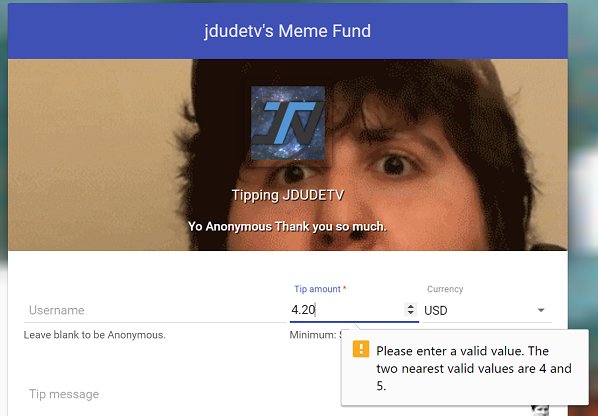


backup playlist
for when the queue has no requests in it
:)
silver plume
@ancient wigeon oh, thank you! 😏
 simple tree
hey general question, I might be blind. Is there a way to change the tip cup ? Are there different variations of the cup or is it the one for now?
stuck hamlet
There is currently no way to change it
but the new cup is being worked on and should be out really soon 😃
It'll have a bunch of customization. (i was told)
simple tree
ok awesome news, thank you @stuck hamlet I thought I might have been missing something. thanks for the info 😃
 idle plank
Hey there, for some reason the bot isn't responding in my chat D:
ember falcon
The bot won't connect to my friend's channel, is something wrong since the restart earlier?
tawny pivot
Just give it a second, we're adding some new features 😃
ember falcon
Alright, I'll let her know
idle plank
Woo!
ancient wigeon
Speaking of bits cup - is there an ETA on that? As of almost 2 weeks ago it was 2-3 weeks (according to Perry). Don't meant o bug, just stoked for it :D
once that happens I can get rid of streamlabs :D
 upper steeple
any eta on the bot coming back online?
 turbid reef
its rebooting now 👌
 green quail
Hello! Hello! I was looking at the new "giveaway" feature and in the FAQ, we can read that there is a subcriber luck option. I can't find it when I setup a giveaway. Any idea ? Thanks!
upper steeple
@turbid reef bot still isn't working
silk patrol
@upper steeple it was restarted to push an update, it's back now
or soon if you are in the queue
upper steeple
@silk patrol i just tried slots in my stream and nothing happen, okay i will wait
silk patrol
i just came back on a stream i'm modding
 vague pond
Is streamElements down atm. It doesnt seem to work