#helpdesk-twitch
1 messages · Page 65 of 1
 ripe laurel
But you still have the !redeem in front.
 sharp swift
So, first stream with SE and mid-way through It just reverted my overlay to the SE homepage and blanked out my stream for.. roughly 20 minutes without me noticing.
 trim perch
I need a day off just to play with all the stream settings so I have something more beautiful
 stuck hamlet
@sharp swift weird bug, but we did have server issues today :C
it shouldn't have revert back to the homepage, it should of just went blank tho
 proud pumice
@sharp swift that never happens if the url is correct since if it loses connection we just keep caching it
;O
stuck hamlet

ripe laurel
Someone else said that happened to her husband about an hour or two ago too.
sharp swift
@proud pumice @stuck hamlet Well, It was working just fine for about the first 1.5 hours and then it just changed suddenly, I had to turn it off for the remainder of the stream.
proud pumice
🤔 gonna check
trim perch
the one time that happen to me, I repasted it to the browser source and it repaired itself. 🤷
stuck hamlet
shouldn't need to repaste, but just refresh it
trim perch
that was the first thing I did, pasting was the only thing that fixed it
proud pumice
even if OBS hiccups, we're suppose to mitigate
ripe laurel
no_skills_ben - Today at 1:08 PM
hey guys my husband's overlay just became streamelements front page all of a sudden mid stream. He just made it invible in OBS. I want to streamelements and launched the overlay there and it gave me a blank page. I am guessing streamelemnts is having some troubles today?
Oh it was before i went back to sleep.
ripe laurel
EST.
proud pumice
3.5 hrs ago?
ripe laurel
3.5 hours ago roughly.
proud pumice
rgr!
ok seems indeed a certain region was affected in some hiccup, @trim perch you and that womans husband are a lucky few
and i saw that slots remark!
we do have it 😄

trim perch
i put it where it belongs!
I know you have it, I want to bot to use it
to "advertise it" if you will
ripe laurel
Just set up a timed command to advertise slots.
proud pumice
what is this? Skynet?
trim perch
obvi
stuck hamlet
the bot cannot react to itself
ripe laurel
Type in a fake reaction lol
trim perch
It was a subtle way to show viewers that slots is an option
stuck hamlet
basically impossible without having 2 instances.
proud pumice
actually its smth we cant do since if we allow the bot to react to itself people can abuse it to create infinite loops and crash it
trim perch
fair enoug hah
trim perch
I could make it look like it played with itself tho
proud pumice
hi
stuck hamlet

trim perch
oh geeze..
ripe laurel
Like how Nightbot won't trigger its own commands when it uses a ! command.
 shy ridge
is the a way i can download all the data from my profil. like tippeds followers etc ?
proud pumice
@shy ridge havnt created an automated method but we'll extract it for you if you need it
going somewhere? 👁
shy ridge
will be nice ya im goin back to my own bot
proud pumice
which kind of bot is that?
shy ridge
twitch, discord bot like streamelements etc
proud pumice
custom made? or any brand we know
shy ridge
custrom made
proud pumice
we rarely lose people, really interests me to know what might trump us ;D
shy ridge
to many problems with the site and the overlay stuff and tipped page
ripe laurel
You can probably copy the results of someone using !slots and switch out the username to StreamElements but i don't know if you can time it close enough after the bot spitting out !slots in chat @trim perch
 final isle
@proud pumice that would be great, so tomorrow morning all of the tips will be removed from the my tips page and i can go ahead and re-add?
trim perch
I could put it in the same command, if I apply enough spaces, it might look legit xD
ripe laurel
But you wouldn't get the mod icons and time stamps and such lol
And multi line isn't supported so it may show up in the middle and not along the left to some.
proud pumice
@final isle the devs are out of office right now, hit me up tmrw morning/noon EU and i'll jump over to them and get that done for you
ripe laurel
Oh use a lost 100 points and not the winning one as i think that has a total of points at the end and someone can see the total not increasing if paying attention and know it's fake.
trim perch
it would be more just to show "hey this stream has slots!" I might just add more marque images to the stream every so many minutes, like i have with some of my store items so ppl know its avail
proud pumice
@trim perch im thinking on smth better
ripe laurel
Or put it in your stream title.
proud pumice
maybe a widget for the overlay manager that writes in a nice visual way
 twin spoke
Is it possible to have !redeem not have the bot say a message after?
ripe laurel
One of the rotating slides.
proud pumice
'enabled games: slots emotes etc etc'
trim perch
yeah that would be nice too
proud pumice
@twin spoke its smth that we really want to do, but right now only with !redeem
shy ridge
or put it in the profil in streamelemnts
trim perch
its hard to remind ppl that it exists
ripe laurel
Modules, chat alert settings if you mean in chat.
twin spoke
Excellent, thank you
It'd be great to just Disable it for the Sound Effects and not actual items too
But I'll deal for now
ripe laurel
I know custom commands can whisper as a reply.
twin spoke
Redeeming stuff out of the store won't be a custom command though right?
ripe laurel
You mean store redemption widget?
trim perch
hmmm what about whispering welcome messages....its the only thing I still use another bot for!
ripe laurel
Yeah, it's under default.
twin spoke
Yeah.. so can't touch that
proud pumice
@trim perch our data shows greeting lurkers actually scares more people away
trim perch
🤔
ripe laurel
Great way to get rid of lurkers then!
trim perch
never thought of it that way
twin spoke
So, when I redeem a sound effect it shows this in chat
@twin spokeWorld_, you successfully redeemed Big Ass Titties for 0 points.
There a way to not have that?
Lmao @ the title of it I'm sorry
proud pumice
LOL
 unkempt oasis
I hate it when I'm called out when I'm lurking
shy ridge
@proud pumice Was it possible to download my data ?
unkempt oasis
I've left a few streams because of it
trim perch
in that case, i'll remove deepbot haha
proud pumice
@shy ridge yeah sure man, its yours, tmrw when the devs are back in office i'll grab that for you.
@twin spoke you dont have to enable chat alerts
shy ridge
okay thank you
proud pumice
if you dont want them
trim perch
well time to drive home in a pretty much hurricane storm 😄 bbl
twin spoke
Even w/ chat alerts disabled, it still comes up
The chat alert 'redemption' message is "{user} just redeemed {item} PogChamp"
Which is different than the one showing up in Chat
ripe laurel
It's the redemption confirmation for the redeemer he doesn't want.
twin spoke
Yes sir
proud pumice
on it
oh yeah i see
its not the chat alert from redeeming via website
its the confirmation of redeeming via chat
twin spoke
There a way to disable that?
Btw, absolutely loving the support man. Been plugging SE on Reddit
Amazing
proud pumice
we actually had lots of people ask for that confirmation since lets say you dont have enough point it says you cant redeem and reason.
no way to disable it since its like a failsafe so the viewer knows if his thing worked
lets say you have cooldown on stuff
the viewer will wanna know why his thing didnt pop
twin spoke
I get that
ripe laurel
Is there a way to have that set up as a whisper?
proud pumice
 twin spoke
The Sound FX all have 0 for Cost, so it's not too necessary. Having it as a Whisper would be perfect though
Omg
Definitely adding that as a second one
proud pumice
🤔
😄
@twin spoke as soon as we find time to do a recap of upgrades to the store @turbid reef will check for an ability to disable the auto reply back
oki?
twin spoke
Thank you sir
Sound FX are a big part of my channel, so not having that crowd the chat would be lovely
ripe laurel
Or disable if it works but if it doesn't, post there wasn't enough points or on cooldown or something to let one know it didn't work?
twin spoke
Maybe an option to not have the bot show up on the chat widget as well ;P If I can add another feature request
 left jolt
Is there a way to make !raffle a supermod+ only command?
I have my mods sneakin' points behind my back
LUL
please help
proud pumice
🤔 @left jolt we planned it as mods command because we figured mods are trustworthy
slowly finding out that there's also a higher level than mods ;D
@twin spoke yes removing bots is smth that we can do pretty quickjly, its already on the devs table
left jolt
i was hoping i could set !raffle as a supermod option only 
i put some pretty cool items in my store even my mods want to get points so
i want to lock them from raffling when no one is looking rofl
proud pumice
i see i see
twin spoke
I don't see the Widget for Sound FX
There's options for Text, Image, Video, and then for Stream Engagement I see Chat, Kappagen and Contest
unkempt oasis
It's the Store Redemption widget
unkempt oasis
Yes, all the redemptions are played through that widget
 dim garnet
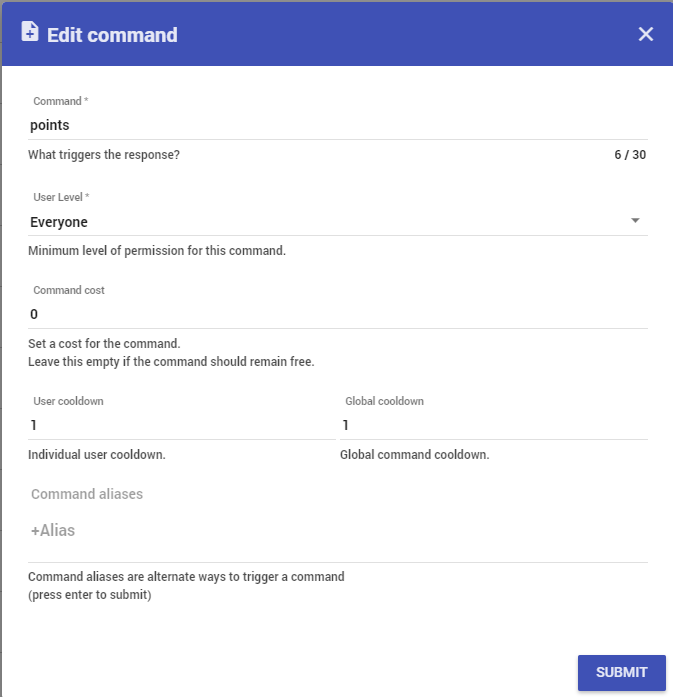
Hey folks sorry to bug ya. The other day I asked if there was an issue with commands. For some reason I have to go to the !points command open and save it again for it to work. I did have it changed before But there was someone in here I think it was Scalper Who I asked if there was an issue because I had actually changed it from points to something different he suggested that I change it back to points and then make an alias/keyword and I did. But Still having the same issue is a matter of fact my aliases have now disappeared and I don't know why
wow and sorry for the book lol
 ripe laurel
There were hiccups today and the server was being fixed.
dim garnet
it was happening b4 today as well wonder if its all linked
 sullen mantle
I have probably an easy question but it's stumping me.
I turned on text to voice and it's reading one letter at a time. Now I can't find where I turned it on and where to change the settings
 restive jetty
Check under your specific alert type settings
ripe laurel
It's probably because it's all caps like DNA.
Alert layer, cog icon after the one you want to modify, TTS on that list near bottom.
restive jetty
Under your tip/cheer setttings there is an option for TTS settings
What's up @rugged bane
 rugged bane
hey @restive jetty
overlay preview just won't show up
I might be missing something
but even when I choose a theme is just blank
restive jetty
hmmm. there were server issues earlier that might have cused something similar. Have you tried a nice hard refresh? ctrl + shift + r?
restive jetty
Let me see if mine show up real fast. Mine are showing up in Chrome. Both of my packages are there :S
rugged bane
thanks
restive jetty
Worth trying another browser just to be sure though
ripe laurel
The themes are loading for me.
The animated OVERWATCH one is nice. Too bad i don't play OVERWATCH.
rugged bane
you just choose them right, do you need to do something else to be able to see them?
ripe laurel
No. Do you have anything on your overlay? With my overlay i had images and stuff that seemed to block them so i created a new overlay to see if the themes loaded.
sullen mantle
I was able to turn off the text to speech for cheers. Is there a way to turn on text to speech for chat?
ripe laurel
Chat widget doesn't have a TTS setting. That probably wouldn't be a good idea for big streamers since the TTS would be reading the entire stream and be way behind with the amount of text people type.
Try logging out and then <Ctrl><F5> @rugged bane and then log in again.
rugged bane
Kk
sullen mantle
Thanks for the help finding the cheer text to chat setting. Was worried I was gonna have to turn off SteamElements and I just started using it.
ripe laurel
It's worth taking the time to comb through the options to get your stream layout and bot working the way you like with what's currently available 😃 It'll only get better from here with lots of improvements in the works.
sullen mantle
It's about time to start my stream. I did turn on alerts and the cheer cup.
Hope I have it right
ripe laurel
As long as they look right in your overlay editor you're off to a good start 😺
sullen mantle
So with the alert box in my OBS do I have to do the same with the cup?
ripe laurel
You just need one browser source URL from the overlay. Everything is on that.
sullen mantle
Not sure how to do that
ripe laurel
The widgets show through the overlay, which is what you add to OBS.
sullen mantle
I have the overlay url browser open, so I guess I'm ok. How do I test it?
ripe laurel
Go to the overlay editor and click on the emulate buttons.
If you have the browser open and on OBS you'll get sounds and alerts twice. You can close the overlay browser for stream.
Just make sure you hit save on the editor when you're done.
sullen mantle
Ok, so browser doesn't have to be open
ripe laurel
Right.
You can have OBS open with the overlay editor to test the alerts. You should see them on the overlay editor and again in OBS.
sullen mantle
cup isn't showing, but the alert text and sound is
 frosty lantern
have you got the correct resolution and it isnt hidden behind anything?
rugged bane
no luck
sullen mantle
It's not behind anything and the text is off center. I guess I have to mess with positioning inside the window. I really dislike the technical stuff to streaming
Figured out the centering. LOL
frosty lantern
@sullen mantle i meant is this the correct resolution
sullen mantle
Now just gotta get the cup to show
frosty lantern
did you get it?
rugged bane
yeah
sullen mantle
I changed the alert box to 600 x 600 and it worked
rugged bane
but I'm talking about the preview in the edit part
sullen mantle
Now sure how to get the cup to show on my obs
ripe laurel
Did you save it @sullen mantle ?
sullen mantle
Seems that the cup needs it's own alert box.
 muted elm
Ok, I'm all full of questions lately. So it looks like I'm sticking with Streamlabs tipping for now due to BitBossBattles. Is there any way to integrate that with StreamElements alerts and more importantly, Loyalty?
ripe laurel
The cup loads fine in my overlay.
restive jetty
I'd drop taht into feature requests so the devs can peek at it and maybe add it on the list
sullen mantle
The widget right?
ripe laurel
The width is set and can't be changed, yeah.
There's a new cup version coming out soon 😹
sullen mantle
Ok, at least I got the alerts to work for now. I give up on the cup for now.
ripe laurel
What is your overlay resolution?
sullen mantle
Unknown
ripe laurel
When you clicked on New Overlay did you just use default?
rugged bane
1080p for me
sullen mantle
I think so
sullen mantle
I'm gonna just go with the alert box. I don't get that many tips to worry about it for now.
I'm all teched out now.
I just wanna play the games. LOL
ripe laurel
Do you have access to another browser @rugged bane ? Not sure why your preview is blank. I think it's javascript - do you have that enabled?
@sullen mantle on the browser source, right click it and then properties. What is the width and height and can you see the cup there?
You can come back after you stream when you have more time to figure out your cup 🐱
rugged bane
let me check
twin spoke
Anyone know the command for a Whisper
ripe laurel
/w username if you just want to whisper someone on twitch.
Or try another computer @rugged bane
twin spoke
Was trying to have the bot do it
 ancient jay
@here finally figured out why my overlay wouldnt work on obs after following all the steps. the source needs to be above or higher proity then the game scene
twin spoke
Would just show the /w in chat rather than doing it lol
restive jetty
@twin spoke commands hit advanced and there's an option that says "How should the bot send the messag?" Set taht to whisper
ripe laurel
Custom commands the bot can whisper reply back. Defaults can't do that.
restive jetty
^
rugged bane
no luck u.u
ripe laurel
Yeah, OBS layers everything and what's on top is what you see. Unless you have x-ray vision 👓
ancient jay
yea that was not in the tips for making an over lay, had to get another streamers help
ripe laurel
Does your overlay editor show up green on the right @rugged bane or is it just white?
 dapper sail
how can i deactivate the tips?
ripe laurel
You can't remove your PayPal if that's what you mean. If you mean with tips showing up on stream and alerts, etc., those would be widgets and chat commands and modules.
rugged bane
Just white
dapper sail
uh... and streamelements has a protect system to chargebacks?
thats why i don't want tipos activated
tips
ripe laurel
They have the force user to log in with their twitch option. Chargebacks are usually handled by PayPal and it looks like PayPal has been improving in that area.
rugged bane
Why is it only white?
 weary mist
@dapper sail if you do tips, make sure to get a PayPal business account (free upgrade), plus the charge they get says "thanks for the tip".
dapper sail
thanks !
weary mist
I also recommend a chatlogger, plus with forcing them to login, you can prove easier that it is a tip
 vivid trail
@dapper sail Logviewer is free, just need to opt-in. Easy to get chatlog if you ever need to win paypal disputes 😃 Made by SE dev https://cbenni.com
weary mist
Also, put some disclaimers in your tip panel. "By clicking here, you agree that you are able and willing to make this tip, and that all tips and donations are final"
ripe laurel
Some people just donate though without chatting. The stream i was on last week some lurker donated $500 but it was still pending days later.
restive jetty
@vivid trail I didn't know about logviewer. Setting that bad boy right up now
rugged bane
So no idea what's going on?
ripe laurel
@rugged bane can you use another computer from anyone?
Not really safe to let someone else log in that you don't really know.
weary mist
@rugged bane did we already ask what browser you are using?
ripe laurel
Chrome.
weary mist
Ok, weird then
 crystal hollow
So how can I use Kappagen without needing to set up everything else in streamelements? I've already got everything I need (aside from Kappagen) from other services, and don't want to have to transfer stuff over.
ripe laurel
Logged out and did hard refresh.
rugged bane
Yep
ripe laurel
Have you seen the video @crystal hollow ?
rugged bane
Let me get my laptop
crystal hollow
No, I'm in my intro going live.
ripe laurel
You can set up a single overlay with just kappagen and import the old settings.
crystal hollow
Again, what part of not needing to set anything else up don't you understand?
ripe laurel
Then after stream when you have more time and want to use the other features of StreamElements you'd only have one browser source for everything. The widgets are all separate so if one thing crashes the whole thing doesn't go down. Does the old URL still work then?
Everything is run via the overlay, sorry.
crystal hollow
The old url displays a giant blue image advertising streamelements.
proud pumice
@crystal hollow that banner is there for 60 secs and goes away, you can setup only kappagen on SE, dont have to do it now
stream, when you're done come on over and we'll get you sorted
ripe laurel
Also, everything else is different from anything else so i was trying to show you that you don't need everything else but i guess you meant anything else from the start.
 eternal solstice
can someone help me make sub emotes?!?! i suuuuckkk!!
ripe laurel
You can probably ask streamers with emote styles you like who made it for them.
weary mist
@eternal solstice scroll up in #creative-chat, I know someone posted some good examples of emotes 😃
 rare ruin
hey guys im seeming to be having trouble, im a mod on someones stream elements yet i cant seem to do any mod actions. any suggestions?
ripe laurel
There is no dashboard access at the moment but you can use mod commands.
rare ruin
alright, thx
ripe laurel
😸
 lilac forum
Is there any way to put a individual user cooldown on item redemptions? Only having the option of a global user cooldown is frustrating
 upbeat topaz
I'm curious in running a couple of raffles / contests at the same time, with no end to them (end will be based on when a certain $$ is reached). I'd want to setup X cheers to give person Y a raffle ticket for 1 raffle, and someone who donates money to be setup with a raffle ticket for a different raffle. I could just not use the loyalty point system I guess in general, and only allow cheers / donations to be assigned points. Other option is making raffle tickets be like 10,000 points each or something crazy.
weary mist
something like that I wouldn't recommend. Making it money based starts to look like a lottery, which is against the law in a lot of places unless you have a permit
lilac forum
Might violate twitch TOS for bits as well, not sure, but something to consider
muted elm
Heya @weary mist 😃
weary mist
Imma ready. What was I doing agian? lol
muted elm
Ummm... oh, BitBoss with SE
weary mist
ahhaa
gottcha
So I see what I might have missed
I wasn't aware that you can set up BBB to do tips as well.
is that something you wanted to keep? Or....
muted elm
That's the only part that I really care about ATM. I'm not affiliated yet, so no bits. Just tips.
weary mist
ahhh. I didn't get that part of it. Sorryz. you can smack me around for that one
apparently the only ways to do that are through streamlabs and gather
muted elm
LOL. No worries, man! Appreciate the thought.
I guess the feature request stands then! 😄
weary mist
yessir
ripe laurel
@oblique marsh message @proud pumice about the wiping of donations. He's going to try to get that taken care of for another user as well tomorrow.
 worldly wharf
Is there an issue with TTS with Overlays? I turn it off... yet it still reads the text. Suggestions?
ripe laurel
Did you save it in the layout?
rugged bane
I still can't do anything u.u
ripe laurel
@proud pumice can you check @rugged bane 's account? Says his layout editor won't load and just comes up white. Tried on 2 PCs.
worldly wharf
@ripe laurel I have turned it off on all my alerts, even turning the volume down to zero and still it does text to speech. I want it off on everything. 😛
ripe laurel
I mean did you click on the Save button on the bottom? I have a habit of saving things so if i'm just testing i hit the back button lol
worldly wharf
Yep I hit the Save button.. about 257 times in last 10 minutes. hahaha
ripe laurel
You can try logging out, hard refresh <Ctrl><F5> for Chrome/Firefox and then logging in again if it's the emulator.
Let me get into one of my overlays.
rugged bane
yeah, save button not working
when I add something to the overlay and click save and then exit
its gone
worldly wharf
The save button is working.. as it does change the layout on OBS.. Just the text to speech seem to go everytime. Not sure if it is just because i'm "Emulating" a alert or because it is actually going to be on later during the stream. 😛
ripe laurel
Do you have the TTS enabled under different variations?
rugged bane
well, then its just me
worldly wharf
TTS is off on all variations of all alerts and sound volume is set to zero.
ripe laurel
I turned off TTS and saved and it didn't read. Odd.
Do you have the overlay editor open in another tab anywhere?
worldly wharf
Nope, and just looked through every Overlay, zero have TTS on. 😛
Ah ha! tried it from the "Activity Feed" = Repeat and it doesn't read the text, but when i "Emulate it" via the overlay editor it does read it.
ripe laurel
That's progress. So it may be fine during stream. I was going to suggest trying to put the activation at $1k or something to test lol
worldly wharf
Yeah I think it is just when your emulating it, guess i'll find out later.. lol
ripe laurel
My emulations work though so i don't know why yours aren't keeping the settings.
 noble pumice
I don't suppose you would know why my total follower count isn't syncing up to my channels/
ripe laurel
Have you just started using StreamElements?
noble pumice
Well I've been using it for a while but I just started using the Total Follower widget.
Is it showing me how many followers I've gotten since I started using StreamElements?
ripe laurel
I think it's from when you started using SE. You can edit session here and manually input a number: https://streamelements.com/dashboard/session
noble pumice
Huh. Alright.
ripe laurel
The top right Follower Count.
noble pumice
Thanks. Kinda sticks that it won't show my total count without a work-around but that's cool.
Thanks for the help!
ripe laurel
😸
upbeat topaz
@weary mist For the cheers raffle, I was thinking of doing a 50/50 raffle every $100. Winner gets to pick which Registered charity I donate the money to.
Unless you think that viewers wouldn't be interested in me doing such a thing with their cheers.
Figuring out ways to give back / help out.
weary mist
@noble pumice sorry about that. It wasn't designed specifically to show total followers, just do a goal per session. But what you want should be a feature request.
noble pumice
Oh it's cool. I noticed that there's a follower goal widget, too, so I may just end up using that. Would make more sense in the long run.
weary mist
@upbeat topaz is that 50 for you, 50 for charity?
upbeat topaz
Correct. 50% of donations from cheers go towards the stream (after processing fees etc), and 50% to the charity.
I could make it lower, like 25%
weary mist
then that is something I think would be just fine
again, im no lawyer, I just interpret it the best way I can. And charity is always a good thing
upbeat topaz
You think 50% is too much to give away from someone who's donating to the stream via cheers?
ripe laurel
If people donate it's to support you. What you do with their donations is up to you and if you want to give 50% away i don't see why that would be a problem. You can have a disclaimer or something maybe that says 50% of income from bits minus processing fee will get donated.
worldly wharf
Having tons of issues with my sounds/Overlapping sounds. Starting to get fustrated nothing is working right. Deleted the alerts out of this overlay, yet still year them in obs. Going off the tracks now. 😛
weary mist
@worldly wharf hmmm, that is a bit weird, lmao
somewhere, obs is trolling you
did you turn off the troll function?
ripe laurel
Do you have the layout open in a browser? Did you check Shut down source when not visible as well?
weary mist
@upbeat topaz no, 50% is fine. Its completely up to you what you want to go where. as long as you are not giving the people something for bits, you are good
worldly wharf
Sounds are coming from "System Sounds" turn that off.. they go off.. Delete the alerts out of the Overlay... But yet still year sound.. #Broken
I guess the real question.. Where do the sounds come from? the browser source for the Overlays?
ripe laurel
If i were you i would have cleared the layouts and restarted the computer by now lol
Sounds would play through the browser source and if you add that as a source to OBS it'd play through OBS.
worldly wharf
Way ahead of you... restarted.. shut down all items except obs.. etc.. etc..
I'm even editing the Overlay on another machine so no way that machine could hear the sounds from this one.
ripe laurel
You would hear sounds from overlay editor, any browsers open with the layout, any browsers open with your stream, and OBS.
worldly wharf
No windows open.. Only OBS on my streaming machine... Editing the overlay on another machine..
About 3 hours into trying to fix this now
ripe laurel
Do you have multiple outputs for audio sources or anything like that?
Under Device Manager, Audio inputs and outputs or Sound, video and game controllers.
worldly wharf
I have 6 channels of audio running. Its something like that But can't seem to find the source as to why I can hear the alerts.
I have a super advanced setup. hehe
ripe laurel
And you said you deleted the alerts right?
worldly wharf
I just started a new scene from stratch in OBS.. Just put the overlay in by itself...
Now I can hear nothing...
How does the alert audio get from SE to OBS?
ripe laurel
Try Refresh cache of current page on the old source properties. It would be through the browser source. OBS would pull the data from there.
That sounds like progress though 👍
Maybe delete the layout from your current scene, duplicate scene, delete the old scene, add in layout. Just thinking something may be stuck somewhere.
worldly wharf
I created a empty Scene... with just the overlay... No sound
ripe laurel
Right. Now you want the overlay on the old scene xD
 teal rapids
I've got a problem someone might be able to help me with.
worldly wharf
I added basic alerts to it... still no sound.
ripe laurel
Did you remember to increase the volume since you changed them to 0%?
I can help with most of the basic set up stuff @teal rapids . What's up?
teal rapids
I'm moreso wondering how to get my current playing to actually display the song title.
worldly wharf
I set text to speach to zero.. but not the alert sounds.
teal rapids
I have it set to where the source is songrequest but it won't show the title
It still says "No Song"
ripe laurel
Yeah, it's been mentioned a few times. The dev's know about it, so it should be fixed soon™
ripe laurel
lol @worldly wharf would be easier to try to troubleshoot if i were there but you said you have an advanced setup too.
worldly wharf
Yeah thanks for your help @ripe laurel Gonna just call it on it now. Gotta stream in a few minutes and wasted a ton of hours trying to make it work. 😛
ripe laurel
lol I created a new layout and emulated tip and heard the emulation in both the new layout and on my OBS with the my current browser source.
Good luck! Hope it gets sorted soon!
 pallid night
when i edit the text for the recent followers widget, it doesn't show the changes. the recent tips widget, however, does. idk whats up with that
ripe laurel
I just tested on my end. Do you mean the font hasn't changed on your layout, or it reverted back? You may have forgotten to save if the latter.
pallid night
it hasn't changed, even after saving it
ripe laurel
What browser are you using currently?
pallid night
chrome
ripe laurel
Do you have the layout open in just one tab? Would you please log out, hit <Ctrl><F5> to force a hard reset, and then log in and try changing the font again please and thankies? 😸
pallid night
like, log out of streamelements altogether?
ripe laurel
I call it my layout but it's the overlay. Yes.
rugged bane
hey guys
ripe laurel
rriotHi
rugged bane
should songrequest work with only the song name?
pallid night
just did all that. still doesnt show the changes to the text.
font changes went through but any edits to the text itself don't
like i want it to show "❤ {name}" but it only shows "{name}"
and even if i change it to "Thanks for the follow {name}" it still only shows "{name}"
ripe laurel
Song requests work with the YouTube ID or URL. It takes too many resources to search for songs but the limit but they're working on getting the limit from YouTube increased.
Yeah, i'm not seeing the message part working for me either.
 slim prawn
im trying to figure this out myself
so do you only get the alert sound when you launch the page?
ripe laurel
Even if i delete the {name} it doesn't change.
If you have it set up and working you would hear the sounds through OBS without having the page launched.
I didn't see anything in the history i have. Maybe @weary mist can take a look or file a bug report if it's not already been mentioned.
weary mist
Ok, I will check it out real fast, and put in a report
ripe laurel
Okies. It's the Recent followers widget @pallid night has found out to be uneditable with the message.
slim prawn
the alert sound is being played twice because i have multiple scenes, any idea how to fix that?
i crashed mine too lol
weary mist
make sure you have it so the sources shut down when not visible
ripe laurel
Click on Shut down source when not visible when you right click and select properties. It's on the bottom.
For the browser source on all your scenes.
slim prawn
found it thanks!
pallid night
Oh i hope they make the recent followers editable in the future
 valid charm
If I have a command, that does the $(count) is there a way I can set the count to a non zero starting number? ie if i had !count "The count is $(count)" but i want to start at say 100
 crisp plinth
The last two gamewisp subs I've gotten havent registered via SE
BUG? or should i reconnect game wisp
 tiny trench
hi guys, is it possible to import previous alerts from streamlabs into streeam elements?
crisp plinth
yup
tiny trench
how so?
tiny trench
ty
ripe laurel
Take off the REVLO end.
frosty lantern
@pallid night what do you mean?
ripe laurel
valid charm
@weary mist I know you are streaming atm, but when you have a moment later: If I have a command, that does the $(count) is there a way I can set the count to a non zero starting number? ie if i had !count "The count is $(count)" but i want to start at say 100 ❤
ripe laurel
I'm not seeing anything on how often GameWisp syncs. You may want to try integrating it again. Does it show the Disconnect under it on the integration page or does it say to connect?
crisp plinth
ya it does. ill try disconnecting and reconnecting
its been a day since the first time its happenened and still hasnt registered
 lament blade
does anyone know if StreamElements will automatically stop giving people points when my stream is offline, or do I have to turn it off manually?
crisp plinth
I'll pop in here in 24 hours if the subs havent registered
frosty lantern
@lament blade it stops automaticallh
lament blade
excellent thank you very much
ripe laurel
Viewers will still get points for actions like following whilst offline.
weary mist
yessir
 waxen valve
doe's anyone else have an issues with alertboxes in the overlay editor not working properly ? i have 2 issues i can replicate and havent found a fix yet. thoughts ?
 woven jackal
Hello, I am a super mod for SE for a streamer what does that allow me to do? Am i able to access their dashboard.
waxen valve
@rapid tapir you there man i need a little assistance 😃
frosty lantern
as of yet no you can not however this has been heavily requested @woven jackal
@woven jackal https://streamelements.com/dashboard/bot/commands/default scroll to the bottom
woven jackal
Thank you. For the help.
waxen valve
@frosty lantern you got a second to talk man ?
frosty lantern
oh sorry i thought Cbenni was helpin ya. wasup?
waxen valve
nah he never replied Xd i have 2 issues relating to the over lay editor i think they are bugs ?
waxen valve
in the overlay editor, i select one alert box i have made, then i select another, and it actually acts as if i have 2 layers selected. then when i go to delete the new layer i made (alertbox 2 that acts as if its selecting 2 layers at a time) it deletes them both.
As well as the cheera alert box wont save my image/audio change
frosty lantern
i cant but gimme a sec
waxen valve
no worries :3
frosty lantern
@waxen valve have you clicked on that yet?
waxen valve
nah i havent one sec ill check
frosty lantern
you may have all the default variations which will over ride the normal as it will always be in the parameters.
either delete the variations or change them to whatever you would prefer they are
valid charm
Is there a way to make a custom command that causes StreamElements to say something in chat, then perform an action, or vice versa? specifically, I'd like a command where a user could time themselves out so !command add !timemeout /timeout ${user} 30, and StreamElements says "${user} has timed themselves out" within the same command?
frosty lantern
@atomic hollow ^
 atomic hollow
Not sure its possible, well need to check with @turbid reef
valid charm
@atomic hollow ahh kk, if you have any leads @turbid reef please @ me! Thanks for all the help and work ya'll have done
waxen valve
@frosty lantern my recent cheers only pop up when they happen per session i nchat correct?
frosty lantern
what do you mean
waxen valve
i have a recent cheers text and i just want to know if it will be blank in the editor untill somoen in my next stream sents me some bits ?
frosty lantern
i believe itll be empty until you recieve a cheer.
does it show most recent or recent ones?
waxen valve
it shows latest cheer 😃
but not recent cheers as it does with recent donations or followers
frosty lantern
ill try and watch an add and cheer you so its not empty
waxen valve
no worries, i wont be streaming till 6:30pm tonight (and thats a maybe) im currently sick so
but ill let you know 😃
TY
frosty lantern
kk
 terse yew
Is there a way to set the starting number for the donation goal?
For example when I changed the name of the tipper in "my tips", it popped up as ANOTHER donation which then added to my donation goal even though it shouldn't have
frosty lantern
do you mean how many you currntly have?
terse yew
like
ripe laurel
terse yew
when i create a donation goal
i can set the goal amountand it auto starts at 0
but as each person donates that number goes ujp
how can i set it to start at like
10 for example instead
ripe laurel
Tip goal
refresh
The total number of tips towards your goal since last reset
frosty lantern
as rinnie said https://streamelements.com/dashboard/session
ripe laurel
Did you already add the Tip Goal widget?
valid charm
Is there a way to adjust a command with ${count} ie instead of starting a new command at 0, can i make it start at 100?
waxen valve
@frosty lantern no way to reset the follower goal ? as mine is set to 100, but its showing 367/100
waxen valve
oh shit, havent seen this 😄 thank you !
frosty lantern
np
terse yew
yeah i have the tip goal widget
waxen valve
@frosty lantern when i reset one module, it actually visually resets everything untill i refresh the page, that's a bug
ripe laurel
You mean widgets?
frosty lantern
so when you reset one they all reset?
waxen valve
only visually, btu the data for the non reset ones are still there, they only visually come up when i refresh the page
frosty lantern
strange
 ripe laurel
Well he's helping us help him!
frosty lantern
XD
woven jackal
Do more than the available variable({name}{item}) on alerts work.
atomic hollow
One big streamer family
waxen valve
omfg @frosty lantern that's crazy !? how do you watch adds to get bits ?:O
frosty lantern
either have to be in the US or use a vpn to set your location as the US
i use Vpn 😃
waxen valve
im from aus 😦
frosty lantern
same
waxen valve
😮 TWINZIES!
lament blade
IT WORKS!!! thanks so much for spending the time fixing this bot for me last night i will be going live in the next few mins again thanks alot so glad it works great bot!
atomic hollow
Aussies, so cute
waxen valve
😄
frosty lantern
to be 100% honest i think lots of people are from australis @waxen valve
frosty lantern
why whated he do?
waxen valve
followed you on twitter @frosty lantern
frosty lantern
aww thanks
waxen valve
❤
ripe laurel
I wish i could <Ctrl><Z> to undo layout editor -_-
atomic hollow
True
waxen valve
i ssecond this ^^
atomic hollow
Third ^^
frosty lantern
@waxen valve double check if your recent cheers is working now
atomic hollow
Who do we need to sleep with to get it
ripe laurel
Have to keep exiting and restarting resizing stuff lol The overlapping makes it hard to click.
waxen valve
ive got it on screen in OBS now, nothing 😦
frosty lantern
hmm
waxen valve
yeah @ripe laurel i agree, plus the hide feature, could you actually make it hide XD so we can see what's under it ?:P
ripe laurel
Also check your resolutions.
woven jackal
Do commands variable work on alerts or only the available variable({name}{item}) ?
atomic hollow
@ripe laurel work with layers, bottom left
ripe laurel
I duplicated my overlay so i can practice tweaking and keep an original lol
lament blade
donation? wow you guys really are amazing
frosty lantern
@waxen valve can ya gimme the link that is used as your overlay?
ripe laurel
I click the layer i want to work on but when i click on the editor wanting to click a line and move it so it's with another line i clicked the wrong one lol
atomic hollow
Use the arrows
ripe laurel
For the sub alert: Available variables: {name}, {amount}, {tier}
You'll see available variables under the settings of each alert.
atomic hollow
Arrow keys i mean
frosty lantern
ill dm ya from now Mosa
woven jackal
I see so only those. Are there plans to add the other commands variable to the ones that work with alerts?
ripe laurel
I can use the arrows to resize, yes, but that moves the bottom of my box. lol I guess i can try positioning the top where i want it and then use arrows.
Oh, no arrows for Top and Left, only Width and Height.
No biggie. I can click bottom left layer 👍
I probably won't stream again until like a week or so, so that leaves me plenty of time to change my mind on settings 😹
 restive lantern
Hey all - looks like the chat announce module is broken
And one of my overlays randomly resized itself from 900/1600 to 900/1440 again (noticed it because my rotating images in the bottom right were cut off randomly one day
ripe laurel
Did you click on edit and forgot to change the size? When you edit an overlay the default size shows up.
waxen valve
what is this new ground control app ?:O
ripe laurel
If you want to change the name or anything this is the default size that shows up.
 olive lintel
@waxen valve click in the "activity feed" on the right you will see the ground control app
olive lintel
you can control songrequest and see your Activity feed from it
@waxen valve around 1 month.
waxen valve
😮 i only just saw it now hell yeah 😄
ripe laurel
When did Rebecca Black get her own BTTV emote? And there's only one star emote? -_-
olive lintel
@ripe laurel from the beginning 
ripe laurel
lol Can't seem to adjust KappaGen duration so i'll just give new followers one big blue star.
olive lintel
@ripe laurel
stuck hamlet
@ripe laurel KappaGen duration is the same as your alert
Not what's he's/she's talking about nanito
ripe laurel
Oh is that the same for emotesplosions? My alert for followers is 2 seconds but the big star lasts a lot longer.
stuck hamlet
"Big star"?
ripe laurel
I have it set to show one emote and picked the blue star since there's only one star.
stuck hamlet
Emotesplosion for alerts should last as long as your alert setting.
ripe laurel
stuck hamlet
That's curious, but creative, 👍🏼
ripe laurel
Oh, so it is the same slider under CHAT EMOTES so @olive lintel is correct there.
I saw someone i watch when i was typing that name 😮
stuck hamlet
🤔
ripe laurel
Maybe i can give 5 stars now in 2 seconds.
ripe laurel
lol That didn't work. Stars show up for 2 seconds one after another.
stuck hamlet

ripe laurel
Increased duration to 3 sec to fade closer to when my follower alert fades.
olive lintel
@ripe laurel try changing this:
olive lintel
change it to 5 if you want 5 stars
stuck hamlet
I will beat up Benni, no worries
ripe laurel
I did but the stars came one after the other when i was doing bubbles lol
stuck hamlet

ripe laurel
One star is good. Still acknowledges the follower along with the alert 👍
888 of these in a firework for all my other alerts 😹
 restive lantern
I edited it about 15 times over the past few weeks. Sometimes it sticks, sometimes not
 slate meteor
How do i remove the logo overlay on the tip page? So it just has my background header?
ripe laurel
👍
You can change the images on https://streamelements.com/dashboard/tipping if that's what you mean @slate meteor
teal rapids
Holy hell that's so silly\
olive lintel
@slate meteor I think it can't be done.
ripe laurel
My other variation has the other clip of them from that episode 😹
Oh you mean this part? I think it's built in since all the links are there.
olive lintel
Guys don't forget you have a #322361432937070592 channel for you 😉
teal rapids
Do you guys have a Twitch team or anything?
ripe laurel
I'm satisfied with what i've got done now 👍 There are twitch staff on the list ---> but IDK about a team.
My stream's like a hidden gem - very niche - so i don't even get many viewers 🐱
Here's my other one 😹 They're animated with audio.
weary mist
@valid charm not at this time, though having something like that has been requested more than a couple times (logical variables and such)
ripe laurel
Spent the last hour looking for a follower alert sound. Finally found a free one that i kind of like & didn't have to sign up for anything to get ⭐
 idle plank
Anyone awake? I'd love some support for a couple issues I'm having.
atomic hollow
talk to me
idle plank
ayy
atomic hollow
try this @ripe laurel https://www.myinstants.com/index/il/
 idle plank
Alrighty, so I'm having some issues with the Overlays. I stream a lot of Dota 2 and was mainly using just the alertbox from streamlabs. I tried to make OBS a lot less cluttered, but the streamelements overlay absolutely kills my FPS in game, and I don't know why. Everything should match up with what I stream. Also, I get this weird white line on the right side of my stream where the overlay is.
How do I change the resolution of the streamelements overlay? Sorry I have to ask such a dumb question. Is it in the actual site or is it through the browser source settings in OBS?
atomic hollow
ok, few things
strat with watching this video - https://youtu.be/X7XrDdRE7Fk

Need help setting up your Overlay Manager? Got any questions, or just want to say "Hey"? Join our Discord server: http://bit.ly/DiscordStreamElements https:/...
resolution can be changed here -
and are you using Kappagen?
idle plank
Well I'd really like to, but someone told me that it can hit your FPS pretty hard. I have an ok CPU, I'm not really sure how much of an issue it will be if I do try to use it.
Okay so I think maybe the resolution might have been the biggest issue with my FPS dropping. Seems like kind of a dumb move on my part. rip
Alright I'm gonna try setting up a basic overlay for Dota 2.
atomic hollow
let me know how it goes
idle plank
Will do.
ripe laurel
Nice sound site for future reference 😸 I wanted a short burst starry clip. Ended up going with this.
atomic hollow

 dawn wasp
Is there any way for mods to edit the advanced fields using !command add options? eg. to add command keywords or aliases?
atomic hollow
@dawn wasp
!command add/remove/edit/options/show
Valid flags are: -cd (number) -usercd (number) -cost (number) -level (number) -type (say, whisper or reply) -count (number)
dawn wasp
amazing thanks
atomic hollow
@dawn wasp you can also try !command edit !keyword <keyword>, not sure if it works
dawn wasp
@atomic hollow no way to edit keywords or aliases?
not really interested in the cooldown settings etc 😦
atomic hollow
thats what I am trying to find out
dawn wasp
oh thanks! 😃
atomic hollow
let me try it in my channel for a sec
dawn wasp
np
atomic hollow
@dawn wasp I will let you know later when the devs are up
idle plank
Alright @atomic hollow I'm using KappaGen and the alertbox, that's pretty much all I wanted. I'm awful at designing my own overlays. xD Anyway, that should be it for now.
Thanks for all the help
atomic hollow
my pleasure
restive lantern
@atomic hollow I LOVE that "female orgasm" is a rickroll 
THERE'S A BEN BRODE LAUGH
OMFG
YOU CHANGED MY LIFE
ripe laurel
How did your stream go @restive lantern ? You left to stream right?
restive lantern
probably - comcast f'd me again
ripe laurel
The streamer i mainly watch switched over to Century Link because Comcast was being a PITA.
restive lantern
i don't have a choice unfortuantely
ripe laurel
I'm sorry 😿
atomic hollow
@restive lantern it took me a minute to understand what the hell you are talking about
I thought you talked to my wife or something
ripe laurel
Does your wife stream @atomic hollow ? 👌
atomic hollow
I wish
ripe laurel
Do you stream shadow boxing under IRL?
atomic hollow
I dont stream, I work
ripe laurel
You can probably stream that under IRL 
atomic hollow
so many secret stuff though
ripe laurel
Fair enough. Watching muted streams can get boring, unlike a Rick Roll female orgasm.
atomic hollow
true dat
 upbeat birch
Is there a function to show song requested videos through the overlay? :3
If not, something you might consider?
ripe laurel
If you want to show the actual videos the only thing i can think of is adding a source on OBS.
 ancient wigeon
Is there a way to have the events list not reset every time i stream? It clears every single time
 silk patrol
@ancient wigeon unfortunately, not yet. But since it has been requested a lot, it should be coming soon
idle plank
Hey there, I'm having issues with song request
it looks like one of my mods can't use it at all
the chat command
Really not sure why
 viscid scroll
Good morning, I was just wondering is there any way to import everything from ankhbot?
atomic hollow
if you can export your points we can import them
viscid scroll
What kind of format does the file need to be to import them?
atomic hollow
a CSV with name and points
viscid scroll
One more question, to import with a CSV which import tool do i use?
atomic hollow
the Revlo one
viscid scroll
Thank you for help
atomic hollow

 worn pivot
Is there any eta on the rework of the timers btw? 😃 it would be really nice to have timed command but several of them cycling
commandS
stuck hamlet
what do you mean rework of the timerS?
worn pivot
A while ago we talked about the fact that the timers don't work like they should iirc. So someone mentioned that you would think over the use (for lack of better words)
stuck hamlet
they have been fixed
stuck hamlet
apparently something was broken, but now should work as intented
im not a dev, so i cant give exact words :p
worn pivot
I do? what 😦
 muted knot
Don't worry Kyena I'll beat Shadow up for you
atomic hollow
so what if youre not good at OW
worn pivot
atomic hollow
you can still be nice 

 atomic hollow
so tomorrow, your 1st message in our Discord is - "oh boy, what a great day, i love life and I love StreamElements"
stuck hamlet
hahah
worn pivot
I would absolutely do that but unfortunately I am going on vacation tomorrow morning :p
I can do it in the evening from my phone though, promise 😉
worn pivot
visiting my parents in Switzerland 😄
atomic hollow
I approve that
worn pivot
👍 I might post zoo pictures and food - with the chocolate and cheese focus and all
 rough jacinth
Hello. What's happened with Items Redemption from store? It works in really strange way right now
stuck hamlet
Could you elaborate?
rough jacinth
On previous week everything was fine - when somebody redeem - overlay pop-up on stream with Gift gif. Now instead of Gift gif - there is picture of redeemed item
And in overlay editor button "Emulate item Redemption" dont work
stuck hamlet
The image shown from the store was one of the most requested things on our request page,
rough jacinth
Hm... Okaaay then, how to edit overlay right now? This image is cutted and not in full size. And when I'm pressing "Emulate item Redemption" - it do nothing
That's what I've got in my editor
But in fact - its not Gift gif
stuck hamlet
you want the gift gif?
rough jacinth
Gift gif or ability to edit the true overlay
I mean, something is broken and this is not okay
stuck hamlet
i think this might be broken due to the update
atomic hollow
the emulate is indeed bugged
but all the rest works
in order to test the store just purchase the item in your public store
rough jacinth
Okay, lets try from other side
How can I change the size of Pic, that is showing to viewers when they redeem an Item?
sorry for bad Eng, I trying to do the best 😄
frosty lantern
can you link me @rough jacinth
rough jacinth
@frosty lantern link?
stuck hamlet
To the store i think is what he meant
rough jacinth
@stuck hamlet @atomic hollow so, this is what I'm talking about
This is must be beautifull circle
But its cutted from up side and with white JPG stuff
stuck hamlet
you want it to be a beautiful circle?
rough jacinth
Yes, sure, it will be awesome
@frosty lantern https://streamelements.com/drkiray/store
frosty lantern
its showing for me @rough jacinth
stuck hamlet
the best size for image in store is 275x210
atomic hollow
works for me as well
stuck hamlet
If you change it to 275x210, it'll be beatiful again 😃
rough jacinth
Okay, thank you @stuck hamlet , I'll try
stuck hamlet
😃
rough jacinth
@atomic hollow @frosty lantern it happens from time to time. Maybe when SE is under heavy load
atomic hollow
could be
rough jacinth
I replace my JPG to PNG image and now it shows me a Gift gif instead of my pic. It seems like a good joke.
stuck hamlet

 thorny atlas
Hey guys, might be a stupid one - the initial number on the follower goal is cooked, have i done something wrong?
frosty lantern
@thorny atlas https://streamelements.com/dashboard/session change in here
final isle
hey @proud pumice not sure what time you wanted me to check in but good morning. reminder about the deleting all tips from my tips page so we can get accurate amounts added.
 halcyon olive
Hey all, new here so sorry if this has been answered already! Is there a "Sub Points" Stream Label? I am looking at moving to Elements and adding some bits, including the points.
stuck hamlet
what is "Sub Points?
halcyon olive
For partnered streamers you now have sub points, instead of sub count. It's how you unlock the emotes
halcyon olive
So you have 3 tiers of sub, 4.99/9.99/24.99 and they are worth 1/2/6 points
halcyon olive
Then you are welcome 😜
stuck hamlet
if i gotta be honest, i dont think we have that, but i will look into it for you
halcyon olive
The point label would allow a visible goal for unlocking the next emote, especially since the emote levels now persist, even if you drop below the threshold
Thanks, I would appreciate that 😃
stuck hamlet
i get it, and i get why it's important!
final isle
with the new giveaway module you are working on is there going to be a way to allow twitch or game wisp subscribers to get more entires, also is there currently a way to give subs more currency per minute then non subs?
silk patrol
@final isle dunno yet for the giveaway, it's still in the dev pipeline. as for the sub currency bonus, it's already a thing, but subs will only get their bonus points upon subscribing, there is no bonus per minute
final isle
@silk patrol where is the sub bonus? I don't see it under loyalty settings.
silk patrol
@final isle in the loyalty settings. But they might be hidden if you aren't partenered or if you haven't logged your gamewisp account
final isle
ah gotcha thanks
stuck hamlet
yea devs, fix it >.>
 serene granite
@idle jetty what's your username ?
 idle jetty
ahqesportsclub
silk patrol
@serene granite it's a known bug that has been there since day one. i think the problem is with AngularJS, because that happens on the points leaderboard too
stuck hamlet
leaderboard has been fixed
silk patrol
@stuck hamlet it's not always working tho, I just experienced it on the dashboard
@idle jetty reloading the page works sometimes
serene granite
ya I just wanted to make sure I have your username written in our bug tracking system
Hopefully we can get around to it next week
it's an annoying issue definitely, but we had a few bigger fish to fry the last few days

 snow bane
Question: Is there a way to troubleshoot why my bits are going into my cup?
silk patrol
@snow bane they are tho, just watched your last VOD and at 2:05:52 we can clearly see the bits falling into the cup. but as Onslaught said, the new and improved cheercup is on its way ❤
serene granite
new cup is so awesome it needs a new name
silk patrol
^ also because cheercup doesn't make any sense
ripe laurel
@snow bane Perry - Last Saturday at 3:51 AM
https://streamable.com/hobzj

these are what we call bombs, when someone drops a serious resub tip or cheer he can blow the cup up
silk patrol
Some wally gave some other wally some digital tokens of no real significance LMAO
@snow bane only the default cheer icons will appear in the cup as of right now. But it will probably be a thing in the new one
rugged bane
@tawny pivot can I get some help with overlays?
preview is completely white no matter what I do
stuck hamlet
Hey @rugged bane I would love to help
What exactly do you mean when you say preview?
 river saddle
I lost the link someone gave me yesterday to edit my tip goal widget and other items. Can someone please provide? (And I will save it 😃 )
silk patrol
@river saddle https://streamelements.com/dashboard/session it's in activity feed 😉
weary mist
you can find it going to activity feed ->edit session
river saddle
gahh, thanks
 untold pond
Hello - anyone available to help with the Overlays?
silk patrol
@untold pond sure, what's your issue?
untold pond
I'm trying to create an overlay for Store Redemptions, but I'm not able to see what it looks like - when I hit the "Emulate Item Redemption" button, nothing happens
stuck hamlet
That unfortunately is a new bug :/ Darko was smacked on the head and told to fix it
untold pond
ah okay
silk patrol
@untold pond a new update got released and the item redemption emulation doesn't work in the editor. To test it, click on launch overlay and then try redeeming an item through chat
stuck hamlet
^
untold pond
gotcha, giving it a shot
stuck hamlet
We fix one thing just to cause 2 more issues to make sure we still have jobs
silk patrol
@stuck hamlet classic dev struggle ^^
untold pond
@silk patrol - it worked - thanks a bunch!
silk patrol
@untold pond you're welcome, feel free to ask again if you need any kind of help
 wet moth
hmm, is there a way to have the stream store redeptions accept address requirements via wisper to the bot? i need addresses so i can mail them out, but having people post their addresses to chat is a bit unsafe for them
also, any way that it can email me an alert? because if they redeem when i'm offline or away i might not notice if i forget to check the activity feed
silk patrol
@wet moth unfortunately no, but those are both neat ideas. add them to our brainstorming page https://strms.net/features and feel free to upvote any idea you like
wet moth
k
 split harbor
hey! I'm on Mac and my OBS studio doesn't have the option to not load the browser sources when they're not visible. Do I need to update? I'm getting all my alert sounds twice when they play
silk patrol
@split harbor are you on the latest version of OBS Studio?
the option you are looking for is at the bottom of the browsersource properties
 lone flax
Can anyone help me, I thought I had solved the problem. But everytime I type a command related to quotes in any way I also get the message " 20. ${querystring} ". can someone explain me how I can get rid of that?
silk patrol
@lone flax do you use the default command or have you created a custom one ?
lone flax
@silk patrol I am using the default one, but there have been costume quote commands before with nightbot and etc. My friends channel should be clean from other stuff
silk patrol
@lone flax quotes are working fine in my chat, nothing like this pops up. Plus ${querystring} sin't a SE variable. Did you or your friend imported commands from nightbot? If that's the case, you might have to edit/delete it
lone flax
I've went through and checked if any quotes were as an own command, and not in the quote system. Seemed to be the problem. Thanks for the quick anwser though 😄
silk patrol
no prob ^^
lone flax
Btw @silk patrol Is there a way to check a list of quotes?
untold pond
got another question, whenever anyone's available 😃
Question: on an item I have for sale, I added 4 requirements to it, however the 4th requirement is not visible when purchasing the item
well... ^ more of a concern - is this also a bug?
wet moth
oh i winder if there's a character limit that's causing that
rugged bane
@stuck hamlet sorry, was streaming
stuck hamlet
No worries
rugged bane
When I open the overlay editor the preview is completely white
No matter what I add
It remains blank
stuck hamlet
What browser are you using?
stuck hamlet
Can you show me a screenshot
stuck hamlet
@tawny pivot dafuq is this
Is your Chrome up to date? Silly question, just want to make sure
stuck hamlet
There should be a green area, so this is strange.
Very strange
First time I see something like this 🤔
rugged bane
Yeah its up to date
weary mist
what are your dimentions
 tawny pivot
Could you press F12 so you see something like this: https://i.imgur.com/rZUmAFU.png
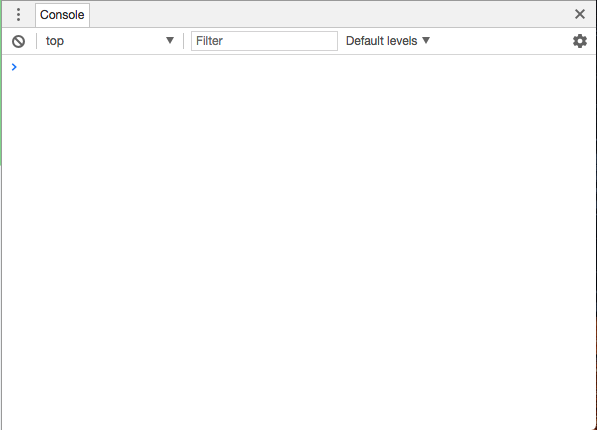


and then do a reload.
tawny pivot
Yes please 😃
tawny pivot
thx, got it 😃
rugged bane
2560 x 1440
tawny pivot
What's your twitch username again?
tawny pivot
👌
rugged bane
Thanks for all the help
weary mist
👍
@stuck hamlet just wanted to make sure, haha. I had an idea, and didn't want to forget it. glad styler is looking into it, its a very weird issue
silk patrol
@lone flax not yet
crisp plinth
@split harbor @silk patrol Ohhh, so that's why I've been getting spammed with alert sounds!! Thanks! Oh and heya, Nic!!
It's because I don't turn off the alerts when not using them right? That little checkbox in browser source in OBS?
Might make a separate overlay for alerts then.
silk patrol
@crisp plinth exactly!
@untold pond do you mean on the website or when people redeem throught chat ? Twitch has a character limit, so it might be it as Mixiekins said
untold pond
@silk patrol - I mean on the website - it only shows 3/4 requirements
I also tested to purchase the item, and I was able to purchase it with the 3/4 requirements
weary mist
@untold pond thanks, I will put it onto the bug list
silk patrol
@untold pond I've just setup a item with 6 requirements, they all appear. You have to scroll to see them all
and all the fields were mandatory, i couldn't redeem it without filling all the fields
@weary mist don't add it yet then ^^
weary mist
@silk patrol good thing my interwebz are super slow. lol